Tag: Google

  • Gmail Reveals Its Hottest Secrets (Part 2)

    I wrote a blog post about a week ago about several hidden, secret features in GMail. Most of that was about organizing your inbox. This post is more about the secrets and great features you can use as you are writing emails. Let me know if you have any additional helpful features in the comments below!

    (numbers 1-5 in part 1 of this series)

    6. Canned Responses

    Do you find yourself composing the same email several times a day? If so, you should enable canned responses. Canned responses are drafts or email templates that you can save in your settings when you go to compose a new message. They will not show up automatically, so you need to go to the Labs in the settings of GMail, and enable this feature. There will be an arrow at the bottom right of a new message, and that is where you will find the feature once it has been enabled. This saves so much time for me and my colleagues, so I highly recommend it.

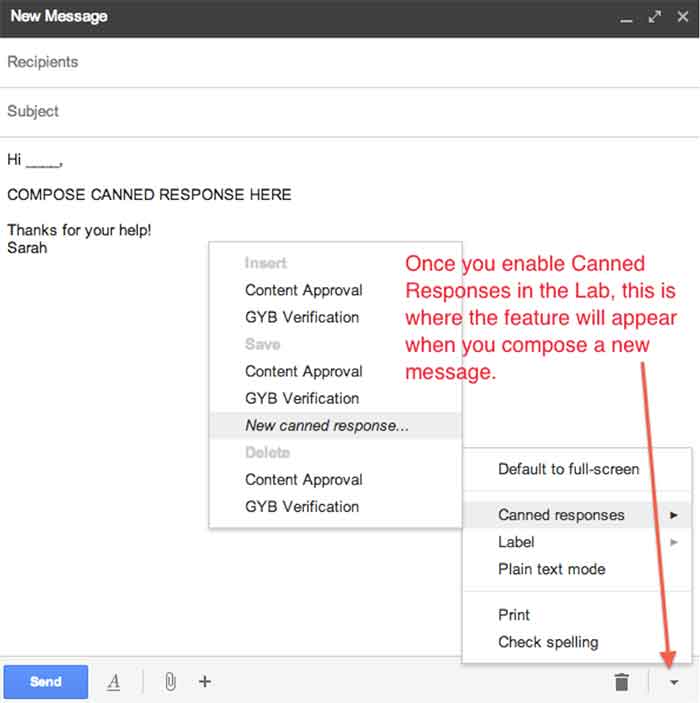
    01-CannedResponses

    CannedResponse

    7. Reply from the same address the message was sent to

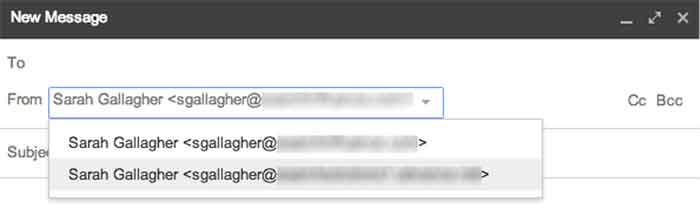
    If you have multiple email addresses you use in your workplace, it’s important to make sure that you reply with the appropriate email. When I compose an email, I have to switch the email address of who it is coming from (which also changes my email signature). However, you can automatically set it so that when you press reply on an email thread, it replies from the email address the original email was sent to.
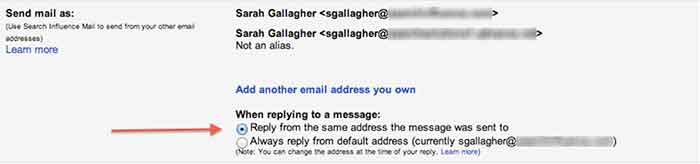
     

    03-SendMailAs

    04-NewMessageFrom


    8. Undo Send

    Have you ever forgotten to include something in an email?  Attach something? Sent an email to the wrong person? Misspelled something? Addressed the wrong person? (that one’s really bad)!

    THIS SETTING IS A LIFE SAVER!!

    It can be enabled under the General settings. You can select how long you have to undo a message once you press the send button. I have selected up to 30 seconds, which is the longest time possible. Once you send an email, you’ll get a notification at the top of your email account saying you can undo send or see the message you just sent. Please note that this is the only place where you will be able to undo the send. If you archive the message, click to your inbox, or somewhere else within GMail, the undo send option will not be available.

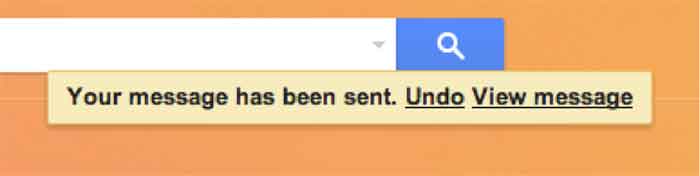
    05-UndoSend

    06-UndoSendAlert

    9.Boomerang

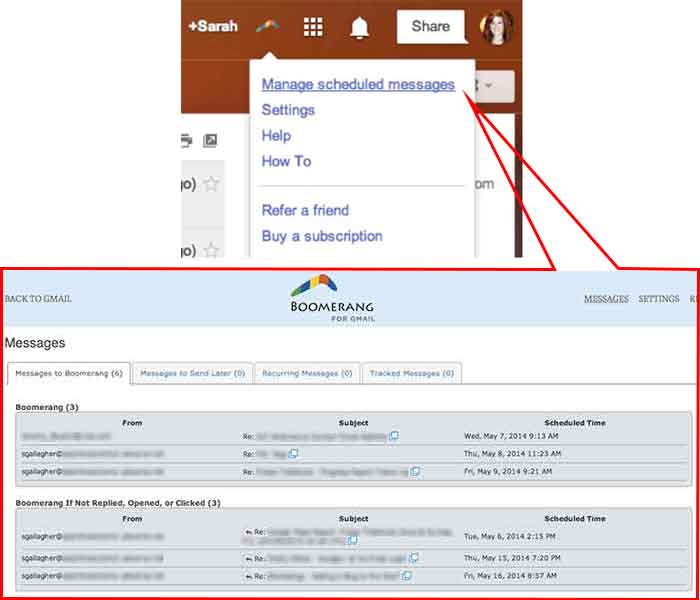
    Boomerang is a great tool to use for scheduling emails and following up with people. Often, I work late nights, but I don’t want to send emails that late mainly so the person who receives it won’t know I work until 9:00 at night. I can compose an email and schedule it to be sent anytime in the future. You can also set it to “boomerang” back into your inbox if someone does not reply or open the email you sent. You also have the ability to manage and edit any of your scheduled messages. Boomerang allows you to schedule or return up to 10 messages per month. If you find yourself needing it more than that, there is a subscription available for purchase.
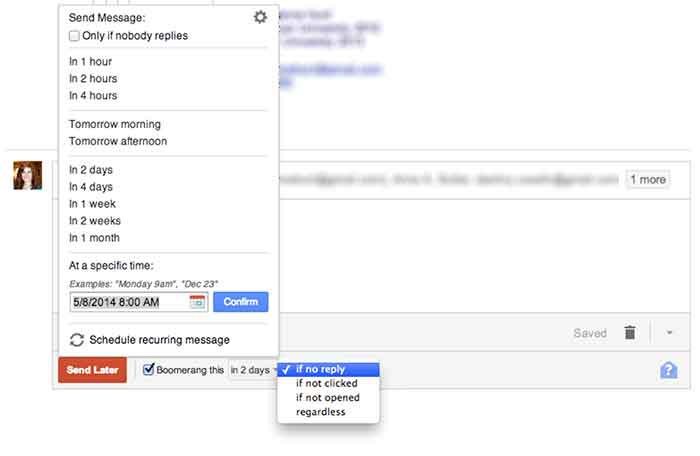
    07-SpecificSendTime

    08-BoomerangSettings

    10. Rapportive

    Rapportive is a feature that shows information about your contacts right in your inbox. They “combine what you know, what your organization knows, and what the web knows,” to display this information in the right sidebar of your email. I like this because it’s an easy way to connect with those people on social media (ie: put your great stalking tendencies to work 😉
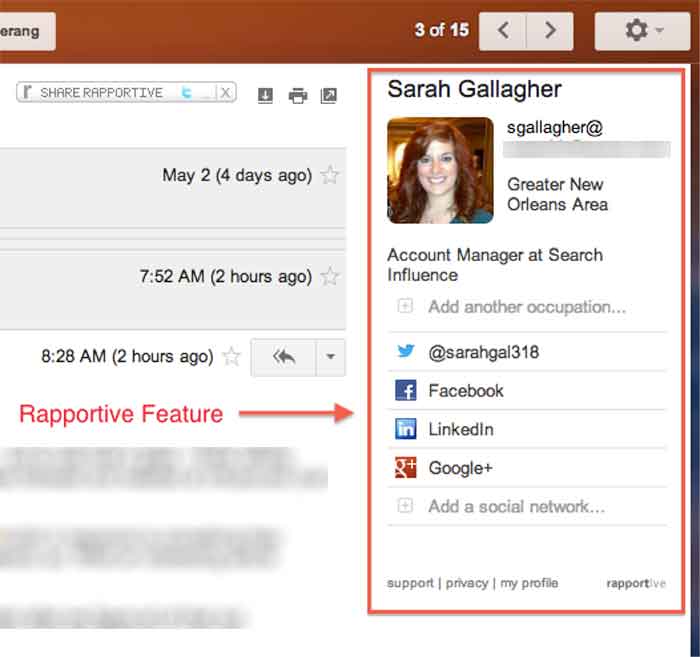

    09-Rapportive

  • 5 for Friday – New YouTube Feature, Ads on Reddit and more!

    Stencil5

    1. Advertising on Reddit is easy with this guide -Moz

    For those of you unfamiliar with the site, Reddit.com is a social site composed of user submitted images, text posts, links, news stories and more. Reddit is a huge community with roughly 115 million unique visitors. This site offers low cost ads with high potential to engage users and even go viral. Advertising on Reddit requires different tactics than on other sites, though. Ads are treated like any other content, meaning “Redditors” have the ability to vote your ad up or down, affecting its visibility. Your voice and overall strategy on Reddit must be handled differently than on other sites. This handy guide gives a lot of great advice to help get your business started.

    2. Google Bulk upgraded to allow multiple administrators -Blumenthals

    Google+ is finally getting a much-needed multi-admin feature! Corporate Google accounts can now create listings for all of their locations and then authorize separate Google accounts as admins.  The bulk upload tool hasn’t been embraced in the past, but demand from SEO companies and business owners finally convinced Google to update their bulk upload backend as well. With an upgraded account, a single corporate account can manage up to 10,000 locations with full control. This is going to make social media management much easier for business with multiple locations!

    3. When is best time to make your social media post? -Hubspot

    socialmediaicons

    Scheduling your social media posts well can actually make a big difference in how many people see them. Web traffic to these sites change greatly depending on the day of the week and time of day. There is no set calendar that is best for all social media sites; people use them all differently. Facebook yields high results during weekday afternoons while Pinterest has increased traffic on the weekend. Check out this handy infographic for details on the best and worst times to reach out on Facebook, Twitter, Linkedin, Pinterest, Tumblr and Google+.

    4. Youtube allows users to add 3-second intros to their videos -Mashable

    This post is short and sweet because the subject is pretty simple. Youtube has a new feature allowing users to add a 3-second intro to all of the videos on their channel. This feature is valuable for creating a distinctly branded channel. Viewers can begin to identify your videos easily based on the consistent intro. Currently the only limitation on these intros is that they may not be used for advertising or sponsorship purposes.

    5. Foursquare moves their check-in feature to new app: Swarm -Search Engine Land

    Foursquare, in a bold move, is removing their key feature, “check-ins.”  Checking in will now be done on their new app, Swarm. Swarm will focus on the social aspects: checking into locations, finding friends, and even being able to chat to people you know nearby. Foursquare will continue to exist with a focus on discovering local businesses and serving as a competitor to Yelp. The success or failure of this division could determine the future for this company.

  • 5 Google+ Page and YouTube Tips Your Boss Wants To Know

    In the office I am often asked to help with doing things in Google that turn out to be fairly simple tasks but are often hard to figure out. For example, creating a custom YouTube channel URL is fairly simple to do, but the place you make this edit is not the most obvious to find. So, I’m going to walk you through 5 Google tasks I am most commonly asked to help with.

    1. Change the Name of a G+ page

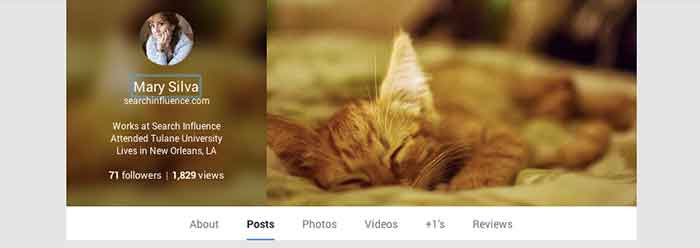
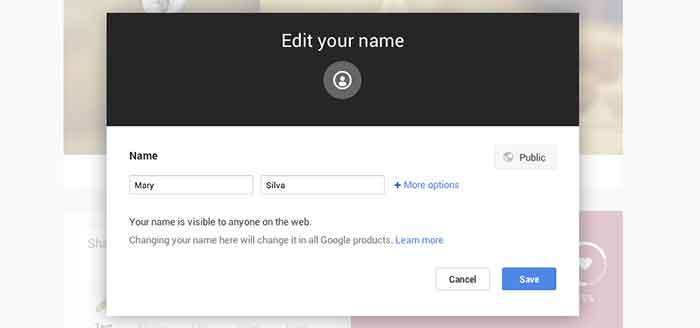
    Sometimes we’ll bounce around for several minutes looking for where the settings tab or options part of a page is just to change one tiny detail. In the case of changing the visible name of your personal G+ page or the the listed name of your business, a quick and easy way to make the edit is through the front end of your Plus Page while logged into your account. All you have to do is click your name! From there a popup will appear allowing you to edit this field. It’s important to note that you’re not allowed to do this as many times as you’d like with your personal profile page though. You can change your profile name only up to 3 times in two years.

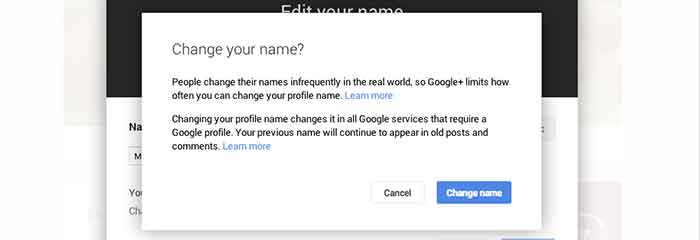
    When changing your personal profile name you’ll see this warning about frequency:
    “People change their names infrequently in the real world, so Google+ limits how often you can change your profile name.”

    GooglePlusProfilePage

    GooglePlusEditName


    GooglePlusConfirmNameChange

    2. Make Community/MapMaker Edits to G+ Local Pages

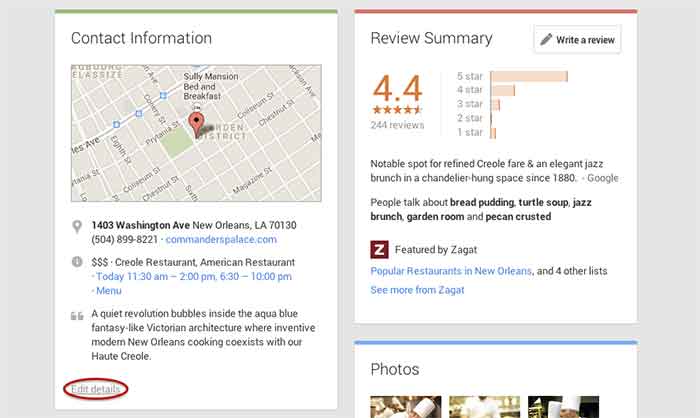
    The most common community edits we need to make to a listing happen when we’re just starting out and the listing we want to claim is owned and/or verified by someone else. The process for requesting ownership of a listing can be a lengthy one, and in the meantime you may want to update your business information from the front end. To do so, simply navigate to the Contact Information section of the businesses Plus Page under the About tab.  Then click “edit details” in the bottom left corner of the Contact Information box. The next page is the Map Maker editing screen that allows you to not only submit edits about the contents of the listing, but to also report a listing as a duplicate or closed location and report reviews that don’t belong.

    GooglePlusDuplicateListing

    3. Link/Verify A Website

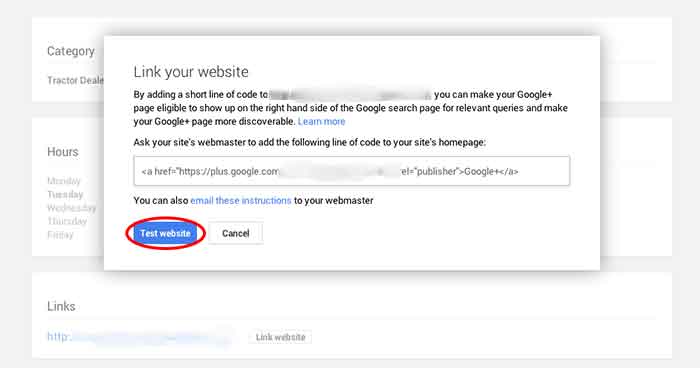
    We’ve recently discovered an issue when linking a business’s site to a Plus Page. After having the code added to a business’s website for linking to the Plus Page, you have to go back into G+ to make Google search for and verify that the code is on the site. You probably wouldn’t have encountered this had you done the entire process of adding the code to the site after getting it from Google, but often it’s a matter of getting the code and giving it to your developer to put on site. So in this case, you’d want to make sure to go back to where you got the code and click “Test website” in order to tell Google to check for the code. This can all be accessed from the front end of your Plus Page by clicking “Link website” under the Links section of the About page.

    GooglePlusLinkYourWebsite

    4. Add or Edit Managers of a G+ Page

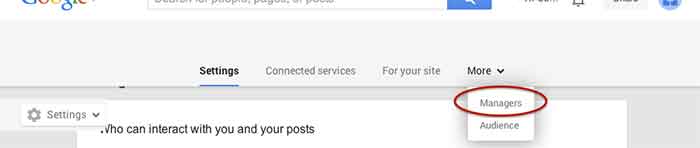
    Adding a manger to a Google Plus Page can be helpful for many situations. Businesses often want to have someone help with social media posting but don’t want to just give that person all of their login information since that is often linked to personal Gmail inboxes and the like. As with editing the name of a page, adding a manager can be done more than one way from within the account. I, however, find that the easiest and quickest way to do it is by going to settings from the home drop down in the top left corner when logged into Google Plus. Then, simply navigate to the Managers tab on the top left to access the manager permissions editing page.

    GooglePlusManager

    5. Create a Custom YouTube Channel URL

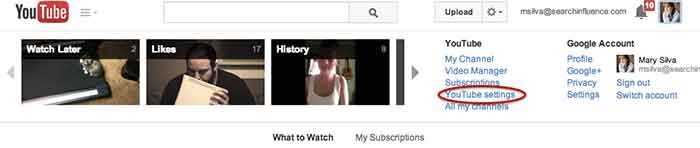
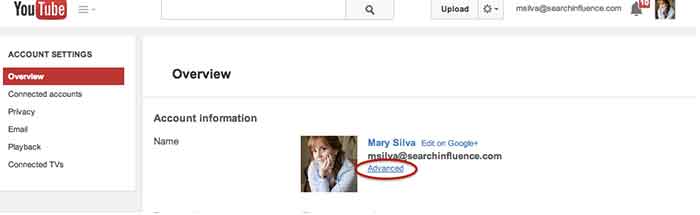
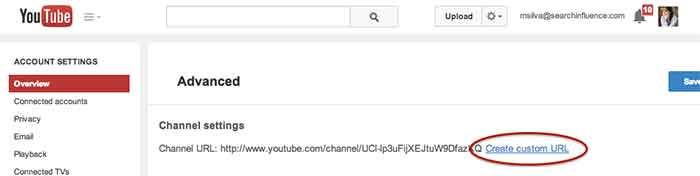
    You knew this one was coming based off of that intro, didn’t you? So, from the top right drop down menu of YouTube, click “YouTube settings,” then “Advanced,” and finally “Create custom URL.” It’s that simple but not exactly the most intuitive place to look for it, given the many other options in YouTube.

    YouTubeSettings

    YouTubeAdvanced

    YouTubeCustomURL

    I hope at least one of these steps was helpful for you, if not all of them. Let me know in the comments below what you think!

  • The Secret Life of Gmail (Part 1)

    Part of my everyday is sorting through ~150 emails, which can be quite taxing if you don’t have a good system in place. We use GMail for our email system at SI. I know most small businesses probably have their email system already figured out, but if you don’t, I would HIGHLY RECOMMEND using GMail as it has lots and lots of great features that make emailing less painful. I have learned some great tricks offered within Gmail- far too many for just one blog post. This first post is about organizing and archiving your email account. Part two will be geared towards writing and scheduling emails. I hope you find this helpful!

    1. Priority Inboxes

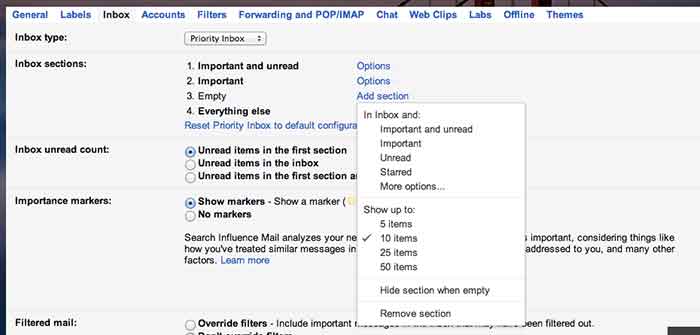
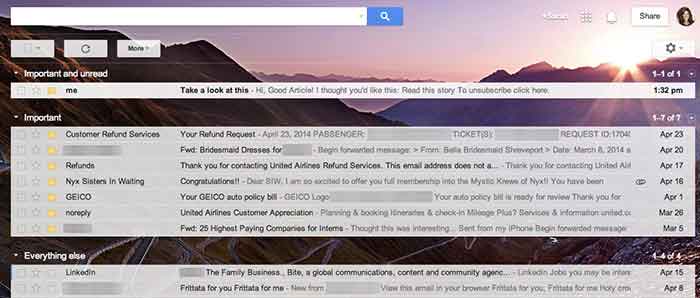
    Priority inboxes are a great way to organize your inbox if you have trouble figuring out what’s important and what is actually relevant to you. This setting is very customizable, and you can set the number of emails you wish to see or have visible per section. I have mine set up as Important and Unread, Important, and Everything Else. Important and unread is exactly what it says- all messages that are marked as important or all messages that are unread. Important is everything that I have read and marked as important, but I haven’t necessarily responded to or handled the particular issue yet. Everything else is compilation of things I just need to file away or delete (because they’re not applicable to me).

    GmailSettings

    2. Important Arrows

    These are great in combination with the Priority Inbox. If you use these, Google will start to learn what is and is not  important to you. It will learn to sort them in the priority inboxes accordingly.  When I get an email in my Important and Unread, Google knows to put it there because it has the important arrow. If I receive an email in my Important and Unread section that is actually not applicable to me, I uncheck the arrow. That way, the next time I get a similar email (with that same subject or from that same person), Google puts it in my Everything Else inbox. It works the other way too- if I see something in my Everything Else Inbox is actually important, I put the important arrow with it, and Google moves it into my Important and Unread Inbox. It learns these habits over time, so your Inbox for the most part really does become organized.

    Gmail-Inbox

    3. Filters

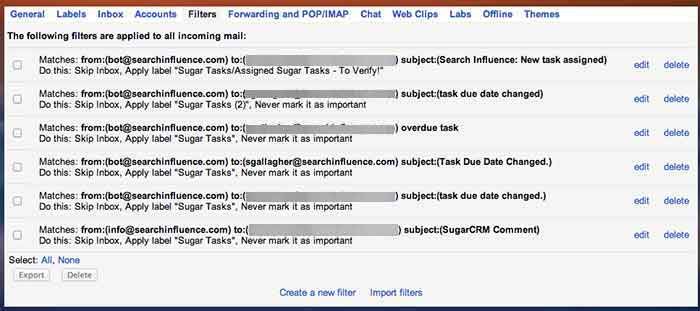
    Do you find yourself receiving emails that you don’t ever need to read or open? We get emails from our CRM system all the time, but I never look at them because, frankly, I receive way too many other emails a day that are much more important. So, I have set up a filter so the emails I receive from that recipient are automatically filed away into my “CRM” folder. They never actually show up in my inbox! To set up a filter, go to settings, filters, and then create new filter at the bottom. You can perform a search function by email recipient addressed to you with a certain subject line, etc. You can set it so GMail will either automatically apply a label or archive it into the folder you have identified. This will save a lot of filing time if you have emails similar to this coming to you everyday.

    GmailFilters

    4. Unread Messages Icon

    This is a Lab in the settings. If you’re like me and you leave your email open all day in a tab (I know I shouldn’t, but hey- we all have our vices), you can enable this feature so you can monitor your email as you are working on other tasks. My recommendation is if you get more than 10 new messages, you should probably hop back over to your email just to check and make sure nothing SUPER important needs to be tended to.

    GmailInboxTab

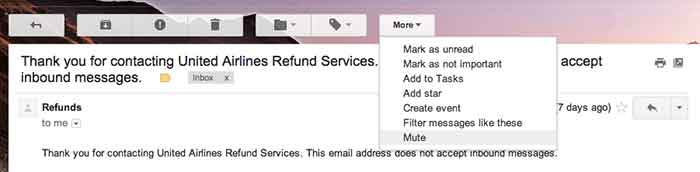
    5. Mute Button

    This is a great feature that you can use to mute conversations if they keep popping up in your inbox. I get a lot of emails that are not related to me, so I often put a “Not Mine” label on them. If that same conversation pops up again in my inbox, I’ll see the “Not Mine” label on it, realize that it is not for me, and press the mute button. This will make it so if anyone else responds on this email strand, the conversation will no longer come to my inbox, but it will stay filed away in its folder. BRILLIANT STUFF HERE!

    Gmail-MuteEmail

  • 5 For Friday – Twitter, Facebook, and Pinterest, Oh My!

    5RD

    1) Twitter Profile Redesign is now available to everyone!

    -Twitter

    Do you have the new Twitter layout for your profile? If not, you may be behind the times. Twitter recently updated their profiles with a new, user friendly look. This design is pretty similar to what many people are used to seeing on Google+ and Facebook. They are in the process of rolling out the profile redesign to all Twitter users.


    2) Are Your Fans Interacting with Your Brand on Social Media?

    – Mashable

    The look of your graphics and images supporting your social media updates carry a lot of weight. If they’re not appealing to your followers, they will fall flat when it comes to engagement. Mashable shares some insight on the various types of images that can boost interaction amongst your fans.


    3) Google Offers New Ways to Market Apps in Search, Display, and YouTube

    – Marketing Land

    Many app creators struggle to get their product noticed,  downloaded, and used by consumers. Google is now offering various unique ways to market them in AdWords via search, display, and YouTube. Read this article to learn details about all of the exciting new features available to app marketers.


    SocialMediaPhone

    4) Facebook Mobile is Killing it! Is your brand on Facebook Yet?

    – Bloomberg

    If your brand is not spending at least some of its marketing dollars on the social media giant, you are probably missing out on a major consumer base. This article from Bloomberg tells us that nearly half of the world’s internet population is logging into their profiles, at least, once a month. This mean almost a billion people a month are logging into the mobile app alone!

    5) Pinterest Announces the Launch of a Visual Search Engine

    – Buzzfeed

    Pinterest is launching a new “Guided Search” for its mobile users. It takes user’s broad search and prompts them to narrow it down with pictures in related sub categories. This very informative article from Buzzfeed explains, in detail, the specifics of Pinterest’s new guided search.


  • 5 For Friday – Links, Stories, & Posts for Your Weekend

    5-Dice

    1. SEO 101: Getting the On-Page SEO Basics
    – Search Engine Journal

    This article provides a ground-floor explanation of some of the basic, on-page SEO elements. Though this article may not seem useful for experts, this article takes into account that the rules for SEO are always changing. A refresher to update readers on what’s changed slightly and what’s stayed the same can help a new site get started and an old site get freshened up. The article also offers some useful tools to help with implementing the basics it suggests.

    2. Fix These 5 Email Marketing Missteps
    – Mashable

    Emails are such a normal part of our daily lives that we forget how to treat it during marketing campaigns. This article describes 5 problems that are commonly found and offers solutions to overcome these issues. It’s important to use whatever tools we have on hand when it comes to marketing, and email is no exception.

    3. How to Identify Non-Ranking URL Page Types Using Google Site Search
    – Search Engine Watch

    The author provides the benefits of using Google’s site search in order to identify and find “valuable indexation metrics” for non-ranking page types. Though the author doesn’t state that this should replace crawling a site, he does state that there are useful details to gleam from a slower and more in-depth study of a site.

    4. Marketing 101: How to Create a Successful Influencer #Marketing Plan
    – Search Engine Journal

    Reaching your target audience means enlisting the help of people with a good voice in the industry, known as an influencer. The article provides a definition of influencer marketing, as well as the benefits that can come from it. There are also a few simple ways suggested in designing the marketing strategy, reaching out to influencers, and keeping them with you. The author also puts emphasis on making sure to have something to offer when reaching out to influencers. Anyone with a steady audience and a good voice does not need or wish to offer any favors for free.

    5. 6 Changes We Always Thought Google Would Make to SEO that They Haven’t Yet
    – Moz

    This article gives an interesting insight into the Google changes and updates that experts have expected, but haven’t seen implemented yet. The notes are sensible, and when it comes to changing SEO rules, it’s extremely important to try and stay ahead of the game and to figure out the path that Google is trying to take search.

    FridayPeople

  • Why Your Ads Fail: The Secret To AdWords Data

    Within the past decade or so, it’s no surprise that everyone is hopping onto the data bandwagon. To businesses big and small, across all industries, it’s all about collecting data, data, data. However, while we focus endless efforts on collecting and analyzing data, we often lose sight of the reason why.

    This is especially true in the world of online marketing, and in this case, online marketing through Google AdWords. If you’re running a PPC campaign, you know that AdWords provides a plethora of data and reports from all the typical metrics. From impressions, clicks, cost per click etc. to where your clicks are coming from, the day of week, the time of day—the list of metrics goes on. That’s why finding actionable data is like finding a needle in a haystack.

    However, there are three simple data reports that can provide instantly actionable insights.

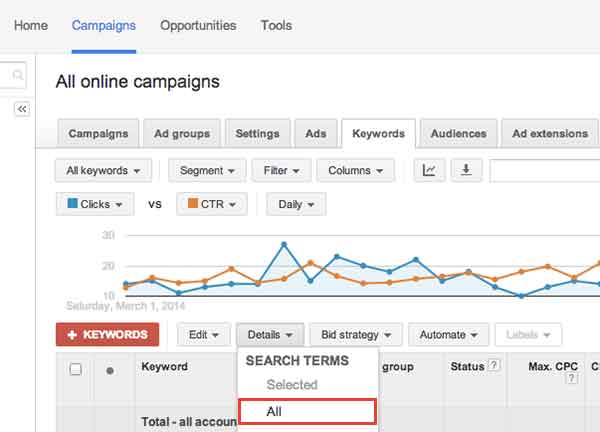
    1) Search Term Report

    The first report is the Search Term Report/Search Query Report. This report can be found under the “Keywords” tab. Select “Details.” Then select “All.”

    Screen-Shot-2014-04-02-at-6.01.44-PM

    This report is useful because it shows the search terms that people are actually typing in and searching for. This data can inform your decisions in creating new campaigns, new ad groups, finding negative keywords (keyword searches you don’t want your ad to show up for), and even give you ideas for your content creation strategy.

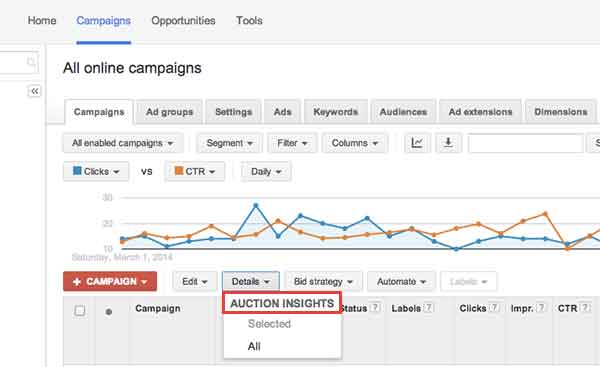
    2) Auction Insights Report

    The second report that’s useful is the Auction Insights Report. This report can be found under the “Campaigns” tab, under the “Details” section. Select “All.”

    Screen-Shot-2014-04-02-at-6.02.27-PM

    This report is useful because it shows how your campaigns, ad groups, and keywords are performing compared to your competitors’. It compares your impression share (how often your ads show up), your average position etc. with that of competing campaigns. Understanding what your competitors are doing, can better inform your bid decisions, how you design landing pages, and more. Remember, your competitors in the physical world may not necessarily be your competitors in the digital world.

    3) Conversion Time Lag

    The third report that’s useful is the Conversion Time Lag Report. This report can be found under
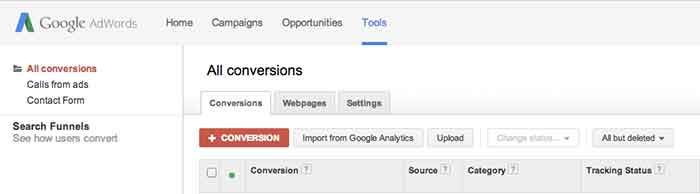
    “Tools” (at the very top navigation bar). Click “Conversions,” then “Search Funnels” (on the left side of the page), then “Time lag.”

    Screen-Shot-2014-04-02-at-6.24.38-PM

    This report shows how long it takes for people who’ve clicked on your ad to convert. Based on your sales cycles, this can inform the number of touchpoints you need with your customers in order to drive them down the sales funnel. Depending on the time lag, you can then decide whether or not to reach out to your customers through a remarketing campaign, a content marketing campaign, an email marketing campaign, or through social media and how often you should do so.

    In an online marketing environment where there’s a lot of hay, hopefully these three reports give you three useful needles in your haystack.


  • Social Media Goes Sci-Fi

    Continuing the trend of the recent push towards wearable tech, Facebook recently announced that they have acquired the virtual reality company Oculus VR, for a price tag of around two billion dollars. If you have no idea what Oculus is, or does, their flagship product, the “Oculus Rift,” is depicted below:

    10166365646_9d9a2ea50c_z

    If you thought Google Glass was intense, the Oculus Rift will most likely not be for you. Unlike the Glass, the Rift headset is specialized for HD gaming and full submersion into virtual reality. If the headset looks familiar, this isn’t the first time this type of technology has hit the consumer markets. The company started as a Kickstarter in 2012 with the goal of reviving the type of gaming headsets depicted in the 1990s Sinbad classic “First Kid.”

    00000065

    Benefits

    Even though the technology came and went over a decade ago, this doesn’t mean that history is destined to repeat itself. Stanford University’s Virtual Human Interaction Lab has been conducting research on how virtual reality can improve education, help the environment, and teach altruism. Their findings on how we can utilize virtual reality simulators have drawn the attention of several social media companies, including Mark Zuckerberg.

    Integrating Oculus

    Whether or not the gaming technology will cross into the social media world is yet to be determined. As of now, Facebook has not announced any specific plans for integrating the Oculus technology into their platform. However, Chaotic Moon Studios produced a concept video of what a Facebook themed virtual reality experience may look like. The video depicts the headset’s possible ability to create a user friendly shopping experience, similar to the one Facebook already uses.

    Unfortunately, we probably won’t be seeing this kind of social media experience gain popularity for a while. Mark Zuckerberg called it a “long-term bet on the future of computing.” Until then, could you see yourself using the Rift instead of going to the mall?

  • 5 for Friday — Links, Stories, & Posts for Your Weekend

    five-5

    1. Google To Protect Paid Search Keyword Data, Making it ‘NotProvided’
    – Search Engine Journal

    This article discusses a report that Google will stop passing keyword data to analytics software, even for AdWords advertisers. The three main points of the article state that Google will likely stop providing referrer data for paid clicks on AdWords ads, Advertisers may see [not provided] in their Google Analytics reports or other analytics provider reports for paid search clicks, and Google AdWords reports will remain unaffected. How will this change effect you?

    2. The Art of Thinking Sideways: Content Marketing for “Boring” Businesses
    – MOZ

    Here the author speaks about different ways to create unique content for your clients. We have all had clients where we wondered if there was any way to promote their brand. As marketers it is our goal to raise brand awareness, improve search engine rankings, and increase sales for our clients.

    3. 73% Lose Trust in Brands Due to Inaccurate Local Business Listings [Survey]
    – Search Engine Watch

    If a business has incorrect information in an online listing will you lose trust in the business and look elsewhere? Have you ever looked up an address to a service or a business only to find yourself driving in circles because the info was incorrect? This happened to me personally a few weeks ago while looking for a restaurant. After I found myself lost for about 10 minutes I gave up and moved on to a new restaurant. This article has some interesting info about how potential customers will research your business information.

    4. How Brands Are Using Twitter’s Redesigned Profile Pages
    – Mashable

    This has some excellent examples of a few major brands who have recently updated their Twitter profiles. I agree that these new profiles provide the client the opportunity to add more content, but immediately thought they looked like a Facebook profile. Twitter is rolling this function out slowly to the general public. Check out the examples and let us know what you think!

    5. 80% of Local Searches on Mobile Phones Convert
    – Search Engine Watch

    Here is a study on local search on mobile devices. The stat that stood out to me was that four out of five local searches on a mobile device end in a purchase. Check out the infographic at the bottom of the article for more interesting data they found.

  • Heaps of SEO from Down Under

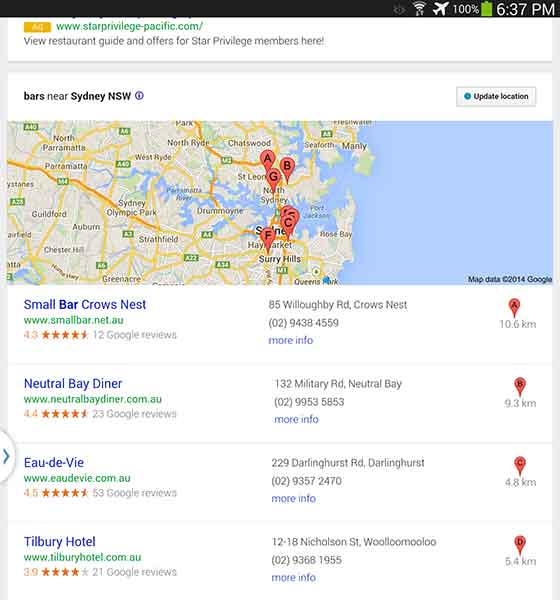
    While I was in Australia earlier this year, I used google.com.au to search for a good happy hour spot after a long day at Bondi beach (they have free beach wi-fi!!). No matter how hard I searched, the best watering holes weren’t showing up in my search results. Little to my knowledge, it was because I was searching for “bars in sydney,” while all the other blokes and sheilas in Aussie call them by a different name, “hotels.” The following are the search results from various keyword searches in Australia. Check out how they vary just by changing one word!

    “Bars in Sydney”

    AusSEO-Bars-01

    I found that the “bars” results were filled with restaurants that happened to serve classy drinks (not exactly what I was looking for). And I don’t mean to whine, but it’s mildly upsetting that results A, B, and G are located in North Sydney. SEO in Australia needs to step up its game.

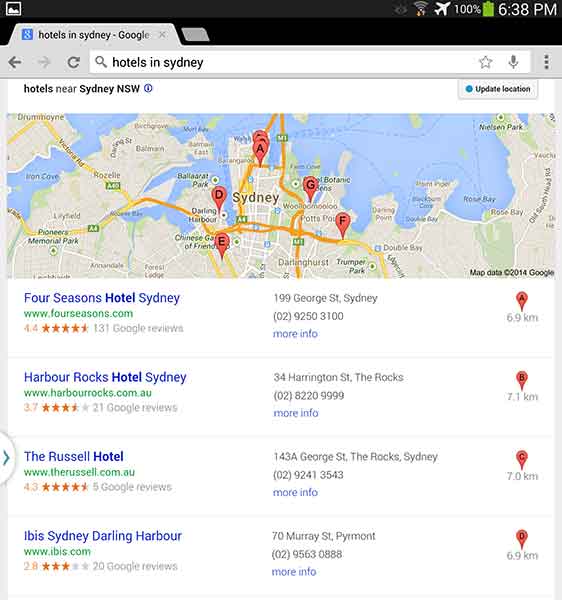
    “Hotels in Sydney”

    AusSEO-Hotels-01

    Unfortunately, looking at “hotels” wasn’t helpful either. This keyword can get a little complicated because, while bars are called hotels, hotels are also called hotels. I think it would be really difficult for a bar to outrank an actual hotel, even on google.com.au.

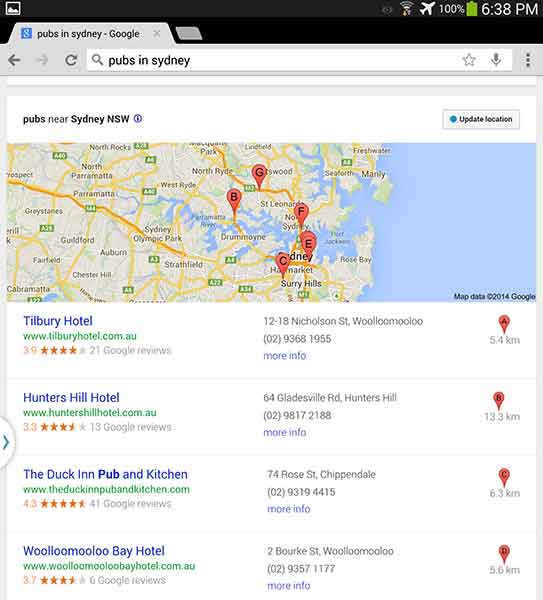
    “Pubs in Sydney”

    AusSEO-Pubs-01


    The best results? Pubs. Each result was a bar with “hotel” in their business name and “pub” in the meta description. Pubs are a big part of Australian and English culture so it is fitting that this 7-Pack produced the best results.

    If you want to run a local campaign, pay attention to changes in culture and language in your area. You may be able to target locals and tourists differently by focusing on some keywords more than others. As Ja’mie King would say, SEO in Australia is, like, so random.

    PublicSchools

    Have you had any strange encounters with Google keywords in certain areas? Let us know in the comments!