Tag: Google

  • Has Panda 4.0 Got You Down?

    Sad Panda 4.0 Image - Search Influence

    Now that we are 4 weeks post-Panda 4.0, there is a decent amount of data to sift through and determine if a website got caught in the Panda filter.

    Panda is supposed to provide consumers with search results that are helpful to their needs. This means websites that have some authority and provide a service to consumers are going to be more trusted and rank better. The better websites offer answers to consumers for what they are looking for and help them make decisions based on useful information. The content is engaging and gets people the information they need.

    Not Too Much Panda Drama
    Matt Cutts Panda 4.0 Tweet Image

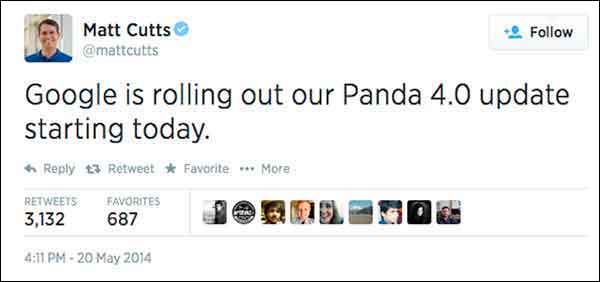
    Panda started rolling out May 19, so that’s our magic date for before and after data. When looking only at Google organic traffic and comparing May 19, 2014-Jun 15, 2014 to Apr 21, 2014-May 18, 2014, I saw a 6.71% increase for one plastic surgeon’s website. This is a respectable increase when you consider that summer is generally thought to be the start of the slow season for plastic surgery as an industry.

    For this plastic surgeon, I looked at the same date range for the last 4 years. Every year, this same date comparison resulted in a minor and expected decrease of Google organic traffic. This illustrates the typical seasonality. Given that history, we’re pretty excited to see an increase from Google organic traffic going into summer.

    I looked at another client’s website, this time for an apartment complex, which is up 15% in Google organic search. Last year showed a decrease for the same time frame comparison. Unfortunately, the client didn’t have Analytics data for 2012. I have always thought that summer would be a high season for his industry, but he says for his complex and his location, summer is not necessarily the busy season. I always like to see double-digit growth in Google organic traffic (that’s a no brainer), but I worry about the monthly Panda data refresh leveling things back out, which happens all the time. The fact that the site had an increase at least tells us that the site is trusted, and we are on the right path, so that’s the story to celebrate.

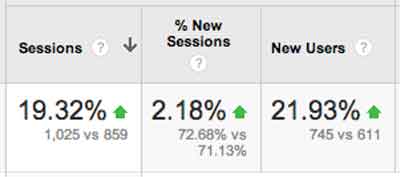
    One of our account managers has a charter-fishing website (which I think would be super fun to work on). This fishing charter client had a whopping 115% increase, but you have to consider that this is his high season. Last year the same time frame comparisons saw a 65% increase. Even with the seasonality, I think he was a winner with Panda 4.0. He has lots of great original photos and lots of engagement – it totally looks fun to go out on his boat! And that’s a major part of what makes a quality site.
    Site Traffic For Engaging Content Chart Image - Search Influence

    In the health industry, we have a drug rehabilitation clinic website, which experienced a 19% increase after Panda 4.0. So, the interesting part for this client is that their content is solid. We have been working more heavily on their citations and less on their content, so it’s possible this client is simply readjusting from the previous Panda. It’s also possible that clean local citations are helping the site’s quality and trust.

    Magic?

    I know everyone reads these posts for some super secret insight, to learn some nugget of goodness, and I will probably disappoint. The efforts of our account managers have helped our clients’ websites, some shown above, but really, as a group, we have done nothing extraordinary. If it’s an older client, we have taken the time to review all of the past years of work and get back to the basics. We fixed any technical SEO problems we found. We are also constantly refreshing content, constantly reviewing citations, and building social channels with planned content calendars. If it’s a newer client, we work on building a solid foundation of fresh content, consistent business data, and getting social.

    There is no magic here, just thoroughness.

    This Wasn’t Just Any Ol’ Panda Update

    This Panda update is largely thought to be a significant algorithm change rather than the monthly refresh. Barry Schwartz says it succinctly, “Panda 4.0 must be a major update to the actual algorithm versus just a data refresh. Meaning, Google has made changes to how Panda identifies sites and has released a new version of the algorithm today.”
    What Does This Mean Quote Panda 4.0 Update Image - Search Influence

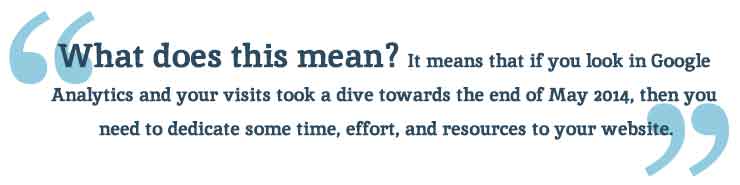
    What does this mean? It means that if you look in Google Analytics and your visits took a dive towards the end of May 2014, then you need to dedicate some time, effort, and resources to your website. When there is a Panda data refresh every month, it’s not going to get better without some serious website rehab.

    As a side note, most of the clients I looked at had a small bump up in first week of June. I don’t know if there was a Panda refresh just 2 weeks after the Panda algo update, but I definitely see it across a large number of clients.

    The Panda Checklist

    Cleaning House For Panda 4.0 Update Photo - Search Influence

    There is so much you can do to “clean your house” for Panda, but here are the first efforts I would take to tackle the Panda beast.

    #1 Crawl Before You Can Walk

    Start with a detailed crawl of your website. You can use whichever website crawler you prefer (At Search Influence, most of us use the Screaming Frog SEO Spider). You’re really just looking for a comprehensive spreadsheet where you can look at your website as a whole. The crawl will give you a list of pages, images, CSS files, and many other goodies.

    With this list, you can sort, filter, get organized, and clean up your site.

    • Review how many H1s and H2s each page has. Subheadings are wonderful. Use them.
    • Check your canonicals. Make sure they are set up properly.
    • See what is being redirected.
    • Find what is 404ing.
    • Read the meta data for each page and see how amazing or how lame it is.

    With this list, you can find multiple pages on a single topic. Often enough, we find a client has multiple pages and posts on a single topic. I looked at a client two weeks ago who had 8 pages all on the #1 service she offered. Wow! I was so overwhelmed. I can’t imagine how a casual site visitor would feel (“Where in these 8 pages is the info I need?”) or how the Google bots sort this out. Confusion within your own site is absolutely a no-no. If I am confused about which page I should read, then the Google bots sure won’t know what to say about it. If they could talk and all.

    Once you review your site crawl and have some action items to improve the tags and architecture (i.e. make it easier for the consumer to find what they need), you can laser focus on individual pages within the site.

    #2 Am I a … Plagiarizer?!

    Put your site through a content checker. There are a few out there, so try several because no single tool is the best. If you wrote your content years ago or someone wrote your content for you, it’s a good investment to check for duplication. Who knows who has scraped your content or if your writer ripped it off from some other unsuspecting website owner.

    Search Influence’s Tracy Stoller, Content Lead, asks a pointed question, “Google is looking for quality content that is useful to searchers. If the content is on 40 other sites, what makes your site the useful one?

    #3 Improve the Content

    If you’ve discovered some redundant pages, you need to merge those pieces into a single primary page for the given topic. This is tedious, but it absolutely must be done.

    If you happen to find some duplicate content, rewrite it. Sit down and knock out some new text. If you are the business owner, then you know the details of your product and service like no one else. I like to suggest that a business owner talk about the service—just talk—and record him/herself. Then, have a transcript service type it up from the recording. This usually generates the most natural and most detailed text, even after editing.

    How long has it been since you updated the content on your site?

    I logged into a client’s WordPress site last week and saw that the page I was on had not been updated since 2010. We have been updating their content slowly, but, clearly, we missed this one. Some topics may not have much change in four years, but we can look at how the visitors came to that page and where they went after and how long they spent on the page, and we can certainly refresh the page with this information in mind. We can rewrite with more details and offer easy links to the most often visited next page. We want to make it as easy as possible for the visitor to get the information they need.

    Remember, content does not mean just text. Content is text and videos and images and calculators and quizzes and slideshows, etc. Multifaceted media on a single page creates an extremely consumer-focused experience.

    #4 Take Some Pictures!

    You need relevant images on your page of text. Text and images should be focused on a single topic. The image should be optimized around the same topical idea as the text on the page. If you create the image, and it’s original, that’s even better. I have combed through a client’s Facebook, Flickr, and Pinterest to grab any original images they have and reuse them on the website. If they already exist, and I have access to them, it’s one less thing I have to ask the client to do. You really need to see the impact of authentic, original images.

    Really, which of these says more to the consumer?

    Engaging Photos Comparison Sailor Image - Search Influence

    #5 Blogging

    Pages and blog posts are different animals. Pages are for the topics that are evergreen and should represent a business’ core products or services. Blog posts are for

    • Commenting on current events,
    • Answering specific questions that require high levels of detail (Q&A)
    • Showing current trends in your industry
    • Real engagement with your audience!

    Paula Keller, Search Influence’s Director of Account Management, says, “We see blog posts written about specialized topics from seven years ago still driving organic search engine traffic to a website. Blogging is good for the readers who come across it today, good for the search engines as the new content publication brings them back to your site, and has long-lasting benefits on your site’s authority.“

    #6 Video

    Video is not entirely necessary to overcome Panda, but it is a great addition to your content. The best videos are created with some input from the client or are created by the business owner with a handy smartphone.

    The best videos are instructional how-to’s or tutorials: 30 seconds on unclogging a sink, installing an ice maker water line, or one minute of an attorney educating us how to behave if we get pulled over or… (Yikes!) arrested.

    When you have a video created and ready, add the video to your Google account’s YouTube channel, and embed it on the topically relevant page. Mark it up with proper schema! I would add videos at a pace that is both slow and steady – once a month, once a quarter – whatever frequency you think you can actually stick to.

    #7 Consistency is The Key

    Okay, so I know that local citations work is not the first thing we think of when we are considering Panda (typically thought of as strictly a content algorithm). Panda is really searching for the quality, authoritative websites. Way back at the very first Panda, Google said, “It will provide better rankings for high-quality sites.” And one of the key efforts in building high-quality sites is having clean consistent business data across the local ecosystem.

    David Mihm started his Local Search Ranking Factors “to help small business owners confused by Local Search, or those strapped for time, to prioritize their marketing efforts.” Many industry leaders contribute to the Factors (including Search Influence!). It was last published in August 2013, and it reveals that citation volume, NAP consistency, and other local signals account for 16% of the ranking factors.
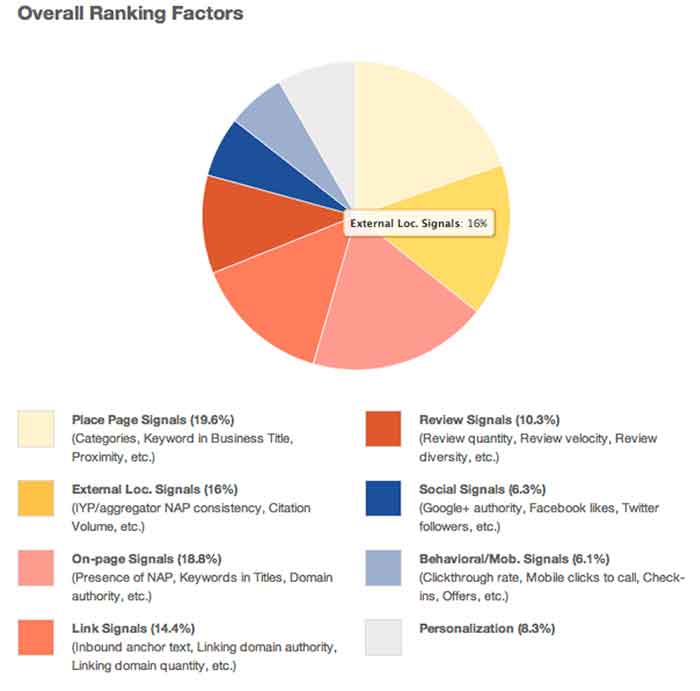
    Overall Ranking Factors Chart Image - Search Influence

    Our own Mary Silva, Senior Internet Marketing Associate, adds, “Consistent and correct business NAP (Name, Address, Phone, and often Website) is the key to getting your site to rank locally. If Google finds inconsistencies in your business information across the web, then your business and its associated site are considered less authoritative and not as trustworthy.”

    You can clean your listings yourself, but be forewarned, it’s a serious time investment. There are tools out there to help you in this endeavor. Be sure to allocate some hours every month to reviewing those tools and taking any action to edit and update listings as you go.

    Learn to Love the Panda!

    If you need help getting your site back on track from Panda, we would love to help out. Just know that Panda can be your friend. The latest update shows that it’s a simple matter of some spring cleaning, getting back to the basics, and being a good citizen. We can help you get there!

  • 5 for Friday – Twitter and Facebook Duke it Out, Social Signals’ Effect on SEO, and the Power of Nofollow Links

    5hand

    1. Mobile Site Call Conversions Now Available in AdWords – PPC Hero

    It’s finally here! Adwords now tracks click-to-call conversions on mobile devices. This can easily be added to a specific landing page with a little bit of coding. This feature will allow you to track calls through the same venues as your other performance metrics and customize the value of the incoming call. This blog post has step-by-step instructions on how to implement this new feature on your site!

    2. Google Wallet’s 2-Click Instant Buy Checkout Comes To iOS – Tech Crunch

    This week Google Wallet released its Instant Buy API for iOS apps. This was first released for Android apps a year ago. This free service can be accessed with your Google+ login and stores your shipping and credit card information. Merchants can then use the information to complete the transaction. Google Wallet aims to eliminate the frustration of mobile device shopping and decrease shopping cart abandonment.

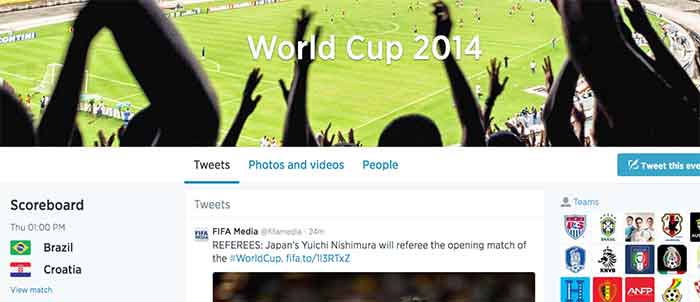
    3. Facebook and Twitter Want You to Talk About the #WorldCup on Their Field – Marketing Land

    Facebook and Twitter are engaged in a Battle Royal almost as intense as the World Cups itself. With yesterday’s commencement of the Fifa World Cup, these two social media powerhouses pull no stops to be become the No. 1 platform for Fifa fans to electronically engage.

    Facebook’s campaign provides fan with a Trending World Cup Page. Here fans can access the latest scores, view highlights and interact with a global map to pick their favorite teams

    Use #WorldCup and #WorldCup2014 to access Twitter’s World Cup landing page. Here you can create a Fifa-specific profile and choose a cover photo and profile picture to support your team. Don’t forget to include your HashFlag. Introduced during the last World Cup, these three-letter hashtags can be used by fans to unlock an image of a country’s flag.

    Which social media platform will reign supreme? Only trending numbers will tell. Let the games begin!

    WorldCup

    4. Social Signals and SEO – Blind Five Year Old

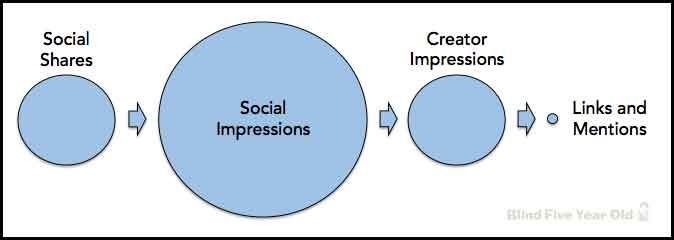
    While the power of social media seems encompassing, Google is currently not using social signals, even from Google+, in its algorithm to calculate search results. You might be asking yourself why you’re putting so much effort into social now. Fear not! Maximizing the potential of a Google+ listing and other social outlets does have benefits. The Blind Five Year Old breaks down social media activity to explain that its not necessarily the activity itself, but the result of that activity that matters.

    social-seo-signals

    5. The Hidden Power of Nofollow Links – Moz Blog

    Link building is an integral part of all SEO campaigns. They can help build your company’s brand, build public awareness, increase profit and, of course, lead to more links. Links can also help build your site’s authority in the eyes of search engines. But what about nofollow links? While they seem unfathomably dreadful, this blog posts offers a silver lining and techniques to utilize those nofollow links.

  • Getting Hands On With The New Google My Business

    Today, Google launched Google My Business. This new, more intuitive Google Places serves as a one stop shop for small businesses to do the normal Google Places work like updating business info, adding photos, connecting with customers through Google Plus posting, and staying on top of reviews. They also launched an Android app for managing Business Tools on the go (with the promise of an iOS app launching soon). Watch Google’s introductory video to Google My Business here.

    Changes For Users New and Old

    All new businesses to Google will start in Google My Business. As for current Google Places users, a blog post from Google earlier today said, “We’re also upgrading current users of Places for Business and the Google+ Dashboard to this new experience.” For those who just sat through and are still cleaning up the mess that was the upgrade to the new Google Places, don’t worry! You won’t have to go searching for which dashboard your listings are in or anything like that. It seems that Google My Business is a mostly superficial change that has already happened and just means a newer looking dashboard and a few extra features and controls (like easy access to Youtube, AdWords, and Analytics).

    Google My Business, Game Of Thrones Gif - Search Influence

    Quick & Easy Editing

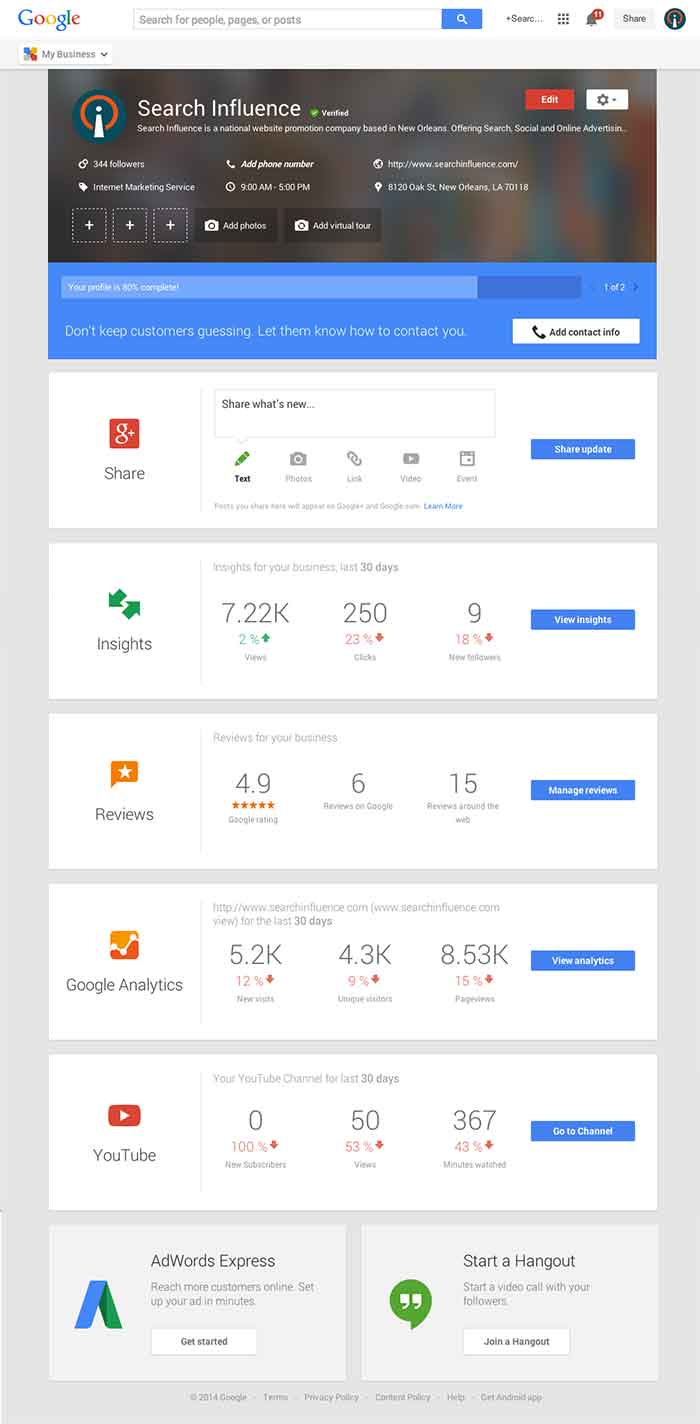
    These new features are pretty awesome. From your dashboard, first you’ll see the area for easily managing the individual aspects of your primary business information where previously you would have navigated through an “Edit Business Details” button. Connected to the bottom of this dialogue, there will be a blue box that allows you to edit the business information needed to get your profile to 100% complete. Google My Business has succeeded in using minor dashboard edits to make major usability improvements.

    Google My Business Dashboard Image - Search Influence

    Streamlined Sharing

    The next box is a basic G+ Share box for social posting to your business page. Share texts, photos, links, videos, and events easily all from one location. Side note: I recently found out, thanks to a post from Mike Blumenthal, that there is now an easy way to connect your business’ brand page to a location. So, if you have been posting socially from a Google Plus brand page for your business, you can now easily transfer that engagement into your verified local page.

    Google My Business Insights Tool Image - Search Influence  Google My Business Insights Followers Image - Search Influence

    New Data & Graphs

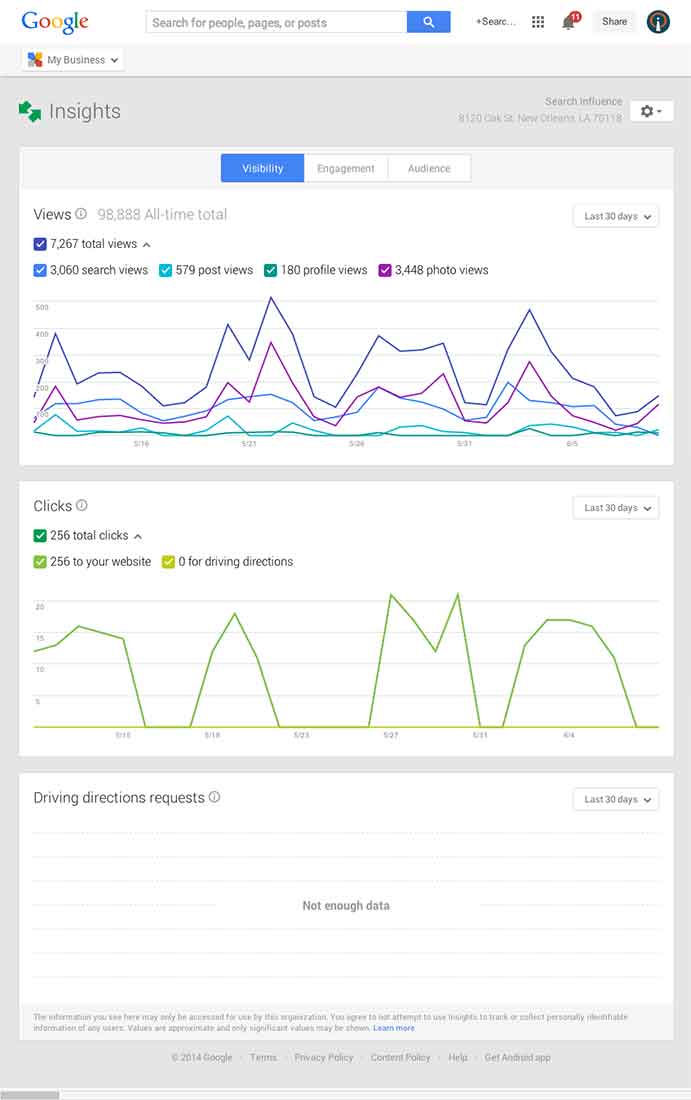
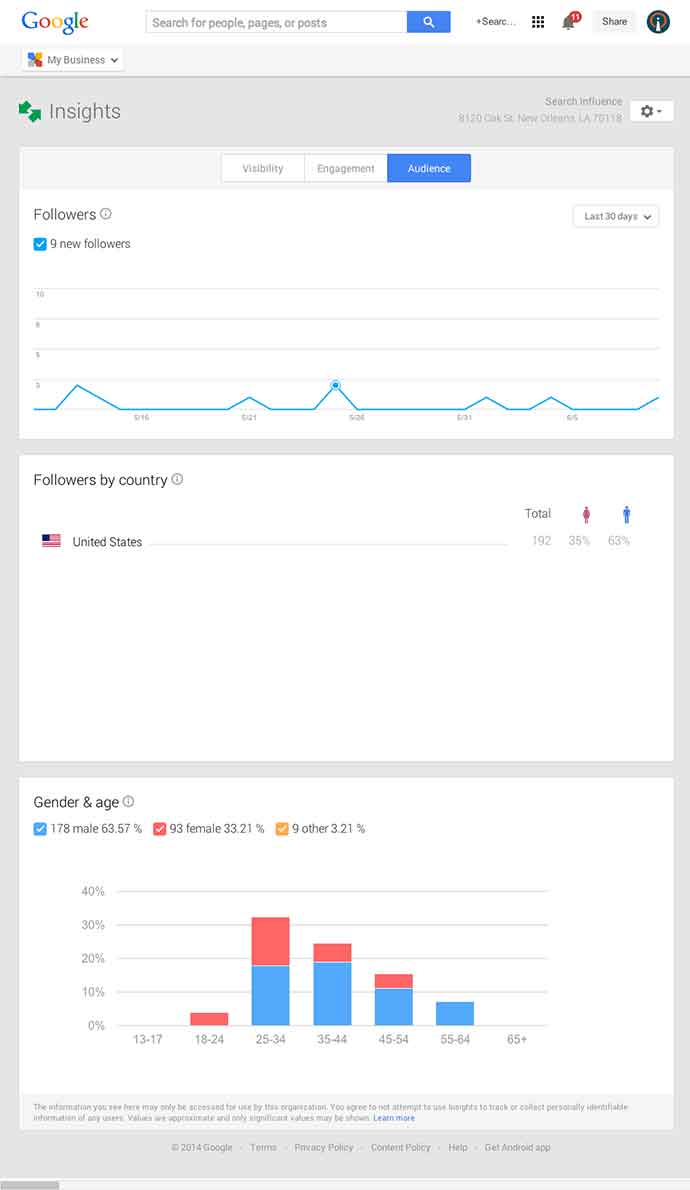
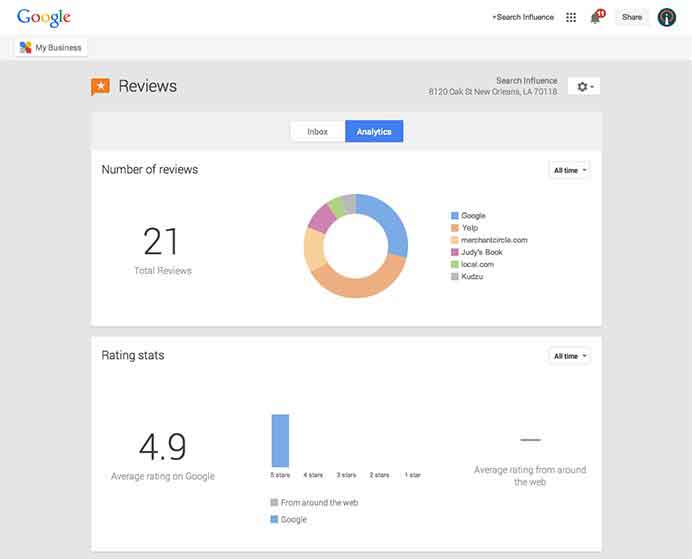
    Next, you’ll find the Insights Tool. Here, you can see how many views your G+ page has gotten over a period of time, how many clicks occurred, and where they went (either looking for Google Maps driving directions or directly to your website). The next feature (and my favorite addition to the Google My Business dashboard) is the reviews section. When you click into “Manage Reviews,” you’ll see your Google reviews as well as other business reviews from around the web. If you click “Analytics” at the top of this page, you can see a really streamlined graphical representation your review information or “Rating Stats” and where your business’ reviews come from.

    Google My Business Reviews Tool Image - Search Influence

    Additional Tools

    You will be able to see other tools like Google Analytics (if you have it installed on your site), YouTube (if you have a channel connected), and AdWords Express (again, if you use it). If you don’t use the above tools, they will still appear at the bottom of your dashboard with the option to “Get Started” if you want to use them! You’ll also see a place to “Join a Google Hangout” at the very bottom of your dashboard. All in all, the new Google My Business looks looks both beautiful and user friendly, presenting a new way to manage businesses’ online reputations through Google.

  • 5 For Friday – Bing Turns 5, Google+ Pages Merge, & MySpace Misses You!

    BirthdayFive

    1. At Five Years Old, Bing Has Come Far Yet Has More To Grow – Search Engine Land

    Can you believe the little guy is already 5 years old?! Microsoft’s search engine has made some solid strides over the last five years, gaining more of the search market share, and taking Yahoo’s 2nd place rank. While Google continues to dominate, Bing has been challenging users to make the switch, but it looks like the only share they’re gaining is from Yahoo.

    Although they will probably never match Google, Bing’s success as credible search platform has lead to partnerships outside of Microsoft, putting search into services and apps, including third-party apps. With the progress they’ve made so far, it’ll be interesting to see where they’ll be in 5 more years.

    2. Google Now Allows Brand Pages to Become Google+ Local Pages – Local U

    Google has released an update to Google+ that will finally make it possible to merge a Google+ Local page with a Brand page. After Google Places began integrating Google+, many businesses were confused and frustrated when realizing that they were unable to integrate their existing Google+ Brand pages with their verifiedLocal page.

    The problem has been solved with this recent update, and businesses are now able to merge all of their local data with their Brand page. This will allow for all of the local features to also be integrated, which include reviews, business information, and the map. This article give specifics about the changes to your pages when making the switch.

    Google+ still has a several other kinks that they need to address, but this is a step in the right direction and will bring some much needed relief to many business owners (and marketers!). Happy merging!

    Giant_Panda_Eating3. Press Release Rankings: Slammed by the Panda? – SEER Interactive

    Since the release of Panda 4.0, press release agencies have seen a severe drop in traffic, which has everyone questioning the value of using them for SEO marketing efforts.

    The algorithm update has primarily affected the press release sites’ rankings in search results, specifically when used to manipulate the search results with irrelevant content. This means that the press releases most affected are spammy and were being used as a way to game search results while not providing any useful information for the searcher.

    The good news is that press releases are still a very valuable marketing tool, when used for the right reasons (to announce timely and newsworthy information). This particular impact of the Panda update on press release sites is just another way that Google is cleaning up search results, proving just how important it is to always produce the most relevant and useful content for your business.

    4. How to Grow Your Google+ Fan Base to 1,000 Followers & Beyond – Search Engine Watch

    It’s pretty clear that Google loves their products and wants you to use them. All of them. And the more active you are, the better. For Google+, not only is it important to be active, it’s important that you engage and build up your fanbase—follow and be followed. This article shares some great tips and tricks to get started on building your fanbase and to create and maintain engaging content for your followers.

    MySpaceRuinedMyLife5. Myspace Is Embarrassing Users With Old Photos to Win Them Back – Mashable

    Remember that old Myspace page you had 10 years ago? Neither do we. If you’re one of the lucky people that has access to or even uses that old email account, Myspace wants to remind you by sending you old embarrassing photos. While these admirable marketing efforts probably won’t make you go back, it will, at the very least, drive more traffic to their site so that you can laugh at those photos…and then delete your account.

    Image sources:

    “5th Birthday Cake” by Andy Eick

    Giant Panda” by Chen Wu from Shanghai, China

    Myspace Ruined My Life” by Bill Alldredge

  • 5 for Friday – Google Changes Its Logo, Apple Buys Beats, Internet Trends Report and More!

    spraypaint5

    1.Google Made the Slightest Change to Its Logo and Users Still Noticed – Mashable

    Google changed its logo and chances are, you probably didn’t even notice. The nerds did, though. Here’s a GIF of the logo, before and after.

    2.Apple Confirms It Will Buy Beats for $3 Billion – Mashable

    Apple confirmed the largest acquisition in company history – they will buy Beats Electronics and Beats Music for a cool $3 billion. No big deal, really.

    3. Lawyers Sue SEO Firm For Violating Google Guidelines – Search Engine Land

    A Michigan law firm is suing its former SEO company for allegedly using “spammy” techniques violating Google’s guidelines. I’ve been with Search Influence since October 2013 and have already seen changes in industry best practices, so it’ll be interesting to see what this means for SEO companies moving forward.

    4. The Most Important Insights From Mary Meeker’s 2014 Internet Trends Report – TechCrunch

    TechCrunch breaks down Meeker’s 164 slide report into 52 more digestible nuggets. Here are the 5 I found most interesting:

    • Mobile now accounts for 25% of all web usage
    • Internet advertising grew 16% this year
    • Music streaming is up, sales are down – sales fell in 2013, while streaming grew 32%
    • Photo sharing up 50% over 2013 in just the first half of 2014
    • 84% of mobile owners use their devices while watching TV

    2014InternetTrendsReport

    5. 7 Essential LinkedIn Marketing Stats: When to Post, What to Post and How to Improve – Search Engine Journal

    An interesting read about the third-fastest-growing social network. Don’t believe me? LinkedIn sends nearly four times more people to your homepage than Twitter and Facebook. Combined.

  • 5 For Friday – Facebook Privacy, Google With Your Voice, and Yelp Videos!

    5-sand1. Facebook Defaults Posts From “Public” to “Friends” & Introduces Comprehensive Privacy Checkup
    – Marketing Land

    Facebook has finally launched a major change that may have an impact on their real-time efforts. With the privacy updates, users’ posts will now default to only be visible by friends, and all users will be encouraged to check on their privacy settings if they have not been updated recently. Greg Finn says he expects that this update may cause hashtags and real-time conversations to continue on their decline.

    2.Yelp Will Allow 12-Second Video Reviews Starting Next Month
    – Marketing Land

    Beginning in June, “Elite” users will be allowed to share their review of local businesses via a short video. These videos will first appear inline with the photos, but will eventually also appear along with the reviews like photos currently do.

    3.Google+ Introduces New Features That Automatically Generate Movies and Travelogues
    – Search Engine Journal

    Google+ launches Stories and Movies that will bring together your photos and videos to highlight your favorite moments from your travel or an event. Google’s Story will arrive within 24 hours after you return from your vacation. After you receive your story, you will be able to customize it and share it. Google+ Movies will include related photos and videos along with a soundtrack and special effects.

    4. Google Adds “Okay Google” Voice Search For All Chrome Users
    – Tech Crunch

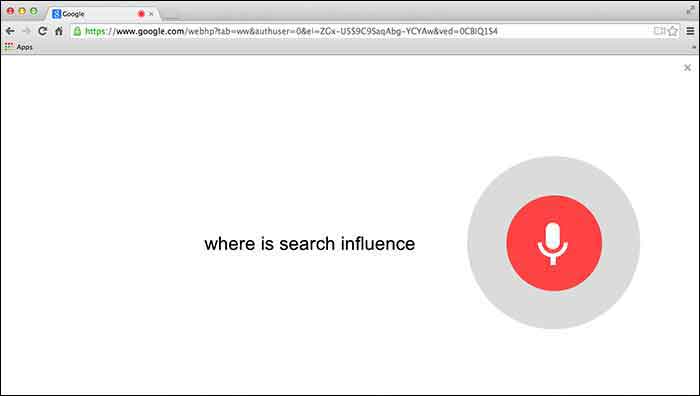
    Users will first need to give Chrome permission to use the mic on their computer. Then you can simply go to Google.com and say “Okay Google” to trigger the voice search followed by your search request.

    GoogleChromeVoiceSearch

    5. Google Paid “Dealers Nearby” Appears To Have Gone Live
    – Mike Blumenthal

    Mike Blumenthal noticed that Google’s new paid ads (now appearing within the knowledge graph) are live. This seems to be only the case in the US according to the comments thread on Dr. Pete’s tweet regarding this update. Mike Blumenthal suggests that we may one day see Google selling competitors space in branded knowledge panels.

  • In The Game Of Maps, You Either Get There, Or You’re Using Apple Maps

    NotSureIfWhen you think of Apple Maps, you probably think of the disaster that was the iOS 6 Apple Maps update.

    Apple Maps is infamous for directional errors like having turn-by-turn directions that instruct users to drive across an airport runway to get to an airport. We’ve also experienced client business issues with Apple Maps.

    For example, Apple Maps users were being taken to a location 50 miles away from our client’s actual listed business location when using turn-by-turn navigation in the app. We had to then figure out how to edit business information in Apple Maps, as there is no desktop way to access Apple Maps, and you can only access it through the mobile app.

    The data in Apple Maps is mostly powered by data from Yelp, TomTom, Factual, Localeze, and Acxiom as you can see in Moz’s local search ecosystem. By making sure your business information is as accurate as possible on these sources, you could help avoid errors on the sites that they feed to. Often, however, when it comes to issues with Apple Maps, it’s best to figure out how to fix them at the source.

    YeahItUsesAppleMaps

    So here I’m going to walk you through how to edit information in Apple Maps via your mobile device.

    Step 1:

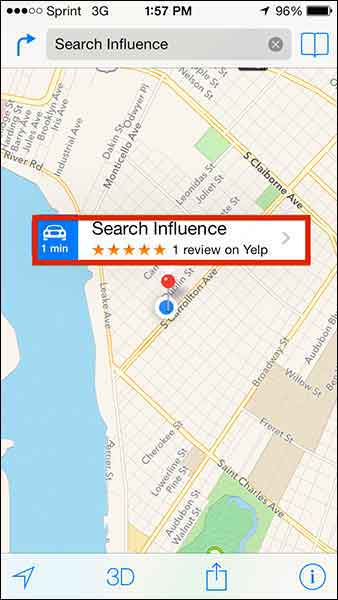
    Search for the business that you’re looking to update.

    Step 2:

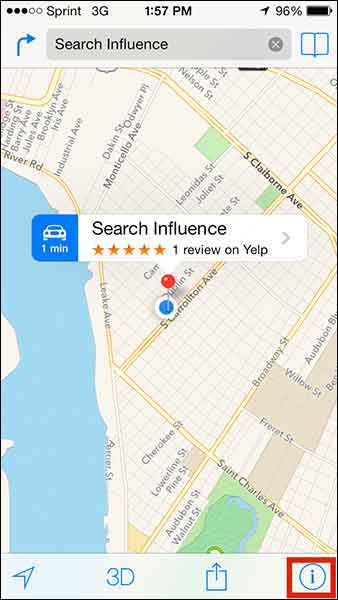
    If you’re looking to add a business that is not appearing in search or to update directions that aren’t appearing properly, click on the ‘i’ (for information) icon in the bottom righthand corner. If you’re trying to edit particular business information like name or address, skip to Step 5.

    Step1

    Step 3:

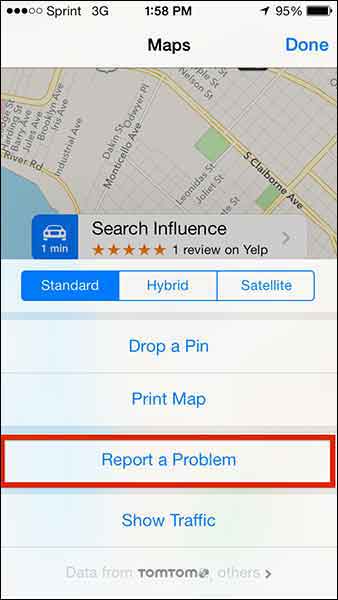
    From this popup dialog you will choose “Report a Problem”.

    Step2

    Step 4:

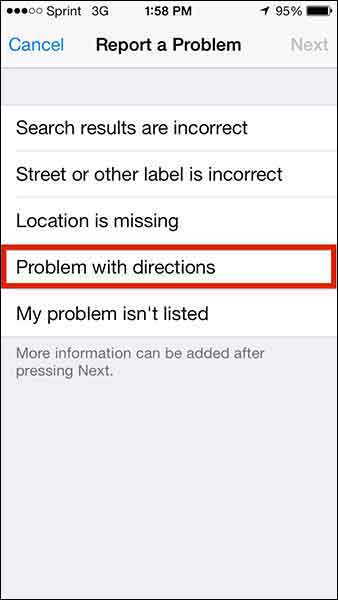
    This “Report a Problem” page will allow you to choose to report that

    • Search results are incorrect
    • Street or other label is incorrect
    • Location is missing
    • Problem with directions
    • My problem isn’t listed

    Select your issue (in our client’s case, we chose “Problem with directions” to indicate that the map was taking people somewhere it shouldn’t in turn-by-turn directions) and submit your problem!

    Step3

    Step 5:

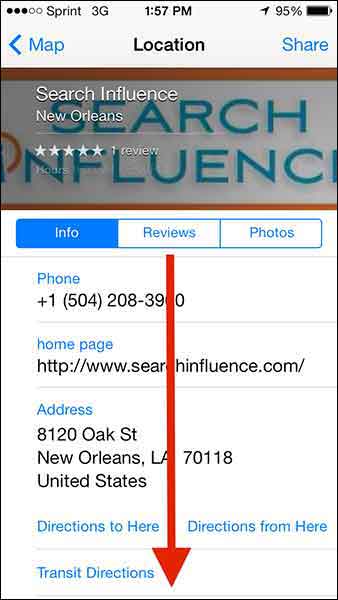
    To make more specific Apple Maps updates about a particular business, click on the business name in the search results.

    Step4

    Step 6:

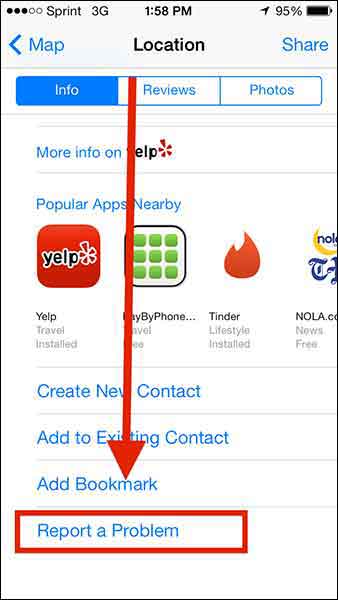
    Then scroll down “Report a Problem” on the “Location” dialog box, and CLICK IT!

    Step5

    Step6

    Step 7:

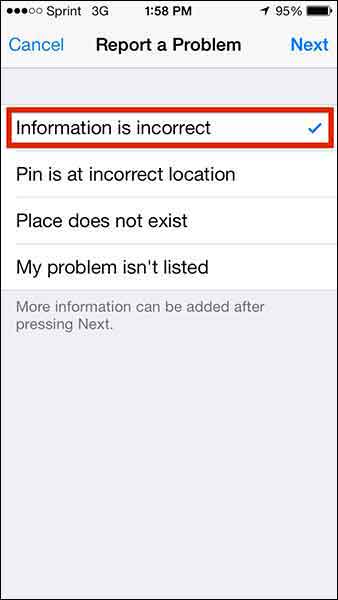
    Choose from the list of issues (most likely you’ll want to report that “Information is incorrect”) and click “Next” in the top right corner.

    Step7

    Step 8:

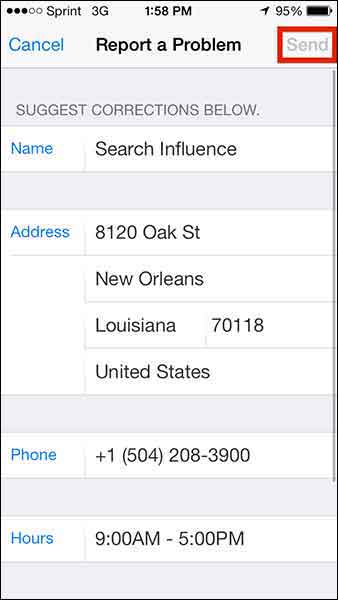
    Edit whatever details you need (obviously this page will differ depending on what problem you’re reporting) and click “Send” to send the report.

    Step8

    1O7UpdateApple maps has been gaining momentum in user numbers as it is the default app on all iPhones. Apple crushes all. It is known.

    With this in mind, one can only hope that Apple Maps’ future will have a formal business portal for claiming and managing your business information, but until then, we’ll have to live with this limited access process.

  • 5 For Friday – Backlinks, Knowledge Graph, And Privacy!

    FiveForFridaysColorfulFive1. Matt Cutts: Google Won’t Devalue Links Anytime Soon

    -Search Engine Watch

    Well, you’d certainly hope this is the case with the way Google is initiating hundreds of thousands of manual actions every month…But in Matt Cutt’s recent video, he explains the value of those quality links while Google continues to better understand and define what determines quality content. As it stands, Cutts sees the value of quality links to be a relevant ranking factor for the time being. So fear not, if you are working to improve the quality of your content along with improving and diversifying that backlink profile with authoritative links, you’re certainly protecting yourself from future menacing Penguin updates.


    2. Google’s Knowledge Graph Expands into Google Maps

    -Search Engine Land

    Google’s knowledge graph is expanding from organic search results into their map results. Much like the results from regular search queries on google.com, the knowledge graph will now pull information cards with quick facts about certain places searched in Google maps results. But hey, don’t just take Search Engine Land’s and my word for it, run a maps.google.com search for New Orleans’ own St. Louis Cathedral and check it out for yourself!


    3. European Court Requires Google to Delete Personal Info

    -Search Engine Roundtable

    Hey SEOs! Reputation management just got easier! If you live in Europe that is. In a recent ruling, a bill so cleverly titled “the right to be forgotten” requires that search engines, such as Google, Yahoo, and Bing must remove links from search results for a person’s name if that person requests to have that result removed.

    GoogleLogo

    4. How to Dramatically Improve Your Google Authorship

    -KISS Metrics

    This article provides some great tips for improving your Google authorship. As with any authorship improvement tip article, though, do keep in mind that excessive guest blogging is a definite no no. Keep the list of sites you contribute to condensed and featuring only those important and authoritative sites you write for. Guest blogging, if done incorrectly, can be seen as a spammy link-building tactic. A definite highlight of the tips provided in this article was “feature your most flattering picture…you don’t have to be good looking. You just have to…’put your best face forward.’” So no worries—you don’t have to be Brad Pitt, Ryan Gosling, or Jon Hamm. You just want to ensure your thumbnail image is clear.


    5. 5 New and Improved Twitter Features Marketers Should Use

    -Search Engine Watch

    This article is a fantastic overview of those new Twitter features and how they translate into tactics marketers can utilize. A particularly interesting, stand out feature is that Twitter now allows for engaging tweets to appear larger than others. Now “all” you have to do is make sure your tweets are always relevant, engaging, and interesting to your audience.


  • Google Ranking: No ShortCutts to Success

    More often than not, our clients ask why their keywords aren’t as high up on Google as they should be. Is it a penalty issue? Is it an algorithm change? Or is it your content? Recently, I had a client that asked these exact questions. Here at SI, our job is to diagnose the answer.

    If you’re an online marketer, you know one name to be the Holy Grail of answers: Matt Cutts (for you non-online marketers, the head of Google’s Web Spam team).

    Recently, Cutts created a help video to answer the question we ask every day: What really determines why you’re not ranking as high as you think you should?

    The answer: It depends!

    Image of Google's There are No Simple Solutions Quote

    Make Friends With Webmaster Tools

    According to Cutts, you should first ALWAYS, ALWAYS, ALWAYS check Webmaster Tools. Here, you can see in detail what could be the issue, whether it be keyword stuffing within your content or some sort of crawl error.

    “We have seen sites that will launch a new development website that was previously no-indexed, and forget to take off the noindex tag,” Cutts said. “Or there’s 404s, or we can’t reach your site…”

    But what about the other algorithmic issues? How can you determine if it’s an algorithmic penalty or your content? According to Cutts, they don’t give much thought about algorithmic penalties because Google doesn’t really view them as penalties.

    “It’s a tough call to make,” he says, “because the web spam team is working on more general quality changes, not necessarily things specifically related to web spam…we just think of it as the holistic ranking.”

    Don’t Fear The Algorithm

    According to Cutts, in 2012 Google rolled out about 665 changes to how they rank search results, so the odds that they are rolling out some algorithmic change at any given point are pretty high. In fact, they might be rolling out a few. However, if the algorithm changes they make will impact your site in a big way, Google will notify you of those changes.

    For example, as Cutts says, Panda’s algorithm has become more integrated into indexing and has less of an impact on your rankings, whereas Penguin’s is still ever-changing and will more than likely have a bigger impact. In other words, Google will  likely send you a notification if you were affected by some change within Penguin’s algorithm.

    You’re probably wondering, what does this all mean? The reality is, it comes down to what you believe is best practice for your site. If your competitors are doing something that you think might be affecting their rankings in a great way, then use your judgement to determine if that’s something you should be doing for your site. As Cutts says, it’s difficult for Google to say that something is a penalty because it’s just a part of ranking. The good news is that it is algorithmic. As you change or modify your site based upon what you see within your competitors, you can see that these algorithms can reprocess the sites and you can and will rank again!

    Applause

  • 5 for Friday – Google SSL Warnings, Twitter & Amazon Collab, and more!

    1. Twitter and Amazon Link Up, Add Items To Your Shopping Cart With A Single Tweet – Buzzfeed

    452416003

    Amazon is using Twitter to drive sales with the new #AmazonCart feature. This may be a major breakthrough for ecommerce businesses. It’s super simple:

    1. The business tweets out a link for a product.

    2. Interested consumers can then reply to that tweet with the hashtag #AmazonCart.

    3. The product will instantly appear in the consumer’s Amazon cart.

    The consumer’s Twitter has to be linked to their Amazon account in order to do this, but the new feature should drive sales for E-commerce businesses with products on Amazon. Twitter users can also search the hashtag #AmazonCart to see what other people are buying. Isn’t technology great?!

    2. Become Your Own Rumpelstiltskin: Spinnin’ Crappy Online Reviews Into a Better Business – Search Engine Journal

    This is a great article on how to approach negative reviews. There are bad reviews from people who genuinely had a bad experience and bad reviews from people who are just plain irrational.

    How do you tell the difference between these people?

    If you look through an irrational person’s profile it’s full of negative reviews and they usually make overly dramatic and sadistic statements. People that genuinely had a bad experience  usually have a mix of positive and negative reviews if you look through their profile, there are some positive comments within their negative review and they make rational statements about their experience.

    How do you deal with this?

    Respond to the irrational reviewer with a generic, but genuine message without addressing specific points of concert. If they respond back, don’t respond again. Respond to the rational reviewer by addressing their specific concerns quickly and assuring the reviewer that steps have been taken to ensure that this will not happen again.

    3. New App Reveals How Much Information You’re Giving To Facebook – Search Engine Journal

    FacebookScaryScary! A new app, called Digital Shadow, was launched as a promotional tool for the upcoming video game Watch Dogs. It uses data you’ve given to Facebook to guess your location, your income, and your passwords. They use algorithms to predict your interest, desires, and fantasies. We live in an era where we like to document everything online from how we’re feeling to what we purchased to where we are in the world. It’s an eye opener to find out that there are people in the world that can use that information against you to hack your computer or to be more influential in their sales tactics towards you.

    4. Google Pauses Webmaster Tools SSL Warnings In Order Clarify Them In Future – Search Engine Roundtable

    Google recently sent out mass SSL warnings via Google Webmaster. They decided to pause the warning after they realized they were causing mass confusion. Now, Google is working on making the warnings clearer and tweaking the criteria before restarting them.

    Google is simply providing information about the server response for HTTPS access to your URL. If it responds, but the SSL cert does not match the domain, the warning lets you know. Basically, Google wants the hosts to either serve content via HTTPS properly, or not serve content there at all. Serving content via HTTPS without a valid TLS/SSL certificate will result in users seeing browser warnings. Avoiding this makes sense, no matter how many site users actually see the warning.

    5. Announcing Schema.org Actions – Schema Blog

    LegosAction

    Schema.org introduced vocabulary that allows websites to describe the actions they enable and how these actions can be invoked. You can use action schema to play a video, review a movie, or purchase a product. The new schema adds context to a link or content. It is a way of interpreting content to cite sources and authors and the type of activity that happened between the two. From what was said in the press release, the actions schema is still a work in progress and will be enhanced as more users use action schema and provide feedback.