Tag: google maps

  • Local SEO: How to Clean up Citations for Better SERP Visibility

    seo-google

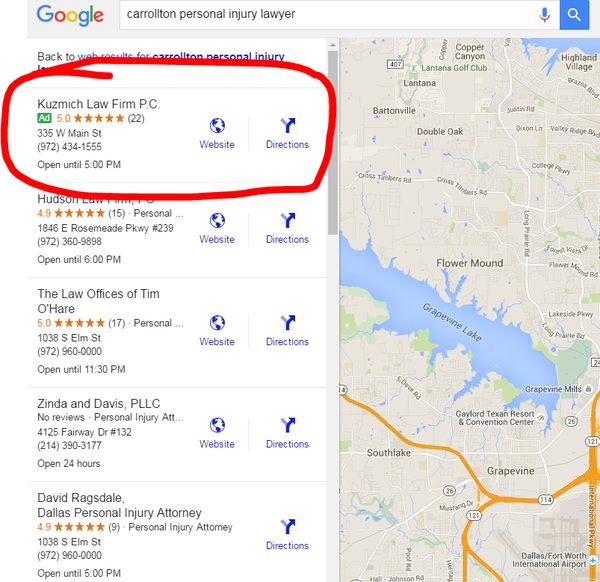
    Google, Bing, and other major search engines are constantly changing and developing their search engine results pages (SERPs). Major components of these pages include organic, paid, and local results. With the ever-increasing use of mobile, these local results are growing in importance in overall SEO strategy.
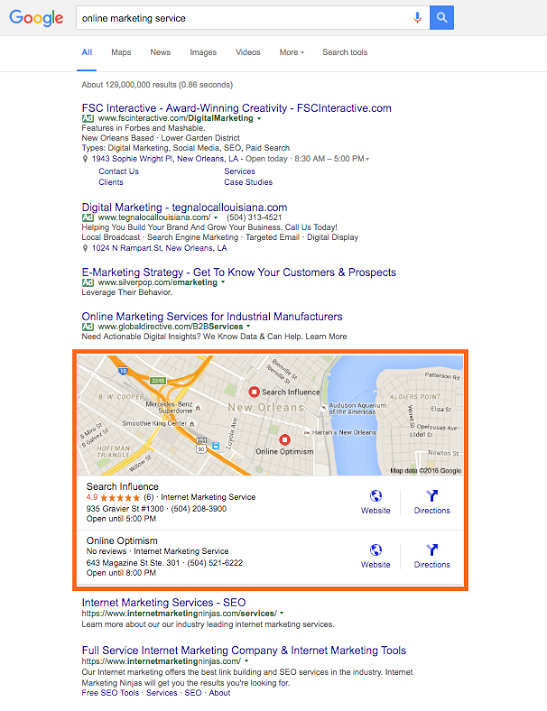
    SERP Screenshot

    So how does one account for local SEO, you may ask?

    This is where citation cleanup comes into play.

    Citations are the presence of a business’s name, address, and phone number (NAP) on any website. As search engines crawl websites and find instances of a business’s NAP, they look for consistency in that information, so the more accurate and consistent your citations are across the internet, the better your business will rank in a local search (i.e. in Google and Bing maps as well as in the maps packs on SERPs).

    Ensuring this consistency is called citation cleanup. From my experience, there are four major steps to effective citation cleanup:

    1. Ensure your address is USPS verified.
    2. Update your NAP on your website.
    3. Audit and build your citation on the major data feeds and directories.
    4. Find your remaining existing citations and make sure they are all consistent.

    Let’s break this down and go into a little more detail.

    Ensure Your Address Is USPS Verified

    This is an important place to start because, as you’ll find later on, many of the directories you end up submitting to or cleaning up have standard formatting that in most cases aligns with USPS’s own standards. So, if your format doesn’t match it will be harder and less likely to achieve consistency.

    Update the NAP on Your Website

    After the USPS verifies your address, make sure it’s reflected on your website. Include your whole NAP as a structured citation. Your website is the baseline for your NAP; this is what Google and other crawlers will compare other citations to, so it must be correct and formatted here.

    **For a little extra oomph, consider marking up your citation on your website with structured data like Schema. This will help crawlers understand it better as your NAP.

    Audit and Build Citations on Major Data Feeds and Directories
    Local_Search_Ecosystem_US

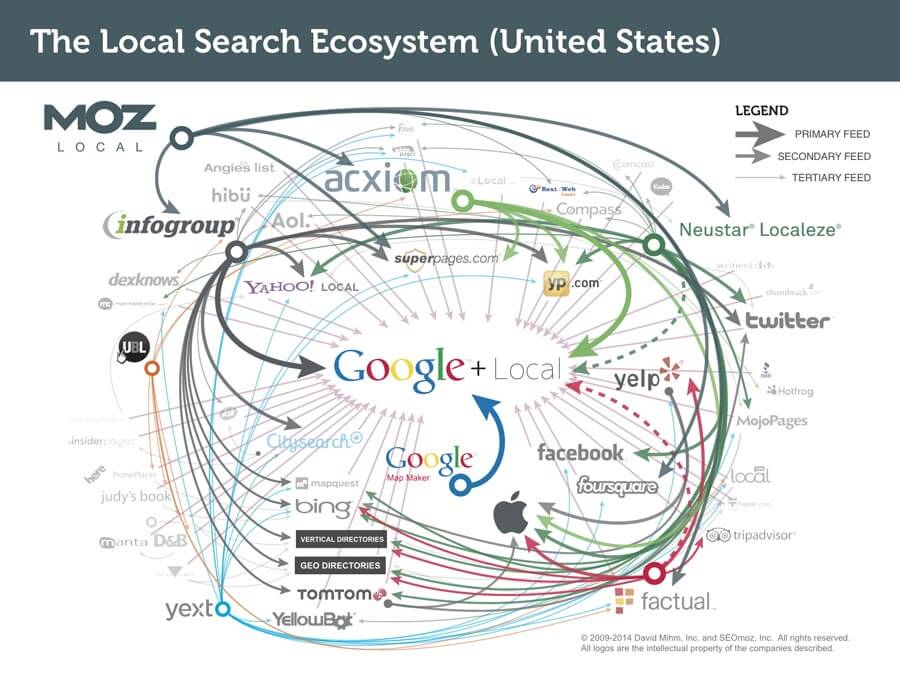
    The reason I put this before doing actual cleanup of existing citations is because citation dissemination is a hierarchical process within a large ecosystem of directories. There are a few feeds that push to other smaller directories where your citation may already exist, so updating these and the major directories first will make cleanup later on a little easier.

    There are four major feeds to check first: Infogroup, Acxiom, Localeze, and Factual. These feeds trickle down to other directories and local search engines, including Yahoo! Local, Apple Maps, SuperPages, etc. This is also where that USPS-verified address comes into play, especially. Part of the reason these four directories are so authoritative is because they have such strict guidelines on address verification.

    Along with those feeds, you also want to update the major local directories. Since many of these are directly on those search engines’ sites, this is absolutely essential to local rankings. These major directories include: Google Maps, Bing Maps, Yelp, YP, Foursquare, etc. You may also consider auditing your social media accounts to make sure your NAP is correct there as well.

    Find Remaining Existing Citations and Make Sure They Are All Consistent

    Once you’ve built your major citations, you’re ready to do some additional cleanup, if necessary. It’s useful for all businesses to be aware of their citations across the internet, but some businesses may need additional cleanup more than others.

    If you’re a business who’s recently changed their name, address, phone number, or website, you should definitely consider more extensive search and cleanup. The same goes for those who are still seeing problems with their local rankings. You may be missing a citation or set of citations that’s affecting your rankings.

    There are a number of ways to do this. You can use Google just to search for instances of your citation manually, or you can use a service to do a more in-depth search for your citation and its variations across the internet.

    Either way, you’ll find that your citation can be updated on some sites more easily than others. You may need to submit forms to have it updated, contact website administrators, or go through other channels to get it done.

    If you’re business is at this point, you may find it more cost-effective to hire an agency or service to do this kind of cleanup.

    However, once you’ve successfully cleaned up your citations, you’ll rest easier knowing that your business information is correct across the internet.

    Citation cleanup is an important factor in local and overall SEO. By ensuring NAP consistency, you’re gaining valuable traffic from local search engines! To learn more about why NAP consistency is important with your SEO, you can watch this short video.

    Image 1 Credit
  • Seeing Colors? Google Expands Paid Ads

    Google Ads

    Late last month Google changed the landscape of internet marketing once again. The latest update from Google expanded paid ads into two new areas, Maps and Local Finder. These two places were once a haven for those of us with beautiful, organic traffic, but we are set to be invaded by the strong-arm tactics of paid advertising.


    Local Finder Ads

    This change is likely to cause tears of both sadness and anger. In case you forgot, let our very own Amy Arnold explain how Google eviscerated the old Local Pack. In short, Google decided to reduce the number of local businesses displayed in the Local Pack from seven to three. Some of the default information displayed was also removed in an attempt to streamline the app. Many users found that the top three results were not enough, which compelled them to click that little “More Places” link in the search for more leads. After the most recent changes, ads are now displayed at the top of the More Places section, which is similar to how they are placed in the regular search results.

    Green Google Map Ad

    In addition to the new Penguin update, explained by yours truly, local businesses also have to deal with their information being relegated by potentially three spots. Even though it is possible to get your website higher by paying, it seems that organic content creators have been hit hard enough to cry.

    Cat Crying GIF

    Maps Ads

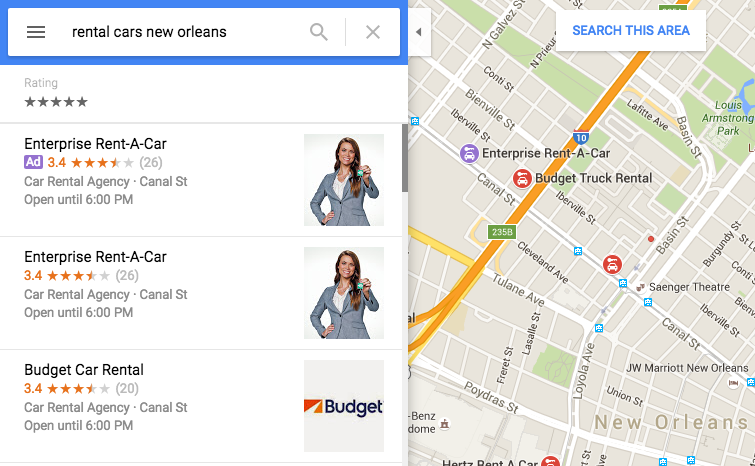
    Google Maps also received an ads revamp and a new color coding. Purple ads are now showing up, and Google decided to fill us in on exactly why that’s happening. These ads are controlled by AdWords, and users who have the location extensions enabled and are still charged the standard cost-per-click rate whenever a user attempts to get location details and directions or complete a mobile click to call requests. In addition to having your business show up at the top of Maps search results, a nice purple icon is also added to the map on your business location. By setting the targeted area, advertisers are able to give some extra range to their map pin in addition to appearing at the top of the list. Of course, if you plan on buying ads and placing your business at the top of search results to pay-per-click, you better make sure your business information is up to date.

    Google Purple Ad

    One thing you may have noticed from the above image is that the Enterprise Rent-A-Car is listed as both the top result and first advertisement. This would be an example of what not to do. A company may appear twice because it is already the top search result in this area. This redundancy happens a lot in regular search results, but the map ads allow you to select an area, allowing your ads to reach further than your search results normally would. This process is of course very confusing, but Search Influence’s expert Online Ads team is certified in Google AdWords and helps our clients gain maximum visibility. If this seems overwhelming, they’d be happy to take care of your advertising needs.

    Image 2 credit: Brian Barwig

  • Google My Business for Doctors: Visibility, Authority, & SEO

    One of the first steps in improving your searchability with Google is to claim or create a Google My Business listing. With Google My Business, you can manage your information in Google Maps and Google Plus. Since My Business is owned by Google itself, the links gained from these profiles are highly valuable and authoritative.

    However, if you’ve ever tried to claim your Google My Business listing, you may have seen how complex it can be, especially for businesses like medical practices. You may have had questions like: “How do I represent multiple locations for my practice” or “What if I want patients to be able to find their doctors in addition to my practice?” Well, today we’ll go through how to establish your Google My Business presence with exactly those questions in mind, and more!

    1603-SI-KierstensBlog-KG-A-01

    First, let’s dive a little deeper into the world of Google My Business. Google My Business is essentially the dashboard in which you can maintain your information with Google directly. This means that by creating a listing in Google My Business, you’re also creating a Google Plus page and, if establishing a local presence, a Google Maps listing as well. By doing so, you’re telling and verifying with Google, “Hey, I’m a real business, and here’s my real information!” By maintaining that information and posting to your Plus page, you’re proving to Google that you’re the authority on your business and that your business is a valuable resource for users to find.

    Sounds great, right? Who doesn’t want an in with Google? For many businesses, this can be as simple as claiming and verifying a single business listing. But for medical practices, it can get pretty complicated.

    Claiming Your Google My Business Local Listing(s)

    To begin, claim and verify your practice’s primary local business listing. If you are a multi-location business, go ahead and claim the local listings for each of your addresses. Each local listing will need to be verified by either phone or postcard, and no edits can be made until then. Once that’s done, check out these tips and guidelines for building your practice’s Google My Business presence:

    1603-SI-KierstensBlog-KG-B-01

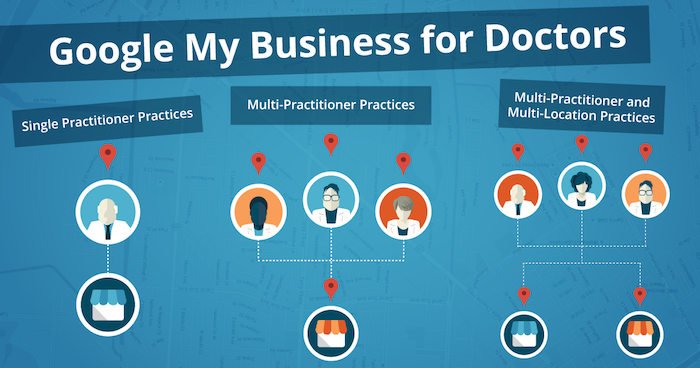
    1. Single Practitioner Practices
      For practices with just one public-facing doctor, you’ll need to decide whether or not to use that doctor’s name instead of the business name. This is wholly a personal decision, but do not create Google My Business pages for both.
    2. Multi-Practitioner Practices
      For practices with multiple public-facing doctors, it is acceptable to create local pages for each doctor, in addition to the practice’s local page. If this is the case, do not include your business name in the name of the practitioners’ pages. And try to differentiate between these pages with either a different phone number or suite number for each doctor, when possible.
    3. Multi-Practitioner and Multi-Location Practices
      For doctors who work at multiple locations, it is acceptable to create separate local pages for each doctor for each location, according to Google’s guidelines. However, it’s even more important that you’re able to differentiate between these pages with separate phone numbers and/or suite numbers. The practical likelihood that Google will flag these as duplicates is higher so proceed with caution! If your goal is to make sure clients can find their doctor’s contact information for each of their locations, then this is a solid practice. Otherwise, if you’re trying to get all of your doctor’s to rank for general searches you’ll need to do more than just add them to Google My Business.

    Brand Pages

    As mentioned before, Google My Business is two pronged; it lets you manage both your local presence via Google Maps and your social presence via Google Plus. If you’re a multi-location practice, consider creating a Google Plus Brand page in addition to your local pages to consolidate your social presence. Brand pages are not linked to Google Maps in any way. Instead, they are purely social platforms for you to manage…you guessed it, your brand! So rather than doing so on each of your local pages, you can post to your one Brand page and gather the same clout with Google.

    That wasn’t so bad, right? Remember to keep these pages updated and treat your primary Google Plus page as a social media profile, like Facebook or Twitter. By doing so, Google will be able to better recognize you as a trustworthy and authoritative source.

    Now that all your pages are claimed, verified, and updated, you’re one step closer to a solid SEO presence!

  • Does My Business Really Need a Google My Business Page?

    4-14-2016-BlogImage2

    In today’s interconnected world, businesses are putting a lot of effort toward getting their name out there on social media. The two biggest social media platforms, Facebook and Twitter, are used by businesses in all industries to connect with potential customers. The social exposure achieved through Facebook and Twitter is very important for businesses to market to and connect with customers and clients. Another social media platform, Google My Business, is very important to a business’s online success for a number of different reasons. Around here, one question we usually hear from our clients is “Why Google My Business?” Below are some ways that having a presence on Google My Business can help a business succeed online through more SEO-focused means!

    1. The Maps Pack: Establishing a Local Presence

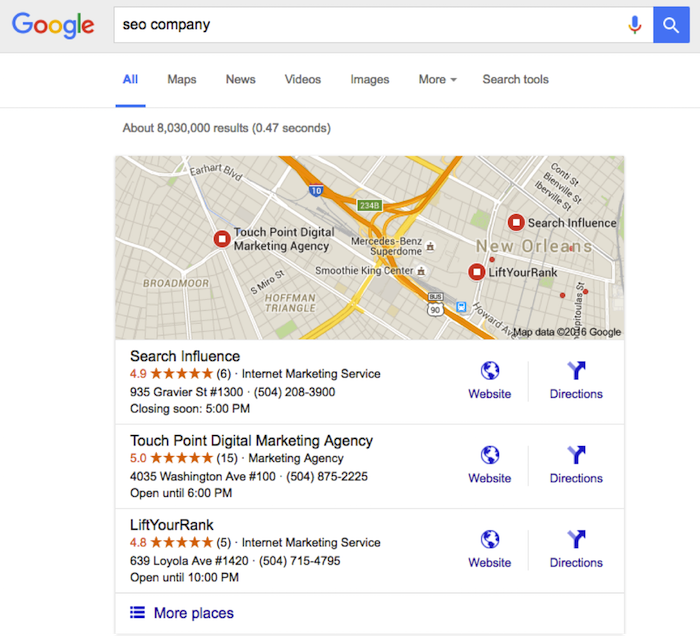
    One important reason for having an established presence on Google My Business is what we like to call the “maps pack.” Without having a Google My Business page, a business will not show up in the local results at the top of the search engine results page. These results are presented as a map with pins representing each business, with information (website, phone number, address) below that is pulled from Google My Business. These more visual results allow the user to gauge the geography of businesses they potentially want to visit.

    This maps pack feature creates fierce competition for local businesses. Ever since a recent update to the maps pack, which reduced the number of businesses listed in the local search results from seven to three, having a presence on Google My Business has become even more important. Optimizing the Google My Business page allows a business to make sure that their information in the maps pack will be correct when they are included.

    Not showing up in the maps pack means less traffic through the search engine results, and due to the prominence of the maps pack in the mobile search results, say goodbye to a large amount of mobile clicks. As we all know, the further down a business is in the Google search results, the less likely users are to click into its information. As you can see below, showing up in the maps pack is very attractive to potential customers. Now isn’t that an SEO company you would want to hire?

    Maps Pack Image

    2. Reviews!

    Another benefit of having an active Google My Business page is the importance of online reviews. Remember the “maps pack” we just discussed? A study by Digital Marketing Works shows a strong correlation between Google My Business reviews and showing up in the maps pack in the local search results. Search engines strive to give searchers a great user experience, so they lean toward sending users to a business that other people have rated highly online.

    Also, having these Google My Business reviews displayed prominently on the maps pack and Google search results will help convince customers to click through. In fact, ratings and reviews are some of the most influential SEO factors in getting users to convert into customers and to purchase your goods or services. Due to this high conversion rate, having these trusted Google My Business ratings and reviews in the search results and maps pack is very important for businesses trying to market themselves online!

    3. Google Publisher

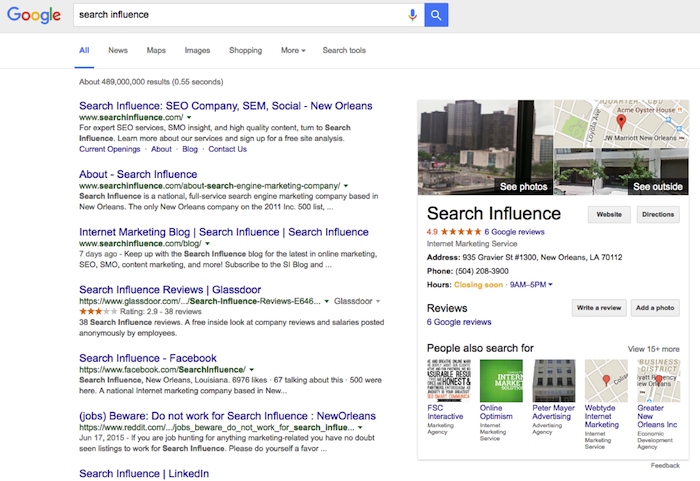
    Another reason Google My Business is important is the effect it can have on Google Publisher. Adding Google Publisher to your site allows your Google My Business information to show up in the “Knowledge Graph.” Triggered by a branded search, the Knowledge Graph is the window of information that shows up on the side of the search results page. This information (reviews, photos, hours, and address) comes straight from Google My Business and serves as a great first look at a website. Having an optimized and active Google My Business page allows the correct business information and more ratings/reviews to show in this knowledge graph. This can gain users’ trust and make them more likely to click into your business’s site! Below, you can see how a branded search for a company allows this Knowledge Graph to load and show more information about the business.

    Knowledge Graph Image

    Making sure you are active on Google My Business can definitely help with social interactions and getting your brand established in social media, but the benefits of this platform go far beyond that. Activity and having correct information on your Google My Business page go a long way toward improving your business’s SEO and your ability to convert clicks into customers.

  • Running With The Pack: Competing in Local Search Just Got Harder

    Running With The Pack: Competing in Local Search Just Got Harder

    Overnight on Aug. 6, Google updated search results for mobile and desktop searches from local seven-pack to a three-pack. This is not just in the United States; it seems to be worldwide and rolled out at one time. It’s really early to start dissecting this change, but I’m not seeing much good about it.

    What Does This Mean for Organic Search?

    For organic search, it means it’s even harder for searchers to find you. It looks as if these changes from Google are driving consumers to a business’ My Business page and perhaps encouraging more ad spending.

    Organic—Looking a Little Closer

    On Mobile

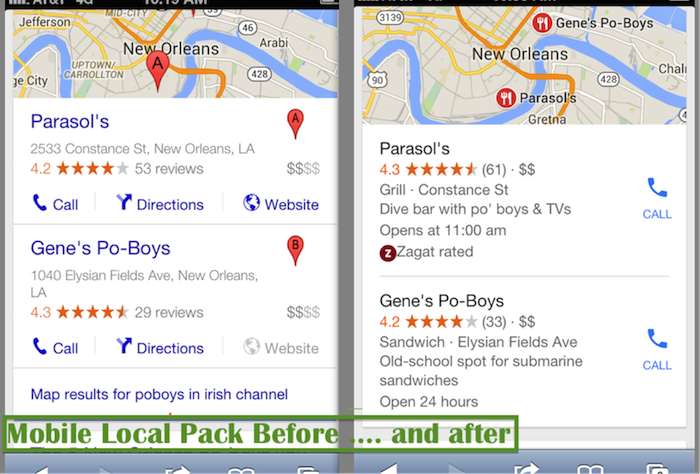
    Before Google rolled out this change, when a search on mobile gave local pack results, the user could immediately click on what they needed directly on the search results page, including:

    • Click-to-call
    • Click to get some directions
    • Click on the website

    Now, the mobile local pack only provides a click-to-call button:

    Mobile Local Pack Click Call Image

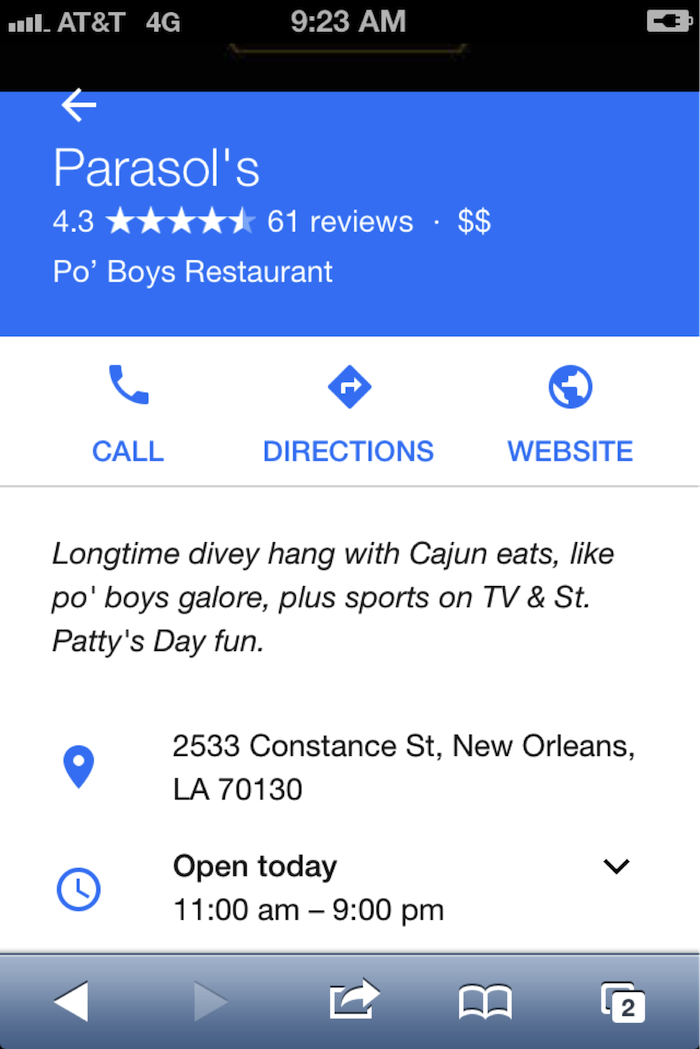
    If the searcher wants to visit the website for more info, they have another click in order to navigate to the My Business page:

    Navigate Google My Business Page Image

    On Desktop

    With the new update, I get the three-pack with no immediate click opportunities:

    DesktopThree Pack Google Image - Search Influence

    Update:

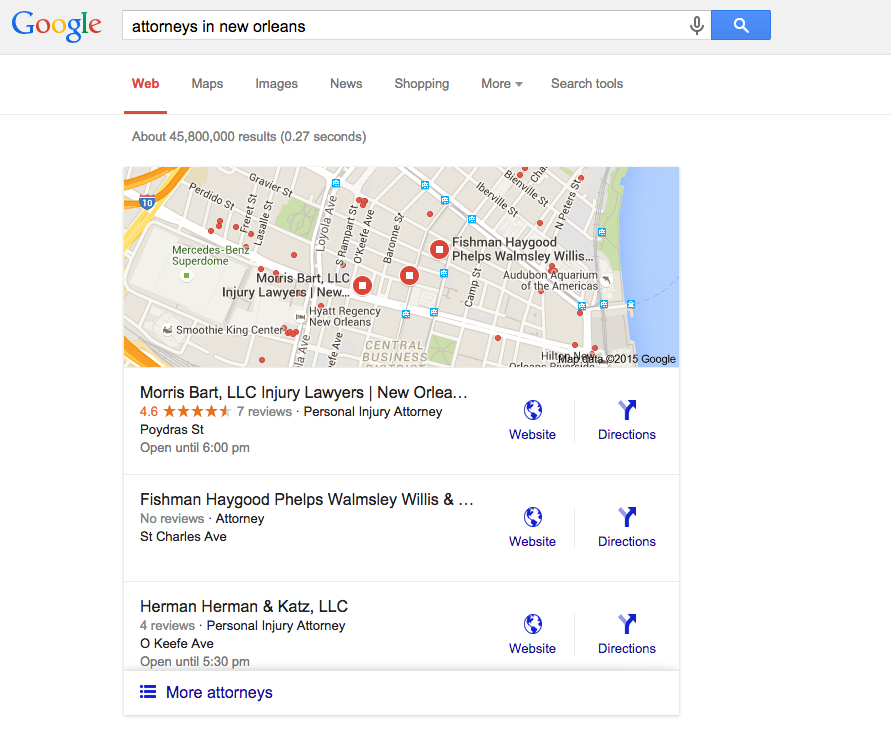
    Ryan Schulze, Senior Account Associate, commented, on this published post with an interesting correction. (It takes a village.)  He shows how some searches on desktop are giving the website link in the 3-Pack.  It suggests different search categories have different clicking opportunities.  I would guess this is based on percentage of search performed on mobile vs desktop.

    attorneys in new orleans 3 pack desktop

    Back to the story …

    I click on Parasol’s, thinking I will get its website or the Google My Business listing. Instead, it drives me to the local finder with ALL of the competitors right there!

    • This is not great if you’re in the three-pack because you must fight the competitors again for the searcher’s attention.
    • If you’re not in the three-pack, this levels the playing field. You have a chance to woo the searcher away from their initial choice.
    • If you are a searcher, it’s annoying because you have already indicated your preference with your first click, and Google forces you into an extra click to call the business. In addition, you are forced into viewing more choices after you made your decision.

    Desktop searches are losing ground to mobile, but desktop isn’t dead, and it still dominates search in some industries—usually those that skew to an older population.

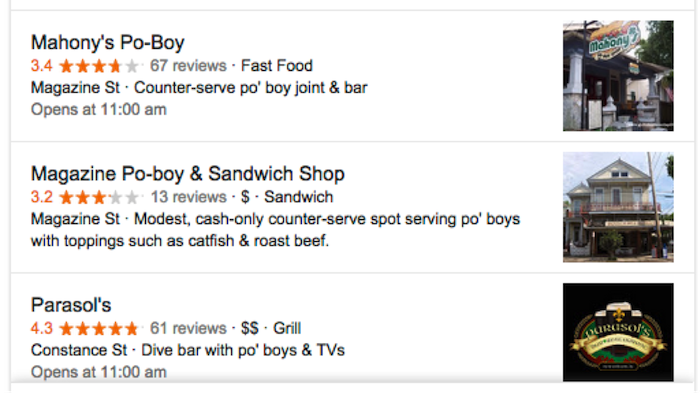
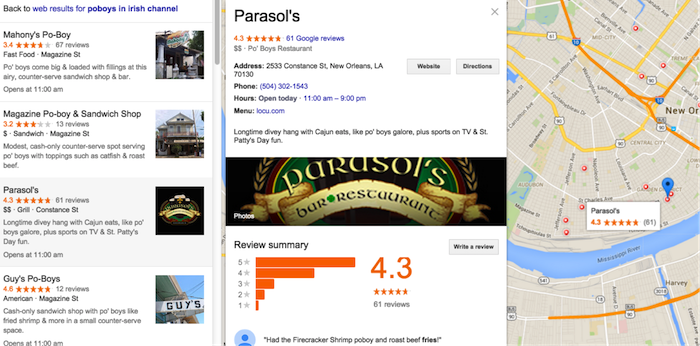
    This does show us that it is still incredibly important to claim and optimize a Google My Business listing. Those Google My Business listings can get your business into the desktop local finder list, which is a long list of competition, so images and reviews are still important efforts to woo the searcher over to your business:

    Local Business Maps Pack Image - Search Influence

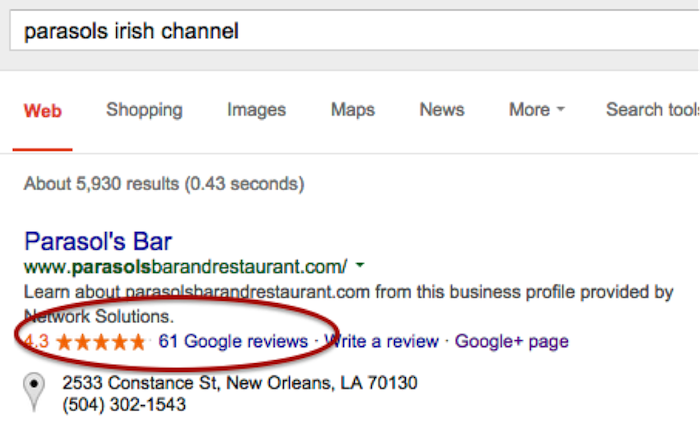
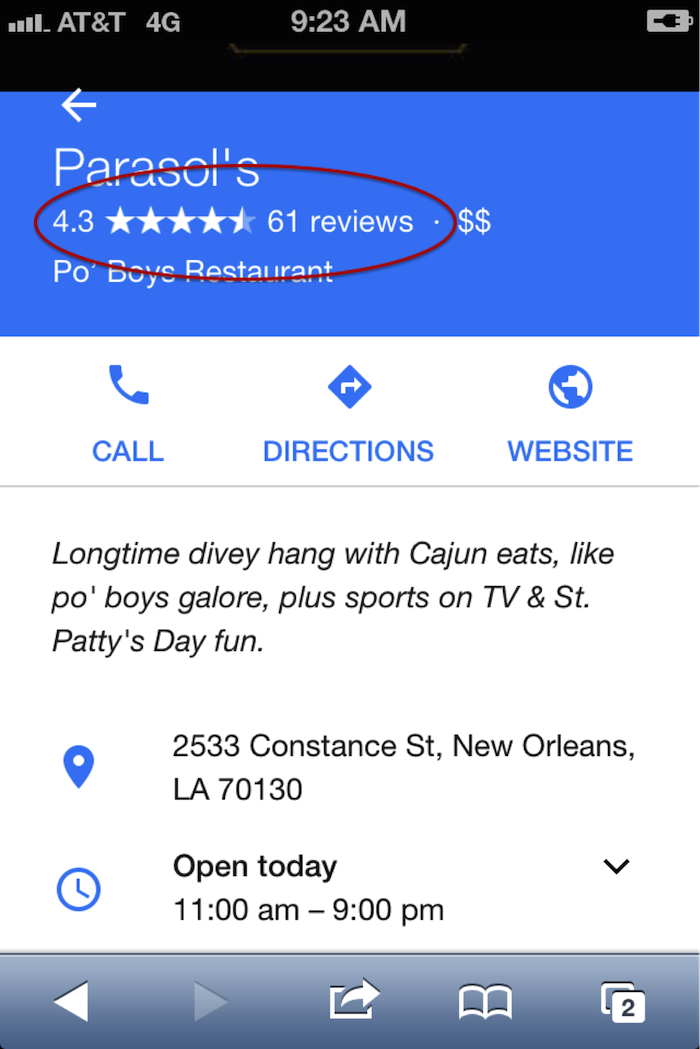
    Reviews on branded search results on desktop and mobile:

    Online Reviews Branded Search Image - Search Influence

    Online Business Reviews Mobile Image - Search Influence

    (FYI: if you’re ever in New Orleans in March, Parasol’s is a great place to be.)

    Early Data on Organic Visits

    I was chatting with Megan Lindsey, senior account manager at Search Influence, about the effect of this change for one client in particular. Lindsey sums it up nicely: “I imagine now since a searcher has to click on the business name and then once more on the ‘website’ button that people aren’t as inclined to keep clicking. I would think that most clients, even if they were in the top three maps results, are losing organic traffic because of it, but especially the ones who aren’t there anymore.”

    The early Google Analytics data supports Lindsey’s hypothesis. I found no great winners: Several clients’ Google organic was static, and several were worrisome. These clients are local businesses that are historically very strong in their markets. Over the weekend dates, there were 20 percent to 35 percent losses in organic website traffic, which seems to have rebounded Monday to Wednesday, so it appears things are still settling down.

    CLIENT A

    google / organic

    Aug. 7, 2015 – Aug. 10, 2015: 179 visits

    July 30, 2015 – Aug. 3, 2015: 285 visits

    % Change -37.19%

    Aug. 7, 2015 – Aug. 12, 2015: 319 visits

    July 31, 2015 – Aug. 5, 2015: 364 visits

    % Change -12.36%


    CLIENT B

    google / organic

    Aug. 7, 2015 – Aug. 10, 2015: 161 visits

    July 30, 2015 – Aug. 3, 2015: 210 visits

    % Change -23.33%

    Aug. 7, 2015 – Aug. 12, 2015: 161 visits

    July 31, 2015 – Aug. 5, 2015: 210 visits

    % Change -6.76%


    CLIENT C

    google / organic

    Aug. 7, 2015 – Aug. 10, 2015: 36 visits

    July 30, 2015 – Aug. 3, 2015: 54 visits

    % Change -33.33%

    Aug. 7, 2015 – Aug. 12, 2015: 58 visits

    July 31, 2015 – Aug. 5, 2015: 67 visits

    % Change -13.43%


    Have Calls Increased?

    The clients above usually do really well in the local pack and in organic website traffic, so let’s see what happened to their call volume. If you are a lucky business falling in the three-pack, consumers might be calling your business more now than visiting your website.

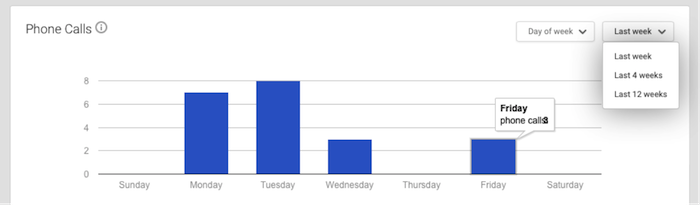
    When you log into the Google My Business page and go to Insights, this is the data you get:

    Phone Call Data 1 Image - Search Influence

    It’s severely limited and not really insightful. The date ranges are not customizable. There is no data after Aug. 8. I have to wait until next week to get any data on effects of call volume from the three-pack rollout, and I can’t compare to the previous week. I will have to do some elementary math that surely Google could program to ensure a better user experience.

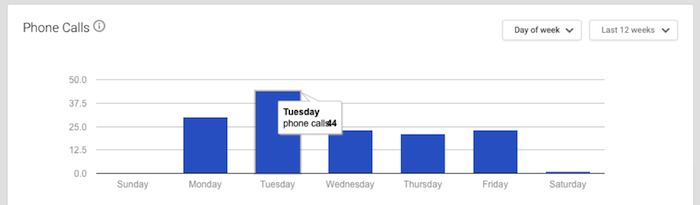
    The data is summarized to the point of being so generalized it is virtually useless. This is 12 weeks of call data. I know Google can do better.

    Phone Call Data 2 Image - Search Influence

    It warns that call volume is “approximate and only significant values may be shown.”

    Also, the call numbers could be calls from three different sources: Google Maps, search and maps for mobile. This is so frustrating for business owners. I would want to know EVERY call I received! And I would want to know where I received the calls! Google has the data, and it just isn’t sharing with business owners.

    And Paid Search?

    On the first day of the this rollout, local search expert Mike Blumenthal made these early comments: “I am not sure what will happen on clicks for AdWords, but those businesses that were lower in the old display may feel compelled to double down on their AdWords activity.”

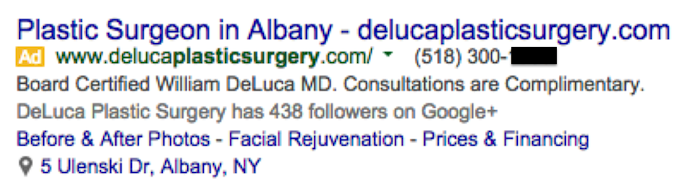
    I asked Jeanne Lobman, senior online advertising manager at Search Influence, to check it out and give us some input. “Those businesses that were previously only ranking in spots four to seven in the local pack (and nowhere organically) are now going to need to spend money on AdWords ads in order to be seen in the search engine results pages. Additionally, since Google has removed the website URL and the phone number from the local pack info, it could be beneficial to run AdWords in order to make sure searchers can easily find your phone number and call you (on desktop). This would be accomplished by using call extensions with your campaigns, which adds your phone number to your ad (as seen in the below example).

    Plastic Surgery Google Ad Phone Image - Search Influence

    On mobile, the local pack results do include the call button, but there’s no link to the website. When you click the local result on mobile, you are taken to the G+ page, which then has a link to the website. To avoid having that extra step, running an AdWords campaign on mobile ensures you can land people directly on your website with one click.”

    Lobman pulled some AdWords reports to see what impact this change may have had on click-through rate. She says it’s really too early to tell any effects, but the data so far suggests there seems to be an increase in clicks and impressions but little to no change in click-through rate, conversions and conversion rate.

    So Now What?

    We need to give it a little more time to settle in before we make any dramatic changes. When we looked at six days of organic visitor data versus four days of data, we see big improvements, so watching the data to make smart moves is the action item.

    Walk through the process that visitors might use to find your website online, and try to improve what you can control, such as adding phone numbers in your desktop AdWords ads or continuing to encourage reviews from your customers.

    Your engagement online is a reflection of how you engage with your customers in real life. Providing for the searcher with easy linking from ads, Google My Business images, reviews and informative website content is a long-term plan, and it’s a good one to win trust and authority.


  • A Tale of Two Google+ Updates: Shutting Down G+ Pages & Disconnecting YouTube From G+

    Shuttered Google Local Pages - Search Influence

    In the past week, two new Google Plus updates have come to light. First, we found out that as of July 28, Google has plans to shut down inactive and unverified Google My Business (aka Google Plus) listings. On Monday, July 27, Google’s Bradley Horowitz posted on Google’s official blog that in the coming months, it will be removing the requirement for users to have Google+ profiles to use various Google products such as YouTube and Google Photos.

    The Update: Google My Business is Shutting Down Unclaimed, Unverified Listings & Unverifying Inactive Accounts’ Listings

    On July 23, a Local Search Forum user posted an email they received from Google as follows:

    UPDATE – Announcement from Google July 22, 2015

    Dear photographers and agencies,

    In the past few months, you may have seen some changes in the look of Google+ pages that have been associated with Google My Business (GMB) accounts. These changes, including how we treat business pages without owners, are part of Google’s ongoing effort to simplify people’s experience with our tools. We are constantly working to provide only valuable and rich content to our users.

    On July 28, Google will begin shutting down those GMB–associated Google+ pages that have not been associated with user accounts and are also not verified. You may find that some of your Business View tours also sit on such pages, but note that after this removal of unverified Google+ pages, the Business View tours will still remain available on Google Maps and Google Search.

    Here are a few recommendations for informing any business customers that may be impacted by this:

    Encourage your business customers to verify their listings if they wish to retain their Google My Business page …

    If a business owner decides later that they would like to have a Google My Business page, please advise them to create a new page and verify their listing. The Business View virtual tour can be then transferred to the new verified listing. Please log a case to our support teams to request that images for your business customer be forwarded to the new GMB page.

    Please point your business customer to their images in Google Maps.

    Best,

    The Google Maps | Business View team

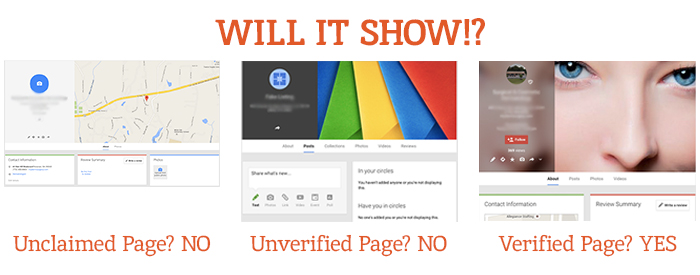
    This was specifically geared towards photographers so they would know how to handle the effect on Business View tours. What this means for all Google My Business users is that unclaimed local pages will most likely no longer be visible (as Google has always said is the case for unverified Google Plus Local pages).

    Different Google Local Pages - Search Influence

    As always, this update is accompanied by Google’s explanation that all actions are in the best interest of users and geared towards improving the user experience. Thanks, Google!

    On June 4, via the Google Business Help forums, Jade Wang (come visit us in NOLA again soon 😉 ) of the GMB Maps team also announced: “If a user is unresponsive to our attempts to contact him or her and has not logged into Google My Business for a significant length of time, then we may unverify pages in the account.” Here’s the full update from Jade:

    In some cases, we may contact Google My Business users via email to confirm that they are still actively managing a business page. If a user is unresponsive to our attempts to contact him or her and has not logged into Google My Business for a significant length of time, then we may unverify pages in the account. We’re doing this in order to continue to provide users with the best experience when they’re looking for local businesses like yours. If you find that a page in your account has been incorrectly unverified, please contact support to get assistance restoring verification.

    It’s a good idea to keep an eye on the inbox associated with your Google My Business (Locations) account. It’s also a good idea to regularly log into Google My Business (Locations) to confirm that your business information is current and accurate.

    My Take On It

    Both of these updates could mean great news for businesses that have struggled with requesting ownership of listings that were verified in the past by a person or an account they no longer have access to. To fix this issue in the past, you’d have to submit an ownership request form to Google to gain access to these listings. Then, you’d have to wait 10 business days (as per Google’s rules) and reach out to support (they could check to see if the account never responded to the request). After this 10-day period, the support representative could determine that the account that owned the listing was inactive and release the listing to you for claiming and verification.

    Basically this means inactive accounts are no longer roadblocks to getting access to business listings in Google My Business!

    While some issues may be alleviated with the update, what’s harder for search engine optimization work is that now it’ll be more difficult for us to see unverified duplicate G+ pages, old or closed G+ pages, and practitioner G+ pages that could be hurting businesses’ local rankings. Map Maker should allow us to still see the data but not the pages themselves.

    But there are signs this hasn’t rolled out completely yet. I have some unverified, fake listings in my Plus account (shhh, I know) that I use for training purposes that haven’t been touched yet. This is likely a slow rollout that started July 28. I did notice some changes to Maps navigation recently that were probably in preparation for this, though. For example, you used to be able to click “Write a review” from the Maps results to get to the G+ local page for a business, but now that just opens a review dialogue in the Google search results for that business in another window. This makes sense, since unclaimed businesses will no longer have pages.

    The Update: Google+ Is Disconnecting From Unnecessary Services

    On Monday, July 27, Bradley Horowitz posted on Google’s official blog that Google+ would be moving towards a “more focused Google+ experience,” which basically means no longer forcing users of various other Google products to have a G+ profile to use said products.

    Specifically, Google wants to foster the natural sharing environment of G+ by adding new features such as Google+ Collections. This update means that all you need to share content, communicate, and have a YouTube channel (among other things) is a Google account and not necessarily a G+ profile. Also, it will continue to keep Google accounts private and unsearchable. For those who were forced to create G+ profiles to use YouTube and other Google products in the past, Google promises that it will “offer better options for managing and removing those public profiles.”

    My Take On It

    Congrats to everyone who was pissed when they couldn’t use YouTube without a Google+ profile!

    Mad Men Cheers Joan

    At first, it seemed that G+ pages that are already connected to YouTube channels might be disconnected. But, that last comment about offering ways to get rid of unwanted G+ profiles, points to the fact that this update will not actively affect anyone in this way.

    Since this update has not yet rolled out, however, it is important for users to realize that they should not delete their G+ yet! Doing so prior to roll out will force you to delete your entire YouTube presence!

    Let me know your thoughts on all of these new Google updates! I’d love to hear what other users think of these changes.

    Image source:

    Mad Men gif

  • How to Win Followers and Influence People: Build Your G+ Following in 3 Steps

    We’ve cracked the code to successfully increasing the Google+ following for a small business (or at least we know we’re on to something). Our little experiment shows that if you follow three simple steps, you can gain more followers on Google+.

    Now, before you equate the importance of Google+ (colloquially referred to as “The Plus”—it’s a thing, I promise) to that of utensils at a pizza shop or a certain search engine that rhymes with “wing,” it is important to note that although Google has consistently denied any causal relationship between what shows up in a Google search and activity on “The Plus,” evidence shows there may be reason to listen up. Besides, even if you don’t drink the Kool-Aid and immediately become a Google+ fanatic, I think we can all agree that vying to be in Google’s good graces is always a smart idea. I mean, come on, you wouldn’t skip your boss in line at the movie theatre or punch Ryan Seacrest in the face after winning a trip to Hollywood (OK, I can’t make any promises on that one), but you get the point. Don’t bite the hand that feeds.

    Follow and Compliment

    Now that we have established that Google+ matters, let me clue you in on a little G+ secret. People on social networks are like that hyper-masculine guy on your road trip: all they want is to be followed and complimented. Following, and subsequently +1’ing a person on Google+, is like referencing your buddy’s cheese blog in the bar you are currently patronizing with a group of friends. Not only have you discovered him on an incredibly remote platform, but you’ve even followed up with a compliment! Go you, Stanley, you’re relevant, and people appreciate your knowledge of cheese.

    In all seriousness, though, over the past few months our experimentation shows that you will receive at best a 40 percent return rate in followers. For every 100 people followed and +1’ed, we received approximately 40 follows in return. It is important to note that the client happened to be a particularly interesting and popular business. That’s not to say the inherent love of HVAC nuances isn’t bountiful across the land, but it’s just something to keep in mind.

    Given the fairly low rate of return, you can see how this may prove to be quite taxing if your goal of followers is in the hundreds, especially considering Google+’s limit of 50 follows per day. So what shall we do as small businesses owners armed with this knowledge? Luckily, as your in-house guinea pig, I am here to break it down into three simple, effective steps.

    3 Steps to Building Your G+ Following

    1) Start by following larger, established pages in your geographic area. Think The Wizarding World of Harry Potter if you are located in Orlando. If you need help getting to the Google+ page for The Wizarding World of Harry Potter, I can’t help you. If you have to ask, you’ll never know. If you know, you need only ask.

    2) Once you have lost yourself in a voracious “following” spree, now it is time for flattery. The people who occupy the comment threads of your newly acquired network are relevant to you in a few ways. Not only do they most likely engage with local businesses, but they are also active on “The Plus” ← there it is again! See, I told you it’s a thing. Start following and +1’ing posts in your stream you deem relevant to your business’s interests.

    3) Be sure to watch out for exceeding Google’s “follow” limitation on a larger scale. After you exceed 1,000 people/pages followed on Google+, we’ve noticed that the social network gets a little buggy. If you begin “maxing out” of follows well before your promised allotment of 50, simply take a break for a week, binge on some Netflix, and live to fight another day.

    That’s all for now, folks! If my team discovers any new, innovative ways to garner your Google+ following, we will be sure to let you know. If you hear nothing, that means Skynet, ahem, I mean Google has discontinued “The Plus.”

    Image sources:

    Kool-Aid GIF

    Guinea pig GIF


  • This National Small Business Week, Step up Your Online Marketing

    It’s National Small Business Week—time to celebrate the successes and the insane amount of work small business owners put in. The struggle is real.

    You know you’re a small business owner when…

    …Your nightmares are about getting bad Yelp reviews.

    …Your social media “strategy” consists of bribing your college-aged daughter to handle your Facebook and Twitter accounts.

    …Your holiday hours did not quite make it to the Internet, and customers actually showed up only to find your business closed.

    To cure these and other headaches, start with a little TLC for your website and your online marketing strategy—after all, both of these play a huge role in bringing you customers, but they may unfortunately also be keeping you up at night. Follow these top three online marketing tips for small businesses.

    If You Can’t Beat ‘Em, Join ‘Em

    It may sound upsetting that Yelp listings are front and center in a Google search for your business while your own website is far down the list of search results. But savvy small business owners know that Yelp and other large online directories can win over customers with minimal effort. So if you can’t beat the Yelps of the world, join ‘em!

    This strategy is also known as Barnacle SEO. Basically, your business needs to attach itself to large, fixed objects and then wait for customers to float by in the powerful current. Identify the large, high-ranking online directories that matter to you most, such as Yelp, and add your information there in the hopes of “borrowing” some of the page one rankings. There are many trusted online directories like Yelp out there you can barnacle up to: Angie’s List, Foursquare, Google+, Avvo (for lawyers), Healthgrades (for doctors), and even TripAdvisor.

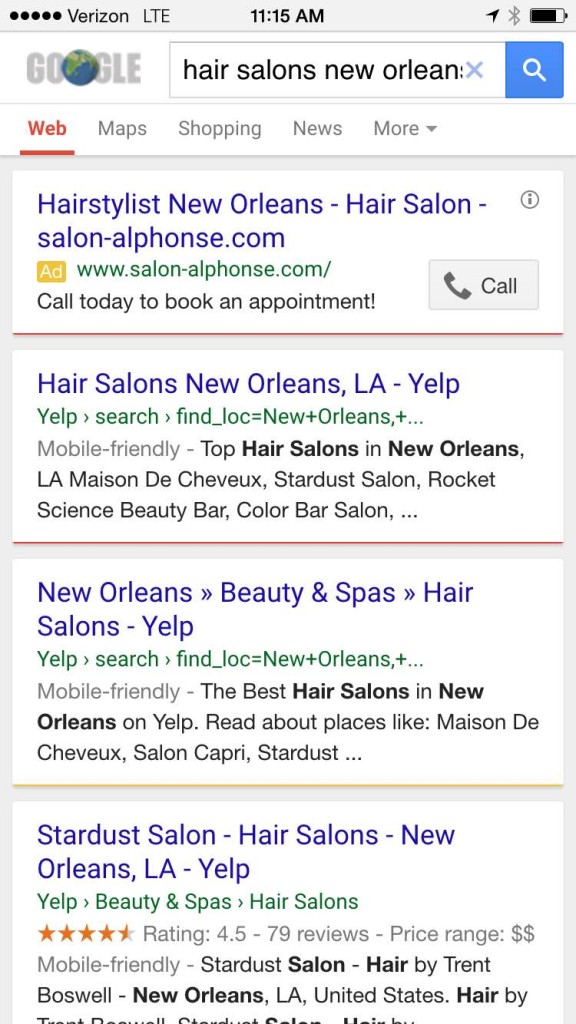
    And this tip comes with a bonus: this strategy also works well for customers searching on smartphones because these websites are optimized for the mobile experience—providing the targeted information that local customers searching on their smartphones really need. When you perform a Google search for “hair stylists New Orleans,” for example, the top results are mostly from Yelp:

    Yelp Mobile Screenshot Image - Search Influence

    Target Your Social Media Efforts

    Another thing that keeps you as a small business owner up at night? Social media—or more specifically, finding the time for it. For starters, why is social media worth your time? The latest statistics from the Pew Research Center paint a pretty compelling picture that customers are on social media: 74 percent of online adults use social networking sites.

    As a time-starved small business owner, you must get the most for your social media time. This requires targeting your social media efforts. Start by channeling your ideal customer. What is your typical customer’s age, marital status, and family status? Where is your customer physically located? Do your customers fall into a certain income bracket?

    Once you know who your target customer is, find the social media channel that appeals to them. For example, Facebook still skews significantly female and is the top-used social network for U.S. teens, making it ideal for fast-moving consumer goods, according to Business Insider. Instagram is also popular among females ages 18 to 44, so clothing, accessories, and those types of brands tend to perform well on this network. While LinkedIn is most popular for adults, Twitter is primarily a news source and attracts mostly male users. YouTube reaches more adults ages 18-34 than any single TV network. Pinterest is the place for food and drink-related information as well as parenting tips.

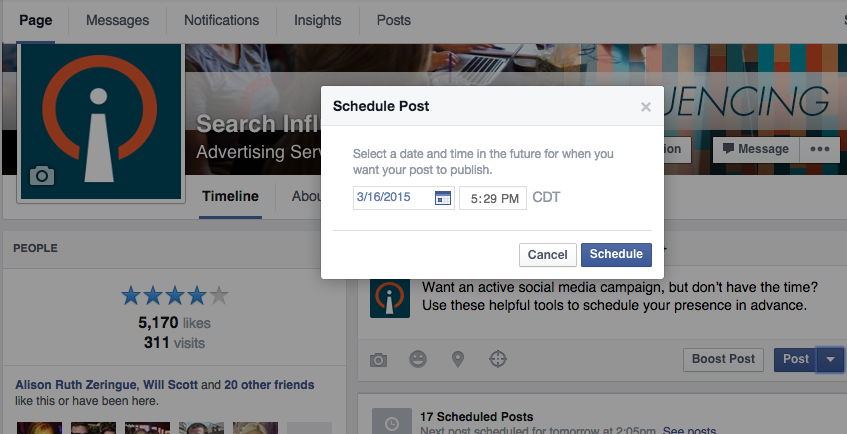
    But remember, whichever social networks you decide to focus on, automate your posts with these quick tips.

    Facebook Scheduled Post Image - Search Influence

    Avoid Customers Crying in Your Parking Lot

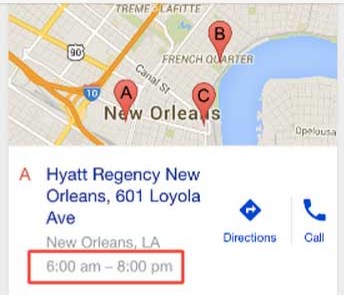
    If you’ve ever done a Google search for your business, you’ve likely seen this kind of result:

    MapsTimeViewImage

    But what happens when you have special holiday hours? Will customers see your normal hours in a Google search and show up in your parking lot over the holidays? Currently, Google My Business has not built out the functionality for saving holiday-specific hours ahead of time. As the profile setup currently stands, you’ll need to manually edit the hours of operation on a given day when your business is open (or closed) outside your standard hours of operation. See Google’s steps on how to update your business’ hours.
    Also, remember to let folks know when you are, in fact, open on the holidays. For instance, let everyone know your restaurant is open on Independence Day and post your holiday-specific menu for the day or highlight any patriotic specials. Is your medical practice open for limited hours on Memorial Day this year? Post a piece to your blog or social media profiles highlighting the top summertime health hazards from boating accidents to severe sunburns.

  • Googleplasty: How to Reshape Your Search Results (Part 2)

    As more businesses begin to take efforts to improve their online presence, standing out in search results of highly competitive markets and areas becomes even more difficult—and nowhere is this perhaps more true than in the cosmetic medicine industry.

    In order to reshape your search results through the art of “Googleplasty,” you must know what factors make your business rank high in a Google search. Since we now know all about the different types of search results from part one of this two-part blog series, let’s talk about the most important factors that play a role in how high your practice ranks.

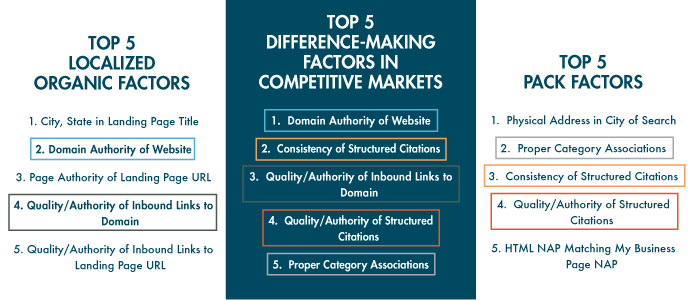
    The following three “Top 5” lists of factors are from from Moz’s 2014 Local Search Ranking Factors survey. The information came as a result of surveying 40 industry experts to determine what had the most influence on ranking in Google search results.

    top 5 search ranking factors

    As you can see, all of the factors that are integral in competitive markets also play a part in either localized organic or maps pack results. Due to their repeat importance, I think they’re the five factors most worthy of discussing in detail.

    1. Domain Authority of Website

    domain authority

    First up on our list as the most important factor in competitive markets is Domain Authority, which isn’t much of a shocker. Domain Authority is a proprietary measurement (created by Moz geniuses) of a domain’s power within a 100-point scale. This score can be used to predict if a site is likely to rank in Google’s search results and can also be used to track a site’s growth and increase in strength.

    It is a metric that combines other metrics such as age, number of links, and quality of links, so it’s not easy to manipulate through singular or direct efforts. As it is directly put on Moz’s site, “The best way to influence this metric is to improve your overall SEO.”
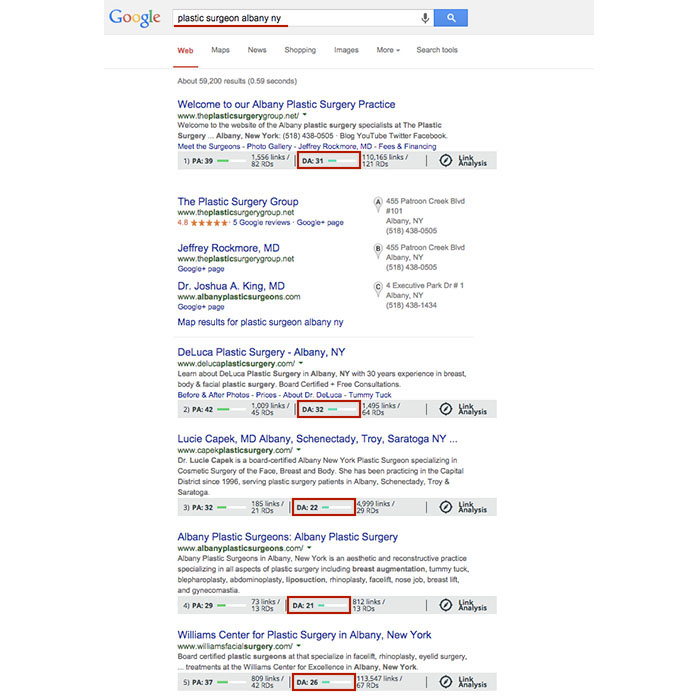
    Using Moz’s MozBar to see domain authority of pages in search results, you’ll see that the top five business sites in the localized organic results for “plastic surgeon albany ny” have Domain Authorities of 31, 32, 22, 21, and 26, respectively. As you can see here, having a score that is higher by a single point won’t guarantee that you rank above your competitor, but in this search example, business sites past the first page of results tended to have Domain Authorities lower than 20.

    Domain Authority Search Results

    2. Consistency of Structured Citations

    structured citation consistency

    While this factor isn’t as high ranking for localized organic results, it is third for the top maps pack factors and second here in the top factors for competitive markets. One reason for this is that in many competitive markets, such as plastic surgery or cosmetic dermatology, you’ll find maps packs in search results.

    To start, a citation is a place on the Web where a business’ name, address, phone number, and often website can be listed (sometimes referred to as the NAP of a business – name, address, phone). Any combination of the NAP, with or without all parts, listed on a site is considered a citation. A structured citation in particular is a listing of business information found on a directory website (e.g. YellowPages.com and Yelp.com). On the other hand, an unstructured citation can be business information on non-directory sites like newspaper sites, press release sites, and blogs, to name a few.

    By increasing the number of matching information sources (and therefore matching signals) to Google, you also increase your chances in having Google match this information to search queries, according to a recent webinar with Google’s Heather Wilburn. So if you want to be matched with potential patients searching for businesses like yours in your area, consistent business information across the Web is one of your best bets, especially in competitive industries like cosmetic surgery.

    3. Quality/Authority of Inbound Links to Domain

    inbound links to domain

    An inbound link to your domain (aka inlink or backlink) is exactly what it sounds like, a link leading to your website. The relevance to your industry or location and the authority of a website linking to yours in and of itself are the two best traits for quality links. Buying links or having links from random, spammy sites will hurt, not help you. Links from local sites and popular sites are a pretty safe bet. You can seek out local sponsorship opportunities as a good link-building effort or help other sites clean up their broken backlinks by using your working ones.

    To differentiate between natural link building versus spammy link building, remember that it’s all about user experience and what makes sense to the user. If your efforts don’t uphold the ideal of providing the best user experience possible, then they’re probably not good.

    4. Quality/Authority of Structured Citations

    structured citation quality

    As mentioned above, a structured citation can be any directory site that lists any variation of your business’ NAP or website. While consistency is most important, you also want to make efforts to build high-quality, authoritative citations in directories.

    Just like there are many factors to improve your own site’s authority, there are also many factors to determine the quality of a directory. You can delve into Whitespark’s blog on how to identify quality citation sources for a detailed breakdown, but basically a good rule of thumb is to look for high domain authority and human moderation in directory sites. Examples of human moderation include how DMOZ requires submission review by its team before a link goes live or how Google Plus, Yelp, and Bing listings all require verification via phone call or a postcard sent to the business.

    Google also considers niche directories highly authoritative. A niche directory is an industry-specific or location-specific directory. Since the Pigeon algorithm update, this kind of citation building has become especially important, and searching for your industry’s keywords will often help you identify these niche directories. If you search for “plastic surgeon columbus oh,” you’ll see that the directories healthgrades.com, vitals.com, and smartplasticsurgery.com appear on the second page of search results. Often, these types of directories require either verification or payment for those seeking to be listed on their site. If you understand the concept of barnacle SEO, you know that being listed on these types of big, authoritative sites is a great way to improve your own visibility to potential customers. Use your discretion to decide if the opportunity cost of getting on a directory isn’t too high to be worth the effort.

    Warning: If a site ever requests a “reciprocal link” to its site on your site in order to be listed, this is NOT A GOOD practice, and they are not worth your time.

    5. Proper Category Associations

    category associations

    Having proper category associations is another important factor for ranking in the maps pack that can set you apart from the rest in a competitive market. It’s a pretty simple concept, and it basically boils down to the part of the guidelines for representing your business on Google that tells businesses to “Choose categories that are as specific as possible, but representative of your main business.” A cosmetic surgeon with the primary category on the Google Plus local listing set to “surgeon” is less likely to rank above one with a primary category set as “plastic surgeon” in the maps pack, for example.

    Though this is a lot to grasp and take action on all at once, having the foundation and understanding of best practices to improve user experience and to better your business online will greatly improve your successes online in the long run.

  • Googleplasty: How to Reshape Your Search Results (Part 1)

    As businesses grow more in touch with their online presence, it becomes more and more challenging to stand out in the search results of highly competitive markets and areas—and nowhere is this perhaps more true than in the cosmetic medicine industry.

    Search Influence - Plastic Surgeon Local Google Search Results

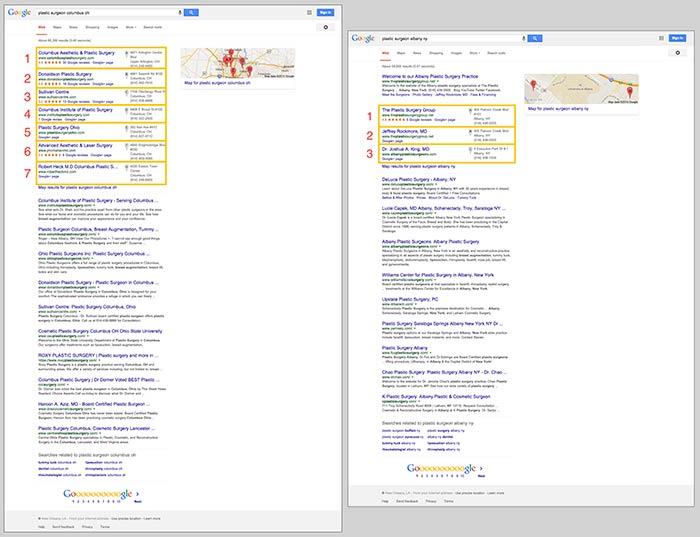
    First things first, let’s make sure we’re on the same page about the two major kinds of results that we see in desktop results for plastic surgeons. “Localized organic” search results and “maps pack” results typically appear together in what is referred to as “combined” search results. The factors that determine what appears in these two areas are not the same, as you can tell by the the difference in results and by the appearance of a site more than once between the two. Maps packs can come in a variety of forms and don’t show up for all search queries, which is also important to note.

    In the screenshot below on the left for the search “plastic surgeon columbus oh,” you’ll see 10 localized organic results below a 7-count maps pack. In the screenshot on the right for “plastic surgeon albany ny,” you’ll see 10 localized organic results, but the 3-count maps pack appears below the first organic result.

    Search Influence - Google Maps Pack Plastic Surgeon

    Stand Out in the Maps Pack

    In the maps pack itself, the most striking features are the review stars and rating display. The data in the maps pack area is pulled directly from Google Plus local listings in Google Maps. So, to make your practice stand out in the maps pack, you should claim and verify your Google Plus listing via Google My Business.

    Once you’ve claimed and verified your listing, you’ll want to get reviews from your patients. It’s important to understand that one or two reviews a month over a few months is better than 15 reviews in one week. As with most online marketing strategies, natural behavior is the best behavior.

    Stand Out in Localized Organic

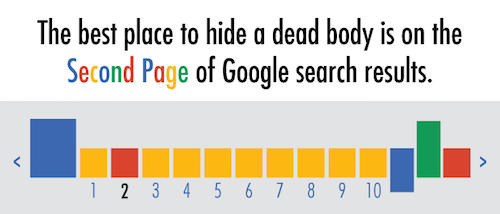
    The most obvious way to stand out in the localized organic results is to be ranking as high as possible and to AT LEAST be in the top 10 so that you’re on the first page. As the age-old SEO joke goes, “The best place to hide a dead body is on the second page of Google search results.” Hardly anyone looks past the first page, and—according to eye-tracking data—not many look past the top half of the search results page.

    Search Influence - dead body Google Search Results meme

    The Google PageRank algorithm that determines these rankings takes into account somewhere around 200 factors, so it’s not as simple as pinpointing one or two efforts to be made.

    Now that we’ve got a better understanding of what we’re looking at in search results, we can start to understand the major factors that affect ranking in each of these sections. Stay tuned for my next blog, where we’ll talk about the top five ranking factors in the maps pack, in the localized organic results, and in competitive markets!