Tag: google maps

  • Google Maps: Ongoing List of COVID-19 Updates (June 2021 Update)

    Note: this post was updated on June 9th, 2021.

    Many of the changes that Google made to Google My Business for COVID-19 will likely stick around after the pandemic. Consumer behavior changed and Google adapted to help businesses meet those needs.

    On the other hand, a lot of functionality was limited in the immediate aftermath of COVID-19. Currently, listings more or less have the same functionality as they did prior to the pandemic. A lot of these limitations, such as removing the reviews option, were to prevent overreactions on things like hospital listings in the immediate aftermath of the pandemic. As things settled down, these features returned.

    COVID-19 Google Maps Updates

    • Google removed the option to leave reviews and ask questions in the Q&A section. They now have returned the ability to leave reviews for all business categories besides drug rehab and narrow sets of medical categories like hospitals.
      • UPDATE: Both reviews and questions and answers are back to the pre-pandemic functionality, regardless of category. The changes Google made resulted from uncertainty and potential harm done to certain listings, but as “normalcy” returns, so have these sections.
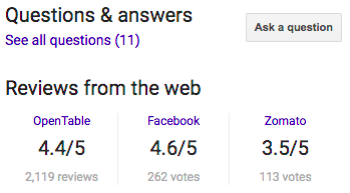
    Screenshot of Google My Business reviews live on SERP

    • As of today, Google does not permit video uploads to the channel. Previously, businesses could include videos in the overall Photos section. Google has not said when they will update this feature.
      • UPDATE: Videos are now viable and usable on all listings.
    • The company has slowly rolled back out the Q&A section, with service industries seemingly being the first to get these back. There is no clear timetable for the full rollout.
    • Google removed the ability to use their previously supported Chat feature for help. This is likely due to staffing issues related to COVID-19, so the only method to reach Google is through this form.
      • UPDATE: This form remains functional, but the response times vary depending on numerous factors.
    • Google rolled out the ability for chains to use Google Posts.
    • Google is working on features that will help users in the post-COVID-19 world. According to Ramesh Nagarajan, Product Management Director of Google Maps,

    “When you look up public transit directions for a trip that is likely to be affected by COVID-19 restrictions, we’ll show relevant alerts from local transit agencies. These alerts can help you prepare accordingly if government mandates impact transit services or require you to wear a mask on public transportation.

    When navigating to medical facilities or COVID-19 testing centers, we’ll display an alert reminding you to verify eligibility and facility guidelines to avoid being turned away or causing additional strain on the local healthcare system.”

    • It is unclear how this impacts businesses, but it is a sign that businesses should communicate their status around these issues on their profile using the numerous features Google introduced.
    • The “Temporarily Closed” option for listings will remain for as long as needed. It is important to note that Google insists marking business locations as temporarily closed will not impact your ranking.

    Ongoing COVID-19 Google Maps Updates

    • Temporarily Closed option added for listings.
      • UPDATE: This option remains available for businesses.
    • Google added Takeout, Delivery, and Dine-In badges for restaurants and bars to show which options they currently offer.
      • UPDATE: These options remain available and will likely stay for the near future. The relevance of having information about “no-contact“ options will depend on the length of the pandemic, but that may be a consumer behavior that remains.

    Screenshot of dine-in, takeout, no contact delivery attributes on Google My Business listing

    • There are two COVID-specific post options right now. Both of these are great ways to update users about the status of your business.
      • UPDATE: These post features remain available to businesses.
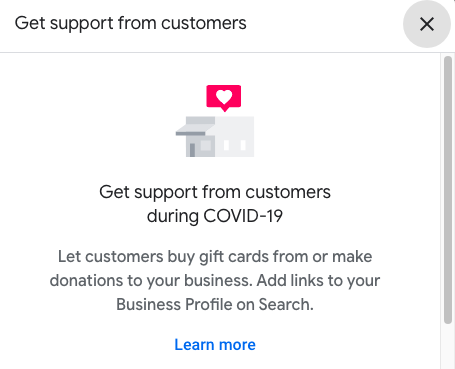
        • Ways to support your business
        • General update about your status

    Screenshot of get support from customers option offered by Google My Business


    Screenshot of options related to COVID-19 in Google My Business Posts

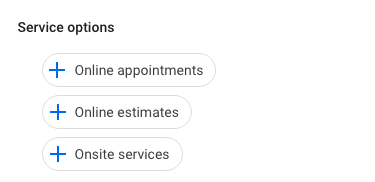
    • Google added backend attributes that help inform both Google and potential customers about what type of online and on-site services you provide.
    • Google is now allowing businesses to display COVID-19 safety measures including mask requirements, staff requirements, and temperature checks.
      • UPDATE: Google has added more details around the safety measures taken by businesses.
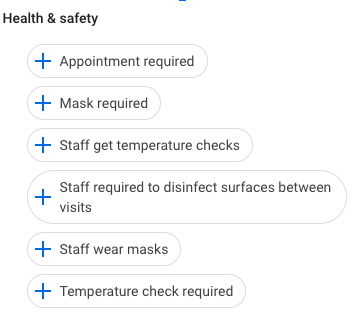
    Screenshot of Google My Business safety options

    • UPDATE: During the course of COVID-19, numerous businesses pivoted to offering online services. As a result, Google rolled out features to help businesses connect with users looking for virtual experiences. Some of these include online care, online classes, and online appointments.
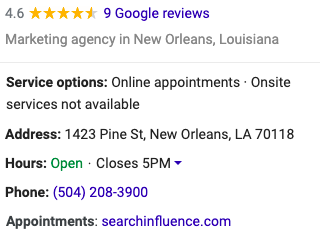
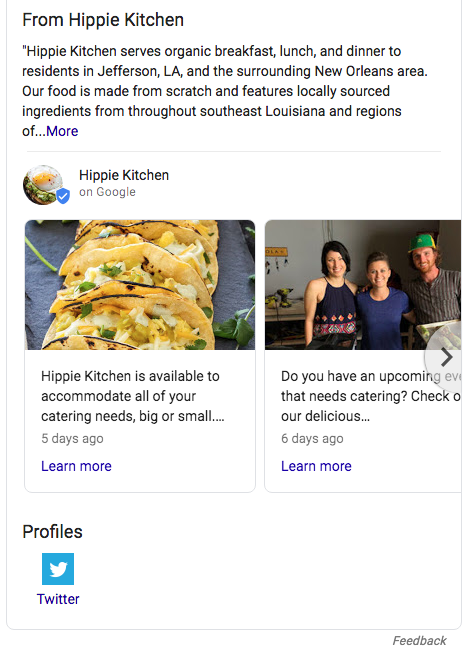
    Screenshot of main business information on google my business listing

    Today, Google has essentially returned their listings to their pre-COVID functionality with the added benefits of having service and safety information more present on the listings. These are features that are likely to stay and help increase engagement with listings and provide more user-centric information beyond the business address and phone number.

    If you’re interested in discussing how Search Influence can help you navigate the post-COVID business landscape and your ongoing marketing efforts, please reach out to talk to a strategist about your digital marketing goals.

    Here are some additional resources to help your business run as smoothly as possible during this period.

    Images
    Mobile device

  • 7 Best Social Media Platforms for Your Digital Marketing Strategy in 2019

    A group of people using social media on their mobile devices at Search Influence in New Orleans, LA

    Social media is an essential element of a holistic and integrated marketing plan. Different social media platforms allow you to create and share content, reach specific audiences, and accomplish your marketing and business goals. Before you begin expanding your current social media marketing, make a plan. Here are some questions to help you get started:

    • Who are you trying to reach?
    • Where does your target audience consume content online?
    • Which message(s) do you want to send your target audience?
    • What is your end business goal?

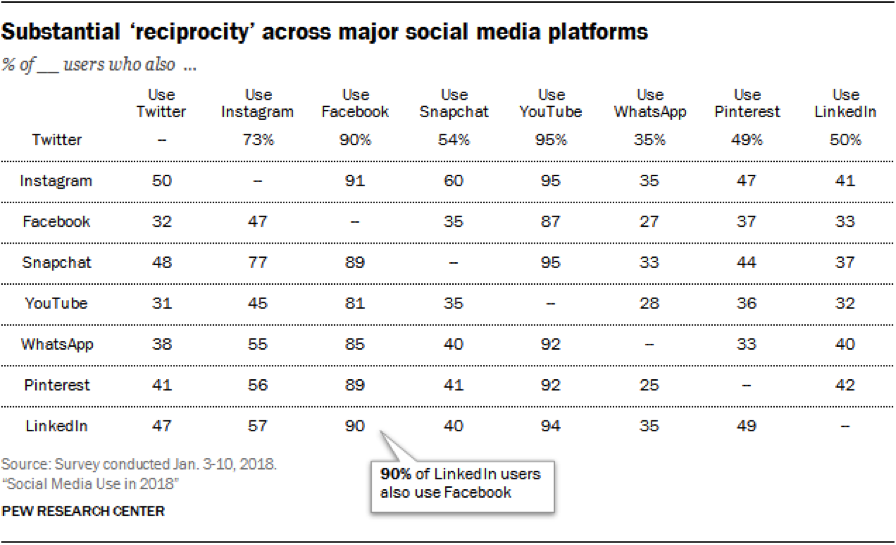
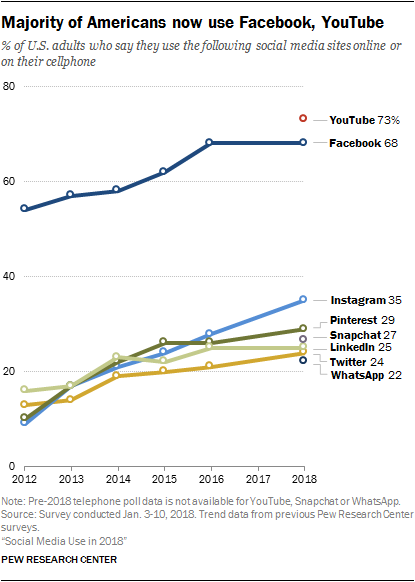
    Your answers to these questions will help you define your business goals and translate them into social media marketing goals. You will then be able to prioritize which social platform to use. If you are new to social media marketing, Facebook is where you should start. If you already have decent engagement on one platform, where should you go next? Most Americans are active on two to three social platforms, so why limit your marketing to just one?

    Screen shot of social media stats

    Which Social Media Platform Is Best for Marketing?

      1. Facebook – With more than 2.27 billion active monthly users, Facebook is definitely your number one choice. Through Facebook Ads Manager, you can target users based on their location, age, gender, level of education, relationship status, job title, interests, purchase behavior, device usage, and so much more. And it doesn’t end there! Facebook allows you to create Custom Audiences to reach current customers or patients. Custom Audiences can be created from the phone numbers or email addresses you’re already collecting, or from Facebook Pixel to target people who have visited your website. To reach new customers, use Lookalike Audiences; these are created from Facebook’s insights about Custom Audiences to target users with similar online behaviors. You may think “My target demographic isn’t on Facebook,” and you could be right, but Facebook Ads Manager takes the guesswork out of it. This platform allows you to create and serve your message to the right user on Facebook, Instagram, or (through the Audience Network) across the web. As stated by Facebook,

    “1 billion+ people see a [Facebook] Audience Network ad each month.”

      1. Instagram – Owned by Facebook, Instagram boasts more than 1 billion monthly active users and has the same advertising options as Facebook. First and foremost, it’s a visual platform, which provides you with an opportunity to showcase your business’s personality. There are a number of free tools you can use to improve your audience’s creative experience.
      2. YouTube – YouTube allows your business to post and share an unlimited amount of video content, which you can then share on social media, send via email, or embed on your website. As a product of Google, there is also an added SEO benefit of having a YouTube channel and producing video content on the platform. With more than 1.8 billion active monthly users worldwide, YouTube has essentially become the second largest search engine behind Google. When it comes to paid advertising on YouTube, it takes the lead over Facebook for video. Facebook charges your account for each 10-second view, while YouTube does not charge you until a user has consumed at least 30 seconds of an ad. According to expandedramblings.com,

    “YouTube overall reaches more 18-34 and 18-49 year-olds than any cable network in the U.S.”

    1. Google My Business – You may not consider Google My Business to be a social network per se, but this free platform offers features that Facebook, Instagram, Twitter, etc. do not. Posts are searchable via keywords, they positively affect your SEO rankings, and they provide an opportunity for backlinks. You can read more about why you should be posting on Google My Business.
    2. LinkedIn – This platform is known as the primary social networking platform for professionals. You can use LinkedIn to update customers on your business, connect with industry partners, and recruit new team members. As a professional network, it is the top choice for B2B social media marketing. According to Forbes, “LinkedIn is one of the best platforms for generating leads and now makes up 46 percent of the social media traffic generated to company websites for B2B firms.”
    3. Pinterest – Similar to Instagram, Pinterest is a visual platform. Pinterest allows your business to show off your product offerings, before-and-after images (great for home improvement, beauty, and cosmetic surgery industries), and curated pin-boards. As you are probably already aware, its audience is primarily female. Pinterest is an oasis for hobbyists, brides and grooms, and day-dreamers in general. Keep this in mind when sharing content. Travel itineraries, suggested packing lists, landscaping ideas, craft projects, and wedding inspiration are the bread and butter of this platform. But don’t think you’re limited to just engaging with your audience. According to Hootsuite, 87 percent of Pinners have made a purchase through the platform.
    4. Twitter – Twitter is a quick-paced platform that’s perfect for sharing the latest trends or your business’s take on current events. Its audience skews somewhat younger but is split pretty evenly between men and women. Your business can participate in a larger conversation by using hashtags for trending topics. These hashtags allow you to reach new potential customers in your industry. Twitter can also be used to monitor positive and negative reactions from existing customers, and you can use the platform to provide additional customer service.

    How Do You Decide Which Social Platforms to Use?

    So, now that you’re familiar with the seven best social platforms for your digital marketing strategy, you should keep these tips in mind. When trying to decide which platform(s) are best for your business, first review your goals and audience, and then make a plan. Then, meet your audience where they are engaging online. Once you have started sharing on one of these platforms, analyze your efforts and look for areas to fine-tune your targeting and content strategy before jumping to another platform. If you’d like more advice on how to use social media platforms to effectively target your ideal clients, start a conversation with our experts by calling (504) 208-3900.

    Whichever type of social media platform you decide to use in your marketing strategy, Search Influence has your back. Our social media experts can work with you to implement a strategy and track the campaign’s performance. Start a conversation with one of our strategists today to make the most of your social media.

    Images:

    Group of people using mobile devices
    Reciprocity Table
    Social Media Line Chart

  • How Do I Get My Business on Google My Business?

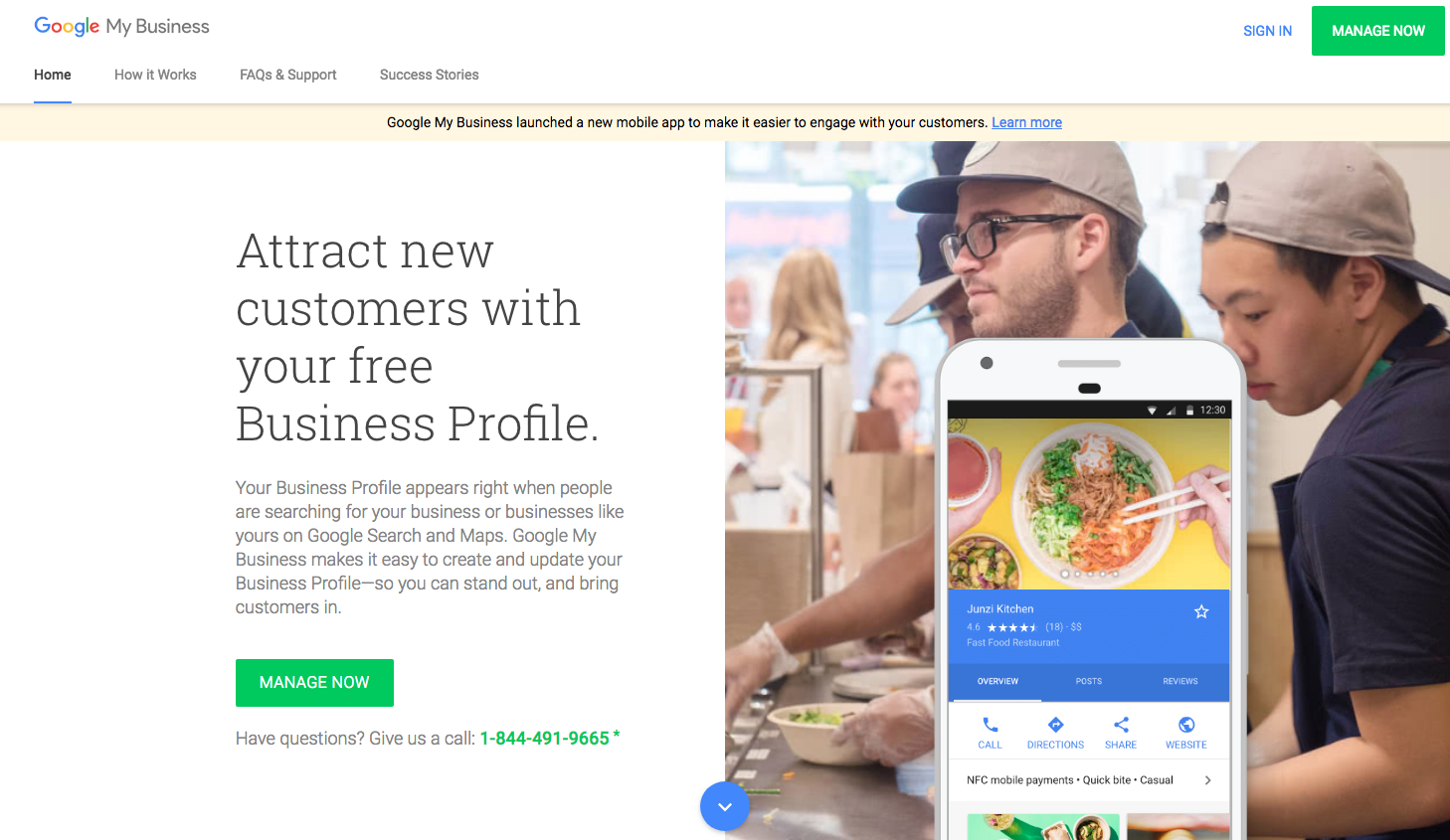
    Homepage of Google my Business on a computer screen at Search Influence in New Orleans, LA

    Google My Business is a free tool offered by Google that lets business owners create a listing for Google Maps and Google Search. Google My Business (GMB) also offers the ability to manage your listing in many ways, but the first step is to get listed. So, how do you get listed on GMB? This step-by-step guide will show you precisely how.

    Add or Claim Your Listing on Google My Business

    1. Go to Google My Business and Click the “Manage Now” Button

    2. Head over to the official Google My Business website. You’ll find the bright green “Manage Now” button in multiple places, but they all lead to the same place. Note that this does require a Google Account to complete, so make sure you have one available that will always be easily accessible.

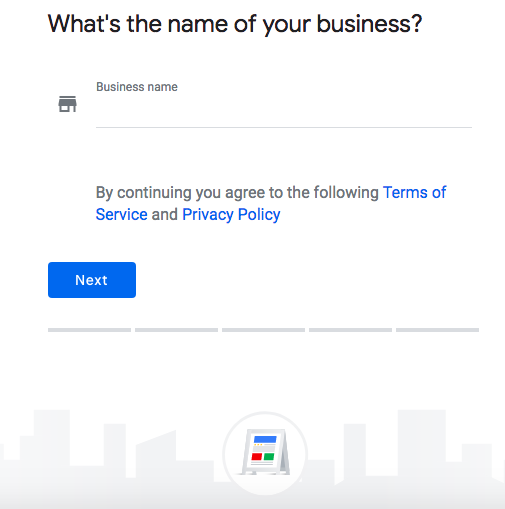
    3. Enter Your Business Name

    4. Enter the name of your business in the box that is presented to you on this page. If your business has already been claimed and verified, you’ll receive a notice that will instruct you to use the recovery email address to get access to the listing. If not, you’ll enter your address on the next screen; the option to hide your address for service area businesses is in this step as well.

      Screenshot of Google My Business page on a computer screen at Search Influence in New Orleans, LA

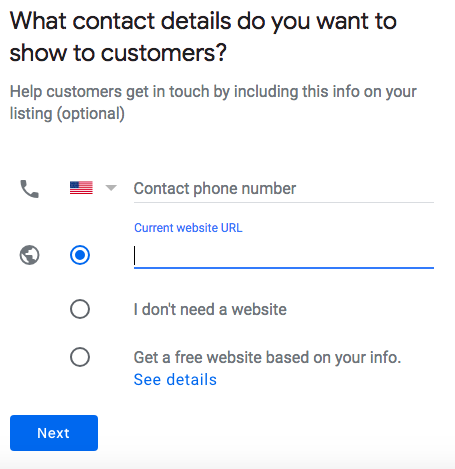
    5. Add Contact Information

    6. A potential customer doesn’t have much value if they can’t contact your business. Entering your phone number and website will display it on your GMB listing. You’ll also enter your address here. Be aware, Google will not allow any P.O. boxes for business addresses. Don’t worry if you own a service area business and don’t want to have that information displayed all across the internet; you can choose not to display your address.

      Contact info page of Google My Business on a computer screen at Search Influence in New Orleans, LA

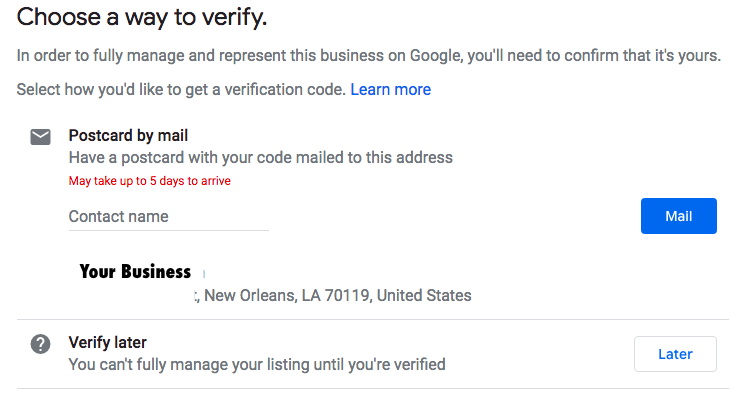
    7. Verify Your Business

    8. After clicking finish, you’ll be taken to a screen to verify your business listing. The most common verification method is through the mail. Google will send a postcard to the address that was entered for the listing to verify that it actually exists at the location that was added to the GMB platform. Once a millennia (internet time of course), Google decides that a simple phone call is enough to verify a listing. The chances of this happening are very rare, so make sure to keep an eye on your mailbox!

      Postcard verification page of Google My Business on a computer screen at Search Influence in New Orleans, LA

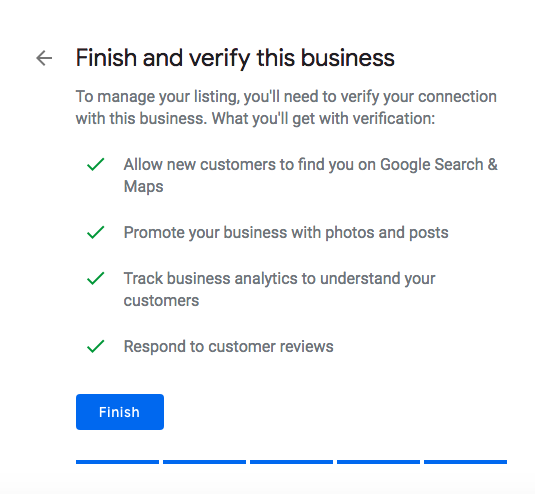
    9. Confirm Your Business

    10. After verifying your business, you’ll just have to confirm your business details one last time, and you now have a shiny new Google My Business listing! Now that all of your information is verified and confirmed, your listing will show up in Google Maps and in Google Search whenever it matches a relevant search query.

      Screenshot on a computer screen of a Google My Business page at Search Influence in New Orleans, LA

    What Can I Do With Google My Business?

    Admittedly, verification is only the first step of your GMB journey. In addition to the visibility that it provides you on Google Maps and in Google Search, Google My Business allows you to interact directly with users. The first way is by posting on Google My Business. Users can “follow” your business on Google Maps, which allows them to view posts on their mobile device. These posts also show up in Google Search results. You can add a call to action that gives users a direct way to interact with your business when discovering your posts.

    Example of a post on a Google My Business page at Search Influence in New Orleans, LA

    Optimizing your profile is another customizable feature of GMB. You can add a menu, add a service area if you service more than your storefront, add product listings, ensure that you have the most accurate categories associated with your business, add photos, and much, much more. There is a GMB mobile app that also lets you manage on the go while at work or while working on vacation, as some people like to do. It gives you some very thorough metrics like top search queries, calls from your listing, website clicks from your listing, how many direction requests you receive from Google Maps, and a suite of other features. All this may sound like a lot, and it is. Managing your online presence can be tough, but Search Influence does offer local SEO services that cover every corner of Google My Business.
    Another bonus is that the strength in Google My Business’s signals for significant local search relevance was increased just from having a GMB listing. Once your business starts to receive some reviews, for better or for worse, this also improves your local presence. Even if a review is not favorable, it does provide a good opportunity to reach out to dissatisfied customers in a professional and public manner. Having a high rating with a large number of reviews is definitely something that looks good to people who find your business while searching on Google.

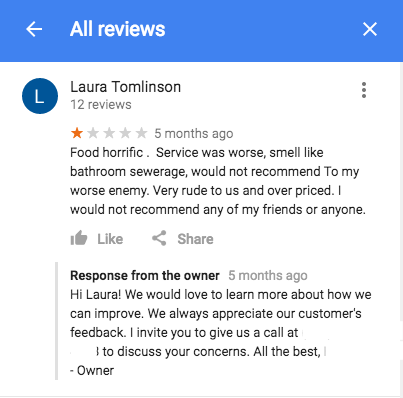
    Example of a bad user review on a Google My Business listing at Search Influence in New Orleans, LA

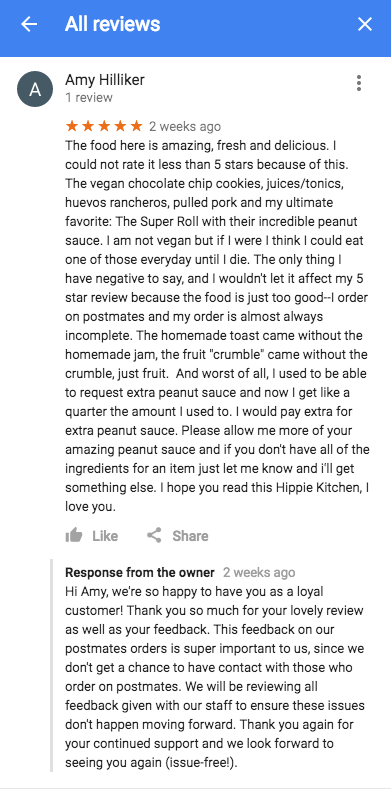
    Example of a user review on a Google My Business listing at Search Influence in New Orleans, LA

    Google My Business is essential to any business attempting to optimize their local SEO, which should be almost every small business. With a whole suite of services, this platform has progressed light years from the old Google+ Local and will only continue to grow. At Search Influence, we set up and manage GMB accounts for countless clients and continue to follow and track best practices. Don’t wait to take advantage of this free service! Get in touch with us for your local SEO needs and explore our complete digital marketing services.

  • Getting The Most From Your Google My Business


    Two business owners making edits to their Google My Business listing as instructed by Search Influence in New Orleans, LA

    When was the last time you went to the second page of Google search? If you find yourself having difficulty remembering the answer to that question, you are not alone. Research shows that as of November 2018, the top 10 results of Google searches that make up the first page are responsible for 75 percent of all clicks on search engine results pages (SERPS). As a business owner, you may now be asking yourself the question, “How do I get my business on the first page of Google?” Google’s ranking is determined by a multitude of factors, two of them being the accuracy of your company’s Google My Business (GMB) listing and the volume of interaction associated with it. For many people making local searches on Google, your GMB listing is the first contact that they make with your business, so you want to make sure what they see is accurate and thorough.

    Claim or Create Your GMB Listing

    The step that precedes all others for your GMB listing is claiming or creating it. The age of your business and the volume of information that has previously been supplied about it on the internet will determine which step you need to take. If Google has already collected information regarding your business, you will need to simply claim the listing. If Google has not previously collected information regarding your business, you will need to create a listing. Either way, to begin the process, start here. The first and most important step in getting the most from an already-existing GMB listing is claiming it. Until you have achieved this end, the content of your listing is at the mercy of the internet. Any Google user can suggest edits on a GMB profile, which may become live. Because some of the data in GMB listings is user-generated, it is not always entirely accurate. Once you have claimed your business, you are in complete control of the information that is live on your listing.

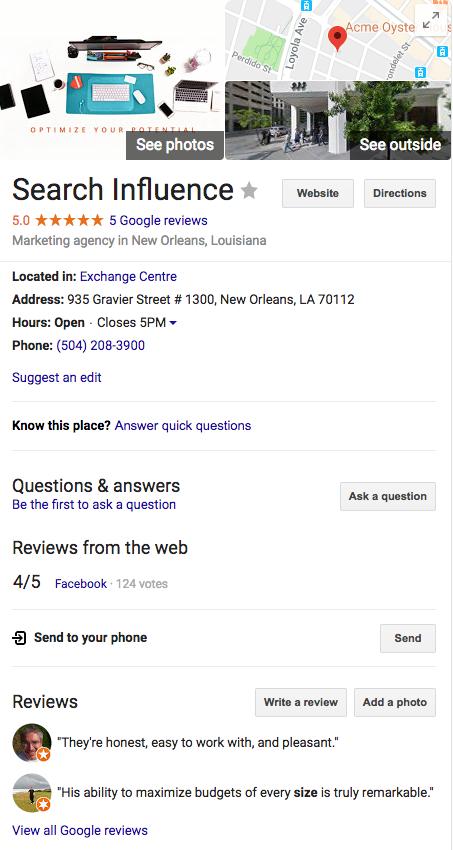
    Example of Google My Business listing from Search Influence in New Orleans, LA

    Give Your GMB Listing the Data It Deserves

    Now that you are in control of your GMB listing, it’s time to start making it as accurate and informative as possible. Initially, you will want to make sure that all of the essential information, such as your name, address, phone number, website, and hours of operation are correct across all of the other platforms that show your business’s information, such as Yelp. Selecting the correct category is also pertinent to your ranking in local searches. Don’t just choose the general category; choose as many subcategories as you find relevant and appropriate to your business. Additionally, a solid business description can help you stand out against your competitors. A good business description is one that attempts to cover all of the products or services that you offer, but that does so in a summarizing manner. You want the viewers of your listing to read the entire description, so say as much as you can in as few words as possible.  

    Review, Respond, and Post On Your GMB Listing

    At this point your GMB listing is in your control and displaying accurate and additional information; from here you will want to maintain it. Google publicly acknowledges that user interaction for business listings is a factor that affects its rankings. One way to satisfy this is by making frequent posts regarding updates affecting your business, or about products and services that your business offers. These posts are a free form of advertising that appears in local searches, and the more frequently you post, the more likely you are to get a boost in your rankings. Not everyone who uses the internet is on social media, but everyone who finds you in a local search can see your posts. So with that being said, a good rule of thumb is to make a GMB post every time you make a post on social media, or at least once a week. Additionally, these posts are a good way to increase traffic to your website by informing users of a product or service that they might not have realized your business offers.

    Another way that you should maintain your GMB listing is by responding to reviews about your business posted by other Google users. This is not only important from an SEO standpoint, but also from the viewpoint of the users who view your listing. Negative reviews should absolutely be given responses, as that is your only opportunity to defend your business to the users viewing your listing. Customers want to feel engaged, and a business that positively engages the customer is more likely to see that customer return and refer others.

    Because Google My Business is still relatively new, many people don’t understand the impact it can have on local rankings. If you’re ready to boost your local SEO with an optimized Google My Business listing and relevant posts, get in touch with one of the marketing experts at Search Influence today.


  • Year-end Trends: What’s Been Driving Local Search in 2018?

    Annually, the brightest minds in the local search field come together to provide their input on the major changes and trends in the industry via the Local Search Ranking Factors Survey. Coordinated by Darren Shaw from Whitespark and the fine folks at Moz, the 2018 review of local ranking factors helps to coalesce the general sentiment around the most impactful inputs as they relate to local searches. This survey is a great resource for digital marketers because it not only helps us understand the changes in the last year, but also how to better focus our efforts and energy moving forward.

    Here at Search Influence, we are fortunate to be one of the contributors to this survey. With our experience in the local search realm across numerous industry verticals, we are well-equipped to help add more context to an, at times, confusing digital marketing landscape. As expected, much of what we saw in the day-to-day management of our clients’ local search campaigns was reflected in the results of this year’s survey.

    What’s the Biggest Local Search Trend for 2018?

    According to the results of the survey, the biggest local search trend is Google My Business management.

    For those of us who spend countless hours wrangling Google My Business (GMB) and/or Google Maps accounts, the attention Google has put into the product is obvious. With the addition of Google Posts, Google Q&A, website builder, services, expanded attributes, primary and secondary categories, etc., it became clear that GMB was being re-positioned as a social, activity, and information hub for potential customers, current customers, and the business, in some part to offset the loss of Google+ as a business platform.

    Understandably, digital marketers have found GMB signals increasingly important year-over-year. It is pretty straightforward, intuitively—use the new features introduced by Google to help with local search performance. However, many businesses and digital managers fail to follow up once these new features are rolled out.

    Of the eight signals measured in the results, GMB makes up 25.12 percent. As you can see in the image above, this is a large increase from the previous year’s data. Ensuring that your business has a properly optimized listing will go a long way in determining the vitality of your business in a local search context.
    31 questions to ask a marketing agency

    Reviews Are an Increasingly Relevant Local Search Ranking Factor

    Along with increased profile options, Google has started taking steps to help increase review participation on the Google My Business listings themselves. Through new mobile app features, new messaging features, and other small tweaks, Google has made it clear that they do not just want users leaving reviews for the business; they want to make sure businesses are interacting with their reviewers as well. One prevailing thought derived from the data points is that Google is making an effort to create a quasi-community around business listings, making it so users do not even feel the need to click through to a client’s website. There is ample room for discussion about the pros and cons surrounding that concept, but, as a practical matter, digital marketers and businesses should be keenly aware of this trend and know how to best leverage it to convert potential customers.

    This fact is reflected in the breakdown of the influence of review signals. As seen in the table above, the influence of reviews on listings has increased significantly year-over-year. As businesses begin to compete more and more for the “Local Pack,” reviews may be a large factor in whether or not your business becomes listed. Encouraging your customers to review you on Google, whether positive or negative, will help Google know your business is active. What’s more, if you, as a business, respond to the positive and negative reviews, you are adding a valuable signal to Google, as well as displaying good customer service.

    But, What Happened to Links and Citations?

    One important thing to consider in regards to this survey is that just because something has become less important relative to other factors does not mean that it has lost significance. A good local search strategy encompasses a holistic approach that implements strategies for all of the different factors, of which linking and citations are a significant portion.31 Questions Checklist square image

    Part of the reason these factors have seen a dip in relevance is because the other factors have become more influential—in other words, the overall results have become a bit diluted due to the increasing number of factors. To rephrase, linking and citations are still a large, integral part of a good local search campaign; however, you might want to get a wrangle on your Google My Business and review situation prior to embarking on a full-fledged link/citation-building campaign.

    So, What Are the Other Factors?

    A large portion of the review is the section-by-section breakdown, along with a helpful glossary, to help you fully understand how each factor is weighed and what digital marketers think. It is important to distinguish between organic search results and the “Local Pack,” as both have different considerations when it comes to ranking signals. In lieu of breaking that down here, I suggest reading the data supplied in the post on Moz’s blog, as well as Darren Shaw’s companion piece explaining the survey.

    Local search is a constantly evolving, dynamic field that requires actively monitoring changes to platforms and signals, and to Google’s new product rollouts. Undoubtedly, there will be some disruption in the local search field via a new product, new algorithm, or cosmetic changes, but these surveys give us the historical context to better understand why these changes might have occurred and how they might impact future usage. If you’d like help building a dynamic marketing strategy that encompasses these trends, reach out to Search Influence to request your free marketing analysis.

    Images:

    Laptop

  • Search Influence Year in Review: Our Top 10 SEO Blog Posts of 2016

    With this year drawing to a close, now is the time to reflect on the year and prepare for a successful and productive 2017. In keeping with this, we’ve highlighted our top SEO blog posts of 2016 to get you extra pumped for your New Year’s re-SEO-lutions.

    Image Of Happy New Year Script - Search Influence

    1. An Update: How to Get Rich (Answers, That Is) With Google

    In 2016, it’s estimated that approximately 40 percent of queries on Google resulted in “Rich Answers.” So what are these Rich Answers, and how can your website get selected for a Rich Answer on Google’s search engine results page (SERP)? This updated post gives you all the details.

    2. Barnacle SEO – Local Search Engine Optimization for the Sam’s Club Crowd

    3745255

    For small businesses with small budgets, the “Barnacle SEO” approach may have big payoffs. Learn how attaching yourself to the white whales of the SEO world can expose you to new markets and customers.

    3. Nix the Wix SEO Challenge: Tips & Tricks

    Sure, Wix is the uber-easy-to-use, code-free web developing platform for dummies, but just how well do Wix sites get along with search engine optimization? Thanks to these quick tips and tricks, it’s easier than you may think for Wix sites to play nice with SEO.

    4. 10 SEO Blogs You Should Be Following

    Fancy yourself a true SEO connoisseur? This list outlines all the insider blogs you should be reading to stay up to date on the constantly changing world of search engine optimization. Hey, even if you’re new to the game, resources like the Google Blog and MOZ Blog provide a plethora of information to get started.

    5. These 10 Expert Tips Will Drive Traffic to Your Business’s Website

    Driving traffic to your website means driving sales for your business. Our in-house experts share their insights when it comes to getting people in the online door. Hint: If you’re promoting on Facebook and publishing press releases, then you’re off to a good start.

    6. 5 Tips to Improve Local Search Rankings Even If You Don’t Have a Physical Location

    Many businesses are opting for prime real estate on the interweb instead of brick and mortar locations, but that doesn’t mean you need to sacrifice website optimization. Check out these five tips for increasing your ranking.

    7. Google My Business for Doctors: Visibility, Authority, & SEO

    Claiming or creating a Google My Business listing can have big search impacts for medical practices. Follow this step-by-step guide for single practitioner practices, multi-practitioner practices, and multi-location practices.

    8. Local SEO: How to Clean up Citations for Better SERP Visibility

    A citation is the presence of a business’s name, address, and phone number (NAP) on any website. The consistency and accuracy of your NAP across sites will improve your local SEO rankings. Learn the four basic steps to complete an effective citation cleanup.

    9. 12 Things You May Not Know About Online Marketing

    Are you ready to be shocked and awed by the amazing (and hard to predict) world of online marketing? Here’s a list of some of the things that caught our Search Influence team members by surprise when they were rookies in the game.

    10. The Importance of Content Marketing to Your SEO Strategy

    Content marketing is the bread and butter of your SEO strategy and, in many ways, the success of your brand. Are you telling a relevant and compelling story about your business? Are you targeting the right audiences? This post will help you answer these important questions.

    What better way to bring in the new year than with a new online marketing strategy? We hope these posts offer some helpful insights and maybe even a little motivation for a productive and optimized 2017.

  • #NOLATech Week 2016: How To Drive More Traffic To Your Site

    In conjunction with NOLATech Week 2016, Search Influence hosted a workshop to help support small businesses in their online marketing efforts. Paula Keller and Mary Silva presented on how to boost your local search rankings and ways to drive traffic to your website respectively.  

    Paula Keller’s “How To Boost Your Local Search Rankings”

    Paula’s “How To Boost Your Local Search Rankings” presentation took the audience through what types of businesses benefit from local SEO efforts. It also detailed the different types of Google My Business pages and how to use them. With the insight from Paula’s presentation, business owners can better understand how to optimize their business both onsite and offsite to gain better local search rankings.

    search-influence-university-how-to-boost-your-local-rankings-10-11-2016


    Mary Silva’s “10 Ideas To Drive Traffic To Your Website”

    Mary’s “10 Ideas To Drive Traffic To Your Website” presentation tackled concepts that influence your site’s user experience and actionable ways to help improve traffic to your site. It covered topics ranging from highly technical concepts like Schema markup and Google Search Console Analysis to less laborious efforts like directory and authoritative link earning. She explained how to use Schema.org rich snippets to create more engaging search results for your website on Google. Her presentation also went into detail on how to use social media efforts effectively to not only post but also promote engaging content like infographics. “Think of your online marketing efforts as a service,” said Mary, Internet Marketing Team Lead at Search Influence. “We know our users, and we’re getting them closer to their end goal faster. Make your overall goal to give users a cleaner, better experience and make users lives easier. ”

    search-influence-university-10-ideas-to-drive-traffic-to-your-website-5-26-2016

    In utilizing some of the tips and tools explained in these two presentations, guests could help increase their business’s online success in many ways including, but not limited to, improved visibility in local search results and increased traffic to their sites.

    For more information on the event, visit townsend.bunksite.com/ or contact the office directly at 504-208-3900 or Search Influence, 935 Gravier St #1300, New Orleans, La. 70112.


  • Here Are Our Top 5 Blogs From September

    Another month, another top five blogs from Search Influence! All of these posts are chock-full of information that will help you keep your website in tip-top shape and give you some insight into life at Search Influence. Subscribe to our blog to stay up to date on what’s going on in the world of SEO and Search Influence.

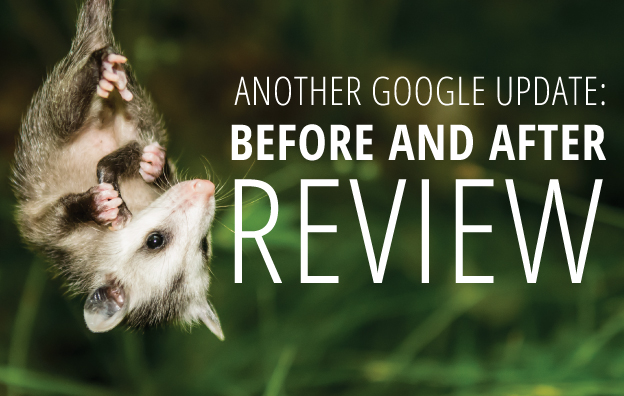
    #5: How Google Possum Has Affected 3 Pack: A Before and After Review

    Google’s newest update has had some drastic effects on the search results 3 pack. Amy Arnold gives us the lowdown on some listings that are pretending to be dead.

    Google Possum Update

    Look at that beautiful Google update devouring those listings.

    #4: What Happened to Facebook’s 20% Text Grid Tool?

    Michelle Neuhoff Boyd is back at it again this month and refuses to leave the top five standings. Whether you’re a Facebook fiend or a business taking advantage of the social platform, this blog entry has mountains of information about the inner workings of the Social Media giant.

    #3: Happy Working Parents Day: 10 Influencers on Lessons From Their Working Parents

    To celebrate National Working Parent’s Day, Mary Silva whipped up a heartfelt blog post complete with written and video interviews of some of our employees. Tears may be shed by the time you reach the end of the video, so be sure to have that tissue box ready.

    Kid nodding head

    #2: Search Influence Adds 3 New Hires in August

    Search Influence added three more employees in August and a lot of people were interested. Learn more about our new team members in this post compiled by Melissa Verzwyvelt.

    #1: Barnacle SEO – Local Search Engine Optimization for the Sam’s Club Crowd

    Last but not least, Mr. Barnacle SEO himself, Will Scott, saw a massive resurgence in popularity of his blog where he coined the industry changing term. Take a gander at this super informative blog.

    While you’re at it, follow our blog to get the latest updates from Search Influence.

  • How Google Possum Has Affected 3 Pack: A Before and After Review

    Google Possum Update

    Throughout September, the local search industry has been watching the results of the dubbed Google Possum update.

    In August 2015, Google shook up local search results, which changed the Map Pack from a 7 Pack to a very exclusive 3 Pack. This change was a dramatic one by omitting many local businesses and by making inclusion nearly impossible for businesses in the exterior of city limits and in suburbs.

    Fast-forward two years, and we now have Possum.

    “Possum?”

    Joy Hawkins wrote an excellent blog post summarizing the effects observed by the Possum update, and in that post she attributes Phil Rozek with creating the Possum moniker because “it is fitting since many business owners think their Google My Business listings are gone, when in fact they are not. They have just been filtered — they’re playing possum.”

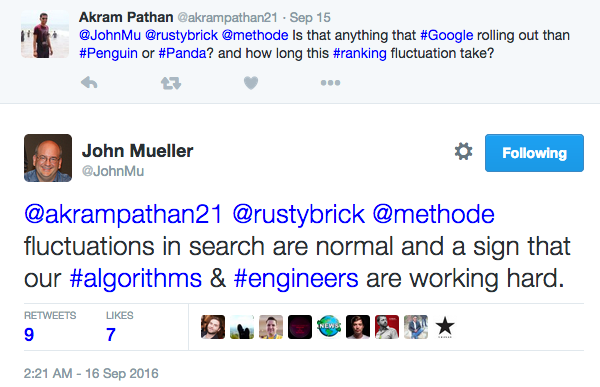
    And officially? … Possum is an unannounced update, meaning the SEO community collectively compared notes and decided this was an algo update. Google did not directly announce or confirm this update. However, John Mueller did Tweet a comment, which I completely paraphrase as “if you see stuff happening, maybe the Google Engineers are doing something.”

    Possum Update Tweet


    “Google is now filtering based on address and affiliation.”

    In her post on all things Possum, Joy Hawkins cleanly lists the effects of this change. Among her list is the observation that Google is now filtering results based on duplicate address, website, or affiliation.

    We see duplicates all the time in map results for local searches for any place that has multiple practitioners:

    • Doctors (plastic surgeons, orthopedists, dermatologists … )
    • Lawyers
    • Dentists and orthodontists
    • Hair salons
    • Etc.

    For example, a doctor’s clinic can have numerous Google-allowed listings: one for the practice and one for each physician or practitioner seeing patients at that practice. Each of these listings will have the same address, phone number, and website, so one clinic or practice can end up with multiple listings and dominate the results landscape.

    But user experience for such a repetitive Local Pack is not ideal, and Google is all about user experience. We have a plastic surgeon client, Deluca Plastic Surgery in Albany, NY, who has been fighting this battle for a long time.

    Dominating the Local Pack No More

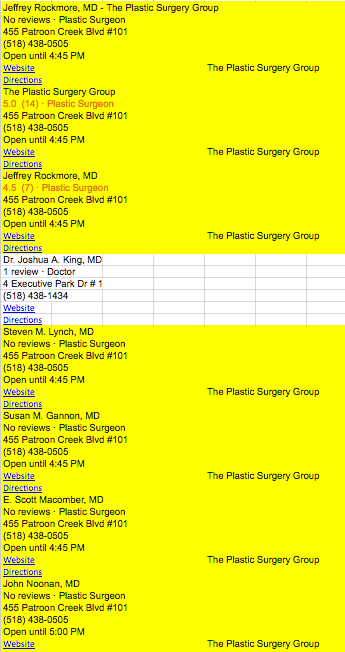
    Anyone searching “plastic surgery Albany NY” back in April 2016 would have seen the 3 Pack all leading to the same practice. In fact, in the “More Places” Maps results, the same practice completely dominated with positions 1, 2, 3, 5, 6, 7, 8, and 16. What the heck, Google?!

    I had copied and pasted the Maps results into a spreadsheet just for fun back in April. I’m glad I did, because I can share this story with you. Here are just the first eight results from that April 2016 Maps search—those in yellow all lead back to the same practice:

    April 2016 Maps Search Results

    Our client was ranked at 18th and 20th. Our client is in Albany, and the website had and has stronger Domain Authority, stronger NAP, more reviews, and on and on, so it just didn’t make sense.

    We did some work to mitigate those results. We had some minor success, but fighting a battle against Google’s algorithm, you might not always come out a winner.

    And Then Possum Came Along

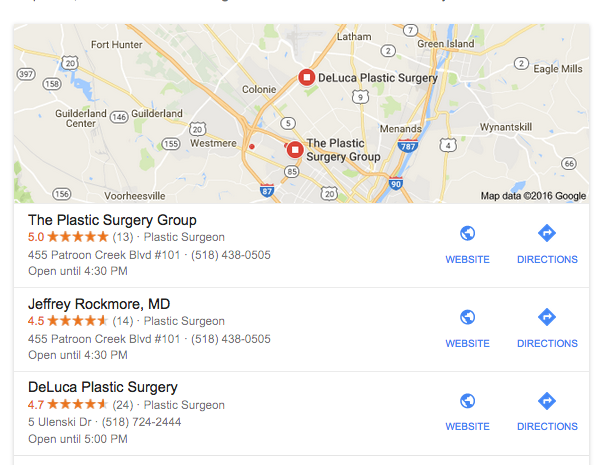
    Today, we now see Deluca in the 3 Pack. Woo hoo!
    Google maps results after Possum roll out

    We are feeling pretty good about this (don’t take the wind out of my sails), but we acknowledge that all is not perfect in this scenario. In this 3 Pack, the doctor in the second listing is a plastic surgeon at the practice represented in the first listing.  He has the same address and phone number, but he has his own, personally branded, website.

    This is one example among millions of searches, but it may suggest that domain is a primary indicator of the duplication filter. This needs lots more observation and input, and I encourage you to let us know if you have seen 3 Pack changes this September.