Tag: Google Analytics

  • How to Set Up AI Traffic Tracking in GA4

    Key Insights

    • AI platforms are regularly sending real users to websites. This traffic exists today, even if it hasn’t been tracked or discussed widely yet.
    • GA4 doesn’t clearly identify AI-driven visits on its own. Without proper setup, those sessions get grouped with other referrals and are easy to overlook.
    • Visits from AI tools don’t behave the same way as traditional search traffic. They often come from users researching, comparing, or trying to solve a specific problem.
    • Channel-based tracking makes AI traffic easier to find and analyze. Custom channel groups help isolate these visits and keep reporting consistent as AI tools evolve.
    • AI measurement works best when you focus on trends, not perfection. Directional insight is enough to evaluate performance and make smarter decisions.

    Traffic from AI tools is already reaching your website. It’s happening now, and it’s measurable, even if it has never appeared clearly in your reporting. Google’s AI Overviews, ChatGPT, Perplexity, Claude (and so on) are sending users to third-party sites every day.

    The issue isn’t whether AI traffic exists. It’s whether you can see it at all. In Google Analytics 4 (GA4), AI-driven visits are typically classified as Referral traffic, which strips away context and minimizes impact.

    Seeing AI traffic clearly changes how performance is evaluated. Let’s break down how AI traffic shows up in GA4, how to surface it deliberately, and how Search Influence turns those signals into dashboard-level insights that teams can use to make confident decisions.

    What Counts as “AI Traffic” in GA4?

    Before you can track AI referral traffic, you need to be precise about what qualifies. AI traffic isn’t a vague concept or a future trend. It refers to a specific type of visit with a distinct source and intent.

    How AI traffic is defined

    AI traffic includes sessions that originate from AI-powered tools when those tools link users to third-party websites as part of an answer, recommendation, or explanation. These visits happen when a user chooses to leave an AI interface and click through for deeper context, validation, or next steps.
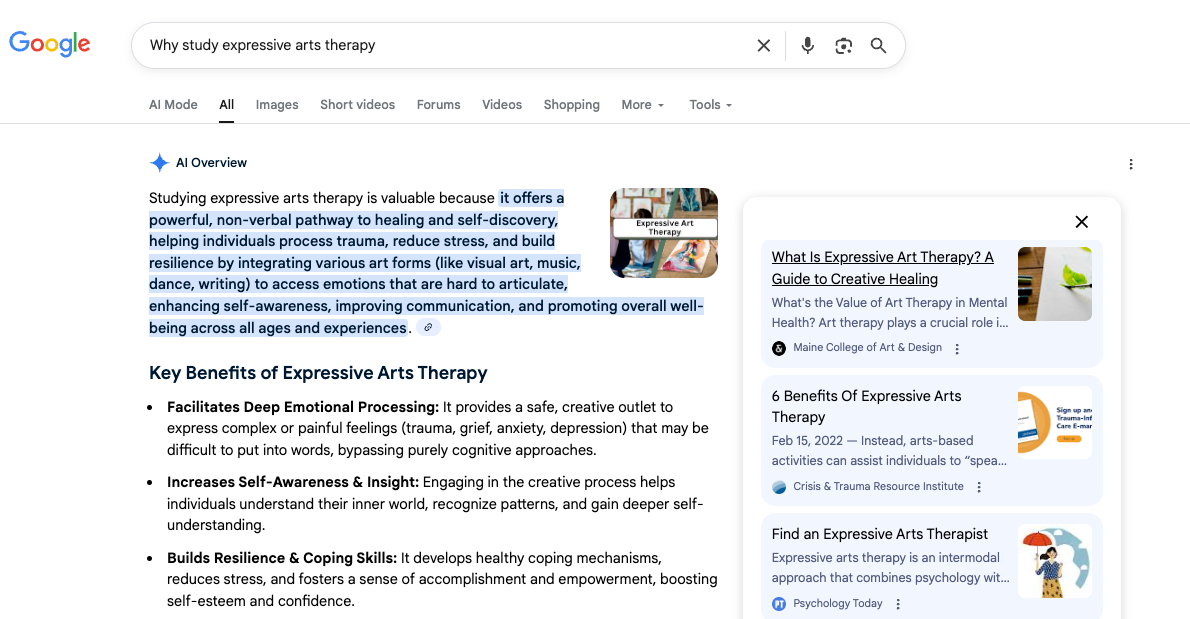
    Pictured: An AI Overview in Google Search showing cited sources alongside the generated response. When a user clicks one of these linked citations to learn more, that visit is sent from the AI interface to the publisher’s website. In GA4, that click-through is classified as AI traffic.

    This type of traffic is already present across many websites. In a 2025 Ahrefs analysis of 3,000 anonymized sites, 63% recorded at least one visit from an AI source.

    Common AI tools that send traffic today include:

    • Google’s AI Overviews
    • ChatGPT
    • Perplexity
    • Claude
    • Gemini
    • Copilot

    If a user clicks a link from one of these platforms and lands on your site, that session counts as AI traffic.

    What AI traffic is not

    AI traffic is often confused with other acquisition channels, which leads to inaccurate assumptions about its role.

    AI traffic is not:

    • Organic search traffic from Google or Bing
    • Paid search or display traffic
    • Standard referrals from publishers, directories, or partners

    Even when AI tools surface content that originally ranked in search, the visit itself does not come from a search engine. The source is the AI platform, not the SERP.

    Why AI-driven visits behave differently

    Users arriving from AI tools typically have a different mindset than traditional search users. In many cases, they are:

    • Researching a specific question or comparison
    • Looking to confirm information they’ve already seen
    • Narrowing options rather than browsing broadly

    As a result, AI-driven sessions often enter deeper into content, focus on fewer pages, and show engagement patterns that don’t always align neatly with organic search benchmarks.

    Why this definition matters

    Without a clear definition of AI traffic, reporting becomes inconsistent fast. Teams end up blending unlike sessions together, misreading intent, or minimizing AI’s contribution altogether.

    Agreeing on what counts as AI traffic makes it possible to:

    • Track it consistently over time
    • Compare it meaningfully against other channels
    • Analyze behavior without muddy attribution

    Once AI traffic is clearly defined, the next challenge becomes visibility (specifically, where this traffic actually shows up inside GA4).

    Where AI Traffic Lives in GA4 by Default

    When AI traffic reaches your site, GA4 has to decide where to put it. That decision happens automatically, based on how GA4 assigns sessions to its Default Channel Groupings.

    GA4 groups traffic by matching source and medium patterns. When a visit doesn’t meet the criteria for search, paid, social, or email, it’s typically assigned to the Referral channel. This is where most AI-driven visits end up.

    Why AI traffic gets classified as Referral

    AI tools send users to websites using standard web links. From GA4’s perspective, there’s nothing about these visits that signals a unique acquisition channel. As a result, traffic from AI platforms is treated the same way as any other external link click.

    That means AI traffic is not labeled, flagged, or separated by default. It’s folded into Referral alongside a wide range of unrelated sources.

    What this looks like in reporting

    In practice, AI traffic blends in with referral sources such as:

    • Software platforms
    • Documentation sites
    • Blogs and media outlets
    • Partner or vendor domains

    Without deliberate segmentation, there’s no clear way to distinguish an AI-driven session from any other referral visit.

    Why this makes AI traffic hard to analyze

    Referral traffic is often reviewed at a high level, if at all. It’s rarely trended with the same attention as organic or paid channels, which makes emerging patterns easy to miss.

    As a result:

    • AI traffic is difficult to isolate over time
    • Growth from AI platforms can go unnoticed
    • AI’s contribution to acquisition and engagement is underrepresented

    AI traffic isn’t invisible in GA4. It’s simply buried, and understanding where it lives by default is the first step toward surfacing it intentionally.

    How AI Traffic Tracking Works in GA4

    Once you know AI traffic is folded into Referral reports by default, the next question is how to surface it consistently. In GA4, that starts with custom AI traffic channel groups.

    Why channel groups work

    Channel groups operate at the acquisition layer in GA4. When AI traffic is defined as its own channel, it becomes visible across standard reports, comparisons, and dashboards without relying on one-off views or manual analysis.

    This approach:

    • Applies consistently to past and future data
    • Integrates cleanly into existing reporting workflows
    • Makes AI traffic comparable to other acquisition channels

    Why filters and ad hoc reports aren’t enough

    Temporary filters and explorations can surface AI traffic, but they don’t scale. They require constant upkeep, fragment reporting, and make trend analysis harder over time.

    Channel groups solve the problem structurally by establishing AI traffic as a distinct acquisition category.

    How AI traffic is identified

    AI traffic is grouped using session source values, not behavior or content signals. When a known AI platform appears as the source, GA4 can assign that session to the appropriate channel.

    This keeps attribution clean and allows rules to evolve as new AI tools emerge.

    A scalable, industry-aligned approach

    Custom channel groups are already a best practice for managing complex acquisition sources in GA4. Applying that same framework to AI traffic creates visibility without overengineering and keeps reporting aligned as AI-driven discovery continues to change.

    High-Level Steps: Setting Up an AI Traffic Channel in GA4

    AI traffic doesn’t need to be created or inferred. It already exists in GA4. The goal of setup is to surface it in a way that’s consistent, durable, and usable across reports.

    1. Create a custom channel group for acquisition analysis
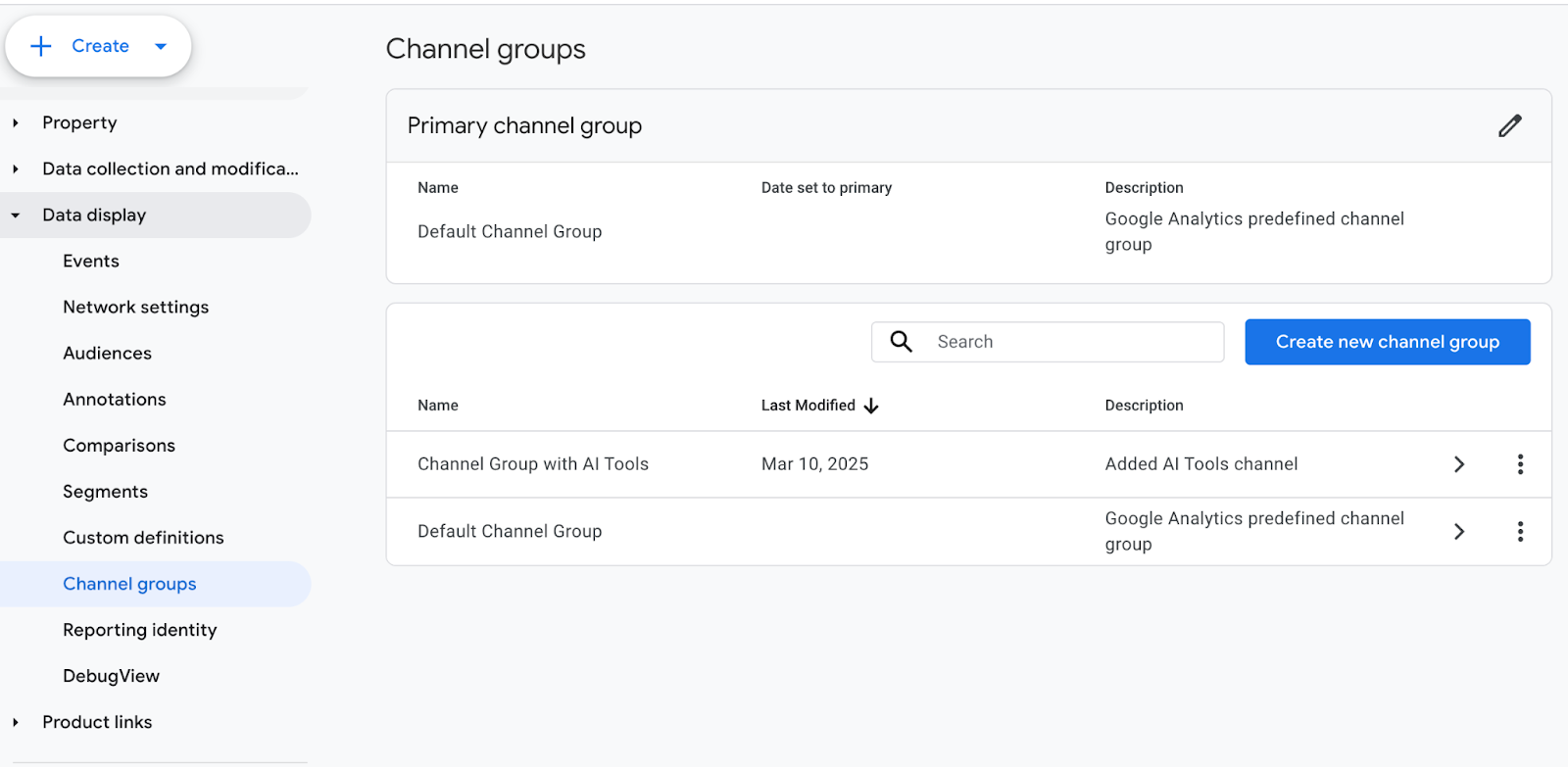
    AI traffic tracking starts with a custom channel group. Channel groups determine how sessions are categorized throughout GA4’s acquisition reporting, which makes them the right layer for isolating AI-driven visits.

    This establishes AI traffic as a first-class acquisition channel.

    2. Add a dedicated channel labeled “AI Tools”

    Within the new channel group, a dedicated channel is defined specifically for AI-driven sessions. A clear label like “AI Tools” keeps reporting readable and reduces ambiguity when data is shared across teams.

    At this stage, simplicity matters more than over-segmentation.

    3. Identify AI traffic using session source values

    As stated above, AI traffic is identified using session source values rather than behavioral or page-level signals. When a session originates from a known AI platform, GA4 can assign it to the AI Tools channel.

    This keeps attribution consistent and avoids guessing user intent.

    4. Apply regex logic to group known AI platforms under one channel

    Known AI platforms are grouped together using pattern-based logic. This allows multiple tools to roll up into a single channel while keeping the structure flexible as AI-driven discovery continues to evolve.

    As new AI tools are released or gain adoption, this regex can be updated to include additional referrers without changing the overall reporting framework. This keeps AI traffic consolidated, prevents fragmentation across referral sources, and ensures visibility keeps pace with the expanding AI ecosystem.

    The channel evolves through periodic refinement, not constant reconfiguration, which makes it sustainable over time.

    5. Reorder channels so AI traffic is evaluated before Referral

    Channel order determines how GA4 assigns sessions. Placing the AI Tools channel above Referral ensures AI-driven visits are captured intentionally rather than falling into the default referral bucket.

    This step prevents AI traffic from being hidden again.

    6. Validate AI traffic visibility in GA4 acquisition reports

    After setup, AI traffic should appear clearly across standard acquisition reports. At that point, teams can begin trending performance, comparing AI traffic against other channels, and incorporating it into regular reporting.
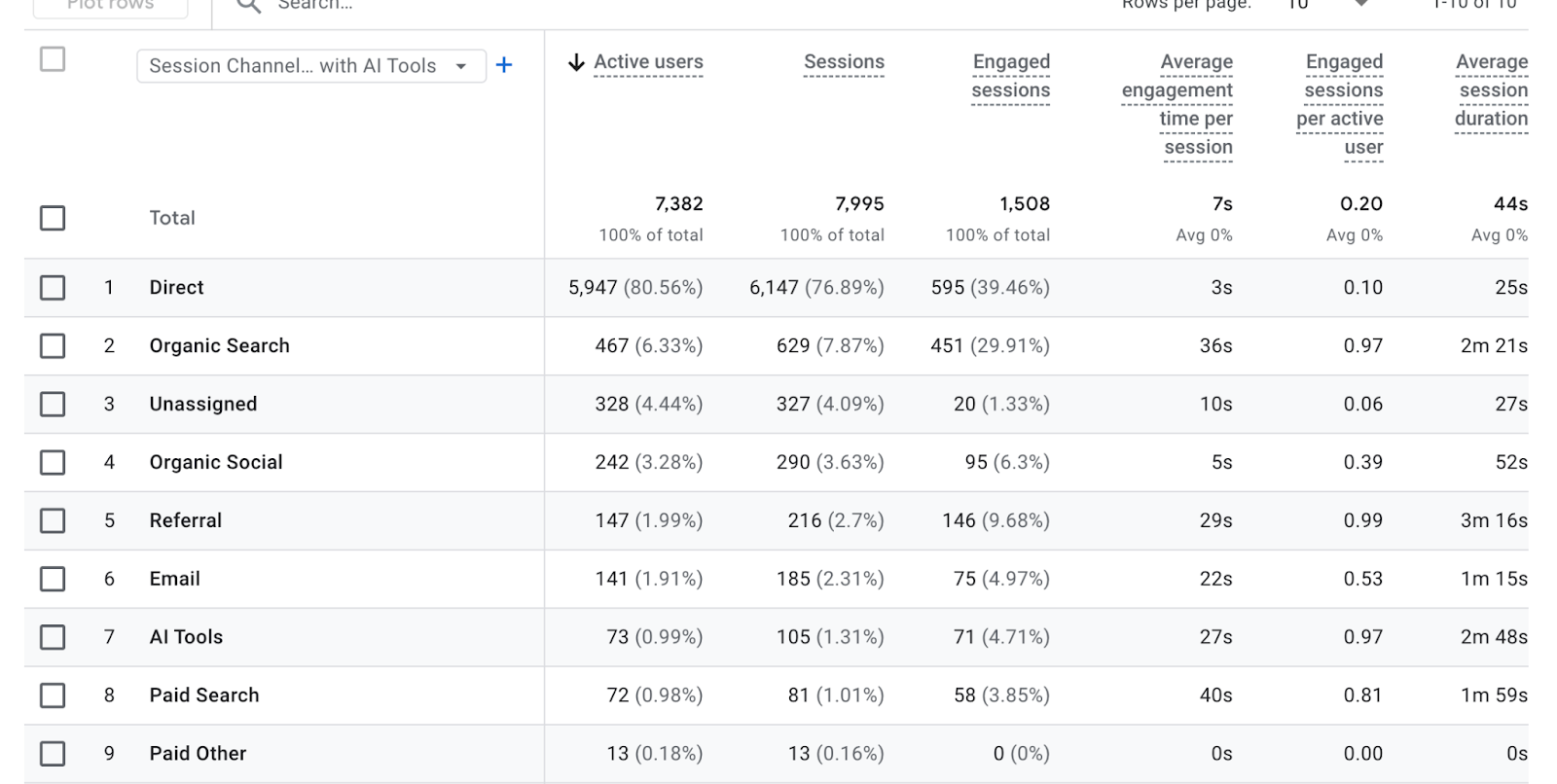
    This setup doesn’t change how GA4 captures data. It simply surfaces AI-driven sessions that were already there, pulling them out of the referral background and into a form that teams can actually use.

    For a more detailed, step-by-step walkthrough of this setup, see Dana DiTomaso’s “How to Track and Report on Traffic from AI Tools (ChatGPT, Perplexity) in GA4.”

    Separating ChatGPT From Other AI Tools

    After AI traffic is surfaced as a channel, some teams notice that one source tends to stand out. In many cases, that source is ChatGPT.

    Why ChatGPT often dominates AI traffic

    ChatGPT often represents a larger share of AI-driven sessions due to its broad adoption (it became the fastest-growing app in history, reaching 100 million active users within two months of launch) and frequent use for explanations, comparisons, and next steps. As a result, it’s often the first AI signal teams notice once tracking is in place.

    How ChatGPT traffic can behave differently

    Not all AI traffic behaves the same. ChatGPT-driven sessions may show different patterns than traffic from tools like Perplexity, Claude, or Gemini.

    Common differences include:

    • Deeper entry points into content
    • Longer engagement on explanatory pages
    • Strong alignment with informational or evaluative intent

    These differences reflect how users interact with various AI tools, rather than their performance quality.

    When separating ChatGPT adds value

    Separating ChatGPT into its own channel can improve clarity when it accounts for a meaningful share of AI traffic or when teams want platform-specific insight. In these cases, segmentation supports analysis rather than adding noise.

    When it’s better to keep AI traffic sources grouped

    For many teams, especially early on, grouping all AI tools under a single channel keeps reporting simpler and trends easier to interpret. Segmentation should be introduced only when it helps answer real questions.

    AI Tool Referrals vs AI-Generated Search Clicks

    AI tools vs AI search features

    AI-driven traffic doesn’t follow a single pattern. One of the most common points of confusion is the difference between AI tool referrals and AI-generated search features.

    AI tools send traffic directly from their own interfaces. When a user clicks a link inside a tool like ChatGPT or Perplexity, that visit arrives as a standard referral session.
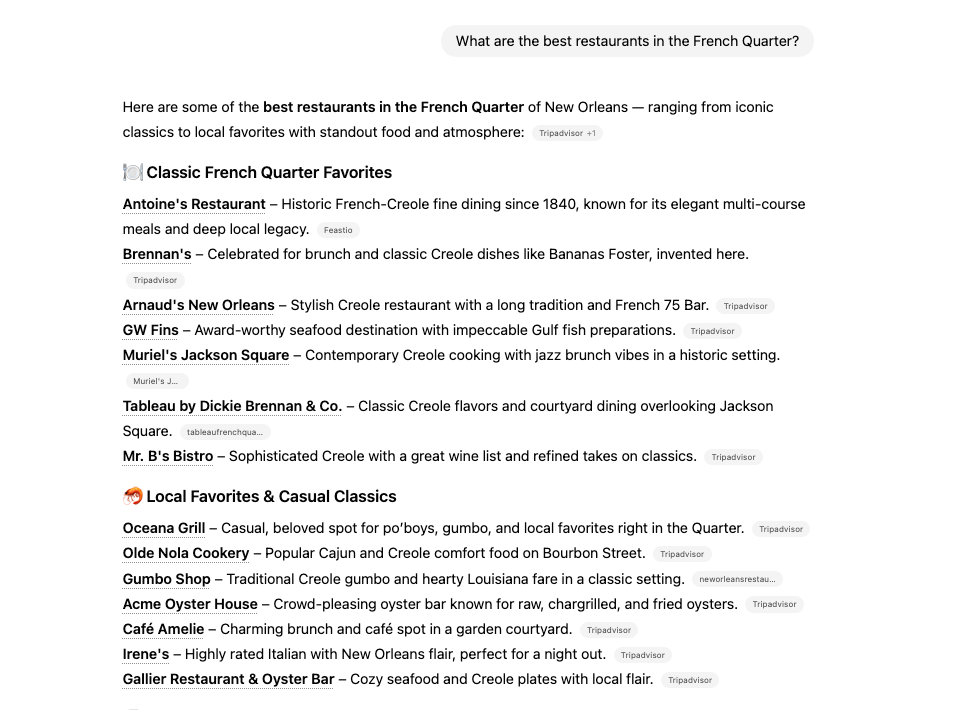
    Pictured: A recommendation list generated inside ChatGPT, where each item includes a clickable external source. When a user selects one of these links and lands on a website, the visit is recorded as a referral from ChatGPT, distinguishing it from clicks that originate within a search engine results page.

    AI-generated search features work differently. These include:

    • AI Overviews
    • Featured Snippets
    • People Also Ask

    In these cases, the user is still on a search engine results page. The click originates from a Google-owned surface, not from an external AI tool.

    Why this distinction matters in GA4

    Because AI tools and AI search features generate different types of URLs, they behave differently in analytics. Channel groups can reliably capture traffic from AI tools because those visits have identifiable external sources.

    AI-generated search clicks, however, often share source and medium values with traditional organic search. As a result, they can’t be isolated cleanly using channel group rules alone.

    Understanding this distinction prevents misreporting. AI tool referrals and AI-generated search features both influence discovery, but they require different tracking approaches inside GA4.

    When Event-Based Tracking Is Needed for AI-Generated Search Links

    Channel-based tracking captures traffic from AI tools, not from AI-generated search features.

    When discovery happens inside AI Overviews, Featured Snippets, or People Also Ask, a different measurement approach is required.

    How event-based tracking fills the gap

    Event-based tracking provides a way to measure clicks from AI-generated search features by identifying specific URL patterns and triggering custom events. This approach typically requires Google Tag Manager and a deeper understanding of how search feature URLs are structured.

    Rather than reclassifying traffic into a new channel, this method captures interactions as events that can be analyzed separately inside GA4.

    What to expect from this approach

    Event-based tracking adds useful context, but it comes with limitations. Teams should go into this with the right expectations:

    • Tracking is partial, not comprehensive
    • URL structures change, which can break rules over time
    • Visibility is directional, not exhaustive

    Because of that, event-based tracking works best as a complement to channel-based AI traffic reporting, not a replacement for it.

    When it’s worth implementing

    This approach is most useful for teams that:

    • Want deeper insight into AI Overviews and other SERP features
    • Have the technical resources to maintain tracking rules
    • Are already comfortable working beyond standard GA4 reports

    For teams looking to explore this layer in more detail, Dana DiTomaso offers a technical deep dive in “How to Track Traffic from AI Overviews, Featured Snippets, or People Also Ask Results in Google Analytics 4”.

    Using GA4 Audiences to Analyze AI Traffic

    Channels show where traffic comes from. Audiences show what users do after they arrive. Once AI traffic is visible as an acquisition channel, audiences become the primary way to understand its quality, intent, and impact.

    How audiences extend AI traffic analysis

    GA4 audiences enable teams to categorize users based on their entry points and subsequent actions. When AI-driven sessions are used as audience criteria, behavior can be analyzed across engagement, conversion, and retention metrics.

    This shifts AI reporting from volume-focused to outcome-focused.

    Common AI-focused audience examples

    Teams often create audiences such as:

    • Users who arrived via AI tools
    • Users who engaged after an AI-driven session
    • Users who converted following AI traffic
    • Returning users whose first session came from an AI source

    Each audience answers a different question about how AI-driven discovery influences performance.

    What audiences reveal that channels can’t

    Channels make AI traffic visible. Audiences make it interpretable.

    With AI-based audiences, teams can evaluate:

    • Engagement depth compared to organic or paid users
    • Conversion rates tied specifically to AI discovery
    • Whether AI traffic introduces net-new users or supports return behavior

    This helps separate curiosity clicks from meaningful acquisition.

    Using audiences to guide reporting and decisions

    AI audiences can be applied across standard GA4 reports, comparisons, and dashboards. Over time, they help teams identify patterns that inform content strategy, UX decisions, and measurement priorities.

    Rather than asking whether AI traffic exists, audiences help answer the more useful question: what that traffic actually contributes.

    What Search Influence Tracks for AI Traffic

    Surfacing AI traffic is only the first step. The real value comes from understanding how that traffic performs, how it changes over time, and how it contributes to broader acquisition and conversion goals.

    Search Influence focuses on a focused set of metrics that balance visibility, behavior, and impact.

    Core AI traffic metrics

    At the foundation, we track AI traffic volume and growth trends over time. This establishes whether AI-driven discovery is increasing, stabilizing, or declining.

    Key metrics include:

    • Total AI sessions and month-over-month change
    • AI traffic share relative to organic search
    • Engagement indicators, such as pages per session and engagement time
    • Conversion performance tied to AI-driven sessions

    These metrics provide directional clarity without overfitting analysis to short-term fluctuations.

    Understanding performance by AI tool

    Beyond aggregate volume, we break AI traffic down by platform to understand how different tools contribute to discovery and engagement.

    This includes:

    • Traffic distribution by AI channel
    • Engagement and conversion behavior by tool
    • Early identification of new or emerging AI referrers

    Comparing tools side by side helps teams spot meaningful differences without assuming all AI traffic behaves the same way.

    Visualizing AI Traffic With Custom Dashboards

    Why GA4 alone isn’t enough

    GA4 can store the data, but it’s not built for fast, repeatable AI reporting across a team. Most AI questions require clicking through multiple reports, changing dimensions, and rebuilding the same views every time.

    Common friction points include:

    • AI traffic gets buried unless you know exactly where to look
    • Views are hard to standardize across stakeholders
    • Trend checks take too long to repeat weekly or monthly
    • Non-analysts struggle to pull the same story consistently

    If AI visibility matters, reporting has to be easy to access, easy to trust, and easy to repeat.

    How Search Influence dashboards surface AI insights

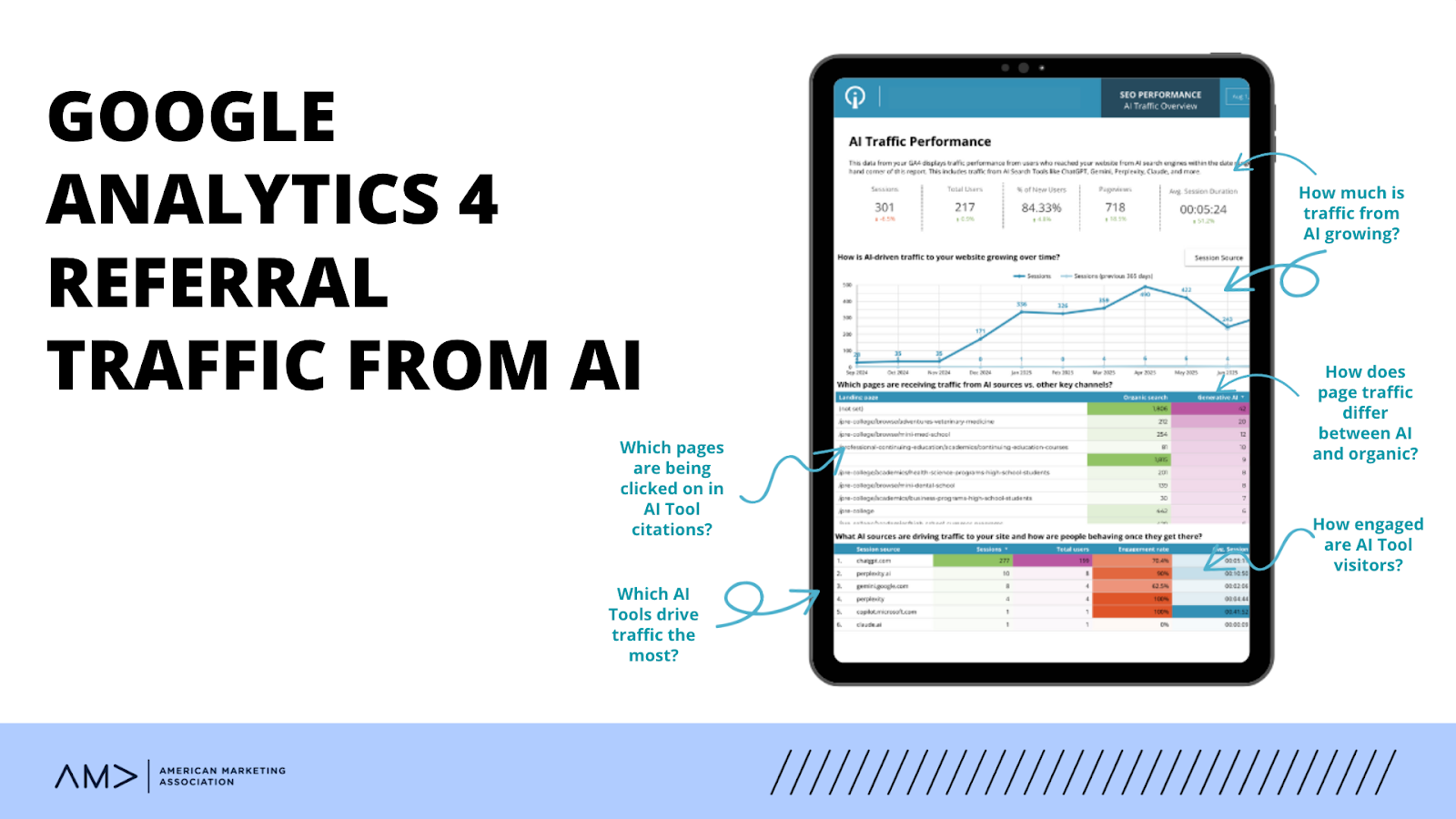
    Dashboards translate AI tracking into a shared, repeatable view that teams can rely on. Instead of rebuilding reports, AI performance is surfaced alongside organic and paid channels in a consistent format.

    Our custom-built dashboards typically show:

    • AI session volume and trend movement over time
    • AI traffic share relative to organic and paid
    • Engagement and conversion behavior from AI-driven sessions
    • Platform-level detail when it supports analysis (e.g., ChatGPT vs other tools)

    This shifts AI reporting from exploration to execution, making it part of an ongoing performance review rather than a one-off analysis.
    AI Tracking Tools Beyond GA4

    While GA4 remains the foundation for measuring what happens on your site, other platforms are beginning to surface how brands appear across AI-driven experiences.

    Today, these tools generally fall into three roles:

    • AI visibility tracking tools (such as Scrunch)
      Help teams understand where and how a brand shows up inside generative AI tools, including citation patterns and brand presence.
    • SEO platforms expanding into AI signals (including SEMrush and Ahrefs)
      Provide early indicators around AI citations, content reuse, and discovery, often alongside traditional search performance.
    • GA4 as the system of record
      Confirms what AI-driven discovery actually produces once users arrive, including engagement, conversion behavior, and downstream impact.

    Together, these tools answer different questions. Visibility platforms show where discovery happens. SEO tools reveal how content is reused or cited. GA4 validates what that traffic does next.

    The Reality of AI Traffic Tracking Today

    AI traffic tracking is not static. Referrers change, AI interfaces evolve, and attribution rules shift over time. Precision at the session level will never be perfect.

    What matters is consistency.

    When AI traffic is tracked the same way over time in GA4, patterns become visible. Teams can evaluate momentum, engagement quality, and contribution alongside other channels, even as the ecosystem changes.

    The goal is a usable signal, not a flawless measurement.

    FAQs

    1. Can GA4 automatically identify AI traffic without configuration?

    No. GA4 does not currently recognize AI-driven visits as a distinct channel on its own. By default, traffic from AI tools is classified as Referral, which makes it difficult to identify or analyze without additional setup. Custom channel groups are required to surface AI traffic consistently.

    2. Is AI traffic replacing or supplementing organic search traffic?

    At this stage, AI traffic is best understood as a supplement, not a replacement. Most AI-driven visits reflect users researching, validating, or comparing information before taking action. These behaviors often overlap with search intent, but they represent a different discovery path rather than a direct substitute for organic search.

    3. How accurate is AI traffic tracking in GA4 today?

    AI traffic tracking in GA4 is directional rather than exact. Known AI referrers can be reliably grouped using session source values, but attribution is not perfect and will evolve as AI tools change. The goal is consistent trend visibility over time, not precise session-level certainty.

    4. When should AI traffic be reported separately from organic traffic?

    AI traffic should be reported separately once it reaches a volume or strategic relevance that affects analysis or decision-making. Separating it too early can add noise, but grouping it indefinitely can hide meaningful patterns. The right timing depends on scale, stakeholder questions, and reporting needs.

    5. How often should AI tracking rules and definitions be reviewed?

    AI tracking rules should be reviewed periodically, typically quarterly or when major AI platforms introduce changes. New tools, referrer behaviors, and interface updates can affect how traffic appears in GA4. Regular review helps ensure definitions stay accurate without requiring constant adjustment.

    Turning AI Visibility Into Actionable Insight

    AI-driven discovery is already shaping how users find, evaluate, and engage with content. When tracked intentionally, it provides clear signals that strengthen SEO strategies, content decisions, and performance reporting.

    Search Influence brings structure to this complexity through proven tracking frameworks, executive-ready dashboards, and analytics that teams can act on with confidence.

    To gain clear visibility into how AI traffic is impacting your site, get in touch to explore our SEO, reporting, and analytics support.

    This post is informed by analytics frameworks and methodologies shared publicly by Dana DiTomaso. Our approach builds on those foundational concepts, adapted to how Search Influence configures reporting, analyzes performance, and delivers AI traffic insights through custom dashboards for our clients.


  • In-House Marketing vs. Agency Teams: Build a Strong Strategy Together

    In-House Marketing vs. Agency Teams: Build a Strong Strategy Together

    This post was updated by Paula French on 2/28/25 to reflect recent trends and best practice. It was originally published on 12/6/2018.

    Working professionals giving each other a high five

    Key Insights

    • As brands grow, marketing demands increase, making it difficult for internal teams to execute strategy, create content, analyze performance, and keep up with industry shifts all at once.
    • Agencies provide specialized expertise and resources that complement in-house efforts, allowing internal teams to focus on core business priorities and guide overall strategy.
    • Combining internal marketing strengths with agency support creates a scalable, results-driven strategy that adapts to changing needs without overloading your team.

    Internal marketing teams are often expected to manage it all — strategy, execution, and analysis — on top of keeping up with regular day-to-day tasks. But as the workload grows, so does the risk of burnout, missed priorities and deadlines, and campaigns that don’t perform as expected. The faster the industry evolves, the harder it is for stretched-thin teams to keep up, leading to outdated strategies and missed opportunities.

    While outsourcing can help lighten the internal load, some in-house teams hesitate to seek out agency support, fearing they’ll lose control over their marketing strategy. In reality, internal teams and agencies don’t have to compete. They can leverage their respective strengths to create an agile, focused, and impactful marketing approach.

    If you’re deciding between keeping all of your marketing in-house or partnering with an agency, here’s why you don’t have to choose just one, plus how to balance both for the best results.

    How Can an Agency Help Me If I Am a…

    Single-person marketing team

    Instead of feeling like a one-person show, you’ll have a team to bounce ideas off, refine strategies, and make sure nothing slips through the cracks while improving your results.

    Single-person marketing “teams” can feel isolated and underappreciated. Your organization’s leaders expect you to handle it on your own, but as you’ve tried to run campaigns, manage vendors, write content, plan the strategy, update your website, and still get results, you find two challenges:

    1. There isn’t enough time to do it all yourself.
    2. One person rarely has the skills to be strategic, create graphics, update a website, monitor results, and evaluate and manage vendors.

    A marketing agency takes the weight off your shoulders by acting as an extension of your team. They bring the time, skills, and experience to tackle everything from strategy planning to execution and performance tracking, so you’re not stuck doing it alone.

    Business leader

    No more juggling ads, content, and campaigns on the fly. Partnering with an agency ensures your marketing is always working, even when you’re too busy to think about it.

    When you’re responsible for driving the business forward, marketing is just one of many things competing for your time. Whether you’re managing it all yourself or working with local media vendors, it can be difficult to stay strategic and aligned with your goals.

    You may often feel that:

    1. Marketing takes a back seat when business operations call for urgent attention.
    2. You got into your field to do what you love, not market what you love.
    3. You are reacting to promotional ideas as they cross your desk, with no real strategy about how to best reach your customers.

    Being a leader means wearing many hats, and marketing often ends up as an afterthought. An agency helps shift it from a scattered, reactionary task to a well-planned strategy that actually supports your growth.

    Medium-to-large marketing team

    Even with a well-staffed, in-house department, keeping up with every aspect of marketing can be a challenge. Between aligning team members, executing campaigns, and adapting to industry updates, it’s easy to get stuck in the weeds and lose valuable time for strategy. You may find that:

    1. Your internal marketing team needs support in strategy and direction.
    2. The time it takes to execute tactics gets in the way of strategically analyzing what is truly working (and what is not).
    3. You struggle to keep up with new and changing marketing technologies and ideas.

    Partnering with a marketing agency helps bridge these gaps by bringing fresh insights, specialized expertise, and extra hands where you need them most.  Whether it’s adjusting your strategy, handling time-consuming execution, or keeping your team ahead of evolving trends, they’ll keep your marketing in check and on track without overloading your internal resources.

    Higher education marketer

    Instead of constantly shifting from one urgent task to the next, an agency’s support helps you be more intentional with your marketing.

    Higher education marketing is a constant balancing act. One minute you’re fine-tuning messaging for a new degree program, the next you’re trying to boost student engagement — all while keeping an eye on enrollment goals. With so many priorities commanding your attention, it’s easy to feel like you’re always in reactive mode and that:

    1. Your marketing efforts are spread too thin. You’re trying to serve prospective students, current students, and alumni all at once while balancing multiple degrees and programs.
    2. Data analysis and performance reporting fall by the wayside due to time constraints.
    3. Meeting ambitious enrollment goals feels unattainable without additional resources or expertise.

    An agency will take on recruitment and retention efforts, ensuring you reach the right students at the right time. With deeper data insights, you’ll make informed strategic decisions, focusing your time and budget on what drives real results.

    Want to find out if partnering with an agency is right for your institution? Take our Higher Ed SEO Quiz to discover your best staffing approach based on your current resources, strategy, and performance.

    In-House Marketing vs. Agency Partnerships

    A person giving a presentation in a conference room

    Balancing in-house marketing with agency support lets you stay involved while tapping into advanced expertise. Your team knows your brand best, while an agency brings the skills, strategy, and execution power to amplify your efforts.

    At Search Influence, many of our clients handle routine tasks internally while relying on us for more strategic, high-impact initiatives. The key is knowing which responsibilities are best handled by your in-house team and which most benefit from external support.

    What work should my in-house marketing team handle?

    Identifying unique stories that can be included in marketing

    Great marketing starts with great stories, but you can’t share what you don’t know.

    As part of your internal tasks, build relationships with departments and stakeholders across your organization. This ensures you stay informed of exciting news and developments that bring your marketing to life.

    For example, let’s say you are marketing for a university, and one of your instructors learns that one of her students won a research award. Would your marketing team hear about it?

    If you educate your staff on your marketing goals and build vital relationships, you’ll be less likely to miss valuable stories that strengthen your outreach.

    Serving as spokespeople for public relations and media opportunities

    Having the right people represent your organization in the media bolsters your brand’s credibility and reach. Instead of scrambling when a press opportunity arises, establish a roster of internal experts who can confidently speak on key topics.

    Identifying multiple spokespeople prevents over-reliance on a single person, speeds up media responses, and ensures you always have a knowledgeable representative prepared to engage with the public.

    By designating these spokespeople internally, you streamline the process and create a sense of ownership within your team. When staff members are prepared and empowered to speak on behalf of the organization, it fosters consistent messaging and a proactive approach to media inquiries.

    Creating day-to-day organic social posts

    Social media is where you build a genuine connection with your audience, and staying consistent is what’s key to maintaining that bond. Hubspot reports that social media is the preferred means for product discovery among consumers aged 18 to 44, making routine posting all the more important.

    For businesses with the right in-house resources, managing daily posts can be straightforward. But when time or expertise is limited, outsourcing certain aspects to an agency — like content scheduling, caption writing, or hashtag strategy — can help maintain consistency without adding to your team’s workload.

    You may find that capturing photos or videos in-house and passing them along to an agency for posting works best. This ensures fresh, timely content without the hassle of managing every detail.

    When should I hire a digital marketing agency?

    To improve your website’s SEO and increase organic traffic

    If your in-house team can’t keep up with the nuances of SEO, it’s time to bring in the experts.

    SEO is fundamental to getting your site seen, but it’s far from a one-size-fits-all solution. It takes ongoing attention, work, and a deep understanding of both on and off-site SEO tactics to rank high and stay ranked high.

    An agency will create a comprehensive SEO strategy that aligns with your specific goals, covering key areas like:

    • Deep keyword research to target the right audience
    • On-page optimization to improve visibility, from meta descriptions to header tags
    • Content creation that considers what your audience is actually searching for
    • Site performance improvements, from navigation to mobile optimization
    • Building valuable backlinks to boost your site’s authority
    • Performance tracking to refine strategies and stay ahead of the curve

    When an agency handles these technical details, you free up your team to focus on bigger-picture goals, knowing that your SEO is in the best hands.

    To manage and optimize your digital advertising campaigns

    With an agency managing your digital ads, you’ll rest easy knowing your budget is being spent efficiently, your ads are reaching the right people, and your strategy is always evolving to stay competitive.

    Digital advertising is one of the fastest ways to get your brand in front of the right audience. However, making the most of it is no easy feat. If you’re struggling to create effective campaigns, manage budgets, or keep up with performance tracking, an agency will give your campaigns the focus they need.

    Applying their specialized expertise, an agency positions your brand for paid advertising success by:

    • Crafting targeted campaigns on platforms like Google Ads and Meta
    • Selecting and optimizing keywords for maximum visibility
    • Writing engaging ad copy and designing eye-catching visuals
    • Leveraging advanced targeting to refine audience demographics and interests
    • Setting and managing budgets to ensure your ads reach the right people without overspending
    • Testing different ad variations to identify the most effective strategy
    • Monitoring and adjusting campaigns to keep things running smoothly

    To monitor campaign success through advanced analytics tracking and reporting

    Let an agency take the guesswork out of ad management, using data to refine and enhance your campaigns for maximum performance.

    Analytics and lead tracking require more than just simple data collection. It takes advanced know-how to make sense of your metrics, assess your performance, and use the insights as fuel for your future strategy. If you’re feeling lost in a sea of metrics, an agency will interpret the numbers and guide you toward smarter decisions.

    Trust your advanced tracking and reporting to an agency when you need support with:

    • Tracking leads from forms, calls, and other inquiries
    • Identifying the top-performing marketing channels to allocate resources effectively
    • Analyzing lead quality to improve conversion rates and maximize ROI
    • Conversion tracking set-up to measure sales, sign-ups, and other key outcomes
    • Making sense of your data with customized reports and KPI dashboards 
    • Conducting an ROI analysis to showcase the effectiveness of your efforts
    • Optimizing your campaigns based on performance data

    To craft and execute customized email marketing strategies

    With an agency’s guidance, your email marketing will be a well-oiled machine that consistently delivers high-quality, results-driven campaigns.

    Email marketing often gets treated as an internal “check the box” task without much thought beyond getting the message sent. But when the average cold email open rate is only 27.7%, it’s clear that every detail matters to help your emails stand out in a cluttered inbox.

    From timing to content, getting it right from the start is how you improve opens, reads, and conversions. An agency helps support your email strategy by:

    • Developing the right mix, whether that’s newsletters, nurture campaigns, or frequent email reminders
    • Curating relevant, targeted content that aligns with recipients’ interests and needs
    • Crafting compelling subject lines designed to increase open rates
    • Designing visually appealing emails that work across all types and prompt clicks
    • Segmenting your audience to send the right emails to the right people at the right time
    • Timing emails to ensure they land in inboxes at peak engagement times

    But I Don’t Want to Give Up Control! How Do I Balance In-House and Outsourced Marketing?

    Still debating between in-house vs. agency marketing, or a hybrid approach?

    For the aspects you are currently handling internally, take a moment and ask yourself if it’s the right responsibility for your business. As you go through each item, think…

    Yes, you CAN do it, but…

    1. Are you doing it well?
    2. Are you doing consistently?
    3. Are you monitoring results and making adjustments?
    4. If you were not spending time on this, what else could you be doing?

    If you’re worried about losing control over your marketing when you outsource, rest assured. While your agency will take the heavy lifting off your plate, you’ll still have the head seat at the dinner table. The best agency for you will integrate themselves as part of your team and include you in the strategy and reporting of results, at a minimum.

    Find Your Right Approach to Working With a Marketing Agency

    Are you feeling stretched thin in your marketing approach?

    When your in-house team partners with an agency, you create a dream duo that distributes the workload, increases your day-to-day efficiency, and grants you the extra bandwidth to achieve sustainable success.

    If you’re a higher education marketer interested in further assessing your ideal marketing approach, check out our Higher Ed SEO Quiz. This 5-question quiz will help you determine whether to outsource your work, keep it internal, or take on a hybrid strategy. In just minutes, you’ll have personalized insights to make informed staffing choices.

    See how Search Influence can help you develop a marketing plan that works for your team today!

  • No. Don’t “Upgrade” to Google Analytics 4 (GA4). Instead, install it and run it in Parallel.

    Don’t “Upgrade” To Google Analytics 4 (GA4) Just Yet

    Google has been urging Analytics users  – mostly by email – to “Upgrade” to Google Analytics 4 (GA4).

    At Search Influence, we are installing GA4 but not “upgrading” just yet.

    No doubt, GA4 will be a great improvement, but there are a few really compelling reasons not to go all in just yet.

    A while back, David, our senior web developer, wrote a pretty comprehensive blog post about switching to Google Analytics 4, which you should check out. Below, I’ll reiterate a couple of his points, plus a few more.

    Google Analytics 4 user interface - Should you upgrade to GA4?

    Google Analytics And The Cookie-less Future

    In short, a big reason for this change is to accommodate a cookie-less world. As users can now opt out of tracking, it may be more difficult to gather user experience data if cookies are the way you get that done.

    Google Analytics 4 is not yet a fully baked product. Google tends to take an agile development approach and test new products and features with users.

    Even though it is Cookie-based, Universal Analytics – the current version – is a stable product.

    Do You Even Track Metrics, Bro?

    Google Analytics is great, but there are things it doesn’t do well. Some of the tools that you use to supplement Google Analytics may be negatively impacted if you make the switch too early.

    Some examples:

    In short, just because the Google Analytics team is ready for you to switch doesn’t mean everybody else is. Third parties and even some Google Properties development teams have to catch up to the GA4 APIs and interface changes.

    Third-party tool providers need a chance to get caught up with the new Google Analytics.

    Search Influence And GA4 For Clients

    Google plans to deprecate Universal Analytics as of July 1, 2023.

    In the next few weeks, we will be installing the GA4 tracking code on our client sites (again, alongside Universal Analytics) or recommending their developers do if we don’t have access.

    This way, we will have a full year’s worth of data when Universal Analytics sunsets.

    We’re not making a wholesale switch right now for the reasons above, but we feel it’s important to start collecting data in the new tool to enable good historical reporting in future years.

    We use CallRail and Google Data Studio for most of our client reporting and some internal dashboards, too. We are not willing to risk the integrity of that data for decision-making and reporting to move the newest, coolest Google toy.

    Again, David’s post goes into much more detail about switching to GA4, but I hope this gives a high-level view of the Search Influence approach to integrating this new platform.

    And, of course, if you need help setting up Analytics, Tracking, and Reporting for your organization, please get in touch. We’d love to help.

  • Real World Considerations for Google Analytics E-commerce Tracking

    It’s 2020, and there’s no shortage of instructional guides to setting up Google Analytics Ecommerce Tracking on your website. If you’re looking for detailed technical information on setting it up yourself, there’s no way I would ever outdo Simo Ahava’s guide to setting up Google Analytics Enhanced Ecommerce Tracking in Google Tag Manager. And Google’s own support documentation naturally offers some pretty helpful guidelines and syntax itself.

    What I can hopefully shed some light on is why—despite all these brilliant and freely available resources on the subject—your developer is always making noise about all the problems with setting up Ecommerce Tracking for you. In addition, we’ll look at some recommendations for assessing platforms and plugins when considering options for your site. If your developer is whining about issues with Ecommerce Tracking, it’s probably not because they are being lazy or cranky! Or at least it’s probably not just that.

    Money falling around computer trying to set up e-commerce tracking

    So What’s the Big Hassle With Setting Up Ecommerce Tracking?

    I know, I know. When you set up your basic Google Analytics tracking code, it was so easy! All you had to do was copy and paste the code from Google into a script section in your website’s backend. It took like 5 minutes, and anyone can do it!

    Well, unlike most other aspects of Google Analytics tracking, the code and configuration for Ecommerce Tracking has to actually communicate with your website’s functionality in order to collect the actual e-commerce reporting data. That is to say basic pageview-oriented tracking code is adding reporting functionality to your website, so it doesn’t need to care how your website works as long as it loads. Once the tracking code is there, the reporting information flow is more between Google and the site user’s browser, not so much the site itself. But Ecommerce Tracking code has to get transaction data from your website’s backend e-commerce functionality.

    When an e-commerce customer completes a purchase, the user simply reaches a confirmation page and probably sees some kind of thank you message and general order info. Behind the scenes, though, the website is processing the items in the user’s cart, updating your site/shop’s inventory, processing a payment, sending confirmation emails, and all kinds of other things depending on what you sell and what your process is. The user doesn’t see all of that, and—crucially—neither does Google or the user’s browser unless you want them to. In the case of Ecommerce Tracking, we want Google to get some of that information that wouldn’t otherwise be readily available. That requires your developer to pull some elements of those backend processes and reformat them into frontend-accessible code that Google can read and transmit to its Ecommerce Tracking platform.

    OK Fine, So Our Developers Have to Write Some Code. That’s What We Pay Them For.

    Yes, that’s true. And we’re all generally very pleased with that arrangement. But with all the different options and possible combinations of CMSes and e-commerce platforms and plugins and modules and so on and so on, there’s no hard and fast rule for how or if pulling data from an e-commerce platform is possible in real-world configurations. And modifying someone else’s platform or plugin directly, even if you know exactly what you’re doing, can have major unexpected ramifications as other auxiliary platforms and plugins get updated and integrated by their original creators.

    The whole point of Ecommerce Tracking is to be able to track how the ultimate purchases actually got to the point of purchase. You already know what you sold and how much it cost the user by the very fact that you sold it. Google’s Ecommerce Tracking allows you to compartmentalize how many paying users or what percentage of your transactions come from organic search vs. ads vs. social media vs. emails and so forth. And in order to do that, Google needs to be able to follow the user from arrival to the site all the way to completion of purchase, at which point it needs additional, more granular information transferred from the backend payment processing system itself. And the more differently specialized cooks you have working in the same kitchen that is your user’s arrival-through-purchase experience, the more difficult it is to come out of it with a decent data feast. As a bonus to this blog post, you have full permission to borrow that tortured analogy, compliments of the chef.

    I’ll reference a specific recent example our team encountered to illustrate my point. One of our clients came to us regarding a campaign that was going to be very dependent on Google Analytics Ecommerce Tracking, arriving with a freshly built WordPress site, which used the MonsterInsights plugin for general Google Analytics tracking and the WooCommerce platform for their e-commerce online sales. Both of these are very solid, well-maintained, and extremely widely used platforms, and namechecking them here is not meant as criticism. Meanwhile, WooCommerce had a plugin extension installed to integrate the on-site e-commerce functionality with an external calendar booking platform, which manages attendance stats and served as a sort of CRM for the client internally. The calendar booking platform/CRM had its own internal configuration for Google Analytics, which was essentially a black box to me as an outside developer for completely understandable security and privacy reasons.

    Hey, That’s a Bunch of Different Things

    It sure is! If you’re mapping this out at home, we have MonsterInsights initially establishing tracking for the user. From there, when a user goes to pay for something, they arrive at WooCommerce, which then has to transmit data via an additional add-on plugin to an external booking platform. The booking platform then sends its information back to the WooCommerce add-on plugin, back to “WooCommerce proper” for processing, (which, of course, generally involves additional add-on plugins for specific payment options), and only THEN does a user arrive at the checkout confirmation page where the net results of that path are supposed to be sent to Google Analytics for reporting.

    The obvious way to approach Ecommerce Tracking for a WordPress site with WooCommerce is to add an WooCommerce plugin extension for Google Analytics integration. And that’s what we tried to do, except that it turns out that the WooCommerce Analytics extension’s tracking didn’t play nicely with the preexisting base analytics tracking set up through MonsterInsights. If this is already getting tiresome and technical speak makes you nauseated, just ignore this part, but MonsterInsights sets its own unique tracker name for its Analytics tracking. Since WooCommerce does not, the Analytics clientId that identifies users in their path through a website were getting effectively reset as soon as WooCommerce would fire its e-commerce data for reporting. For more on custom trackers, here’s Google’s breakdown.

    I could go through about 10 more steps of trial and error and frustration here, but I think the bigger point is probably clear enough: while many of those different plugins and extensions and booking platforms can absolutely make one piece of your website setup and maintenance much easier, they frequently do not care about each other. They do the thing they do very well, but they don’t always account for the bigger picture considerations of running an e-commerce website, much less a business with various other tentacles, where the e-commerce functionality is only a single, modest aspect of the services offered in full. So setting up a way to make all of these divergent elements successfully and accurately transfer user tracking information is often just a long game of tracking error whack-a-mole, depending on the preexisting configurations in question.

    E-commerce coding displayed on a computer monitor

    What Can We Do To Avoid E-commerce Problems?

    We can’t make all of these plugins and external modules do exactly what we want exactly when we want it. But we can think about what we ultimately want to accomplish with our websites and ask the right questions before going whole-hog tying all of our operations to something that may not support many of the things we may want to accomplish down the line:

    Do we really need a plugin for this?

    There are many very basic processes and configurations you can perform both without a plugin and without any real development knowledge. No disrespect to MonsterInsights or any other Analytics plugins, which offer plenty of advanced features and options that can be incredibly useful in specific situations, but if all you need from your initial Google Analytics setup is standard pageview tracking, you can probably install that yourself without a plugin. If you can copy and paste your Google Analytics tracking ID into a plugin, you can generally just as easily copy and paste the base Google Analytics tracking code. Google Analytics is an obvious example of this, but many other platforms have associated plugins they love to promote for ease of use, which are ultimately just allowing you to copy and paste one thing instead of another. The fewer plugins and extensions you are tied to, the easier it is to revise or expand your configuration in the future. As an added bonus, using fewer plugins will usually make your site faster and more secure as well.

    If we do need a plugin, what kind of external integrations are available?

    In the context of this post, obviously we’re primarily concerned with whether a platform would integrate with Google Analytics, which is generally simple enough to establish. But don’t just look for the specific things you need at this particular moment when investigating available integrations. Try to get a feel for how many and what types of outside integrations any new platform offers. Just because you’re not using something like Zapier or Automate.io or Mailchimp or whatever it is right now, doesn’t mean you won’t find a need for it down the road. If a new plugin or platform is proudly featuring a wide array of different external integrations, that can be a good indication that the platform will be flexible in accommodating a variety of different use cases and will limit you less as you expand your marketing efforts or your business as a whole.

    Be very wary of any platform assuring you that you don’t need those outside integrations because it gives you all the tracking analytics and other features you need right there in its own dashboard. That is an easy path to finding yourself trapped with limited functionality and unreliable data about your website and your business as a whole. I once logged into an unfamiliar external platform used by a client and was greeted with an enthusiastic congratulatory message highlighting the fact that according to their analytics, the client had received 3 times as many new site visitors as total site visitors in the previous reporting period. Unless this platform’s developers unearthed a magical transcendent code library that can report on website interactions with the hidden spirit world, that math does not work out and that analytics data point isn’t reliable. There’s a level of transparency to the way a platform on the scale of Google Analytics records and reports data that you’re unlikely to find in a random calendar widget’s dashboard screen.

    Is it really that important to use an e-commerce platform that works with Google Analytics Ecommerce Tracking anyway?

    Yes! It’s 2020. We’re disappointed that we don’t microchip brain implant video games and rocket boots. Google Analytics Ecommerce Tracking has been around for a long time and should be a baseline expectation for any ticketing or e-commerce platform to have fully integrated into its native functionality. If your e-commerce or ticketing provider doesn’t recognize the importance and ever-increasingly broad usage of Google Analytics Ecommerce Tracking, it probably isn’t going to be very attentive to other future needs as your business or marketing plans expand, either. Even if you can find ways around it, you shouldn’t be paying to use a platform that puts you in the position of having to do so.

    Conclusions

    If there’s one general principle to take away from this, it’s just to try to think through and plan your various platforms that need to work together online. When deciding on a new plugin or e-commerce/ticketing platform, try to think long term. Sometimes the cheap and easy immediate option can cost you way more in the long run as it requires wildly extravagant development gymnastics to integrate with the other items you may need running and functioning in concert with the new thing that seemed so simple at the time. Online marketing and e-commerce are always moving forward rapidly, so make sure you cast an eye toward the platforms and services that will allow you to keep up.

    Still trying to wrap your head around it all? Whether you’re a tech whiz or new to the game, Search Influence can beef up your analytics approach with qualified confidence. Get an expert opinion and start making smarter e-commerce decisions today.

    Images

    Laptop money

    Coding

  • How Will Safari’s ITP Cookie Policy Updates Impact Google Analytics Tracking?

    To browse the Internet in 2019 is to learn how to manage that nagging sense that someone is always watching. You casually look up the ingredients for a traditional eggplant curry while considering lunch options, and weeks later every website you visit is still force-feeding you offers on wholesale quantities of turmeric root. And of course, if you play it right, you can visit a few sites for things you already know you’re going to buy, then wait for the discount offer to populate somewhere else a few days later for a quality bargain.

    Well, if you use Safari as your web browser of choice, that last little vaguely dystopian life hack may not serve you particularly well anymore. This is because Apple decided a couple years ago that maybe it isn’t actually all that great for online advertisers to be able to follow you everywhere you go on the internet for extended periods of time, building an intricate consumer profile so that they can shoehorn you promotions for things they know you’ll be powerless not to click on and buy. Specifically, Apple decided to crack down on how Safari manages its users’ cookies, which are the little data containers you have to click an annoying popup to “allow” on the vast majority of websites you visit now.

    Pacman cookie

    In 2017, Safari debuted its Intelligent Tracking Prevention protocol (ITP), which was devised to add more rigid restrictions on the degree to which outside parties could track Safari users across the web without those users’ knowledge or consent. Since then, Safari has steadily ramped up its war on trackers as the less scrupulous among advertisers, using already questionable tracking techniques, began developing increasingly shady and manipulative workarounds to continue soaking up that sweet, sweet consumer data. This has all culminated in the release of ITP 2.2 in May of 2019, which now very aggressively and severely limits the kind of tracking options available not only to the more ignominious and exploitative of advertisers, but now also to the well-intentioned businesses and marketers simply trying to quantify and optimize the user experience on the websites they manage. As you might imagine, this has already led to a good bit of wailing and gnashing of teeth in nobler digital marketing circles, as the bad apples have effectively ruined data access and availability for the entire bunch.

    But let’s back up a bit. We need to understand a bit about the technical details here before we can understand the ramifications of what Apple/Safari has unleashed upon the marketing world.

    What Are Cookies Exactly?

    Cookies are ultimately just little chunks of data. When you visit most websites, the site will stash some set of cookie(s) in your web browser. As you continue to use your browser, the cookie essentially reports back to its source about what you’re doing in your browser.

    That already sounds a bit scary, given what we know about privacy issues in 2019, but the general use cases that led to the nearly universal use of cookies by websites weren’t really invasive or villainous in intent. Cookies keep track of whether you are logged into a website or not so that no one but you can order the 20-pound box of gummy bears you added to your Amazon cart in a moment of weakness. Likewise, cookies are the mechanism by which Amazon remembers that you added this—and other unspeakable things to your cart—so that you’re confronted with them in the unforgiving light of day the next time you visit their site.

    Now, just as a website can use cookies to remember that you logged in and added items to your cart, it can use them to see what else you’re doing on their site. One of the most widely used tools for webmasters and digital marketers is Google Analytics, which is a cookie-driven platform that offers a wealth of invaluable data about how users interact with a website. Importantly, Google Analytics does not provide specific identifying information about who a user is; it simply records the pathways that anonymous users employ to arrive at a website and how they engage with it once they are there. This information is then reported to the administrators of a site’s Google Analytics account, allowing those involved in maintaining and developing a site to assess what is or is not working in terms of marketing strategy and user experience. And at this point in the evolution of the internet, if you or someone in your employ isn’t using some on-site analytics platform to assess user engagement on your website, you probably don’t care enough about your online presence.

    Different Types of Cookies

    The cookies described in the previous section are referred to as “first-party cookies.” They are classified as such because they are only added by a site that a user has directly visited, and the information collected by the cookie only reports to that site (or an admin thereof) about users’ activity on that site. So while Google Analytics, for instance, is an external platform not built into a website, the only way for it to collect its data is for a site developer to add tracking code directly onto the site to establish the tracking cookie that users will only receive when visiting the site directly. And data is only collected for the Analytics account-holder when the user is on a site with that account’s tracking code.

    Meanwhile, out in the spooky online wilderness, there are more exploitative advertisers and marketers who employ what are known as “third-party cookies.” Third-party cookies are still set by a site but are not directly tied to that site. For example, a website serving ads from nefariousadvulture.spam will essentially allow nefariousadvulture.spam to set its own cookie. Since the cookie is tied to nefariousadvulture.spam and not the site the user actually visited, that cookie continues to collect data from the cookied user as he or she moves across any other website serving ads from nefariousadvulture.spam. That allows nefariousadvulture.spam to form fuller profiles of users based on their activity across multiple websites, any of which may be able to transmit actual identifying information to the vulture kings, depending on the nature of the sites being tracked.

    Ugh, that was all SO boring. Why did you make me read all that?

    I know, and I’m sorry. But a general understanding of cookies and their different types is essential to grasping the significance of what Safari and other browsers are starting to do in the name of user privacy. Here’s a cool dunk to break up the dull tech speak a bit. You deserve it.

    Giannis Antetokounmpo dunking gif off a great assist

    So What Does All That Have To Do With Safari’s ITP Protocol?

    Initially, with ITP version 1.0, Safari set out to limit the use of third-party cookies. ITP set a 24-hour window for third-party cookies to actively collect data if the user didn’t directly interact with the third-party website that set the cookie. So drawing from the previous third-party cookie example above, if a user directly visited nefariousadvulture.spam within 24 hours of receiving the third-party cookie, it could stay active and continue tracking. If not, the cookie effectively expired after 24 hours. Since the whole premise of this kind of advertising and tracking meant that users were pretty much never going to directly visit the sites serving the ads, this marked a doom and gloom moment for the nefarious ad vulture world. Meanwhile, users of first-party cookies remained generally unaffected. To this point, the general standard was that first-party cookies could remain in place for 30 days before being purged unless a user actively removed them before that point.

    But of course, the nefarious ad vultures weren’t just going to give up on a hitherto successful approach to marketing just because one browser got cranky about it. Many advertisers just rolled up their sleeves and figured out how to have partners or clients set their third-party cookies as if they were first-party cookies, which then proceeded to do exactly what they had done all along in terms of tracking users across numerous websites to build consumer profiles. This, as it turns out, was the tipping point where Safari started moving more in the direction of burning the entire house down to kill a spider on the window sill. The updates and increased aggression toward cookies have been steadily and quickly ramping up ever since.

    With ITP version 2.0 in 2018, Safari essentially blocked the use of third-party cookies altogether. Shortly thereafter in early 2019, to counteract and preempt the inevitably increased abuse of first-party cookies by nefarious vulture types, ITP version 2.1 reduced the 30-day gestation period for first-party cookies to 7 days. While webmasters and marketers were still reeling and trying to piece together the impact this dramatic change had on their analytics, Safari rolled out ITP version 2.2 in May of 2019 reducing the 7-day first-party cookie expiration to 24 hours. Basically, rather than play whack-a-mole with devious and irresponsible cookie manipulators, Safari just poisoned all the moles along with the grass, dirt, and any other less whack-worthy beings that happened to share their habitat.

    What Does This Mean For Webmasters and Marketers?

    It means that everyone has to recalibrate a bit with regard to web analytics. As mentioned earlier, Google Analytics is one of the most widely used platforms available to study website user statistics and behavior. And first-party cookies drive it. Until this year, Google Analytics would be able to track user activity on a particular site over 30 days. Now, for Safari users only, it only gets 24 hours.

    As an example, imagine that you have an eCommerce business selling novelty hot dog cannons for use at sporting events and other projectile-garbage-food-friendly occasions. Anonymous internet user we’ll call Yuzer reaches that familiar point in life where he or she definitely needs a novelty hot dog cannon (it happens to the best of us). So Yuzer opens up Safari and searches google for “novelty hot dog cannon.” Because your website is well optimized with clearly targeted content, Yuzer quickly finds and clicks on your website from atop the search results. With such well-organized content and such user-friendly layout, Yuzer pretty quickly settles on the fact that this is the place to buy the hot dog cannon of his or her dreams. But this is obviously a big decision, and Yuzer wants to talk over all the cannon options available with his or her significant other before just diving into the hot dog water. So Yuzer bookmarks the page, then leaves to scroll weepily through Craigslist Missed Connections, look up relish recipes, and ultimately binge-watch old Columbo episodes until falling asleep.

    To this point, Google Analytics would have reported to you that some anonymous user arrived at your novelty hot dog cannon website via organic search, clicked around a bit to check the specs on various cannon models, then left. You don’t know who the user is, what they like in their relish or how many seasons deep they’ve gotten in Columbo or any other series.

    3 days later, Yuzer and his or her partner excitedly plop down together in front of Yuzer’s laptop and return to your website and finally buy the hot dog cannon they know will be the first page in an important new chapter in their lives. They pull up the page Yuzer had bookmarked, complete a purchase, high five, and go out to dinner to celebrate. Everything is great for Yuzer and the enthused dog-loving revelers on the receiving end of Yuzer’s new cannon. But things are now a bit more complicated for you.

    Until May of 2019, regardless of browser, you would have seen an accurate representation of a path to purchase. This anonymous user reached your site via Google search, clicked around, left, then came back 3 days later and bought a mid-tier hot dog cannon (a solid starter cannon to be sure, but not exactly all-star material). But since Yuzer uses Safari, now you see that one anonymous user reached your site via Google search, clicked around a bit, and left. Then 3 days later another new and different anonymous user visited your site directly by typing the URL into his or her browser window and immediately bought a product. This isn’t what actually happened, but that’s how it is going to show up in Google Analytics reports.Crumbled up fortune cookie

    Tying This All Up, Finally

    To this point, Safari is the only major browser enacting these kinds of draconian restrictions on first-party cookies. According to StatCounter, Google Chrome is still the most widely used browser across all devices and platforms by a landslide. But Safari is a very comfortable, if somewhat distant second. And on tablets, Safari is the clear king of the realm, due to the dominance of the iPad within that device market and Apple’s propensity to bully users into Safari at any available opportunity. And while Safari’s move with ITP has already pressured Chrome, Firefox and (to some minor extent) Edge to roll out some of their own privacy and cookie-centered enhancements, they are all far less aggressive toward first-party cookies and ultimately optional, not integrally built into the software.

    So the impact of ITP 2.2 may not be immediately earth-shattering in terms of more generalized website statistics, but it’s going to matter on levels no one can fully understand just yet. The problem with data analysis of this sort is that—even if only a relatively small percentage of it is skewed—if it’s skewed in significant ways, you can very easily learn the wrong things from it. If Safari’s cookie restrictions start making it look like you’re suddenly awash in new unique tablet users, when you’re in fact just getting tons of return visits from loyal fans with iPads, you can very easily shift your focus in site enhancements or marketing strategy in the wrong direction. And of course, the whole goal of analytics-based tracking is trying to ensure that you’re focused on the right things for the right reasons.

    If there is any consolation in all this, however, it’s that everyone is dealing with the same issue together. Google Analytics and other cookie-driven web platforms will adjust, and many bright minds are already devising alternate methods for preserving more informative portions of responsibly collected user data. And on one hand, the cynic in me personally thinks that a lot of this may come down to sheer corporate sabotage on Apple’s part, since the fact that ITP 2.1 and 2.2 cut directly at the effectiveness of key Google and Facebook tracking platforms in major ways probably isn’t accidental. But if it forces major platforms into finding new ways to track users and websites that are less easily exploited by the nefarious vultures of the world, then maybe we all end up winning in the end.

    If you’re concerned about the changes to digital advertising, the experts at Search Influence are here to help. We create regulation-compliant online ads and track their performance as well. Start a conversation today to learn more about how we can help your business grow.

    Images

    Fortune Cookie

    Giannis Dunking

    Pacman Cookie

  • Get the Most Out of Your Website With These Essential Google Analytics Metrics

    iPhone screen with google analytics at Search Influence in New Orleans, LA

    In today’s world, having an online presence is essential to business. With 27,378,962 live websites currently using Google Analytics, most business owners have heard of Google Analytics. But simply knowing about Google Analytics isn’t enough. Learning how to use the platform can provide business owners with insight into targeted audiences and what they think and feel about your products or services. Knowing the details of your customers’ behaviors will help you determine which pages are drawing customers to your site and which pages need some optimizing. Consider these questions to determine what is most important to your business.

    What Are People Doing on My Website?

    This is a measure of your site’s audience. Tracking your audience reveals who is using your site. When you know the type of person that is visiting your site, you can establish the direction and language of your site’s content and messaging in order to cater to this specific type of person.

    Session Duration

    This metric measures the amount of time that people spend on your website before leaving. The longer someone’s visit, the more likely they are to convert. Tracking this metric can help you determine which pages are effectively supporting your marketing strategy and which might need to be optimized.

    Pages per Session

    Like session duration, pages per session allows you to determine whether you are driving the right people to your website. A higher pages/session rate can indicate that visitors are engaged with your content and, therefore, more likely to convert.

    User Demographics

    This data allows you to segment the people who visit your site based on different criteria, such as their location, age, gender, and interests. Tracking this data allows you to gain a better understanding of who your customers are.

    New vs. Returning Visitors

    If visitors return to your site, that’s good news. It probably means that your audience is engaged and will be more likely to convert. Even if someone did not make a conversion the first time they came to your site, your brand has made enough of an impression to encourage them to return.

    Which Channels Drive the Most Visitors?

    This is a measure of your site’s page tracking. Page tracking is helpful to your business because it tell you how your traffic is coming to your site. Understanding this can help you determine which avenues are best for bringing traffic (and hopefully, conversions) to your site. Use this data to make decisions about where you might want to promote your site’s content.

    Fingers typing on a keyboard at Search Influence in New Orleans, LA

    Landing Pages

    Reviewing this metric will provide insight into the specific pages visitors are landing on. This knowledge allows you to:

    • Pinpoint the most and least popular pages of content
    • Track which keywords are most effective at driving organic traffic to your site
    • Identify the landing pages and paths that convert the most visitors and share these highly effective pages on social platforms

    Bounce Rate

    This metric measures the percentage of visitors who landed on a single webpage and then left without visiting any other pages. You can look at the bounce rate of the entire site or the bounce rate of individual pages.

    Exit Pages

    Exit pages measure the percentage of visitors to a single page that click away and completely leave the website. For a visitor to be measured in the Exit Rate, they must have come to your website, visited multiple pages, and then left. Exit pages are important because they let you see where your traffic drops off.

    Pages you want your visitors leaving:

    • Form completion thank you pages
    • Order completion pages

    Pages you do not want visitors leaving from:

    • Your homepage
    • A conversion form
    • During the checkout process

    Is My Website Leading to Conversions?

    This is a measure of your site’s goal tracking. Creating and monitoring your Google Analytics goals are important to your business because it enables you to track the progress of specific user interactions (that you have pre-defined) on your site. Goals should act as your targets to ensure your website is moving in the right direction.

    Laptop screen at Search Influence in New Orleans, LA

    Conversions

    A conversion takes place when a visitor completes an action that you consider important to your business. Examples of conversions could be filling out a form, completing a purchase, or signing up for an email newsletter. You can track these by channel or landing page to determine which sources are leading to the highest and lowest conversion rate. If your marketing strategy includes paid advertisements such as Google Ads or Facebook Ads, you should also be tracking the cost per conversion for all of your paid ads.

    Google Analytics provides you with nearly endless ways to track and review your website metrics. The metrics that most impact  your business will depend greatly on your company goals and industry (like tourism and travel, for instance). Once you have identified the Google Analytics metrics that matter the most to your business, you can determine how and where to allocate your marketing budget. A digital marketing agency can take tracking metrics off of your plate. If you’re interested in partnering with Search Influence, request a marketing analysis today.


    Images:

    Phone screen with Google search

    Hands typing on keyboard


  • WordPress vs Google Sites: Why You Should Be Using WordPress

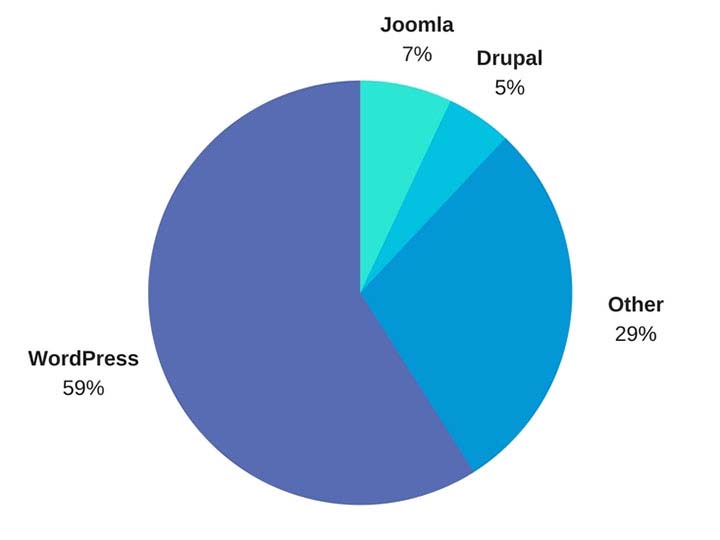
    WordPress is by far the most popular website management system in the world and shows no sign of slowing down at all. What started in 2003 as a PHP and MySQL based open source software has turned into a community of millions of users worldwide that all collaborate to make website management easier and more intuitive. What this means is that all of their site files are available for download at their website for free. Uploading the files to your web server allows you to connect a domain and start using WordPress for your own site. Just one look at this breakdown from Fresh Consulting shows the dominance of WordPress in the CMS market.

    WordPress Market Share represented in a pie graph - Search Influence

    So Why Should I Use WordPress?

    1. It’s Free

    Well, first and foremost, it’s free. As previously outlined, upload the files to a web server and you can work from there. Immediately cutting down on a business cost at the very beginning is always a bonus.

    1. Constantly Updated Options for Themes and Plug-ins

    In addition to that, it is also an insanely popular open source software, which means that millions of users are creating and updating new themes and plugins to help customize your website experience as both an administrator and for users visiting your website. Did I mention it was free?

    1. Easy to Use Editor

    The ease of use of WordPress is also another big selling point of using this platform. For the non-developers out there, WordPress offers a native “what you see is what you get” (WYSIWIG) editor that is easy to use and gives you complete control of the page.

    1. Media Storage & Access

    It also preserves the capability to all sorts of media such as videos, audio clips, and images and has a very convenient file uploader for non-developers who aren’t using an FTP GUI such as Filezilla. This is a convenient way for developers to upload small batches of files that might not necessarily require connecting directly to the server.

    1. For Developers: Open Source Customization

    For the developers, a completely open source code allows complete customization if desired, and easy access to the template files makes minor edits quick and easy. What this means is that if you do happen to have a developer or developers on your team, they won’t necessarily have to struggle and create workarounds in many situations—all of the code is available to them from the beginning. In addition to that, there is also a bustling community of users that create all sorts of templates and plugins that are all open source as well.

    1. WooCommerce for Ecommerce

    Sure, building and creating a website is one thing, but WordPress also offers the WooCommerce plugin, the world’s most popular E-Commerce platform that currently powers 30 percent of the world’s E-Commerce websites. So if your desire is more on the side of selling goods as opposed to brand awareness, then WordPress has you covered there. WooCommerce is free and comes ready to sell right out of the box with loads of free extensions, including one that provides full Google Analytics integration whether you’re using the standard or enhanced Google Analytics E-Commerce. When configured properly, this extension can show detailed data, such as drop off points in your sales funnel.

    woocommerce logo - Search Influence

    WordPress logo - Search Influence

    1. Search Engine Optimization

    Probably the most important feature of WordPress is the Search Engine Optimization (SEO) is a cinch. So easy that Matt Cutts gave them a shoutout in one of his presentations when he was the head of the Web Spam Team at Google. The easiest way to tackle this solution is by adding a free SEO plugin, such as Yoast SEO or All in One SEO, which gives you complete control over your title tags and meta descriptions. Your developer can also easily implement structured data (the code that creates the answers and fancy cards in Google search results) in JSON-LD, which is Google’s preferred format. It’s worth mentioning that some other CMSs don’t play nice with this code and will strip it from your pages. Optimizing your massive images that you may have taken of your business or product with your fancy DSLR camera is an easy task with a plugin like Smush Image Compression and Optimization to help your site maintain its speed, which is something Google definitely cares about dearly.

    How Does WordPress Compare to Other Content Management Systems?

    1. Flexibility

    The “ease of use” selling point for non-developers was originally one of the main selling points of WordPress, but a lot of other Content Management Systems (CMS) are beginning to catch up in that area. Comparatively speaking, a CMS at face value should have a high level of accessibility for people who don’t necessarily know HTML, CSS, JavaScript, PHP, or any other coding languages that are used online. CMSs such as Wix and SquareSpace have begun to gain a lot of steam in recent years, primarily due to large advertising budgets, but still have yet to catch up to the popularity of WordPress. A large part of the continued success of WordPress is the amount of flexibility it offers.

    1. Open Source Software

    As I stated before, WordPress and all of its code is open source, meaning that it is available to the general public. The platform itself is coded in PHP and MySQL, which allows developers to have a field day, creating beautiful templates and all sorts of cool effects that they want for websites. In addition to that, open source code helps create larger communities of users that can help with any sort of idea that you can think of, rather than having to simply rely on WordPress documentation. This community effort leads to a very expansive forum where WordPress users can oftentimes find the answer to any question they may have or join in and offer some unique solutions that they may have come up with.

    A lot of WordPress critics often parrot that a WordPress site isn’t much fresh out of the box, which I personally find to be very disingenuous. SquareSpace and Wix both have a strong selling point for making beautiful websites, while WordPress users see the Twenty Seventeen theme and more than likely cringe at its visage. However, anyone can navigate to the free themes that WordPress offers. After finding one that you like, implementation takes about 5 minutes and 3 clicks of your mouse. This makes it very easy to dispel the myth of all WordPress sites being ugly.

    How Can Other CMSs Be Problematic?

    Here at Search Influence, I’m on the Web Development team where, in coordination with our Account Management team, I implement our proprietary tracking system and on-site optimizations, in addition to the various other projects that may come along. Here are a few instances I’ve found in which other CMSs can present problems.

    1. No Access to Source Code

    Having access to the source code of a website is imperative for accurate implementation of anything on a website. So, it’s safe to say that I’ve come across quite a few issues with some of WordPress’ competitors, which creates abounding frustrations.

    1. Removal of Custom Coding

    One example that I see a lot involves CMSs that strip schema from their web pages, whether it’s coded in JSON-LD or in the microdata format. With Google being very mobile and local-focused, not being able to add structured data to your website means that you’re probably missing out on having your business showing up on the knowledge graph on the right-hand side of the search results. Another quick example would be CMSs that strip title tags and alt text from images. Google uses alt text to determine what an image is and then possibly add it to its image results. The title tags are used for accessibility purposes on the user end.

    Ron Swanson from Parks and Recreation throwing a computer into a dumpster - Search Influence

    1. Lack of a Community

    WordPress has a technically apt community that is generous with their knowledge. In addition to the 50,000+ plugins available, WordPress.com hosts a forum for users with 40,000+ topic threads. It’s hard to match that level of technically sophisticated users available as a resource.

    1. Faulty Built-in Integrations

    Just recently, I was setting up E-Commerce tracking on a SquareSpace site that was using the SquareSpace store. After some searching that took much longer than it would’ve taken to find the solution in the WordPress community, I found that SquareSpace has Google Analytics E-Commerce tracking integrated into their platform. Seems easy enough—drop in the tracking code and let the data flow like a river. After completing a test purchase, my data populated perfectly and I gave myself a pat on the back and wished the client a great campaign.

    Turns out, the integration was completely busted and stopped tracking. I ended up having to set everything up manually. Also, SquareSpace is a pretty poor platform to setup product data and all the other fancy bells and whistles that can be added via Google Analytics. To top that off, I found that the source of the problem is that their storefront uses the classic Google Analytics code, which was officially discontinued in 2012!

    To the contrary, with a WordPress installation, the WooCommerce plugin and the Google Analytics extension can be added to pull all sorts of fancy data, like product data, cart data, dropoff data, etc. The setup for WooCommerce is very clean, and I haven’t had any issues tracking all of the data or the data mysteriously disappearing on me. Even if you don’t have any experience with a particular plugin, the popular plugins have a slew of documentation written by the creators as well as large communities focused on making sure everything works as intended.

    So How Does One Take Advantage of This Powerful Tool?

    Self-Hosted vs. Hosted Through WordPress.com

    WordPress.com does offer its own hosting service, though I will say a business owner should spring for the “business” plan if they plan on hosting through WordPress.com. If not, I highly recommend self-hosting if there is a developer available. Self-hosting truly unlocks the full potential of WordPress, with the ability to completely customize every single aspect of your website. With server access, the possibilities are nearly limitless. Having an open source code that a developer can harness the power of, a community of millions of innovators to back it, and a level of ease that non-developers can take advantage of makes WordPress, in my opinion, the best CMS currently on the market.

    Choosing a CMS platform while either creating a site or updating your old site is very crucial to the success of the website. Getting looped into a poor CMS and linking your domain to it for a year or more may feel like you are stuck with it until your contract is over. But if it’s costing you business, it may be worth the switching cost!

    We’ve helped many businesses transition to WordPress, sometimes keeping the same general feel of their current site design. If this all seems daunting to you, reach out to us for support. We’ll work with you to figure out the best plan of action. Don’t risk missing out on valuable conversions or leads because of the limitations of a clunky CMS that doesn’t allow you to optimize the potential of your website.

    Images:

    WordPress Market Share

    WooCommerce

    WordPress

    Ron Swanson – Computer Trash

  • Your Website Is Yours—Make Sure You Own It

    Imagine you open your dream business with the perfect name, perfect location, great employees at every level, and a great building to host your perfect products. To finish off the grand opening, you hire an outside contractor to do some work for you and you give them all of your keys and tell them to hold on to them even after the work is done and you never ask for them back. This sounds like a silly mistake that is complete hyperbole that no business owner would ever commit. But sadly, this happens every single day when business owners don’t secure their credentials after outsourcing for website creation. Regardless of whether this action was malicious, careless, or just protocol, you stand to lose a lot and have a giant headache if you don’t have proper control of your website and online presence.


    6 questions to ask your website provider

    If your site has yet to launch and you’re reading this right now, you need to take proactive measures to ensure that you have complete control of your website. When a company creates a website for you, they like to use the companies and resources that they like to use. The glitz and glamor of a slick and pretty website can quickly make a business owner forget to ask for administrative access to their own property. Before signing a contract to have a website created for you, make sure you ask the right questions.

    1. Who is hosting my site?

    There are plenty of hosts across the internet, and knowing which one hosts your site is vital if you need to wrest control of your intellectual property. If you forget which one hosts your site, you can search Domaintools, a free domain lookup resource that can tell you which company hosts your domain, unless you opted to pay to have your information hidden. You should also ensure that your email has its own account and is the primary owner of the hosting service. Even if you pay the contractor to complete the necessary setup for you, there is a chance that they’ll add your site to their list of websites that they own. If your relationship fractures, you’re at their mercy. If the contractor chooses not to release your domain, you might have to find a new domain and site.

    Mark Wahlburg Smashing A Computer - Search Influence

    2. What is my server login information?

    Though this may not be relevant to you directly, if you do decide to use a different company for implementing website content, there is a 100% chance that they will at least request this information. Our web developers here at Search Influence, such as myself, utilize this information to create a staging environment for your website. That way we can add all of our changes without altering the live site or disrupting the flow of your website while we work on it. If you don’t have this information but you are the primary owner of your domain and hosting service, you can contact them to receive this information or retrieve it from the backend.

    3. What is my CMS login?

    Incorrect Password Screenshot - Search Influence

    Please—I’m actually begging, please do not sign a contract to purchase a website and not have a login created for yourself where you are the primary owner. With ownership of the CMS, you can easily give another web developer the necessary permissions they need to make any edits to your website. Some website creators may be reluctant to hand this information out or give you the highest level of access since there is the potential to completely take a site down permanently if the user changes some files that are integral for the site to run. Your CMS login may also be called your WordPress, Joomla, Drupal, or Squarespace login.

    4. Do I own my domain name?

    With easy-to-use services such as Namecheap, it is easier than ever to own your own domain even if you don’t plan on building the website yourself. The purchaser of the domain can add it to any profile they so choose. If you don’t have ownership of whatever account the new domain name is attached to, you don’t own your website.

    How Much Popular Sites Go For - Search Influence

    Knowing the potential of how much popular website names can go for, someone that owns your domain can take as much of your money as you’re willing to give them to get it back. Not only that, the likelihood of legal recourse being in your favor is close to none unless you can somehow find a loophole in the contract that is probably ironclad.

    5. Do I own my social media profiles?

    While this doesn’t relate directly to your website itself, this is still in the same vein. Most social media platforms will either have a way to add users as managers on your account, or the company that will handle your online reputation management will have a third party platform that they use to add content to your favorite social media platforms. Facebook, for example, will allow you to add managers to your business account, and managers can write and schedule posts in your steed. As far as social media management platforms are concerned, your social media company will be required to log in, but once will be sufficient unless you decide to change your password. This is very important because the process of re-claiming a social media profile is a very long and drawn out process requiring many different steps of verification. Not my idea of a good time if you ask me.

    6. What about my Google Analytics account?

    Just like everything else outlined here, you will also need to have control of your Google Analytics account. In case you don’t have any tracking on your site, Google Analytics is the popular service offered by Google that allows you to track site visits and a multitude of other metrics. The first rule of Google Analytics is once your historical data is gone, it’s gone forever. If you request Google Analytics to be added to your site for the first time, create the account yourself and then add other users as administrators to take care of the rest. Lunametrics gives a great run down of different views in Google Analytics. At the very least, you should have your own view with completely untouched data, and it should be labeled as such before any marketing company tinkers around with your views.

    Even if you’re past the point of setup, all of these outlined items are necessary to maintain complete control of your website and your online branding. Without it, you could get locked out of your business’ entire online personality. It doesn’t even have to be anything malicious either. Your best friend who is a developer could go on vacation in the Appalachian Mountains and not have access to email. Your nephew who runs your Google Analytics account can get a new phone number and lose access to the Google account and have to wait however long Google decides to verify his identity before you can see the results of your latest paid search campaign.

    If this seems like a huge undertaking, our talented experts at Search Influence have everything you need to get launched properly. In addition to our web development team that is dedicated to the technical performance of your website, every client at Search Influence is assigned a dedicated Account Manager to help you strategize, and even keep your website’s credentials in order. Contact us and request a free digital marketing analysis today.


    Images:

    Mark Wahlberg Computer Smash

  • Rookie Website Mistakes, Part 6: You Abandon Good Work When Replacing an Old Site

    So, you’re launching a new spiffy, user-friendly website? Or, maybe you’re migrating your site from an HTTP to HTTPS secure domain? To make the launch as successful as possible, there are a few important steps you (or more likely your web developer) should take on the backend to facilitate a seamless transition.

    Changing your URL requires a strategic plan. Without it, you could end up with lost links, dreaded 404 errors, and annoyed customers. If you’ve built some authority for your site, you also need to manage your page rankings during the process. No one wants to watch traffic plummet when they launch a new site.

    While it may not be as exciting as creating the design or building out new pages, here are four absolutely necessary administrative steps to take during the launch of your new site.

    Set Up 301 Redirects

    A 301 redirect will automatically transfer users from the old URL to the new page on the website that replaces it. So, when someone types in your old domain they will still end up on your beautiful, newly-designed (or newly-secure) website.

    While there are other options for redirecting links, 301 redirects are the safest and most trusted way to permanently redirect pages without diluting PageRank on Google. In fact, Moz estimates that 90–99 percent of ranking power will pass from the old page to the new one with the use of a 301 redirect. This is because Google bots recognize 301s as a permanent change, indicating that the original content from the old URL has found a new home on the redirected page.

    There is no limit to the number of 301s you can use per site, so you can (and should) redirect all of your old, viable content to new URLs for your new site in order to retain all of the rank power (also known as link juice) from your old site.

    To make this happen, extract all the URLs from your content management system or export the URLs from Google Analytics to create a list of the URLs on your existing site. Don’t forget to include landing pages from any paid search campaigns you’re running, as Google will lower your quality score for running ads with broken links.

    Once you have this list, you can proceed to the next item on our list, mapping out your new site.

    Image of Lost Duck With Map - Search Influence

    Update Site Maps

    As you learned in part four of this series, you’ll obviously want to have more than one page on your new site. An updated sitemap should be the foundation for your new site design. Start by creating a list of all the pages you know you want to include in your new site. Your old site’s URL list (see above) can provide a foundation for essential pages that you know you want to keep, especially the pages on the old site with inbound links that help improve rankings.

    Map out all planned pages that correspond to pages on your old site so you can set up redirects for all of those pages. You’ll also want to take note of key analytics on legacy pages to use for comparison once the new site is launched.

    The following are some ideas for what you should track for your benchmark:

    • Organic traffic and page visits
    • Bounce rate
    • Page loading speed
    • Conversions per page
    • Rankings for priority keywords

    From here, you’re ready to create a robots.txt file and an XML sitemap to give Google and other search engines the right information to crawl your new site. If any of the steps so far have left you scratching your head or frantically googling SEO jargon, one of our friendly tech gurus can help you out!

    Recycle Existing Content & Optimize for SEO

    Creating a new website from scratch is already a big undertaking—don’t recreate the circle. Be sure you bring over your existing title tags, meta descriptions, and page headings and ensure all new content includes these essential SEO elements. This is also the perfect time to audit your existing content to ensure that it meets the latest best practices. Are multiple pages using the same headline (h1) or meta descriptions? Do pages have broken internal or external links? Are images too big and slowing download time?

    Use what works, fix what doesn’t. Your content for each page should be unique, use keywords naturally (without stuffing), and include logical internal links.

    Don’t Forget About Google Analytics

    As you launch the new site, it will be more important than ever to track analytics and ensure that everything is functioning like it should. Migrating to a new domain is a huge, detailed undertaking, and little problems are likely to arise.

    Image of Graphs, Charts, and Analytics - Search Influence

    Make sure that the Google Analytics tracking code is properly installed on each page of the new site and collecting data. With your collected benchmark data, you can compare traffic and rankings for the new site and check and adjust as needed. Tools like Screaming Frog can also help you check for 404 errors on the new site and alert you to any issues with pages being indexed improperly via your robots.txt file.


    Images:

    Lost Duck

  • Rookie Website Mistakes, Part 4: You Have a Single Page Website

    Single page websites are very popular right now with web designers. With so many new ways to develop websites, they’ve become a unique and scroll-friendly way for users to interact with a company in a way that they’re used to (cue the token image of people scrolling through phones). And, to be fair, they can be quite beautiful. For example, take this design from 415-Agency, a San Francisco-based design firm that works with healthcare companies to make their digital products user-friendly, seamless, and as they put it, “awesomely good looking.”

    Image Of Screenshot of Digital Design for Healthcare One-Pager - Search Influence

    It’s an understatement to say that ton of work went into this site—it won them an honorable mention award from Awwwards, an organization that gives awards for the best designs, talent, and web dev agencies across the world. I’m a huge fan of exciting visual content, interactive graphics, and designs that enthrall. But, where some entrepreneurs get into trouble is when they try to manage a killer single page website while also optimizing it for SEO. They may come to discover that, for all its glitz and beauty, they’re the only ones actually finding it online.

    Photo Of Stock Of Boxes - Search Influence

    Form Must Follow Function

    Just as the customer is always the top priority, your website should follow that same line of logic. When thinking of how to design your website, think of not just how users will react to the visuals, but also how they will eventually interact with the site’s navigation. Give them clear avenues for finding more information, ordering products, or exploring your blog or testimonials. While a single-pager may seem simpler, it can often be easier to get lost and frustrated with trying to find a relevant page of content. To quote marketing guru Neil Patel, “website usefulness is more important than website beauty.”

    If a user comes to your site and thinks, “wow,” then give your web designer a bonus or yourself a pat on the back. But, the more important thing you should worry about is if their next word they is, “how?” Users should know how to interact with your site pretty easily. If they don’t know what to do or how to do it, then your site is harming you, not helping you. This can also lead to high bounce rates—users will eventually get frustrated and leave your site for one with better navigation.

    Another thing that can contribute to high bounce rates from your one-page design? Slow load times. I wrote about this in a previous blog in this series, but it’s worth mentioning here as well. Whether you’re using Flash (which, please don’t) or not, data-heavy load times due to unoptimized, large images that occupy your page’s whole screen can strangle your page load times.

    Single Page Websites Lack the Opportunity for Detail Laden Content

    Single page websites don’t have the space to allow for specific, rich content. From a user perspective, this limits the opportunity to provide a visitor with detailed, relevant content on topics they want to learn more about. Instead, they’re likely only able to view around a paragraph on specific topics. From an SEO perspective, this also gives search engines fewer opportunities to crawl your site for content that can help you move up in rankings while asserting yourself as an authority on your subject. It puts a great amount of pressure on a small amount of words. And, if you do manage to get a lot of content onto a single page, it ends up looking like it’s fighting for space.

    Image Of Post-It Notes - Search Influence

    Google likes to see that you’re updating your site with relevant content. If you have a single page site, you could make the argument that new content could be added to the bottom, creating an endless scroll of text and images. But, that method still doesn’t address the problem of not allowing search engines to crawl multiple pages of relevant content, and it also creates a headache of a user experience for visitors.

    By building out pages for your content to live, you give visitors designated, clean spaces with which they can explore your services, products, or ideas (blog posts) to their heart’s content. They don’t have to scroll for a minute or two to find your latest blog post, and search crawlers can find it easier, too.

    Forget About Performing Wide Keyword Targeting

    Since single page sites are generally designed around one main concept, the opportunity for using multiple keywords is very limited. With a multi-page site, every page has a chance to introduce a new topic or genre that can include different types of keywords that target different users and open up multiple avenues for ranking.

    With a single page site, it becomes extremely difficult to rank for varying keywords. For example, say you’re an owner of an HVAC company. You provide installations and repairs for furnaces, A/C systems, ductless A/C, water heaters, as well as air quality testing. By building separate pages for each of those services, you have an opportunity to move them each up in Google’s rankings, all while showing an increase in your authority. Putting all of your content in one page is like putting all of your keyword goals in one basket and hoping Google magically picks them up.

    Missed Opportunities for Quality Tracking

    Having multiple pages means multiple opportunities to track user behavior. You can track if someone spends 5 seconds or 5 minutes on a page about one of your services. With that valuable data, you can then focus your goals on what pages need work to bring in more visitors and convert them into customers. Obviously, this would be a difficult task for a single page site. The data showing time spent by your users will be very general, leaving you unable to tell what they love and what they dislike.

    Are There Examples of Single Page Designs That Work?

    There should and will always be design diversity on the internet. And sometimes, a single page site may work for you. For instance, take this site made by firm Gin Lane for GE that explores everything about the inside of volcanoes. Not only is the site visually satisfying, filled with video and interactive graphics, but the scroll feature of a single page makes sense because you’re literally venturing down into a volcano. Educational sites like this can have the luxury of not worrying about how SEO-friendly their content is because their main goal is to inform, not sell a product or service. Also, it doesn’t hurt that GE has the budget to build a site like this.

    Image of Screenshot of Volcanoes Single Page Website for GE - Search Influence

    Another example of a single page site working to your advantage can be when you’re utilizing it as a promotion. FBC Creative Tech Design created a site for FOX’s upcoming show, “The Gifted,” a show based on the X-men series of comics. The site, using the fictional “Sentinel Services” organization from the show, details the reasons why people should get tested for the “x-gene.” There have been numerous pre-launch sites built to create a buzz around upcoming movies or shows, and this is a fantastic way to build awareness. They’re almost like temporary landing pages. It’s worth noting again that it’s no coincidence that some of the better single-pagers are tied to large organizations—they simply have the budget to pull it off.

    Combining the Storytelling Approach of Single-Pagers Into Traditional Navigation Sites

    There’s no denying that some single page websites create curiosity. They can encourage the user to explore by simply scrolling instead of clicking, and they (ideally) tell a story about their company along the way. Businesses looking to wow users with a cool site while also being optimized for SEO should try to incorporate this same type of organic curiosity into a multiple-page, traditional navigation website. It’s completely possible. Take this blueprint of a popular WordPress design scheme from Undsgn—Uncode.
    Make each page a rewarding experience for users, where they can sit and really get comfortable with your content. If you design your multi-page site with the same goal of clean content without a lot of clutter and clear calls to action, then you’ll achieve a lot of the same aesthetic ideals of a single-pager, and with better SEO capabilities! Also, consider using visual content on your pages, like animation headers and background video. Just make sure they’re optimized so that they don’t slow down your load times.

    The ultimate decision on whether or not you choose a single page website for your business will be up to you. Every website is different; it may work for you. But, it will also be that much trickier to see your site move up in Google’s eyes and, inevitably, in rankings. If you decide that more than one page fits your business, you should learn more about SEO services which are imperative to the health of your website.

    Stay tuned for our next blog in the series, Rookie Website Mistakes, Part 5: The Content Is Weak.


    Images:

    Digital Design for Healthcare

    Volcanoes

    Blog Masonry