Tag: Google Analytics

  • 5 for Friday – G+ On Your Phone, Teens On Facebook, & Tips For Powerful Images

    5ForFriday

    1) CNBC: This 17-Year-Old Website Devastated By Google’s Panda Update – Search Engine Roundtable

    Once upon a time, there was a woman named Linda Stadley. Her recipes brought so much joy to her and those around her that she generously decided to share them with the Internet. So she created www.whatscookingamerica.net, and for 17 years her recipes reigned supreme. She lived happily ever after until Google unleashed its mighty Panda 4.0 paw and ended her domination of the search engine results page faster than you can say Jack Robinson. Users everywhere weep for her loss of traffic.

    …that website though. The writer of this article says it all with his closing statement, “I feel bad but the site does need a facelift.” Well, yeah. This article speaks to the very nature of Google updates: even though they may not make everyone happy, the goal is to help all users find the best information first. Let’s be real here. This site lacks a lot of the features that make a website useful to users looking for recipes (like reviews, for example); therefore, more useful websites will get better rankings because they give people more of what they’re trying to find. Google would probably reply with something along the lines of “sorry we’re not sorry.”

    WhatsCookingAmerica-Website

    2) Google My Business iPhone App Now Available – Blumenthals

    Do you want Google all up in your business? You’re in luck. Google just released the My Business iOS app (as discussed by Mary Silva). The noteworthy features (for both the iOS and Android app) include the ability to edit your business listings and view local insights. Missing from this app is Google Analytics and Adwords Express. You can also access all the features of your Google Plus account. JUST WHAT WE’VE ALWAYS WANTED, said no one ever. The thought behind this was probably something along the lines of, “hey wait a minute, no one seems to be posting to their Google Plus account, maybe they would if they could do that on their phones?” We will see Google, we will see.

    3) Wait A Minute. Facebook Is Still A Big Hit Among Teens? – Marketing Land

    FacebookGraphic

    Facebook hasn’t been poisoned by moms and businesses? What?! As it turns out, Facebook is still popular with teenagers. Forrester Research released a report revealing that 75% of Facebook users ages 12 to 17 use Facebook once a month, with 28% of this age group claiming to use Facebook “all the time.” Of course, numbers don’t always give the whole story. Yeah, these kids are logging on, but are they actually using Facebook? Who’s to say these kids using Facebook everyday are not just scrolling through the newsfeed absentmindedly? Well, this may be the case, because a niche study reveals Facebook lost to Instagram for the most engaging platform.

    There’s a lot to consider here. For one, how will this trend change in the future? Have teens just been classically conditioned to check their Facebooks like a hopeless romantic checks Craigslist missed connections? Do more engaging platforms have more of an advantage in retaining and attracting new users? Time will tell.

    4) Net Neutrality Protesters Arrested At Google HQ – Techcrunch

    Well, this is a fun one. A group of activists in favor of net neutrality were arrested for protesting outside Google Headquarters. What were they doing there, you ask? The group calls for Google to “stand with us in support of an Internet that is free from censorship, discrimination, and access fees.” The group asked Google, among other demands, to change their homepage for a day to include a link to the FCC petition. You may be thinking, ‘but Google isn’t exactly the bad guy here trying to end net neutrality for all, why are they protesting there anyway?’ And you would be thinking correctly. According to this article, Google declined to comment on the arrests. I can’t blame them, as it seems these protesters might have a classic case of misdirected rage.

    5) The 8 Types of Images That Increase the Psychological Impact of Your Content – Copyblogger

    Quality images matter because they increase user experience. Yes, we know this. The advice in this article seems rather obvious, but there’s something to take away here. Specifically, what makes an image useful? This article proposes eight different types of images that provide users with the information they need. The top eight being: stock photos, screenshots, charts and graphs, personal photos, still frames from popular movies and TV shows, infographics, custom art, and comics. I would like to point out that most of these (except stock photos) could and maybe should fall under #7 “custom images.” I feel this article missed out on the opportunity to highlight the way that custom images serve more of a functional purpose for marketing than non-custom images. An infographic, comic, or screenshot that is custom and directly relevant to your business would obviously be more useful to users than one that is not.

  • 5 for Friday — Links, Stories, & Posts for Your Weekend

    five-5

    1. Google To Protect Paid Search Keyword Data, Making it ‘NotProvided’
    – Search Engine Journal

    This article discusses a report that Google will stop passing keyword data to analytics software, even for AdWords advertisers. The three main points of the article state that Google will likely stop providing referrer data for paid clicks on AdWords ads, Advertisers may see [not provided] in their Google Analytics reports or other analytics provider reports for paid search clicks, and Google AdWords reports will remain unaffected. How will this change effect you?

    2. The Art of Thinking Sideways: Content Marketing for “Boring” Businesses
    – MOZ

    Here the author speaks about different ways to create unique content for your clients. We have all had clients where we wondered if there was any way to promote their brand. As marketers it is our goal to raise brand awareness, improve search engine rankings, and increase sales for our clients.

    3. 73% Lose Trust in Brands Due to Inaccurate Local Business Listings [Survey]
    – Search Engine Watch

    If a business has incorrect information in an online listing will you lose trust in the business and look elsewhere? Have you ever looked up an address to a service or a business only to find yourself driving in circles because the info was incorrect? This happened to me personally a few weeks ago while looking for a restaurant. After I found myself lost for about 10 minutes I gave up and moved on to a new restaurant. This article has some interesting info about how potential customers will research your business information.

    4. How Brands Are Using Twitter’s Redesigned Profile Pages
    – Mashable

    This has some excellent examples of a few major brands who have recently updated their Twitter profiles. I agree that these new profiles provide the client the opportunity to add more content, but immediately thought they looked like a Facebook profile. Twitter is rolling this function out slowly to the general public. Check out the examples and let us know what you think!

    5. 80% of Local Searches on Mobile Phones Convert
    – Search Engine Watch

    Here is a study on local search on mobile devices. The stat that stood out to me was that four out of five local searches on a mobile device end in a purchase. Check out the infographic at the bottom of the article for more interesting data they found.

  • Google suggests: An overview of SEO

    Three months ago I started working at Search Influence. I thought I knew a lot about SEO, boy was I wrong. After what seemed like a crash course in everything we do here, I thought I would put together an overview of what I’ve learned:

    SEO

    After 45 (!) trainings I know a lot more about SEO, but I also found out you are never done learning. SEO continuously evolves, and that’s because of Matt Cutts, the head of Google’s Webspam team. To be honest, I only knew him from the 30 Day challenge he talked about at my favorite platform TED. He is the one that changes Google’s algorithm 600 times a year! Another honest confession, I thought this algorithm only changed 25 times a year. I was just a little off.

    Keyword Research

    One of my first trainings was on keyword research. This is a process in which we look at the historical online search behavior for a given product or service to determine what keywords we are going to focus on throughout a client’s campaign. This is an extremely important process and happens at the beginning of our partnership with a client.

    Google Keyword Tool

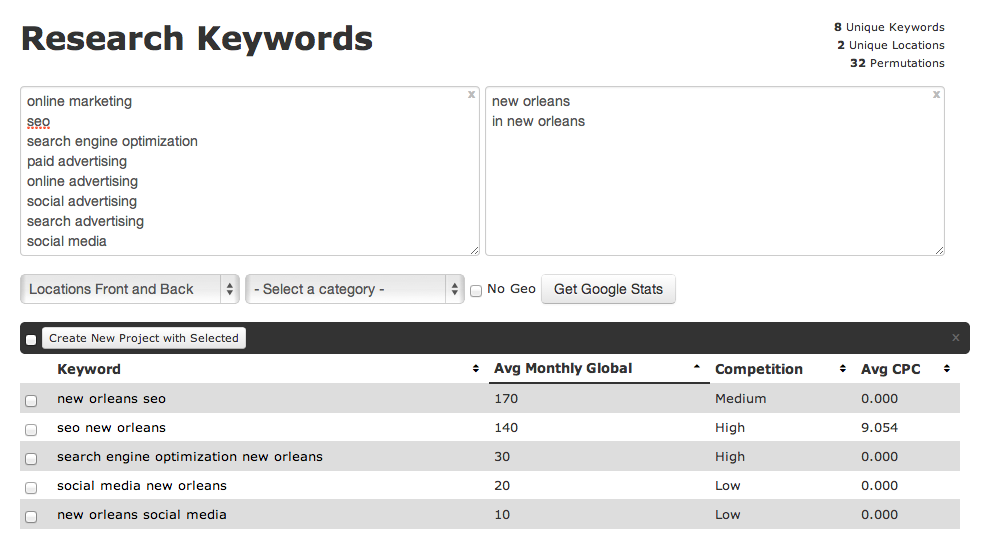
    For the keyword research we use Google’s keyword tool. After adding a long list of root terms and a list of geographic modifiers (the physical location of the client and/or their service areas) the tool shows the approximate number of search queries matching the keywords that were found on Google.

    Google Keyword Tool

    A brilliant tool, but not perfect as it provides search statistics based on Google.com traffic only. But of course, Google captures 72% of all search traffic so we feel better about relying heavily on their research. When needed, we utilize other things like Google Webmaster tools and Google Adwords Keyword tool.

    Google Analytics Organic Keywords

    Before I started working at Search Influence, keyword research was much easier. My colleagues logged into Google Analytics and could see which words people used when searching Google to find the designated website. In October 2013, however, Google stopped offering this information to provide additional privacy and security for its users.

    Google Suggest

    Last month a light bulb went on in the head of a Search Influencer. ‘Why didn’t we think of this earlier?!’ She was talking about Google Suggest, a feature that has been around for five years. Just enter a letter or a word in Google’s search field and you will see associated terms in a dropdown menu. Google describes Google Suggest as:

    “Autocomplete predictions are algorithmically determined based on a number of factors, like popularity of search terms, without any human intervention. Just like the web, the search terms shown may include silly or strange or surprising terms and phrases.”

    Although we benefit from Google Suggest, I agree the search terms shown are sometimes (very) silly or strange, just see for yourself:

    http://youtu.be/DJT67NApROI

    After seeing this, I was curious what Google would suggest when entering ‘Search Influence’:

    Google Suggest

    Reasonable. Logical. But Google also suggested…

    Google Suggest

    What???

    So overall, Google Suggest can be helpful, but it can also make you laugh. (Or make you mad: over the past few years Google Suggest has been sued for racist search suggestions and defamatory language next to individual names or companies).

    So what do I suggest? Use it, but

    Google Suggest

    Do you have any questions about SEO? Let us know in the comments!

  • Top 3 Things to Check in AdWords “Dimensions” Tab

    The Dimensions tab in AdWords is a very useful area. You can really dig into a variety of different data sets to analyze your PPC performance. This data can give you valuable information on how best to optimize your campaign to maximize your budget, especially if you are limited by budget. There are a TON of things you can see and analyze in the Dimensions tab, but below are my three favorites.

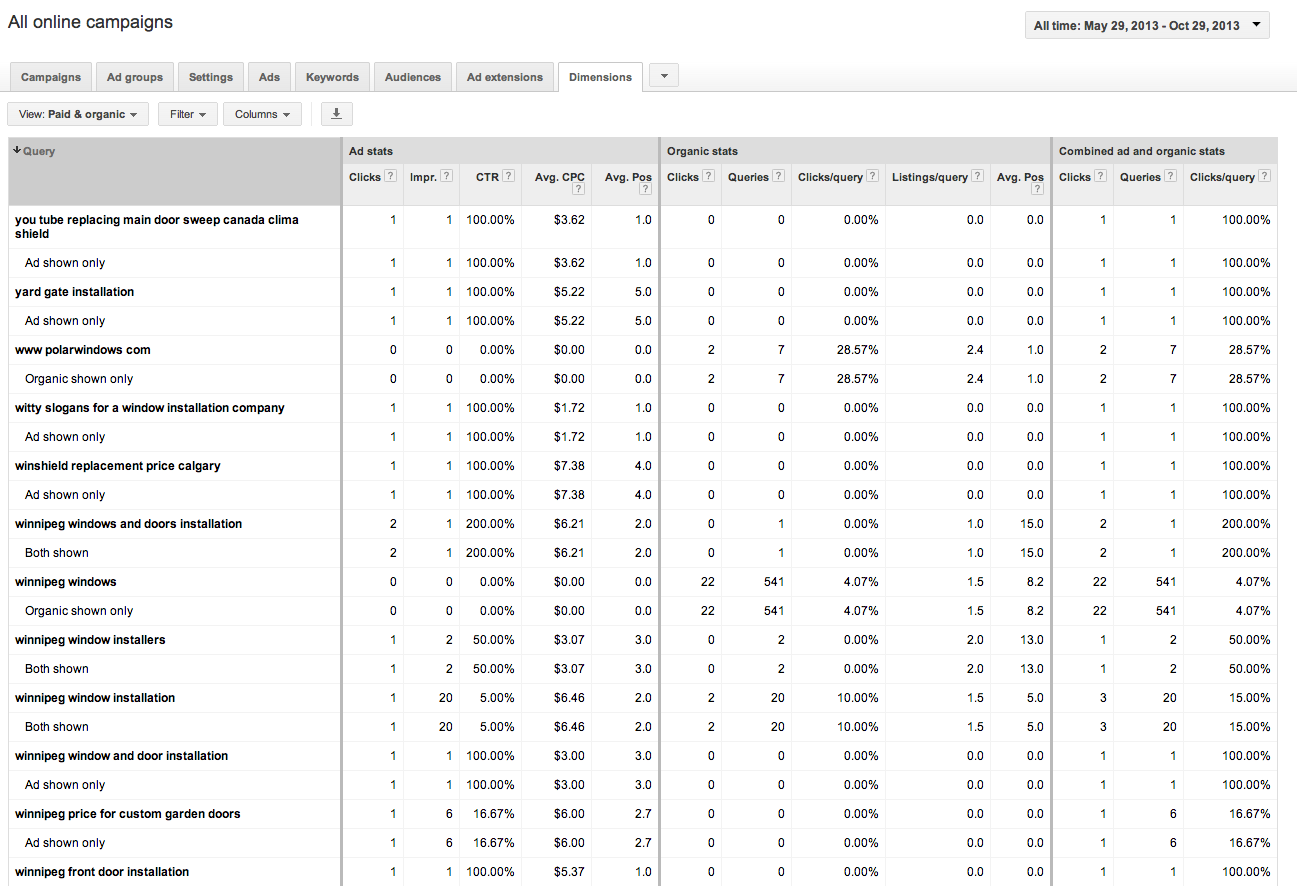
    1. Paid & Organic

    A recently added feature, this table shows how your paid and organic results performed for every search that triggered an ad or organic listing. You can view your click through rates (CTR) for both paid and organic searches individually, but also the CTR for when you have both an ad and an organic listing displaying in the SERPs. This tool can be great to convince clients the value of paid search (even if they have great organic results!). You can also use this to gather some keyword data for making decisions for your SEO campaign given that Google’s decision to make all organic searches (not provided).

    Best Use: Gather information on how your ads perform when they are shown with your organic results.

    Learn how to link your AdWords account and Webmaster Tools account to view this data.

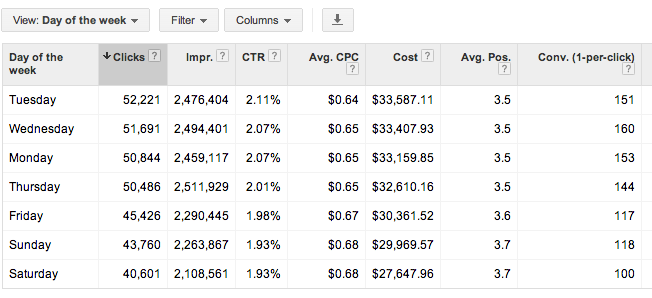
    2. Time > Day of the Week

    This report shows you all stats for each day of the week over your selected date range. You can determine which day performs the best by meeting your defined KPIs. You can then adjust your bids based on the performance you see. Are Tuesdays and Wednesdays higher converting than Saturdays? Focus on those days!

    Best Use: Determine which day of the week is highest converting, and spend budget there.

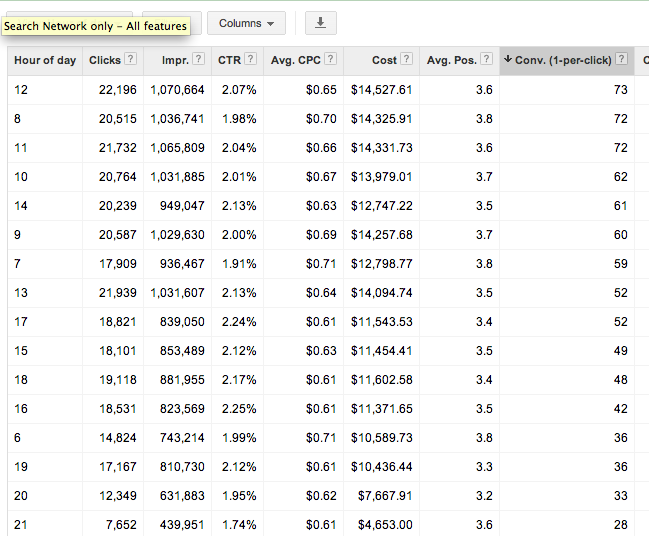
    3. Time > Hour of day

    Shows you cummulative stats for hours of the day for the selected date range. As with the above, you can determine which hours of the day best meet your goals (impressions, clicks, conversions) and adjust your bids accordingly. Be mindful that if you are limited by budget, the hours later in the day may have lower performance due to the budget constraints. You may want to test day parting for hours later in the day if you cannot adjust your daily or monthly budget to determine if those later hours are actually more successful.

    Best Use: Determine which hours of the day convert best and set up dayparting to spend more budget during these times.

    Check out the dimensions tab for yourself and get familiar with the data that is available. There are many more reports available that give you actionable information to better optimize your campaigns. Which are your favorites? Let us know in the comments!

  • Penguin 2.0 May Not Be Done Just Yet

    Penguin 2.0 reconfigure?We’ve been watching Penguin 2.0 and its effects, and as a team we have noticed some fluctuating data that suggests the algorithm has not quite settled in yet.  In another blog post, I put it out there that rankings are not everything, and they are not the primary measure of success.  Ranking reports have known flaws, but they can be used as a weather vane.  When we look at the ranking weather for a few clients, we see some ups and downs, clearly with some effect from the most recent Penguin, but it appears that the players on Google page 1 are still moving around more than a month after the rollout.

    When we look at a few examples, we see the musical chairs being played on page 1 with nobody being safe and comfortable for very long.  We’re watching rankings for a  plastic surgeon in New Jersey for the term “rhinoplasty New Jersey.”

    SEO for plastic surgery

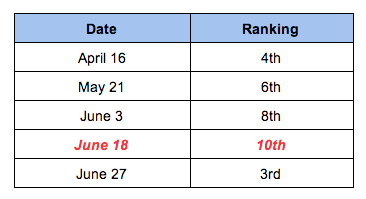
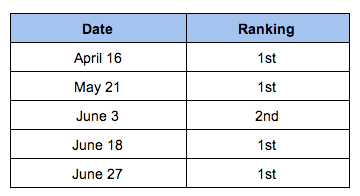
    Here’s a summary of his rankings hopping all over.  His biggest drop was on June 18th:

    Rhinoplasty New Jersey

     The same client for “breast augmentation New Jersey” had more subtle changes, but they are meaningful.

    Breast Augmentation New Jersey

    So it looks like he got a little hit from Penguin 2.0, but may be rebounding.  We have done nothing out of the ordinary for this surgeon to move his site from 10th to 3rd in just nine days, so we make an assumption that Penguin is still adjusting.

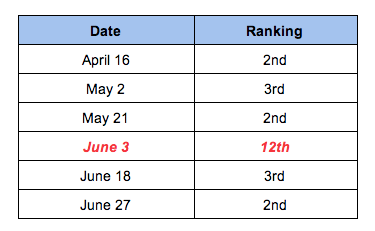
    Another example in ranking fluctuations for “Columbus allergist” is in a doctor’s rankings seen below.  His biggest decrease was on June 3rd vs the guy above who got the hit on June 18th:

    Columbus Allergist

    Rankings Aren’t Everything!

    Rankings are not the only measure by which we watch successes and failures. Organic traffic is another layer of data, and in some organic traffic trends, we see noticeable changes around June 3rd then again around June 18th.

    The client represented in the chart below is a cocktail bar in the South.  They saw a dip in organic traffic after May 22, but they enjoyed an unexpected bump in early June (the traffic dropped off again after that early June peak, but what I want to know is what’s behind that weird little bump up earlier on?):

    Penguin 2.0 adjustment in early June?

    The next example is a traffic bump around June 18th.  This client is a completely different business on the west coast.  We see a little effect from Penguin, then a weird spike:

    Penguin 2.0 adjustment June 18th?


    And Then There Are Other Data Too

    Bounce rates before and after Penguin 2.0It gets a little fuzzier when you start looking at Bounce rates and Time on Page and these data in Analytics.  Who’s to say that these increases or decreases are a direct effect from Penguin?  You could argue your site is having better or worse quality traffic because of ranking and where your site now shows up vs where it showed before Penguin.  You could argue lots.  All I know is that 3 of the 4 clients mentioned above saw an improvement in Bounce rate after Penguin.


    Bounce rates before and after Penguin 2.0 2013Bounce rates improved after Penguin 2.0

    So … what?

    I’m not convinced that Penguin 2.0 was a one time algorithm update, it did its thing on May 22nd, and we’re experiencing the good or the bad or the indifferent.  I think it’s still shaking out, and we may still see a few odd spikes or odd drops in ranking or traffic or some other data.  We may have a few more weeks before websites settle into a relatively comfortable placement on page 1, and it is only then that we can claim some clear understanding of the full effect of Penguin.

    And because Penguin 2.0 is still reconfiguring, it may not be time for drastic action.  If your site is experiencing some definite ups and downs, then yes, you should look at your backlinks quality, the anchor text quality, internal links, etc.  All of this stuff is covered in many other blog posts.  You should have been long ago working on authoritative backlinks and building up your social cred.  But it’s not time to throw up your hands, and just Disavow everything. It’s not time to scrap your website and start with a brand new domain and design.  Take some time to digest what’s going on before bulldozing ahead.

    What I would really like to know is if anyone else noticed definite odd fluctuations around June 3rd and June 18th.  Or if you noticed unusual changes at anytime after May 22nd.  Leave a comment, and let us know.

  • 5 for Friday — Links, Stories, & Posts for Your Weekend

    Round 1-081. The High Cost of Missing Listings: $10 Billion (or More) – Screenwerk

    Have you ever wondered about the real cost of erroneous or missing business contact information for local businesses on the web? A research firm has studied the issue, and you might be surprised how big the numbers are. An estimated 43 percent of listings have some kind of error — often in the business name, phone number, or address — and it’s having a big effect on commerce.

    2. How Ads Look in the New News Feed Layout – Inside Facebook

    There was a lot of chatter this week about the unveiling of Facebook’s updated design for News Feed. While everyone immediately noted the larger photos and individual story modules, internet marketers looked for differences in the new ad design. This article compares some page post ads before and after the update.

    3. Google for Mobile: How Google Makes Money from Mobile – Wordstream

    While many thought Google would be doomed by the inevitable shift to a web environment where mobile rules, it’s beginning to look like the search giant is in the process of successfully transforming into a mobile-first company. In this excellent blog and infographic, you can delve deeper into all their entire mobile portfolio to answer the question, “How does Google make money from mobile?”

    4. Top 5 Google Analytics Changes You Might Have Missed – Search Engine Watch

    Have you been keeping up with all the changes in Google Analytics? This blogger takes a look at five recent additions to the toolbox that can help you save time and find the data that means the most to your site.

    5. When It Comes to Analytics, Are You Doing Enough? -SEOmoz

    Sometimes online marketers forget that descriptive analytics is only one-third of the data researching pie. By focusing equally on predictive and prescriptive analytics, this author argues, your team will be empowered to find the story in the data, formulate reliable predictions, and operationalize your findings.

  • Missing Analytics Data? It’s (Maybe) Not Your Fault

    WHERE ARE THEY, GOOGLE?

    With a recent, subtle Chrome update, Google has significantly curtailed the tracking of keyword data within its own Analytics. It’s been over a year since tracking of keyword data has been disabled for logged in Google users, who were taken to the secure version of the page for any searches. Keyword data from https://www.google.com/ searches (versus http://www.google.com/ searches) shows up in Analytics reports as “(not provided),” reportedly to protect the privacy of Google’s users.

    With the recent Google Chrome update, searches from Chrome’s “omnibox” (its term for “address bar”) now all go through the SSL version of Google search, and thus, keyword data for these searches will not be tracked in Analytics. This is worth noticing, since Google Chrome is clearly dominating the desktop web browser arena at present. In short, this policy could be causing webmasters to miss out on between one-third and half of their data.

    I casually happened upon this phenomenon last month as I was testing a client’s site for problems with cross-domain tracking for their Analytics. My usual procedure to bypass hidden keyword data was to go into Chrome’s incognito mode, search on Google for something that I believe will take me to the client’s site, then visit the client’s site from the results. On inspecting the Analytics cookies, none of the search keyword data was present! I fumbled through all of my Chrome extensions, said “UHHHHH,” a lot, and eventually resigned myself to the fact that that my browser was somehow broken.

    Turns out that it wasn’t broken — this was intentional. The changes are obvious: comparing keyword data for our clients’ Analytics profiles between December 10 and December 18 of this year versus the same of last year shows a consistent increase in “(not set)” or “(not provided)” keywords. This isn’t to say that keyword data is not present, but rather that it’s unavailable from the leading desktop browser.

    Google Chrome doesn’t alone hold the distinction of presenting difficulties for achieving accurate visitor data. For the same client, I also noticed a significant presence of “direct” traffic, which is an apparently misleading term. After a bit of research, I found that the issue was due to security settings in Safari counting a significant portion of traffic as “Direct.” As you can see by the screenshots below, Safari traffic (a majority of which is through iOS – Safari being the default browser) accounts for a sizable portion of all direct traffic.

    Google’s official description of direct traffic reports in Analytics is that they provide details on “which of your URLs are the most popular destinations for direct traffic: which URLs people can easily remember (e.g., google.com), which addresses appear most often in auto-completion, or which of your pages are bookmarked the most.” As we’ve seen, this is misleading. The depicted client had a significant amount of direct traffic to URLs laden with query strings: something unlikely for users to generate on their own.

    So how do we respond to this decrease in data available? As the Google blog post linked above mentions, Webmaster Tools still provides a list of the keywords that take users to your site. By pairing this with other information from Analytics, we still know what drives traffic to a site, but don’t have as precise a pool of data available, and for understandable reasons.

    We do use Google Analytics to give us insight into how users interact with clients’ sites and to help us plot courses of action, but Analytics is just one of the tools we use. Besides, SEO is a rapidly growing field! What worked two years ago or one year ago — or even a month ago — is no longer applicable. Constantly staying on top of changes made to the technology used within your industry, and specifically knowing what these marked changes in data mean are both necessary tasks to stay afloat.

  • Marketers Like Us – How I’ve Learned to Stop Worrying and Love Having No Privacy

    Not too long ago, I was completely ignorant of any tracking on the internet. I thought, like many, that the things I did online were solely known to me and wouldn’t affect anything. I thought that “Private Browsing” really meant that, and that no one else would know or care that I played a bunch of flash games and that I worked in whatever field I did.

    Flash forward to now — I’ve had a whopping year of intensive exposure and training in Internet Marketing: found out what Facebook is really for; why Google might not even find the site I’m looking for; what Google is doing in my status bar, even if I typed in the url; how Google’s ads knew exactly what I typed; that Google’s rankings are always in a state of flux; and even how I like to see the pages I visit. In short, entering this job totally changed how I look at the web.

    And I’m happier for it. Sure, people are always trying to create some kind of “Google is Watching You” zeitgeist, whether through their use of AdBlock and Ghostery, or by bringing up the problems Google’s had with European trade officials, or how much Google’s search results have changed since the last time they noticed. People seem to be concerned that someone’s watching their online habits specifically. But I’m now the person who’s watching, and I know how and why I’m doing it.

    internet privacy
    Is this who's looking at your browsing habits?

    To be fair, everyone who’s “invading” privacy is watching online habits. It’s easy to say it’s on a “macro” level, but it’s harder to convince some people that it’s more like an ant farm than an investigation. For internet marketers, not only is it simply not profitable to look at the individual, but it’s becoming less feasible and less legal to do so.

    Firstly, targeted marketing based on internet behavior isn’t an unregulated free-for-all on your personal information. 2009 brought a proposal from the FTC for seven “Self-Regulatory Principles for Online Behavioral Advertising,” outline in this Interactive Advertising Bureau report. But for this discussion, it’s important to note that the regulations do not affect collection of data “solely for [the website’s] own uses,” or for contextual advertising like Adwords, “as it delivers advertisements based on the content of a Web page, a search query, or a user’s contemporaneous behavior” — the two main ways marketers use your data online.

    What most marketers are concerned with are those non-regulated uses. Google Analytics, found 39 times more than the “average” tracker on the web, is largely for the company’s own use. Google, still the top dog for internet searches, puts its contextual ads right next to its search results — a strong source of revenue for its advertisers.

    Analytics, despite privacy advocates’ concerns, is nothing to be afraid of. It’s only to make sites more responsive to their users. One of the greatest tools for the company owning (or managing) the site is to know how people actually use their site. Certainly, most hosting packages do this in a rudimentary way, but few have the immediate gratification of being able to see the site alongside what links are clicked.

    Internet Privacy
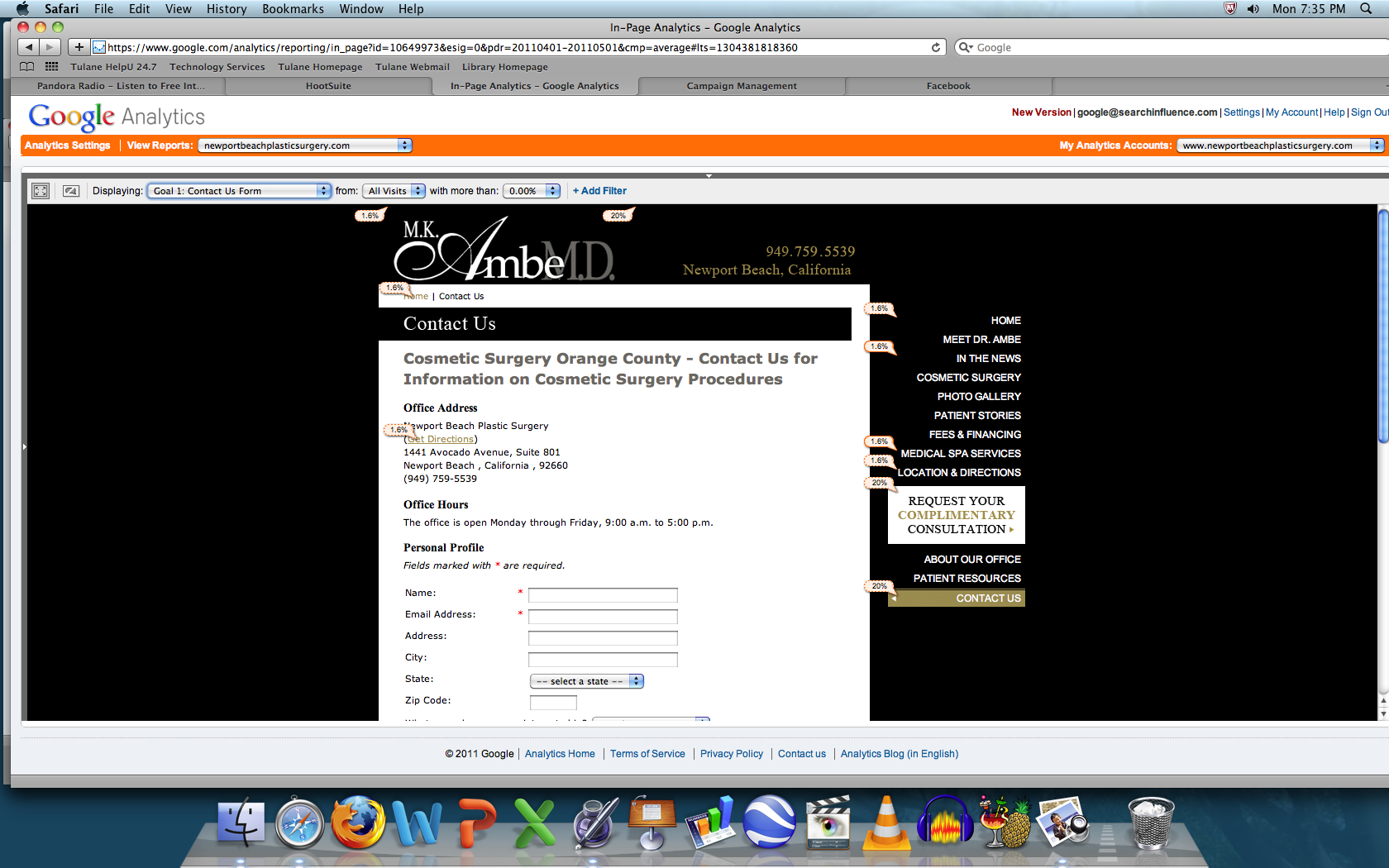
    Conversions from a Contact Page in Analytics
    Internet Privacy
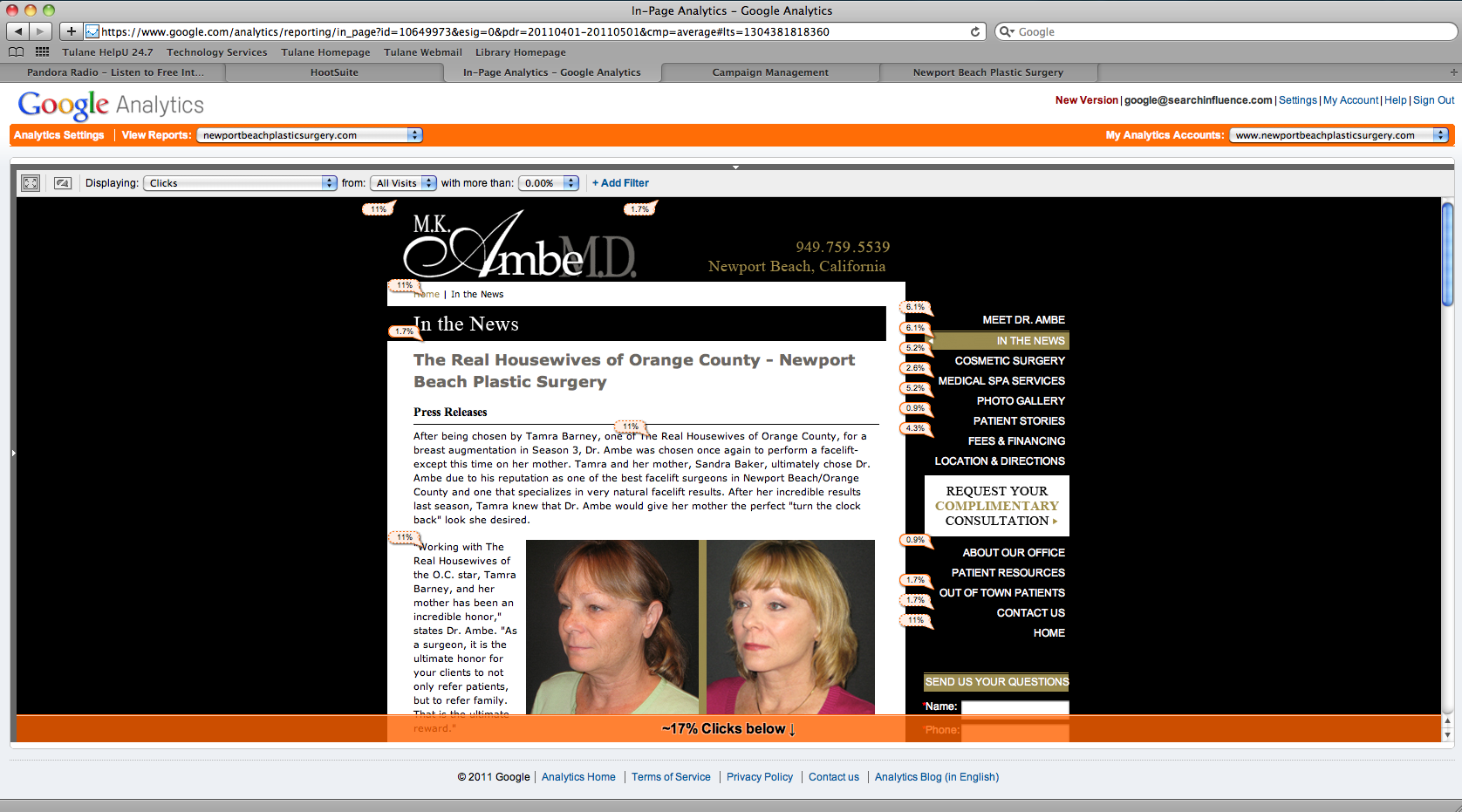
    Landing Page overlaid with In-Page Analytics

    The In-Page Analytics shows the percentage of clicks to the various pages in little pop-ups next to each link. Of course, it’s only tracking links to the page, so you have to take it with a few grains of salt if you have contextual linking on the page, but it gives site owners and especially ad campaign runners an idea of how to make their choices more relevant to browsers. The page below shows that almost 2% of visitors hit up the contact page from here, and another view shows us that a fifth of the people visiting the contact page complete a form — whether that’s good or bad is for the marketer to decide, but that information is certainly useful. Should that information not be in the hands of small businesses? The 12000 people searching for “block javascript” in Google think so.

    And what about those 12000? How can I know that? Because Google “betrays” its users privacy and gives vague estimates of how much people search for various keywords. Again, this helps small businesses without walls of supercomputers to better gather data so that they can garner a little bit of information to better serve their customers.

    Internet Privacy
    Drilldown of Referrals from Other Sites

    Finally, what about pages you visit that aren’t part of the site you’re on? Why would a site owner want to know that? Surely, they couldn’t want to know what page you were on before this one! But the internet is the ultimate word-of-mouth; “Who referred you?” becomes “From where were you referred?” and unfortunately, people just don’t pay enough attention to notice effectively on their own.

    So instead of ineffective tools and sheer guesswork, the visitor loses a little privacy to help small business owners understand how people came to their site and make it better for those visitors by tailoring the content and design. And this is the mindset behind any loss of privacy for the visitor. Marketers like us aren’t trying to figure out who specifically visited our site and did what — if we were, we’d use other tools that can’t be so easily blocked, and would only be used for malicious visitors.

    While some might call it “drinking the Kool-Aid,” I’ve understood more deeply why losing just a little privacy and not trying to circumvent analytics and other tools are a boon for the whole Internet — making it more valuable to the visitor, so that sites give to the reader what they really want. Stop worrying, and support your small businesses on the web.

  • An Overview Of Google Analytics

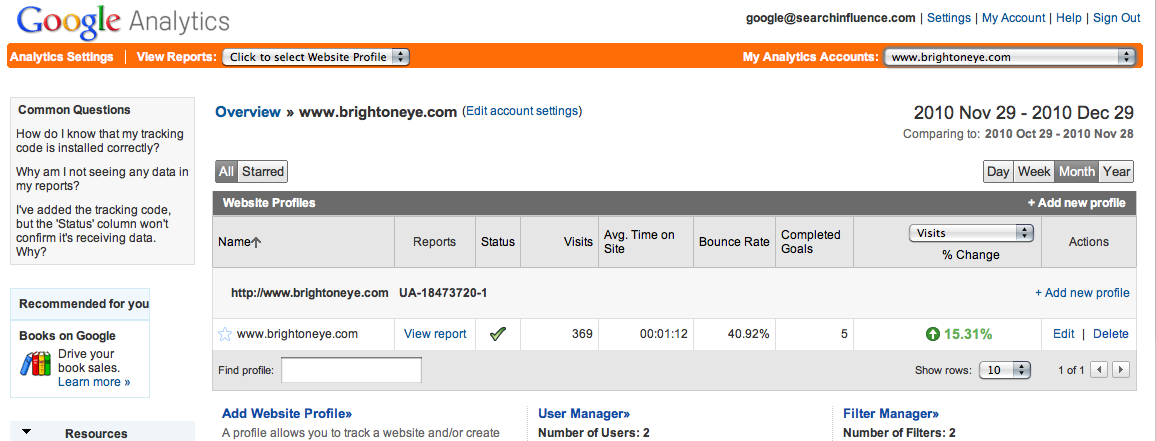
    Upon installing the Google Analytics code on your Web site, you will have an abundant amount of information to navigate through relating traffic sources and visitor information.

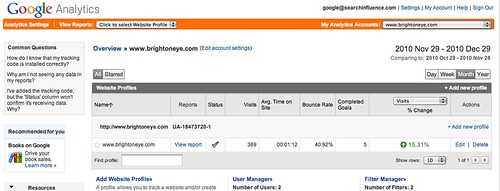
    To begin analyzing your Web site’s data, go to http://www.google.com/analytics/ – Click “Access Analytics” (blue button on the right side) and login using your Google account, under which the installation was made.


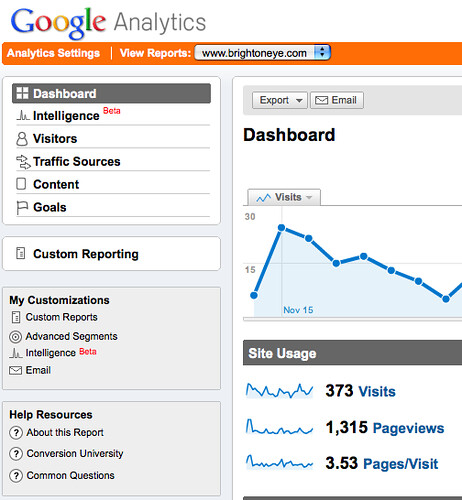
    The first screen is the Overview page.


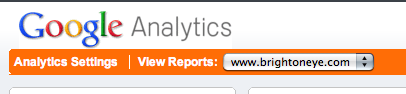
    To access the Dashboard with all the data for your site make sure the “View Reports” drop down menu on the top left corner displays your site’s name correctly.


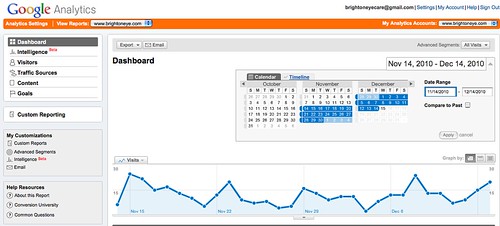
    To specify the dates of the data you want to analyze, adjust the calendar on the right. Usually, a month to month comparison is best, but the smallest period of time you can compare by is day by day.  Note that data is only collected from the date Analytics was first installed on your site, any information from before that time will be unavailable.


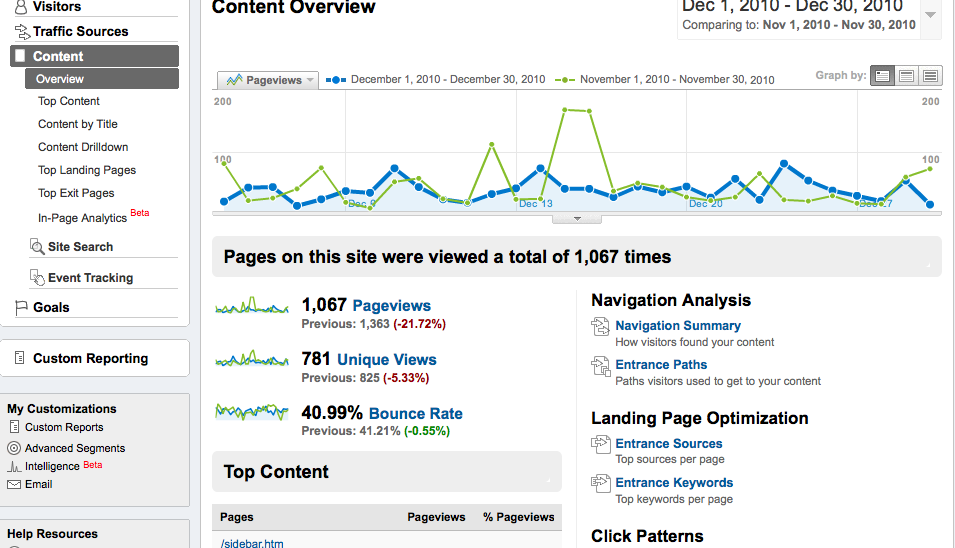
    On the left hand navigation, you will see a variety of options to analyze including Intelligence, Visitors, Traffic Sources, Content and Goals.

    Under “Intelligence” you can set up customized alerts regarding your data that can either be emailed or sent directly to your phone.

    Under “Visitors” you can gain some insight on what browsers your visitors are using to get to your site, what mobile devices are being used to reach your site, what kind of Internet connection they used and their geographical location.

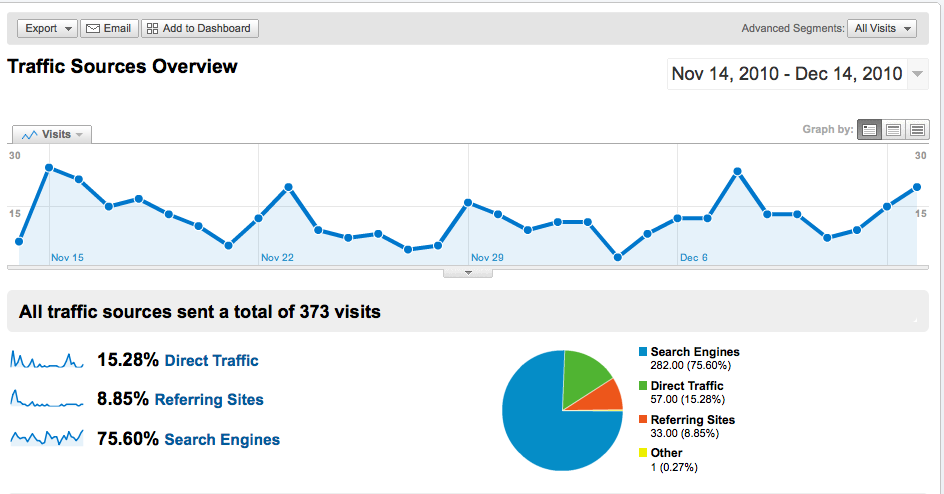
    Under “Traffic Sources” there is a link that will direct you to “Traffic Sources Overview,” which highlights Direct Traffic, Referring Site Traffic, and Search Engine Traffic. The percentage shown reflects the percentage of visitors coming in through those traffic sources and the pie graph illustrates that.


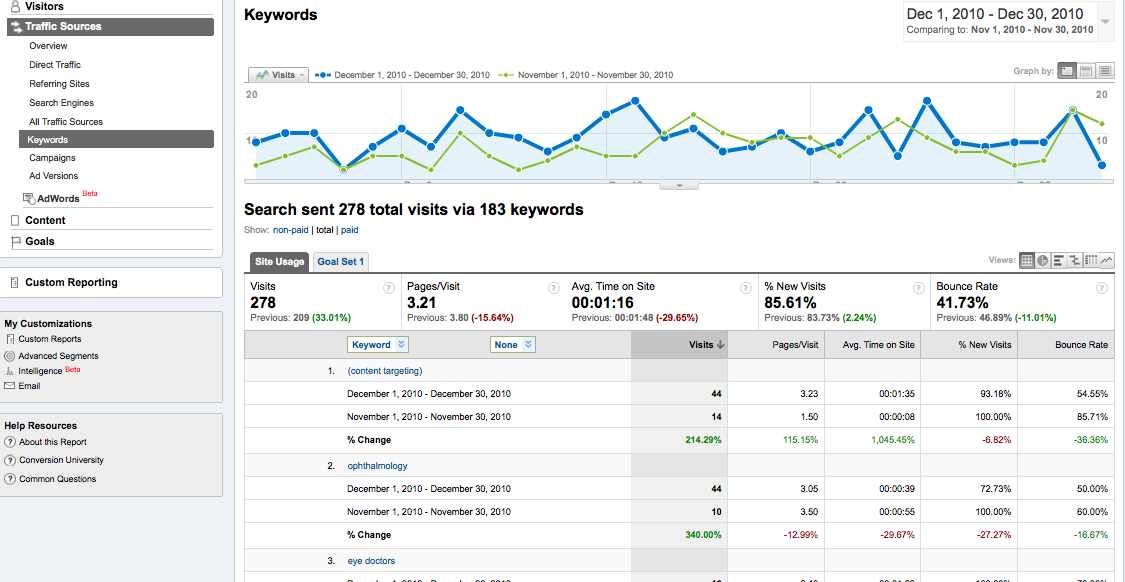
    Beneath the “Traffic Sources” drop down menu, you will notice an option that says “Keywords”. This offers valuable information on what type of search keywords are leading visitors to your Web site. If a keyword appears as [content targeting] this is an indication that a Pay Per Click campaign is leading people to your site.


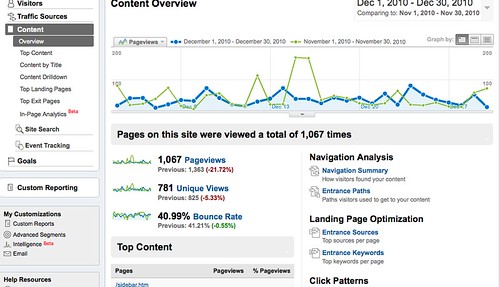
    Under “Content” you can gain insight on specific pages on your Web site including page views, unique visitors and bounce rate. Analyzing this information is particularly beneficial in determining the effectiveness of the design of your site. If your site has a high bounce rate, it indicates that visitors are immediately leaving your site, either because it is unappealing or it didn’t provide them with the information they were searching for quickly or effectively enough. Under “Top Content” you can determine which pages are receiving the most views and thus, the most interaction.


    Finally, you can export any of these pages as PDFs or other formats. You may also email the data results of any page with its respective information.


    Though this is but a brief overview, there are a number of additional features in Google Analytics including setting up alerts and customized reporting. Together, all of this data can give you a deeper understanding of your Web site and help you determine its effectiveness and help you make important decisions regarding your internet marketing efforts.