Tag: Google Analytics

  • #NOLATech Week 2016: How To Drive More Traffic To Your Site

    In conjunction with NOLATech Week 2016, Search Influence hosted a workshop to help support small businesses in their online marketing efforts. Paula Keller and Mary Silva presented on how to boost your local search rankings and ways to drive traffic to your website respectively.  

    Paula Keller’s “How To Boost Your Local Search Rankings”

    Paula’s “How To Boost Your Local Search Rankings” presentation took the audience through what types of businesses benefit from local SEO efforts. It also detailed the different types of Google My Business pages and how to use them. With the insight from Paula’s presentation, business owners can better understand how to optimize their business both onsite and offsite to gain better local search rankings.

    search-influence-university-how-to-boost-your-local-rankings-10-11-2016


    Mary Silva’s “10 Ideas To Drive Traffic To Your Website”

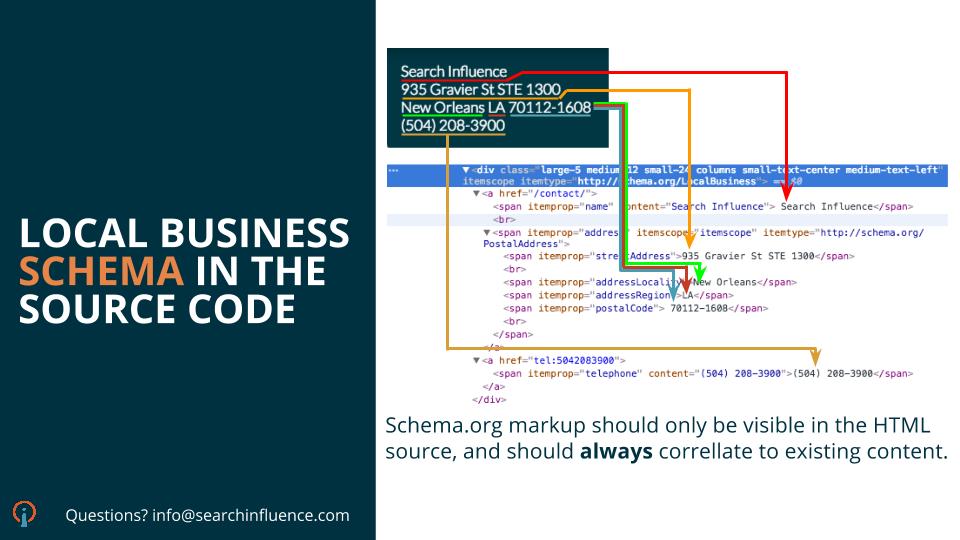
    Mary’s “10 Ideas To Drive Traffic To Your Website” presentation tackled concepts that influence your site’s user experience and actionable ways to help improve traffic to your site. It covered topics ranging from highly technical concepts like Schema markup and Google Search Console Analysis to less laborious efforts like directory and authoritative link earning. She explained how to use Schema.org rich snippets to create more engaging search results for your website on Google. Her presentation also went into detail on how to use social media efforts effectively to not only post but also promote engaging content like infographics. “Think of your online marketing efforts as a service,” said Mary, Internet Marketing Team Lead at Search Influence. “We know our users, and we’re getting them closer to their end goal faster. Make your overall goal to give users a cleaner, better experience and make users lives easier. ”

    search-influence-university-10-ideas-to-drive-traffic-to-your-website-5-26-2016

    In utilizing some of the tips and tools explained in these two presentations, guests could help increase their business’s online success in many ways including, but not limited to, improved visibility in local search results and increased traffic to their sites.

    For more information on the event, visit townsend.bunksite.com/ or contact the office directly at 504-208-3900 or Search Influence, 935 Gravier St #1300, New Orleans, La. 70112.


  • Here Are Our Top 5 Blogs From September

    Another month, another top five blogs from Search Influence! All of these posts are chock-full of information that will help you keep your website in tip-top shape and give you some insight into life at Search Influence. Subscribe to our blog to stay up to date on what’s going on in the world of SEO and Search Influence.

    #5: How Google Possum Has Affected 3 Pack: A Before and After Review

    Google’s newest update has had some drastic effects on the search results 3 pack. Amy Arnold gives us the lowdown on some listings that are pretending to be dead.

    Google Possum Update

    Look at that beautiful Google update devouring those listings.

    #4: What Happened to Facebook’s 20% Text Grid Tool?

    Michelle Neuhoff Boyd is back at it again this month and refuses to leave the top five standings. Whether you’re a Facebook fiend or a business taking advantage of the social platform, this blog entry has mountains of information about the inner workings of the Social Media giant.

    #3: Happy Working Parents Day: 10 Influencers on Lessons From Their Working Parents

    To celebrate National Working Parent’s Day, Mary Silva whipped up a heartfelt blog post complete with written and video interviews of some of our employees. Tears may be shed by the time you reach the end of the video, so be sure to have that tissue box ready.

    Kid nodding head

    #2: Search Influence Adds 3 New Hires in August

    Search Influence added three more employees in August and a lot of people were interested. Learn more about our new team members in this post compiled by Melissa Verzwyvelt.

    #1: Barnacle SEO – Local Search Engine Optimization for the Sam’s Club Crowd

    Last but not least, Mr. Barnacle SEO himself, Will Scott, saw a massive resurgence in popularity of his blog where he coined the industry changing term. Take a gander at this super informative blog.

    While you’re at it, follow our blog to get the latest updates from Search Influence.

  • Top 5 Search Influence Blogs from July 2016

    If you are like many of us at Search Influence, you took a few days off last month to enjoy the summertime. Now that August is here, you may have a few minutes to catch up on your reading. Here are our top five most read blogs from July.

    Top 5 Search Influence Blogs from July 2016 Image 1

    1: Search Influence Reviews: Here Are 5 of the Best Bars We Visit After a Long Day at Work

    Our team members enjoy grabbing a nice cold one after a long day at work! Check out our top five list of local bars—each with a wide selection of beers and delicious bar food in venues only New Orleans can provide.

    2: What Happened to Facebook’s 20% Text Grid Tool?

    Facebook officially rolled out this new update to the 20% text rule in June. Read about it and how it affects Facebook ads in this updated blog.

    3: Learn How to Create a Snapchat On-Demand Geofilter to Boost Your Next Event

    Snapchat launched the ability for users to create On-Demand Geofilters for birthday parties, weddings, business events, or just for fun! Learn how easy it is to submit the filter along with some key metrics to gauge your filter’s success.

    4: 12 Things You May Not Know About Online Marketing

    New to online marketing? Here are 12 things that surprised some of our team members when they started working at Search Influence.

    5: 10 SEO Blogs You Should Be Following

    Every day, we see traditional marketing grow more obsolete. Learn about 10 of the most informative and essential SEO blogs you should be following.

  • SEO 101: How to Install Google Analytics on Your Website

    Blog1

    So you want to take your business to the next level. You built this amazing website, but you have no idea if anyone is even looking at it. You’ve looked around online and found a pretty cool stat counter, but you need more information than that. That’s where Google Analytics comes in.

    What Is Google Analytics?

    Google Analytics is a robust tool used to track visitors to your site and how they arrived there—and it’s absolutely free. With Google Analytics, you can track how many visitors have viewed your website, what pages they viewed, how long they stayed on your website, and a lot more. You can even figure out where in your conversion process visitors are most likely to abandon the conversion. This kind of information is essential for truly optimizing your website to appeal to your visitors.

    Hopefully, I’ve sold you on Google Analytics, but before we can glimpse any of those sweet, sweet metrics, we have to install it on your website.

    Step 1: Sign up for an account.
    Navigate to the Google Analytics homepage and select Google Analytics from the “Log In” dropdown. Then select “Sign Up” on the following page.

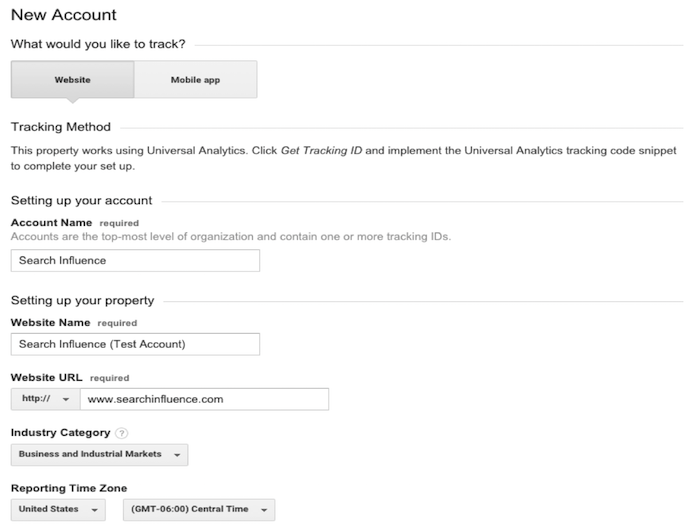
    Step 2: Fill out information about your website.
    Provide Google with basic information about your website, including its name and location. After filling out this information, accept the terms the conditions, and we’re almost there!

    New Google Analytics Account, Login Screen Image

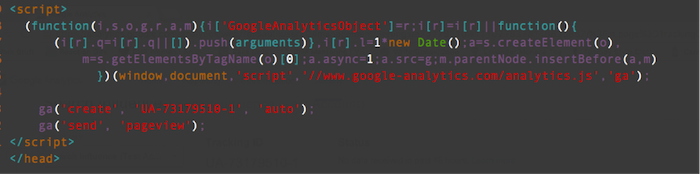
    Step 3: Copy and paste the Google-provided JavaScript snippet onto your website.
    Make sure you implement the JavaScript snippet so it appears once per page on every page of your website. This is important to make sure we track all users on your website accurately. If you are using a templated website, it is best to insert the snippet above the closing </head> tag.

    JavaScript Snippet For Google Analytics Image

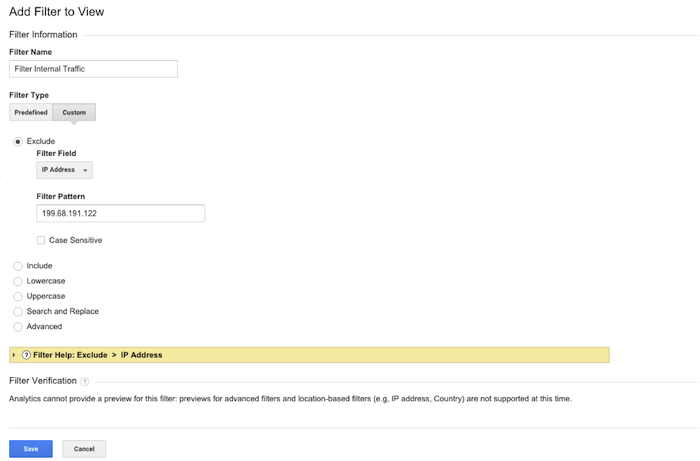
    Step 4: Filter all your internal traffic.
    You don’t want the pageviews to your website to be skewed by your own visits to your site. That’s why it is important to create a filter that removes any visits from your IP address. You can easily find out what your network’s IP address by clicking on this link. Copy your IP address and navigate to the Admin section of your Google Analytics account. In the rightmost column, select “Filters” and add a new filter titled “Filter Internal Traffic,” as in the image below. Click save, and you’re all set!

    Filter internal traffic for Google Analytics image

    Get tracking!

  • We Went to AdWords Bootcamp so You Don’t Have to: 5 Tips from the Experts

    We Went to AdWords Bootcamp so You Don’t Have to: 5 Tips from the Experts

    I had the pleasure of living and breathing AdWords for two full days on its home field—at Google Tech Corners in Sunnyvale, California.

    We had some very focused discussions that dove into some of the newer features and the best practices for long-standing features. I share some of my key takeaways below!

    1. Be present for your customers’ “micro-moments.”

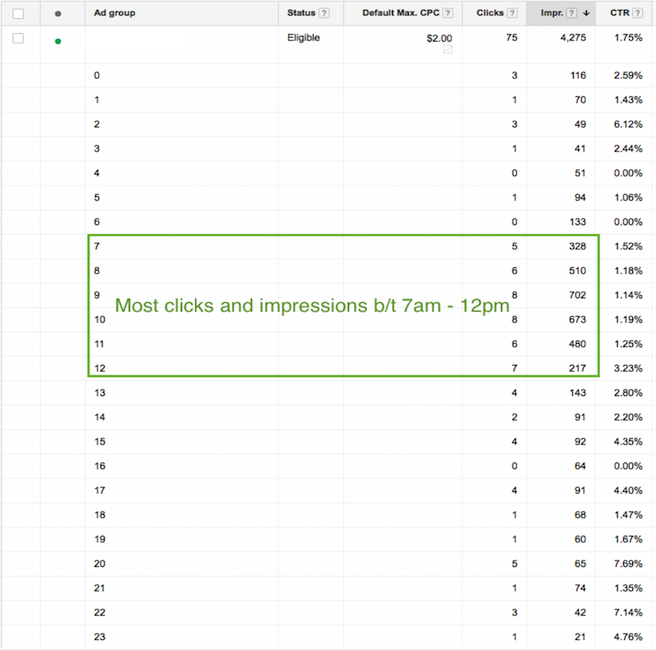
    These “micro-moments” are the key critical points in time in which your customers are searching for your products and services. You must be present when your customers’ micro-moments occur. You may want to increase your bids at certain times of day when more searches for your type of business are being done.

    Ex: restaurant upping bids leading up to and during mealtime.

    If your customer’s micro-moments aren’t as obvious as that of a restaurant, you can identify those high times by analyzing the following:

    • Google AdWords: impression & click reports by time of day
    • Google Analytics: visits by time of day

    Paula Blog 1

    2. We can trust cross-device conversions.

    If you work in AdWords, you’ve likely seen the column “Estimated Conversions.” Google has recently changed the name of this column from “Estimated” to “Cross-Device Conversions”

    Only conversions with a 95% certainty will be included in this number.

    Why do you care?

    Search sessions are segmented for the same purchase throughout the day and across devices. Gone are the days when a user sits at their desktop at nighttime and researches everything they want to know within 30 minutes.

    For example: instead, we’re talking two minutes at 7 a.m., five minutes at 9 a.m., ten minutes at noon, and maybe five minutes again at 6 p.m. to purchase.

    1511-SI-BlogImage-D-01

    3. You better not ignore cross-device conversions.

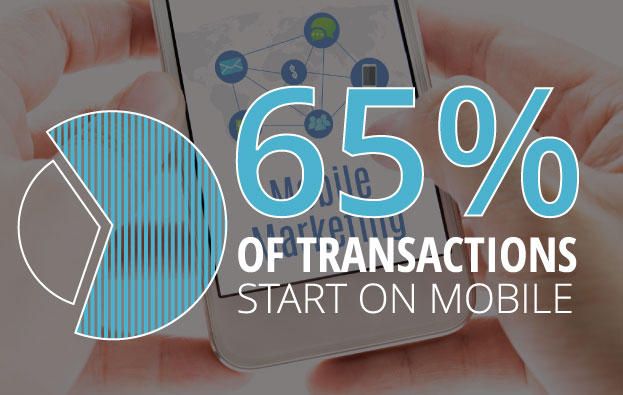
    Why? 65% of transactions start on mobile.

    I’ll be making it a priority to look at cross-device conversions in addition to the traditional conversion metrics (which only include users who search and convert on the same device). If you are looking at traditional conversions only, you are missing out.

    In order to see this metric, you must have one or more conversions set up in AdWords. Then, Google will do the rest.

    4. Leverage in-market segments and affinity segments.

    In both AdWords display targeting and Google Analytics, you can find “In-Market Segments” and “Affinity Segments.” Analytics allows you to see this info about your existing site visitors, and AdWords allows you to target potential customers using these two targeting options.

    This isn’t new knowledge, but I was given a fantastic example of what distinguishes the two, and I thought it was worth sharing:

    Affinity Segments:

    Users in this group have demonstrated (via the sites & pages they visit) what their lifestyle interests are.

    Example: A user in an affinity segment for “automobiles” would read car blogs and articles about future car releases, and they would also watch YouTube videos about cars.

    In-Market Segments:

    Users in this group are actually in the market for a given category of product or service.

    Example: A user in an in-market segment for “automobiles” would be looking at Kelly Blue Book, local dealership sites, Edmunds, TrueCar, etc.

    5. Allow new features to make your life easier.

    Last but not least, what I finally realized is that Google is constantly adding new features to AdWords to help us better spend our money. Given advertising is very much Google’s main source of revenue, this only makes sense.

    As new features roll out, learn their benefits and capabilities, and adjust your process accordingly.

    With consumer behavior changing faster than you can say “micro-moments & cross-device conversions,” there’s never an excuse to say “Well, we’ve always done it this way.”

  • Googleplasty: How to Reshape Your Search Results (Part 2)

    As more businesses begin to take efforts to improve their online presence, standing out in search results of highly competitive markets and areas becomes even more difficult—and nowhere is this perhaps more true than in the cosmetic medicine industry.

    In order to reshape your search results through the art of “Googleplasty,” you must know what factors make your business rank high in a Google search. Since we now know all about the different types of search results from part one of this two-part blog series, let’s talk about the most important factors that play a role in how high your practice ranks.

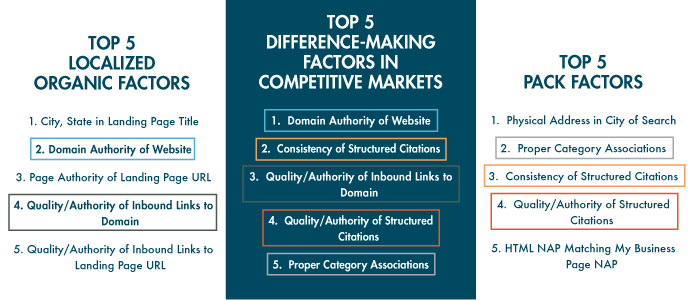
    The following three “Top 5” lists of factors are from from Moz’s 2014 Local Search Ranking Factors survey. The information came as a result of surveying 40 industry experts to determine what had the most influence on ranking in Google search results.

    top 5 search ranking factors

    As you can see, all of the factors that are integral in competitive markets also play a part in either localized organic or maps pack results. Due to their repeat importance, I think they’re the five factors most worthy of discussing in detail.

    1. Domain Authority of Website

    domain authority

    First up on our list as the most important factor in competitive markets is Domain Authority, which isn’t much of a shocker. Domain Authority is a proprietary measurement (created by Moz geniuses) of a domain’s power within a 100-point scale. This score can be used to predict if a site is likely to rank in Google’s search results and can also be used to track a site’s growth and increase in strength.

    It is a metric that combines other metrics such as age, number of links, and quality of links, so it’s not easy to manipulate through singular or direct efforts. As it is directly put on Moz’s site, “The best way to influence this metric is to improve your overall SEO.”

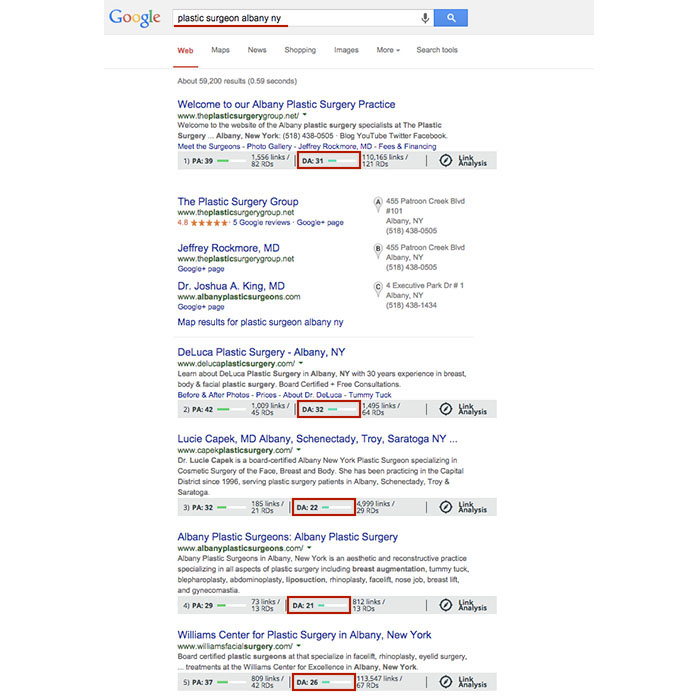
    Using Moz’s MozBar to see domain authority of pages in search results, you’ll see that the top five business sites in the localized organic results for “plastic surgeon albany ny” have Domain Authorities of 31, 32, 22, 21, and 26, respectively. As you can see here, having a score that is higher by a single point won’t guarantee that you rank above your competitor, but in this search example, business sites past the first page of results tended to have Domain Authorities lower than 20.

    Domain Authority Search Results

    2. Consistency of Structured Citations

    structured citation consistency

    While this factor isn’t as high ranking for localized organic results, it is third for the top maps pack factors and second here in the top factors for competitive markets. One reason for this is that in many competitive markets, such as plastic surgery or cosmetic dermatology, you’ll find maps packs in search results.

    To start, a citation is a place on the Web where a business’ name, address, phone number, and often website can be listed (sometimes referred to as the NAP of a business – name, address, phone). Any combination of the NAP, with or without all parts, listed on a site is considered a citation. A structured citation in particular is a listing of business information found on a directory website (e.g. YellowPages.com and Yelp.com). On the other hand, an unstructured citation can be business information on non-directory sites like newspaper sites, press release sites, and blogs, to name a few.

    By increasing the number of matching information sources (and therefore matching signals) to Google, you also increase your chances in having Google match this information to search queries, according to a recent webinar with Google’s Heather Wilburn. So if you want to be matched with potential patients searching for businesses like yours in your area, consistent business information across the Web is one of your best bets, especially in competitive industries like cosmetic surgery.

    3. Quality/Authority of Inbound Links to Domain

    inbound links to domain

    An inbound link to your domain (aka inlink or backlink) is exactly what it sounds like, a link leading to your website. The relevance to your industry or location and the authority of a website linking to yours in and of itself are the two best traits for quality links. Buying links or having links from random, spammy sites will hurt, not help you. Links from local sites and popular sites are a pretty safe bet. You can seek out local sponsorship opportunities as a good link-building effort or help other sites clean up their broken backlinks by using your working ones.

    To differentiate between natural link building versus spammy link building, remember that it’s all about user experience and what makes sense to the user. If your efforts don’t uphold the ideal of providing the best user experience possible, then they’re probably not good.

    4. Quality/Authority of Structured Citations

    structured citation quality

    As mentioned above, a structured citation can be any directory site that lists any variation of your business’ NAP or website. While consistency is most important, you also want to make efforts to build high-quality, authoritative citations in directories.

    Just like there are many factors to improve your own site’s authority, there are also many factors to determine the quality of a directory. You can delve into Whitespark’s blog on how to identify quality citation sources for a detailed breakdown, but basically a good rule of thumb is to look for high domain authority and human moderation in directory sites. Examples of human moderation include how DMOZ requires submission review by its team before a link goes live or how Google Plus, Yelp, and Bing listings all require verification via phone call or a postcard sent to the business.

    Google also considers niche directories highly authoritative. A niche directory is an industry-specific or location-specific directory. Since the Pigeon algorithm update, this kind of citation building has become especially important, and searching for your industry’s keywords will often help you identify these niche directories. If you search for “plastic surgeon columbus oh,” you’ll see that the directories healthgrades.com, vitals.com, and smartplasticsurgery.com appear on the second page of search results. Often, these types of directories require either verification or payment for those seeking to be listed on their site. If you understand the concept of barnacle SEO, you know that being listed on these types of big, authoritative sites is a great way to improve your own visibility to potential customers. Use your discretion to decide if the opportunity cost of getting on a directory isn’t too high to be worth the effort.

    Warning: If a site ever requests a “reciprocal link” to its site on your site in order to be listed, this is NOT A GOOD practice, and they are not worth your time.

    5. Proper Category Associations

    category associations

    Having proper category associations is another important factor for ranking in the maps pack that can set you apart from the rest in a competitive market. It’s a pretty simple concept, and it basically boils down to the part of the guidelines for representing your business on Google that tells businesses to “Choose categories that are as specific as possible, but representative of your main business.” A cosmetic surgeon with the primary category on the Google Plus local listing set to “surgeon” is less likely to rank above one with a primary category set as “plastic surgeon” in the maps pack, for example.

    Though this is a lot to grasp and take action on all at once, having the foundation and understanding of best practices to improve user experience and to better your business online will greatly improve your successes online in the long run.

  • Five for Friday: The Analytics Glitch, Google’s Beginnings, Mardi Gras Madness, & More!

    1. Google Analytics Data Drops Off On Monday, February 9th – SEO Roundtable

    Did you notice that all of your customers suddenly decided to boycott your website this past Monday? You’re not the only one. Luckily, this is not an issue with your website or your business; it’s actually a brief glitch in the data of Google Analytics. This problem appears to have affected thousands of websites. Though Google has yet to give an official statement on the matter, they have assured us that they are looking into the problem.

    MLB.com animated GIF

    2. Your Guide to Everything Mardi Gras – New Orleans Online

    Mardi Gras celebrations are in full swing this week, and New Orleans Online has released an infographic to help us navigate and understand the chaos! Filled with tidbits on the history of Mardi Gras as well as helpful hints for making the most of this year’s events, this infographic can guide both newbies and veterans through the Carnival season in New Orleans.

    mardi gras animated GIF

    3. Lessons Learned from the Early Days of Google – Matt Cutts

    Today, we know Google as the wooly mammoth of the Internet—large and in charge. Whether we are aware of it or not, no company has had a greater impact on how we navigate the World Wide Web. But it wasn’t always that way. Google, like all huge companies today, had humble beginnings, with a lot of blunders and a lot of lessons learned. Matt Cutts revealed all in his presentation at UNC Chapel Hill last month.

    google animated GIF

    4. Is Yahoo Stealing Mobile Search Share from Bing? – Marketing Land

    Yahoo is beginning to make its first divergence from its search alliance deal with Microsoft. The search engine has its eyes set on the mobile market, a segment that was not part of the search alliance deal made five years ago. The search engine has gained traction on mobile devices not at the expense of Google, but at the expense of its ally Microsoft.

    5. 8 Sure-Fire Ways to Beat Out Your Top PPC Competitors – Hanapin Marketing

    Yesterday, Jamie Smith and Cassie Oumedian of Hanapin Marketing presented a webinar on the eight ways to beat out your top PPC competitors. Some of the expert tips included competitive intelligence and monitoring insights, why location targeting is a must, and bid strategies to outrank your competitors. If you weren’t able to catch the webinar live, you can go to the Hanapin Marketing website to get the full recap.

    Image Sources:

    Dog Typing Image

    Mardi Gras Parade Image

    Google Doodle Image

  • Law & Order SEO: Finding The Culprit Behind Your Decreased Organic Traffic

    As digital marketers, we regularly analyze site traffic to ensure that our efforts are producing positive results. But what happens when you’re doing all the right things in your SEO campaign (high-quality website content, blogging, link-building, etc.) and your Google organic website traffic is consistently going down?

    1) Traffic Deep-Dive

    First, log into Google Analytics and narrow your search down to Google organic traffic over the largest date range possible. Look for trends of upward or downward traffic and make annotations of known changes that might have caused traffic to change (such as a new website launch or the installation of a blog). Also, check traffic by landing page to see if only certain pages were affected.

    TrafficDeepDive

    2) Compare to Algo Timeframes

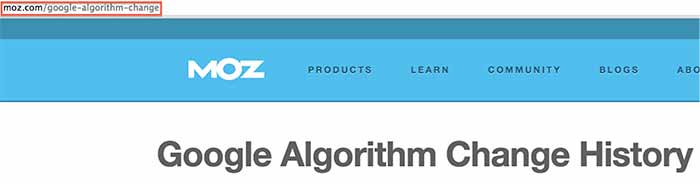
    Next, see if any of the changes correspond to one of Google’s algorithm updates using the Moz algorithm timeline. Keep in mind that the date might not be exact, because the updates often take time to roll out. If you can attribute the traffic change to an algorithm update, take the necessary action depending on the update. Hit by Panda? Focus on your content strategy. Hit by Penguin? Take a close look at your inbound links and check for a manual action.

    AlgorithmChangeIssue

    3) Investigate Other Possible Culprits

    If your traffic change didn’t correspond to a Google algo update, this is when your analysis gets a little tricky, as there are many possible reasons for the change. Here are some things to check when searching for the source of your traffic change:

    • Rollout of a new website (setting up 301 redirects is essential to this process as well as carrying over all SEO optimizations)
    • Removal or adjustment of your content
    • Relocation of your business (your citations need major focus)
    • Discontinuation of an ad campaign that was generating traffic
    • Adjustment of technical elements of your site, such as meta-tags or robots.txt
    • Change or removal of your Google Analytics tracking code (surprisingly common)
    • Change in the marketplace or seasonality (like a decreased demand for your products/services in general or during a certain part of the year)—check out Google Trends
    • Messy directory profile (check your percentage of correct citations using Moz “Check My Listing”)

    These tips will hopefully help you get to the root of the issue and take the necessary action to achieve your SEO goals. If you need a professional team to do the work for you or to assist you in your efforts, you can always call us: we’ll be happy to discuss our SEO packages with you.

    Have any additional recommendations for things to check? This list is not exhaustive, so please help add to it!

  • What’s Black and White and Impacts 3-5% of Search Queries? Panda 4.1!

    In the last two months, Google has been busy improving the Panda. In early August (Aug. 8, 2014, to be exact), there was a lot of chatter from the SEO community seeing the flux in Google Analytics accounts, which was generally accepted as an unconfirmed monthly Panda data refresh.

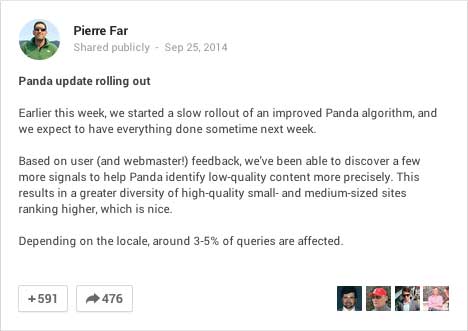
    In early September, there was a large Panda data refresh, and on Sept. 25, Google’s Pierre Far announced yet another Panda algorithm update, (the previous Panda algo update was May 19).

    GooglePlusPostPandaAnnoucedImage

    And just to keep you on edge, ceaselessly examining your Analytics data, the rollout of this Panda has been sloooowwwwslothlike. Google confirmed that some Google data centers were not updated until “October 6 or later.” So, your website could have seen the algorithm at some point before Sept. 25 and after Oct. 6 – that’s a two-week time frame to analyze!

    What is Panda?

    There are so many blog posts out there describing the Panda algorithm, I will just summarize it briefly. If you’re interested in reading about it in more detail, here’s a good blog post, and some excellent reading here.

    Panda is an algorithm that filters the search results to:

    1. Reward high-quality content with more presence
    2. Push sites with thin content down to rank lower

    Google says low quality or thin content is text that

    •   Is very short in length
    •   Offers very little useful information to the consumer
    •   Is unoriginal or copied

    Your website content should not be self-serving; it’s all about providing information to the consumer to educate them with detailed and authoritative information.

    PandaContentPullQuoteImage

    This most recent Panda is an algorithm update, which is supposed to reward more high-quality small and medium-sized websites. From Par’s G+ post:

    “Based on user (and webmaster!) feedback, we’ve been able to discover a few more signals to help Panda identify low-quality content more precisely. This results in a greater diversity of high-quality small- and medium-sized sites ranking higher, which is nice.”

    This update is significant because it added more signals to better identify lower quality sites. Earlier algo updates have rewarded big directories for local searches, so this update is exciting because small- and medium-sized websites have a fighting chance for ranking in their local markets.

    Google Updates vs Data Refreshes

    To paraphrase, an update is a change in the algorithm. A data refresh is when the algorithm has not changed, and new data that is pushed through the data centers, such as new crawl data, is updated in the various data centers across the Google universe.

    Updating the data centers is one reason why updates are seen at different times for different geographies.

    I am quoting this really old Matt Cutts blog post here:

    Algorithm update: Typically yields changes in the search results on the larger end of the spectrum. Algorithms can change at any time, but noticeable changes tend to be less frequent.

    Data refresh: When data is refreshed within an existing algorithm. Changes are typically toward the less-impactful end of the spectrum, and are often so small that people don’t even notice. One of the smallest types of data refreshes is an:

    Index update: When new indexing data is pushed out to data centers. From the summer of 2000 to the summer of 2003, index updates tended to happen about once a month. The resulting changes were called the Google Dance.”

    What are data centers? Google crawls the websites out there and caches those in their gigantic index. That index is huge and is stored on thousands of machines. Those thousands of machines live in various Google data centers around the world. To truly geek out, read more about Google data centers here – these centers are where the Internet exists.

    Did Panda Help or Hurt Your Site?

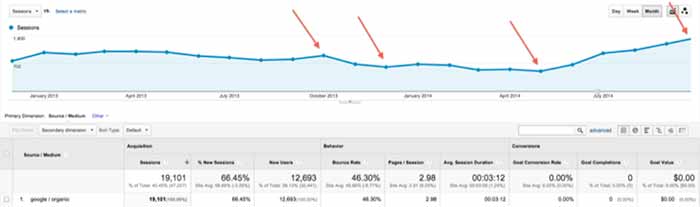
    When you look in Google Analytics, it may be easy to see a drop off or dramatic increase. For example in the graphic below, I’m guessing Panda rolled out in the business’ local area around Oct. 6, and it didn’t go well for the site:

    Panda rolled out Oct 6, 2014

    And on Sept. 29, this site was Panda-happy:

    increase in Google organic traffic after Panda September 2014

    For most of the sites I looked at, the visual changes were more subtle, so I usually toggle between the data by week vs. the daily data. The weekly data shows me a week where the decreases started, which correlates to the earlier rollout dates:

    weekly analytics view to pinpoint Panda rollout

    When I switch to the daily data, I can clearly see the dips in traffic. I have to pinpoint Saturday, Sept. 20t or Wednesday, Sept. 24 as the day this site got the Panda.

    daily Analytics shows dips in Google organic traffic after Panda

    The Sept. 20 might be a little early to fit in the Panda time frame, and I am accustomed to seeing a spike immediately before an algo filter, so I’m going for Sept. 24. Using Sept. 24 as the before and after date, this website has seen 12% decrease in Google organic traffic.

    12% decrease in Google organic traffic after Panda Sept 2014

    This website with the 12% decrease in Google organic traffic after Panda is a good website for an authoritative local business. What this drop tells us is even if the content on the site offers really great information for the consumer as this one does, it might be old and/or thin. Someone may have copied it over the years. We might need to add other content to our pages with images and videos. Content is not just text. We need to take a good look at the age of the text and the variety of the content on the page. With this review, we can create a strategy for improving the content for the next Panda data refresh.

    What to Do Now

    PandaImageWebsite owners or managers who see a Panda smack really need to take a critical look at the content on the site. To succeed, the content needs to be information rich, and not self-serving.

    An example of self-serving content is content that is stuffed with keywords, abundant keyword use on a page not only in the body text, but also in the URL and alt tags. This is also sometimes referred to as over-optimization.

    Self-serving can also mean the content talks too much about the business instead of talking about the product or service the consumer is trying to learn about. Talking about the business is great as long as it’s on the About page or the home page. Leave products or service pages to be about those topics.

    This is a great list compiled by Josh Bachynski “The Complete Google Leaked PANDA Do & Don’t LIST – 2011 to Present.”  This list really dives into the aspects of good and not-so-good content.

    Google published a list of questions to ask when writing content. The full list is here. I have chosen some to republish below:

    • Would you trust the information presented in this article?
    • Is this article written by an expert or enthusiast who knows the topic well, or is it more shallow in nature?
    • Are the topics driven by genuine interests of readers of the site, or does the site generate content by attempting to guess what might rank well in search engines?
    • Does the article describe both sides of a story?
    • Does this article provide a complete or comprehensive description of the topic?
    • Are the pages produced with great care and attention to detail vs. less attention to detail?

    Diversity of content and freshness of content are also factors to consider.

    Diversity of content helps readers in various ways. Content can mean images. Original images are best rather than stock images, but stock images work. Content can also mean videos, charts, calculators, and reviews. Content is anything that helps the consumer learn more to make well-informed decisions.

    For content freshness, a blog is probably the easiest approach to keep the website updated regularly without having to rewrite your page’s content too often.

    If you have a specific owner or practitioner who is the authority on the information, claim that using Author markup – authorship thumbnails are gone from SERPs but that doesn’t mean the Author authority is gone.

    There are so many tactics for coming back after a Panda smack, and the best strategy is a mix of tactics. It will likely take time to create really good content and build back your website credibility, but it is a necessary investment for your site’s success.

    If you think your site is suffering from the Panda, give us a call. We would be glad to help.

  • TUTORIAL: A Google Gem That’s Trending Near You

    GoogleTrendsLogoMy clients frequently ask me how long it takes to rank higher on Google search page results. I explain that the process is gradual and not guaranteed due to a number of factors, such as the 200 plus “signals” that make up Google’s algorithm, the time it can take for Google to read our “signals,” creating a consistent online presence, etc. — the questions usually end there. I recently had a client challenge me beyond a basic explanation of SEO, digging into my keyword research, and inspiring me to explore the seasonal average search value.

    When the client asked me if I examined seasonal search value in my keyword research, I had to admit that I had not. It typically makes sense to look at average yearly search volume because, as stated above, the SEO process is gradual and we don’t want to target a term that will only help our clients in the short-term. This still left me wondering about seasonal search value, so I researched it. I was suspicious that seasonal search could help identify outside factors that affect the progress of SEO campaigns, and it may help lock-down industry standards that I wasn’t aware of.

    Google Ad Words’ Keyword Planner does allow you to select different date ranges to examine the monthly average value, but I wanted to find a tool that identified possible patterns in keywords. I should have known that Google already had a product for this: Google Trends.

    Google Trends’ Fun Facts:
    – Started in 2006
    – Remember “Google Insights for Search”? This tool put search data into graphs and merged with Google Trends in 2012
    Medical researchers have attempted to predict outbreaks with this tool over the past few years
    – You don’t need a Google account to use this tool

    Visit the site and follow along with my tutorial

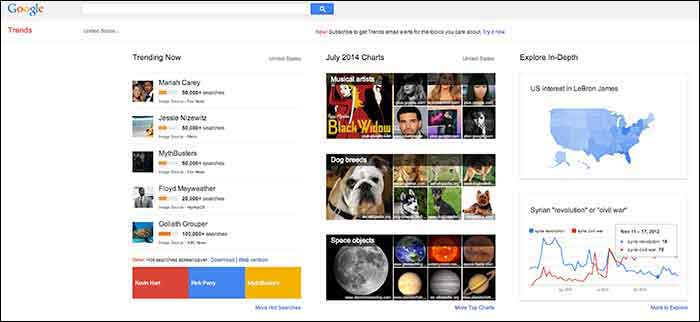
    When you visit Google Trends, you will see three columns of interesting data, so where should you start? The best place to start is with your goals in mind. Do you have specific keywords in mind that you would like to research and compare, or do you want keywords generated for you based around a topic? Either option is available here, along with many other unique features that make it a useful tool for SEO experts.
    GoogleTrends

    Here you will find 3 main categories: “Trending Now,” “July 2014 Charts” and “Explore in-Depth”. The first two categories could be used to brainstorm social media and blog ideas because you can see what’s being searched the most that day as well as a review of the past month’s top searches organized by topic.

    I am going to examine the third column on the page titled, “Explore in-Depth” because I find it most useful for SEO purposes. Still keep in mind the other two columns, however, because they relate to recent news and pop culture that’s also trending. The “Explore in-Depth” column shows two examples of ways you can examine topics and keywords. Click “More to Explore” at the bottom right-hand corner to see all of your search options.

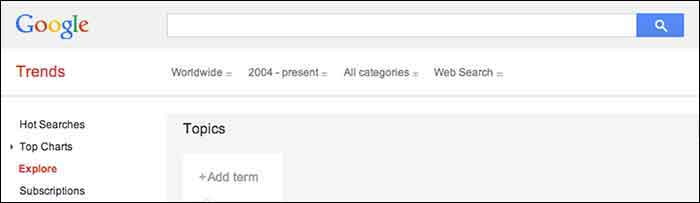
    How to search by Keyword

    When you start adding “Topics” that you are interested in gaining search value for, you will also see a drop-down box appear which gives you different types of searches to select. The example below shows “Search term,” which would be the keyword or query, “Transportation Mode,” which is a category. Google will find keywords that fall into that category, and “Book by Deanne Sclar” which indicates a branded search for that book. Once again, think about your goals. If you have specific terms in mind that you want to research, then select the “Search Term” option. If you want to explore a category and see what keywords were searched the most under that category, select the category.
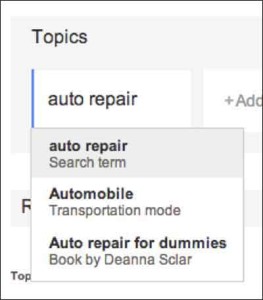
    GoogleTrendsTopicsImage

    GoogleTrendsTopicsMenuImage

    I first selected “Search Term” and filtered the dates of our search to July 2013-July 2014. As you’ll see below, I receive an “Interest over time” graph, but I am also given a “Regional List” category of countries who have searched for “auto repair” the most. I have also been supplied with “Related Searches” at the bottom of the page. Let’s explore these resources.
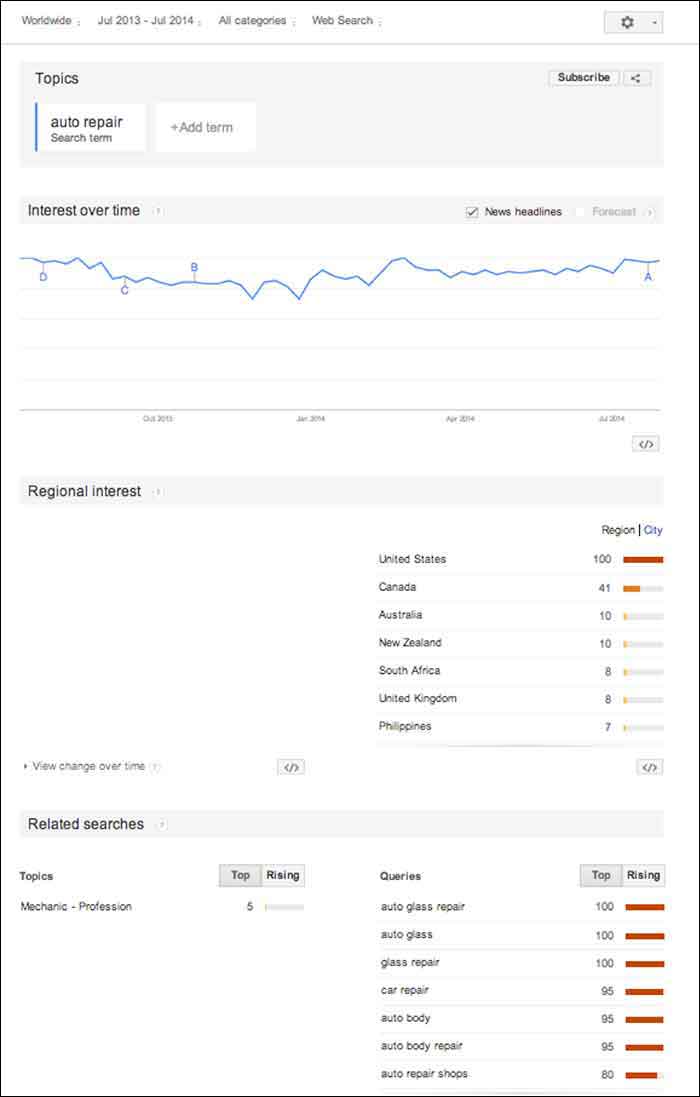
    GoogleTrendsTopicsInterestsImage

    Note that the numbers on these graphs are not absolute numbers. They are relative to each other to reflect a trend.

    “Numbers represent search interest compared to the highest point on the chart. If at most 10% of searches for a given region and time were for ‘pizza’ we’d consider this 100. Each point on the graph is divided by the highest point and multiplied by 100. When we don’t have enough data, 0 is shown.” -Google Support

    1. Interest over Time
    GoogleTrendsTopicsInterestsForecastImage

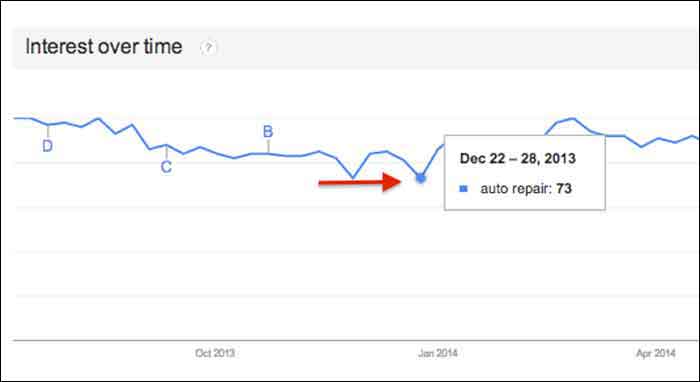
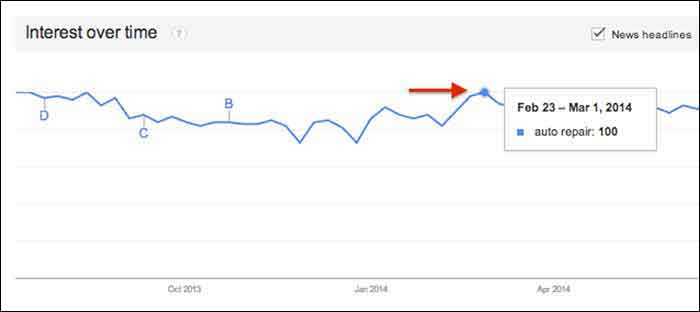
    This graph gives us a snapshot of the overall trend of searches for “auto repair” between July 2013 and July 2014. Hover over any point in the graph to see the exact score that Google Trends gave that time period of searches. After hovering over these points and comparing the highest score to the lowest, I realized that there was no dramatic change, but there was a slight decrease in late fall and early winter months.
    GoogleTrendsTopicsInterestsDecImage

    GoogleTrendsTopicsInterestsFebImage

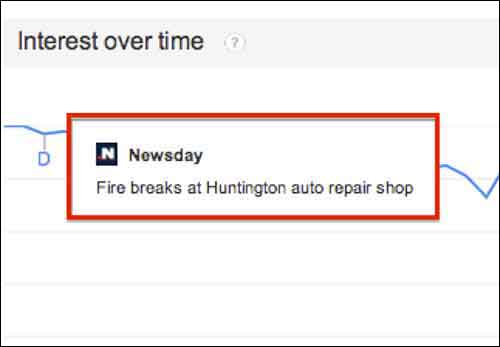
    You may notice the letters next to what seems like random points on the graph. These letters represent times when news headlines included that keyword. This is an interesting tidbit of knowledge to consider. Knowing if the trend increased dramatically is important because it could be due to an outlying factor.
    GoogleTrendsTopicsInterestsNewsdayImage

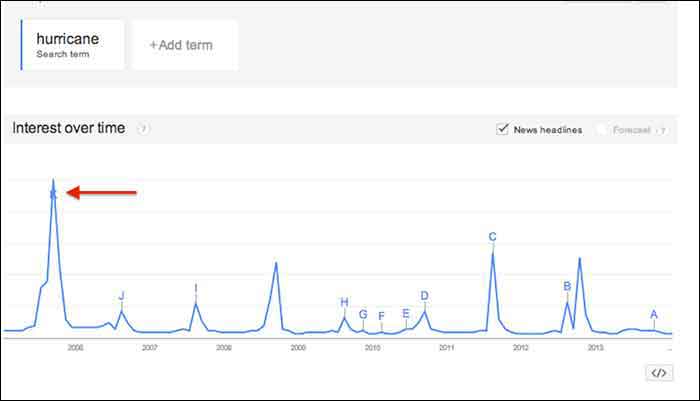
    Fun Fact: Look at how the trend for the keyword “hurricane” was affected by Hurricane Katrina in 2005.
    GoogleTrendsTopicsInterestsHurricaneImage

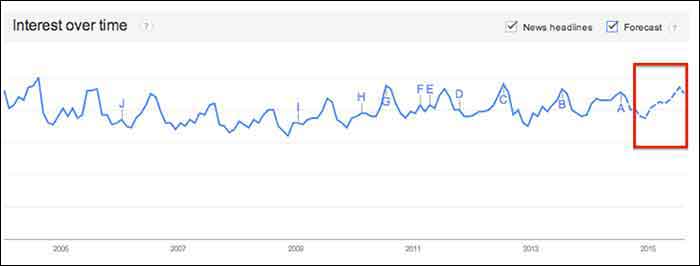
    You may notice the “Forecast” check box to the right of the “News Headlines” check box. This feature attempts to predict the upcoming trend of your search term. Note that you have to extend your start and end dates to make this option available. To yield the most accurate forecast, open the start and end dates to as wide as possible. This yielded the below results, showing the possibility of slight decreases in the fall and early winter months, with a continuous increase in the spring and summer months. Note that I had to hover over the graph points to figure out the dates because the graph does not let you zoom in.

    You could use this chart in conjunction with other keyword research tools such as Google Ad Words’ Keyword Planner to expect possible decreases or increases in certain keywords due to seasonal search value. For example, it’s not surprising that “ac repair” is not a particularly common search word during the winter months. Other keywords with seasonal value may not be as obvious, however, so resorting to Google Trends serve as one tool to help you crack the code when dealing with what seems to be seasonal increases or decreases in the search rankings.

    GoogleTrendsTopicsInterestsForecastImage

    2. Regional Interest

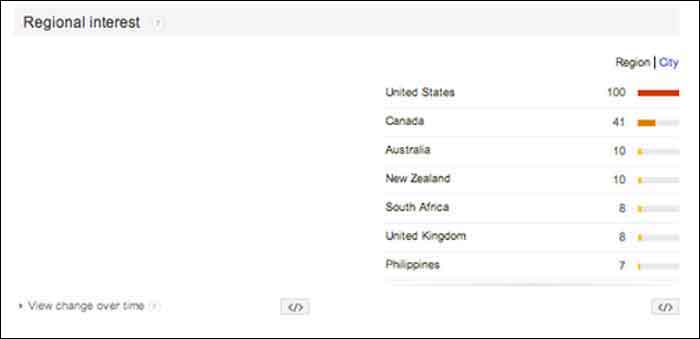
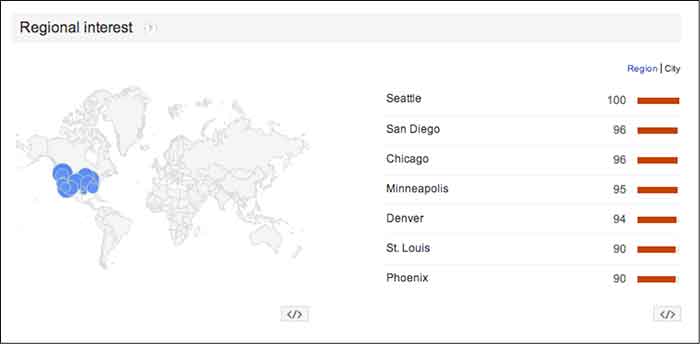
    “Regional Interest” displays larger areas that are searching for your keyword the most. While this is a useful tool for pinpointing countries and large cities, it does not typically show small cities or rural towns. In a global search (as shown below) the results help to narrow down the top countries searching for a keyword, and then the largest cities by clicking the “City” tab. The numbers represent the same calculated numbers as in the “Interest over time” section, so they are normalized and are the outcome of comparing the search volume to the area that searched for your keyword the most.

    For a business with a statewide, national or a global target audience, this map could help you pair the keyword with specific locations. It is possible that more people search “auto repair” in Detroit, while more people in Los Angeles search for “car repair”. This sounds like a slight difference, but the more precise you can be when choosing keywords, the higher your possible rate for success will be.

    In this case, the United States shows a dramatically higher interest in “auto repair” than any other country. You can click on each country to see a breakdown of interest within each one. You may also click the “City” link next to “Region” for the cities with the most interest in “auto repair” despite the country (demonstrated in the 2nd photo below).
    GoogleTrendsRegionalInterestsImage

    GoogleTrendsRegionalCityInterestsImage

    3. Related Searches

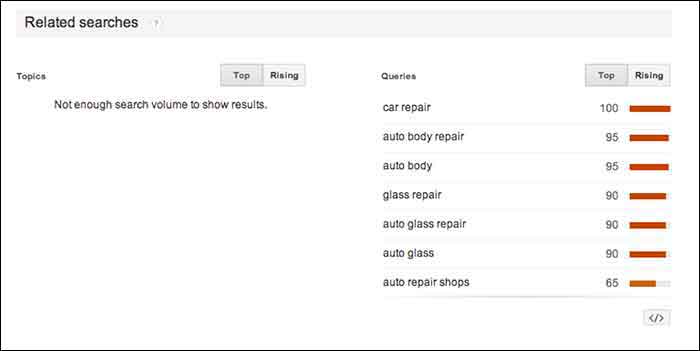
    If Google identifies your keyword with other similar terms that are being searched for, it will list them in the Related Searches section. This section is broken down by “Topics” and “Queries”.

    In this case, I received queries, but did not receive any topics. The message under “Topics” read, “not enough search volume to show results”. In keyword research, however, I would prefer to look at the queries because they are exact keywords. For example, “car repair” and “auto body repair” are the top two related queries listed for “auto repair” (shown below). You could use this list to find keywords that you may not have thought about researching, or to examine the similar keywords in relation to the keyword you are searching.
    GoogleTrendsRelatedSearches

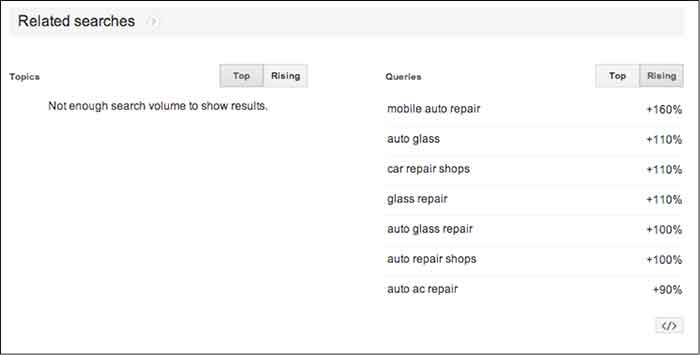
    The “Rising” tab under “Queries” shows terms that have had a significant increase in searches compared to the previous year. As shown below, “mobile auto repair” has risen 160%. This does not mean that “mobile auto repair” is one of the highest searched terms overall, but it may be worth monitoring throughout the campaign to see if it continues to rise and could be important to rank well for. With the rise of mobile Internet usage, it makes sense that this term could continue to increase in value.

    Resources:

    Google’s Algorithym: http://www.google.com/intl/en-US/insidesearch/howsearchworks/algorithms.html

    Google Trends data calculation: https://support.google.com/trends/answer/4355164?hl=en&rd=1

    Google Ad Words’ Keyword Planner Tool (must be logged into Google Ad Words):

    https://adwords.google.com/ko/KeywordPlanner
    GoogleTrendsRelatedSearchesRisingImage

    Finding a Pattern:

    I started researching more specific auto terms and found that there was a seasonal pattern for the service, “auto detailing”. I would not make this seasonal observation a factor in whether to choose the term as a targeted keyword or not because there is consistent search value. Although, it may help explain a decrease of site traffic in the winter months if that occurs.

    It is easy to get caught up in looking for a direct cause and effect between SEO practices and search engine rankings or site traffic, but expanding your research to recognize seasonal patterns can give you a larger idea of how your industry is searched for online.

    My next tutorial will examine search results by “Topic” instead of specific keywords. Stay tuned to learn more about how this can help your SEO practices!


    Image Source:

    Google Trends Logo