Tag: digital marketing

  • Small Business, Big Difference: Social Media Use on the Rise

    Small Business Social Media Use Image Search Influence

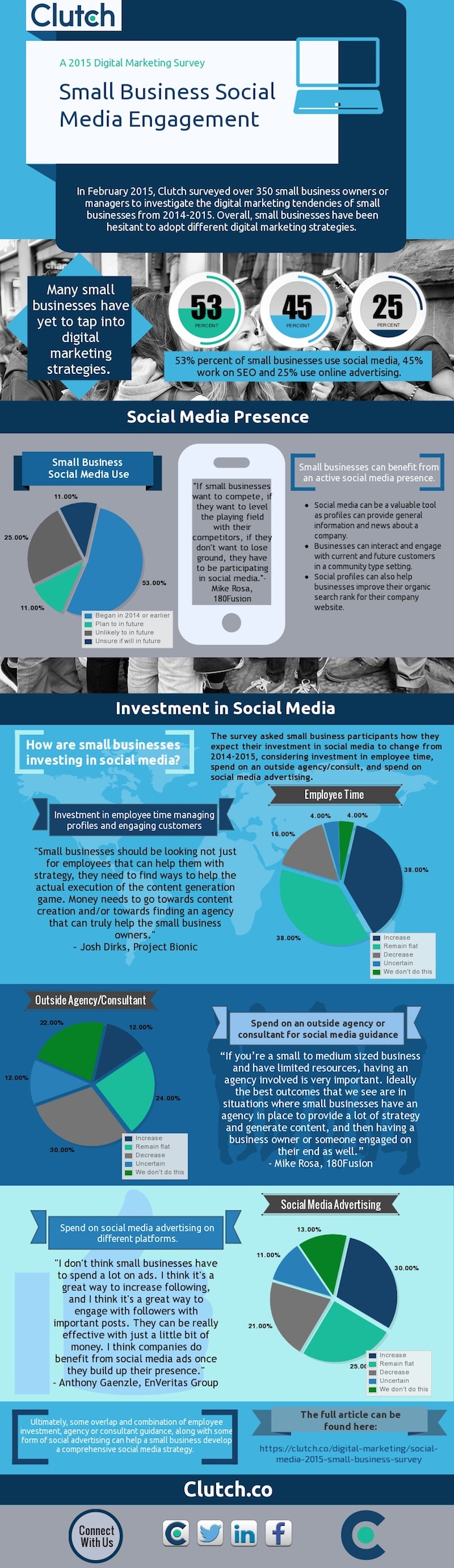
    Clutch, a B2B research firm, has released the results of its 2015 survey on small business practices in social media. The survey, which received more than 350 submissions, asked small business owners or managers to give insight into their social media and Internet marketing practices.

    The Findings

    Here are some highlights of the small businesses surveyed:

    Small business digital marketing strategies

    • 53% of small businesses use social media
    • 45% of small businesses work on SEO
    • 25% of small businesses use online advertising

    Company size

    • 60% of responding businesses have fewer than 10 employees
    • 14% have between 11 to 50 employees
    • 18% have between 51 and 250 employees
    • 8% have over 251 employees

    Investment (employee time, agency spend, ad spend)

    • 38% expect to increase their investment
    • 38% plan on keeping the same investment
    • 16% plan to decrease investment

    Clutch Infographic Small Business Survey Image Search Influence

    What Does This Mean?

    It’s weird to think back to 2006, when Facebook was essentially just for high school and college students to interact with each other through basic status updates. Nine years later, Facebook has around 1.44 billion monthly active users, yet only 53% of businesses surveyed indicated they use social media. In today’s social media age, having an active social presence is one of the easiest and most inexpensive options available to small businesses. It’s free to create a business page on Facebook, Twitter, and the other myriad of social media pages. Additionally, with the abundance of users on these sites, your customer base and target audience is already available to you; you just need to bring them to your page.

    Benefits of Social Media for Small Businesses

    When customers shop at small businesses, they tend to value the qualities of these stores versus their big-box competitors. Having a question answered on a local bike shop’s Facebook page is usually easier than reaching out to a large retailer’s customer service team. Allowing customers to post to your business’ page also gives other viewers the ability to see reviews, photos, and that the business cares about its customers by maintaining an active social presence. Maintaining a strong social presence can work as a way to “warm up” your potential customers and introduce them to your brand for a relatively low initial cost.

    Small Business Investment

    Besides simple statistics, the survey discusses the necessary investment of small businesses to ensure that their social media strategy has the best chance to be successful. While it may seem that just having a profile is enough to effectively market your business, there is additional effort that should be taken if you want to see your desired results. Employees should have a hand in the content strategy and the day-to-day operations. Various opinions can help diversify your strategy and give additional insight into your broader customer base. By spreading the responsibilities of managing the page across a few employees, each individual’s workload should not be greatly affected, while the overall product will be of high quality. Wondering how you can make time for social media and continue to run your small business? Check out these social media tips for time-starved entrepreneurs.

    Content Strategy

    In addition to diversifying where your content is coming from, it helps to vary the content you’re sharing with your followers. If you’re only talking to your current customers about products or direct business promotions, people new to your page may dismiss your content, as it doesn’t apply to them. Try to think outside of the box and delve into your potential customers’ other interests. By using this practice, your pages and posts can be beneficial in more ways than reminding customers of your weekly promotions. Writing about the best local bike trails may bring more people to your page through liking, sharing, and commenting, and it can help to organically get your store’s name into your community.

    Takeaway

    Seventy-six percent of the companies surveyed responded that they would either keep the same investment moving forward or increase it. Facebook and Twitter have shown over the past five to 10 years that the sites are not simply the most visited social media pages, but two of the most visited websites of any kind. When establishing your small business, it is important that your business could be found on Google. But in 2015, it is becoming important that your business be available on social media sites as well. Moving forward, each company should take the necessary time to see what resources can be used to begin a social media campaign. Start off by managing a page yourself, working your way up to reach an ideal social media campaign, and involving an overlap of employee involvement, agency guidance, and some use of social media advertising such as Facebook fan-building campaigns, for example, which have shown to have the best results for success with these small businesses.

    To view the complete report, visit Clutch.

    Image source:

    Clutch infographic

  • Marketing Must-Haves: What to Look for When Hiring an Online Marketing Firm

    Hire Online Marketing Firm Image - Search Influence

    You may be worried that outsourcing your online marketing efforts will mean losing control of your company’s voice.

    You are the expert when it comes to your company’s unique selling points, after all. However, a good online marketing firm will want to work hand-in-hand with you to make sure your story stays intact and works for you. Remember, they are also experts! A good marketing firm can help tell your story on multiple platforms and ensure it stands out above the competition, whether it is local or industry-driven. Here are some tips for hiring the right online marketing firm.

    Find a firm that provides a full arsenal of services.

    An effective marketing firm will offer a full range of services. To be competitive online, you need to reach your desired audience wherever they may be, and they may be on multiple platforms. Search engine optimization, social media, and advertising are all important elements to a successful marketing effort. Remember, it’s not enough to plop a website online or create a Facebook page and hope for the best. A marketing firm should be able to do keyword research, write compelling content, and handle your advertising investment.

    Check testimonials and read successful case studies.

    When you’re hiring an individual, you always ask for a resume, conduct an interview, and check their references. You should follow the same rules when hiring a marketing firm. Think of their website and online presence as their resume. What do they have to offer? How do they approach their job differently than others? Then start a dialogue with the company. Get on the phone with them. Ask questions, learn more about the company culture, and evaluate whether or not their team can help you achieve your goals. Finally, check references. You want to make sure their other customers are satisfied. Read their testimonials and case studies, such as the Success Stories showcased on the Search Influence website, to get an understanding of how they measure success.

    Make sure the firm utilizes analytics and lead tracking.

    One of the most important aspects of a marketing plan is analytics. Without solid and consistent analytics set up on the front end, you won’t be able to see the fruits of your marketing efforts—and most importantly, your return on investment. A good marketing firm will be results oriented and will be able to talk you through their analytics and lead tracking process. When hiring a marketing firm, make sure they are able to track how a visitor came to your site, whether it was through paid or organic search, a referring site, or an email marketing campaign; which search engines are being used to find your site; what keywords you’re ranking for (and what keywords you SHOULD be ranking for); what page of your site is generating leads and conversions; and your audience’s physical location.

    Follow these three helpful tips to hire the right online marketing firm for your company, and see your traffic increase and your leads turn to conversions.

  • Facebook Enters The Game of GIFs: A Feast For People, Not Pages

    Search Influence Game of Gifs Blog

    tyrion dancing

    On May 29, Facebook confirmed that it would begin supporting animated GIFs! Up until this point, only Giphy GIFs could be used on Facebook, but they appeared like videos where you’d have to click a play button for the animation to start. For now, however, this new, universal GIF support only extends to personal profiles and not Pages.

    In the past, I’ve jokingly (sort of) said that Google Plus would always be better than Facebook because it supported GIFs. As a freelance photographer and creator/curator of cinemagraphs (animations that consist of seemingly still photographs with subtle repeated movement in them—example below), I’ve always been annoyed that I could only share my art on Tumblr and G+. So I was really excited when I learned about the addition of GIF support to Facebook late last week. Sadly, I realized very soon after this announcement that Facebook had not extended this support to Pages.

    Cat Tail Animation Cinemagraph Gif

    So What GIFs CAN Pages Use And See?

    People can share GIFs in the comments of posts by Pages but not on the walls of Pages. Also, Pages cannot share, reshare or comment using GIFs. So Pages can see when people post GIFs, but if they try to reshare a person’s GIF status or post their own, it will have to be opened in a new window for the GIF to play. A statement from a Facebook spokesperson on Business Insider said “Like many features that we release on Facebook, we want to ensure that this drives a great experience for people first before rolling it out more widely. While Pages cannot currently post GIFs, we are exploring ways to enable this in the future.” This also means that GIFs cannot currently be used in ads. Here’s to hoping they mean to roll this out for Pages in the very near future.

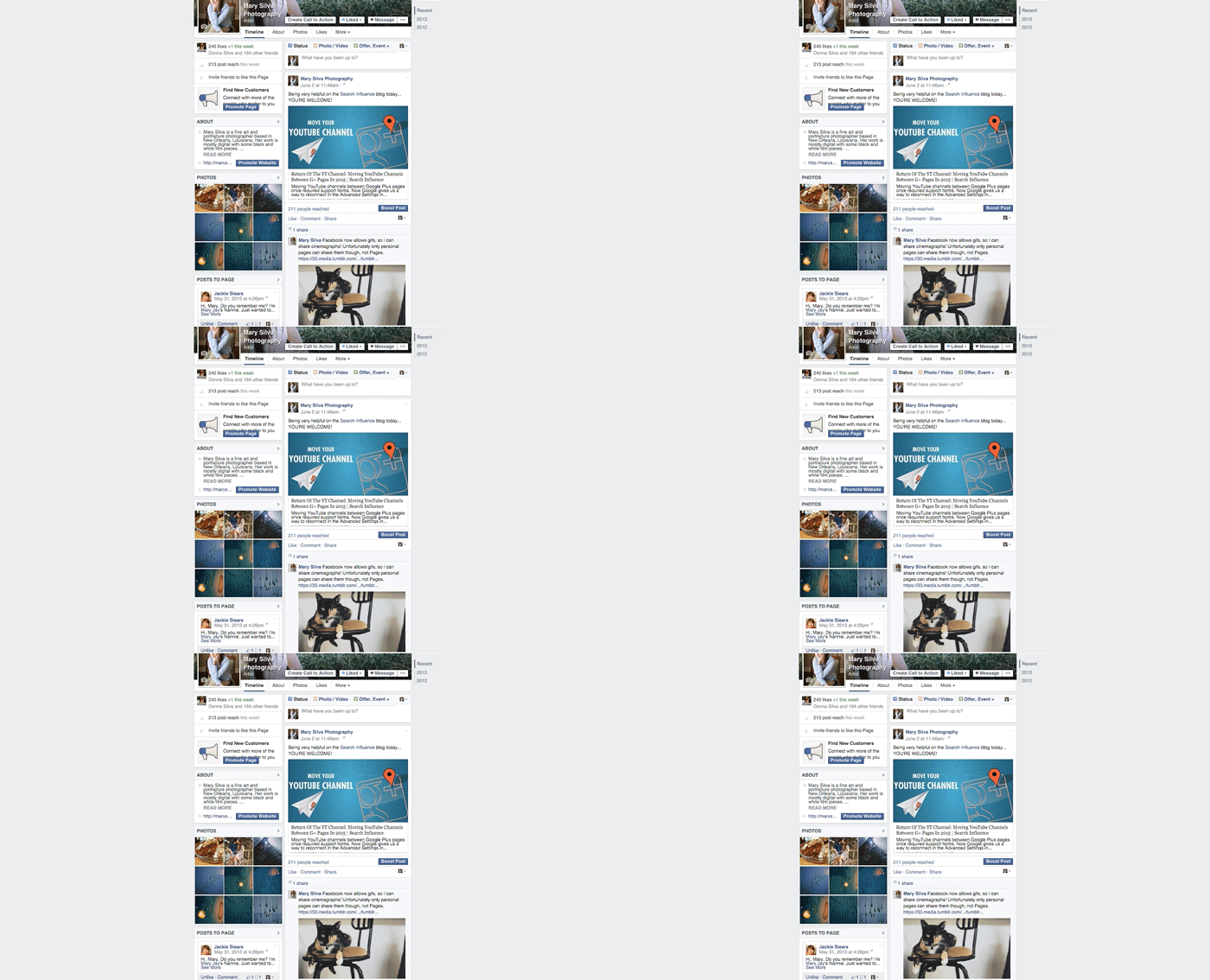
    Here’s a GIF of the previously shown cat GIF moving in the comments of a post on a Page:

    Search Influence Gif on Facebook Page

    There are also other stipulations to using this new feature even on your personal Page. You cannot upload a GIF; it must be hosted elsewhere. So I suspect we’ll see a lot of sharing from sites like Tumblr (who just rolled out a GIF search—perfect timing) and Imgur.

    For now, I’ll just be happy that I can at least share my cinemagraphs that are already on my blog on my personal Facebook Page now.

    Thanks to HuffpostTV for the dancing Tyrion GIF!

  • Return Of The YT Channel: Moving YouTube Channels Between G+ Pages In 2015

    Move YouTube Channels Between Google Plus Pages

    In the early ages of YouTube and Google Plus connections, disconnecting and reconnecting channels to the correct G+ page was not an easy feat. I once wrote a blog about this lengthy workaround for LocalU. Not long after that blog post, Google released a support form that allowed you to have a YouTube support specialist do the reconnection for you. While this support was amazing and usually reconnected channels within 24-48 hours, it required a middleman to get the work done and wasn’t immediate.

    Now, Google has released a way to reconnect your channel to another page within your account in the Advanced Settings section of YouTube! If everything is in one account, then this reconnection takes mere seconds. Often, however, we find ourselves in a situation where the channel is connected to a personal Google Plus page in one Google account, and we want it connected to a business page in another login.

    So I’m here to walk you through how to handle both of the aforementioned situations.

    Reconnecting A Channel Within One Account

    We’ll start with the simple one. You’ve got a YouTube channel connected to one page (probably a person page, maybe a random brand page), and you want it connected to your official business page on Google plus. Whatever shall you do!?

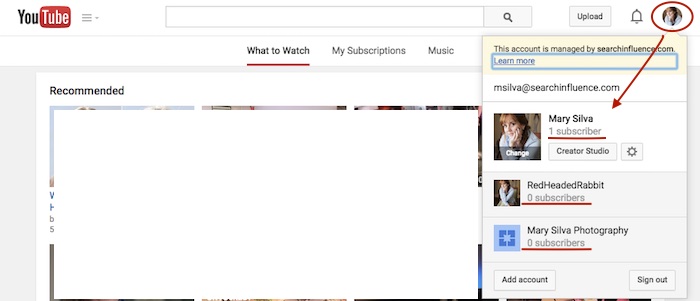
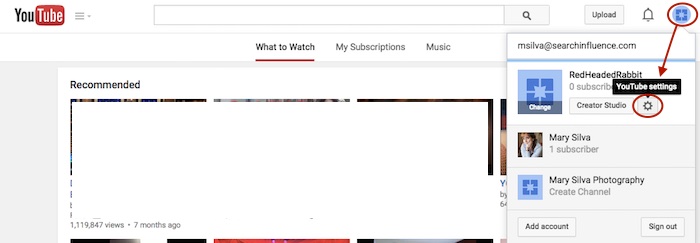
    Step 1: Go to YouTube.com and log in to your Google account. In the top-right corner of the page, click on the circle that shows your page icon to see a list of pages and their channels within this account.

    YouTube Users

    Usually, when you first log in to YouTube, you’re automatically managing or acting as your personal Google Plus page (the profile listed first in the dropdown is the one you’re currently acting as). To manage another page, which is what we’ll need to do to move channels, you’d just click the page you wish to manage from the dropdown.

    Deleting Unnecessary Channels Side Steps:

    Before we can proceed with moving channels, however, note that in the screenshot above, both of the extra pages have “subscribers” listed under their page names. This means that channels have been created for both of these pages already (otherwise we’d see “Create a Channel” below the page names). So if we want to move a channel to the page “Mary Silva Photography” in this account, then we’ll have to free it up for receiving a channel by deleting the unwanted channel that is currently connected to it.

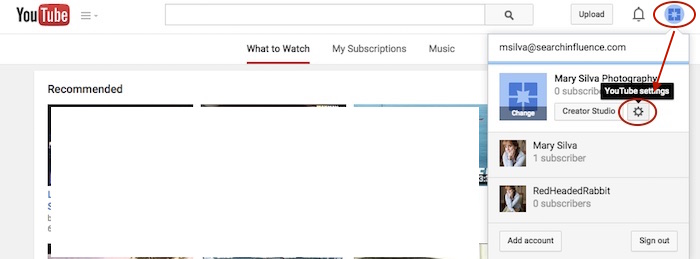
    This can be done fairly easily by clicking the “YouTube Settings” gear from that top-right dropdown while managing the page from which you want to delete the channel.

    Screenshot 2015-05-18 10.36

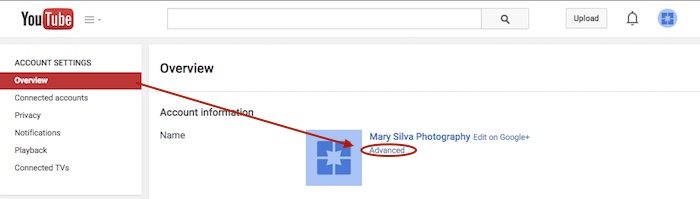
    Then click “Advanced” under the page name in the “Overview” tab.

    Screenshot 2015-05-18 10.37

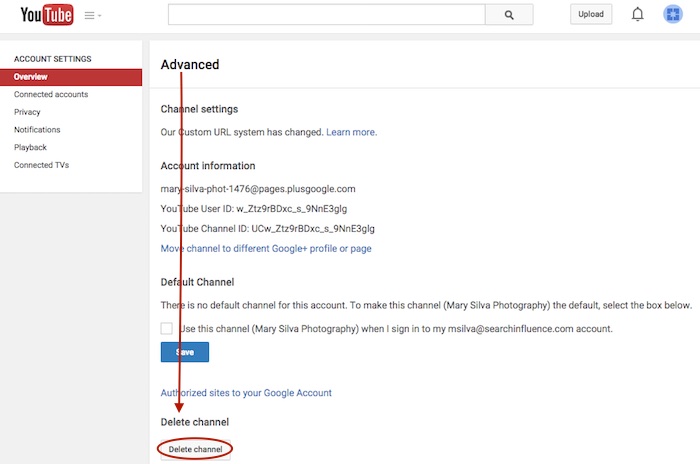
    At the very bottom of the page, you’ll see the “Delete channel” option. Once you click that, you’ll probably have to re-enter your password. Brace yourself.

    Screenshot 2015-05-18 10.38

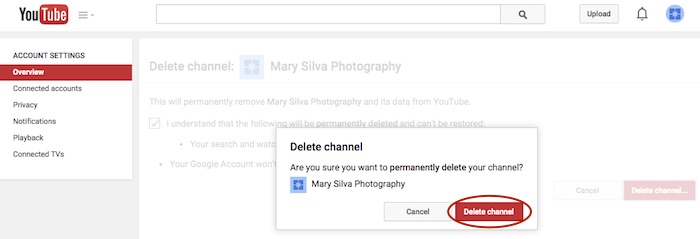
    You’ll see a verification page to confirm what you’re about to do. Check the box and click “Delete channel” to get one more verification dialogue, then click “Delete channel” one last time to complete the process.

    Screenshot 2015-05-18 10.41

    Now we can get back to moving the channel. In this example, we’ll pretend that the channel connected to “RedHeadedRabbit” needs to be moved over to “Mary Silva Photography.” As you can see in the next screenshot in Step 2, “Mary Silva Photography” now shows “Create a Channel” in the dropdown, so it’s free to take on the channel from the “RedHeadedRabbit” page.

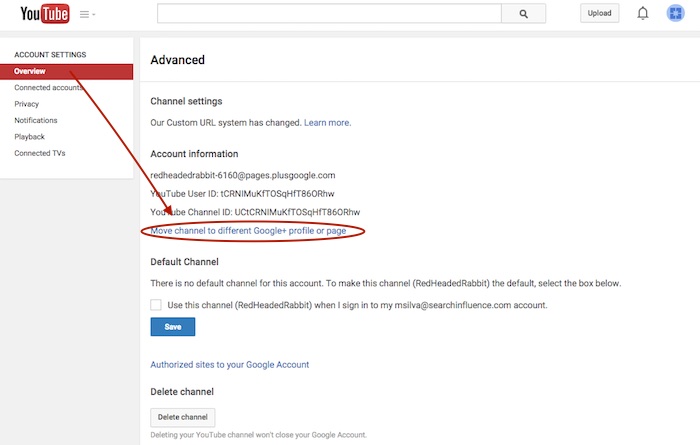
    Step 2: Click on the page that has the channel you want to move in the top-right dropdown to manage the page (in this case, “RedHeadedRabbit”), and then the aforementioned “YouTube Settings” gear should appear for that page. Navigate back to the “Advanced” settings page from the “Overview” tab just as you would have to delete the channel.

    Screenshot 2015-05-18 10.47

    Step 3: This time, however, you’ll want to click the “Move channel to different Google+ profile or page” option just above the “Default Channel” header. Google will probably make you enter your password again, so brace yourself.

    Screenshot 2015-05-18 10.48

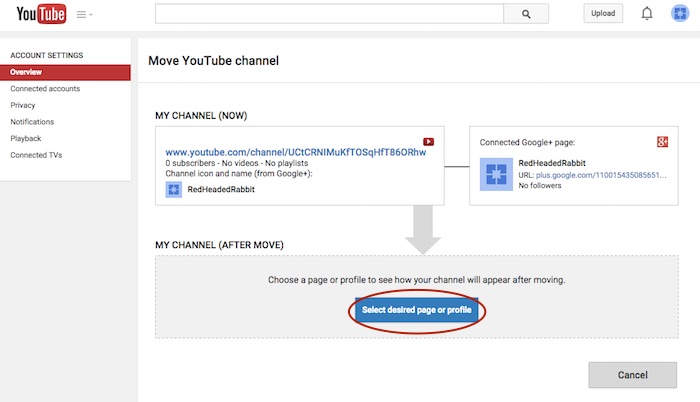
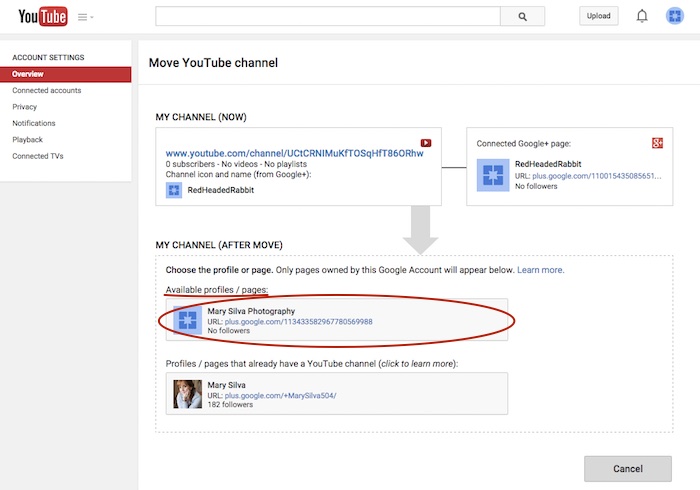
    Step 4: Now you’ll see the “Move YouTube channel” page. Under “MY CHANNEL (AFTER MOVE)” click the “Select desired page or profile” button.

    Screenshot 2015-05-18 10.49

    Step 5: Choose the page you want to move the channel to from the “Available profiles / pages” section.

    Screenshot 2015-05-18 11.05

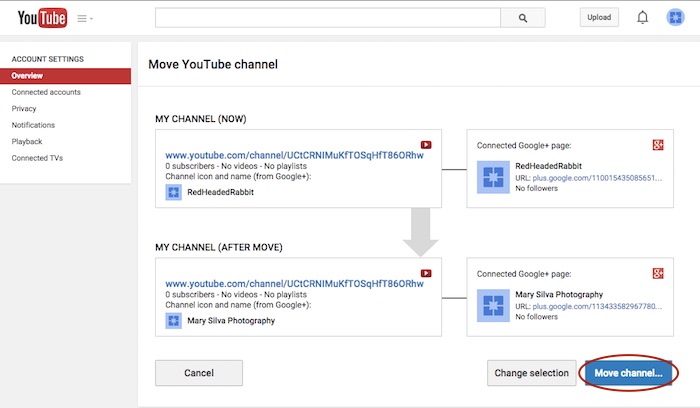
    Step 6: Confirm where you’re moving the channel (you can click links on this page to double-check that you’re moving the right channel to the right Plus pages) and click “Move channel…” to complete the transfer.

    Screenshot 2015-05-18 11.06

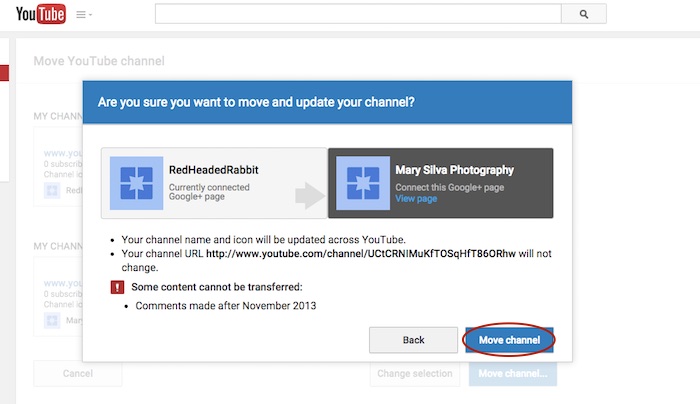
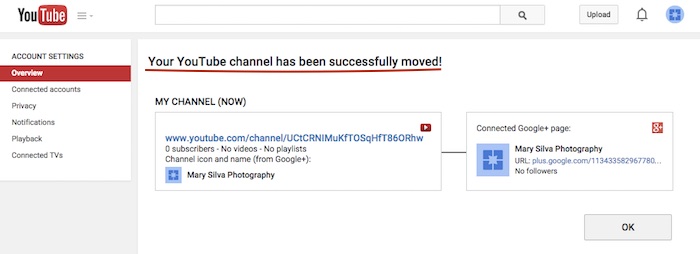
    Step 7: Click “Move channel” in one last confirmation dialogue box, and you’re done! You’ll see one last confirmation screen about the successful channel transfer.

    Screenshot 2015-05-18 11.13

    Screenshot 2015-05-18 11.09

    Reconnecting A Channel With Two Different Accounts

    As previously mentioned, we often find that we have a channel connected to a personal Google Plus page in one Google account, and we want it connected to a business page in another login. The steps for moving the channel will be the same as above, but first, we must get the pages all set up properly within one account.

    The account that has the channel has to be the OWNER of the page that we want to move the channel over to. So we need to go through adding the YouTube channel account as a manager of the business page within the other account first. Then we can go back and transfer ownership of the business page over to the channel account completely.

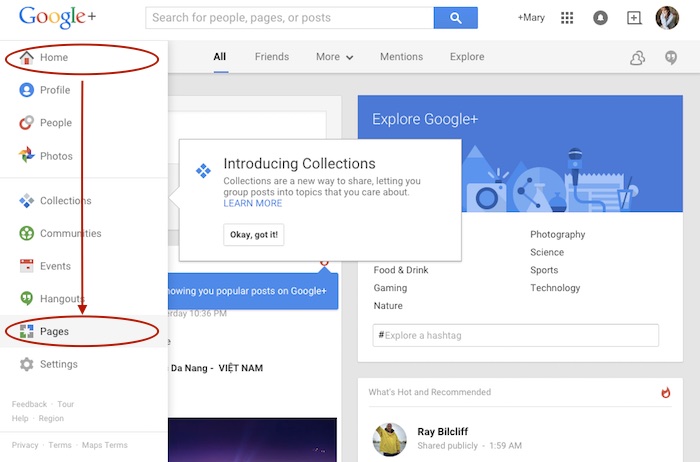
    Step 1: Log in to the account that the main business is claimed in and go into your Pages.

    Screenshot 2015-05-18 11.30

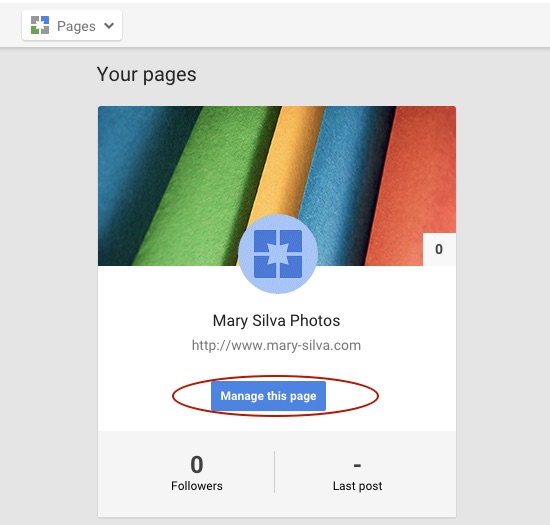
    Step 2: Choose “Manage this page” for the listing that you want to make the YouTube account a manager of.

    Screenshot 2015-05-18 11.31.30

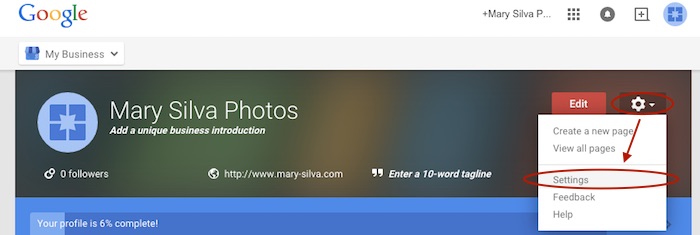
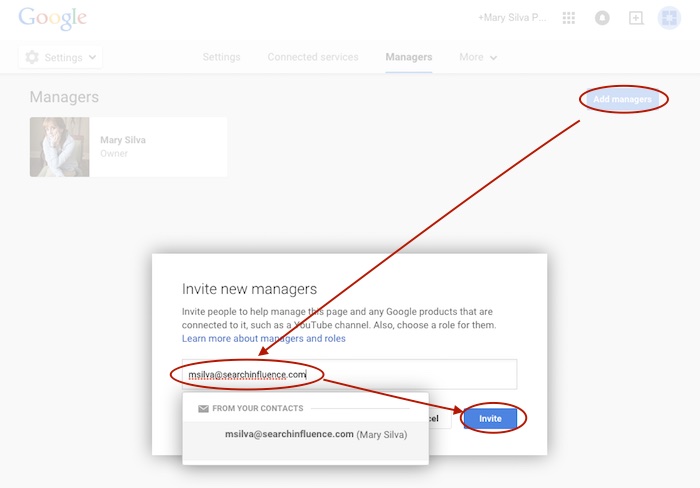
    Step 3: Go to “Settings” in the dropdown. Then, choose “Managers” under the “More” tab and add the email address for the YouTube account as a manager by clicking “Add managers.”

    Screenshot 2015-05-18 11.31.44

    Screenshot 2015-05-20 12.46.32

    Screenshot 2015-05-18 11.32

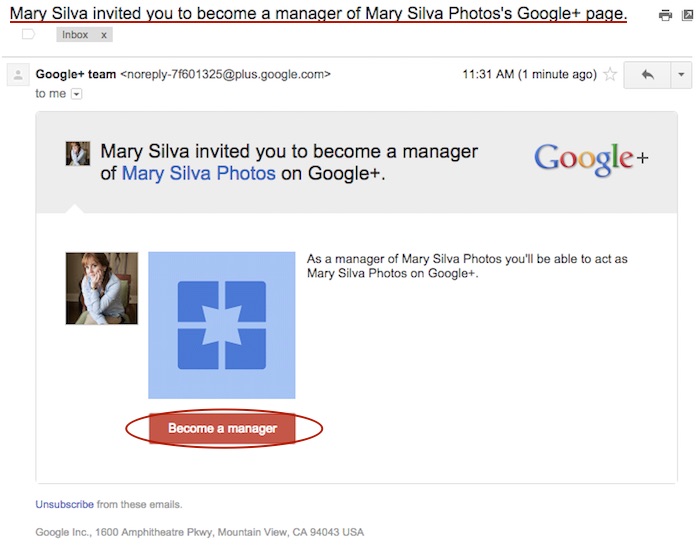
    Step 4: Log in to the email for the account with the YouTube in it. Look for the email that says “Person Name invited you to become a manager of the Business Name’s Google+ page” and click “Become a manager” within that email.

    Screenshot 2015-05-18 11.33.15

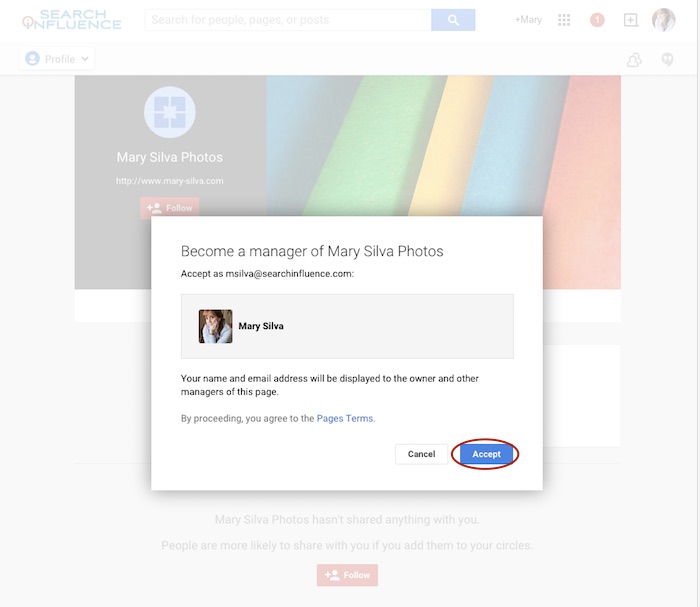
    Step 5: The link from the email will take you to the Google Plus page and automatically open a “Become a manager of Page Name” dialogue where you’ll click “Accept” to complete the managership setup.

    Screenshot 2015-05-18 11.33

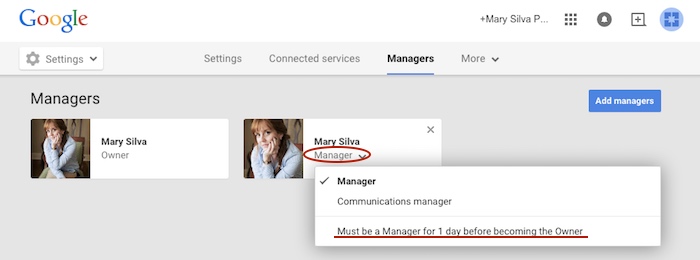
    Here’s where we wait…Unfortunately, for security reasons, Google requires an account to be a manager of a page for at least one day (as seen in screenshot below) before ownership of the page can be transferred over. So wait a day and come back to me when you’re ready to wrap this up. 😉

    Screenshot 2015-05-18 11.38.58

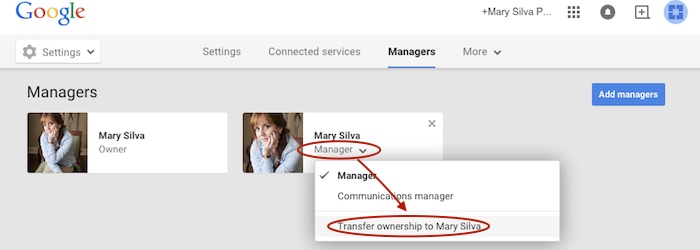
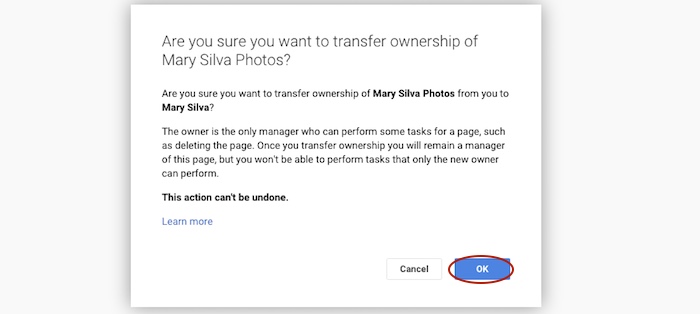
    Step 6 (One Day Later): Now log back in to the account that owns the page and follow steps 1-3 again to get back to your “Managers” settings page of your official business page. When you click “Manager” under the account name, you’ll see a dropdown with the option to “Transfer ownership to Person Name” where you previously saw “Must be a Manager for 1 day before becoming the Owner.” Once you click that, you’ll click “OK” to verify the transfer of ownership, and then the transfer is complete!

    Screenshot 2015-05-19 12.54.22

    Screenshot 2015-05-19 12.54.37

    You’ll get an email in that new owner account saying something like, “Person has made you the owner of the Page Name Google+ page.” Unlike the managership process, you don’t have to click anything in an email, so the ownership has been transferred completely, and you’re done!

    Now that you have everything set up properly, you can proceed with steps two to seven in the “Reconnecting A Channel Within One Account” section above.

    Hopefully this extensive tutorial helps you through all of your YouTube woes. To learn more about the ins and outs of Google Plus pages in Google My Business, you can read more on the blog here.

  • Give Content a Natural Glow: Medical Marketing Makes the Switch to Natural Content

    Content marketing natural glow image - Search Influence

    Back in the early days of search engine optimization, there were a lot of shady practices that were less than ideal for site visitors. Keyword-stuffing, spammy tweets, backlink schemes, and useless content were often the norm, as these tactics helped websites climb the ranks of the search engine results page. With content more focused on algorithms than the audience, many websites scared off potential users. While some of these tactics have been left firmly in the past, many SEO strategies still optimize for Google bots instead of users. This is especially true when it comes to geo-modified keywords in healthcare marketing (think “plastic surgeon new orleans”), which continue to make many pages feel stuffy and awkward.

    Of course, letting go of geo-modified keywords can seem like a hard pill to swallow—especially for those in highly competitive fields such as the plastic surgery industry, where medical practices are constantly battling for the top spots in a Google search. “Going natural” when it comes to content might seem like an overwhelming change at first, but the benefits to your patients and your practice make it a worthwhile strategy in the long run.

    Content is King

    So what do we have when we eliminate all the spam? Natural content. Google rewards sites that provide better user experiences, relevant information, and quality content—those with high click-through rates, low bounce rates, and long time-on-site—with better overall rankings.

    What’s more, all of the updates to Google’s algorithm have made the search giant incredibly advanced, and you might be surprised by some of the astonishing leaps it can make. A search engine results page might pull up one or more high-ranking pages that never actually include the words a user originally entered as a query. For example, a search for “breast implants new orleans” might return pages that never actually use this exact term. Highly relevant pages on “breast augmentation” might rank higher in a Google search than irrelevant, keyword-stuffed pages. What does all this mean? Google’s smarter than you thought.

    Interested in more content marketing strategies for your website? Find out how infographics can give your online strategy a facelift.

    It’s All About the Audience

    As its name suggests, SEO has always focused on search engine optimization—but the best way to earn trust from your patients is to focus on your patients. Forget trying to keep up with algorithm changes: Google’s updates are always centered around providing a better user experience, so why not focus on that as well?

    Spammy, keyword-stuffed content isn’t doing your patients any favors. Visitors to your site can see through the awkward “fluff” content, and they’ll abandon it to find content that actually answers their questions and meets their needs. Sites with overly optimized content tend to see higher bounce rates and less time spent on the site overall.

    Protection Against Algorithm Updates

    Beyond the fact that you’re losing your human visitors by focusing your content on the needs of Google bots, you also hurt yourself with this approach. Overly optimized content is vulnerable to every new update to Google’s algorithm. Well-written natural content, on the other hand, won’t need any of the major edits that spammy content will regularly require. Content that is relevant to the needs of your patients will always be useful—and Google’s algorithm can see that without your help. If you need help determining whether your website content will pass the Google test, fill out the short form on our homepage to sign up for a free website analysis.

    Search Intent Optimization

    At the end of the day, your potential patients are looking for something, and it’s your job to figure out what. Maybe they need help to become informed about a procedure they’re considering, maybe they’re weighing the pros and cons of several medical options, or maybe they know what they need and are searching for a trustworthy practice in the area.

    Whatever the case, you’ll need to do your research. Figure out what they consider useful and decide how you can use unique and creative content to solve their problems. Patients will be able to see the value in content that gives them the answers they need, and they’ll trust the information more if it doesn’t seem awkward or spammy. Go from there to build your relationship with them—rather than building a relationship with an algorithm.

    If you’re ready to take the dive into offering patients more natural content, but you’re not sure where to start, let us know how we can help! Interested in the ins-and-outs of search engine optimization for the medical industry? Check out our tips on the art of “Googleplasty.”

  • Eight Years of Influencing: The Amy Arnold Story

    Amy Arnold, director of research & development at Search Influence, recently celebrated her eight-year anniversary with the company April 30. Amy, one of Search Influence’s original employees, is known for her extensive knowledge of the online marketing industry, and her contributions to our company’s progression are something to pay tribute to (and also because she has some wicked dance moves).

    Amy Arnold Search Influence Dance Image

    Amy’s Journey

    Amy’s journey before Search Influence began in advertising. She started her career working for the original Internet—you know, the Yellow Pages—where she sold ads in a phone book, which was a great advertising tool that has lost its value today. Next, Amy moved onto online advertising for phonebooks and was introduced to a load of technical elements. Picking up bits and pieces about HTML and coding along the way, she was able to develop basic Internet knowledge, which brought her here, to Search Influence.

    In the beginning, Amy recalls late nights and weekends (say what?), and she describes the first two years as “weird and wild.” The work in the beginning had to be accomplished extremely quickly, and it was both difficult and time consuming; Amy says she truly had so much fun during these years. One of her most memorable experiences during her early years here was when she would sit around her kitchen table with other employees and develop training and processes that our team still uses today.

    During her time here, there have been crucial changes to Google that affected our business in totality. In 2013, there were a combination of Penguin, Panda and Hummingbird updates that Amy remembers as a defining moment in our culture: “That was the time to take a critical look at things we were doing.” The company changed many processes that year because of these updates. In that time, Amy was reassured that although much was changing, many of the tactics and processes in place were tried and true and weren’t going anywhere. Growth like this is something that propelled our company to what it is now.

    The Future of Online Marketing

    The future of our business and the Internet as a whole is unpredictable, but Amy has her guesses: “Apps are going to become more important.” They are quite influential now, of course, and apps have a specific purpose because they serve a specific need. “Google wants us to provide a need to customers,” Amy believes, and apps are designed specifically to do that. Also, data security is a hot topic right now for Internet users, and this is a tangible thing Google can track. Amy predicts this affecting Google trust for businesses in the future (you heard it here first, from Amy Arnold).

    When I asked her about some of her more memorable moments here, she mentioned how Will and his wife, COO and Co-Founder Angie Scott, decided to grow a local team here in New Orleans. She described it as an early stepping stone for the company’s maturity into what it is now. Even though Amy is utterly irreplaceable here at Search Influence, she had this to say about her time here: “Will and Angie had the vision and courage to make a pretty bold decision, and I’m happy to be a part of it.”

    I used to live by this saying: “I’ve always dreamed of growing up to be Amy Poehler.” – Amy Poehler. Now I’ll be amending that to my new favorite Amy, Amy Arnold.

    Image source:
    Amy Poehler gif

  • More Locations, More Problems? Optimize Your Franchise SEO—Part 2

    Franchise SEO tips image - Search Influence

    In part two of this two-part series about how to successfully optimize your franchise SEO, you will find three more winning strategies and steps for multi-location or franchise SEO.

    It’s All About Location

    The effort to have each location found in its own market is often perceived as the most challenging part of multi-location SEO. In part one of this series, we discussed the importance of building the central brand. Now we will tackle how to deal with individual location information, and the ways your franchisees can help to best optimize your franchise marketing and location SEO.

    1. On-Site Location Pages

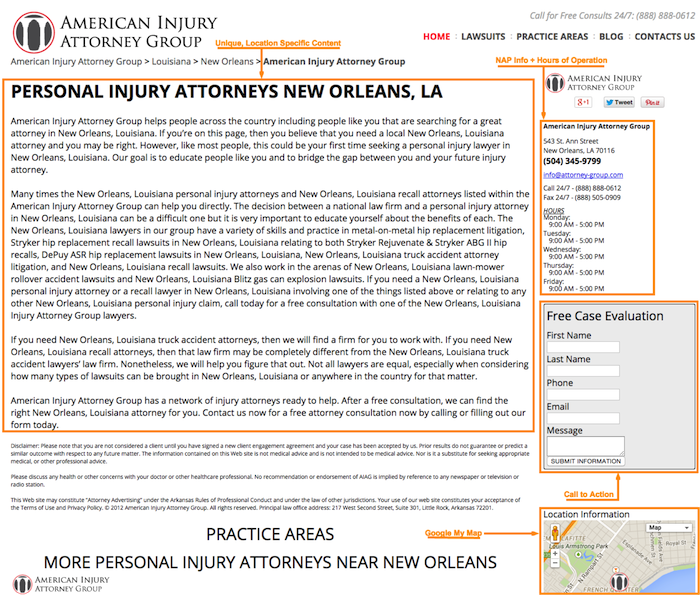
    Now that you have built up your central brand, it is time to focus on your individual franchises. Each franchise location should have its own location landing page on your company’s website. Taking extra care to create separate location pages allows search engines to better understand that you have individual locations in specific geographic areas. It also gives you an opportunity to tell users about the unique products and services offered at each different location.

    Here is a list of the necessary elements for an effective location page for Internet franchise opportunities:

    • My Map to Google+ page
    • Unique content for the specific location
    • Directions to the location from different landmarks, highways, surrounding cities, etc.
    • Photos of the location
    • Reviews of the location (probably best to have a separate page for these)
    • List of products and/or services (should link back to the main products/services pages)
    • Schema MarkUp to the name, address, and phone number
    • Link to the individual location’s social profiles
    • Link to staff member profile pages
    • Strong call to action

    Franchise SEO Tips 1 Image Search Influence

    As with all web pages, it is a best practice to implement unique, compelling content on your location landing pages. Users expect a rich experience when navigating your site, and bland content may turn them away. At the same time, content that is too dense with information or full of keywords may deter users from your web page. To keep site visitors interested, give them valuable information using bullet points in case they are in a hurry. Some multi-location businesses leave a portion of these elements to be completed by the individual franchise owners and managers. In an ideal world, this would be an effective solution, but knowing that these kinds of franchise marketing requests are often put on the backburner, it is best to have a solitary stakeholder in the corporate office responsible for these tasks.

    2. Citation Building

    Citation building is perhaps the most daunting exercise when approaching multi-location SEO. As it is with SEO for single-location businesses, consistency of name, address, and phone number in your online business listings is key. You will often see name formats including the location, such as “Company Name – Lakeview Location.” However, this is not a best practice for SEO purposes. Instead, remove the location information, and keep the business name exactly the same for all of the locations. The different addresses and phone numbers for each location will be enough to differentiate them for both Google and your potential customers.

    Each location should have a unique business description written for its online listings. This task may be best completed by individual franchisees, as it might be difficult for any one individual to write multiple, unique descriptions for essentially the same business.

    On the other hand, you should choose the same categories and logo for every location. Adding unique pictures of each location and its staff would be a nice touch, as well, but it may not be worth the trouble if you have upwards of 10 to 15 locations. Some directories will offer more fields than others. It is in your best interest to provide as much information as possible.

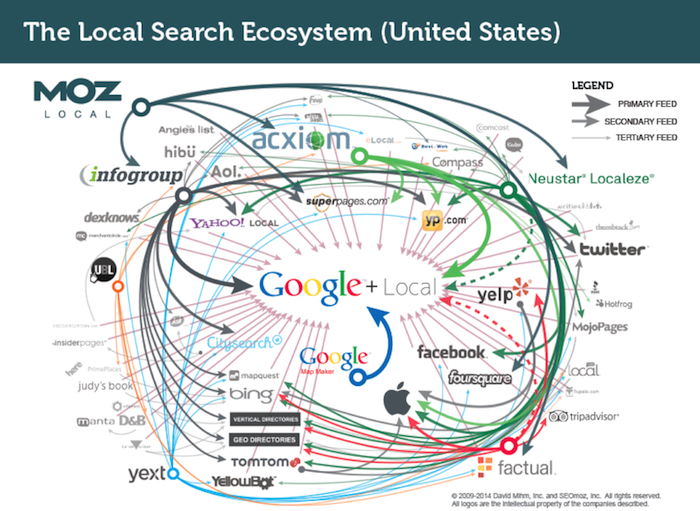
    Rather than taking on the incredibly time-consuming task of doing this for each individual business directory for every single location, consider using Moz Local. This tool makes pushing out each location’s name, address, phone number, categories, business descriptions, etc., to major directories as easy as a simple click of your mouse.

    As you can see below, the major online data feeds and directories share their information with each other, which should allow Moz to take care of most of your citation building and cleanup. Just 90 days after you submit the listings to Moz, go back and see where you stand. Some manual cleanup may be required.

    Local Search Ecosystem Image

    Expanding your search for niche directory opportunities for your company’s industry and each franchisee’s market is also highly recommended. By getting listed in these hyper-specific and hyper-local directories, you are giving search engines that much more information about what you offer and where your business should be found.

    3. Enlist the Help of Your Franchisees

    Enlisting the help of your franchisees may be a time-consuming task for some, which is why everything preceding this recommendation can be taken care of by one single source.

    Allowing each of your locations to manage its own social presence can be both empowering and helpful for your visibility in search engine results. To help manage the challenges that may arise, you should create a clear social media policy outlining what is and what is not acceptable. Make your branding and the content of the posts a top priority when creating this social media manifesto. You will also want to make this a working document just in case someone finds a loophole that needs closing.

    Each location should also be responsible for collecting positive reviews and testimonials from their customers. I would highly recommend incentivizing this effort and coaching your managers on the proper way to approach their customers. Written testimonials on the website serve as phenomenal selling tools. Reviews on Yelp, Google+, and other third-party review sites are even better.

    Getting everyone on the same page with webinars can also be advantageous to the cause. Some topics that you will definitely want to cover include social media branding, social media posting, social media interaction, and how to ask customers for reviews. Break each of these up into bite-sized chunks, and keep your focus on the industry’s top three social media platforms. Side note: record all of your webinars, and make them available to your franchisees at their leisure.

    Get Started!

    As you can see, there is plenty of work to be done in order to achieve success with multi-location SEO. As your franchise grows and brings on new franchisees, use the above recommendations as a checklist for each new location. You can get most of this done within a week’s time for each new franchise location. Doing so will save you a lot of trouble down the road. It may be in your best interest to contact Search Influence for your online marketing needs, especially including the complicated maze of managing multi-location SEO and franchise marketing.

    Image source:
    Local Search Ecosystem image

  • This National Small Business Week, Step up Your Online Marketing

    It’s National Small Business Week—time to celebrate the successes and the insane amount of work small business owners put in. The struggle is real.

    You know you’re a small business owner when…

    …Your nightmares are about getting bad Yelp reviews.

    …Your social media “strategy” consists of bribing your college-aged daughter to handle your Facebook and Twitter accounts.

    …Your holiday hours did not quite make it to the Internet, and customers actually showed up only to find your business closed.

    To cure these and other headaches, start with a little TLC for your website and your online marketing strategy—after all, both of these play a huge role in bringing you customers, but they may unfortunately also be keeping you up at night. Follow these top three online marketing tips for small businesses.

    If You Can’t Beat ‘Em, Join ‘Em

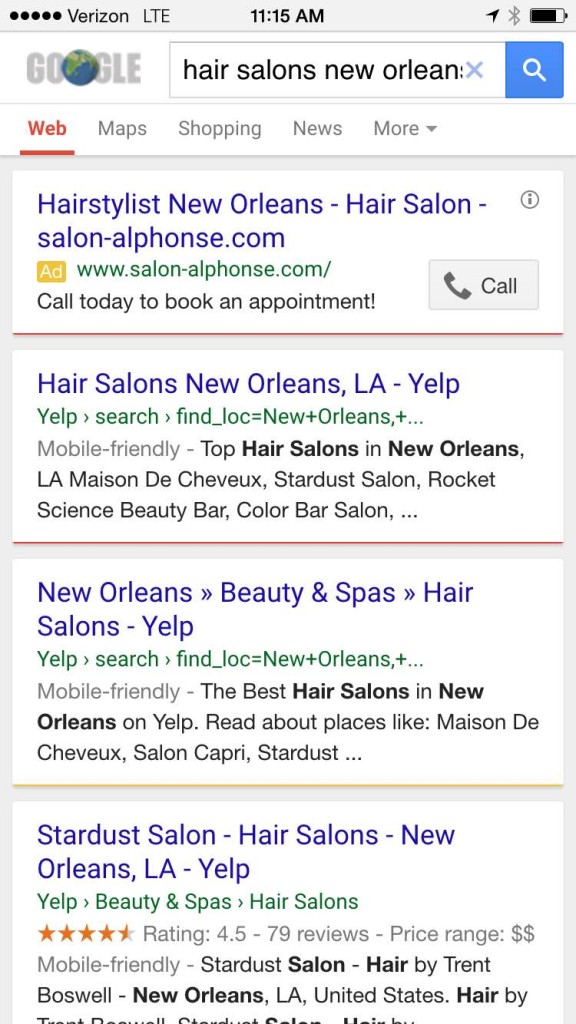
    It may sound upsetting that Yelp listings are front and center in a Google search for your business while your own website is far down the list of search results. But savvy small business owners know that Yelp and other large online directories can win over customers with minimal effort. So if you can’t beat the Yelps of the world, join ‘em!

    This strategy is also known as Barnacle SEO. Basically, your business needs to attach itself to large, fixed objects and then wait for customers to float by in the powerful current. Identify the large, high-ranking online directories that matter to you most, such as Yelp, and add your information there in the hopes of “borrowing” some of the page one rankings. There are many trusted online directories like Yelp out there you can barnacle up to: Angie’s List, Foursquare, Google+, Avvo (for lawyers), Healthgrades (for doctors), and even TripAdvisor.

    And this tip comes with a bonus: this strategy also works well for customers searching on smartphones because these websites are optimized for the mobile experience—providing the targeted information that local customers searching on their smartphones really need. When you perform a Google search for “hair stylists New Orleans,” for example, the top results are mostly from Yelp:

    Yelp Mobile Screenshot Image - Search Influence

    Target Your Social Media Efforts

    Another thing that keeps you as a small business owner up at night? Social media—or more specifically, finding the time for it. For starters, why is social media worth your time? The latest statistics from the Pew Research Center paint a pretty compelling picture that customers are on social media: 74 percent of online adults use social networking sites.

    As a time-starved small business owner, you must get the most for your social media time. This requires targeting your social media efforts. Start by channeling your ideal customer. What is your typical customer’s age, marital status, and family status? Where is your customer physically located? Do your customers fall into a certain income bracket?

    Once you know who your target customer is, find the social media channel that appeals to them. For example, Facebook still skews significantly female and is the top-used social network for U.S. teens, making it ideal for fast-moving consumer goods, according to Business Insider. Instagram is also popular among females ages 18 to 44, so clothing, accessories, and those types of brands tend to perform well on this network. While LinkedIn is most popular for adults, Twitter is primarily a news source and attracts mostly male users. YouTube reaches more adults ages 18-34 than any single TV network. Pinterest is the place for food and drink-related information as well as parenting tips.

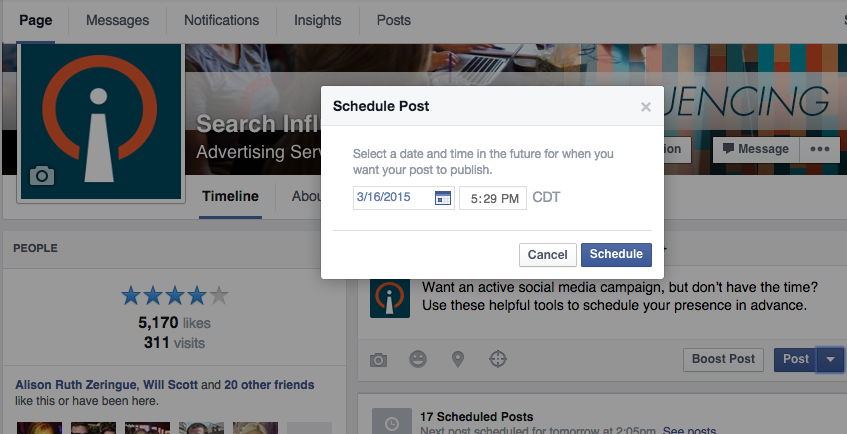
    But remember, whichever social networks you decide to focus on, automate your posts with these quick tips.

    Facebook Scheduled Post Image - Search Influence

    Avoid Customers Crying in Your Parking Lot

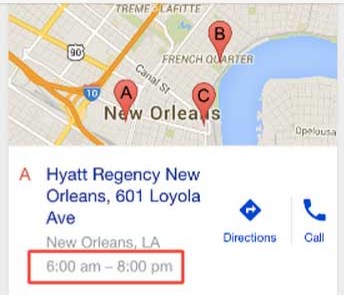
    If you’ve ever done a Google search for your business, you’ve likely seen this kind of result:

    MapsTimeViewImage

    But what happens when you have special holiday hours? Will customers see your normal hours in a Google search and show up in your parking lot over the holidays? Currently, Google My Business has not built out the functionality for saving holiday-specific hours ahead of time. As the profile setup currently stands, you’ll need to manually edit the hours of operation on a given day when your business is open (or closed) outside your standard hours of operation. See Google’s steps on how to update your business’ hours.

    Also, remember to let folks know when you are, in fact, open on the holidays. For instance, let everyone know your restaurant is open on Independence Day and post your holiday-specific menu for the day or highlight any patriotic specials. Is your medical practice open for limited hours on Memorial Day this year? Post a piece to your blog or social media profiles highlighting the top summertime health hazards from boating accidents to severe sunburns.

  • More Locations, More Problems? Optimize Your Franchise SEO—Part 1

    Franchise SEO tips image - Search Influence

    Do you ever feel like your efforts to market your business with more than one location are ineffective? Do you live with the constant doubt about whether or not you did as much for one location as you did for another, or if your franchisees are doing something counterproductive that will painfully squander your efforts? You may also be wondering how to get users from all of your markets to find their corresponding local franchise business. How much is too much when it comes to overstuffed keywords for franchise SEO and duplicate web pages with franchise marketing?

    You don’t need to be an industry professional to know that comprehensive search engine optimization (SEO) requires a balance of more than a dozen simultaneously active elements. From consistently monitoring your targeted keywords to constantly generating new, compelling website content, maintaining high search engine rankings proves to be a multidimensional effort. It seems like all it takes is one surprise update or manual action from Google, and your entire SEO strategy can collapse like a house of cards. For multi-location businesses and franchises, this balancing act becomes even more complex, which is why Search Influence is here to help you not only maintain, but maximize the results of your Internet marketing and digital franchise efforts.

    In this two-part series, you will receive a five-step guide that should answer all of your questions about multi-location or franchise SEO. This first piece will focus on building the corporate brand—a frequently forgotten necessity in effective franchise marketing for any business, regardless of the number of locations.

    Build Your Brand

    This may seem logical, but many times, webmasters and marketers get so caught up in the challenges that come with the individual locations that they forget they have a brand to promote. These recommendations have nothing to do with location-based information; however, they are just as significant to your franchise SEO and Internet marketing success.

    1. Focus on the Main Pages

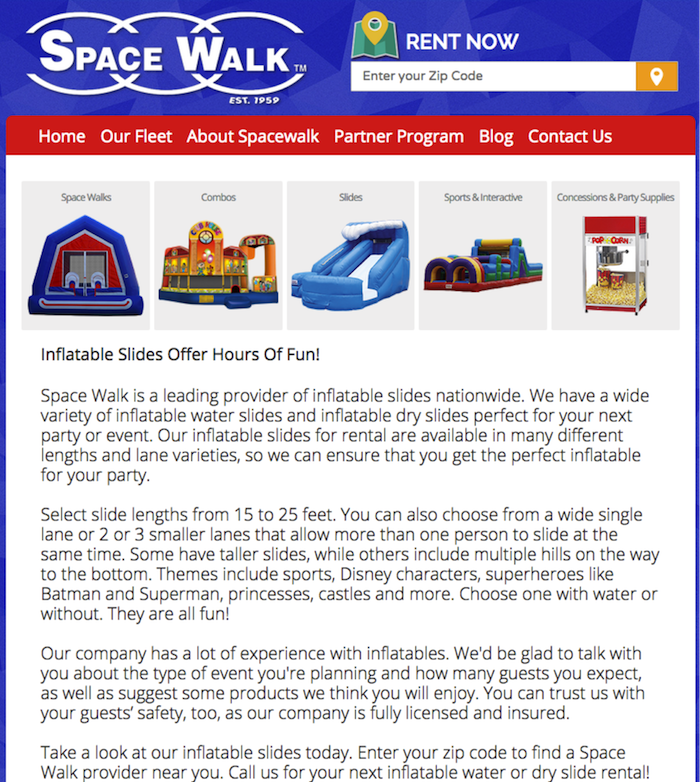
    When I refer to the main pages, I am referring to the homepage, the “about us” page, your blog, and your products and services pages—in other words, any page that contains content that is applicable to the brand and its offerings.

    These pages need to contain the best content on your site, as they will likely be the most visited. Depending on how many locations you have, you may want to include each location in the title tags of these pages, but I would avoid this practice if you have more than three, as title tags should not appear forced or spammy.

    Space Walk Franchise SEO Image Search Influence

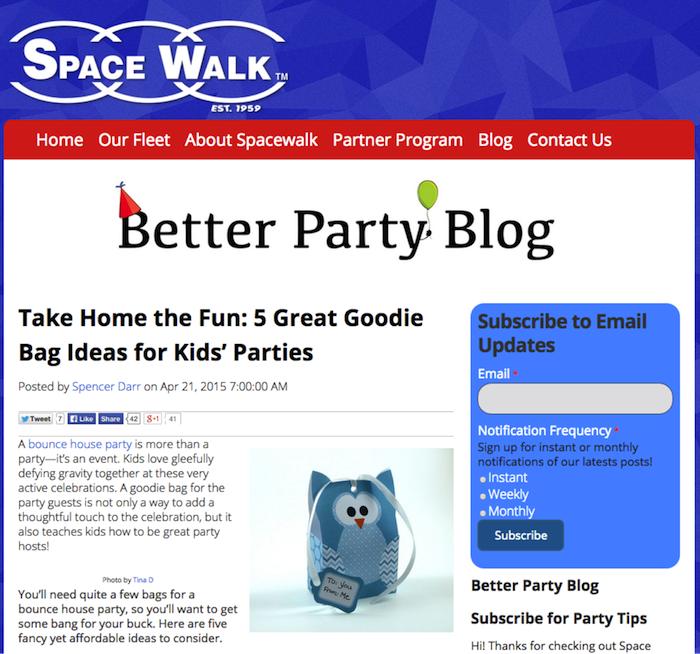
    The blog, on the other hand, can be more versatile with regards to the content that you create. Your blog should be focused mainly on industry-specific topics, but it should also have a touch of personality. Things like showcasing your community involvement or a franchisee’s achievement are both great blog topics. Search engines love active blogs, because they show that you are keeping your site up to date by offering the latest and greatest industry knowledge in a timely fashion.

    Better Party Blog Space Walk Fanchise Image - Search Influence

    Having a mobile-friendly site is important to your franchise’s digital marketing efforts, especially with our heavy reliance on smartphones today. As Google rolled out one of its most significant algorithm updates in April 2015, your site could have been practically wiped off the map if it was not mobile-friendly, and the same is just as true today.

    2. Off-Site Authority for Your Brand

    Since Google’s more recent Penguin updates, the link building game has changed. Instead of worrying about getting links to your website and becoming keyword obsessed, we need to be thinking about building authority and a stronger overall presence for the brand.

    The simplest way to do this is by creating social profiles for your brand. This is not to say that franchisees cannot or will not create their own individual pages, but you should own the brand and its voice by claiming and being active on the major social channels.

    What are the major social channels, you ask? Google+, Facebook, and YouTube are all surefire winners here. But why Google+ and YouTube? One, they are both owned by Google, and you always want to make friends with the decision maker. Two, YouTube is the second biggest search engine in the world. By regularly posting content to these profiles, search engines will get a better sense of what you offer and, in turn, what you should be found for. Note: you will have to rely on your franchisees to help you verify their individual Google+ listings.
    Listing your company in categorical directories can also help the cause of brand building. If there is a relevant directory for the product or service you offer, your business should be listed, along with all of the details of your offering. In this scenario, becoming a part of industry associations can have as much of a benefit online as off.

    There is nothing that can beat real, newsworthy press. Whether it be a press release, a magazine article, or a blog post, when your brand is mentioned online, Google is going to recognize it and correlate the content around it to your website. A link back to the site in these cases can prove helpful as well.

    Now that you have a better sense for basic brand building, stay tuned for part two of this blog series, which will explain how to manage the optimization of all of your individual locations. At Search Influence, we are best equipped to help you succeed with your franchise marketing plan and franchise SEO efforts. Contact us today with any inquiries regarding how we can guarantee a successful online marketing strategy for your company.

  • Making Patients & Customers into Fans: Are Facebook Fan-Building Campaigns Effective?
    Medical Facebook Likes Image Preview - Search Influence

    Looking to connect with your ideal patients and customers online? Facebook fan-building campaigns are just what the doctor ordered for creating the perfect online experience for your audience as well as building your community of followers.

    But before we delve into the specifics of Facebook fan-building campaigns and how this online marketing strategy can win you customers and patients alike, let’s briefly go over what fan building is. Fan building is a way for businesses to acquire likes on Facebook and to connect with all the people that matter to them. While a business can acquire fans organically, paid ads are more effective and efficient at increasing a business’s fan base and amplifying the rate of fan growth.

    Part 1: Are Page Like Ads Effective at Fan Building?

    Short answer: Yes. Facebook page like ads are effective.

    Case Study 1: 

    Let’s look at Client A. Client A is a well-established business specializing in reconstructive surgery. Search Influence started a fan-building campaign for Client A toward the end of 2011 and have been actively managing it ever since.

    In order to maximize the client’s budget, we focused ad copy around the authoritative nature of our client in the field of reconstructive surgery and targeted these ads to users we identified as most likely to convert (in the form of a page like) based on their interests and online behaviors.

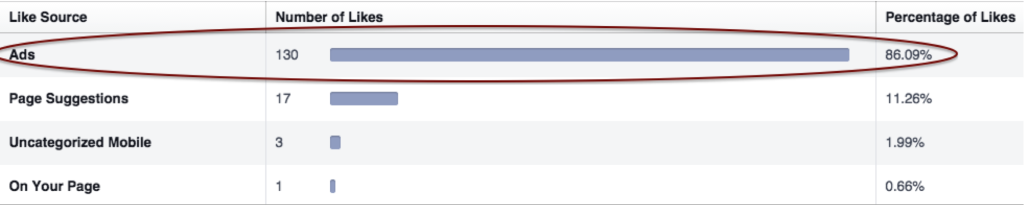
    Prior to the Facebook fan-building campaign, Client A had around 550 page likes from various organic sources. Not a shabby number to begin with, but we were able to get that number up to 21,000 within a year. Within two years, Client A had more than 30,000 fans … within three years, more than 65,000 fans. And likes acquired from our fan-building advertising campaign made up of a majority of the fan growth:

    Page Likes By Source (Daily):

    Facebook Fan Buikding Likes Image Search Influence

    The above segments the daily page likes gained by source. As you can see, likes as a result of fan-building ads made up more than 85 percent of the likes gained.

    Case Study 2:

    Client B is a multi-location addiction treatment and recovery facility. We started running a fan-building campaign for Client B toward the end of 2012. The campaign lasted two years and increased Client B’s fan base by more than 6,000. For Client B, we focused on grabbing the attention of users by including encouraging and supportive language within our ad copy, and we targeted users that we identified as most likely to be interested in the services offered by the client or to know someone that could benefit from the services offered.

    One of the main roadblocks was getting users to like a page that focused on such a sensitive subject. After all, why would anyone want to publicly like a page about addiction treatment and recovery? Well, if you fill your page with interesting content that is relevant to your business and engaging to your audience, users are more likely to follow and interact with your page. So with Client B, we first got users’ attention with our page like ads, and we kept their attention with the content on the page!

    Once we stopped running Client B’s fan-building campaign, we noticed that while the fans gained from the campaign were still there … the rate at which new fans were coming in has stalled. Take that as you will, but we came to the conclusion that fan-building campaigns are, in fact, effective. Moreover, fan-building campaigns are sustainable (more on that next).

    Part 2: Is Fan Building Sustainable? YES!

    Fan-building campaigns are a sustainable way to increase your fan base. If you create an effective campaign with the right message and proper targeting, page likes gained from fan-building campaigns don’t just disappear once the campaign ends. Users like pages because they’re interested in the product, the business, or the brand, and they want to know what’s going on and to get updates.

    That being said, just having an active fan-building campaign isn’t the be-all and end-all to building and maintaining fans. As demonstrated in Case Study 2, an effective fan-building campaign only starts with knowing who your target audience is, how to reach them, and what message will speak best to your target audience. From there, the campaign flows into what is actually on your page.

    You can get page likes by having the most interesting and enticing messaging in your ads and by targeting the exact audience that should be interested … but if your page is boring and dry, you’re not going to be able to sustain the page likes you gain and maximize your fan-building campaign’s potential.

    Lagniappe: Likes For Lives

    A relatively recent tactic used for fan-building campaigns is called “Likes For Lives.” The concept behind Likes For Lives is that for every like a business receives on its page, it will take some sort of action to save a life. The action is usually a donation of some sort.

    Below is an ad from our most recent Likes For Lives campaign we ran for a client of ours during October 2014. October happens to be breast cancer awareness month, so we decided to incentivize Facebook users to click like by pledging to give a $1 donation for every like. This particular Likes For Lives campaign gained our client 748 likes from October 10 to October 30, 2014. The average cost per like was 48 cents.

    The Likes For Lives campaign generated more clicks in the 20 days that it ran compared to this client’s monthly average of 150 likes from its regular fan-building campaign. Therefore, a Likes For Lives campaign for this specific client was very successful.

    Likes For Lives Faebook Fan Building Image Search Influence

    One of the best ways to stand out and speak to users, no matter what type of advertising campaign you’re running, is to have a unique and attention-grabbing ad copy. And Likes For Lives campaigns provide just that. If you know who you’re trying to reach and how to create the targeting needed on Facebook to reach them, why not utilize the Likes For Lives incentive to build your fans and help a cause? Likes For Lives campaigns are a great way for all businesses, especially those with a health care focus, to gain positive brand awareness and to strengthen the fan base.