Tag: digital marketing

  • The Rise of the Silver Surfers: Engaging Older Americans Online

    Mini Infographic Silver Surfers Older Americans Month - Search Influence

    In honor of Older American’s Month, let’s take a look at the latest trends and talk about engaging this audience!

    “So, who exactly is considered an older American?” you might ask yourself. Well, based on the Older Americans Act of 1965, you could say anyone over 60, basically Baby Boomers and older. These are the people who were working in businesses and actively using technologies like PalmPilots and beepers/pagers during the early stages of the rapid technology growth in the 20th and 21st centuries. You may have also previously heard the term “silver surfer” used to refer to anyone over the age of 50 who is an avid internet user.

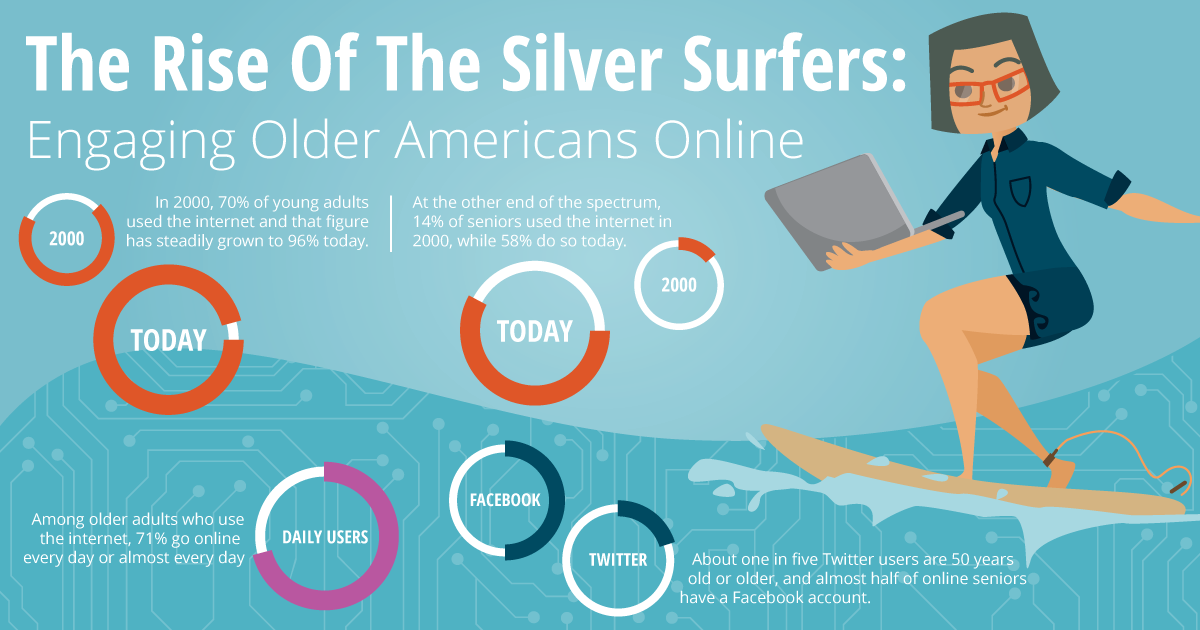
    According to 97 surveys conducted by Pew Research over the past 15 years (2000-2015), internet usage gaps between older and younger Americans still persist, though they’re lessening. Now about six in ten seniors go online. While adults 65 and older rank the lowest in internet usage between age groups, the number of older Americans online has grown in the past 15 years and will continue to grow in the coming years.

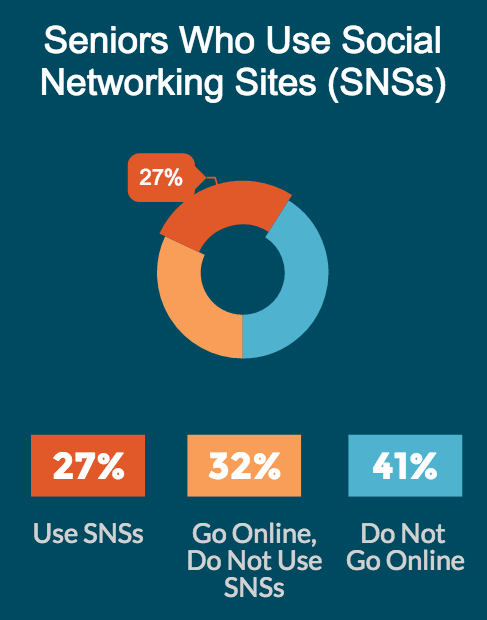
    Another report from Pew Research digs deeper into technology usage trends by analyzing seniors within their age group. Among the older Americans who currently go online, about three-quarters of them go online every day. Just over a quarter of seniors use online social networks.

    The Stat:

    “Older adults have lagged behind younger adults in their adoption, but now a clear majority (58%) of senior citizens use the internet.” — Pew Research Center

    What It Means for Marketers:

    While the previous usage numbers and perceptions would’ve indicated to online marketers that the older age groups aren’t very active online, that is definitely no longer the case. As of 2012, more than half of the senior population is online, and you can bet that number will continue to grow. The silver surfers are now an important and very present audience to consider when marketing online.

    The Stat:

    Seniors have the largest adoption rate change from 2000 to 2015 of any age group (14% to 58% respectively). — Pew Research Center

    What It Means for Marketers:

    This rapid increase in adoption rates shows an increase in technological intelligence among this age group. The previous parallels between chronological age and cognitive age are shifting and advertisers would do well to adjust accordingly. While practicing “ageless” marketing is all well and good, when trying to target this specific audience, be authentic and thoughtful of “the new 65,” a more-tech savvy and a now younger cognitive age group.

    The Stat:

    77% of older adults have a cell phone, but just 18% are smartphone owners. — Pew Research Center

    What It Means for Marketers:

    As many of you reading this know, mobile marketing is quite the focus of today. While a little less than a quarter of older adults have smartphones, over a quarter own tablets or e-book readers. This means that mobile searching and browsing is highly likely for this audience. Consider your potential to reach these seniors when optimizing your website and its content.
    Seniors Older Americans Online Using Social Networking Sites - Search Influence

    The Stat:

    “Today 46% of online seniors (representing 27% of the total older adult population) use social networking sites such as Facebook.” — Pew Research Center

    What It Means for Marketers:

    These silver surfers aren’t just surfing the web; they’re socializing, too! About one in five Twitter users are 50 years old or older, and almost half of online seniors have a Facebook account. Engage with the older American audience to help grow your brand online.

    Biggest Takeaway:

    When you think older Americans, you shouldn’t think, “my grandma who makes me fix her Wi-Fi router and doesn’t understand smartphones.” Instead, think of the generations before you who were in their prime for the technological boom that gave us the first cellphones, computers, and video games. These generations were the first to experience technology and were fortunate enough to grow and adapt with it. So, in reality, they’re part of your market and audience whether or not you realize it. The silver surfers are here and growing, so don’t discount them when you’re planning your marketing campaigns!

    All data and stats came from the following sources:
    http://www.pewinternet.org/2014/04/03/older-adults-and-technology-use/
    http://www.pewinternet.org/2015/06/26/americans-internet-access-2000-2015/
    http://blogs.forrester.com/gina_sverdlov/12-06-08-the_data_digest_digital_seniors
  • Seeing Colors? Google Expands Paid Ads

    Google Ads

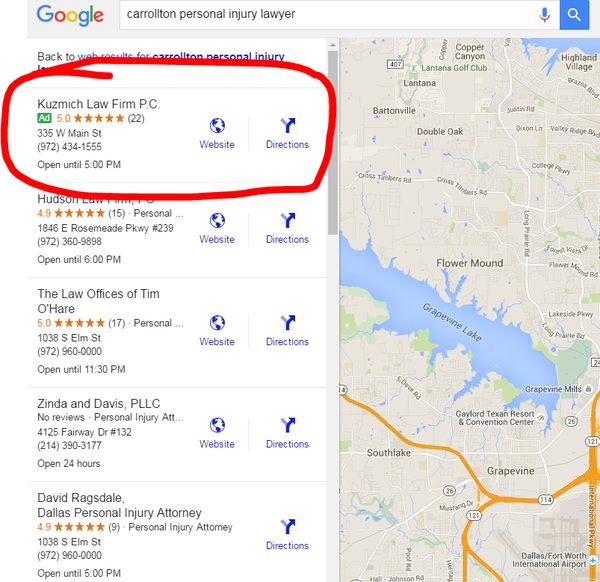
    Late last month Google changed the landscape of internet marketing once again. The latest update from Google expanded paid ads into two new areas, Maps and Local Finder. These two places were once a haven for those of us with beautiful, organic traffic, but we are set to be invaded by the strong-arm tactics of paid advertising.


    Local Finder Ads

    This change is likely to cause tears of both sadness and anger. In case you forgot, let our very own Amy Arnold explain how Google eviscerated the old Local Pack. In short, Google decided to reduce the number of local businesses displayed in the Local Pack from seven to three. Some of the default information displayed was also removed in an attempt to streamline the app. Many users found that the top three results were not enough, which compelled them to click that little “More Places” link in the search for more leads. After the most recent changes, ads are now displayed at the top of the More Places section, which is similar to how they are placed in the regular search results.

    Green Google Map Ad

    In addition to the new Penguin update, explained by yours truly, local businesses also have to deal with their information being relegated by potentially three spots. Even though it is possible to get your website higher by paying, it seems that organic content creators have been hit hard enough to cry.

    Cat Crying GIF

    Maps Ads

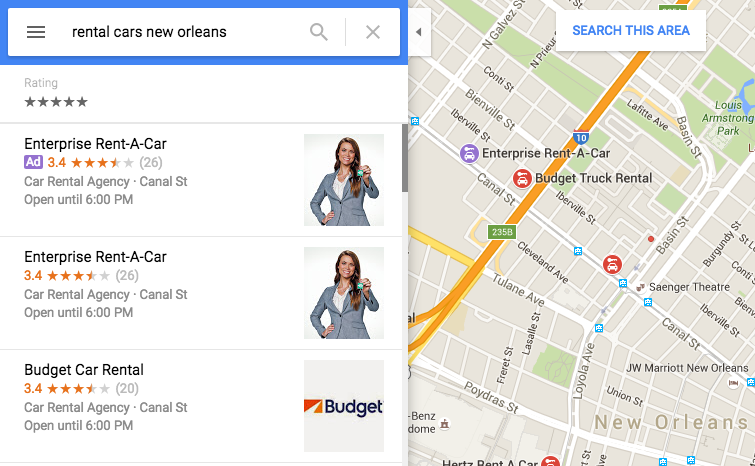
    Google Maps also received an ads revamp and a new color coding. Purple ads are now showing up, and Google decided to fill us in on exactly why that’s happening. These ads are controlled by AdWords, and users who have the location extensions enabled and are still charged the standard cost-per-click rate whenever a user attempts to get location details and directions or complete a mobile click to call requests. In addition to having your business show up at the top of Maps search results, a nice purple icon is also added to the map on your business location. By setting the targeted area, advertisers are able to give some extra range to their map pin in addition to appearing at the top of the list. Of course, if you plan on buying ads and placing your business at the top of search results to pay-per-click, you better make sure your business information is up to date.

    Google Purple Ad

    One thing you may have noticed from the above image is that the Enterprise Rent-A-Car is listed as both the top result and first advertisement. This would be an example of what not to do. A company may appear twice because it is already the top search result in this area. This redundancy happens a lot in regular search results, but the map ads allow you to select an area, allowing your ads to reach further than your search results normally would. This process is of course very confusing, but Search Influence’s expert Online Ads team is certified in Google AdWords and helps our clients gain maximum visibility. If this seems overwhelming, they’d be happy to take care of your advertising needs.

    Image 2 credit: Brian Barwig

  • Dude, Where’s My Location? Google Removes Location Search Ability

    Dude, Where’s My Location? Google Removes Location Search Ability

    News Impacting Your SEO Graphic Image

    While most people were recovering from Thanksgiving food comas on December 1st, Google was quietly removing the ability to change the location of your search. For those of you who don’t fondly remember, there used to be an option in the search tools that allowed you to pretend you were in a far off land searching, places like Saginaw and Cleveland.

    Google Missing Location Search Image

    What This Means for Online Marketing

    The impact of this change is now starting to really be felt for those of us in the online marketing world.

    Advanced Web Ranking, a popular keyword tracking software, had to make a quick fix for their product. Before this change, tracking keywords anywhere your clients was as simple selecting a location in the software. Just like that, you were seeing the results for “french fries” right along with everyone else located in Newark.

    Then, BOOM. Google changed that.

    According to Google support, the solution to this problem is now to add the city to see results for that city.

    Google Drops Location Search, Screenshot Image

    My example of “french fries” while searching in Newark has now become “french fries Newark” while in New Orleans.

    Changing Keyword Searches

    If you spend time looking at search volume, you might be aware that there is a difference between any two keywords, no matter how similar they may seem. Everyone is different, and I might search “french fries Newark,” you might search “Newark french fries,” and my neighbor might search “french fries in Newark.”

    Since AWR updated their software to fit the new location definition, they are unfortunately changing what is actually being tracked. If you read the comments on their release of the news, users are not happy with the change. AWR needs kudos for their quick response to a large change in online marketing, even though it did not adequately address the change.

    As AWR’s change magnifies, Google has drastically changed online marketers’ ability to peer into markets of their clients from afar. It really brings home the point that online marketing and SEO is are ever-changing industries, and you have to always on your toes, even over the holidays.

    Image Credit:

    Tom Hanks

  • Will Camp Out for Marketing Tips: Your Black Friday Survival Guide

    1

    November is here! A month full of falling leaves, dropping temperatures, giving thanks, and many people’s favorite shopping day: Black Friday. Last year, 133.7 million people shopped during the Black Friday weekend, according to a Fundivo.com study. As a local business, you may be trying to get a piece of the Black Friday pie this year, but you might not know where to start. Follow these tips to make the most of your online marketing efforts on one of the busiest the shopping days of the year.

    Plan Early

    The time to start thinking about marketing for Black Friday is now. If you traditionally experience a high volume of customers and sales during this time, like a retail store, you won’t necessarily be able to think about your marketing plan as you’re stocking extra inventory a few days before.

    One of the first things to decide is what your business is going to offer for Black Friday. Is it going to be a storewide sale? Will you sell a product you don’t typically offer? Consider your goals and determine what makes the most sense for your business.

    Get the Word Out

    Once you’ve chosen your Black Friday offer, you need to let people know about it. By promoting your offer online, you’ll be able to reach significantly more potential customers than by promoting it in-store alone.

    If you don’t have extra budget specifically for your Black Friday offer, use social media to connect with your fans. Stand out amongst competitors by posting images of products that will be available during your sale or offer an online-only incentive to entice shoppers to stop in on Black Friday.

    If you’re willing to put a bit of spend behind your efforts, Facebook advertising is an affordable alternative to a costly pay-per-click campaign. You can use their impressive targeting options to get your message in front of your specific demographic. Facebook targeting ranges from gender, age, and location to education, income level, interests, shopping habits, and more.

    Also, consider adding a page to your website with information specific to your Black Friday offer. That way, anyone scouting out sales in your area beforehand will know exactly what to expect from your business.

    Be Creative

    Black Friday isn’t just for retail. Although retail stores tend to see the majority of the action, it doesn’t mean other industries can’t jump on the bandwagon.

    Not everyone loves waiting in line overnight and battling crowds all day, but who doesn’t love a bargain? If you’re a service area business, reward your customers for being productive with home maintenance on Black Friday by offering discounted service or installation. Since many people take the day off work, it’s a great time to take advantage of gaining some extra business.

    Restaurant offers are also a great way to capitalize on Black Friday foot traffic. Let customers know ahead of time that appetizers are half off or you’re offering happy hour prices all day so they know where to go when they need a break from the shopping crowds.

    Make sure your business is taking full advantage of Black Friday this year by creating your marketing plan early, making your offer known, and utilizing creativity to gain more customers.

    Image Sources:
    Jingle All The Way
    Glee
    Gossip Girl
    Shopaholic

  • Stalking, Espionage, and More: The Guide to a Successful B2B Marketing Campaign

    Dealing with business to business, or B2B, clients in search engine optimization, search engine marketing, or social media can be challenging. There is an extra layer of difficulty associated with a technical business that you don’t typically have when working on B2C campaigns.

    The key to starting a B2B online marketing campaign is to focus on your business. Having a jumping-off point of information also allows you to craft thoughtful questions to ask in your initial meeting. Here are some easy things you can do to understand a technical client’s business and industry (besides scouring their site).

    Understanding the Client

    1. Watch the Tube – I love watching YouTube videos that my clients have created. Industrial clients tend to be good at showing off their technology via video. It can be super insightful, and it may help with your strategy down the road.

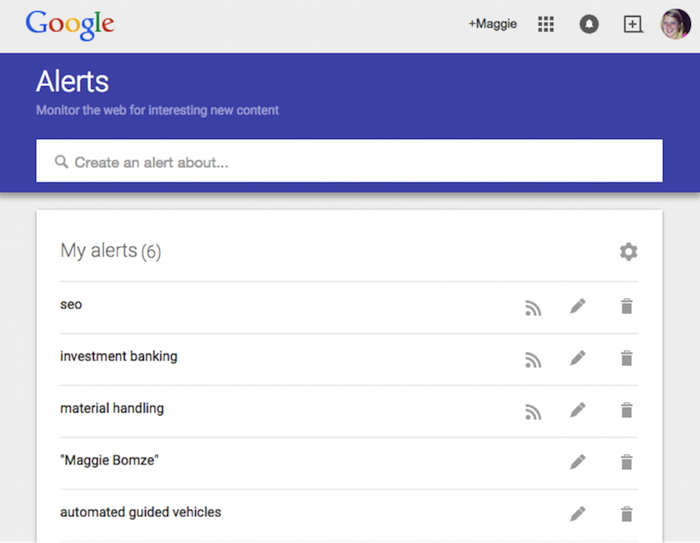
    2. Set up a Google Alert – Reading up on industry news can initially help with learning about the B2B client, and it can be informative later on when you need ideas for social media posts and press releases. (Side note: I think it’s 110% acceptable to have a Google Alert about yourself, so go on and set that up too.)

    MB Blog 1

    3. Do Some Stalking – Head over to LinkedIn to find out who you are going to be speaking with and what their background involves. I’ve also gone as far as joining engineering groups on LinkedIn to see what people in the industry are talking about (and more importantly for SEO and SMO, what types of posts get them engaged). I would also advise checking out any professional associations, charity organizations, and conferences where they regularly attend or present.

    Reaching the Client’s Customers

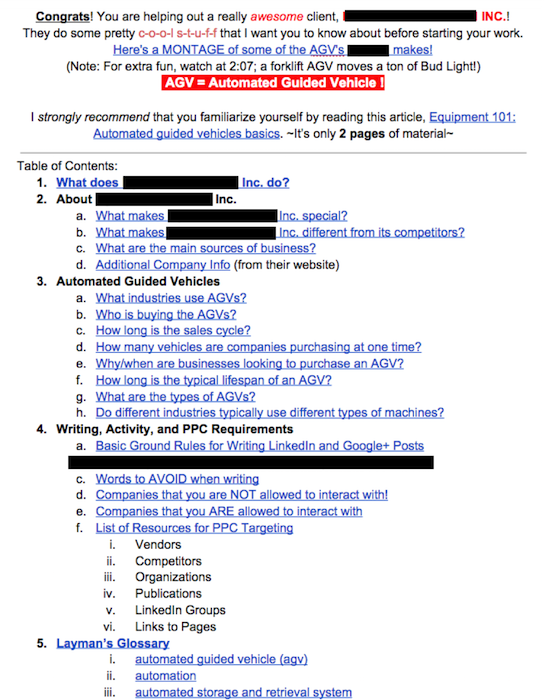
    1. Infiltrate the Buying Center – Find out (most likely by asking) which industries the client works with, and ask the right questions to find out who the decision makers are in the buying process. This can help you with ad targeting and creating relevant content for C-level buyers vs. operational team members.

    2. Find the Trigger – I always ask technical clients about their sales cycle, and most importantly, what triggers the need for our client’s goods/services. It is helpful to know what other businesses are going through and where search engine optimization fits into the B2B marketing plan.

    3

    Relaying that Knowledge to Your Team

    1. Shout It from the Rooftops – Let the appropriate people on your team know the information they’ll need in order to produce the highest quality work for your client. This might be the hardest part of a B2B marketing campaign. Ask anyone on my team: I’m guilty of giving everyone all of the info I have on a super-technical topic! One short-term solution is to keep an ongoing “Everything you need to know” doc and organize it through bookmarks. This way, your team can quickly get to the info that impacts their task.

    MB Blog 2

    What are some of your tips for working with B2Bs in SEO? Let us know in the comments!


  • Ya-Who? The Slow Decline Has Already Begun for Yahoo’s Local Listing Service

    Changes can surprise the SEO world (looking at you, phantom Google updates), and sometimes, changes can be seen a mile away. This is when everyone should look at Yahoo and their local listings. Their importance is diminishing every day, and eventually they will be a thing of the past, like Google Plus Authorship.

    The Decline of Yahoo

    Though Yahoo’s importance is not as cut and dry as Google Authorship, I’m going to throw out some information that has me making this prediction with as much certainty as predicting that New Orleans will get rain sometime in July.

    Is It Worth the Trouble?

    Now, you can argue that since Yahoo was still the 3rd most common search engine as of July 2015 according to comScore, it is worth it to pay attention to Yahoo Local listings.

    That is a good argument that we should still pay attention in the SEO world, but that is only one side of it.

    Though a very high-ranking search engine and site in general, I’m arguing that their local listings are not worth the time and effort that comes from hassling with support over email, phone, or even Twitter. Since Marissa Mayer took the helm in 2012, Yahoo has been turning their focus away from their older products, such as their Maps and even directory service. Along with these seems to be native local listings.

    From an SEO standpoint, Yelp is the real “Y” of the listing world, especially with the ever-rising importance of reviews. I see it becoming the only “Y” in a year or so. So with that in mind, “Y” even bother with Yahoo?

    Yahoo-logo

    Image Credits:

    Homer Simpson GIF
    Yahoo Logo

  • Insta-Ads: Facebook Brings Instagram Ads to Life

    Good news for advertisers! It appears that Instagram Ads are now open for advertisers through Facebook’s Power Editor.

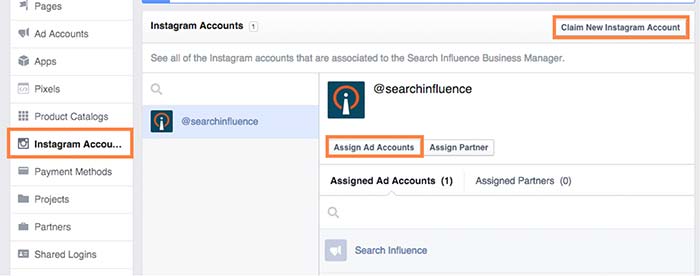
    While no official announcement has been made (and Instagram hasn’t even updated their site), I stumbled across these new features while poking around my Business Manager. What tipped me off was the ability to claim Instagram accounts under the Business Settings in Business Manager. From there, you can assign ad accounts to individual Instagram accounts. Interesting, right?

    instagramadscreenshot

    There is also a notification at the top of the page that states that “Instagram ads are gradually rolling out and might not be available to you right now. You can claim your Instagram account to have your setup ready. Read more here.”

    How Do They Work?

    After doing some digging and playing around with Power Editor, I was able to create an ad for Search Influence’s Instagram profile. However, the only ad objectives currently available on Instagram are “Clicks to Website” and “Mobile app installs.”

    Earlier this month, Instagram launched its Ads API Partners program. According to AdWeek, “Instagram Ads API Partners will be able to perform tasks including scheduling and publishing content to the Facebook-owned photo- and video-sharing network, monitoring audiences and sharing access to Instagram accounts across teams.”

    What Does This Mean For You?

    All of these updates come as very welcome news, as managing and advertising for businesses on Instagram was difficult in the past. Previously, Instagram advertising was only open to larger brands willing to spend $200,000 or more on brand awareness for a three-week campaign.

    Do you plan on using Instagram advertising? How do you think it can benefit your business?

  • Word of Mouth in the Digital Age: The Importance of Online Reviews

    SmallBusinessWoman

    Having just moved, I’ve spent a lot of my free time shopping on Amazon. From new bathmats to nice wine glasses, a majority of my paychecks have gone towards furnishing my new house. One thing I really needed, though, was a solution to the rock of a mattress that came with the apartment. I needed a mattress topper. Since it was something I would use every night, I wanted the ability to test out the feel of it first. The only negative of Amazon is that you can’t do that. So, whose opinions can I trust other than my own? Fellow customers.

    I spent all night (on the rock) searching through different mattress toppers. I didn’t look at the actual toppers as much as the reviews, though. “This one’s too lumpy,” or “This one smells funny” were the words that guided me to finding the perfect topper. And now, I’m sleeping like a queen, thanks to my fellow customers.

    In this scenario, I was the customer, and the product was the business. I passed up on a lot of toppers that were probably just as good as the one I ended up getting. Having a lot of bad reviews or no reviews at all were the deciding factors for me, and these things can be the deciding factors for whether or not your business succeeds online.

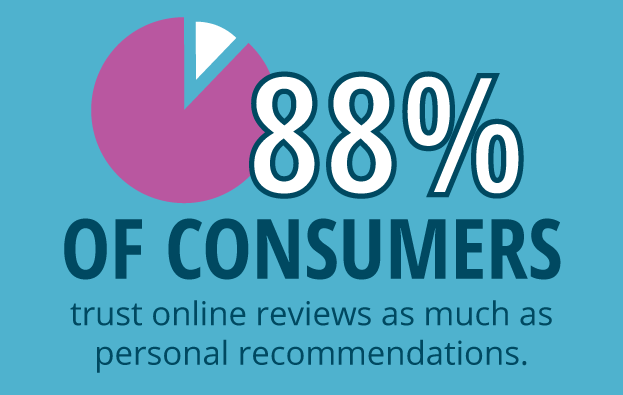
    Consumers Trust Online Reviews Statistic Image

    Why Reviews Matter

    According to a study done by BrightLocal, “88% of consumers trust online reviews as much as personal recommendations.” Reviews can greatly impact consumer decisions, showing how valuable positive reviews are to local businesses. In the same study, “72% of consumers say that positive reviews make them trust a local business more.” Thus, positive reviews increase conversions.

    Negative reviews can hurt business and prevent a potential customer from converting. However, negative reviews can also be a positive thing. Negative reviews give a business unique insight in the ways they can improve, and they can also help eliminate consumer suspicion if there are too many positive reviews. A study done by Econsultancy found that “68% of consumers trust reviews more when they see both good and bad scores, while 30% suspect censorship or faked reviews when they don’t see anything negative at all.” Overall, businesses should leverage the value of negative reviews by working to enhance their business and improve customer relationships.

    SEO Benefits of Reviews

    Not only do consumer reviews enhance customer experience, but they also provide some SEO benefits:

    • Improving local rankings by showing Google that people are engaging with your brand on third-party sites like Yelp.
    • Adding new content to your site. Search engines like to see unique content being added to a site regularly.
    • Increasing chances of ranking for long-tail keywords. Users reviewing your business tend to use the same terms that other potential customers may use when searching for your business.
      • Add reviews to many pages on the site in order to increase the amount of pages ranking for long-tail terms.
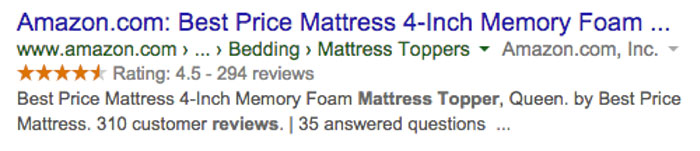
    • Adding schema markup for reviews, which enables rich snippets.

    AmazonReviewScreenshot

    Sources:

    http://searchengineland.com/88-consumers-trust-online-reviews-much-personal-recommendations-195803

    https://www.brightlocal.com/2014/07/01/local-consumer-review-survey-2014/#methods

    https://econsultancy.com/blog/8638-bad-reviews-improve-conversion-by-67

    https://econsultancy.com/blog/9366-ecommerce-consumer-reviews-why-you-need-them-and-how-to-use-them/

  • Hello Bing, Goodbye Yahoo Local: Moz Local Makes Moves

    Moz Local made some small changes to its reporting dashboard over the past week or so. These small layout differences indicted a large change in the capabilities of the tool.

    Only announced on August 18th (though acknowledging that updates slowly rolled out over the previous week), Moz has added City Grid (City Search), Insider Pages (not fully rolled out yet), and Bing to the growing list of sites that they can submit information directly to. The tool also removed Yahoo from listings that they find and evaluate for you.

    What does this mean for you, a business owner?

    City Search and Bing were already available for Moz Local users to find and address, but they have now made the move over to their “Direct Network.” Since both require verification to edit business information, this change could make it even easier to send out your correct business information out into the wild, wild web for customers and search engines to see.

    Since Moz Local offers an easily navigated and editable interface, when an address, website, or even hours change, you can modify it in just one place and watch it change throughout the high-authority directories and data aggregators.

    What does this mean for you, a marketing professional?

    Moz’s removal of Yahoo Local listings in an strong indication that Yahoo is moving away from being a source for native, unique listing information. As it stands now, native Yahoo listings are being replaced/overpowered with Yelp listings with reviews. By not even caring to show a client’s information on the site, Moz is acknowledging that Yahoo is no longer an independent listing source.

    By adding Bing to their direct network, Moz could change the amount of sites that require client confirmation. With every client, there is a varying amount of difficulty that can happen with verifying listings. Postcards can get lost. Phone calls can get missed. Moz seems now to give a way to circumvent those problems. However, completely dropping the process of claiming Bing would not be wise. Claiming the listing gives you the power to change information immediately and to see how often the listing is seen.

    Moz is showing that it has a great ear to the ground for changes that may be rumbling in the local citation world, and I know that I will be keeping an eye out for any of the new changes that it says should be rolling out soon.

  • A Tale of Two Google+ Updates: Shutting Down G+ Pages & Disconnecting YouTube From G+

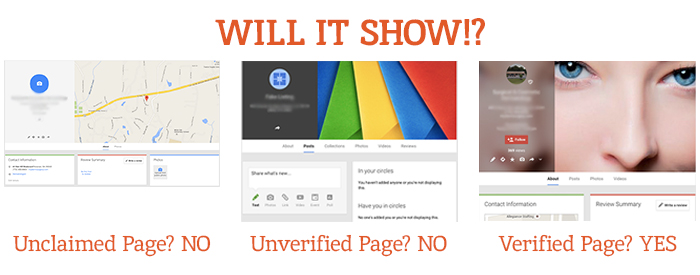
    Shuttered Google Local Pages - Search Influence

    In the past week, two new Google Plus updates have come to light. First, we found out that as of July 28, Google has plans to shut down inactive and unverified Google My Business (aka Google Plus) listings. On Monday, July 27, Google’s Bradley Horowitz posted on Google’s official blog that in the coming months, it will be removing the requirement for users to have Google+ profiles to use various Google products such as YouTube and Google Photos.

    The Update: Google My Business is Shutting Down Unclaimed, Unverified Listings & Unverifying Inactive Accounts’ Listings

    On July 23, a Local Search Forum user posted an email they received from Google as follows:

    UPDATE – Announcement from Google July 22, 2015

    Dear photographers and agencies,

    In the past few months, you may have seen some changes in the look of Google+ pages that have been associated with Google My Business (GMB) accounts. These changes, including how we treat business pages without owners, are part of Google’s ongoing effort to simplify people’s experience with our tools. We are constantly working to provide only valuable and rich content to our users.

    On July 28, Google will begin shutting down those GMB–associated Google+ pages that have not been associated with user accounts and are also not verified. You may find that some of your Business View tours also sit on such pages, but note that after this removal of unverified Google+ pages, the Business View tours will still remain available on Google Maps and Google Search.

    Here are a few recommendations for informing any business customers that may be impacted by this:

    Encourage your business customers to verify their listings if they wish to retain their Google My Business page …

    If a business owner decides later that they would like to have a Google My Business page, please advise them to create a new page and verify their listing. The Business View virtual tour can be then transferred to the new verified listing. Please log a case to our support teams to request that images for your business customer be forwarded to the new GMB page.

    Please point your business customer to their images in Google Maps.

    Best,

    The Google Maps | Business View team

    This was specifically geared towards photographers so they would know how to handle the effect on Business View tours. What this means for all Google My Business users is that unclaimed local pages will most likely no longer be visible (as Google has always said is the case for unverified Google Plus Local pages).

    Different Google Local Pages - Search Influence

    As always, this update is accompanied by Google’s explanation that all actions are in the best interest of users and geared towards improving the user experience. Thanks, Google!

    On June 4, via the Google Business Help forums, Jade Wang (come visit us in NOLA again soon 😉 ) of the GMB Maps team also announced: “If a user is unresponsive to our attempts to contact him or her and has not logged into Google My Business for a significant length of time, then we may unverify pages in the account.” Here’s the full update from Jade:

    In some cases, we may contact Google My Business users via email to confirm that they are still actively managing a business page. If a user is unresponsive to our attempts to contact him or her and has not logged into Google My Business for a significant length of time, then we may unverify pages in the account. We’re doing this in order to continue to provide users with the best experience when they’re looking for local businesses like yours. If you find that a page in your account has been incorrectly unverified, please contact support to get assistance restoring verification.

    It’s a good idea to keep an eye on the inbox associated with your Google My Business (Locations) account. It’s also a good idea to regularly log into Google My Business (Locations) to confirm that your business information is current and accurate.

    My Take On It

    Both of these updates could mean great news for businesses that have struggled with requesting ownership of listings that were verified in the past by a person or an account they no longer have access to. To fix this issue in the past, you’d have to submit an ownership request form to Google to gain access to these listings. Then, you’d have to wait 10 business days (as per Google’s rules) and reach out to support (they could check to see if the account never responded to the request). After this 10-day period, the support representative could determine that the account that owned the listing was inactive and release the listing to you for claiming and verification.

    Basically this means inactive accounts are no longer roadblocks to getting access to business listings in Google My Business!

    While some issues may be alleviated with the update, what’s harder for search engine optimization work is that now it’ll be more difficult for us to see unverified duplicate G+ pages, old or closed G+ pages, and practitioner G+ pages that could be hurting businesses’ local rankings. Map Maker should allow us to still see the data but not the pages themselves.

    But there are signs this hasn’t rolled out completely yet. I have some unverified, fake listings in my Plus account (shhh, I know) that I use for training purposes that haven’t been touched yet. This is likely a slow rollout that started July 28. I did notice some changes to Maps navigation recently that were probably in preparation for this, though. For example, you used to be able to click “Write a review” from the Maps results to get to the G+ local page for a business, but now that just opens a review dialogue in the Google search results for that business in another window. This makes sense, since unclaimed businesses will no longer have pages.

    The Update: Google+ Is Disconnecting From Unnecessary Services

    On Monday, July 27, Bradley Horowitz posted on Google’s official blog that Google+ would be moving towards a “more focused Google+ experience,” which basically means no longer forcing users of various other Google products to have a G+ profile to use said products.

    Specifically, Google wants to foster the natural sharing environment of G+ by adding new features such as Google+ Collections. This update means that all you need to share content, communicate, and have a YouTube channel (among other things) is a Google account and not necessarily a G+ profile. Also, it will continue to keep Google accounts private and unsearchable. For those who were forced to create G+ profiles to use YouTube and other Google products in the past, Google promises that it will “offer better options for managing and removing those public profiles.”

    My Take On It

    Congrats to everyone who was pissed when they couldn’t use YouTube without a Google+ profile!

    Mad Men Cheers Joan

    At first, it seemed that G+ pages that are already connected to YouTube channels might be disconnected. But, that last comment about offering ways to get rid of unwanted G+ profiles, points to the fact that this update will not actively affect anyone in this way.

    Since this update has not yet rolled out, however, it is important for users to realize that they should not delete their G+ yet! Doing so prior to roll out will force you to delete your entire YouTube presence!

    Let me know your thoughts on all of these new Google updates! I’d love to hear what other users think of these changes.

    Image source:

    Mad Men gif