Tag: digital marketing

  • On Social Entrepreneurship and Social Media – Interview with Alexandra Ernst of Project Pangia

    ProjectPangiaOwnerImageA year and a half ago, Project Pangia was born from the mind of Alexandra Ernst. After graduating from Loyola University New Orleans and working with The Walt Disney Company, she set out to create a business of her own. Having a passion for travel, meeting people, and social change, she aimed to create a business that would connect people. Project Pangia is a global initiative based on social and interactive development through the exchange and tracking of travel bracelets. With the help of social media, Ernst has managed to successfully fund an $18,000 Kickstarter campaign, create jobs for various underprivileged women in Bali, Indonesia, and spread these bracelets to more than 17 countries.

    How did you come up with the idea for your business?

    Project Pangia started as an idea for a travel website. I’ve always had the entrepreneurial spark and I wanted to create something. More than creating a normal business, I wanted to create something that connected people around the world and had some social impact.

    I began thinking about how our generation uses social media; we all have Facebook, Instagram, and Twitter – people sometimes just sit and browse through these sites for hours looking at other people’s posts or thinking about what they are going to post. Then, I started thinking about how I could utilize these tools but be able to connect with people not only on a virtual level but also on a human level. This evolved into a travel networking site, but I needed something that would allow me to do it on a fixed budget. It all came full circle when I thought about the idea of creating these bracelets. I said, “What if I give these bracelets to one person; they can hand one off to another person and somehow be able to see where these bracelets are going?”

    How does the exchange of bracelets work?

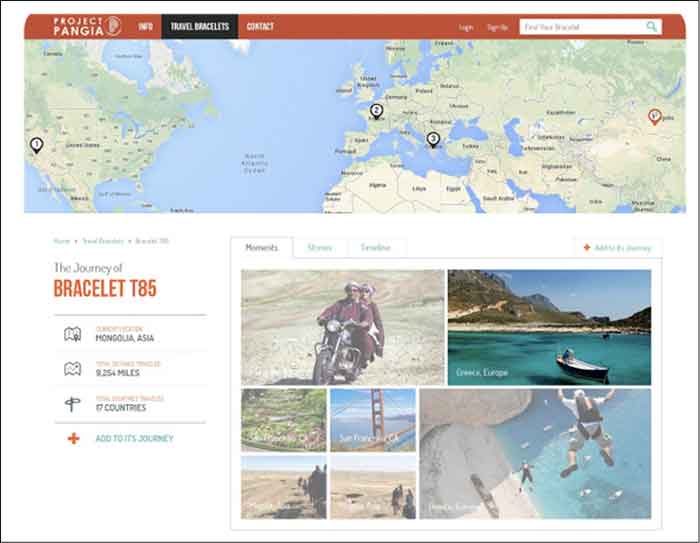
    As it is explained on the Project Pangia website, every bracelet is handmade and stamped with a unique code, which is registered on the site. Every bracelet is handmade and stamped with a unique code, which is registered on the site. You can track your impact as your bracelet is passed along from one hand to another in the “spirit of kindness.” Each new recipient can add to the bracelet’s story online before passing it on to someone new. We keep you updated as your bracelet reaches certain milestones so you can witness just how far one simple act of kindness can go.

    What is the goal/vision for your business?

    A huge part of it is working in underprivileged communities that otherwise wouldn’t have these opportunities of having fair compensation for their work, quality working conditions, and mentorship. For now, I’ve handled the production aspect in Bali – we used recycled surfboards and other sustainable materials for our production, packaging, and shipping. Ultimately, I would like to offer other communities around the world these types of opportunities through collaboration and partnerships.

    Project Pangia also aims to spread kindness and spread the message of “travel in kindness.” By doing so, we are creating cultural awareness and connecting people through the use of personal interaction, as well as through embracing the use of technologies and social media platforms.

    Finally, as the business grows, I want for Project Pangia to have a strong online presence on a global level and I have been slowly creating this by displaying my products and the stories that arise through them on my website, Facebook Page, Instagram, and Twitter.
    ProjectPangiaScreenshotImage

    If you are active in social media, what platform do you find elicits the most activity?

    Facebook and Instagram have definitely been the two that have grown at the fastest rate. In January 2014, my Facebook page had about 200 followers. Once I began to post more consistently and I began to push a couple of Facebook Ads, it grew to almost 3,900 in just a few months.

    My Facebook page was definitely my most important and effective tool for my Kickstarter campaign. If it weren’t for Facebook it would have been impossible for me to successfully fund it. By creating Sponsored Posts through Facebook I was able to drive a lot of traffic to my campaign. Also, my campaign was shared via Facebook 1,523 times! It was definitely where I saw more interaction from my followers who eventually became my backers. My goal was $18,000 and I raised $18,295.

    My Instagram has also continued to grow. I constantly want to push more imagery, and I think nowadays there’s an overload of information and people don’t want to read that much. Therefore I want to show them as many pictures of my products and their impact, and my followers have responded very well to that. A month ago, I had about 300 followers and it has nearly doubled in less than a month.

    I try to be very meticulous and careful about what I post, which is why I do not post as often as other businesses. Something very important to keep in mind is that you can’t just post anything online; you have to be very intentional with what you are writing.

    What other tools aside from social media are you utilizing to push your business online?

    I currently use a WordPress site and as someone without much technical background, this platform has truly allowed me to manage my website effectively. WordPress even has a tool that measures traffic within the same platform. I also have Google Analytics installed with the site and I use Hootsuite to create social media posts ahead of time and make sure I stay organized.

    Do you have any advice for other young entrepreneurs who want to leverage the use of social media with their business?

    It’s way more time and money than you’ve ever imagined, so you better love it with all your heart and truly believe in it. However, once you start seeing how people respond and the feedback they give you it makes it all worth it.
  • New York Hotel Fines $500 For Negative Online Reviews. How Can They Fix It?

    500fineA Hudson, NY hotel has a perplexing way of dealing with bad reviews. According to Page Six, instead of using bad reviews as constructive criticism, the hotel charges wedding couples $500 for each bad review their guests post online.
    “Please know that despite the fact that wedding couples love Hudson and our inn, your friends and families may not,” reads an online policy. “If you have booked the inn for a wedding, or other type of event . . . and given us a deposit of any kind . . . there will be a $500 fine that will be deducted from your deposit for every negative review . . . placed on any Internet site by anyone in your party.”

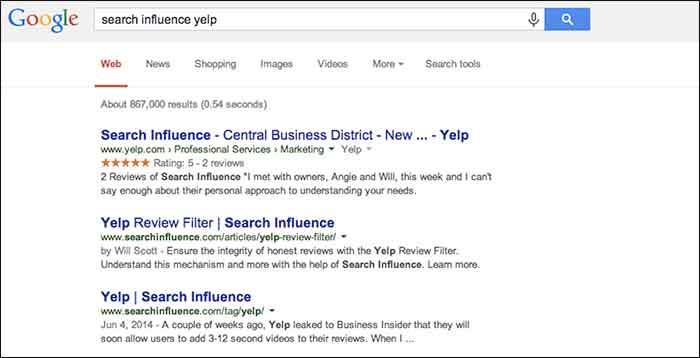
    As expected, this caused the Internet to go into a frenzy. The day the story broke, the company’s Yelp page was flooded with over 500 bad reviews causing their review rating to plummet.

    Since Yelp recently received a well-deserved boost from Google in their search results, Yelp reviews can significantly help or hinder a business.

    Here are a few ways you can handle bad reviews without charging a $500 fine:

    1. Respond to good and bad reviews:

    Respond to all reviews, especially if they are asking a question or expressing a concern. When people take time out of their day to review your business, they like to be recognized. Responding to reviews lets consumers know that you care about your customers.

    2. Strive to be great at what you do:

    If you provide an all around excellent experience, you will get great Yelp reviews. It’s that simple!

    3. Calmly address the Reviewer’s Issues:

    When addressing a bad review remain polite and respectful. The reviewer is someone that gave your establishment a try and wasn’t happy with their experience for whatever reason. Hear this person out. If you respond in a negative way, it only makes your business look bad to other consumers. Not only can you ruin the chance of the reviewer changing their review or revisiting your establishment, this can also cause you to lose potential customers who choose businesses based on online reviews.

    4. Offer a remedy:

    If you think there is a way to rectify the situation, try to offer the person an incentive to come back. Send a private message that includes a coupon for a free milkshake or discounted service. Yelp users can use the update function to change their initial review. Everyone likes to feel that his or her opinion matters, so feeding a disgruntled user’s ego can sometimes quell the fury, and may lead them to reconsider their initial opinion of you.

    5. Bad reviews should be used as constructive criticism

    Never take a bad review personal. Bad reviews that are rational and deserved are not completely a bad thing. Use that negative review as a way to improve your business. Once you have fixed an issue or improved your business based on critiques, let the Yelp community know. They will be happy to know that their concerns matter and that you are listening.

    SIyelpSearchImage

  • TUTORIAL: A Google Gem That’s Trending Near You

    GoogleTrendsLogoMy clients frequently ask me how long it takes to rank higher on Google search page results. I explain that the process is gradual and not guaranteed due to a number of factors, such as the 200 plus “signals” that make up Google’s algorithm, the time it can take for Google to read our “signals,” creating a consistent online presence, etc. — the questions usually end there. I recently had a client challenge me beyond a basic explanation of SEO, digging into my keyword research, and inspiring me to explore the seasonal average search value.
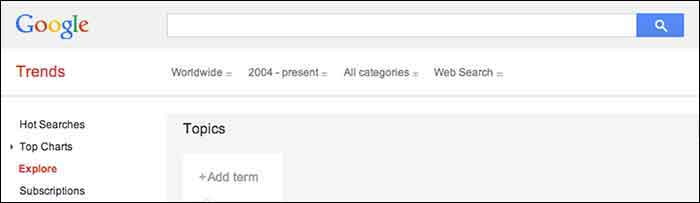
    When the client asked me if I examined seasonal search value in my keyword research, I had to admit that I had not. It typically makes sense to look at average yearly search volume because, as stated above, the SEO process is gradual and we don’t want to target a term that will only help our clients in the short-term. This still left me wondering about seasonal search value, so I researched it. I was suspicious that seasonal search could help identify outside factors that affect the progress of SEO campaigns, and it may help lock-down industry standards that I wasn’t aware of.

    Google Ad Words’ Keyword Planner does allow you to select different date ranges to examine the monthly average value, but I wanted to find a tool that identified possible patterns in keywords. I should have known that Google already had a product for this: Google Trends.

    Google Trends’ Fun Facts:
    – Started in 2006
    – Remember “Google Insights for Search”? This tool put search data into graphs and merged with Google Trends in 2012
    Medical researchers have attempted to predict outbreaks with this tool over the past few years
    – You don’t need a Google account to use this tool

    Visit the site and follow along with my tutorial

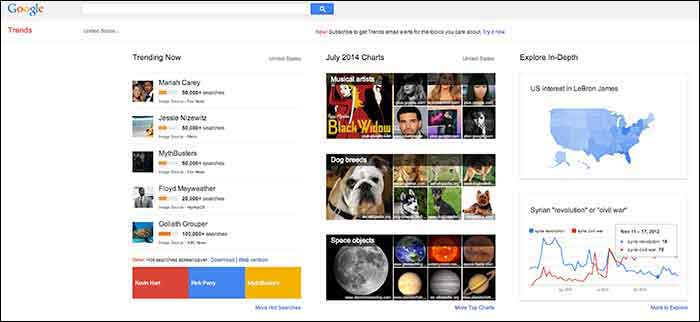
    When you visit Google Trends, you will see three columns of interesting data, so where should you start? The best place to start is with your goals in mind. Do you have specific keywords in mind that you would like to research and compare, or do you want keywords generated for you based around a topic? Either option is available here, along with many other unique features that make it a useful tool for SEO experts.

    GoogleTrends

    Here you will find 3 main categories: “Trending Now,” “July 2014 Charts” and “Explore in-Depth”. The first two categories could be used to brainstorm social media and blog ideas because you can see what’s being searched the most that day as well as a review of the past month’s top searches organized by topic.

    I am going to examine the third column on the page titled, “Explore in-Depth” because I find it most useful for SEO purposes. Still keep in mind the other two columns, however, because they relate to recent news and pop culture that’s also trending. The “Explore in-Depth” column shows two examples of ways you can examine topics and keywords. Click “More to Explore” at the bottom right-hand corner to see all of your search options.

    How to search by Keyword

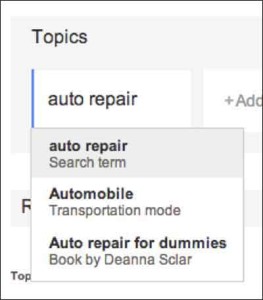
    When you start adding “Topics” that you are interested in gaining search value for, you will also see a drop-down box appear which gives you different types of searches to select. The example below shows “Search term,” which would be the keyword or query, “Transportation Mode,” which is a category. Google will find keywords that fall into that category, and “Book by Deanne Sclar” which indicates a branded search for that book. Once again, think about your goals. If you have specific terms in mind that you want to research, then select the “Search Term” option. If you want to explore a category and see what keywords were searched the most under that category, select the category.

    GoogleTrendsTopicsImage

    GoogleTrendsTopicsMenuImage

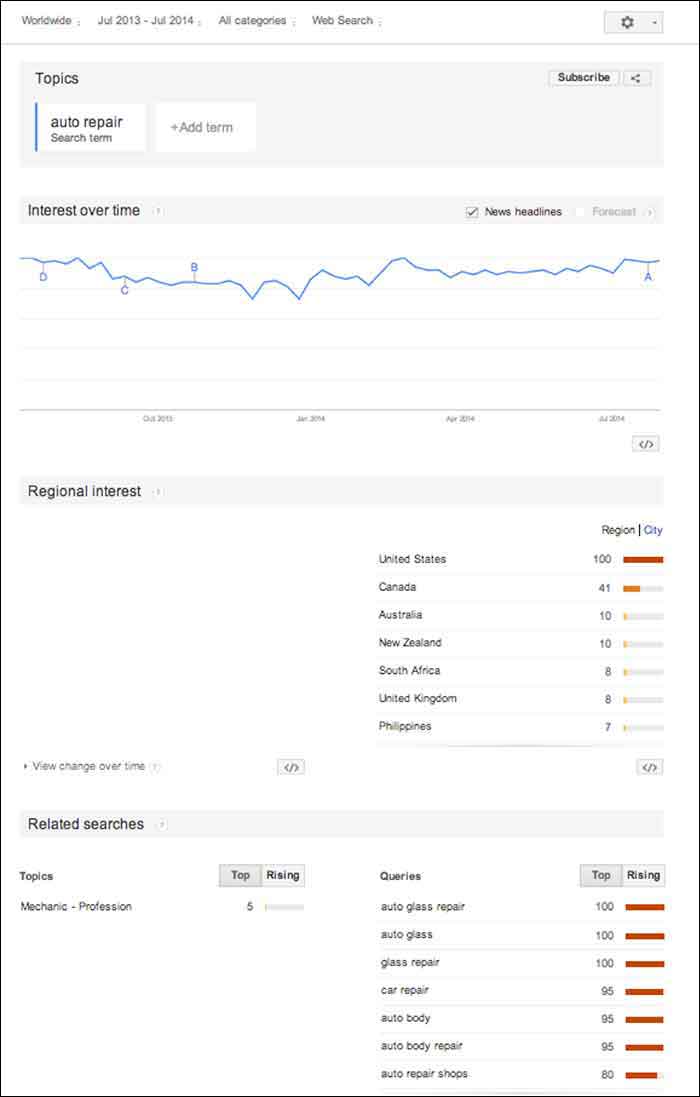
    I first selected “Search Term” and filtered the dates of our search to July 2013-July 2014. As you’ll see below, I receive an “Interest over time” graph, but I am also given a “Regional List” category of countries who have searched for “auto repair” the most. I have also been supplied with “Related Searches” at the bottom of the page. Let’s explore these resources.

    GoogleTrendsTopicsInterestsImage

    Note that the numbers on these graphs are not absolute numbers. They are relative to each other to reflect a trend.

    “Numbers represent search interest compared to the highest point on the chart. If at most 10% of searches for a given region and time were for ‘pizza’ we’d consider this 100. Each point on the graph is divided by the highest point and multiplied by 100. When we don’t have enough data, 0 is shown.” -Google Support

    1. Interest over Time

    GoogleTrendsTopicsInterestsForecastImage

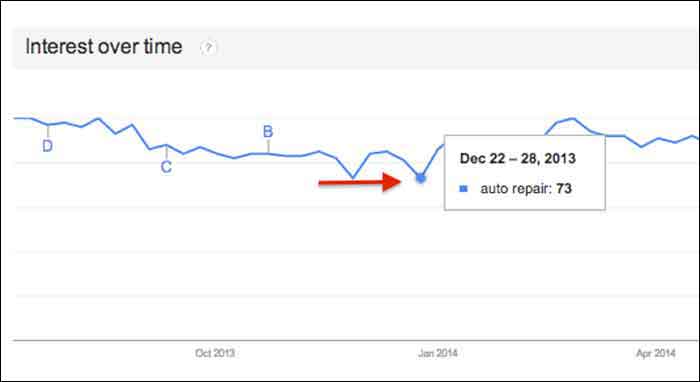
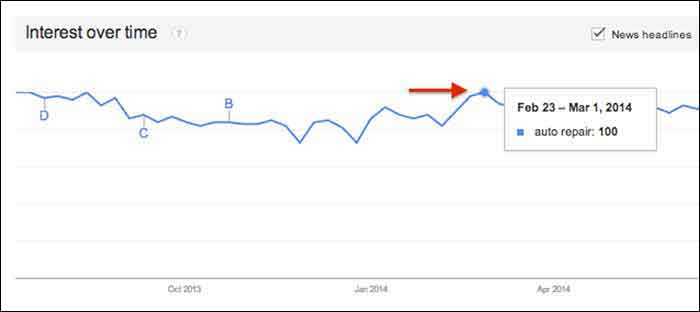
    This graph gives us a snapshot of the overall trend of searches for “auto repair” between July 2013 and July 2014. Hover over any point in the graph to see the exact score that Google Trends gave that time period of searches. After hovering over these points and comparing the highest score to the lowest, I realized that there was no dramatic change, but there was a slight decrease in late fall and early winter months.

    GoogleTrendsTopicsInterestsDecImage

    GoogleTrendsTopicsInterestsFebImage

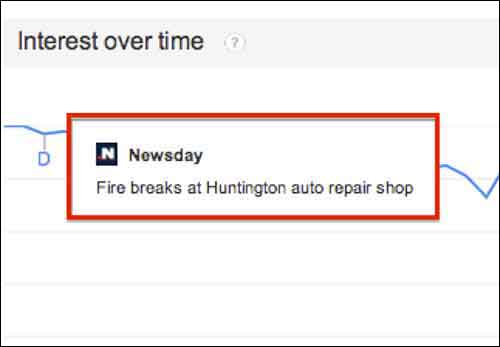
    You may notice the letters next to what seems like random points on the graph. These letters represent times when news headlines included that keyword. This is an interesting tidbit of knowledge to consider. Knowing if the trend increased dramatically is important because it could be due to an outlying factor.

    GoogleTrendsTopicsInterestsNewsdayImage

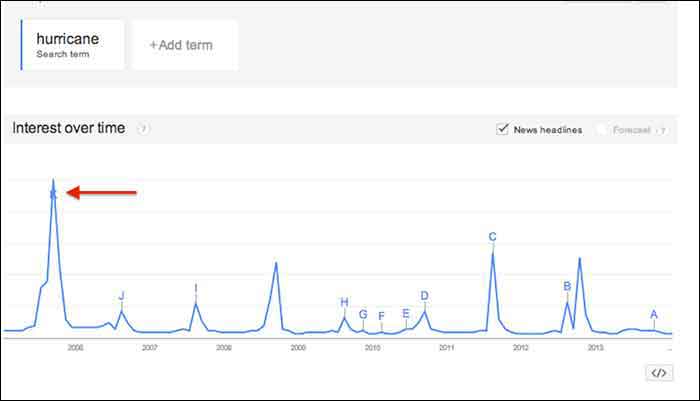
    Fun Fact: Look at how the trend for the keyword “hurricane” was affected by Hurricane Katrina in 2005.

    GoogleTrendsTopicsInterestsHurricaneImage

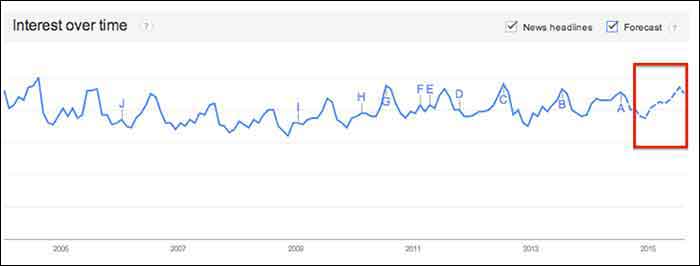
    You may notice the “Forecast” check box to the right of the “News Headlines” check box. This feature attempts to predict the upcoming trend of your search term. Note that you have to extend your start and end dates to make this option available. To yield the most accurate forecast, open the start and end dates to as wide as possible. This yielded the below results, showing the possibility of slight decreases in the fall and early winter months, with a continuous increase in the spring and summer months. Note that I had to hover over the graph points to figure out the dates because the graph does not let you zoom in.

    You could use this chart in conjunction with other keyword research tools such as Google Ad Words’ Keyword Planner to expect possible decreases or increases in certain keywords due to seasonal search value. For example, it’s not surprising that “ac repair” is not a particularly common search word during the winter months. Other keywords with seasonal value may not be as obvious, however, so resorting to Google Trends serve as one tool to help you crack the code when dealing with what seems to be seasonal increases or decreases in the search rankings.

    GoogleTrendsTopicsInterestsForecastImage

    2. Regional Interest

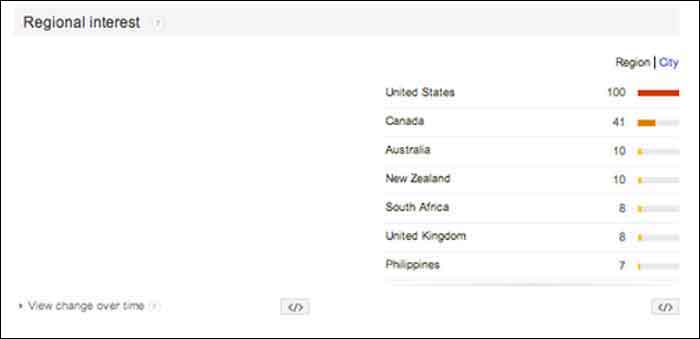
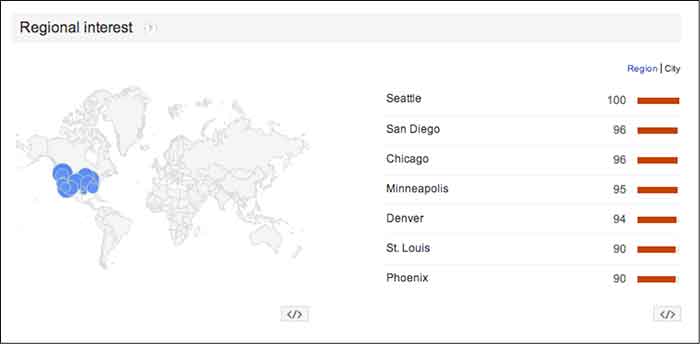
    “Regional Interest” displays larger areas that are searching for your keyword the most. While this is a useful tool for pinpointing countries and large cities, it does not typically show small cities or rural towns. In a global search (as shown below) the results help to narrow down the top countries searching for a keyword, and then the largest cities by clicking the “City” tab. The numbers represent the same calculated numbers as in the “Interest over time” section, so they are normalized and are the outcome of comparing the search volume to the area that searched for your keyword the most.

    For a business with a statewide, national or a global target audience, this map could help you pair the keyword with specific locations. It is possible that more people search “auto repair” in Detroit, while more people in Los Angeles search for “car repair”. This sounds like a slight difference, but the more precise you can be when choosing keywords, the higher your possible rate for success will be.

    In this case, the United States shows a dramatically higher interest in “auto repair” than any other country. You can click on each country to see a breakdown of interest within each one. You may also click the “City” link next to “Region” for the cities with the most interest in “auto repair” despite the country (demonstrated in the 2nd photo below).

    GoogleTrendsRegionalInterestsImage

    GoogleTrendsRegionalCityInterestsImage

    3. Related Searches

    If Google identifies your keyword with other similar terms that are being searched for, it will list them in the Related Searches section. This section is broken down by “Topics” and “Queries”.

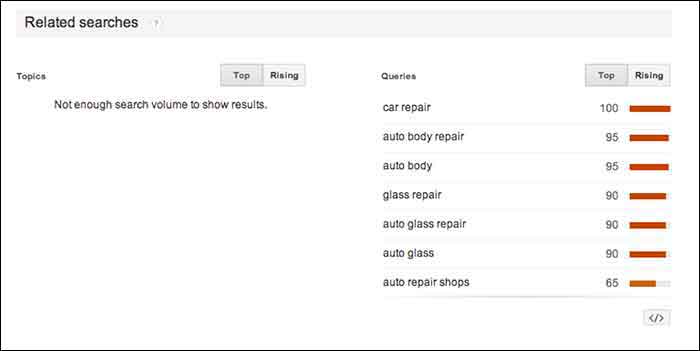
    In this case, I received queries, but did not receive any topics. The message under “Topics” read, “not enough search volume to show results”. In keyword research, however, I would prefer to look at the queries because they are exact keywords. For example, “car repair” and “auto body repair” are the top two related queries listed for “auto repair” (shown below). You could use this list to find keywords that you may not have thought about researching, or to examine the similar keywords in relation to the keyword you are searching.

    GoogleTrendsRelatedSearches

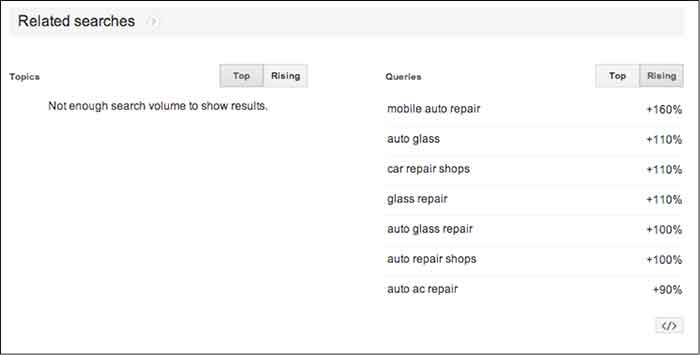
    The “Rising” tab under “Queries” shows terms that have had a significant increase in searches compared to the previous year. As shown below, “mobile auto repair” has risen 160%. This does not mean that “mobile auto repair” is one of the highest searched terms overall, but it may be worth monitoring throughout the campaign to see if it continues to rise and could be important to rank well for. With the rise of mobile Internet usage, it makes sense that this term could continue to increase in value.

    Resources:

    Google’s Algorithym: http://www.google.com/intl/en-US/insidesearch/howsearchworks/algorithms.html

    Google Trends data calculation: https://support.google.com/trends/answer/4355164?hl=en&rd=1

    Google Ad Words’ Keyword Planner Tool (must be logged into Google Ad Words):

    https://adwords.google.com/ko/KeywordPlanner

    GoogleTrendsRelatedSearchesRisingImage

    Finding a Pattern:

    I started researching more specific auto terms and found that there was a seasonal pattern for the service, “auto detailing”. I would not make this seasonal observation a factor in whether to choose the term as a targeted keyword or not because there is consistent search value. Although, it may help explain a decrease of site traffic in the winter months if that occurs.

    It is easy to get caught up in looking for a direct cause and effect between SEO practices and search engine rankings or site traffic, but expanding your research to recognize seasonal patterns can give you a larger idea of how your industry is searched for online.

    My next tutorial will examine search results by “Topic” instead of specific keywords. Stay tuned to learn more about how this can help your SEO practices!


    Image Source:

    Google Trends Logo

  • Google Instant Verification Passes The Sentence & Swings The Sword

    On July 31st, Google rolled out an instant verification option for local businesses that have already verified their websites with Google Webmaster Tools.

    WaitInstantVerificationImage

    There is, however, very specific cases. As the Google support page linked above states, it’s important to note “that some business categories may not be eligible for instant verification.”

    OneDoesNotSimplyVerifyAListingImage

    Webmaster tools verification option won’t work for your business if:

    • You’re creating a new listing
    • The pre-existing listing is already claimed by another user and your business has to request ownership
    • You have to change the website on the pre-existing listing you want to claim
    • Webmaster Tools isn’t verified BEFORE you claim the listing
    • Webmaster Tools isn’t verified in the same account that you are claiming your business listing in
    • Your company’s “My Business” category is not one of the Google approved categories eligible for this verification.

    “My Business” pages we tested:

    Car dealership: Claimed in account with pre-existing listing in need of claiming – worked

    Heating supplies provider: Had ALL ideal criteria. Listing had correct site and was available to claim, and WMT was already verified in the account. – didn’t work (So this business must have a category problem that makes it ineligible.)

    Real Estate: Created new listing- didn’t work

    Basically, if it’s possible, Google will automatically verify your business on its own when you claim your business in Google My Business. Google skips giving you any verification options altogether and just auto-verifies the listing.

    Assuming this new Google My Business feature is a work in progress on Google’s end, maybe once we see more categories accepted, it will become more doable and the qualifications may not be so restrictive. Even then, with the stipulations currently, it would be a rare occurrence.


  • 5 for Friday – Google SSL Warnings, Twitter & Amazon Collab, and more!

    1. Twitter and Amazon Link Up, Add Items To Your Shopping Cart With A Single Tweet – Buzzfeed

    452416003

    Amazon is using Twitter to drive sales with the new #AmazonCart feature. This may be a major breakthrough for ecommerce businesses. It’s super simple:

    1. The business tweets out a link for a product.

    2. Interested consumers can then reply to that tweet with the hashtag #AmazonCart.

    3. The product will instantly appear in the consumer’s Amazon cart.

    The consumer’s Twitter has to be linked to their Amazon account in order to do this, but the new feature should drive sales for E-commerce businesses with products on Amazon. Twitter users can also search the hashtag #AmazonCart to see what other people are buying. Isn’t technology great?!

    2. Become Your Own Rumpelstiltskin: Spinnin’ Crappy Online Reviews Into a Better Business – Search Engine Journal

    This is a great article on how to approach negative reviews. There are bad reviews from people who genuinely had a bad experience and bad reviews from people who are just plain irrational.

    How do you tell the difference between these people?

    If you look through an irrational person’s profile it’s full of negative reviews and they usually make overly dramatic and sadistic statements. People that genuinely had a bad experience  usually have a mix of positive and negative reviews if you look through their profile, there are some positive comments within their negative review and they make rational statements about their experience.

    How do you deal with this?

    Respond to the irrational reviewer with a generic, but genuine message without addressing specific points of concert. If they respond back, don’t respond again. Respond to the rational reviewer by addressing their specific concerns quickly and assuring the reviewer that steps have been taken to ensure that this will not happen again.

    3. New App Reveals How Much Information You’re Giving To Facebook – Search Engine Journal

    FacebookScaryScary! A new app, called Digital Shadow, was launched as a promotional tool for the upcoming video game Watch Dogs. It uses data you’ve given to Facebook to guess your location, your income, and your passwords. They use algorithms to predict your interest, desires, and fantasies. We live in an era where we like to document everything online from how we’re feeling to what we purchased to where we are in the world. It’s an eye opener to find out that there are people in the world that can use that information against you to hack your computer or to be more influential in their sales tactics towards you.

    4. Google Pauses Webmaster Tools SSL Warnings In Order Clarify Them In Future – Search Engine Roundtable

    Google recently sent out mass SSL warnings via Google Webmaster. They decided to pause the warning after they realized they were causing mass confusion. Now, Google is working on making the warnings clearer and tweaking the criteria before restarting them.

    Google is simply providing information about the server response for HTTPS access to your URL. If it responds, but the SSL cert does not match the domain, the warning lets you know. Basically, Google wants the hosts to either serve content via HTTPS properly, or not serve content there at all. Serving content via HTTPS without a valid TLS/SSL certificate will result in users seeing browser warnings. Avoiding this makes sense, no matter how many site users actually see the warning.

    5. Announcing Schema.org Actions – Schema Blog

    LegosAction

    Schema.org introduced vocabulary that allows websites to describe the actions they enable and how these actions can be invoked. You can use action schema to play a video, review a movie, or purchase a product. The new schema adds context to a link or content. It is a way of interpreting content to cite sources and authors and the type of activity that happened between the two. From what was said in the press release, the actions schema is still a work in progress and will be enhanced as more users use action schema and provide feedback.

  • Why I Hate Your Website: A Guide to Good Web Content

    Hopefully you’ve read some of our other great blogs on sharable content and you’re sending out all those valuable signals that lead people back to your website. These leads are great and all, but what good are great signals and roadmaps if they lead you to something… disappointing?

    Imagine your favorite childhood adventure movie: A six-pack set of friends, perhaps accompanied by a talking animal of some sort, follow the strange, convoluted clues of an ancient map they found in someone’s grandfather’s attic. What if these young adventurers followed this map to the very end only to find a great big chest full of nothing?

    HeavilyGuardedContent

    That would be the worst movie ever.

    So, just to clarify, your website is that chest, and you’ll want to make sure that there’s some treasure up in there. How? Treasure = good content.

    Sidenote: I recently heard an interview on NPR with Pixar Animation Studio’s president Ed Catmull that relates to this topic. The interview was introduced with “content is king” so, you know I was tuned in. In the interview, Catmull downplayed the importance of technology in Pixar’s movies. “It’s not about the technology,” he says.  “We use the technology, we develop it, we love it, [but] it’s about the story.” So, if Pixar believes in content, you should too!

    So, what makes good web content?

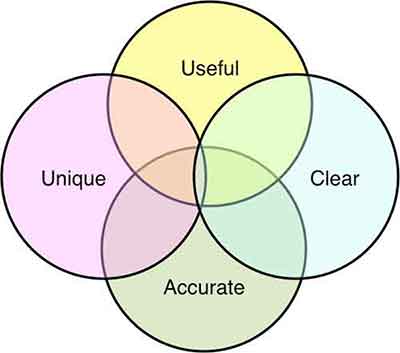
    From a broad perspective, here are four characteristics that can guide you to good content.

    Infographic

    Useful

    Your viewers have jumped down the rabbit hole in search for something. It’s your job to know what that something is. Have they arrived at this page looking for contact information? For pricing? To make a purchase? — Make sure you know why the viewer has made it to this point. Then, and only then, can you provide the solution.

    Be as detailed as possible, but also be concise. My number 1 rule: no fluff. Aaron Wall of SEOBook puts it perfectly, “Good writing does not add extra words for the sake of word count. Each word carries purpose and meaning.”

    Clear

    Make it easy for your visitors to find what it is they are looking for. Your site should not be iSpy, Contact Info Edition. Organization of your content is paramount. The longer your visitors have to search for information, the more likely they are to jump to another site. Make the information easy to skim.

    ispy-meme

    A major issue I see is vanity capitalization. If the intent is to highlight important information, the tactic has the opposite effect. With so many Capitalized words throughout the Content, it becomes Unclear why You are Capitalizing anything at all? See how difficult it was to read that one sentence? Capitalize words within your subheadings, headings, navigation bars, etc. all you like, but don’t go cap-crazy within your content. Sending too many signals to your reader that THIS or THIS or THIS or THIS and THAT are important throughout your page can become confusing. If everything is important, nothing is important.

    Pro Tip: Subheadings are a great way to point your site visitor in the right direction. But don’t go overboard.

    Unique

    Duplicate content is something I see a lot of. It’s not just a personal pet peeve; it’s bad for SEO. So, don’t fill out multiple pages with the same content just for the sake of having multiple pages. Not only is this confusing for your site visitors, but it is confusing for search engine crawlers as well. So, you’d think if it’s bad for your viewers and it’s bad for your ranking, people wouldn’t do it. However, you’d be surprised how many sites I see with duplicate content on top of duplicate content. Make sure each page has content unique to that section. If the two pages are too similar, find a way to combine them. Otherwise, reword things to show the unique purpose and perspective of that specific page.

    Accurate

    Make sure your hours of operation, your address, your pricing, promotional deals – any information that may fluctuate – is up-to-date. The more active you are on updating your site’s information, the more accurate your site will be. This is not only good for your visitors, but good for search engines. Being up-to-date on information makes you a more reliable source.

    I can’t count how many times I’ve wondered if a site was open on a particular day—whether it was due to an obscure holiday (Hey, it’s New Orleans, places close their doors for seemingly no reason whatsoever), or due to conflicting information—and their site was anything but helpful. Letting your site visitors know what’s what ultimately gives them the information they need to be customers. And that’s the point, isn’t it?

    Whether you’re adjusting old content or starting from scratch, think from the perspective of your site visitors. It’s also good practice to examine the sites you visit frequently. What are some frustrating aspects of navigating the site? What is some information you wish they displayed? The key aspects of good content are all around you, take note of them! Observing the successful (and less successful) aspects of other sites, whether they are related to your industry or not, can help you navigate your own site’s content.

    So, how about it? What are some examples of good content that you see on a regular basis?

    GoogleSearch

  • Are You Being Productive Or Just Keeping Busy?

    Over two months have passed in 2014, and like most of you, I can honestly say that I have been very busy. I would be willing to bet that 50+ business days into the year, I, like a lot of you reading this have logged 150-200 hours of meetings, and have received and answered well over a over a thousand emails. Doesn’t that sound busy? This past weekend, as I was doing my weekly review, I found myself wondering, have I been productive as well? Have I been focusing on the projects that will make Search Influence a great place to work? What about the things that will allow us to serve our customers better?  How much time have I (and the teams I support) put into developing the Internet Marketing products that will help our customers succeed online tomorrow?

    4556099850_bcd9318b5b

    If you find yourself wondering the same thing, or worse, in an honest moment, answering no to that question, here are three things that you can do to avoid being busy, yet unproductive.

    1) Review your long-term initiatives or goals on a regular basis

    9331682959_2e179c31c6

    In the book Getting Things Done, the author David Allen challenges readers to undertake a weekly ritual wherein they will review and process everything in their inbox, their to-do lists (that’s right, lists), their previous and upcoming calendars, and their projects or “larger outcomes,” I find that this review of my long-term projects and initiatives, or “larger outcomes” allows me to ask myself if I gave each of these areas the attention they deserved, and to make sure that I have some actions or meetings teed up to assure that I keep moving toward success in the upcoming week. Think about it, if you move the needle on the 4-5 of the most important things every week, in 3-6 months, you will have made a significant impact on some areas that are important to you.

    2) Be ok with saying “no” occasionally

    Remember those thousand emails that you have processed so far this year? Or the over 150 hours of meetings? Chances are, in a few of those, someone has asked you to take on a small project or task. If you have a reputation for being someone who can get things done, you might get asked for help in more than a few. I completely get the urge to tell everyone “yes.” In fact, I think that you should be looking for ways to tell people “yes” whenever you can. Sometimes, the best way to support the people who are asking you for help is to tell them “no.” Two potential benefits immediately come to mind:

    • Hopefully the initiative you chose to prioritize over helping someone will have a positive impact on all parts of the organization you are working in, including theirs.
    • By telling them “no,” you may be empowering an employee to try to complete the task or solve the problem on their own.

    There are also other ways that you can say “no,” while offering to provide some support:

    • Offer someone else in your part of the organization as a resource. Who knows, the task or assignment may even be a good developmental opportunity for someone more junior.
    • Ask if your support or action is needed right now. If not, perhaps you won’t have to tell them “no,” just “maybe later.

    3) “Unplug” To Focus

    4447008001_9867947867

    How many potential communication inputs do you have to distract you during the workday? Here are mine:

    • Email
    • Chat
    • Text
    • Phone
    • Face to Face
    • Social Media

    Those are six ways that anyone who needs me can get in touch with me at any point throughout the day. Those are also five potential distractions if I am trying to work on something that needs my undivided attention.

    When was the last time that you set three hours aside to work on something extremely important, but three hours and six interruptions later, your three hour window was shut, and you had barely made a dent in your project? Now, I will be the first to admit that as a manager, it is hard to take actions that make it seem like I am not available to support my teams.

    Availability
    Concept smartphone tablet pc and laptop in hands Isolated on white backgroundOne thing that I have come to realize is that being available to others does not necessarily mean being available every moment of the day, or even workday for that matter.

    And how available are you in these meetings you are in anyway? I have found that there are times when I need to eliminate (ok, minimize) the potential distractions by unplugging from all communication devices (except my cell phone, of course).

    If anything is important, but not urgent, it will be waiting for me when I plug back in. And if anything is urgent, I let my teams (and my family) know that in an emergency, I can be reached via my cell phone.

    Then I turn to whatever it is that needs my undivided attention and try to knock it out. Again, hopefully, whatever it is I am working on will have a significant impact on those that I have chosen to unplug from for a few hours, so in the long-run they will benefit, too.

    In short, its very easy to stay busy these days. There is always a meeting to go to, a text we could respond to, emails to deal with, and unplanned, “urgent” work to be done. And all of that has to get done. The challenge is making sure that you are handling the things that are not extremely urgent, but are critically important.

    How do you make sure that you are getting to the things that matter most to your organization and the people who depend on you?


  • Content: The Beginning

    In the beginning there was the Internet.

    At least, that’s what I tell myself when I try to think back to my early childhood. Kids (whatever, I’m a kid, kids younger than me) are glued to smart phones, they have these things called tablets and nooks… but what of books? What of literature? These are some of the questions people had about television back when the youths first sat their little rumps down in front of the tube. Now, the eye of Sauron has turned to the Internet.

    internet.gif

    Don’t get me wrong, the Internet is chock-full of copious amounts of information (all the information, in my opinion—if it’s not on the Internet, it doesn’t exist) and can be extremely useful. Ah, but therein lies the issue!

    The Internet is an extremely powerful thing, a great source for random, trivial, and (sometimes) useful knowledge. However, with great power comes great responsibility. Although many can argue that the Internet is killing language (lik3 wut3v3r dude), excusing poor spelling, grammar, and vocabulary, the Internet has also bred a whole new generation of nit-picky grammar specialists. You know who I am talking about, that one person who loves to correct your use of words, followed by a sweet, misleading asterisk.

    What am I getting at?

    hercmeme.jpg

    Although a lot of time goes into straightening out the aesthetic and function of websites, many forget to think about the words.

    To quote the great V, “Words will always retain their power. Words offer the means to meaning, and for those who will listen, the enunciation of truth.”

    However, choosing those words can be a difficult, sometimes even Herculean, task. On the one hand, your content needs to be purposefully crafted, tailoring to those aforementioned language *specialists*, but on the other hand, your content needs to be clear, concise, and easily understood by a diverse audience, i.e. everyone.

    Good Content = Good SEO

    But how do I write good content? You may ask. Obviously, content will vary depending on your site, your brand, and your audience. But, say we were to tackle “good” content on a broad scale

    Check back for my next blog where I break down the concept of content, starting first with: The What — What Your Content Needs To Say.

  • Instagram is “Ad” it Again!

    Screen Shot 2014-03-06 at 11.46.49 AM

    Does it seem like, eventually, everything turns into a platform for advertising? For social media, that seems to be the trend when comparing networks over the years. Everything from Facebook, Google, Twitter, Pinterest, and Pandora have all followed the same trend. Using a great business plan (and a lot of foresight), they open their online “doors,” create a massive following, and after a few years succumb to the massive potential profit that is advertising.

    Instagram Ads

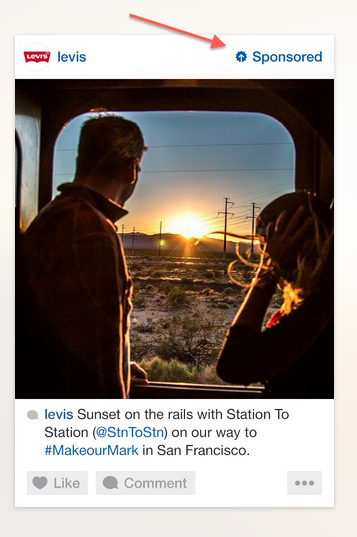
    Even though it took some time, it is clear that the mega success of our beloved Instagram has followed suit. After Facebook bought the ultra popular image sharing platform for a cool $1 billion, they didn’t waste time reaping a return on their investment. In late 2013, Instagram announced that they would start releasing “sponsored” posts that would look and feel like the other images users were already sharing. The Beta version of these sponsored posts were designed to “underwhelm” users so that they might not even know they were looking at an advertisement.

    Who Sponsors Posts?

    Screen Shot 2014-03-06 at 11.47.44 AM
    These sponsored posts were only given to a select number of brands like Ben & Jerry’s, Macy’s, Michael Kors, Lexus, and Levis, in order to test out consumer reactions. However, recent studies show that these advertisements were highly successful due to the limited number of competitors on the site, the quality of the advertisement, and the fact that it is an image instead of text. Many advertisers understand that images are far more powerful than words, which is why Instagram, along with its huge user base, is an ideal platform for marketing.

    Personalized Ads

    But how will Instagram know what brands you like or images you’re drawn to? The beauty and genius of the merger is that Facebook already knows everything about you! Between the information Facebook has already collected about you (likes, interests, hobbies, etc.) and the images that you like and follow on Instagram, advertisers are able to put more customized and targeted ads in front of you. The hope is that these ads will be so successful that companies will eventually pay more to advertise. So watch out, you might actually start seeing ads that you enjoy!

    Have you seen an ad on Instagram that grabbed your attention? Let us know in the comments!

  • Google Places For Business Email Update

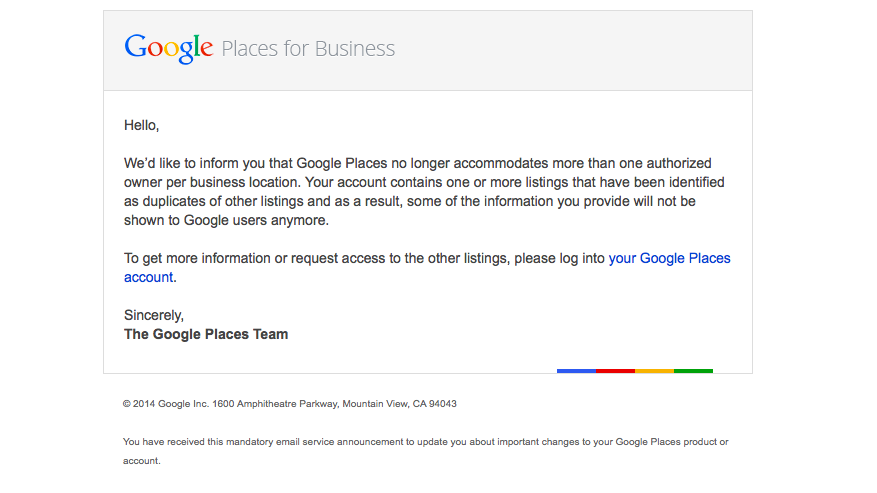
    We’re still not panicking about all of Google’s updates! As many of you already know, Google has been sending out a Google Places for Business email that reads as follows:

    The Message

    Hello,

    We’d like to inform you that Google Places no longer accommodates more than one authorized owner per business location. Your account contains one or more listings that have been identified as duplicates of other listings and as a result, some of the information you provide will not be shown to Google users anymore.

    To get more information or request access to the other listings, please log into your Google Places account.

    Sincerely,
    The Google Places Team

    As this message is kind of vague/ confusing, I called a Google rep to get clarification on exactly what’s going on here. Bear with me as I explain what this means exactly and how it’s affecting business listings.

    The Meaning

    PrintGoogle is finally pulling all listings into the new Places for Business dashboard. In the old dashboard there could be multiple owners of a listing, but in the new dashboard there can only be one.
    As Google performs these batch listing upgrades, the first owner whose account is upgraded gets grandfathered in, so to speak, and they will be the sole owner of the listing through the new dashboard. If someone has already claimed and verified a listing in the new dashboard, however, then no one will experience the “grandfather” situation in the batch upgrades as it is already verified in the new dashboard and has its one owner.

    The good news is that many of us have been force pulling businesses into the new dashboard by claiming them through the Places section of plus.google.com. So the latter situation will have already occurred for most, and we will be the current, sole owner of verified listings in the new dashboard. (If you lose ownership of your listing in the batch update by Google, you can still request it back, it will just take time through a two week request period and contact with Google.)

    We have seen cases, however, where after the batch update by Google there appears to be two listings in the dashboard of accounts who have already pulled their listing into the new dash on their own. Generally one appears as verified(the one we forced pulled into the new dash) and the other as unverified(the one Google pulled over), but they both lead to the same G+ page when you click through the “view this listing” link in each. This is just a weird hiccup, and if you wish to clean up the dashboard by deleting the unverified one, it will not affect your listing. As long as you have a verified listing in the new dashboard, you are the sole owner of said listing.

    Now What?

    Basically, anyone who has ever had a listing in the old dashboard is receiving this generic email, and it is not necessarily an indication as to whether or not the listing is owned/verified in the new dash in your account. So, as long as we’re keeping on top of our business listings’ dashboards, there is no cause for alarm! There’s also the note about duplicate listings in the email. Duplicate listing issues are not something that occur in every account which receives this email. More to come on addressing duplicates in the new dashboard next week! If you’d like to see what others are saying about the email, check out Search Engine Land’s post from earlier this morning or these forums where people have been discussing particular, individual issues encountered (Google Product Forums and Local Search Forum).

    Here’s a screenshot of the actual email for those of you who would like to see it:
    Screen Shot 2014-03-05 at 10.42.19 AM

    If you have any questions or comments about this situation, feel free to comment below! Stay tuned for how to handle duplicate listings!