Blog

  • I Wanna Index You Up: Google Exposed

    Google is a great keeper of secrets. They’re willing to share parts of demographic data captured from their users with potential advertisers. But, they keep their own personal data locked up pretty tight, or at least tight enough to keep anyone without a neurosis for data away.

    About a month ago, I was trying to get an idea of URLs that existed on a client’s website. Due to their unfortunately dated decision to integrate a Flash-based navigation on their front page, I could not use a sitemap generator — software that crawls a site and outputs all URLs — to gather up a URL list.

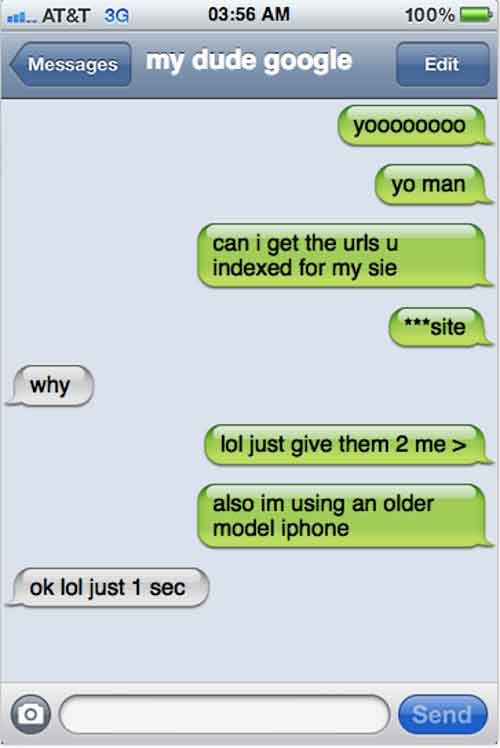
    Because I’m pretty lazy, or some could argue resourceful, I decided to look into what Google indexed for that site. However, you can’t exactly text Google up to request the URLs be sent over.

    MyDudeGoogleImage

    It’s Up To You, My Dude

    Although Google Webmaster Tools provides you with a lot of info about your site, including how many URLs are indexed, it does not tell you which URLs are indexed. So I did a little bit of digging, and I found this “bookmarklet” that easily captures the SERPs that appear on a given page of results, and lists them in an easy-to-import-into-Excel format.

    CoolTipImage

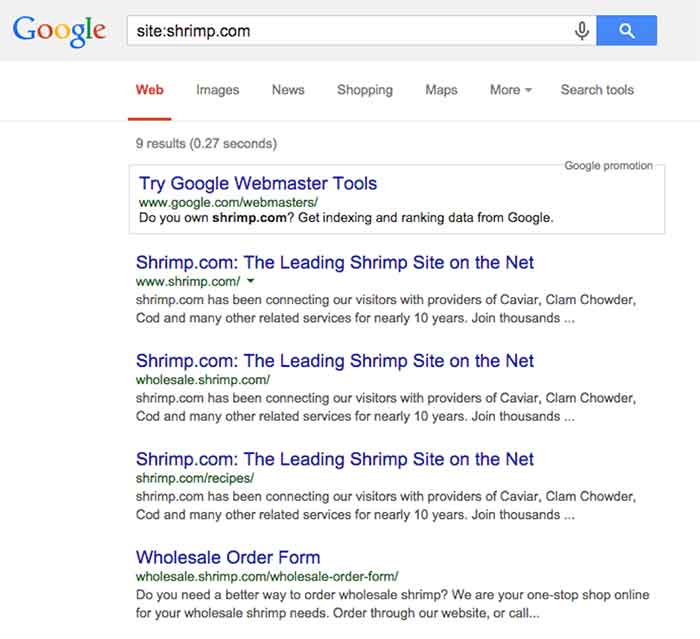
    To see a list of URLs (or at least a partial list) Google has indexed for a specific domain name, query Google for “site:sitename.com.”

    Here’s a reenactment of what I saw when searching for the indexed URLs:

    SiteShrimpComImage

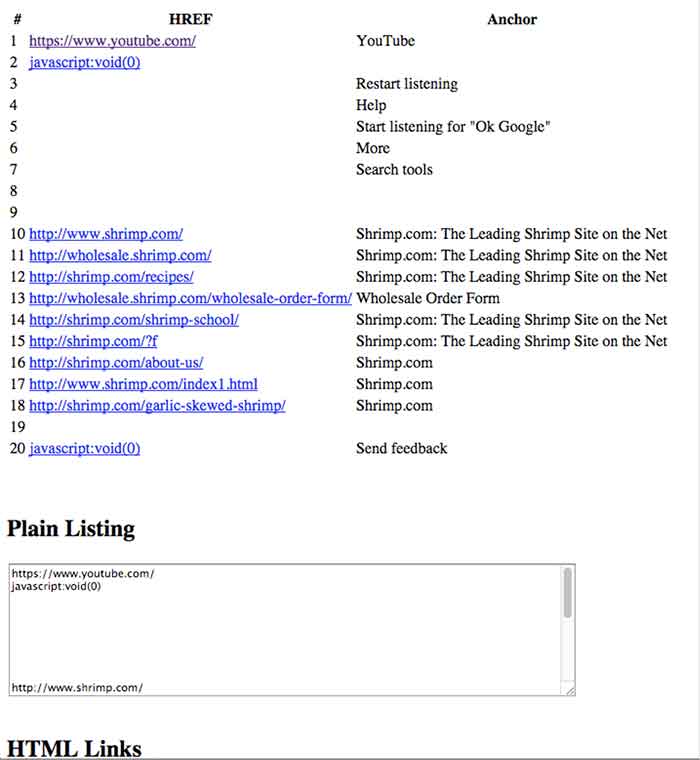
    Once you have that bookmarklet added to your bookmarks bar (just drag and drop, as the instructions say), clicking it gives results like this in a new tab:

    RankingListImage

    By visually filtering out the worthless stuff (JavaScript, a link to Youtube, and blank rows), I’m left with this tidy list of first page of results. Sadly, we find that there are only 9 pages indexed of shrimp.com, inclusive of its subdomains, within Google:

    • http://wholesale.shrimp.com/
    • http://shrimp.com/recipes/
    • http://wholesale.shrimp.com/wholesale-order-form/
    • http://shrimp.com/shrimp-school/
    • http://shrimp.com/?f
    • http://shrimp.com/about-us/
    • http://www.shrimp.com/index1.html
    • http://shrimp.com/garlic-skewed-shrimp/

    For the purpose of finding the indexed URLs for my client, I just kept clicking “Next Page” and running this until I couldn’t get any more results.

    And with that, I had a pretty good idea of URLs that were actually indexed by Google. Luckily, this was a reasonable amount of pages to parse through, but I could imagine this being particularly tedious process for larger sites.

    Although you may want to take the results of these queries with a grain of salt, given the presence of Google’s filter bubble, its accessibility to non-technical users make it a helpful tool.

    In my experience at Search Influence, we’ve had a few clients with indexing issues related to pages that are actually discoverable by search. We knew how many URLs were indexed, as well as how many we expected to be indexed, but we did not know which URLs were not part of their index. By cross-referencing a sitemap with all discoverable URLs versus the results of this manual URL scraping of Google’s index, we can have a clue into what the heck’s wrong, and start troubleshooting with more focus.

  • The Only Thing Scarier Than Bad SEO is Search Influence Halloween

    Search Influence recently moved to a much larger building with more space for our growing staff. The only catch is in this much larger building our office is located on the 13th floor. Working (celebrating) our first Halloween on the 13th floor was not scary as you may think.

    Our office is a mixture of fun people, eccentric styles, and unique cultures. The one aspect we all have in common is enjoying what we do and where we work. Even though we experience fun in the office on a daily basis, holidays like Halloween bring out the festive spirit from within us.

    Nearly one fourth of the office staff came dressed up as various characters, animals, and other Halloween favorites.

    SIHalloweenGroupPicImage

    The outfits ranged from imitations of other co workers,

    HalloweenPregnantImage

    to a favorite TV character (Sue from SNL),

    SNLSureImage

    to classic storybook characters (Hansel and The Mad Steampunk Hatter).

    StorybrookImages

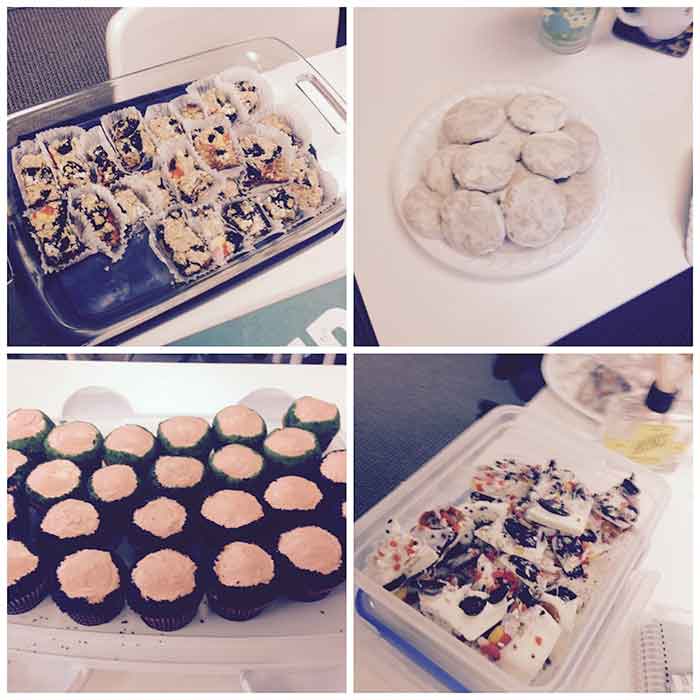
    No Halloween would be complete without the treats! Many Influencers brought their favorite treat to share with the entire office.

    The treats ranged from traditional candies,

    CandyCollageOne

    to sugary delights

    CandyCollageTwo

    classic yet healthy options (Ants on a Log),

    HealthySnackImage

    and savory snacks.

    CheeseBallsImage

    To top it all off we even had some rad decorations.

    HalloweenDecorationsImage

    Our first Halloween on the 13th floor was a success and enjoyed by all! We are lucky to work for a company that encourages us to be uniquely ourselves.

  • Those Who Do Not Learn From The Past Are Doomed To Have Poor Search Value

    If you’re reading this blog you’re probably already aware that Google has been busy updating their algorithms. If you work in the Internet marketing industry you may be on edge, cowering at the very mention of any animal whose name begins with the letter P. Ever since the first Panda update in 2012, followed by the introduction of the infamous Penguin algorithm that laid waste to the search engine rankings of many a carefully formulated marketing campaigns, ended careers, crushed SEO companies, and changed the hierarchy of competing businesses across the globe, people have kept an ear to the ground for the approach of further updates.

    Unfortunately, the secrets behind these algorithms are tightly guarded, and only general guidelines and information are provided to the public by the clandestine data giant, Google. So what are we to do? How can we avoid being penalized for our efforts and implement a lasting marketing strategy that won’t blow up in our faces like some Looney Toons derived Acme product?

    Threading Through the Maze: Birth of the Search Engine

    In search for the most strategic tactics to create a future-perfect website, I believe we must first visit the distant past, the primordial pre-digital world of 1945. Yes, its time for a flashback.

    BackToTheFutureImage

    The heated global conflict of World War II has induced a brave new world of scientific development spurred on by allied nations sharing research to gain a technological edge in the war. In the wake of the conflict, a newly established international science community, having proven itself as an invaluable resource in every aspect of the war, is continuing to progress at an unprecedented rate. As the head of the U.S. Office of Scientific Research and Development, Vannevar Bush, has been coordinating between a broad range of scientific disciplines from all over the world since 1941. Frustrated with the inefficiencies involved with sharing massive amounts of data between specialized fields of study, namely the inability to quickly find pertinent information, Bush devised a solution that he described in his essay As We May Think.

    “The summation of human experience is being expanded at a prodigious rate, and the means we use for threading through the consequent maze to the momentarily important item is the same as was used in the days of square-rigged ships.”

    Bush’s vision was to create a system that more naturally indexed information by association, implementing “associative trails”  allowing a person to further explore particular ideas within an article as opposed to having to put down one resource to take up the search for information anew. He envisioned the ability to view multiple articles on a single screen, with the ability to add comments that could be stored and recalled with the article thereafter and the creation of links between related articles, allowing users to map out a network of information easily accessed and built upon by future users.

    Of course, in that day, the technology did not exist to implement Bush’s machine. Bush’s device, the “Memex”, he proposed would use every 60’s spy film’s favorite storage format — microfilm. His vision inspired further development within the scientific community that above all other things resulted in streamlining the exchange of information making exponential leaps and bounds in development and implementation of new science possible.

    Back to the Future

    WhereWereGoingDontNeedRoadsImage

    So you’re probably thinking at this point. “Awesome. A guy back in the 1940’s thought up something vaguely search-engine like. Great. Maybe next time I need to change the oil in my Nissan you can tell me about the inception of the steam engine.”

    Okay. I like nerding out about history. Guilty as charged, but this brief walk through the annals of history does have some significance to the modern webmaster. As much as technology changes and improves, the demands that drive development remain unaltered. The desire for an intuitive means to access a large network of information led to a series of advancements that reshaped modern society.

    The entire history and continued development of search engines lies within the scientific community as an effective means to index and provide relevant information to those that are looking for it. Every search engine adheres to these concepts and despite the negative association with algorithm updates in the Internet marketing community these updates are, at the very least, intended to improve on Google’s ability to provide the most relevant and desirable information to the user.

    For those looking to the future, bare in mind that Google isn’t just getting better at devising its algorithms and penalizing what it interprets to be undesirable marketing practices, Google also provides ever increasing access to information and incorporates more user behavior into how they determine the validity of a website. As the #1 search engine in the world, and largest provider of analytics solutions, Google has access to massive amounts of user data which is being actively used to determine search rankings. While you can fool search engine crawlers and automated ranking processes, Internet users of today are savvy, experienced, and don’t take kindly to spammy or misleading marketing practices.

    Preparing for the Inevitable

    The oversimplified answer to how to implement a website that will succeed on the search engines, and continue to do so, is one that embraces the ideals on which Bush’s Memex was based and all search engines were built — to put useful information into the hands of the people that are looking for it.

    STEP 1: To best do this, the important first step is determining what information your clients need and want most. Don’t get tripped up analyzing at this part of the process. Think simple. If it’s a product you’re selling, generally a wealth of user reviews on the Internet will tell of the user’s opinions and desires. Tap into these for inspiration.

    STEP 2: Next, create original, well-written and researched content. The content should provide users with the information they are looking for, clearly labeled and organized to enable a user to quickly find the tidbits that are most relevant to their search. Updating or adding to this information often is important. Keeping your site current and error-free will help continue visits to your site and an upward progression in ranks.

    Step 3: In addition to text, it’s important to provide high-quality images, videos, and other media, and it’s even more important to label these properly. The more original media you provide the better.

    Step 4: Established social media sites and Internet communities relevant to your industry are important places to have a presence in order to connect directly with potential clients and establish your site’s authority.

    I know these tips are nothing new. These are the time-tested practices for Internet success that have barely changed since the genesis of the Internet.

    I understand the general reaction to algorithm updates. It’s crushing to struggle up the ranks using all your know-how just to have those efforts ripped to pieces. And when battling for exposure in the dog-eat-dog world of marketing, many, if not most, will turn to any competitive advantage they can muster.

    It’s important to realize, however, that with regular updates occurring that further marginalize the gains of shady marketing practices, anyone looking for more than a flash in the pan needs to embrace the ideals from which the search engine was born and connect people to the information they are looking for.

    Image Sources:

    Thanks to Don’t Count Your Chickens and to halbschwer for the Back To The Future Gifs. Also, thanks to Mark Bourne for the Wile E. Coyote image.

  • Game On! Google’s Knowledge Graph Now Shows Video Games

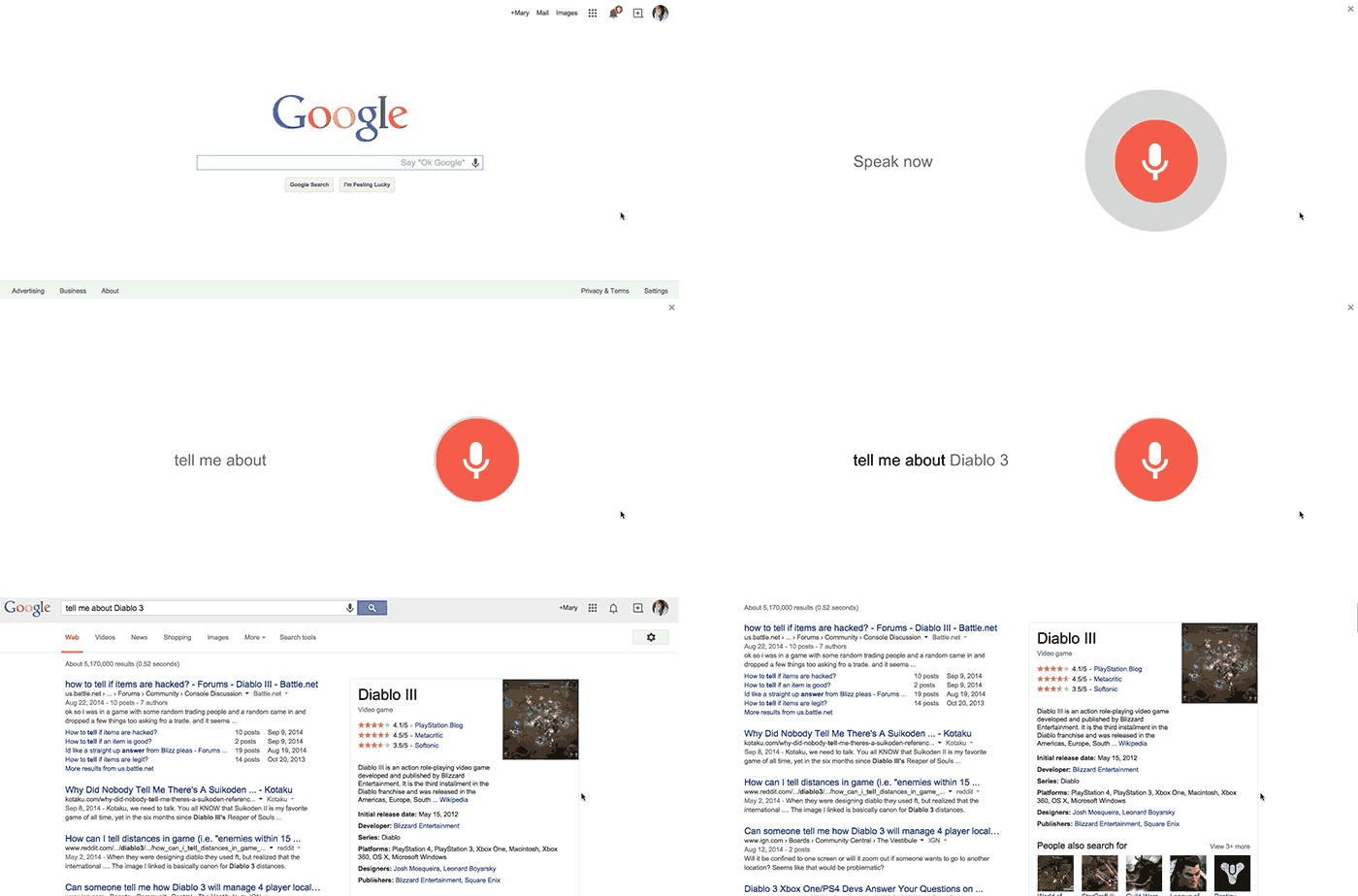
    As of a couple days ago, Google’s Knowledge Graph now includes information about video games! For those of you unfamiliar with the Knowledge Graph, it’s the box that appears on the right side of search results usually for searches like famous people, books, movies, and businesses. It includes pertinent, concise information on the subject matter. Accessible through desktop, mobile, and voice searches, the Knowledge Graph is Google’s way of connecting “real-world things” to provide “more meaningful results.”

    OK-GOOGLE-TELL-ME-ABOUT-DIABLO-3

    With video games, there are a few basic information points that users typically look for when searching for video games. With this addition to the Knowledge Graph, Google has created basic title information for video games, like release date, rating, developer, platform, and publisher, among other things, easy for users to find.

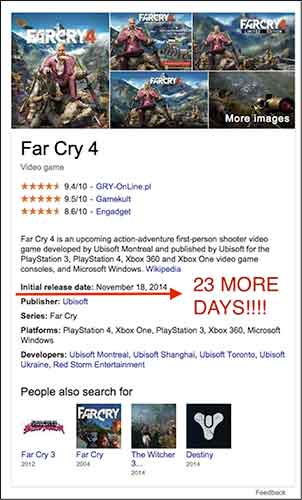
    FarCry4KnowledgeGraphImage

    In the past, when I wanted to find the release date for a new video game it would take a bit of clicking around on various sites (usually Wikipedia or IGN) to locate that information. Now I can find out when Far Cry 4 is coming out just by searching “Far Cry 4,” which to me is pretty amazingly convenient!

    Another exciting feature for gamers is the “people also search for” section, which enables you to easily discover a new game! It is worth noting, however, that it seems (at least for now) in this section, games in a series are plagued by their previous or original titles. To me, that’s wasted space. I’d obviously know to check out Far Cry 1-3 if searching for Far Cry 4 and would like to see a more varied selection.

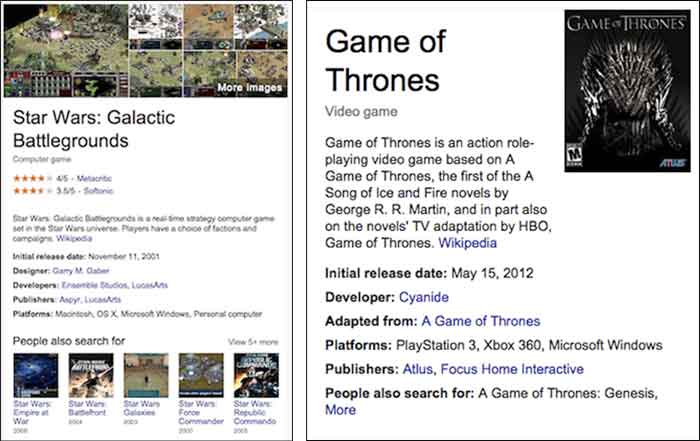
    I did a test to see if some of my all-time favorite games would also show up in a search (even if they’re much older games). Diablo II, Game of Thrones (the RPG) and the lesser-known Star Wars: Galactic Battlegrounds all passed! As suspected, however, it seems like the less recognized games, like Game of Thrones, miss out on some of the listed data, such as game photos, ratings, and a “people also search for” section. As an avid gamer, I know better than to judge a game purely based off ratings, but it’s still great data to have, now made easily accessible to searchers via the Knowledge Graph.

    StarWarsGameOfThronesKnowledgeGraphImage

    For more information on this awesome update, check out VentureBeat’s article including direct info from a Google spokesperson.

  • Avoid Detours: Claim and Edit Your Apple Maps Listing with Maps Connect!

    In the past, the only way you could edit Apple Maps listing was through user feedback on the mobile app. Recently, with our company’s big move from Uptown to the CBD New Orleans, the best way to go about getting our address updated in Apple Maps at that time was to email the whole company and have them mass-submit user feedback about the address change. (P.S. it worked!) These kind of mass-effort cleanup requirements made editing your business information as difficult as crossing The Narrow Sea in Game of Thrones. Thankfully, with the release of Maps Connect from Apple, you can now claim, verify, and edit your Apple Maps listing via mapsconnect.apple.com without the hassle of the above process.

    While the data provided to Apple Maps still primarily comes from Yext and major data feeds, such as Localeze, Factual, and Acxiom, the new Maps Connect allows businesses to be in direct control of their Apple Maps information. Businesses no longer have to rely on data feeds to change their information.

    While it’s a pretty intuitive and user friendly process, I’m going to walk you through it!

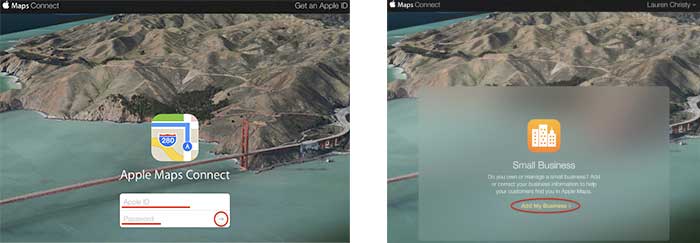
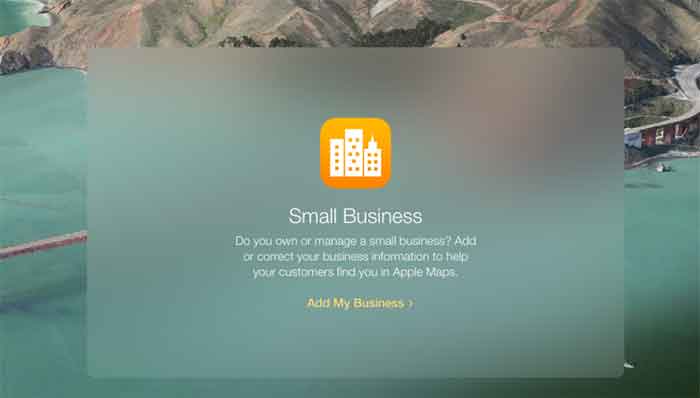
    Step 1:

    Click “Add My Business” to get going.

    Step 2:

    Log in with your Apple ID or create a login if you don’t already have one.

    AppleMapsConnectImage

    Step 3:

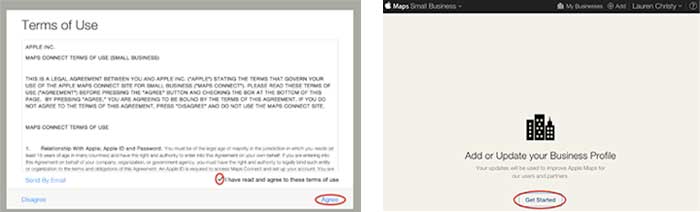
    Read the “Terms of Use,” check “I have read and agree to the terms of use,” then click “Agree.”

    Step 4:

    Click “Get Started” to finally start the actual claiming process.

    GetStartedAddorUpdateBusinessProfile

    Step 5:

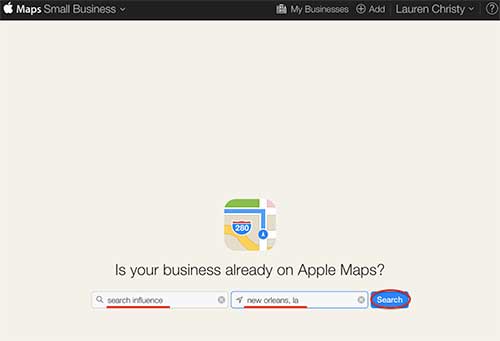
    Search to see if your business is already on Apple Maps by entering your business name, city, and state in the respective fields, then click “Search.”

    IsYourBusinessonAppleMapsImage

    Step 6:

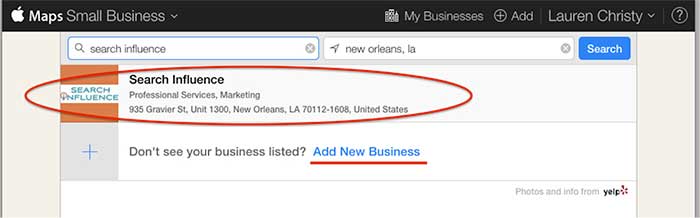
    Based on the results you get, either click on your pre-existing listing to claim it, or click “Add New Business” if yours is not already on Apple Maps.

    NOTE: You should always try searching for truncated versions and any possible variations of your business name before assuming it’s definitely not in a directory.

    AddNewBusiness

    Step 7a:

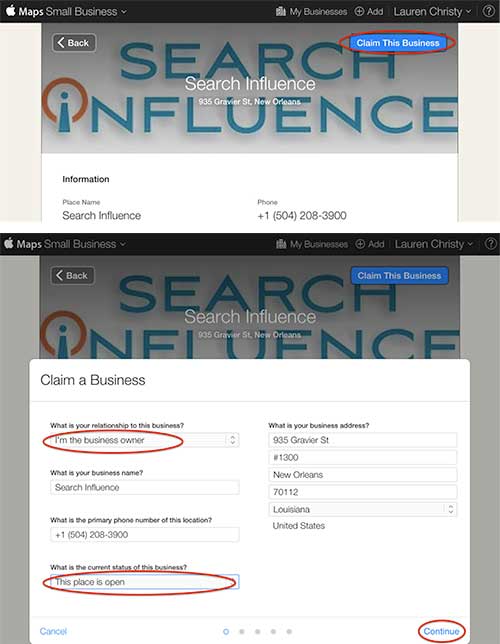
    If claiming a pre-existing listing, you’ll be taken to the live listing of your business where you can click “Claim This Business” in the top right-hand corner. Then you’ll choose your relationship to the business, change any of the business information that is inaccurate, choose the status of the listing, and click “Continue.”

    ClaimThisBusiness

    Step 7b:

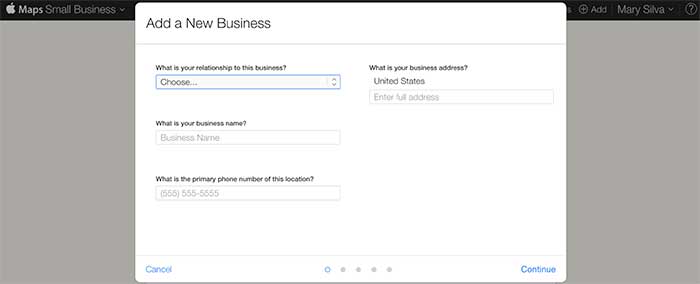
    If creating a new listing, you’ll be taken to a screen to fill out your businesses NAP (Name, Address, Phone Number) and your relationship to the business.

    FillOutBusinessNAP

    Step 8:

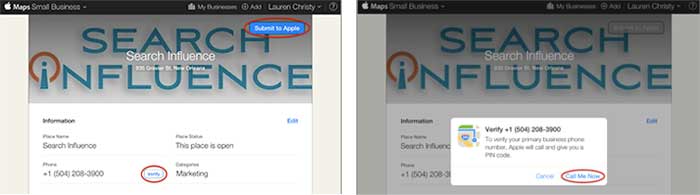
    In either case, the last step is a phone verification. By clicking “Submit to Apple” in the top right corner or “Verify” next to your number, you’ll be taken to a screen to verify your phone number by clicking “Call Me Now.”

    SubmitToApple

    Much like other higher-level directories (think Google, Yahoo, Bing,and Yelp) this phone verification is an immediate, real-time call to the business number to relay a pin. If the phone call with the code doesn’t work the first time, much like Apple’s process for bad pin-code entries on products like the iPhone and iPad that have passcode locks, you have to wait 1 minute to try again, then 5 minutes the next try, and 25 minutes after that. You can circumvent the wait time, however, by logging out of Maps Connect and logging back in.

    Since this is an automated process, businesses like ours with phone tree systems will suffer the inability to phone verify for now. I reached out to Apple Support to see if there’s an option to request a manual phone call to verify or some kind of domain-email verification. Within 24 hours the replied that they “manually reviewed and approved [our] profile” which I assume was because of our domain email being used in our account. Hopefully they’ll take a tip from from Google, Bing, and Yahoo and eventually allow a postcard verification option. Maps Connect is also currently only available to U.S. businesses.

    According to the folks at Search Engine Land, “Updates or new listings will show up within a week or could show up more quickly depending on the situation and whether the listing was flagged and/or there’s additional verification required. Beyond this, Apple has additional fraud prevention measures in place, but didn’t discuss them extensively.” So be patient when making any updates or edits.

  • Search Influence Welcomes 4 New Guys & Ghouls To Our Legion of The Undead

    Search Influence Welcomes 4 New Guys & Ghouls To Our Legion of The Undead

    Search Influence is growing, growing, growing! Since we moved to the CBD, we have rapidly expanded. For us, though, it’s not all about the numbers. We’re just excited to welcome incredible people to our team. Get to know our newest influencers:

    Aubrey-AhmedAubrey Ahmed – Junior Internet Marketing Associate

    Born and raised in New Orleans, Aubrey completed her undergrad at Loyola University, where she majored in English and French. While working toward her master’s in education, she spent a year teaching in France before returning to her hometown for a change of pace. She is passionate about books, art, traveling, and writing. She is looking forward to beginning this new chapter at Search Influence!

    Drew-RoweDrew Rowe – Junior Account Associate

    Drew grew up in in a small beach town in Los Angeles, but went to LSU for college. She graduated in May with a major in communications. Even though she loves California, she decided to move to New Orleans because she loves how friendly the people are here. She also loves the food, of course. Fun fact about Drew: all through high school, her ID said Mr. Drew Rowe because they assumed, based on her name, that she was a guy.

    Jessica-KerseyJessica Kersey – Junior Internet Marketing Associate

    Like most military kids, Jessi spent her formidable years all over the country. She has lived in two countries, five states, and one island. In 2014, she graduated from Cedarville University with a B.A. in journalism. New to New Orleans, she hopes to discover all the amazing secrets the city holds. Jessi is also a hardcore pop culture and canine enthusiast.

    Mathieu-GalyMathieu Galy – Junior Internet Marketing Associate

    Originally from Toulouse, France, Mathieu graduated from the Business School of Paris in 2013 with an M.A in International Marketing and Communication. After graduating, he moved to New Orleans to follow his spouse. Since then, he has been enjoying everything that New Orleans has to offer and he has been giving his time to help Audubon Zoo as a volunteer. Mathieu loves baking French pastries, making his friends happy, and their dietitians a bit less! He is totally fond of his English bulldog, Fluffy.

    Welcome Aubrey, Drew, Jessi, and Mathieu, we look forward to all of the great things you will accomplish with Search Influence.

  • The Saints Fan’s Guide To Schema

    Saints season is underway as our boys in black and gold try to bring another Super Bowl win back to the Bayou. Fall season isn’t just a time to enjoy football accompanied by ice cold bevs, a few Lit’l Smokies, and a seven-layer dip, it’s also the best time to ask yourself if you’re getting the most out of schema – one of the most untapped resources in online marketing.

    QUARTER ONE – SCHEMA, BUT WHAT IS IT?

    First off, Who Dat. Secondly, schema is an HTML markup that you can add to web pages to make them more easily readable by search engines. Schema is essentially a type of label similar the numbers on a player’s jersey. Schema gives the crawler an idea of what the content on a page can be categorized as, sort of like how numbers on a jersey can tell you what position a player is (btw, go number 9!!! #breesus).

    QuarterOne

    QUARTER TWO – OKAY…SO, WAIT, WHAT?

    Trust me, schema is great. Still don’t believe me? According to a Searchmetrics case study, pages with schema.org integration on average rank four positions higher compared to pages without schema. Not to mention Google officially recognizes schema in the same way that coors light Bud Light is recognized as the official beer of the NFL.

    QuarterTwo

    HALFTIME – STAND UP & GET CRUNK!

    Also, time to dispose of a few soft pretzels and tray of N’awlins Nachos.

    QUARTER THREE – I AM PRETTY FULL, BUT WHISTLE MONSTA IS HERE, SO LET’S DO THIS.

    Now that you are all in on the schema bandwagon, you need to figure out what kind of schema you should be using. This is where you need to develop your schema playbook. There is an incredible amount of schema out there – and that is an understatement. To get started, try checking out the local business schema on schema.org. If you have reviews on your page, another good starting place may be schema.org/Review.

    QuarterThree

    QUARTER FOUR – CLEAR HIERARCHY, FULL HEARTS, CAN’T LOSE

    Time to implement schema and bring home that elusive win. Schema markup is added within HTML tags on site pages. Both HTML and the schema are structured according to a clear hierarchy, which is important to remember when choosing which schema properties to use for markup.

    QuarterFour

    0:00 4TH QTR – FINAL SCORE: SAINTS WIN! SAINTS WIN!!!!

    And most importantly, you win too. Schema is often misunderstood, but if used correctly, it can be one of the most powerful tools in an online marketer’s arsenal. Thanks for reading, and GO SAINTS!

    Take a more in-depth look at schema with this blog from SI web developer, David Fransen.

  • Is Apple Pay Keeping Google Wallet Away? Yelp Gets Posh + More!

    1. Apple Pay Launches as a part of iOS 8.1
    – Mashable

    On Monday, one of iOS 8’s most anticipated features, Apple Pay, went live. iPhone 6 and iPhone 6 Plus users only had to download the iOS 8.1 update and add a credit card to Passbook to start using the feature. In theory, a user only need connect a card, hold their iPhone to a pay terminal, use their personalized Touch ID and be on their way.

    Apple Pay does not link with loyalty cards, nor can it bypass the seemingly never ending prompts you encounter at supermarkets and drugstores. The near field communications (NFC) feature can work with most payment terminals, with most major banks and the list of participating merchants is expected to continue to grow.

    ApplePayImage-SearchInfluence

    2. Google was here first with Google Wallet
    – Mashable

    Although Apple Pay has greatly overshadowed it, Google has had a similar system since 2011 called Google Wallet. But if Google really was the hipster of cellular device tap and pay, why is Apple getting all the credit (pun intended)?

    Apparently, it’s the service providers such as AT&T, Verizon, and T-Mobile that have been obstructing the visibility of Google Wallet for the past three years. While Google controls the Android software that carries Google Wallet, the service providers control the hardware and carried minimal phones capable of using the feature. Apple, on the other hand, controls the hardware and software of their devices.

    Google hopes to gain more media and user attention following the launch of Apple Pay because unlike Apple, Google Wallet is compatible with any bank and any credit card.

    3. Drivers for Uber Protest Company Policies
    – Business Insider

    Drivers for the ridesharing service, Uber, are not happy this week. On Tuesday, drivers organized across the country to protest the company’s policies, including those on reduced fares, tipping, the driver rating system, and driver safety.

    Drivers say that because of Uber’s reduced fares, they are losing money and find shorter trips not worth the cost of gas they require. They feel the company’s automatic tipping policy, that requires drivers to deny cash tips from customers that wish to give one, is only adding to their struggles. Drivers also face concerns over their personal safety when dealing with disgruntled or intoxicated passengers.

    Uber has yet to comment on the matter.

    UberProtestImage-SearchInfluence

    4. Yelp Adds Hotel & Winery Reservations to Business Pages
    – MarketingLand

    Remember last year when Yelp teamed up with OpenTable to make booking a restaurant reservation as simple as a tap of a button? Instead of food, this time it’s rooms and wine. Early on Monday, the company announced that business pages would now do hotel bookings, via Hipmunk, and winery reservations, via CellarPass. Yelp has also expanded its booking services to a number of other third party delivery and reservation services.

    While Yelp does not charge businesses directly for access to these features, the third party providers do and give Yelp a share.

    5. Maps Connect – An Aspirin for the Maps Corrections Headache
    – Search Engine Land

    On Tuesday, Apple launched Maps Connect, a free service that allows small business owners to manage listings on Apple Maps via their Apple ID. The process requires a one-step verification phone call. After that, the business owner is free to manage their listing or listings seamlessly. Updates or newly created listings show up within a week or sooner.

    The service does require an Apple ID, so those without it will need to download it. It also is intended for small business owners themselves, or authorized representatives, but not third party agencies.

    Currently, Maps Connect is only available stateside, but Apple plans to expand overseas in the future.

    AppleMapsUpdateImage-SearchInfluence

    Image Sources:

    Thanks to Mashable for the Apple Pay photo, Maya Kosoff of Business Insider for the Uber protest photo, and Search Engine Land for Apple Maps Self-Service photo.

  • Google Gives Answers To Life, Love, & The Universe

    As you may or may not have noticed, prevalence of Google’s answer boxes among search results has increased dramatically. Google’s algorithm updates have always pushed the search engine to more closely mirror the human searchers, aiming to provide the best answer to each question. With the collection of Google’s Knowledge Graph (their personal database of information and the interconnectivity of ideas), they have announced their goal of transforming from an “Information Engine” to a “Knowledge Engine.”

    From Google’s Knowledge Graph, a new item has emerged in search results: the answer box.

    If you haven’t seen them (and have no idea what I am talking about), let me back up. According to Moz, Google now displays a direct answer in 3.5% of search results, as opposed to the standard 10-pack of results, sprinkled with some PPC ads.

    These direct answer results have been around for well over a year (I found posts introducing them in August of 2013). However, answer boxes are being seen in 44% more search results after the rollout of Panda 4.1. So, more people are seeing them and more people are talking about them!

    Answer Box 1.0

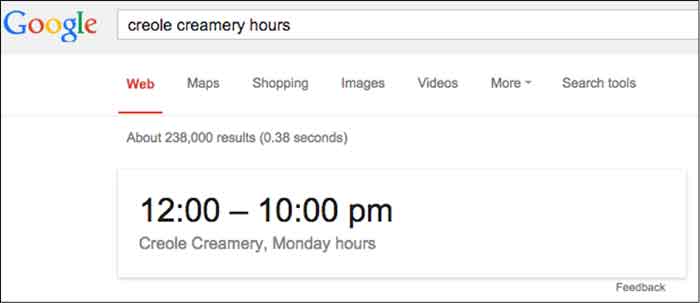
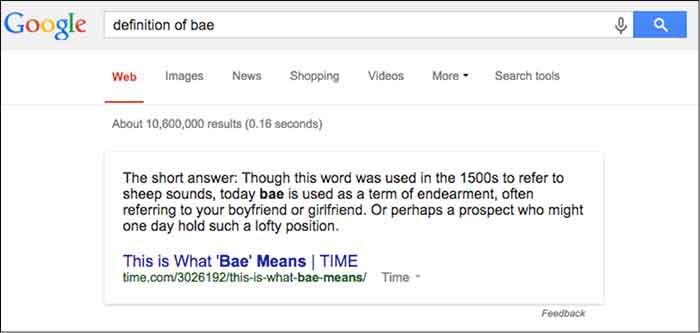
    The first generation answer box was a Google SERP feature. These early answer boxes provided short, direct snippets of information that were concise and, ultimately, limiting. Below is a perfect example that still holds this early answer box format:

    Google Answer Box Hours Of Operation Image - Search Influence

    Dr. Peter J. Meyers provides 101 other examples of early answer boxes in this blog. Quickly scrolling through them, you’ll notice they all look pretty similar and pretty boring.

    Answer Box Evolution

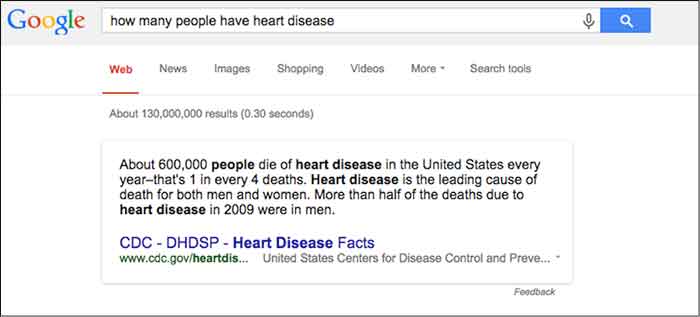
    Over time, the answer box has drastically evolved. Google quickly realized that it could not index every possible answer to every possible question. Spoiler alert, Google doesn’t like to be limited. So, instead, Google used its vast index of the Internet to pull results from sites, creating a completely different answer box that looks more like:

    CDC Information Pull Google Answer Box Image - Search Influence

    This, however, can pose problems. Sometimes, Google pulls answers from long-outdated websites, which can provide an incorrect or inappropriate answer.

    There are going to be instances where Google provides an insufficient or incorrect answer. When this happens, rejoice because even Google is imperfect. One example (and, yes, I’m being excruciatingly picky here) cropped up while I was doing research for one of our clients.

    HowManyHeartDiseaseGoogleAnswerImage

    Initially, my reaction was “Cool, that’s some information that I could use,” but then I realized it wasn’t the information I was looking for.

    StarWarsJediMindTricksImage

    Nice try Google. I was looking for how many people have heart disease, not how many people die from heart disease.

    But, you’ll notice that there is this handy “Feedback” button at the bottom. Here, you can write a personal message to Google telling them to get their act together. Yes, you can be a part of the Google movement.

    Other issues can occur when Google pulls from sites that are out-of-date. So be on the lookout, and when you find inaccuracies provide concise feedback, and be on your merry little way.

    Other Answer Box Speciation

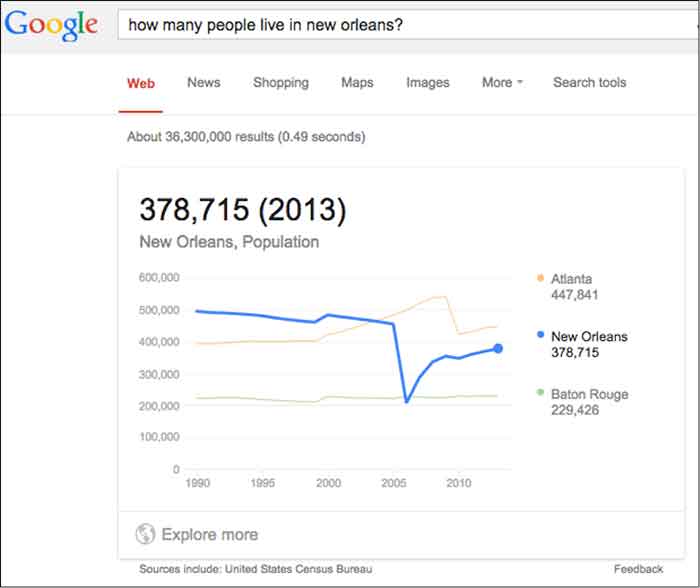
    Population – This one is actually interactive and will show the population anywhere along the measured domain.

    Interactive Population Google Answer Box Image - Search Influence

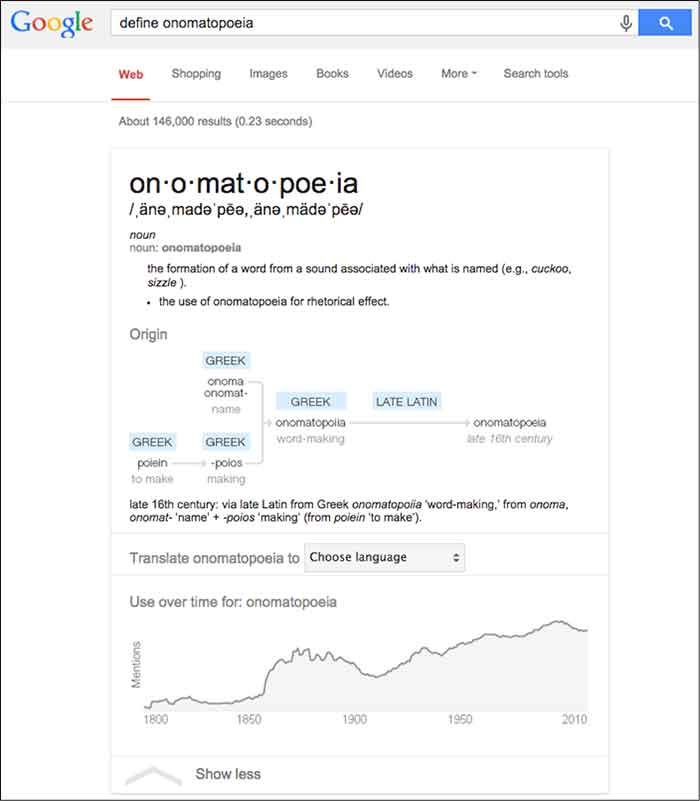
    Etymology & Definition – As a copywriter, this is a personal favorite of mine. I imagine this will do wonders for future linguists and English majors as they can find definition and historical context, all in one search.

    Definition Google Answer Box Image - Search Influence

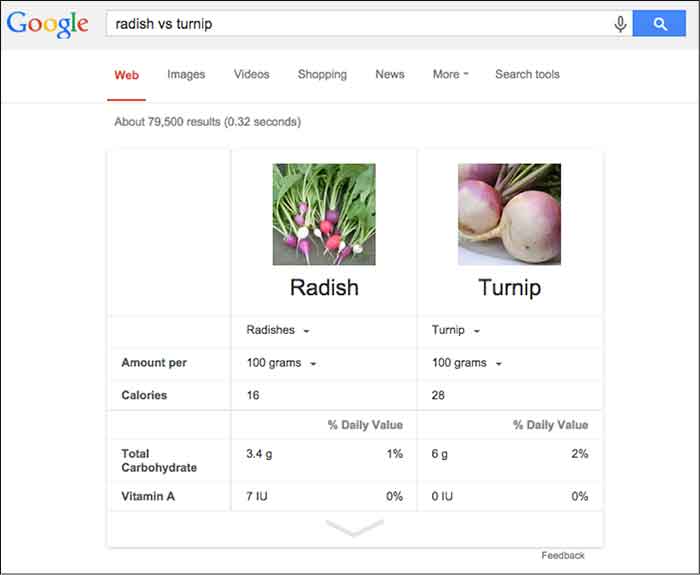
    General Knowledge – What is a thing? Compare and contrast objects or see a specific object defined across a wide array of variables.

    Comparison Google Answer Box Image - Search Influence

    These are just a few examples of an infinite amount of possibilities and I expect Google to only further diversify its answer boxes as its Knowledge Graph continues to expand. However, you’ll notice that, in general, the newer answer boxes seem much more comprehensive, colorful, and engaging. It seems fairly certain the we will continue to see these answer boxes more often as Panda stays on patrol.

    Why Now, Google?

    Plain and simple: mobile search is on the rise. Mobile users already account for more than half of all site traffic. The percentages are even more staggering for social sites such as Facebook and Twitter. Google is in tune with the mobile trend.

    The mobile searcher is a completely different animal than the traditional laptop user. Personally, when I am searching on my phone, I am looking for something very specific. That could mean any number of things — hours of operation, contact info, a trivial fact… The point is, I’m not in the mood to sift through a second layer to find that information. Google appeals to the mobile user in all of us with these answer boxes.

    Also, Google’s answer boxes are another push for clear, concise, valuable information. Google is, afterall, a search engine. Users are searching for information. Google continually updates its algorithms to effectively provide the best possible information.

    On its own site, Google says, “Get answers no matter where you search. Information from the Knowledge Graph is available on your desktop, tablet, and smartphone. So wherever you search on Google, you’ll find that answers and discovery are at your fingertips.”

    What Does This Mean For Your Site?

    In theory, if you’ve earned enough authority points from Google, your site could be a source included in the answer box. Unfortunately, unless you are the CDC or Times.com, this is highly unlikely for broad searches. To get pulled into more localized questions, there are things you can do to signal to Google, “Hey, this is an important piece of information.”

    One such way is schema, which classifies bits of information so that it is easier for search engines to digest. You can learn loads more about schema here and in an upcoming blog post.

    What kinds of answer boxes have you seen? Have you come across any issues with terrible (or terribly funny) Google answers? What do you think of them? Let us know!

    Image Source:

    Thanks to Tina Grimes for sharing the Star Wars mind trick gif.

  • What’s Black and White and Impacts 3-5% of Search Queries? Panda 4.1!

    In the last two months, Google has been busy improving the Panda. In early August (Aug. 8, 2014, to be exact), there was a lot of chatter from the SEO community seeing the flux in Google Analytics accounts, which was generally accepted as an unconfirmed monthly Panda data refresh.

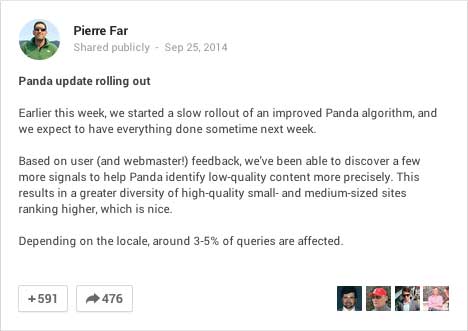
    In early September, there was a large Panda data refresh, and on Sept. 25, Google’s Pierre Far announced yet another Panda algorithm update, (the previous Panda algo update was May 19).
    GooglePlusPostPandaAnnoucedImage

    And just to keep you on edge, ceaselessly examining your Analytics data, the rollout of this Panda has been sloooowwwwslothlike. Google confirmed that some Google data centers were not updated until “October 6 or later.” So, your website could have seen the algorithm at some point before Sept. 25 and after Oct. 6 – that’s a two-week time frame to analyze!

    What is Panda?

    There are so many blog posts out there describing the Panda algorithm, I will just summarize it briefly. If you’re interested in reading about it in more detail, here’s a good blog post, and some excellent reading here.

    Panda is an algorithm that filters the search results to:

    1. Reward high-quality content with more presence
    2. Push sites with thin content down to rank lower

    Google says low quality or thin content is text that

    •   Is very short in length
    •   Offers very little useful information to the consumer
    •   Is unoriginal or copied

    Your website content should not be self-serving; it’s all about providing information to the consumer to educate them with detailed and authoritative information.

    PandaContentPullQuoteImage

    This most recent Panda is an algorithm update, which is supposed to reward more high-quality small and medium-sized websites. From Par’s G+ post:

    “Based on user (and webmaster!) feedback, we’ve been able to discover a few more signals to help Panda identify low-quality content more precisely. This results in a greater diversity of high-quality small- and medium-sized sites ranking higher, which is nice.”

    This update is significant because it added more signals to better identify lower quality sites. Earlier algo updates have rewarded big directories for local searches, so this update is exciting because small- and medium-sized websites have a fighting chance for ranking in their local markets.

    Google Updates vs Data Refreshes

    To paraphrase, an update is a change in the algorithm. A data refresh is when the algorithm has not changed, and new data that is pushed through the data centers, such as new crawl data, is updated in the various data centers across the Google universe.

    Updating the data centers is one reason why updates are seen at different times for different geographies.

    I am quoting this really old Matt Cutts blog post here:

    Algorithm update: Typically yields changes in the search results on the larger end of the spectrum. Algorithms can change at any time, but noticeable changes tend to be less frequent.

    Data refresh: When data is refreshed within an existing algorithm. Changes are typically toward the less-impactful end of the spectrum, and are often so small that people don’t even notice. One of the smallest types of data refreshes is an:

    Index update: When new indexing data is pushed out to data centers. From the summer of 2000 to the summer of 2003, index updates tended to happen about once a month. The resulting changes were called the Google Dance.”

    What are data centers? Google crawls the websites out there and caches those in their gigantic index. That index is huge and is stored on thousands of machines. Those thousands of machines live in various Google data centers around the world. To truly geek out, read more about Google data centers here – these centers are where the Internet exists.

    Did Panda Help or Hurt Your Site?

    When you look in Google Analytics, it may be easy to see a drop off or dramatic increase. For example in the graphic below, I’m guessing Panda rolled out in the business’ local area around Oct. 6, and it didn’t go well for the site:

    Panda rolled out Oct 6, 2014

    And on Sept. 29, this site was Panda-happy:

    increase in Google organic traffic after Panda September 2014

    For most of the sites I looked at, the visual changes were more subtle, so I usually toggle between the data by week vs. the daily data. The weekly data shows me a week where the decreases started, which correlates to the earlier rollout dates:

    weekly analytics view to pinpoint Panda rollout

    When I switch to the daily data, I can clearly see the dips in traffic. I have to pinpoint Saturday, Sept. 20t or Wednesday, Sept. 24 as the day this site got the Panda.

    daily Analytics shows dips in Google organic traffic after Panda

    The Sept. 20 might be a little early to fit in the Panda time frame, and I am accustomed to seeing a spike immediately before an algo filter, so I’m going for Sept. 24. Using Sept. 24 as the before and after date, this website has seen 12% decrease in Google organic traffic.

    12% decrease in Google organic traffic after Panda Sept 2014

    This website with the 12% decrease in Google organic traffic after Panda is a good website for an authoritative local business. What this drop tells us is even if the content on the site offers really great information for the consumer as this one does, it might be old and/or thin. Someone may have copied it over the years. We might need to add other content to our pages with images and videos. Content is not just text. We need to take a good look at the age of the text and the variety of the content on the page. With this review, we can create a strategy for improving the content for the next Panda data refresh.

    What to Do Now

    PandaImageWebsite owners or managers who see a Panda smack really need to take a critical look at the content on the site. To succeed, the content needs to be information rich, and not self-serving.

    An example of self-serving content is content that is stuffed with keywords, abundant keyword use on a page not only in the body text, but also in the URL and alt tags. This is also sometimes referred to as over-optimization.

    Self-serving can also mean the content talks too much about the business instead of talking about the product or service the consumer is trying to learn about. Talking about the business is great as long as it’s on the About page or the home page. Leave products or service pages to be about those topics.

    This is a great list compiled by Josh Bachynski “The Complete Google Leaked PANDA Do & Don’t LIST – 2011 to Present.”  This list really dives into the aspects of good and not-so-good content.

    Google published a list of questions to ask when writing content. The full list is here. I have chosen some to republish below:

    • Would you trust the information presented in this article?
    • Is this article written by an expert or enthusiast who knows the topic well, or is it more shallow in nature?
    • Are the topics driven by genuine interests of readers of the site, or does the site generate content by attempting to guess what might rank well in search engines?
    • Does the article describe both sides of a story?
    • Does this article provide a complete or comprehensive description of the topic?
    • Are the pages produced with great care and attention to detail vs. less attention to detail?

    Diversity of content and freshness of content are also factors to consider.

    Diversity of content helps readers in various ways. Content can mean images. Original images are best rather than stock images, but stock images work. Content can also mean videos, charts, calculators, and reviews. Content is anything that helps the consumer learn more to make well-informed decisions.

    For content freshness, a blog is probably the easiest approach to keep the website updated regularly without having to rewrite your page’s content too often.

    If you have a specific owner or practitioner who is the authority on the information, claim that using Author markup – authorship thumbnails are gone from SERPs but that doesn’t mean the Author authority is gone.

    There are so many tactics for coming back after a Panda smack, and the best strategy is a mix of tactics. It will likely take time to create really good content and build back your website credibility, but it is a necessary investment for your site’s success.

    If you think your site is suffering from the Panda, give us a call. We would be glad to help.