Blog

  • 8 Must Visit Eateries For BIA Kelsey SMB Digital Attendees

    8 Must Visit Eateries For BIA Kelsey SMB Digital Attendees

    SoBouNolaCracklinImage
    Cracklin. Yes. Cracklin. Tasty.

    My colleague Neal Polachek, a noted analyst and advisor, wrote me an email asking my opinion on New Orleans restaurants. He is coming to town for the BIA Kelsey LEADING IN LOCAL: SMB Digital Marketing event. He mentioned Cochon, which is excellent, but I had a few other recommendations.

    If you’re coming to New Orleans for the BIA Kelsey show, then please look up Search Influence. We’re only a few blocks from the Hyatt and we would love to see you.

    The following is a transcript of my email to Neal:

    As you know, there are TONS of great places in New Orleans. I do love Cochon. Your only challenge may be the noise level.

    Donald Link’s group has another new restaurant called Peche which is also great.

    Others you should consider off the beaten path:

    Lillette – One of our current favorites, on Magazine St. just passed the Garden District towards Uptown.

    Gautreau’s – Hidden in an Uptown residential neighborhood – worth the trip!

    Pascal’s Manale – Also in Uptown, it’s classic, quintessential New Orleans.

    Oddly enough, one of our current favorite restaurants is actually inside the Hyatt pavilion, called Borgne.

    Another current favorite that is seldom as busy as it should be is SoBou, which is attached to the W in the French Quarter. You can make a meal of the appetizers alone.

    If you want a super-fancy wine and dine, a hot prospect or a hot date kind of thing, there’s R’evolution in the french quarter just past Bourbon Street. This restaurant is excellent. We just ate there for the first time a couple of weeks ago.

  • 5 for Friday: New Apple Gadgets, Net Neutrality, And Twitter Says Buy, Buy, Buy!

    5ForFridayImage

    1. Apple’s Big Reveal
    -Mashable

    This week, it’s impossible to ignore Apple’s big unveilings. While the new iPhone 6 may come with some interesting upgrades, for me, “the big reveal” was all about the Apple Watch. The new gadget is very slick looking and appears to be packed with features. Apple aims to put our entire social networks on our wrists while combining a fitness tracker, texting and voice capabilities, as well as a ton of fun apps. Check out this article, which talks about the technology behind Apple Watch.

    2. Twitter’s Advances Its E-Commerce Plans
    -TechCrunch

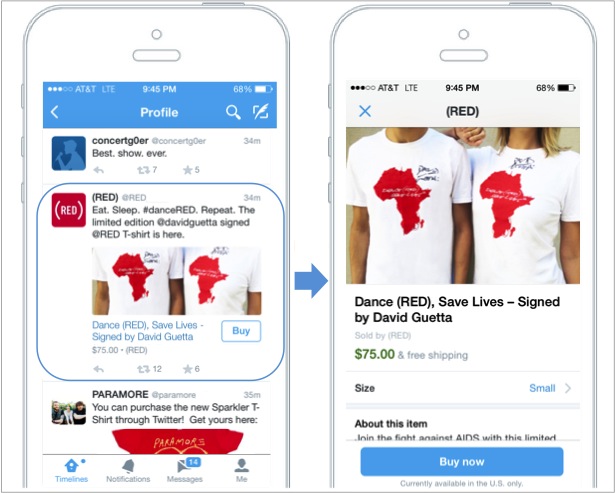
    As the ever growing competition between social media giants continues, Twitter explores alternative revenue options other than advertisements. The Nathan Hubbard, Twitter’s head of commerce, says of the microblogging platform, “[We] want to be a bridge between a consumer wanting something and getting it.” While still in the testing phase, the “Buy” button is a big step for Twitter in a series of initiatives built to generate more profit from its 271 million users. How do you feel about the option to buy goods from within Tweets?

    TwitterBuyNowButtonImage

    3. Facebook Converts Higher Value Into Better Marketing Services
    -Bloomberg

    While on the subject of social media advertising, check out this article on Bloomberg, which talks about Facebook’s incremental improvements to its array of advertising services. Marketers today are willing to spend more money for better conversion tracking, innovative new promotion options (such as video ads), and improved mobile ads.

    4. Social Networks for Net Neutrality
    -TechHive

    SaveTheInternetImageOver a dozen large websites, such as Netflix, Foursquare, and WordPress, joined “The Internet Slowdown Day” protest on Wednesday, looking to garner public support in the fight for net neutrality. Citing big Internet providers as the enemy, the websites simulated what the fast and slow lanes of the Internet would look like by displaying the loading page icons on their home pages. As September 15th approaches (the deadline for second-round comments on FCC proposed net neutrality rules), the conversation about Web traffic regulations is as pertinent as ever.

    5. Are You Using All Possible Keyword Sources?
    -Moz.com

    This highly informative post by Neil Patel uncovers some of the potential sources for your keyword research that you may not have thought of previously. While you may already have a preferred tool, the author suggests several unorthodox ways to supplement your research and, ultimately, lead to a better SEO campaign.

    Image Sources:

    Save the Internet Image

    Twitter Buy Now Button

    App Filled Five Image

  • On Social Entrepreneurship and Social Media – Interview with Alexandra Ernst of Project Pangia

    ProjectPangiaOwnerImageA year and a half ago, Project Pangia was born from the mind of Alexandra Ernst. After graduating from Loyola University New Orleans and working with The Walt Disney Company, she set out to create a business of her own. Having a passion for travel, meeting people, and social change, she aimed to create a business that would connect people. Project Pangia is a global initiative based on social and interactive development through the exchange and tracking of travel bracelets. With the help of social media, Ernst has managed to successfully fund an $18,000 Kickstarter campaign, create jobs for various underprivileged women in Bali, Indonesia, and spread these bracelets to more than 17 countries.

    How did you come up with the idea for your business?

    Project Pangia started as an idea for a travel website. I’ve always had the entrepreneurial spark and I wanted to create something. More than creating a normal business, I wanted to create something that connected people around the world and had some social impact.

    I began thinking about how our generation uses social media; we all have Facebook, Instagram, and Twitter – people sometimes just sit and browse through these sites for hours looking at other people’s posts or thinking about what they are going to post. Then, I started thinking about how I could utilize these tools but be able to connect with people not only on a virtual level but also on a human level. This evolved into a travel networking site, but I needed something that would allow me to do it on a fixed budget. It all came full circle when I thought about the idea of creating these bracelets. I said, “What if I give these bracelets to one person; they can hand one off to another person and somehow be able to see where these bracelets are going?”

    How does the exchange of bracelets work?

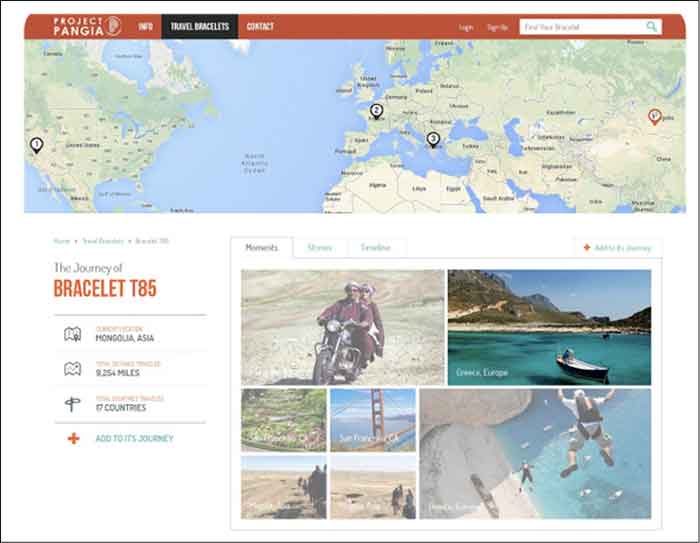
    As it is explained on the Project Pangia website, every bracelet is handmade and stamped with a unique code, which is registered on the site. Every bracelet is handmade and stamped with a unique code, which is registered on the site. You can track your impact as your bracelet is passed along from one hand to another in the “spirit of kindness.” Each new recipient can add to the bracelet’s story online before passing it on to someone new. We keep you updated as your bracelet reaches certain milestones so you can witness just how far one simple act of kindness can go.

    What is the goal/vision for your business?

    A huge part of it is working in underprivileged communities that otherwise wouldn’t have these opportunities of having fair compensation for their work, quality working conditions, and mentorship. For now, I’ve handled the production aspect in Bali – we used recycled surfboards and other sustainable materials for our production, packaging, and shipping. Ultimately, I would like to offer other communities around the world these types of opportunities through collaboration and partnerships.

    Project Pangia also aims to spread kindness and spread the message of “travel in kindness.” By doing so, we are creating cultural awareness and connecting people through the use of personal interaction, as well as through embracing the use of technologies and social media platforms.

    Finally, as the business grows, I want for Project Pangia to have a strong online presence on a global level and I have been slowly creating this by displaying my products and the stories that arise through them on my website, Facebook Page, Instagram, and Twitter.

    ProjectPangiaScreenshotImage

    If you are active in social media, what platform do you find elicits the most activity?

    Facebook and Instagram have definitely been the two that have grown at the fastest rate. In January 2014, my Facebook page had about 200 followers. Once I began to post more consistently and I began to push a couple of Facebook Ads, it grew to almost 3,900 in just a few months.

    My Facebook page was definitely my most important and effective tool for my Kickstarter campaign. If it weren’t for Facebook it would have been impossible for me to successfully fund it. By creating Sponsored Posts through Facebook I was able to drive a lot of traffic to my campaign. Also, my campaign was shared via Facebook 1,523 times! It was definitely where I saw more interaction from my followers who eventually became my backers. My goal was $18,000 and I raised $18,295.

    My Instagram has also continued to grow. I constantly want to push more imagery, and I think nowadays there’s an overload of information and people don’t want to read that much. Therefore I want to show them as many pictures of my products and their impact, and my followers have responded very well to that. A month ago, I had about 300 followers and it has nearly doubled in less than a month.

    I try to be very meticulous and careful about what I post, which is why I do not post as often as other businesses. Something very important to keep in mind is that you can’t just post anything online; you have to be very intentional with what you are writing.

    What other tools aside from social media are you utilizing to push your business online?

    I currently use a WordPress site and as someone without much technical background, this platform has truly allowed me to manage my website effectively. WordPress even has a tool that measures traffic within the same platform. I also have Google Analytics installed with the site and I use Hootsuite to create social media posts ahead of time and make sure I stay organized.

    Do you have any advice for other young entrepreneurs who want to leverage the use of social media with their business?

    It’s way more time and money than you’ve ever imagined, so you better love it with all your heart and truly believe in it. However, once you start seeing how people respond and the feedback they give you it makes it all worth it.

  • New York Hotel Fines $500 For Negative Online Reviews. How Can They Fix It?

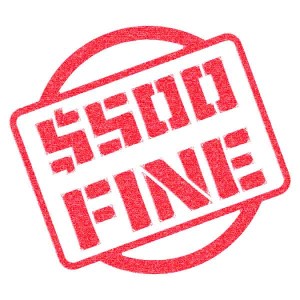
    500fineA Hudson, NY hotel has a perplexing way of dealing with bad reviews. According to Page Six, instead of using bad reviews as constructive criticism, the hotel charges wedding couples $500 for each bad review their guests post online.

    “Please know that despite the fact that wedding couples love Hudson and our inn, your friends and families may not,” reads an online policy. “If you have booked the inn for a wedding, or other type of event . . . and given us a deposit of any kind . . . there will be a $500 fine that will be deducted from your deposit for every negative review . . . placed on any Internet site by anyone in your party.”

    As expected, this caused the Internet to go into a frenzy. The day the story broke, the company’s Yelp page was flooded with over 500 bad reviews causing their review rating to plummet.

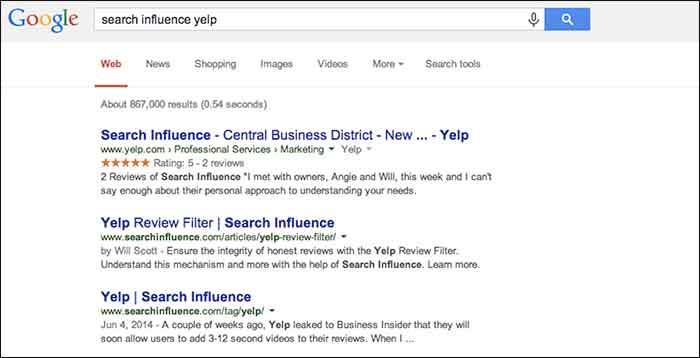
    Since Yelp recently received a well-deserved boost from Google in their search results, Yelp reviews can significantly help or hinder a business.

    Here are a few ways you can handle bad reviews without charging a $500 fine:

    1. Respond to good and bad reviews:

    Respond to all reviews, especially if they are asking a question or expressing a concern. When people take time out of their day to review your business, they like to be recognized. Responding to reviews lets consumers know that you care about your customers.

    2. Strive to be great at what you do:

    If you provide an all around excellent experience, you will get great Yelp reviews. It’s that simple!

    3. Calmly address the Reviewer’s Issues:

    When addressing a bad review remain polite and respectful. The reviewer is someone that gave your establishment a try and wasn’t happy with their experience for whatever reason. Hear this person out. If you respond in a negative way, it only makes your business look bad to other consumers. Not only can you ruin the chance of the reviewer changing their review or revisiting your establishment, this can also cause you to lose potential customers who choose businesses based on online reviews.

    4. Offer a remedy:

    If you think there is a way to rectify the situation, try to offer the person an incentive to come back. Send a private message that includes a coupon for a free milkshake or discounted service. Yelp users can use the update function to change their initial review. Everyone likes to feel that his or her opinion matters, so feeding a disgruntled user’s ego can sometimes quell the fury, and may lead them to reconsider their initial opinion of you.

    5. Bad reviews should be used as constructive criticism

    Never take a bad review personal. Bad reviews that are rational and deserved are not completely a bad thing. Use that negative review as a way to improve your business. Once you have fixed an issue or improved your business based on critiques, let the Yelp community know. They will be happy to know that their concerns matter and that you are listening.

    SIyelpSearchImage

  • Tiny Houses and Tiny Spaces: Making the best use out of space

    TinyCoverDesignImageThe term “Netflix” is Internet speak for “how to kill 2 hours on a rainy Saturday evening.” Well, it was one of those times, and I had stumbled upon Tiny: A Story About Living Small. This documentary shows Christopher Smith’s yearlong journey to find a home of his own. To accomplish this, Chris sets out to buy a large plot of land surrounded by wilderness. On it, he begins to build a tiny house. He ends up building his “home” on a utility trailer with 124 square feet of living space. In the film, Chris also interviews several other families that have also decided to consolidate their living situation.

    If you are like me, you have poured hours into Google searches of these tiny houses and thought, “that’s clever.” The numerous tricks and tips of people who opt for a smaller living space utilize all of the space so that they are comfortable and not cramped. It is this notion that interested me most – taking something small and making it seem bigger by utilizing only what matters and making it flow.

    When it comes to design, far too often we are faced with trying to fill in every conceivable space with more content and images. In doing this, we fail to see that what we are left with is just a pile of stuff and our original message is buried. Also, there are times when we say more than what is needed, and instead of drawing in the target viewer, they seem to just be waiting patiently for the end so that they can move onto the next thing. So to combat this, I have compiled a list of things to consider when designing for smaller spaces, whether for a sidebar web ad or a quarter page ad in a magazine.

    Take a Hard Look at the Space

    The main thing that gets lost when designing for small spaces is the actual size of what we are designing for. Computers give us the ability to enhance images and see them close up. But far too often, what can be read while zoomed in, cannot be read in its actual size. So take the time to open the web ad in a browser to see it in action, or print out the magazine ad and hold it in hand.

    Stack the Messages

    When it comes to deciding what to put in to the space, think of each element as a physical thing. Can you stack everything in your hand and still read everything? Does the logo take up too much space to where someone could fail to know what the image is? Does the novel-like copy seem like more of a pain to read and not draw in attention?

    Dual Purposes

    ToiletDualPurposeImageWhat makes tiny houses so unique and intriguing is that the purpose of everything within them is to maximize space. Like having a sink connected to upper basin of a toilet to eliminate the need for two large elements in a bathroom.

    In the design of things, we can sometimes make use of this as well. Can you use images of your brand in action? Is there a way to animate a web ad and engage the audience in the process? Can that magazine ad both sell your brand and serve as a useful tool to the viewer, like a checklist or a resource worthy of being saved?

    Space to Stretch Out

    The most common reason for people not wanting to jump on the tiny house bandwagon is the concern of not having enough room to even stand up. Many have expressed they would feel too confined and cramped. This same concern should be applied to our designs. When faced with a small real estate for any design, empty space needs to be viewed as an actual thing, as opposed to just being “empty.”

    Too often, we view space as being wide and vast. This also trickles down into the planning process for designs, and by the time it comes to implementation, there is no space for any of the elements to stand up or stretch out. It is important to take into account that space is an actual thing and needs to be represented, otherwise the design will become too confined and cramped.

    The Big Impact of Little Things

    The idea that everything needs to be big in order to be seen is something that does not hold true with designs that are small. This mindset is great for ideas, but when it comes to implementation, all that excitement and enthusiasm needs to be more focused. When it is, that small thing will be inviting and call out, like the sirens to Internet sailors, or to the casual passerby of a newsstand. These small designs should act as a ticket to something larger, something that merits investigation. Making our audience ask, “I wonder what that is all about?” is stronger and more enticing than just giving them a catalog of your products. It is that sense of curiosity and yearning to investigate that will build brand strength and forge a desire to learn more about what it is that you do.

    If you are curious about tiny houses, check out these blogs:

    http://www.tumbleweedhouses.com/

    http://thetinylife.com/

    http://www.tinyhousedesign.com/

    Image Sources:

    Tiny Book Cover

    Dual Purpose Toilet

  • 5 For Friday – War Of The Week’s 5 Kings: Apple, BTC, Google, Pinterest, & IG

    1. It’s Gold, It’s Gold Baby: The New iPad Air, That Is – Business Insider

    Apple is releasing a gold version of the iPad Air with the new launch. With the iPhone 6 being launched next week, the next Apple event in line will be in October. According to MacRumors, the new iPad Air 2 is suspected to include some features similar to the iPhone 5s: fingerprint recognition and an 8MP rear camera.

    Fingers crossed everyone can get gold iPads that match their gold iPhones just in time for the holidays!

    2. KnCMiner Throws A Lasso Around The Moon For Bitcoin – TechCrunch

    Since last December, KnCMiner has made some hard core ASIC systems to move BTC markets shortly after deployment. Now they’ve announced “a $14 million Series A to help build out new mining chips along with hosted mining services.” This ASIC chip upgrade is expected to come on-stream next year.

    As a company that doesn’t actively look for funding, their miners generally sell out immediately at the commence of pre-order periods. In the past, this has allowed them to fund the entire venture independently, but they plan to look for $70 million in funding for future upgrades to a Series B to grow in capacity along with the appreciation of Bitcoin’s price.

    BitcoinOnTheMoonImage

    3. Google Crushing and How to Survive Q4 With Intense Competition – Search Engine Watch

    No, this isn’t about our awesome Google+ Crush infographic (although it should be).  Mary Weinstein of Search Engine Watch posted 4 things that you can do to improve your e-commerce strategy.

    1. Improve Brand Perception using Google Special Offers, Seller Ratings, and Product Ratings.

    2. Make Feed Changes to optimize your AdWords campaigns.

    3. Optimize Big Data by using Google data for Google Shopping campaigns.

    4. Leverage Search Trends, such as the growth of the mobile e-commerce segment to do location targeting.

    4. Pinterest Becomes The Ultimate Creeper – Marketing Land

    This past week, social bookmarking network, Pinterest, sent emails to some of its users congratulating them on upcoming weddings, even some who aren’t actually planning a wedding at the moment. Talk about poor targeting.

    The nature of a site like this is that a lot of people create “dream” and “inspiration” boards without the intention of following through with their pinned desires. So naturally, there are a lot of “dream wedding” boards out there for people who aren’t even remotely close to a wedding day. Luckily, the improperly emailed users mostly found it amusing and took no offense.

    Amusingly enough, Pinterest came out with a funny statement to New York Magazine’s Daily Intelligencer saying that they email these category-specific boards to users every week. This one was meant for those simply interested in wedding content and not just those getting married. They ended the statement with, “We’re sorry we came off like an overbearing mother who is always asking when you’ll find a nice boy or girl.” In my opinion, that’s a great way to turn it around.

    5. Spring 2015 Fashion Week Is Upon Us, You NEED To Follow Some Designer Instagrams – Huffington Post

    You might not be cool enough to intern for a designer or be backstage for all of Fashion Week’s best shows, but you are totally cool enough to know where to look to find your fashion fix.

    Thanks to Huffington Post’s 60 designers to follow, there’s an easy way to keep up with the fashion world. Some of my faves from the list are @zac_posen (designer), @stellabugbee (editorial director of The Cut), and @chloenorgaard (model). One of my personal favorites who didn’t make the list is the fashion photographer Jamie Beck @annstreetstudio.

    InstagramFashionWeekImage

    Image Sources:

    Bitcoin On The Moon

    Instagram Fashion Week

  • TUTORIAL: A Google Gem That’s Trending Near You

    GoogleTrendsLogoMy clients frequently ask me how long it takes to rank higher on Google search page results. I explain that the process is gradual and not guaranteed due to a number of factors, such as the 200 plus “signals” that make up Google’s algorithm, the time it can take for Google to read our “signals,” creating a consistent online presence, etc. — the questions usually end there. I recently had a client challenge me beyond a basic explanation of SEO, digging into my keyword research, and inspiring me to explore the seasonal average search value.

    When the client asked me if I examined seasonal search value in my keyword research, I had to admit that I had not. It typically makes sense to look at average yearly search volume because, as stated above, the SEO process is gradual and we don’t want to target a term that will only help our clients in the short-term. This still left me wondering about seasonal search value, so I researched it. I was suspicious that seasonal search could help identify outside factors that affect the progress of SEO campaigns, and it may help lock-down industry standards that I wasn’t aware of.

    Google Ad Words’ Keyword Planner does allow you to select different date ranges to examine the monthly average value, but I wanted to find a tool that identified possible patterns in keywords. I should have known that Google already had a product for this: Google Trends.

    Google Trends’ Fun Facts:
    – Started in 2006
    – Remember “Google Insights for Search”? This tool put search data into graphs and merged with Google Trends in 2012
    Medical researchers have attempted to predict outbreaks with this tool over the past few years
    – You don’t need a Google account to use this tool

    Visit the site and follow along with my tutorial

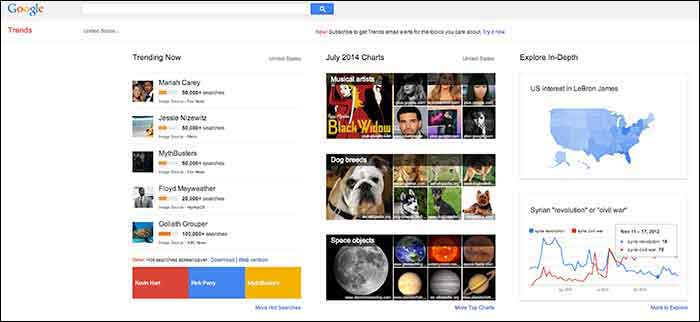
    When you visit Google Trends, you will see three columns of interesting data, so where should you start? The best place to start is with your goals in mind. Do you have specific keywords in mind that you would like to research and compare, or do you want keywords generated for you based around a topic? Either option is available here, along with many other unique features that make it a useful tool for SEO experts.
    GoogleTrends

    Here you will find 3 main categories: “Trending Now,” “July 2014 Charts” and “Explore in-Depth”. The first two categories could be used to brainstorm social media and blog ideas because you can see what’s being searched the most that day as well as a review of the past month’s top searches organized by topic.

    I am going to examine the third column on the page titled, “Explore in-Depth” because I find it most useful for SEO purposes. Still keep in mind the other two columns, however, because they relate to recent news and pop culture that’s also trending. The “Explore in-Depth” column shows two examples of ways you can examine topics and keywords. Click “More to Explore” at the bottom right-hand corner to see all of your search options.

    How to search by Keyword

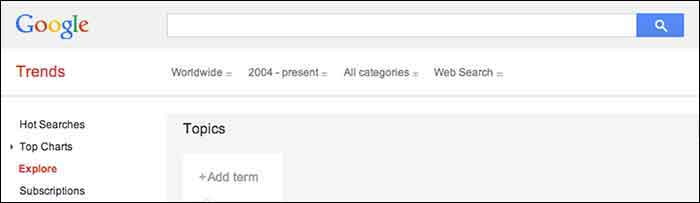
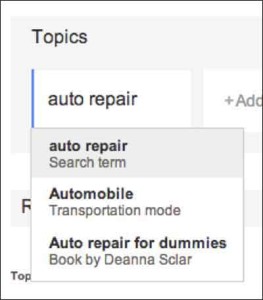
    When you start adding “Topics” that you are interested in gaining search value for, you will also see a drop-down box appear which gives you different types of searches to select. The example below shows “Search term,” which would be the keyword or query, “Transportation Mode,” which is a category. Google will find keywords that fall into that category, and “Book by Deanne Sclar” which indicates a branded search for that book. Once again, think about your goals. If you have specific terms in mind that you want to research, then select the “Search Term” option. If you want to explore a category and see what keywords were searched the most under that category, select the category.
    GoogleTrendsTopicsImage

    GoogleTrendsTopicsMenuImage

    I first selected “Search Term” and filtered the dates of our search to July 2013-July 2014. As you’ll see below, I receive an “Interest over time” graph, but I am also given a “Regional List” category of countries who have searched for “auto repair” the most. I have also been supplied with “Related Searches” at the bottom of the page. Let’s explore these resources.
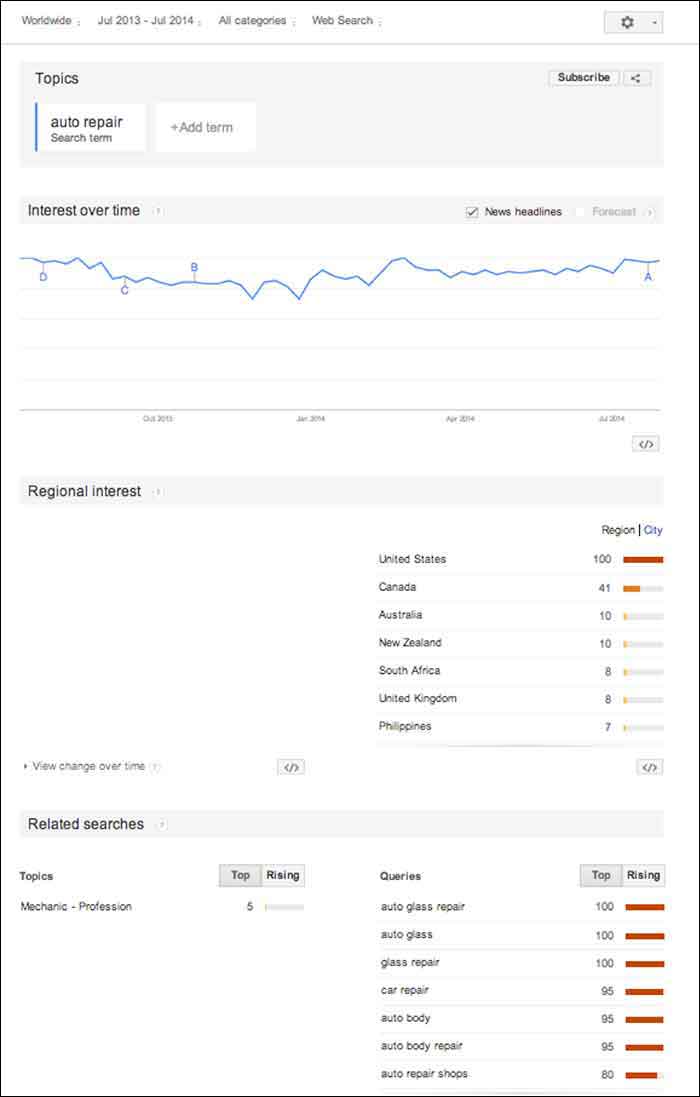
    GoogleTrendsTopicsInterestsImage

    Note that the numbers on these graphs are not absolute numbers. They are relative to each other to reflect a trend.

    “Numbers represent search interest compared to the highest point on the chart. If at most 10% of searches for a given region and time were for ‘pizza’ we’d consider this 100. Each point on the graph is divided by the highest point and multiplied by 100. When we don’t have enough data, 0 is shown.” -Google Support

    1. Interest over Time
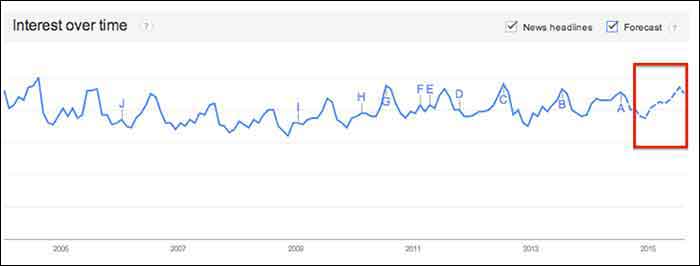
    GoogleTrendsTopicsInterestsForecastImage

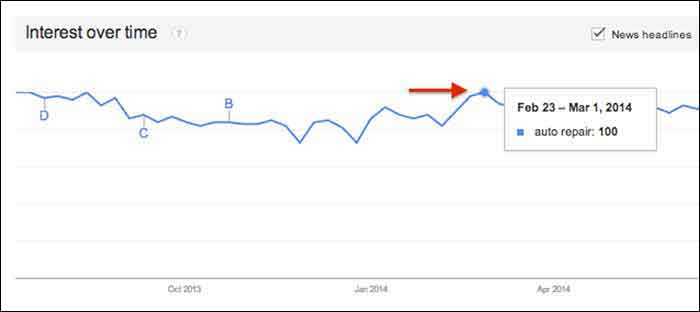
    This graph gives us a snapshot of the overall trend of searches for “auto repair” between July 2013 and July 2014. Hover over any point in the graph to see the exact score that Google Trends gave that time period of searches. After hovering over these points and comparing the highest score to the lowest, I realized that there was no dramatic change, but there was a slight decrease in late fall and early winter months.
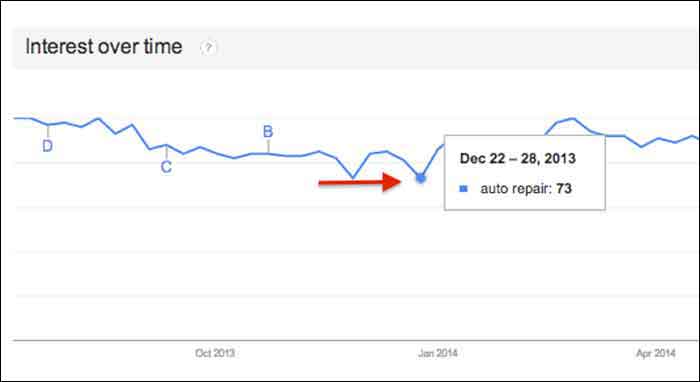
    GoogleTrendsTopicsInterestsDecImage

    GoogleTrendsTopicsInterestsFebImage

    You may notice the letters next to what seems like random points on the graph. These letters represent times when news headlines included that keyword. This is an interesting tidbit of knowledge to consider. Knowing if the trend increased dramatically is important because it could be due to an outlying factor.
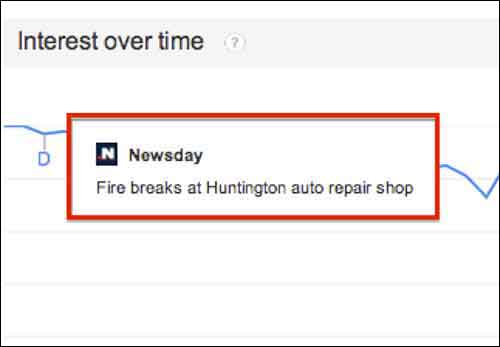
    GoogleTrendsTopicsInterestsNewsdayImage

    Fun Fact: Look at how the trend for the keyword “hurricane” was affected by Hurricane Katrina in 2005.
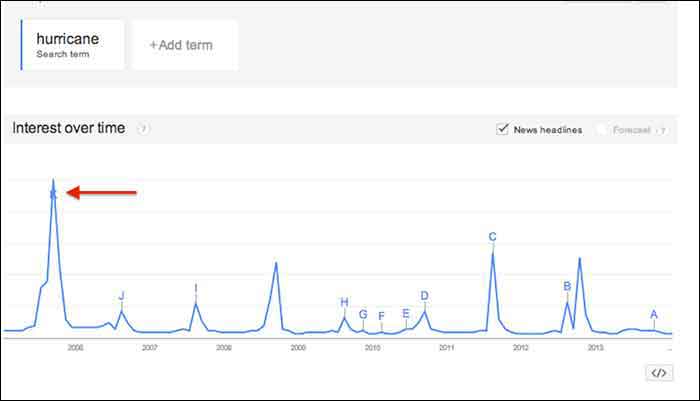
    GoogleTrendsTopicsInterestsHurricaneImage

    You may notice the “Forecast” check box to the right of the “News Headlines” check box. This feature attempts to predict the upcoming trend of your search term. Note that you have to extend your start and end dates to make this option available. To yield the most accurate forecast, open the start and end dates to as wide as possible. This yielded the below results, showing the possibility of slight decreases in the fall and early winter months, with a continuous increase in the spring and summer months. Note that I had to hover over the graph points to figure out the dates because the graph does not let you zoom in.

    You could use this chart in conjunction with other keyword research tools such as Google Ad Words’ Keyword Planner to expect possible decreases or increases in certain keywords due to seasonal search value. For example, it’s not surprising that “ac repair” is not a particularly common search word during the winter months. Other keywords with seasonal value may not be as obvious, however, so resorting to Google Trends serve as one tool to help you crack the code when dealing with what seems to be seasonal increases or decreases in the search rankings.

    GoogleTrendsTopicsInterestsForecastImage

    2. Regional Interest

    “Regional Interest” displays larger areas that are searching for your keyword the most. While this is a useful tool for pinpointing countries and large cities, it does not typically show small cities or rural towns. In a global search (as shown below) the results help to narrow down the top countries searching for a keyword, and then the largest cities by clicking the “City” tab. The numbers represent the same calculated numbers as in the “Interest over time” section, so they are normalized and are the outcome of comparing the search volume to the area that searched for your keyword the most.

    For a business with a statewide, national or a global target audience, this map could help you pair the keyword with specific locations. It is possible that more people search “auto repair” in Detroit, while more people in Los Angeles search for “car repair”. This sounds like a slight difference, but the more precise you can be when choosing keywords, the higher your possible rate for success will be.

    In this case, the United States shows a dramatically higher interest in “auto repair” than any other country. You can click on each country to see a breakdown of interest within each one. You may also click the “City” link next to “Region” for the cities with the most interest in “auto repair” despite the country (demonstrated in the 2nd photo below).
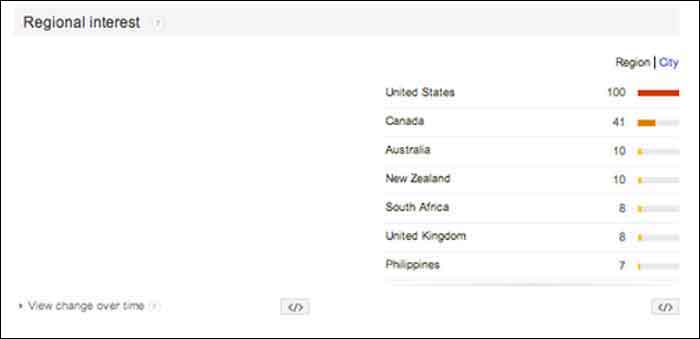
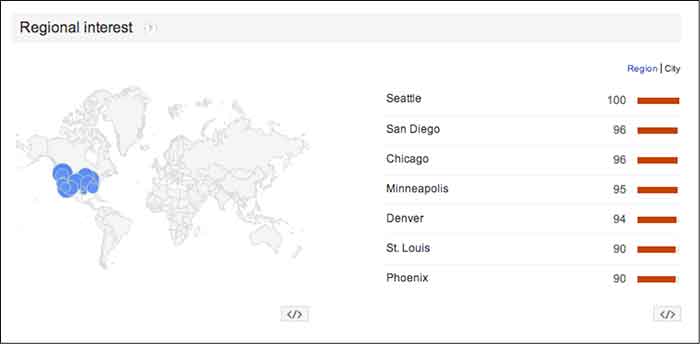
    GoogleTrendsRegionalInterestsImage

    GoogleTrendsRegionalCityInterestsImage

    3. Related Searches

    If Google identifies your keyword with other similar terms that are being searched for, it will list them in the Related Searches section. This section is broken down by “Topics” and “Queries”.

    In this case, I received queries, but did not receive any topics. The message under “Topics” read, “not enough search volume to show results”. In keyword research, however, I would prefer to look at the queries because they are exact keywords. For example, “car repair” and “auto body repair” are the top two related queries listed for “auto repair” (shown below). You could use this list to find keywords that you may not have thought about researching, or to examine the similar keywords in relation to the keyword you are searching.
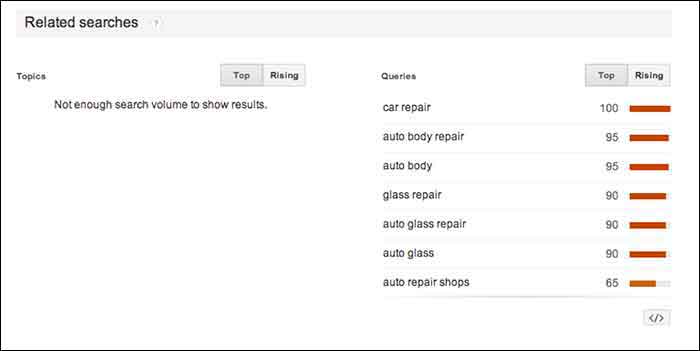
    GoogleTrendsRelatedSearches

    The “Rising” tab under “Queries” shows terms that have had a significant increase in searches compared to the previous year. As shown below, “mobile auto repair” has risen 160%. This does not mean that “mobile auto repair” is one of the highest searched terms overall, but it may be worth monitoring throughout the campaign to see if it continues to rise and could be important to rank well for. With the rise of mobile Internet usage, it makes sense that this term could continue to increase in value.

    Resources:

    Google’s Algorithym: http://www.google.com/intl/en-US/insidesearch/howsearchworks/algorithms.html

    Google Trends data calculation: https://support.google.com/trends/answer/4355164?hl=en&rd=1

    Google Ad Words’ Keyword Planner Tool (must be logged into Google Ad Words):

    https://adwords.google.com/ko/KeywordPlanner
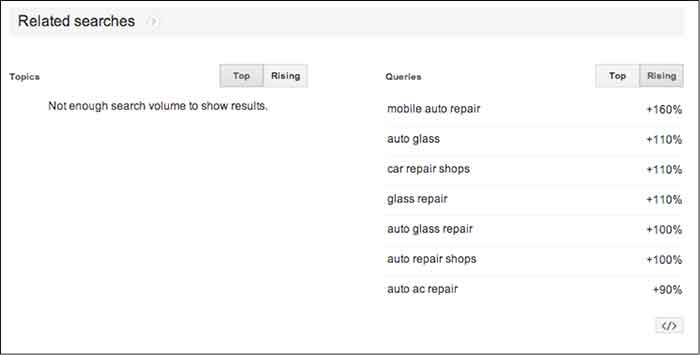
    GoogleTrendsRelatedSearchesRisingImage

    Finding a Pattern:

    I started researching more specific auto terms and found that there was a seasonal pattern for the service, “auto detailing”. I would not make this seasonal observation a factor in whether to choose the term as a targeted keyword or not because there is consistent search value. Although, it may help explain a decrease of site traffic in the winter months if that occurs.

    It is easy to get caught up in looking for a direct cause and effect between SEO practices and search engine rankings or site traffic, but expanding your research to recognize seasonal patterns can give you a larger idea of how your industry is searched for online.

    My next tutorial will examine search results by “Topic” instead of specific keywords. Stay tuned to learn more about how this can help your SEO practices!


    Image Source:

    Google Trends Logo

  • 6 Second Marketing: Using Vine for Your Business

    Jul14

    In today’s fast-paced society, your business doesn’t have much time to grab the attention of potential customers. Can you do it in six seconds? Millions of users are racking up views and attention for their six-second masterpieces on Vine, Twitter’s ultra-short video sharing app that fits in well with the social network’s theme of keeping things brief—and businesses are using Vine to amplify their social media marketing campaigns and boost visibility.

    What is Vine? A Brief History

    Launched in January 2013 by Twitter, Vine was originally a mobile app that capitalizes on smartphone cameras, allowing users to capture and share up to six seconds of looped video. The platform gathered steam quickly, becoming the fastest growing app of 2013 with millions of users and several viral clips.

    Today, Vine has more than 67 million users. Vine videos can be posted to other social networks like Facebook and Twitter, and earlier in 2014 the platform introduced a desktop interface similar to YouTube, with searches, playlists, popular users, and trending tags.

    The Benefits of Using Vine for Business

    Some companies view the Vine platform as too short to be useful—but many said the same about Twitter. There are several benefits to using Vine as part of your marketing strategy, and they extend beyond the platform itself.

    Here are just a few of the advantages Vine can give your business:

    • Video works. Several studies have shown that video consistently performs better as a marketing tool, with higher engagement and more click-throughs. Regardless of your business type, video can help you promote it: 90 percent of online shoppers find video helpful in buying decisions, and 75 percent of executives watch work-related video.
    • Shorter is better. Online viewers are often pressed for time, or multitasking and switching between several windows. Long videos tend to see fewer views—so at six seconds a pop, viewers are far more likely to watch a Vine video.
    • Boost social sharing. Vine videos don’t have to stay on Vine. They can be posted on multiple social sites, or your business website or blog, and including hashtags in your description can help you improve discoverability and encourage sharing.

    What Can You Do with Vine?

    Just how much marketing can you pack into six seconds? With the right mindset, you can deliver a powerful message through a Vine video. For example, Lowe’s home improvement store created a series of Vine videos called “Lowe’s Fix in Six,” with each video delivering an interesting home do-it-yourself (DIY) tip. UK fashion retailer ASOS engaged their followers with an “unboxing” video of their products that invited customers to upload their own unboxing, incorporated the hashtag #ASOSUnbox, and entered participants in a drawing for a goodie box.

    To create effective short videos, consider:

    • The types of videos you want to offer—you might have helpful tips, product showcases, customer contests, or even content that’s pure entertainment
    • How you’ll communicate your message briefly and visually
    • The best way to tie your short videos to your company brand or theme

    Remember that like all social media marketing, Vine should be used to share more than just your products or services. Consider offering quick behind-the-scenes video that shows your workplace culture, your employees in action, or where your products are made. Or get your followers to participate and invite six-second testimonial videos, which you can display on your website in addition to posting on Vine and other social platforms.

    Regardless of your social marketing strategy, the Vine platform can make a powerful, visual addition to your current efforts and help increase your business visibility and reach. All you need is a smartphone or digital camera, and six seconds.

    Image courtesy of Frank Gruber

    Megan Totka is the Chief Editor for ChamberofCommerce.com. She specializes on the topic of small business tips and resources. ChamberofCommerce.com helps small businesses grow their business on the web and facilitates connectivity between local businesses and more than 7,000 Chambers of Commerce worldwide.

  • 5 For Friday – Amazon Ad Challenge, Facebook Changes, Twitter Spam, & Google’s Snafu

    1) Amazon Takes on Google Adwords – Wall Street Journal

    AmazonLogoImage

    The war for Internet supremacy rages on between Google and Amazon. The increasingly competitive relationship between the two giants has grown even more strained as of late, but their tenuous relationship has survived largely because Amazon is one of Google’s largest advertisers for text ads. But that may change.

    Amazon is working on a competing in-house platform, and testing could commence as early as later this year. Using the plethora of shopping data the online retailer has amassed, the program could almost instantly become a major force against the search engine’s online ad dominance.

    2) Despite More Ads, Facebook Promises, “We Will Not Show More Ads” – Digiday

    Speaking of Internet giants, Facebook is in the news again. In a rather quiet update earlier this month, Facebook amended its advertising policy to allow marketers to show ads more frequently in users’ News Feeds.

    The update allows advertisers to show the same ad twice a day, as opposed to the previous once a day restriction. The new update also allows advertisers to show users two News Feeds ads per day from a page that they did not explicitly “Like,” again up from just one.

    Facebook emphasizes that you will not see more ads from various companies, just possibly more ads from the same company. A Facebook spokesperson said of the change, “This does not change ad load. We will not show more ads; rather, we are updating the spacing between ads, and relaxing some of the parameters around the insertion of ads.”

    Hmmm… more ads is more ads, no matter who they are from.

    3) More from Zuckerberg & Co: Facebook is Finally Cracking down in Upworthy-Style Click Bait – Gizmodo

    We’ve all seen it – an annoying, attention-grabbing headline like “No One Would Help This Little Girl from Being Bullied. What She Did Next Will Shock and Amaze You.”

    Of course, these headlines are designed only to generate clicks, but dang, am I intrigued. I mostly refuse to click them simply on principle, but even when I do succumb to the temptation, I am always disappointed.

    DoNotPushButtonImage

    Thankfully, Facebook is finally taking steps to eradicate this spammy click bait by looking at how long people actually read the articles they click on as well as comparing the click ratio to comments, “Likes,” and shares.

    Facebook also announced that links should be posted in a “link format” instead of shared in the status update and captions of photos. Posts that have links in the captions will be given less priority in the News Feed.

    4) Meet Twitter’s Spam-Fighting Tool – Marketing Land

    And now, a word from that other social media juggernaut: Last week, Twitter gave an inside look at their super spam-killing system known as BotMaker. Since launching the system recently, spam metrics have dropped 40% overall.

    BotMaker is designed to prevent spam content from being created, reduce the amount of time spam appears on Twitter, and reduce the reaction of new spam attacks. To accomplish this, Twitter uses a combination of systems that detect spam at various stages: Scarecrow (real time), Sniper (near real time), and Periodic (over extended periods of time). What makes it even more effective is its ability to adapt quickly with new models and rules to combat the ever-changing production and proliferation of spam.

    To learn more about the creation of BotMaker and how it works, feel free to dig in deep over on the Twitter Engineering Blog.

    5) Moving to HTTPS: Good or Bad? – Wall Street Journal

    Google recently announced it would be giving a boost in search rankings to encrypted websites. But in an effort to push site owners to switch to HTTPS, Google overlooked the fact that many web components, including its own Trusted Stores and AdSense, are not completely compatible with those types of sites yet.

    To protect sensitive info, sites were already required to have their checkout pages encrypted, but the announced rankings boost spurred many sites to try and convert all of their “non-sensitive” pages as well.

    This caused a bit of a problem with user experience. Trusted Stores is not compatible with basic encryption, meaning that the required badge cannot be displayed. Without this badge, Google will not accept HTTPS sites into the Verified Stores program.

    As for AdSense, Google now acknowledges that “if you convert your HTTP site to HTTPS, ads on your HTTPS pages might earn less than those on your HTTP pages.” This is because the HTTPS ads don’t compete in auctions with HTTP ads, which lowers rates. Whoops!

    OopsMyBadImage

    Image Sources:

    Amazon in Browser

    Do Not Push Button
    “Oops my bad”

  • Google Instant Verification Passes The Sentence & Swings The Sword

    On July 31st, Google rolled out an instant verification option for local businesses that have already verified their websites with Google Webmaster Tools.

    WaitInstantVerificationImage

    There is, however, very specific cases. As the Google support page linked above states, it’s important to note “that some business categories may not be eligible for instant verification.”

    OneDoesNotSimplyVerifyAListingImage

    Webmaster tools verification option won’t work for your business if:

    • You’re creating a new listing
    • The pre-existing listing is already claimed by another user and your business has to request ownership
    • You have to change the website on the pre-existing listing you want to claim
    • Webmaster Tools isn’t verified BEFORE you claim the listing
    • Webmaster Tools isn’t verified in the same account that you are claiming your business listing in
    • Your company’s “My Business” category is not one of the Google approved categories eligible for this verification.

    “My Business” pages we tested:

    Car dealership: Claimed in account with pre-existing listing in need of claiming – worked

    Heating supplies provider: Had ALL ideal criteria. Listing had correct site and was available to claim, and WMT was already verified in the account. – didn’t work (So this business must have a category problem that makes it ineligible.)

    Real Estate: Created new listing- didn’t work

    Basically, if it’s possible, Google will automatically verify your business on its own when you claim your business in Google My Business. Google skips giving you any verification options altogether and just auto-verifies the listing.

    Assuming this new Google My Business feature is a work in progress on Google’s end, maybe once we see more categories accepted, it will become more doable and the qualifications may not be so restrictive. Even then, with the stipulations currently, it would be a rare occurrence.