Blog

  • A Tale of Two Strategies: PR & SEO

    MozPrandSeoImageLast month, I sat in on a webinar with a few fellow Influencers about how to integrate PR into SEO strategy. Given that I used to work in PR and am constantly looking for ways to combine the two industries, attending this was a no-brainer.

    Integrating SEO & PR Best Practices

    Samuel Scott, Senior Director of SEO & Digital Marketing at The Cline Group in Tel Aviv, took us through how to best integrate SEO and PR best practices into a holistic, integrated marketing strategy. After all, traditional public relations is the best way to build brand awareness and earn quality, authoritative backlinks – the SEO dream.

    Authoritative Link-Building

    “If I had to choose between your average link builder and an expert PR professional, who knew how to approach and interact with media outlets and presented well on camera, I’d go for the public relations person any day of the week.” -Everett Sizemore, seOverflow.

    Now obviously if you have to choose between your average anything and an expert, you’re going to choose the expert. What Everett is saying here is that good PR leads to optimal placements, and that placements lead to links.

    PR+SEO In Action

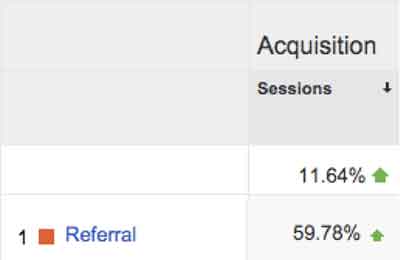
    A press release we recently wrote for a client was picked up by WGCL-TV and Digital Journal, two sites with extremely high domain authorities (74 and 85, respectively). Without even really trying, we were able to build the client links on two very authoritative sites! In the week and a half following the press release, overall traffic to the client’s site increased by more than 10 percent and referral traffic increased by nearly 60 percent.

    ReferralRatesImage

    Working Together Makes Everything Better

    There are a few things that SEO pros can learn from PR experts, and vice versa:

    • What PR can learn from SEO:
      • Which traffic from what outlets tend to convert the most and bounce the least?
      • Are PR efforts increasing branded searches?
    • What SEO can learn from PR:
      • From what outlets (and types of outlets) is it easiest to get coverage & links?
      • How are reporters and others are responding to the company’s online presence?

    Both SEO and PR should utilize data such as placements, traffic, conversions and bounce rate to answer the questions above and further hone their strategies into a single streamlined, holistic, integrated strategy. It’s time to stop thinking about “traditional” and “online” marketing as two separate things – they’re quickly becoming just “marketing.”

    If you take one thing from the Mozinar (Moz’s punny-but-cute name for webinar), let it be this: Don’t think about how to get links. Think about how to get coverage and publicity! The links will then come naturally as a result.

  • Old Google Plus Guidelines Go Out Of Business

    bowing to google - search influenceTwo nights ago, on December 1st, Google updated the business guidelines for pages in Google My Business (aka Google Plus). I’m here today to walk you through what’s changed and to give examples of good and bad practices of these new guidelines. It’s important to note, however, that these tips aren’t standalone. Having a thorough understanding of the “Guidelines for representing your business on Google” is essential to using this blog to your advantage.

    Descriptors in the Business Name Are NOT Allowed

    Back at Pubcon last year, I heard a lot about how to use descriptors and why you should be using them. While in theory it’s a great idea, when asked if we should be using this in house, my thought was that it ruins the principle of NAP (Name, Address, Phone Number) consistency across the web and that Google probably wouldn’t stick with it. Sure enough, this was one of the changes two nights ago.

    Before:

    In addition to your business’s real-world title, you may include a single descriptor that helps customers locate your business or understand what your business offers.

    Now:

    Your name should reflect your business’ real-world name, as used consistently on your storefront, website, stationery, and as known to customers. Any additional information, when relevant, can be included in other sections of your business information (e.g., “Address”, “Categories”).

    Note the word “consistently” in the new guidelines. The examples Google gives in the new guidelines say you can’t include the following in your business name:

    • taglines
    • store codes
    • trademark signs
    • unnecessary all caps
    • hours info
    • phone numbers or websites
    • special characters (e.g. %&$@/”) or legal terms (e.g. LLC Ltd) – unless part of your real name
    • services or products
    • location information

    My advice is to pick an official business name and stick to using it everywhere. Avoid punctuation if possible, because it just provides another opportunity for inconsistency.

    BAD: Starbucks Downtown

    GOOD: Starbucks

    Importance of Name & Category Consistency for Chains & Brands

    Now:

    All business locations within the same country must have the same name for all locations.

    All locations of a business must share the one category that best represents the business.

    Along the same lines of not using unique descriptors, if your business has multiple locations, the name and categories of their pages should reflect the same information. Note that there are instances of when variances are acceptable to Google that you can read more about within the guidelines.

    BAD: Location #1 – Name: The Search Influence, Location #2: Search Influence

    GOOD: All Locations – Name: Search Influence

    BAD: Search Influence Page #1 – Category: Advertising Agency

    Search Influence Page #2 – Category: Internet Marketing Service

    GOOD: All Search Influence Pages – Category: Internet Marketing Service

    Categories Must Be As Specific As Possible

    Before:

    Select at least one category from the list of available categories.

    Now:

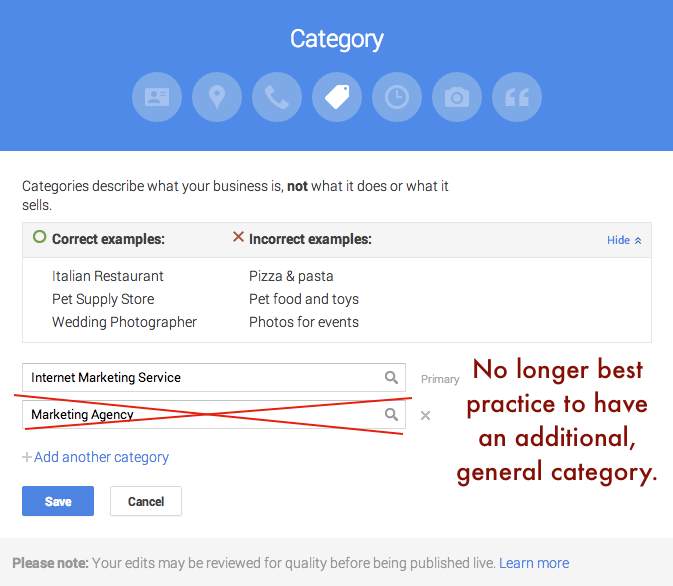
    Use as few categories as possible to describe your overall core business from the provided list. Choose categories that are as specific as possible, but representative of your main business.

    This is one that will mostly affect major niches like doctors and lawyers, as there are a lot of general terms that could apply to these types of businesses. In the example above where I showed Search Influence with the categories Advertising Agency and Internet Marketing Service, our more specific category would be the latter. Adding Advertising Agency as an alternate would not be best practice.

    BAD: NOLA Hospital – Categories: Hospital, Children’s Hospital, Doctor, Surgeon

    GOOD: NOLA Hospital – Categories: Children’s Hospital

    Google Plus Categories Guidelines - Search Influence

    Departments Within One Location Must Have Unique Categories

    Before:

    Departments within businesses, universities, hospitals, and government buildings may be listed separately. These departments must be publicly distinct as entities or groups within their parent organization, and ideally will have separate phone numbers and/or customer entrances. Businesses that operate in a service area, as opposed to a single location, should not create a page for every city they service.

    Now:

    Publicly-facing departments that operate as distinct entities should have their own page. The exact name of each department must be different from that of the main business and that of other departments. Typically such departments have a separate customer entrance and should each have distinct categories. Their hours may sometimes differ from those of the main business.

    If you choose to represent the various departments of your business through multiple pages in Google My Business (e.g. Hospitals, Schools), each page should have a unique department. Also, as per normal Google guidelines for multiple pages at one location, each page should have some unique location identifier, which would be either a unique suite number/address or a unique phone number.

    BAD: NOLA University – Category: College

    NOLA University Cosmetic Surgery Department – Category: College

    GOOD: NOLA University – Category: College

    NOLA University Graduate School – Category: Graduate School

    Multiple Brands At One Location Must Choose ONE Name

    Now:

    If your business location combines two or more brands, do not combine the brand names into a single page. Instead, pick one brand’s name for the page. If the brands operate independently, you may use a separate page for each brand at this location.

    The examples Google gives for this update seem to pertain to places like fast food restaurants where, for example, a KFC and Taco Bell are in the same building. In that instance, a page called “KFC / Taco Bell” would not be acceptable, and they would have to have two separate pages if they’d like to represent both business names.

    At first, I thought this might affect car dealerships that use multiple business names for multiple pages but are at the same location. However, as long you have separate pages for multiple “brands” at the same location, you should be fine. It is important to note that multiple businesses at the same location need at least one form of unique location identifiers, whether it be a different phone number for each brand at the one location or a different suite number for each brand at the one location.

    BAD: Page #1 – Name: KFC / Taco Bell

    GOOD: Page #1 – Name: KFC Page #2 – Taco Bell

    BAD: Page #1 – Mary’s Jeep, 935 Gravier Street, New Orleans, LA (504) 208 – 3900

    Page #2 – Mary’s BMW, 935 Gravier Street, New Orleans, LA (504) 208 – 3900

    GOOD: Page #1 – Mary’s Jeep, 935 Gravier Street #1300, New Orleans, LA (504) 208 – 3900

    Page #2 – Mary’s BMW, 935 Gravier Street #1301, New Orleans, LA (504) 208 – 3900

    No Practice Name in Practitioner Names of Multi-Location Practices

    Now:

    If the practitioner is one of several public facing practitioners at this location:

    The organization should create a page for this location, separate from that of the practitioner.

    The page for the practitioner should be titled with name of the practitioner only, excluding that of the organization.

    The reason the now improper formatting is bad practice is that it impedes the user experience and could prevent someone from finding the page they’re looking for if practitioners with the practice name in their name are showing up in practice search results. This needs no further explanation in my opinion, so straight to examples.

    BAD: NOLA Cosmetics: Mary Silva

    GOOD: Mary Silva

    Solo Practitioner Name Formatting

    Now:

    If a practitioner is the sole public-facing one at this location and represents a branded organization, the practitioner page should not be separate from the organization’s page. Instead, create a single page, titled using the following format: [brand/company]: [practitioner name].

    Along the same lines of the last guideline, to help users find this type of business, practitioners who own a branded practice and are the only practitioner of said practice should have just one page that combines their name with the branded name.

    BAD: Page #1 – NOLA Cosmetics Page #2: Mary Silva

    GOOD: ONE PAGE – Nola Cosmetics: Mary Silva

    What Happens If I Get This Wrong?

    Some of these guidelines appear to be less enforceable than others, in my opinion. So I’d say it’s best to adhere to them and get your pages fixed as soon as possible. If it’s something like pages that appear to be duplicates because there are multiple businesses at the same location with matching info (matching category or matching phone and address), it might get flagged by Google’s algo as a duplicate page violation, but only time will tell how strictly these changes will be enforced.

    If you’d like to see the old version of the guidelines to compare them to the new, my way of doing this was to use the Internet Archive Wayback Machine and look at the guidelines page on November 30, 2014. Also, Mike Blumenthal provided a concise, comprehensive list of these updates in his blog!

    Hope my thoughts and these examples help. Good luck in all of your Google My Business endeavors! Also, thank you to Amanda DiSilvestro at business2community.com for the bowing to Google image.

  • New Gmail Inbox Has It All, But Can It Separate Naughty From Nice?

    Always on a mission to improve user experience, Google recently released a fresh new look to “Inbox by Gmail.” This update provided additional labels for better organization of your inbox, reminders, snooze options, attachment previews, and more.

    Invite Only

    Recent buzz about Inbox by Gmail has circulated, especially during the first phase of the invite-only system. People are curious about Inbox by Gmail because they want to be part of this exclusive group. If you have yet to receive an invite, send an email to [email protected], and ask politely. Maybe Google will invite you in their next circulation.

    InboxByGmailImage

    Organize With Labels

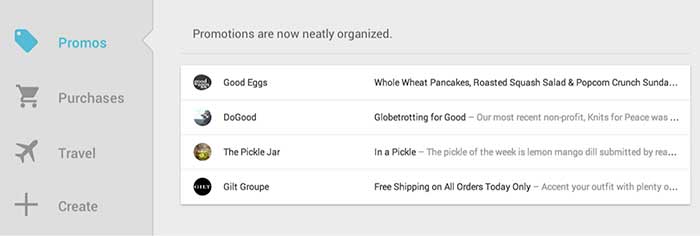
    Google announced Inbox by Gmail “is a better way to get back to what matters.” For this reason, Google created more categories of labels to keep emails organized. Gmail currently bundles emails under tabs “Primary,” “Social,” and “Promotions.” Inbox by Gmail will have many more label tabs available, like “Updates,” “Finance,” “Purchases,” “Travel,” and “Forums.” You also will have the option to create your own labels. This exciting feature organizes emails for you before they arrive in your general inbox.

    InboxByGmailPromotionsImage

    Timeline

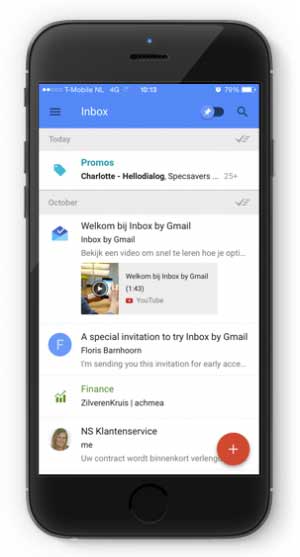
    Warning, your general inbox will look different. When an email belongs to a label, it will be automatically placed within its designated tab. In your general inbox, you will only see who sent the email. This way, you will have less emails showing in your general inbox.

    Mark Your Mail

    Other features: you can mark emails as “important,” as a “to do,” you can add reminders to emails (with extra information like phone numbers), and you can snooze an email to get it out of your inbox until you’re ready to view it.

    More Features

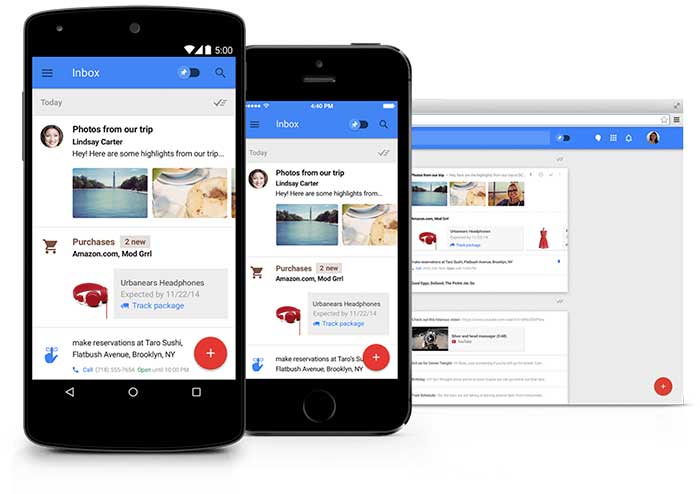
    You can see the highlights of your email without opening the message. The new inbox previews reservation information, online orders, and pictures. You can also get real-time flight updates and speed dial a friend – all from your Gmail account.

    InboxByGmailSmartphoneImage

    Promotional Email

    There are two reasons why I’m not excited as a professional, serving my clients who send the occasional promotional emails:

    1. Promotional emails are now one click further away from the target audience. These types of emails are thrown under a tab and may never be seen.
    2. In their general inbox people will only see a preview of all of your promotional emails. This will include the name of the person or business that sent the promotional email, but not the subject. This update will have a huge impact on the open rate of promotional emails.

    InboxByGmailPromotionsPreviewImage

    Three tips for promotional email to pass the new application:

    1. Address the email to the name of a person rather than a business so the email looks more personal.
    2. People will scan the “Promotions” or “Social” inbox very fast, so you need to be unique and engaging to be noticed. Your subject line is extremely important. Perform some A/B testing to find out which type of subjects score best.
    3. Be relevant – send people emails they would want to read.

    Inbox By Gmail: Yes Or No?

    For personal-use and some business purposes, this new update deserves a big resounding YES! For people or businesses who send promotional emails, this demographic echoes a big fat NO!

    Get an invite and let us know by email what you think of Inbox by Gmail. Your email will end up in our label “VIM” – Very Important Mail.

  • Don’t Be Afraid To Stop & Ask For Directions: Making Google My Maps for SABs

    As promised in my last blog about the new Google My Maps, I’m here today to teach you how to how to create My Maps for service area businesses (often referred to as SABs) that have highlighted boundaries of what counties or parishes they service.

    Before we delve into this guide, let’s start with the basics like what exactly is a KML file. KML is the file format used to show geographic data in mapping programs. It is an XML based format and stands for Keyhole Markup Language. Now that you know what this file type is, let’s see how you can use it.

    How to Use Old 2011 KML Files

    Fun Fact: The U.S. Census Bureau holds kml files for all county guidelines here!

    As you can see, they’re from December 2011, so any boundaries that have changed since then will be incorrect. In a very general sense however I’ve found these codes very useful in the past. Each file contains all county boundaries in one state, but the tricky part is that they don’t tell you what state it is in the file name. I went ahead and downloaded them all a long time ago and updated the file names to reflect the state they contain. It’s pretty closely in alphabetical order so if you just use a list of US states in alpha-order next to the list of files in numerical order it should match pretty closely.

    Once you’ve figured out which file contains the state you’re looking for, find the county or counties that you want to display in your map, and move it’s entire code for each county (should start with “Placemark” attribute and end with the closing of the “Placemark” attribute) just below the “Document” attribute. Once you’ve moved the boundaries you want to keep to the top of the KML file, remove all the excess counties and leave the closing attributes for “Document” and “kml” at the bottom.

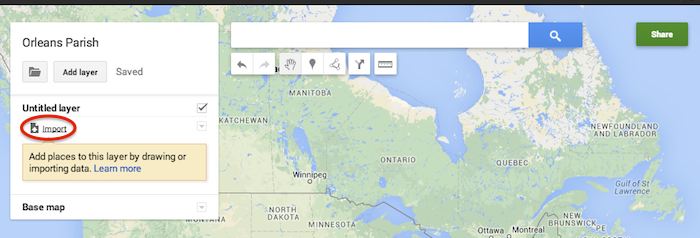
    Now that you’ve successfully prepared your KML file, in My Maps, click Import on the left and choose your KML file from your computer.

    Import A KML File To My Maps - Search Influence

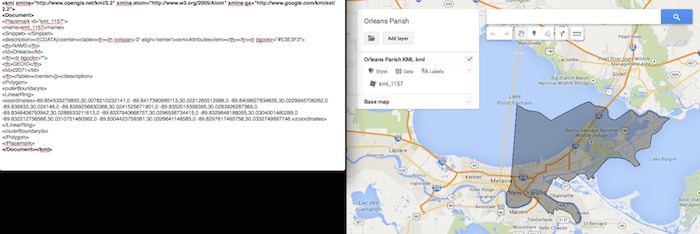
    See the screenshot below for an example of how your KML file should generally look if you’ve done it correctly. The screenshot shows the file for Orleans Parish of Louisiana in TextEdit and then what said file looks like imported into My Maps. (NOTE: In order to show a not so massive screenshot of the KML code, I removed about 3/4 of the coordinates. There are a massive amount of coordinates used to make up these detailed boundaries.)

    Preparing Viewing A KML File In Google My Maps - Search Influence

    How to Use New 2013 KMZ Files

    The U.S. Census Bureau also has the most up to date 2013 files, which are KMZ format (note the .kmz instead of .kml extension). This is essentially zipped KML files with a .kmz extension, but if you use a Mac like me, unzipping or unpacking the zipped file is not easily achieved. The 500k file contains the most detailed boundaries out of the 3 options.

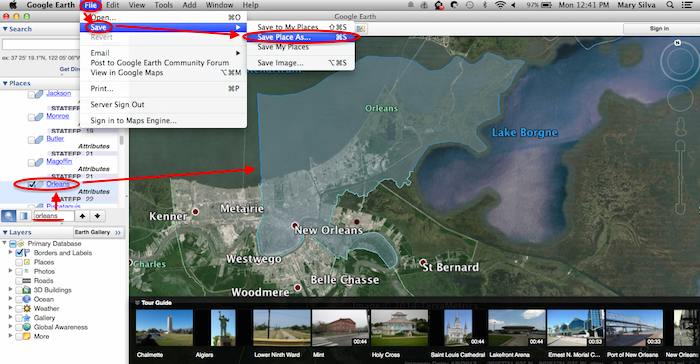
    So, the way I handle this KMZ file is to open the entire file in Google Earth and export just the KML file of the areas I want displayed. To do so you’ll use the search feature of Google Earth on the left at the bottom of the “Places” window to search for and select the areas you want displayed. Since many counties have the same name you’ll want to make sure it’s showing up in the state and location it’s supposed to. Also, note that if you’re trying to add multiple counties in the same state, the Attribute number to the right of the county will be the same for all counties within the same state. This should help you easily identify the counties you’re looking for when adding multiple.

    Once you’ve selected the geographic areas you want displayed on your map in the “Places” section, then save the file as a KML file by clicking File>Save>Save Place As….

    Saving A KML File from Google Earth for Google My Maps - Search Influence

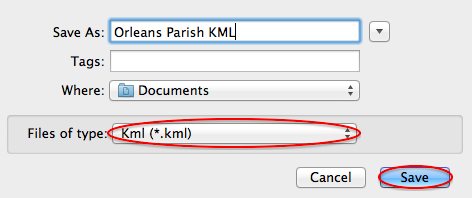
    My Maps will not accept a KMZ file, so make sure to save as a KML.

    Saving a Map in Google Earth As a KML File to Use in My Maps - Search Influence

    Once you’ve saved your file, follow the same steps mentioned above to import the KML file to My Maps. I’m not sure if the paid My Maps Pro is any different, but it appears to me that you cannot import multiple KML files to one My Map. So, in the event that you want to represent multiple service areas in one My Map, you’ll want to have all of the geographic area codes in one KML file.

    This Google Earth process can also be used instead of manually editing the older KML file codes as shown in the first instructional section in case you don’t want to delve into the coding via text edit. It’s definitely an easier route, but for me, Google Earth can sometimes run slow when trying to handle these files and I don’t mind manually editing code.

    Hopefully these steps and screenshots help out a fellow My Mapper!

  • Don’t Be An Advertising Grinch: Grow Your Profits 3 Sizes This Holiday Season

    Can you believe we’re already on the verge of December? Are you prepared for the holidays? I’m not asking if you have your Christmas tree (or Hanukkah bush) picked out or if your travel plans are confirmed…we’re talking about advertising, and specifically online advertising. Hopefully, you’ve already adopted online advertising into your business’s ad strategy (if not, I just happen to know of an exceptional company that can help you get started), but this year, having an online presence for your products or services is more crucial than ever.

    Therefore, it’s only appropriate that we at Search Influence help prepare you and your business for the upcoming season! Here are 8 Questions, Tips, and Best Practices to get you in the right mindset and bring some holiday cheer to your ad strategy.

    1. What channels are you using?

    It’s common knowledge that there are a plethora of ways you can reach potential customers online, whether it’s via email marketing, PPC, social media, etc., but which is the best for your message?

      1. Email Marketing
      2. PPC
      3. Facebook
      4. Social Media in General
      5. Retargeting

    It’s easy to get overwhelmed if you think about utilizing all of these channels, especially if you consider how much it could cost you. So if you don’t have an unlimited budget, try and think about it this way: which channels are you already utilizing that you can focus on during the holidays? Which one (or two) channels might you add, even if it’s just for the holiday season, in order to build awareness and not get lost amongst all the other businesses advertising during the holidays? As with anything else during the holidays, the most important thing is to try not to spread yourself too thin. It’s better to put more budget and effort into a couple of channels than to lose your message by trying to use them all.

    2. Let the Christmas creativity flow!

    Your audience is already primed for the holidays – feed into it!

    Creative is extremely important this time of year. Keep your ad copy fresh by changing up your creative from the rest of the year and integrating topical messages into your ads. And don’t worry about sounding cheesy — this is one of the few times you can get away with it! When people are bombarded with holiday messages, think outside of the box. How do your products or services apply to this time of year? For example, are you a culinary business with an audience inclined to embrace your new recipes and cooking supplies at this time of year? Or are you a travel agency whose key demographic might be looking to escape from the cold weather with one of your vacation packages? There are many lenses you can look through when selling your product, so don’t lose sight of the way your consumer will be feeling during the holidays. Just ask yourself: how can your business/brand help enhance the message of the holidays?

    3. What are you prepared to offer?

    Use “giftable” language.

    This is crucial, especially if you have an online business or utilize e-commerce. It’s the holiday season after all, so people are looking everywhere for – and expecting to see – holiday deals. Remember to use gift-centric language in your ad copy. Could you market your service as a gift for your customers? Make it less about you trying to sell them something and more about what they’ll be getting from you if they turn to you during the most competitive time of year.

    Think about advertising sales/offers/discounts that are time sensitive. Putting out an offer that must be utilized before the new year is a good option because it encourages people to buy now, and it could be more trackable and traceable to a holiday campaign.

    On the other hand, if you’re a “resolution-related” company, your holiday advertising might expand past Christmas into the new year. No one wants to hear about gym memberships when they’re wolfing down the cranberry sauce.
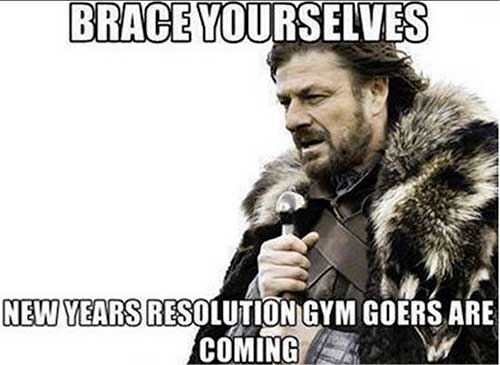
    BraceYourselvesNewYearsImage

    Finally, if you’re going to advertise offers during the holidays, be sure to utilize offers that are truly compelling. Don’t announce something as including free shipping unless it is paired with something else; your message certainly won’t stand out if you’re offering only free shipping along with everyone else.

    4. Christmas isn’t the only holiday in December,

    nor should it be the only thing on which you focus your advertising efforts.
    Is your product or business Christian-centric? If not, would you risk alienating a subset of your audience if you mention “Christmas” in your ad copy and/or message? This may seem like a minor opportunity, but it could be a great chance to demonstrate self-awareness and show your customers how well you know them.

    Additionally, be sure to think about the time surrounding the holidays, not just the holidays themselves. For example, if you’re utilizing a mobile campaign, use the pre-holiday weeks to increase your customer base and drive mobile app installs ahead of the holiday season, and focus your post-holiday time for new device owners activating apps and devices for the first time. Lastly, remember that a lot happens in the buying cycle after December 25th. Consider using after-holiday clearance or Boxing Day specials, and keep in mind New Years and everything that comes with that – hello, resolutions!

    5. Think device.

    If you’re an online advertiser, multi-device targeting for this time of year is crucial. Consumers are omni-channel. People shop online and in-store; therefore, you should really boost your visibility and advertise on as many devices as possible. This may sound easy, as on Google Adwords all you need for this is to make sure your device targeting is set to “All.” However, just because your ads can show up on mobile or tablet does not mean they are automatically optimized to do so. Here are some thoughts to keep you focused on multi-device targeting:

      1. Mobile is where it’s at! This year, there are more people using more devices than ever before.
      2. According to this year’s Facebook Holiday Webinar, over 60% of people in the US use at least 2 devices every day.
      3. Facebook also found that over 40% of all online adults start an activity on one device and finish it on another (think conversions); therefore, cross-platform and cross-device marketing are extremely important. Simply put, more consumers are starting their holiday shopping in-store and finishing it online (or vice versa).
      4. Do not think of mobile as a technology, but as a consumer behavior. Why is your consumer searching on mobile? What do you want to tell them when you show up on their mobile device?
      5. Mobile optimized ads should have creative that accommodates a small screen. For example, utilize a click-to-call function and display a very short, user-friendly menu so your site is easily navigable on a smartphone display. To learn more about using mobile ads or optimizing your site to fit mobile parameters, check out what Google has to say on the matter: Google Mobile Ads.

    6. Account for Black Friday/Cyber Monday.

    The holiday season seems to be getting earlier and earlier each year. This year, the retail space seems to have forgotten about Thanksgiving by skipping straight from Halloween to Christmas.

    Technically, you as an advertiser should be thinking similarly (thoughts about holiday shopping and marketing do start in October), but it’s certainly ok if you’re late to the party! Everyone knows the real “gifting” takes off around Thanksgiving and Black Friday.
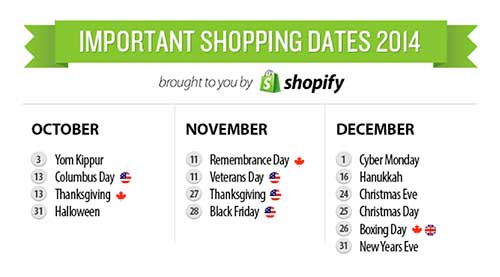
    ImportantShoppingDatesImage

    That being said, there are certain days that have evolved online regarding holiday shopping. If you’re into e-commerce, you’re already familiar with Cyber Monday, but it might help to organize your holiday advertising efforts even more granularly, as every year there seem to be more “dates to remember.”

    1. Black Friday – November 28th

    2. Cyber MondayDecember 1st – keep in mind: Facebook announced that this year, 25% of online shoppers will place their orders from a mobile phone on Black Friday and Cyber Monday! (https://www.facebook.com/business/success).

    3. Green Monday – December 8th – usually the shipping cut off for most postal outlets to get standard-shipped packages to customer before Christmas.

    4. Free Shipping Day – December 18th – a one-day event held in mid-December. Merchants are encouraged to offer free shipping with guaranteed delivery before Christmas. Like I said earlier, don’t think free shipping alone will give you an edge above everyone else – but it certainly helps! Sign up to be listed as a participant of Free Shipping Day here.

    5. Super Saturday – December 20th – the last Saturday before Christmas, Super Saturday is a big revenue day, as it technically marks the end of the shopping season that is considered to begin on Black Friday. Super Saturday targets last-minute shoppers. Typically, this day is a good day to offer one-day sales in an effort to accrue a great deal of last-minute Christmas revenue.

    6. Boxing Day – December 26th – As mentioned in #5, people are opening the new devices they received over the holidays, downloading apps, and/or looking to trade gifts in for something else. Online and in-store advertisers oftentimes offer deeper discounts on remaining merchandise, which can be a great way to get rid of leftover inventory.

    7. Social Media Presence is Crucial.

    GrinchMemeSocialImage

    The holidays are a very popular time for social media presence; your audience is online more often, whether it’s for shopping or to connect with friends and family. Therefore, make sure you increase your presence as well! Up your post load, produce more articles, and sponsor more updates to make sure you’re seen by your target audience and to show them you’re not “out of office” for the holidays.

    However, you may have to do some shopping yourself in order to make this happen. Advertising inventory prices will be rising for the holidays across Facebook, Twitter, and LinkedIn, so you must decide if you want to expand your budget in order to adequately boost your social media involvement.

    Before you grinch out on this, consider that your potential profit might be worth a slightly (and temporarily) elevated budget. After all, Facebook reports that 46% of shoppers who used Facebook before shopping used it to look for deals, promotions and holiday gift ideas, and they often discovered these things through their news feed. (Facebook Holiday Webinar).

    8. Stay organized!

    This last “tip” isn’t so much about online advertising as it is about advertising in general! Like anything concerning your business, staying organized is key, but it can be even trickier around the holidays when we seem to be juggling our personal and professional lives more than usual.

    Regarding your online presence, we recommend creating a promotional calendar before the month even begins. Know what days you’d like to run what ads, and become as comfortable as possible with the seasonality of the month. You can also take advantage of the ad-scheduling features on certain ad platforms – this way, you can create your ads, post promotions, sponsored updates, etc. ahead of time and then schedule them to run on certain dates/times without you having to be around the computer.

    Simply put, plan ahead as much as possible! This will leave less work for you to do later when you’re trying to baste a turkey, or when your luggage inexplicably gets lost by the airline…

    Now some might think this goes without saying, but remember to breathe. You do not need to implement all of these suggestions into your ad strategy! Whatever you do decide to do this holiday season, the most important thing is to document and remember the results for next year and to ultimately strengthen your marketing strategy. Just because it’s the holiday season doesn’t mean you need to stress about your advertising. But unlike the holidays, just try not to get your family too involved.
    SIHappyHolidaysImage

    Image Sources:

    Brace Yourselves

    Important Shopping Dates

    The Grinch
  • We’re Thankful For Our Newest Influencers!

    We’re Thankful For Our Newest Influencers!

    Great team members are as essential to our business as mashed potatoes are to Thanksgiving dinner. They’re the gravy to our SEO campaigns, the stuffing to our—you get the picture! Get to know a little bit about each of our newest influencers:

    Ryan-Eugene-200Ryan Eugene – Junior Account Associate

    Born and raised in Silver Spring, MD, a suburb of Washington, DC, Ryan graduated from The College of William and Mary in May 2013. After working as a track and basketball coach at the National Cathedral School in DC, he moved to New Orleans to experience all there is to love about the Big Easy and be closer to his grandmother who lives in Thibodeaux, LA. In his spare time during the last few months, he appeared in an episode of NCIS: New Orleans and lifeguarded at the JCC. So if you’re planning a pool party and you need a lifeguard, he’s your guy!

    Brok-Kretzmann-200Brok Kretzmann – Junior Internet Marketing Associate

    Brok is from Minnesota. He loves extreme outdoor adventures—anything from an 85-mile bike ride to spelunking or free climbing. Brok is also a certified scuba diver. Music and technology, as a whole, are what he lives for. He jokes that you won’t ever find him without music of some kind.

    Kate-Mason-200Kate Mason – Junior Internet Marketing Associate

    Kate is from Nashville, Tennessee. She graduated from USC in 2011 with degrees in Journalism and Anthropology. After traveling to Thailand and Cambodia this summer for two months, Kate moved to New Orleans for her next adventure. Kate’s secret talent is knowing every word to every song almost ever.

    Paulina-Rodriguez-200Paulina Rodriguez – Junior Web Developer

    Paulina is originally from Los Angeles, California. She studied applied mathematics at UC Santa Cruz and Claremont Graduate University. Paulina is excited to be part of the development team. She enjoys watching extremely gory movies and can’t wait to try all the amazing food New Orleans has to offer!

    Lauren-Siegel-200Lauren Siegel – Product Management Intern


    Lauren is a 2nd year Tulane MBA student concentrating in Marketing & Strategic Management and a New Orleans native. When she’s not getting down to business, Lauren enjoys any activity that relates to fashion, fitness, or food. Lauren also has a major Instagram problem, which mostly revolves around her 85-pound furry son named Pongo.

    Join us in welcoming Ryan, Brok, Kate, Paulina, and Lauren! We’re excited (and very thankful!) to have you.

  • Five For Friday: Backlinks Back, Alright! The Missing Linkjuice & More

    5PoolBallImage

    1. Blogs on Blogs
    – Moz

    Recently, Isla McKetta wrote an entry on The Moz Blog entitled “When Is a Blog the Right Form of Content Marketing?” Blogs have been championed as sure shots for improving online traffic and increasing a company’s influence. McKetta, however, argues that blogs are often overrated, and whether or not a business needs a blog depends on the type of business it is. The article provides concrete examples of when blogs are superfluous and marketing efforts would be better spent on other areas. It’s definitely worth reading.

    2. Link Trouble
    – Search Engine Land

    Julie Joyce wrote a piece on why a website might not be as “linkworthy” as it could be. It’s common knowledge within the SEO realm that having other websites link to yours is vital. There are many steps that can be taken to optimize your site’s linking potential. While some of Joyce’s examples are somewhat obvious, such as including social sharing buttons, there are some important points that could be overlooked. For example, if your site has “atrocious writing,” it’s very unlikely that anyone will link to it.

    3. Backlinks Matter
    – Search Engine Watch

    Adam Stetzer posted an article concerning why backlinks matter for small businesses. Stetzer argues that while small companies can’t afford to overlook backlinks when trying to rank higher on Google, they can’t take an easy way out either. According to Stetzer, low-cost deals offering “500 backlinks for $79” are actually dangerous for businesses because Penguin will view those links as spam and therefore suppress the business’ ranking. The article also discusses the relatively new concern of “Negative SEO” and how to avoid it.

    4. How to Verify Apple Maps Listings Faster
    – Mike Blumenthal

    It has happened to just about everyone working in Internet marketing – while trying to verify a listing on Google or Apple Maps you’re forced to spend extraneous amounts of time retrieving a verification code over the phone and enter it in online. It seems as if these directories are trying their hardest to prevent you from taking control of the listing. Arbitrary factors, such as using a specific phone number too many times, can delay this process from anywhere between 5 minutes to an hour. Luckily, Justin Moseback of blumenthals.com has a trick to curb your time (and anger) spent on getting this task done.

    5. Stuff: Where Should You Put it?
    – Matt Cutts

    TypingOnLaptopImage

    When working within SEO, copious amounts of data are used every day. Therefore, it’s important to know where and how to store it most effectively. Matt Cutts has posted an in-depth article that explores the pros and cons of various data ecosystems. Ultimately, it seems, the best option is the one that molds the best to your business’ needs. However, there are some very convincing arguments for a few of them!

    Image Sources:
    Thanks to Dricker94 for the #5 pool ball image, and to Ministerio TIC Colombia for the typing image.

  • The Hitchhiker’s Guide To The New Google My Maps: Coding 101

    So along with many other recent Google Maps enhancements, Google has finally done away with the “Classic” My Maps. On September 16, Google sent an email to many users stating that “Google My Maps [was] being upgraded.” Recently, you were able to continue using Classic, but if you wanted you could upgrade to new My Maps. At this point all of your maps once created in Classic My Maps should have transitioned to the new My Maps automatically. As of the past few days the classic My Maps version has officially phased out.

    For those of us who have become accustomed to the features of Classic My Maps, it’s easy to feel a little shell shocked by the changes.

    Before we start delving into the new My Maps, here’s three examples of the different types of maps you could/can embed on your site.

    Old/Classic My Maps (EXTINCT) vs New My Maps – Respectively:

    Classic My Maps Embed - Search Influence New My Maps Embed - Search Influence

    Simple Google Maps Embed:

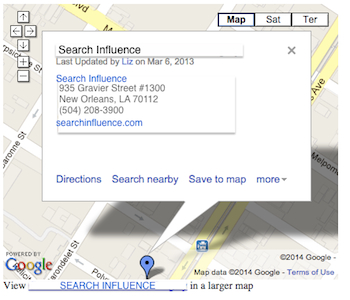
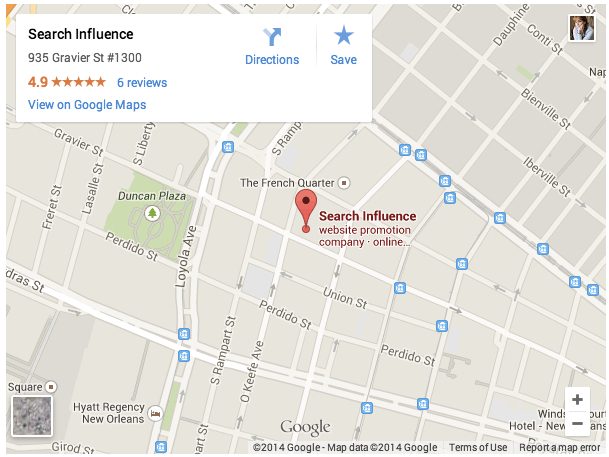
    Google My Business Embed Map - Search Influence

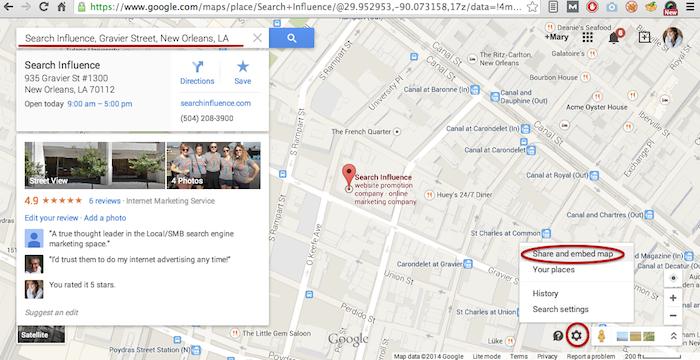
    My Maps should really only be created when you need a map with multiple business locations represented in one map or when you want to create maps with service area outlines. Otherwise, for single-location clients you should use the Google Maps embed feature as shown below:

    Google Maps Share and Embed Map - Search Influence

    In the new My Maps, making the My Map itself hasn’t changed really, the map interface is just a little prettier. You can still import KML files as well as search and add plus page pins to your map. I’m here to help you through the major changes ranging from the simple movement of where to access features to the extensive parameter codes breakdown with the loss of InfoWindows. So let’s get to it!

    New Tool, New Tricks:

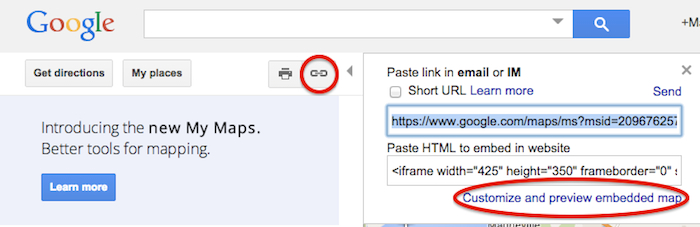
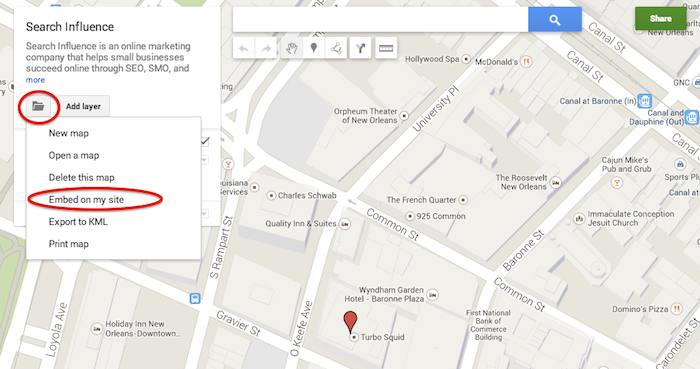
    First things first, where the heck did they move “customize and embed” button to get your embed code!? Well, as obscure and vague (to me at least) as it seems, it’s now housed in the folder icon on the left next to the “Add layer” button. It took me longer than I care to admit to sort that one out, so hopefully I save someone reading this that bit of time.

    Old Location to Grab the Embed Code:

    Old Google My Maps Embed Location - Search Influence

    NEW Location to Grab the Embed Code:

    New Google My Maps Embed Location - Search Influence

    Learn to love that new folder. It also houses the button to create a “New map” once you’re done creating your map or whenever you need to start a new map.

    IMPORTANT NOTE: You now have to share your My Map to make the map visible when you embed it, similarly to how you would share something from Google Drive. Click “Share” in the top right corner then I’d recommend to set access to “Public on the web – Anyone on the Internet can find and view.” The automatic setting when you choose “Public” is editable by the public. Unless you want to risk some strangers editing your maps, switch over to “view” only mode.

    New Product, New Parameters:

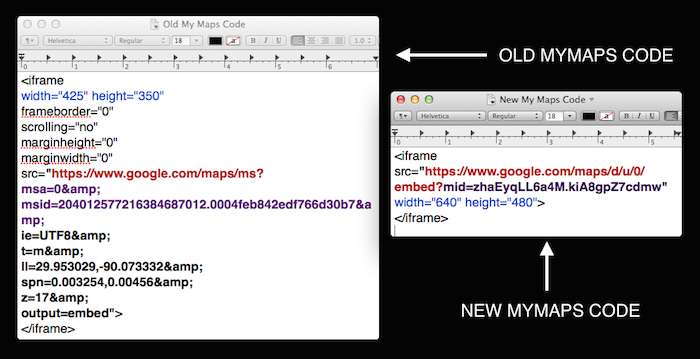
    Code Before and After:

    Google My Maps Embed Code Before and After - Search Influence

    So as you can see in the image above, they’ve removed a lot of previously provided parameters, making the source attribute a lot shorter and more concise. These parameters were responsive to and generated by the now extinct InfoWindow. The InfoWindow allowed you to preview and adjust the My Map before grabbing the code. As previously mentioned, these adjustments must now be done manually.

    First, for sake of knowing what we lost, we’ll cover all the attributes and parameters that were provided in the old My Maps codes.

    Size
    For the size of the maps, the InfoWindow used to let you choose Small, Medium, Large, or Custom.

    Here’s what old My Maps defaults gave you:
    Small: width=”300″ height=”300″
    Medium: width=”425″ height=”350″
    Large: width=”640″ height=”480″ (New My Maps is large by default)
    Custom: WHATEVER YOU WANT

    The parameters that adjust the source code are now separated by just “&” instead of the “&” parameter divider. I’m assuming that this change is a result of Google’s preference to save some characters.

    My Map ID
    First, you’ll notice that the parameters msa= and msid= have been replaced by mid=. The msa= parameter was used to set whether you were showing a particular, identified map (when set to 0) or showing other things like the My Map create form (when set to 2). Then when msa= was set to 0 to indicate that you were showing a particular map, you’d identify said map using the My Map identifier parameter msid=. It looks like the new identifier parameter, mid=, encompasses all you need.

    Input Character Encoding
    In the old code, ie= was used to set the input character encoding, which is typically set to Unicode 8 (UTF8).

    Terrain
    The type of terrain shown in the base of your My Map used to be set using t=. The following inputs will give you the respective results:
    t=m: normal map (think white cities, yellow street lines, green parks)
    t=k: satellite (the photographic, Google Earth look)
    t=h: hybrid (combination of normal and satellite, street lines and photographic)
    t=p: terrain (think atlas-type with shaded mountains)

    Latitude and Longitude
    To set the center point of the map, the code ll= would be used. Must be in decimal format and have latitude before longitude separated by a comma. Alternately, using sll= instead, with the same input formatting will set the latitude and longitude of the center point of the business.

    Span
    The parameter spn= was used to set the width and height for the geocoder to determine how many degrees of latitude and longitude will be shown.

    Zoom
    One of the most important parameters for My Maps in my opinion is the zoom adjusting z= parameter. Smallest input, 1, will show you all continents of Earth and the largest possible input (most zoomed in input) is 21.

    The only one I’ve needed is the zoom parameter so far, but any of the above will work. I think the terrain parameter might be helpful as well, but that can also be done by adjusting the terrain of your map directly in My Maps under “Base map”. Below is an example of the new My Maps code adjusted with a zoom parameter in bold.

    New Google My Maps Code With Zoom Parameter - Search Influence

    What about the popup window with all the dropped marker information!?

    Sadly, there is no longer a parameter to make the information of the My Map marker already visible on your map. This marker typically contains businesses’ location information. Viewers will now have to click the marker in the My Map to view this information.

    So, for single location businesses, the easiest way to get an embed code for your site, which shows your business info with the marker, is by using the simple “Share and embed map” feature already in Google Maps (see “Google Maps embed feature” screenshot above).

    Hopefully this will save someone having trouble adjusting to the new My Maps some time from scouring forums for this info. Stay tuned for my future post on how to use KML files for service area business maps!

  • Help! I’m A Cyborg And Nobody “Likes” Me

    Technology is redefining human connections, which has made social media a crucial ingredient in any marketing strategy. With many different outlets available used to communicate with your audience, how do you choose the best approach for your business? When sitting behind a computer screen, it is easy to forget the purpose of B2C marketing – building and maintaining meaningful relationships with your customers.

    Here are some quick tips to create that connection through your social media campaign.

    Be Receptive

    Always be conscious of how your product and service will benefit the customer. Keep these benefits in mind when encouraging your customers to engage in your promotion and be receptive to their feedback. The beauty of social media is that it allows you to create a more personal approach to marketing those benefits, receiving feedback from the consumer and personally responding to his or her thoughts or concerns within minutes, demonstrating your excellence in customer service.

    FacebookPeopleFirstImage

    Be Genuine

    It is critical that the voice and verbiage used for your campaign is coming from an authentic place. Eliminate the robotic, scripted tone and your audience will feel like they are not conversing with a business, but with a person who actually cares about their needs.

    HaveALotOfFeelingsImage

    Be Direct

    In this fast-paced society, your audience is most likely pressed for time and multitasking. Give them stimulating content in a short, digestible format that they will consider worth their time. Your mindfulness and appreciation for their time can go a long way.

    Keeping your campaign personal, and showing your gratitude to your customers in a genuine way can be the key to a successful social media campaign. As long as your customer service is consistent with your social media efforts, your business can build and maintain those essential relationships.

    Image Sources:

    Thanks to Buzzfeed for the Mean Girls gif and for the Facebook “People First” image.

    Other Source:

    LinkedIn’s Social Media & Emotional Brand Attachment Case Study


  • Five For Friday: A Very Twitter Christmas, Facebook Gets Scroogy With Likes, & More!

    iphone5borderimage

    1. Are Twitter Users the Most Efficient Holiday Shoppers? – MarketingLand

    Given their 160-character count limit, Twitter users are clearly efficient communicators. And now, we are learning that they are super efficient holiday shoppers as well. The popular social platform released a study highlighting its ability to influence shoppers in their decisions on retail establishments and which specific items to purchase. 54% of users are more likely to purchase an item if they saw it advertised on Twitter. The study also shows that Twitter users not only shop earlier, but they also shop more frequently for holiday purchases. I guess now we know where retail shops should be marketing during the holidays.

    2. Secrets to Properly Linking on LinkedIn – Business2Community

    We all have a LinkedIn page. We’ve entered in our resume details, uploaded a picture, maybe got endorsed by a friend or two, and received a glowing recommendation from our moms, but now what? How exactly can you benefit from this?

    Here are 12 secrets from LinkedIn pros! Adopting some of these habits will help you increase your presence and improve your network. Some tips include:

    • Message people in groups for free!
    • Share useful and relevant news (mainly for attention).
    • Use tools, like FiveHundredPlus, to stay organized.
    • Follow first; Like, Share, and Comment second.

    LinkedIn can be confusing, and it may seem unnecessary, but with the growing number of companies and business people joining and actively using the platform, it has become more beneficial to understand how it works. Creating a substantial network will help in the long run. So, go forth and connect!

    3. How-To: The Most Perfect List Post – Business2Community

    Everyone loves lists! However, with their increasing popularity and Internet users’ ever-prevalent short attention spans, how do you keep readers reading?

    Business2Community offers a near-perfect list of tips for creating the best and most effective list post. There are several things to consider when writing out a list, and remember, every detail matters. Some of the tips provided are:

    • Always, always, always have an introduction and a conclusion (excluding the distinguished SI Five for Friday posts).
    • Pick the right number (10 instead of 5, 7 instead of 8). Trust us, it’s science.
    • In the title, use “10” instead of “ten.” Seriously, it matters.
    • Write longer posts.

    These tips are guaranteed to help make your list go viral, or at least make sure your readers actually read through to the end.

    YouArePerfectImage

    4. The End of Facebook Like-Gate as We Know It – MarketingLand

    Say goodbye to the days of entering a contest on Facebook with the simple click of a Like button. Facebook engineers have dismantled the ability for companies to use Likes as the entrance fee for contests and prize drawings.

    The effects of this are two-fold. For one, companies will now have to engage users on a deeper level in order for them to connect with the business. This change effectively ends the use of “artificial incentives.” Two, they also expect to see more conclusive results when determining demographics, as opposed to the scattered results received when companies were giving away iPads haphazardly to gain social media presence.

    However, it is also being argued that ending Like-gating is solely meant to gain revenue for Facebook. The belief is that companies will pay for Likes if they have to. And now, they have to.

    5.  What’s the About Page Supposed to Be About? – CopyBlogger

    The About page seems pretty self-explanatory, but it has actually evolved over the years and is no longer a place for you to just describe your business/products. For a more effective page, use it to start a conversation with your reader and emphasize to potential clients that you have what they are looking for. Because this is often the most visited page on your site, it is wise to grab the reader’s attention from the get-go. Let your personality shine! This will assure your visitors that they are in the right place, and they are more likely to continue browsing your site.

    There are 5 steps to creating a superior About page:

    1. Engage with readers by introducing your personality and humor on the site. Don’t be afraid to be different.
    2. Get into the readers’ heads. Make them think you’re reading their mind by showing them you have exactly what they are looking for.
    3. Brag, but humbly. Include some testimonials so others are singing your praises.
    4. Near the end, insert a bit of your biography. Make sure you express why you do what you do, and why you love it.
    5. Call to action! Invite your readers to sign up for your email list, call, or contact you. Most of the time, they will!

    Image Sources:

    Thanks to Mariah Summers for the “You Are Perfect” gif.