Blog

  • Enriching Your Results on Google

    If you’ve used Google to perform a search for a recipe, an answer to a question, to find a restaurant, or find out the time a concert starts, you’ve probably noticed that not all search results look the same. Some of the results have extra information, some appear with pictures in a “carousel” at the top of the page, and some have reviews with stars on them. These are what have been called “Rich Snippets” by Google, and more recently are being referred to as “Rich Results” in Google documentation. There are many types available, and if you have a website that you are trying to drive traffic to, then there is probably a way for you to take advantage of these features.

    What’s a Rich Snippet?

    The results returned by Google for each recommended web page that consist of a title, a description, and the URL for the page are “snippets” of information taken from the pages of websites. For example, take our LinkedIn page as it appears in the search results:

    Typical Snippet

    Rich snippet data on a SERP result for Search Influence's LinkedIn page

    The title and description are pulled from meta information stored on the pages of websites that are referenced in the results. These are typically added to the code of the site using some simple HTML that can be read in the source code but does not display for site visitors on the page.

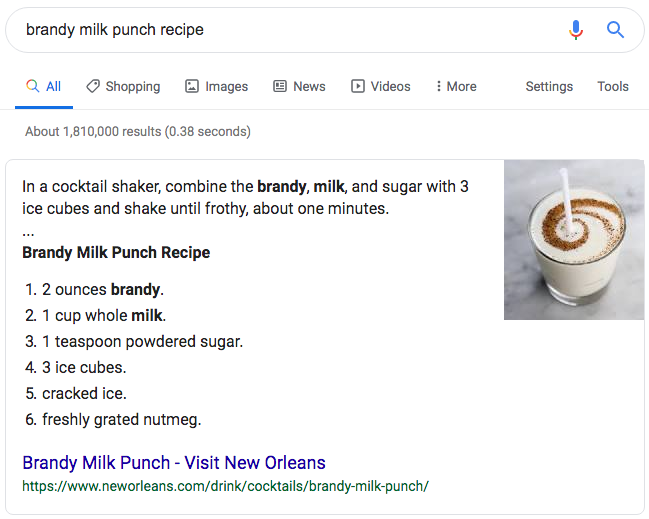
    Rich Snippet
    Example of a rich snippet being served up in the Google SERP

    Similarly, Rich Snippets use code on the page to provide more information to Google and can result in additional information that is displayed more prominently in search results.

    How Do I Get My Site to Show as a Rich Snippet in the Search Results?

    In order for Google to display your webpage(s) as rich snippets in the search results, you need to have the information required for the Rich Snippet type in a coded format that Google can read. This is done with “Structured Data,” which, just as the name would suggest, is information specified in a particular format. Google uses the vocabulary of schema.org for most of it’s structured data, and there are several different formats that can be used. Google’s preferred format is JSON-LD (JavaScript Object Notation for Linked Data) which is a common format for communicating information in web-based applications and other domains. This code format can be a bit tricky to write, so you’d likely be better off using examples provided by Google’s documentation and replacing the values with your own information or using a tool or plugin that will generate the code for you.

    If you are familiar with HTML, there are some more easily writable ways to implement structured data on your site using Microdata and RDFa. These use additional HTML attributes to define structured data.

    If you use a popular CMS (content management system) like WordPress or Shopify, there are also a variety of plugins or add-ons that can assist you in adding structured data to your site.

    What Types of Structured Data Does Google Use for Rich Snippets?

    There are 29 different rich result displays, and Google has just announced some more upcoming display options that will be available on certain search types. I would recommend checking out Google’s documentation for a comprehensive list and all the different structured data that is required for a web page to appear with various display perks and in certain sections of the results. I’ll cover some of the primary ones that will apply to the broadest number of sites.

    Article

    Blog posts and news articles can use the article structured data to potentially be featured in Google’s top stories, carousel, and display, with extra features like headline text and a larger image than the normal thumbnails from results.

    Breadcrumb

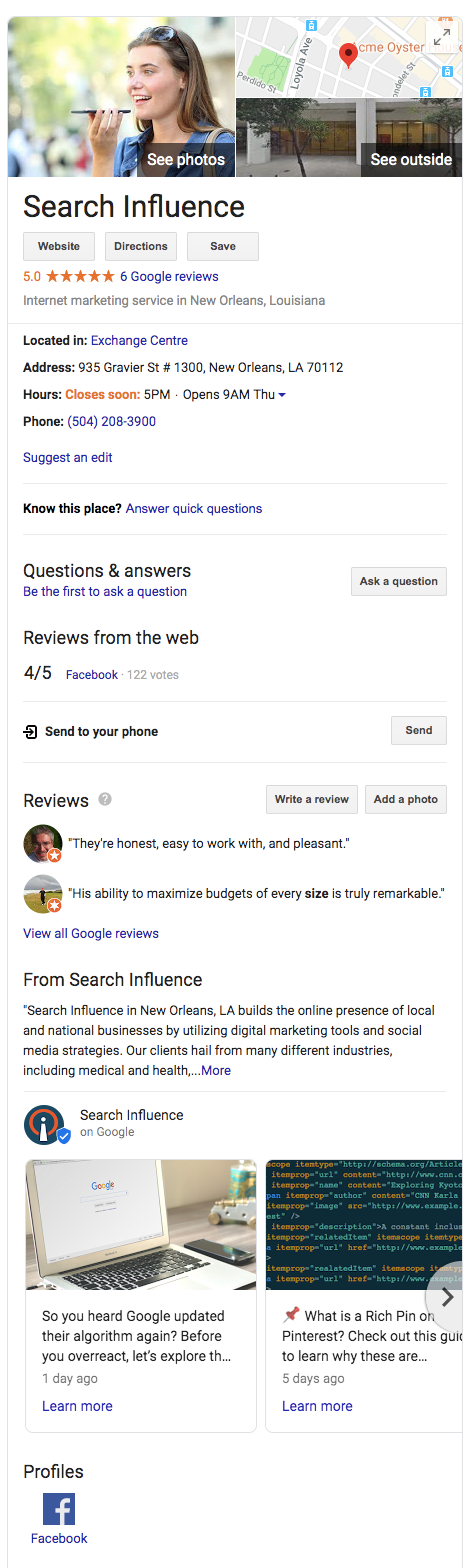
    Breadcrumb structured data can be used to display the pages in relation to the rest of the site.Example of a knowledge graph result using Search Influence as the businessFor example, a specific product page could fall under a category page, which falls under a broader category. With breadcrumbs displayed in the search results, navigation to any of these pages is just a click away.
    Carousel

    Google’s search carousel feature, a prominent interactive display with images that appear at the top of search results, can be unlocked with the carousel structured data. This usually works in conjunction with other structure data like article, recipe, or course structured data.

    Course

    For Education, schools and businesses offering courses can lay out information that will be displayed in the Google search results.

    Event

    This type is an interactive rich result that shows a list of organized events, such as concerts or art festivals, that people may attend at a particular time and place.

    FAQ Page

    A Frequently Asked Questions page structured data is for common questions posed on the page’s subject, often used by businesses to provide information about its products and services.

    How-To

    A How-To walks users through a set of steps to successfully complete a task, featuring video, images, and text.

    Local Business

    Local businesses will benefit greatly from this type of structured data. It allows your business to appear in the knowledge graph with important information like address, hours of operation, contact info, logo, and business description.

    Logo

    This allows your organization’s logo to appear in search results and the Google Knowledge Graph.

    Product

    Structured data for products includes price, availability, and reviews.

    Q&A Page

    Similar to an FAQ page, Q&A structured data can be used on pages that present information in question and answer format.

    Recipe

    This structured data type will allow recipes to potentially display in Google search results with ingredients list and instructions.

    Review Snippet

    A review snippet is a rating or short review excerpt. It can apply to products, recipes, movies, and local businesses.

    Video

    These snippets allow you to markup video content and appear in video results of Google search results.

    Where Can I Learn More?

    You can see example code, required information, and images of the resulting rich snippets that structured data types make possible in Google’s documentation here. I also recommend checking out Schema.org, where you can learn more about the structured data that Google used as a base for all their structured data conventions.

    If you need help implementing code or appearing higher on Google’s search results, the Google and SEO experts at Search Influence can help. Contact us today.

    Images

    Dollar sign

  • How to Create Effective and Engaging Video Content on a Budget

    In 2019, it’s impossible to deny the importance of video content for businesses. Visitors spend 2.6 times more time on pages with video, and websites with videos are 53 times more likely to reach the front page of Google than ones without. 95% of the message is actually retained from a video (as opposed to only 10% of information read via text) and a whopping 85% of consumers want to see more video content from brands. The evidence that video is going to dominate the marketing world for the foreseeable future is everywhere, and it’s exciting!

    We’re going to give you a few tips below to help you create optimized videos that won’t break the bank.

    Visual representation of good video implementation on site

    Tip 1: Choose a Style and Tone for Your Video

    The tone of your video can make or break how it’s received by your viewers and ultimately your ROI, and since some marketing professionals consider video to be the type of content with the best ROI, you need to choose wisely. If you’re making an informative video about wills and estate planning, you’ll probably want to take a more serious approach. This not only goes for the content of the video but the animation style, too. You don’t want to use an animation style that’s too playful for your subject, but you also shouldn’t use an overly professional video style for more fun and casual content.

    Tip 2: Appeal to Your Audience’s Emotions

    Instead of focusing narrowly on your product or service, you should also try to appeal to the emotional side of the viewer by focusing on the mission of your product or company. Focusing on a story will connect more to the user subconsciously, which is how 95% of all purchases are made.

    Tip 3: Utilize Existing Content

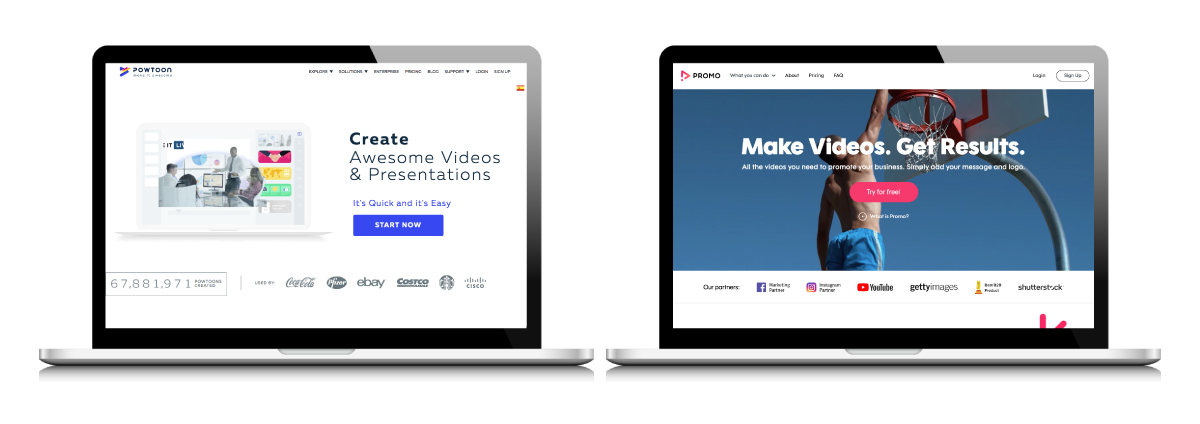
    Two examples of video production products

    Making videos in-house will save you a lot of money, and you don’t need to be an experienced filmmaker or video editor to make quality marketing content. There are plenty of resources out there that don’t require any special software to use. Powtoon, for example, is a great resource for creating animated videos. Multiple different animation styles are available to choose from that can work for any industry or topic.

    Another helpful video creation resource is Promo. Promo provides free music and live action and animated video clips that you can combine with text or your own footage and audio. You will save countless hours by using what is already available to you on these and other platforms.

    Tip 4: Focus on the First Ten Seconds

    It is essential to grab your viewers’ attention in the introduction of your video. A fifth of all viewers will stop watching after ten seconds if their attention is not captured in the first ten seconds. You have until the 30-second mark to engage your viewers or you’ll lose 33% of them, and one minute until you lose 45%. You need to know your audience well enough to know what will stand out to them enough to stop scrolling and pay attention throughout your whole video. Once they do make it to the end of the video, a strong CTA is just as important as those first ten seconds. Choose something specific like subscribing to a newsletter or visiting a page on your site.

    Tip 5: Optimize Your Video for SEO & Mobile

    Over half of all videos on the web are viewed on mobile. Of those mobile viewers, over 90% of them share video content with others. The potential shareability of videos viewed on mobile is not something to be ignored, and which is why you need to optimize your videos for mobile. The standard aspect ratio for videos viewed on desktop is 16:9, but this is not ideal for mobile as it does not show up big enough on the screen. Ideally, videos optimized for mobile would be designed with a 9:16 aspect ratio so that they fill the entire screen. To ensure your video is viewed well on both desktop and mobile, create a square video with a 1:1 aspect ratio. For Facebook, your videos should have both captions and audio. This is not required, but it is recommended, as 85% of videos on Facebook are viewed without sound.

    Animaker is just one resource available to you that allows you to create vertical videos tailored specifically for mobile viewing.

    According to the digital marketing institute, you should be hosting your video on your own domain: “enable embedding on your video as this will help you increase the likelihood of receiving inbound marketing links,” and make sure your descriptions and keywords are thorough and unique to the video you created. Video can drive up organic traffic as much as 157%, so you need to make sure your video is optimized for SEO.

    These tips should help get you started on creating and optimizing your own video content in-house. If you should still need some SEO guidance on making sure the right people and customers are seeing your video content, the team at Search Influence can help. Contact us today to get started.

  • How to Use Google Shopping to Increase Retail Sales

    It’s more important for retailers, now more than ever, to capitalize on the internet as an additional revenue source for their businesses. The vast majority of internet users in the U.S. are expected to shop online this year, with Statista estimating that 80% of all internet users in the country are expected to make at least one purchase online during the 2019 calendar year. Compound this fact with the matter of Google being the most used search engine worldwide with over 1 trillion searches taking place on the search engine per day, the importance of utilizing Google’s shopping tools to boost profitability can’t be overstated.

    What Are Google Shopping Ads?

    One of the most important Google tools that online retailers can take advantage of is Google Shopping Ads. Google Shopping Ads are product listing ads that are featured across Google’s Search and Shopping results. These ads differ from Google’s paid search ads in that they feature product pictures, while paid search ads do not. There’s also no need to set up text ads or bid on any keywords with the use of Google Shopping Ads, which is another key difference between the two popular ad types.

    Person using credit card to make purchase on Google Shopping

    Online retailers can use Google Shopping campaigns to promote their local and online inventory, and boost traffic to their websites and local stores. Shopping campaigns also give retailers the benefit of being able to find better qualified leads for their product offerings. By featuring detailed product information directly within your shopping ads, online retailers better help shoppers make well informed purchasing decisions, which in turn leads to increased conversions and purchases. In addition to including detailed product information within your Google Shopping Ads, there are several other key areas of importance that retailers must focus on in order to achieve success with a Google Shopping Ads campaign.

    Your Product Feed: The Key to Campaign Success

    One of the most important areas to consider when taking on a shopping campaign is the proper setup and optimization of your product feed. For context, Google Shopping is powered by two platforms: AdWords and Google Merchant Center. Google Merchant Center is where your product feed lives. Your data feed is simply information about the products that you want to sell formatted in an organized way that Google can read and understand. As we previously mentioned, you don’t bid on the keywords your Product Listing Ads show up for. Google instead crawls your feed and determines if one or more of your products is relevant for a particular search query. In this regard, Google Shopping has similarities to SEO. You need to structure the various elements of your feed so that Google can make sense of it and find it relevant for the appropriate search queries.

    The three most important elements to consider when building your product feed include the product title, product description, and Google product category. First and foremost, your product title should be accurate, descriptive, and include top keywords as well as the name of the product. Important information about the product should be frontloaded in the title, and additional descriptors such as make, model, size, or color are all helpful keywords to include in the title of your product.

    Secondly, product descriptions should follow the same guidelines as product titles. Ensuring that your product description accurately describes the item at hand, while also including relevant keywords and important product information at the beginning of the description all help increase the chances of your ad being shown for relevant search queries.

    Lastly, choosing an appropriate category for the products in your shopping campaign is an important (and required) step to getting your products to show up for the right search queries. Google has created a fairly exhaustive list of categories and subcategories that your products might fall under, which can be found here. There are currently over 6,000 categories and subcategories to choose from on Google’s list. Only one category per product can be selected, so it’s important to choose the most relevant category for the product at hand. This will help Google understand exactly what your product is when deciding to display your ad in response to consumer search queries.

    Carrying shopping bags after a lot of retail spending

    Getting Your Bidding Strategy Correct

    Aside from your product feed, your shopping campaign bids are the most important part of your ad strategy. Your bids will play a key role in determining which queries your ads show up for, along with the overall profitability of your campaign. Shopify suggests taking into account your product price, profit margin, and online conversion rate to calculate your initial cost per click bid. Once your initial bid is set, be sure to adjust your bids if you find that your ads aren’t gaining enough impressions, clicks, and conversions. Increase bids slightly—by $.05 to $.10 at a time—until the ads begin to generate more impressions and clicks.

    You’ll also want to be mindful of your daily budget, and monitor this metric closely. It’s very likely that a new campaign won’t hit their maximum daily budget in the first days and weeks. Over time, as your click-thru rates improve, and as Google gains more data on how users respond to your ads, they’ll begin to show them more frequently for relevant queries. Once this trend shifts, you’ll want to review your daily budget to allow for more impressions and clicks for your campaign.

    Campaign Performance Review & Ongoing Optimizations

    After your campaigns are set up, and you’ve settled on a successful bidding strategy, it’ll be time to track your success and review your campaign for optimization opportunities. Reviewing the amount of clicks and impressions for the products in your product feed can help you in deciding next steps to further boost the performance of your campaign.

    For example, products with a high amount of clicks but low conversions may benefit from a thorough review of their product page on your site. Could your product images be clearer? Does the page showcase product reviews? Think of the onsite page optimizations from a consumer standpoint, and make adjustments accordingly.

    Another report worth reviewing regularly is the search query report. Reviewing keyword performance will give you insight into whether adding negative keywords, changing up your product feed, or reducing certain product bids would be an effective optimization.

    When you partner with our team at Search Influence, we will handle every detail of your campaign to make sure it performs effectively so you can focus on growing your business. Our online advertising services can help you reach your target audience and make continuous improvements to your advertising strategy. Get started today by requesting a proposal online.

    Images

    Shopping

  • How I Learned to Stop Worrying and Embrace Google Algorithm Updates

    Author’s Note: During the course of writing this blog Google took an unusual step (for them) and announced an impending core algorithm update. While this blog does not discuss this update specifically, the underlying themes about handling these updates should remain applicable. To learn more about this core update, I recommend reading some of industry news sources I have mentioned below. 

    Much like the sun will rise in the east and set in the west tomorrow, digital marketers and business owners alike will hear rumblings every few months about supposed updates to Google’s ever-elusive algorithm and begin to worry. For some businesses, these updates (or “improvements,” as Google usually euphemizes) can generate significant dips in traffic to their site and seemingly undo previously successful SEO efforts. A prime example of that scenario would be back in August of 2018, when SEOs noticed a noticeable drop in site traffic, particularly in the medical vertical.

    This led to wild speculation about the scope, purpose, and future impacts of this particular update. Undoubtedly, many digital marketing practitioners felt the effects of this update with diminished traffic to their sites. As someone who has worked on numerous SEO campaigns and strategies, I can certainly relate to the consternation around Google reconfiguring their algorithms to change the way sites are rewarded organically. In many instances, these updates can positively impact sites that may be less authoritative and in some cases utilize underhanded tactics that do not necessarily meet searchers actual needs.

    Lisa Simpson taking a scientific approach to Google algorith updates

    This is certainly very frustrating from a marketer’s perspective, as the parameters around what is best practice and how to win organically can shift seemingly overnight. When this is combined with Google’s textbook evasiveness around these updates, it may be overwhelming.

    So, How Should I Respond to a Google Algorithm Update?

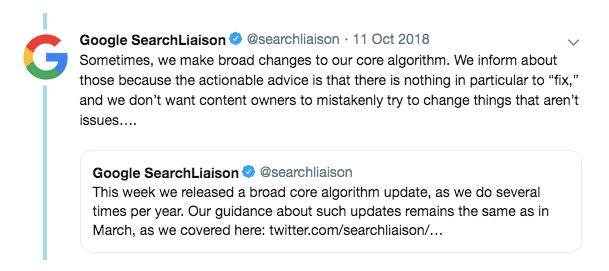
    Google has made efforts to become more communicative with SEOs in recent years (they even updated their “SEO Starter Guide” for the first time in over seven years back in April of 2019), however, they still are very cagey about what they are willing to reveal as it relates to specific algorithmic updates. In certain cases, if there’s enough of a perceived backlash from the larger SEO community, then Google representatives may take steps to address it publicly; however, those answers are typically engulfed in vaguery as well. Take this statement from Google’s Search liaison Danny Sullivan in the aftermath of the August and September 2018 updates as an example.

    “We understand those who do less well after a core update change may still feel they need to do something. We suggest focusing on ensuring you’re offering the best content you can. That’s what our algorithms seek to reward.”

    The word “seek” is pretty telling here, as it underscores the idea that the algorithm is imperfect. Also, consider the fact that Google is constantly reworking their algorithm to best serve searchers, another implicit sign that there is room to improve. The first thing you can do to help yourself respond to algorithm updates is to realize that 1) it’s not a perfect reward system and 2) these changes are out of your control. Additionally, the solution is intentionally vague and does not really define what “best content” really is.

    Screenshot of Twitter discussion of Google algorithm updates

    Above we see the acknowledgment. One can waste a lot of time questioning Google’s decision-making, but it is important to evaluate whether these updates have actually had a tangible effect on your business. In many cases, these updates may impact certain industries, but certain sites within that industry do not see the effects. Before looking at the macro of the issue, the focus should be on if there is any tangible impact on the micro level; in other words, did this update actually impact me? From there, you can start to take the steps needed to recover, if you even need to.

    How Do I Know When a Google Algorithm Update Is Occurring?

    Since Google does not typically acknowledge when an update is happening, digital marketers rely on third-party tools and anecdotal evidence to connect the dots. The best way to stay on top of this is by following some of the industry leaders who follow and discuss news stories of the day, such as (to name just a few) Search Engine Roundtable (who does an amazing job staying on top of chatter around updates), Search Engine Journal, or Search Engine Land.

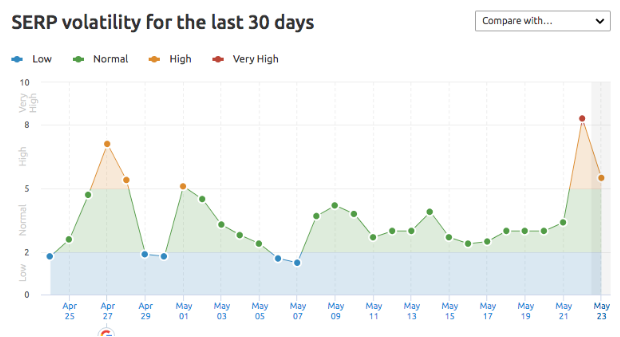
    Most reporting around these updates comes from what SEOs and digital marketers are seeing in real time, as well as from new tools that help monitor search engine volatility. One of these tools is SEMRush’s Sensor that measures the level of volatility across industries and across different countries. Often, the sensor will pick up on this volatility and the news about updates will follow in the next few days.


    SEMRush's Google algorithm sensor

    As you can see here, April 27th and May 22nd are of particular interest. SERP (Search Engine Results Position) volatility is noted as very high, meaning sites’ rankings have fluctuated greatly. As I write this blog on May 23rd, I am starting to see chatter around the typical sites about potential updates to Google. These are largely unconfirmed, and it’s unlikely that this is a massive update, but we do not know that until more SEOs and digital marketers weigh in or Google confirms these updates. What this tells us is that somewhere, in some verticals, rankings have fluctuated. Whether or not this is a result of an update or some other unknown factors is hard to know.

    It is important to remember this: these anecdotes and 3rd party tools are just signs, not concrete evidence. There are many examples of overreaction to this data and many times it can lead to unnecessary scrambling when it may just be a minor change or something completely unrelated to an algorithm change.

    Well, My Traffic Is Way Down, Now What?

    This is where it becomes tricky, as you must be familiar with your overall SEO strategy as well as the possible sources of these issues. This is why monitoring tools like SEMRush’s Sensor as well as the various industry news sources is imperative to running an effective SEO campaign. If your traffic is down as a result of an algorithm update, then there is almost assuredly highly skilled digital marketers attempting to diagnose and find solutions to the problems.

    Take this post about how to recover from the “Medic Update” from Search Engine Journal. This is chock-full of the usual pain points about these updates, Google’s vague acknowledgments, and some evaluation of previous updates. In addition, however, we get plenty of great strategies around content to help rectify the issue. The volatility of SEO and rankings allows for your site to recover if you continue to be ardent about following best practices and putting effort into your strategies. Furthermore, you cannot get locked into a fixed set of best practices. In many cases, the best solution is to try a new approach you may have avoided or not known prior.

    In the moment, these updates can seem like a business-altering minefield, but it is very important to remain focused on long-term strategy. SEO is oftentimes a slow, non-linear process, so it’s important to keep that in perspective before getting overwhelmed by a bad few months after an update.

    If you need help with your SEO strategies, the team at Search Influence has the expertise to navigate through the ups and downs of Google algorithm updates. To learn more, contact us today.

    Images

    Laptop

    Lisa

    Google Twitter

    SEMRush

  • Pinterest Rich Pins, a Complete Guide

    Google’s Rich Snippets changed the face of the search game for the better, and now Pinterest has done a very good impression of it—and it is pretty darn good. Pinterest’s Rich Pins are a new feature that allows Pinnable content to display better information to avid Pinners.

    Phoebe from friends stating "Oh my God, you're rich"

    What Is a Rich Pin?

    A Rich Pin differs from normal pins by displaying additional information to users instead of only the pin title. Rich Pins use metadata in accordance with schema.org and the Open Graph Protocol to display this additional information on your pins. Open Graph may sound familiar because it’s what’s already used to display information on social media platforms such as Twitter and Facebook. Pinterest takes this principle a bit further by essentially combining the Open Graph Protocol with Article, Product, and Recipe schema types from schema.org to display detailed rich results on their websites. Below is a comparison of the Carbonara recipe from Immaculate Ruemu and My Gorgeous Recipes.

    Carbonara recipes used as rich pins on Pinterest

    As you’ll see, neither recipe uses guanciale, but I’m willing to forgive Ruemu because of the wealth of rich data that shows up in her Pinterest SERPs.

    How Do You Get a Rich Pin?

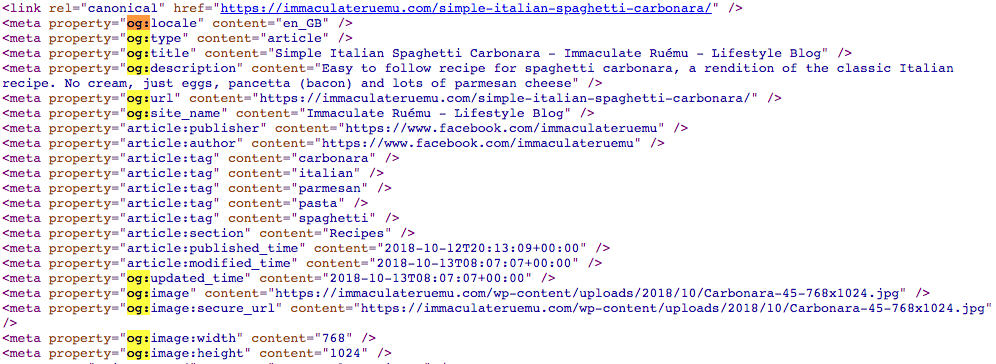
    Getting a Rich Pin is as simple as following Pinterest’s official Rich Pin Getting Started Guide, but is also as difficult as following Pinterest’s official Rich Pin Getting Started Guide. The two ways to add structured data to show up in Rich Pins is to use Open Graph Tags in the header of your web page or to use meta tags in the body of your web page. Ruemu opts to add some open graph tags to the head of her recipe pages so that she ends up with Rich Pins whenever she pins to Pinterest.

    Open graph markup example

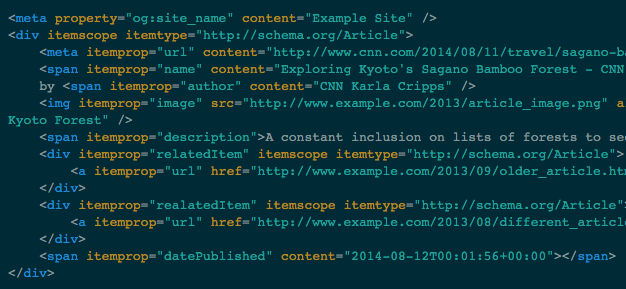
    The alternative to this method is to add meta and span tags to the portions of your content that you want to show up in Rich Pins.

    Example of span tags used for rich pins from Pinterest

    Once the tags are in place on your website, you’ll just need to apply for Rich Pins using Pinterest’s validator, then select what type of markup you used. Though Pinterest does support both methods of markup, one takeaway is that adding markup to the body of your articles, recipes, or pages, generally has to be completed manually and can be very cumbersome to constantly do every time you want to create a new post. A developer has the ability to add Open Graph Tags to the head element of your template files so that this information is served up dynamically and changes to the appropriate content, depending on what is actually being posted. If you don’t have a developer, Search Influence has a full development team capable of implementing detailed and difficult changes to existing websites.

    Another option is to use a WordPress plugin to take care of this for you (if your site uses the WordPress CMS). This does require some research, however; plugins can sometimes be a lot larger than they appear and bloat your site size or even slow it down, in some cases.

    Why Should I Markup My Site?

    Some users may be initially turned off from the idea of Rich Pins since it displays so much information from your site without the user having to visit your site, but as research has shown, Rich Results on Google have a higher CTR and lower bounce rates. While we don’t know exactly why users want to click rich results more, we can see the added authority from a visual standpoint at least. Ruemu’s Carbonara recipe lists all the ingredients, its 5 stars out of 10 review rating, and cook time, all on the Pin itself. So if you’re looking to whip up some Carbonara for dinner, her Pin gives you the high-level information before even clicking through. So when you actually click through, you know that the recipe itself is legit.

    Much like Google’s own Rich Results, Rich Pins don’t actually guarantee higher positional ranking or any of that other jazz. What it does offer is a tangible effect of some backend work on your website that you’ll be able to see on the front end of Pinterest, which has an already proven record of success with users. Keep in mind that Rich Pins are currently only available for recipes, articles, or products. If your website does feature any of these, feel free to enlist Search Influence to assist you in updating your website to efficiently use Pinterest’s Rich Pins.

    Images

    Carbonara

    Carbonaro Pt. 2

    Code 1

  • Capture More Potential Applicants With Lead Generation Ads

    Students rely on search engines to research and evaluate the colleges they are interested in attending. As an institution of higher education, you should nurture them from the early stages of research to when they begin applications. The applicant cycle, according to PerfectSearch, can take up to two or more years and should consist of multiple tactics, including targeted emails, paid search, SEO, and social media.

    Lead generation ads are great for capturing potential applicants who are close to converting, as well as those who are earlier in the process. Because of this, they are a great way to capture people who want to move quickly through the application process.

    Lead generation ads can be utilized on Facebook, Instagram, and LinkedIn. Since Facebook and Instagram are both under Facebook, if you set ads live on Facebook, they’ll also show on Instagram.

    Person setting up Facebook lead generation ads for their business

    What Are Lead Generation Ads?

    Lead generation ads are just that—ads that run on Facebook that are meant to generate leads. According to Facebook, lead generation ads let people show their interest in a product or service by filling out a form in the ad with their details and encouraging a business to follow up with them.

    Once a user clicks on the ad, a form will populate with the pre-filled information from the user’s profile. Meaning, they don’t have to type in their name, phone number, or email address. It’s a simple concept with a great return.

    Facebook’s lead ads can help you meet the following goals:

    • Finding new customers for your business
    • Finding out more about people’s interests
    • Getting people to sign up or register for your service
    • Getting people to enroll in your program
    • Getting people to download a brochure or manual

    Why Should You Use Lead Generation Forms?

    Depending on the type of form, filling in the information can be time-consuming and overwhelming. Collecting data and customer information is the key to success, so the more information you are able to collect, the better. According to data from Facebook, lead generation ads usually have high conversion rates because there are fewer steps in the conversion process. The mobile-friendly forms are created for easy converting.

    Leilani Bruce of Pacific54 states, “according to Adobe’s State of Digital Advertising 2018 report, 50% of Gen Z (18-19 year olds) and 42% of millennials (20-36 year olds) think social media is the most relevant channel for ads.” So the question should be WHY NOT use lead generation forms?

    You can customize the questions and information you collect. So, it would be a great idea to ask which programs or courses the potential applicant is interested in. From there, follow up with additional questions based on that user’s answers, but keep them simple and to the point.

    The forms run in more places than just Facebook’s newsfeed; they can also show up in Instagram feeds, stories, etc. Whether you’re using carousel ads, videos, or static ads, they all support lead generation ads. Using videos is recommended because users engage with videos more often than static ads.

    One great feature of Facebook is its self-learning and optimization, meaning that Facebook will automatically optimize your campaign to show your ads to people who are more likely to fill out the form. This leads to more conversions and highly qualified leads.

    As mentioned before, make sure to reach out to potential applicants in a timely manner, whether you follow up with more information or are just using remarketing to drive applications.

    Group of digital marketers working on Facebook lead generation ads

    Tips on Using Lead Generation Ads

    After capturing data from a pool of potential applicants, you can create a remarketing campaign to continue to target them. This allows you to remarket to someone who might have already interacted with one of your ads.

    Also, potential applicant information can be used to create a lookalike audience. According to Facebook, a lookalike audience is a custom audience that’s used to reach new people who are likely to be interested in your university because they are similar to your existing students. Make it easy for potential applicants to get in touch with you by utilizing a specific call to action (CTA) like click-to-call.

    Another thing Facebook is capable of is connecting with your university’s internal platforms. Facebook can easily integrate with MailChimp, Salesforce, Google Drive, or custom CRMs. Facebook recommends integrating CRM software since it allows you to see your leads in real time, letting you reach out to your leads more quickly. And the sooner you reach out to a potential applicant, the more likely they are to convert.

    If you’re looking for new techniques to drive more students to your university, the team at Search Influence has years of experience helping institutions of higher education increase the quality and size of their applicant pools. To learn more about our services, contact us online.

    Images

    Woman Typing

    Team Meeting

  • How User-Generated Content and Engagement Can Help Boost Your SEO

    As we continue moving toward an increasingly digital world, the importance of user-generated content, and the engagement that it produces, is becoming more prevalent in the realm of SEO. What users say about your brand, and how often, can have a real impact on your online visibility. How you promote, engage, and moderate this content is equally important. Below, we’ll look at the good and the bad while also finding ways to use this sort of content to the benefit of your business.

    So What Is User-Generated Content?

    User-generated content (UGC) is as straightforward as it sounds—any content that is created by a user and shared on an online platform. This content can include reviews, testimonials, images, and comments that are shared on platforms such as social media, blogs, or internet forums. Think product reviews on YouTube or reviews of a restaurant on Yelp. Additionally, this type of content can also be shared directly on your business’s website (we’ll go into that more later).

    Eric Cartman walking down the halls in a Yelp Critic shirt

    What Are the Benefits of UGC?

    The most obvious benefit of UGC is the publicity of your brand, products, and/or services. But what does this mean in terms of SEO? For starters, it provides more information and context for search crawlers. Search engines can provide a user with results from both your website and other platforms that mention your brand. For example, a Twitter user’s tweet praising a good experience with your company’s customer service could show up on search engine result pages (SERPS). More content means more opportunities for search engines to find your brand and provide that information to users.

    As mentioned earlier, user-generated content doesn’t have to come from outside sources. There are ample opportunities to obtain UGC directly from your website. In a Reddit AMA last year, Google’s own John Mueller suggested that allowing users to make comments (say, for instance, on your website’s blog entries) is one way of getting more content onto your website. Allowing users to make comments and engage in a discussion will give crawlers more content to consume, thus providing them with more context. Want to share positive feedback from some of your customers or clients? Consider adding a testimonials section to your website that highlights this feedback to impress other potential customers.

    Woman at computer approves and thinks this user generated content is legit

    Another benefit of user-generated content is that it brings authenticity to a brand. According to Stackla, 90% of consumers (a 4% increase in just two years!) believe authenticity to be an important factor when deciding which brands to support, while 61% of marketers say this is what makes content marketing most effective. Authenticity is what drives and encourages engagement from potential customers. Users are 28% more likely to engage when given UGC such as product videos and official brand authorized content. If users are engaged, this will result in more time spent on a site and a higher likelihood that this will result in conversions.

    Are There Any Downsides to UGC?

    Unfortunately, there is a glaring disadvantage to user-generated content if it’s not handled appropriately: People won’t always give your business glowing reviews. We’ve all seen scathing Yelp reviews or tweets go viral. Are they always warranted? Not necessarily, but search engines don’t know that, and they sure don’t discriminate. Just as positive content about your business can give you an advantage in SEO, conversely, negative content can result in poor SEO performance. You may not always be able to do away with the critics, but there are certainly ways to help combat that type of content.

    How to Manage UGC

    So what can you due to limit or control this sort of content? One of the easiest and most obvious ways is to hire someone with the knowledge and know-how to manage it for you. Keeping up with and finding ways to control user-generated content can be incredibly time-consuming, so giving that responsibility to experienced professionals will not only save you time but will also ensure that it’s done in a thoughtful and SEO-friendly way. Finding ways to incorporate user-generated content on your website is one of the easiest ways of managing content since it gives you complete control over the type of content that is shown. Allowing users to submit review videos to your site or to offer a testimonial of their experience are just two ways to get more authentic content onto your site.

    It’s important to keep in mind that user-generated content will happen whether you like it or not. How you choose to handle it is a critical decision for a successful, sustainable business. There are plenty of services available for your business to utilize to achieve the online success you desire. Ready to get started? Contact our team today to see how we can help grow your business.

    Images

    Ilya Pavlov on Unsplash

    Cartman

    Legit

  • Seven Tactics to Maximize Your Restaurant’s Organic Reach On Instagram

    In the world of pay-to-play, restaurants are seeing their organic reach diminish across social media. Organic reach is the number of unique people who have seen your unpromoted post. When posting organically, you rely on the social platform’s algorithm to distribute your content to whoever it chooses to show your post to.

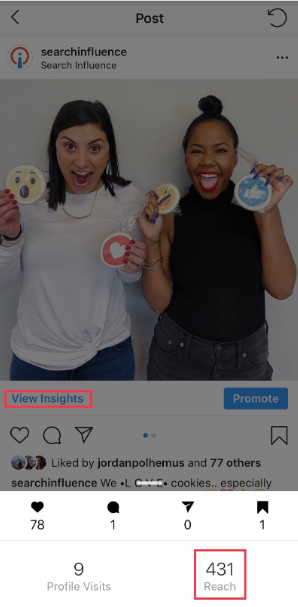
    In order to see your reach on Instagram, you need a business Instagram account. Click on the post you want to analyze and then click “View Insights” under the photo.

    Fortunately, Instagram still has best practices for maximizing reach organically. We’ll start with Instagram basics to lay some marketing groundwork and work our way to reach-increasing tactics. You’ll need a solid organic strategy in place in order to receive engagement and consistently grow your reach. Use these seven tactics to get started.

    1. Know Your Branding

    Checking a restaurant’s Instagram before deciding where to eat is becoming second nature to Millennials. They’ll probably already know what they’re ordering before they get to the restaurant too.

    To impress these Millennials, you’ll need a good Instagram aesthetic, or “theme.” This involves consistent branding, style, and voice—whether it’s an in-feed post, Story, caption, or comment.

    There are a few ways you can nail this, but the most important part is understanding your own brand. If you understand your restaurant’s branding, it will reflect in your posts.

    Tactic #4 will go into detail about how to create a cohesive Instagram theme.

    Dropping phone into food while trying to snap photo for Instagram

    2. Post Consistently

    Be consistent in time and frequency of posting. Your followers will start to expect your posts and even look out for them! It’s best to post daily if you can. One way restaurants can achieve this is by posting daily specials.

    Also, find the optimal time to post, then be consistent. Start by thinking about when your customers are getting hungry. This may be an hour before your restaurant’s typical peak times.

    If needed, you can test different posting times to find which will bring the most reach. You can click “View Insights” under your photo to find the photo’s reach and then compare your results for different times.

    3. Engage Back With Those Who Engage With Your Restaurant on Instagram

    According to the Maru/Matchbox Retail Vision Study, 69% of Millennials take a photo of their food before they’re about to eat. It’s no secret that many of those photos will wind up on Instagram.

    That said, if someone posts a photo at your restaurant and tags your restaurant’s Instagram, be sure to engage with that post. You could even ask to repost it on your account if it fits into your feed’s theme. The same goes for Instagram Stories since you can now share Stories that you’re mentioned in.

    Engaging with customer photos is another great touchpoint beyond table service. Once customers notice that you’re engaging back or even reposting their content, they’ll be more motivated to share food photos and tag your restaurant. #foodie

    4. Get Creative With Your Instagram Theme

    Don’t limit yourself to professional photos of your food. Those will get stale (no pun intended). Instead, fill your feed with drool-worthy food photos, social events, employees, and more.

    To start, choose three to five categories of posts to rotate through. For example, a trendy restaurant with a cocktail bar may rotate photos of appetizer close-ups, cocktails, social events, and interior photos. Knowing this will help you plan which content you need to capture in advance.

    Next, pick your Instagram feed’s aesthetic or tone. Will it be dark and moody? Bright and colorful? Monochromatic? Once you’ve decided this, stick with it and keep that in mind when taking or curating photos.

    Pro Tip: Don’t post blindly. Use any free Instagram planner like UNUM to plan out your feed. Rotate through your photo categories to ensure no two are next to each other. This will keep your content fresh and varied but still consistent.

    You can read more about getting the best photos for social media here.

    5. Reach Out to Local Food Bloggers

    The increased exposure from influencer marketing can make a big impact on your business. Once you have an understanding of who you want to reach, find local food bloggers with a similar following.

    Many food bloggers with a smaller following (under 15k) will be willing to exchange an Instagram post and Story for a meal on the house. For food bloggers with a large following, try offering them a high-value gift card in exchange for their time and discuss the possibility of a giveaway.

    Giveaways are often beneficial for both the influencer and restaurant in terms of brand awareness and follower growth. Make sure not to skimp out on the giveaway prize, and always keep giveaways fresh and unique.

    For example, giving away a gift card every time will get boring and won’t garner much excitement over time. Try giving away a romantic dinner for two in February and free cocktails for a group of friends in March. You’ll reach different audiences this way.

    6. Use Instagram’s Video Features

    According to Hubspot’s study on content trends globally, video content from brands is preferred by consumers. Instagram has three options for sharing video: Stories, IGTV, and an in-feed video post.

    First, use Stories to share videos that are on-the-whim and unedited. Make sure to tag locations, use hashtags, and tag accounts for maximum reach. When you tag other accounts, they have the ability to “mention” your Story in their Story. Essentially, it’s an earned repost.

    In addition to Stories, try IGTV for edited videos. You can share 15-second to 10-minute vertical videos, which are currently the preferred format on social. There are two features you should be using with IGTV:

    1. Show an IGTV preview in your Instagram feed by selecting this option when uploading.
    2. Link the IGTV in your Story so users can swipe up to watch the video.

    Last, you can share videos in your feed like you would share any other image post!

    7. Ensure Maximum Reach With Each Post

    Finally, all your effort comes full circle in this step, where you want to ensure you’re getting maximum organic reach. The key to high reach on Instagram is using most of Instagram’s available features. The more reach you get, the higher the chance you’ll capture the right user’s attention at the right time.

    There are two significant ways to maximize your post’s reach organically, including users who do not follow you: location tagging and hashtags.

    Always tag a location to your photos so that your photo will show in the “Places”’ feed. For example, if you type in “New Orleans” in the Places search bar, you’ll see the top and recent photos that have tagged a location within New Orleans.

    In addition to tagging locations, use all 30 hashtags allowed for each post. If you’re a locally owned restaurant, you should use around 20 local hashtags and the rest as branded hashtags or common food hashtags on Instagram.

    A good hashtag strategy requires you to check and adjust every few months to make sure your photos are appearing in the hashtag feeds. Keep the hashtags that for which you’re appearing at the top, and replace the others with new hashtags. The goal is to appear somewhere in the top of the feed for all 30 hashtags; however, since this is always changing, you’ll always be checking and adjusting.

    Bonus Step: Promote Your Posts

    This is a bonus step because this is not an organic tactic. However, organic strategy pairs very well with paid strategy. If there’s a specific promotional post you want everyone to see, you should pay to promote it. This is a great way to get the word out about weekly specials, and we’ve seen it work well for our own clients.

    To reiterate the importance of an organic strategy, you’ll stay top-of-mind for old customers and certainly reach new ones this way. Start building your organic strategy today! If you need assistance to make it happen, contact the team at Search Influence and utilize our social media expertise.

    Images

    Phone drop

    Wine glasses

    Dining outside

  • Do Businesses With Multiple Locations Need Multiple Facebook Pages?

    Facebook has become an integral part of marketing for any business. Those with multiple physical locations must decide how they would like to present themselves on this platform: in one corporate page representing all locations, or in separate pages that reflect each location. While the ease of managing one corporate page may sound appealing, it is important to have a social media presence for all locations. It is likely that each location has its nuances. Whether they differ in menu items, atmosphere, or specials, it is important that these differences are reflected accurately in all marketing so the local brand is well represented and customers have correct expectations.

    There are two ways to accomplish separate Facebook marketing for multi-location businesses: creating multiple business pages or using Facebook Locations.

    Young man using computer for Facebook

    Facebook Locations Vs. Multiple Business Pages

    When a business has multiple business pages, they have created a separate page for each location, meaning that each location is set up completely independent from the other. This is one way to account for all locations; however, it often makes more sense to utilize Facebook Locations to accomplish this.

    Facebook Locations is set up with one parent page that represents the main brand. Within this page, there are local pages that account for each individual location. All pages are managed through the central parent page. One way to think about Facebook Locations is the parent page as an umbrella and the local pages underneath it.

    Who Should Use Facebook Locations?

    While Facebook Locations is a great tool, it is not appropriate for every business to use. Multi-location businesses with a generally centralized brand identity are the best candidates for Facebook Locations. Additionally, this method is best for businesses that have an employee that can communicate and be involved with all locations, since all pages are through the parent page.

    The Advantages of Using Facebook Locations

    The main advantages of using Facebook Locations are that it can save time while allowing each location to share increasingly specific and relevant content.

    As mentioned before, all pages are managed through one central spot, the parent page, with one login. Through the central login, a business is able to post content to all pages by sharing from the parent page. This is a quick and easy way to share company-wide information. Additionally, content (such as location-specific events, specials, etc.) can be posted just to certain pages from this same login. These features increase efficiency by reducing the amount of time spent logging in and out of multiple business pages.

    Using Facebook Locations allows for highly targeted location-ads and content to be shared to each local community. This way, followers are more likely to pay attention to and engage with the ads and content they see because it is relevant and important to their location.

    The parent page will have a map that shows all individual locations, in addition to listing them out under a “Locations” tab. This feature makes it easier for potential customers to find the nearest location to them.

    One objective that is only available for businesses that use Facebook Locations is store visits. According to Facebook: “Store visits reporting shows you visits that happen within 1 day, 7 days, and 28 days after a person clicks an ad, and 1 day, 7 days, and 28 days after your ad is viewed.”

    This is extremely valuable information, as it is the most advanced way to correlate posts or ads with actual customer visits. Facebook uses a variety of measurement signals to calculate this metric, which they explain further in this post.

    Person using mobile device for Facebook pages

    Creating and Managing Facebook Location Pages

    The first step in creating a Facebook Location page is to set up a parent page. This should be a page for the main brand and is the same as setting up any Facebook Business page.

    After this, there are three ways to add specific locations:

    1. Manually add each address
    2. Upload using a CSV template
    3. Migrate existing pages into new location structures

    Once all pages are set up, someone must be in charge of managing them. This role includes ensuring all information is correct, publishing posts, managing reviews, and more. Some businesses assign these responsibilities to an in-house marketing employee. However, many find it more effective to hire an agency for social media management.

    Ready to set up your business’ Facebook Location pages? Search Influence has been helping brands succeed online since 2006. Our services include social media management, content creation, and online advertising. Request a proposal today to learn how we can help you make the most of your brand on social media.

    Images

    Computer User

    Mobile Device

  • THANK YOU to Our Small Business Clients!

    THANK YOU to Our Small Business Clients!

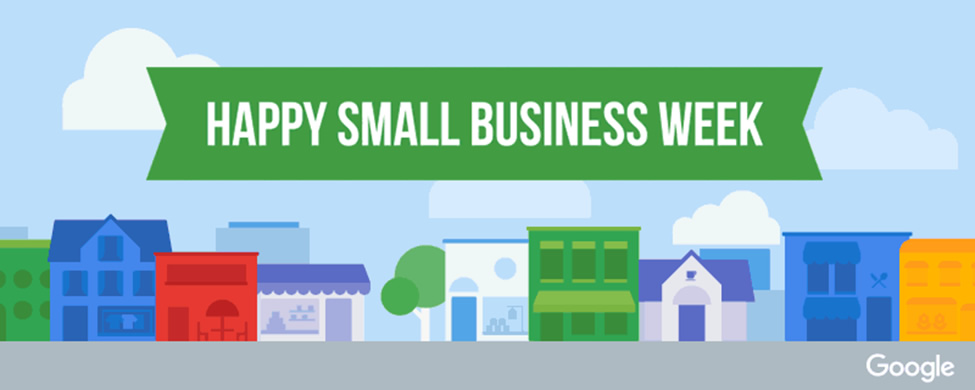
    Happy Small Business Week from the Search Influence team!

    We were founded in 2006 with the goal of helping small businesses succeed online. Today, we work to optimize the potential of businesses of many sizes, but this week, it’s all about our small business clients!

    Today we share with you five small business clients and a little bit of their story—it was hard to choose just a handful to feature, as we have so many that inspire us each day to help them grow their businesses.

    Nugget Markets

    CaliforniaNugget Markets logo

    Nugget Markets is the grocery store we all we wish we had right down the street. Their 12 locations in Northern California offer specialty items and “Gourmet to Go” at lower prices than conventional grocery stores. No wonder they’ve been thriving since 1926!

    Pascal Architects

    New Orleans, LA Pascal Architects logo

    Pascal Architects is a well-established architecture firm in New Orleans. The company and its principles have been involved in some of the most impressive projects in the city, including the original construction of the Superdome, the restoration of the Cabildo, and the creation of the Ritz-Carlton from the historic Maison Blanche department store.

    Paisano’s Pizza

    Virginia and Maryland Paisano's Pizza logo

    Paisano’s Pizza is a Virginia-based local pizza chain. We began working with them in 2011 when they had 10 locations. They now have over 40 locations across Virginia and Maryland, and even one in Florida! Talk about a small business success story.

    Oracle Lighting

    New Orleans, LA

    Oracle Lighting is a New Orleans-grown auto light manufacturer, specializing in premium LED halo lights,owned by husband and wife Justin and Tiffanie Hartenstein. They have hundreds of resellers across the country and were named Exporter of the year by The Small Business Administration!

    Caluda’s King Cake 

    New Orleans, LA

    Caluda’s began focusing on direct-to-consumer king cake sales in 2018. They were breaking into a crowded market with lots of long-established competitors. With some smart branding, relationship building, and targeted advertising, Caluda’s is now a top tier king cake in New Orleans!

    We express a sincere THANK YOU to all our clients and those we’ve had the honor of supporting in the past. We truly wouldn’t be Search Influence without you!

    If you’re looking to grow your small business and become one of our success stories, start a conversation with the digital marketing experts at Search Influence.