Blog

  • How to Target Adult Learners and Non-Traditional Students With Digital Advertising

    Key Insights

    • Use information about current students to find new ones
    • Your platform and messaging will depend on your student personas
    • Prioritize degrees or programs that contribute to overall success
    • Follow the data and don’t be afraid to change your targeting plan

    College graduation ceremony with graduates in caps and gowns

    No one would dispute the value of a college degree in the current job market. Not all schools are created equal, though. Each institution has its own values, strengths, and community. That’s why it’s important for college marketers to display the best values of their organizations.

    Marketers can support this goal by delivering high-quality leads by targeting the right audience. This is especially important when universities target non-traditional students, also known as “adult learners.” This blog post details some great ways to target non-traditional students and create effective campaigns to reach them.

    Analyze the Profiles of Enrolled Students to Define a Target Audience

    So, how can marketers figure out which audience to target? Start by painting a picture of the student body. Student profiles, or personas, give marketers a proxy target for prospective students. Colleges often have terabytes of data from inquiries, applications, and enrolled student profiles. This data can be invaluable for determining your personas.

    Different programs and schools within the university will have their own student persona (or several personas). The student body in the engineering program will probably look different from the MBA program’s student body. Most importantly, non-traditional students won’t look like newly graduated high school seniors, so it’s critical to know the differences between each student population.

    For each program, marketers will also need a good sense of what prospective students look like at each stage of the admissions process. Ideally, marketers should know when people make inquiries, apply, accept admission, and pay tuition to start classes.

    What if you don’t have robust data? In these cases, it’s important to work with other departments to build the best profiles possible and develop a strategy.

    Find Prospective Students on the Internet

    After using data to create a profile of the target audience, the next issue is where to advertise. Marketers can reach prospective students on a variety of websites and apps based on their affinities.

    The answer depends on the relevant student persona:


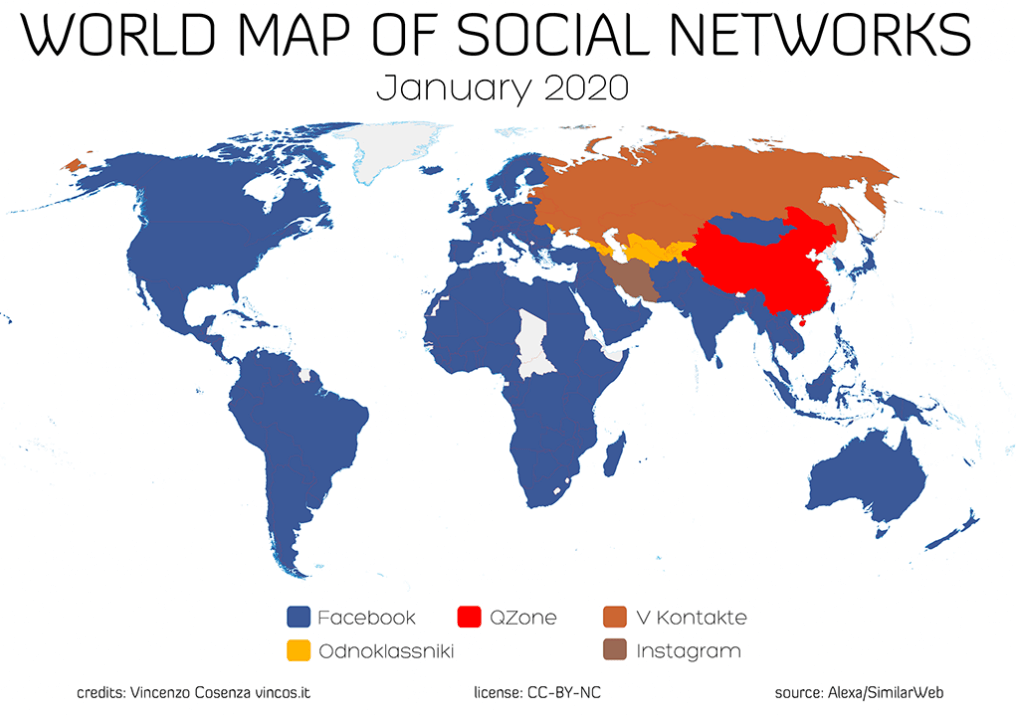
    Map of worldwide social media channel usage

    Luckily for marketers who want a simplified campaign, all of these groups have Facebook in common (considering that Instagram and Facebook are integrated). It’s not surprising that so many education marketers use Facebook. The platform has great targeting options and 2.7 billion monthly users. Facebook is great for college marketers in general because of the ability to target prospective students based on their locations, ages, and interests. There are other options that are more specific, such as occupation, education, family situation, life events, and more.

    Of course, there are always Google Ads campaigns. Placing ads on Google will help with targeting non-traditional learners who are looking for degree programs or the education requirements for making a career change. However, for increased targeting, Google Display is the way to go.

    Campaign Structure Tips

    With a well-defined audience and various platforms for targeting, the next step is translating this information into a structured campaign. Segmenting ad campaigns based on each degree is a logical first step because messaging can be so different for each program.

    For example, a culinary arts program may have two primary personas:

    • Entrepreneurs who want to open a restaurant
    • Current restaurant employees who want to move up in the industry

    Marketers can build one campaign for the entire culinary program and create different messaging and targeting to reach both of these personas.

    An effective campaign will also have separate messaging for prospective students who are in different stages of the sales funnel. For example, marketers probably won’t have much luck with a call-to-action like “APPLY NOW!” with people who have only just found out about their culinary program. On the other hand, something lower-touch like “Request more information” or “Sign up for a free admissions webinar” can help nudge prospects from Awareness to Consideration and Conversion.

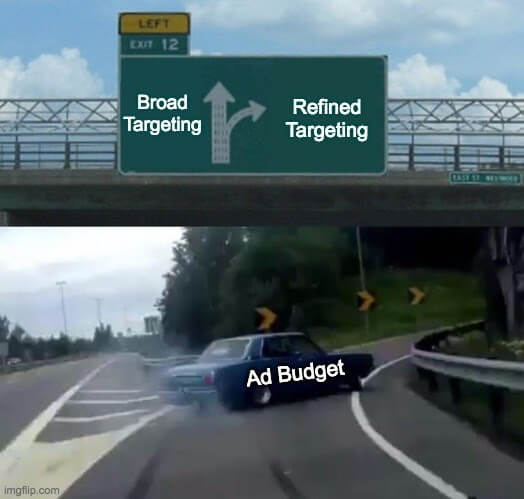
    Car veering into an exit showing broad vs refined targeting for ad budget

    When setting up targeting, marketers need to compile a list of characteristics for each persona and set up their campaigns to reach those people. Becoming more familiar with each platform’s targeting options will help reach more prospects. For Google Search ads, the most basic targeting is choosing geographic areas. For other campaign types, this usually means additional targeting options. For example, marketers could target people in the market for master’s degrees on Google Display or current community college students on Facebook.

    The last step is creating a budget. Each department will have an opinion about where the most budget should go. It may be tricky to come to an agreement everyone likes. The important thing, though, is to focus the budget where it’s most likely to help reach the school’s goals.

    Once a campaign is running smoothly, it’s time to sit back, relax, and… constantly optimize your campaigns. If you’d like to talk to a strategist about a campaign you’re planning or are already running, Search Influence has a team of experts ready to help you meet your goals. Contact a member of our team today.

    Images

    Graduation

    World Map

    Left Exit Meme

  • Healthcare Marketing Laws: Language to Keep Your Ads Legal

    This post was updated by Jordan Polhemus on December 21, 2020 to reflect recent trends and refreshed statistics. It was originally published on November 26, 2019.

    Key Insights

    • Review your current Facebook targeting strategies to determine how the recent changes to Facebook’s targeting options will impact your campaign’s performance.
    • Review your entire messaging and targeting strategy with your legal team before launching any marketing campaigns.
    • Prepare for more health regulations within the Facebook advertising platform.

    Doctor's stethoscope on desk next to laptop

    The healthcare industry, unlike almost any other industry today, has incredibly strict advertising regulations that both individual physicians and large hospitals must follow. Violating these regulations could lead to anything from ads not being permitted on certain platforms to legal action—or even a revocation of a physician’s license.

    This post covers the do’s and don’ts for ad copy and demographic targeting to keep your ads legal in an ever-changing healthcare marketing landscape. Please note that this is not an exhaustive list of everything you should and shouldn’t do for medical marketing. It’s an overview of advertising best practices within the medical industry. Additionally, these recommendations do not include all the specifics for every state.

    Changes to Facebook Advertising Targeting

    Facebook has made several changes to their targeting options since 2019.

    The Removal of Third-Party Information

    The most impactful difference is the removal of third-party information that gave organizations the ability to target users based on personal information, such as (but not limited to):

    • Income
    • Cars owned
    • The age of user’s house
    • The age of the people in the user’s household

    Before this update, many data providers partnered with Facebook to create a more descriptive profile of their users that allowed marketers to create extremely detailed and specific targeting.

    After the Cambridge Analytica scandal, Facebook decided it didn’t want to be responsible for the data that third parties brought in, so it eliminated Partner Categories and other third-party data programs.

    The Removal of Potentially Discriminatory Targeting

    Facebook has worked to remove potentially discriminatory targeting to prevent misuse of the ad platform in the future, including:

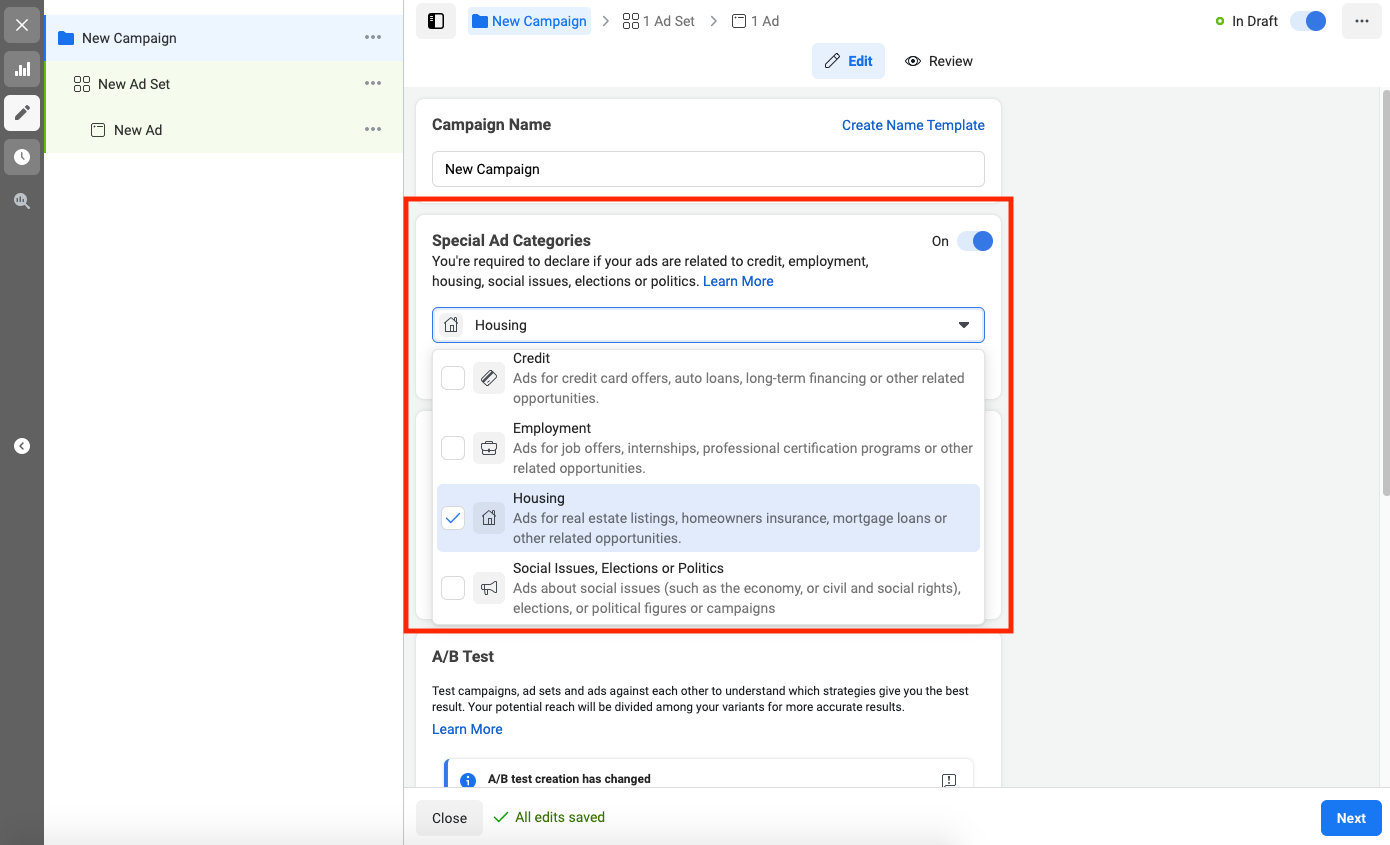
    Facebook’s “Special Ad Categories”

    In the last few years, we’ve seen a considerable tightening in what marketers can do when promoting organizations in certain industries. The types of ads impacted include:

    • Housing
    • Employment
    • Credit card
    • Political

    Screenshot showing Facebook's special ad category options

    Predictions for the Medical Industry

    Although this isn’t the case yet in the medical industry, we believe that Facebook will move in this direction soon and require all medical providers to follow additional guidelines, which will place further restrictions on their targeting and messaging. Although not currently in place, you will likely have to choose a “special ad category” to advertise in the medical industry on Facebook in the future.

    For example, if you are running ads for any political organization, such as a political candidate, PAC (political action committee), or even for small local elections, the advertiser and the ads must comply with a very strict set of rules, including:

    • Verifying the page
    • Providing special documentation proving the identity of the page manager
    • Complying with specific messaging guidelines

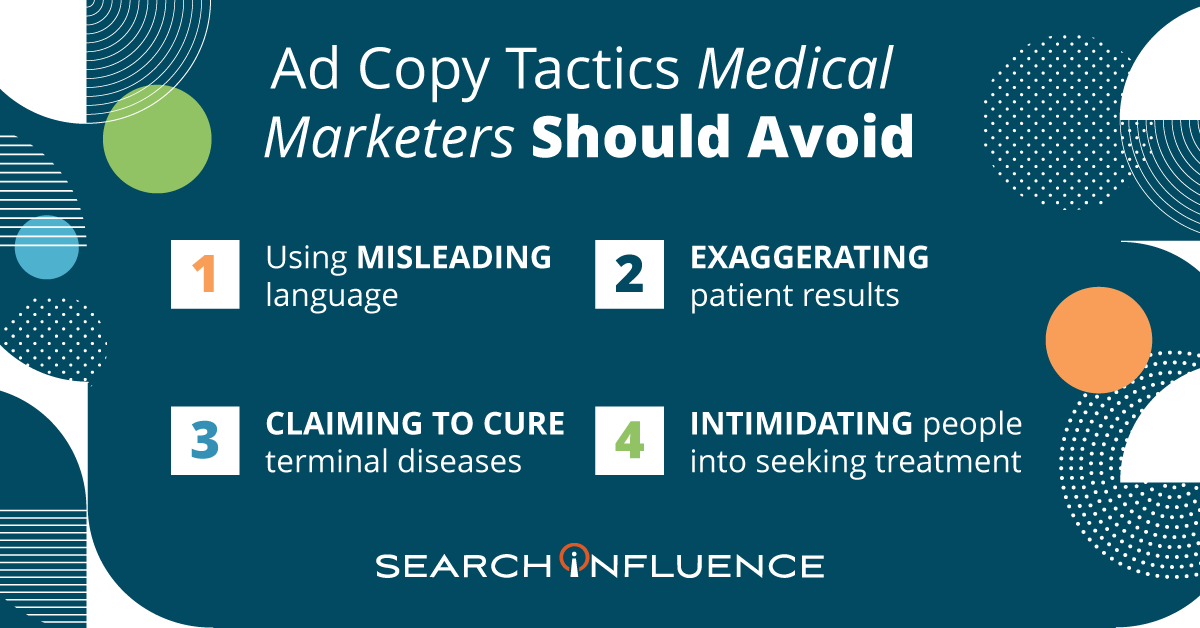
    Ad copy tactics medical marketers should avoid

    Advertising Language Do’s and Don’ts

    Advertising cannot be misleading in any way

    Misleading or deceitful language is strictly forbidden in all medical advertising. This includes implications that would cause a reasonable person to misunderstand or be deceived. Consider the impact of the words you choose in your Healthcare SEO strategy as well.

    Examples:

    • “This procedure will heal you.”
    • “You will look just like Kim Kardashian.”
    • “You will never need to see another doctor again”.

    Don’t use words like “best” or “superior”

    Unless there is objective evidence to support the claim, practices cannot claim professional superiority in any way.

    Examples:

    • “We are the best plastic surgeons in the world.”
    • “You will be under the care of the greatest ophthalmologist in your area.”
    • “Make an appointment with the most talented doctor.”

    Don’t use hyperbole when describing your techniques or results

    A potential patient’s health should be discussed factually and without embellishment, so using exaggerated statements or claims (even if they’re not meant to be taken literally) can be seen as deceptive and misleading.

    Examples:

    • “Your skin will be softer than silk.”
    • “Make an appointment for the best day of your life.”
    • “You’ll be as skinny as a toothpick.”

    Don’t assure a permanent cure for an incurable disease

    Don’t use intimidation or undue pressure for services, products, or procedures

    Examples:

    • “If you don’t get this procedure done by ____doctor, then you will die”
    • “If you don’t see Dr. X, then you are doing a disservice to your children”

    Don’t make any scientific claims unless you provide a reliable, peer-reviewed study as evidence

    Because of the amount of trust patients put in their healthcare providers, physicians are required to provide truthful information when making healthcare decisions and recommendations.

    Therefore, it would be an ethical violation for any practice to claim results or benefits that cannot be scientifically proven, whether or not that physician is talking to their own patient.

    Example:

    • “Getting X surgery will extend your life by 15 years”

    Don’t show before and after photos without the proper disclaimers

    Because before and after photos can influence a patient’s decision-making process, each practice must clearly state that results may vary and the results shown are not guaranteed. Otherwise, patients could reasonably expect to see similar outcomes.

    Practices must include disclaimers alongside perceived claims, even if the claims are direct quotations from past patients.

    Don’t reveal patient details

    Anonymizing patient information isn’t as simple as changing a name. Under HIPAA, there are more than 18 categories of personal health information (PHI) that can result in patient identification.

    It is best to either create a fictional scenario in your messaging or work with your attorney to secure a no-compensation, signed patient release before using any of their PHI in advertising.

    Don’t make any claim about the cost of a service or product that your practice cannot substantiate

    Due to differences in medical coverage based on health insurance, advertisements should never include prices—unless the practice can ensure that all patients receive that price regardless of their healthcare coverage.

    Don’t use a competitor’s name or any other trademarked name in ad copy or advertising without written permission

    If you wouldn’t say it in the elevator, don’t put it online

    Try reading the content of a post out loud and to others before posting. If it sounds like something you wouldn’t say in an elevator (where you can be overheard), then it shouldn’t be something that you put in advertising.

    Have your marketing plan, including ad copy, reviewed by an attorney to confirm that no laws are being broken in any of the states your ads will appear.

    By working with both large hospitals and small private practices, we’re well-versed in medical marketing and have years of experience running successful campaigns for our clients. Our digital marketing agency keeps up to date with the latest medical search trends, as well as updates to regulations and best practices.

    As a Google Premier Partner, the majority of Search Influence’s employees are certified in Google’s advertising platforms, including Search, Video, Mobile, and Display, just to name a few.

    For more information about how we can help promote your practice on Facebook and other social media platforms, start a conversation with us today.

    Resources

    Images

    Stethoscope

  • The Times-Picayune and The New Orleans Advocate name Search Influence a winner of the New Orleans Top Workplaces 2020 Award

    Search Influence is proud to be named a winner of the New Orleans Top Workplaces 2020 Award by The Times-Picayune and The New Orleans Advocate, among a list of 70 independently selected companies.

    Search Influence is honored to be recognized as a Top Workplace in the small companies category.

    This is the 6th year of the New Orleans award, which is powered by Energage, a third party company who conducts a quantitative and qualitative assessment of nominated companies.

    For this year’s award, Energage surveyed 32,694 employees in the Greater New Orleans area to measure satisfaction across 15 culture drivers.

    “In times of great change, it is more important than ever to maintain a connection among employees,” said Eric Rubino, Energage CEO. “When you give your employees a voice, you come together to navigate challenges and shape your path forward based on real-time insights into what works best for your organization. The Top Workplaces program can be that positive outcome your company can rally around in the coming months to celebrate leadership and the importance of maintaining an employee-focused culture, even during challenging times.”

    Search Influence has invested significantly in company culture over the last several years in an effort to create an engaged and effective team that produces the results we and our clients expect from our work.

    The two things that stood out in our survey were Search Influence’s transparency and core values. Our team truly knows and understands our values, and most importantly, lives by them.

    Our company’s core values, which spell CHARGED:

    • Collaborative
    • Hungry
    • Agile
    • Reliable
    • Genuine
    • Effective
    • Dedicated

    Our team commented on several aspects of our company culture. Those key things include:

    • Keeping our core values alive in the organization
    • Communication & transparency
    • Clear feedback mechanisms
    • Benefits and perks that allow our team to balance their priorities across personal and work life

    “This is a place to learn, grow, develop professionally, and help businesses/non-profits and the like market themselves and grow. The company values employees and the benefits package makes it possible for people to ‘work to live’ not ‘live to work.’ ”

    —Account Management employee

    “The leadership team puts a real emphasis on listening to employee feedback… The company has made major changes in the last few years as a direct result of employee feedback, and I am confident they will continue to evolve.”

    —Account Management employee

    “Everyone is so dedicated to the success of this company! Being transparent with everyone at the company has been a lot of fun and makes me want to continue to strive to be more and more transparent, as I see that as a benefit that people love.”

    —Employee

    We thank our “CHARGED” team for their support in making Search Influence the company that we all love, especially our leaders, who help steer the ship.

    Finally, congratulations to our fellow winners! We are honored to be listed alongside so many fantastic and well-respected New Orleans companies.

  • Graphics Checklist: High-Quality Assets You Need to Promote Your Business

    Key Insights

    • Businesses need current and high-quality location, team, event, product, and service photographs and logos to establish trust and authority on their websites and across digital and print campaigns.
    • With a well-thought-out plan of action, building out a high-quality asset library does not have to be expensive, time consuming, or intimidating.
    • You cannot use low-resolution photos across all platforms. Marketers need original, high-quality photo, video, and logo files.

    Person behind a video camera gathering assets for a business

    One of the biggest challenges businesses face when developing marketing campaigns is not having enough high-quality photography and video assets for the products, services, or events they want to promote.

    It might be tempting for a company to use whatever photos or videos they have on hand, but low-quality assets are unlikely to attract a steady stream of qualified leads. Using consistent, quality visual assets across all platforms and social channels communicates authority, trust, and professionalism to customers and prospects.

    This post will help businesses understand what visual elements are required in order to create an effective online presence, and how to use those assets effectively in a variety of campaigns. Use our checklist to audit your visual library and understand where and how to make improvements.

    What Are the Minimum Requirements for High-Quality Assets?

    Businesses should use their logos, videos, and photos throughout their websites and across all digital and print campaigns. This includes social media profiles, directories, and ads.

    As a general rule of thumb, it’s always better to have images and videos that are as large and high-resolution as possible! Assets can always be scaled down, but enlarging a photo or video that’s too small isn’t possible without pixelation or distortion. Contrary to popular procedural dramas, if a photo is low-resolution, there is no way to magically “enhance” this photo and render it usable across all platforms.

    1. For any digital campaigns, photos, and videos should be at least 1,080X1,080 px (pixel) with a 72 ppi (pixels per inch) resolution.

    • We recommend 1,080 pixels since we often run Facebook ads, and this size aligns with their minimum image size requirements.
    • Facebook ads have the largest minimum size requirements of any ad platform. By meeting these minimum requirements, businesses can cover their bases everywhere.

    2. Your website should have a hero image—a large visual element (either photography or video) that a visitor sees on your homepage. It should represent the site’s most important content.

    • The hero image can be static or dynamic, such a set of rotating images.
    • Your website’s video or photo hero image should be a minimum width of 1,600 pixels, but ideally 2,000+.

    3. For print assets, photos need to be 300 dpi (dots per inch).

    • Since images displayed on the web are 72 ppi, the only way to print them at full resolution is to print them very small.
    • A 600×300 px image from the web at 72 ppi, for example, can only be printed at 2×1 inches.

    4. Logos are an exception to the rules above.

    • The largest that a logo will appear in a campaign is 1200×1200 px, so we recommend a logo that will be easily viewed at this size without having to scale it up to avoid distortion.
    • Logos with transparent backgrounds are more versatile; plus, Google Responsive Display Ads specifically recommend logos in this format.
    • GIF, PNG, and SVG file formats support transparency.

    What Makes an Asset Relevant for Your Business?

    1. Photos should cater to a business’s target audience. Photos of products on plain backgrounds are great for an online shop, but photos and videos of people actually using the promoted products or services make for much better ads.

    2. Interior and exterior shots of the business’s physical location are ideal for search engine listings, directories, ads, and websites.

    • These photos can also help users find a storefront while using Google Maps, especially if the default street view is somehow obstructed or inaccurate.
    • 360 photos allow potential customers to interact with Google Maps listings, and they can be taken professionally or with a special camera.

    3. Having photos of the current staff as a group and individually with the same background is necessary for “About Me” pages and helps potential customers connect with your business on a more personal level.

    Keep in mind that most campaigns will need fresh images rotated over time, so depending on the goals of the campaign and what’s being promoted, more photos or videos may be needed every three to six months.

    Cartoon of person checking off giant list with a giant pencil

    Checklist

    Determine the assets needed by campaign:

    1. All campaigns need a logo file.

    • Ideal file formats are AI, EPS, SVG, PSD.
    • A PNG with transparent background is acceptable, and JPG/JPEG files are OK.
    • The minimum size should be 1,200 x 1,200 pixels.

    2. SEO campaigns require external and internal photos/videos of your location(s), as well as photos of your team.

    • The minimum size required in an SEO campaign will vary, but the bigger, the better!

    3. Facebook Display, Google Display, social media management, email, and blog campaigns require photos/videos related to the products, services, or events being promoted and photos/videos that are applicable to the audience being targeted.

    • Product photos are best when taken on a plain background at the same angle.
    • Team photos are best when taken with the same background.
    • Larger photos are always preferred, and these campaigns typically require a minimum size of 1,080 by 1,080 pixels.

    4. Print campaigns require any relevant product, location, event, service, or team photos with at least 300 dpi resolution.

    Gather existing assets:

    1. Have you worked with a photographer or videographer in the past? Make sure all of these assets are easily accessible and organized.

    2. What types of assets do you have?

    • Take inventory of your assets by organizing them into categories.

    Make arrangements to acquire additional assets if your current assets do not meet the above criteria:

    1. Logo files can usually be recreated in a more scalable or higher resolution file format, but this is harder with more complex logos.

    2. Thumbtack is a great resource for affordable professional portrait, location, 360, event, and product photography.

    3. If professional photography is still not within scope, head to free stock photography sites like Pixabay or Pexels.

    High-quality visual assets elevate not only your digital and traditional marketing campaigns, but also your overall online presence. You can easily arrange for professional photography and videography, or contact Search Influence to discuss asset creation and developing your asset library.

    Images

    Camera

  • How to Prompt Customers to Leave High-Quality Reviews That Influence SEO

    Key Insights

    • Businesses can prompt reviews and testimonials that include beneficial keywords to support ranking in the Search Engine Results Pages (SERPS).
    • Three benefits to providing review prompts:
      • Encourages high-quality, specific reviews
      • Influences more people to find you when searching for degrees, products, services, and experiences you offer
      • Themes in reviews help those who skim search results understand your value
    • Creating a list of prompts your customers can use when crafting their review helps make sure their reviews benefit both prospective customers and your search rankings!

    Customer reviews and testimonials are crucial to your business. They provide you with feedback on your products and services and help potential customers gain insights from your current ones. Additionally, reviews and testimonials that include beneficial keywords can support ranking in the Search Engine Results Pages (SERPS).

    Graphic of a hand using a tablet to read online reviews of a business

    When your business has reviews on important sites, like Google My Business (GMB), Google sees your business as authoritative and is likely to reward you for this. Greg Gifford, an experienced SEO consultant, created a video for LinkedIn with a suggestion that inspired this post: provide prompts so customers leave reviews with keywords that benefit your rankings.

    In this post, we’ll walk through the steps you should take to prompt your customers (without specifically asking them) to leave beneficial keywords in their reviews and testimonials. Not only can you prompt them to leave a review, but you can also give them some questions they can use to get started. This helps customers leave high-quality reviews with details that will benefit your rankings and also gives them a baseline to get started in writing their review.

    Benefits to Providing Review Prompts

    #1 – Encourages high-quality, specific reviews

    • When you request a review after a customer has experienced your services, it can be intimidating for them to start off with a blank screen. When you prompt your customers with questions about their experience, it helps them feel more comfortable and helps you earn more detailed reviews.

    #2 – Influences more people to find you when they search for the degrees, products, services, and experiences you offer

    • Reviews help influence rankings in the SERPs. If you use prompts that include the keywords you’re targeting, your customers are more likely to use those terms in their reviews, which makes you more likely to rank for them.

    #3 – Themes in reviews help those who skim search results understand your value

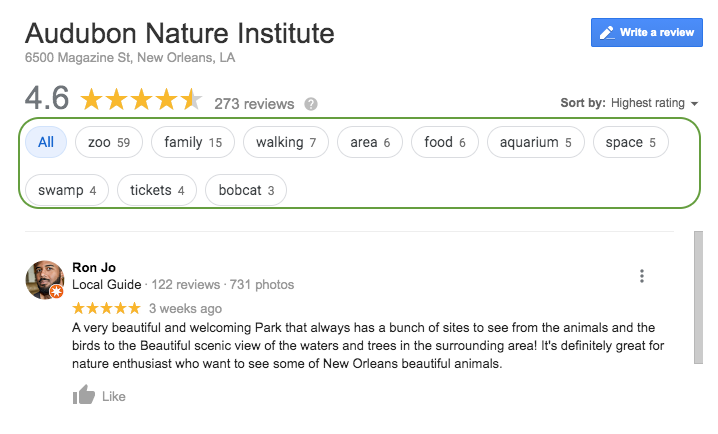
    •  Google aggregates common themes in reviews. This helps if someone searches for something in the immediate area of your business.
      • Example: Here you can see that Google has aggregated keywords and phrases throughout the reviews to make it easier for a potential customer to see reviews that include venues they may want to visit. If a consumer wanted to see all the reviews that included the keyword “zoo,” they could select it and read up on the experiences others have had.

    Screenshot of reviews from Google My Busiess for Audubon Nature Institute in New Orleans, LA

    • Also, when searchers see the themes of your reviews called out, they can more quickly understand what your business offers. In the example above, it’s helpful to know that the business has a zoo, aquarium, and swamp attraction they could visit while in town.

    Questions to Prompt Reviews

    Sample questions you can use to foster specific, high-quality reviews:

    Medical / Healthcare Questions to Prompt Detailed Customer Reviews

    • Which treatment did you receive?
    • What brought you into the practice?
    • Why did you choose our practice or a specific doctor?
    • Which location did you visit?

    Tourism & Attractions: Questions to Prompt Detailed Customer Reviews

    • Which attractions did you visit?
    • How were your interactions with the staff?
    • What were the amenities like?
    • What did you enjoy most about your experience?

    Restaurants: Questions to Prompt Detailed Customer Reviews

    • Which food and drink items did you have?
    • Which restaurant location did you visit?
    • How do we compare to other restaurants you’ve been to in the past?
    • How were your interactions with the staff?
    • How was the ambiance?

    Education: Questions to Prompt Detailed Customer Reviews

    • Which campus did you visit/attend?
    • Which degree or program are/were you interested in?
    • Do you have any tips for future prospects?
    • How did this experience prepare you for life after graduation?

    Bonus Tip for Bringing Reviews Into Other Marketing Efforts:

    • Feature the most called out benefits of your business in your website copy, imagery, and social media posts and ads

    How Can You Get Started?

    • Gather any email addresses you have of past and present customers.
    • Write an email that prompts them to leave a review for your business.
    • Within the email, include prompting questions that will get them thinking about their experience and ultimately help them produce a thoughtful review that will benefit everyone!

    Now that you’ve got a leg up on your reviews and testimonials, it’s time to start thinking about improving other aspects of your SEO. If you’re not sure where to start, ask for a digital marketing analysis of your website from our team of experts at Search Influence.

    Images

    Tablet

  • How Hospitals and Healthcare Practices Can Adapt to Google Updates

    Key Insights

    • Google decides what websites show as local and organic results by considering the business and it’s website’s relevance, prominence, and distance.
    • Keywords, content, and connections continue to be required to earn trust with google and keep your website relevant. However, the WAY you think about keywords or the WAY you write content may need to adapt over time to Google’s changes.
    • Google trusts up-to-date, accurate, and user-friendly content.

    Google is continuously updating their algorithms. These changes are usually small, but now and then, a significant update affects the way marketers have to approach search engine optimizations. It’s crucial for marketers in the medical industry to promptly adjust to these updates because Google has additional regulations for healthcare websites.

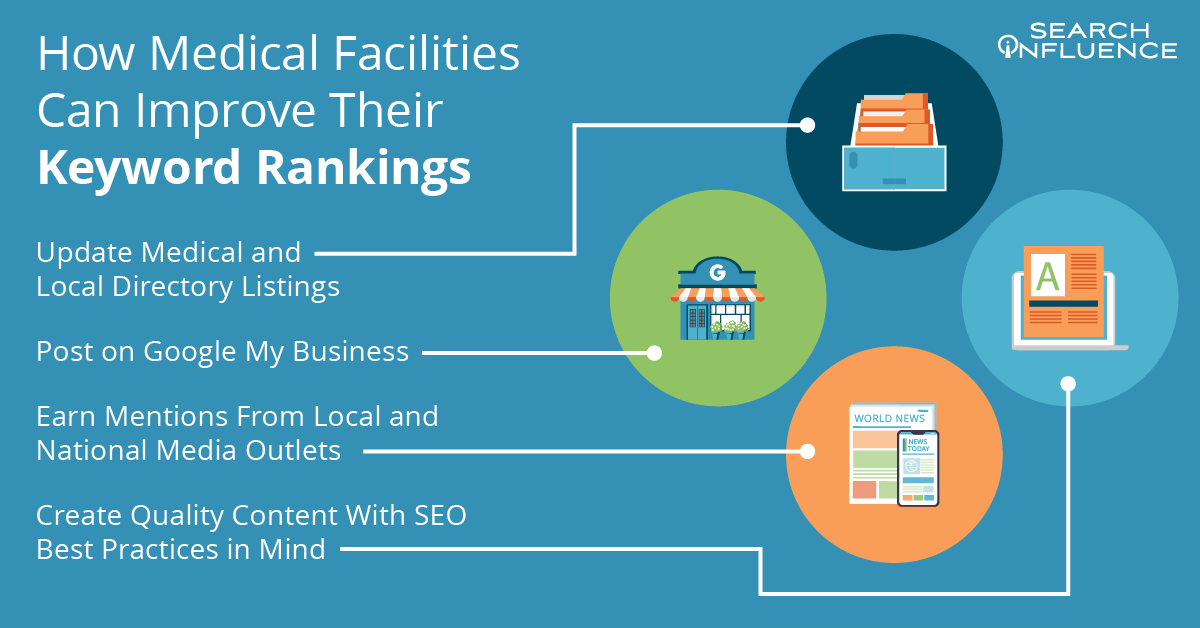
    How medical facilities can improve their keyword rankings

    The Basics of Google Search and SEO

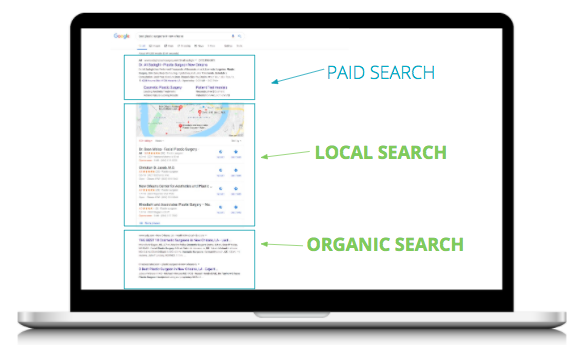
    Before diving into the algorithm updates, medical practices should understand a few optimization basics. Before a user searches for a keyword, Google has already analyzed and organized information from millions of webpages in its Search Index. When a search begins, Google’s algorithms sort through the index using hundreds of different factors to find relevant results. These results are then displayed in different formats so that people can find exactly what they’re searching for. Here is what the results most often look like:

    A screenshot of Google's search results showing the difference between paid search, local search and organic search results

    This blog is all about making an impact in local and organic results, not paid search. Organic search refers to unpaid search results that appear because they are relevant. Local search refers to organic results for businesses or places that are in the same area as the searcher. These are often displayed as map results.

    Google decides which websites to show as local and organic results by considering three factors:

    • Relevance
    • Authority
    • Distance from the searcher

    Relevance is how well a business profile matches a consumer’s search results. Authority is determined by a business’s presence online (links, articles, or directories) and offline (landmarks or locally known brick and mortar businesses). Distance from the searcher is, well, relatively straightforward.

    Medical marketers must ensure that their practice’s online presence meets these three important Healthcare SEO ranking factors, which is where search engine optimization, or “SEO,” comes in.

    There are three key components to having a successful SEO strategy:

    • Keywords: What are people searching for? Which words or phrases do they use to find a new healthcare provider or information on a procedure?
    • Content: Does the content on a website truly answer the question the searcher was asking?
    • Connections: Does this website have backlinks or mentions from other, authoritative websites? Is there accurate information on the faculty, practice, or doctor listed on relevant directories like Google My Business or Healthgrades?

    Despite periodic updates to Google’s algorithms and how they rank search results, these three components continue to be the basis of earning Google’s trust and keeping your website relevant. However, the way medical marketers think about keywords or write content has to adapt over time.

    How Do Google Updates Impact Hospitals and Healthcare Practices?

    A stethoscope sitting on top of a keyboard representing online healthcare

    Google is extra critical of health-related websites and has defined a specific content category for pages with content that could impact a person’s happiness, health, financial stability, or safety. These are called YMYL (Your Money, Your Life) pages and include hospitals and medical practices. The “Medic” update in August 2018 reflected the level of scrutiny Google uses when reviewing websites that deal with health or healthcare. Their goal is to discourage misleading information and ensure that searchers find trustworthy advice.

    The credibility of the organization that runs the website impacts its rating, which is good news for large hospitals and other well known institutions. Hospitals are often considered a trusted source of information in their communities. On the other hand, smaller practices may have to work a little harder to prove their authority. But to rank well, it isn’t enough to be a trustworthy organization. The website must also have high-quality content.

    How to Create Good Content

    When writing content for a medical website, it’s vital to think about what Google considers good content and what information potential patients include in their searches. All content should be up to date, accurate, and user friendly. Marketers need to consider the following:

    • Be Specific and Substantive: Websites should have detailed, in-depth information. Try to avoid lightly touching on a subject without providing any useful information. Searchers look for clear answers to their questions.
    • Directly Answer Common Questions: Survey the medical staff to see the most common questions patients ask before, during, and after an appointment. Then, provide direct answers to these questions on the site.
    • Use Subheadings: Use subheadings as a way to guide the reader down the page and direct a searcher to the section of the content that has the information they’re looking for.
    • Use Bullet Points & Numbers: Break the information out into lists that are easier for readers to digest.
    • Look at Top Ranking Pages: When in doubt, see what the top results for targeted keywords are doing and borrow some of their ideas. What type of information do they provide? How are their pages organized?

    When considering what to write about, think of the keywords people are searching for and what information they expect to find. In the medical industry, there are typically two categories for searches: general health and healthcare. When someone searches a health term, they are looking for information about an ailment such as symptoms, causes, and treatments. Sites that rank for general health searches usually belong to large institutions, like the Mayo Clinic, which would be difficult to outrank.

    It is important to have local content to leverage Google Maps and Google My Business. When someone searches for a doctor or specialty, like an orthopedic surgeon, they’re looking for healthcare and are considering going to a doctor. Healthcare searches are typically local because people tend to look for treatment in their area.

    How to Rank in Local Search and on Google Maps

    The earlier discussion about relevance, authority, and distance ties back in here. For Google Maps results, distance is the biggest factor. The physical location of the searcher determines the range of results they see. There’s no easy way to move closer to a searcher, so marketers have to focus on the factors they can control:

    • Relevance:
      • Have quality content for each specialty or procedure the practice offers
      • Establish backlinks from trusted directories and other high ranking websites and local organizations
    • Authority:
      • Links pointing back to the practice’s site also improve authority
      • Earn media mentions and directory listings
      • Obtain and share as many quality reviews as possible with Google

    Remember that the MOST important directory to update is Google, and information in Google My Business should always be up to date! With a verified hospital or medical practice category listing, marketers can set up specific hospital information (such as the different departments or doctors) to give patients a more direct search result.

    If you’re ready to start improving your healthcare practice’s ranking for vital keywords in Google, Search Influence knows how to help. We help businesses grow online by developing SEO and digital marketing gameplans tailored for each of our clients. Request your marketing proposal and let’s make it happen today.

    Images:

    Stethoscope

  • What Happened to Facebook’s 20% Text Grid Tool? (Updated 2020)

    Editor’s Note: This post was originally published on March 25th, 2016, and has been updated to provide you with the latest information.

    Update (October 1, 2020):

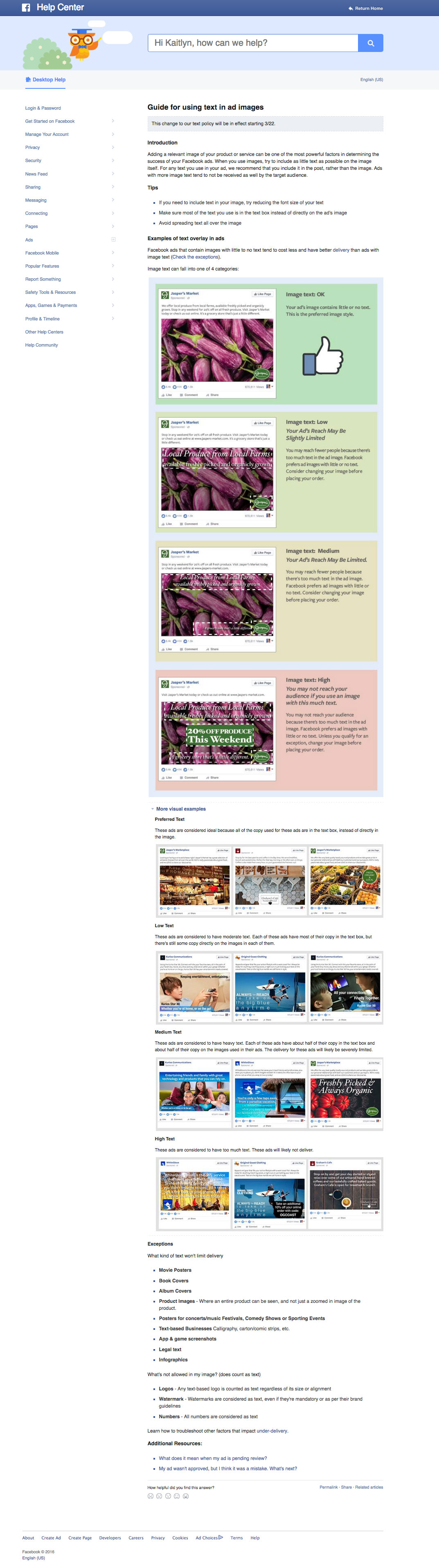
    Back in 2016, we were all so very excited to see the Facebook Grid Tool disappear. Unfortunately, it was replaced with similar restrictions of labeling ads with High, Medium, Low, or Ok amounts of text, and we found that ads were still being penalized for including large amounts of text. So is it true this time? Is it really gone?

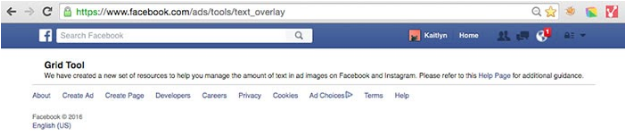
    Facebook Grid Tool OFFICIALLY Removed

    See for yourself! The original Facebook Grid Tool (https://www.facebook.com/ads/tools/text_overlay) now redirects to the Business Help Center page on Best Practices For Image Ads on Facebook. These new guidelines strongly advise that testing is the best way to find out what works best for your audience, and we agree! Of course, Facebook still recommends that you should avoid excessive image text. Their new guidelines state “We’ve found that images with less than 20% text perform better,” so it’s clear that they still stand behind their 20% even if they are not enforcing it. As a designer, I agree that there is something to be said for that. Too much text, especially on smaller ads, can negatively impact readability. But what’s so great about the update is that you can now A/B test different types of creative and find what best meets your campaign goals without being limited by Facebook.

    Backend Warnings Removed

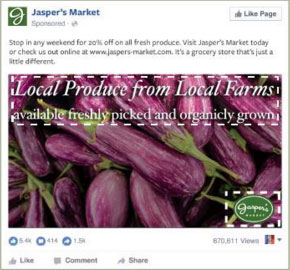
    On top of the removal of the actual grid tool itself, we also found that ads with large amounts of text, like this example below, are no longer being flagged by Facebook and campaign reach has not been affected.

    Example of effective Facebook ad with text

    What Does This Mean For You?

    As advertisers, we are thrilled to be more in control over testing creative and optimizing our campaigns. We live for it! For business owners running their own campaigns, this might be somewhat of a scary change. Optimizing campaigns for peak performance can take time and effort, which may be challenging to manage on top of other things. Let us help you! Schedule some time to meet with one of our strategists and discuss your goals as well as any questions you have.


    Wondering about the history of the 20% text grid tool? We’ve been monitoring this for years. Here’s our update from June 13, 2016:

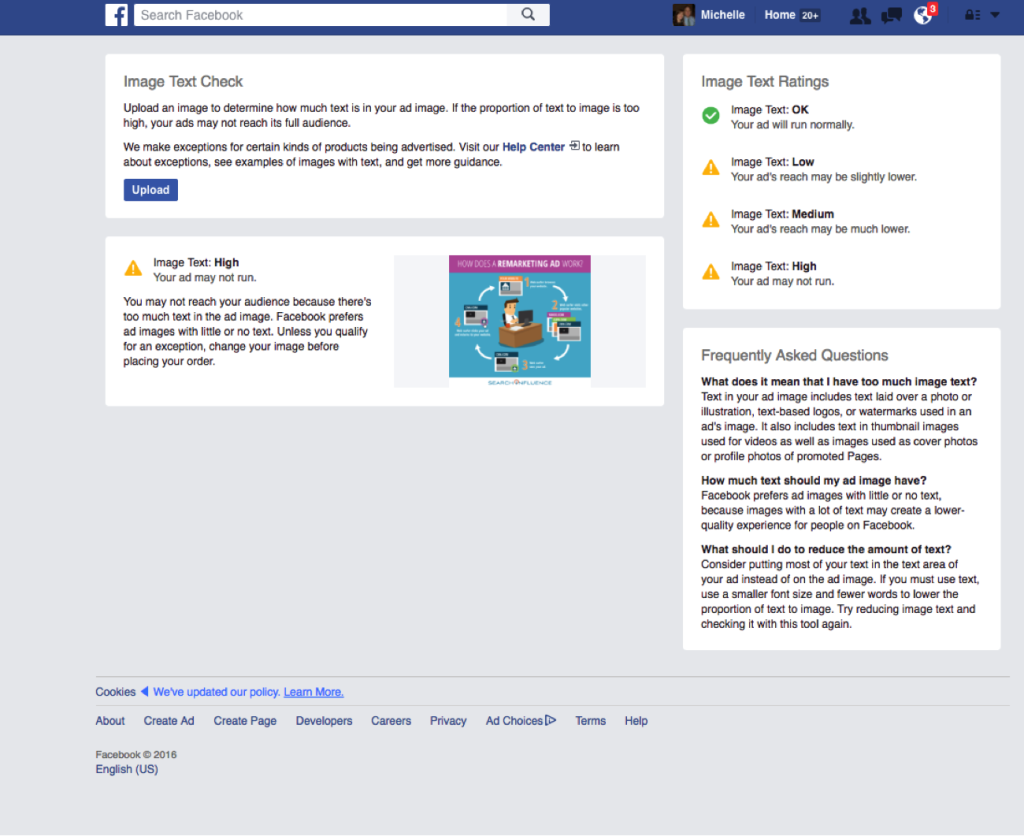
    It looks as though Facebook has officially rolled out this update to the 20% text rule! Here is the link to the new help page. When uploading your images to the new “Image Text Check” tool, you’ll automatically be notified of the likelihood of your ad reaching its intended audience (see our new screenshot below). If you’d like to better understand why your ad receiving less delivery, you can check the Ads Manager “Delivery” column.

    Facebook Screenshot

    Original Post (March 25th, 2016):

    Facebook seems to slowly be rolling up an update to their 20% text rule for Facebook Ads and Promoted Posts, which means some people are no longer able to access the Facebook Grid Tool. Our very own Kaitlyn Levy made this discovery when she was redirected to a Facebook Help Center page after trying to use the grid tool. But this new help page only seems to be accessible to a few, select users.

    So What’s Changed?

    There are four categories for the amount of text allowed on a Facebook ad. Your image text can be considered “OK”, “Low”, “Medium”, or “High.” The amount of text on your ad will determine the reach that it could potentially have. For example, an image that has the following text would be considered “Medium,” which may cause your ad to reach fewer people.

    MediumText

    What Does This Mean for You?

    While the strict 20% text rule seems to be falling by the wayside, the overall amount of text allowed on your ad can still have a huge impact on your ad’s reach. Your ad may not be rejected, but Facebook says that an ad with “High” amounts of image text may not reach your audience.

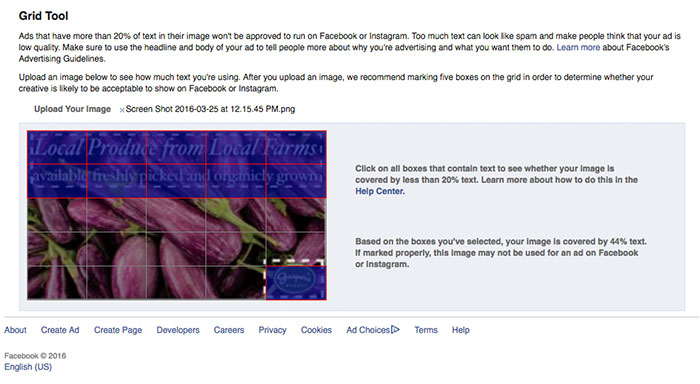
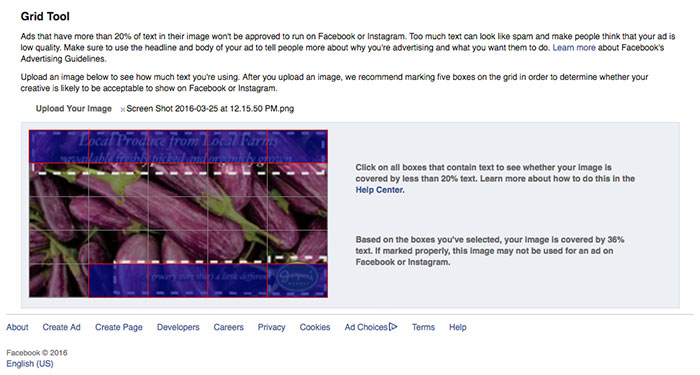
    Additionally, without a strict grid in place, you may have a bit more flexibility with the layout of your ad, but you still need to keep in mind the overall amount of copy in your message. When loading the examples provided on the help center page into the Facebook Grid Tool, you will see that the example in the “Low” category has 44% text, but the example in the “Medium” category has 36% text. The difference between the two examples is that the “Low” category, even with a larger font that takes up slightly more space on the ad, still has more copy than the “Medium” category example.

    The “Low” Category Example in the Grid Tool:

    NewTextRuleLowCategory

    The “Medium” Category Example in the Grid Tool:

    NewTextRuleMediumCategory

    Are There Any Perks to the New Guidelines?

    Yes! Along with the rollout of the new guidelines, they have also included some “exceptions” to the rule. There are some types of text that won’t limit your ad’s reach. Some of these exceptions include, movie posters, book covers, product images (only where the entire product is seen), legal text, and infographics. Some of the items that will still be counted as text are logos, watermarks, and numbers.

    Do You Have Access to the New Guidelines?

    Check here to find out and let us know by leaving a comment!

    Don’t Have Access? Here’s a Peek at the New Help Center Page:

    NewFBAdTextGuidelines


  • Stairway to Higher Ed Website Heaven: Seven Steps to Engage Prospects and Students

    This post was updated by Ariel Tusa on September 24, 2020 to reflect recent trends and refreshed statistics. It was originally published on May 2nd, 2019.

    Key Insights

      • Make sure your website is an easily accessible tool that prospective students can use to find information.
      • Cater to mobile users by having a mobile-friendly site that loads quickly.
      • Maximize your public relations staff and media contacts for mentions and high-quality backlinks.

    Universities have a leg up in search rankings, thanks to the authority of “.edu” domains and brand recognition. However, many university websites aren’t set up to make the most of these advantages, and the added uncertainty of COVID-19 has put a strain on the marketing budgets of organizations around the world. So, what’s an educational institution to do? Maximize the potential of your university’s brand with our seven tactics to improve your search visibility among prospective students!


    A stairwell covered and surrounded by clouds leading into a blue sky

    To market effectively, it’s important to understand the buyer’s journey—or in the case of higher education—the student journey. Online searches are a critical part of the student journey that help people decide where they will apply.

    According to a study by Google, 58% of students use search engines to begin their research for higher education.

    With that in mind, let’s dive into our seven steps! We’ll take a look at some examples from one of our education clients, Tulane School of Professional Advancement.

    1. Mobile Experience: Mobile Experience Must Be on Par With (or Better Than) Desktop

    Beginning in the summer of 2018, Google rolled out their “mobile first” algorithm, making your mobile site more important than ever. Sometimes, developers edit websites on a computer without testing them on both a desktop and a mobile device. However, most prospective students will only visit your site on a mobile device. For Tulane SoPA, mobile traffic has increased from just under 43% in 2016 to nearly 75% in 2020.
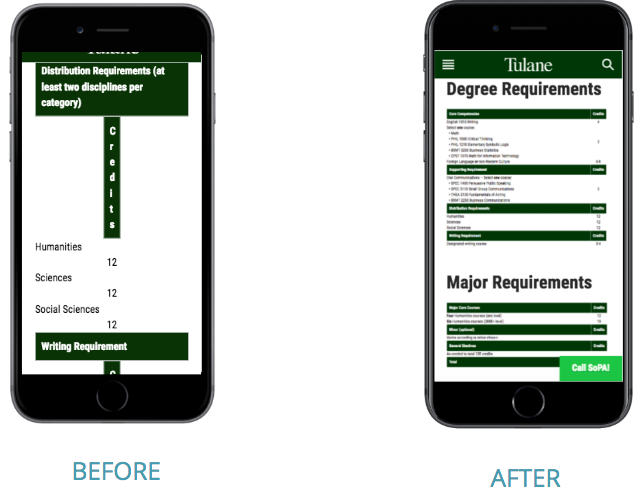
    Before and After of Tulane School of Professional Advancement's mobile website

    Many websites end up with a user experience that looks like the “before” image when their design focuses on desktops. When you set your sights on improving the mobile version of your site, you’ll end up with something that’s more like the “after” image. Providing a high-quality experience to mobile users can improve your conversion rates and boost your search rankings.

    PRO TIP: Google offers a free Mobile-Friendly Test that reviews the size of graphics and technical elements to assess the user experience on mobile devices. The test’s assessment generates feedback you can pass on to your web development team to review and update your website.

    2. Site Speed: Your Site Should Load Quickly

    Keep more of your visitors on your site by solving the most common speed issues for websites. Google wants to provide a seamless experience and answer a user’s query as quickly as possible, meaning that site speed is becoming a more important factor for keyword rankings.

    This chart illustrates how important your site’s speed is to users. A study by Google equated the cognitive load of waiting for a slow mobile website to be on par with solving a math problem and watching a horror movie… and worse than standing on the edge of a cliff!
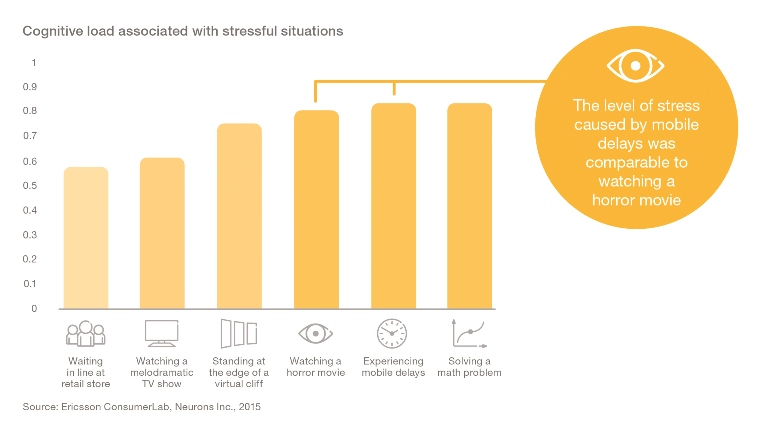
    A bar chart showing cognitive load associations with stressful situations

    On a more positive note, sites with load times under 3 seconds garner the most sessions and peak conversion rates, showing that load time has a real impact on user experience and, therefore, conversion. The ideal load time is 3 seconds or less. Even just improving load time from 3.3 seconds to 2.4 seconds, you can increase your conversion rate by 27%.
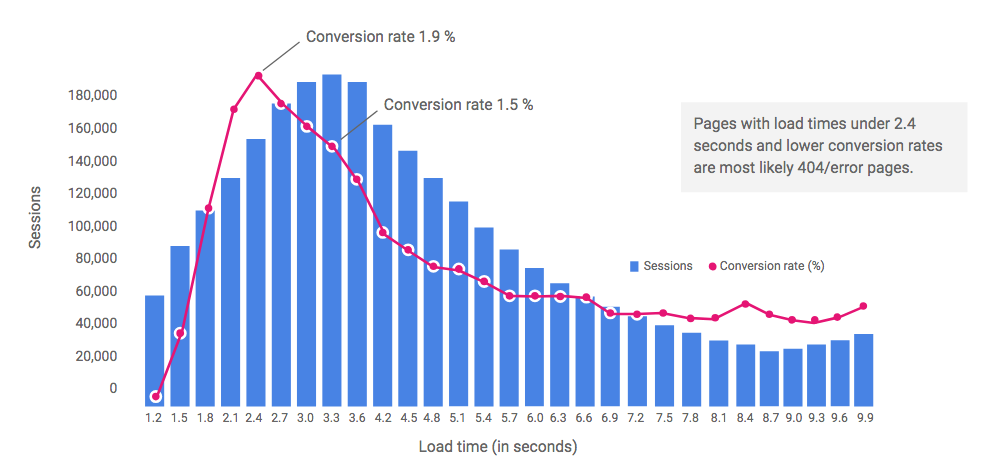
    Correlation chart between sessions and load times

    Google free Mobile Site Speed Test tool can demonstrate how your site compares to those of other universities. The report generated by the Mobile Site Speed Test estimates how much you’ll speed up your load time by implementing its recommended changes.

    3. Content: Should Provide Helpful Information to Prospects (and Search Engines)

    Universities often think of their websites as tools for current students and less about prospects. When creating your content strategy, think about where users may be in the student journey—their decision making process—and speak to them at all levels:

        • Some are just starting to search for answers to everyday problems
        • Some might be further along in their journey, researching options at your school
        • Some may be even further in their journey and are ready to take action and need to find a way to contact you QUICKLY!

    Many universities lack specific content for their programs, degrees, and courses, requiring prospects to speak to an advisor to get details. Instead, break down barriers for prospects by assuring this info is easily accessible on the site. As you begin identifying ideal content for a page, whether it’s a homepage or internal page, think about the different ways people consume content:

        • Skimmers read the headings, bullets, and key stats to quickly make a decision on how to move forward.
        • Swimmers may read some of the sub-content, watch a video, and click onto a deeper page.
        • Divers will read all of the content on the page, watch a video, and most certainly would go to other pages on the site.

    Having a dedicated page for a topic also makes it more accessible to search engines, which helps prospects find the information more easily. When building content for your university’s website, use this content checklist:

    ✓ Does your site have dedicated pages for each program/degree?
    ✓ Is content crafted to speak to “skimmers, swimmers, and divers” (a mix of bullets, infographics/media, and paragraphs with details)?
    ✓ Are online and on-campus options clearly stated?
    ✓ Do you have one-pager downloads that require visitors to input their email address to build a prospect pool for email marketing?
    ✓ What are the top five questions your front desk and advisors are asked?

    4. Optimize for Branded Searches

    Branded searches describe searches conducted by prospects that include your school’s name in the query. They may search by name only or with a combination of your name and a degree, major, or academic program. Optimizing for branded search supports prospects who are in the consideration and decision phase of their journey—they’re already familiar with your school and searching for it by name.

    Help prospects and students find information more easily when searching for specifics like “Tulane SoPA Tuition” or “Parking on Smith campus” by optimizing for branded searches.
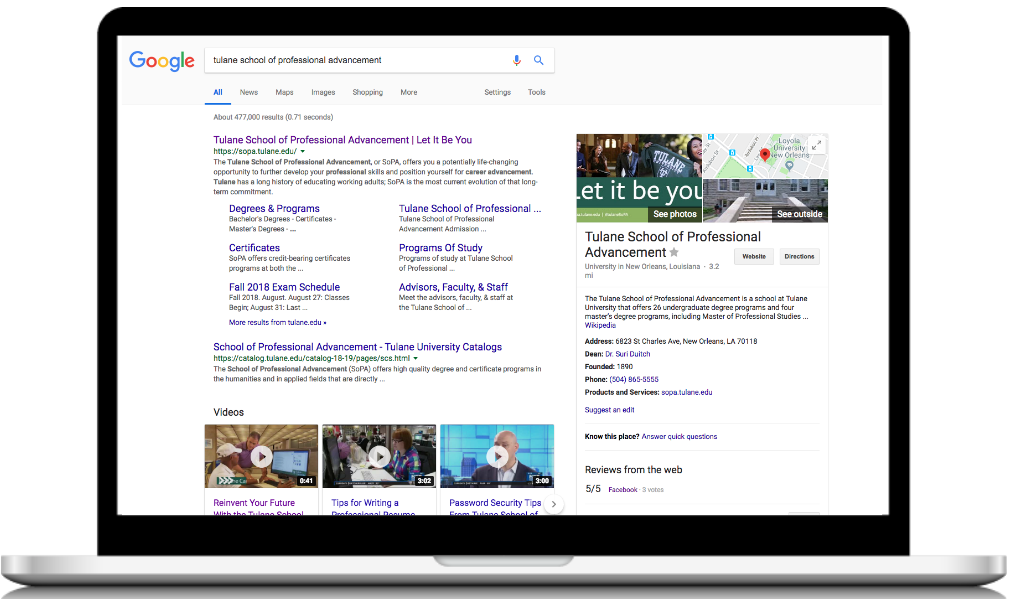
    A laptop showing a google search for tulane school of professional advancement

    When performing a branded search for your own university, you should see your website. If your site is established, you’re also likely to see “sitelinks,” which are Google’s top suggested pages for users. The Knowledge Panel on the right offers location information from Google My Business, Wikipedia, and reviews from around the web. Of the many parts of the SERP (search engine result page), there are pieces you can and cannot control.

    What you can control:

          • Your website
          • Info on Google My Business (photos, accurate location data, posts)
          • Content you’ve posted on other websites (YouTube videos)
          • First-party reviews

    What you can’t completely control, but can work on:

          • Third-party reviews, including Google
          • Third-party mentions
          • Wikipedia (more on this later)

    5. Earn Backlinks That Are Relevant to Your Target Audience

    Links to your website from other sites are like positive reviews to search engines. Building links supports your university’s website ranking by building authority and relevance. Google uses backlinks to judge if you are a trustworthy and relevant source for a topic. Which websites link to your site is more important than how many. Backlinks from authoritative national sites, like The New York Times or Wall Street Journal, give you national authority in Google’s eyes. Earning backlinks can be a challenge, but approach this tactic with a quality-over-quantity mindset. A strong PR strategy is critical to earn genuine, valuable links.

    Any accredited university should also pass the “notability” test and be listed on Wikipedia. If you are established, you likely already have a Wikipedia page. Wikipedia pages can be edited for accuracy and provide links to your website. However, the language should be strictly factual and have a neutral tone.

    When authoritative local sites, like a local news outlet, link back to your site, this adds to your local authority.

    Sites that are both relevant and authoritative, like a list of the Top 10 humanities programs on USnews.com, support both your relevance and authority even when you are simply on the list and don’t get a backlink! Some lists require payment for inclusion. Here are the key questions we ask when considering paying for placement:

    ✓ Is it a reputable website?
    ✓ Does it rank well on Google compared to competitors within its industry?
    ✓ Does the feature include a link back to your website? (Remember, if not, that’s okay)
    ✓ Do you get to approve the content that will be listed about your school or program?

    6. The Press and Media Are Highly Effective Tools

    Media mentions are one the best sources of links and branding. Your university may receive some attention from the media, but you can’t sustain or control this without a PR strategy. Local media sources are often excellent contacts to work with.

    The key is finding a strong PR partner—someone who already has relationships in the industry—and a process. Most colleges and universities have enough going on to produce newsworthy stories consistently. With a dedicated PR effort for Tulane SoPA, they are earning an average of five to six media appearances per month. To be successful, you need to frequently communicate with your PR team, as well as ensure that your staff is available for interviews, providing quotes, and more.

    Here’s a checklist your marketing team can use for quality backlinks and media mentions:

    ✓ Wikipedia
    ✓ Top lists
    ✓ Partner community colleges, universities, and high schools
    ✓ Scholarship search websites
    ✓ Scholarship partners
    ✓ Local directories
    ✓ Local media outlets
    ✓ National media outlets

    PRO TIP: When responding to requests for quotes, be sure to include which specific page should be linked to (don’t always choose your homepage).

    7. Technical Elements Support Search Success

    Key technical settings on your site can help Google understand and process the info on your webpages, which leads to a stronger search presence. Master these four elements:

          1. Your site runs HTTPS and you have purchased and properly installed an ”SSL certificate.” This tells Google and users that any information a user inputs on your site (such as their name, email, or phone number) is being transmitted securely. Google’s most recent version of Chrome calls out non-secure sites more strongly by making the text red, instead of a subtle gray warning.
          2. The robots.txt file is the first file that Google crawlers read when they visit your website. It provides a directory that tells crawlers which pages you want to appear in search results and which you do not. If configured improperly, prospective students may see this in search results. There’s a technical check your web developer can do to assure this setting is accurate.
          3. An updated sitemap hands your list of URLs to Google on a silver platter. HTML sitemaps are good for users and search engines. XML sitemaps are more technical and exist primarily for search engines. While this may sound redundant, you want to take advantage of all of these elements to make it as easy as possible for search engines to index all of your important website pages. Your developer can list your sitemaps within your robots.txt file, which, again, gives Google what it needs to know.
          4. Schema is a technical tactic for labeling your data on the backend of your website to help Google better understand the content. Google can usually understand and parse content easily, but this helps avoid any ambiguity. The simplest example of schema is labeling your address and phone number data. On the front end, it looks the same to the user. On the backend, you’re saying “Hey, Google. I have three distinct locations. This is location one, and this is the address and phone number.” Things get really interesting when you start to mark up more niche types of content on your website, like your course information. Schema.org is your source for the details you need to do this. This can improve your rankings for niche keyword searches because Google can then understand very specific details about your offerings. Leveraging schema markup language can also help you achieve “rich answer snippets,” which is when Google serves up the answer directly to the user in the search result, citing your website as the source.
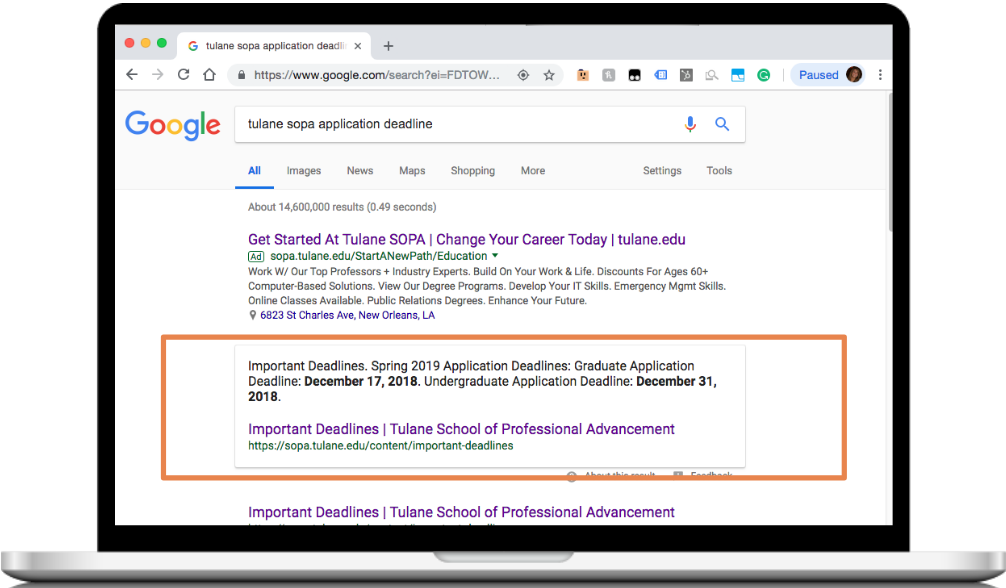
    A laptop showing a google search for tulane's application deadline

    Here is an example of a very specific search, for which a “rich answer” comes up—this is also often referred to as “Position Zero.” Google is beginning to show more and more of these “rich answers.” Schema markup is the first step to earning them.

    PRO TIP: Once you’ve worked on these four technical elements, create a custom 404 Page for your university’s site. When a user lands on a page that no longer exists, they’ll then be taken to a page on your site that can help them find the information they were looking for initially.
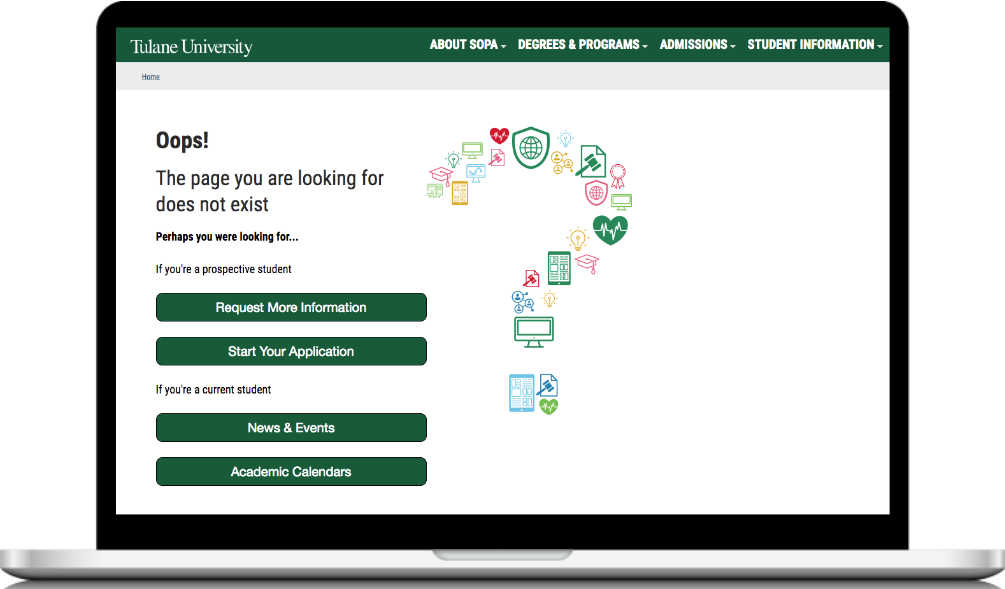
    Tulane University's 404 page

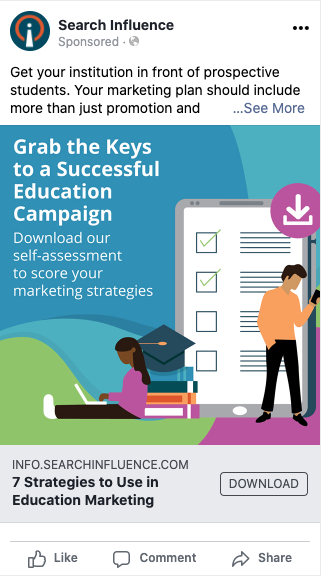
    Congratulations! With our seven key steps to search success, you’ve officially graduated! Wondering how to take your learnings and apply them to your institution’s website? Download our self-assessment to score your marketing strategies and uncover the opportunities you have to drive leads into and down the funnel!

  • Facebook’s Leads Center Provides a Hub for Marketers to Manage Their Leads

    Key Insights

    • Facebook announced Leads Center, a new tool that provides a space for you to organize and maintain information from their prospects.
    • Your lead management process will become more efficient because you no longer have to go outside of Facebook or through a third party to manage or view your leads.
    • Leads Center is in the beta phase, so it is not available to all users.

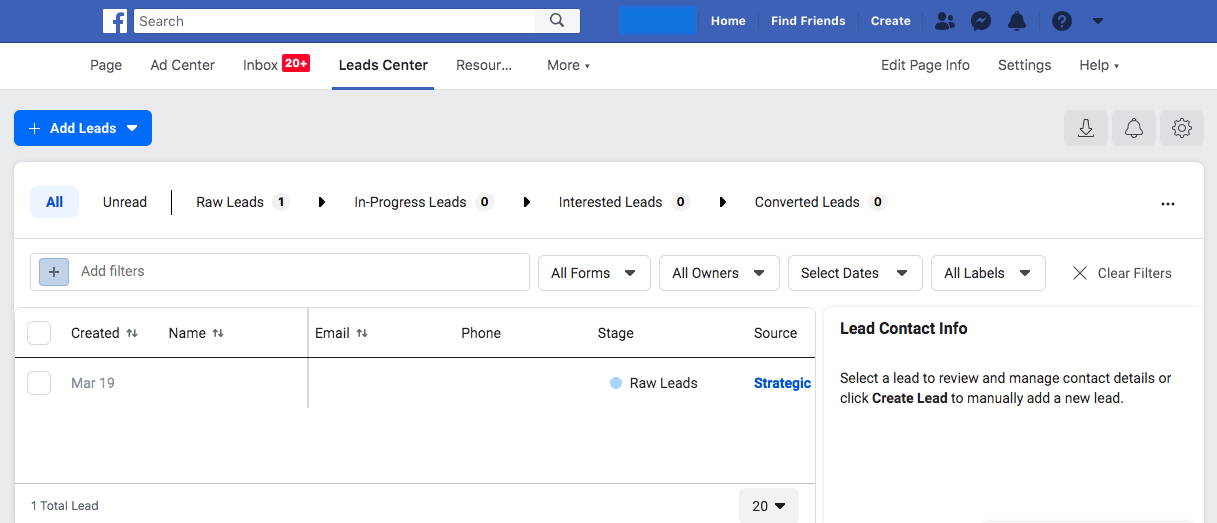
    Backend screenshot of new Facebook Leads platform

    Soon, you won’t have to save the leads you got from Facebook’s Lead Generation Ads in a spreadsheet on your desktop. Facebook is releasing a new feature called Leads Center. While this new tool is not available to everyone yet, it will provide users with the ability to organize and maintain information from their prospects. This tool will include the ability to:

    • Manage leads by setting reminders to follow up, assigning owners to leads, and adding notes to their contact information
    • Filter leads
    • CreateCustom or Lookalike audiences
    • Email leads from the Leads Center

    Now you may be asking yourself, why does this matter and how does this benefit my business? Facebook’s Lead Generation Ads produce lead forms that fit a specific purpose and provide prospective clients with efficient user experiences. Instead of filling out long, time-consuming forms, the forms are prefilled with the customer’s information. This process makes for a stress-free experience for potential clients and provides businesses with quality leads. In turn, this results in a higher conversion rate.

    Before Leads Center, you had two ways you to access your leads. The first was downloading a spreadsheet from the backend of Facebook. The second was setting up a “zap” through Zapier to get the leads into your own CRM.

    In this post, we’ll take an in-depth look into how Leads Center can benefit your business, some of its key features, and its availability.

    Will Leads Center Be Helpful for Your Business?

    Now to get to the good part—how Leads Center helps your business and make your Facebook lead management more efficient. You will no longer have to go outside of Facebook or through a third party to view or manage your leads. Search Influence has used lead forms for many years now, and this new offering is an excellent way to help business owners to manage their leads.

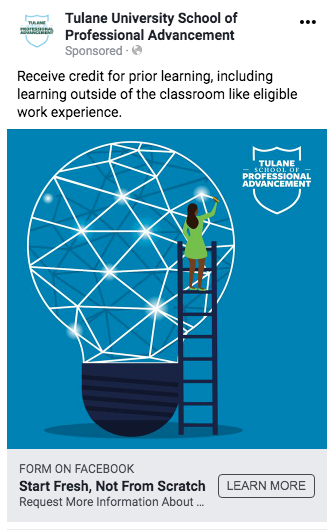
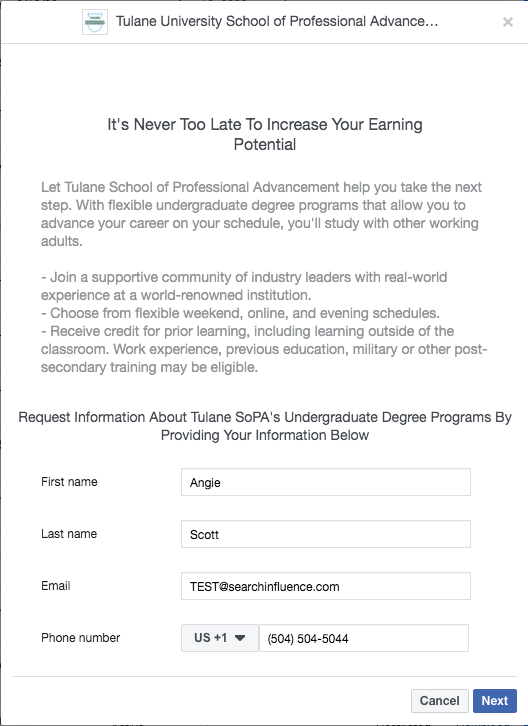
    Below are examples of a Lead Generation Ad and the form:

    Tulane School of Professional Advancement lead gen facebook post example

    Tulane Facebook conversion form example screenshot

    The Key Features of Facebook’s New Leads Center

    Leads Center has various functions that will simplify managing your leads. Let’s take a look at some of the key features:

    • Custom labels: If the lead is interested in a specific product or service, you can create a label to describe or organize your information.
    • Assigning owners: You can assign owners to specific leads so the right individuals on your team manage them.
      Mark prospects according to their lead stage: You can organize leads by where they are in the funnel to easily manage and process them.
    • Lookalike audiences: You can create lookalike audiences based on the information from your leads to optimize your ads’ audiences and obtain more qualified leads, resulting in higher conversion rates!
    • Create reminders: You can set reminders for each lead to assure none of them slip through the cracks.

    A Closer Look at Lead stages

    Facebook uses four different stages to categorize leads and represent where they are in the funnel:

    • Raw: New leads
    • Interested: Leads that have qualified for the service or product.
    • Contacted: Leads that have been contacted.
    • Converted Leads: Leads that have been converted into customers.

    Organizing these leads by their stage will help you target them more effectively because you’ll know where they are in the sales funnel.

    Facebook Leads Center Availability

    Currently, Leads Center is in the beta phase, so it is not available to all users. Leads Center is open to businesses that have previously run ads with the Lead Generation objective. Leads that are generated in Messenger are not available yet.

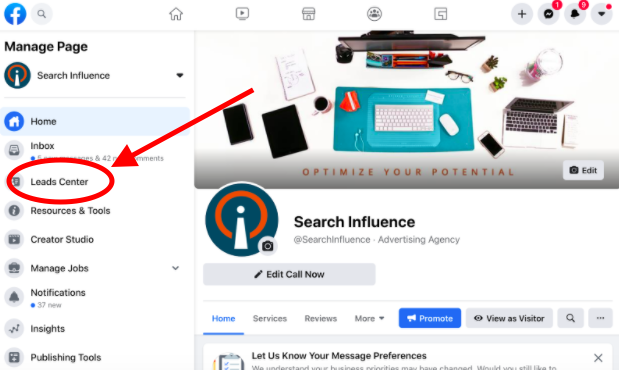
    To view the Leads Center, go to your Facebook page. Then, look below “Inbox” in the left-hand tab to see if it is available to you!

    Leads Center link shown on Facebook profile page screenshot

    Facebook’s Lead Generation ads are just one of many ways to generate quality leads that result in a higher conversion rate. Through Facebook’s Leads Center, you can view leads, assign users to them, categorize them, create lookalike audiences, and so much more, all within Facebook.

    Search Influence is dedicated to helping businesses reach their goals. If you’re looking for a reliable way to generate leads and manage them efficiently, Facebook’s Leads Center will be a beneficial tool. Contact us today to see how we can help you!

  • Search Influence to Host Healthcare Marketing Webinar, “4 Ways Digital Marketing is Evolving”

    Take advantage of the changes in digital marketing to reach prospective patients!

    Search Influence has teamed with the Louisiana Hospital Association to bring you a webinar all about change! We’ve all been through so much this year, and change is something to which the digital marketing industry is incredibly accustomed.

    Join Search Influence Director of Sales and Marketing, Paula French, and Account Supervisor, Jordan Polhemus, for the free webinar, 4 Ways Digital Marketing is Evolving.

    Paula and Jordan will share knowledge from real-world examples and first-hand experiences to demonstrate you can leverage changes in the digital landscape to attract more patients. The webinar will also include dedicated time to address your questions.

    You will learn:

    • Tactics to adjust your medical marketing strategy in light of COVID-19 user behavior
    • Opportunities to reach your patients despite changes to Facebook Advertising Targeting
    • How to adapt to updates in Google’s Algorithm
    • Methods to capitalize on the shift to mobile devices

    *Note: Due to hurricane preparation, Search Influence and the Louisiana Hospital Association have rescheduled the webinar from its original August 25 date.

    If registered before this reschedule, your registration will automatically carry over to this new date. You do not need to re-register. You will receive a personalized link to join the day before the webinar.

    Louisiana Hospital Association logo