Category: SEO

  • Google Places For Business Dashboard Update: News Roundup

    Peugeot 207 dashboard

    Earlier this month, Google started slowly rolling out the new Google Places For Business Dashboard which includes an updated interface, deeper integration with Plus, and a promise of faster updates. The dashboard is now available to all new users in the U.S. To help better understand the new features, we have compiled a great list of resources on this much-needed updated.

    From Google:


    From Mike Blumenthal a.k.a. Professor Maps:


    From Around the Web:

  • Proprietary CMS vs Open Source: It’s a Little Like Renting vs Buying

    Around here we get new clients everyday.  Among these, there is always one who comes to us with a website built and hosted by a proprietary CMS (content management system) developer instead of being an independently owned and maintained website.

    Now, proprietary systems can be great and have some very real benefits.  We absolutely see those benefits for the business owner.  And we also see some of the challenges that may be things the business owner’s thinks about.

    It’s a little like renting your place versus buying your place.  Renting is awesome because someone else has to do the maintenance, someone else has to clean the gutters and mow the grass and fix leaking sinks.  They own it, they maintain it.  You’re just paying to borrow for a while.  In some ways, I see signing on with a proprietary CMS a little like renting.  You’re paying to borrow the system for a while, and you don’t own the website, the design or the content.

    (Different systems operate differently so it’s a generalization to say you don’t own any of it.  You might get to keep the content if you canceled your contract.)

    Buying a house is a lot more intensive.  You have to go through a learning curve and have money for the fees and down payments. You have to maintain your investment i.e. you have clean the gutters and mow the grass, or pay someone who will.  But eventually you’ve invested heavily in something you own.  Having an independent website is like buying a house in that you have to invest up front in a designer, and you have a learning curve of understanding hosting and getting that set up, and you have to maintain your property.  You are responsible for it’s health and wellness; you own it.

    Proprietary CMS vs Open Source CMS

    Open source software means the source code is created by anyone and is available to anyone. The software is free, but of course custom design and hosting and maintenance is not free. An open source software platform site you build can be hosted anywhere you want, but you have to make sure the hosting service has the security you need to prevent hacking and to secure any sensitive data.  Examples of open source platforms are WordPress, Joomla, and Drupal.  You have to pay for design, hosting, and maintenance and version upgrades.

    A proprietary CMS is developed by a firm, who will often specialize their product for a single industry.  This helps them add in the security needs and hosting needs they usually see in the chosen industry.   For schools which hold student information and grades, for credit unions holding account information, dentists and doctors holding patient data, having a website on an industry specific system that has nothing but schools or credit unions or doctors, is reassuring.  You hope they have seen the typical website concerns specific for your industry and have addressed them for all of their similar clients.  There is safety in numbers.  Proprietary systems are usually a fee each month for which they provide design, hosting, maintenance and version upgrades.

    Why Do Small Business Owners Like a Proprietary CMS?

    There is a lot of good stuff to be said for having your website on a customized CMS.

    It’s empowering. It’s the same reason why I love WordPress.  It’s easy for us who don’t know how to build a website to log in and put some text in there just like we’re typing in Word or in an email, and hit a button, and it’s LIVE!  Just like that.  It’s always good to be able to spontaneously add in a special or a new video or whatever comes up, and I don’t have to go ask a developer to do what I know is a relatively simple edit.

    It’s easy.  Usually in a proprietary CMS, the hosting is part of your monthly fee.  A business owner doesn’t have to understand hosting, nor does s/he have to worry with getting a hosting provider and worry that the hosting provider’s servers are secure.  And design is easy.  They have some templates, pick which one you want, done.

    Security should already be addressed. Especially if you are going to store sensitive data which can be accessible online, a proprietary CMS is attractive.  Hopefully, the system will address security concerns for all of the like businesses on their system, and the single business owner doesn’t have to worry about SSL and all of that stuff.

    A proprietary system allows you to not have to manage hosting or security or system updates and maintenance.  It can be a low-stress way to have a website; just be careful that you choose a development firm that will be around a while and has a solid reputation in your industry.

    So Why NOT Get a Proprietary CMS Site?

    It’s the standardization of these systems that often does not provide what an SEO agency needs to do the job you hired them for.  It’s kinda like asking the landlord to fix a leaking sink but not allowing him a wrench nor any plumber’s tape.  S/he would get the job done, but it would be twice as difficult and a little messier than if s/he had his usual tools in his toolbox.

    Some of the challenges we have had with some proprietary platforms:

    • Content has a character limitation. … Informative, good content is a #1 priority in ranking on Google, and if the site owner is limited, s/he is a limited resource.  We never want content that is sooooo long, but I don’t want to be cut short either.
    •  Can’t create pretty, search engine friendly URLs. … This isn’t super imperative, but it sure is a benefit to have that ability.
    •  We’re limited on changes to heading tags or heading tags simply don’t exist. … Again, not a make-it-or-break-it problem, but it would be nice to have heading tags.
    • Limited to adding new pages.  … Ugh.  This is a problem.
    • Can’t change the navigation. … Not great, but we can work around it.
    •  Can’t change photos or images or we have to use stock images.  … Bummer.
    • Any unique html is not going to happen – no forms, no side widgets, no extras can be added. … That’s disappointing.

    But these are some of our biggest concerns that we often come across:
    — We can’t set up redirects, can’t noindex pages, can’t set a robots file, all because we don’t have FTP access.
    — Cookie cutter content on every page of a site.  This is a killer.  If a platform has 32 dentists, the thought is that the system will provide the same content for each dentist.  It’s easy and cost efficient to write it once and use it for everyone, right?  Everyone who went to high school knows plagiarism is bad.  Google does too.  Unique, relevant content is a high priority if you want your site to rank. If your site has the same content as 31 other dentists, Google knows this and doesn’t like it. Your site will see an negative effect in rankings.
    — Sometimes these platforms do not use Google Analytics for website traffic tracking.  Sometimes they use some other tracking system for which we may not get access.  Sometimes there is no mechanisms in place for tracking traffic.  I can’t prove or disprove that the website is working if I can’t show you the data.
    — Sometimes the proprietary systems don’t have built in fields for standard optimization elements such as custom page titles and meta descriptions.
    — On a rare occasion, we have optimized a proprietary system website as much as we can, and the system owner does a system version upgrade or some maintenance or whatever, and all of our edits are wiped out.  We normally have a copy of a client’s site in a backup file internally, and we could just roll out our backup, but with one of these systems, we often can’t make those internal backups.  If our work is overwritten, we have to start over, which is a significant set back for the website ranking.

    A small business owner has to look at what s/he needs in a website, and how much time s/he has to devote to it.  It’s a business decision, just make sure you ask a lot of questions, and hire people you sincerely trust.

    (P. S. I read just yesterday that it’s because I’m Gen X that I am all-inclusive in my pronouns “s/he.” Maybe so, but I prefer “s/he” than how I was taught to switch from he to she to he with each pronoun use.  That’s just confusing.)

  • Has the Internet Made Us Lazy?

    googleIt’s no doubt that the Internet and search engines have drastically changed many aspects of contemporary life. The way people act, think, and speak have all been dramatically affected by the innovations of the Internet and search engines. In our line of work, we see the great benefits search engines can have on people and business. However, some studies have discovered some other interesting effects the Internet can have on people and their memory.

    Whenever anyone has a question, the automatic answer is “Google it.” To many of us of the younger generation, this seems like a no brainer, but when we think back to our first research project in the 5th grade, just “looking it up” had very different meaning, possibly opening up a book, getting the encyclopedia off the that top bookshelf, or even — gasp — a trip to the library. Information is so easily accessible today through technologies; we have SO much information at the tips of our fingers. Have these innovations of the Internet changed the way our memory and our brain works? Has the Internet made us lazy?

    shutup

    Think back to when you looked up a something simple on the internet, like how late Dominos stays open, and then you wanted to know that information a second time a few weeks later, do you remember that information or do you find your self looking it up multiple times on different occasions. Since the information is readily available to us are we less likely to remember it? Studies have shown the answer is yes!

    A study performed by three psychologists reported college students showed lower rates of recall on newly learned facts when students thought the information would later be easily accessible on a computer. The study also reported that when students are searching for information on the Internet, they were more likely to remember where they got the information than the actual information itself.  All this seems to support the claim that the Internet has in fact has made us lazy.

    Although we may be lazier, the study goes on to tell us the Internet may also be making us smarter! Experiments like these have discovered people are “using technology as external memory storage.” The researchers are quoted saying “We are becoming symbiotic with our computer tools, growing into interconnected systems that remember less by knowing information than by knowing where information can be found.” One of the psychologists concludes this very practice could be making us smarter because we don’t waste brainpower memorizing the facts. Instead we get more out of the information, and we then have a better chance at grasping the overall concept.

    What are your thoughts? How has the Internet affected you over the years? Do you think you are lazier or, in fact, are you smarter?

  • The Missing Markdown Editor

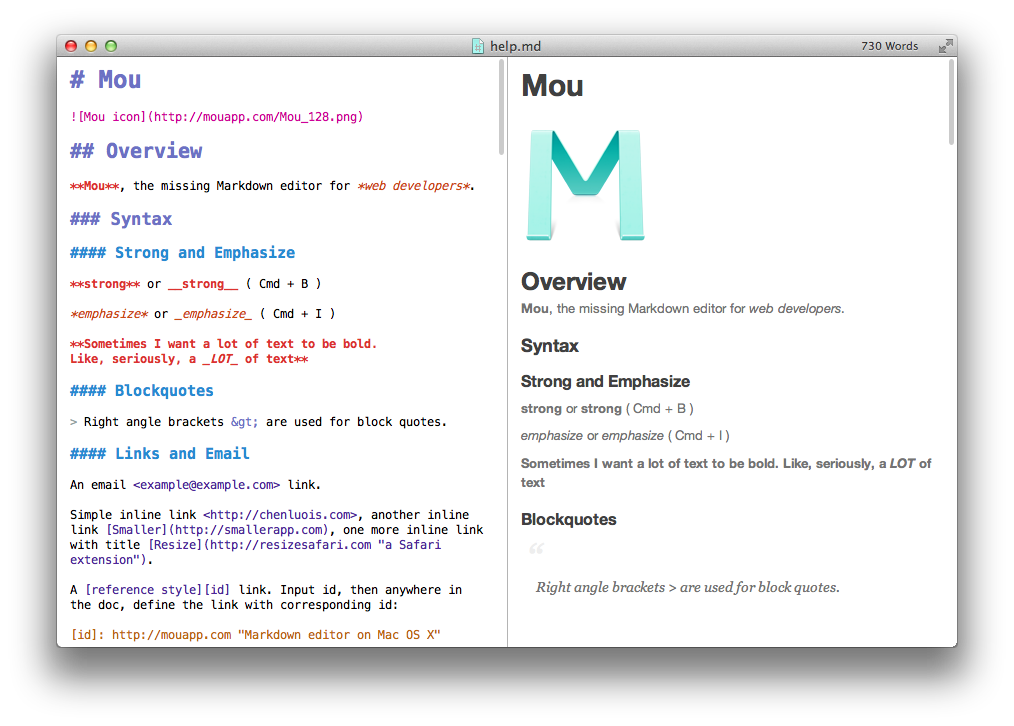
    Let me start by introducing my favorite way to write notes, documents, or any other type of text for that matter. It’s a format called Markdown created by John Gruber. Take a look at his project page for Markdown to learn more about it. I’ve recently discovered a great little application for OS X that absolutely blew me away with how simple, yet amazingly feature packed it is. This application is Mou written by Chen Luo. The missing Markdown editor for web developers.

    Mou_Screenshot_1

    There’s a standard Markdown document on the left with a live render of your document on the right. It provides you with custom stylesheets to change the preview to your liking. For you business folks it can also export your document to a PDF for easy, consistent distribution between multiple different types of devices. Also for those of us who are attached at the hip to our terminal there’s a quick way to launch Mou from the command line using:

    open -a Mou

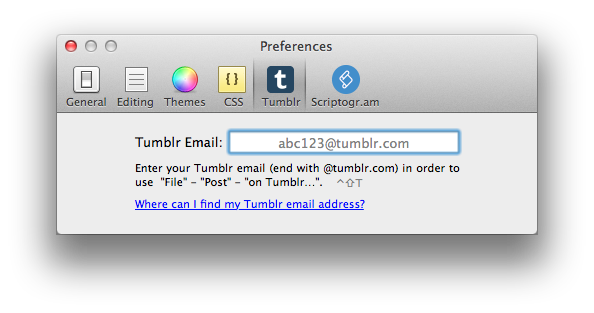
    For those who like to blog with Tumblr, this app will export any Markdown document to your Tumblr blog using the post email address given to you by Tumblr.

    Screen Shot 2013-01-29 at 2.36.22 PM

    This handy little app is a great for anybody who writes text while not wanting to use a large word processing application. Visit mouapp.com to download the application for free, or donate to get a license for free when Mou reaches version 1.0.

  • Missing Analytics Data? It’s (Maybe) Not Your Fault

    WHERE ARE THEY, GOOGLE?

    With a recent, subtle Chrome update, Google has significantly curtailed the tracking of keyword data within its own Analytics. It’s been over a year since tracking of keyword data has been disabled for logged in Google users, who were taken to the secure version of the page for any searches. Keyword data from https://www.google.com/ searches (versus http://www.google.com/ searches) shows up in Analytics reports as “(not provided),” reportedly to protect the privacy of Google’s users.

    With the recent Google Chrome update, searches from Chrome’s “omnibox” (its term for “address bar”) now all go through the SSL version of Google search, and thus, keyword data for these searches will not be tracked in Analytics. This is worth noticing, since Google Chrome is clearly dominating the desktop web browser arena at present. In short, this policy could be causing webmasters to miss out on between one-third and half of their data.

    I casually happened upon this phenomenon last month as I was testing a client’s site for problems with cross-domain tracking for their Analytics. My usual procedure to bypass hidden keyword data was to go into Chrome’s incognito mode, search on Google for something that I believe will take me to the client’s site, then visit the client’s site from the results. On inspecting the Analytics cookies, none of the search keyword data was present! I fumbled through all of my Chrome extensions, said “UHHHHH,” a lot, and eventually resigned myself to the fact that that my browser was somehow broken.

    Turns out that it wasn’t broken — this was intentional. The changes are obvious: comparing keyword data for our clients’ Analytics profiles between December 10 and December 18 of this year versus the same of last year shows a consistent increase in “(not set)” or “(not provided)” keywords. This isn’t to say that keyword data is not present, but rather that it’s unavailable from the leading desktop browser.

    Google Chrome doesn’t alone hold the distinction of presenting difficulties for achieving accurate visitor data. For the same client, I also noticed a significant presence of “direct” traffic, which is an apparently misleading term. After a bit of research, I found that the issue was due to security settings in Safari counting a significant portion of traffic as “Direct.” As you can see by the screenshots below, Safari traffic (a majority of which is through iOS – Safari being the default browser) accounts for a sizable portion of all direct traffic.

    Google’s official description of direct traffic reports in Analytics is that they provide details on “which of your URLs are the most popular destinations for direct traffic: which URLs people can easily remember (e.g., google.com), which addresses appear most often in auto-completion, or which of your pages are bookmarked the most.” As we’ve seen, this is misleading. The depicted client had a significant amount of direct traffic to URLs laden with query strings: something unlikely for users to generate on their own.

    So how do we respond to this decrease in data available? As the Google blog post linked above mentions, Webmaster Tools still provides a list of the keywords that take users to your site. By pairing this with other information from Analytics, we still know what drives traffic to a site, but don’t have as precise a pool of data available, and for understandable reasons.

    We do use Google Analytics to give us insight into how users interact with clients’ sites and to help us plot courses of action, but Analytics is just one of the tools we use. Besides, SEO is a rapidly growing field! What worked two years ago or one year ago — or even a month ago — is no longer applicable. Constantly staying on top of changes made to the technology used within your industry, and specifically knowing what these marked changes in data mean are both necessary tasks to stay afloat.

  • 5 for Friday — Links, Stories & Posts for Your Weekend

    • Survey: 91 Percent Have Gone Into Stores Because of Online Promotion – Marketing Land

    Wanderful Media conducted a shopping survey of over 1,000 U.S. adults and released their findings yesterday. Millennials were the group most inclined to go online to check prices or other product information. The most common online research tool used while in stores were search engines (84 percent), followed by Amazon (76 percent).

    • Google “Censors” Porn in Image Search – Search Engine Journal

    We’ve all unintentionally image-searched a questionable keyword in mixed company to embarrassing and/or hilarious results. Thanks to Google’s new censorship filter of explicit content on image search, no more embarrassment! Google Images’ latest algorithm change has replaced SafeSearch with the new options of “filter explicit images,” and “report offensive images.”

    • Combating Accidental Clicks in Mobile Ads – Google Mobile Ads Blog

    As advertisers and users alike become frustrated at the high number of accidental clicks on their mobile ads, Google is looking to combat the problem by verifying with users that they really meant to click there. They’ve found the majority of accidental clicks occur when users are trying to scroll through or click on in-app content. This update will make the user experience consistent across the majority of Google mobile ads.

    • Hands On With New Google Maps For iOS: Easier On The Eyes And Faster For The Fingers – Forbes

    After a three-month hiatus, Google Maps for iOS has finally returned, entering the Apple App Store at #1. The new UI is representative of Google’s usual minimalism and strips away unnecessary information. Turn-by-turn navigation puts the user in the turn and the layering of information is quite handy!

    • Bacon, Not Kevin: Twitter Adds Negative Keyword Targeting for Promoted Tweets – Marketing Pilgrim

    Emulating the great search engines before it, Twitter is making strides towards improving the relevancy of Promoted Tweets. Adding to exact match, phrase match, and basic keyword match, Twitter announced negative keyword targeting. Advertisers now also have the ability to hook their Tweets onto trending words or hashtags with a feature called “auto-match.”

  • 5 for Friday — Links, Stories & Posts for Your Weekend

    • 7 Fun Ways to Inject Holiday Spirit into Your Social Media Campaign – Search Engine Journal

    It’s official: the holiday season is here. Get your social media in the spirit! Incorporating the holidays into your company’s online presence can create many business opportunities. During the holidays, people are spending more time online looking for gifts, decorating ideas, and other holiday inspiration. Make use of your already-existing connection to capitalize on the opportunity!

    • Why I Love Google Panda (and you should, too) – SEOMoz

    Love Panda? Why would anyone in the SEO industry love Panda when it has caused so many of our small business clients to take a hit in rankings? While there are some growing pains, these updates are making Google more user-friendly and providing us with valuable SERPs. As online citizens, that’s something we can all get excited about.

    • Facebook Users Have One Week to Vote on Policy Changes, Voting Rights – Mashable

    Facebook users hit the polls! All members are prompted to vote on the proposed changes to Facebook’s State of Rights and Responsibilities and Data Use Policy. Facebook has opened the voting to let members decide if they rather their proposed changes or wish to keep things the way they have been.

    • Google Adds New View to Local Searches on Ipad – Marketing Pilgrim

    Google has updated its iPad interface to promote local search results. Users will now be able to see several local places’ overall review scores, pictures, and addresses in the SERPs in a “horizontal carousel,” as Google is calling it. Users can swipe across the screen for more results.

    • Instagram and Twitter: The New Social Media Frenemies – Search Engine Journal

    On Wednesday, Instagram turned off support of Twitter cards, which allowed Instagram photos to display in-tweet, in order to turn Twitter users to viewing content exclusively their own site. Could this be due to Facebook’s recent acquisition of the company?

  • 5 For Friday — Links, Stories & Posts For Your Weekend

    1. Facebook Launches New Option on Charitable Gifts — Mashable

    Recently, Facebook created a new feature on Charitable Gifts that allow users to make a charitable donation in recognition of friends and family members. Users will be able to either choose the organization or let the friend or family member choose. With its 11 non-profit partners, Facebook is rolling out this test to help these organizations raise funds and increase awareness. Is this something you would considering doing on the social network?

    2. New “Quality Impact” feature on Bing Advertising to Help with Transparency — Search Engine Land

    The new “Quality Impact” feature will help advertisers learn how to increase impression share by improving the Quality Score for each keyword. The analysis can be accessed through the keyword report or its API. This will be a big game changer and provide advertisers more guidance than Google Adwords’ counterpart.

    3.  Foursquare Making a Splash in Local Search — Local Search Insider

    Foursquare is making a ripple with its marketing tactics this year by positioning itself as a competitor in the mobile local search game. Read SI’s Joseph Henson’s blog on how Foursquare is building a more “robust improvements to their local search feature, Explore.” Stay ahead of the curve with this insider scoop.

    4.  When to optimize or review your optimizations?  — Search Engine Watch

    Whether your site is new or the site has been around for awhile, on page optimization is important to SEO. What should you for? How is my content affecting my SEO? This blog will give you pointers of what to look for when you are optimizing or re-optimizing content on your site.

    5. Google’s Universal Analytics and What it Means to You — Google Analytics

    Want to see what Google has been developing? Users search in many different ways and with different mediums to get information. How do we track everything? Check out the Google Analytics blog to get a full overview of the “entire marketing funnel.” It will be interesting to see how Google manages this application.

  • 5 for Friday – Links, Stories & Posts For Your Weekend

    Brands That Understand Marketing on Instagram – Mashable

    Much like Pinterest, businesses are slowly but surely beginning to utilize Instagram as a marketing tool. By encouraging your customers or your fan base to be actively — and creatively — involved with your brand, you can engage them in a unique and effective way. Whether you have a clothing brand or a restaurant, this is a great example of how Instagram can boost your social media campaign with user-generated content.

    Pinterest Makes Top 50 Website List – Search Engine Journal

    Speaking of Pinterest, the social media site has secured a spot on comScore’s top 50 most-visited websites list. In addition to its phenomenal growth over the past year, the fact that registration is now open to anyone (no invite needed!) has certainly helped with Pinterest’s latest visitor boom. And with the holidays right around the corner, it’s likely that we’ll see even more traffic from shoppers in the coming months.

    5 Reasons Why Visual Content Needs to Be Included In Your Marketing – Social Media Today

    In case the two previous stories didn’t convince you, visual content should absolutely be a part of your marketing strategy. Images affect people differently than words. They are easily shareable on social networks, and they can quickly capture the interest of your audience. Carefully chosen visual content can engage your customers and connect with them in a simple, effective way. Are you incorporating images in your marketing efforts?

    Apple Drops an iPad Mini on Rivals – The Wall Street Journal

    The iPad Mini was announced this week, and Apple will begin taking orders for the device today. Lightweight and super thin, it measures 7.9 inches diagonally, but has a lower screen resolution than the iPad. At a pricey $329, it’s significantly more expensive than other 7-inch tablets on the market, but hardcore Apple fans could be happy to pay up. Will you be adding it to your wish list?

    Google Takes Street View Tech Into the Grand Canyon – Wired

    Google Maps has captured images of locations using cars, snowmobiles, and even tricycles, but their latest effort to map terrain that is unreachable by traditional methods is really ambitious. The Trekker, a backpack version of the equipment used on Google’s Street View cars, is now being used to map inaccessible sites. This week, the backpacks journeyed into the Grand Canyon. What will Google’s Street View engineers think of next?