Category: SEO

  • Optimize Your YouTube Videos With Video Transcripts

    youtube

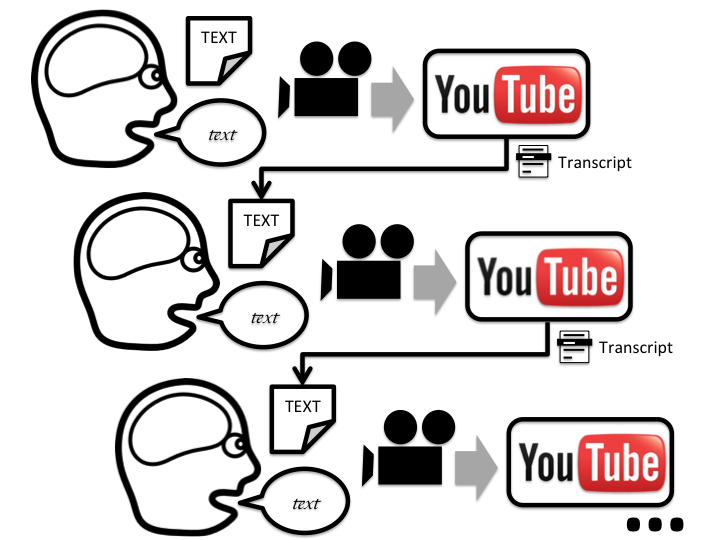
    Using YouTube to promote your business is one of the best avenues to take when it comes to outranking your competition. YouTube is one of the largest search engines available today, which means that everyone is trying to get a piece of the action. The only problem is that most people do not know how to leverage the power of YouTube, because their video gets lost in what I like to call “The Black Hole Of Videos”. People still have not learned that YouTube is a search engine, and therefore, your videos have to be identify by the search engine as an authority. Video transcripts can play a major role in telling search engines, “Hey! Look at me! I am a good video and I have content to prove it!”

    youtube 2

    The problem with YouTube video optimization is the only thing that YouTube has to determine what the content of your video entails is the description, the title, and the tags. While these are great ways to get more viewership for your videos, if your niche is popular with a lot of competition it could be very hard to outrank. Video transcripts give YouTube something to actually read and determine what your video is about based on more than just titles, descriptions and tags. YouTube and Google read text to optimize content, so by adding a transcript you are adding extra content to crawl! Remember, content is king in search engine land. The transcripts are classified on your video as “CC” or “closed captioning”. It’s almost equivalent to putting your Youtube video on steroids. Most of your competition will not upload a video transcript and this gives you an advantage of your competition.

    If you don’t have time to transcribe your video, go to Fiverr.com. People have offers to transcribe videos for $5 dollars so you don’t have to! Transcriptions will skyrocket your YouTube videos to the next level, simply because you are giving YouTube content to actually read and crawl instead of just titles and tags.

  • The Return… of the Website

    Website examples

    The website is back, y’all!  Yeah yeah, we know they didn’t go anywhere, but for the last few years we have had a large shift to companies investing in their social media presence and building out experiences that their fans can interact with on Facebook.

    It made sense 100% of the way at that point in time. That’s where the users were — on Facebook. That’s where MANY users still are. Facebook is still growing; albeit, not quite as rapidly as 2 years ago, but doesn’t it feel like you see at least one new aunt and uncle popping up on Facebook each week?

    If it’s growing, then why does it feel like it has become stale?

    The challenge here lies in the evolution of Facebook over the more recent years. Facebook started with a wall for each person. That was the only place, besides on your own profile, that you could write anything on Facebook.

    If you wanted to see what someone was saying, you had to visit individual Facebook profiles. Since 2006–and then expanded upon by “the new Facebook” in 2010–we have the News Feed. Facebook prioritizes what it thinks is news based on an algorithm of what it thinks you want to see. The problem is, I am pretty bored with checking my Facebook because the algorithm hasn’t quite got it right, and it’s too far gone to ever get corrected.

    If you are a business, Facebook admits only 16% of your fans (I refuse to call them “like-ers”), are seeing your posts that you are putting all of that thought and energy into. Now I am not recommending you abandon Facebook — as you shouldn’t — buyers (especially women) are on Facebook, so learn how to improve your EdgeRank with our recent post by Laura Manning.

    When Facebook users see only a couple new posts every time they check, they get bored. And bored on Facebook means your user starts to think “hmm… what else can I do on my mac, iPhone, or iPad?

    I have found that I have started to wander the internet much more than I did a year ago. Facebook used to consume about 90% of my leisure internet use. Now it consumes about 20%.

    Website Under Construction

    What I am starting to find is an appreciation for websites again: a place where you can go and dive deeper into a product or service and really discover your options. Kind of how it was in 2000.

    So for those of you who have truly been investing in your websites in the right ways over the past decade, who have recently started, or  want to make an investment now, my prediction is that is the right time to do so.

    The Key Things You Need to Remember:

    1. Make sure they can picture themselves using your product.

    Got a spa? Make sure they can see themselves in it. Got a house cleaning business? Make sure they can picture themselves sitting in their clean living room when you are done.

    2. Sell it.

    Sell what you’ve got to offer. Whether you’ve got, again, a spa or a house cleaning service, buyers want to read all the juicy details of how they’re getting a quality, comprehensive service for their hard earned cash. Explain every aspect of your packages, down to the last detail. Even if you think it’s insignificant, your buyers will appreciate it. Your customers want to know the benefits!!

    3. Update your website. 

    Feature all of your products or services on your website. I want to know what you can do for me. No one wants to ask “do you do stump grinding?”

    4. “Give away a little bit of the store.”

    Search Influence’s Director of R&D, Amy Arnold, often preaches that each website needs to “give away a little bit of the store.” This means provide info on your site that you would typically share with someone when you have an initial call, consultation, or meeting with them. Yes, yes, it may be more than you want to put out because “what if they don’t call me” but trust me, this is the right thing to do. We have low bounce rates on sites that support this recommendation.

    If you provide them the information they are looking for without them having to call you, you are proving to them that you have the knowledge — when you competitors are probably not.

    The key learning here is simple — don’t ignore your website — your website should be updated almost as many times as your aunt comments on your recent pics on “the Fbook.” Your customers are searching, and they will likely find you if you continue to keep your website up to date. Of course, doing some off-site promotion of your site never hurt either, but that’s not the point of this post 🙂

    Your website is being looked at more than you think. And if you don’t know how many visits you are getting to your site and from where they are coming, for heaven’s sake, install Google Analytics on it!

  • Effective Use of Exceptions

    Throw Lots of Exceptions

    It seems like a good idea, when writing new code, to use liberal amounts of thrown exceptions to signal erroneous situations. The more the better. Any time you can detect a situation where your data is completely wrong, throw an error. In Ruby just using a simple raise with a message (or no message) can go a long way to saving your sanity.

    if something_is_fishy
      raise "something is fishy"
    end

    # or the single-line version

    raise "something is fishy" if something_is_fishy

    In this case your program will crash and your environment will inform you about the file and line number where the error occurred. However I have been using custom error classes (subclasses of StandardError) to more clearly describe what is wrong.

    class UnexpectedlyInvalidInput < StandardError; end
    class UnexpectedResponseType < StandardError; end
    class ThisIsImpossible < StandardError; end

    Some sources advise you to only throw exceptions which you intend to catch. I disagree. In fact most of the error throws you write should not be caught, because most of those should not be thrown at runtime anyway! Strive to use exceptions to detect situations when you, the programmer, have screwed up because something impossible has nonetheless happened. What counts as “impossible” may depend on your business requirements, documented behavior of APIs, common sense, or subjective judgement.

    Obviously it will get tedious or impossible to throw errors at every stage of the code where someone may have messed up (especially in a dynamic language like Ruby). Below I will list situations where it is convenient and natural to throw.

    When using a case or a series of if, else if, else if, ... to interpret the several possible variants of your data (such as “ok” and “error”), put a final else, which throws an error indicating you got an unexpected variant. If you do not put the else and you get an unexpected variant, you will spend valuable time sifting through the aftermath to determine that that was actually the cause of the error. Skip that step and you’ll be able to go fix the actual problem.

    case arg['status']
      when 'ok' then show_user_the_money
      when 'error' then show_alert_dialog
      else raise InvalidStatus
    end

    In an API client module you can throw an error if the raw data you get from the API is not the correct type. You expect the API to adhere to its documented behavior. If it does not, you can’t seriously expect to do anything except change your code. Throw an error.

    If you are expecting a data value to be not nil, by all means, throw an error if it is nil before you use it. The behavior of nils in many programming languages, including Ruby, allows for the program to continue on willy-nilly until you get lucky enough for a crash somewhere else, maybe in another module.

    def procedure_which_expects_non_nil arg
      raise ArgumentError, "arg cannot be nil!" if arg.nil?

      # rest of the code
    end

    In all of the above cases, you now have a clear directive of how to proceed if the program throws any of the errors. You need to fix your bug, alter your usage of an API, or fix a bug that produces a nil erroneously.

    Don’t Worry About Catching

    Don’t try to catch very much. The above errors, for example, have no valid reason to be caught. Try to stick to throwing errors, which indicate bugs to fix rather than normal conditions that will happen as a matter of course. You may need to catch at the top level sometimes to deal with low level unpredictable IO situations like a broken pipe.

    It’s a Bad Idea™ to catch all errors (without re-throwing). The reason for this is that you will be painfully unaware of problems with your code that you did not expect. In Ruby, this includes syntax errors, which are not detected until late runtime and manifest themselves as exceptions!

    # NO! BAD! VERY BAD!
    begin
      results = do_lots_of_complex_things
    rescue #recover from ANY kind of exception
      results = []
    end

    If you do rescue from all errors, make sure to re-throw simply by using raise by itself (shown below).

    # not bad
    begin
      results = do_lots_of_complex_things
    rescue => e
      send_an_error_email(e)
      raise #re-throws the error e
    end

    # also not bad
    begin
      results = do_lots_of_complex_things
    rescue SpecificProblem
      results = []
    end

    The normal way to catch without re-throwing is to make sure it is only for a specific error class (shown above). Finding out which class you want to catch is tricky but worth it.

  • Switching to Trello from Pivotal Tracker

    We started using Pivotal Tracker over 2 years ago to track the status and progress of our first big software development project. As the lead developer, it fit perfectly into the workflow that I had envisioned for my fledgling department. I added user stories, gave them points and watched my velocity rise and rise as my two week iterations rolled by. I was showing value, being agile and I was generally happy with the progress of the project.

    That project launched a few months later and it has been in use ever since. Then bug fixes and feature requests started to trickle in. And the development department grew. And after the success of the first, second, third, and fourth projects were added to the queue. It was obvious that Pivotal Tracker was going to need some additional tools to manage multiple projects and multiple developers across those projects. We looked into several add-ons, third party tools and even used a Google doc for a while, but nothing seemed to work quite how we wanted.

    As we focused on one project, the iterations would still roll by on our inactive projects. It’s possible to change the “team strength” to 0% when you aren’t working on a project, but it is reset back to 100% every iteration, and an empty iteration is still recorded. This doesn’t look good and ruins the velocity estimates that Pivotal Tracker is so good for.

    I first found Trello while looking for alternatives to Pivotal Tracker. My first reaction was that it’s too simple. Where do you put in points? Why do I have to manually move stories from the backlog to the current iteration? I ruled it out along with other more beautiful apps such as Asana and Trajectory.

    The search was put on hold until I found a blog post by User Voice that describes exactly how they use Trello. I was blown away. First and foremost by the fact that a company would share this much information about it’s process. It has inspired me to be more open about how we develop software. Secondly, I was surprised to see them using it outside of the “one project is one board” paradigm. They use six boards to document, vet and prioritize new features and bugs. This really changed my view of how we could use Trello.

    We don’t have one single software product called Search Influence. We have a conglomeration of many tools to help each department be as efficient as possible and still give our customers the individual attention they need. We needed a way to track each of these projects individually. Having a “Next Up” list like User Voice would be infeasible because we would have to prioritize cards across multiple projects. I would rather prioritize the projects themselves and give developers freedom to choose which they want to work on. This has worked well for us in the past and Trello is making it even easier.

    We have one board with a card for each of our projects. It has lists for “Ideas,” “Research and preparation,” “Ready to begin,” “In Progress” and “Done”. Cards generally move left to right and “Done” really means “Done for now.” In the description of each card there is a link to a Google doc and its own Trello board. Developers assign cards to themselves from any list except “Ideas” and “Done.” I believe we will need a separate board for “Ideas” and “Research and preparation” in the near future from which the “Ready to begin” list will be populated, but for now all of our projects have been pretty well researched and we are working on some great features.

    This is how we are currently doing things, but it’s a work in progress. All of our current projects are researched and ready to be worked on, but the next change will be to create a board strictly for planning. This will make it easier for other parts of the company to be involved in our roadmap. If you have any questions or use Trello in different way, make sure to comment. We’re excited about the changes going on at Search Influence.

  • Responsive Design: An Introduction

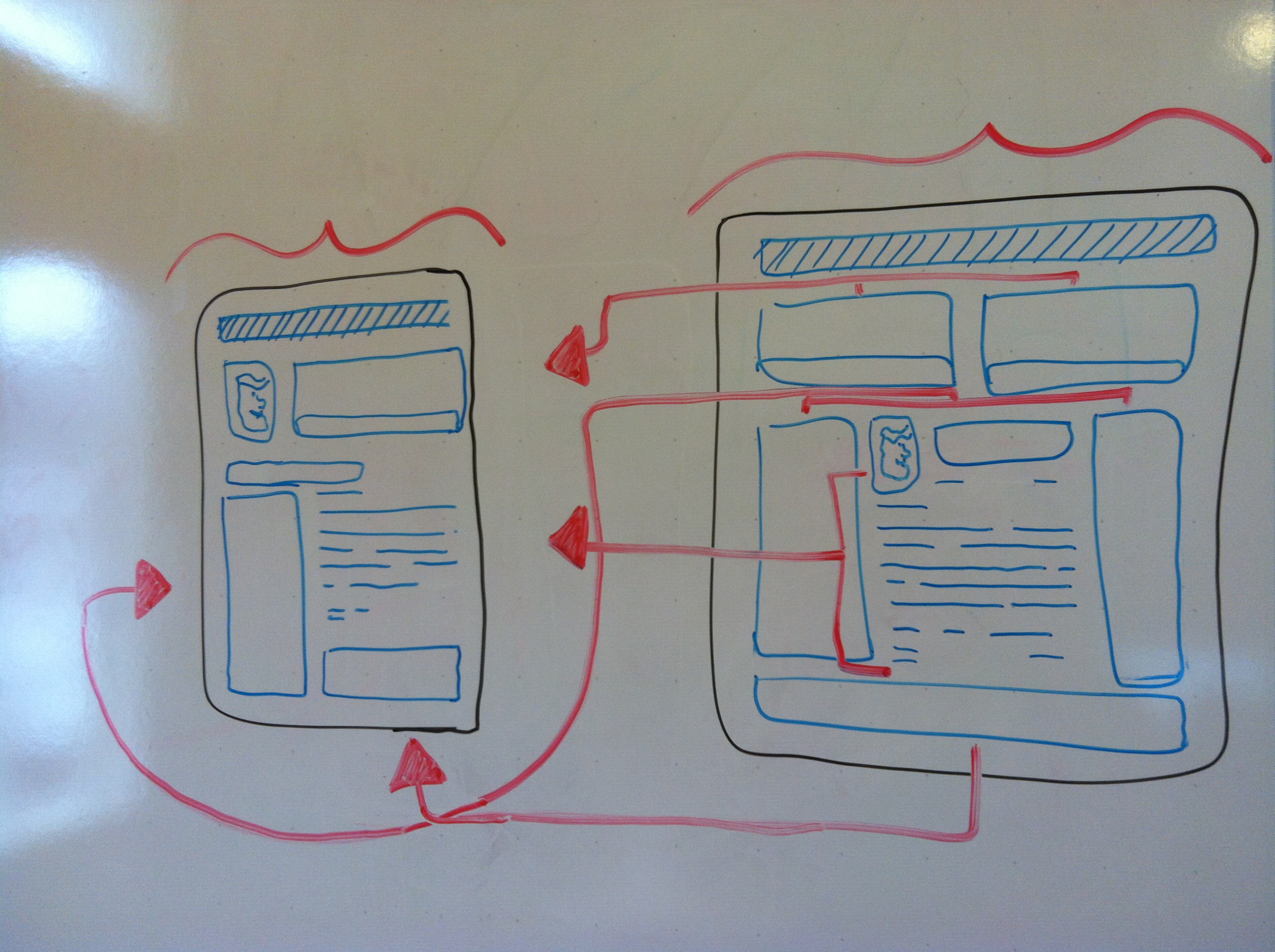
    Responsive Design–What’s the fuss about? You hear the phrase “responsive design” but still don’t get it or why you should be paying for it? Allow me to explain it without all of the technical details.

    Making mobile versions of your website is common these days, but the implementation can make web developers’ heads spin. First thing to note is there are mainly two different approaches to making your site AWESOME on your veiwers’ devises and/or desktops.

    Concept smartphone tablet pc and laptop in handsThe first way is to have your main site for desktops and an additional (smaller) site for phones, tablets, and/or  ‘phablets’ (phone + tablet), which usually adds to your hosting, looking something like ‘mobil.yoursite.com.’ This works, but it doubles your content, number of domains, and space you are going to need to host such a site. Let’s not forget to mention the fact you will need to edit the mobile site every time a phone is made. Try to count how many sizes of tablets, phones, and monitors there are. Go ahead, I’ll wait. No? Me neither. Just getting up to date is enough to give a developer job security for the next decade. Or make his/her head explode.

    Now wouldn’t it be great if your site just magically resized itself no matter what size the screen was and no matter what the pixel ratio was? I’ve beaten around the bush to get to the point, which is that responsive design using CSS (Cascading Style Sheets) can display your site according to the size of the user’s browser window. So whether your customer is on the latest iphone or tablet or wall projector, your site will handle it like a champ, displaying the site elements however you want them at that given size.

    Man, can it get any better? It actually does. Because you are using CSS instead of external files, which can bog down your site’s load time, it reacts in real time by styling itself. IT’S ALIVE!! If you’re on a desktop you can do a neat trick. You can actually resize your browser window and watch your site ‘take shape.’

    photo (1)
    With responsive design, you can change a website’s dimensions without worrying about the design elements.

    Use THIS SITE as an example if your site is not yet responsive. The elements on the page should ‘pop’ into new locations as it gets smaller/ larger. This ability to resize your site essentially free of cost it a great asset to your company and can save anyone, even smaller companies, big money.

    So responsive design has come a long way and still has a ways to go when it comes to the ever-expanding technologies and the shape of the web. Soon it will be as common term as “social media.” Now you should have a better idea of what people mean when they refer to sites being responsive, and the technical stuff won’t be as alien to you as before.

  • How To De-Personalize Your Search Results

    As Google continues to update its algorithm to deliver more local and personalized results to searchers, it becomes harder to get a true sense of where your site ranks in the search results. Below are a few different options for “de-personalizing” the search results you see.

    First things first, Sign out of Google

    Since your Gmail or Google+ account may be tied to various searches or a specific location, you should sign out of your account. If you would like to remain signed in, there are a couple of precautions to take:

    Hide Private Results:
    1) In the upper right hand corner there will be an icon for a person and a globe. Select the globe.
    Hide Private Results

    Turn Off Private Results:
    1) In the upper right hand corner select the gear > Search settings
    Update Google Search Settings for Private Browsing

    2) Scroll down to the “Private Results” Section and select “Do not use private results”
    Do Not Use Private Results in Search Settings

    3) Select Save

    De-personalizing your Results: &pws=0

    1) Go to google.com and do a search

    De-Personalize Search Results

    2) In your address bar, scroll to the end of your URL and add “&pws=0” and hit enter

    De-Personalize Search Reults with pws=0

    2) Voila! Your results have been de-personalized.

    Tip: you can also add “&num=100” to display 100 results on your search engine results page instead of just 10!

    Using Chrome? Use an Incognito Window

    If you are using Chrome, you can take an extra step and use an incognito window, which will have no history attached to it.

    1) Go to File > New Incognito Window
    TIP: The shortcut is Command-Shift-N on a Mac (on Windows it is Control-Shift-N)
    De-Personalize Search Results with Incognito Window

    2) Proceed to Google.com to perform your search (or search directly in the address bar)

    De-Personalize Search Results with Incognito Window for Chrome

    3) Finally, for extra precaution, use the &pws=0 method above

    4) Chrome also has this handy extension called Disable Google Personal Search that you can install that will automatically add &pws=0 to all of your searches. This speeds up the process quite a bit!

    Take Advantage of Private Browsing

    Safari
    If you are using Safari, you can browse the Internet using “Private Browsing.” The difference between private browsing and using an incognito window is that this setting is for the Safari Application, as opposed to just one window.

    1) Go to Safari > Private Browsing…
    Private Browsing in Safari

    2) A pop up will appear, select “OK”
    Turn on Private Browsing in Safari

    3) Proceed to Google.com to perform your search (or search directly in the address bar)
    Private Browsing in Safari Address Bar

    4) Finally, for extra precaution, use the &pws=0 method above

    Firefox
    Firefox has a similar feature. Here’s how to turn it on:

    1) Go to Tools > Start Private Browsing
    TIP: The shortcut is Command-Shift-P on a Mac (on Windows it is Control-Shift-P)
    Private Browsing in Firefox

    2) A pop up will appear, select “Start Private Browsing”
    Turn on Private Browsing in Firefox to start browsing

    3) Proceed with your search!
    Turn on Private Browsing in Firefox

    4) I came across this extension, which works in Firefox and in Chrome. It’s called Google Global, and can be used to see search results in other countries but also has a de-personalization option.
    Google Global De-Personalized Search results

    Internet Explorer
    Lastly, Internet Explorer also has a private browsing option. Follow the below steps:

    1) Go to the gear icon in the top-right corner and choose Safety > InPrivate Browsing
    TIP: The shortcut is Command-Shift-P on a Mac (on Windows it is Control-Shift-P)

    2) I haven’t personally tested it out, but there is a plugin you can use for Firefox and Internet Explorer to prevent you from seeing personalized search. Download it here.

    Clear Your Cookies

    If you want to be absolutely sure you have no personalized search,  you can clear all of your cookies. I prefer not to do this as it will also make you sign back in to any accounts that you may have previously been logged in to, but it will definitely do the trick. Here’s a great article on clearing your cookies depending on your browser and computer.

    Thinking About Your Online Results

    Looking at the de-personalized results will only give you a sense of your online presence. Google’s move toward greater personalization around location and search history makes a focus on rankings a less accurate depiction of your overall online presence. Although these are the “truer” results, because most everyone else using the Internet will have personal results, you can see how any one search result page is not 100% accurate or true for everyone.

    Your rankings are a key performance indicator for your online results, but they are by no means the definition of success. It is important to look at a variety of factors which include an increase in traffic for organic traffic, both branded and non-branded, and an increase in conversions, leads, or transactions that are completed as a result of organic searches.

  • Penguin 2.0 May Not Be Done Just Yet

    Penguin 2.0 reconfigure?We’ve been watching Penguin 2.0 and its effects, and as a team we have noticed some fluctuating data that suggests the algorithm has not quite settled in yet.  In another blog post, I put it out there that rankings are not everything, and they are not the primary measure of success.  Ranking reports have known flaws, but they can be used as a weather vane.  When we look at the ranking weather for a few clients, we see some ups and downs, clearly with some effect from the most recent Penguin, but it appears that the players on Google page 1 are still moving around more than a month after the rollout.

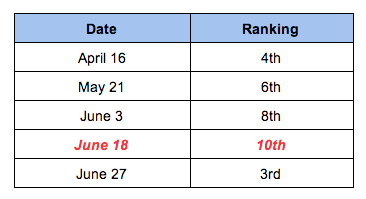
    When we look at a few examples, we see the musical chairs being played on page 1 with nobody being safe and comfortable for very long.  We’re watching rankings for a  plastic surgeon in New Jersey for the term “rhinoplasty New Jersey.”

    SEO for plastic surgery

    Here’s a summary of his rankings hopping all over.  His biggest drop was on June 18th:

    Rhinoplasty New Jersey

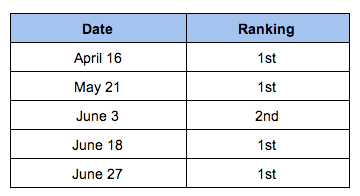
     The same client for “breast augmentation New Jersey” had more subtle changes, but they are meaningful.

    Breast Augmentation New Jersey

    So it looks like he got a little hit from Penguin 2.0, but may be rebounding.  We have done nothing out of the ordinary for this surgeon to move his site from 10th to 3rd in just nine days, so we make an assumption that Penguin is still adjusting.

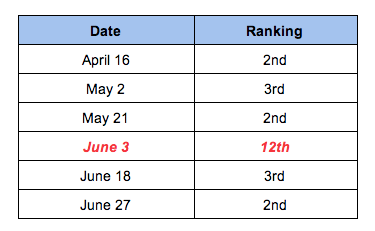
    Another example in ranking fluctuations for “Columbus allergist” is in a doctor’s rankings seen below.  His biggest decrease was on June 3rd vs the guy above who got the hit on June 18th:

    Columbus Allergist

    Rankings Aren’t Everything!

    Rankings are not the only measure by which we watch successes and failures. Organic traffic is another layer of data, and in some organic traffic trends, we see noticeable changes around June 3rd then again around June 18th.

    The client represented in the chart below is a cocktail bar in the South.  They saw a dip in organic traffic after May 22, but they enjoyed an unexpected bump in early June (the traffic dropped off again after that early June peak, but what I want to know is what’s behind that weird little bump up earlier on?):

    Penguin 2.0 adjustment in early June?

    The next example is a traffic bump around June 18th.  This client is a completely different business on the west coast.  We see a little effect from Penguin, then a weird spike:

    Penguin 2.0 adjustment June 18th?


    And Then There Are Other Data Too

    Bounce rates before and after Penguin 2.0It gets a little fuzzier when you start looking at Bounce rates and Time on Page and these data in Analytics.  Who’s to say that these increases or decreases are a direct effect from Penguin?  You could argue your site is having better or worse quality traffic because of ranking and where your site now shows up vs where it showed before Penguin.  You could argue lots.  All I know is that 3 of the 4 clients mentioned above saw an improvement in Bounce rate after Penguin.

    Bounce rates before and after Penguin 2.0 2013Bounce rates improved after Penguin 2.0

    So … what?

    I’m not convinced that Penguin 2.0 was a one time algorithm update, it did its thing on May 22nd, and we’re experiencing the good or the bad or the indifferent.  I think it’s still shaking out, and we may still see a few odd spikes or odd drops in ranking or traffic or some other data.  We may have a few more weeks before websites settle into a relatively comfortable placement on page 1, and it is only then that we can claim some clear understanding of the full effect of Penguin.

    And because Penguin 2.0 is still reconfiguring, it may not be time for drastic action.  If your site is experiencing some definite ups and downs, then yes, you should look at your backlinks quality, the anchor text quality, internal links, etc.  All of this stuff is covered in many other blog posts.  You should have been long ago working on authoritative backlinks and building up your social cred.  But it’s not time to throw up your hands, and just Disavow everything. It’s not time to scrap your website and start with a brand new domain and design.  Take some time to digest what’s going on before bulldozing ahead.

    What I would really like to know is if anyone else noticed definite odd fluctuations around June 3rd and June 18th.  Or if you noticed unusual changes at anytime after May 22nd.  Leave a comment, and let us know.

  • Local U New Orleans: 14 Things You’ll Want to Know

    About a month ago, my team and I attended Local ULocal U Logo
    an online marketing seminar held at Tulane University. It was an extremely valuable, very energizing half-day! Various industry leaders in local SEO have dedicated their time and resources to helping small businesses learn the basics. It was more than worth the price of admission!

    Not only did I take away a lot of valuable information, but I’ve already started thinking about how I can apply the topics discussed to help Audubon improve our online presence. I’m excited to put a plan into action and work with my team to make the website even better.

    Below are my top takeaways from the day.  If Local U is coming to your city, I highly recommend attending.

    Takeaways:

    1. Does your website answer the top 10 most frequently asked questions that you hear from customers in your physical space/store?
    2. Is your NAP (business name, address, phone number) easy to find on every page?

      White Bengal Tiger NAP
      This tiger needs a nap! Too bad this type of nap won’t help your local presence!
    3. Remove all Marketing Speak.
    4. Are you consistently blogging? (Tip: Top 10 FAQs make excellent blog post topics.)
    5. Are you building links on your site to other reputable sites? Links are gold! Search engines move from link to link.
    6. Content is not just text. Content is photos, graphics, video, reviews.
    7. Future of online marketing is customer reviews. Do you have a review process built into your sales process – to both encourage reviews and deal with negative reviews?
    8. When asked what do you do on Google, 46% say read customer reviews. Reviews are social proof.
    9. If you are not talking about something on your site, you cannot rank in search for it! Create pages for what you want to rank for.

      Sea Otter
      It’s important to add enticing photos and videos. Who wouldn’t love to look at cute pictures of animals all day?
    10. There is no single Google search results page. 50-200 different algorithms at work at any given time and results are personalized. We are all seeing slightly different results.
    11. Rank for what you are best at, be specific!
    12. YouTube is the world’s second largest search engine. What will users find there about you?
    13. You cannot own or control Facebook. You can own and control your website. Your website is most important, at the heart of all your online marketing.
    14. Emails must be readable on all devices. 42% of all mails are opened on a mobile device.

    Lani McWilliams is the Director of Audubon Nature Institute Logo Member Services & Ecommerce at Audubon Nature Institute. Audubon Nature Institute is a 501(c)3 not-for-profit organization dedicated to celebrating the wonders of nature and educating their visitors about the natural world.

  • Google Slider Replacing the Maps Seven Pack?

    Many people have seen the slider on the top of Google search results when searching for “things to do various city,” but have you seen it when searching other local terms lately? When I searched the term, “Pizza New Orleans,” I noticed the slider appearing instead of the seven pack for the first time today! I search this term often–not because of my love for pizza, but because of my client’s pizza chain. Never in the history of everdom have I seen the slider show up for this particular term.

    What if Google is leaning more towards this instead of the seven pack? This can be a good and bad for local businesses. Good because your business will not be pushed all the way to the bottom of page one, way under the seven pack. Potentially bad, because many people may be driven to click the pretty images on top of the screen vs. clicking on the plain jane search results.

    What does this mean for me, you ask? How can I be a part of this beautiful slider? As our fearless leader says, “Barnacle SEO is the answer!” A well optimized Google Place listing and page are the first steps.  Your best possible scenario is to be the Theo’s Pizza of the page! Theo’s is the first Google Place listing in the slider AND the third organic listing on the page. As per usual, the more real estate the better.

    It’s going to be very interesting to see where Google takes this and how far it will go. Will it eventually replace the seven pack? Only God–I mean Google knows!

    P.S. This doesn’t show up for everyone. A few of my co-workers have seen this in the wild and a few have not. Have you noticed this type of result for other queries besides “pizza” or “things to do?” Tell us in the comments below!

  • 3 Time Saving SEO Chrome Extensions

    3 Time Saving SEO Chrome Extensions

    If you’re like me, you love to find any and all ways to save a little time here and there. That is why I have compiled a list of my top 3 time saving SEO Chrome extensions.

    1. SEO SERP

    What does it do?

    SEO SERP is arguably the best thing since sliced bread. I am embarrassed to admit that I ever googled a keyword then proceeded to count the actual location of the site I wanted to see rank for that term on a search engine result page. What this extension does is it allows you to type in a keyword or phrase and the website you hope to see rank. Press submit, then it tells you the page’s position on search engine results. Don’t make the awful time sucking mistake I did. Download the SEO SERP Google Chrome extension today!

    SEO SERP

    Get the Extension

    Visit SEO SERP’s Chrome extension page to add this extension now!


    2. SEO Mozbar

    What does it do?

    Better put, what doesn’t it do? Quickly view meta data on a particular page, reference page and domain authority, view page load time, see followed, no-followed, internal, and external links, and so much more. All of that information sits right there at the top of your Chrome window, awaiting the inquisitive click of your mouse.

    Get the Extension

    Seriously though, if you don’t already have this fantastic reference, download the SEO Mozbar now!


    3. Notes Anywhere

    What does it do?

    Sticky notes have long since been a great tool for reminding yourself of important tasks and helping clutter your desk with vibrantly colored bits of random information. Like their tangible cousins, the Notes Anywhere Chrome extension does exactly what its name implies. It leaves notes anywhere on any page of any website you want. Close that tab, quit Chrome, or even restart your computer and the notes will still be there next time you visit the site. This is a fantastic tool for adding reminders to yourself of things to adjust, pictures to add, additional content to include, or whatever you want! Best of all, your actual desk isn’t flooded with a rainbow of reminders about various website changes.

    Notes Anywhere

    For the organizationally minded person, you can also view a summary of your notes by clicking on the Notes Anywhere button at the top of the Chrome window. Use this extension as you please, but for me personally, this tool has helped cut out the time I spend searching for the exact location I want to remember to add a link or insert a picture on a specific page.

    Get the Extension

    Visit Notes Anywhere’s Chrome extension page to add this extension now!

    Whether you hope to save time, like to stay organized, or just enjoy learning about great Chrome extensions, I highly recommend adding any and all of the above. You’d be amazed at the time you save when you don’t have to dig around for information. All that’s left now is to find an extension that cuts down on my procrastinating habits.

    With so many fantastic Chrome extensions out there, it’s hard to name them all in one blog post. Which time saving Chrome extensions make your top 3 list? Share them in the comments below.