Category: SEO

  • What’s New About the New Google Maps

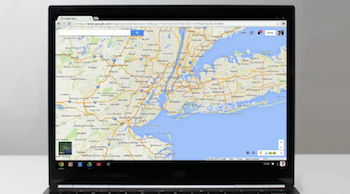
    Screen Shot 2013-12-12 at 1.35.15 PMThis week, Google rolled out a new and improved Google Maps! With this update, many are wondering what exactly is different about Maps besides the obvious physical changes.

    The new design is focused on providing smarter search results immediately and making the user experience much more effortless. In this day and age, consumer satisfaction is highly driven by ease of use, so an update like this is essential to staying on top of the trends in usability.

    Probably the most noticeable change is the way you search. With the new interactive features, you can hover over search results and the map will change to show you those results. This reduces the time spent by users re-searching for what they were looking for because they chose the wrong result.

    So far, I’ve found that the new interactive search results change local search opportunities for businesses to a certain degree. When I search the keyword “internet marketing service” maps displayed only three businesses in the search results but also showed a countless number of business results on the local map. On the map itself, the results were shown with two different kinds of red dots. It looks like the bigger dots are results that Google found more relevant to your search.

    A new goal of Google Maps is to “get better with use,” so as you search the map, star places, and leave reviews, the map adapts and shows you more relevant results. “…the more you use the new Google Maps, the more helpful it becomes.”

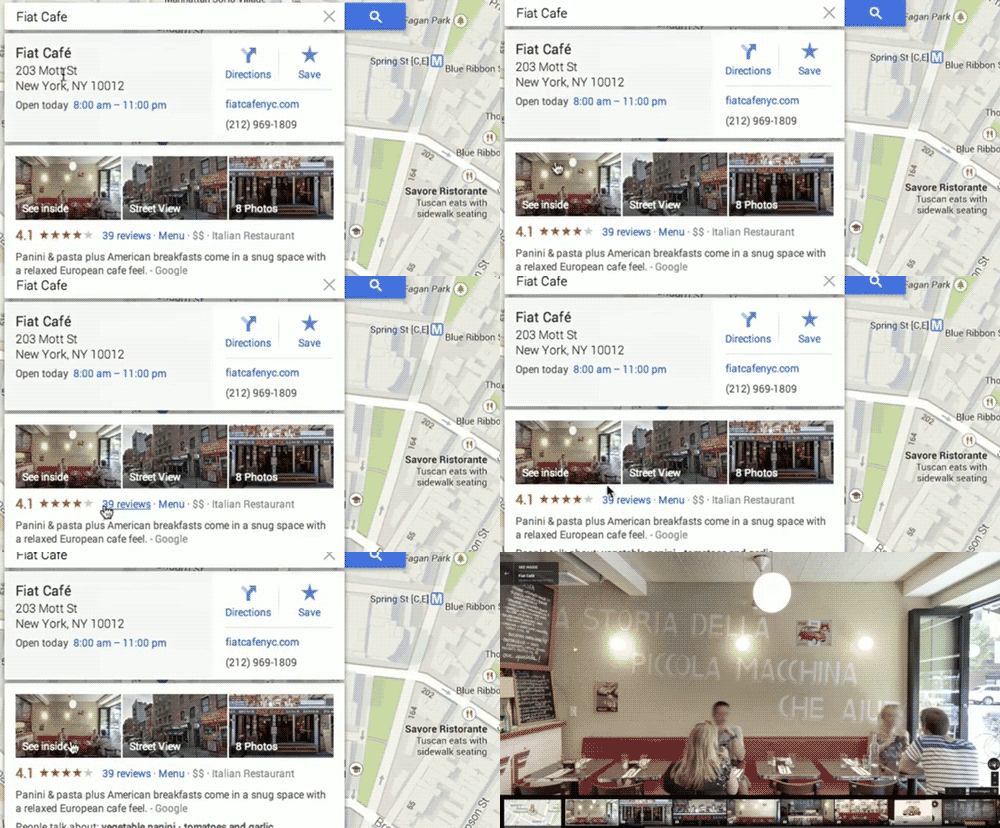
    Once you click on the desired result, the map reacts, showing you business information including the hours, location, and the option to go into Street View. They’ve made the new Maps more tailored for getting directions, taking some styles from how the Google Maps Android and Apple apps work. In the past, Street View was something you could access through buttons in the corner of the map or with Pegman, but Street View is now a readily available in your search results.
    Google-MAPS

    While we’re on the topic of Pegman, let’s talk about the new features involved with everyone’s favorite little Street View helper. Besides making him a revamped and fun—sort of—Google Maps’ mascot (Today he’s donning a Santa hat!),Screen Shot 2013-12-12 at 1.22.43 PMScreen Shot 2013-12-12 at 12.47.07 PM
    they’ve moved the Pegman location to the bottom corner of the map. Also, when you use Pegman, you’ll see new color coded dots and lines indicating where you can enter Street View, “See Inside” some locations, and enter a “Photo Sphere”.

    Finally, the new Google Maps is allowing users to submit their own content for Street View, allowing people to share the experience of their favorite and sometimes remote locations. Users have been allowed to share their Photo Spheres since last year, but now these Photo Spheres that once stood alone will be stitched together to create a Street View experience.

    Overall, the new Google Maps has created a more pleasing and a much easier experience for Maps users while also making Maps more engaging and fun to use.

    Video source of gif and first screenshot here.
  • Google Introduces Helpouts

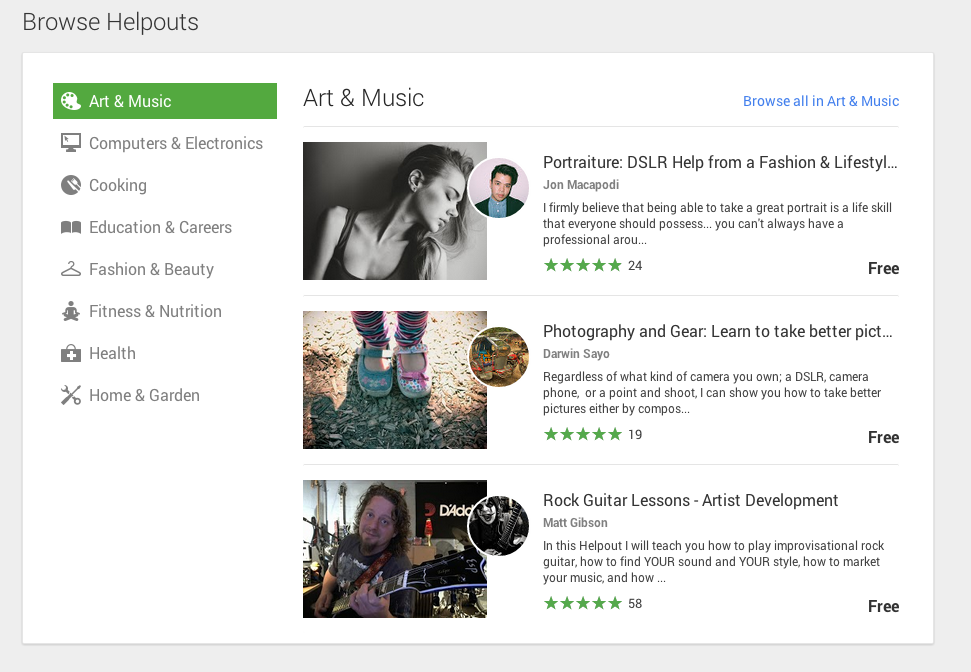
    Haven’t heard of Google Helpouts yet? Don’t worry, you’re not alone. Until recently, Google’s newest venture has been fairly hush-hush, so here’s a brief overview of the product and how to become a part of it.

    What Is Google Helpouts?

    Google Helpouts - Search Influence

    Helpouts seems to be Google’s attempt to branch out into ecommerce by directly connecting businesses to people via video chat and offering advice, information, or services. The types of information available on Helpouts range from computer diagnostics, to medical advice, to cooking tips, to yoga classes. In speaking with a Google Helpouts rep about this new product, he described it as a search engine that people can use to browse for certain professionals or knowledgeable individuals on a variety of topics and connect with them. Individuals willing to provide their expertise via this new Google product can charge by the minute, offer a flat fee, or, if they feel so generous, can simply do it for free.

    How to Join

    As of now, Google Helpouts is on an invitation-only basis for businesses or professionals looking to share their knowledge for free or for a fee. There is an option to schedule a demonstration of this product with a member of the Google Helpouts team via screen share and chat. There, the reps will give you a preview of the features and answer any of your questions. Presumably they will offer you an invitation code to join if you express interest in offering your business expertise via this platform. Google also offers a link to request an invitation code. However, if you’re just looking to get help or learn more about a topic, you are able to join now and start searching for professionals. The only requirement is that you create a public Google+ profile.

    How successful will this product be? It’s hard to tell at this point. With the increasing number of people more willing to go on Yahoo Answers than ask a friend a question, perhaps Google sees Helpouts as an alternative, providing qualified answers to those curious souls. Or perhaps those people asking ridiculous questions on Yahoo Answers will want to maintain a certain level of anonymity. However, for the sake of not wasting time, let’s hope that those questions no one should’ve ever asked remain on Yahoo Answers.


  • 5 Things You Need To Know Before Performing A Backlink Analysis

    5 Things You Need To Know Before Performing A Backlink Analysis

    imagine the internet as an interconnected set of pages all connected by a chain with links. focus on the links themselves and less on the pages.

    Getting lost in the jargon of backlinking research tools is common whether you are new to SEO or have been practicing link building for a long time. However, the number of other sites that link to yours (inbound links) has consistently been a critical factor for search engine rankings. So, naturally there are many tools that allow you to easily perform a backlink analysis on your site—or even a competitor’s site—to find new opportunities.

    Popular sites that allow you to do this are OpenSite Explorer.org, LinkResearchTools.com, Ahrefs.com, and MajesticSEO.com, to name a few. There are also search engine sites that allow you to pull backlink reports like Blekko.com and Bing Webmaster Tools (only lets you check sites you own, though). No matter which service you choose to use, you will be faced with a lot of technical jargon that you will have to understand prior to performing your analysis.

    So, here are the 5 terms that I feel are most needed to understand in order to perform this type of analysis:

    1. Backlink

    It seems like the most obvious one, but in order to understand the more complex vocabulary of SEO research you must first truly understand the basics. A backlink is any link from one website to another. Backlinks are also know as “incoming links,” “inlinks,” and “inbound links.” Sometimes the word “citation” is incorrectly used as a synonym, but a citation refers to any mention of a business on the web. This can occur with or without a link and can be the name, phone number, and/or address of the business.

    2. Page Authority

    This is a metric used by the increasingly popular Moz. Page authority describes the probability of a particular page being found on a search engine. According to Moz.com, “The best way to influence this metric is to improve your overall SEO.” It is not an easy metric to influence directly because it takes into account a varied array of factors.

    3. Domain Authority

    Also used by Moz, domain authority is a similar metric to page authority, but it measures the probable ranking strength of an entire subdomain or domain instead of a single page. Like page authority, it is hard to directly effect, so it’s best to use both page and domain authority as comparative metrics when doing backlink research.

    4. Citation Flow

    This is a metric that both MajesticSEO’s site explorer and WhiteSpark.ca’s local citation finder provide. Citation flow is a number that attempts to anticipate a site’s influence based on its link portfolio or number of inbound links. The numbers from this metric range from 0 to 100.

    5. Trust Flow

    Trust flow is a little bit for tricky to define, but it basically quantifies the quality or “trust” of the links pointing back to a site. For both citation flow and trust flow, the higher the number the better. It seems that a site must have a large quantity of high quality inlinks from pages with good authority to increase these metrics. Google, for example, has a 99 for both citation and trust flow.

    Conclusion

    a group of business people standing around a conference room with a large window lighting them from behind, two of whom are in the foreground shaking hands

    As with all SEO efforts, the practices used in backlink analyses are most effective when performed alongside other internet marketing work with the big picture of SEO in mind. Hopefully this has been a good refresher for the more experienced SEO gurus and a foundation builder for some of you newcomers out there.

  • What is this SEO Thing Anyway??

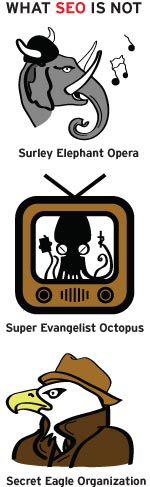
    SEO is not a shortened nickname for CeeLo Green. It’s not a secret government agency either. SEO, or Search Engine Optimization, is the process of improving a website’s visibility by making its function clear to Google and other search engines. Whether you realize it or not, SEO is a big part of every search you make online.

    To understand why you need SEO, you need to understand what SEO is. Search engines like Google and Bing use magical mathematical formulas—also known as algorithms—to scour the Internet and provide websites that are relevant to user searches. Each search engine considers a number of factors before deciding which website gets ranked where and who ultimately ends up on the first page of your search results:

    Not SEO

    Content

    Good content is the key to a high-performing website. Make sure your site’s content properly reflects your business and features the products and services you offer. Optimizing your content for relevant search terms will make sure you’re showing up for the right users. Think about it—you don’t want to rank on the results page  for “ponies” if you sell motorcycles (unless you are selling Iron Pony Motorcycles, that is). Plus, having good content keeps your bounce rate down and increases the amount of time users spend on your site, which are both good things in Google’s eyes. Search engines also look to see if your content is fresh and up-to-date. So if you want to stay at the top of the charts, keep fresh with the times, yo.

    Metadata

    Located somewhere in all that code that may or may not closely resemble the Matrix is metadata that tells search engines exactly what your website is there for. One important piece of metadata is the title tag. Each individual page has a title tag, and it’s one of the first tags the search engine looks at. There’s also  a meta description, which you might recognize as the sentence or two listed under a website’s name on the search engine results page. Properly optimizing this data will help search engines understand what your site is about.

    Authority

    Links are important. Having other sites link to your page proves your site is authoritative enough that other people are willing to reference it as a source. It’s kind of like in high school when you had a crush on Tim because all the girls talked about how amazing his cover of “Don’t Stop Believing” was and that song was totally your jam. But just like in high school, the trustworthy information has to come from the cool kids or else no one will believe it. In our case, “the cool kids” are the websites that Google already trusts. In other words, links aren’t worth much if they’re from sites that Google hasn’t heard of.

    And if you need a little help getting a hang of this SEO thing, you can always count on the experts to give you a hand. Give Search Influence a call today to get started.

  • 3 Keys to Your SEO Strategy for 2013 and Beyond

    Oct13If there was a formula for the best SEO strategy in today’s online market, it might look something like this:

    Content + links + social = WIN

    While there are no guarantees when it comes to search engine optimization, including these three ingredients in your strategy is sure to improve your ROI. Here are some tips and best practices to strengthen your SEO foundation and get results.

    Content: More Important Than Ever

    With recent changes to Google, like the new algorithm and the demise of the Google Keyword Tool in favor of SSL secured searches (that no longer allow marketers—or anyone else—to see specific keyword search data), great content is essential for optimizing your website.

    There are no keyword “cheats” left. In order to boost your search engine ranking, you need to include keywords and search phrases organically inside well written, engaging content that encourages not only search engines, but also your visitors to spread the word about your business.

    Aside from quality, freshness counts when it comes to content. Search engines index your website more frequently when you’re adding new content—so unless you want to continually rewrite the copy on your core pages, you need a way to keep updating your content. Starting or reviving a small business blog is a great way to do that.

    Links: Quality Over Quantity

    Link building has been an important part of SEO as long as there has been other websites to link to. Over the years, search engines have changed the way they weigh links. At first it was the more links, the better—but today, it’s all about quality.

    There are two parts to link quality: inbound versus outbound and reputation. Inbound links—those that lead to your site from other sites—are weighted higher than outbound links, because they mean someone else is impressed enough with your content to link to it. With reputation, the higher the linked site ranks in search engines, the more it matters to your own SEO.

    How can you get quality inbound links? Here are a few ways to do it:

    • Guest blogging. By writing quality content for blogs related to your business, you accomplish two things: help the hosting blog by giving them fresh, unique content, and gain inbound links. Most sites will offer guest bloggers a backlink to their own site in exchange for writing original posts.
    • Press releases. While some businesses view the press release as an antiquated tool that reached its peak while news still came mostly in print form, this type of content can still help your online marketing. There are plenty of syndicated online PR distribution sites, and sending out relevant, newsworthy press releases will spread more inbound links to your website around, even if it doesn’t get you in the newspapers.
    • Content repackaging. For maximum impact with minimal effort, spin your existing content into new pieces for redistribution. Turn newsletter articles into guest posts, blog entries into infographics, or even case studies into explainer videos. Don’t forget to include links to your website in all of your new content!

    Social Media: Yes, You Need It

    If you’re one of the few businesses that still doesn’t have a social media presence, it’s past time to get started. And if your social networks are getting dusty with neglect, it’s time to start showing them some love. Being active on social media helps you amplify your SEO strategy—building your brand and exposing your business to more potential customers.

    The whole idea of social media may be overwhelming, whether you haven’t started yet or you’re trying to keep up with accounts on 10 different networks. For most small businesses, the best social strategy is to choose one or two channels to focus your efforts on (with Facebook and/or Twitter usually the most effective) and build those networks to perfection, instead of scattering your attempts across every platform out there.

    Have you included these keys in your SEO strategy? What are you doing to keep your online marketing relevant? Let us know in the comments!

    Image courtesy of chichacha

    Megan Totka is the Chief Editor for ChamberofCommerce.com. She specializes on the topic of small business tips and resources. ChamberofCommerce.com helps small businesses grow their business on the web and facilitates connectivity between local businesses and more than 7,000 Chambers of Commerce worldwide.

  • SEO: Making it Work For You

    Below you will find a webinar I did a few weeks ago that gives a very high level overview of things YOU can do to improve your presence online. Search Engine Optimization (SEO) can sound intimidating at first, but as you will see, there are many actionable items in this webinar that anyone could implement. Watch this presentation to learn more about what you can do on and off your website to improve your ranking in search results. If you have any questions after watching the webinar, please feel free to give us a call at 504-208-3900 (x.211)

  • 3 Tips for Measuring Your Online Success with SEO and Beyond

    Lately I’m finding more and more clients focused on increasing site traffic. Some are setting goals to double, triple, or even quadruple their current site traffic in as little as 3 months with an SEO campaign. I’m all for a challenge, but there are other metrics to measure the success of an SEO campaign than just site traffic. Here are 3 helpful tips to running a successful and fulfilling online campaign!

    Focus on conversion traffic

    Having 2 million site visits a month is phenomenal! But when these 2 million visitors come to a site, how are they engaging or interacting? Do they click on one of your display ads or make a purchase? Are they filling out a form or calling for more information? A site can generate 2 million visits a month, but if your phone isn’t ringing or if products aren’t being sold, those visits aren’t very valuable. I’ll take less site traffic and a higher conversion rate any day.

    I worked in a retail boutique for 7 years, and as anyone who has ever worked in retail knows, there is nothing worse than a busy day with no sales. You are constantly catering to a customer’s every need with the hope that they might buy something, only to have them say, “I’ll think about it and come back later,” and walk out the door. It gets tiring after a while. Now, try doing that 2 million times a month.

    Traffic coming to your site and not converting is the same as having a full retail store with no sales. You not only want to drive traffic to your site; you want to drive the traffic that is most likely to convert into sales, leads, or better yet, repeat customers.

    Site-Conversion-Image

    Market your business through other online marketing avenues

    In addition to SEO, a great way to increase your site traffic is to make sure you have a presence on other social platforms and engage potential customers through other online marketing campaigns. Launching a paid search campaign is a great way to increase your site traffic immediately if you just can’t wait the 6 – 12 months it will take to organically grow your visibility with SEO.

    A strong social presence can potentially impact your organic search rankings as well. Having optimized and branded social networks throughout the web not only helps your SEO but also allows for another branding opportunity.  Different market segments interact and connect differently.  Having a presence on Facebook, LinkedIn, and Google+ and running a paid search campaign gives you the opportunity to expand your reach and potentially increase conversion traffic.

    Look at other metrics to track success

     When analyzing the success of any online marketing campaign, a great way to see how your audience is interacting when they come to your site is to look at bounce rate, pageviews, and the average time spent on site.  Having a low bounce rate indicates that visitors are coming to your site and finding the information or products they are looking for. A high bounce rate suggests that a visitor came to your site and wasn’t pleased with your content, couldn’t find a form or contact number, or had difficulty finding your products or services and left your site feeling frustrated.

    Another metric to look at is pageviews. A high number of average pageviews shows visitors are staying on your site and engaging with your content. The more pageviews, the more engaged your visitors are on your site. Paying attention to the average time spent on site is another indicator to show that visitors are spending time reading content, looking at products, learning about services, or viewing before and after photos. Keeping  visitors engaged on your site is key. The longer they are on your site, the lesser chances are that they will leave and go to another competitor.

    Lastly, consider calculating and tracking your total site conversion rate. Of all the visits to your site in a given time period, how many of them “converted,” or performed the desired action? If you’re interested in monitoring this metric, the ultimate tracking would include organic and paid call tracking, form inquiry tracking that captures the source and medium of the visitor and strategic event tracking in Google Analytics.

    There’s more to online success than a high number of website visitors. Even with a slight decrease in traffic, if metrics such as bounce rate, pageviews and conversion rate are up you will know that you are targeting (and capturing) the right audience!

  • Hummingbird: Google Answers Your Questions, Anticipates What You Want to Know

    hummingbird

    Google’s most recent algorithm update, Hummingbird, or as some are calling it, the silent update, snuck it’s way into our lives under the radar a few weeks ago. The update was revealed at a celebratory meeting⏤hosted in the legendary garage that Larry and Sergey rented when Google started⏤commemorating the 15-year anniversary of Google’s founding. Although we don’t know much about how the update works (Google wouldn’t release the technical specifics), we do know that it will affect 90% of searches worldwide.

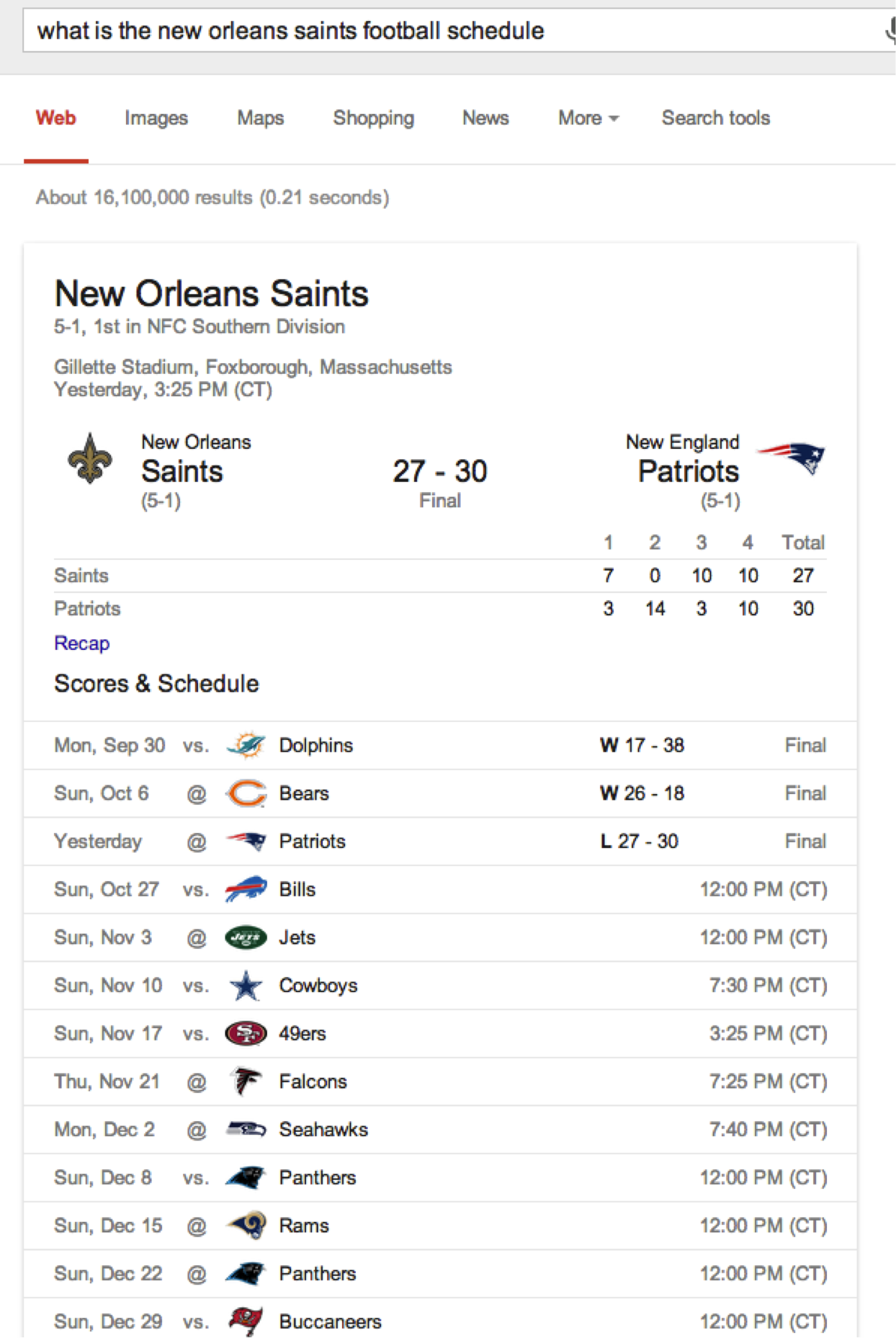
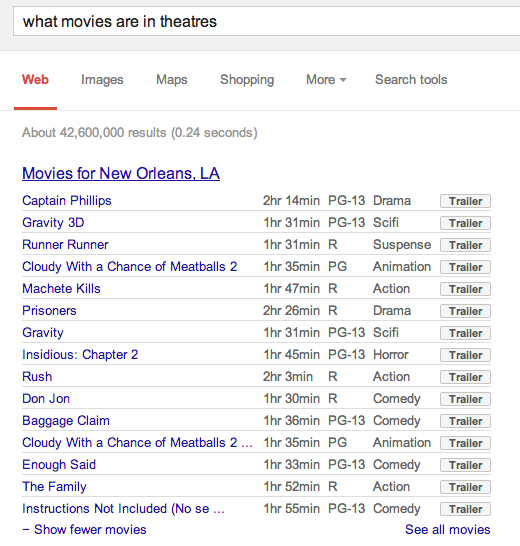
    You may have noticed that Google has gotten better at offering up direct answers to long, complex questions. This update was the most noted change and will allow Google to quickly parse full questions instead of parsing word by word. It will also allow Google to identify and deliver answers to those questions from the content it’s indexed. Other noted changes were updates to Google’s Knowledge Graph that allow for comparison questions and push notifications for Google on iOS. With more people speaking into their phones for searches, Google needed to come up with a new algorithm to turn this process into a more natural conversation and even more accurately anticipate the answer you are ultimately searching for.

    saints schedule

    If Google is using information presented on your site in its Knowledge Graph⏤Google’s encyclopedia of 570 million concepts, or any other display of info on its search engine results page⏤it means that it trusts you so much that it is willing to quote and/or paraphrase your information to searchers. While PC World dubs it to be “poaching pageviews” from the actual websites that are answering our questions, our belief is that it is either an indication of the strength and authority of your site, or that it will help boost such in the long run. The update was less focused on adjustments to SERPs when people are searching for products and services to purchase and more geared at answering questions. Google did say that this was the biggest overhaul to their engine since the 2010 “Caffeine” update (which was focused on speed and including social network results into search).

    movie

    How will this update affect you?

    The algorithm was silently put into place weeks ago, so if you have not already noticed any significant differences in your rankings, you probably will not see them from this Hummingbird  update. It is probable that as you search, you will not notice a huge difference in search results, especially for small businesses. Instead, you will be able to ask Google specific, complex questions and receive a relevant answer.

    Share with us in the comments any interesting shifts in your rankings, or any interesting tricks Google seems to be throwing your way when you search!

  • What I’ve Learned in a Year of SEO

    The year 2012 was a big milestone for me with many life changing events. I got married, moved across the country from Arizona to Louisiana, and I started a new job at Search Influence.

    Over the past year I have learned many things about New Orleans, life, marriage and the workplace. New Orleans has taught me that a parade isn’t real unless there are “throws” and that almost everything is better with some hot sauce. I’ve learned to appreciate the good and smile through the difficult. In marriage, if you burn dinner, your husband will still love you, and you can always order a pizza.

    In the digital marketing world, I learned that you can’t run a great social media campaign on memes alone, people actually do click on Google Ads, and they really do generate business. Not only have I learned to explain the technical jargon, but I’ve also learned that no matter how many times you explain it: To a business owner, it is the results that matter, and it is the results that will speak for your work.

    Most importantly, I’ve learned SEO is a constantly changing landscape, and to be good, you must not only learn to roll with the punches but also be quick and think on your feet. As each update from Google continues to roll out, the ever pressing themes shine brightly.

    1. You can’t cheat the system.

    SEO is all about building natural online authority. The keyword is natural. And in real life, things move a little slower than creating 10,000 links in a month, or 100 reviews in a day, or 20 instances of an exact keyword phrase throughout one webpage. Take time and create real online partnerships and produce information your potential clients would appreciate.

    2. SEO is not an exact science!

    All sites are not created equal. Some SEO practices may work wonders on one site but may do nothing for another. Before you throw links at a site or slap some optimized content on a few pages, take a look at the online presence of a company and make educated decisions on what can best strengthen the site.

    3. Successful SEO is a melting pot.

    You can’t rely on just on-site versus off-site optimization strategies or specific aspects of either. Successful SEO campaigns take a holistic view on strengthening a whole site and online brand from start to finish. For keyword phrases, don’t just focus on one area of business and the terms with the highest search value. Fortify the brand from its core elements then branch out. While you edit the site, work with all elements to better improve it – not just optimize it. Finally, build up the online brand by utilizing signals from various places and types online.

    SEO is an ever changing world, and this year I’ve learned to work for the results and appreciate the strategy behind every client. Finally, I’ve learned that what I do makes a difference. My favorite part of my job is when my clients let me know their phones are ringing off the hook or that they’ve had to hire additional help because of the increase in business.

    Here is to a great year and looking forward to the next!

  • 5 Tips for Managing a Multi-Location Business Online

    Managing a business with multiple locations online can be challenging. It’s important to connect potential customers online with the business location nearest them. Follow these 5 tips for best practices for managing your multi-location business.

    1. All locations need their own individual page!

    It’s important for each location to have its own page on your website. You want each location page to rank for local search in the area. Having one page for each location maximizes the relevancy of the location web page to a searcher and has better chance of ranking locally, especially in blended results (organic mixed with maps results).

    2. Optimize content for each page 

    Add content to the page optimized for a top level keyword and location. Make sure to do this in a way that reads naturally.  
    Optimize all the thing meme
    Content can be relatively short and simple, explaining what the business is / offers, unique selling points, and where the business is located.  Make sure to also optimize the On Page heading (H1), title tag, and meta description as these are all important factors for SEO. It is crucial to have unique content for each page. Many businesses use the same content for all location pages, only switching out the geographical location. This duplicate content leaves the site vulnerable to penalties from Google. For a business with over 100 locations, creating unique content can be difficult. A tip for the writing unique, compelling content for these pages is to incorporate some “local flare” or any information specific to that location in the copy.


    3. Provide a good user experience

    On each location page, also be sure to list out the name, address, and phone number for that location. Its important for visitors that come to the page to be able to easily contact the business or find out where it is located. Adding a map with a pin on your location also proves to help visitors get a better visual of exactly where you are located. When listing the NAP for each, keep the format consistent across all pages. Make sure the name is the actual, official name of the business–instead of “Domino’s New Orleans”–as this will be consistent with other local listings across the web.


     photo 25650BaffinBayDrLakeForestCASelfStorageSmartStopSelfStorage_zpsb1f60ccf.png

    4. Tell Google where you are!

    Implement Hcard or schema around each name, address, and phone number of the location pages. Let Google know who and where you are. These are microformats that provide a standardized way to tell Google and other search engines your contact information. By implementing Hcard around your NAP, you can let Google know “this is my physical location.” Adding this code to the site will help the location page rank well in local search. By knowing where your business is located, Google now knows the page is more relevant to searchers.


    5. Consistent Citations

    When creating local citations across the web, be sure to list the name, address, and phone number of each location consistently. Having consistent listings across online directories helps enforce your physical address to Google and increases the chances of ranking locally. It is especially important to have your NAPs listed consistently on your Google+ local listings. If the directories allow, add the location landing page url in the website field, as this page is most relevant to the listing information.

    Google offers businesses with 10 or more locations a way to bulk upload local listing information. The upload process creates new listings as well as edits pre-existing listings. From my experience, this method has proved to be a very slow process. Bing offers very similar services for multi-location businesses, but 25 or more locations are required to use this upload. The most efficient bulk upload offered by a directory has to be Foursquare. I created a bulk upload for a business with 117 locations, and in less than 24 hours all the listings were created/updated and live.

    Following these 5 steps can dramatically help your local search presence. What other tips do you have for managing a multi-location business? Please share in the comments below!