Three months ago I started working at Search Influence. I thought I knew a lot about SEO, boy was I wrong. After what seemed like a crash course in everything we do here, I thought I would put together an overview of what I’ve learned:
SEO
After 45 (!) trainings I know a lot more about SEO, but I also found out you are never done learning. SEO continuously evolves, and that’s because of Matt Cutts, the head of Google’s Webspam team. To be honest, I only knew him from the 30 Day challenge he talked about at my favorite platform TED. He is the one that changes Google’s algorithm 600 times a year! Another honest confession, I thought this algorithm only changed 25 times a year. I was just a little off.
Keyword Research
One of my first trainings was on keyword research. This is a process in which we look at the historical online search behavior for a given product or service to determine what keywords we are going to focus on throughout a client’s campaign. This is an extremely important process and happens at the beginning of our partnership with a client.
Google Keyword Tool
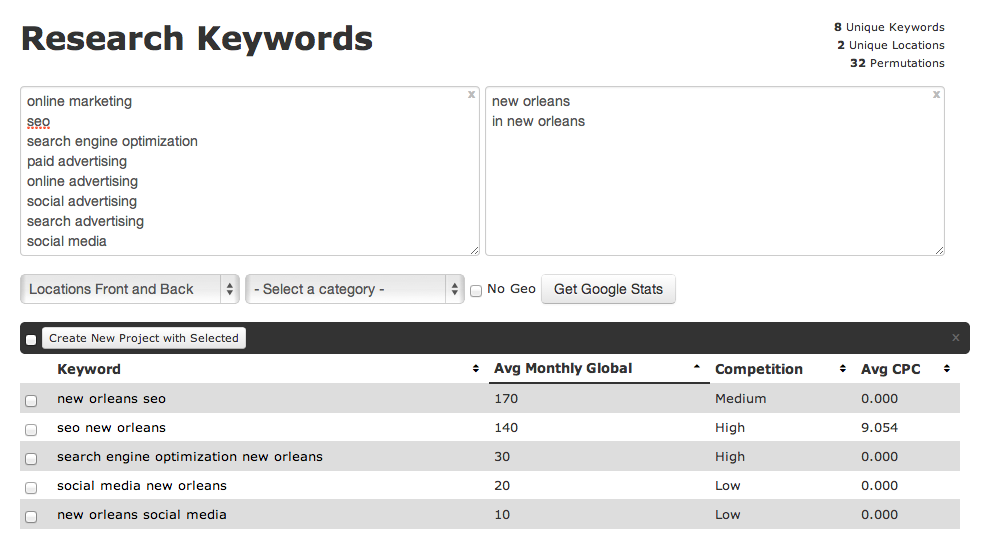
For the keyword research we use Google’s keyword tool. After adding a long list of root terms and a list of geographic modifiers (the physical location of the client and/or their service areas) the tool shows the approximate number of search queries matching the keywords that were found on Google.
A brilliant tool, but not perfect as it provides search statistics based on Google.com traffic only. But of course, Google captures 72% of all search traffic so we feel better about relying heavily on their research. When needed, we utilize other things like Google Webmaster tools and Google Adwords Keyword tool.
Google Analytics Organic Keywords
Before I started working at Search Influence, keyword research was much easier. My colleagues logged into Google Analytics and could see which words people used when searching Google to find the designated website. In October 2013, however, Google stopped offering this information to provide additional privacy and security for its users.
Google Suggest
Last month a light bulb went on in the head of a Search Influencer. ‘Why didn’t we think of this earlier?!’ She was talking about Google Suggest, a feature that has been around for five years. Just enter a letter or a word in Google’s search field and you will see associated terms in a dropdown menu. Google describes Google Suggest as:
“Autocomplete predictions are algorithmically determined based on a number of factors, like popularity of search terms, without any human intervention. Just like the web, the search terms shown may include silly or strange or surprising terms and phrases.”
Although we benefit from Google Suggest, I agree the search terms shown are sometimes (very) silly or strange, just see for yourself:
After seeing this, I was curious what Google would suggest when entering ‘Search Influence’:
Reasonable. Logical. But Google also suggested…
What???
So overall, Google Suggest can be helpful, but it can also make you laugh. (Or make you mad: over the past few years Google Suggest has been sued for racist search suggestions and defamatory language next to individual names or companies).
So what do I suggest? Use it, but
Do you have any questions about SEO? Let us know in the comments!
Welcome back to the wonderful world of Google! Last week I explained in a post the email that Google Places for Business has been sending out to business owner accounts.
Part of that email included a bit about your account containing listings that were identified by Google as being duplicates existing within your account. Now I’m here to explain to you the two most common ways in which we see duplicate Google listings and how they can be addressed.
Internal Duplicates
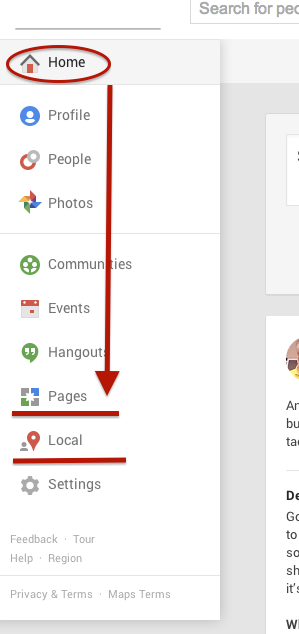
One way we tend to see duplicate listings in Google Places is from within your business owner account, in your own business dashboard. To see how your businesses are appearing in your account dashboard, go to the Places for Business dashboard, which can be found by going to plus.google.com. Then click “Local”(to see your Location pages) and “Pages”(to see your Location, Brand, or other Google Plus Pages) in the drop-down on the left.
The Local dashboard is where we generally identify internal listing duplicates. With the bulk dashboard updates performed by Google, we’ve seen this happening quite often. Since a lot of businesses have been force pulling their listings into the new dashboard by claiming them through the Places section of plus.google.com, there appears to be two listings in the dashboard of these accounts after Google’s mass update.
Generally, one of these listings appears as verified (the one forced pulled into the new dash) and the other as unverified (the one Google pulled over). Sometimes they both lead to the same G+ page when you click through the “view this listing” link in each. This is just a weird hiccup, and if you wish to clean up the dashboard by deleting the unverified one, it will not affect your listing. As long as you have the verified listing in the new dashboard, you are the sole owner of said listing under this new update.
In other cases, however, we’ve created a verified local social page through our force pull into the new dashboard that has all of our social content like G+ posting and YouTube videos. Then, when Google pulls in the location page from your old dashboard, that page is a “duplicate” with all your old reviews on it. In this case, both pages would have content that you wouldn’t want your business to lose through “deleting” a duplicate. So, you’d want to make sure the reviews from the location page are moved over to the newer, verified page before having it deleted. This will require a phone call to The Google Places Team support center.
Obviously if one of these pages has content that you don’t mind losing or doesn’t have any content, that page can be deleted. If the one you want to delete is the verified one and you need the unverified page to be your primary, verified listing, you might be able to avoid having to reverify the listing through getting assistance from The Google Places Team.
External Duplicates
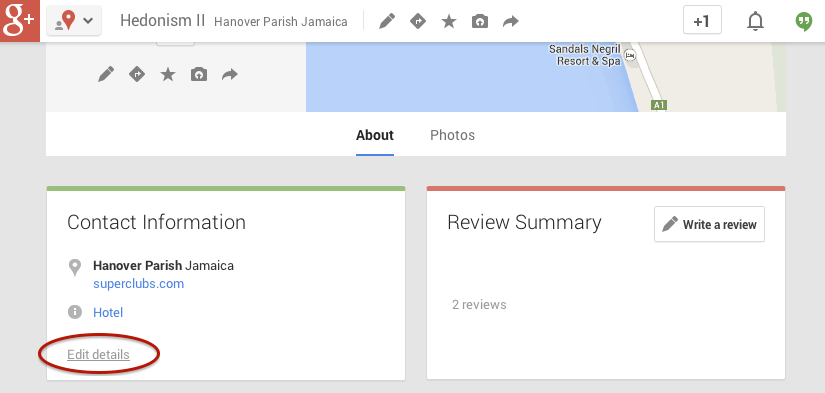
Another way in which we see duplicate Google business listings is on the front end through Maps search results. You’ll see below that Hedonism II has a couple of duplicates that come up in Maps results. Getting these kind of duplicates cleaned up is a bit easier than the situation explained above. What you’ll do to remove these duplicates is called making a “community edit” or “mapmaker edit.”
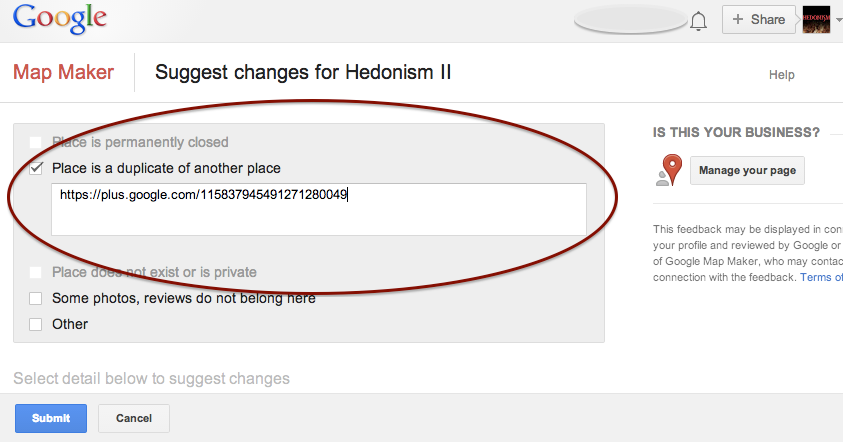
Go to the duplicate listing you’d like Google to remove. Under the “About” section of the Plus page, then at the bottom of the “Contact Information” you’ll see the option to “Edit details.” Once you click that, you’ll have to option click a check box to suggest to Google that this “Place is a duplicate of another place.” You’ll also have a box in which you can leave comments about the report. I suggest leaving a link to the correct/verified page in this field to help the duplicate identification process. See screenshots of this process below.
In my experience, these changes will usually take affect within a week of reporting if Google deems it an accurate report. If no changes take affect in a week, I usually send the report again, wait a week, and repeat again as needed(I’ve never had to report more than 3 times, though).
Understanding the many nuances of what’s going on here might seem fairly daunting, but the level of which you wish to understand these intricacies is dependent on how much control you wish to have on your business reputation/ presence in Google.
If you have any questions, feel free to comment below!
The other day I was visiting my normal news sites, Mashable, Coding Horror, and news.google.com among others. While getting my information download I came across a few postings I thought had true value, and I wanted to share them with my social media friends and family. I immediately went to my handy dandy Google URL Shortener which I had added to my Chrome browser toolbar and – click – presto, I have a short url ready to paste to any social media platform, in my clipboard, cocked and loaded. And so I shared, and then shared some more.
The nice thing about Google’s service is you can track anyone’s goo.gl URL analytics by adding .info, or simply +, to the end of it. For instance, the analytics to the URL http://goo.gl/zlzlYv, which points to townsend.bunksite.com/, can be seen at http://goo.gl/zlzlYv.info. I occasionally went back to my .info page to see which of the links I shared actually had any value (received clicks on their respective pages) to my friends, family and followers.
Google gives some good basic analytics data about URL click throughs, although I’ve seen more in depth analytics from URL shortening service competitors. But I digress, it was about this time when I started wondering, with being the obvious search leader and giant, does using the Google URL shortener give an SEO advantage in search results? It might make sense for Google to use URL shortener data(like number of clicks for a shortened URL) in order determine rank worthy content. Also, it seems logical that since this is another metric to look at how users share content, they would want to encourage the use of their shortener, perhaps by giving some advantage to companies using goo.gl for their social media campaigns, much like the seo benefits of using Google Plus Maggie told us about earlier this month.
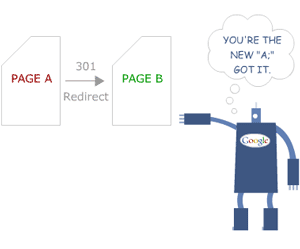
The obvious benefits of using Google as your URL shortening service include proper redirects. You know if you are using their URL shortener you will never run into problems with shorteners that don’t properly treat the redirect conversion as a 301 redirect or don’t properly transfer PageRank or any future possible negative impact. Most popular shorteners conform to the standards set by Google, but still, it’s better to be safe.
Another important issue for short url providers is trust. You must trust the service uptime (availability) is as close to 100% as possible. You have to trust that the redirect process will happen at a speed measured in milliseconds, not seconds. You also need to trust the provider isn’t going to just disappear one day. With an average of 5,922,000,000 (nearly 6 trillion) Google searches every single day, I think they can handle the job of keeping up with this level of service. Besides, you are probably already trusting them to handle your site analytics, search results, pay-per-click advertising and storing documents, among other services. Why not keep all your data in one place?
It is worth noting that Google has pulled the plug on some beloved services in the past, but they generally provide users with a lot of advanced warning before the twilight date. Also, they always provide a way to migrate user data from the shuttered service.
So, we know the Google URL shortening service is worthy of using and helps keep our data in one place, but is there actually a positive weight given to these URLS that translates into higher rankings on the SERPs? For that, I spoke with our Google and Local SEO expert here at Search Influence, Mary Silva. Here is what she had to say on the subject:
“There’s not necessarily any kind of weight given to using the Google URL shortener for linking. Also, Matt Cutts has explicitly said that “goo.gl isn’t an effort to kill anything,” and isn’t some sort of attempt to kill other “product X” URL shorteners.
http://moz.com/learn/seo/redirection
In terms of SEO effects of the shortener, it’s important to recognize that there have been reports that once in a while the Google URL shortener has created broken links, so that would obviously not be beneficial in terms of back-linking and other similar efforts. Always double check that the short url actually works, regardless of the provider you use. Another thing to note is that the Google URL shortener creates a 301 redirect which passes 90-99% of link juice to the redirected page, and is the most ideal for redirects for SEO practices, which isn’t the case for all URL shorteners.”
So, is Google going to rank your linked content higher just because you used their URL shortener? Nope. Content is king and there is no exception to that just because you use Google’s products. Should you use Google’s URL shortener? While no url shortening service is perfect, using this one is certainly no worse than others. Knowing that the service provider is fairly reliable may bring some peace of mind.
You may have heard the buzz lately about an email going out to business owners in Google Places telling them that they have three weeks to update their listing. If the listing isn’t updated, it will no longer be visible to Google users. The good news is that this is actually something that is only occurring for Australian businesses. Basically, you don’t have to worry!
When we first heard about this issue at Search Influence, we were alarmed because an update like this could potentially affect many of our clients’ accounts. So, I decided to delve deep into the web and find out as much as I could from various online sources, and what I found was even more worrisome and ambiguous. Search Engine Watch’s post was the first that brought this issue to my attention. The post provided great information on what needed to be done by those receiving the email, but nothing about the scale of the email rollout and who was being contacted and why.
The Word From Google
Search Engine Journal’s post was awesome enough to give us the exact email google sent out, which reads as follows:
Hello,
Due to changes in Google Maps, we’d like to inform you that unless you review and confirm the information in your Google Places account, we will no longer be able to keep and show it to Google users after February 21, 2014.
If you wish to keep your listing active, follow these three easy steps:
1. Log in to your Google Places account
2. Review and update your information
3. Click the “Submit” button
Sincerely,
The Google Places Team
The fact that the email instructed businesses to click a “Submit” button when updating indicated to me that these were businesses in the old dashboard. So, I thought I had a clue as to who was being contacted at this point.
Next, I went to discussions on MOZ and Google Product Forums where I started seeing comments that maybe this was only something happening in Australia.
Calling The Google Places Team
After seeing both of these slightly alarming, but informative posts I decided to go straight to the source and call The Google Places Team. They were super helpful in taking the time to get to the bottom of the email and were forthcoming about the issue at hand. They also understood that something like this could affect a company like ours on a pretty large scale. The rep on The Google Places Team reached out directly to Google and was able to confirm with me that this is indeed something only happening to Australia Maps.
There have been speculations as to whether or not this is something that could start happening outside of Australia, because Google has a tendency to do things in a test market before rolling them out worldwide. From what the Google rep told me, however, it seems like this is only happening because of an issue that was occurring specifically with Australia Maps.
So, DON’T WORRY! United States Places Businesses are NOT at risk!!
It’s curious how when you’re looking so intently at one thing, something so much bigger sneaks up behind you. Like when you’re a six-year-old kid all excited at your birthday party opening presents, your mom buzzing around taking lots of pictures demanding everyone to “smile,” and your dad sneaks in behind you rolling in a bright shiny new bicycle!
That’s how I have been feeling the last week or so. Like I just got a bright shiny bicycle with a horn and a bell and handlebar fringe!
I have been head down, concentrating on a project with numerous Excel spreadsheets, lots of cups of coffee, data overload, and a glazed look in my eye. When I was poking around in yet more data, I found that Google snuck up behind me with a big bright shiny present. I gotta say, it’s a pretty exciting surprise when I see the majority of our clients have an increase in January’s organic traffic; and not just any increase, impressive increases that makes big smiles all around the office.
So, was there a Google update when I wasn’t looking?
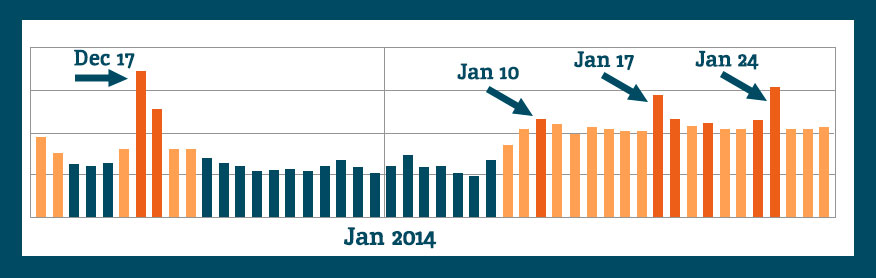
Because the increases in Analytics are seen across so many clients, across so many industries, there had to be an algorithm shakeup. Lo and behold, on January 9th, Barry Schwartz announced the chatter on it “Is Google Search Updating?”
The post’s comments express some winners and losers as expected with any update. I had to dig to find some excitement similar to my own:
Vibhu Gauba
• 16 days ago
“Tracking almost like 700-800 clients of ours and all have moved up !!!!”
and …
SAJID
• 16 days ago
“Wao… Thats gonna be a wonderful update… My traffic rose about 250% from last few day”
Barry Schwartz’ post drove me over to Algoroo. Algoroo was developed by Dejan SEO, and they say “Algoroo tracks Google algorithm changes by observing turbulence in rankings of thousands of keywords. When the bar is high, it’s likely that Google has made a tweak to their algorithm.”
They posted on recent, significant algo updates which is interesting and related to the topic. This unannounced, unacknowledged January update is the 6th most strongest update since May 2013 Penguin.
When we look at the Algoroo chart for more recent dates, we see some definite turbulence in keyword rankings:
The chatter indicates that there was an unannounced update, and a fellow blogger commented, I’m going to enjoy it while I can.
Crawl Rate as an Indicator?
Some of the commenters on the webmasterworld forum had a short burst of discussion around crawl rates trying to find some commonality among websites’ changes, or at least as an indication of “something” happening.
White Dove says, “I’ve seen an increase of crawling activity, including pages that don’t exist anymore.”
Shai comments, “Although no major changes in rankings, I can see some strange crawling occurring on around 30 sites. Not found anything in common between any of them yet.”
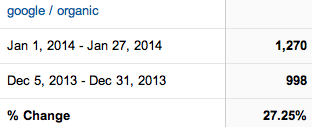
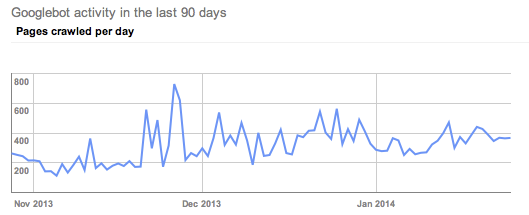
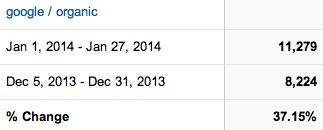
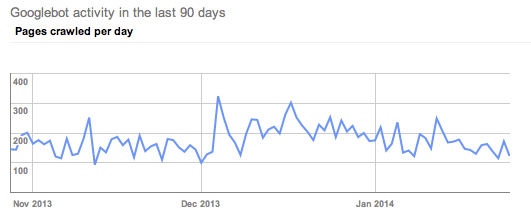
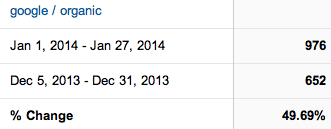
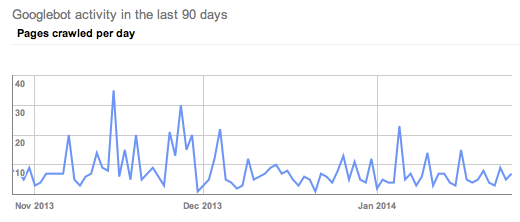
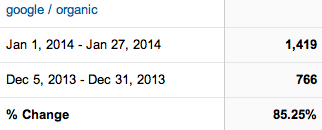
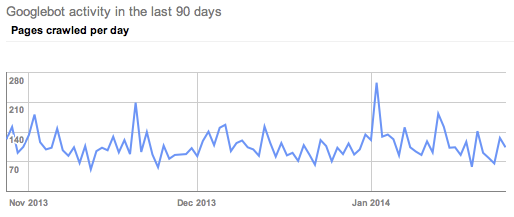
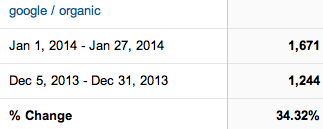
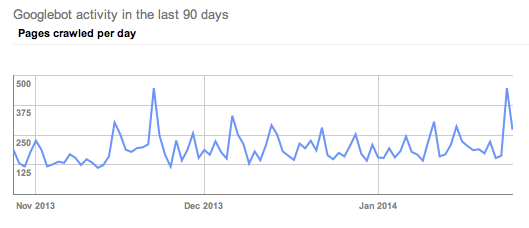
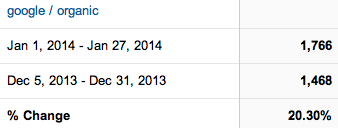
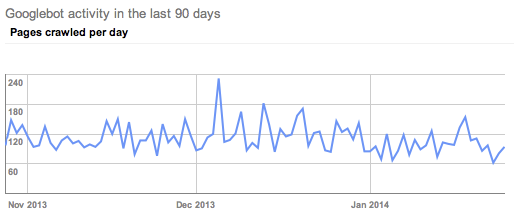
I want to check this out, so I’m looking at clients who I know have improved organic visits in January and scoping out their crawl rates. (Screen shots are Google organic visits Jan 1, 2014-Jan 27, 2014 Compare to: Dec 5, 2013-Dec 31, 2013. Crawl rate charts are showing last 90 days.)
Client A has fantastic organic increases in January. I will take 27% organic increase any time.
A’s crawl rate shows a clear uptick in crawl rate, but not in January. His crawl rate started picking up in late November.
Client B had a 37% increase in Google organic traffic.
His crawl rate picked up in early December.
Client C had great improvements.
If anything, I would say his crawl rate slowed in January.
I had to dig around to find these somewhat obvious examples of the above crawl rate changes. Most of the clients within this same industry had crawl rates like Client D.
Client D has exciting organic visit increases in January.
The crawl rate doesn’t indicate any clearly obvious trends.
All of the clients looked at above are in the same industry, so let’s look at another industry to see if the trends are widespread.
Client E is enjoying a 34.32% increase in Google organic traffic in January.
Their crawl rate also picked up in late November.
Client F has a 20% increase in Google organic.
His crawl trends seen in Google Webmaster tools show a slight decrease in crawl rate in January.
I poked around at other clients in GWT, and I’m not real sure we can pull any decided trends from the crawl rate theory. I didn’t check every Search Influence client, nor did I create elaborate charts of crawl rates per month. I’m comfortable seconding Shai from the webmasterworld forum, “Not found anything in common between any of them yet.”
Search Queries
I’m not seeing any huge changes in rankings data for the keywords we are tracking. We have some ups and downs, but nothing out of the ordinary. We update tracking information regularly, so until the next keyword ranking report is updated, Google Webmaster Tools can tell me some great information, too.
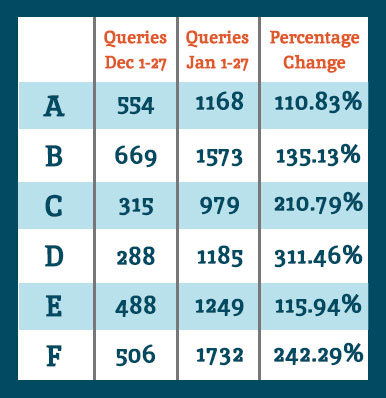
Google Webmaster Tools Search Queries data shows a lot of keyword data that we don’t track in our keyword reports. So for the example clients noted above, I see they all had an increase in Google search results shown in GWT.
When we look at the Queries data for the same comparisons as the organic search data at the top of this post, we see they all had an increase in showing up for searches. Google defines Queries as: “The total number of search queries that returned pages from your site over the given period.”
I interpret this as our websites are ranking for more varied keywords and more than we are tracking. It’s typical for a website to rank for more than you are actually tracking. It’s unreasonable to track for all of the possibilities.
I want to acknowledge that there is seasonality in January search for some industries. Some of the organic increases can be attributed to seasonal search trends, but never at these levels. Also, last week I spoke with client F telling him about the January organic goodness, and his response was January was usually dead for him, and the phones this last month have been ringing. Yes, seasonality is often a factor for any month-to-month increases or decreases, but these data are suggesting something bigger.
Bottom Line
Any time there is any Google algorithm update, whether announced or perceived, there will be winners and losers. I’m happy our client sites are on the positive side of whatever changes were implemented. Yes, it’s good to be a winner today, but it’s not without effort. I can repeat what everyone has been talking about for months and months:
Clean fresh content on a regular basis
Encourage client engagement on Google+
Cleanup any residual devalued links
Earn links with great content and local community participation
These are just a few actions to take in earning trust and traffic from Google search.
If you’ve noticed any changes in search traffic or rankings in January, we would love to hear about it in the comments below.
Whether you’re looking to improve your position or simply figure out what the heck this carousel is doing in your Google search results, this blog post is for you. Let’s start out with a little background information.
What is the Google Carousel?
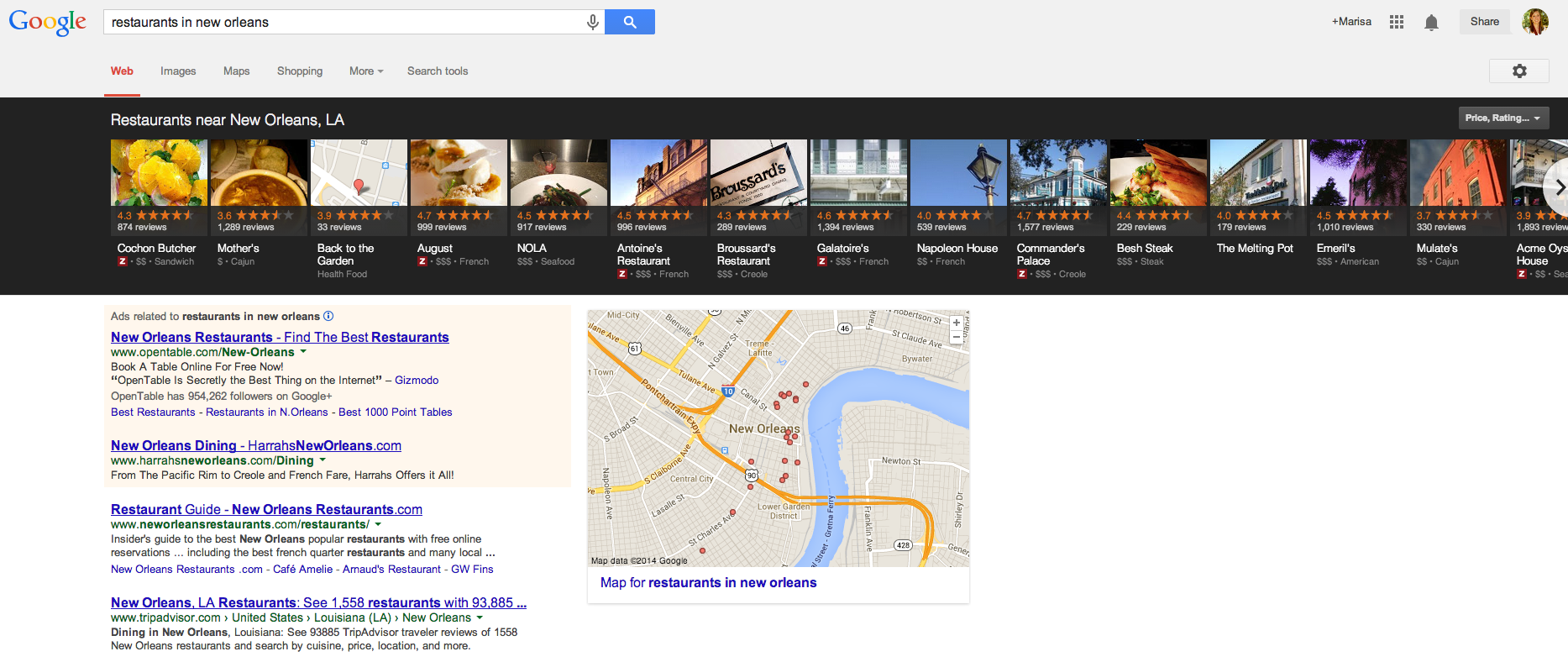
As you have probably noticed by now, Google has incorporated a new carousel into several of its search results. If you haven’t seen it yet, the carousel is a row of about 20 listings displayed in a long black box at the top of search results. The image below shows an example of the carousel pulled for the search query “restaurants in new orleans.”
Click the image below to enlarge
How Does it Work?
Google pulls the information for each carousel listing from the Google+ pages of relevant businesses. Upon clicking a result in the carousel, another search will be performed for that brand. There are pros and cons to having these carousel results display in searches related to your business. Here are just a few:
Pros of the Google Carousel
Your website could potentially be displayed in 2 locations on Google search results: the carousel and regular Google organic results below the carousel. Psst – if you’re looking for some help with those organic rankings I know a guy…
If you have great reviews and ratings on your Google+ page, your average star rating will appear as a fantastic means of comparison to your competitors (who may not have the same stellar rating as you)
Results are displayed ABOVE paid search results, putting you ahead of competitors who are paying to hold that prime real estate above the fold
If done carefully, some service area businesses can rank for local searches in the carousel where they may not have appeared in map pack results before the carousel
Cons of the Google Carousel
When clicking a carousel result, another search is done for your brand rather than being taken to your website or Google+ page, which means more clicks are needed to get to your website and may result in a drop off of potential visitors
The carousel occupies a lot of space “above the fold” in search results, pushing down those precious organic results you worked so hard to obtain
Google chooses the image that is displayed in each carousel result from the images that are uploaded on your Google+ page
There are a number of keywords and phrases that trigger the carousel. Mike Blumenthal has compiled a list of 300+ keywords and phrases that trigger these results. From a business standpoint, there are several reasons why you want to review these search terms and determine if search queries related to your industry are pulling this carousel, and whether or not your company shows up in the results.
The Optimal Carousel Location
A study of user engagement performed by Mike Ramsey suggests that the optimal locations in the carousel are positions 3 and 8, while Ethical SEO did a similar study and found that the 1st and 5th positions in the carousel were most popular. Although the exact prime locations differed, the main takeaways from these studies tell us the following:
Searchers are clicking in the carousel
30% of people in Ethical SEO’s study
48% of people in Mike Ramsey’s study
Reviews and ratings are important
Searchers cited Zagat scores and amount of reviews on a particular result as determining factors for clicking
Images should be eye catching
In Mike Ramsey’s study, the carousel listing with the highest Zagat rating and number of reviews that contained a boring gray exterior photo of the restaurant was not clicked nearly as much as the result next to it that featured a beautifully plated entree
Lookin’ Good in the Carousel
If you have little or no reviews on your Google+ page, what are you waiting for? You’ve worked hard to establish your business and provide positive customer experiences. Build up your following on Google+ and don’t be afraid to remind customers of your brand. Encourage potential and current customers to read your reviews. Highlight previous testimonials or reviews in Google+ status updates. Post pictures of your product, staff, events – anything to send your audience down memory lane and potentially inspire them to recount their experience in the form of a review.
As mentioned previously, Google will select the image that appears in carousel results, so be mindful of the images you upload to your Google+ page. If you are a restaurant, upload images of plated dishes. If you are a jewelry store, upload images of your most popular designs. A good image will differ from industry to industry, however, across the board a good image will be:
Attractive
Eye catching
Clear (don’t upload stretched out or blurry images!)
And depict what you do
Top Ranking Factors
If you’ve been diligently working to improve your rankings for the map pack in blended results, many of those efforts also contribute to carousel ranking factors. Search Engine Journal’s recent study cites three top factors for ranking in the carousel: social signals, external factors, and content structure. The strongest of these appeared to be social signals, which include:
Amount of +1s on your Google+ page
Amount of +1s on a website’s URL that is attached to your Google+ page
Amount of reviews on your Google+ page
Rating of your Google+ page
Next, external factors proved very important. In particular, the number of citations across the internet was cited as the most important external factor. An additional point to that is these citations should be clean and correct across the board. You may have several location citations, but it will only serve to confuse Google if the information is not consistent from one citation to the next. All this should sound familiar, as citations are nothing new to local search ranking factors and something Search Influence has preached for years.
The last of these top ranking factors is content structure. Placing the keyword in the title, the location in the title, the keyword in the URL, and the location in the URL were all found to have a correlation to rankings. Although these factors are important, you don’t want to come off as sounding unnatural or spammy. Do exercise caution with these aspects of content structure, as you want this content to be natural.
With any new update or change Google makes, there is always more to be found and mentioned. What are some things you’ve noticed about the Google carousel? What factors have you seen improve carousel rankings? What trends and/or benefits have you noticed since Google rolled out the carousel? Sound off in the comments!
Techcrunch announced yesterday that Google acquired the connected device company Nest for approximately $3.2 billion dollars USD. [1] While this may seem like a large investment to us laymen (laywomen? laypeople…), it is understood that Google’s disposable capital cannot be quantified by the finite numbers we are used to using. So this investment may not mean as much for the company as the tech-blogosphere would suggest. But what will happen if the people at Wired and Techcrunch are right, and Google keeps doing more Google-y things like buying every robot ever along with the firms that produce them? Well for one thing, SEO will probably work a little differently.
Prediction 1:
In the Future Google/Future SEO Realm/Matrix, display space will be even more precious and SEM will get more expensive.
A lot of SEO bloggers have been beating this drum for a while now. It’s obvious to most that if the screen space is smaller, the amount of results consumers are willing to investigate will reduce as well. The Google Glass has approximately 90% less surface space than traditional smartphone platforms.[2] Intuitively, this kind of face streaming will probably devalue the real estate of any ranking positioned outside of the top three. As the displays get smaller and smaller, SEM will gain more and more popularity as companies like Bing and Google are likely to price gouge for the precious paid display space on these next generation platforms.
Prediction 2:
In the forthcoming Future Google Realm, it will be simply irresistible – if not physically irresistible – to share everything.
With the iphone, consumers were given the opportunity to commodify everything they experienced in their lives.[3] As we begin to wear microphones and cameras on our faces[4] and while the most mundane of our home appliances become members of the global village,[5] there will be more and more opportunities and incentives to share everything. As we begin to create more devices and metrics to record social media, sticking out in the endless void of user created content will become even more challenging, and social currency will become even more invaluable. With the creation of these new outlets, we should expect to see SEO become even more dependent on social media rankings, while performing well in these arenas will be crucial for any successful business.
In conclusion, now is the perfect time to start honing your SEO and social media chops. Now I’ll leave you with a gif of a stock photo model using different technology.
[1]To put this in context, Instagram sold to Facebook for $1 billion in 2012.
[2]Made this up.
[3]A recent study showed that users are three times more likely to share content via their Iphone versus their desktop. http://bit.ly/1d3DAAw
[4]Shout-out to Google Glass.
[5]Google’s Nest acquisition will likely lead to the existence of a consumer experience where home appliances – fridge, oven, stove, coffee maker etc. – will all be connected to the internet and synced up to your smart phone.
A while back, SEO guru David McBee wrote a post in his awesome blog about how he differentiates SEO tactics from PPC strategies. In David’s mind, it can all be related to the difference between dieting and plastic surgery. SEO is a diet, and PPC is plastic surgery.
To illustrate his point, David created this awesome infographic which I think spells things out pretty well. In many ways, this categorization really gets to the root of the differences between what you would do to increase your site’s profile online using SEO tactics versus the much more immediate PPC strategies we all employ.
The SEO Diet
It is very true that SEO is like a diet for your online presence. You need to be in it for the long haul, and you really need to establish clearly defined goals before you start. In exactly the same way that a crash diet will not yield the long term results you are looking for, link baiting or deploying tons of spammy content will not help you reach your idea SEO weight.
I really like the comparison of PPC to plastic surgery because I feel like you should be putting the same kind of thought to the planning stages of a PPC campaign that you would before a procedure like a face lift or tummy tuck.
The PPC Procedure
You need to figure out exactly what you want to focus on and a lot of thought has to go into what you want to look like on the other side. Nothing is worse than not being prepared for an onslaught of traffic hitting your site on the heels of a successful PPC campaign.
What do you think of David McBee’s comparison? What would you say the SEO/PPC dichotomy resembles in your experience? Let us know in the comments! We would love to hear from you, even if you are on a juice cleanse SEO diet.
Bill Gates once said, “If your business is not on the Internet, then your business will be out of business.” I think we can expand on this and say that if your business doesn’t use the Internet to its advantage, it will not compete with those that do. This includes things like good SEO and a smart social media strategy, among other marketing tactics. Since all of these things are aimed at directing people to your website with the goal of converting a user into a customer, that site better be up to the task.
There’s some bad news, though: most people don’t really want to read your website. They don’t have the time or the interest. But fret not! Your web copy can still be effective if you write it with this in mind. The key here is that you allow your readers to get the info they need quickly and without much effort. Let them skim!
1. Visually Appealing Content
Your copy should never look intimidating. Large chunks of text are out. Small paragraphs labeled with subheadings are the way to go. Bulleted or numbered lists are even better. Remember, a lot of your readers are likely using mobile devices. It doesn’t take much text to fill the screen of a phone, which might turn off someone looking for a specific answer.
2. Give Them What They Want
Think about why someone would visit your site. What info are they looking for? That info should be the star of the site. If you own a tire shop, people are probably visiting your site for a few details: location, hours, services, products. If you own a dental practice, they’ll want to know what types of insurance you take, what services you offer, and your location. You can have more than the basics on your site, but make sure that you at least cover the most important details in a way that is easy to read.
3. Put It Where It Belongs
Make sure that your site is easy to navigate and all pages are clearly labeled with a logical title. “What We Do” is ok, but “Services” is better. Don’t put your hours on the “About Us” page. Put them on a page labeled “Hours of Operation.” You want your readers to scan the homepage and be able to quickly find the information they want or quickly figure out how to navigate to that information.
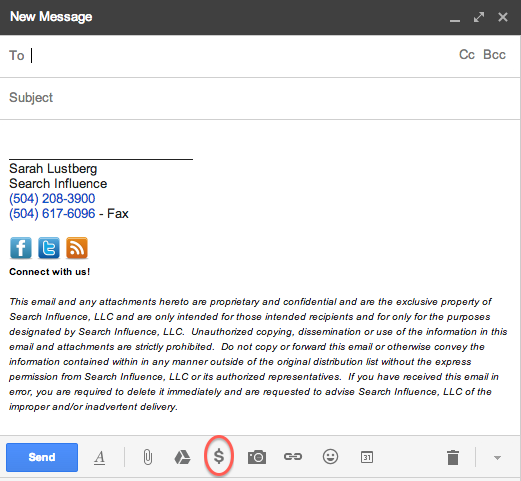
If you use Gmail (and let’s be real, who doesn’t?), chances are you may have noticed a new feature pop up recently.
Unfortunately, clicking the $ doesn’t mean you magically receive money.
Similar to Venmo, the newly implemented Google Wallet allows you to quickly and securely send money within Gmail.
When you set up your account, you’ll be prompted to verify your identity. Once that’s done, simply enter the amount you want to send, choose your source and attach. Easy as pie!
As usual, there’s a catch. While sending money via your Google Wallet balance or linked bank account is free, using your credit/debit card is not — there’s a flat fee of 2.9% per transaction.
If you’re like me and worried that your money could end up in the wrong hands, Google Wallet Purchase Protection covers you 100% against eligible unauthorized payments. I won’t bore you with the details — you can read more about that here.
Weirdly enough, no one volunteered to send me money to test this out, but all you have to do to receive money is open the message with attached money and click “Claim Money.” (At this point, if you haven’t already signed up, you’ll be prompted to do so.) All funds are automatically added to your Google Wallet Balance.
You can use your Google Wallet Card (which you can request on wallet.google.com or via the Google Wallet app) to make in-store and online purchases anywhere that accepts MasterCard® Debit, as well as to make cash withdrawals at ATMs and banks.
So what does this mean for us?
The next time you’re at dinner with a big group of friends and don’t want the hassle of trying to divvy up the check, one person can foot the bill and have their friends pay them back on the spot using Google Wallet. No cash necessary!
Google Wallet also makes it easier for your parents to give you money. I’m just sayin’…



 One way we tend to see duplicate listings in Google Places is from within your business owner account, in your own business dashboard. To see how your businesses are appearing in your account dashboard, go to the Places for Business dashboard, which can be found by going to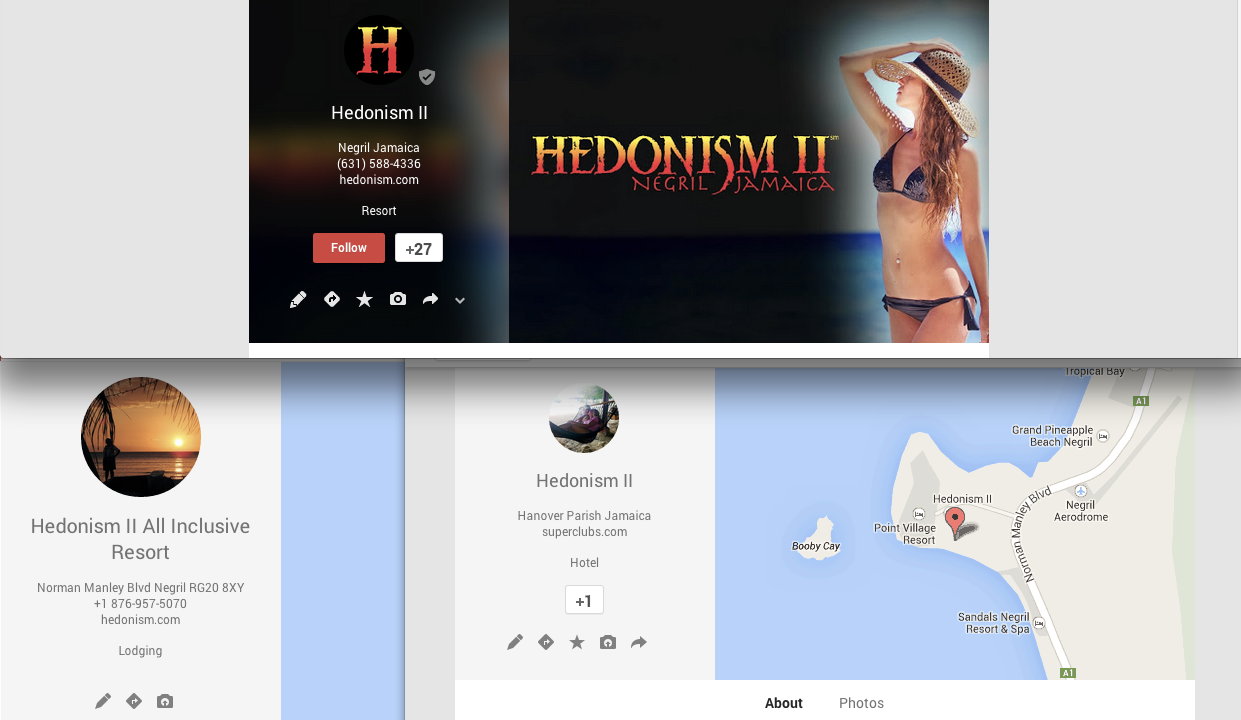





 Amount of +1s on your Google+ page