Category: SEO

  • Is Your Website Healthy? Increase Its Organic Intake & Watch It Grow!

    Whether you’ve noticed it or not, all website owners are in the parenthood business. Our websites are our babies; despite how frustrating they can seem, how stressed they make us, and how much of our money and time they require, we love them anyway. And, of course, we want them to live long, healthy lives. So, whether your business is currently raising a newborn, keeping track of an 8-year-old, or guiding a young adult, your baby deserves undivided attention, precious care, and the healthiest food available.

    100 Percent Organic Image - Search-Influence

    Why Choose Organic?

    Just as any living and working body, your site deserves a high intake of organic food, and in this case, every visitor is a small portion of a meal. Organic traffic is traffic that comes to a website through unpaid links from search engines, directories, and more. Because organic traffic is considered natural, it’s not a quick process but rather builds over time. Its success is directly related to the content on the site and the number of backlinks it receives from trustworthy sites. Since you’re the parent of this functioning being of the virtual world, you’re responsible for its wellbeing.

    Website Healthy Eating Image - Search Influence

    The Recipe To Increasing Organic Traffic

    The organic method is not only a high-quality and reliable tactic, but it’s also free and increasable. Plus, high numbers in organic traffic will naturally inflate your search engine rankings. How do you do this? Here are a few, efficient ways to increase your site’s organic traffic:

    • Build a site with relevant, unique content that’s up to date and free of grammatical errors.
    • Add keywords as naturally as possible into your compelling content. (Don’t overuse them.)
    • Do NOT post duplicate content on your pages.
    • Start an engaging blog.
    • Only have dependable, authoritative backlinks to your site. (Strive to have content that others want to link to. Don’t use link schemes.)
    • Optimize your photos.
    • Remember to add page descriptions.

    Healthy Choices Scale Image - Search Influence

    The Final Health Check

    The question at hand is simple: Is your website healthy? Or, is it stuffed with too many keywords? Is it living on manipulative, artificial backlinks? Is its body suffering from the lack of unique content nutrients? Deceptive preservatives will decrease your traffic and discredit your right to rank high on Google, Bing, and other search engines. Fill your site’s body with authentic, creative content with striking, optimized photos and strong backlinks. Then, you can sit back and watch its organic traffic grow.

    Your website has a heart. Treat it like it does, and give it your best.

    Website Healthy Heart Image - Search Influence

  • Google Changes The Way Authorship Shows In Search Results

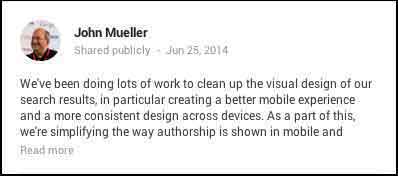
    John Mueller Post - Update To Google Search Image - Search Influence

    Last Wednesday, June 25, John Muller, Webmaster Trends Analyst at Google, made a pretty big announcement on his Google plus page. In the ongoing effort for a better and more consistent mobile experience, Google has decided to remove authorship circle count and profile photos from search results. Muller said, “Our experiments indicate that click-through behavior on this new less-cluttered design is similar to the previous one.”

    So, essentially the pretty but cluttered results weren’t positively influencing clicks.

    What Does This Update Look Like?

    Basically, the only change is that the author’s photo and circle count is gone.

    Google Search Results Update - Example Image - Search Influence

    So Why Bother With A Photo?

    You might be thinking that this update means you’re now saved a step in optimizing your profile and content to appear in search results. In Google’s News section, however, your photo associated with your author Google+ will still appear. In fact, Google’s support page on “Author information in search results” still currently says that if “you want your authorship information to appear in search results for the content you create, you’ll need a Google+ Profile with a good, recognizable headshot as your profile photo.” You can also follow that link to find steps on how to get it set up properly.

    I’m continually impressed by Google’s consistent updates to improve user experience. Many businesses could benefit from this kind of consumer-centric behavior.

  • Has Panda 4.0 Got You Down?

    Sad Panda 4.0 Image - Search Influence

    Now that we are 4 weeks post-Panda 4.0, there is a decent amount of data to sift through and determine if a website got caught in the Panda filter.

    Panda is supposed to provide consumers with search results that are helpful to their needs. This means websites that have some authority and provide a service to consumers are going to be more trusted and rank better. The better websites offer answers to consumers for what they are looking for and help them make decisions based on useful information. The content is engaging and gets people the information they need.

    Not Too Much Panda Drama
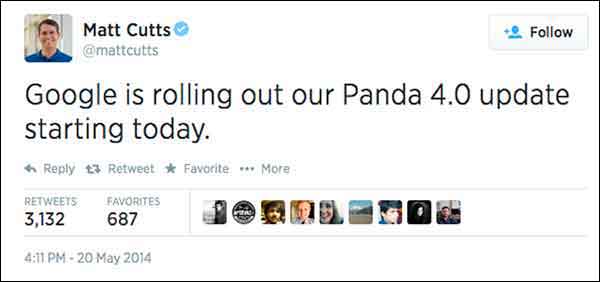
    Matt Cutts Panda 4.0 Tweet Image

    Panda started rolling out May 19, so that’s our magic date for before and after data. When looking only at Google organic traffic and comparing May 19, 2014-Jun 15, 2014 to Apr 21, 2014-May 18, 2014, I saw a 6.71% increase for one plastic surgeon’s website. This is a respectable increase when you consider that summer is generally thought to be the start of the slow season for plastic surgery as an industry.

    For this plastic surgeon, I looked at the same date range for the last 4 years. Every year, this same date comparison resulted in a minor and expected decrease of Google organic traffic. This illustrates the typical seasonality. Given that history, we’re pretty excited to see an increase from Google organic traffic going into summer.

    I looked at another client’s website, this time for an apartment complex, which is up 15% in Google organic search. Last year showed a decrease for the same time frame comparison. Unfortunately, the client didn’t have Analytics data for 2012. I have always thought that summer would be a high season for his industry, but he says for his complex and his location, summer is not necessarily the busy season. I always like to see double-digit growth in Google organic traffic (that’s a no brainer), but I worry about the monthly Panda data refresh leveling things back out, which happens all the time. The fact that the site had an increase at least tells us that the site is trusted, and we are on the right path, so that’s the story to celebrate.

    One of our account managers has a charter-fishing website (which I think would be super fun to work on). This fishing charter client had a whopping 115% increase, but you have to consider that this is his high season. Last year the same time frame comparisons saw a 65% increase. Even with the seasonality, I think he was a winner with Panda 4.0. He has lots of great original photos and lots of engagement – it totally looks fun to go out on his boat! And that’s a major part of what makes a quality site.
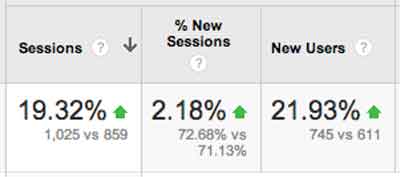
    Site Traffic For Engaging Content Chart Image - Search Influence

    In the health industry, we have a drug rehabilitation clinic website, which experienced a 19% increase after Panda 4.0. So, the interesting part for this client is that their content is solid. We have been working more heavily on their citations and less on their content, so it’s possible this client is simply readjusting from the previous Panda. It’s also possible that clean local citations are helping the site’s quality and trust.

    Magic?

    I know everyone reads these posts for some super secret insight, to learn some nugget of goodness, and I will probably disappoint. The efforts of our account managers have helped our clients’ websites, some shown above, but really, as a group, we have done nothing extraordinary. If it’s an older client, we have taken the time to review all of the past years of work and get back to the basics. We fixed any technical SEO problems we found. We are also constantly refreshing content, constantly reviewing citations, and building social channels with planned content calendars. If it’s a newer client, we work on building a solid foundation of fresh content, consistent business data, and getting social.

    There is no magic here, just thoroughness.

    This Wasn’t Just Any Ol’ Panda Update

    This Panda update is largely thought to be a significant algorithm change rather than the monthly refresh. Barry Schwartz says it succinctly, “Panda 4.0 must be a major update to the actual algorithm versus just a data refresh. Meaning, Google has made changes to how Panda identifies sites and has released a new version of the algorithm today.”
    What Does This Mean Quote Panda 4.0 Update Image - Search Influence

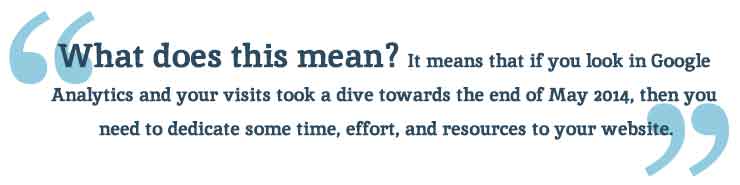
    What does this mean? It means that if you look in Google Analytics and your visits took a dive towards the end of May 2014, then you need to dedicate some time, effort, and resources to your website. When there is a Panda data refresh every month, it’s not going to get better without some serious website rehab.

    As a side note, most of the clients I looked at had a small bump up in first week of June. I don’t know if there was a Panda refresh just 2 weeks after the Panda algo update, but I definitely see it across a large number of clients.

    The Panda Checklist

    Cleaning House For Panda 4.0 Update Photo - Search Influence

    There is so much you can do to “clean your house” for Panda, but here are the first efforts I would take to tackle the Panda beast.

    #1 Crawl Before You Can Walk

    Start with a detailed crawl of your website. You can use whichever website crawler you prefer (At Search Influence, most of us use the Screaming Frog SEO Spider). You’re really just looking for a comprehensive spreadsheet where you can look at your website as a whole. The crawl will give you a list of pages, images, CSS files, and many other goodies.

    With this list, you can sort, filter, get organized, and clean up your site.

    • Review how many H1s and H2s each page has. Subheadings are wonderful. Use them.
    • Check your canonicals. Make sure they are set up properly.
    • See what is being redirected.
    • Find what is 404ing.
    • Read the meta data for each page and see how amazing or how lame it is.

    With this list, you can find multiple pages on a single topic. Often enough, we find a client has multiple pages and posts on a single topic. I looked at a client two weeks ago who had 8 pages all on the #1 service she offered. Wow! I was so overwhelmed. I can’t imagine how a casual site visitor would feel (“Where in these 8 pages is the info I need?”) or how the Google bots sort this out. Confusion within your own site is absolutely a no-no. If I am confused about which page I should read, then the Google bots sure won’t know what to say about it. If they could talk and all.

    Once you review your site crawl and have some action items to improve the tags and architecture (i.e. make it easier for the consumer to find what they need), you can laser focus on individual pages within the site.

    #2 Am I a … Plagiarizer?!

    Put your site through a content checker. There are a few out there, so try several because no single tool is the best. If you wrote your content years ago or someone wrote your content for you, it’s a good investment to check for duplication. Who knows who has scraped your content or if your writer ripped it off from some other unsuspecting website owner.

    Search Influence’s Tracy Stoller, Content Lead, asks a pointed question, “Google is looking for quality content that is useful to searchers. If the content is on 40 other sites, what makes your site the useful one?

    #3 Improve the Content

    If you’ve discovered some redundant pages, you need to merge those pieces into a single primary page for the given topic. This is tedious, but it absolutely must be done.

    If you happen to find some duplicate content, rewrite it. Sit down and knock out some new text. If you are the business owner, then you know the details of your product and service like no one else. I like to suggest that a business owner talk about the service—just talk—and record him/herself. Then, have a transcript service type it up from the recording. This usually generates the most natural and most detailed text, even after editing.

    How long has it been since you updated the content on your site?

    I logged into a client’s WordPress site last week and saw that the page I was on had not been updated since 2010. We have been updating their content slowly, but, clearly, we missed this one. Some topics may not have much change in four years, but we can look at how the visitors came to that page and where they went after and how long they spent on the page, and we can certainly refresh the page with this information in mind. We can rewrite with more details and offer easy links to the most often visited next page. We want to make it as easy as possible for the visitor to get the information they need.

    Remember, content does not mean just text. Content is text and videos and images and calculators and quizzes and slideshows, etc. Multifaceted media on a single page creates an extremely consumer-focused experience.

    #4 Take Some Pictures!

    You need relevant images on your page of text. Text and images should be focused on a single topic. The image should be optimized around the same topical idea as the text on the page. If you create the image, and it’s original, that’s even better. I have combed through a client’s Facebook, Flickr, and Pinterest to grab any original images they have and reuse them on the website. If they already exist, and I have access to them, it’s one less thing I have to ask the client to do. You really need to see the impact of authentic, original images.

    Really, which of these says more to the consumer?

    Engaging Photos Comparison Sailor Image - Search Influence

    #5 Blogging

    Pages and blog posts are different animals. Pages are for the topics that are evergreen and should represent a business’ core products or services. Blog posts are for

    • Commenting on current events,
    • Answering specific questions that require high levels of detail (Q&A)
    • Showing current trends in your industry
    • Real engagement with your audience!

    Paula Keller, Search Influence’s Director of Account Management, says, “We see blog posts written about specialized topics from seven years ago still driving organic search engine traffic to a website. Blogging is good for the readers who come across it today, good for the search engines as the new content publication brings them back to your site, and has long-lasting benefits on your site’s authority.“

    #6 Video

    Video is not entirely necessary to overcome Panda, but it is a great addition to your content. The best videos are created with some input from the client or are created by the business owner with a handy smartphone.

    The best videos are instructional how-to’s or tutorials: 30 seconds on unclogging a sink, installing an ice maker water line, or one minute of an attorney educating us how to behave if we get pulled over or… (Yikes!) arrested.

    When you have a video created and ready, add the video to your Google account’s YouTube channel, and embed it on the topically relevant page. Mark it up with proper schema! I would add videos at a pace that is both slow and steady – once a month, once a quarter – whatever frequency you think you can actually stick to.

    #7 Consistency is The Key

    Okay, so I know that local citations work is not the first thing we think of when we are considering Panda (typically thought of as strictly a content algorithm). Panda is really searching for the quality, authoritative websites. Way back at the very first Panda, Google said, “It will provide better rankings for high-quality sites.” And one of the key efforts in building high-quality sites is having clean consistent business data across the local ecosystem.

    David Mihm started his Local Search Ranking Factors “to help small business owners confused by Local Search, or those strapped for time, to prioritize their marketing efforts.” Many industry leaders contribute to the Factors (including Search Influence!). It was last published in August 2013, and it reveals that citation volume, NAP consistency, and other local signals account for 16% of the ranking factors.
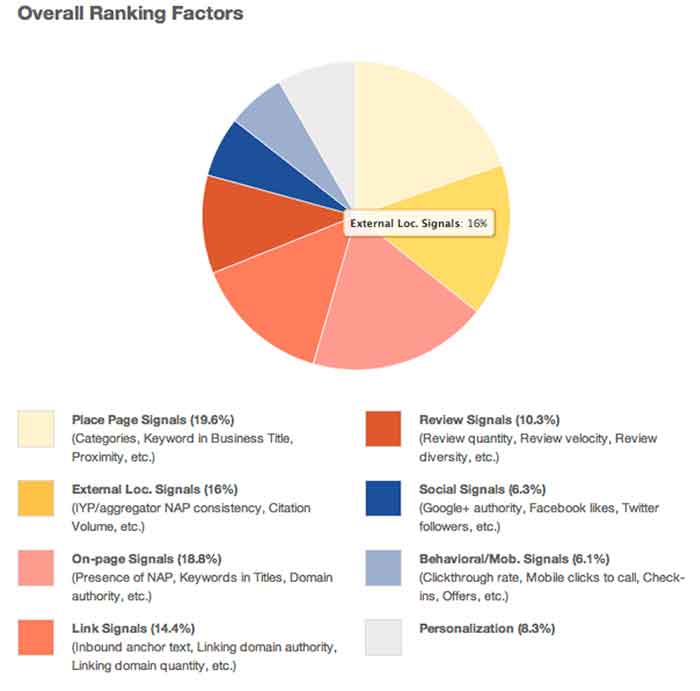
    Overall Ranking Factors Chart Image - Search Influence

    Our own Mary Silva, Senior Internet Marketing Associate, adds, “Consistent and correct business NAP (Name, Address, Phone, and often Website) is the key to getting your site to rank locally. If Google finds inconsistencies in your business information across the web, then your business and its associated site are considered less authoritative and not as trustworthy.”

    You can clean your listings yourself, but be forewarned, it’s a serious time investment. There are tools out there to help you in this endeavor. Be sure to allocate some hours every month to reviewing those tools and taking any action to edit and update listings as you go.

    Learn to Love the Panda!

    If you need help getting your site back on track from Panda, we would love to help out. Just know that Panda can be your friend. The latest update shows that it’s a simple matter of some spring cleaning, getting back to the basics, and being a good citizen. We can help you get there!

  • Getting Hands On With The New Google My Business

    Today, Google launched Google My Business. This new, more intuitive Google Places serves as a one stop shop for small businesses to do the normal Google Places work like updating business info, adding photos, connecting with customers through Google Plus posting, and staying on top of reviews. They also launched an Android app for managing Business Tools on the go (with the promise of an iOS app launching soon). Watch Google’s introductory video to Google My Business here.

    Changes For Users New and Old

    All new businesses to Google will start in Google My Business. As for current Google Places users, a blog post from Google earlier today said, “We’re also upgrading current users of Places for Business and the Google+ Dashboard to this new experience.” For those who just sat through and are still cleaning up the mess that was the upgrade to the new Google Places, don’t worry! You won’t have to go searching for which dashboard your listings are in or anything like that. It seems that Google My Business is a mostly superficial change that has already happened and just means a newer looking dashboard and a few extra features and controls (like easy access to Youtube, AdWords, and Analytics).

    Google My Business, Game Of Thrones Gif - Search Influence

    Quick & Easy Editing

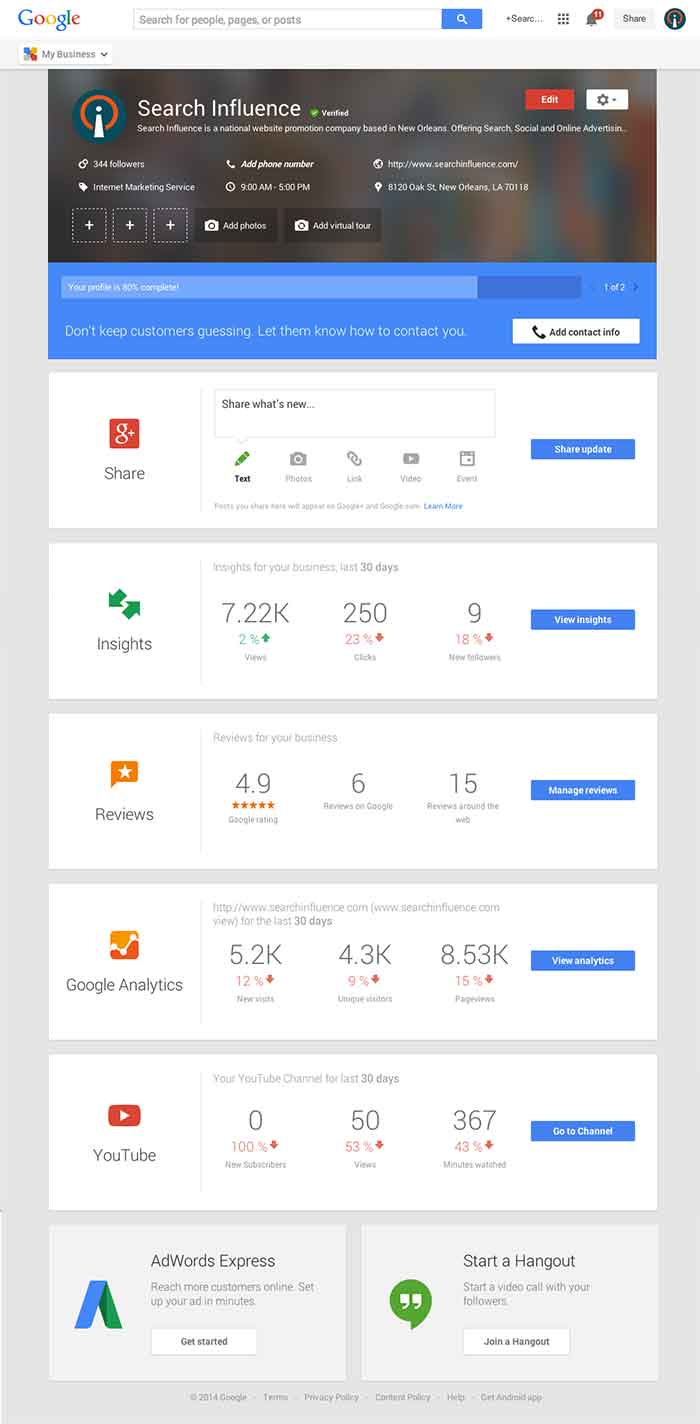
    These new features are pretty awesome. From your dashboard, first you’ll see the area for easily managing the individual aspects of your primary business information where previously you would have navigated through an “Edit Business Details” button. Connected to the bottom of this dialogue, there will be a blue box that allows you to edit the business information needed to get your profile to 100% complete. Google My Business has succeeded in using minor dashboard edits to make major usability improvements.

    Google My Business Dashboard Image - Search Influence

    Streamlined Sharing

    The next box is a basic G+ Share box for social posting to your business page. Share texts, photos, links, videos, and events easily all from one location. Side note: I recently found out, thanks to a post from Mike Blumenthal, that there is now an easy way to connect your business’ brand page to a location. So, if you have been posting socially from a Google Plus brand page for your business, you can now easily transfer that engagement into your verified local page.

    Google My Business Insights Tool Image - Search Influence  Google My Business Insights Followers Image - Search Influence

    New Data & Graphs

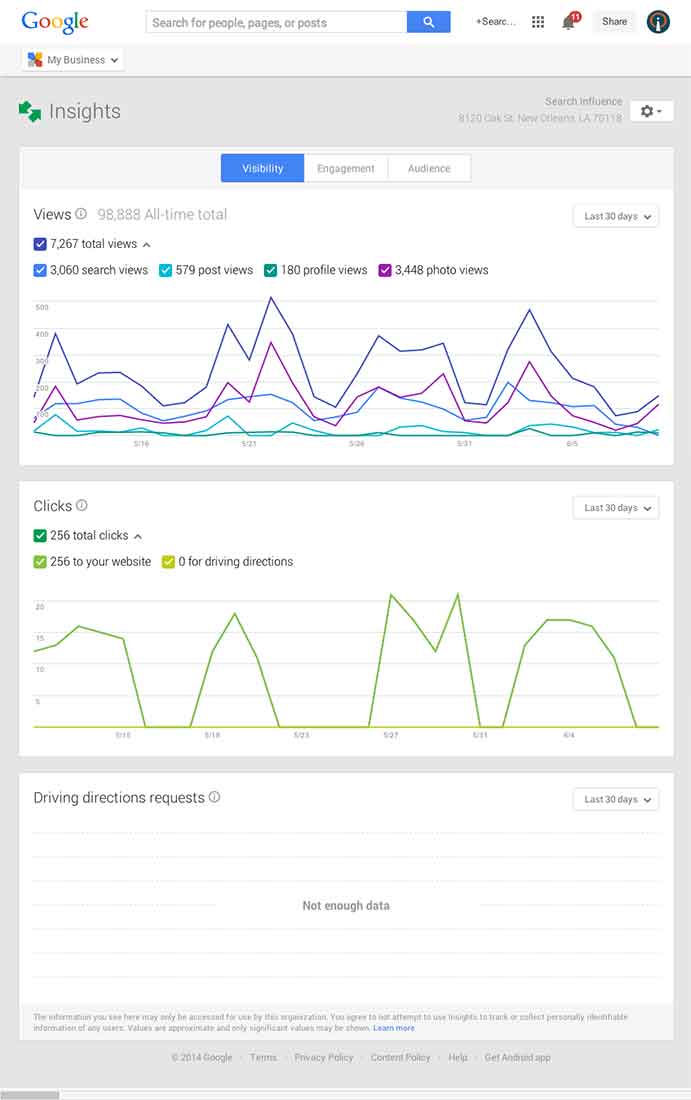
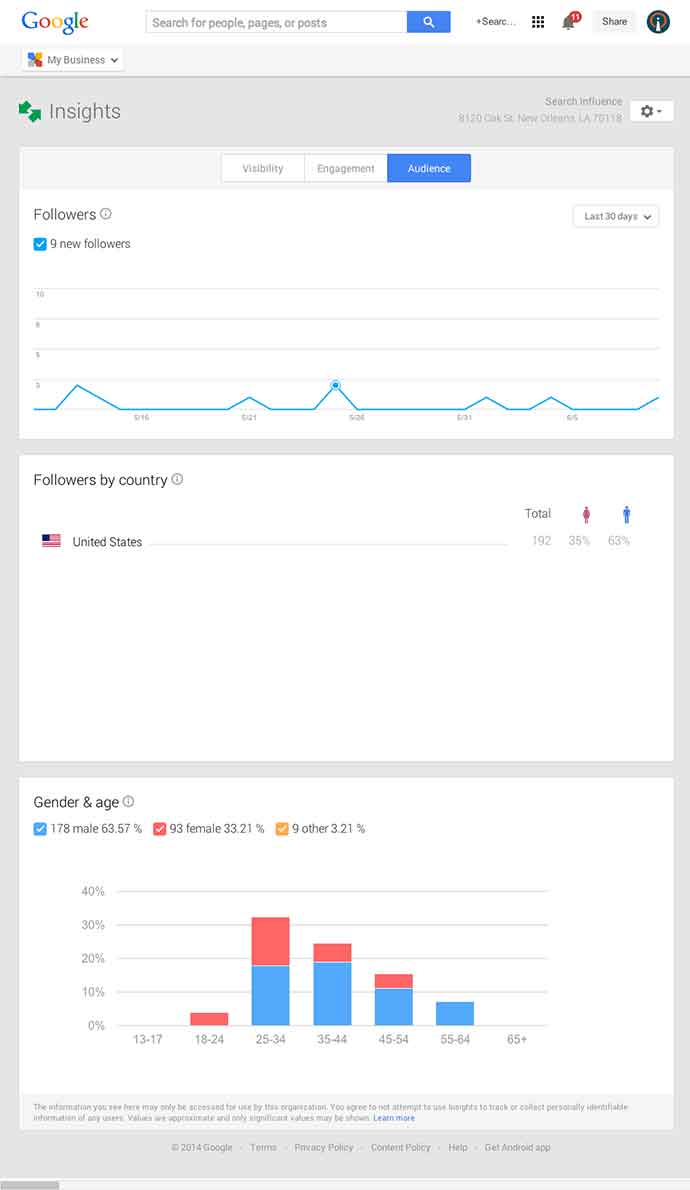
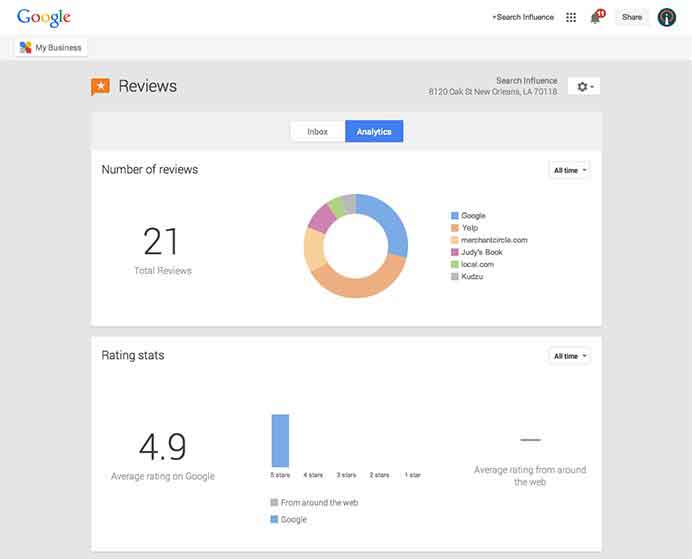
    Next, you’ll find the Insights Tool. Here, you can see how many views your G+ page has gotten over a period of time, how many clicks occurred, and where they went (either looking for Google Maps driving directions or directly to your website). The next feature (and my favorite addition to the Google My Business dashboard) is the reviews section. When you click into “Manage Reviews,” you’ll see your Google reviews as well as other business reviews from around the web. If you click “Analytics” at the top of this page, you can see a really streamlined graphical representation your review information or “Rating Stats” and where your business’ reviews come from.

    Google My Business Reviews Tool Image - Search Influence

    Additional Tools

    You will be able to see other tools like Google Analytics (if you have it installed on your site), YouTube (if you have a channel connected), and AdWords Express (again, if you use it). If you don’t use the above tools, they will still appear at the bottom of your dashboard with the option to “Get Started” if you want to use them! You’ll also see a place to “Join a Google Hangout” at the very bottom of your dashboard. All in all, the new Google My Business looks looks both beautiful and user friendly, presenting a new way to manage businesses’ online reputations through Google.

  • In The Game Of Maps, You Either Get There, Or You’re Using Apple Maps

    NotSureIfWhen you think of Apple Maps, you probably think of the disaster that was the iOS 6 Apple Maps update.

    Apple Maps is infamous for directional errors like having turn-by-turn directions that instruct users to drive across an airport runway to get to an airport. We’ve also experienced client business issues with Apple Maps.

    For example, Apple Maps users were being taken to a location 50 miles away from our client’s actual listed business location when using turn-by-turn navigation in the app. We had to then figure out how to edit business information in Apple Maps, as there is no desktop way to access Apple Maps, and you can only access it through the mobile app.

    The data in Apple Maps is mostly powered by data from Yelp, TomTom, Factual, Localeze, and Acxiom as you can see in Moz’s local search ecosystem. By making sure your business information is as accurate as possible on these sources, you could help avoid errors on the sites that they feed to. Often, however, when it comes to issues with Apple Maps, it’s best to figure out how to fix them at the source.

    YeahItUsesAppleMaps

    So here I’m going to walk you through how to edit information in Apple Maps via your mobile device.

    Step 1:

    Search for the business that you’re looking to update.

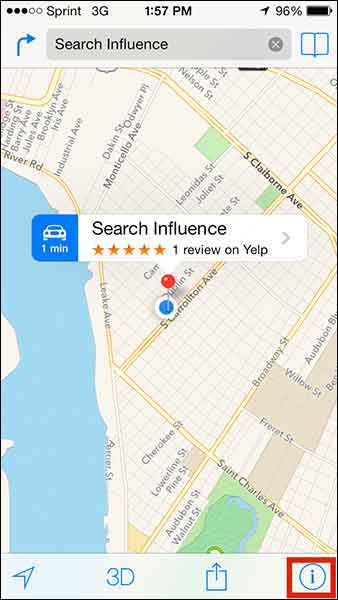
    Step 2:

    If you’re looking to add a business that is not appearing in search or to update directions that aren’t appearing properly, click on the ‘i’ (for information) icon in the bottom righthand corner. If you’re trying to edit particular business information like name or address, skip to Step 5.

    Step1

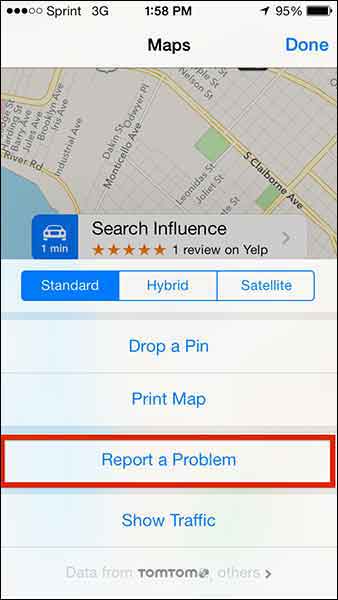
    Step 3:

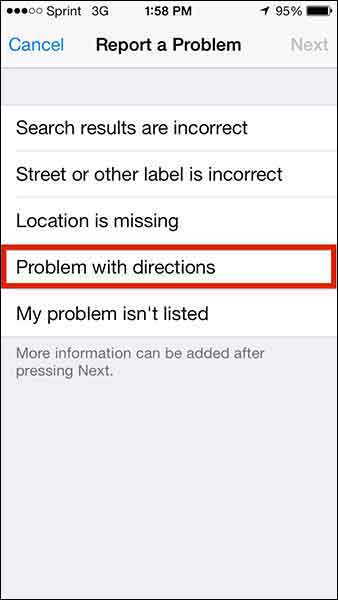
    From this popup dialog you will choose “Report a Problem”.

    Step2

    Step 4:

    This “Report a Problem” page will allow you to choose to report that

    • Search results are incorrect
    • Street or other label is incorrect
    • Location is missing
    • Problem with directions
    • My problem isn’t listed

    Select your issue (in our client’s case, we chose “Problem with directions” to indicate that the map was taking people somewhere it shouldn’t in turn-by-turn directions) and submit your problem!

    Step3

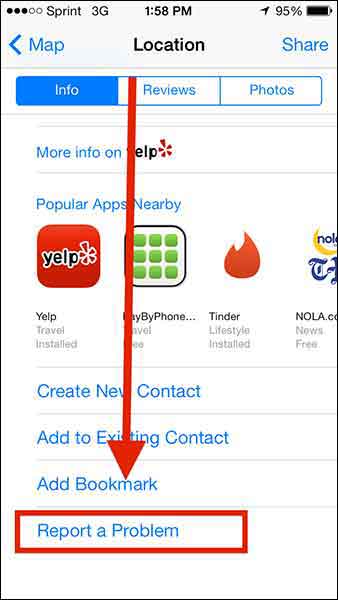
    Step 5:

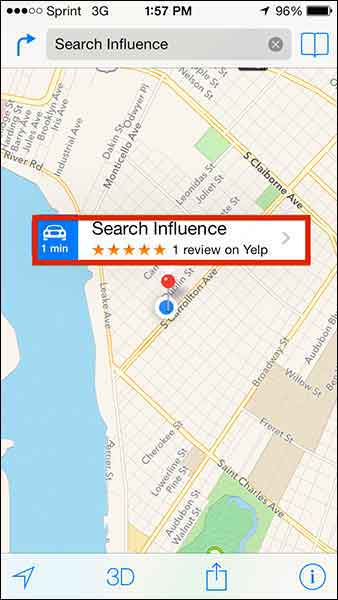
    To make more specific Apple Maps updates about a particular business, click on the business name in the search results.

    Step4

    Step 6:

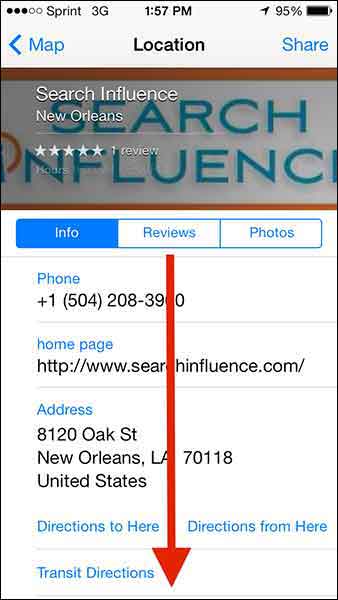
    Then scroll down “Report a Problem” on the “Location” dialog box, and CLICK IT!

    Step5

    Step6

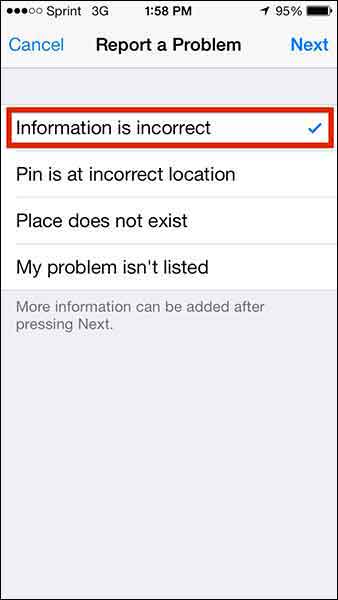
    Step 7:

    Choose from the list of issues (most likely you’ll want to report that “Information is incorrect”) and click “Next” in the top right corner.

    Step7

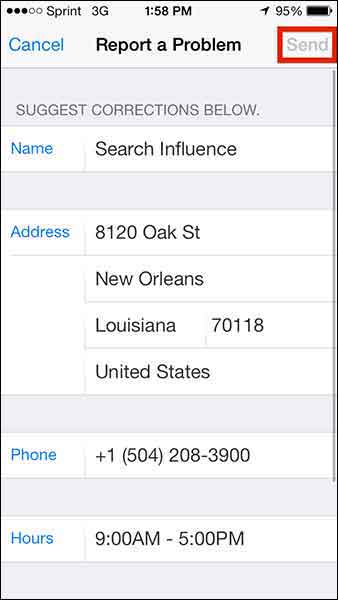
    Step 8:

    Edit whatever details you need (obviously this page will differ depending on what problem you’re reporting) and click “Send” to send the report.

    Step8

    1O7UpdateApple maps has been gaining momentum in user numbers as it is the default app on all iPhones. Apple crushes all. It is known.



    With this in mind, one can only hope that Apple Maps’ future will have a formal business portal for claiming and managing your business information, but until then, we’ll have to live with this limited access process.

  • Google Ranking: No ShortCutts to Success

    More often than not, our clients ask why their keywords aren’t as high up on Google as they should be. Is it a penalty issue? Is it an algorithm change? Or is it your content? Recently, I had a client that asked these exact questions. Here at SI, our job is to diagnose the answer.

    If you’re an online marketer, you know one name to be the Holy Grail of answers: Matt Cutts (for you non-online marketers, the head of Google’s Web Spam team).

    Recently, Cutts created a help video to answer the question we ask every day: What really determines why you’re not ranking as high as you think you should?

    The answer: It depends!

    Image of Google's There are No Simple Solutions Quote

    Make Friends With Webmaster Tools

    According to Cutts, you should first ALWAYS, ALWAYS, ALWAYS check Webmaster Tools. Here, you can see in detail what could be the issue, whether it be keyword stuffing within your content or some sort of crawl error.

    “We have seen sites that will launch a new development website that was previously no-indexed, and forget to take off the noindex tag,” Cutts said. “Or there’s 404s, or we can’t reach your site…”

    But what about the other algorithmic issues? How can you determine if it’s an algorithmic penalty or your content? According to Cutts, they don’t give much thought about algorithmic penalties because Google doesn’t really view them as penalties.

    “It’s a tough call to make,” he says, “because the web spam team is working on more general quality changes, not necessarily things specifically related to web spam…we just think of it as the holistic ranking.”

    Don’t Fear The Algorithm

    According to Cutts, in 2012 Google rolled out about 665 changes to how they rank search results, so the odds that they are rolling out some algorithmic change at any given point are pretty high. In fact, they might be rolling out a few. However, if the algorithm changes they make will impact your site in a big way, Google will notify you of those changes.

    For example, as Cutts says, Panda’s algorithm has become more integrated into indexing and has less of an impact on your rankings, whereas Penguin’s is still ever-changing and will more than likely have a bigger impact. In other words, Google will  likely send you a notification if you were affected by some change within Penguin’s algorithm.

    You’re probably wondering, what does this all mean? The reality is, it comes down to what you believe is best practice for your site. If your competitors are doing something that you think might be affecting their rankings in a great way, then use your judgement to determine if that’s something you should be doing for your site. As Cutts says, it’s difficult for Google to say that something is a penalty because it’s just a part of ranking. The good news is that it is algorithmic. As you change or modify your site based upon what you see within your competitors, you can see that these algorithms can reprocess the sites and you can and will rank again!

    Applause

  • 5 Google+ Page and YouTube Tips Your Boss Wants To Know

    In the office I am often asked to help with doing things in Google that turn out to be fairly simple tasks but are often hard to figure out. For example, creating a custom YouTube channel URL is fairly simple to do, but the place you make this edit is not the most obvious to find. So, I’m going to walk you through 5 Google tasks I am most commonly asked to help with.

    1. Change the Name of a G+ page

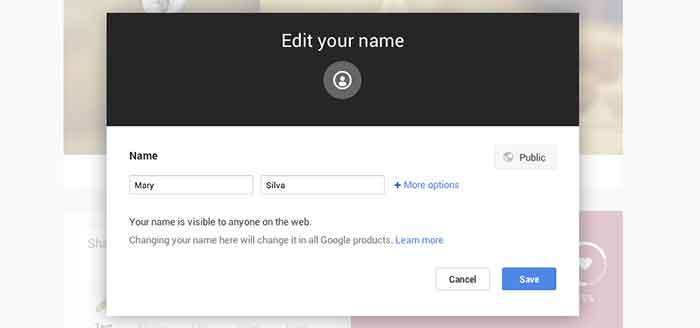
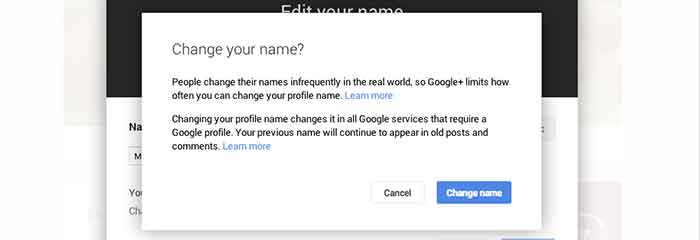
    Sometimes we’ll bounce around for several minutes looking for where the settings tab or options part of a page is just to change one tiny detail. In the case of changing the visible name of your personal G+ page or the the listed name of your business, a quick and easy way to make the edit is through the front end of your Plus Page while logged into your account. All you have to do is click your name! From there a popup will appear allowing you to edit this field. It’s important to note that you’re not allowed to do this as many times as you’d like with your personal profile page though. You can change your profile name only up to 3 times in two years.

    When changing your personal profile name you’ll see this warning about frequency:
    “People change their names infrequently in the real world, so Google+ limits how often you can change your profile name.”

    GooglePlusProfilePage

    GooglePlusEditName


    GooglePlusConfirmNameChange

    2. Make Community/MapMaker Edits to G+ Local Pages

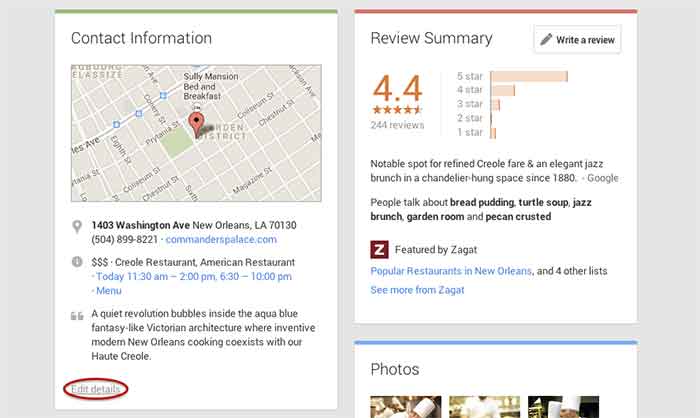
    The most common community edits we need to make to a listing happen when we’re just starting out and the listing we want to claim is owned and/or verified by someone else. The process for requesting ownership of a listing can be a lengthy one, and in the meantime you may want to update your business information from the front end. To do so, simply navigate to the Contact Information section of the businesses Plus Page under the About tab.  Then click “edit details” in the bottom left corner of the Contact Information box. The next page is the Map Maker editing screen that allows you to not only submit edits about the contents of the listing, but to also report a listing as a duplicate or closed location and report reviews that don’t belong.

    GooglePlusDuplicateListing

    3. Link/Verify A Website

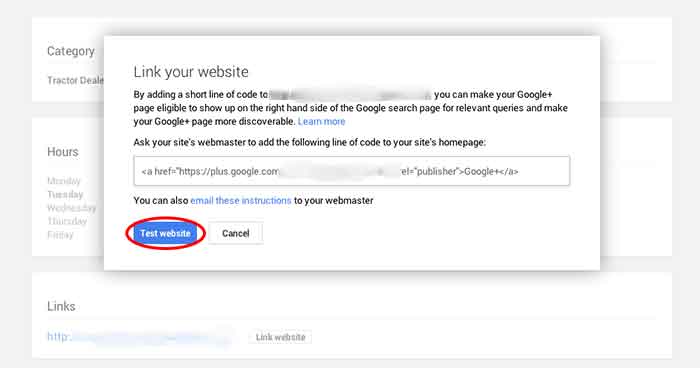
    We’ve recently discovered an issue when linking a business’s site to a Plus Page. After having the code added to a business’s website for linking to the Plus Page, you have to go back into G+ to make Google search for and verify that the code is on the site. You probably wouldn’t have encountered this had you done the entire process of adding the code to the site after getting it from Google, but often it’s a matter of getting the code and giving it to your developer to put on site. So in this case, you’d want to make sure to go back to where you got the code and click “Test website” in order to tell Google to check for the code. This can all be accessed from the front end of your Plus Page by clicking “Link website” under the Links section of the About page.

    GooglePlusLinkYourWebsite

    4. Add or Edit Managers of a G+ Page

    Adding a manger to a Google Plus Page can be helpful for many situations. Businesses often want to have someone help with social media posting but don’t want to just give that person all of their login information since that is often linked to personal Gmail inboxes and the like. As with editing the name of a page, adding a manager can be done more than one way from within the account. I, however, find that the easiest and quickest way to do it is by going to settings from the home drop down in the top left corner when logged into Google Plus. Then, simply navigate to the Managers tab on the top left to access the manager permissions editing page.

    GooglePlusManager

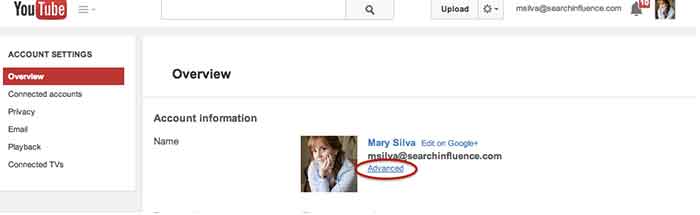
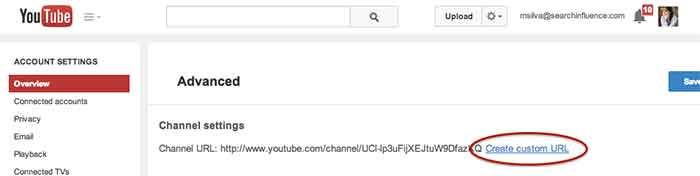
    5. Create a Custom YouTube Channel URL

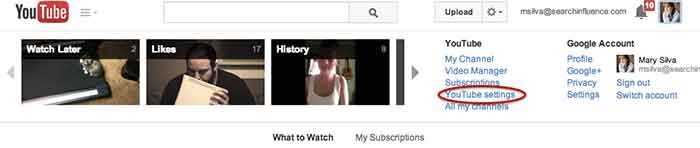
    You knew this one was coming based off of that intro, didn’t you? So, from the top right drop down menu of YouTube, click “YouTube settings,” then “Advanced,” and finally “Create custom URL.” It’s that simple but not exactly the most intuitive place to look for it, given the many other options in YouTube.

    YouTubeSettings

    YouTubeAdvanced

    YouTubeCustomURL

    I hope at least one of these steps was helpful for you, if not all of them. Let me know in the comments below what you think!

  • Why Your Ads Fail: The Secret To AdWords Data

    Within the past decade or so, it’s no surprise that everyone is hopping onto the data bandwagon. To businesses big and small, across all industries, it’s all about collecting data, data, data. However, while we focus endless efforts on collecting and analyzing data, we often lose sight of the reason why.

    This is especially true in the world of online marketing, and in this case, online marketing through Google AdWords. If you’re running a PPC campaign, you know that AdWords provides a plethora of data and reports from all the typical metrics. From impressions, clicks, cost per click etc. to where your clicks are coming from, the day of week, the time of day—the list of metrics goes on. That’s why finding actionable data is like finding a needle in a haystack.

    However, there are three simple data reports that can provide instantly actionable insights.

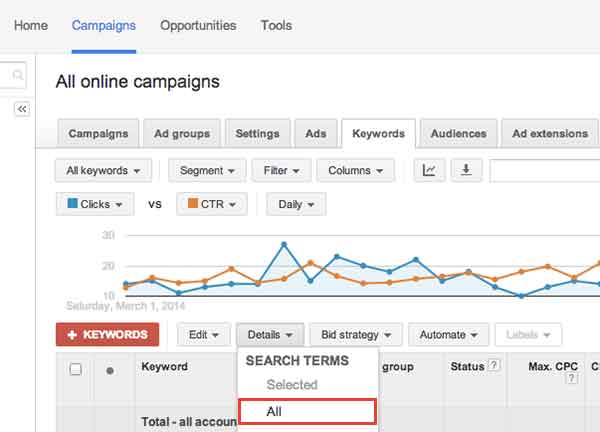
    1) Search Term Report

    The first report is the Search Term Report/Search Query Report. This report can be found under the “Keywords” tab. Select “Details.” Then select “All.”

    Screen-Shot-2014-04-02-at-6.01.44-PM

    This report is useful because it shows the search terms that people are actually typing in and searching for. This data can inform your decisions in creating new campaigns, new ad groups, finding negative keywords (keyword searches you don’t want your ad to show up for), and even give you ideas for your content creation strategy.

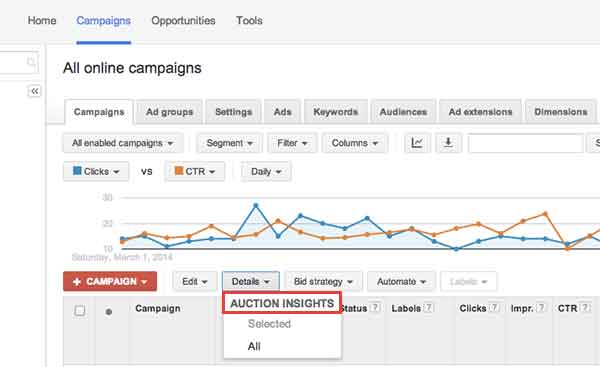
    2) Auction Insights Report

    The second report that’s useful is the Auction Insights Report. This report can be found under the “Campaigns” tab, under the “Details” section. Select “All.”

    Screen-Shot-2014-04-02-at-6.02.27-PM

    This report is useful because it shows how your campaigns, ad groups, and keywords are performing compared to your competitors’. It compares your impression share (how often your ads show up), your average position etc. with that of competing campaigns. Understanding what your competitors are doing, can better inform your bid decisions, how you design landing pages, and more. Remember, your competitors in the physical world may not necessarily be your competitors in the digital world.

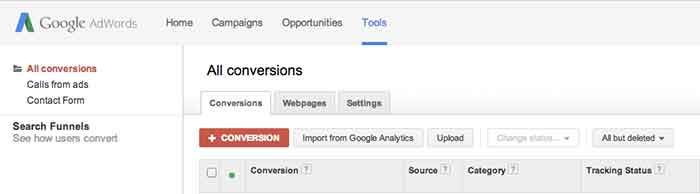
    3) Conversion Time Lag

    The third report that’s useful is the Conversion Time Lag Report. This report can be found under
    “Tools” (at the very top navigation bar). Click “Conversions,” then “Search Funnels” (on the left side of the page), then “Time lag.”

    Screen-Shot-2014-04-02-at-6.24.38-PM

    This report shows how long it takes for people who’ve clicked on your ad to convert. Based on your sales cycles, this can inform the number of touchpoints you need with your customers in order to drive them down the sales funnel. Depending on the time lag, you can then decide whether or not to reach out to your customers through a remarketing campaign, a content marketing campaign, an email marketing campaign, or through social media and how often you should do so.

    In an online marketing environment where there’s a lot of hay, hopefully these three reports give you three useful needles in your haystack.


  • 3 Tips for User-Friendly Navigation

    A few weeks ago, my future mother-in-law purchased her first iPad. While she has been the proud owner of an iPhone for a few months, there was something different, to her, about the navigation of an iPad. As we were walking through some of the different apps and functions on her new tablet, she found herself trapped in her browser window and unsure how to get back to her email.

    MaggieSmith-01

    Are you the type of person who can easily pick up on the newest technology trends? Or do you feel like you can never catch up with things changing so frequently? User-friendly navigation can take that worry away and make your experiences with technology easy and fun!

    Tip #1: Keep something familiar.

    We’ve all experienced that little moment of panic when we don’t know where to go next. For some people it happens when traveling to a new city or starting a job at a new company. We want to know that there’s a way out of any situation. For my future mother-in-law, that “way out” was the home button. After discussing the way she closes out of the Internet on her iPhone, she quickly realized she had that same “panic button” located at the bottom of her iPad.

    Tim Ash, CEO of SiteTuners and author of “Landing Page Optimization” was a keynote speaker at PubCon in New Orleans. During his keynote presentation he mentioned that as soon as we see someone walk into a room, we subconsciously decide how to kill them. He claimed it’s just a part of our natural instincts. I’m not sure if that’s the case for everyone, but I do think we at least look for an escape route.

    MaggieSmith-02

    Tip #2: Make it easy.

    Have you ever started navigating your way through site and then realized that you weren’t sure of the best way to get back without having to click the back button nine or ten times? What do you do? Do you simply close your browser window out of frustration? We crave easy navigation to avoid such frustration and make browsing simpler.

    To a certain degree we all enjoy updates to technology, but we still like to hold onto something familiar. For some social media sites, such as Facebook and Twitter, having a fixed navigation is the solution. How often do you find that you’ve logged into your social media account and then hours later, or for those with better self control, minutes later, you’ve scrolled so far down the page you’re looking at updates from days or weeks ago? Can you imagine what it would be like if you had to scroll all the way back up to the top of the page? If you were on Facebook before 2011, then you might remember.

    Tip #3: Know your audience.

    Is this something that all websites need? No, not necessarily. For many sites, scrolling is not quite as intuitive. The solution could be as simple as having “HOME” as an option in your navigation. Know your audience. Some users need an actual home button or link in the navigation, and some simply expect that your logo will link back to your homepage. If you’re unsure of the way your users interact with your page or how to make your page easier to get through, it may be best to do some testing.

    MaggieSmith-03

    Do you have any tips for easy navigation? If so, let us know in the comments! 

  • Heaps of SEO from Down Under

    While I was in Australia earlier this year, I used google.com.au to search for a good happy hour spot after a long day at Bondi beach (they have free beach wi-fi!!). No matter how hard I searched, the best watering holes weren’t showing up in my search results. Little to my knowledge, it was because I was searching for “bars in sydney,” while all the other blokes and sheilas in Aussie call them by a different name, “hotels.” The following are the search results from various keyword searches in Australia. Check out how they vary just by changing one word!

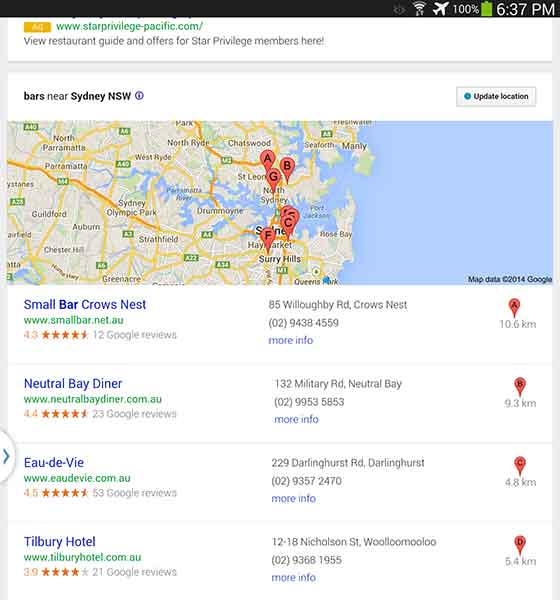
    “Bars in Sydney”

    AusSEO-Bars-01

    I found that the “bars” results were filled with restaurants that happened to serve classy drinks (not exactly what I was looking for). And I don’t mean to whine, but it’s mildly upsetting that results A, B, and G are located in North Sydney. SEO in Australia needs to step up its game.

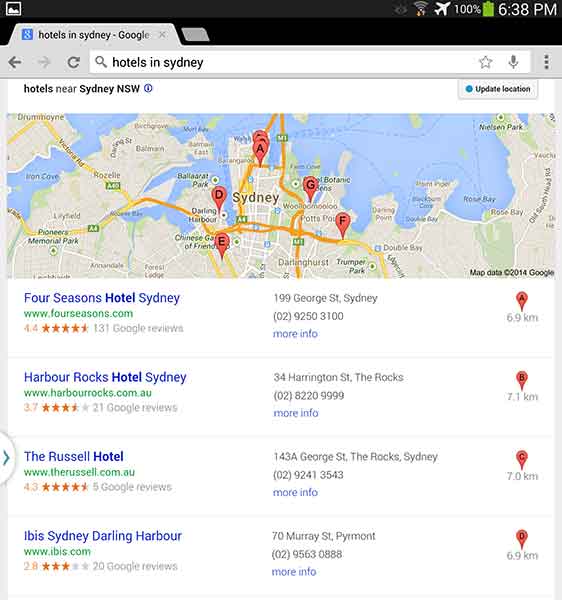
    “Hotels in Sydney”

    AusSEO-Hotels-01

    Unfortunately, looking at “hotels” wasn’t helpful either. This keyword can get a little complicated because, while bars are called hotels, hotels are also called hotels. I think it would be really difficult for a bar to outrank an actual hotel, even on google.com.au.

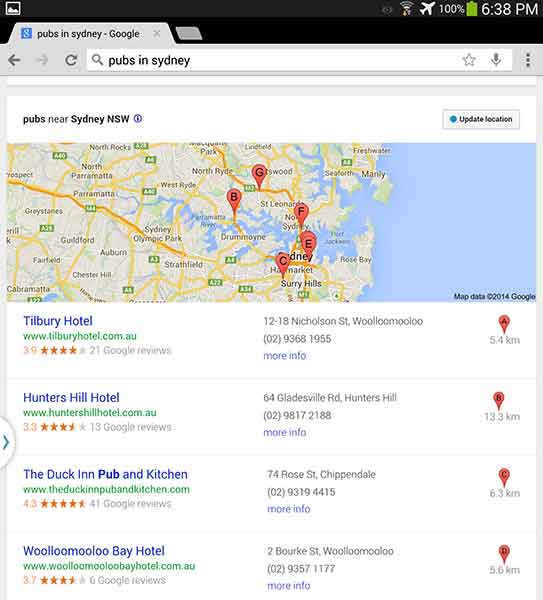
    “Pubs in Sydney”

    AusSEO-Pubs-01


    The best results? Pubs. Each result was a bar with “hotel” in their business name and “pub” in the meta description. Pubs are a big part of Australian and English culture so it is fitting that this 7-Pack produced the best results.

    If you want to run a local campaign, pay attention to changes in culture and language in your area. You may be able to target locals and tourists differently by focusing on some keywords more than others. As Ja’mie King would say, SEO in Australia is, like, so random.

    PublicSchools

    Have you had any strange encounters with Google keywords in certain areas? Let us know in the comments!