Category: SEO

  • What’s Black and White and Impacts 3-5% of Search Queries? Panda 4.1!

    In the last two months, Google has been busy improving the Panda. In early August (Aug. 8, 2014, to be exact), there was a lot of chatter from the SEO community seeing the flux in Google Analytics accounts, which was generally accepted as an unconfirmed monthly Panda data refresh.

    In early September, there was a large Panda data refresh, and on Sept. 25, Google’s Pierre Far announced yet another Panda algorithm update, (the previous Panda algo update was May 19).
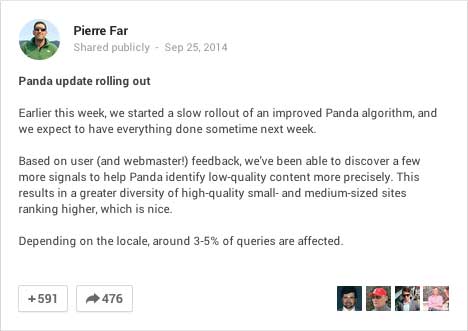
    GooglePlusPostPandaAnnoucedImage

    And just to keep you on edge, ceaselessly examining your Analytics data, the rollout of this Panda has been sloooowwwwslothlike. Google confirmed that some Google data centers were not updated until “October 6 or later.” So, your website could have seen the algorithm at some point before Sept. 25 and after Oct. 6 – that’s a two-week time frame to analyze!

    What is Panda?

    There are so many blog posts out there describing the Panda algorithm, I will just summarize it briefly. If you’re interested in reading about it in more detail, here’s a good blog post, and some excellent reading here.

    Panda is an algorithm that filters the search results to:

    1. Reward high-quality content with more presence
    2. Push sites with thin content down to rank lower

    Google says low quality or thin content is text that

    •   Is very short in length
    •   Offers very little useful information to the consumer
    •   Is unoriginal or copied

    Your website content should not be self-serving; it’s all about providing information to the consumer to educate them with detailed and authoritative information.

    PandaContentPullQuoteImage

    This most recent Panda is an algorithm update, which is supposed to reward more high-quality small and medium-sized websites. From Par’s G+ post:

    “Based on user (and webmaster!) feedback, we’ve been able to discover a few more signals to help Panda identify low-quality content more precisely. This results in a greater diversity of high-quality small- and medium-sized sites ranking higher, which is nice.”

    This update is significant because it added more signals to better identify lower quality sites. Earlier algo updates have rewarded big directories for local searches, so this update is exciting because small- and medium-sized websites have a fighting chance for ranking in their local markets.

    Google Updates vs Data Refreshes

    To paraphrase, an update is a change in the algorithm. A data refresh is when the algorithm has not changed, and new data that is pushed through the data centers, such as new crawl data, is updated in the various data centers across the Google universe.

    Updating the data centers is one reason why updates are seen at different times for different geographies.

    I am quoting this really old Matt Cutts blog post here:

    Algorithm update: Typically yields changes in the search results on the larger end of the spectrum. Algorithms can change at any time, but noticeable changes tend to be less frequent.

    Data refresh: When data is refreshed within an existing algorithm. Changes are typically toward the less-impactful end of the spectrum, and are often so small that people don’t even notice. One of the smallest types of data refreshes is an:

    Index update: When new indexing data is pushed out to data centers. From the summer of 2000 to the summer of 2003, index updates tended to happen about once a month. The resulting changes were called the Google Dance.”

    What are data centers? Google crawls the websites out there and caches those in their gigantic index. That index is huge and is stored on thousands of machines. Those thousands of machines live in various Google data centers around the world. To truly geek out, read more about Google data centers here – these centers are where the Internet exists.

    Did Panda Help or Hurt Your Site?

    When you look in Google Analytics, it may be easy to see a drop off or dramatic increase. For example in the graphic below, I’m guessing Panda rolled out in the business’ local area around Oct. 6, and it didn’t go well for the site:

    Panda rolled out Oct 6, 2014

    And on Sept. 29, this site was Panda-happy:

    increase in Google organic traffic after Panda September 2014

    For most of the sites I looked at, the visual changes were more subtle, so I usually toggle between the data by week vs. the daily data. The weekly data shows me a week where the decreases started, which correlates to the earlier rollout dates:

    weekly analytics view to pinpoint Panda rollout

    When I switch to the daily data, I can clearly see the dips in traffic. I have to pinpoint Saturday, Sept. 20t or Wednesday, Sept. 24 as the day this site got the Panda.

    daily Analytics shows dips in Google organic traffic after Panda

    The Sept. 20 might be a little early to fit in the Panda time frame, and I am accustomed to seeing a spike immediately before an algo filter, so I’m going for Sept. 24. Using Sept. 24 as the before and after date, this website has seen 12% decrease in Google organic traffic.

    12% decrease in Google organic traffic after Panda Sept 2014

    This website with the 12% decrease in Google organic traffic after Panda is a good website for an authoritative local business. What this drop tells us is even if the content on the site offers really great information for the consumer as this one does, it might be old and/or thin. Someone may have copied it over the years. We might need to add other content to our pages with images and videos. Content is not just text. We need to take a good look at the age of the text and the variety of the content on the page. With this review, we can create a strategy for improving the content for the next Panda data refresh.

    What to Do Now

    PandaImageWebsite owners or managers who see a Panda smack really need to take a critical look at the content on the site. To succeed, the content needs to be information rich, and not self-serving.

    An example of self-serving content is content that is stuffed with keywords, abundant keyword use on a page not only in the body text, but also in the URL and alt tags. This is also sometimes referred to as over-optimization.

    Self-serving can also mean the content talks too much about the business instead of talking about the product or service the consumer is trying to learn about. Talking about the business is great as long as it’s on the About page or the home page. Leave products or service pages to be about those topics.

    This is a great list compiled by Josh Bachynski “The Complete Google Leaked PANDA Do & Don’t LIST – 2011 to Present.”  This list really dives into the aspects of good and not-so-good content.

    Google published a list of questions to ask when writing content. The full list is here. I have chosen some to republish below:

    • Would you trust the information presented in this article?
    • Is this article written by an expert or enthusiast who knows the topic well, or is it more shallow in nature?
    • Are the topics driven by genuine interests of readers of the site, or does the site generate content by attempting to guess what might rank well in search engines?
    • Does the article describe both sides of a story?
    • Does this article provide a complete or comprehensive description of the topic?
    • Are the pages produced with great care and attention to detail vs. less attention to detail?

    Diversity of content and freshness of content are also factors to consider.

    Diversity of content helps readers in various ways. Content can mean images. Original images are best rather than stock images, but stock images work. Content can also mean videos, charts, calculators, and reviews. Content is anything that helps the consumer learn more to make well-informed decisions.

    For content freshness, a blog is probably the easiest approach to keep the website updated regularly without having to rewrite your page’s content too often.

    If you have a specific owner or practitioner who is the authority on the information, claim that using Author markup – authorship thumbnails are gone from SERPs but that doesn’t mean the Author authority is gone.

    There are so many tactics for coming back after a Panda smack, and the best strategy is a mix of tactics. It will likely take time to create really good content and build back your website credibility, but it is a necessary investment for your site’s success.

    If you think your site is suffering from the Panda, give us a call. We would be glad to help.
  • The Beheading of Google Authorship

    So unless you’ve been living under a rock, you already know, or at least have an idea, of what happened to Google Authorship. Back in June, we saw the ominous sign that Google removed Authorship circle count and photos from search results. Between its low implementation rates and high error of implementation, Google Authorship was simply proving not to be a strong search signal. Google’s continual changes are almost always driven by the goal to improve usability and to make search results more relevant to users.

    Why?

    So, why, after 7 years, is Google getting rid of this feature, and why did they even have it in the first place?

    In 2007, Google patented Agent Rank (aka Author Rank) with the idea of creating a search signal to improve the rankings of authoritative, reputable authors. They understood the power of personal connection and the desire for people to connect with other people online. As the years went on, rel=”author” was rolled out to webmasters everywhere, and with the start of Google+, the Authorship project came full circle. This was, at the time, a solid way to prove authenticity of writers for those searching for trusted results.

    However, as time went on, it became apparent that the use cases of Authorship markup were either limited or done incorrectly. In a study performed by Stone Temple Consulting, which sampled 500 authors over 150 different major media sites, it was found that 70% of authors didn’t even try to connect their content and authorship to one another, and that 72% of sites that did attempt markup, had errors.

    Google’s research also found that providing author information in search results didn’t help users, and if anything, distracted from search results.

    Now What?

    GPlusGifFirst, this doesn’t mean that Google is diminishing the value of markup in general, just this particular type of markup. In a post on his Google+ page, John Mueller said, ”Going forward, we’re strongly committed to continuing and expanding our support of structured markup (such as schema.org).”

    It is clear, that in their ideal world, Google will find a better way to come back to this Authorship feature. According to Mark Traphagen, Sr. Director of Online Marketing for Stone Temple Consulting, this is far from the end of authorship. Google just needs to have the ability to more confidently determine who the voices of a niche are without relying on markup. In Mark’s words, “author authority is going to have to be based on much more sophisticated means of machine-based identification and understanding,” which, as you can imagine, we are a long way away from.

    Moving forward, I think it is important for authors to continue using the best Authorship practices, because Authorship still exists, just with a lesser role in search results. And there is no evidence that having a strong Authorship presence won’t influence your results in a more indirect way. Also, quality content will always be a strong ranking factor, and providing multiple, non-spammy ways to access said content across the web (like through the “Contributor to” section of your Plus page), will always be a good practice.

    ThumbsUpImage

    Image Source:
    Thumbs Up Gif

  • Tiny Houses and Tiny Spaces: Making the best use out of space

    TinyCoverDesignImageThe term “Netflix” is Internet speak for “how to kill 2 hours on a rainy Saturday evening.” Well, it was one of those times, and I had stumbled upon Tiny: A Story About Living Small. This documentary shows Christopher Smith’s yearlong journey to find a home of his own. To accomplish this, Chris sets out to buy a large plot of land surrounded by wilderness. On it, he begins to build a tiny house. He ends up building his “home” on a utility trailer with 124 square feet of living space. In the film, Chris also interviews several other families that have also decided to consolidate their living situation.

    If you are like me, you have poured hours into Google searches of these tiny houses and thought, “that’s clever.” The numerous tricks and tips of people who opt for a smaller living space utilize all of the space so that they are comfortable and not cramped. It is this notion that interested me most – taking something small and making it seem bigger by utilizing only what matters and making it flow.

    When it comes to design, far too often we are faced with trying to fill in every conceivable space with more content and images. In doing this, we fail to see that what we are left with is just a pile of stuff and our original message is buried. Also, there are times when we say more than what is needed, and instead of drawing in the target viewer, they seem to just be waiting patiently for the end so that they can move onto the next thing. So to combat this, I have compiled a list of things to consider when designing for smaller spaces, whether for a sidebar web ad or a quarter page ad in a magazine.

    Take a Hard Look at the Space

    The main thing that gets lost when designing for small spaces is the actual size of what we are designing for. Computers give us the ability to enhance images and see them close up. But far too often, what can be read while zoomed in, cannot be read in its actual size. So take the time to open the web ad in a browser to see it in action, or print out the magazine ad and hold it in hand.

    Stack the Messages

    When it comes to deciding what to put in to the space, think of each element as a physical thing. Can you stack everything in your hand and still read everything? Does the logo take up too much space to where someone could fail to know what the image is? Does the novel-like copy seem like more of a pain to read and not draw in attention?

    Dual Purposes

    ToiletDualPurposeImageWhat makes tiny houses so unique and intriguing is that the purpose of everything within them is to maximize space. Like having a sink connected to upper basin of a toilet to eliminate the need for two large elements in a bathroom.


    In the design of things, we can sometimes make use of this as well. Can you use images of your brand in action? Is there a way to animate a web ad and engage the audience in the process? Can that magazine ad both sell your brand and serve as a useful tool to the viewer, like a checklist or a resource worthy of being saved?

    Space to Stretch Out

    The most common reason for people not wanting to jump on the tiny house bandwagon is the concern of not having enough room to even stand up. Many have expressed they would feel too confined and cramped. This same concern should be applied to our designs. When faced with a small real estate for any design, empty space needs to be viewed as an actual thing, as opposed to just being “empty.”

    Too often, we view space as being wide and vast. This also trickles down into the planning process for designs, and by the time it comes to implementation, there is no space for any of the elements to stand up or stretch out. It is important to take into account that space is an actual thing and needs to be represented, otherwise the design will become too confined and cramped.

    The Big Impact of Little Things

    The idea that everything needs to be big in order to be seen is something that does not hold true with designs that are small. This mindset is great for ideas, but when it comes to implementation, all that excitement and enthusiasm needs to be more focused. When it is, that small thing will be inviting and call out, like the sirens to Internet sailors, or to the casual passerby of a newsstand. These small designs should act as a ticket to something larger, something that merits investigation. Making our audience ask, “I wonder what that is all about?” is stronger and more enticing than just giving them a catalog of your products. It is that sense of curiosity and yearning to investigate that will build brand strength and forge a desire to learn more about what it is that you do.

    If you are curious about tiny houses, check out these blogs:

    http://www.tumbleweedhouses.com/

    http://thetinylife.com/

    http://www.tinyhousedesign.com/

    Image Sources:

    Tiny Book Cover

    Dual Purpose Toilet

  • Google Instant Verification Passes The Sentence & Swings The Sword

    On July 31st, Google rolled out an instant verification option for local businesses that have already verified their websites with Google Webmaster Tools.

    WaitInstantVerificationImage

    There is, however, very specific cases. As the Google support page linked above states, it’s important to note “that some business categories may not be eligible for instant verification.”

    OneDoesNotSimplyVerifyAListingImage

    Webmaster tools verification option won’t work for your business if:

    • You’re creating a new listing
    • The pre-existing listing is already claimed by another user and your business has to request ownership
    • You have to change the website on the pre-existing listing you want to claim
    • Webmaster Tools isn’t verified BEFORE you claim the listing
    • Webmaster Tools isn’t verified in the same account that you are claiming your business listing in
    • Your company’s “My Business” category is not one of the Google approved categories eligible for this verification.

    “My Business” pages we tested:

    Car dealership: Claimed in account with pre-existing listing in need of claiming – worked

    Heating supplies provider: Had ALL ideal criteria. Listing had correct site and was available to claim, and WMT was already verified in the account. – didn’t work (So this business must have a category problem that makes it ineligible.)

    Real Estate: Created new listing- didn’t work

    Basically, if it’s possible, Google will automatically verify your business on its own when you claim your business in Google My Business. Google skips giving you any verification options altogether and just auto-verifies the listing.

    Assuming this new Google My Business feature is a work in progress on Google’s end, maybe once we see more categories accepted, it will become more doable and the qualifications may not be so restrictive. Even then, with the stipulations currently, it would be a rare occurrence.


  • Give Your Site Some Link-building Lovin’

    MclovinYourLinksWith this year’s Google algorithm updates, we’ve heard a lot of buzz about implementing disavows and getting rid of bad, non-relevant links to your site. However, what we’ve heard less about is what to do after you get rid of all of those links. Now that those disavowed or deleted links are no longer helping, (or hurting) your site, it’s important to build up a profile of links that are strong, relevant, and influential to help elevate your site back to its previous authority and status. Here are some tips to help give your site the link building lovin’ that it needs.
    1. Create A Link Building Strategy

    Just like with any marketing endeavor, it’s important to create a roadmap and set goals to get a clear sense of where you want your efforts to take you. Take a look at the current links pointing to your site. Then, decide which types of links are relevant and helpful to your site (the kind of links you’d like to pursue more of). Based on that, allocate a budget, time, and metrics to measure your upcoming link building efforts.

    2. Use Real-Life PR Opportunities

    A great way to get natural links back to your site is to do it the old-fashioned way with PR opportunities. Host an event, go to conferences, engage in your community, leverage relevant organizations — all of these activities not only build your brand, they also provide credible linking opportunities for your website.

    Remember: Almost anything that happens offline can be captured online as well.

    3. Leverage Great Shareable Content

    The adage “content is key” is especially applicable when it comes to link building. People are consuming massive amounts of content on the Internet everyday. Content is a great way to capture viewers’ attention. Additionally, when viewers share a piece of content or use it on their own site, your website is attributed as the source.

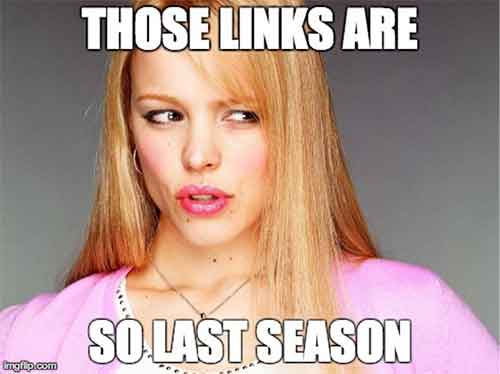
    Getting rid of old, irrelevant links to your site is just like cleaning out your closet. Every wardrobe needs updating, so send last season’s links to the thrift store and go find yourself the latest collection of new links to give your site a boost.

    LinksSoLastSeason

    Image Sources:

    Link Memes

  • A Few Things You May Or May Not Have Ever Wanted To Know About Schema, But Were Too Bored To Ask

    As Google continues to affirm its support for more detailed types of schema markup when crawling sites, it seems that there is an increased level of general interest in the concept and implementation of schema. I know that across our office, there are constant enraptured whispers about the ethereal mystery and beauty of this particular variety of microdata. At least, that’s what I imagine. In any case, I am quite certain that people across departments in the Search Influence office, and presumably others, are talking about schema more than they used to.

    If you are already thoroughly comfortable understanding and implementing schema, this is not a blog post for you. Take a long pull on your cigar, another sip of fine brandy, ease the seat back and return to your Baudelaire. As for everyone else, I’m writing this because Google’s documentation on the subject – though extremely helpful and somewhat surprisingly transparent – is probably still a bit dense for those not familiar with microdata as a concept or without some experience coding a web page. I’m hoping to help bridge this gap for anyone seeking a schema primer without the time or inclination to sign up for a night school web design course.

    So What Is Schema Anyway?

    Schema is a type of microdata that is standardized and structured in a way that can help search engines parse pertinent information from web content. The official description can be found here, but let’s keep this simple.

    Many of us went to school at a time where we had to carry around these huge, heavy things called “books” that contained all sorts of crucial knowledge within words printed on bound “paper.” In the course of trying to learn the material contained in the books, many students found it helpful to highlight really pertinent passages in obnoxious neon colors. Highlighting made it a lot easier to go back and see what passages to focus on when studying later for an exam or putting together an essay.

    Well, schema is a lot like highlighting for a search engine. We mark up certain key pieces of information that may provide a clearer concept of what is most important for a search engine to pull from a larger body of content. It’s not saying that the entirety of that content isn’t important in any way; rather, it’s streamlining the presentation of content so that Google or Bing can get a clear picture of what the page is about even before parsing the full scope of what is contained on a page. Accordingly, there is a vast array of different schema types available for different content topics or functions. Whether the topic of your page involves a bus trip or a volcanic eruption, there is probably a schema type that can help further break down your content.

    OK Cool, But Why Bother If Google Is Going To Read Everything Anyway?

    Yes, Google will find a way to establish a general concept of what is on your page for presentation in search results with or without the use of schema. But, well, the Internet is kind of huge, and search engines tend to get kind of busy dealing with that a lot of the time. I think anyone interested in schema understands that Google and Bing use extremely intricate and elaborate algorithms to assess content for use within search results. Even with all of Google’s bears, birds, and mythical beasts on the job, however, it is still possible for information to be misconstrued within Google’s results. It is less a matter of keeping a search engine from getting things wrong than it is of helping a search engine get things more accurate.

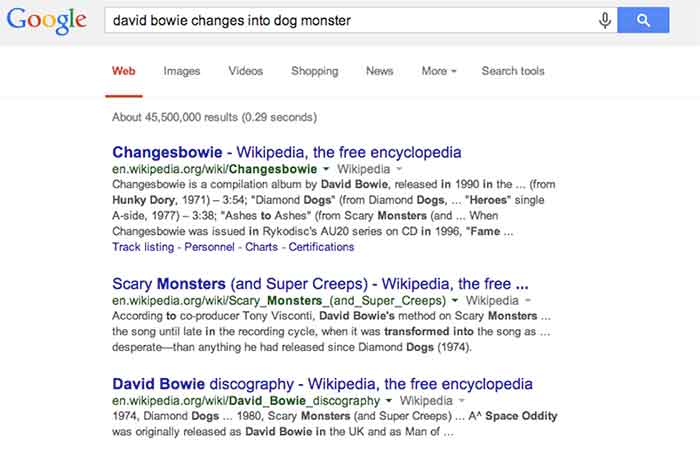
    For a hypothetical example, let’s look at this – as I do most things – in David Bowie terms. As you may or may not be aware, David Bowie actually briefly changed into an apocalyptic half-dog monster in 1974. This is a fact. Had you been unaware of this rather unusual moment in human evolution and overheard it discussed in an elevator (which is certainly where most of us first hear about otherworldly metaphysical transformations), you might be tempted to Google it. Well, if you were to Google “david bowie changes into dog monster,” you’ll eventually find some things about dog monsterdom, to be sure, but you also get an awful lot of results related to the classic 1971 song “Changes,” the compilation album “Changesbowie,” and the 1980 album “Scary Monsters.”

    ChangesBowieSchemaExampleImage

    Well, in this example, Google isn’t doing anything wrong really. It gave you perfectly logical results related to the primary subject of your search and based on the many of the keywords entered, but it still wouldn’t be quite what you were looking for. This is where schema would come into play. If an obviously extant news article on the completely 100% factual occurrence of David Bowie turning into an apocalyptic dog monster had been marked up with, say, Article schema breaking down the subject matter and providing a summary of the content, Google would likely have better understood to serve you the content that directly matched your search query. Likewise, were album and song writeups for “Changes,” “Changesbowie” and “Scary Monsters” marked up with MusicRecording schema or MusicAlbum schema, Google would be better able to differentiate these types of results from articles more pertinent to this search.

    I realize that it’s cheating to hold Google accountable for not being able to perfectly assess my intent in searching for viable news on an event that didn’t actually happen, but this example still hopefully illustrates how schema can be employed to help Google get from “logical and related” to “absolutely on point” in its serving up of search results.

    There is, of course, a less tangible, but equally (if not more) enticing motivation for using schema. Imagine you are trying to settle on your order at a restaurant, and you ask your server if there are any vegetarian options. You’re probably going to leave a bigger tip for a server who specifies and describes the vegetarian options available, versus a server who simply says, “yeah, read the menu” and walks away. In the same way, there is a mentality when using schema that making it easier for Google to see what it needs to take away from a page might result in a better ranking in search results. I will not say in any definitive terms that adding schema markup boosts a site’s search ranking, but – if used correctly and responsibly – it sure isn’t likely to hurt, is it?

    So that’s all it does? What’s all the fuss?

    Well, actually there are a number of other things we can do using schema beyond making Google’s life easier and hoping for some vague benefit in rankings. With many types of schema, we can make really cool things happen in search result snippets for specific types of pages with specific types of content.

    Review Schema

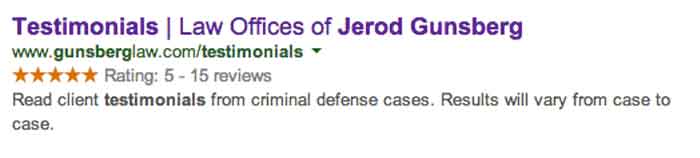
    One thing clients tend to like is having a really pretty star rating value appear in listings of their site in search snippets, which is something that can be accomplished using Review schema.

    StarRatingSchemaExampleImage

    By marking up a number of details within the content of this testimonials page, we are able to communicate enough information to Google about the ratings contained on this page that it presents the rating and review values right there in the search snippet. This is obviously pretty enticing for a user unsure of which result to click on in a long list of unfamiliar names and businesses.

    It is important to remember, though, that the reviews contained in review schema must contain actual ratings associated with said reviews in order to facilitate the addition of the pretty stars to the results. It is also good practice to include some portion of each reviewer’s name in order to establish legitimacy for the content being marked up. Also, in a case like the above example, where there are multiple reviews with multiple rating values, it is necessary for some cumulative review value totals to actually appear on the page. This is known as a review set’s aggregate rating, and it is required in order for the list of ratings to be compiled into a single rating value to be displayed as a star value.

    Video Schema

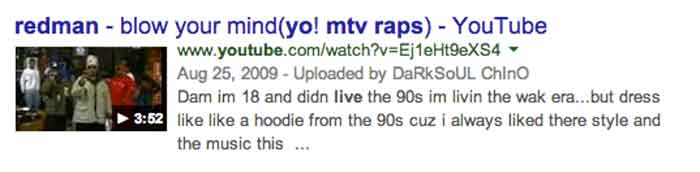
    Anyone who has used Google (so anyone reading this) has seen the potential results of video schema in action every time the inevitable Youtube video links comes up somewhere in your search results list. When YouTube links appear in search results, they are generally accompanied by a thumbnail of the video, which is also a direct link to play the video and the duration of the video being linked. See below:

    VideoSchemaExampleImage

    Effective use of video schema can lead to a similar thumbnail, play icon, and duration display within your site’s search snippets. This can be accomplished using self-hosted videos displayed with custom players or through embedded videos hosted on YouTube, Vimeo, or any other video engine. It is important to remain realistic about this though. Remember that Google owns YouTube, so it’s kind of unlikely that the page containing your embedded YouTube video is going to rank higher or be featured more prominently than the source video’s listing actually on YouTube.

    MusicRecording Schema

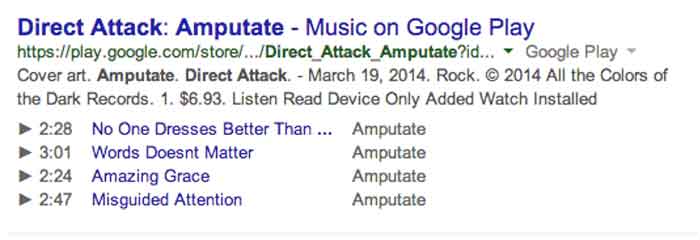
    Much like video schema, MusicRecording schema can display player icons with track, title, and duration details right there in the search snippet. This type of schema obviously only applies to a fairly niche segment of sites and/or clients, but it is another good example of how search snippets can be enhanced through schema. The example below displays a Google Play search result, which, as with fellow Google property YouTube, almost always displays the player info in the search snippet. Similar results can be accomplished in organic results with effective use of schema, however:

    MusicRecordingSchemaExampleImage

    OK, I Get It. So How Do You Do It?

    I’m not going to get into incredibly great detail here, because I promised a relatively simple primer and not a code-heavy breakdown that would scare away newcomers. Perhaps a more thorough explanation of the actual implementation of schema within HTML can be addressed in a future post. For now, I just want to explain schema implementation in terms of properly reading and understanding schema properties in the context of the schema.org item breakdowns.

    The most important thing to understand is that schema markup, like the HTML markup it is integrated into, is hierarchical in nature. This means that there are often numerous schema subproperties, within another schema subproperty, within a schema property, within the top level declared scope of a specific schema type, and so on. And once you go a next level deep in the hierarchy (or change the scope of your markup), the set of available properties is different and only applies to this new scope of the schema.

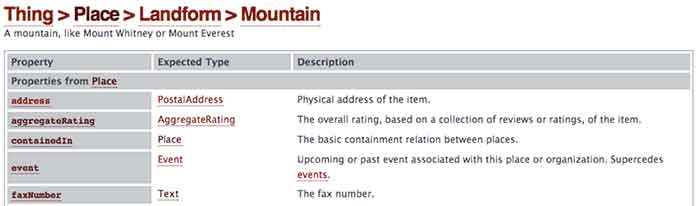
    As an example, let’s look at a section from the page for the always useful Mountain schema*:

    MoutainSchemaExampleImage

    So we’re going to start with Mountain schema as the scope of what we’re marking up in our content. As you can see, there is a list of available Properties for use within this schema on the left. With a nod back to the much earlier comparison in this post, these are all the different types of information we can “highlight” for a search engine. The Description on the right is a pretty self-explanatory explanation of what the property should reference. So far, so good.

    Now, where things get a little tricky is in the Expected Type column in the center. Take a look at the bottom most property “faxNumber,” which is obviously very important. We all know how difficult it can be to send a fax to a mountain, right? Well, you can see that the faxNumber property has an expected type “Text.” This means that whatever text content you list as the value for the faxNumber property is what will be directly communicated to a crawler or search engine as the fax number for your mountain. Simple enough.

    Well, you’ll notice that all the properties above it have more vague and mysterious extended types associated with them. In fact, these types are entirely new hierarchical scopes for the schema being added to the page. So for the “address” property, for instance, instead of just dumping your mountain’s entire street address in as the value, as you can with “faxNumber,” you’re going to have to change the scope of this schema and fill in any address information according to the next level of properties contained in the PostalAddress schema type. Once you change scopes in schema, the deeper level schema type does not know what is going on in the outer levels. So in this example, your PostalAddress does not know or see your mountain’s fax number.

    OK, This Is Getting Ugly. Just Stop.

    Good call. This is probably a good place to cut off an intro level crash course in schema, since anything much more detailed would involve some actual HTML knowledge or experience. Hopefully, this will have helped a non-web developer understand a little bit more about what schema is and how it can be employed to better communicate with search engines. There is such a vast expanse of available schema types for use marking up web content, a fundamental grasp of its structure and function can be extraordinarily useful in pointing your content more directly to the right readers.

    * This is where the Game Of Thrones meme would have gone if I weren’t such a snob.

  • HTTPS: Guardians Of The Google Galaxy

    Last week, Google published a blog post stating unequivocally that encryption will be a ranking factor for websites. They said, “We’re starting to use https as a ranking signal.” They did downplay that message slightly by adding the impact would be a small amount of rankings trust: Here is a pretty important takeaway from the Google published blog post (the emphasis is mine).

    “For now, it’s only a very lightweight signal … But over time, we may decide to strengthen it, because we’d like to encourage all website owners to switch from http to https to keep everyone safe on the web.”

    Which I interpret as “You don’t have to frantically get encryption on any of your websites today, but as you perform regular maintenance on any websites you own, you may want to consider adding SSL (Secure Sockets Layer).”

    EncryptionIsComingImageIn the Spring, Matt Cutts hinted strongly that the need for encryption was coming, and at the time we took a “wait and see” approach, knowing that it was not an urgent matter, and we could look at it again when it did become “a thing.”  Now, it is officially a thing.

    Over the years, Search Influence has had a small percentage of clients with encryption.  It has always been on websites where it makes sense: banks, credit unions, any online loan application sites, e commerce (of course) — basically, sites where you submit your personal and financial information. Historically speaking, plumbers, catering services, charter fishing, and dog walkers, would not normally need this level of security because those businesses don’t normally ask consumers for their personal info.

    As we watch the behaviors of secure vs non-secure websites, we will be better able to make informed decisions on the “ to-secure-or-not-to-secure” front.

    For now, MaAnna Stephenson says in this post, “Do it Because it’s Right For You … don’t make this change because of the ranking factor bump alone.“ I tend to agree with her at this point. Google could evolve this into a more significant factor as they suggest in the announcement, or like, other experiments, it could lose importance.

    What Does Encryption do?

    Encryption does very little to protect a website; it serves to protect any data exchange between a website visitor and the hosting server. This announcement by Google illustrates that they want a safe search experience for consumers. The ultimate goal is the consumer experience, and the consumer wants security.

    Without encryption, when you fill out a form or provide any information on a website that gets sent back to the business, this data is sent as plain text. Plain text is bad for personal information and financial information because plain text is easily taken by hackers.

    EncodingDataImage

    What encryption does — it encodes any data going through the website, and only the website owner can decode that data. The concept is the same as using codes to exchange secret messages. You can only decode the message if you have the decoding key.

    These 5 bullets are a great distillation of what happens.  I have quoted these straight from  from DigiCert:

    1.    Browser connects to a web server (website) secured with SSL (https). Browser requests that the server identify itself.

    2.    Server sends a copy of its SSL Certificate, including the server’s public key.

    3.    Browser checks the certificate root against a list of trusted CAs and that the certificate is unexpired, unrevoked, and that its common name is valid for the website that it is connecting to. If the browser trusts the certificate, it creates, encrypts, and sends back a symmetric session key using the server’s public key.

    4.    Server decrypts the symmetric session key using its private key and sends back an acknowledgement encrypted with the session key to start the encrypted session.

    5.    Server and Browser now encrypt all transmitted data with the session key.

    Considerations

    For existing websites, there are some considerations when deciding to implement encryption.  Most of these will cost the website owner money, time, and effort.

    1) Prepare to get an SSL certificate.

    Before you get an SSL certificate, there are several things you need beforehand:

    • Unique IP
    • Certified signing request
    • Accurate WHOIS record
    • Business valuation documentation

    Hopefully, you have a developer who will manage this checklist for you.

    2) Get the SSL certificate.

    The website owner has to decide what kind of SSL certificate he/she needs. Leigh Aucoin, Web Development Team Lead here at Search Influence, comments, “Most hosts or domain registrars offer SSL certificates, and there are some companies that specialize in this in particular.”

    Single Domain Cert

    Prices may vary (usually expect upwards of $70/year) for a single domain.

    If a single domain SSL cert is setup, it’s important to establish a “canonical” domain (as we tend to do) of www or non-www, and set the certificate to that one. Otherwise, you’ll need to purchase another certificate either for the www subdomain or just the raw hostname.

    Wildcard Cert

    Having a “wildcard” SSL certificate that will match all subdomains is approximately 3x the price. This may be good for certain sites, but most clients don’t have subdomains beyond www.

    Also, a website owner needs to understand that the SSL certificate, maintenance, and annual renewal will cost money and effort every year. Peter Rigney at Annunciation Interactive offers his input, “My practical experience is that, for clients who ‘just want the website to work’, keeping an SSL cert up to date can be somewhat logistically painful.  The annual renewals involve some work, charges, and client authorization processes that aren’t particularly fun for anyone. Particularly when it’s a ‘hands-off’ or over-taxed client…”

    This is work for a professional, unless you are a business owner with a lot of technical knowledge.

    MatrixImage

    3) Get it installed on your server.

    Leigh suggests that your hosting company should be able to provide you or your developer with guidance on how to do this, and it may vary per host. Per this FAQ, “Installing a certificate involves a process that’s specific to each individual web server. Certification Authorities publish instructions for generating the Certificate Signing Request (CSR) and installing the certificate.”

    4) Make sure your SEO is impacted as little as possible.

    Per Google Webmasters support, changing from http to https is considered a URL change, and as with all URL changes, it very likely could have a ranking decline after launch.

    Moving from http to https is considered a site move, all of your URLs are changing and all precaution and planning needs to be considered. Redirects, new sitemaps…  This costs a small business owner money in paying the developer to do this work. The web developer has to gather all of the site’s existing information, plan a thorough strategy, implement everything along with the SSL certificates, and monitor the results in the weeks after.

    5) Plan for accurate data.

    When you launch, you will want to make sure you see your website data accurately. In Webmaster Tools, make sure you verify all existing variations of your site (www., non-www., https, subdirectories, subdomains). Don’t forget about the settings for your preferred domains and canonical URLs.

    6) Know that site speed can be decreased.

    Your site speed could be impacted because encryption slows things down. All the data gets encrypted and then decrypted by the website visitor and then again on the hosting server. This takes a little more time than sending straight text data. The SSL also encrypts the page content, the style sheets, and all of the other features on the page such as images and videos. If your site is already old and clunky, you may want to consider an upgrade. While upgrading you should strongly consider a mobile or a responsive site to go along with your potential encryption.

    Not a Snap Decision

    CatShouldAddEncryptionImageDeciding to add encryption to a website is not a decision that can be made quickly. The certificate itself — not to mention hosting and domain renewals — costs money.  Relatively speaking, they don’t cost a lot of money, but the overhead is something that needs to be considered.

    The average small business owner would likely have to pay a developer to manage the process and installation. You also will likely have to pay the developer to maintain that security every year with renewal. Find a developer with some experience with SSL certificates. A trusted, knowledgeable developer is a valuable investment.

    There may be some opportunity costs if the site loses some ranking in the first few weeks after launch. This is a very real scenario and is especially a concern for ecommerce sites. If your developer isn’t experienced with setting up redirects and submitting sitemaps, talk to your SEO team to coordinate with the developer.

    If you are already planning a site redesign, or converting to a responsive site, or some other investment in your domain, it would make sense to go ahead and add in encryption. Just plan ahead and be thorough.

    This blog post is intended to give a small business owner some talking points when having a discussion with his developer. I’m sure there are many small considerations not included here, but if you have a valuable tip for an SMB, please comment!

    Image Sources:

    http://rebloggy.com/dancing+baby+groot/search/bestmatch/page/1

    https://imgflip.com/memegenerator

    http://giphy.com/search/hacker/3

    http://fierydragon.com/dragonsbreath/?p=1286


  • Survive Your Serving of Google’s Pigeon Pie

    Late last week, influencer Erika Karas wrote an informative blog about Google’s algorithm update, Pigeon. The new Pigeon update might make it more difficult for individual businesses to rank among sites that Google deems more useful and relevant to local searchers’ results. Most local directories received a boost in rankings thanks to Pigeon. It makes sense if you consider the fact that when most people search for things like “pizza New Orleans,” they want to see a list of their options along with reviews, making sites like Yelp and Zagat more relevant than just a link to one pizza place in the area.

    So, how can you make sure you stay relevant with this in mind? First, search for common phrases that your targeted audience looks for. Next, see what sites Google is ranking highest and get your business on there with detailed and correct information.

    In the research I’ve done since the algorithm update, these are the sites I’ve found most often: Yelp, Zagat, Urbanspoon, Thumbtack, TripAdvisor, and Yellowpages. For obvious reasons, Google Plus is the first place your listings should be claimed and optimized. Yellowpages and Yelp are also great places to start, because they both have backend business portals that make it easy to claim and update your listings. They also require phone verifications by the business, which makes them more authoritative and trusted by Google. It’s best to provide as much information as possible in these listings and be consistent in the information you provide. Your name, address, phone number, website, and hours of operation should all be the same on your listings as they are on your website.

    Also, look out for categorical sites like HealthGrades, RateADentist, HomeAway, and the like that are relevant to your industry. You might want to look into getting your business on these industry sites, as they will also play a key role in rankings post-Pigeon. In some of my Pigeon research, I noticed our golf and dental clients were affected the most. These clients were pushed down in rankings in favor of categorical sites like RateADentist and GolfNow.

    Although these tips aren’t guaranteed to aid your rankings, they will help keep you relevant and appearing among industry-specific results.

  • “Pigeon” Algorithm Update Released Thursday 7/24/14

    Pigeon: The New Google Local Search Algorithm Takes Flight

    Google “Pigeon” algorithm update pic on Search Engine Land

    Yesterday, July 24th, 2014, Google pushed live what Search Engine Land is calling the “Pigeon” update. SEO sources are reporting that this update is specifically affecting the local search algorithm. This update has further intertwined organic and local indicators, algorithms and results, and it has the potential to affect the rankings of many small businesses.

    Matt McGee said it best on Search Engine Land: “[Update will] benefit big directory sites like Yelp and TripAdvisor — sites that have stronger SEO signals than small, individual restaurants and hotels are likely to have. For those businesses and websites, local search has just gotten a lot more difficult.”

    Small businesses will likely notice an effect on their rankings. Whether the effect is positive or negative is yet to be seen.

    Additional Details:

    • Major directories such as Yelp, Zagat, Urbanspoon, TripAdvisor, and others are seeing increased page 1 rankings and influence in the search results
    • The update has only been released to US English results, but the percent of queries impacted has not been reported
    • Google said that this new algorithm improves their distance and location ranking parameters, and aims to provide a more useful and relevant experience for searchers seeking local results, although it may make it more difficult for individual businesses to rank in the search results

    Like so many of Google’s updates, this is a first pass which will certainly have tweaks and updates as it goes along. In every algorithm update it typically takes a few weeks before we understand the full impact.

    This update from Google plays into a long-term strategy we’ve practiced at Search Influence: Barnacle SEO. Barnacle SEO has been getting a lot of attention lately because of Google’s love of big sites. What we’ve learned, over the years, is that it’s important to be present in all the places Google, and customers, would look for a business like yours.

    Rest assured, like the other updates before it, we’ll assure our clients are well positioned for the future.

    For more information check out these articles:

    Google “Pigeon” Updates Local Search Algorithm With Stronger Ties To Web Search Signal

    Pigeon: Search Engine Land’s Name For The New Google Local Search Update

  • Call Me, Tweet Me (If You Wanna Rank Me) – Google Update Favors Mobile Sites

    UpdateAllTheCrustySitesImageRecently, Google released a blog about the importance of having a modern website that supports modern devices. Google has always put emphasis on the user’s experience. Now, they are trying to avoid sending users to sites that don’t promote a good user-friendly experience.

    Google explains that flash sites will display a warning in their search engine results. This warning can be detrimental to business owners with flash sites, or any site Google deems not compatible with modern devices. If users see this warning in the search engine results pages they will be less likely to click on the site. Essentially, it does not matter if a business’s site is ranked at the top of the page or the bottom; if this error warning is displayed the click through rate will be obliterated and the traffic to the site will plummet.

    How does this update affect you?

    Google is pretty vague in their blog, using Adobe Flash sites as an example and leaving it open ended insinuating that other types of sites may also be affected. Even though Google doesn’t provide a list of sites that may be affected, this should be a wake up call for all site owners. Any business with a website that is not compatible with mobile devices should be prepared to make upgrades. At this point, not doing so can bring site traffic to a standstill.

    Google is not saying it, but sites that are affected by this updated should expect to see their keyword ranking drop as well. With the stress put on user experience, it is unimaginable to think that Google would possibly allow sites that don’t promote a good user experience to rank higher than sites that do.

    Next Steps!

    Google recommends to all sites that don’t support various devices, to make the appropriate upgrades. Google references Web Fundamentals and Web Starter Kit, two resources that can be utilized by Webmaster to make the upgrade process smoother.

    It will be interesting to see how this update will evolve in later updates, and to see its effects on ranking algorithms. Will Google begin to rank sites according to their responsive design? Will they begin to rank those sites with responsive designs higher than sites that don’t? We will just have to wait and see. Business owners with a site that is not does not support all devices should call a web developer straight away!

    Image Source:
    Thanks to Hyperbole and a Half for All The Things image.