Category: SEO

  • Don’t Celebrate Too Soon: What to Know About Disappearing Manual Actions

    The topic of manual actions disappearing from Google Webmaster Tools is not a new issue, but it has come up a few times in the last week, which automatically deems the topic worthy to write about.

    Do manual actions have expiration dates?

    Manual actions do expire, and when they expire, they disappear from Webmaster Tools. The expiration date is not published in Webmaster Tools, but Matt Cutts states in this older video that manual penalties do expire and that the length of the penalty is dependent on the maliciousness of the problem.

    In my experience, I have seen these disappear from GWT most commonly at one year, but that is not an absolute expiration date.

    If the penalty is gone, is the problem is still there?

    Eric Kaun sums it up nicely:

    It looks like the manual action that was applied by the webspam team on your site expired. Right now there are no manual actions affecting your site in Google’s search results. However, even when a manual action expires, if the reason for the original manual action is still relevant, it’s possible that the manual action will return later on.

    I’d strongly recommend that you continue removing any inorganic links to your site to prevent any future manual actions on your site.

    John Mueller adds more in this GWT forum:

    While manual actions will expire at some point, I would strongly not recommend sweeping them under the carpet and hoping that they go away on their own – at least if you’re interested in having your site be optimally represented in our search results. Even when a manual action expires (which might take quite some time), if the reason for the original manual action is still relevant, it’s always possible that the manual action is returned later on. In my opinion, if you’re aware of issues that are negatively affecting your site’s performance in search, and if its performance there is important to you, then resolving those issues is often a good use of time.

    Should I still submit a disavow file?

    If a website had a manual action, and that manual action notice is gone, a disavow file should absolutely still be submitted. The site likely still has the unnatural links, thin content, or other problems that originally warranted the manual action. It’s just basic cleanup and common sense. You want to rank in Google, but Google has directly told you that your site has signs of unnatural behavior. Go clean up your act, and you may win a little favor back from Google.

    Also, note that it is possible for a manual action to return. If it returns, Google is generally stricter this time around and requires much more cleanup. If you get two manual actions, Google tends to no longer trust your site, and you have to work a little harder to earn back that trust.

    What will happen to my rankings?

    It’s worth noting that after an MA is lifted, rankings don’t always increase, especially if you just had a partial match manual penalty. Sometimes rankings won’t increase because the site also had a hit from a Panda or Penguin filter or there aren’t enough quality references to get to the top of the SERPs.

    If the pages of your site were ranking from unnatural behavior before, what’s left now that those tactics are edited and the bad behavior is fixed? Among other factors, the site needs some new, engaging content and some strong, relevant backlinks as first steps on the path to bouncing back.

    Do I need to submit a reconsideration request?

    If a manual action disappears from Webmaster Tools, a reconsideration request cannot be submitted because the submission goes through the manual action message, which is now gone. All you can do is edit the unnatural behavior you have on the site, remove or edit the links that you can, then submit a disavow file.

  • Pick up the Phone: Google is Calling With A Mobile-Friendly Update

    With Google’s recent announcement that mobile-friendliness will be a ranking signal, we have been fielding impressive numbers of emails and phone calls from website owners asking how this affects them.

    Google has been moving toward rewarding websites that are addressing consumer demand with mobile-friendliness. In the official announcement published on February 26, Google says, “Starting April 21, we will be expanding our use of mobile-friendliness as a ranking signal.”

    Two factors to consider regarding this algorithm launch:

    1. This rollout will affect mobile search rankings only.
    2. This rollout will likely be a period of rollouts rather than a single-day launch.

    Mobile Search Rankings Only

    In a hangout the day after the announcement, John Mueller, Web Trends Analyst for Google, mentions at about 9:42, “These ranking changes are effective on smartphones for smartphone users.”

    Again at 44:40, he reiterates that this algorithm is specific to mobile search. Mobile SERPs and desktop SERPs may become significantly different starting in late April.

    JohnMuellerGoogleMobileFriendlyYouTubeImage

    (Thanks, Joshua Berg, for the G+ post with topics time stamped).

    Why is Google launching a mobile-specific algorithm?

    Because mobile use is growing so quickly and is approaching 50% of Internet use, Google wants mobile users to experience relevant, high-quality websites that are designed for mobile use specifically. It’s a recurring theme that Google wants to provide for the user by offering a quality experience.

    Um, is my site mobile-friendly?

    In November, Google announced the addition of “mobile-friendly” tags in mobile search results.
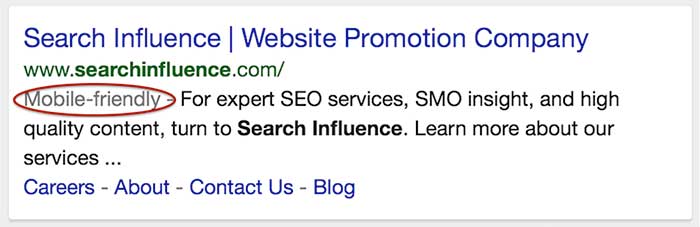
    mobile-friendly tag in iphone search results

    At the same time, they also gave us a mobile-friendly testing tool. Take note that this testing tool shows you how the Google bots see your site, which is not necessarily how your site resolves on an actual smartphone.

    Passing the test means you qualify for getting the mobile-friendly tag in mobile search.

    However, even if you have a mobile-friendly (“mobfr” per Joshua Berg) site, if the Google bots can’t get to all of the page elements, the testing tool image result may not be how your site really looks on a phone.

    Not passing the test generally means you don’t have a mobfr site. However, I have seen a few sites that are responsive but don’t pass the test. They look great on my iPhone but don’t look great to the Google crawlers.

    This is an example of a responsive website that looks and functions well on my phone, but the mobfr tool just doesn’t see it that way. (The good news is that this website owner has been working on an improved responsive site that should launch soon, well ahead of the April 21 deadline.)

    errors in mobile friendly testing tool show the site different than on iphone

    Do I have to get a mobile site if I want to rank?

    In the hangout video, this question is discussed at about minute 12:00. The summary is that mobile-friendly websites will be getting the edge in mobile rankings. Paraphrasing the hangout conversation, non-mobile-friendly sites will not be dropped out of mobile search completely.

    Any time you boost the position for a specific set of sites, it will naturally result in the loss of position for another set of sites. Giving precedence to mobfr sites just means not-mobfr sites have to move out of the way.

    John Mueller also mentions that if a not-mobfr site renders decently on mobile and is highly relevant, it would be a disservice to the searcher to not serve those sites up in results. It’s all about the searcher.

    How much do I really need to worry about mobile traffic?

    The number of visitors using a mobile device to access websites has increased dramatically over the last few years. The current average hovers at around 50%, depending on the industry. This is half of a website’s traffic coming from smartphones. I looked at some of our clients to see if I could confirm this stat. I dug around in Analytics and pulled mobile (not tablet) stats for the last six months for two industry types.
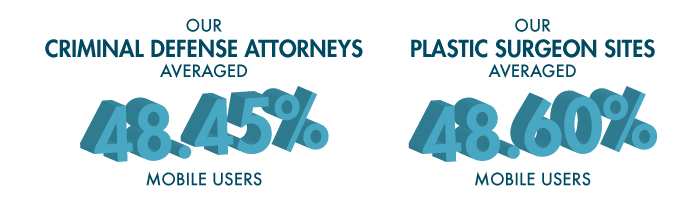
    SI-stats-blog-1

    For some industries, this algorithm may not be as big of a concern as it is for the criminal defense and plastic surgery industries. I looked at an admittedly small set of clients to get these two percentages:

    •      Independent insurance agents average 17.48% of traffic as mobile.
    •      K-12 schools have mobile traffic at an average of 13.87%.

    If the mobile traffic to your site is in the double digits but may not be at 50%, you can look at other data points in Analytics. Look at bounce rates, pages visited, and repeat visits from smartphone users to see how satisfied or dissatisfied they were with their visit to your site.

    What are the options to make my site mobile-friendly?

    There are three options for developing a mobile-friendly site version. The most common option is to have responsive and mobile serving separate URLs. Here are three options for mobile sites thatGoogle discusses in detail on their developer site:
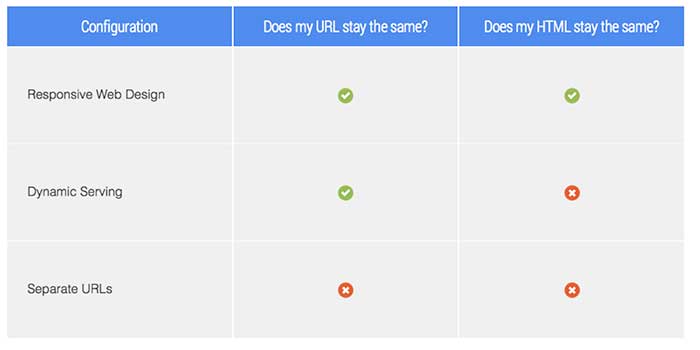
    GoogleDeveloperURLConfigurationOptionsImage

    What’s better, mobile or responsive?

    Personally, I love a responsive site because the site has the same HTML, the same URLs, and the same design across all devices: desktop, mobile, tablet.

    It should be noted that a responsive design is an investment because it usually requires a complete rebuild of the site. However, if you rely heavily on website traffic for lead generation and if you haven’t redesigned your site in a few years, this may be the time to invest.

    A mobile version of your site is a good option as well. You can have either a full version or just a portion of your website in a mobile design. Creating a mobile site with a handful of important pages, or the pages most people visit, may be all you need to deliver to mobile users the information they need.

    For websites with an already high percentage of mobile users, I have to recommend responsiveness over mobile. For websites with double-digit mobile traffic, but not 50%, a mobile site may serve you well.

    Also, make sure your developer optimizes images and pages for fast page load. Google has been testing with page load speed tags in SERPs too, and if you’re investing in a site upgrade, you should address as many factors as you can at one time.

    What about duplicate content?

    If you have a mobile site and a desktop site with the same content on two different URLs, these can be seen as duplicate content, which can dilute your content’s authority. Example:

    Domain.com/about-us

    m.domain.com/about-us

    John Mueller commented on this topic: “You don’t have to worry about duplicate content—definitely not when it comes to mobile versions when they’re annotated appropriately.”

    You should make sure to get your developer’s assurance that content will be referenced properly between a mobile site and a desktop site.

    Your website is an asset for your business.

    One small business owner I talk to frequently is in an industry that does not get a lot of leads online. The owner is not interested in anything online, but he knows his customers use his website frequently as a resource, and his site is an asset to the business. He gritted his teeth and devoted a lot of his 2014 budget to technology. He converted his website to a responsive design, and while he was at it, he had the developers add encryption, and he was able to have an app created (which can be an expensive investment for a small business, but in his industry it’s almost required). It’s 2015, and he feels some satisfaction (and relief) that he took care of all of these things last year.

    The takeaway is that a business’ online properties are assets that need regular maintenance and upgrades to keep up with the ever-changing Google and consumer demand. If your site is not mobile-friendly, you should talk to your SEO manager as a first step in finding out what you need.

    For even more information, see:

    March 4, 2015 Google’s Gary Illyes Q&A on Upcoming Mobile Ranking Change

    March 5, 2015 Google: The Mobile-Friendly Ranking Factor Runs In Real-Time & Is On A Page-By-Page Basis

    “…if you have 10 web pages on your web site and 5 of them are mobile-friendly and 5 are not, then only the pages that are mobile-friendly will benefit.”


  • 4 Internet Marketing Mistakes You Might Be Making

    There is nothing more frustrating than putting all your money and effort into your site’s content only to see a conflicting ROI. Many companies and businesses rely on Internet marketing to increase their profits, but some make simple and even unpredictable mistakes as they go about it. Feeling frustrated or annoyed with your results? You’re not alone.

    WAIT! Don’t break your computer just yet—we’re here to point out some mistakes you might be making.

    1.) Every part of your content concentrates on sales.

    Everyone wants to make sales and increase profits. That’s the whole point of your Internet marketing campaign, right? But new users who visit your site may not purchase your product or service right away. Smart buyers want to research your product, learn more about your brand, see what you offer, and compare your prices to the prices of your competitors. Your potential customers likely won’t have the compulsion to commit to a purchase right away unless you are a well-known company like Amazon. Don’t try to sell your product outright; rather, tell a story with your content. Ease your customer in slowly to make them believe in what you are selling.

    To do this, avoid making your content too product-specific. Let’s say you sell garden hoses, and garden hoses are all you know. You don’t want to talk about just garden hoses all the time; you’ll lose customer interest. And let’s face it—you can’t talk specifically about garden hoses non-stop while keeping your content interesting. So make sure you expand your content beyond your specific product. On certain pages of your site, spill expert gardening secrets, discuss ways to keep your lawn fresh, or start an FAQ section on popular gardening techniques. Always expand on your product and related topics to keep the customer engaged!

    2.) You’re using social media sites…incorrectly.

    One of the biggest components of any company’s campaign is the strategic use of social media. Coordinating posts on Facebook, Twitter, LinkedIn, and other social media platforms can take up exorbitant amounts of time and effort. Concentrating too much or too little on certain posts or topics can lead to fewer followers on a specific page, and no one wants to see multiple, random posts appear on their newsfeed every single day. Creating posts and utilizing social media should be a strategic and intelligent endeavor, not a disorganized, chaotic mess.

    Plan ahead by understanding the goals of your social media strategy. Do you want to drive traffic to your site? Generate more sales? Enhance your email list? Work toward brand awareness? Know your brand and, most importantly, know your customers! You don’t need to use every social media outlet; just figure out which channels your customers use most. If you’re not sure which media sites your customers prefer, just ask! It’s important to learn as much as you can about your clients, their social activity, and how to appeal to them. Absorb yourself in the community’s conversation and interact with your clients. Marketing 101: customer service and knowledge is the number one driving component to any business.

    3.) Your content is SEO-heavy.

    SEO is essential to any marketing campaign. You want Google to find your specific keywords and phrases to generate more traffic. SEO helps human users know you exist within their area!

    While all that is true, you do not want to write all of your content specifically for search engines. No one wants to read website content that has keywords stuffed into every sentence; content needs to be well-written and unique! When creating pages for your visitors, you want the writing to be memorable and easy to read. Once you start to write your content, all of the information you have about your product will flow out naturally, and the content will optimize itself: users will be more likely to share your content through social media, blogs, or websites when the writing is more natural. And if you want to give your content greater authority, be sure to link to other credible websites within your industry.

    4.) You aren’t calling your clients to action.

    You caught the fish, and now you have to reel them in.

    It is a very common misunderstanding that if you drive traffic, you will automatically increase sales. Maybe your new customers aren’t making purchases, and even your old customers who have been following your site and posts since the beginning of time still aren’t biting. Personally, I have followed many company sites without ever buying their products. Why is that?

    Creating an easily accessible path to your product is crucial. You want clients to have a simple conversion from viewing/visiting to buying. By embedding relevant calls to action within your text, you can ensure that content on your site gets potential customers deeply involved with your product. Every page for your products should have a link to sign up for your site, email list, or newsletter in three places: on the sidebar, below the article, and underneath the header.

    Don’t leave your customers to ponder what to do after reading your page. Send them along the right path!

    Image Sources:

    Smashing Computer Gif

    According to Google Gif

    Thumbs Up Gif

  • Search Tools, Edit Wars, and More: Get the Gist of Wikipedia for Businesses

    Wikipedia

    What is the Loch Ness Monster? Who is Monty Python? What is the history of Starbucks? Every time you do a Google search for practically any event, business, person, phrase, song, or obscure piece of trivia, Wikipedia seems to be right there at the top of the search results. Wikipedia, for those who are still using PalmPilots and pagers, is a free online encyclopedia. What makes Wikipedia unique is that it allows users to edit the content on all 35 million of its pages!

    A Brief History of Wikipedia

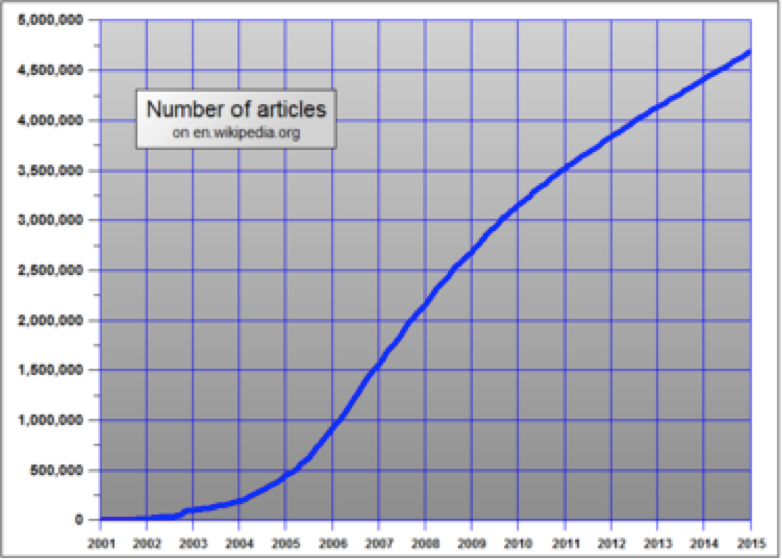
    With more than 500 million unique views each month, Wikipedia is currently the 7th most popular website on the Internet—but it didn’t start out that way. Wikipedia was launched in 2001, back in the dark ages of the Internet, and it was highly criticized for building a business plan in which no central organization would control editing and the general public would be responsible for the site’s upkeep. Because the site’s content was being created only by users, it took quite a while for the concept to gain traction in certain circles. In addition, some considered the website’s content to be untrustworthy because edits were so easy to make in the site’s early days. As you can see from the graph below, it took several years for the site to gain popularity, but within a few years, Wikipedia’s usage and traffic exploded.

    WikipediaGrowthGraph

    If you have ever visited Wikipedia, you’ve surely noticed that there are no advertisements, no fees to use the site, and no indications that the company is making a profit at all! This is partially due to the fact that they are a not-for-profit organization relying almost completely on donations from their users. A few times a year, the site hosts drives in order to cover basic costs like server space, bandwidth, software, office space, and salaries for its small staff. Of course, because all of their content is donated, there is no need to pay for updates and contributions!

    As time went on and Wikipedia increased in popularity, the company wanted to ensure that the site’s content was as trustworthy, current, and extensive as possible. Wikipedia began to create new processes that made editing content and creating pages more difficult, and it also added a review process. Only registered users can create new articles, some pages are protected from edits, and some pages are “semi-protected,” which means that only certain editors can make changes. All editors are allowed to submit modifications or updates. However, review is required for many of these edits, and all new articles must go through the review process. Depending on the page, edits can be reviewed by the public or by specific members of the Wikipedia staff, but if the edits are small enough, they might go live immediately without passing through the review process.

    What This Means for Your Business

    Because the site has such high authority and ranks so well in search results, Wikipedia offers incredible SEO opportunities for businesses. A business’s Wikipedia page can have very recent information, detailed descriptions about products and services, a history of the company, and even information about charities and community outreach programs the staff partakes in. However, because Wikipedia aims to always tell the full story from a neutral (and non-promotional) standpoint, dark spots in the company’s past are more prone to surfacing. Major lawsuits, media mentions, and other types of bad press could have a permanent place on a business’s Wikipedia page if that news is noteworthy enough. If your business is considering going down this path, always keep in mind that others will be able to write and edit all content about the business.

    Below, we have provided additional information (all from Wikipedia) on how to create a page, make edits, and more!

    Resources

    http://en.wikipedia.org/wiki/Wikipedia

    http://en.wikipedia.org/wiki/History_of_Wikipedia

    http://en.wikipedia.org/wiki/Wikipedia:Size_of_Wikipedia

    http://www.ehow.com/how-does_4809393_wikipedia-make-money.html

    http://en.wikipedia.org/wiki/Wikipedia:Your_first_article

    http://en.wikipedia.org/wiki/Wikipedia:Article_wizard


  • SEO for 2015: Meet the New Boss, Same as the Old Boss

    The world of SEO is constantly changing. Google, the big prize for search engine ranking, may change its search algorithms from 500 to 600 times a year, and major updates like Panda, Penguin, and Pigeon are rolled out on a fairly regular basis. And while your business can’t shift SEO strategies daily to incorporate every change Google unveils, it makes sense to take a fresh look at your SEO approach at least annually—or does it?

    The answer is yes, and no. While there are some aspects of SEO that can and should be refreshed or updated to keep up with changing algorithms and your audience’s needs and tastes, the good news for online marketers is that the basic SEO strategies you’re already familiar with will continue to be effective—in 2015 and beyond.

    Here’s a look at what will change in the SEO landscape for 2015 and what will remain the same.

    Sticking to the basics still works

    Best practices for SEO strategies have always revolved around delivering high-quality, targeted, and useful content with a few well-chosen, naturally incorporated keywords—and for 2015, that won’t change. Google-sanctioned “white hat” SEO tactics continue to be the most effective strategies for driving SEO and boosting search engine rankings.

    Another basic element of SEO that will remain the same is the need for both on-page (what you say about yourself) and off-page (what others say about you) factors. Successful SEO includes creative, useful, and engaging content creation for your website, social media, and other online channels, along with promotion that drives off-page SEO by attracting links to your content from other authoritative sites.

    Going mobile will be an imperative

    By now, most companies are aware that a responsive, mobile-friendly website is essential for attracting and retaining customers—but mobile SEO is more important than ever when it comes to Google. Responsive site design will be a crucial aspect of ranking high on Google, since the search engine now reports whether or not a site is mobile-friendly to both users and webmasters.

    If you’re not sure whether your business website is mobile-friendly enough, Google offers a free online testing tool, along with a link to information about their mobile-friendly criteria and how it may affect your search engine results.

    For small business, local SEO will be king

    In 2015, it will be important for businesses—especially small businesses—to make sure their websites are optimized for local area searches. Google and other search engines are giving more attention to local directories and citations, including hyperlocal content (relevant content authored by local experts within their geographic areas).

    One effective SEO strategy for optimizing local search is to make sure your phone numbers, addresses, and location pages are consistent with off-page directory listings. If you haven’t done so already, check out third-party business directory and review websites such as Yelp, Google+, and Yahoo Business to ensure that your local information is correct.

    Thinking like a publisher will benefit your SEO

    As search engine algorithms continue to shift weight away from obvious marketing and promotional content and toward contextual relevance, individuals are becoming more important than companies with regard to search engine rank. To take advantage for SEO improvement, more companies are transferring authorship credit to individuals—including text article writers, infographic designers, and video and podcast producers. Giving content creators their own voice will lend your content more weight with search engines.

    Links and keywords will lose center stage

    For a long time, keywords and links have been the cornerstones of SEO. But with a massive shift toward contextual search and high-value content, these primary factors no longer carry the same weight. Inbound and outbound links still matter for search, but their importance has been dwindling as more algorithms place relevance over popularity and authority.

    The same shift is apparently underway with keywords. While a few well-chosen and well-placed keywords still serve to help search engines determine the overall meaning of a page or piece of content, it’s more important that your content answers the right user questions and remains useful and engaging.

    If you’ve been sticking to SEO best practices, your strategy for 2015 is likely to only require minor changes in order to remain effective for the coming year and beyond.

  • I’m So Trendy. You Already Know… Using Google Trends on YouTube

    The last time I wrote about Google Trends, I explained how it could be useful in your keyword research process. I am now going to explore how this tool can be used to create a strategically optimized YouTube video.

    Note: As mentioned in my previous blog, keep in mind that the numbers on the graphs presented are not absolute numbers. They are relative to each other to reflect a trend.

    Search by Keyword

    If a client already has a YouTube video featuring a general overview of their business, then we typically try to match up another one of their keywords with a YouTube topic centered around that keyword. Google Trends has a section of the site dedicated to finding trends in search results on YouTube only, so you can see if that keyword is trending and if there are related phrases to consider adding to the title and description of the video.

    Here’s how to get there:

    1. Visit http://www.google.com/trends.

    2. Change your search setting in the top right drop down box in the top navigation from “Web Search” to “YouTube Search.”

    YouTubeSearchImage

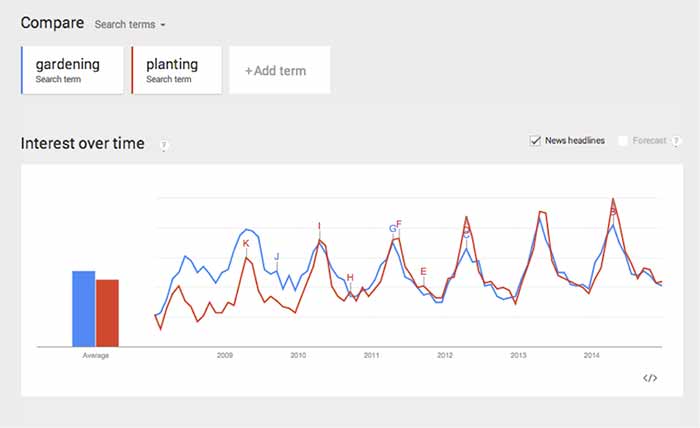
    3. Type in the root of the keyword(s) you want to use in the search box under “Compare.” You can compare up to five keywords at a time. This can be used to help you decide between keywords to use as a video topic.

    CompareChartImage

    In this case, both search terms fluctuate at the same time, so seasonality wouldn’t be a factor, but it could be in other instances. This chart tells me that “gardening” used to be a more popular search trend than “planting” on YouTube, but the gap has closed, and “planting” is actually trending more now. It’s interesting that both of the trends dropped so steeply in 2014.

    Because of this, we should look at similar phrases that could have a stronger trend. This is easy to do when you scroll down the page to “Related Searches.”

    Related Searches

    4. Scroll down the page to “Related Searches.”

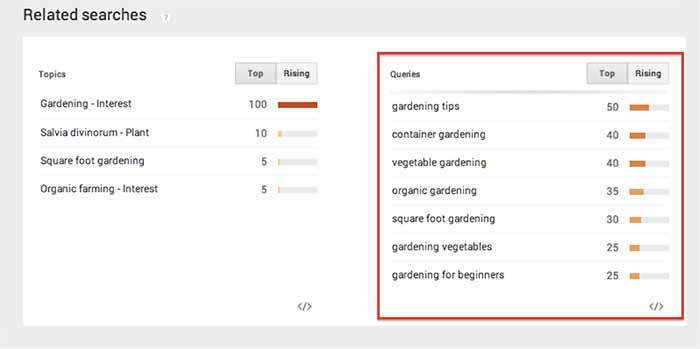
    5. Within “Related Searches” you will see a “Queries” box that shows the most consistently trending searches that are similar to your keyword(s). This is a good place to look for topics that are already popular on YouTube.

    RelatedSearchesImage

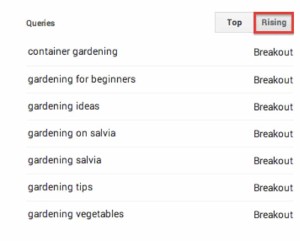
    6. Note the “Rising” column next to “Queries.” These are terms that have been searched for often recently and could become long-term trends.

    As you can see above, I searched for “gardening” and found “container gardening” and “gardening for beginners” as “Related Search” queries. If one of my keywords is “gardening livonia mi,” then I can use “container gardening livonia mi” in the title and description of the video, to optimize it for both terms.

    RisingImage

    Whether you are looking for a way to strategically choose a keyword to optimize a YouTube video or you just need an interesting video topic, Google Trends’ YouTube Search will be a handy tool to explore!

  • Big Results Can Come in Small (SEO) Packages

    tinygiftsimageMany small businesses fear that because they don’t have millions of marketing dollars at their disposal to build their SEO campaign, they simply won’t be able to compete with large corporations. However, there are many SEO tactics small businesses can employ to level the playing field and compete against large marketing budgets.

    If You’re Small, Focus Small

    If your small business offers many services but has a limited budget, it will be more effective to focus your SEO efforts on a small set of highly relevant keywords. For example, if you’re a hair salon and you offer haircuts, blow drying, hair coloring services, etc., it will be better for you to focus on the one service that you perform best. It’s more effective for you to try to be visible for a primary or specialty service than to try to be visible for all of your services—and not to be visible for anything in the end.

    pinonglobeimageYou’re Local, So Get Hyperlocal

    A big advantage you have as a small business is your attachment to the area. Focus your efforts on your local audience by hosting events, participating in your community, getting local reviews, and targeting your content to your locale. You can then leverage all of these hyperlocal efforts in your SEO campaign. That local event you hosted or local organization you helped can generate local content, local buzz, and website links back to your site, all of which tell search engines that you are locally relevant.

    Specific And Long Tail Is The Way To Go

    With limited funds, you need to be clever about the keywords you’re focusing your efforts on instead of going for the obvious ones. To go along with the hair salon example, instead of emphasizing keywords like “hair cut” or “hair coloring,” focus your efforts on more long tail phrases such as “tips to layer your hair” or “how to get an ombre effect.” It’s much easier to rank highly for these long tail, specific keywords than the obvious, broad keywords. While there may be less traffic, the traffic you do get will be highly relevant.

    The next time you think your SEO dollars and campaign efforts don’t stand a chance against giants in the industry, don’t forget that being small has its advantages. Leverage your nimble nature and cleverness for some easy wins!

    Thanks to Heiwa4126 for the globe image and to John Fingas for the tiny presents image.

  • Law & Order SEO: Finding The Culprit Behind Your Decreased Organic Traffic

    As digital marketers, we regularly analyze site traffic to ensure that our efforts are producing positive results. But what happens when you’re doing all the right things in your SEO campaign (high-quality website content, blogging, link-building, etc.) and your Google organic website traffic is consistently going down?

    1) Traffic Deep-Dive

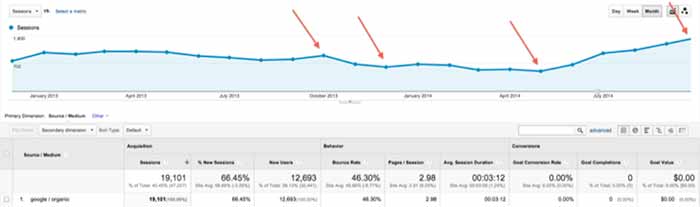
    First, log into Google Analytics and narrow your search down to Google organic traffic over the largest date range possible. Look for trends of upward or downward traffic and make annotations of known changes that might have caused traffic to change (such as a new website launch or the installation of a blog). Also, check traffic by landing page to see if only certain pages were affected.

    TrafficDeepDive

    2) Compare to Algo Timeframes

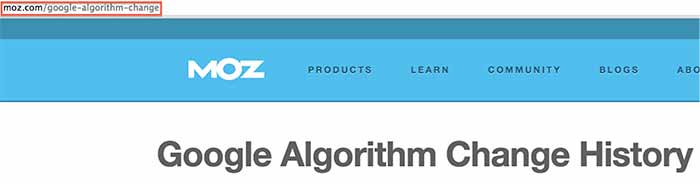
    Next, see if any of the changes correspond to one of Google’s algorithm updates using the Moz algorithm timeline. Keep in mind that the date might not be exact, because the updates often take time to roll out. If you can attribute the traffic change to an algorithm update, take the necessary action depending on the update. Hit by Panda? Focus on your content strategy. Hit by Penguin? Take a close look at your inbound links and check for a manual action.

    AlgorithmChangeIssue

    3) Investigate Other Possible Culprits

    If your traffic change didn’t correspond to a Google algo update, this is when your analysis gets a little tricky, as there are many possible reasons for the change. Here are some things to check when searching for the source of your traffic change:

    • Rollout of a new website (setting up 301 redirects is essential to this process as well as carrying over all SEO optimizations)
    • Removal or adjustment of your content
    • Relocation of your business (your citations need major focus)
    • Discontinuation of an ad campaign that was generating traffic
    • Adjustment of technical elements of your site, such as meta-tags or robots.txt
    • Change or removal of your Google Analytics tracking code (surprisingly common)
    • Change in the marketplace or seasonality (like a decreased demand for your products/services in general or during a certain part of the year)—check out Google Trends
    • Messy directory profile (check your percentage of correct citations using Moz “Check My Listing”)

    These tips will hopefully help you get to the root of the issue and take the necessary action to achieve your SEO goals. If you need a professional team to do the work for you or to assist you in your efforts, you can always call us: we’ll be happy to discuss our SEO packages with you.

    Have any additional recommendations for things to check? This list is not exhaustive, so please help add to it!

  • 12 Days of SEO (as Told by Christmas Movies)

    December is finally here, and you know what that means – Christmas SEO! Here are my 12 (Days of Christmas) tips for your small business’ online presence, as told by my favorite Christmas movies:

    1. Accept That SEO Is a Gradual Process

    It may take some time, but if you strategize and take things step-by-step, you’ll be able to improve your results on Google.

    2. Keep It Consistent

    Just like the Rockettes’ kickline, it’s important to keep your business’ name, address, and phone number consistent across the web. This includes your website, social media outlets, and directories!

    3. Work on Positive Reviews

    Getting positive reviews from positive customers can go a long way. Once you have five reviews on your Google+ page, your average star rating will begin to show in search results. Tip: you can give customers this nifty review link to make it really easy.

    4. Don’t Let the Big Guys Push You Down

    Directories and national chains can be intimidating, but play up your strengths as a locally owned business. You can strategically find keywords to target that feature a maps pack; you can also optimize your business listing on the directories that are ranking high.

    5. Feature Fresh, Original Content on Your Site

    Duplicate content can be harmful to your site’s SEO, and it can be boring for potential customers. Make sure that your site’s verbiage isunique and engaging. It’s okay to be different!

    6. Avenge Your Manual Actions

    A manual action from Google may seem worse than being trapped on the Island of Misfit Toys, but there are ways to earn back trust and get in Google’s good graces. With time, money, and effort, you’ll get there one day. Just like Santa, Google checks its list twice. Once you’ve put in the work, wait and see what happens during the next algorithm refresh.

    7. Trust the Keyword Research

    Sometimes it may seem as though the keywords we recommend are not how people are searching, but the numbers don’t lie. Just don’t forget to check for outliers such as news articles, branded searches, and weird town names (Cadillac and Bath, Michigan).

    8. Get Backlinks That Are Natural and Relevant

    Just because you have lots of backlinks doesn’t mean they are good for your site. They may be spammy or unnatural. When getting links back to your site, you should have a combination of quality and quantity. Ideally, you want lots of good links coming from strong, relevant websites.

    9. Pay Attention to the Technical Side

    Keep all of your sitemaps updated and make sure you submit them to Google and Bing Webmaster Tools. It’s also important to add schema so that Google can easily find helpful information about your business. Don’t forget about optimizing your site’s images and meta data; it’s a quick and easy way to get your “ticket” on the Google Express.

    10. Verify High Authority Directory Pages

    Don’t get “lost” in map results or directory searches. Get your listings verified (usually via phone, mail, or email) and optimize them. I suggest claiming your Google+, Yelp, Bing, Foursquare, and Moz Local listings. If niche sites such as Houzz, Avvo, or Edmunds are available for your business, claim those listings as well. P.S.: this helps you with the recent Pigeon update!

    11. Engage with Customers Through Social Media

    It isn’t enough to have social media accounts; you need to be active and interact with your customers. Keep your content interesting and reward fans for commenting on your page. It could be as simple as liking their comments, favoriting their tweets, or saying “Thank you!”

    12. Analyze, React, and Keep Calm after Google’s Algo Updates

    The landscape of Google can seemingly change in the blink of an eye. While it’s important to brace for the worst, don’t forget to check for the best. A lot of recent updates have been good for my clients! Think of the glass of milk as half full and the cookie plate as half empty; be prepared to take action on the latter.

    Image Sources:

    Rockettes

    Christmas Story

    Christmas Vacation

    Miracle on 34th Street

    Mean Girls

    Polar Express

    Grinch

    Santa Clause

    Lost in New York

  • What’s Black & White & May Have Killed Your Site in 2014? This Year’s Top 3 Algo Updates

    In 2014, there were numerous algorithm updates that changed the world of SEO—for the better. Google uses a finely tuned (and ever-changing) algorithm to sort search results in a way that best caters to the searcher. In order to perfect this art, Google turns out algorithm updates, both minute and massive, regularly (and sometimes not so regularly). As such, SEO is always evolving to match this quickly turning tide, which is why it’s best to focus on creating a site that will best benefit the end user.

    Looking back on the past year, there were many, many, MANY updates of note. So let’s just focus on the top three major hitters.

    Panda 4.0

    About

    Being in the top three is no small feat, and kicking off the list of top algorithm updates of 2014 is Panda 4.0. On May 19th, Panda 4.0 rolled out, affecting about 7.5% of English-language queries. Though there was another major Panda update in 2014, Panda 4.1, the effects of this second Panda update were less noticeable than those of its predecessor, “only” affecting about 3-5% of queries.

    Generally, Panda updates are geared towards high-quality content. Their goals are twofold:

    1. To stop sites with low-quality content from working their way into Google’s top search results
    2. To reward high-quality content with more presence by pushing sites with thin content down in SERPs

    What did it do?

    Panda 4.0’s effects did not stray from the Panda expectation. Some of the observed changes that occurred to sites as a result of Panda 4.0 were that it:

    • Penalized aggregated content
      • Aggregated content relates to sites that compile content from other sites. A well-known site that utilizes aggreged content is Buzzfeed, though Buzzfeed seemed to fare this update well.
    • Penalized thin content
      • There were 2 major types of sites with thin content that were affected:
        • Sites lacking quality, long-form content throughout
        • Sites with strong hierarchical structures that may contain quality, long-form content on key pages but contain thin content on higher-level category pages
    • Rewarded high-quality content
      • Sites with reputable, long form, user-friendly content

    How it changed SEO

    Quality content = good content + positive user experience. The major takeaway from Panda 4.0 is not a new one. User experience is always an important factor, but it’s one that can get lost in pursuit of developing long-form content. When developing quality content, an emphasis should also be placed on how the content is viewed.

    AddingCustomGraphic

    Images

    Paragraph after paragraph about your service offerings is likely a wasted effort without visual aids to break up text and give users a new means of understanding.

    Internal Links

    Do you have before and after images? Related blog posts? Anything to give the reader more info? Add links to give users a reason to click through more of your site.

    Mobile Experience

    Now have you considered mobile? Site visits from mobile users are always increasing. Are you providing mobile visitors a good viewing experience that is specific to mobile and easy to navigate and read?

    PizzaNewOrleans

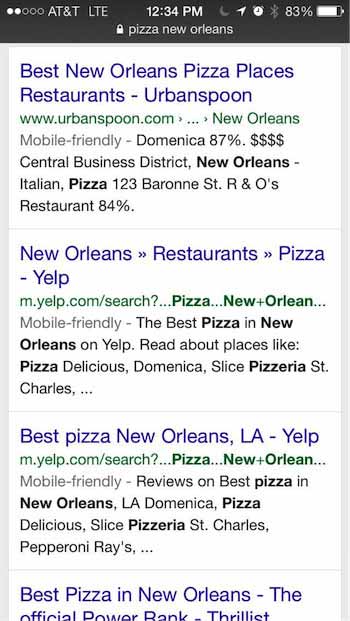
    Though not a part of the Panda update, Google is now providing information in SERPs stating whether a site is mobile-friendly or not. This effectively allows users to skip over results they know cannot be easily viewed on their device, and it furthers the importance of ensuring that your site provides a positive user experience for searchers on all devices.

    “Pigeon”

    About

    A few short months after Panda 4.0, a new breed of animal entered the circus of algo updates when Google rolled out “Pigeon.” Unlike Penguin and Panda updates, Pigeon was not a penalty-based update (aimed at cleaning the SERPs from low-quality sites), but a core change to the local search ranking algorithm. Many different types of businesses were affected by Pigeon. Some of the industries that saw a big effect from Pigeon were real estate, restaurant, hotel, retail, and more.

    What did it do?

    Overall, Pigeon dramatically altered some local results and modified how they handle and interpret location cues. This update is supposed to be a move toward a better user experience for mobile users, with results more concentrated in number and in proximity to your location. Google has also stated that Pigeon helped develop closer ties between the local algorithm and the core algorithms.

    How it changed SEO

    Some of the major changes that occurred as a result of this update were:

    • The disappearance of local listing packs from a large number of SERPs
    • A stronger emphasis placed on relevant directories in search results, leading more SERPs to become directory-heavy rather than heavy with individual businesses’ sites.
    • A switch in focus of local ranking factors
      • Local rankings are expected to depend more on website authority and less on traditional local ranking signals
    • A change to the way in which location cues are interpreted, with results more concentrated in number and in proximity to your current location

    Penguin 3.0

    About

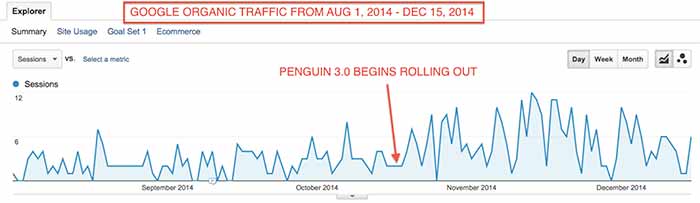
    Last, and certainly not least, this list would not be complete without mention of our long-lost “frienemy,” Penguin. This year, the story of our love/hate relationship with the Penguin algo update was mostly one of love and longing as we patiently awaited its arrival after a yearlong hiatus. Much like preparing for the arrival of Santa, webmasters spent their year diligently reviewing and cleaning up backlinks in an effort to wind up on Penguin’s “nice” list. Finally, Christmas morning came on October 17th when Penguin 3.0 began rolling out, initially affecting less than 1% of US/English queries. 

    What did it do?

    Generally speaking, Penguin updates focus on the level of natural linking behavior. This filter primarily affects websites with a high volume of lower-quality links. For those sites who were affected by the Penguin updates of 2013 and took the initiative to clean up low-quality links in 2014, a positive effect was likely realized after Penguin 3.0.

    PenguinGoogleOrganicTrafficIncreaseImage

    Specifically, Penguin 3.0 also began a movement to begin regular refreshes, much like Panda. As a result, many webmasters have observed major changes since Penguin 3.0, dubbing these major changes Penguin 3.1, 3.2, 3.3, and 3.4.

    How it changed SEO

    Penguin 3.0 resulted in 2 major industry changes in how Penguin updates are processed and anticipated:

    1. Google has stated that they will move toward regular refreshes of Penguin 3.0, much as they have done with Panda. In the past, Penguin updates have been processed offline and pushed live on a specific date and time. With this new change, Google is indicating that they will be making changes to the algo within their live rankings processes.
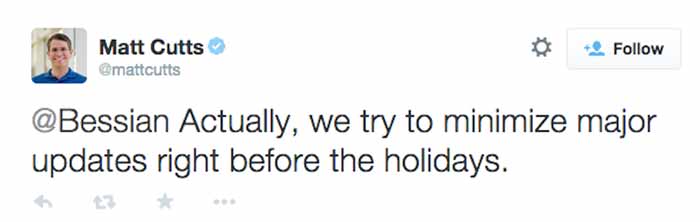
    2. Google broke its “no major updates during the holidays” promise on Thanksgiving Day when Penguin 3.1 occurred. Though Google considered this Thanksgiving Day fluctuation a part of their initial Penguin 3.0 rollout, rarely do updates take this long and cause major fluctuations late in the game.

    MattCuttsTweetHolidayUpdates

    Takeaways For 2015

    So whether Panda, Pigeon, or Penguin affected your site in during 2014, we hope you have been able to use the plethora of circulating information to bounce back. If not, you can always contact Search Influence to help you formulate a specialized plan.

    The big takeaway, however, is that algorithm updates are to be expected, so it’s best to prepare for them ahead of time by making your site as user-friendly as possible. We don’t know what’s headed for us in 2015, but rest assured, it will probably be as eventful as 2014.