Category: SEO

  • How To Fix A Manual Action

    How To Fix A Manual Action

    In recent weeks, there’s been chatter about a large influx of manual actions. This got me thinking: how many people actually know how to fix manual actions? Stay tuned, ’cause you’re gonna learn today!

    But First, the Basics: What Is a Manual Action?

    A manual action is a manual penalty applied to a website by a member of Google’s Web Spam team. According to Google, there are a few common types of manual actions:

    • Hacked site
    • User-generated spam
    • Spammy freehosts
    • Spammy structured markup
    • Unnatural links to your site
    • Thin content with little or no added value
    • Cloaking and/or sneaky redirects
    • Unnatural links from your site
    • Pure spam
    • Hidden text and/or keyword stuffing

    In today’s post, we’ll be discussing a few of the most common types of manual actions.

    How Do I Know My Site Has a Manual Action?

    SEO practitioners know that performance fluctuations are expected, especially since Google’s algorithm is constantly changing. If you’re beginning to see your website rankings drop consistently, that’s usually an indicator of a possible manual action (or partial manual action). However, if you’re unsure, check out Google Search Console (aka Webmaster Tools for those late to the name-change party)! Once in the Search Console, you will see one of two actions displayed on the Manual Actions page:

    1. Site-wide matches
    2. Partial matches

    Each action will display a reason as to why your site received the action, as well as how the action will affect your site.

    So My Site Has a Manual Action…What Now?

    The good news: we can fix this! The bad news: fixing a manual action takes quite a few steps. The first thing you will want to do is determine what kind of manual action your site has. If you see this message, this means that Google has detected a pattern of unnatural deceptive or manipulative links pointing to your site. According to Google, here are the recommended actions to take:

    First, review Google’s Webmaster Guidelines on linking.

    Next, follow the steps below to identify and correct the violation(s):

    1. Download a list of links to your site from Search Console. You can download your links arranged either by hostname (Links to Your Site > Who links the most > Download more sample links) or in chronological order (Links to Your Site > Who links the most > Download latest links).
    2. Check this list for any links that violate our guidelines on linking. If the list is large, start by looking at the sites that link to you the most or links that were created recently (in the last few months).
    3. For any links that violate our guidelines, contact the webmaster of that site and ask that they either remove the links or prevent them from passing PageRank, such as by adding a rel=”nofollow” attribute.
    4. Use the Disavow links tool in Search Console to disavow any links you were unable to get removed.

    Once you’ve removed or disavowed the unnatural links, the last step is to submit a reconsideration request. A reconsideration request is a formal request to Google to reconsider giving your site a penalty. You will want to let Google know about everything you did to clean up your site, including documentation about the links you removed or tried to remove.

    Here comes the bad news: once you submit the request, you have to be patient.

    ryan reynolds ugh annoyed eye roll

    I know, people. I know. Ain’t nobody got time for that! BUT it will all pay off on that beautiful day when Google sends you that wonderful message in Search Console and approves your reconsideration request!

    FYI, this will be you:

    love actually hugh grant

    Hacked Site…Uh Oh!

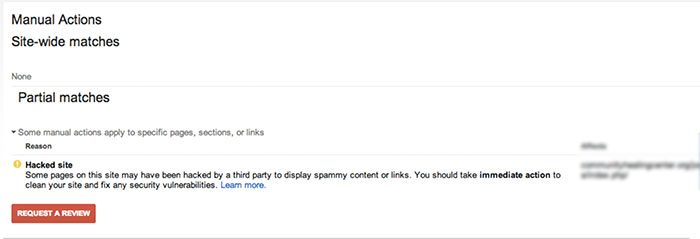
    Google may give your site a partial manual action if it notices that your site has been hacked. If you check the manual actions tab in Google Search Console, you will see a notice called “Hacked Site.”
    ManualActionsSiteWideMatchesImage

    According to Google’s Web Spam team, there are a few steps you will want to take if you’re the victim of a hacking:

    • Contact your host provider.
    • Quarantine your site by taking your site offline (change all passwords and check new user accounts).
    • Check the Google Search Console.
    • Assess the damage. If your site was hacked with spam, the display warning will be “This site may be hacked.” If you’ve been hacked with malware, the display warning will state “The site may harm your computer.”
    • Identify the site’s vulnerabilities and list them out.
    • Clean up the website to prevent future security problems.

    Once all hacked content is removed, “Request a Review” in the Google Search Console. Again, patience. Ugh.

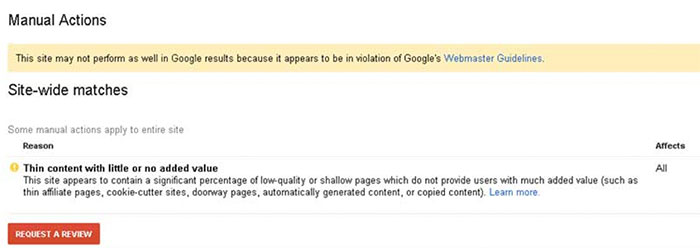
    Thin Content with Little or No Value

    For the non-SEO practitioners, you might be thinking, “What does that mean?” In a nutshell, Google launched a quality update in May 2015, specifically for onsite content. This means Google is placing more of an emphasis on sites producing quality content and penalizes those with content that is not useful to visitors.
    ManualActionSiteWideMatchesThinContent

    How to Fix Your Content, According to Google:

    • Remove any duplicate content from your site that is found anywhere else on the Internet.
    • Eliminate affiliate links on pages with little to no valued content, or add some value to the page’s content.
    • Get rid of auto-generated content pages.
    • Improve the website content to provide significant value for your site visitors!

    Once again…cue the reconsideration request.
    Remember, patience is a virtue!

  • Dude, Where’s My Location? Google Removes Location Search Ability

    Dude, Where’s My Location? Google Removes Location Search Ability

    News Impacting Your SEO Graphic Image

    While most people were recovering from Thanksgiving food comas on December 1st, Google was quietly removing the ability to change the location of your search. For those of you who don’t fondly remember, there used to be an option in the search tools that allowed you to pretend you were in a far off land searching, places like Saginaw and Cleveland.

    Google Missing Location Search Image

    What This Means for Online Marketing

    The impact of this change is now starting to really be felt for those of us in the online marketing world.

    Advanced Web Ranking, a popular keyword tracking software, had to make a quick fix for their product. Before this change, tracking keywords anywhere your clients was as simple selecting a location in the software. Just like that, you were seeing the results for “french fries” right along with everyone else located in Newark.

    Then, BOOM. Google changed that.

    According to Google support, the solution to this problem is now to add the city to see results for that city.

    Google Drops Location Search, Screenshot Image

    My example of “french fries” while searching in Newark has now become “french fries Newark” while in New Orleans.

    Changing Keyword Searches

    If you spend time looking at search volume, you might be aware that there is a difference between any two keywords, no matter how similar they may seem. Everyone is different, and I might search “french fries Newark,” you might search “Newark french fries,” and my neighbor might search “french fries in Newark.”

    Since AWR updated their software to fit the new location definition, they are unfortunately changing what is actually being tracked. If you read the comments on their release of the news, users are not happy with the change. AWR needs kudos for their quick response to a large change in online marketing, even though it did not adequately address the change.

    As AWR’s change magnifies, Google has drastically changed online marketers’ ability to peer into markets of their clients from afar. It really brings home the point that online marketing and SEO is are ever-changing industries, and you have to always on your toes, even over the holidays.

    Image Credit:

    Tom Hanks

  • An Update: How to Get Rich (Answers, That Is) with Google

    Editor’s Note: This post was originally published on December 3, 2015, and then updated on July 28, 2016, to provide you with the latest information.

    2016 Rich Answers: Update

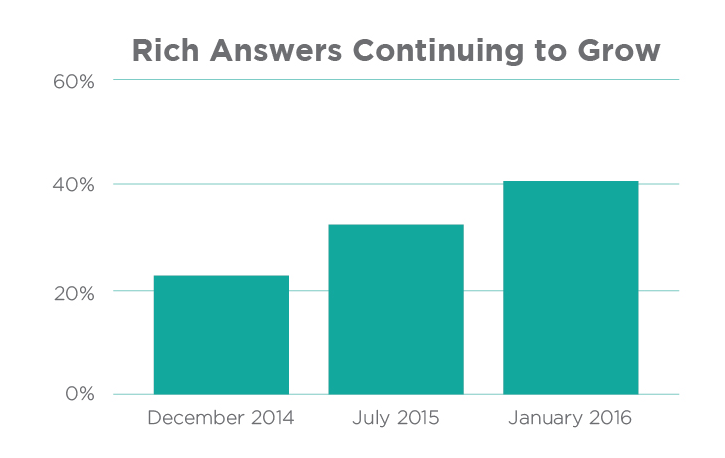
    Over the years, we’ve continued to follow and analyze Google’s perpetually evolving search engine results page (or SERP) to stay on top of Google’s algorithm and to provide deeper insight into how people use search engines. Rich Answers Continuing to GrowOver the past 12 months, we’ve witnessed a major paradigm shift in Google’s SERP, resulting in Rich Answers for 40% of queries on average as of 2016!
    Stone Temple Consulting Corporation’s 2016 study shows that Google provided Rich Answers (also known as Rich Snippets) for 22.6% of queries in 2014, 31.2% of queries in 2015, and 40% of queries in early 2016.

    Mostly surprisingly of all, the study shows that 55% of the available Google snippets are either brand new or have a new URL source since 2015. This is evidence of the volatility of rich snippets and how new sources (cough, your website, cough) have an enormous opportunity to obtain one!

    As Google’s SERP continues to evolve, it is now more important than ever to build a website in a way that better enables a domain to obtain these Rich Answers in the future. See the original blog post below for methods.

    What Are Rich Answers?

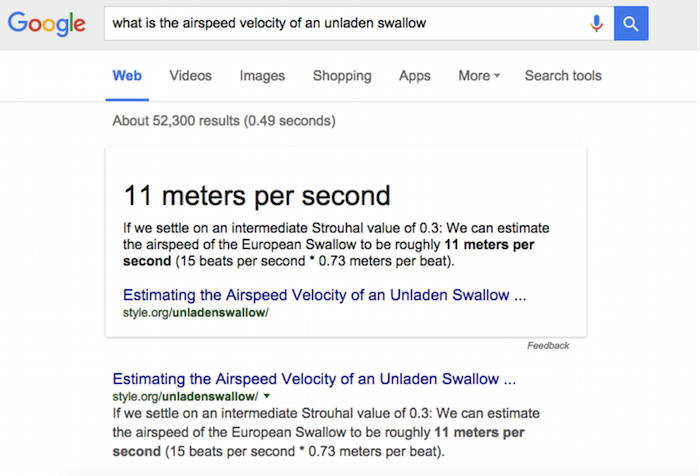
    “Rich Answers,” “Rich Snippets,” or “Google Knowledge Graphs” are results to search queries that have a definite or concrete answer. So definite, in fact, that Google will place them above all other searches with a linking source. Google will provide answers to questions such as “who won the Oscar for best actor in 2015,” “what is a rel=canonical,” “who is the president of Madagascar,” or even “what is the airspeed velocity of an unladen swallow.”

    Image Of Google Rich Answer Displaying Air Velocity Of An Unladen Swallow

    Rich Answers are featured snippets within the search results that allow the users to gain the information they are looking for faster and easier. These Rich Answers are provided in many ways, such as knowledge boxes, tables, images, maps, how-to graphics, and step-by-step instructions.

    The Results Are In

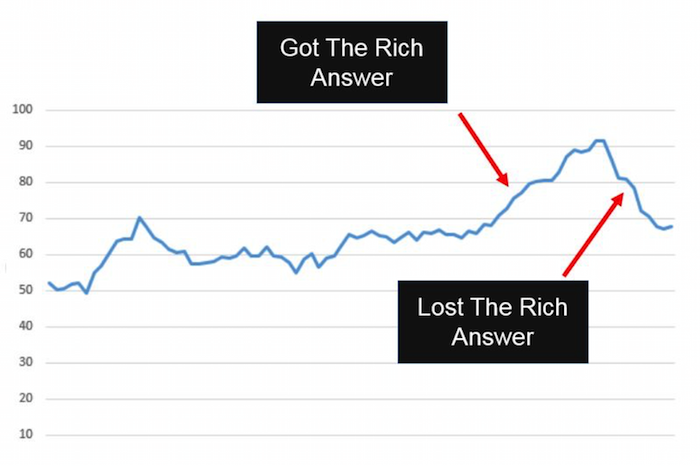
    Stone Temple Consulting released their findings earlier this year, stating that Google Rich Answer results have in fact grown quite significantly from approximately 22.6% in December of 2014 to 31.2% in July of 2015. This is truly a staggering amount considering the number of searches that are performed in the Google search engine every day. You might think that this would be detrimental to the health of most websites: if people are finding what they need in the SERP, they won’t continue onto a website. However, Stone Temple Consulting shows that in fact, the websites who were able to provide Rich Answers in the SERP actually get more website traffic than before. It creates a better user experience for all Google users by pushing up quality content, providing the searcher what they are looking for more quickly and creating a product that users want to come back to.

    Graph Image Of Effects Of Google Rich Answer Results

    Strategy to Getting a Rich Answer:

    Our simple strategy to getting a Rich Answer:

    1. Identify a simple question.
    2. Provide a direct answer.
    3. Offer value added info.
    4. Make it easy for users (and Google) to find.

    Use Google TrendsGoogle Correlate (which is currently in Beta), Shopping Insights, and data from your Search Console to determine if a topic is trending. This will give you a better understanding of how much effort to put forth on providing high-quality content so that other searches (and Google) will find your website as the authority on that subject.

    Utilizing Schema markup can help the search engines better understand the resources that you are providing on a given website. If Google can better understand your site, they can return more informative results for users and increase the likelihood of a Rich Answer over time.

    The format of content can also be a large contributing factor to obtaining a Rich Answer in the SERP. Step by step instructions, bulleted lists, simple tables, and charts are all simple ways businesses can format content that will allow Google and its users to more easily find the answer they are looking for.

    Summary

    We are expecting these trends to continue as Google’s users find value in these types of results. In fact, we predict that Google will not only increase these types of results in the future, but that it will also begin to provide more interactive Rich Answers by utilizing high performing website content. Once Google can directly attribute performance on the SERP within Google Analytics, it will become much more mainstream to include Rich Answers optimization in the marketing strategy of businesses.

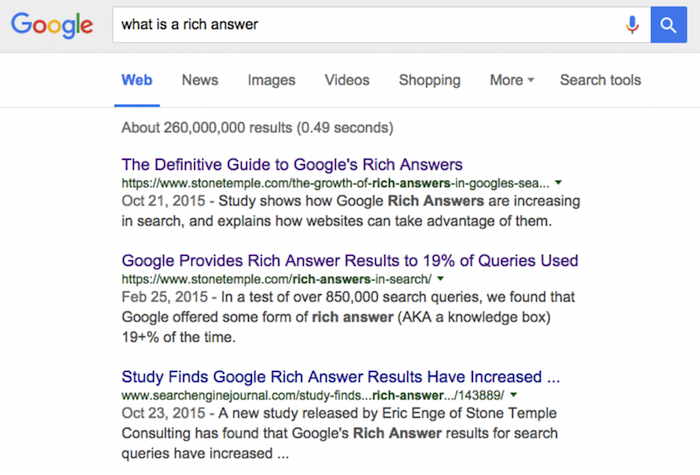
    And one last thing: if you search “what is a Rich Answer,” there is no Rich Answer for that result yet.

    Image Of Google Search Results For What Is A Rich Text Answer

    Image Credits:

    Image 1 Credit | Image 3 Credit

  • AI Is Here, and It’s Affecting Your SEO: A Look at Google’s RankBrain

    In late October, Google announced that they are actively using an artificial intelligence algorithm called RankBrain as part of the search results engine. This has rolled out slowly since early 2015 and has become a factor for website owners and search marketers to pay attention to, according to Bloomberg.

    “RankBrain has become the third-most important signal contributing to the result of a search query.”

    What are you saying? What madness is this?

    RankBrain is used as a way to interpret the searches that people submit to find pages that might not have the exact words that were searched for. It correlates words on your website page to those expected to be seen about the topic. A very simple example from Search Engine Land: RankBrain helps determine whether your page is about “apple,” the fruit, or “Apple,” the company.

    RankBrain is self-learning. It’s analyzing billions and billions of searches and click actions to determine what content is more helpful to consumers and what is less helpful. When there are content updates on your site or a competitor’s website, this algo is reanalyzing and reconfiguring search results. This is not done in real time.

    How often does RankBrain update?

    Because it is self-learning, it is constantly updating itself. But the real question is: how often is it updating search results?

    “Google periodically updates the system by feeding it a load of new data to help it better reason with new concepts.”

    So Google is feeding it batches of search data, and it’s crunching through the data in batches. The algo is constantly updating itself as it learns from the content it’s analyzing, but the search results are not constantly updating. Search results are updated in batches, which may explain some unexpected ups/downs in Google organic traffic that don’t match up to announced algo updates.

    1511-SI-Newsletter-KG-A-02

    Does Google’s RankBrain change any SEO that we do?

    As RankBrain learns more and more, and as Google feeds it more new data to crunch, we may see some organic traffic blips, up or down. These will not likely be announced data updates. Google has said they typically won’t announce data updates. Ups and downs are expected as the AI figures out how your content relates to specific search terms relative to the other content in your market.

    With the launch of Hummingbird and the continuous Pandas, Search Influence has long seen the need for really informative consumer-focused content. We have seen consistently positive results across many websites in many industries with this standard of content. If your content is written in accord with Panda and Hummingbird, meaning it is rich text, educational, and really on topic, RankBrain should not be a problem for you.

    For further reading, this blog post by Cyrus Shepard was one of the more influential in our constantly evolving content standards, and I think it is definitely related to this discussion.

    What’s Next?

    “Facebook Inc. uses AI techniques to filter the newsfeed that comprises the personalized homepage of the social network and Microsoft Corp. is using artificial intelligence to increase the capabilities of its Bing search engine.”

    Google is actively using self-learning artificial intelligence, its driverless cars have driven over 1 million miles, and it has the dead/undead Google Glass. Reach into your sci-fi knowledge, and consider what Google might do next.

    Image Sources:

    Google RankBrain

    Smartphone

  • Google My Business Brings the Holiday Cheer with Special Office Hours Pre-Sets

    4

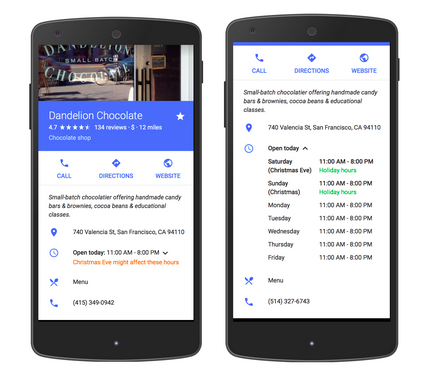
    Yesterday, a new My Business feature was published by Google in the product forums. This new feature allows business owners to pre-set special hours to their My Business listing for holiday closings or special times that are exceptions to your day-to-day office hours.

    google my business special hours exampleThere is more information in Google Support documentation. If you have many locations to update, there is a spreadsheet upload feature. If your business has hours that extend into a second day, there is information on how to manage that scenario.
    Editing Your My Business Special Hours

    This morning, I updated the office hours of a local credit union. This feature will be especially helpful in publicizing the dates their office is closed in the upcoming weeks. It will also be especially helpful to the community for finding the times each branch is closed, and we know Google is focused on user experience.

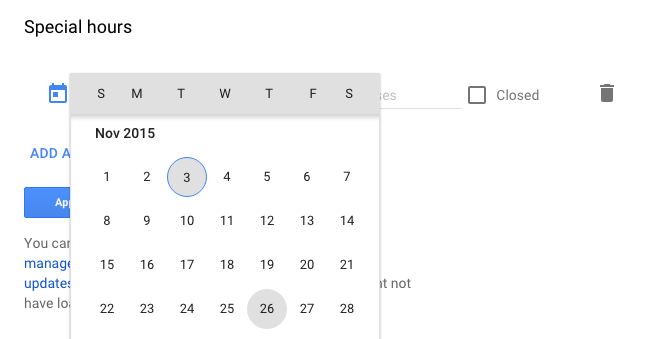
    Once you log into your Google account, navigate to your list of locations and choose one location to edit the location details. Scroll down to “Special Hours” below the standard “Hours.”

    choose the holiday date for special hours

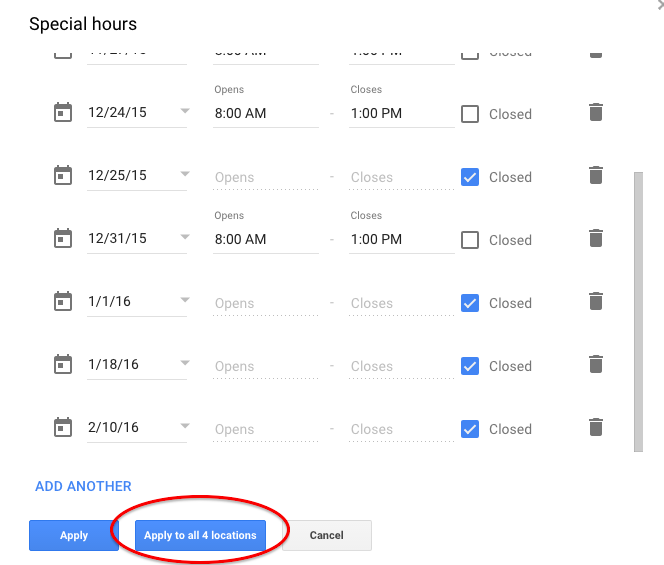
    Click on “Special Hours,” and you can choose a day from a drop-down calendar and either apply early closing hours or mark if the office is closed the entire day.

    If the hours will be the same at all of your locations, Google has thoughtfully provided a button to apply the hours to all locations within your account.

    Your final Special Hours or office closing times may look something like this for your summary review. Some days they are closed, and some days the branch is closing early:

    apply special hours office closed times to all locations

    Great New Feature

    You may want to set up some reminders to update your holiday hours every quarter or every six months.

    I know businesses have wanted this feature for quite some time, and now it’s available just in time for Thanksgiving and the December holidays. Very good timing, Google!

  • ‘Tis the Season: Ten Ways to Enhance Your Online Presence All Year Round

    2

    Traffic to your website depends on how relevant your landing page is in relation to the terms being searched and how well optimized your site is in the eyes of Google. If demand for your products and services is low for a certain time of the year, chances are search volume will also be lower, resulting in less traffic to your site. Having a strong online presence is all about understanding user behavior and optimizing your site to achieve the best results. In order to accomplish this, utilizing a seasonal SEO strategy will help boost your overall online performance annually.

    Whether your business maintains consistent demand or changes with the time of year, there’s something for everyone when it comes to seasonal SEO!

    What Is Seasonal SEO?

    Seasonal SEO refers to optimizing your site for seasonal keywords in order to get more visibility in search engine results during a specific time of the year. For example, let’s say you own a jewelry business. Around the holidays, search volume will increase for Christmas presents. Instead of just optimizing your site for vintage jewelry, you may try optimizing for “Christmas vintage jewelry,” “vintage jewelry for Christmas,” or even “holiday vintage jewelry” in order to enhance your site’s ability to be found amidst the high search traffic for the season. Optimizing your site seasonally could prevent your business from missing out on additional holiday revenue.

    22310142726_1b807169fc_z

    Capitalizing on the Seasons

    So how does one go about optimizing for the seasons? Here are five tips to get your site ready, no matter the time of year.

      1. Do your research. Don’t just blindly select any season to optimize your site. Look at year-over-year data on Google analytics to make inferences on when traffic to your site is the highest in order to determine what season optimizing your business will most benefit from. You will want to concentrate your efforts on one to two seasonal holidays, three at most.
      2. Start planning now! Once you’ve selected which seasons you will be optimizing for, create a seasonal SEO calendar to outline which items you intend to seasonally optimize. (Local SEO consultant Andrew Shotland has provided an excellent resource here.) Keep in mind that searches for most seasons start much further in advance. For example, planning for Valentine’s Day starts mid-January. Once more, it can take a while to gain momentum when it comes to SEO, so starting months in advance is key.
      3. Create unique pages of seasonal content and optimize it for the appropriate seasonal keywords. During the season, place the seasonal landing page in the main navigation, HTML sitemap, and XML sitemap so that humans and search engine bots can access it more easily. Create one or two seasonal pages annually, three at most.
      4. Update your meta descriptions for seasonal pages and your site. Meta descriptions exist to facilitate a higher click-through rate between the search engine results page and your website. Not only is it a good idea to create seasonally focused meta descriptions for seasonal pages, but it is also a good idea to update the meta descriptions of your year-round pages (i.e., your home page) so that they’re seasonally focused for the time being. After the holiday season is over, be sure to change them back.
      5. Do not delete seasonal pages once the season is over. It can take a while for new pages to gain authority and recognition with Google. Once you get a seasonal page to rank, deleting that page would mean that you would be starting from scratch the following year. You can simply reuse the seasonal pages for next year by updating the content. Because you may not want to keep these pages in your navigation all year round, it is very important to keep these pages indexed in both your HTML and XML sitemaps so that these pages remain crawlable and hopefully indexed all year round. When the season rolls around again, be sure to implement it back into your navigation again. Rinse and repeat.

    Off-Season Businesses

    But what happens if you own a seasonal business? Perhaps your store is closed during certain times of the year (i.e., a ski company closed for the summer), or perhaps nobody is looking for your swim store’s bikini line in the middle of January! Do not fear: indeed, while search traffic to your site will be lower off season due to its correlation to current consumer demands, there are still steps you can take to maintain your online presence year round.

      1. Do your research. Look at year-over-year traffic and conversions in Google analytics to ensure you’ve identified the correct high season for your business.
      2. Display positive customer reviews off-season. While the season is still in its prime, be sure to gather customer reviews about your business, especially your Google+, Yelp, and Bing pages. For example, a family may decide in May that they would like to take a winter ski trip. They may begin reading reviews on ski resorts and ski gear months in advance in order to be well prepared for their upcoming trip.
      3. Engage in social media all year round. It is critically important to always be engaged with your clients and potential clients on social media. Here’s why.
      4. Play up off-season hype. When it’s snowing outside, it wouldn’t hurt your business to post a picture of a sunny beach with your company’s sandal line to generate top-of-mind awareness even off season.
      5. Create interesting blog topics year round. This will provide readers with plenty of content during peak season as opposed to taking a break from posting during off-season months. It will also generate fresh content for your site, which signals to Google that your site contains relevant content for viewers.

    How do you maintain your business’s online presence year round?

  • Don’t Leave Your Website Buffering: How to Make Big SEO Gains with Video Content

    Everyone likes watching videos on the Internet—funny videos, cute animal videos, cute kid videos, and cute videos with kids AND animals.

    And while there will always be a place for these videos in our hearts and on the web (what would YouTube be without them?), video content has recently found a new, even greater purpose on the Internet. In recent years, videos have emerged as an integral part of any and every SEO campaign. Based on four main metrics, there are several ways video content can help your business and website gain more traction.

    • With YouTube rising to the lofty status of the world’s second-largest search engine (behind only Google, which just so happens to own YouTube), videos are getting more screen time than ever.
    • Videos have been proven to improve SERP rankings. Because YouTube and Google are in such close cahoots these days, videos from the popular video site are ranking higher than ever in Google searches. The more popular a video, the higher its authority, which affords a greater opportunity of appearing at the top of search pages.
      • A study conducted by Forrester discovered that pages with video are about 50 times more likely to rank on the first page of Google search results.

    1511-SI-BlogImage-B-01

    • For that reason, among others listed below, here is Search Influence’s latest video, a brief case study about our partnership with the Audubon Nature Institute in New Orleans.

    • This is also why properly optimizing videos is so important—all video content (title, description, transcription, links, etc.) is crawled and processed by the search engines.
    • Every business should have their own YouTube channel that is accessible via their website. But to make even better use of videos, embedding YouTube videos directly onto website pages has been proven to be even more effective.
      • Embedded videos can improve click-through rate with up to a 41% higher CTR than plain text, according to study conducted by Cisco and aimClear.

    • Embedded videos can also reduce bounce rate. The longer a visitor spends on a website, the more authority it is given by Google. Unfortunately, the average online attention span is less than 10 seconds. Video content allows visitors to become engaged with something on your site for a longer period time. The average length watched of a single Internet video is over 2.5 minutes—all that extra time is crucial in the SEO world.
    • Videos communicate a lot of information quickly, which lets people sample content without committing to reading lengthy text. Videos are also much more useful in establishing trust with potential customers than written content, especially if the video features the business owner or a client testimonial.
    • Finally, video content is much more likely to generate social interaction and shares, which equals quality backlinks. Videos are easy to watch and share, therefore more appealing and likely to be watched (and allowing for more people to discover the video, and by extension, discover the business in general).
      • In a fascinating experiment, Gemma Holloway at Koozai compared two posts covering the same exact topic—one featured a short video introduction and the other had only text. The video post received between 200% to 300% more page views and shares on social media than the text-only article.

    So don’t leave your website or your business buffering. Incorporate videos into your SEO and Internet Marketing strategy and watch the benefits play out on your computer screen!

  • Ya-Who? The Slow Decline Has Already Begun for Yahoo’s Local Listing Service

    Changes can surprise the SEO world (looking at you, phantom Google updates), and sometimes, changes can be seen a mile away. This is when everyone should look at Yahoo and their local listings. Their importance is diminishing every day, and eventually they will be a thing of the past, like Google Plus Authorship.

    The Decline of Yahoo

    Though Yahoo’s importance is not as cut and dry as Google Authorship, I’m going to throw out some information that has me making this prediction with as much certainty as predicting that New Orleans will get rain sometime in July.

    Is It Worth the Trouble?

    Now, you can argue that since Yahoo was still the 3rd most common search engine as of July 2015 according to comScore, it is worth it to pay attention to Yahoo Local listings.

    That is a good argument that we should still pay attention in the SEO world, but that is only one side of it.

    Though a very high-ranking search engine and site in general, I’m arguing that their local listings are not worth the time and effort that comes from hassling with support over email, phone, or even Twitter. Since Marissa Mayer took the helm in 2012, Yahoo has been turning their focus away from their older products, such as their Maps and even directory service. Along with these seems to be native local listings.

    From an SEO standpoint, Yelp is the real “Y” of the listing world, especially with the ever-rising importance of reviews. I see it becoming the only “Y” in a year or so. So with that in mind, “Y” even bother with Yahoo?

    Yahoo-logo

    Image Credits:

    Homer Simpson GIF
    Yahoo Logo

  • Patience Is A Virtue, But If You Don’t Have It, Use Google’s Popular Times

    As a naturally impatient person, I struggle with the following: people who take forever to text me back, traffic, and long lines. Thankfully, Google Search’s newest feature called Popular Times lets impatient people like myself know when a restaurant, business, or venue is busiest so we can avoid rush hour. Intrigued? Read on!

    What Is “Popular Times?”

    According to Google, Popular Times “uses data from users who have chosen to share their location” in order to keep track of when businesses are at their busiest and slowest. Although this search feature is only available on mobile devices and for select businesses, it can prove helpful for people looking to maximize their time during certain days of the week.

    Popular Times in Action

    I’m not a heavy coffee drinker, but there are some days when I am in desperate need of a caffeine boost. I commute from the Northshore to New Orleans, so I have to be fairly strategic about when and where I get my cup of joe if I choose to get it in the morning.

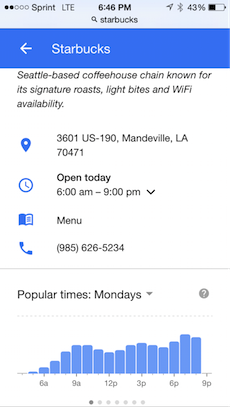
    This weekend, I had a craving for a Starbucks Pumpkin Spice Latte (#dontjudgeme), so I thought I’d check out Popular Times to see if I could stop by the Starbucks drive-thru nearest to me before heading to work one day this week.

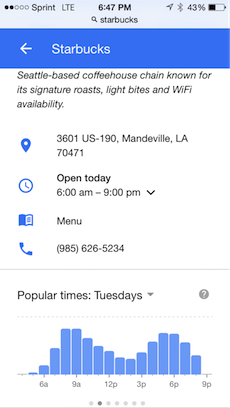
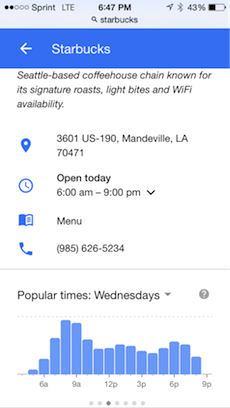
    These were the results for the first few days:

    PopularTimes1  PopularTimes2  PopularTimes3

    Monday at 7 a.m. seemed to be when Starbucks got the least amount of traffic, so I now know when to stop by if I need to get my PSL fix. Now to just stop pressing the snooze button…

    What do you think of Popular Times? Do you think it’s got potential, or is it just another a superfluous Google search feature? Let us know in the comments below!

    Image Credit:

    Pumpkin Spice Latte GIF

  • Hello Bing, Goodbye Yahoo Local: Moz Local Makes Moves

    Moz Local made some small changes to its reporting dashboard over the past week or so. These small layout differences indicted a large change in the capabilities of the tool.

    Only announced on August 18th (though acknowledging that updates slowly rolled out over the previous week), Moz has added City Grid (City Search), Insider Pages (not fully rolled out yet), and Bing to the growing list of sites that they can submit information directly to. The tool also removed Yahoo from listings that they find and evaluate for you.

    What does this mean for you, a business owner?

    City Search and Bing were already available for Moz Local users to find and address, but they have now made the move over to their “Direct Network.” Since both require verification to edit business information, this change could make it even easier to send out your correct business information out into the wild, wild web for customers and search engines to see.

    Since Moz Local offers an easily navigated and editable interface, when an address, website, or even hours change, you can modify it in just one place and watch it change throughout the high-authority directories and data aggregators.

    What does this mean for you, a marketing professional?

    Moz’s removal of Yahoo Local listings in an strong indication that Yahoo is moving away from being a source for native, unique listing information. As it stands now, native Yahoo listings are being replaced/overpowered with Yelp listings with reviews. By not even caring to show a client’s information on the site, Moz is acknowledging that Yahoo is no longer an independent listing source.

    By adding Bing to their direct network, Moz could change the amount of sites that require client confirmation. With every client, there is a varying amount of difficulty that can happen with verifying listings. Postcards can get lost. Phone calls can get missed. Moz seems now to give a way to circumvent those problems. However, completely dropping the process of claiming Bing would not be wise. Claiming the listing gives you the power to change information immediately and to see how often the listing is seen.

    Moz is showing that it has a great ear to the ground for changes that may be rumbling in the local citation world, and I know that I will be keeping an eye out for any of the new changes that it says should be rolling out soon.