Category: SEO

  • What Is Canonicalization and How It Helps You Get Found Online

    What is canonicalization? Image 1

    For those who are unfamiliar, canonicalization can be an intimidating, seven-syllable term. Fear not—it’s nowhere near as complex as it sounds, but it is definitely important, particularly in terms of helping your business get found online.

    Defining Canonicalization

    What is canonicalization? Image 2

    When it comes to SEO, canonicalization refers to normalizing multiple URLs by redirecting to a single, dominant version. In other words, you need to determine if you want your site to be www.yoursite.com OR yoursite.com. If you choose www.yoursite.com, then yoursite.com should redirect to that URL. If you can pull up both versions, then you have an SEO problem. Why? From a search engine’s perspective, there are two identical sites that exist with the same exact content. Since the search engines cannot decipher which version of the duplicated content should be shown to individuals searching for the subject matter, it penalizes both sites. This will make both versions appear lower in search rankings. This concept is actually essential to the creation of a successfully optimized website.

    What Web Developers Can Do to Help

    With canonicalization, individual web pages can be loaded from multiple URLs for the purpose of successful SEO best practice. This becomes a problem when pages with the same content have different URLs, as the links that are intended to go to the same page get split up among multiple URLs. Web developers have established methods for redirection so that mismatched URLs can be changed and combined. Two main types of redirection are the 301 and the 302. With the 301, an HTTP status code indicates the permanent move of a hyperlink. The 302 indicates a temporary redirect message.

    Good vs. Bad Canonicalization

    Canonicalization is known to be among the most important aspects of organic SEO. To put it simply, good canonicalization results in search engines crawling more pages on your site, which gives link authority, so you have a stronger link profile. This also means there are fewer broken links across other sites. Bad canonicalization, on the other hand, produces the same results, just with the opposite effect.

    Case in point: when it comes to good canonicalization, one product description or page of content should never have multiple URLs. Every resource—every page, image, video, etc.—must have one Uniform Resource Locator (URL), and never more.

    Image 1 Credit | Image 2 Credit

  • Local SEO: How to Clean up Citations for Better SERP Visibility

    seo-google

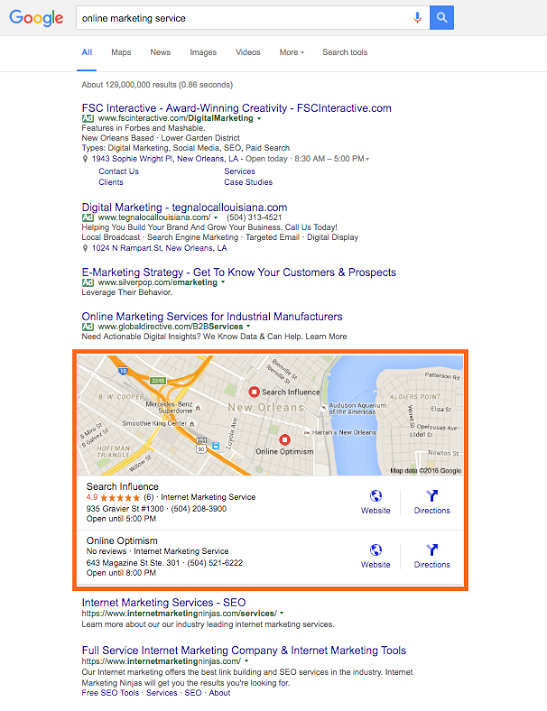
    Google, Bing, and other major search engines are constantly changing and developing their search engine results pages (SERPs). Major components of these pages include organic, paid, and local results. With the ever-increasing use of mobile, these local results are growing in importance in overall SEO strategy.

    SERP Screenshot

    So how does one account for local SEO, you may ask?

    This is where citation cleanup comes into play.

    Citations are the presence of a business’s name, address, and phone number (NAP) on any website. As search engines crawl websites and find instances of a business’s NAP, they look for consistency in that information, so the more accurate and consistent your citations are across the internet, the better your business will rank in a local search (i.e. in Google and Bing maps as well as in the maps packs on SERPs).

    Ensuring this consistency is called citation cleanup. From my experience, there are four major steps to effective citation cleanup:

    1. Ensure your address is USPS verified.
    2. Update your NAP on your website.
    3. Audit and build your citation on the major data feeds and directories.
    4. Find your remaining existing citations and make sure they are all consistent.

    Let’s break this down and go into a little more detail.

    Ensure Your Address Is USPS Verified

    This is an important place to start because, as you’ll find later on, many of the directories you end up submitting to or cleaning up have standard formatting that in most cases aligns with USPS’s own standards. So, if your format doesn’t match it will be harder and less likely to achieve consistency.

    Update the NAP on Your Website

    After the USPS verifies your address, make sure it’s reflected on your website. Include your whole NAP as a structured citation. Your website is the baseline for your NAP; this is what Google and other crawlers will compare other citations to, so it must be correct and formatted here.

    **For a little extra oomph, consider marking up your citation on your website with structured data like Schema. This will help crawlers understand it better as your NAP.

    Audit and Build Citations on Major Data Feeds and Directories

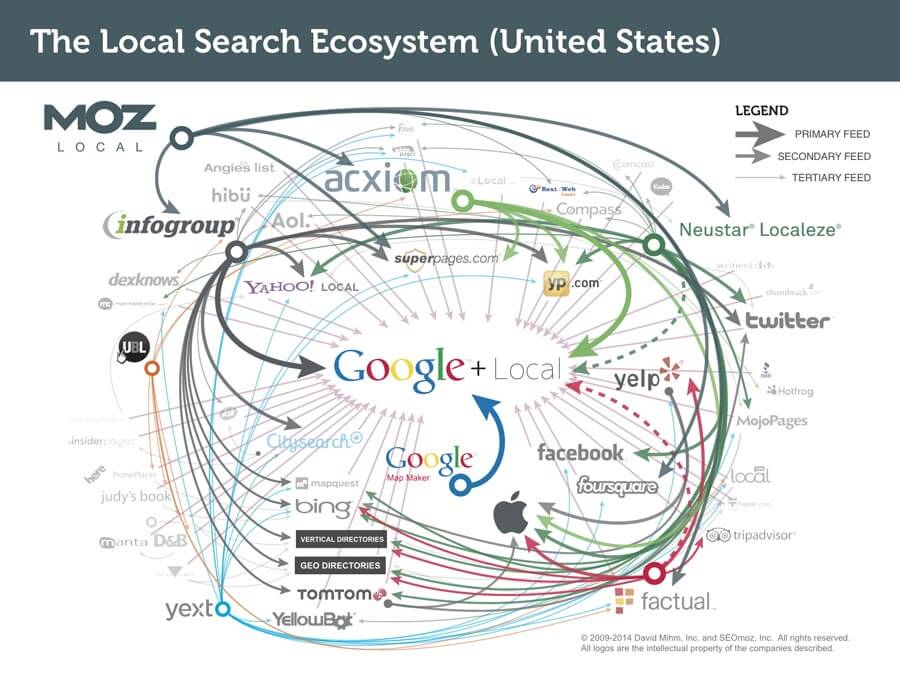
    Local_Search_Ecosystem_US

    The reason I put this before doing actual cleanup of existing citations is because citation dissemination is a hierarchical process within a large ecosystem of directories. There are a few feeds that push to other smaller directories where your citation may already exist, so updating these and the major directories first will make cleanup later on a little easier.

    There are four major feeds to check first: Infogroup, Acxiom, Localeze, and Factual. These feeds trickle down to other directories and local search engines, including Yahoo! Local, Apple Maps, SuperPages, etc. This is also where that USPS-verified address comes into play, especially. Part of the reason these four directories are so authoritative is because they have such strict guidelines on address verification.

    Along with those feeds, you also want to update the major local directories. Since many of these are directly on those search engines’ sites, this is absolutely essential to local rankings. These major directories include: Google Maps, Bing Maps, Yelp, YP, Foursquare, etc. You may also consider auditing your social media accounts to make sure your NAP is correct there as well.

    Find Remaining Existing Citations and Make Sure They Are All Consistent

    Once you’ve built your major citations, you’re ready to do some additional cleanup, if necessary. It’s useful for all businesses to be aware of their citations across the internet, but some businesses may need additional cleanup more than others.

    If you’re a business who’s recently changed their name, address, phone number, or website, you should definitely consider more extensive search and cleanup. The same goes for those who are still seeing problems with their local rankings. You may be missing a citation or set of citations that’s affecting your rankings.

    There are a number of ways to do this. You can use Google just to search for instances of your citation manually, or you can use a service to do a more in-depth search for your citation and its variations across the internet.

    Either way, you’ll find that your citation can be updated on some sites more easily than others. You may need to submit forms to have it updated, contact website administrators, or go through other channels to get it done.

    If you’re business is at this point, you may find it more cost-effective to hire an agency or service to do this kind of cleanup.

    However, once you’ve successfully cleaned up your citations, you’ll rest easier knowing that your business information is correct across the internet.

    Citation cleanup is an important factor in local and overall SEO. By ensuring NAP consistency, you’re gaining valuable traffic from local search engines! To learn more about why NAP consistency is important with your SEO, you can watch this short video.

    Image 1 Credit

  • Why Link Building Is Important for Dentists

    Why Link Building Is Important for Dentists

    Another Day, Another Molar

    Up until last year, I had gone to the same dentist since I developed my first tooth, maybe before. Once a year, I would visit the office, get a nice teeth cleaning, and pick out a prize. I might be in my twenties but, dangit, I like prizes.

    When I moved to New Orleans, I had to start all over and find a new medical “squad” to take care of me. I didn’t mind a new doctor (urgent cares, amirite?), but I was worried about finding the right dentist. Will I like them? How much paperwork will I need to fill out? Do they let “children at heart” get prizes?

    Is This Real Life? David Gif

    To find a new dentist, I first asked people around the office: “Do you like your dentist?” and “How did they fix your cavities?” I asked people who I trusted and some people who I didn’t trust but had nice teeth. After a few word-of-mouth referrals, I ended up turning to the internet to read reviews, rankings, and credentials.

    Many practices used to grow solely on word-of-mouth referrals, and while referrals from family and friends still provide a direct path to your dental chair, the internet’s influence on how patients find new dentists is growing. If trends continue, more and more patients will find their new dentist on search engines. To increase your practice’s visibility and rank high on SERPs, you need an SEO campaign.

    Which brings us to link building. If you are struggling with business outside of personal referrals, I have a solution for you! If your patients have grown up and moved cities, I can help you out! If you give prizes out to adult patients, let me lend you a hand!

    The Wisdom Tooth of Linking

    Linking is the SEO equivalent of a personal referral. Search engines are like busy bodies: They interact with every website, and the more your site interacts with other sites, the more trust and authority your site will receive from search engines. But how do you get your site to interact with other sites? How do you build trust?

    To find new patients, you need to interact, or link, with industry websites. Sites like HealthGrades and RateMDs are specifically for medical professionals. These websites require verification information such as license numbers, which is why search engines trust them. These sites also allow users to post reviews for their dentists, creating another platform for interaction between you and your patients. (If you want to learn more about the benefits of reviews and how to get more from your patients, check out this blog post by a friend or this blog by yours truly).

    There are also sites specifically for the dental industry, such as Every Dentist. You can create a profile, get links, and build even more trust and authority for your website. When a patient searches “dentists,” links from specific dental sites tell search engines, “Hey! I’m a trusted dentist!” The search engines, in return, will give your site a higher ranking.

    So, if you want to get more patients, get to linking! Who knows? I could be your next patient. I promise I won’t lie about how much I floss…

    And That's the Tooth Simpson Gif


    Gif 1 Credit |  Gif 2 Credit

  • 5 Rookie Mistakes That Will Ruin Your New Website’s SEO

    SEO Mistakes to Avoid

    Here at Search Influence, we take pride in providing valuable SEO information and tips for our clients, from the nitty gritty of Google’s algorithms to the basics of designing a great website. Our recently published white paper covers 5 SEO mistakes that could be lurking in your web design. Here’s a rundown of the rookie mistakes you may not know you’re making.

    Your Site Is Too Slow to Load

    Large, unoptimized images on the landing page can significantly decrease site speed. Not only does this lead to poor user experience, it affect how Google ranks your site in searches.

    You’re Not Allowing the Site to Be Crawled

    Web crawlers are how search engines know pages of your site exist and what the pages are about, so restricting their ability to crawl and index essentially renders your site invisible in search results.

    Your Site Isn’t Mobile Friendly

    Mobile Phone

    More and more people use phones and tablets to access the internet. You can miss a large percentage of your target audience if you do have have a mobile friendly site.

    It’s the Wrong Kind of Flashy

    Relying too much on Flash elements can slow down your site and causes complications for mobile users. And while single page sites can be visually appealing, you can miss many optimization and analytical opportunities.

    The Content Is Weak

    When it comes to Google’s algorithms, text is more important than visuals. Good content gives a better understanding of what the page is about, for crawlers as well as human readers. And old fashioned SEO techniques, such as keyword stuffing, can do more harm than good.

    If you’re concerned that your site may be suffering from any of these problems, fear not. Check out our white paper for more detailed information on each of these concerns. Once you have a better understanding of the issues at hand, you can reach out to your web developer or one of our SEO specialists to begin addressing your concerns.

    Image 1 Credit

  • 5 Tips to Improve Local Search Rankings Even If You Don’t Have a Physical Location

    SAB Image

    If you’re new to the world of SEO, trying to optimize your business on the internet can feel like you’re trying to solve a Rubik’s Cube: You have an idea of what the finished result should look like, but the process leading to the final product may feel convoluted. Given that SEO strongly emphasizes the importance of NAP consistency, it’s possible to feel even more puzzled on how to optimize your website if your business does not have a physical storefront.

    Follow these five tips and you will be on the path to success.

    Do I own a service area business (SAB)?

    Before diving into how to optimize for a service area business (SAB) website, it’s important to identify whether or not your business is a SAB. A SAB is a business that does not service customers at the business’s physical location. Instead, an employee will travel to the customers to provide goods or services. Examples of SABs include HVAC companies, limousine companies, house cleaning services, landscaping services, mailing services, etc. (My favorite example of a SAB happens to be the ice cream truck that comes to my neighborhood during the summer.)

    Ice Cream Truck

    Know thy service area.

    If your business is a SAB, you will need clear answers to the following questions for a successful online optimization campaign:

    1. What is your service area, and how far will you travel?
    2. Do you have multiple service areas? If so, where?

    Tips & Recommendations

    1. Targeted Area Pages – A targeted area page is content that is specific to the area you are trying to service. The title tag, on-site content, H1, and meta description can be optimized to the specific location you service. For targeted area pages, the content should contain location specific information, such as specials that apply only to that area, customer testimonials from locals, completed projects in the area, and even location-specific videos.
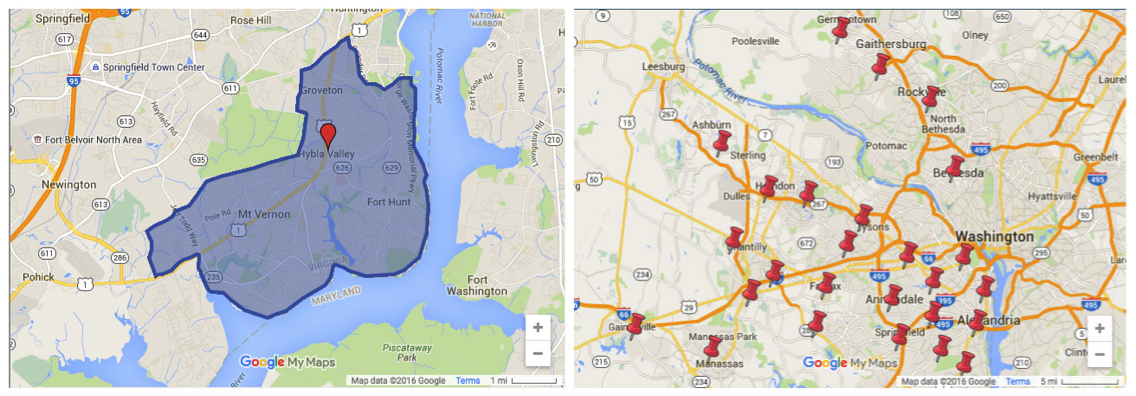
    2. MyMap – A MyMap is a custom map that outlines the specific areas your business serves. It implements a visual on your website for a better user experience. You can create a standard one, shown below on the right, or even customize your MyMap, like the one shown on the left.SAB Search Results
    3. Categorical Directories – When you submit your business to a directory, you are receiving an authoritative link back to your site, which provides referral traffic and in turn strengthens your site authority in the eyes of Google. (The saying “You are judged by the company you keep” is a common expression that is helpful in understanding link building from authoritative sites.) While directories can advance your SEO goals, be sure to submit your business to a categorical directory instead of a local directory. Unlike a local directory that is organized by a business’s NAP, a categorical directory is organized by industry.
    4. Get5Stars – Reviews are a great way to reinforce that your business services multiple areas. Get5Stars is a tool that allows for customers to leave reviews on your website. In turn, you can review the client feedback before publishing it live on your website.
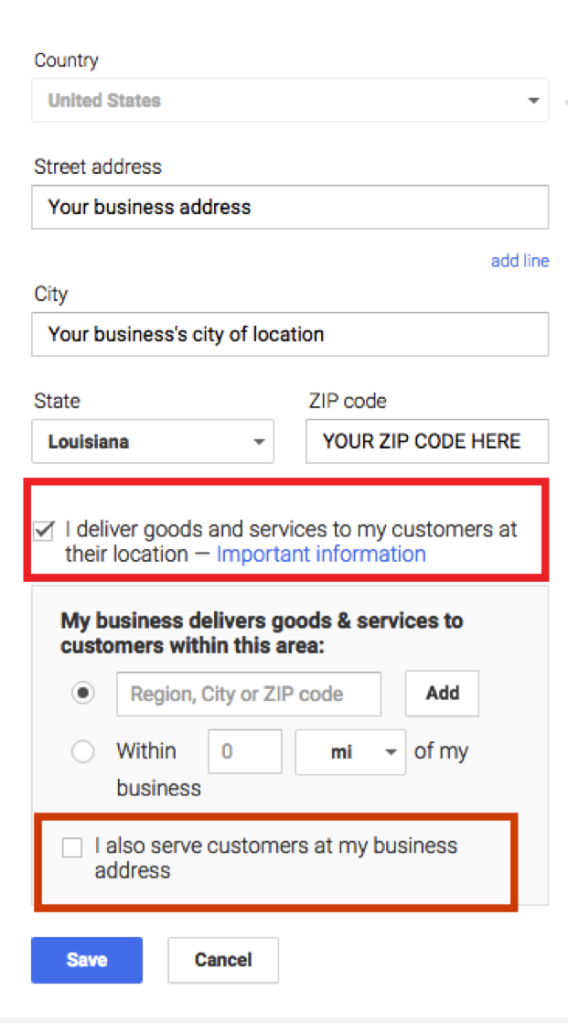
    5. Optimize your Google+ correctly – When you are setting up your Google+ page, be sure to select the box that says “I deliver goods and services to my customers at their location.”

    Google My Business Screenshot

    Follow this up by filling out the ZIP codes you service. If you are a SAB that also accepts customers at your storefront, you can check off the second box. Optimizing your Google+ page correctly will hide your physical location from the viewer while also increasing your page’s authority on the maps pack for the areas you serve.

    Words for the Wise

    When optimizing your SAB online, avoid from these common mistakes:

    1. Advertising your P.O. Box address as a physical location
    2. Portraying an existing business as your own
    3. Using a virtual office address
    4. Creating identical targeted area pages (also called “Find and Replace” pages where the content is exactly the same but only the geo modifiers are different)

    Still have questions? Watch our recent webinar for more information and tips.

    Ice Cream Truck Image Credit

  • Oh No! Where Did Medical Schema Go?

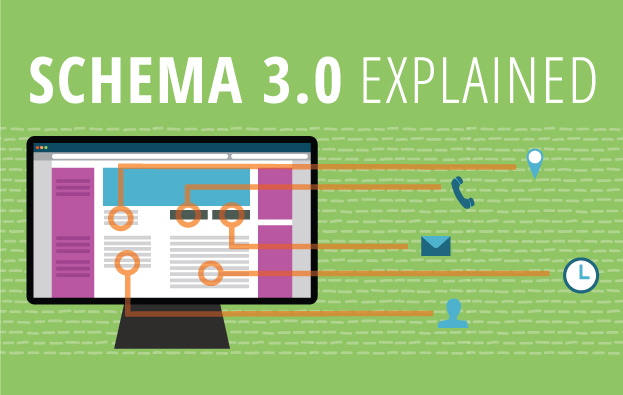
    Schema 3.0 Explained

    While working on implementing some schema markup for a medical clinic last week, I went to schema.org to see my available property choices, but when I went to the same page I’ve visited a hundred times before, https://schema.org/MedicalClinic, instead of the list of properties and their definitions I was expecting, I got this perplexing message:

    Medical Schema Change

    After doing a little poking around on schema.org, I noticed their release notes mentioned the implementation of a new version of schema, Schema 3.0.

    What does that mean for those of us who use schema on our websites? Well, not too much for most industries. Some new schema properties have been added here and there. You can see the release notes for a full list of schema updates. However, if you manage a medical industry website, then you should be aware of a fairly significant change. Schema has re-organized their site and created a new “extension” for Medical schemas. Medical schemas like “MedicalClinic,” “MedicalProcedure,” “Physician,” and even “Dentist” have been migrated to a new subdomain, https://health-lifesci.schema.org/. Most but not all pages on schema.org that used to contain properties available for medical schema types now show the same core vocabulary message. Some pages, like https://schema.org/Physician, still display their property types. ​There are new pages on the health-lifesci subdomain for medical schema types, so we can still mark up these schema types using the new URLs for these pages:

    Currently, Google has not followed suit—their structured data testing tool has not been updated. If you replace https://www.schema.org/MedicalProcedure with https://health-lifesci.schema.org/MedicalProcedure, Google doesn’t throw up an error; it just completely ignores the schema. This update raises some pretty big questions. Will Google update their schema validation, and will the old schema URLs be deprecated and invalid?

    Another variable that makes updating your schema iffy is the information on the new schema extension page, “The terms defined in this extension may be considered moderately stable, but some changes are still likely (including renaming and restructuring) through ongoing community collaboration.” I also think that this may indicate that the restructuring may not be limited to just these schema types, and schema.org may start creating more extensions for specific schemas, rather than including them in the core schema language.

    Right now all we can do is watch and wait. So long as Google is only validating the old schema URLs, we recommend continuing to use those, but stay on the lookout for some big changes yet to come.

    Edited on 5-16-2016 at 3:24 pm:

    “As of this afternoon, Google has already made updates to their validation tool so the new health-lifesci extension will now validate. The old URL for these schema types continues to work as well and does not produce a warning or error. Hopefully this is a sign that those of us with medical schema already implemented on our sites will not have to update the schema to the new format any time soon. Kudos to Google for the swift update.” 

    Feature image credit.

  • SEO & Chill: Google’s Penguin Algorithm Will Sink Sites With Spammy Links

    Every business owner who uses the internet to advertise or display their product (which should be every business owner) needs to know about the importance of Google’s Penguin algorithm. Penguin was introduced way back in April of 2012 as a way to combat some “black hat” SEO practices, such as link buying and link trading with very low-quality and low-authority links. Just like Chill Penguin, Google’s Penguin algorithm is a bit dated, with its last full, confirmed update being back in October 2014, but it was still very active in stopping spammy backlinks. Even before its launch, Google sent out warnings to users of its Webmaster Tools to get rid of their spammy backlinks. Those who heeded the tech giant’s words were rewarded with high rankings in the search engine result pages; those who didn’t ended up on ice.

    Continuous Updates

    The newest Penguin update won’t be an Earth-shattering update like its previous versions, but this version will have continuous updates that will affect searches. What exactly does that mean? That’s anyone’s guess, but only Google knows the true answer. What we can do is try to prepare. Re-evaluating the information we already possess is a great start. We already know that Google hates super spammy, low-quality links and that they love high-authority links. Using this knowledge, you can pretty much assume that having highly authoritative backlinks would lead to Google liking your website a lot more. As far as this update being continuous, that more than likely means that the algorithm will auto-update based upon information that ends up getting collected.

    So What Are Good Links?

    Here’s an analogy: let’s say Google’s Penguin algorithm is a real penguin, your website is the penguin trainer, and your backlinks are fish. Low-quality backlinks would be akin to spoiled mullet, whereas high-quality backlinks are more like freshly caught wild Alaskan salmon. Doesn’t take a marine biologist or an ornithologist to figure out that your penguin will like you more if you continue to feed it salmon. High-quality backlinks will eventually lead you to increased SERP rankings. Not having backlinks is similar to starving your penguin; it makes your page look as if it isn’t an authority on its subject, which is bad news.

    Where Can I Start Getting Good Backlinks?

    Our very own Mary Silva outlined a pretty good strategy of procuring high-authority backlinks. The process itself isn’t easy and requires some inherent knowledge of the internet and the ability to rummage through links extensively and identify what would be the best moving forward into the outreach portion. What it entails is auditing all of your backlinks and clearing out all of the weak and low-authority backlinks. Then comes the hard part: reaching out to other high-authority sources to link to your site is one part of the next step. The more high-authority sources linking to your site, the more likely you are to gain Google’s praise. Another way to link build is to create unique and engaging content so that others can share it and create backlinks for you.

    If you don’t think you’re up for intense link building, Search Influence offers many different search engine optimization packages that can be custom tailored to fit both your budget and needs.

    Image Credits:

    Chill Penguin GIF
    Penguin Trainer GIF

  • Google My Business for Doctors: Visibility, Authority, & SEO

    One of the first steps in improving your searchability with Google is to claim or create a Google My Business listing. With Google My Business, you can manage your information in Google Maps and Google Plus. Since My Business is owned by Google itself, the links gained from these profiles are highly valuable and authoritative.

    However, if you’ve ever tried to claim your Google My Business listing, you may have seen how complex it can be, especially for businesses like medical practices. You may have had questions like: “How do I represent multiple locations for my practice” or “What if I want patients to be able to find their doctors in addition to my practice?” Well, today we’ll go through how to establish your Google My Business presence with exactly those questions in mind, and more!

    1603-SI-KierstensBlog-KG-A-01

    First, let’s dive a little deeper into the world of Google My Business. Google My Business is essentially the dashboard in which you can maintain your information with Google directly. This means that by creating a listing in Google My Business, you’re also creating a Google Plus page and, if establishing a local presence, a Google Maps listing as well. By doing so, you’re telling and verifying with Google, “Hey, I’m a real business, and here’s my real information!” By maintaining that information and posting to your Plus page, you’re proving to Google that you’re the authority on your business and that your business is a valuable resource for users to find.

    Sounds great, right? Who doesn’t want an in with Google? For many businesses, this can be as simple as claiming and verifying a single business listing. But for medical practices, it can get pretty complicated.

    Claiming Your Google My Business Local Listing(s)

    To begin, claim and verify your practice’s primary local business listing. If you are a multi-location business, go ahead and claim the local listings for each of your addresses. Each local listing will need to be verified by either phone or postcard, and no edits can be made until then. Once that’s done, check out these tips and guidelines for building your practice’s Google My Business presence:

    1603-SI-KierstensBlog-KG-B-01

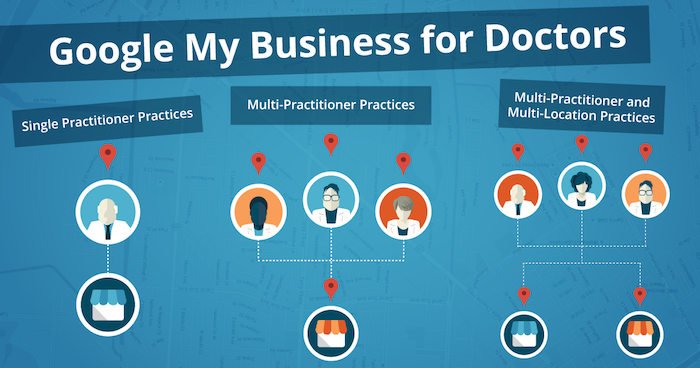
    1. Single Practitioner Practices
      For practices with just one public-facing doctor, you’ll need to decide whether or not to use that doctor’s name instead of the business name. This is wholly a personal decision, but do not create Google My Business pages for both.
    2. Multi-Practitioner Practices
      For practices with multiple public-facing doctors, it is acceptable to create local pages for each doctor, in addition to the practice’s local page. If this is the case, do not include your business name in the name of the practitioners’ pages. And try to differentiate between these pages with either a different phone number or suite number for each doctor, when possible.
    3. Multi-Practitioner and Multi-Location Practices
      For doctors who work at multiple locations, it is acceptable to create separate local pages for each doctor for each location, according to Google’s guidelines. However, it’s even more important that you’re able to differentiate between these pages with separate phone numbers and/or suite numbers. The practical likelihood that Google will flag these as duplicates is higher so proceed with caution! If your goal is to make sure clients can find their doctor’s contact information for each of their locations, then this is a solid practice. Otherwise, if you’re trying to get all of your doctor’s to rank for general searches you’ll need to do more than just add them to Google My Business.

    Brand Pages

    As mentioned before, Google My Business is two pronged; it lets you manage both your local presence via Google Maps and your social presence via Google Plus. If you’re a multi-location practice, consider creating a Google Plus Brand page in addition to your local pages to consolidate your social presence. Brand pages are not linked to Google Maps in any way. Instead, they are purely social platforms for you to manage…you guessed it, your brand! So rather than doing so on each of your local pages, you can post to your one Brand page and gather the same clout with Google.

    That wasn’t so bad, right? Remember to keep these pages updated and treat your primary Google Plus page as a social media profile, like Facebook or Twitter. By doing so, Google will be able to better recognize you as a trustworthy and authoritative source.

    Now that all your pages are claimed, verified, and updated, you’re one step closer to a solid SEO presence!

  • 10 SEO Best Practices To Resuscitate Your Medical Practice’s Website

    Your 2017 Website Checklist Image - Search Influence

    What exactly is SEO, and why should your medical practice be applying it to your website? SEO, or search engine optimization, is a means for building a successful website. It is an on-going strategy for increasing your site’s visibility in the search engine results and helping prospective patients find you and the services and treatments you provide. A well-rounded SEO campaign employs both on-site and off-site work to gain new patients, excel in search engine rankings, and bring in high-quality traffic to your site. The focus of this post is specifically on-site optimizations, which are part and parcel to a successful Healthcare SEO campaign.

    With Google, Yelp, and Bing taking nearly 90% of the market share, your ranking in those search results is essential to the online success of your medical practice. In this post, I give an overview of the 10 SEO tactics that are crucial for not only building a strong and healthy website, but also growing your client base.

    1. Title Tags and Meta Data

    Title tags and meta data are implemented on the backend of your website. They are short and informative, acting as the title of a page of content on your site. Title tags are read by search engine bots as well as users. These title tags are visible at the top of a browser window and appear in search results as a bold blue link title. An optimized title tag includes branding information, your location, and what that specific page of content is about. This allows both search engines and potential patients to know who you are, where you are, and what services you can provide for them.

    There are four types of meta data: meta keywords, meta language, meta robots, and meta description. Most effort is applied to meta descriptions (or meta tags), which act as a summary or description of that page of content. In search results, this information appears in two lines of gray text under the title tag. Every page of your site should have a unique meta description. It is best practice to remain in Google’s 160-character limit while including information on what that page is about as well as a call to action. You want your patients to know not only that you offer tummy tucks, but also that they can easily learn more about the procedure on your website!

    Here’s an example of an optimized title tag and meta description:

    Optimized Meta Data

    2. Call to Action

    Your website should have a clear and bold call to action as soon as a patient arrives on your site. What do you want existing and prospective patients to do once they have found your site online? Do you want them to call for an appointment, or do you have online scheduling? Do you offer a weekly newsletter with tips for healthy habits, or maybe an email list with monthly specials on cosmetic procedures? Make sure your site tells patients what the next step is in learning more about your business or coming in for appointment.

    Here’s an example of a call to action and two types of forms:
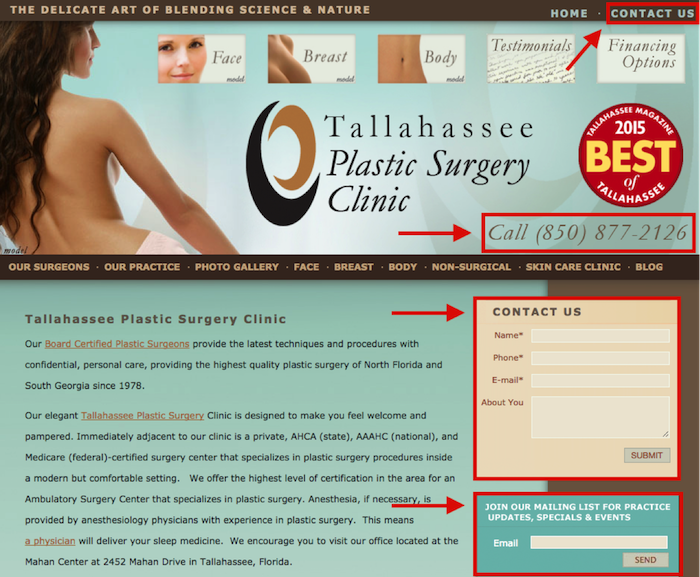
    Optimized Forms

    3. No Broken Links

    Just one broken link can gravely impact your ranking in the search engine results, create a poor user experience, and result in the loss of a customer. If a potential patient clicks on something in their search results and it 404s, they may never return to your site. 404s can be caused by the removal of content (PDF documents, videos, etc.), external links that are changed or moved, and the renaming or moving of pages within your own site. When possible, fix the problem at the source (update internal links on your site to reflect new URLs). You can also redirect any old URLs that have moved to a new URL. Careful: too many redirects can slow down the speed of your site. And remember, some pages are meant to 404, such as files that are not images or pages, or files that a normal site visitor should not have access to, such as an admin or login area.

    4. Topics and Keywords

    Topics are the more general themes assigned to pages on your site. Keywords are those phrases in your content that help people find your website through search engines. The pages of content on your site should include topics and keywords with the services that your practice offers. Keep in mind that these need to be terms that your patients would type into search engines. For example, there are on average over 40,000 monthly searches for “rhinoplasty,” but you don’t want to miss out on those 12,500 monthly users who are searching for “nose job.”

    The topics and keywords you choose for each individual page of your site should appear in the title tags, meta descriptions, on-page headings, alt tags of images, and on-site content. I will go more into content later, but keep in mind that you should be including one keyword for every 100 words appearing on the page. Google rewards those sites full of unique and fresh content.
    Google will reward you if all on-site content is unique and high quality.

    5. Mobile Friendly

    Your site must be mobile friendly! According to a study by Mobile Behavior Report, 27% of users will leave your site if it’s not optimized for mobile use. That’s a lot of business to miss out on! Many patients are calling for information or scheduling appointments on the go. You want to make sure they can easily access your site from their smartphone, and Google can help you with that! They offer a free tool to check how mobile-friendly your website is.

    6. Quick to Load

    If your site is slow, patients are likely to leave and visit another site in hopes of finding the information they are looking for. You want to create the best user experience by presenting an easily accessible and speedy site! Again, Google is here to save the day with their PageSpeed Insights tool. This tool measures both your desktop and mobile speed, gives it a score ranging from 0 to 100, and makes recommendations on how you can make your site speedier.

    7. Schema

    Schema is a piece of code that is placed on your site to help search engines provide richer and more informative results for your patients. It’s a way of “labeling” important information on pages of your site so that search engines can better read it and produce better search results for users. There are many types of schema that can be applied to your site. For a medical practice, one the most effective types of markup is ratings/reviews schema.

    8. Content

    Implementing optimized content on your site is one of the most important aspects of an SEO campaign. This is the actual text on your site where you describe your practice and the individual services that you offer. Google rewards sites with original, high-quality content. It needs to be unique to your site, natural, and fresh! A list of the services your practice provides may seem sufficient, but your site is an opportunity to show your new and existing patients that you are a knowledgeable expert in your field. Don’t just list that you provide rhinoplasty and breast augmentation; demonstrate that you are well versed in these procedures and their recovery process. Make your patients feel at ease and increase their confidence in choosing you as their physician.

    Unique and fresh content also reinforces your site authority with Google bots. New content implemented on your site brings those bots back to crawl the information on your site. Content should typically be about 500 words per page, but as the medical field is more technical, twice that length is usually appropriate. Use content as a means to stand out to patients and search engines as an authoritative and relevant source in your field!

    9. Blog

    Blogs are another way to place rich content on your site! Like on-site content, they boost your site’s authority, but they also allow you to relate to your patients. Regularly posting on your blog engages readers with valuable and useable information. Your website may have a page on melanoma, but a blog post on skin tips for summer is a friendlier way to attract patients to your site. Here are some helpful tips on choosing the length of your blog posts.

    10. Google Analytics

    Last but certainly not least on the list of must-haves for your website in 2016 is Google Analytics! With all of the items above, you’ll want to track the progress of your newly optimized site. With greater insight comes greater control. Google Analytics allows you to analyze your traffic data to better understand your audience. It also helps you understand which of your marketing strategies are working best for your practice. If you can hone in on your audience and which tools are most effective in reaching them, you can lower your marketing costs and bring in more business!

    These 10 best practices are an inexpensive way to boost awareness of your practice and bring in new, revenue-generating patients. With a little strategy and effort, you can have a comprehensive SEO campaign that brings your practice’s website up to speed!

    Image Credit:

    Nurse Phoebe Image

  • Four Steps for Ranking Above Wikipedia on Google

    2710464400_0fd7f7c94e_z

    When a user makes a query in Google, Google will sometimes display a Featured Snippet, which is a few lines of text that directly answer the question posed. These Featured Snippets provide valuable insight to the user who made the query, and according to a study by HubSpot, web pages ranking as a Featured Snippet for a high-traffic keyword see an average click-through-rate increase of 114%. But how do you get your web page to rank as a Featured Snippet?

    Identify Common Questions Related to Your Business and Market

    To rank as a Featured Snippet, your web page is going to have to offer a clear answer to a question that people are asking. Think about the most common questions you get from your customers. If you operate a dentist’s office, which procedures do your patients ask you about the most? Or as a lawyer, are there any specific laws or acts that your clients frequently ask you to clarify? Record these questions.

    Answer These Questions Clearly and Directly

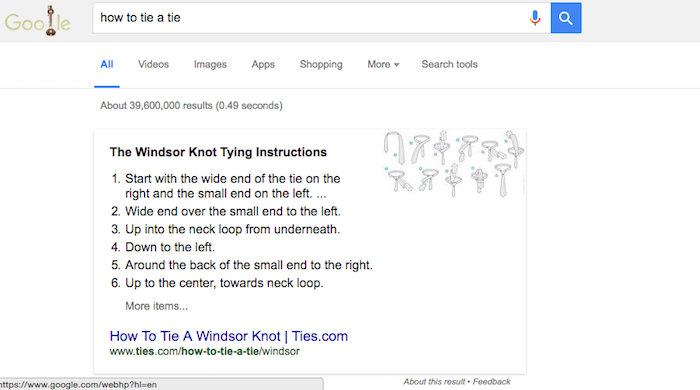
    The point of the Featured Snippet is to answer the searcher’s query as efficiently as possible. After you have analyzed the questions you want your web pages to be featured for, answer them clearly. For example, a “how to” question would be best answered in a numbered series of steps. When “how to tie a tie” is searched, Google pulls a Featured Snippet from ties.com with detailed instructions on making a windsor knot. Each step is clearly numbered and gives exact directions.

    Windsor

    Provide More Valuable Content on Your Page Beyond the Answer

    Your web page for the Featured Snippet needs to have more content on it than just the answer to the query. After all, your answer should only be 54–58 words, and as we have discussed before, pages ranking on the first page of Google’s search results have significantly more words than that. Ways that you can add content to the web page are by adding a video about the topic with a clean transcript of the video’s content.

    Embrace the User Experience

    You want the answer to the query to be found easily by both searchers and Google’s crawlers. Include the search query in your header, with the answer found directly below it. Also include a <p> tag right below the header so that the crawlers will read the header as a header and not as part of the answer. The content you wish to be a Featured Snippet should begin in the same way you would logically begin an answer to the question. For instance, the Featured Snippet for the query “how to bake cookies” begins “COMBINE flour, baking soda, and salt in a small bowl.” There is a clear directive, which stresses the importance even further of eliminating filler content and language from your website.

    As with all matters related to SEO, experimentation will provide you with more insight in how these systems work and allow you to develop an effective content marketing strategy. If your first attempts at trying to rank as a Featured Snippet fail, keep trying. After all, the benefit of being able to rank ahead of such sites as Wikipedia is immense in gaining your website higher visibility.

    Image Credits:

    Question Mark Image