Category: SEO

  • The Beginning of Google’s Mobile-first Index Rollout Is Underway—Are You Prepared?

    In 2016, Google announced they had begun testing a new ranking system based on indexing all mobile content first. Now, it’s official. The eagle has landed! The beginning of Google’s mobile-first indexing rollout is now well underway. As Google continues to move toward the big shift, it’s important that your company’s website is ready for the change.

    But how do you make the jump? Let’s start from the beginning.

    What Is the Mobile-first Index?

    Previously, GoogleBot would crawl your website and assign rankings based on the desktop version of your company’s website. Now that about 60 percent of search queries are made from mobile devices, Google is replacing desktop versions of sites in the index with their mobile counterparts via this mobile-first index. As a result, Google will determine rankings based on the quality of the mobile version ahead of the desktop version of the site.

    If the mobile performance, content, and user experience are up to scratch, your site receives a better ranking. If they are inferior, other sites will rank higher and you would take a hit.

    Ouch.

    How Do I Know When My Site Will Be Included in the Mobile-first Index?

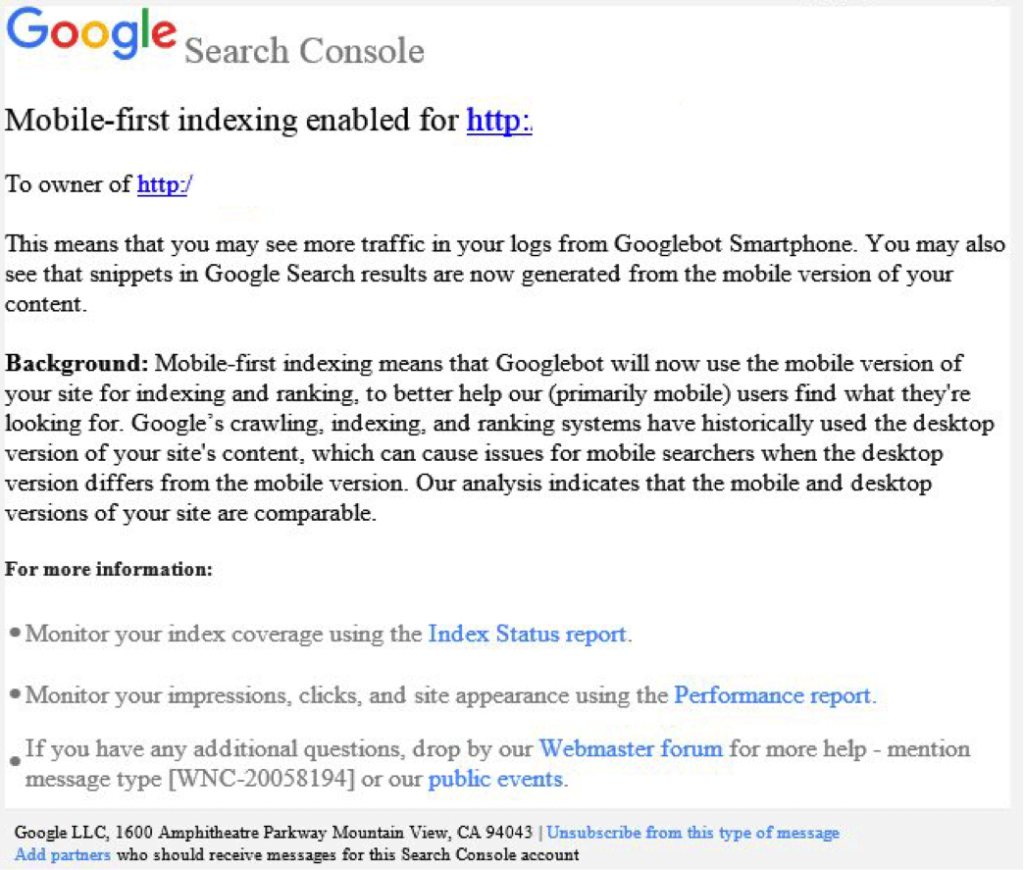
    Beginning this month, Google started notifying site owners and webmasters that their sites are migrating to mobile-first indexing through Search Console. The message looked like this:

    Screenshot of a mobile-first index notice from Google - Search Influence

    How Do I Prepare for the Mobile-first Index?

    Here are some tips to get you started.

    1. Mobile Page-speed

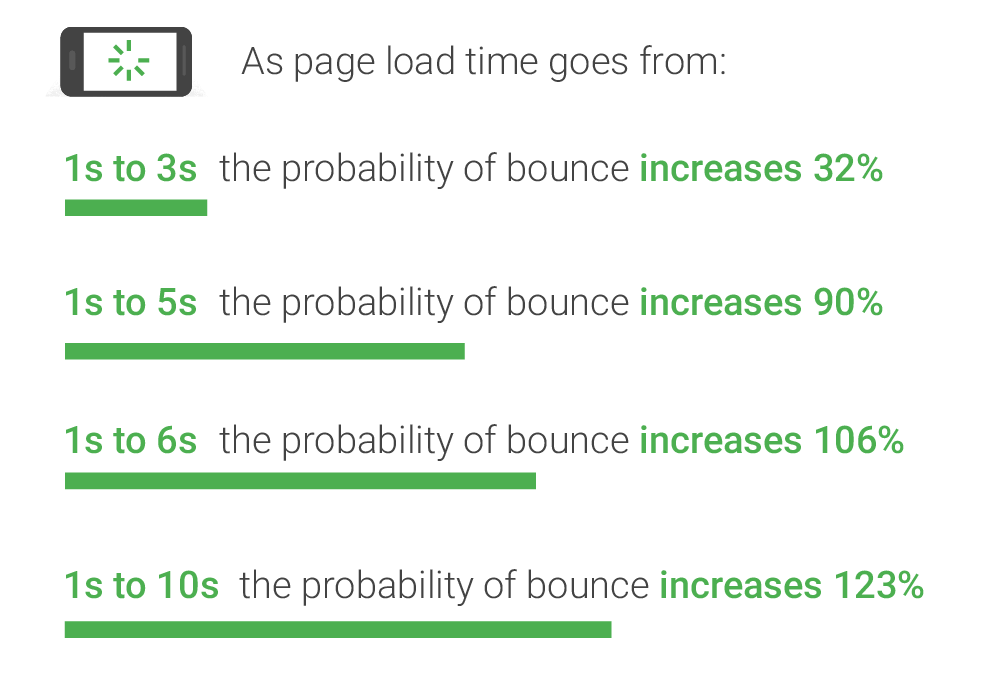
    According to Google’s mobile page speed study on Think with Google, as page load time slows down from one second to six, the bounce rate increases by 106%.

    A graphic of page load time relative to bounce rates - Search Influence

    So, make sure that your mobile website loads quickly and seamlessly. Google’s PageSpeed Insights is a handy tool for a basic test.

    2. Responsive Website

    A responsive website that is mobile-friendly works seamlessly across all devices. How do you make a website responsive?

    If your website is built on the WordPress platform, then creating a responsive design is very easy!
    Jared Jones’ post on the beauty of WordPress will make you a believer.

    3. Search Console Verification

    If you have separate mobile and desktop websites, verify the mobile version in Google’s Search Console. This proves that you own the site and directly affects how Google interprets and indexes it.

    Google’s Search Console help page provides you with all the ammo you need to get this done. More complex solutions for this preparation period includes content and image optimization, on-site directives and redirection, and schema structured data for your website.

    Talk to Us!

    At Search Influence, we are excited to start seeing the mobile-first index take form!

    To fully understand the impact of Google’s mobile-first index on your website, contact us for an audit and review of key aspects of your site’s mobile-friendliness. We’ll help you develop a roadmap to rectify potential risks to your search ranking and the content experience for your customers.

    Images:

    Parks and Rec

    Mobile-first notice Screenshot

    Page-speed Bounce Rates

  • What Happened to My Meta Descriptions in Search Results?

    During a typical day-to-day interaction with Google’s SERP recently, I started to realize the variable nature in which meta descriptions were being pulled into search results for our site. We know that last December Google announced the expanded the character count guidelines for meta descriptions, but that did not seem to be the only input at play—it was pulling in the implemented meta description for some searches and a chunk of the content from the website for other search verticals.

    Let’s start with a service page present on our domain. Within the page’s coding, we have implemented the following meta description:

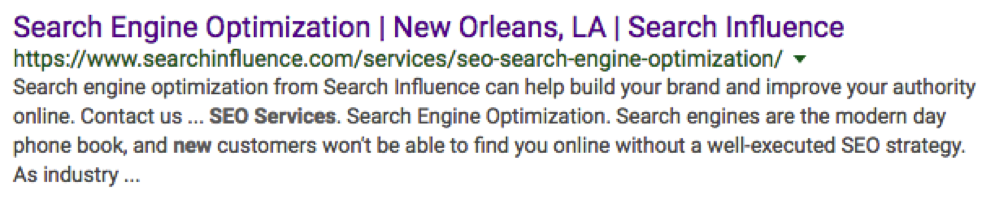
    However, a search for “seo services new orleans” generated a completely different meta description from the one implemented in the site’s coding.

    Google appears to have made the decision that our implemented meta description was either less accurate or less relevant to our search intent than the page’s content. What jumps out here is that in the SERP we see that three of our search terms are bolded in the description, including the “new” from New Orleans. Google has made the decision to extract the “new” and treat it as its own search value and not necessarily as a string with “New Orleans”.

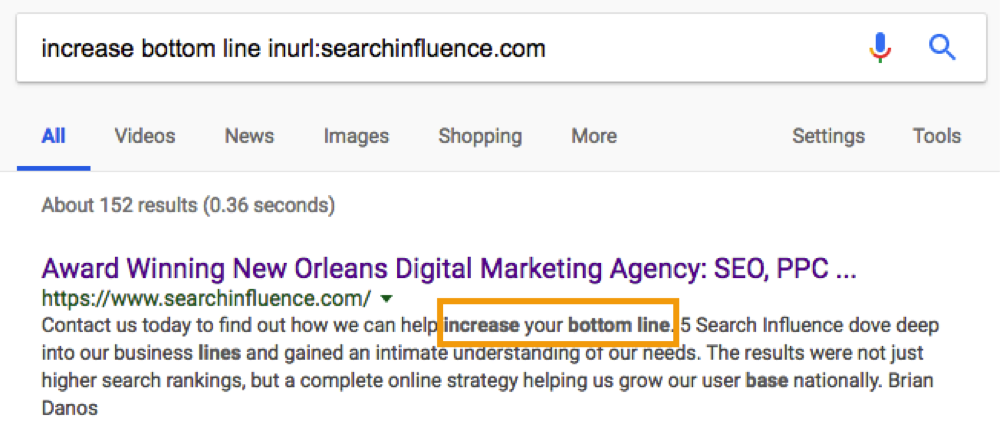
    With this in mind, I began to test the limits of Google’s ability to crawl and pick specific parts of content to utilize in a meta description. Let’s start with our main domain’s meta description.

    In the search for “digital marketing new orleans” our implemented description pulls in perfectly.

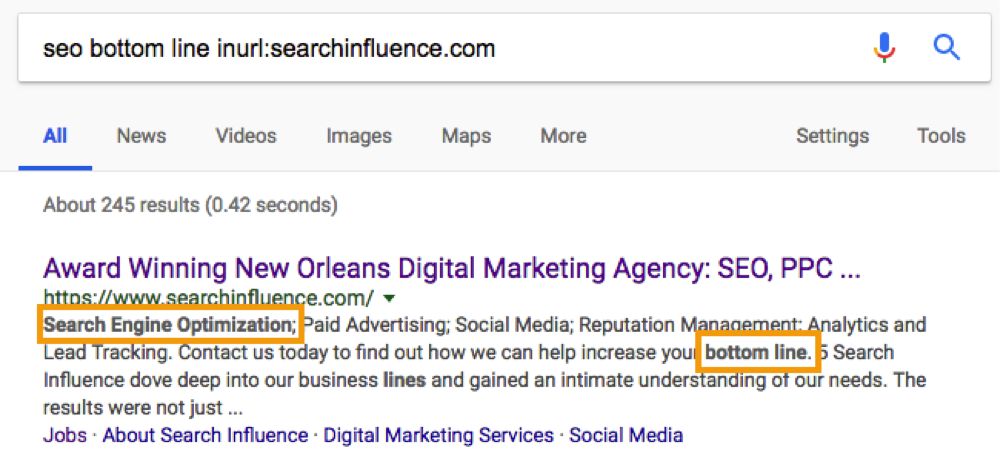
    So in this case, our intent and meta description seem to be perfectly aligned. But, what if I picked some unrelated string of words from my content? I scrolled toward the bottom of searchinfluence.com and picked out a chunk of content to see if I could get it to populate as the meta.

    Wow, that was easier than anticipated.

    Let’s take this a step further. What happens if we Frankenstein some sort of combination of content and our original keyword search.

    So, from this small sample, we can see that Google is actively trying to best address your search intent by extracting the most relevant information from the most relevant pages related to your search query.

    This leads to many follow-up questions: How do I optimize my meta descriptions? Does the length matter? How do I make sure I capture the searchers I want? This presents a lot of loose ends, as these types of things always face small adjustments and tweaks from Google. However, this research can help us form some conclusions about general rules.

    1. Assure your meta description addresses the main focus of the page with search volume in mind.

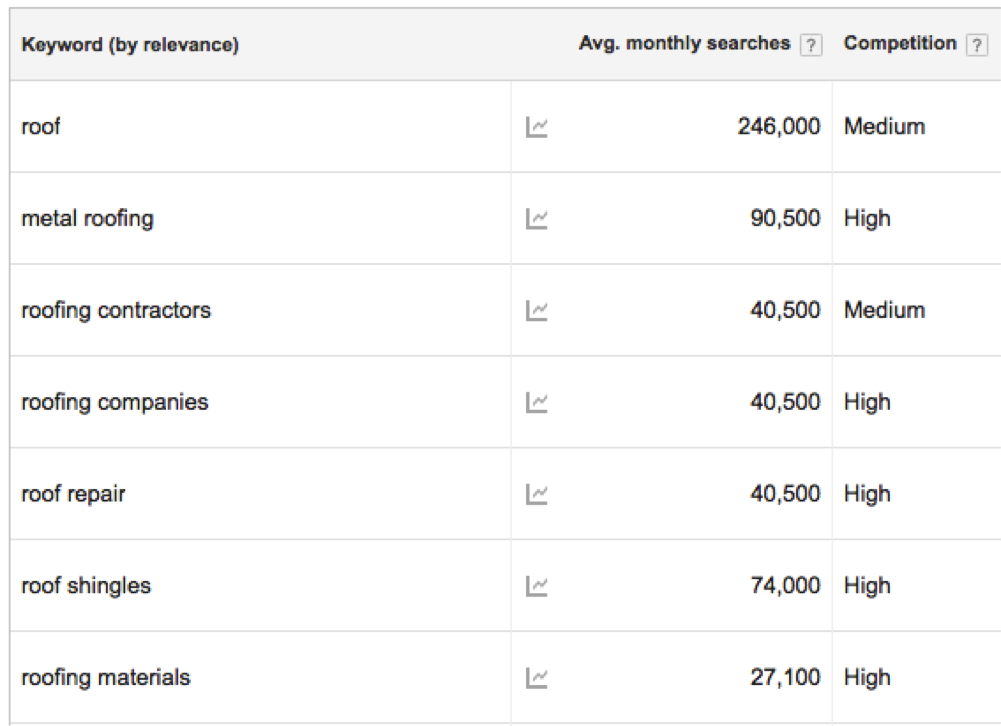
    If Google is trying to tell us that intent matters, then it makes sense to align your meta descriptions with the intent of the searcher. Let’s take a roofer for instance:

    What can I infer from these average monthly searches? For the main domain, best practice would be to address metal roofing, contractors, “company,” repair, shingles, and materials if I want my implemented meta description to pull in for all of the keywords. Keep in mind that, as tempting as it might be, if your page’s content does not address a particular topic or keyword we do not want to include it in the meta description for the sake of attracting searchers. Your keywords or topics in your meta descriptions and on-page content should always align very closely.

    Also, think about pages with a lower number of clicks and conversions. Am I missing any top-level keywords on these pages? Which keywords or topics can I implement to help searchers better understand my product or service? This may require some testing, however, it will aid the end goal of pushing the target audience to the desired product or pages.

    This might seem like a return to a “keyword focused” construction of meta descriptions, but it is more about aligning what your business provides with what a potential customer or client might be searching. If you want your meta descriptions to pull into the SERP, this must be kept in mind.

    2. Meta descriptions should reflect the page’s content.

    When writing meta descriptions, you should also consider the variance in search queries. In theory, your page can rank for a number of keywords outside of your original plan. With that in mind, the meta description should work hand-in-hand with the page’s content. This way, when Google prioritizes one over the other you are still accurately presenting your product or service.

    Additionally, in terms of marketing, find what works best for conversions and stick with it. Since we cannot create a meta description that catches every possible search term or query, you should be strategic about using terms or queries that will best position your business in front of searchers.

    3. Google is utilizing Semantic SEO for Metas.

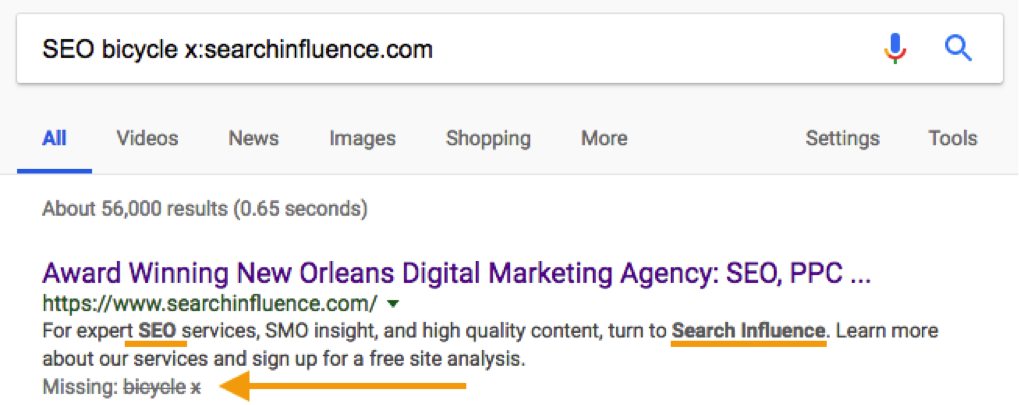
    What we see in bolded text in the SERP results, as seen in earlier sections and the image below, is that Google is continuing to think about searches semantically. In other words, Google is applying more meaning to your searches than a strict A-to-A, keyword-to-result formula. It is trying to infer certain things about your search and what type of content you seek in return. Think about your Semantic SEO strategies and how those can be integrated into your meta descriptions.

    In the above example, we see that Google hit on “SEO” and “searchinfluence” as indicated by the bolded text in the meta description. Below that, we see terms that were excluded, “bicycle” and “x”. What this shows us is how Google is thinking about your search query semantically and thinking about the context of what you are searching, excluding terms that are not semantically part of your search vocabulary.

    4. Utilize the extra space.

    Google has provided us with some extra legroom for our descriptions by expanding the character count to somewhere around 300. Testing has indicated that descriptions can go beyond 300 characters, but that is the explicit cut off provided by Google. While Google will still pull in “shorter” metas that fit the old standard, it makes logical and semantic sense to include as much information that covers as much search intent as possible.

    As with most things Google, this is continually evolving and requires continued observation and testing. However, there are clear signals about the ways meta descriptions are being rethought as they relate to the SERP. This is a great opportunity to test our new ideas and apply new SEO strategies to see what works and how it can positively impact your business.


    All screenshots were taken by Cory Agular.

    Images:

    Start

    Young Frankenstein

    Cat Reflection

    Space

  • Mobile Travelers: 4 Ways Mobile Search is Used in Vacation Planning

    Mobile Travelers: 4 Ways Mobile Search is Used in Vacation Planning

    We’ve come a long way from lugging around heavy guidebooks and drawing out routes on paper maps. In fact, we’ve even come a long way from planning vacations on desktop computers. Google shares that a growing number of travelers are planning vacations on their mobile devices, with mobile’s share of travel visits growing 48 percent in 2016, and mobile web conversions for travel sites growing 88 percent that same year. As a result, it’s increasingly important for businesses in the tourism and travel industries to optimize their websites for mobile and make researching and booking trips easy for mobile customers. Here’s how!

    Take me away - Search Influence

    “Micro-Moments”

    According to the same source from Google, the key to a successful mobile travel site is leveraging micro-moments. These are moments of intent when someone acts on a need—for example, looking for a hotel once they’ve booked a flight to that city. Google names the core four micro-moments of planning a trip as I-want-to-get-away, Time-to-make-a-plan, Let’s-book-it, and Can’t-wait-to-explore. Different businesses in the travel industry will prioritize different micro-moments—for example, an influencer on Instagram might focus on I-want-to-get-away while a local tourism bureau might concentrate on Can’t-wait-to-explore. But, catering to customers across all four micro-moments certainly can’t hurt!

    1. I-want-to-get-away

    Also called Dreaming Moments, these are the times when people start thinking about their next vacations—and Dreaming Moments happen often. Again, according to Google, 37 percent of U.S. travelers think about planning vacations once a month, and 17 percent think about it once a week or more. In 2015, 38 percent of non-branded travel searches came from mobile devices. Today, that number is only increasing. So, how can travel and tourism businesses cater to this growing audience?

    One option is using SEO services to help your website rank higher in search engine results for questions like, “What to do in [destination]?” and, “Where is [destination]?” These are two of the top travel questions people ask Google. Another great resource is YouTube. Google estimates that roughly 106 million of YouTube’s monthly unique visitors are travelers, and 64 percent of people who watched travel-related videos did so during Dreaming Moments. This means that learning to attract customers on YouTube is a must for businesses catering to I-want-to-get-away micro-moments.

    Animation of a plane flying - Search Influence

    2. Time-to-make-a-plan

    Also called Organizing Moments, these are the times when travelers have decided to take a trip but are still considering different hotels and airlines with an open mind. During these moments, travelers are figuring out the logistical details of their journey—like how long flights will take or how much hotels will cost. And, they’re figuring out these logistical details on mobile. On Google, mobile flight-related searches are up 33 percent year over year, and mobile hotel searches are up 49 percent.

    To reach customers during Time-to-make-a-plan Moments, consider online advertising campaigns, or Google services such as Hotel Ads and Google Flights. And, of course, make sure that your website is fully optimized for mobile!

    3. Let’s-book-it

    Booking Moments are incredibly important—not only because they’re the times when travelers start spending money, but also because these moments may have the most room for newcomers to make an impact. Going back to data from Google, 46 percent of travelers who do mobile travel research made their final booking decisions on mobile but did the actual booking itself on a desktop or laptop computer. This means that customers are likely not getting everything they need from mobile during Booking Moments. Businesses that improve their mobile booking have an opportunity to rise above the competition.

    Google recommends Book on Google as a way to increase conversion rates for mobile Booking Moments. But, other ways to improve customers’ mobile booking experience include streamlining the check-out process to remove any unnecessary steps and making sure your site is secure. Customers will be more likely to book on-the-go if they trust that their information is safe and secure.

    4. Can’t-wait-to-explore

    Also called Experiencing Moments, data from Google proves that these are also areas of huge potential. Travelers are increasingly planning their vacation activities while they’re on the trip, with 85 percent of 2016 leisure travelers deciding on activities after arriving at their destinations. Here again, travelers are making these plans on mobile. In fact, mobile searches from hotels increased 30 percent in 2016. Companies who aren’t catering to this growing audience are missing out on potential business.

    So, how can a travel industry business appeal to customers in Experiencing Moments? Provide travelers with information! The same source from Google found that 53 percent of leisure travelers are interested in visiting new places, compared to just 18 percent who want to return to previous destinations. This means that the majority of vacationers are somewhere they’ve never been before. Offer recommendations for restaurants or attractions, and make these recommendations location-aware—Google searches for “places to eat near me” more than doubled in 2016.

    Two planes making a heart shape in the sky - Search Influence

    Travel is increasingly becoming a mobile-centric industry, and businesses have a lot to gain by targeting customers in these core travel micro-moments. Whether it’s improving YouTube reach to grab viewers during I-want-to-get-away Moments, or making sure a site is hosted on a secure server for Let’s-book-it Moments, Search Influence is here to help. Bon Voyage!

    Images:

    Take Me Away

    Want to Get Away

    Bon Voyage

  • Rookie Website Mistakes, Part 6: You Abandon Good Work When Replacing an Old Site

    So, you’re launching a new spiffy, user-friendly website? Or, maybe you’re migrating your site from an HTTP to HTTPS secure domain? To make the launch as successful as possible, there are a few important steps you (or more likely your web developer) should take on the backend to facilitate a seamless transition.

    Changing your URL requires a strategic plan. Without it, you could end up with lost links, dreaded 404 errors, and annoyed customers. If you’ve built some authority for your site, you also need to manage your page rankings during the process. No one wants to watch traffic plummet when they launch a new site.

    While it may not be as exciting as creating the design or building out new pages, here are four absolutely necessary administrative steps to take during the launch of your new site.

    Set Up 301 Redirects

    A 301 redirect will automatically transfer users from the old URL to the new page on the website that replaces it. So, when someone types in your old domain they will still end up on your beautiful, newly-designed (or newly-secure) website.

    While there are other options for redirecting links, 301 redirects are the safest and most trusted way to permanently redirect pages without diluting PageRank on Google. In fact, Moz estimates that 90–99 percent of ranking power will pass from the old page to the new one with the use of a 301 redirect. This is because Google bots recognize 301s as a permanent change, indicating that the original content from the old URL has found a new home on the redirected page.

    There is no limit to the number of 301s you can use per site, so you can (and should) redirect all of your old, viable content to new URLs for your new site in order to retain all of the rank power (also known as link juice) from your old site.

    To make this happen, extract all the URLs from your content management system or export the URLs from Google Analytics to create a list of the URLs on your existing site. Don’t forget to include landing pages from any paid search campaigns you’re running, as Google will lower your quality score for running ads with broken links.

    Once you have this list, you can proceed to the next item on our list, mapping out your new site.

    Image of Lost Duck With Map - Search Influence

    Update Site Maps

    As you learned in part four of this series, you’ll obviously want to have more than one page on your new site. An updated sitemap should be the foundation for your new site design. Start by creating a list of all the pages you know you want to include in your new site. Your old site’s URL list (see above) can provide a foundation for essential pages that you know you want to keep, especially the pages on the old site with inbound links that help improve rankings.

    Map out all planned pages that correspond to pages on your old site so you can set up redirects for all of those pages. You’ll also want to take note of key analytics on legacy pages to use for comparison once the new site is launched.

    The following are some ideas for what you should track for your benchmark:

    • Organic traffic and page visits
    • Bounce rate
    • Page loading speed
    • Conversions per page
    • Rankings for priority keywords

    From here, you’re ready to create a robots.txt file and an XML sitemap to give Google and other search engines the right information to crawl your new site. If any of the steps so far have left you scratching your head or frantically googling SEO jargon, one of our friendly tech gurus can help you out!

    Recycle Existing Content & Optimize for SEO

    Creating a new website from scratch is already a big undertaking—don’t recreate the circle. Be sure you bring over your existing title tags, meta descriptions, and page headings and ensure all new content includes these essential SEO elements. This is also the perfect time to audit your existing content to ensure that it meets the latest best practices. Are multiple pages using the same headline (h1) or meta descriptions? Do pages have broken internal or external links? Are images too big and slowing download time?

    Use what works, fix what doesn’t. Your content for each page should be unique, use keywords naturally (without stuffing), and include logical internal links.

    Don’t Forget About Google Analytics

    As you launch the new site, it will be more important than ever to track analytics and ensure that everything is functioning like it should. Migrating to a new domain is a huge, detailed undertaking, and little problems are likely to arise.

    Image of Graphs, Charts, and Analytics - Search Influence

    Make sure that the Google Analytics tracking code is properly installed on each page of the new site and collecting data. With your collected benchmark data, you can compare traffic and rankings for the new site and check and adjust as needed. Tools like Screaming Frog can also help you check for 404 errors on the new site and alert you to any issues with pages being indexed improperly via your robots.txt file.


    Images:

    Lost Duck

  • The Final Countdown: Secure Your Website to Align With Google’s Update to Chrome

    Is your website safe from google's not secure warning - Search Influence

    The year is almost over, October is finally upon us, and if you’re wondering what you should be checking off of your business plan “to-do list,” then you should definitely place priority on reviewing the security of your website.

    Starting this month, Google will officially be letting your visitors know if your site isn’t secure for them to navigate.

    This shouldn’t come as a surprise, since Google announced its intentions back in 2014. But nonetheless, the time to take action is now. Here’s what you should be looking for in order to avoid Google showcasing security warnings to your visitors and potential customers.

    Image of an HTTPS secure site - Search Influence

    Are You Talking to Me?

    A secure site means your site has received an SSL Certificate. SLL uses HTTPS (Hypertext Transfer Protocol Secure) servers to encrypt and store information given on the site. Here’s more detailed information from Google about HTTPS servers. Not only do they provide an assurance for your visitors by securing any information they provide through a form fill like credit card details, but Google also announced that HTTPS is a ranking factor, even if not a huge one.

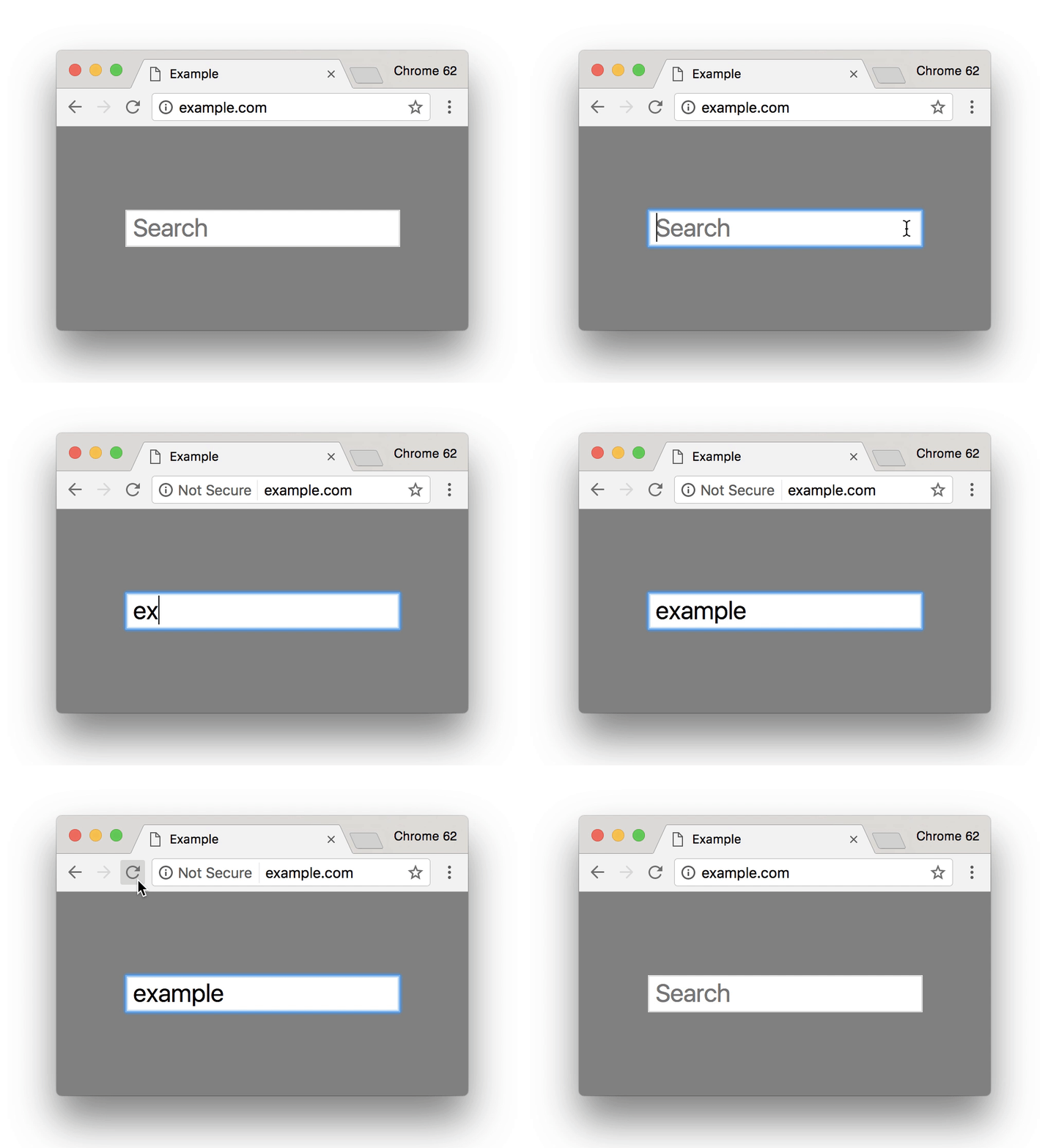
    So, how can you tell if your site is secure? One the easiest ways is to open an incognito window and look at your site’s URL in the search bar. Does it read  “Secure|HTTPS”? If so, then you’re good to go. If you attempt to input any information in a field on your site and “not secure” reads at the start of your URL, then that means your site is not secure and you will need to contact your web developer, web host, or attempt the switch to a secure site yourself. Google made a handy GIF displaying what this would look like for users.

    Search bar from Google Site - Search Influence

    Is It Too Late to Secure My Site?

    Google’s update to how it displays unsecured sites in Chrome is slated for release around October 24. If you have already earned an SSL Certificate for your site, then kudos to you. But, it’s never too late to switch your site to HTTPS.

    Jared Jones, one of our technical web developers, wrote a detailed blog post about the importance of having a secure site, steps you can take to switch to HTTPS, and reasons why it may affect your site’s speed and your overall ROI. If you’re thinking of tackling the project yourself, this post is a great start.

    Google plans to announce future changes to increase site security, like displaying “not secure” for all HTTP pages, not just those in incognito mode. But, it’s safe to say that making this simple change will increase the trust of visitors to your site, leading to a higher return rate for your business. Contact our team of experts—we can help you make the switch today.

    Here are some options:

    1. Do it yourself or with your developer or website company, with caution.

    Beware, not all SSL Certificates are created equal. Be sure the provider of the SSL Certificate is Google approved. purchasing an SSL Certificate, configuration at the server level is required for set up as well as ongoing maintenance. The process must be repeated each time it expires.

    Once the SSL Certificate is purchased, it must be configured at the server level in order to complete setup. Ongoing maintenance is also required, and the process must be repeated each time it expires. When you update your URLs to HTTPS, you must also implement proper 301 redirects and all your assets must be addressed when moving.

    2. Let us take care of it for you!

    We’ve developed an easier-to-maintain alternative for our clients that fully addresses redirects and website assets, setting you up better for the long term.

    If you are a current client, we’ve already reached out to you about moving over.

    If you are not a Search Influence client, reach out to us so we can discuss helping you!


    Images:

    Google GIF

  • Turning Links Into Lemonade: Your Guide to Juicy Internal Linking

    You’ve likely heard of internal links. In terms of SEO jargon (which there’s a lot to sift through), they’re pretty straightforward. Internal links are just the hyperlinks on your site that point to other pages within the same domain. For example, your homepage content probably has internal links pointing readers to your primary service or product pages. While a blog post might incorporate internal links to other posts that elaborate on a similar topic—or better yet, a service page that helps users solve the problem focused on in the blog post.

    The navigation menu for your website is also a structure for internal linking to ensure that all of your pages are connected and easily crawlable by search engines. It’s important that all new pages you create are linked back to your homepage using this navigation. For the purpose of this post, however, we’re going to assume your navigation is set up and focus on the internal links you incorporate into the actual content of your pages and posts.

    Choose Internal Links for Users & Crawlers

    Internal links are easy to understand, but don’t underestimate their power—both in terms of SEO ranking and an improved user experience.

    A person's hand squeezing a lemon

    When you properly use internal links, you’re spreading ranking power (also known as “link juice”) and authority from your site to that specific page, which improves the chances that it will also rank in search results. Internal links act as road signs, telling search engines which pages to crawl next on your site. On top of that, when you use highly relevant content links that match users’ search queries you’re confirming your authority.

    Internal links also plot the course for users (humans) to navigate your website and find the most relevant content to meet their needs. This keeps them on your site longer and improves the user experience. Just imagine that a prospective customer finds your blog post about steps to take when you get a flat tire, then within the post, they find a strategically-placed link leading them to your tire company’s product page about how to find replacement tires. With the right internal linking, you’ve given that person the information they needed and even offered a solution.

    So what does it mean to properly use internal links? There’s not always a hard and fast rule for when to link, how much to link, where to link, and the like. But this guide can offer a primer for getting started.

    Choose Appropriate Anchor Text

    The anchor text for your internal link is simply the clickable words you select to turn into your hyperlink. You’ll want to think about your selection both in terms of the context of the sentence and how the anchor text reads on its own for skimmers. There’s no character count limitation for anchor text, but you should aim to keep it as concise as possible without sacrificing clarity. Your reader should know where they are headed before they click the link.

    Landing them on a confusing or off-topic page that does not align with your anchor text disrupts the user experience. While keywords or topics for the content are a great first choice for relevant anchor text, Moz recommends using a variety of words throughout the post that most naturally fit for your anchor text. That’s because Google’s algorithm will take note of pages with too many keywords in anchor text and flag them as spam.

    Instead, opt for descriptive, partial-match anchor text that contains part of the target topic within the text. For example, build a comprehensive SEO strategy with Search Influence. This link goes to our SEO services page, which you could probably guess based on the anchor text.

    When in doubt, double-check that your anchor text meets the following criteria:

    1. The anchor text fits naturally within the rest of the content on the page
    2. There is zero mystery about where the user will land when they click the link
    3. Anchor text selection is diverse across all the content on the page

     Opt for Relevancy Over Quantity

    We can’t overemphasize this enough: choose natural, relevant pages to link to within your content. Don’t force a link. Google and your users will catch on quick, end of story.

    You should also avoid linking to the homepage or contact page. Those pages already have plenty of link juice. If your reader is already on an internal page within your site, why would they want to backtrack to your homepage? Instead, do as Kissmetrics recommends and reach for a 1:1 ratio of deep internal links and main navigation links. If your page is content heavy, then you should link out to other content-rich pages that elaborate on your topic and keep your reader engaged.

    Animation of hand counting to five

    While there is no magic number for how many links you need on a page, you can aim for about 2-4 contextual, natural links that make sense and address topics that would interest your reader. Just like with writing calls-to-action, you should assess each linking opportunity from the perspective of your prospective buyer to see if the target page is a good fit.

    Audit Existing Content for Linking Best Practices

    Keeping your content fresh with new internal links is an important step because it notifies Google to crawl the page again, increasing your ranking opportunities. You can also make sure that your inventory of content remains up-to-date and relevant for readers. We recommend building a schedule for updating content on a regular basis, with priority given to posts that cover topics for which you’re most interested in ranking. If you’re a plastic surgeon, that might mean auditing all of your existing posts about breast augmentation and liposuction if those are your top two procedures.

    When you update a page, we recommend checking for necessary updates, adding fresh content in the opening paragraph, then naturally incorporating internal links to any new related content. If you recently added pages about breast augmentation FAQs and post-surgery healing, then you’ll want to ensure those pages have link juice from other breast augmentation pages and posts on your site.

    Tools like Moz’s Open Site Explorer allow you to see how many internal links are going back to each page on your site. This will give you a holistic view of your domain to see how you can move more link juice to specific pages that cover topics related to those top-priority ranking terms.

    Of course, sorting through these tools and creating a dynamic strategy for link building takes a dedicated effort. If you’re short on time but eager to improve your link profile, contact us to chat with an expert.


    Images:

    Lemon

    Counting

  • Rookie Website Mistakes, Part 4: You Have a Single Page Website

    Single page websites are very popular right now with web designers. With so many new ways to develop websites, they’ve become a unique and scroll-friendly way for users to interact with a company in a way that they’re used to (cue the token image of people scrolling through phones). And, to be fair, they can be quite beautiful. For example, take this design from 415-Agency, a San Francisco-based design firm that works with healthcare companies to make their digital products user-friendly, seamless, and as they put it, “awesomely good looking.”
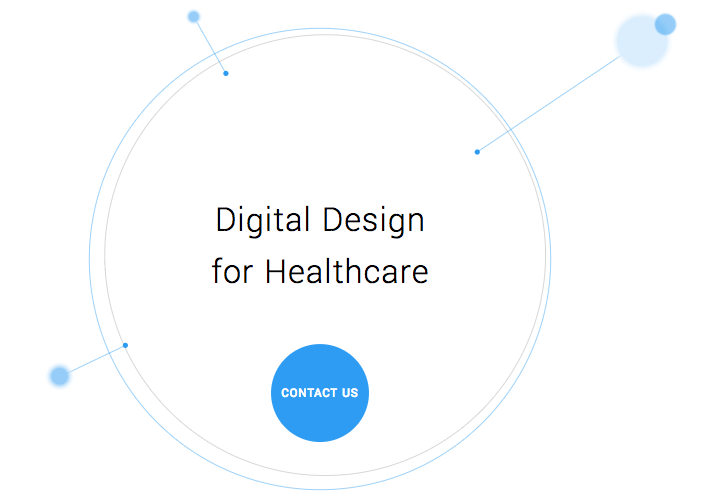
    Image Of Screenshot of Digital Design for Healthcare One-Pager - Search Influence

    It’s an understatement to say that ton of work went into this site—it won them an honorable mention award from Awwwards, an organization that gives awards for the best designs, talent, and web dev agencies across the world. I’m a huge fan of exciting visual content, interactive graphics, and designs that enthrall. But, where some entrepreneurs get into trouble is when they try to manage a killer single page website while also optimizing it for SEO. They may come to discover that, for all its glitz and beauty, they’re the only ones actually finding it online.

    Photo Of Stock Of Boxes - Search Influence

    Form Must Follow Function

    Just as the customer is always the top priority, your website should follow that same line of logic. When thinking of how to design your website, think of not just how users will react to the visuals, but also how they will eventually interact with the site’s navigation. Give them clear avenues for finding more information, ordering products, or exploring your blog or testimonials. While a single-pager may seem simpler, it can often be easier to get lost and frustrated with trying to find a relevant page of content. To quote marketing guru Neil Patel, “website usefulness is more important than website beauty.”

    If a user comes to your site and thinks, “wow,” then give your web designer a bonus or yourself a pat on the back. But, the more important thing you should worry about is if their next word they is, “how?” Users should know how to interact with your site pretty easily. If they don’t know what to do or how to do it, then your site is harming you, not helping you. This can also lead to high bounce rates—users will eventually get frustrated and leave your site for one with better navigation.

    Another thing that can contribute to high bounce rates from your one-page design? Slow load times. I wrote about this in a previous blog in this series, but it’s worth mentioning here as well. Whether you’re using Flash (which, please don’t) or not, data-heavy load times due to unoptimized, large images that occupy your page’s whole screen can strangle your page load times.

    Single Page Websites Lack the Opportunity for Detail Laden Content

    Single page websites don’t have the space to allow for specific, rich content. From a user perspective, this limits the opportunity to provide a visitor with detailed, relevant content on topics they want to learn more about. Instead, they’re likely only able to view around a paragraph on specific topics. From an SEO perspective, this also gives search engines fewer opportunities to crawl your site for content that can help you move up in rankings while asserting yourself as an authority on your subject. It puts a great amount of pressure on a small amount of words. And, if you do manage to get a lot of content onto a single page, it ends up looking like it’s fighting for space.

    Image Of Post-It Notes - Search Influence

    Google likes to see that you’re updating your site with relevant content. If you have a single page site, you could make the argument that new content could be added to the bottom, creating an endless scroll of text and images. But, that method still doesn’t address the problem of not allowing search engines to crawl multiple pages of relevant content, and it also creates a headache of a user experience for visitors.

    By building out pages for your content to live, you give visitors designated, clean spaces with which they can explore your services, products, or ideas (blog posts) to their heart’s content. They don’t have to scroll for a minute or two to find your latest blog post, and search crawlers can find it easier, too.

    Forget About Performing Wide Keyword Targeting

    Since single page sites are generally designed around one main concept, the opportunity for using multiple keywords is very limited. With a multi-page site, every page has a chance to introduce a new topic or genre that can include different types of keywords that target different users and open up multiple avenues for ranking.

    With a single page site, it becomes extremely difficult to rank for varying keywords. For example, say you’re an owner of an HVAC company. You provide installations and repairs for furnaces, A/C systems, ductless A/C, water heaters, as well as air quality testing. By building separate pages for each of those services, you have an opportunity to move them each up in Google’s rankings, all while showing an increase in your authority. Putting all of your content in one page is like putting all of your keyword goals in one basket and hoping Google magically picks them up.

    Missed Opportunities for Quality Tracking

    Having multiple pages means multiple opportunities to track user behavior. You can track if someone spends 5 seconds or 5 minutes on a page about one of your services. With that valuable data, you can then focus your goals on what pages need work to bring in more visitors and convert them into customers. Obviously, this would be a difficult task for a single page site. The data showing time spent by your users will be very general, leaving you unable to tell what they love and what they dislike.

    Are There Examples of Single Page Designs That Work?

    There should and will always be design diversity on the internet. And sometimes, a single page site may work for you. For instance, take this site made by firm Gin Lane for GE that explores everything about the inside of volcanoes. Not only is the site visually satisfying, filled with video and interactive graphics, but the scroll feature of a single page makes sense because you’re literally venturing down into a volcano. Educational sites like this can have the luxury of not worrying about how SEO-friendly their content is because their main goal is to inform, not sell a product or service. Also, it doesn’t hurt that GE has the budget to build a site like this.

    Image of Screenshot of Volcanoes Single Page Website for GE - Search Influence

    Another example of a single page site working to your advantage can be when you’re utilizing it as a promotion. FBC Creative Tech Design created a site for FOX’s upcoming show, “The Gifted,” a show based on the X-men series of comics. The site, using the fictional “Sentinel Services” organization from the show, details the reasons why people should get tested for the “x-gene.” There have been numerous pre-launch sites built to create a buzz around upcoming movies or shows, and this is a fantastic way to build awareness. They’re almost like temporary landing pages. It’s worth noting again that it’s no coincidence that some of the better single-pagers are tied to large organizations—they simply have the budget to pull it off.

    Combining the Storytelling Approach of Single-Pagers Into Traditional Navigation Sites

    There’s no denying that some single page websites create curiosity. They can encourage the user to explore by simply scrolling instead of clicking, and they (ideally) tell a story about their company along the way. Businesses looking to wow users with a cool site while also being optimized for SEO should try to incorporate this same type of organic curiosity into a multiple-page, traditional navigation website. It’s completely possible. Take this blueprint of a popular WordPress design scheme from Undsgn—Uncode.
    Make each page a rewarding experience for users, where they can sit and really get comfortable with your content. If you design your multi-page site with the same goal of clean content without a lot of clutter and clear calls to action, then you’ll achieve a lot of the same aesthetic ideals of a single-pager, and with better SEO capabilities! Also, consider using visual content on your pages, like animation headers and background video. Just make sure they’re optimized so that they don’t slow down your load times.

    The ultimate decision on whether or not you choose a single page website for your business will be up to you. Every website is different; it may work for you. But, it will also be that much trickier to see your site move up in Google’s eyes and, inevitably, in rankings. If you decide that more than one page fits your business, you should learn more about SEO services which are imperative to the health of your website.

    Stay tuned for our next blog in the series, Rookie Website Mistakes, Part 5: The Content Is Weak.


    Images:

    Digital Design for Healthcare

    Volcanoes

    Blog Masonry
  • Rookie Website Mistakes, Part 3: Your Site Isn’t Mobile-Friendly

    Now that you have learned how to get your website found in Google searches, Part 3 of our Rookie Website Mistakes blog series will explore how to get mobile visitors to stay.

    It’s no secret that the current generation is keen on the combination of mobility and technology. We are a group who thrives off convenience and being able to get the information we need while on-the-go. It’s no wonder the level of frustration when a website we want to reach is not properly formatted for mobile use. Many of us quickly move on, searching until we find a site that is mobile-friendly and can also provide us with the information and services we need. According to Google, 58 percent of Americans use their smartphone (instead of a computer) to access a website. This means that over half of your potential audience—individuals who use the internet—are searching via cell phone. Visitors are also typically multitasking, leaving you with a limited amount of time to impress and engage them. You would be remiss to not format your website accordingly. Let’s dive a little deeper into what you lose and what you stand to gain with a website formatted for mobile visitors.

    Not Using Responsive Design

    One of the main differences between a site that’s built for mobile use and one that’s not is the responsiveness of the design. Consider the size of the interface or screen on a desktop computer or laptop versus a smartphone. Because mobile phones are smaller, websites cannot afford to have lofty navigation that hangs out in the margins—nor can they afford to have a surplus of text that hides below the fold. Often, the entire design of the website should be optimized for how visitors will need to navigate the page on a 5×3-inch device. Font size, typography, and single-column layout are also some items to consider.

    Optimizing for mobile does not mean that a business will have to create two different sites. Responsively designed websites are flexible and can detect screen size and orientation. The flow and readability of the design are crucial for a pleasant user experience that will keep visitors on your page, allowing them to receive the valuable information you are providing.

    Lack of a Touch-Friendly Interface

    Because visitors to your website are most likely accessing your page from their handheld device, it is imperative that the site can be easily navigated by touch. Visitors are frequently using touchscreens to find your business online, and once they arrive at your website, they need to be able to use their fingers to scroll, move between pages, click links and videos, and request more information.

    Man pointing his finger toward a smartphone's touchscreen - Search Influence

    Consider enlarging the font and adding more space between navigation buttons and links so that it’s easier to select items on the page. Unlike using a mouse on a desktop, fingers are less precise, so the use of buttons is vital to a friendly interface. Be sure to also have indicators on items that can be selected, such as adding a highlight or indentation marker to the button. This lets visitors know that their phone has recognized their selection. Another element is utilizing dropdown menus for navigation. They can be used on desktop screens and are ideal for mobile phones. Also, make sure the phone numbers are click-to-call and emails listed on your website are designed to open a compose window. This adds even more convenience for potential customers and visitors to your website.

    Images That Aren’t Optimized

    In previous blogs, we’ve made a case for the importance of having quality images on your page. But what happens if these images are slow to load? According to a study done by Equation Research, 60 percent of mobile users expect a site to load within 3 seconds, and 74 percent are willing to wait up to 5 seconds for it to load before abandoning the website entirely. Visuals that take too long to configure to the page also slow down the general responsiveness of your website. Scale images through code or optimize them by using new HTML markup that prevents the browser from downloading pictures that are larger than what is needed.

    Coworkers sitting at a table with different multimedia devices - Search Influence

    Content That Isn’t Mapped for Mobile

    Take inventory of each piece of content on your website and evaluate how effective it will read on a mobile phone. The size of the font and the typography style is something to consider, but the length and relevancy of the content are important, too. Trim down the fat. Use your analytics intel to determine which pieces of content your visitors are actually reading, and consider removing or optimizing content they are not. Review your website and be sure each piece of existing content is essential and can be easily digestible on all screen sizes.

    Having a mobile-friendly website is not something to be overlooked. With more and more of your potential customers using their phones to search for your business, mobile-friendly optimization is vital to the health of your business. If you have any questions or concerns about how to optimize your website and grow your business, our team is happy to help. Drop us a line!

    Stay tuned for the next blog in the series, Rookie Website Mistakes, Part 4: You have a Single Page Website.

  • Paid Search, SEO, and the Evolution of Google

    Paid Search, SEO, and the Evolution of Google

    No man ever steps in the same river twice, for it’s not the same river and he’s not the same man. –Heraclitus

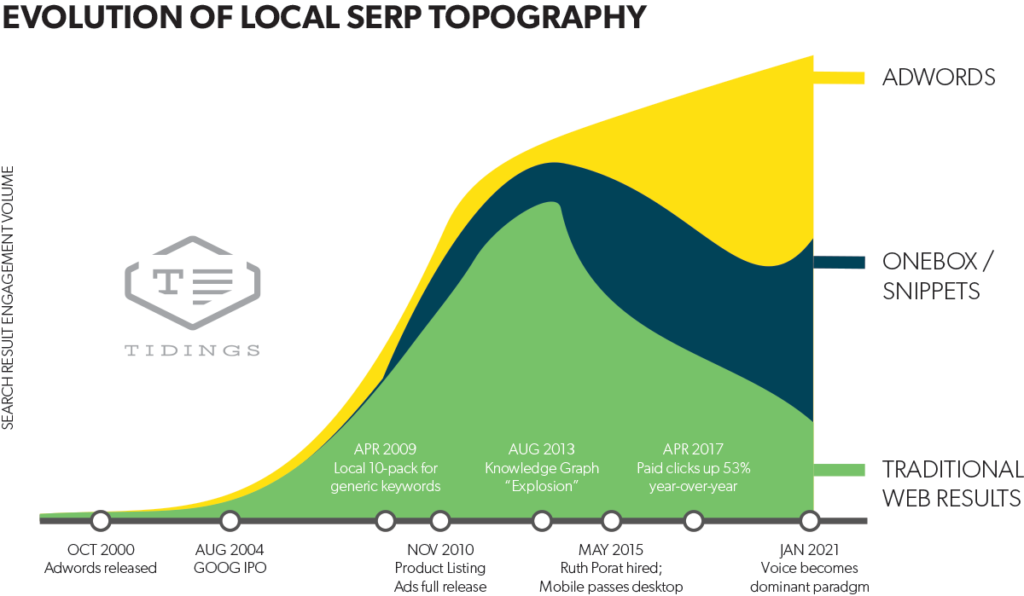
    One thing that’s certain in the world of search is that technology and user habits are always evolving. David Mihm recently wrote an excellent blog on the ever-changing landscape of search engines otherwise known as “SERP Topology.” We recently had the honor of hosting David as a guest speaker for a lunch & learn for the whole team. He provided us with some powerful insights about the evolution of Google. Here are some key takeaways.

    Local serp topography graph

    As you can see above, based on his predictions it is highly likely that Google search results will be more and more driven by paid advertising as opposed to traditional SEO in the next 5-10 years.

    Practically, this will impact your business in a few different ways. Some industries will continue to stay relevant with a traditional SEO approach, but for many, it will become a less effective strategy.

    If you’re a business owner, here are some things to keep in mind:

    1. What percentage of closed business is coming from digital marketing efforts?
    2. Where, specifically, are your leads coming from?
    3. How is your team converting those opportunities?

    Brand Awareness

    If you’re producing content, it will become increasingly important to promote that content using social platforms and other advertising options, such as Google Display Ads. Marketing your brand through ads will continue to be an important and useful strategy.

    Referrals

    The connection economy will continue to increase in importance. Who are the influencers in your industry online? Where are they? Find out what platforms the thought leaders are on and connect with them.

    Also, find out where your customers are hanging out. If it’s Facebook, then you should seriously consider developing a strong presence there.

    Lead Generation

    Organic SEO is very powerful, however, one of the downsides is that it can take a long time to grow results. Google ads are a great option to compliment SEO and content marketing strategies because you get instant feedback from your target audience. From there, you can take that feedback, find those great leads, and nurture them into customers.

    SEO

    Search engine optimization is not going away anytime soon. And, in the next 10 years, it will remain relevant for many industries. However, it won’t be quite as effective in the near future. As Google continues to generate the majority of its revenue from advertising expenditure, it inherently implies a push toward incentivizing businesses to use those tools.

    If you’d like to understand more about how to advertise your business online, or how you can best take advantage of SERP Topology, reach out here to chat with a strategist.

    Image:

    SERP Topology

  • Rookie Website Mistakes, Part 2: Not Allowing Google to See Your Website

    Congrats, you’ve finally created a website for your business! And in the last post in our Rookie Website Mistakes blog series, you even learned how to bring your site up to speed. Now’s the part where you pat yourself on the back and start thinking about how to work your way to the top of the first page in the search results.

    Well, hold your horses—Google’s really smart, but it’s not magic. Think of the search engine results pages (SERPs) as an insanely big library: if you’ve written a novel, the book doesn’t automatically appear in the correct place on the correct library shelf. You’d have to get someone to read it, decide what it’s about, and figure out how to catalog it somewhere in the existing shelves. In the same way, Google needs to actually “read” your website before it can make a decision about where it fits in in the SERPs.

    Main hall in Trinity College library - Search Influence

    And if you’ve accidentally prevented Google from reading your site at all, it has no way to fit it into its library. As a result, the “if you build it, they will come” mindset definitely doesn’t apply: potential customers won’t find you if your site isn’t showing up when they search for it. Failing to allow search engines to actually find your website is a very common rookie mistake when moving WordPress sites from staging to a live server, but a little knowledge of how Google works can help bring your site up to speed.

    How Does Google Find and “Read” Your Website?

    According to Verisign‘s Domain Name Industry Brief, there were approximately 330.6 million domain name registrations in the first quarter of this year alone. Google’s a huge company, but its employees don’t have time to read all of these new sites. Instead, they entrust that task to specialized bots, called “spiders,” “crawlers,” or “Googlebot,” that automatically discover your website and analyze its contents.

    These bots “crawl” websites by moving through one link to the next, bringing back information for the search engines. Google also uses these spiders to analyze updates to your site, but since you’re just starting out in the website ownership process, let’s focus on site discovery. “Indexing” is the process of discovering your site and deciding where it fits into Google’s library. A page has been indexed when Googlebot’s results have been recorded in Google’s index, or the massive database of the search engine, allowing the page to actually show up in the SERPs.

    One interesting thing to point out is that the terms “crawl” and “index” are related but not necessarily dependent on each other. In other words, just because a bot has visited a page doesn’t necessarily mean that the page has been indexed. Similarly, it’s possible for a page to be indexed without ever having been crawled (in rare cases).

    Door with bars and keep out sign - Search Influence

    What Happens When Googlebot Is Blocked?

    If Googlebot is unable to see what’s on your site, it means that no crawling and indexing is happening. This, in turn, might mean a loss of rankings in the SERPs.

    There are a few ways your site might be blocking Googlebot:

    • Firewalls – Using a firewall or DoS protection system is always best practice, but your systems might be recognizing Googlebot as a potential threat. Because Googlebot tends to make far more server requests than your average human user, the firewall on your site might flag this as threatening behavior, preventing the bots from crawling your website.
    • Intentional blocking – The webmaster of your site might intentionally block Googlebot in an attempt to control how the site is crawled and indexed.
    • DNS issues – Your DNS provider may be inadvertently blocking bots.

    Leave doormat - Search Influence

    How Do You Ensure That You Aren’t Telling Helpful Bots to “Get Lost”?

    Here are a few things to double check to be sure you’re putting out the welcome mat for your helpful crawlers.

    First things first: check for noindex meta tags, which basically tell bots “thanks, but no thanks.” It seems obvious, but removing a line of code may be all you need to do to get indexed.

    Next, check your robots.txt file. It’s not a mistake to use this file at the root of your site; when used effectively, it allows you to give bots exact direction as to which pages you want crawled and which bots you want to access your site. However, if you’re using it incorrectly, you might be blocking Googlebot from seeing your site at all. You can learn more about robots.txt here, and Google offers plenty of additional information to help you understand how to use robots.txt files effectively with Googlebot.

    You might also want to configure your URL parameters through Google Webmaster Tools to control Googlebot’s access without a loss of search ranking.

    Finally, if a firewall or any kind of bot blocking script is the culprit, you’ll need to manually remove the block. For DNS issues you can’t fix on your own, try contacting your DNS provider.

    How Long Does it Take Google to Crawl Your Site?

    Note that even after making these changes, you’ll need to give Google a few days (at least) to index your site—it won’t happen instantly. And once you’ve made sure Google is able to access your site for crawling and indexing, you can move forward by optimizing your website for spiders to make it easier to crawl. If you need help with that next step, our team would be happy to get you on the right track. Contact an expert from our team anytime.

    Stay tuned for our next entry in our blog series: Rookie Website Mistakes, Part 3: Your Site Isn’t Mobile Friendly.

    Images:

    Library

    Keep Out

    Doormat