Category: SEO

  • How I Learned to Stop Worrying and Embrace Google Algorithm Updates

    Author’s Note: During the course of writing this blog Google took an unusual step (for them) and announced an impending core algorithm update. While this blog does not discuss this update specifically, the underlying themes about handling these updates should remain applicable. To learn more about this core update, I recommend reading some of industry news sources I have mentioned below. 

    Much like the sun will rise in the east and set in the west tomorrow, digital marketers and business owners alike will hear rumblings every few months about supposed updates to Google’s ever-elusive algorithm and begin to worry. For some businesses, these updates (or “improvements,” as Google usually euphemizes) can generate significant dips in traffic to their site and seemingly undo previously successful SEO efforts. A prime example of that scenario would be back in August of 2018, when SEOs noticed a noticeable drop in site traffic, particularly in the medical vertical.

    This led to wild speculation about the scope, purpose, and future impacts of this particular update. Undoubtedly, many digital marketing practitioners felt the effects of this update with diminished traffic to their sites. As someone who has worked on numerous SEO campaigns and strategies, I can certainly relate to the consternation around Google reconfiguring their algorithms to change the way sites are rewarded organically. In many instances, these updates can positively impact sites that may be less authoritative and in some cases utilize underhanded tactics that do not necessarily meet searchers actual needs.

    Lisa Simpson taking a scientific approach to Google algorith updates

    This is certainly very frustrating from a marketer’s perspective, as the parameters around what is best practice and how to win organically can shift seemingly overnight. When this is combined with Google’s textbook evasiveness around these updates, it may be overwhelming.

    So, How Should I Respond to a Google Algorithm Update?

    Google has made efforts to become more communicative with SEOs in recent years (they even updated their “SEO Starter Guide” for the first time in over seven years back in April of 2019), however, they still are very cagey about what they are willing to reveal as it relates to specific algorithmic updates. In certain cases, if there’s enough of a perceived backlash from the larger SEO community, then Google representatives may take steps to address it publicly; however, those answers are typically engulfed in vaguery as well. Take this statement from Google’s Search liaison Danny Sullivan in the aftermath of the August and September 2018 updates as an example.

    “We understand those who do less well after a core update change may still feel they need to do something. We suggest focusing on ensuring you’re offering the best content you can. That’s what our algorithms seek to reward.”

    The word “seek” is pretty telling here, as it underscores the idea that the algorithm is imperfect. Also, consider the fact that Google is constantly reworking their algorithm to best serve searchers, another implicit sign that there is room to improve. The first thing you can do to help yourself respond to algorithm updates is to realize that 1) it’s not a perfect reward system and 2) these changes are out of your control. Additionally, the solution is intentionally vague and does not really define what “best content” really is.
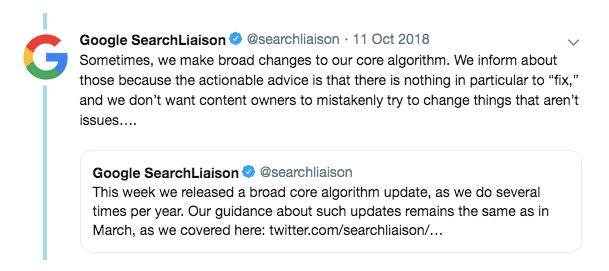
    Screenshot of Twitter discussion of Google algorithm updates

    Above we see the acknowledgment. One can waste a lot of time questioning Google’s decision-making, but it is important to evaluate whether these updates have actually had a tangible effect on your business. In many cases, these updates may impact certain industries, but certain sites within that industry do not see the effects. Before looking at the macro of the issue, the focus should be on if there is any tangible impact on the micro level; in other words, did this update actually impact me? From there, you can start to take the steps needed to recover, if you even need to.

    How Do I Know When a Google Algorithm Update Is Occurring?

    Since Google does not typically acknowledge when an update is happening, digital marketers rely on third-party tools and anecdotal evidence to connect the dots. The best way to stay on top of this is by following some of the industry leaders who follow and discuss news stories of the day, such as (to name just a few) Search Engine Roundtable (who does an amazing job staying on top of chatter around updates), Search Engine Journal, or Search Engine Land.

    Most reporting around these updates comes from what SEOs and digital marketers are seeing in real time, as well as from new tools that help monitor search engine volatility. One of these tools is SEMRush’s Sensor that measures the level of volatility across industries and across different countries. Often, the sensor will pick up on this volatility and the news about updates will follow in the next few days.
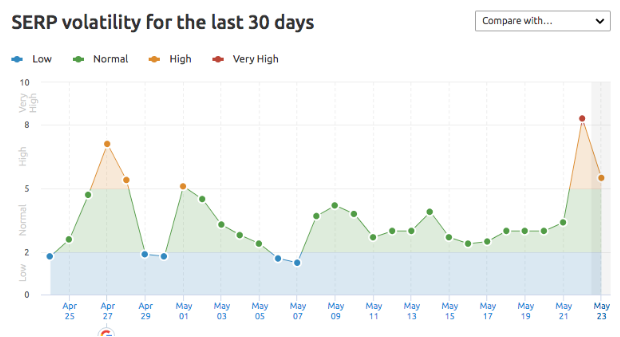
     

    SEMRush's Google algorithm sensor

    As you can see here, April 27th and May 22nd are of particular interest. SERP (Search Engine Results Position) volatility is noted as very high, meaning sites’ rankings have fluctuated greatly. As I write this blog on May 23rd, I am starting to see chatter around the typical sites about potential updates to Google. These are largely unconfirmed, and it’s unlikely that this is a massive update, but we do not know that until more SEOs and digital marketers weigh in or Google confirms these updates. What this tells us is that somewhere, in some verticals, rankings have fluctuated. Whether or not this is a result of an update or some other unknown factors is hard to know.

    It is important to remember this: these anecdotes and 3rd party tools are just signs, not concrete evidence. There are many examples of overreaction to this data and many times it can lead to unnecessary scrambling when it may just be a minor change or something completely unrelated to an algorithm change.

    Well, My Traffic Is Way Down, Now What?

    This is where it becomes tricky, as you must be familiar with your overall SEO strategy as well as the possible sources of these issues. This is why monitoring tools like SEMRush’s Sensor as well as the various industry news sources is imperative to running an effective SEO campaign. If your traffic is down as a result of an algorithm update, then there is almost assuredly highly skilled digital marketers attempting to diagnose and find solutions to the problems.

    Take this post about how to recover from the “Medic Update” from Search Engine Journal. This is chock-full of the usual pain points about these updates, Google’s vague acknowledgments, and some evaluation of previous updates. In addition, however, we get plenty of great strategies around content to help rectify the issue. The volatility of SEO and rankings allows for your site to recover if you continue to be ardent about following best practices and putting effort into your strategies. Furthermore, you cannot get locked into a fixed set of best practices. In many cases, the best solution is to try a new approach you may have avoided or not known prior.

    In the moment, these updates can seem like a business-altering minefield, but it is very important to remain focused on long-term strategy. SEO is oftentimes a slow, non-linear process, so it’s important to keep that in perspective before getting overwhelmed by a bad few months after an update.

    If you need help with your SEO strategies, the team at Search Influence has the expertise to navigate through the ups and downs of Google algorithm updates. To learn more, contact us today.

    Images

    Laptop

    Lisa

    Google Twitter

    SEMRush

  • How User-Generated Content and Engagement Can Help Boost Your SEO

    As we continue moving toward an increasingly digital world, the importance of user-generated content, and the engagement that it produces, is becoming more prevalent in the realm of SEO. What users say about your brand, and how often, can have a real impact on your online visibility. How you promote, engage, and moderate this content is equally important. Below, we’ll look at the good and the bad while also finding ways to use this sort of content to the benefit of your business.

    So What Is User-Generated Content?

    User-generated content (UGC) is as straightforward as it sounds—any content that is created by a user and shared on an online platform. This content can include reviews, testimonials, images, and comments that are shared on platforms such as social media, blogs, or internet forums. Think product reviews on YouTube or reviews of a restaurant on Yelp. Additionally, this type of content can also be shared directly on your business’s website (we’ll go into that more later).

    Eric Cartman walking down the halls in a Yelp Critic shirt

    What Are the Benefits of UGC?

    The most obvious benefit of UGC is the publicity of your brand, products, and/or services. But what does this mean in terms of SEO? For starters, it provides more information and context for search crawlers. Search engines can provide a user with results from both your website and other platforms that mention your brand. For example, a Twitter user’s tweet praising a good experience with your company’s customer service could show up on search engine result pages (SERPS). More content means more opportunities for search engines to find your brand and provide that information to users.

    As mentioned earlier, user-generated content doesn’t have to come from outside sources. There are ample opportunities to obtain UGC directly from your website. In a Reddit AMA last year, Google’s own John Mueller suggested that allowing users to make comments (say, for instance, on your website’s blog entries) is one way of getting more content onto your website. Allowing users to make comments and engage in a discussion will give crawlers more content to consume, thus providing them with more context. Want to share positive feedback from some of your customers or clients? Consider adding a testimonials section to your website that highlights this feedback to impress other potential customers.

    Woman at computer approves and thinks this user generated content is legit

    Another benefit of user-generated content is that it brings authenticity to a brand. According to Stackla, 90% of consumers (a 4% increase in just two years!) believe authenticity to be an important factor when deciding which brands to support, while 61% of marketers say this is what makes content marketing most effective. Authenticity is what drives and encourages engagement from potential customers. Users are 28% more likely to engage when given UGC such as product videos and official brand authorized content. If users are engaged, this will result in more time spent on a site and a higher likelihood that this will result in conversions.

    Are There Any Downsides to UGC?

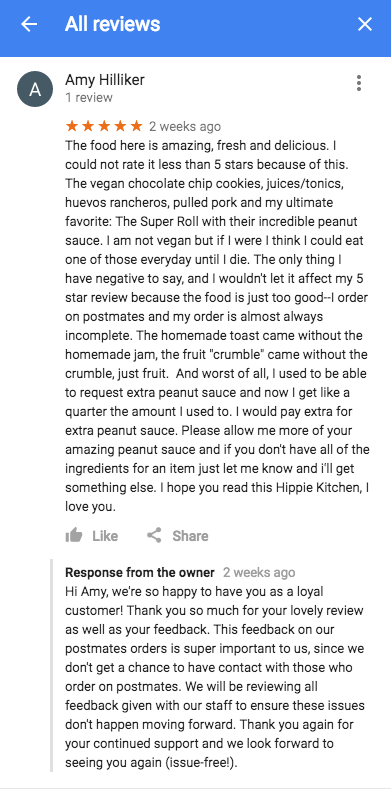
    Unfortunately, there is a glaring disadvantage to user-generated content if it’s not handled appropriately: People won’t always give your business glowing reviews. We’ve all seen scathing Yelp reviews or tweets go viral. Are they always warranted? Not necessarily, but search engines don’t know that, and they sure don’t discriminate. Just as positive content about your business can give you an advantage in SEO, conversely, negative content can result in poor SEO performance. You may not always be able to do away with the critics, but there are certainly ways to help combat that type of content.

    How to Manage UGC

    So what can you due to limit or control this sort of content? One of the easiest and most obvious ways is to hire someone with the knowledge and know-how to manage it for you. Keeping up with and finding ways to control user-generated content can be incredibly time-consuming, so giving that responsibility to experienced professionals will not only save you time but will also ensure that it’s done in a thoughtful and SEO-friendly way. Finding ways to incorporate user-generated content on your website is one of the easiest ways of managing content since it gives you complete control over the type of content that is shown. Allowing users to submit review videos to your site or to offer a testimonial of their experience are just two ways to get more authentic content onto your site.

    It’s important to keep in mind that user-generated content will happen whether you like it or not. How you choose to handle it is a critical decision for a successful, sustainable business. There are plenty of services available for your business to utilize to achieve the online success you desire. Ready to get started? Contact our team today to see how we can help grow your business.

    Images

    Ilya Pavlov on Unsplash

    Cartman

    Legit

  • Do Businesses With Multiple Locations Need Multiple Facebook Pages?

    Facebook has become an integral part of marketing for any business. Those with multiple physical locations must decide how they would like to present themselves on this platform: in one corporate page representing all locations, or in separate pages that reflect each location. While the ease of managing one corporate page may sound appealing, it is important to have a social media presence for all locations. It is likely that each location has its nuances. Whether they differ in menu items, atmosphere, or specials, it is important that these differences are reflected accurately in all marketing so the local brand is well represented and customers have correct expectations.

    There are two ways to accomplish separate Facebook marketing for multi-location businesses: creating multiple business pages or using Facebook Locations.

    Young man using computer for Facebook

    Facebook Locations Vs. Multiple Business Pages

    When a business has multiple business pages, they have created a separate page for each location, meaning that each location is set up completely independent from the other. This is one way to account for all locations; however, it often makes more sense to utilize Facebook Locations to accomplish this.

    Facebook Locations is set up with one parent page that represents the main brand. Within this page, there are local pages that account for each individual location. All pages are managed through the central parent page. One way to think about Facebook Locations is the parent page as an umbrella and the local pages underneath it.

    Who Should Use Facebook Locations?

    While Facebook Locations is a great tool, it is not appropriate for every business to use. Multi-location businesses with a generally centralized brand identity are the best candidates for Facebook Locations. Additionally, this method is best for businesses that have an employee that can communicate and be involved with all locations, since all pages are through the parent page.

    The Advantages of Using Facebook Locations

    The main advantages of using Facebook Locations are that it can save time while allowing each location to share increasingly specific and relevant content.

    As mentioned before, all pages are managed through one central spot, the parent page, with one login. Through the central login, a business is able to post content to all pages by sharing from the parent page. This is a quick and easy way to share company-wide information. Additionally, content (such as location-specific events, specials, etc.) can be posted just to certain pages from this same login. These features increase efficiency by reducing the amount of time spent logging in and out of multiple business pages.

    Using Facebook Locations allows for highly targeted location-ads and content to be shared to each local community. This way, followers are more likely to pay attention to and engage with the ads and content they see because it is relevant and important to their location.

    The parent page will have a map that shows all individual locations, in addition to listing them out under a “Locations” tab. This feature makes it easier for potential customers to find the nearest location to them.

    One objective that is only available for businesses that use Facebook Locations is store visits. According to Facebook: “Store visits reporting shows you visits that happen within 1 day, 7 days, and 28 days after a person clicks an ad, and 1 day, 7 days, and 28 days after your ad is viewed.”

    This is extremely valuable information, as it is the most advanced way to correlate posts or ads with actual customer visits. Facebook uses a variety of measurement signals to calculate this metric, which they explain further in this post.

    Person using mobile device for Facebook pages

    Creating and Managing Facebook Location Pages

    The first step in creating a Facebook Location page is to set up a parent page. This should be a page for the main brand and is the same as setting up any Facebook Business page.

    After this, there are three ways to add specific locations:

    1. Manually add each address
    2. Upload using a CSV template
    3. Migrate existing pages into new location structures

    Once all pages are set up, someone must be in charge of managing them. This role includes ensuring all information is correct, publishing posts, managing reviews, and more. Some businesses assign these responsibilities to an in-house marketing employee. However, many find it more effective to hire an agency for social media management.

    Ready to set up your business’ Facebook Location pages? Search Influence has been helping brands succeed online since 2006. Our services include social media management, content creation, and online advertising. Request a proposal today to learn how we can help you make the most of your brand on social media.

    Images

    Computer User

    Mobile Device

  • Only 4 Percent of Businesses Are Voice Search Ready—Are You in That Number?

    At the beginning of 2019, over 66 million people in the United States were uttering the phrases “Ok Google,” “Hey Siri,” or “Alexa!” to find information on the internet. When you consider that the adult population of the United States is around 253 million, that means that around 25 percent of people are using voice search to get answers to their questions. As marketers, we need to start to pay attention to this, and make sure that we are present to help them answer their questions. According to a recent study conducted by Uberall, only 4 percent of businesses are “voice search ready,” which means that there is opportunity to show up in searches for businesses that are prepared.  

    25 Percent Is Not That Significant, So Why Should I Care?

    In 2016, the number of smart speaker users in the United States was estimated to be 16 million. So, between 2016 and 2018, the segment grew by four times. But in order to really understand the impact, we need to understand usage. Thanks to a recent study conducted by Bright Local, we know that 58 percent of consumers have used voice search to find local business information in the last 12 months and that 46 percent of voice search users seek out local business information on a daily basis. This behavior has big implications for local brick and mortar businesses. So, although 25 percent may not seem like a huge number, the growth in adoption and usage make voice search a channel worthy of the attention of local businesses.

    Person using mobile device for voice search

    Ok, So, It’s Here, How Do I Take Advantage?

    The good news is that right now, voice search optimization looks a lot like regular SEO. If you are answering questions and providing valuable information to the searcher, you will be fine. If you are a local business, there is a silver bullet that many of your competitors are not using. Remember, 46 percent of voice search users are using their device to search for information about local businesses on a daily basis. If you couple that with Uberall’s finding that less than 4 percent of businesses have the six key elements of voice search readiness complete and consistent across the important platforms, you can see that with a little work, your business could show up in intent-based voice searches like those that end in “near me” and “near me now,” which are on the rise, according to Google.

    What Does It Mean to Be “Voice Search Ready”?

    Voice search readiness has a lot of parallels with local search optimization, especially for local businesses. To put it another way, if you have done the right things to optimize for local searches, your local business should perform well in voice search, especially for bottom-of-the-funnel (more likely to lead to conversion and store visits) searches. Uberall’s study identifies 37 directories that feed directly into voice search platforms. The good news is that not all of them may be relevant to your audience. Uberall found that 90 percent of the impact on Voice Readiness Score comes from the directories that we are all familiar with: Google, Yelp, and Bing. I would add Apple Maps, as well. Uberall states that Siri’s search is powered by Google, but I was not able to replicate that on my iPhone, and according to a recent article by Eric Shanfelt, Siri gets its business data from Apple Maps Connect and reviews any other information from Yelp, or sometimes other sources.

    What to optimize is pretty simple. Think about what users need to know about your business when they search:

    1. Address: Potential customers need to know where they can find you, and Siri, Alexa, and Google Assistant need to know what local searches to serve your business up for.
    2. Opening hours: How frustrating is it to show up to a place whose map listing asserts that it is open, only to find that it’s closed. BONUS: Remember to update any special hours that you have around holidays or any other periods where your normal business hours do not apply.
    3. Phone number: This is an easy conversion point.
    4. Business Name
    5. Website URL
    6. Zip Code

    This may seem pretty basic, but these attributes need to be consistent across all directories that you have out there to get the maximum benefit.

    Mobile device and smart speaker used for voice search on a desk

    Putting It Into Action

    If you are a local business and want to put this into action, there are three approaches that you can employ:

    1. Do it yourself: If you have the time, you can go to the four major platforms directly, claim your business (we have created step-by step-directions for claiming your Google My Business Profile), and input the information listed above. If you choose this option, you will want to review these periodically, as sometimes listings get changed with community edits, and you will also want to update the platforms when anything changes with your business—think holiday hours.
    2. Use a listing distributor like Vendasta or Yext: There are other aggregators out there as well, but the idea is this—put your information into one platform, and let them handle getting it to the directories in a consistent manner. This approach can allow you to go beyond the four major platforms, but still requires some manual effort on your part. Regular monitoring is still suggested, although this can be done in the aggregator, and not all directories have “two-way feeds,” which could mean that you will need to log into the directory platform to make the updates.
    3. Hire a digital marketing agency to manage your online presence: If your time is better spent on other areas of your business, or the prospect of managing listings overwhelms you, hiring an agency can be a great option. When selecting an agency, ask if they are using a listings distributor, which will help them keep your listings accurate, and can provide you with a dashboard to monitor their progress. The main benefits here are that the agency should be familiar with the listing’s distributors and directories, and they will know who to contact when there are any problems with consistency.

    Voice search and its intersection with local search is still in its infancy and is constantly evolving. With the increased adoption of both the devices and behaviors, this tactic is ripe for exploitation by savvy local businesses. If you’d like help building a dynamic marketing strategy that encompasses these trends, reach out to Search Influence to request your free marketing analysis.

  • What Are Good Backlinks Vs. Bad Backlinks?

    Backlinks are one of the many components of behind-the-scenes SEO strategy. A backlink is essentially a link on a site that leads users to a different site. Think of backlinks as a continuous chain that links websites to one another; some chains are firm, strong, and reliable (good backlinks) and others are rusty, neglected, and not doing their job (bad backlinks).

    The Role of Backlinks in an SEO Strategy

    Before diving into the nitty-gritty of backlinks, let’s differentiate between backlinks and internal links. While both sound similar and have substantial SEO value, they play different roles. An internal link is clickable text (a.k.a. a hyperlink) on your site that leads to another page within your site. We go into more detail about internal links and their juicy SEO power in our past blog post. (See? I just made an internal link!)

    A backlink is a hyperlink that lives on another site and links back to yours. WPBeginner points out that backlinks are one of the many tools used by search engines to calculate search result rankings. (And just like that, I gave a backlink to WPBeginner’s site!). Think of backlinks as an approving nod from one site to another. When used correctly, backlinks acknowledge the authority of another site.

    Dr. McCoy and Captan Kirk nodding in agreement about backlinks

    Google has used backlinks as a ranking signal for keyword searches for almost two decades. Google didn’t really differentiate between the quality and quantity of backlinks until their Penguin algorithm update rolled out in 2012 to closely monitor backlinks and prevent spammy “black hat” SEO backlink tactics. This update gave the SEO world a clearer picture of what Google considers legitimate backlinks that actually add to sites’ authority. Now, the strongest backlinks come from authentic, well-known sources, such as newsworthy press releases, trusted editorials, news articles, or webinars.

    For the sake of consistency, we’re going to focus on Google’s backlink policy and how sites are affected in Google search results in the remainder of this post. Because backlinks can have a significant impact on search rankings, we’re going to explore what separates strong backlinks from rusty ones.

    What Is a Good Backlink?

    A good backlink is a relevant outbound link to a trusted, authoritative site. Generally, a site is viewed as trustworthy if it has lots of strong backlinks pointing to it. Google views these backlinks as one way to confirm that your site contains helpful, quality content.
    New call-to-action
    Now, let’s break down some key factors of a good backlink.

    It Comes From an Authoritative Site

    Earlier we mentioned that a backlink should link to an authoritative site, but what exactly does this mean? An authoritative site provides trustworthy, well-sourced content that is updated regularly. It’s considered an expert in its field. For example, readers interested in sustainable building requirements may read multiple online blogs or articles on the topic, but they would likely consult the Environmental Protection Agency’s site, epa.gov, to reaffirm this information and treat it as the most authoritative source on the topic.

    Not all quality backlinks have to come from a source as renowned as the EPA, but keep in mind similar characteristics when searching authoritative sites.

    The Anchor Text Is Specific

    Hyperlinking to a page with clear, specific anchor text is a big win for both the user and search engines. Concise anchor text will give users an idea of where this link will bring them if they choose to click on it, while search engines will use the keywords in said anchor text to figure out the topic of the page it lives on.

    Let’s put this advice into action—which anchor text would you feel more comfortable clicking?

    1. Click here!
    2. Dive even deeper into why anchor text matters in backlink strategies.

    I hope you went with number two.

    Barack Obama gif related to importance of anchor text in backlinks

    It’s Relevant to On-page Content

    Backlinks aren’t just there to take up space and serve as an SEO metric—they should enhance the reader’s experience. Backlinks need to be relevant to the content they’re in and actually provide supplemental information. Think of it from the reader’s perspective—backlinks won’t add any value if they’re bringing readers to completely unrelated sites.

    Google aims to provide users with helpful, rich content that answers queries. Unrelated, distracting backlinks just get in the way of that. Google considers relevant backlinks to be much more valuable than a backlink from a random, unrelated site. A dermatology clinic site that links to a used car Q&A forum would probably send a red flag to Google (and also confuse readers browsing the site).

    What Is a Bad Backlink?

    Don’t let anyone tell you any backlink is a good backlink; it’s simply not true. Since Google focuses mostly on quality over quantity, they track and evaluate backlinks to flag potentially spammy practices.

    Here are a few clues that a backlink may be rusty and untrustworthy.

    They Come From One Site

    The well-known saying “variety is the spice of life,” may not be referring to backlinks, but it’s a mantra we can use here. If a site has a plethora of backlinks, but almost all of them come from one site, this will look spammy to Google. You should actively strategize to build strong backlinks from a range of relevant sites.  

    It’s Hidden or Paid

    Yes, a hidden backlink is basically what it sounds like—it is invisible to a user and Google. Sounds sketchy, right? It is. A backlink that is hidden—whether by manipulating text and background colors or hiding the link in a punctuation mark—is a “black hat” SEO strategy that clearly defies Google’s best practices.

    Gif of Homer sliding into bushes after violating Google's linking policy

    Paid backlinks are a grey area because some methods of paid links are viewed as legitimate. Just because a link has been paid for doesn’t automatically mean it’s bad. Since this a gray area, you should be highly selective with paid methods. If the site’s content is related to your industry, you won’t be penalized for paying for ad space. Paid directory business listings are also fine, as long as they’re reputable.

    It’s Sourced in Spammy Forum Comments

    New call-to-actionThis relates back to the importance of backlinks being relevant and actually helpful to readers. Linking back to your site from off-topic discussion forums just for the sake of a backlink will look suspicious. Like most things in SEO, the intent of posting links to forums may have originally been authentic, but this strategy can too easily turn from trustworthy to spammy.

    Acquiring Good Backlinks and Ditching the Bad

    Congratulations, you’re now armed and ready to differentiate good backlinks from the not-so-good! Because strategic link building is so effective for search rankings, it can be one of the most challenging SEO strategies. But great news—you don’t have to do it alone! Search Influence can help increase your website’s authority by building a strong backlink strategy that’s relevant to your business. Our range of SEO services can also help increase your online presence and ability to reach customers. Let’s start a conversation about how we can help you.

    Images

    Lock and chain

    Star Trek

    Barack Obama

    Homer

  • Unfamiliar With “SEO?” Here’s Why Search Engine Optimization Is Important

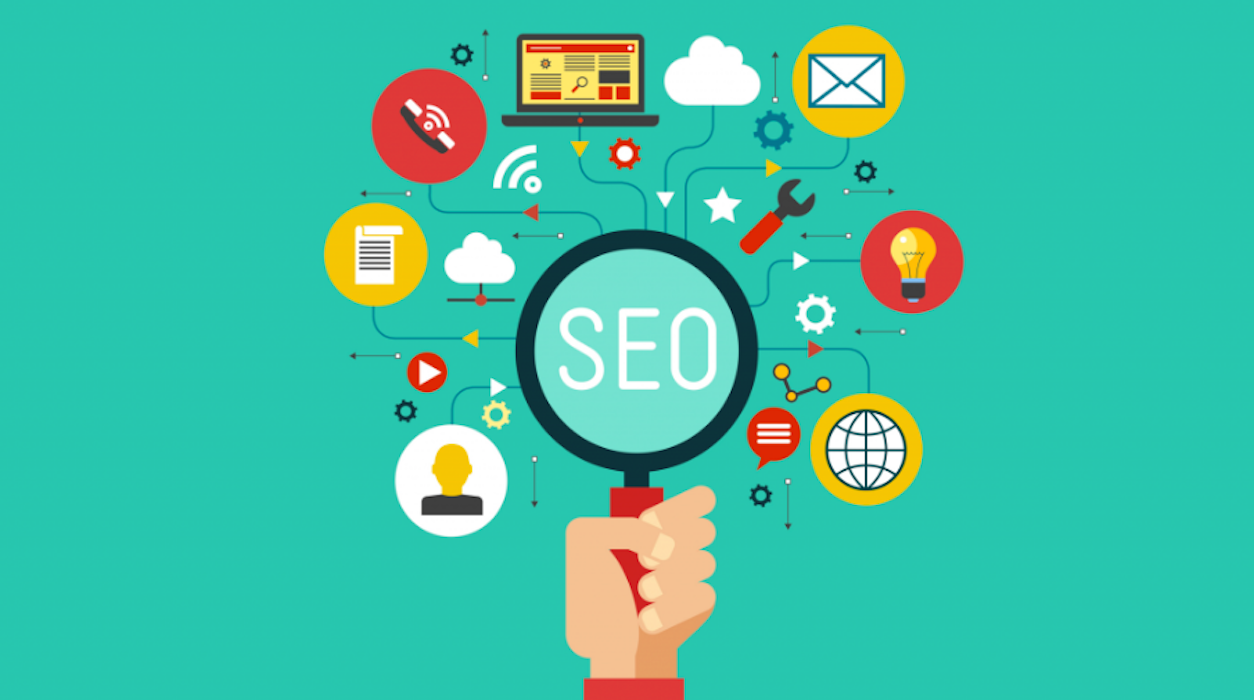
    Magnifying glass zooming in on SEO

    I entered the digital marketing industry in 2012 when Search Engine Optimization was a simple blend of keyword stuffing and link building. If anyone suggests those strategies still hold up, then they’re living in the past. SEO has changed because the search behavior of consumers has changed. According to Google, 84% of Americans are shopping for something at any given time, in up to six different categories. During their journey, shoppers are searching online, verifying references, reading reviews, connecting with local businesses, and (the most important step of all) converting.

    The once linear buyer’s journey has become a multilateral experience full of content consumption, brand impressions, strategic ad targeting, online searches, remarketing, and email marketing. To be successful, brands must be present in the ever-changing and always competitive online market.  As digital marketers, our job is to connect searchers to the right businesses, and SEO is one of the most effective ways to do that.

    What Is SEO?

    SEO allows businesses to connect with the right audiences by increasing the quality and likeliness to convert traffic to a website while improving brand recognition.

    The way Google connects businesses with audiences is through its algorithm, which changes about 500-600 times a year. The algorithm is intended to keep up with consumer behavior and keep searchers from ending up on untrustworthy websites. To quickly connect searchers to businesses, Google’s algorithm includes some of the most popular “checklists” that searches have indicated are important.

    Can I trust them?
    Are they located close to me?
    Do they offer the service I need?

    New call-to-action

    How SEO Works

    The three most effective constituents for any SEO campaign include content, brand authority, and local presence.

    Content

    Content helps answer the question “Do they offer the service I need?”

    It looks like on-site content, blogs, videos, whitepapers, email marketing, infographics, content marketing, product descriptions, information about the business’s history, and social posts.

    Shoppers consume content differently on mobile devices than on desktops and through different avenues like video, blogs, graphics, and social posts. Content is the most effective way to communicate who you are and what you do to search engines and your audience. This gives businesses a great opportunity to get creative and engage with audiences outside the traditional text of website content.

    Website content

    Create and optimize unique content for each service or product that you want to rank for next time a user is searching. For example, a lawyer who specializes in personal injury should have dedicated pages for each practice area they offer like medical malpractice, car accident, wrongful death, etc. Having dedicated pages for “medical malpractice” precisely and effectively communicates to Google that the content on these pages strictly focuses on “medical malpractice.” This strongly impacts content relevance and organic rankings when people search “medical malpractice lawyer.”

    A click to a site, organic or paid, is a very strong sign of a user’s level of intent and conversion. On-site content should be used to communicate competitive advantages, prices, products, and services. Onsite content should deliberately be written in to drive conversion behavior, with strong calls to action like “call now”, “sign up for our newsletters”, “contact us today”, or “buy”.

    Videos

    Research by HubSpot suggests that using videos on landing pages will increase conversions by 86 percent.

    Businesses need to communicate their message and engage with their audience. A video can be a 30-second teaser for a series of blogs, 2-minute testimonials of a happy client, or 5-minute highlight summary of a recently sponsored community event. Videos are great for users engagement and even better for product promotion.  Almost 50 percent of internet users look for videos related to a product or service before visiting a store.

    Blogs

    According to HubSpot, companies that published more than 16 blog posts per month got about 4.5 times more leads than companies that published zero to four monthly posts.

    This type of content should be slightly more engaging and address identified topics and related topics interesting to the audience. Blogs should always be shared on social, and including videos is a great way to complement the content and increase engagement.

    Brand Authority

    New call-to-actionThis helps answer the question “Can I trust this businss?“

    It looks like earned media like press releases and brand mentions, industry recognition and noted awards, customer reviews, backlinks for all off-site work and publications, and Google posts.

    88 percent of people trust a review from a stranger as much as they would a referral from a friend or family member. Having reviews on your site builds trust with readers while highlighting customer satisfaction. Potential customers trust user-generated content, and all businesses should encourage their clientele to leave reviews or have a dedicated strategy in place to generate them.

    Other ways to increase brand awareness off-site are through earned media publications like brand mentions and press releases. Anytime a business has a newsworthy topic like a major event, community sponsorship, new leadership, or a new location, creating and publishing a press release can establish brand trust and awareness while gaining reputable backlinks.

    Brands should always assure they are receiving link backs from any third party publications and sponsorships. Not only do links build trust with Google, but it also provides a way for referral site traffic from other sources and sites.

    Local Presence

    This help answer the question “Are they conveniently located to me?”

    It looks like local on-site content, correct and consistent listings on maps like Google, Apple, Yelp, and Bing, and showing up in Google’s Maps Pack.

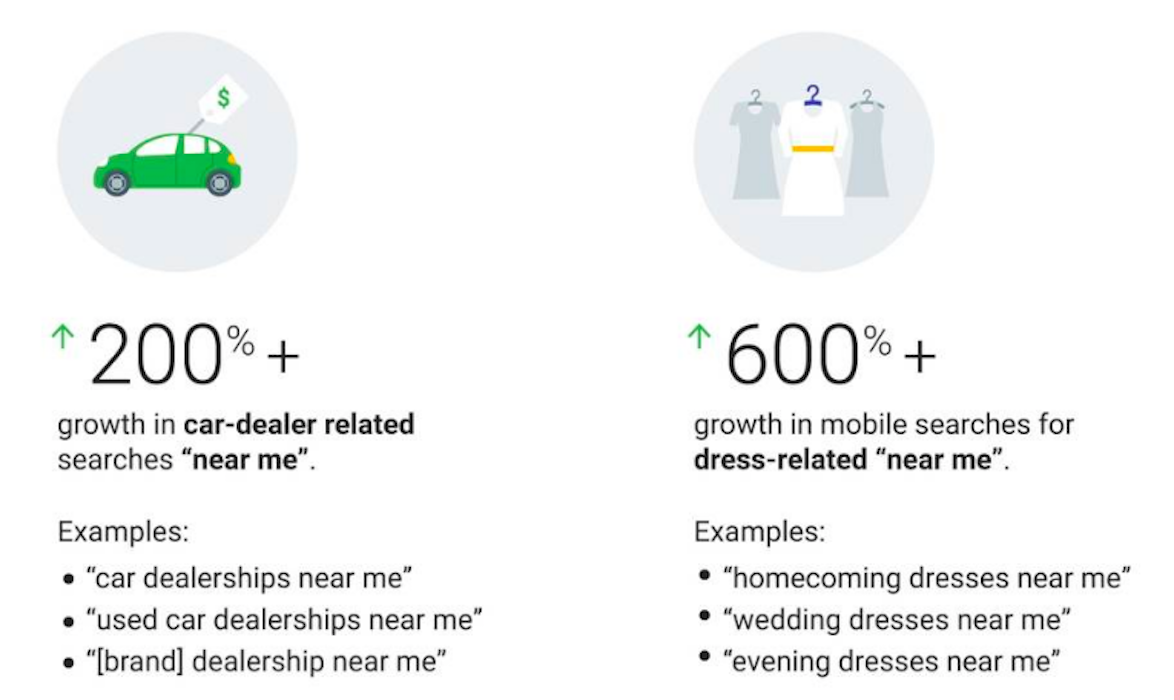
    While consumer behavior continues to move off of the streets and onto the internet, communities supporting local businesses stay strong. In 2018, HubSpot’s data stated that 72 percent of consumers who did a local search visited a store within five miles. Being found locally is crucial, especially for businesses in the service industry like landscapers, restaurants, groomers, mechanics, etc. According to Google, mobile searches that include the phrase “near me” have grown by 500 percent in the last two years.

    Google graphic showing the dramatic increases in near me searches

    So how can businesses communicate they are in fact “near” searchers? First, make sure that you claim and optimize the correct name, address, and phone number across the major local directories like Google, Apple, Yelp, and Bing. Also, build out local landing pages for each location on-site to include a map, local content, hours of operation, and directions. Check out our location page for a concrete example.

    The way consumers search for dresses, landscapers, and car dealers will continue to change, and therefore the digital marketing industry will too.  Just as our campaigns have strayed from the simplicity of keywords and link building, our marketing campaigns will continue to develop and change. In an everchanging and competitive industry catered to consumers, businesses must have a strategy to be successful. If you don’t, Search Influence’s digital marketing experts can help you develop one. Call us at 504-336-3379 to learn more.

    Images

    Magnifying Glass

    Google Data


  • How Voice Command Is Changing SEO

    iPhone with its screen displaying Google search at Search Influence in New Orleans, LA

    Most marketers are familiar with the shift from laptop and desktop computers searches to mobile searches. Statista reports that searches performed on mobile devices have continued to grow in recent years, with mobile devices making up 55 percent of all organic search engine visits in the United States in the second quarter of 2018, up from 46 percent in the second quarter of 2016. In fact, the number of mobile search users is expected to increase to 221 million by 2020.

    The shift to mobile search comes at a time when most smartphones are equipped with some sort of voice-assisted search capability, such as Siri, Alexa, and Google Assistant. Artificial intelligence (AI) assisted voice search has effectively changed the way users are searching for the information, products, and services that they need, with searches now taking place with nothing more than the sound of your voice. As mobile and voice searches continue to increase, marketers should be mindful of the impact these search trends will have on their SEO strategies and plan accordingly to remain competitive and continue to stand out in search engine results.

    Mobile Optimizations Are Key

    As most voice searches are done on some type of smartphone or mobile device, having a mobile-friendly site is critical to ensure your business or brand appears for valuable voice searches that are taking place on mobile phones. Marketers should take steps to make sure their websites are mobile-friendly. Luckily, Google offers a free tool that can assist in determining how mobile-friendly your website is.

    In addition to researching and implementing Google’s suggested mobile optimizations for your site, the layout of your content on a mobile device is also very important. Try breaking content up into shorter paragraphs, utilizing lists and bullet points, and including images to help make your content more mobile-friendly and keep readers engaged.

    Optimizing Content for Voice Search

    One of the most important factors to keep in mind when considering voice searches and SEO is the fundamental difference in the way people type versus the way people actually speak. Search Engine Watch notes that searchers using voice-assisted search are more likely to use full sentences and grammatically correct language, compared to using a non-sentence when typing a phrase or question into Google.

    For example, a voice-assisted query about the importance of voice search and SEO could be:

    “Why is Voice Search important to SEO?”

    Whereas a typed query would be more informal and broken up:

    “Voice search SEO”

    Marketers looking to optimize content for voice search should utilize clear, conversational language that answers specific questions.

    The Impact on Local SEO

    A large percentage of all voice searches are location-based queries, making it more important than ever to make claiming and optimizing your business listings and Google My Business listing a priority in your SEO strategies. Due to the inherently mobile nature of smartphone use, a large portion of voice requests through Alexa, Siri, and similar AI technologies also deal with navigation and location.

    What exactly does this mean for local business owners? This means that now, more than ever, utilizing well-thought-out local SEO tactics will be especially important for your business to appear at the top of local search engine results.

    Local businesses should look for ways to creatively include local information in their SEO strategies to capitalize on local search intent via voice-assisted search queries. Try including both long tail and short keywords within your content that mention local landmarks and places in your neighborhood.

    Woman on a laptop at Search Influence in New Orleans, LA

    Keep It Simple

    While the thought of another technological trend impacting your SEO strategy and results can be intimidating, keep in mind that many of the tactics one would use to optimize for voice searches are also ones that would be used when optimizing for traditional searches as well. Optimized content is the foundation of any SEO strategy, regardless of whether or not you’re optimizing your content for a traditional or voice-assisted search.

    Other SEO building blocks that positively impact search engine results for traditional search queries include mobile-friendliness and mobile site speed. Again, the good news is that if you continuously focus on optimizing your site as well as your site’s content for traditional search queries, chances are that you’ll be in a good position when it comes to optimizing your site for voice assisted searches as well.

    As voice search continues to grow, it will be up to marketers to adapt to capture the benefits of this new type of search. By continuing to employ tried-and-tested SEO tactics and staying up to date on how new trends can impact your SEO, you can stay ahead of the competition and keep potential customers engaged. Our team of experts thrives on staying on top of new trends in the digital marketing landscape. Reach out to us today to learn how we can help your business stay up to date as well.

    Images:

    iPhone on Google search

    Woman on laptop


  • How Do I Get My Business on Google My Business?

    Homepage of Google my Business on a computer screen at Search Influence in New Orleans, LA

    Google My Business is a free tool offered by Google that lets business owners create a listing for Google Maps and Google Search. Google My Business (GMB) also offers the ability to manage your listing in many ways, but the first step is to get listed. So, how do you get listed on GMB? This step-by-step guide will show you precisely how.

    Add or Claim Your Listing on Google My Business

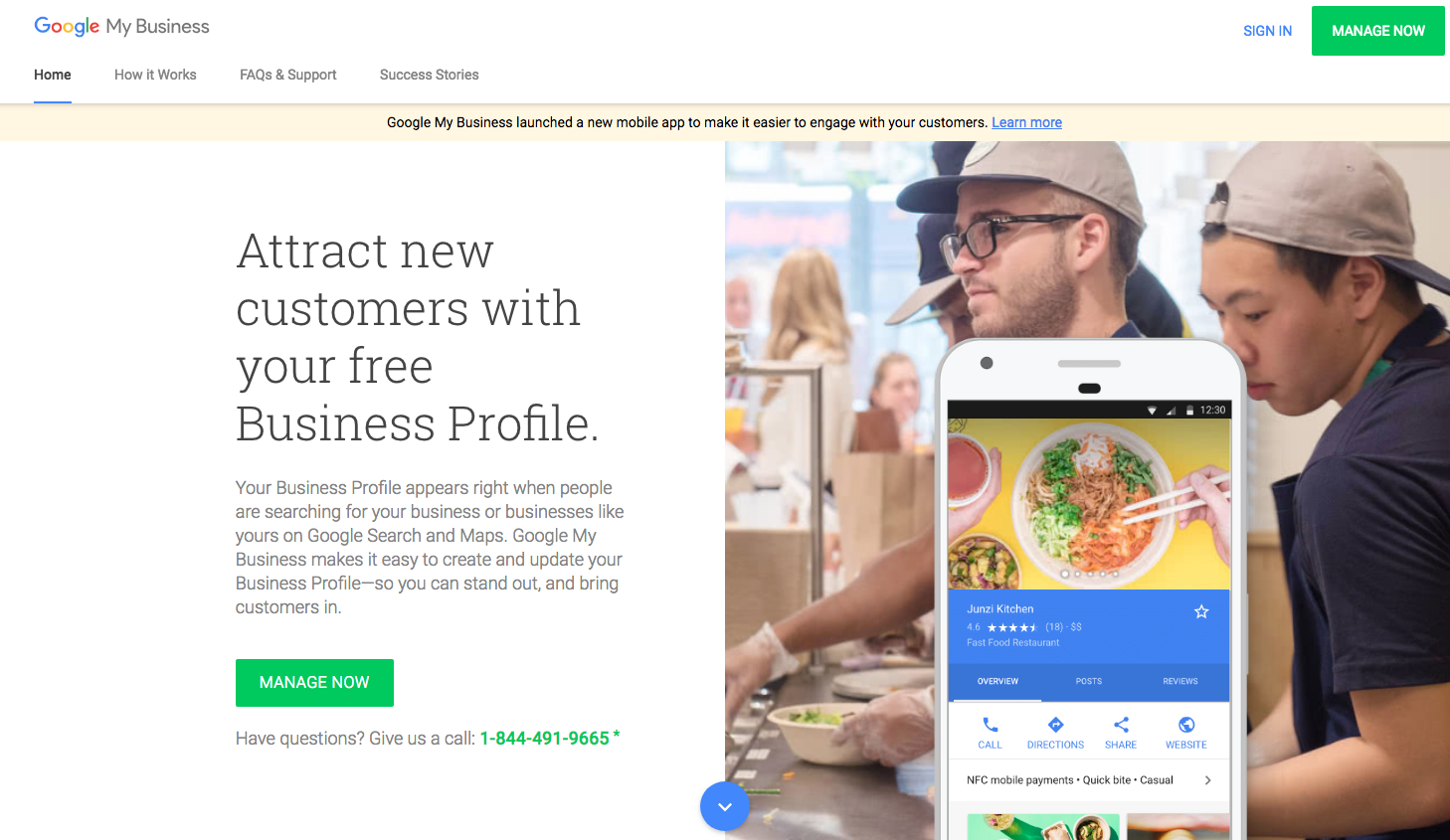
    1. Go to Google My Business and Click the “Manage Now” Button

    2. Head over to the official Google My Business website. You’ll find the bright green “Manage Now” button in multiple places, but they all lead to the same place. Note that this does require a Google Account to complete, so make sure you have one available that will always be easily accessible.

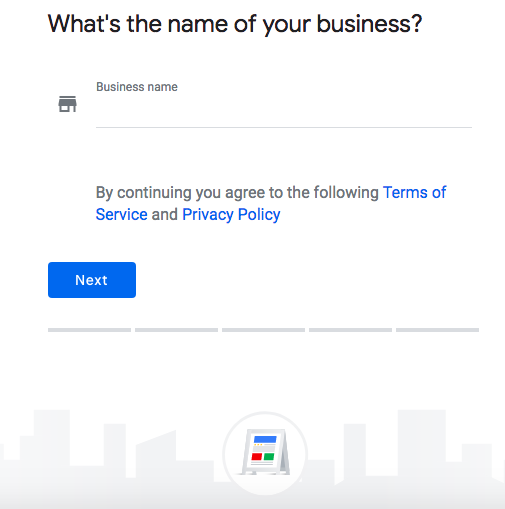
    3. Enter Your Business Name

    4. Enter the name of your business in the box that is presented to you on this page. If your business has already been claimed and verified, you’ll receive a notice that will instruct you to use the recovery email address to get access to the listing. If not, you’ll enter your address on the next screen; the option to hide your address for service area businesses is in this step as well.

      Screenshot of Google My Business page on a computer screen at Search Influence in New Orleans, LA

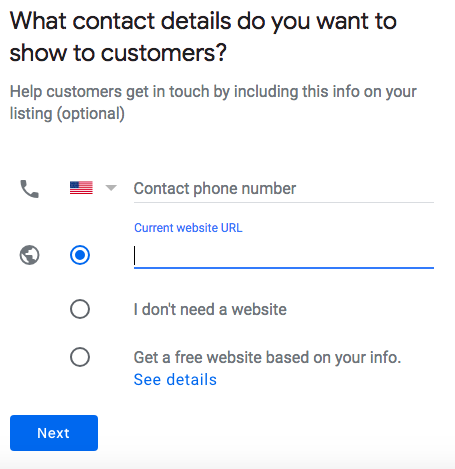
    5. Add Contact Information

    6. A potential customer doesn’t have much value if they can’t contact your business. Entering your phone number and website will display it on your GMB listing. You’ll also enter your address here. Be aware, Google will not allow any P.O. boxes for business addresses. Don’t worry if you own a service area business and don’t want to have that information displayed all across the internet; you can choose not to display your address.

      Contact info page of Google My Business on a computer screen at Search Influence in New Orleans, LA

    7. Verify Your Business

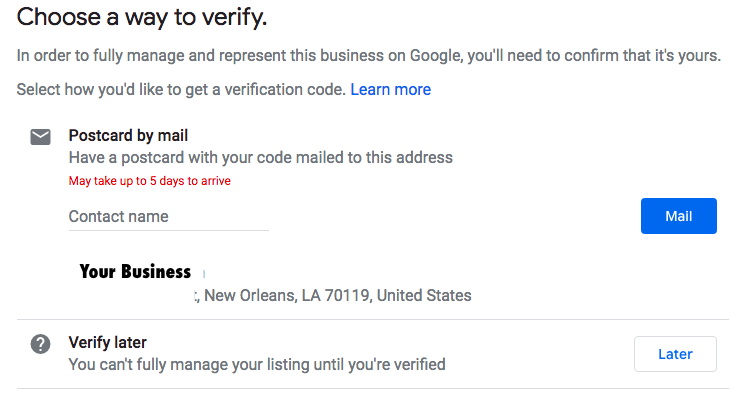
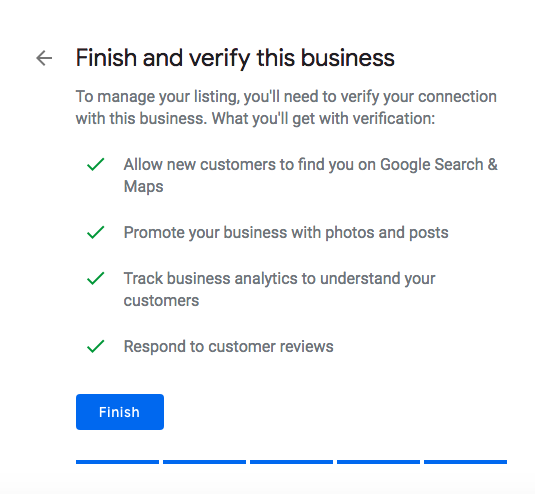
    8. After clicking finish, you’ll be taken to a screen to verify your business listing. The most common verification method is through the mail. Google will send a postcard to the address that was entered for the listing to verify that it actually exists at the location that was added to the GMB platform. Once a millennia (internet time of course), Google decides that a simple phone call is enough to verify a listing. The chances of this happening are very rare, so make sure to keep an eye on your mailbox!

      Postcard verification page of Google My Business on a computer screen at Search Influence in New Orleans, LA

    9. Confirm Your Business

    10. After verifying your business, you’ll just have to confirm your business details one last time, and you now have a shiny new Google My Business listing! Now that all of your information is verified and confirmed, your listing will show up in Google Maps and in Google Search whenever it matches a relevant search query.

      Screenshot on a computer screen of a Google My Business page at Search Influence in New Orleans, LA

    What Can I Do With Google My Business?

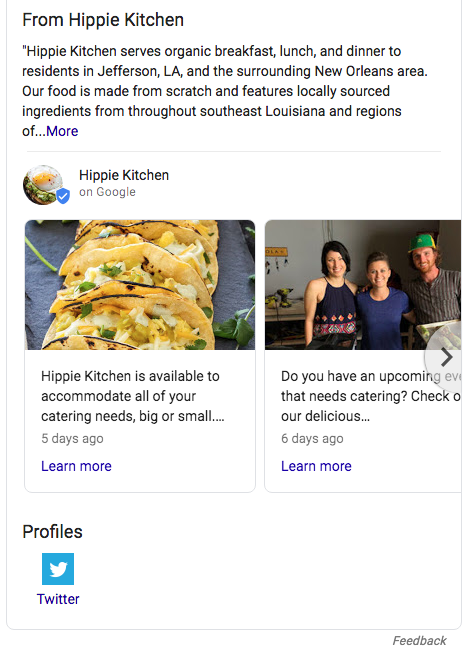
    Admittedly, verification is only the first step of your GMB journey. In addition to the visibility that it provides you on Google Maps and in Google Search, Google My Business allows you to interact directly with users. The first way is by posting on Google My Business. Users can “follow” your business on Google Maps, which allows them to view posts on their mobile device. These posts also show up in Google Search results. You can add a call to action that gives users a direct way to interact with your business when discovering your posts.

    Example of a post on a Google My Business page at Search Influence in New Orleans, LA

    Optimizing your profile is another customizable feature of GMB. You can add a menu, add a service area if you service more than your storefront, add product listings, ensure that you have the most accurate categories associated with your business, add photos, and much, much more. There is a GMB mobile app that also lets you manage on the go while at work or while working on vacation, as some people like to do. It gives you some very thorough metrics like top search queries, calls from your listing, website clicks from your listing, how many direction requests you receive from Google Maps, and a suite of other features. All this may sound like a lot, and it is. Managing your online presence can be tough, but Search Influence does offer local SEO services that cover every corner of Google My Business.
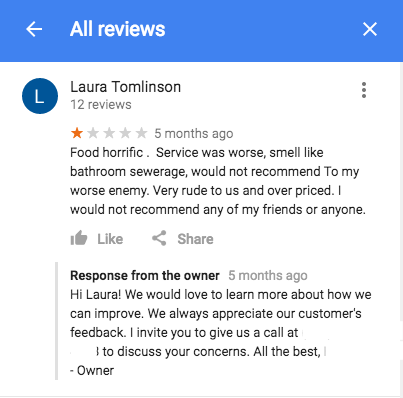
    Another bonus is that the strength in Google My Business’s signals for significant local search relevance was increased just from having a GMB listing. Once your business starts to receive some reviews, for better or for worse, this also improves your local presence. Even if a review is not favorable, it does provide a good opportunity to reach out to dissatisfied customers in a professional and public manner. Having a high rating with a large number of reviews is definitely something that looks good to people who find your business while searching on Google.

    Example of a bad user review on a Google My Business listing at Search Influence in New Orleans, LA

    Example of a user review on a Google My Business listing at Search Influence in New Orleans, LA

    Google My Business is essential to any business attempting to optimize their local SEO, which should be almost every small business. With a whole suite of services, this platform has progressed light years from the old Google+ Local and will only continue to grow. At Search Influence, we set up and manage GMB accounts for countless clients and continue to follow and track best practices. Don’t wait to take advantage of this free service! Get in touch with us for your local SEO needs and explore our complete digital marketing services.

  • SEO News: Data Aggregator Factual Now a “Submission Only” Source for TDCs

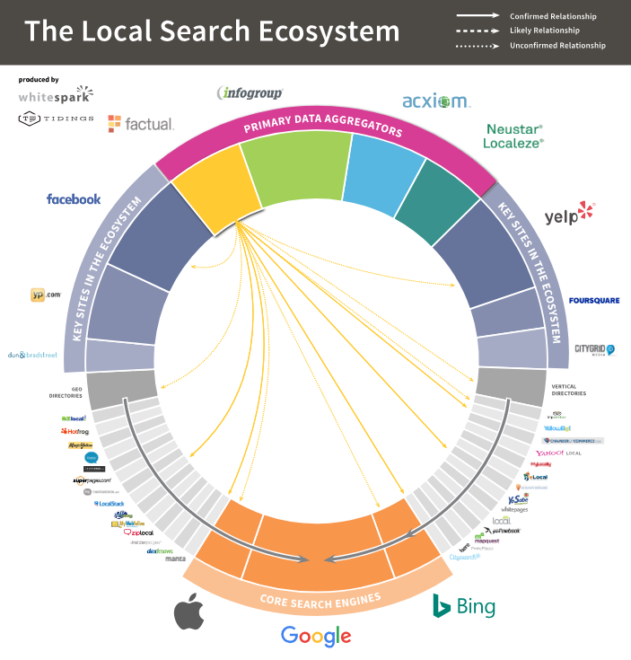
    SEO professionals who deal with clients’ backlink profiles and citation distribution on a daily basis are likely familiar with Factual, one of the largest data aggregators in the local search space. Factual does not accept listing submissions or edits from individual users; rather, they utilize trusted data contributors (more on that later) to help collect, validate, and then disseminate what they describe as “the ongoing accuracy of core business attributes.” In basic terms, you want to have your business listed on Factual as a platform because it helps push that data to other data collecting websites, expanding your digital reach across the internet.

    What Does Factual Moving to Submission Only Mean?

    Factual going to submission only means that third-party trusted data contributors (TDCs) can no longer guarantee that these data submissions will be accepted on Factual’s end. In TDCs like Yext or Moz, users can submit their business data, and the TDCs will push that information all at once to data aggregators, of which Factual is just one. Some other examples of data aggregators would include Acxiom, Neustar/Localeze, and Infogroup. TDCs help SEO professionals by guaranteeing that accurate listings will populate on these very important aggregators. 

    Yext logo


    This helps SEO professionals save a lot of time because it allows them to manage a client’s core data, have the data sent to these aggregators, which then send the data to more sources. Additionally, these tools help measure the accuracy of the listings, telling you if there is a discrepancy in name, address, phone number, or other attributed data. There is tremendous value in having accurate data for these reasons:

    • The data gets pushed from these four aggregators to numerous other internet sources.
    • Having consistent data for your name, address, phone number, and website adds authority to your business, in terms of SEO.

    Why Does Factual Going Submission Only Matter?

    Data aggregators that are willing to accept data from third-party tools as well as measure their accuracy help SEO and/or link builders tremendously in terms of time saved. For those at an agency or juggling numerous clients, monitoring these listings individually and having them edited is a gigantic time suck and oftentimes can be less than effective.

    By eliminating Factual from the equation, there is one less data aggregator that you can manage en masse via third-party tools. Factual will remain an important directory and aggregator, but you have to manage the data in a different way; more than likely, manual review on the physical listings will the best way to ensure accuracy. If there are inaccuracies, the best course of action would be to follow the guidance on how to make edits on their FAQ page.

    Why Did Factual Go to Submission Only for TDCs?

    This is a bit unclear, but Factual made this decision across all platforms. They did not cherry pick the sources that they would allow to guarantee submission or measure accuracy, but rather decided to limit the functionality available to the TDCs. 

    Factual’s next steps might be indicative of a larger trend industry-wide, or it might be just an internal decision based on factors we are not aware of. Regardless, this is worthy of monitoring going forward, because if more TDCs follow suit, local listing and data distribution management might be a bit more challenging in the near term.

    Even though the SEO industry is always changing, the marketing experts here at Search Influence are always keeping up with industry trends to optimize our clients’ SEO campaigns. If you think your business could use help with listing management or other SEO strategies, contact us today to start a conversation.

    Images

    Whitespark

    Yext

  • How to Optimize YouTube Videos for SEO

    Man watching optimized Youtube videos on his phone at Search Influence in New Orleans, LA

    What’s your first thought when you think of YouTube videos? Funny pet compilations or cooking tutorials? Well, if so, then it might surprise you that YouTube is more than just a resource for entertaining clips or personal vlogs (video blogs); it’s actually the second-most visited website in the world, behind Google. More than 1.5 billion users log into YouTube per month. It’s even crept into the television market, and the time that people spend watching YouTube on their TV has doubled in the past year.

    Still, only 9% of small businesses utilize YouTube. And, because YouTube is owned by Google, it pays to ensure that your videos are optimized for SEO just like your website. That might be the difference between a few views and a few thousand.

    Gif of Youtube logo

    A Beginner’s Checklist to YouTube SEO

    1. Title

    Just as your company’s web pages need metadata that contains clear and concise title tags with researched keywords, your video’s title needs to clearly list the topic while also using keywords. It’s one of the few places where you can put keywords, so it’s important to do some preliminary keyword research to see how people are searching for your product or service. A word of caution though—don’t put keywords in your video’s title just for the sake of inserting keywords. As with Google, this practice will not help your position in the YouTube search results page (YSRP). The key is to make it relevant while describing what the video is about.

    Example title of an optimized Youtube video from Search Influence in New Orleans, LA

    1. Description

    A video’s description should be just that—a description of the video. You don’t need to transcribe the entire video or write a short story about it; you just need to give a relevant but brief description. In addition to your title, descriptions are a place where you can utilize keywords. Again, don’t go throwing keywords into your description hoping that it will make your video rank highly in the YSRP. YouTube is smarter than that. Use choice, relevant keywords.

    For length, it’s best to aim for under 250 characters, or roughly 30 words. After this character limit, YouTube uses the “show more” prompt to hide the rest of your description. It’s also important to fit your keywords, a valuable resource link, and a call to action before this threshold. What’s a valuable link? Your company’s homepage can work just fine. But, you’ll get even better value if you can use a page deep in your site—think service pages, product pages, testimonials, limited offer pages, etc. Also, make sure to use “http://” or “https://” before the URL, or it won’t hyperlink in the description!

    After the “show more” fold, you can add more useful links and information, including prompts to follow you on Twitter, subscribe to your YouTube channel, or like you on Facebook.

    Example Youtube video description from Search Influence in New Orleans, LA

    1. Tags

    You’ve got your title; you’ve optimized a concise description; now it’s time to add tags. This is where you don’t want to be stingy. Add any keywords you’ve already used as well as other related keywords, as long as they make sense and are relevant to the content of your video. Also, YouTube recently starting using hashtags as another way to improve searchability.  

    Stephen Colbert saying

    1. Transcript

    This is one that not everyone may know about. YouTube will automatically create subtitles for your video, but their automated transcription process can be unreliable. By uploading a transcript (captions) of your video, you’ll know that someone who watches silently on mobile (which, if Facebook video is a point of reference, a lot of people do) will see an accurate transcription of what’s being said.

    Anna Kendrick saying

    1. Interaction on your part!

    YouTube is similar to social media in that you shouldn’t use the tactic of “set it and forget it.” Just like if someone is interacting with your business’s Facebook page or Instagram post, you should respond in a timely, professional manner. YouTube is also susceptible to, how should I put it, lively discussions in the comment thread. If there are any negative comments or reviews, respond to the ones where you feel you can actually help remedy a situation, and ignore the ones that are simply trolling.

    1. Promotion

    So you’ve uploaded your video and interacted with users in the comments. Great job! But, you’re still seeing pretty low views. Paradoxically, one of the ways to get your video higher up in YSRP is through views, but it’s hard to get views if it’s not being found. Now is the time to promote it. Share it on your blog, social media channels, email marketing campaigns, and even tell your friends, family, or network associates. This can help bring in those valuable views. You can track viewer data through YouTube Analytics. To learn more about using YouTube Analytics, Hootsuite has a detailed guide here.

    It’s Never Been Easier to Create Quality Video Content

    Since the launch of YouTube in 2005, not only has traffic within the platform drastically increased, but the quality of the content being produced has jumped leaps and bounds when compared to the very first video, a 19-second clip of YouTube co-owner Jawed Karim at the zoo talking about elephants.

    But one of the limitations that used to exist, whether or not you had a nice camera or a crew to shoot your video, doesn’t exist anymore. With the capabilities of smartphones, it’s very easy to point and shoot a tutorial, video blog, company profile, or any other type of video content you want to share with the world. By utilizing these tips, you can be on your way to adding some bingeable video content to the YouTube community. At Search Influence, our digital marketing experts can help your business build and grow your brand online. Check out some of the many clients we’ve worked with. Want to chat? Fill out the form in the sidebar today.

    Images:

    Man With iPhone on Head

    Youtube Logo 

    Stephen Colbert

    Anna Kendrick