Category: Industry Insights

  • 5 Higher Education Marketing Challenges Solved by SEO and Paid Digital Advertising

    5 Higher Education Marketing Challenges Solved by SEO and Paid Digital Advertising

    Key Insights

    • SEO and paid digital advertising works. And because they are trackable and measurable, we assure you they do.
    • Drive more qualified leads with SEO and paid digital advertising, which will help you capture prospects actively looking for your offerings.
    • Reach your audience at all stages of the funnel with SEO through broader, career-growth topics in the awareness stage and more specific, branded searches in the decision stage.
    • With the flexibility of these tactics, you can quickly adjust your marketing plan when it isn’t working.
    Prioritize SEO and paid ads to make the biggest impact on your marketing plan

    Education marketing leaders need reliable strategies to drive results. If you don’t know which strategy to favor to meet your enrollment goals, we are here to let you in on something — SEO and paid digital advertising will make the biggest impact on your marketing plan. And because they are trackable and measurable, we assure you they do. (When we refer to paid digital advertising, we mean paid search and display ads. Throughout the rest of the blog post, I’ll refer to paid digital advertising as paid digital ads.)

    While marketing leaders see SEO as important, we at Search Influence don’t believe that they have prioritized it as a key part of their strategy. We also know marketing teams spend a lot of money on paid digital ads but believe they don’t optimize their campaigns to their fullest potential because they don’t look at the data from the right angle.

    In this post, we’ll detail how SEO and paid digital ads can solve the top five challenges we hear from education marketing leaders. Overall, you’ll see that SEO and paid digital ads address the number one goal of a successful higher education strategy: qualified inquiries (at an acceptable cost) that turn into students.

    #1: How Do I Get More Qualified Inquiries?

    Most often, higher education marketing plans have both a quantity and quality issue when it comes to inquiries.

    • You don’t have enough new prospects entering the funnel
    • You receive a decent number of inquiries but not enough high-quality inquiries
    • It seems like you receive high-quality inquiries, but you don’t know how to evaluate their quality

    SEO and paid digital ads help you capture prospects actively looking for your degrees, programs, and certifications, which means you’ll receive more qualified inquiries.

    A comprehensive SEO strategy improves your rankings, which drives more website traffic and more inquiries. When these prospects inquire, you should expect higher quality leads because they got to your site through a search that indicates they are actively considering a solution and want to learn about your educational offerings. Similarly, paid digital ads fuel qualified inquiries in the same way — by driving website traffic from people actively searching for your programs.

    Paid display advertising (i.e., Facebook and LinkedIn advertising) helps you drive more qualified inquiries by targeting the RIGHT audience. Other tactics, such as organic social media, could reach a variety of people. However, when you specifically target your audience through paid digital advertising, the data gives you confidence that your messages reach the right people.
    Graphic showing magnifying glass over marketing metrics

    #2: I Know My Audience Is Out There. How Do I Reach Them?

    SEO and paid digital ads help you reach your audience in distinct ways.

    When people think about SEO, they usually think about reaching audiences that directly search for your programs. Less often, they think about the impact SEO can have at the top of the funnel — when prospects are not yet aware that education may be their answer.

    By writing blog posts about more general topics that your audience may be searching, you can be one of the first organizations to reach them and lead them to consider education. For example, higher funnel topics like “Most Popular Programming Languages for a Career in Web Development” or “How to Launch Your Freelancing Career in 3 Steps” can drive traffic from prospective students who are looking for career growth advice but might not yet have considered a degree. Yes — this is SEO!

    Although higher education marketers generally include paid digital ads as part of their strategy, we often hear from them that their campaigns don’t drive enough inquiries. This isn’t a problem with paid digital ads as a tactic. This suggests there’s an opportunity to adjust your campaigns, which means testing your target audience and/or fine-tuning the creative messaging.

    Campaign adjustments, through both expert human optimization as well as machine learning optimization, help you better reach your audience. For example, a campaign might drive very few inquiries or the wrong types of inquiries because your campaigns target either too narrow or too broad an audience. By making these types of adjustments, paid digital advertising can drive leads at an appropriate cost.

    #3: How Do I Drive Prospects Down the Funnel?

    Some higher education marketing leaders are surprised to hear that both SEO and paid digital ads can drive prospects down the funnel.

    A robust higher education SEO strategy includes a full-funnel approach to content that speaks to prospects in each stage of their decision-making process. Recommended content for each part of the funnel:

    • Top of the funnel: Career growth topics
    • Middle of the Funnel: Program/degree-specific content
    • Bottom of the funnel: Branded search engine optimization, which allows you to capture searches specific to your school/unit and assure that prospects find their answers quickly — and on your website

    Branded SEO is often overlooked and is one of my favorite tactics! Branded searches in the decision phase include application deadlines, reviews, tours, and tuition costs.

    Paid digital advertising allows you to tweak your creative messaging to fit your prospect’s place in the marketing funnel. With the proper campaign segmentation, you can:

    You can also run multiple ad variations to speak to more people. Over time, you will see which messages work more than others and switch them out.

    As you segment your messaging down the funnel, you can create specific messaging you wish your audience knew about. You don’t have to worry about overall/introductory messaging because your audience has already engaged with your institution and knows you. For example, a single ad could focus on:

    • A student’s success story
    • An alumni career achievement stat
    • An award, or special pricing

    #4: What Am I Getting for My Budget?

    The clear accountability of paid digital ads and SEO is a key reason many have moved the lion’s share of their budget to the digital arena.

    SEO and paid digital ads enable you to see the source of the prospect on an inquiry-by-inquiry basis, which means you can track the cost per inquiry and cost per application from each source and overall. Ultimately, this means you can tie ROI back to your campaigns.

    These direct metrics enable you to compare your stats to industry benchmarks and to peer organizations which both give you confidence your results stack up and tell you clearly what you get for your budget.

    Graphic showing a coin being put into a piggy bank

    #5: Can I Quickly Adjust My Marketing When My Plan Isn’t Working?

    The beauty of SEO and paid digital ads is that you can make adjustments along the way.

    With SEO, you can increase your emphasis on optimizations for a given program or degree if the work so far hasn’t been aggressive enough. If one program outperforms the others, you can pivot your time spent to another program.

    Contrary to traditional marketing or longer-term media buys that lock you into a specific time frame, with paid digital ads, you can make adjustments after you have specific data. Optimizations can range from creative/messaging updates to changes to where the ads run to who sees the ads.

    If a campaign has not met your goals, you can actually turn it off and reinvest that money into a campaign that drives results at an acceptable cost. For example, if you have campaigns on Facebook and paid search, and the paid search campaign drives quality leads, you can reallocate your budget from Facebook to paid search.

    Prioritizing SEO and Paid Digital Ads Will Have an Impact on Your Higher Education Marketing Plan

    As a digital marketing agency that started out as a search engine optimization agency, it may not be surprising that we have this point of view. Yet, we think it’s worth repeating: Higher education marketing teams know they should prioritize SEO in their marketing plans, but they often don’t.

    We also believe that universities that invest heavily in paid digital ads and don’t see expected results have not leveraged data to make the best optimizations.

    If you are ready to learn how SEO and paid digital ads can make the biggest impact on your marketing plan, please reach out to the Search Influence team via our contact us form or give us a call at (504) 208-3900.

     

  • New Orleans CityBusiness Recognizes CEO Will Scott in the 2022 Power List

    Key Insights

    • Weekly business publication New Orleans CityBusiness highlighted Search Influence CEO Will Scott in its quarterly edition of the 2022 Power List.
    • The July edition of the 2022 Power List focused on New Orleans’ top 20 influential professionals in the tech industry.
    • From the agency’s early start-up days to its status as a national digital marketing firm, Scott’s feature in the Power List covers all things Search Influence.

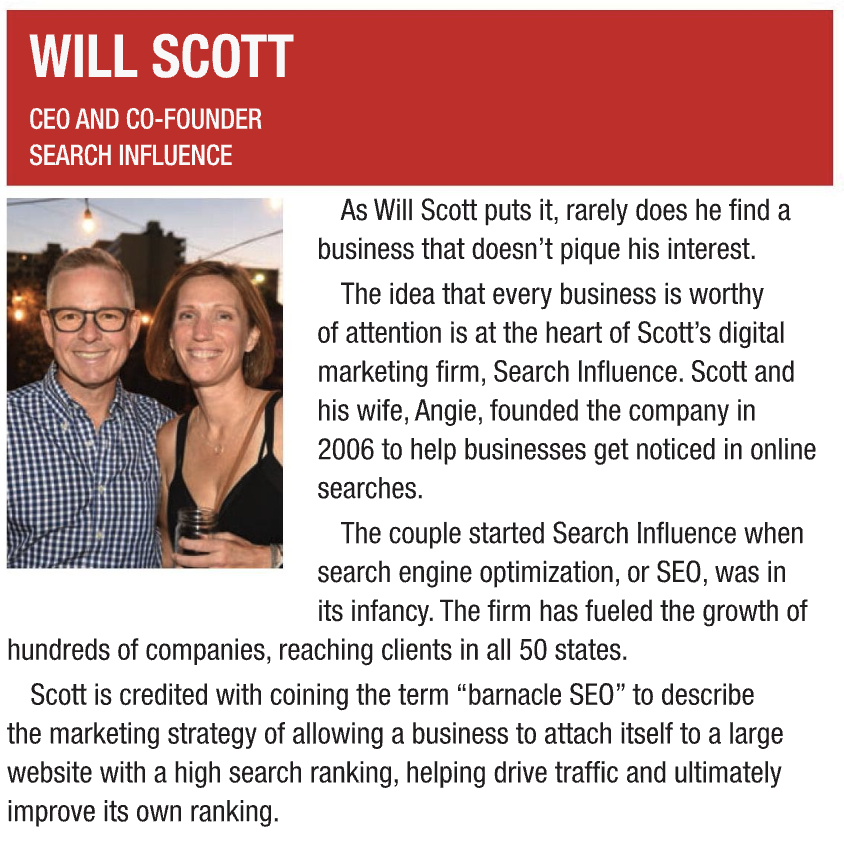
    On July 29, 2022, weekly business publication New Orleans CityBusiness named Search Influence Co-Founder and CEO Will Scott in its 2022 Technology Power List.

    Since 1980, CityBusiness has covered high-profile and emerging businesses in the metropolitan New Orleans area.

    Will Scott named to 2022 New Orleans CityBusiness Power List

    Will Scott’s Feature in the 2022 Power List

    The Power List, appearing quarterly in CityBusiness, takes a look at some of the most influential professionals in the Greater New Orleans region. This past month, the publication spotlighted the technology sector, an industry that has grown locally in recent years, with both established corporations and ambitious entrepreneurs looking to make their mark on the Crescent City.

    Among the 20 named leaders pioneering the New Orleans tech industry, Scott’s feature talks about all things Search Influence—from its grassroots foundation with COO and wife Angie Scott—to its status as a national digital marketing firm, reaching clients in all 50 states.

    “As Will Scott puts it, rarely does he find a business that doesn’t pique his interest,” writes CityBusiness. “The idea that every business is worthy of attention is at the heart of Scott’s digital marketing firm, Search Influence.”

    Fueling the growth of hundreds of companies since 2006, Scott is credited with coining the term “barnacle SEO.” In his feature in the Power

    Streetcar riding down st charles avenue in new orleans, la

    List, CityBusiness describes this marketing strategy as a method of allowing businesses to attach themselves to large websites with high search rankings, helping to drive traffic and ultimately improve their own rankings.

    Learn More About Search Influence’s Impact

    Led by Scott, the team of dedicated marketing professionals at Search Influence have helped businesses across industries optimize their potential.

    New Orleans made and proud, Search Influence works with clients in education, medicine, tourism, law, and beyond to deliver digital marketing results that lead to business growth.

    Fill out our online form today to learn more about Scott’s marketing expertise and the digital marketing services at Search Influence.

    Images

    Streetcar

  • Healthcare Marketing Ideas: How to Communicate Through Severe Weather Events

    Healthcare Marketing Ideas: How to Communicate Through Severe Weather Events

    Key Insights

    • Unexpected events are just that — unexpected. Despite this, your healthcare practice can properly prepare for any unprecedented conditions by remaining proactive in pre-planning patient/provider communication strategies.
    • Keep your messages in touch with current events. Adjust automated and pre-scheduled messages, social media posts, and newsletters to fit the context of the current climate. In other words, don’t be tone-deaf!
    • In times of uncertainty, keep patients informed by reviewing all digital platforms for opportunities to regularly send out updates. No site or profile is too small for an update regarding office closures or changes to your hours of operation.
    • Keep messages, details, and updates across platforms accurate. There’s no quicker way to lose a patient’s trust than to send out information that seemingly contradicts itself.
    • Pre-planning communication strategies help your team save time, delegate responsibilities, and understand expectations when weather or pandemic-related events strike. It’s never too soon to start pre-planning your medical marketing strategies to circumvent a potential crisis.

    Healthcare worker typing on laptop at desk

    Picture this — it’s the height of a worldly crisis, and your healthcare clinic has no choice but to temporarily close its doors to patients. You’re rushing to get your office’s updates written, approved, and posted, on top of trying to figure out which marketing team member will update which platforms to keep patients informed and engaged with your clinic. You haven’t even decided how to release your updates, and you’re already overwhelmed.

    This scramble to release timely, accurate, and relevant information to the public signals the need for your team to plan cohesive communication strategies. Proactive communication — as opposed to reactive responses — helps anticipate what your patients most want to know, as well as how and when they prefer to receive updates regarding your facility.

    From adjusting automated messages and updating your office’s primary platforms to enhancing reader trust through accurate messaging, pre-planning your medical marketing strategies contributes to a more confident and patient-centered workflow. In this post, we’ll cover some healthcare marketing ideas to drive effective patient/provider communication during unpredictable times.

    Benefits of Proactive Communication for Patients and Staff

    No matter if your clinic is bracing for the rampaging effects of a Category 3 hurricane or a global pandemic, environmental threats are a direct segway to stressed hospital systems. Unexpected events and catastrophes often lead to last-minute office closures, causing an increase in delays in care and, ultimately, a decline in provider satisfaction. On the contrary, if your office remains open while other healthcare clinics in your area face closures, front desk staff may field relentless phone calls from patients inquiring about your hours of operation and whether they should even show up for their appointment.

    If you communicate proactively, you may be able to increase your show rate for those uncertain days and prevent less rescheduling — which can otherwise be a headache for staff and doctors alike. Streamlining communication between patients and staff begins with implementing agile practices in otherwise turbulent environments. In doing so, not only is patient experience improved, but care staff can relish the efficiencies of a more seamless and adaptive work environment.

    Once your patients trust that your digital platforms will provide them with critical information, you’ll start to really see these benefits. But to reap these rewards, your team will first need to adopt strategies that center your clinic as a reputable and dependable source of information.

    Adjust Automated and Pre-scheduled Messages

    We live in an automated world — pre-scheduled posts and emails help us run our marketing communications smoothly on a daily basis. So, what can you do to make sure that automation doesn’t hurt your brand? If patients receive or see messages contradictory to what they expect or heard through another channel, they may question what is accurate. During a crisis, adjusting all pre-planned messages before they reach your intended audience is the backbone of consistent and reliable patient-provider communication.

    Halt automated messages

    Your team is likely already in the habit of updating your office’s phone tree. Beyond that, your team should be turning off any automated appointment reminders. If a patient receives a message while the office is closed, that can cause questions regarding whether they have missed an important appointment — reducing their confidence in the communication they are receiving.

    Reevaluate pre-scheduled posts, emails, and newsletters

    Next, you should review any pre-scheduled social media posts and defer or cancel any that would appear tone-deaf or not make sense given the current climate. Even if it’s an engagement-driven evergreen post, if your audience sees that while they are in the middle of a natural disaster, it may look like your company isn’t paying attention to what’s going on in the world.

    The same principle applies to marketing emails or newsletters that you may have pre-scheduled or that go out on an automated cycle; if patients receive those during a time of crisis, then the messages will, at best, fall on deaf ears and not get the attention they deserve. In a worst-case scenario, they could insult a patient who might wonder why they are receiving an email about a non-timely topic during an emergency situation. No matter the type, reviewing and adjusting all pre-scheduled messages prevents the likelihood of insensitive content surfacing and tainting your brand’s empathetic reputation.

    Update Information on Primary Platforms

    Now that you’ve covered the basics and paused any messaging that may not make sense to your receivers, it’s time to shift focus to where patients might expect to find pertinent information. According to a survey conducted by Redpoint Global, a staggering 80% of patients report preferring to use digital channels to communicate with healthcare providers at least part of the time, which highlights the criticality of keeping digital content updated across all online platforms.

    To begin, you’ll want to review your healthcare system’s most influential platforms to suggest any updates be made to hours of operation, facility safety standards, or other relevant expectations patients may expect to have. While the breadth of your digital footprint may be more than you realize when first building a list of profiles to update, some of the most important platforms that will require reviewing include:

    • Your website
    • Email/text
    • Patient portal
    • Facebook
    • Instagram
    • Google My Business
    • Google Search
    • Any other websites that come up when someone searches your hospital or medical office’s name

    Install a website notification bar

    If you don’t already have a website notification bar, it’s a good idea to install a feature that puts a banner at the top of your site with your clinic’s latest updates. Before using this functionality, your team should be sure to complete a test run on your site to ensure it accurately delivers timely notifications. Because your staff may be limited in emergency or last-minute scenarios, it’s also important that 2-3 team members are trained and have access to update this, as well as create a new page with more details if necessary.

    Assure Patient Confidence With Accurate Messaging

    How can you assure your patients trust the information you’re delivering in the updates? Establish confidence in the accuracy of your messages by:

    • Dating the updates: Keeping a time record of updates helps your patients know the information you’re putting out is fresh. This can be especially important if the situation lasts longer than a day or two.
    • Communicating often: Keep the updates coming. Daily updates may make sense on some channels, particularly in the days of the most uncertainty.
    • Keeping it consistent: Be sure the messages and details across each platform refrain from contradicting one another. Consistent messaging is key to long-standing patient trust!
    • Being clear about patient expectations: Don’t make your patients assume — proactively communicate what they can expect from your staff and clinic.
    • Relaying information about future updates: Finally, note when and how patients can receive the next update.

    Strategies to Pre-plan

    So, you’ve reevaluated all automated and pre-scheduled messages, updated your primary platforms with accurate information, and now you’re looking at how to pre-plan your medical marketing strategies in times of crisis. Some of the most essential components of an effective pre-plan strategy include:

    • Delegating responsibility for updating platforms: Be sure there are 1-2 backups, just in case a staff member isn’t in a location with reliable internet access.
    • Implementing a shared password system: Store passwords in a secure management system like Passpack or Last Pass to ensure that the right people have access to the proper channels for updating.
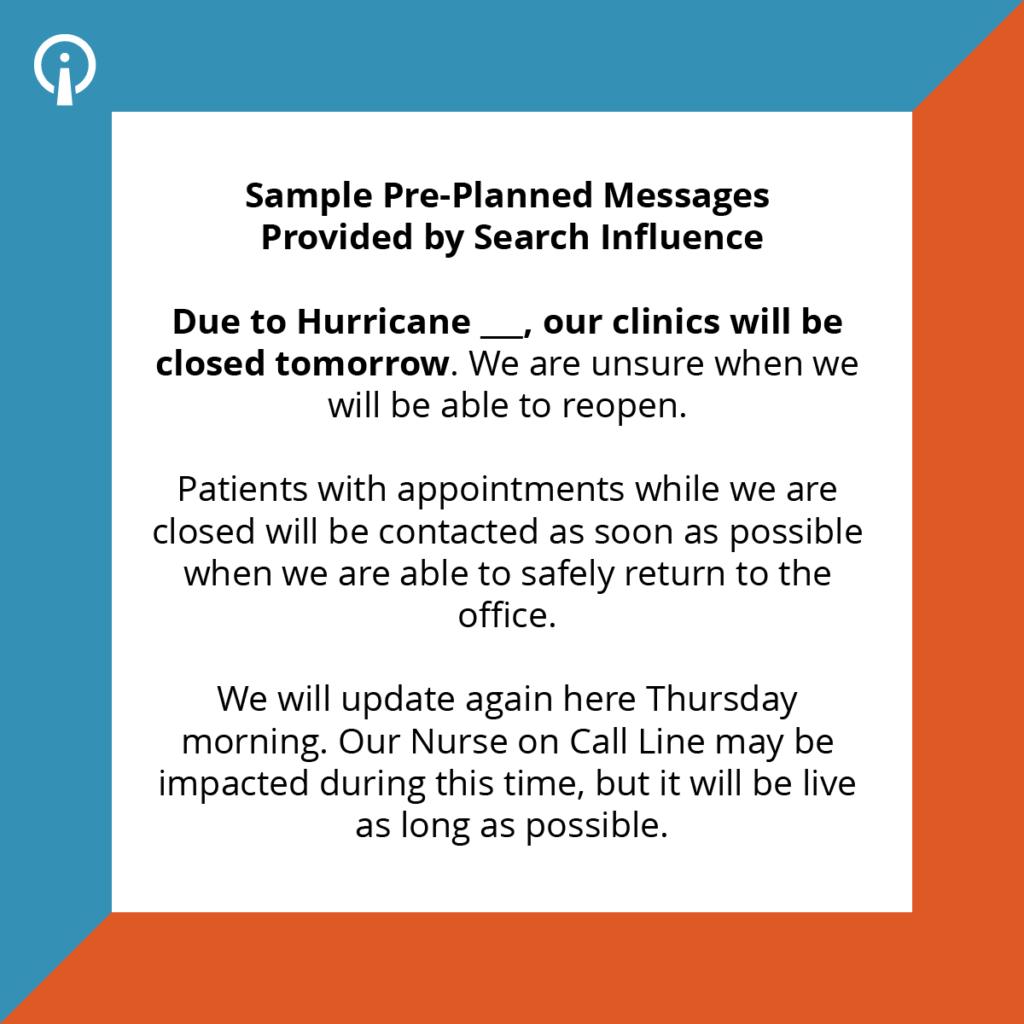
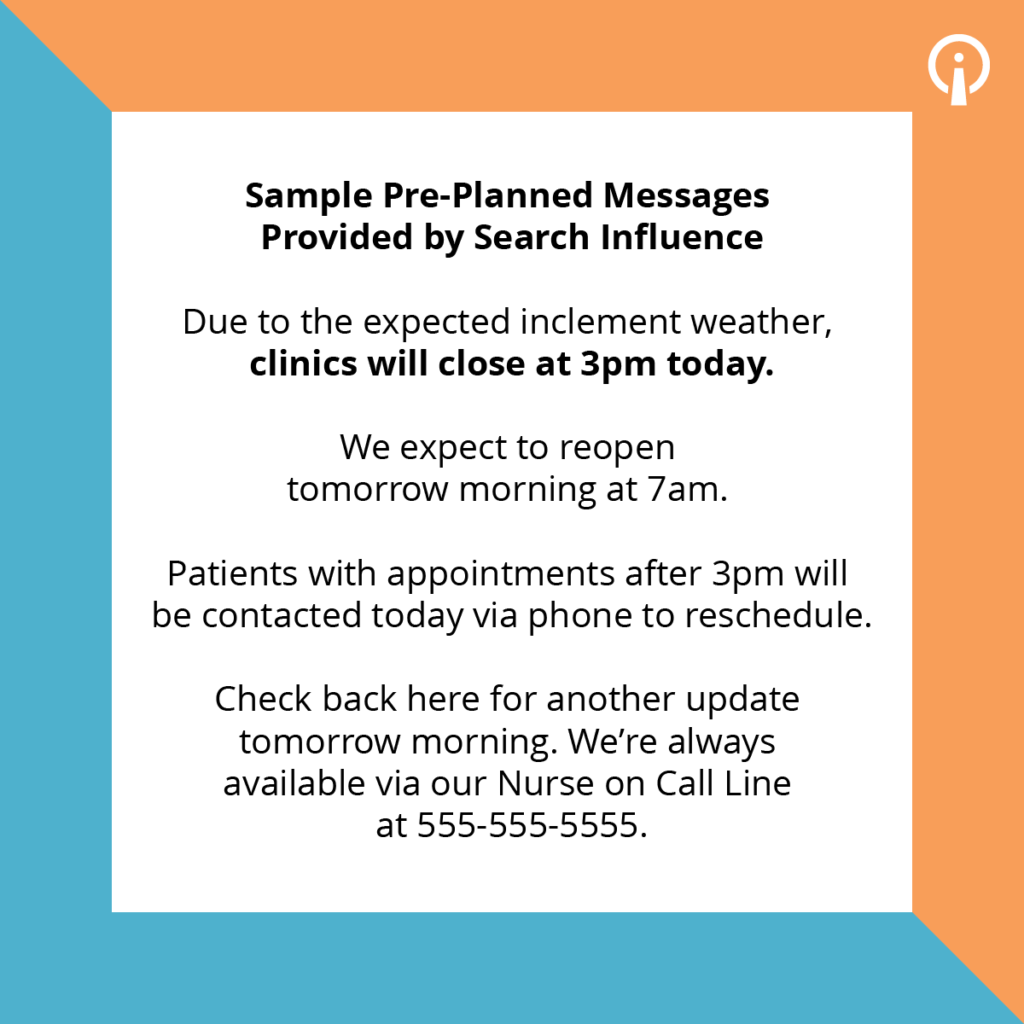
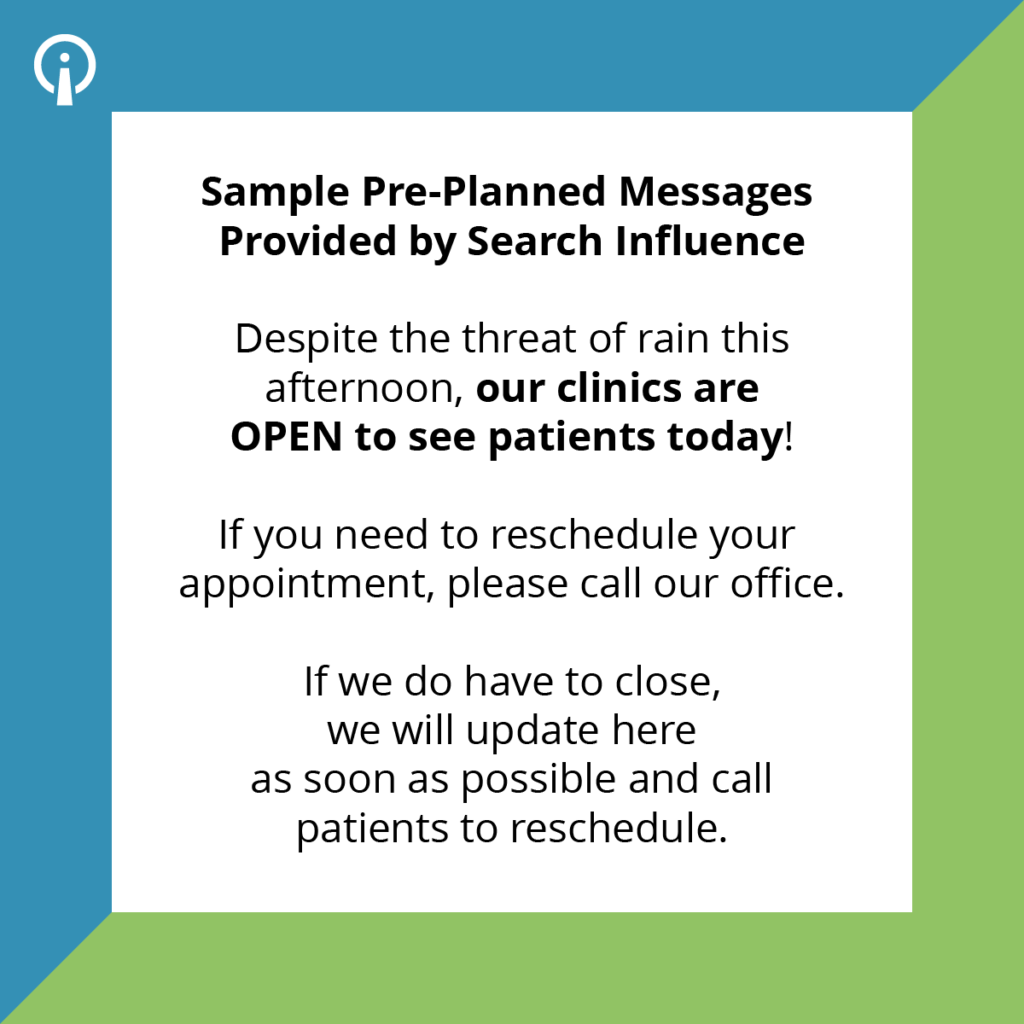
    • Writing and gaining approval for sample messages: Sample messages can be used as a basis for your real-time messages and demonstrate the most important points of all of your healthcare marketing ideas. This strategy can help save your team writing time while also ensuring communications get out quickly.
    • Pre-creating social media graphics and email templates: Just like pre-writing sample messages, pre-creating graphics and emails accompany the same benefits of saving your staff time in periods of urgency.
    • Carrying out a crisis communication drill: Take an hour or two to present a scenario to your team and have them “execute” the plan all the way up until posting or sending any messaging. This will pressure test if they are able to write the messages, access the platforms, and work the relevant systems. It will also force all the pre-organization to happen by making sure everyone has access to the plan.

    Anatomy of pre-planned messages

    Whereas we may be quick to assume communication is solely required for office closures, it’s almost equally as important to communicate that you are open if things are happening in your community that may be causing others to close. Ideally, pre-planned messages for office openings and closures are composed using the following anatomical focal points:

    • What’s the situation?
    • How are hours impacted?
    • How will existing appointments be handled?
    • When can patients expect the next update?
    • How can patients be helped while you are closed

    So, How Do You Get Started?

    With hurricane season fully underway and COVID-19 numbers still on the rise, now is the time to enact these medical marketing strategies and meet your business growth goals. Here’s a quick recap on how to get started:

    • Establish and gather your team of 2 or 3 people minimum so that you have coverage.
    • Compile and prioritize the list of communication channels and platforms. Then, define owners and set up access, logins, and training.
    • Pre-plan messages and get those approved.
    • Finally, conduct drills to make sure your team can execute the plan as intended without any preventable basic issues.

    Now that you’ve mastered the basics of proactive healthcare communication strategies, it’s time to set your plan into motion. At Search Influence, our digital marketing agency can help you create a communication plan that keeps your patients informed, engaged, and returning. To learn more, contact us today for help getting started on all of your healthcare marketing ideas.

    Images
    Stethoscope and Laptop Computer

  • No. Don’t “Upgrade” to Google Analytics 4 (GA4). Instead, install it and run it in Parallel.

    Don’t “Upgrade” To Google Analytics 4 (GA4) Just Yet

    Google has been urging Analytics users  – mostly by email – to “Upgrade” to Google Analytics 4 (GA4).

    At Search Influence, we are installing GA4 but not “upgrading” just yet.

    No doubt, GA4 will be a great improvement, but there are a few really compelling reasons not to go all in just yet.

    A while back, David, our senior web developer, wrote a pretty comprehensive blog post about switching to Google Analytics 4, which you should check out. Below, I’ll reiterate a couple of his points, plus a few more.

    Google Analytics 4 user interface - Should you upgrade to GA4?

    Google Analytics And The Cookie-less Future

    In short, a big reason for this change is to accommodate a cookie-less world. As users can now opt out of tracking, it may be more difficult to gather user experience data if cookies are the way you get that done.

    Google Analytics 4 is not yet a fully baked product. Google tends to take an agile development approach and test new products and features with users.

    Even though it is Cookie-based, Universal Analytics – the current version – is a stable product.

    Do You Even Track Metrics, Bro?

    Google Analytics is great, but there are things it doesn’t do well. Some of the tools that you use to supplement Google Analytics may be negatively impacted if you make the switch too early.

    Some examples:

    In short, just because the Google Analytics team is ready for you to switch doesn’t mean everybody else is. Third parties and even some Google Properties development teams have to catch up to the GA4 APIs and interface changes.

    Third-party tool providers need a chance to get caught up with the new Google Analytics.

    Search Influence And GA4 For Clients

    Google plans to deprecate Universal Analytics as of July 1, 2023.

    In the next few weeks, we will be installing the GA4 tracking code on our client sites (again, alongside Universal Analytics) or recommending their developers do if we don’t have access.

    This way, we will have a full year’s worth of data when Universal Analytics sunsets.

    We’re not making a wholesale switch right now for the reasons above, but we feel it’s important to start collecting data in the new tool to enable good historical reporting in future years.

    We use CallRail and Google Data Studio for most of our client reporting and some internal dashboards, too. We are not willing to risk the integrity of that data for decision-making and reporting to move the newest, coolest Google toy.

    Again, David’s post goes into much more detail about switching to GA4, but I hope this gives a high-level view of the Search Influence approach to integrating this new platform.

    And, of course, if you need help setting up Analytics, Tracking, and Reporting for your organization, please get in touch. We’d love to help.

  • Why Advertising Costs Spiked in 2021, Particularly in Q4 (and What You Can Do About It)

    Key Insights

    • Advertising costs tend to be higher in Quarter 4 for all industries
    • The iOS14 update in 2021 and the pandemic in 2020 magnified these trends in 2021
    • Plan ahead and anticipate this spike by creating a full-funnel strategy in advance to help offset these costs

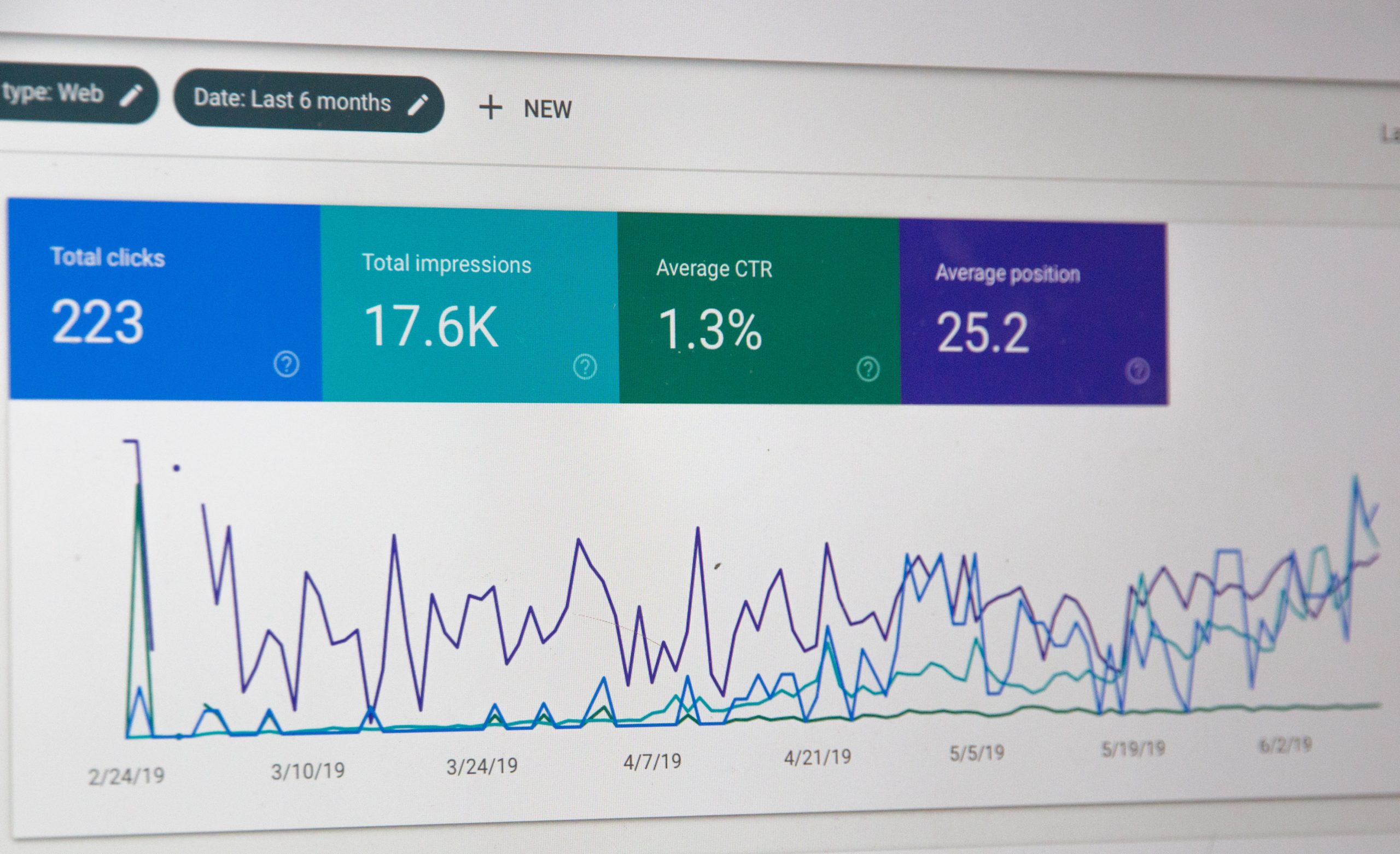
    Screenshot of google search console data platform

    As we make our way into 2022, you may be high-fiving your team as you happily report that cost per impression has dropped across your Facebook campaigns, particularly for month-over-month comparisons. While this is exciting to see in the first quarter of the new year, it’s not exactly a coincidence. In fact, it’s actually the result of a trend we see in quarter 4 of the year prior. Q4 is notorious for driving advertising costs to their highest rates of the year. This is an important topic to address because it affects nearly all industries and can negatively affect your bottom line as the year comes to a close. The biggest driver of elevated CPMs during this time is increased competition.

    Starting with Black Friday, more and more marketers are rushing to push their ads live in time for the holidays, meaning more competition and higher advertising costs for you. While this likely doesn’t come as a huge shock, you might be surprised to learn that 2021 advertising costs were particularly high.

    To find out just how high, Search Influence has pulled our internal Facebook data to best answer this question. We have also included three proactive measures to help you plan for and cut these costs down each year.

    Internal Case Study

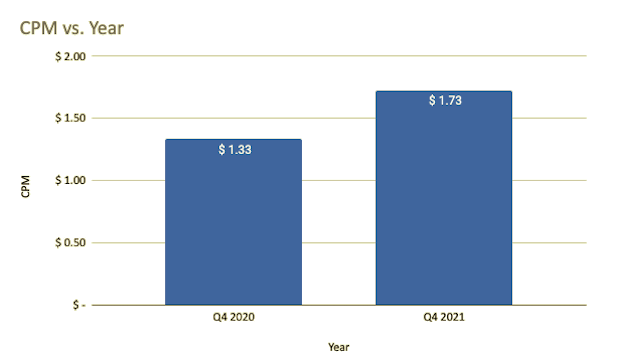
    In this review, we compared our 18 active Facebook clients, regardless of campaign objective, to the 17 Facebook clients active in 2020 during the same period. The results showed that Facebook cost per impression rose 29.48% in quarter 4 of 2021 compared to Quarter 4 of 2020.

    CPM versus year in quarter 4 2020 versus quarter 4 2021

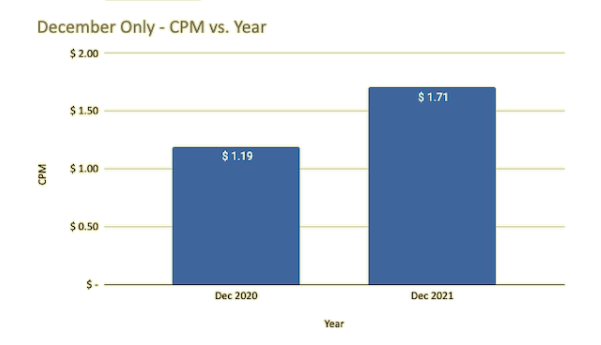
    The results were even more drastic in December. In December alone, CPM rose 43.07%!

    December data for CPM versus year for December 2020 against December 2021

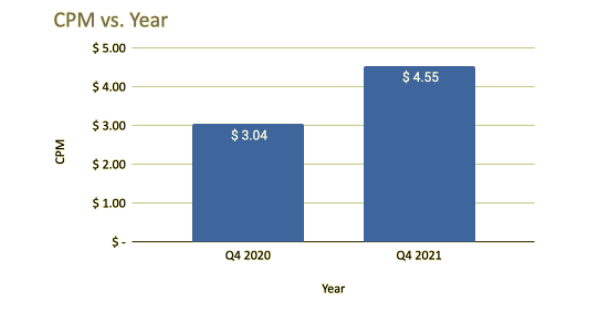
    For our higher education clients, in particular, we saw even more fluctuation. In quarter 4 of 2021, Higher Education CPMs rose 49.51% compared to the year prior.

    CPM comparison from Q4 2020 to Q4 2021

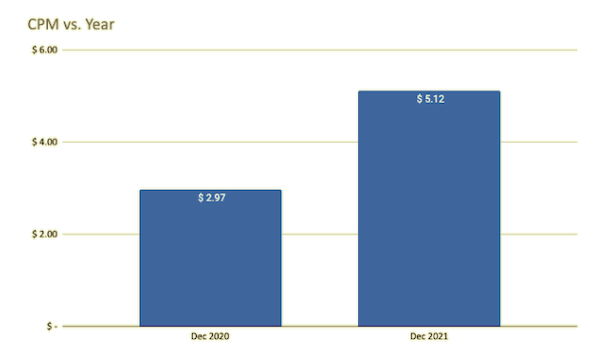
    And in December alone, CPMs grew 72.13% for this industry compared to December 2020.

    December only higher education CPM versus year data

    But, Why 2021?

    The most likely culprit is the iOS14 update that went into effect earlier in the year. Now that privacy is under the magnifying glass, Facebook has to revamp. Retargeting and Lookalike audiences are largely unavailable or tanking in performance due to most iOS users opting out of tracking. The result? Much smaller retargeting audiences.

    Additionally, Lookalike audiences, which come from Pixel data, aren’t being tracked the same way. Therefore, the data source for much of your Lookalike audience quality has been falling, and performance will suffer as a result. In sum, your ads are targeting a broader audience than before. Add that with the seasonal trends we see in Q4, and what do you get? Record high CPMs.

    Lastly, 2020 was a truly difficult year for everyone. As companies made cuts across their business, advertising budgets were often the first item on the chopping block. If you could keep your advertising campaigns running during this time, you might have been pleasantly surprised by the reduced competition. Now that the world is growing more and more accustomed to the new “normal” in light of the pandemic, companies can get back in the marketing game, and boom, competition is back, as are high CPMs.

    So What Does This Mean for You and Your Industry?

    Higher CPMs are here to stay, and you can expect them to be the highest towards the end of the year. The biggest spikes will likely hit in November and December, beginning around Black Friday.

    At Search Influence, we recommend the following strategies to help you counterbalance the increased costs in the final quarter:

    • Plan and execute a full-funnel strategy
      • The best way to prepare for this is to be proactive about your advertising strategy and plan at least six months in advance again. We would recommend allocating additional budget towards the end of the year to help compensate for the seasonality OR start running your campaigns earlier to ensure your ads are out of learning and optimizing towards your goals before the holiday rush hits. Beginning early in the year with a brand awareness strategy that leads into a conversion or lead generating strategy closer to the busy season allows users to grow familiar with your brand before it’s time for them to convert.
    • Create early incentives
      • Another strategy we recommend would be to set initiates for users to convert early. For example, an education client might waive an application fee if submitted before November 20. Likewise, an eCommerce click might benefit from offering an early bird promo code to encourage shoppers to purchase before marketing costs surge.
    • Increase awareness with high-quality video assets
      • Using video assets is an excellent way to improve performance. They almost always outperform static images, and 81% of customers decide to buy a product or service by watching a brand’s video content. Videos are also a great tool because you can use them to remarket to users that have viewed them before.

    Failing to plan ahead of this seasonal push could have a detrimental impact on your business. At Search Influence, we believe it is essential to build a full-funnel strategy throughout the year that can help you with most of your marketing budget. Reach out to our expert team at Search Influence to find out how you can improve your marketing strategy today!

    Images

    Search Console

  • 4 Steps to Demonstrate the Value of Your Higher Education Marketing Strategy

    Key Insights:

    • Define relevant SMART goals for your marketing strategy to provide clarity on the results you want to achieve.
    • Utilize research-backed data to demonstrate how your campaign’s messaging and platforms help reach your target demographic.
    • Tailor your presentation to your audience to convey how your strategy helps each stakeholder reach their unique goals.

    A person making charts and graphs on a computer

    After you’ve created your marketing plan, your next step is to present your strategy to key stakeholders to demonstrate how it will improve the organization’s results. Effectively presenting this information is essential for gaining stakeholder trust and aligning your organization’s goals. In this post, we will outline the four-step formula for demonstrating the value of a new marketing strategy.

    #1: Share Your Goals

    Discussing the goals of your campaign allows stakeholders to visualize the end result of your higher education marketing strategy and understand the expected returns. Furthermore, sharing your goals conveys you have thoroughly examined how this plan impacts the organization.

    When sharing goals, focus on quantitative measures primarily, but don’t forget to bring in some qualitative measures to show the whole picture. Start by defining important qualitative goals, and then turn these into more tangible measures by adding quantitative metrics. These goals should be SMART: specific, measurable, achievable, relevant, and time-bound. SMART goals clarify what results you are trying to achieve and the time frame you aim to achieve them.

    After defining these goals, let your stakeholders know how often you will update them on your progress. This will keep you accountable to the measurement of your performance and lets your stakeholders see your commitment to achieving results.

    #2: Relate Your Goals to Your Target Demographic

    After you have defined the goals of your marketing strategy, it is essential to demonstrate how these goals impact your target demographic. This helps you convey to stakeholders how this direction aligns with your organization’s goals. To demonstrate this, start by researching industry data on the demographic makeup of the platforms your campaign is utilizing.

    The good news is that you can find an abundance of reliable data on the demographic makeup of popular social media platforms in the age of digital marketing. Knowing where your target demographic is consuming information can aid you in conveying the power of your higher education marketing strategy and stay ahead of the curve. For example, here are the largest age groups on major social media platforms:

    You should also research how much time your target demographic spends on each platform. This will allow you to determine how effectively your marketing strategy will reach these users. For example, 20% of Gen Z spends more than 5 hours every day on Tiktok. This data can convince stakeholders that TikTok can be a very effective platform to reach Gen Z due to its high engagement with that demographic. Take a look at this breakdown of the average time spent per day on each popular social media platform:

    • Facebook: 38 minutes per day
    • Instagram: 29 minutes per day
    • Twitter: 3.53 minutes per session
    • TikTok: 45+ minutes per day

    Including this demographic information while presenting your strategy allows stakeholders to understand the effectiveness of this plan. Additionally, showcasing these key statistics helps gain stakeholder buy-in and aids in preparing you for any potential objections.

    During a strategy presentation, use this research-backed data to justify the messaging of your campaign. You can use this data to explain what challenges your target demographic faces and how your messaging drives conversions.

    For instance, let’s say you are a higher education institution trying to reach Gen Z students applying to college. You do research and find that 67% of Gen Z students indicate their top concern is being able to afford college. Using this data, you can adjust your campaign’s messaging to speak to this concern. You can convey this by highlighting your programs’ affordability or by providing resources on applying for financial aid.

    Then, when demonstrating the value of your marketing plan, make sure to include these key statistics that helped you determine your target consumer’s needs. Presenting research-backed data that supports your campaign’s platforms and messaging can help gain stakeholder buy-in.

    #3: Compare and Contrast to Your Current Strategy

    When you present a new marketing plan, you must emphasize why the current strategy doesn’t meet your organization’s goals. Comparing and contrasting it with your proposed tactics will clarify the necessity of a new approach.

    To compare and contrast with your current strategy, pull data on which audiences your current campaigns reach and what results it has achieved. You can do this by looking at Facebook, Google Ads, and Google Analytics campaign results. Use this data to highlight where your current campaigns fail to meet your goals and reach your target demographic. Then, emphasize how your proposed strategy will fill in the gaps and deliver more results for your organization. You can convey this by using research-backed data and SMART goals to demonstrate to stakeholders the results you expect with this new campaign.

    #4: Tailor Your Presentation to Your Audience

    Depending on who you are presenting to, it is beneficial to make slight adjustments to how you explain your strategy and what data you bring to support it. Different stakeholders have unique needs and interests, and tailoring your presentation assists you in conveying how this higher education marketing strategy will benefit them in particular. Furthermore, your stakeholder’s personality can help determine the most successful approach. Using personality assessments like the DISC method can help you understand how best to reach different personality types.

    Be sure to tailor your metrics depending on the different stakeholders you are talking to. Tailor the data you include based on what is most important to your audience and the funnel stage of your campaign.

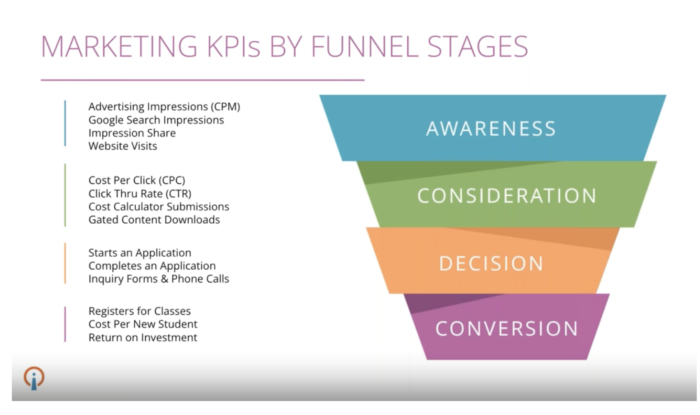
    For instance, different stakeholders may respond better to macro or micro metrics. Macro metrics are actions that directly contribute to the primary objective of your campaign, such as cost per enrollment and return on investment. Macro metrics are useful when presenting to stakeholders that may not be as familiar with marketing terms and are more invested in the overall picture. On the other hand, micro metrics are secondary conversions that support the overall goal, such as cost per click and click-through rate. These metrics are more likely to be effective when presenting to stakeholders with marketing experience.

    In addition, the stage of the marketing funnel you are targeting will help determine which metrics to present. For instance, awareness campaigns might focus on metrics such as website visits and impressions, while conversion-focused campaigns are more suited for tracking metrics like return on investment and cost per new student. By tailoring the data and messaging in your presentation to each audience, you can more effectively communicate how your plan will drive results by using language your audience is familiar with.

    marketing KPIs by funnel stages

    In order to gain stakeholder trust in a new higher education marketing strategy you should define goals that align with your target demographic; compare these to your current strategy, and tailor the presentation to your audience. By following this guide, you can use research-backed data and targeted messaging to convey the value of your marketing plan to any stakeholder.

    To learn more about how Search Influence handles higher education marketing strategy, fill out a form to get access to our on-demand webinar series.

    Images:

  • How a User Experience Audit Benefits Your Business

    Key Insights

    • Website user experience audits help businesses retain users and increase conversions.
    • If you understand the data behind user behavior, you can anticipate a user’s needs when designing and optimizing your website.
    • Examine trust factors, content considerations, and device usage when completing an audit.

    Woman typing on laptop computer and media app icons

    What Is a User Experience Audit?

    A user experience audit, or UX audit, is the process of reviewing a website for areas of usability improvement. There’s no one way to complete an audit because each one depends on the type of products or services offered and data analysis of user types and behaviors. It’s important to keep in mind a few key questions when completing a UX audit:

    • How does user experience impact conversions?
    • Are there usability issues, design issues, or both?
    • Should you consider your business initiatives when performing a UX audit?

    In this post, we’ll cover the questions above, along with the impacts of trust factors, content, and device usage in order to retain visitors and improve conversions.

    User Experience’s Impact on Conversions

    Imagine visiting a website to purchase shoes but find that you can’t add the item to your cart. You could refresh the page or revisit the site at another time, but many people will just visit other websites in search of the same shoe.

    If you’re the business of the original website, you’ve just lost out on a conversion—and likely more than one. Ensuring that your site supports users’ interactions without interruption is vital in retaining users and ensuring they convert.

    Usability Issues

    A site might seem functional, but it could lack the design necessary to increase user interaction and conversions. A ResearchGate study attributes 94% of a user’s first impressions of a site to its design. A poorly designed site could make all the difference in a user staying on the site or leaving with little to no engagement.

    Consider Business Initiatives When Performing a UX Audit

    Each business will have its own specific business initiatives that they want to achieve, such as raising awareness of their brand, increasing user engagement, or improving their ROI. Those initiatives can drive how to look for improvements to a user’s experience when completing a UX audit.

    Graphic of speech bubbles in multiple colors

    The Value of Trust

    Include trust factors on your site to establish credibility with your users. Trust factors are indicators on your site that can help users feel more assured in using your services or buying your products, such as testimonials, awards, and certifications.

    Content accuracy and quality can also impact a user’s trust. Issues such as incorrect grammar or inconsistent contact information help users to decide whether your business has credibility.

    Content Considerations

    A site with lots of pretty pictures won’t cut it. Written content plays a crucial role in determining user engagement. Site language should compel the user to stay on the site and learn more about the products or services offered.

    According to Small Business Trends, 70% of small businesses don’t use calls to action on their site. When a user visits a website, they expect some sort of direction in order to convert. If all they see are images but no clear and obvious path to purchasing a product or service, they likely won’t comb over the site to find out where to complete the purchase. Having clear and specific calls to action is imperative for driving conversions on your site.

    Why Device Type Matters

    Examining how users engage on your site helps you understand how to design for devices that best work for your users. In recent years, mobile device usage has grown over desktop usage. In the span of a single year, mobile usage went up by 10%, while desktop dropped by 6%.

    Several factors impact device usage, so it’s important to understand the data behind user visits and behavior on your site. Do more users visit your site on mobile versus desktop? If so, you should design your site in a way that lends itself to a better user experience on mobile.

    As you can see, UX audits are important for ensuring your site is designed in a way that is suitable to a user’s needs. Incorporating trust factors, understanding user behavior, and captivating content are necessary for a business’s success. By executing these concepts, you can increase visitor retention and engagement, thus increasing your conversions.

    Ready to grow your business with a UX audit today? If so, contact our team for a free consultation!

  • Read This Before You Switch to Google Analytics 4

    Read This Before You Switch to Google Analytics 4

    Key Insights

    • A new version of Google Analytics is available and comes with some major changes.
    • The Google Analytics 4 release is the largest update in the last decade or more to Google Analytics. It impacts the way users are tracked and the way their behavior is reported to us as marketers.
    • Google hopes to future proof and improve user analytics by updating to tracking technology that doesn’t rely on browser cookies.
    • Google Analytics 4 includes changes to both reporting and measurement – which are currently still a work-in-progress, by our assessment.

    Google Analytics data being displayed on a tablet

    There’s no doubt 2020 was a whirlwind for many reasons. Adding to the chaos for digital marketers everywhere, Google snuck in a major update for Google Analytics, with the official rollout of Google Analytics 4 (GA4) in late 2020.

    Chances are, you probably depend on Google Analytics to understand your website traffic and user experience, track your digital campaigns and make decisions. W3 Techs reports that Google Analytics is used by “86.1% of all the websites whose traffic analysis tool we know.” So, major updates to Google Analytics naturally have sweeping impacts for marketers. Adapting (or not) to the new technology could impact your long-term ability to analyze the success of your marketing.

    Google rolls out updates and changes to Google Analytics over time, and in some cases, users continue to track their data with past versions. The GA4 release is the largest update in the last decade or more to Google Analytics. It impacts the way users are tracked and the way their behavior is reported to us as marketers.

    We expect websites will be forced into switching at some point. That said, there are considerations to adopting early. On one hand, it’s recommended to begin collecting data via the new technology so that when you are required to switch, your historical data is built out. On the other hand, you don’t want to solely rely on GA4 just yet. This post will review what makes GA4 notable and provide some guidance (in layman’s terms) on whether or not you need to consider switching.

    If you’re a developer or looking for a more in-depth technical perspective, check out “Should You Switch To Google Analytics 4” by my colleague David, our resident conversion tracking authority.

    What is Google Analytics 4?

    Google Analytics 4 is effectively an entirely new form of Google Analytics which makes “App + Web” configuration standard for all online properties. The foundational metric of reporting has changed from Pageviews within a Session to Events. This means it’s better designed for those who have both an app and website and who want to more seamlessly track and understand individual behavior across those platforms.

    How is Google Analytics 4 different from Universal Analytics? What are the key reporting differences?

    Usually, Google Analytics updates are just code updates in the background and no change to the reporting user interface. But this update is significantly different.

    There are some benefits to the reporting changes, but since GA4 is still a work-in-progress, there are some significant differences that may present challenges to the typical Universal Analytics user. Bounteous covers them in-depth here. Here are a few key points:

    • Reporting dashboard differences
      • No e-commerce reports
      • No available cost data from ads
      • Marketing channels are associated with conversion events rather than visitor sessions
    • Currently, there are very few pre-built reports, filters, and views. For example, you cannot exclude internal traffic.

    Should I switch to Google Analytics 4?

    The short answer to “Should I switch to Google Analytics 4?” is… maybe. The answer depends largely on what type of web/app properties you have and want to track, among other considerations. Keep in mind that the analytics community as a whole expects there could be significant progress and updates to GA4 as time goes on. GA4 will eventually replace Universal Analytics as the standard, so it is appropriate to be paying attention and considering how you may transition.

    So what are the considerations for switching to GA4 now? Here are the things you should consider:

    • Do you have a website and an app?
    • How dependent are you on your current Analytics reporting metrics and data?
    • Do you have the bandwidth to manage the switch, learn and understand the differences in reporting metrics and rework existing reports?
    • Do you work with an outside agency or other third parties on marketing efforts? What do they recommend?
    • Do you use any other application to tie into Google Analytics (like Google Data Studio or a custom reporting dashboard)? If yes, are you prepared to update those connections?

    Our recommendations for switching to GA4 now:

    • If you only need to track behavior on a website (not an app), the short-term benefits of transitioning to GA seem insignificant and will likely demand a lot of resources to adjust to the new configurations, reporting, etc.
    • If you want to unify reporting and improve tracking across apps and websites you manage, some of the immediate benefits may make the transition worth your while.

    Regardless of which boat you are in, we recommend to track Universal Analytics properties and GA4 properties concurrently for now.

    Using a tablet to evaluate Google Analytics data

    Can I use both Google Analytics 4 and Universal Analytics?

    Yes, you can use both Google Analytics 4 and Universal Analytics at the same time, and we recommend it as the immediate option to set you up for a long-term successful transition.

    If it excites you to adopt “the new thing” but want to play things safe, you can install both tracking codes and check out the differences yourself. Since these are separate properties, they don’t interfere with one another, and per our testing, we can set up both to work simultaneously without any conflicts.

    An important note is that historical data from Universal Analytics will not be available in Google Analytics 4, so you might consider installing it alongside Universal Analytics to begin to collect data in the new landscape.

    For more information about running GA4 and Universal Analytics parallel, check out this blog written by our CEO Will Scott

    Do I Have to Switch Now?

    If you walk away with nothing else, here’s what I hope you gained from reading this post:

    • It’s new, it’s developing, and we’ll be watching along the way. It’s generally expected that Google will continue to iterate and improve on GA4 in the upcoming year.
    • If your goal is to track both an app and website, an early adoption plan for GA4 is a good idea to explore.
    • You don’t have to switch yet! There’s no risk in setting up GA4 to work concurrently with Universal Analytics and begin collecting data so that you are ready in the future for a transition. In fact, we recommend it.

    Do you want advice specific to your situation on Google Analytics 4 or any other tracking and analytics challenges? Reach out to our expert team at Search Influence through our site form and let’s discuss how we can help you begin tracking your website performance accurately!

  • What is OTT and CTV? A Marketing Manager’s Guide to Advertising on Long-Form Streaming

    Key Insights

    • Consumers across all age groups have embraced streaming tv shows and movies.
    • Advertising on streaming services offers many benefits over traditional TV advertising, including robust targeting and measurement, including individual or household information.
    • By leveraging OTT, you can reach consumers with messages across multiple devices and platforms, truly running a full-funnel campaign with ads that talk to each other.
    • You can stretch your advertising dollars with OTT to reach consumers where they already watch content: their smart TVs, computers, and mobile devices.

    Even if you are old enough to remember tuning in live for the Cheers finale live or parking in front of the television for “The One Where Ross Finds Out,” chances are you now stream most of your favorite TV shows. In 2020, Hulu found that 90% of all 13–54-year-olds watch TV on a streaming platform. That’s several generations of consumers who engage with TV, movies—and brands—in a streaming environment. The COVID-19 pandemic has increased watching habits, with the average American now spending nearly two hours a day watching subscription video on demand services.

    Person using remote control on their streaming device

    Advertising on streaming television is an affordable way for businesses to fill their upper funnel while capitalizing on the creative flexibility, targeting, and measurement capabilities of digital advertising. Emerging brands can use streaming advertising to leverage the mass reach and advanced targeting capabilities of long-form streaming to help build awareness, while established businesses can use it to connect with coveted audience segments who do not engage with traditional media.

    The industry term for streaming long-form content directly to viewers via the internet through TVs or devices is called OTT. This post will further define OTT and expand on its benefits, including targeting, measurement, and branding.

    About OTT

    Defining OTT

    OTT stands for over-the-top and refers to content streamed on apps and services, such as Hulu, Discovery+, or Peacock.

    You can watch OTT content on any device connected to the internet. The term originates from the now common practice of consumers going “over the top” of a cable box, bypassing cable/satellite subscriptions or broadcast TV to stream long-form, premium video (such as scripted TV shows).

    Advertisers can also use the term OTT to distinguish streaming tv shows and movies from user-generated online video (for example, unboxing videos on YouTube made by an influencer is not OTT content.)

    What is CTV?

    CTV is a subset of OTT. CTV stands for connected television and refers to a device that delivers video by connecting to a TV.

    CTV examples:

    • HDMI sticks: Amazon Fire TV, Apple TV, Roku
    • Gaming consoles
    • Connected television sets, such as smart TVs

    It does not include tablets, computers, or other mobile devices.

    An Example of OTT and CTV

    You start binge watching the latest Hulu series of the moment through a Roku plugged into your TV.

    You streamed OTT content over CTV.

    You move to your bed and watch Hulu from the app on your phone (yes, yes, you know it’s not good for your sleep to watch TV in bed).

    You streamed OTT content.

    Benefits of OTT

    OTT combines the power of digital media with the advantages of advertising on television. Your brand receives traction from the authority consumers assign to seeing your ad on a big screen with the targeting and measurement capabilities that allow you to optimize performance to maximize your ad spend.

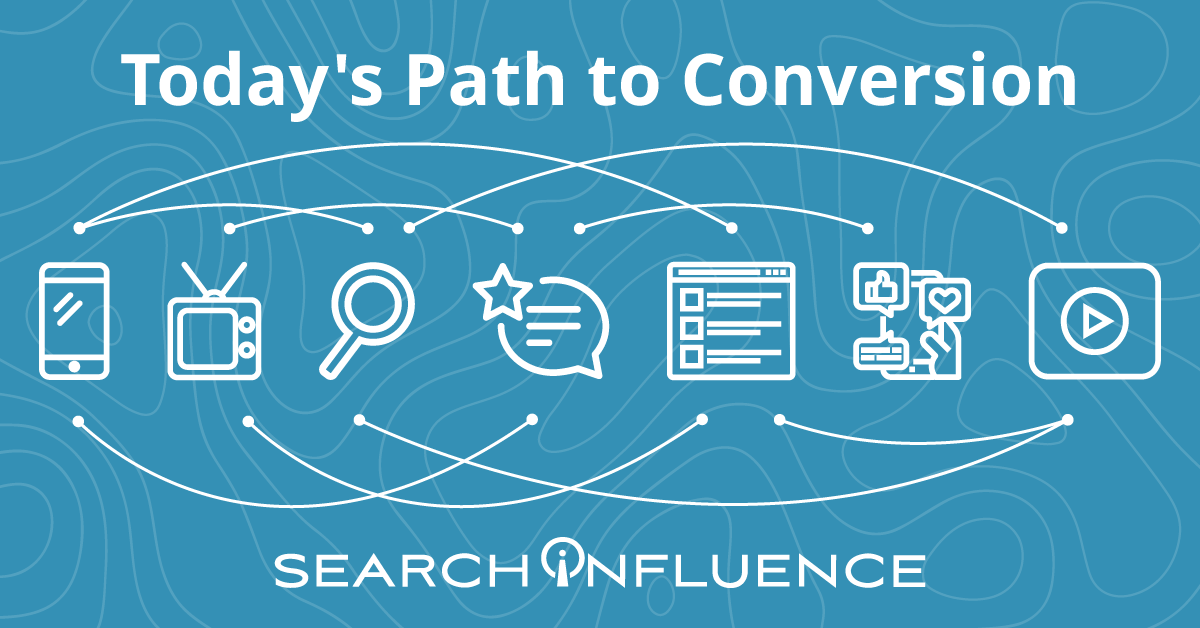
    With all of the research options at our fingertips, consumers’ path to conversion evolves each year. Product research and shopping takes consumers across many online and offline touchpoints. By leveraging OTT, you can reach consumers with messages across multiple devices and platforms, truly running a full-funnel campaign with ads that talk to each other.

    Today's path to conversion

    OTT Targeting Capabilities: First and Third-Party Sources

    OTT first and third-party sources enable businesses to build detailed segments beyond the typical options found on other digital marketing platforms.

    First-party data: The advertising platform learns about audiences through device-level viewer data, which it takes from users’ IP addresses. Targeting options vary by OTT provider. Some options include:

    • Location tracking and geofencing
    • Home page visits

    Third-party data: Third-party vendors provide consumer data and customer attributes that enable more precise targeting definitions. Some options for third-party data targeting include:

    • Purchase behaviors (online and offline)
    • Age/gender composition
    • TV viewership and media consumption

    Retargeting

    A prospect’s viewing behavior becomes part of their digital footprint. If a prospect views an ad, OTT’s retargeting capabilities lets you follow this prospect across all ad-supported streaming services and devices. You can capture brand impressions with video and then prompt an action on a device where it’s easy to convert.

    For example, a healthcare practice can target an upper-funnel ad promoting a new procedure to a household’s smart TV. Later, the practice can display a lower-funnel ad that encourages the prospect to fill out a form for a free consultation for this new procedure to a mobile device in that same household. A prospect is much more likely to fill out a form on a mobile device than if the ad appeared on a smart TV, encouraging prospects to go onto their website and fill out the form.

    OTT Targeting Capabilities: Addressable Geo-Fencing aka Household Targeting

    Through OTT, you can target multiple prospects under one roof.

    ​​When several devices are connected to the same router, they form a network and have the same external IP address. As a result, advertising platforms can identify multiple devices in the same household by looking at whether they have the same IP address.

    OTT advertising platforms can match a smart TV to a series of desktop and mobile devices, creating a “digital household,” which allows advertisers to target individuals across different devices. This extends the opportunity to customize your ad based on the user’s device.

    Examples of What You Can Do with OTT Targeting

    OTT’s multiple targeting options allow you to specify as much as your campaign needs.

    • If a prospect searches a website for events in their area, you can use keyword search retargeting to show them an ad for your event as they stream their favorite TV show.
    • A small business could target residents over 35 years old in a specific zip code.
    • If you want to target adults for your continuing education program, you can leverage information such as education level, areas of interest, and browsing history to customize ads down to which educational programs might be most attractive to a given prospect.

    Measurement and Attribution

    OTT’s sophisticated measurement and attribution capabilities give businesses the tools to evaluate the ROI of their campaigns and understand which segments, platforms, and content deserve further investment.

    The capability to match consumers to their devices means you can see which specific prospects watched your ad, how much they watched, and the outcomes of watching the ad (such as purchase, website visit, or store visit). With the flexibility to test audiences and content variations, you ensure your advertising remains relevant, so you don’t waste ad dollars on a consumer unlikely to take action.

    Branding

    OTT’s multiple platform options help establish legitimacy for your brand. With OTT, your brand ad can appear on a big-screen TV, streaming right after a national brand. This way your ad receives the afterglow of playing right after a Tide commercial on a 70” screen rather.

    Ready to put OTT into practice?

    To drive performance with target consumers, small and medium businesses should consider including OTT as a component of their cross-platform strategy. Emerging brands can use it to build awareness with new consumers, and established companies can use OTT to remain relevant.

    Unsure of where to start with OTT? Contact the experts at Search Influence to discuss how you can use these tactics as part of a full-funnel strategy to drive leads for your business.

  • Four Steps to Adapt to Apple iOS 14’s Impact on Your Facebook Ads

    This post was updated by Marissa Wehrer on August 24, 2021 to reflect updated news. It was originally published on January 20, 2021.

    Key Insights

    • Apple’s iOS 14.5 privacy update has had an industry-wide impact on businesses that use web conversion events to optimize, target, and report using Facebook’s business tools, such as the Facebook Pixel.
    • The update will allow users to opt-out of having their activity tracked across other companies’ apps and websites.
    • Take these four steps to adapt to this industry-altering change and run conversion campaigns in the future.
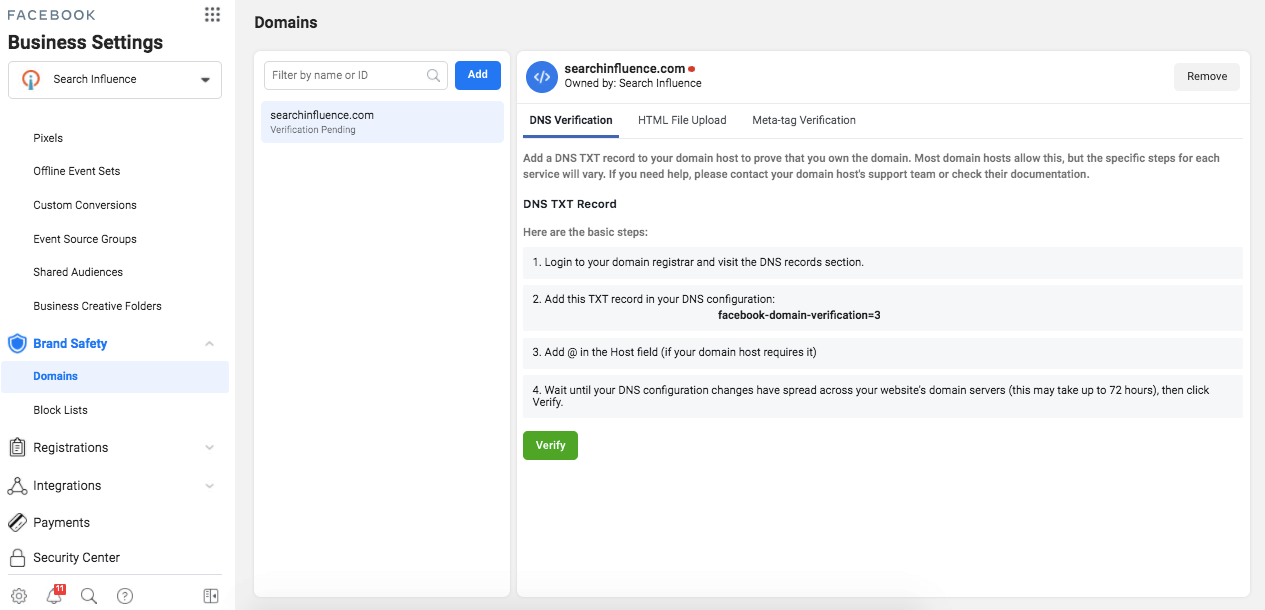
      1. Complete domain verification to configure pixel conversion events for Aggregated Event Measurement.
      2. Prioritize up to eight conversion events that are most important to your business.
      3. Understand how reporting changes will affect your ability to measure success and optimize your campaign.
      4. Identify new campaign strategies and best practices.

    How Does the Apple iOS 14 Update Impact My Digital Ads?

    On April 26, 2021, a significant update came to iOS 14 devices that asked users if they would like to “Allow Tracking” or “Ask Apps Not to Track” their activity across other companies’ apps and websites. The general consensus is that the majority of iOS 14 users will opt-out of tracking, thus preventing marketers from sending personalized advertising to those who opt-out.

    Apple’s new policy has an industry-wide impact on personalized advertising.

    This update will impact businesses that use web conversion events to optimize, target, and report using Facebook’s business tools, such as the Facebook Pixel. Effects include, but are not limited to, the inability to do the following:

    • Target the right audience with the right message at the right time
    • Allocate budget efficiently to produce the lowest cost per acquisition or return on ad spend
    • Get the same amount of data and granularity of reporting to inform decision-making

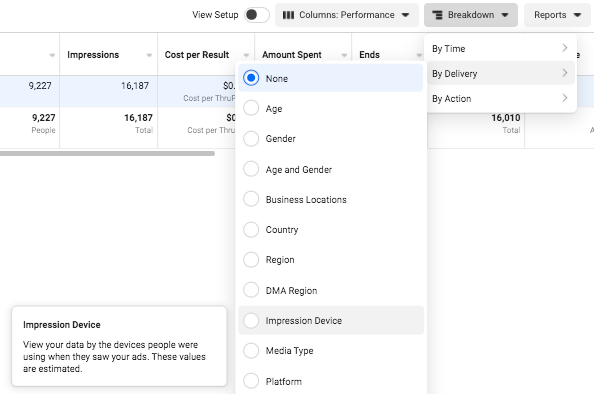
    Understand the scale that your campaign performance could be impacted by reviewing your ad account’s Impression Device delivery breakdown. This will help you analyze the percentage of your impressions served to Apple devices.

    Facebook campaign options in iOS14

    Despite these daunting changes, personalization is not at a total loss. Facebook Ads will remain an effective advertising channel if you rethink your current strategies and best practices.

    If you plan to use Facebook Advertising as a lead driver and revenue generator, the following four steps will be vital to run conversion campaigns due to Apple’s upcoming AppTrackingTransparency framework for iOS 14.5 users.

    Step 1: Complete domain verification to configure pixel conversion events for Aggregated Event Measurement.

    Aggregated Event Measurement is a new Facebook tool that “processes pixel conversion events from iOS devices” in compliance with Apple’s new policy while ensuring advertisers can still run effective campaigns. This tool can only be accessed once your domain is verified.

    As a new best practice for all businesses, you must complete domain verification. Domain verification is a way for you to claim ownership of your domain in Business Manager.

    Following Facebook’s instruction, “Domain verification needs to be done at the effective top-level domain plus one (eTLD+1). For example, for www.books.jasper.co.uk, books.jasper.co.uk, and jasper.co.uk, the eTLD+1 domain is jasper.co.uk. This can help ensure that your domain verification will encompass all variations.” (Source)

    How to verify domains on Facebook

    Step 2: Prioritize the Eight Conversion Events That Are Most Important to Your Business.

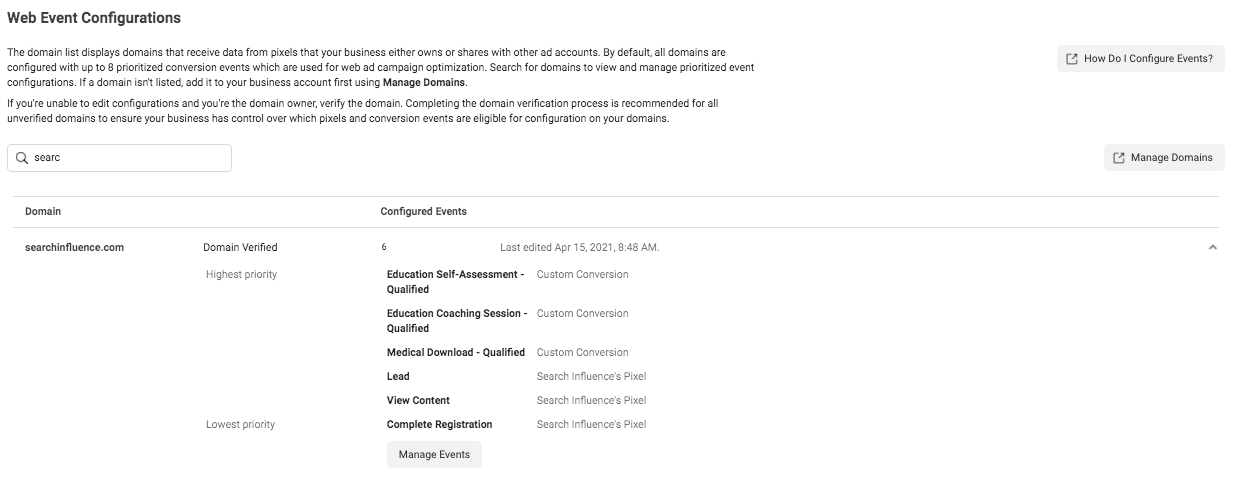
    Once domain verification is complete, you must use the Aggregated Event Measurement tool within Events Manager to set up the events that you want to track and their corresponding priorities. As a reminder, events allow Facebook’s machine learning to better target, optimize, and measure campaign performance.

    With the Aggregated Event Measurement tool, Facebook is requiring you to define up to eight conversion events, whether standard events or custom conversions, per domain (this includes subdomains) and to put them in order of priority.

    When it comes to prioritizing the events, you are going to put the most valuable action first and the least valuable action last. When a user completes multiple actions within a conversion window, only the highest priority event will be counted, and the conversions for the lower-prioritized events will not be counted.

    If your campaigns are currently optimizing for over eight events across the same domain, make it a priority to strategize and select the eight events you will optimize for moving forward. If you are currently operating under the limit of eight events, then prioritizing your events is quite simple.

    Follow Facebook’s documentation to configure Aggregated Event Measurement with your conversion events.

    Screenshot of web event conversions in Facebook backend

    Once you have prioritized your events, adjust your conversion campaigns’ ad set optimization events accordingly. You’ll also need to ensure your conversion ads are attached to the proper domain at the ad level in the Tracking section.

    Step 3: Understand how reporting changes will affect your ability to measure success and optimize your campaign.

    There are new reporting limitations that you should note, as they may affect how you measure campaign success and optimize campaign performance.

    Delayed reporting:

    Data may be delayed up to 3 days, which could severely impact optimizing short-run campaigns. Another key difference is that conversions will now be reported at the time the conversion actually happened, instead of getting attributed to the last ad impression or click.

    Estimated results:

    Statistical modeling may be used to account for conversions from iOS 14 users.

    No support for breakdowns:

    Delivery and action breakdowns, such as age, gender, region, and placement will not be supported. This could greatly impact how you review and optimize campaign performance.

    To test theories based on delivery and action, you will need to manually run tests, likely by creating more targeted ad sets. However, be mindful that this directly goes against Facebook’s best practice to use broad targeting to improve machine learning. (Source)

    Changes to account attribution window settings:

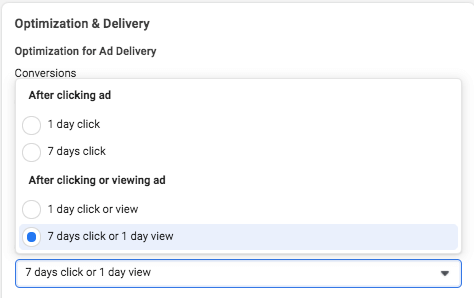
    First, the attribution window for all new or active ad campaigns is now set at the ad set level to ensure that the conversions measured are the same ones used to optimize ad delivery.

    How to do Facebook optimization and delivery

    Additionally, the new default window is a seven-day click attribution window, and 28-day attribution will not be supported for new or active campaigns. The following windows will be supported under the new attribution setting:

    • 1-day click
    • 7-day click (default after Apple’s prompt enforcement in April)
    • 1-day click and 1-day view
    • 7-day click and 1-day view

    As of January 2021, we saw a decrease in conversions due to the new attribution window settings set by Facebook.

    Step 4: Identify new campaign strategies and best practices.

    Optimizing: Test new optimization events

    By being limited to only eight events, this may force you to determine new best practices on how to optimize your campaigns. If you previously optimized your campaign with low-funnel custom conversions, you may need to test broadening your optimization events to less-granular or higher-funnel actions to encompass more website touchpoints.

    And if you haven’t switched to Campaign Budget Optimization (CBO) yet, then now may be a good time to let Facebook’s machine learning take some of the guesswork out of optimizing your campaign.

    Targeting: Test new audiences and targeting

    Our ability to target and remarket to your ideal customer with personalized ads will be severely limited. Mitigate the effects of the iOS update first by leveraging in-app products such as Facebook and Instagram Shops, lead gen forms, and using video. On-Facebook, engagement tends to be remarketable, which could replace some of the website data you’ll lose.

    Take advantage of the most available data by using customer list custom audiences to build remarketing and lookalike audiences with website audiences using the pixel.

    You may also want to consider removing the Audience Network as a placement from your ad sets because Facebook is not confident in its ability to deliver personalized ads for this placement to iOS 14 users.

    Facebook stated, “Ultimately, despite our best efforts, Apple’s updates may render Audience Network so ineffective on iOS 14 that it may not make sense to offer it on iOS 14.” (Source)

    Reporting: Test new key metrics

    If you currently report using breakdowns by delivery or action, determine how or if you will continue reporting on this granular data moving forward. Since these reporting breakdowns are no longer available for conversion data, you may need to determine new key metrics to report on.

    Navigating a New Digital Landscape

    Apple’s iOS 14.5 privacy update is transforming the digital advertising landscape. Campaign performance may see its biggest impact around Q4, which is the six- to nine-month mark from the iOS 14.5 update. This is mostly because audience sources using website tracking will shrink even more since we can’t collect the same amount of data we once did. We’ll also see more adoption of the updated iOS as people upgrade their phones.

    Stay on top of the upcoming changes and create new best practices for optimizing, targeting, and reporting to maintain control of your accounts.

    It’s okay to feel a bit confused about the effects on your Facebook Ads because no one has all of the information or answers yet. If you have questions about how you can still generate leads for your business despite these changes, one of the experts at Search Influence can help. Contact us today to learn more.

    Resources:

    Images:

    Mobile phone users