Category: Industry Insights

  • Be Semantic: How to Install Microdata

    Search engines are designed to do one thing — make sense of the various documents found on the Web. Originally using just on-page factors like content and meta information contained in specialized tags, search engines moved to analysis of links in the late 90’s with the advent of the PageRank algorithm. This new method treated links as “votes” for websites, using anchor text and website clout to determine what is relevant to a search query. Recently, though still relying on links as the main source for determining a page’s worth, search engines and other Internet spiders are returning to on-page factors to find information that’s meaningful to users.
    “New” On-Page Meta

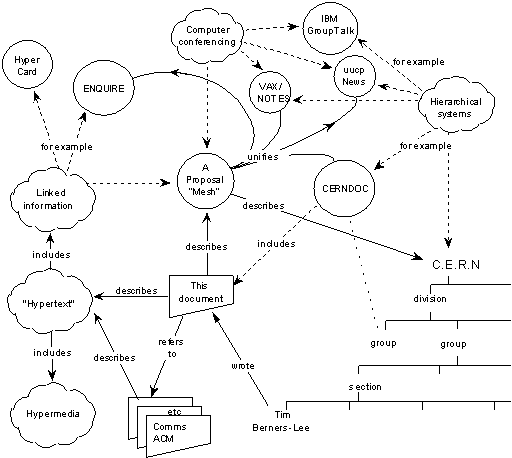
    These “new” on-page factors are the culmination of work dating back to the beginning of the modern Internet. The original diagram showing the basics of how the Web would work devotes much of its space to showing the connections between pages, but one corner lays the foundation for what is now known as the semantic web. This image shows a few of the basic properties in the semantic web: rel=author and other relationship markups, Schema’s breadcrumbs and on-page descriptions, and the hCard microformat.

    Each of these more recent formats are designed to expand on what’s called POSH — “plain old semantic html” — that is, using <p> tags for paragraphs, <ul> or <ol> tags for lists, and <table> tags for tables of data instead of as layout and design elements. The two most common microdata formats, Schema and Microformats, are each based on pure HTML, codifying the use of HTML5’s itemscope and HTML4’s class and ID attributes respectively. In this way, microformats seek to make standard web coding easier for computers to find and use the various data visible on the page.

    Implementing Microdata

    The four most common formats of microdata: XFN, OpenGraph, Microformats, and Schema, make an alphabet soup unwelcoming to newcomers. Part of microdata’s charm is its ease of installation. But while some ways to tell search engines and other scrapers how to index a page are somewhat more arcane, microdata sits on top of the code, easily being added to existing pages.

    Microformats and XFN require relatively little extra knowledge, while Schema and Open Graph assume a little bit of forward-thinking HTML5.

    Microformats & hReview

    hReview, like many compound Microformats, is based around hCard, which was designed to mimic the electronic business card format vCard. With hReview, you can easily mark up reviews to show in Google’s SERPs using standardized classes and IDs.

    In order to do this, there are two steps to the markup. The first is the hReview-Aggregate markup which gives the data shown in the SERP: number of reviews and overall ranking. The second are the actual reviews. Both use hCard to describe about or by whom the review is written.

    Here’s the hReview-Aggregate code from that page:

    <div>
    <h1>Patient Reviews for Columbus, Ohio Plastic Surgeon<br>
    <span id="donaldson-plastic-surgery">
    <span>Donaldson Plastic Surgery – Dr. Jeffrey Donaldson</span>
    <span>
    <span><span title="4661 Sawmill Rd #100"></span></span>
    <span><span title="Columbus"></span></span>
    <span><span title="OH"></span></span>
    <span><span title="43220"></span></span>
    </span>
    </span></h1>
    <p>
    <span>
    <span><span title="4.8"></span></span>
    <span><span title="5"></span></span>
    <span><span title="20"></span></span>
    </span>
    </p></div>

    Much of this example code won’t show, which is against Google’s rich snippets documentation; however, as you can see, the snippet shows in the SERPs. The class=”value-title” syntax follows the microformat specs from their site. But should invisible content be used? Or is it spam? More on that later.

    For the single hReview, the code is clear and most sections are visible. Again, use the value-title syntax to hide any data that’s not meaningful to the user.

    <div>
    <span><span><span title="Donaldson Plastic Surgery - Dr. Jeffrey Donaldson"></span></span><br>
    <span><span title="Tummy Tuck, Columbus, OH"></span><br>
    <span>
    <p>DESCRIPTION</p>
    <p><em>- <span>DM</span> / Columbus, OH </em></p>
    <p><span><span title="4.8"></span></span></p></span></span></span></div>

    XFN & rel=author

    Like microformats, there are other microdata formats that use HTML 4 entities, which keeps the code accessible to most levels of website owners. XFN establishes personal relationships between pages on the Internet and is one of the easiest microformats to install. Prepackaged in many basic WordPress installations, XFN has one major use: establishing your identity using rel=author.

    Using the XFN markup rel=”me”, which relates web pages about someone with social media and other profiles, and the microformat rel=”author”, which associates posts with other web pages about the author, you can let Google and other spiders know who wrote the post. While Google requires further steps and whitelisting to show up in the SERPs,

    For an example, take a look at our authorship markup.
    <a title="Posts by Julia Ramsey" href="http://www.searchinfluence.com/author/jramsey/" rel="author">Julia Ramsey</a>

    This links to Julia’s author archive page, which in turn has a link to her Google+ profile.
    <a href="https://plus.google.com/u/1/104804485354016147497?rel=author" rel="me"><img src="https://townsend.bunksite.com/wp-content/themes/si-dec10/images/g-plus-icon-32x32.png" alt="Find Julia Ramsey on Google+" width="30" /></a>

    There’s some other magic going on, but overall the rel=”me” XFN markup shows who wrote the page and connects it to a social network to grab more information.

    Open Graph

    Moving from connecting with to interacting with social networks, Open Graph is meta information for Facebook. While much of the Semantic Web is about marking up body content, Facebook’s meta information is in the header as tags.

    Using our site as an example:

    <meta property='og:title' content='SOPA Dope &#8211; Today&#8217;s &#8220;Blackout&#8221;, Tomorrow&#8217;s SEO Audit' />
    <meta property='og:site_name' content='Website Promotion Company: Search Influence -  Economical SEO New Orleans, LA SEO / Internet Marketing' />
    <meta property='og:url' content='http://www.searchinfluence.com/2012/01/sopa-dope-todays-blackout/' />
    <meta property='og:type' content='article' />
    <meta property='fb:app_id' content='197784673584291'>
    <meta property="og:image" content="http://graphics.nytimes.com/images/promos/politics/blog/23thompson-nbc.jpg" />
    <meta property="og:locale" content="en_US" />

    There are 7 required tags, mostly named logically. Two that are confusing are og:type and og:locale. The first should be “article” for most pieces of content. The “article” type is for anything that’s a single written post. Necessary, and not always included in Open Graph plugins, is og:locale, which refers to the language and location of the site.

    Schema for Music

    Finally, we come to Schema, the search engines’ attempt to standardize semantic microdata. Schema is deeper and more customizable than any of the other formats, however at the expense of clarity. It uses the itemprop, itemscope, and itemtype attributes from HTML5.

    Of all places to find a modern web example, MySpace’s band profiles use schema for music. Check out the music player on this band’s page.

    The code’s a little less clear because of the flexibility of Schema, but you’ll see by looking at the itemprop attribute that there is a wide variety of meta information categorized and sectioned in that small block of text. In the SERPs, it outputs as a rich snippet, linking to the individual song pages. Needless to say, while extremely niche, this power is invaluable for musicians and bands. All of Schema is this niche, but the benefits are massive, as seen here:

    Is it Spam?

    There comes a point where a marketer could easily see the potential for abuse. Hidden data, which we touched on before, is only one aspect. Certainly, there can be hidden data that is misleading, however it’s clear that some data doesn’t need to be for the end-user. Google’s guidelines say to not hide any data that is a rich snippet, but for things like a strict star rating for a text post and repeating the subject of the review, there’s good reasons to hide structured content.

    However, that hidden data quandary bleeds over to reviews in particular. No website owner is going to be happy about his own site showing his products and services to be low-quality. There is a clear directive for a business owner to cull bad reviews from his own site, and therefore the reviews may be less than perfectly accurate to their customers’ feelings. One way to avoid this would be to take advantage of user-generated content, with safeguards for malicious spam and abuse. Another would be to show accurate ratings based on a rubric, though that could easily become difficult for the website owner to get through.

    For social meta data, often a marketer will use different descriptions and titles to target better on a given social network. This can be used for a sly bait-and-switch, similar to some ads that use a voluptuous beauty to make you click on a much less interesting post.

    However, in most cases a high-powered sniff test and tummy check are all that are necessary to determine if something is spam. Certainly the tools would not be recognized by major search engines if semantic data were considered with the same level of scorn as some marketers have for pure meta keywords. If the reviews selected are glowing, why not give them all 5 stars? If the page is enhanced and not weakened by different social and search meta data, who would mind that?

    The Internet is best served by a semantic, rich web. A vibrant search page, a web that’s easily crawlable for information, and a social experience enhanced by relationships and attribution are all at the core of microdata: make the most of your site today with these techniques.

  • Read This! — February 2012

    Much like our weekly 5 For Friday series, Read This! is a monthly feature on our blog that collects all the practical guides and how-to’s you could ever want to help your business compete online. What’s on the roster for this month? Check it out:
     

    StumbleUpon: A Forgotten Social Media Goldmine — Nifty Marketing

    With the proliferation of people tumbl’ng, digging, tweeting and sharing, it’s easy to forget about one of the classics of link sharing: StumbleUpon. This powerful little tool has been around for years, and it may be time for you to think about utilizing it for your business.

    >How to Write Blog Posts For Your Existing and Repeat Customers — Graywolf’s SEO

    While maintaining a regularly-updated blog chock full of sparkling content is a great way to keep your link-rank high and attract new customers, don’t forget that your former and current clients are reading as well. Michael Gray provides a look at what will keep them coming back.

    Number Crunching: The Top 51 stats for Generation Y marketers — Next Web

    Generation Y, or the Milennials, connect to their surroundings via social technology on an unprecedented level. Check out these facts and figures to get a better handle on exactly where and how you should be focusing your efforts.

    5 marketing tips for putting customers first — iMedia Connection

    In order to bridge the gap from concept to plan to execution, marketing professionals must take great care to promote client satisfaction above all else. These handy tips provide a pitch-perfect guideline to putting your best foot forward when it comes to customer service on all levels.

    Things the Movie “Army of Darkness” Can Teach Us About Internet Marketing — Marketing Pilgrim

    Get your chainsaw-arm gassed up and at the ready, because Kerry Lee Gorgone of Full Sail University is here to tell you about how the teachings of everyone’s favorite zombie-slaying checkout boy can improve your online presence and increase customer interaction.

  • The One Thing You Should Do Right Now to Help Your SEO

    1. Open your browser. www. vs. non-www.adclub.org

    2. Type in www.[yourdomain].com. After it loads, does the web address stay on www.[yourdomain].com?

    3. Then, type in [yourdomain].com. After it loads, does the web address “resolve” to the same address as it did when you completed step 2?

    If not, your site technically has two versions of itself, therefore leaving search engines to believe that your entire site consists of duplicate content. This problem is actually very common, but fixing it is the one thing you should do right now to help your SEO.

    In the example above, the domains www.adclubno.org AND adclubno.org both exist, meaning there are two copies of every page on the site, which could be detrimental to rankings in search engines. Luckily, there is a pretty easy fix for this problem. But first, let’s discuss why duplicate content is bad for Search Engine Optimization.

    What is Duplicate Content?

    Image courtesy of SEOMoz.com.
    Google defines duplicate content as “substantive blocks of content within or across domains that either completely match other content or are appreciably similar.” Duplicate content is often considered one of the top negative SEO ranking factors. Duplicate content to search engines is like identical triplets to a drunk frat guy: how do they know which version is the right one to choose? According to SEOMoz, three of the biggest issues with duplicate content include:

    1. Search engines don’t know which version(s) to include/exclude from their indices
    2. Search engines don’t know whether to direct the link metrics (trust, authority, anchor text, link juice, etc.) to one page, or keep it separated between multiple versions
    3. Search engines don’t know which version(s) to rank for query results

    What this means is that search engines want to show the most relevant content to their searchers, but if you have duplicate content existing across URLs, the search engines get confused. Link metrics and page authority get split between the URLs, diminishing the value of all of your SEO efforts.

    Ways to Check for Duplicate Content

    Duplicate Content ToolBesides typing your domain in your browser, Virante has a duplicate content tool that checks whether your domain has duplicate content. Just submit your domain, and the tool will do a WWW/NonWWW Header Check, Google Cache Check, Similarity Check, Default Page Check, 404 Check, and a PageRank Dispersion Check. As in the previous example, www.adclubno.org failed the WWW/NonWWW Header Check, and because of this main problem, they also failed the Google Cache Check, Similarity Check, and Default Page Check.

    How to Fix These Issues

    So now that you’ve realized that you have a problem, how do you fix if? For starters, you can log in to your Google webmaster tools account and designate your preferred domain. This lets Google know which version of your site to provide in the search engine results. Next, you (or in my case, someone else with actual programming knowledge) should set up a permanent 301 redirect in the .htaccess file to let other search engines know which domain is the preferred one.

    Once this problem is resolved, you will want to make sure that you are consistently using the preferred domain for all of your link building endeavors.

    Do you know if your domain has duplicate content? Find out now!

  • 5 for Friday — Links, Stories & Posts For Your Weekend

    The Evolution of Facebook Features — GroSocial

    Facebook has come a long way from the humble blue-and-white, bare-bones-HTML, .edu-email-restricted social site we all came to know and love in 2005. Check out this visual map and see how the ‘book has exploded since its inception, becoming a multifaceted “people engine” that has spawned so many imitators.

    INFOGRAPHIC: Web Equity – owning your digital presence — Blumenthals

    As with any other form of endeavor, the more effort you put into your online presence, the better it will serve your business’s interests. Get the skinny on the major players in the web equity game with this handy infographic.

    The Art of Timing – Posting on Facebook — DreamGrow

    While you’ve crafted perfect actionable Facebook posts and gained countless fans of your brand, there’s one element missing: the art of good timing. Find out how to hit the scheduling sweet spot for your customers and make sure your content is being viewed by the most eyeballs possible!

    Promoting Your Business via Twitter — ProNet Advertising

    Twitter is a powerful networking tool, but all too often companies simply use it as another venue to spew out announcements without engaging in any customer interaction. Read this handy guide to learn about Twitter dynamics and the fine art of the 140-character strategy.

    Epic: The Noob’s Complete Guide to Online Marketing [Infographic] — Social Times

    Straight from the experts at Social Times, here’s a mammoth infographic that cleanly illustrates the A to Z of online marketing from the basics on up.

  • Read This! — December 2011

    One of the main purposes of our weekly 5 For Friday posts is to highlight weekly news stories that are funny, idea-provoking or just plain interesting. In this feature, we examine pieces that are useful, actionable and directly pertinent to you and your business. Check out these informative articles and get on the road to a bigger and better online presence:

    How to Use YouTube to Build Explosive Product Buzz
    They say a picture is worth a thousand words, so on that note a video can be even more effective. This comprehensive guide gives you the basics of creating, optimizing and publishing a Youtube sensation that can grow your brand and attract even more eyeballs than static images or sales copy!

    11 Editorial Guidelines Every Business Blog Needs
    So have you taken our advice and started a blog for your business yet? Chances are you’re not just creating all the content yourself; this valuable set of guidelines can get you started on establishing rules and regulations for your posters and editing like a pro.

    The Beginner’s Guide To Content Marketing
    If you haven’t invested some energy into content marketing for your brand, you may be missing out on a whole swath of opportunity for new fans, viewers and clients. KISSmetric’s back-to-basics guide shows the advantages of this practice (as opposed to the “fatal flaws” of traditional advertising) and walks you through its first steps and best practices.

    Is your SEO copy crap? 8 ways to tell
    Yes, you may have paid an “SEO copywriting professional” to create the content on your website, but that’s no guarantee you’ve gotten the most you can for your dime. The always-excellent copybloggess Heather Lloyd-Martin shows you how to evaluate your site’s content and determine whether it stands on its own or requires some TLC.

    Integrating Social Media With Your Customer Service
    While social media marketing is a valuable and worth endeavor to grow your brand, simply gaining likes and followers isn’t enough. To dynamically engage your customers, your social media presence should incorporate an element of personalized customer service. Learn how to draw in your existing customer base and create a space for discussion, strengthening personal connections with and between your clients and getting proactive with your communciation.

  • Blinded By The Site: Making Friends With Web Design Minimalism

    If you’re anything like me, when you visit a website that’s overloaded with Flash, an abundance of images, excessive menus, and just a general maze of content, your brain shrivels up to the size of a raisin and your eyes glaze over with no focus of what to look at or where to find it. (As far as I’m concerned, the same problem exists for social media outlets like Facebook and Twitter. Creating endless posts and tweets just for the sake of having more content and saying whatever pops into your fingers is the quickest way to get me to block or un-follow your posts. Then I’ll never hear anything you have to say!) The idea that the more there is to look at, the more visitors, friends, likes, and followers you’ll get is simply untrue in many cases.  You can still catch plenty of flies with sweet, sweet simplicity.

    Too many web designers and developers make choices that, while skillfully executed with complicated Ajax and fancy Flash elements, not only confuse and deflect site visitors, but also have the same effect on search engine crawlers. While when properly used (read: in moderation) these elements have the potential to add functionality and style to your site, it is often beneficial to limit or altogether avoid these in favor of a clean, easily searchable and indexed site.

    Take splash pages, for instance. When a splash page is your homepage, it not only prolongs the amount of time it takes for your visitors to get to the actual content they’re seeking, but it also confuses search engines. Without your homepage containing index-able elements like links to the other pages of your site and keywords, search engine spiders will not be able to properly crawl and index your site. Get rid of that splash page!

    Aside from splash pages, using Flash elements or images elsewhere on your site for headers and menus can often cause visual frustration and complication for visitors and search engines alike. Dancing baby Flash headers and image-heavy menus can be a dizzying headache, and crawlers simply can’t read text embedded in Flash and images. There are several great resources for web designers on how to keep your site design from being overly complex while maintaining SEO excellence. Make sure you mind your H1’s, et al.

    minimalist web design

    Personally, I agree with the late Steve Jobs when it comes to valuing the beauty of a highly-functional, simple design. There’s something to be said for keeping a clean, easily navigable, minimal aesthetic. And I’m not alone in my love of minimalism in web design.  I’m not suggesting you go out and replace all your shirts with black turtlenecks, but I am suggesting that you consider what William of Ockham said and not unnecessarily complicate matters when you can simply state your case. When you embrace minimalism, everybody wins: you, me, and the spiders. And you don’t want to upset the spiders. Trust me.

  • 5 For Friday — Links, Stories & Posts For Your Weekend

    Preventing Negative PRs Online — ProNet Advertising

    When it comes to SEO and public relations, asserting your online reputation and connecting with your fans is important. However, this proactivity must be balanced with care not to draw any fire upon yourself or your company. Check out this handy article to discover what you can do to get on top of your PR before problems even arise!

    Thanksgiving Wishbone Competitiveness & Content Marketing Tips – Who Knew? — TopRank Blog

    Thanksgiving has passed and we’ve all come out of our mashed potato comas, but the turkey still has a lesson or two to teach us. Read on at TopRank to get Susan Misukanis’s “wishbone strategy” on content marketing.

    How The Internet Looked in 1996 vs 2011 [Infographic] — SocialTimes

    Now here’s a blast from the past: this informative graphic diagrams every change imaginable from the tiny village of 1996 Internet to the bustling metropolis of the 2011 version we know and love today. What do you think is the next big thing?

    What Your Analytics Software is Hiding From You — KISSMetrics

    Are you relying exclusively on Google Analytics for information on your site traffic and visitor stats? You may be missing out on valuable data. This article takes a look at the most prevalent holes in the system and the logistics behind them.

    How To Get A Link From A Blogger — Local SEO Guide

    Well, that’s one way to do it. Check out how one clever webmaster got a link to his domain from Local SEO Guide’s Andrew Shotland with a little innovation and a fair amount of chutzpah.

  • Tebowing, T-Bowing and Accidental Google Rankings

    As an LSU alumnus, I'm proud to say I saw Tim Tebowing while crying, after a loss in Tiger Stadium.

    According to Tebowing.com, tebowing is a verb, defined “to get down on a knee and start praying, even if everyone else around you is doing something completely different.” For a little background on the subject, Tim Tebow is a NFL quarterback who currently starts for the Denver Broncos. He’s known to be very religious, one of the greatest college football players of all time, and so far, not a very great NFL quarterback. For these reasons he has been a focal point of sports media since he joined the NFL. Since Tebow became an NFL starter the last few weeks, he has been seen praying frequently before and after games, which has given way to Tebowing — basically the same thing as planking, or taking pictures of yourself performing a specific, silly pose and posting it online.

    At Search Influence, we occasionally plank, tebow, and sometimes start our own trends, but no one wanted to talk about it until we accidentally ranked for the term… or actually a misspelled version of the term. This morning I discovered that in the past 30 days townsend.bunksite.com/ has received 83 visits for terms like tbowing, t bowing, t-bowing, etc. How can that be, when we haven’t written anything about it? It turns out that this blog post ranks # 2 in Google for the term tbowing–which by the way isn’t how it’s spelled, but if you had no idea what it meant, you might search it with this spelling.

    As you can see in the screen shot, due to the apostrophe in the word isn’t, Google is connecting the “t” and the “bowing” to form one word. Since there is no website called tbowing.com and no one calls it “tbowing,” Google has no choice but to try to match your crazy search phrase, which it has probably never seen to any significant degree before, with something seemingly relevant.

    What does this have to do with SEO? Not much other than trying to understand how Google works, and realizing that you might be able to rank for a new word, or an alternate spelling of a word that gets significant search volume, but provides irrelevant results. This brings up another issue — relevance. As you can see in the analytics screen shot, our site has received 83 extra visits that we didn’t plan on getting. The problem with this can be seen in the numbers: nearly 100% of visitors immediately left the page after it loaded because the page had nothing to do with the search term. Even if the page did have something to do with the search term, the term is likely not being Googled by an SEO firm’s target market, small to medium sized business owners, and therefore these “leads” aren’t really leads at all — the overall visits for this month are artificially inflated. Whether you’re a small business owner who has hired someone to manage your SEO, or a marketer looking to track your leads, make sure to exclude numbers like these.

    The moral of this story is that while sheer numbers of visits can be impressive on the outside, they’re not worth much if the viewers leave immediately. Seeding irrelevant keywords and concepts into your webpages can bring in the visitors, sure, but without some dirt to back it up, you’re not going to see results — just a veneer of success.

  • Gmail Update: Hey, It Doesn’t Suck!

    I send and receive a lot of emails every day on my two constantly active Gmail accounts.

    And if you include the number of individual chats I have going at any given minute, that “a lot” expands exponentially.

    That’s why I was hesitant about switching to Google’s new Gmail layout when I first noticed the little blue box in the lower right hand corner of my inbox last week.

    Maybe I’ve been burned one time too many by Mark Zuckerberg’s ongoing ADD-tinged quest to change every last pixel of Facebook in a kaleidoscopic onslaught of updates, but I really, really didn’t want to change my Gmail.

    But I’m so glad I did.

    Gmail, or Gcrack?

    Before I came to Search Influence around six months ago, I was a light to occasional Gmail user. It was fun, free, relatively easy to use, and all my friends were already doing it, so why shouldn’t I? I was a recreational Gmailer.

    Now my usage has taken me to a whole new level. I communicate daily with the 40 freelance writers and 13 Production Team members I oversee, as well as the rest of the ever-expanding Search Influence team.

    I literally couldn’t do my job without my Search Influence Gmail account, the five or six Google Documents I have open at all times, and my endlessly active Gchat. I’m hooked, big time. The only thing I don’t do so far is Google+, and I know it’s just a matter of time before I decide to add another Gaddiction to this list.

    Google is the Force, and I am subject to its will. So I really didn’t want this new layout to suck.

    Keyboard Shortcuts Rock!

    Imagine my relief when I switched my personal Gmail to the new layout and slowly started to realize the amazing level of control the update was suddenly affording me. My work inbox followed this morning in what has proven to be one of the highlights of my day.

    First of all, being able to switch screen size is a major plus. I have my work MacBook hooked up to a 21-inch external display, so being able to adjust the layout as I switch between the laptop’s compact screen and the much larger external monitor is a big advantage. I can be “comfortable” and “cozy” at the same time, which is really great.

    The new conversation layout incorporates a more streamlined and minimalist approach to organizing email threads, which was a hugely welcome addition as far as I am concerned. Anything that helps me clearly navigate an email that may have been originally sent to 40 people and now includes direct replies from 17 of the original recipients is welcomed with open arms.

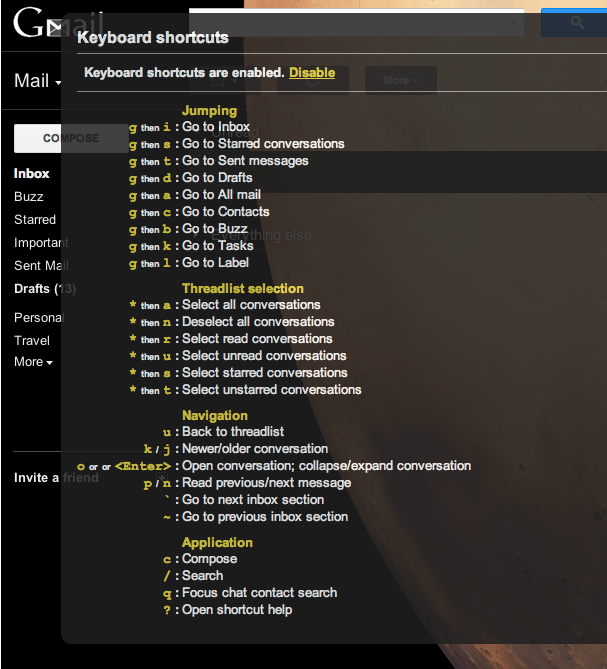
    But what’s really changing the way I interact with all things Google is the new set of keyboard shortcuts that came with the update.Gmail Keyboard Shortcuts

    Like!

    Want to compose an email? All you have to do is hit “c.” Want to go back to your inbox? Hit “g” then “i.” Drafts? Try “g” then “d.” You can hit “j” or “k” to move up and down between emails, “x” to select one, and then “shift” and “i” to mark your selection as read. “Enter” or “o” opens a selected email thread, “r” starts a reply, “a” replies to all, and hitting “tab” then “enter” sends your completed email.

    Want to like something on Google +? Hit “shift” then “1,” or “<Shift> + 1” as Google so craftily puts it in the helpful keyboard shortcuts menu that appears when you hit “shift” then “?”

    All of this adds to up a newfound level of control that will change the way you go about your daily Google life, especially if you’re a hardcore Gmail and Gchat user, like I am. And as a little bonus, the HD themes are pretty amazing.

    All in all, this is one update that actually does what the name implies and updates the user experience with a slew of new controls and options. Coming hot on the heels of a slew of updates to some of Google’s most iconic services, from a wildly unpopular redesign of the Reader to the newly minimalistic local search, this functional and stylish new Gmail is a breath of fresh air. And without the obligatory Someecard mocking the Internet’s latest update-fueled uproar.

  • Take A Breath Before You Tweet, OR: Internet ADD Wrecks the Good Ship Netflix

    Netflix ChaosJeez, it’s been practically seven minutes since I checked for new notifications on Facebook. Refresh, nothing. Ohhh, there’s a picture of a kid I vaguely knew from high school and now he’s linking his tweets into the Facebook feed, let me click over there. Do I follow Kim Kardashian or just Khloe? Any new tweets from the Biebs?

    It’s obvious that my attention span on the Internet can be severely limited at times. And why not? There’s barely any reason for one to even type in words, just a lot of pretty pictures to click on. Heaven forbid I forgot the name of some obscure reality television star, but if I do the answer is instantaneously at my fingertips. The Internet experience of today is different than it’s ever been before. Websites create a far more intimate and immersive experience than just 2 years ago, and are in a completely different arena than 10 years ago. Pictures are worth a thousand words, and they need to be when one only has 140 characters to elaborate on major personal news and global current events.

    While many years of information are archived in cyberspace, much of its utility is focused on the right now. Breaking news happens and a network of millions set to debate, coming to instantaneous conclusions. The people unite and use their freedom of speech to make a stand, but is this a good thing? Can the immediate evaluations made by web junkies actually be harmful?

    In the case of Netflix, popular web opinions have been shown to have a powerful influence over the productivity of the company. In July, the California-based company raised the prices for their various streaming and DVD rental plans. Since the price increase went into effect, July 13th, Netflix’s stock (NFLX) has decreased 36% and has lost 800,000 of their nearly 24 million customers. Aside from the tangible effects, Netflix has suffered far worse in the court of public opinion. Users across the net threw their arms up in a rage when Netflix announced that it would be dividing its business into two entities, one specifically for streaming and the other, Qwickster, for DVD’s by mail. The plan to split the company has since been scrapped due to the public outcry.

    Crumbling NetflixIs what has happened to Netflix in the last four months a good thing? Netflix is a tech company and should rightfully be judged by its tech savvy clientele, but technological Darwinism is a shaky field to venture into as a for-profit company. Is the customer always right? Sorry America, but the answer is no. While the almighty dollar may empower individuals to sway decisions of major companies, it does not mean that consumer pressure always leads to the right outcome. In the case of Netflix it is entirely possible that a month from now the once-glorified media company could be trading for pennies on the dollar and begging Hulu or Amazon to buy them, and everyone could dub Netflix a failure. This is all possible, but it would not necessarily make the actions of Netflix wrong. The immediate conclusions of the Internet-savvy can severely hinder companies’ ability to make improvements to their product, because one or two of those alterations rubs consumers the wrong way. My advice to consumers: take a breath, don’t jump to conclusions, quit sweating the technique and just give products wiggle room to evolve. Who knows — you might even like it.