Author: Search Influence Alumni

  • SI Social: Hunger Games Viral Campaign is Clever Marketing at its Best

    The next blockbuster young adult film is just about to explode onto the silver screen: The Hunger Games, based on Suzanne Collins’ bestselling trilogy of the same name. Aimed at the Twilight set of YA readers, it tells the story of a courageous tomboy named Katniss Everdeen who lives in a dystopian world that’s split into twelve districts and ruled over by an iron-fisted government called The Capitol. Each year, members of the community are selected to participate in The Hunger Games, where they are sent into an arena to kill one another until only one is left standing.

    If it sounds familiar,  you may remember a similar plot from the Japanese film Battle Royale. Collins put a new spin on the formula, people of all ages (myself included) described themselves as “unable to put the book down”, and soon enough, a Hollywood adaption was in the works. Like all majorly popular adaptions, the marketing of the translation can go a long way towards a production’s ability to succeed or fail. However, the brains behind the Hunger Games campaign are clearly using every ounce of the power that social media has to offer to promote the film, and so far, they’ve pulled it off marvelously.

    Viral marketing played a major role in finding “Recruiters” to represent the twelve districts that exist in the original story, who are actually hardcore fans that were chosen as volunteers. By harnessing the power of excited fans, these Recruiters spread the word around to other fans about the film and hyped up the details in such a way that allowed them to feel they played a major role. Still, the Recruiters don’t know who “hired” them — just another interesting part of the puzzle. But they did mention something about free uniforms…

    As for the official Facebook page, it’s used some tactics you’d expect from a marketing campaign, but also has popped up with some great surprises too. One really smart offer was to make your own free ID card (see, that’s mine up there!), which assigns you to a district and gives you the chance to have the ID sent to you for free. It also redirects you to a page with personalized merchandise from your district — it even has your name on it. I admit, the fan in me drooled at the idea of having a t-shirt or a bag with the logo and my name on it. It’s an angle I haven’t seen much of in the past, and I fell for it.

    No viral campaign would be complete without representing the dark forces of whatever you’re promoting, and The Capitol homepage knows it. This district for the rich and powerful of course has a flair for fashion, and a retooled Tumblr represents it at Capitol Couture, which shows off all the elaborate looks the people of the Capitol flaunt to show off their money and clout. The people behind the Hunger Games PR campaign even went as far as partnering with beauty company China Glaze to produce a line of nail polishes called the Capitol Colors — one for each of the districts, of course.

    Twitter is not exempt, either — there are tons of accounts, including ones for all the sites I’ve mentioned above, a official Twitter, and one for the Hunger Games 24, which allows fans to win tickets to advance screenings. Fans who have gotten their IDs and district assignments can also hashtag their tweets with it,creating twelve sets of fans who are all meeting other fans because they are united by districts.

    Using the structure of the book’s world as the backbone of their campaign was a brilliant plan, and the hype around the release of the Hunger Games is huge because it capitalizes a world we already know and have grown to love. By using the heart of what makes anything a success — its fans — this campaign has been a true victory, especially when it comes to getting people genuinely excited and sharing the word with family and friends with authentic enthusiasm.

    I planned to be there on opening day (March 23rd) before the campaign started, but now I’m even more excited because I might be able to meet other fans from my district thanks to Twitter and the Facebook community. And I’m sure I’m not the only one. Are you going?

  • Internet Privacy in 2012: It’s Not Easy Being Anon

    internet privacy isn't easy
    A True Anon

    Now that we’re all settled into 2012, we still find ourselves catapulting forward through the Information Age. Some have even classified our current place in time as the Personalization Era [sic]. This is a time wherein the information collected about you online can and does tailor your experience on the Internet to your interests and/or demographic.  Your searches, data collected through your online presence (Facebook and other social networking sites), tweets, and other bits and pieces come together to serve as a pool of data that allows search engines and various sites to do a variety of things to assist or appeal to you. Advertising, personalized search results, product recommendations, etc. are chosen specifically for you! This era, in my experience, has found many divided into two larger groups: the Embracer and the Anon.

    Embracers either know how the system functions and reap the benefits of this custom online experience, or they are completely unaware and simply enjoy their online life with great abandon. Embracers also house the Oversharers.These are the people whose Internet lives can overshadow “IRL” and they thrive on divulging minutia.

    Conversely, Anons are those whose Twitter feeds are penned by pseudonyms that require follow requests to view, their Facebook profiles are well-protected, and you’re not going to find many, if any, lamentable pictures of them from their freshman year of college even if you’re “in” with them online. These are the people who comb through privacy settings, making sure they’re in full control of what is accessible and to whom. Generally, if they have the option, they also opt out of anything that shares their information or uses it for commercial purposes. Included here is also the ultra-paranoid who will usually be on the other end of emails where the subject begins with “FW:Fwd:FW:” and who legitimately believe much of the fear-mongering myths dispelled on Snopes.com.

    internet privacy isn't easy
    Fwd:fwd:FWD:fwd

    So who’s better off in the current era: the Embracer or the Anon?

    The Embracers are certainly going to have plenty to work with for their memoirs. They’re often extremely up-to-date on Internet trends and make online friends far and wide. They often appreciate that their online experience has been tailored to them and utilize this when shopping or discovering new websites, products, or services. On the other hand, over-sharing
    or being unaware of the implications of sharing certain personal data on the web, besides possibly annoying an Anon or two on their friend list, can be risky and lead to dangerous pitfalls like identity theft. Stalking people in the “Personalization Era” certainly seems easier, though! Avid Foursquare users beware: try not to make too many enemies.

    The Anons can and do enjoy their chosen level of privacy. Future employers or those undesirable lurkers will have a hard time pinning any dirt on the Anons based on their online presence. They can even be fully present at and enjoy a party
    without live-tweeting it. Life is getting harder for the Anon, however, thanks to changes in Google’s privacy policy and the trend of moving away from anonymity in many forums.

    The case for and against Internet anonymity has been a subject of discourse more and more recently and, no matter which group you find yourself in, chances are that if you’re reading this, you’ve got an opinion on it. Whether you’re an Embracer, an Anon, or somewhere in between, knowing what you’re sharing and with who is always a good idea.

  • Read This! — March 2012

    Optimizing Search Engine Marketing For Seasonal Opportunities — Search Engine Land

    If you’re in the business of beach umbrella retail, snowblowing equipment, spring cleaning or other seasonally-related product or service, chances are you’ll be interested in this article explaining how to stay on top of the trends and perfectly time your campaigns to get the most out of the busy season.

    Reaching Your Target Market Through Social Media — ProNet Advertising

    Engaging your customers and building a brand online is a crucial part of competing in the contemporary business world — read this article to learn more on how to maximize the potential of every part of your social media activity.

    SEO 101: Getting the Right URL Structure — Graywolf’s SEO

    Poor URL structure can be an enormous impediment to your site’s optimization. Don’t fall into the trap of multiple addresses for single pieces of content, keyword stuffing or overly complex directories — Michael Gray gives you the skinny on how to create concise, effective URLs for your site that are linkable and crawlable for maximum efficiency.

    How to land cool speaking gigs — SuccessWorks

    While you endeavor to build your business’s success online, you shouldn’t let your personal brand offline fall by the wayside either. Conference speaking is a skill crucial to succeeding in many industries — here’s a beginner’s guide to nabbing the gig you want and creating an effective and memorable presentation once you’re on stage.

    The Marketer’s Guide To Pinterest — Social Times

    Have you joined up with new image sharing platform Pinterest yet? This handy graphic from Social Times illustrates why you should be joining this quickly-expanding sharing site, along with helpful tips on adding pin buttons to your site, establishing a presence with your own board and making sure the media on your site is pinnable.

  • Facebook Timeline For Pages Released: What To Expect

    Facebook Timeline for Pages
    Welcome to a whole new shebang!

    “Welcome to your Page Preview” is a frightening heading for any marketer, especially on a platform like Facebook that is so limited in design. But today, Facebook Page owners across the country are seeing the innovations that came to personal profiles move on up to the east side of business pages. Today, you can see your Facebook page with the Timeline Layout.

    The Facebook Timeline for Pages

    At the top-right of the page, a button for the Admin Panel looms. When opened, the panel contains a one-click view of a few major metrics for checking up on the page. Notifications, new likes, personal messages, and insights are all grouped together, with menus at the top to consolidate sharing, ad creation, and page and user management. This section vastly improves the page owner’s experience on the site, as it reduces the amount of places to look for useful data.

    Facebook Timeline for Pages
    At-A-Glance Notifications and Metrics

    Cover, Tab Navigation, and Wall Control

    Much like personal profile pages, the new timeline starts you without the main design point of the timeline: the cover photo. In addition, it starts you with a number of tabs that may not be the optimal ones for clickthrough, and your custom tabs have transferred their tiny icons to the tab window.  This leaves a business or marketer a lot of work to organize and design their page. However, this work will most likely pay off with higher CTRs on the tabs, which are now prominent.

    Facebook Timeline for Pages
    Turn This….

    These tabs are completely mobile except for Photos, which is always first, though through a relatively cumbersome “swap position with” interface. Each custom tab can be further customized in appearance by opening the tabs out and clicking “Edit Settings,” letting you change the tab title, which maxes out at 17 characters, and the image, which should ideally be in a 3:2 pixel ratio. This layout is a compromise, giving some flexibility while still keeping a uniform appearance, and removes any incentive to have too many tabs on the page, hopefully controlling low CTR to tabs.

    Tabs have changed their URL structure as well, moving from a ?sk=app_[id] parameter format to a simpler /app_[id] URL. This helps with both SEO optimization of Facebook tabs and linking, as you can now more easily add tracking parameters for analytics tracking of your pages. It seems that the old URLs will lead to the same page without redirection or canonicalization, which seems at cross-purposes to the Tab URL simplification.

    Facebook Timeline for Pages
    …Into This!

    Facebook Timeline for Pages
    Parameter Values for ?filter=
    The menu marked “Highlights” adds a parameter of ?filter=, which sorts the wall posts for better management. Likely, this is the way to set the default behavior of the Facebook Page, though Highlights seems to be the ideal setting for most set-and-forget pages, as it will draw from all posts by friends about the page combined with posts by the page with high Edgerank. Furthermore, this is the only way to show both user-generated and business-created posts at the same times.

    To the Window, to the Wall!

    Facebook Timeline for Pages
    Where's the @mention?

    The Timeline for Pages Wall is a fascinating glimpse into the depth of Facebook’s association technology. The first standout is taking cues from the “People are talking about” Newsfeed units. This scours Facebook for friends who are talking about, but not necessarily tagging, your brand. This opens up a Pandora’s box of marketing woes, but seems user-centric. These aren’t posted to the page, and only show your friends’ posts; if your friends have a bad experience somewhere, it won’t tarnish the brand for others, but show you that you might not have as much fun there.
    Facebook Timeline for Pages
    Seen this before?
    Other Wall units follow the lead of personal profiles: Milestones, which demark historical events for the business, enhanced Photos posts, and combined posts are at the core of the Wall redesign. One of the most intriguing choices by the designers is to consolidate other views of the wall into a “box”.
    Facebook Timeline for Pages
    Low EdgeRank posts are consolidated for ease of skipping

    These likely low-EdgeRank posts are another compromise for a marketer. Comment spam and other undesirable posts might get combined and minimized into this box, leaving posts with higher algorithmic value to the visitor in more prominent places. The visitor may skip these posts when viewing the page; however they can be moderated from the “See All” link.

    New Facebook Insights

    Insights gets a minor facelift, becoming more report-like and visually appealing. The first glimpse is from the “Likes” Tab, prominent in the default tab setup.  It provides an at-a-glance look at the vitality of the Facebook Page. Likes and People Talking About This are not new, but aggregating check-in statistics under “Most Visited Week” and “Largest Party” and photo tagging is a great step towards measuring the ROI of the social network.

    Facebook Timeline for Business
    The Likes App is a killer way to get quick stats.

    These quick-view statistics are derived from the traditional Insights accessible through the Admin Panel. Insights hasn’t changed, beyond following the less cluttered view introduced with Timeline for Business Pages.

    Facebook Tabs

    iFrame Tabs are some of the most vibrant parts of a Page, allowing a business to radically deviate from the traditional Facebook layout. Tabs are now true landing pages, stripping away much of the clutter and navigation from the page. This has allowed for more than 320 extra pixels of width in the tabs, paving the way for a richer and more interactive experience on the page. To boot, an understated tab switcher is at the top of the page.

    Facebook Timeline for Pages
    The App Tab is wider, with less clutter.

    This stripping of clutter highlights a serious change in outlook for Facebook: there are no ads. While this may be a boon to users and a bone thrown towards European and American privacy legislation, advertisers are possibly losing another place to see a right-column-full of ads. As with the transition to Timeline for profiles, this has the potential to thrash the effectiveness of display ads on the social network.

    What Does It Mean?

    Timeline for Facebook Business Pages is the latest in a line of major and minor design tweaks that the social network has undergone. For marketers and business owners, the redesign offers deep integration with both the feel of the new Facebook and the inner workings of EdgeRank and other metrics. Timeline lets businesses tell their whole story while visitors read the posts most relevant to them about the business, taking from a wide variety of sources and methods of mentioning the brand.

    These new changes, set to roll live March 30, are sure to keep all of us – marketers, business owners, and users – on our toes and creating the best social experience for our readers. Got any million-dollar ideas for the new layout?

  • Design Theory: Upgrading Your Site With a Font Facelift

    SEO tactics work behind the scenes, pulling the Google puppet strings with keywords and coding wizardry.  Congratulations!  Your website traffic has doubled, and your site has more hits than a barroom brawl! However, while getting visitors is great, keeping visitors is better — and a pleasing, non-eye-searing website design can be crucial when you’re trying to win a potential customer’s trust.

    With each installment of SI Design Theory, we’ll talk about a few simple styling tricks that you can implement in order to make your website more inviting.  This week, we’ll be talking about fonts: the most basic element of any web design.

    Difficulty Level: Easy

    If Your Font Has the Word “Comic” In It, By Definition, No One Can Take You Seriously
    Before we get into some of the finer points of typography, here is a list of fonts that will instantly date your site at about… 1998.
    • Comic Sans
    • Verdana
    • Courier New
    • Papyrus

    Stay away!  Yes, a few of these fonts are web standard and browser friendly.  They’ve been around since the fetal stages of the Internet, but that’s probably not what you want your website to say (and the font, quite literally, says everything).

    Here are just a few substitutes that are just as clean and readable as Arial Regular, Verdana, and Courier New:

    Abadi, Gill, and ITC Kabel are fantastic at smaller sizes, and look great within body copy or as H1s (headers or subheaders).  Helvetica Neue, as the name implies, is a modern twist on the old designers’ standby (better in large sizes).  Arial MT Condensed, or almost any condensed, sans serif font, is a bold and eye catching choice for headlines.
    Protip: You can use any licensed true type font on your website with this nifty CSS trick.


    Minding the Gaps
    When it comes to readability, spacing is everything.  Let’s take a look at Abadi MT Condensed Light, in its unstyled glory, with no attention paid to its default spacing:

    Perfectly acceptable, but with a little spacing, we can make this much better:


    Space between letters is called “tracking.”  Space between lines is called “leading,” or line height.  As a general rule, large fonts need tighter tracking and larger leading.  Small fonts need looser tracking and smaller leading.


    If someone can come up with a snappy mnemonic device for remembering this, call me.  But for the rest of us: play with line height and letter spacing until your text reads comfortably.  You’ll also want to mind your margins.  Give your paragraphs plenty of room to breathe on all sides, top, bottom, left, and right.


    And never forget!  Always justify (align) your text!

    (Don’t) Paint It Black

    We’ll talk about eye catching vs. eye searing colors in an upcoming post, but for now, a simple lesson: consider bringing your body copy down from stark black to a lighter shade of gray.  Use blacks sparingly to create emphasis where you need it.  As long as your grays are not too light, it will give a more pleasing and more modern look to your copy.


    Fun With Fonts!  Drawing With Type

    It’s true that images will attract the eye in a way that simple blocks of text cannot.  However, a well styled page doesn’t need to be bogged down with 100 stock photos in order to get your message across.  The following image was made entirely with type.


    Try resizing punctuation for a conjunction that is both useful and attractive.  Bringing curling fonts together with tight tracking (as seen with P22 Zaner Three) can create unique borders and stylish separators.  Even webdings (remember those?) have their place, as seen here with Unca Pale.
    P.S.  Never underestimate the impact one good drop cap.
    Next time: Communicating with your visitors through color
  • 5 For Friday — Links, Stories & Posts For Your Weekend

    Have You Been the Target of a Google Places Hit Job? —Search Engine Land
    If your company is receiving mediocre/poor reviews on your Google Places page, it is possible that a competitor is sabotaging you. In order to determine if your review is spammy, you should check the source, the volume and validity of the reviewer, and the content of the review. Whether it is spam or a legitimate bad review, you should confront it head on.

    We Can’t Wait: Obama Administration Unveils Blueprint for a “Privacy Bill of Rights” to Protect Consumers Online White House
    President Obama released a “Consumer Privacy Bill of Rights” to protect consumers’ rights to privacy on the Internet.  The blueprint allows for users to control their personal information on the Internet, which in turn is supposed to maintain consumer trust in businesses. This “Bill of Rights” includes transparency, access and accuracy, and security.  What does this mean for SEO?

    Facebook Launching New Premium Ads — Social Media Today
    Facebook plans to launch its new approach to advertising next week.  This innovative style of social advertising incorporates user generated content by creating ads of posts from businesses.  These ads will target the friends of individuals who “like” that post.  Others will be able to “like” and comment directly onto these ads. Increased brand interaction will increase brand authority and visibility.

    It’s Our First Pandaversary! SEOBook
    Happy Pandaversary! Before Google’s Panda Algorithm, low quality link building farms increased site rankings.  As a result, content farms have dropped severely in rankings and YouTube, mainstream media, and big retailers have benefited greatly.  The infographic on SEOBook breaks down the impact, winners, losers, and recovery strategies post-panda.

    Pinterest Marketing Tips & Tricks to Drive Targeted TrafficSearch Engine Watch
    You’ve probably heard that recently Pinterest surpassed Google+ as a traffic source. Marketers, such as Steam Driven Media, are learning how to incorporate Pinterest into their marketing strategy. Through actively participating on Pinterest—pinning and repinning pictures regularly, using creative board names, repinning others images—companies can show new products and interact with their consumers.  What do you recommend for optimal Pinterest use?

  • The Importance of Online Reviews: What Your Customers Really Think

    You might be very surprised by what your customers really think of your business, especially if you haven’t looked before. Go ahead. Take a second and go Google any business. I googled sandwich shop reviews New Orleans.

    All business owners know a businesses online presence is important, but to what extent might not be fully appreciated. Consumers continue to evolve the way in which they research and buy goods or services. Online shopping is a multi-billion dollar industry and continues to grow every year. Recognizing its importance is vital to the success of any business. No longer can businesses ignore what its customers are saying about them. Much like word of mouth, online reviews are growing in popularity and trustworthiness.

    Online Reputation Management ReviewsAs social media and technology continue to root themselves in peoples daily lives the value of a well managed online presence continues to grow. The ability of a customer to express themselves freely and anonymously on the Internet can be a scary thought to many business owners, but proper monitoring of the top channels can result in very valuable advertising.
    In the automotive industry, dealers blanket the air waves with television commercials, radio spots, direct mail pieces, billboard advertisements, and many other forms of advertising. But the decision process does not end there. There is a negative stigma related to the auto industry that makes people tend not to trust car dealers. If the money spent on advertising is met with an overwhelming number of negative reviews it is safe to assume potential buyers see this information and that the money was probably wasted.

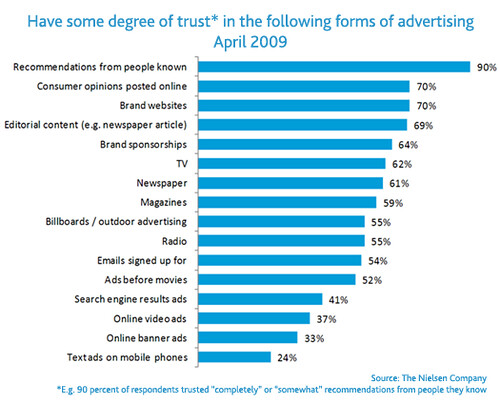
    In response to this dilema, people flock to online reviews to get an opinion. According to a Nielsen study in April 2009, consumer opinions posted online was the second most trusted form of advertising.

    Reputation Management of Online Reviews

    Why not use that to your advantage?

    In theory, every single customer becomes a brand ambassador either positively or negatively expressing their opinions. For a minimal investment a dealer can leverage the word of mouth of all of their satisfied customers to enhance their businesses reputation. You can not control what they say, but you can take the following steps to help maintain your online reputation.

    The three most important things someone can do to improve their online reputation are:

    1. Maintain and Monitor a list of the top review websites in your industry
    2. Treat all comments seriously and respond quickly and courteously. Use the channel where the review first appeared to respond.
    3. Take the conversation offline, this does NOT mean get the comment removed. It means reach out to the reviewer with another way to contact you. Give them your phone number, set up a meeting, or send the person a direct message asking what can be done to help resolve or rectify the issue. Not all issue can be resolved but by reaching out to them you show everyone that you care what people have to say or think.

    Reputation Management Online Reviews
    As food for thought, Where would you eat? I know where I would…

  • What the Father of Facebook Can Learn from SEO About Conversion Optimization

    Everyone has heard of Mark Zuckerberg, Facebook Founder, but he owes much of his success to his father Edward Zuckerberg, DDS. Zuckerberg describes himself as the actual “Father of Facebook”, teaching Mark the ins and outs of computer programming on their Atari 800. In an effort to promote his Westchester, NY dental office he turns to Facebook and other social media tools. According to Zuckerberg, “It’s a tremendous marketing tool for business. It certainly is the biggest bang for your marketing buck”. So how exactly does Zuckerberg use Facebook and other social media you might ask?

    Check out his Facebook page. Going by the name of “Painless Dr. Z”, he believes “Facebook is a brilliant marketing tool, which targets young people and spreads the word about local business”. While it’s great to see him using the site his son created to maximize his business there are definitely a few changes he could make to his Facebook page as well as his website. Let’s start with how to improve SEO for his Facebook:

    Facebook Conversion Optimization
    Exhibit A — Which one is more compelling?

    Exhibit A: The “Like” iframe
    Graphically, this iframe needs a fair amount of improvement. The “Call to Action” can be more clear and bolder. It needs to make people want to click the “Like” button. There needs to be less words and more bold graphics.

    Exhibit B: Website

    As all SEO professionals know your website is one of the top tools for busting your SERPs on search engines, especially Google. Optimizations of keywords, meta data, img alt tags, and internal linking all play a part in increasing your rank on Google. Let’s take a look at how Zuckerberg could boost his on-site SEO.

    Facebook Conversion Optimization
    Exhibit B — Where is the Focus? How Do I Do Anything?

    1. Title Tags: These provide the user and search engine the content of the page. Currently, Dr. Z’s title tags give very little detail to what the page is about. The use of keywords is essential for rankings.

    Example:
    Current: Edward J. Zuckerberg, D.D.S., F.A.G.D. | High Tech Dentist in Dobbs Ferry, Westchester County, New York

    Update: Dentist Dobbs Ferry | Edward J. Zuckerberg, D.D.S., F.A.G.D. | Westchester County, New York

    2. Internal Linking: Looking at the Services page, there does not seem to be internal linking between other pages on the site. Here is where Dr. Z’s site could benefit from some good ol’ internal linking. So what’s the benefit of internal linking you ask? It helps boost a sites site performance in the SERPs and keeps visitors on the site for a longer period of time.

    3. Optimizing content on-site: This is a simple step. For the best results insert the keyword 3 to 4 times on desired page. Looking once again at the Services page it’s clear Dr. Z does not use keywords for any of his procedures. Also, the procedures do not have their own separate pages. With a page for each service, this can boost the site’s rankings.

    Just a few tips on how Dr. Z and anyone with a website can improve their rankings online.

  • 5 For Friday — Links, Stories & Posts For Your Weekend

    How Twitter Can Improve Your Management (in 140 Characters or Less) — Inc.com

    It’s said that brevity is the soul of wit, and nowhere is that more apparent than the mandatory 140-character limit of Twitter messages. Inc.com’s Frank Addante takes you how the confined space can actually help you structure your management style and clarify your goals.

    Elections, The Olympics and the End of the World: What’s Next for Social Video — Marketing Pilgrim

    With political campaigns being broken on the strength of dislikes alone and views of adorable owls skyrocketing to unprecedented levels, it seems evident that Youtube is here to stay. Get the skinny on what leveraging its inherent shareability can do for your social media presence.

    SEO: A Force for Good — Search Engine Watch

    While the search engine optimization industry certainly has its monetary side, its ideal functionality is helping search engines discover and rank content in a way that is intelligible and relevant to the user. Check out this foray through the brighter side of optimizing and targeting!

    Variety: The Spice of Life, and Your Blog — Small Business SEM

    While writing a “home run” post every single time seems great on the outside, it can get wearing on your readers after a while. Check out this article to find out how to mix and edit your blog in order to get the maximum benefit out of your writerly efforts.

    Promoting Your Old YouTube Videos — ProNet Advertising

    While sharing your videos upon release is important, their productivity never really expires when you follow these easy tips to keep your archives working for you.

  • Newsletter Marketing 101: Why Your Customers are Ignoring You

    Do your email newsletters never get opened? Do your fans often ignore you on your social media outlets? Many small business have trouble figuring out how to engage their customers and potential customers. How you communicate with them is important, and newsletter marketing is a big part of that.

    Whether you send a monthly or bi-weekly email newsletter, the likelihood of a user clicking the link to “unsubscribe” from your newsletter is 67%, according to an ExactTarget study. Here are some helpful tips of direct marketing via newsletters and how to leverage your newsletters through social media.

    • When should you send out your newsletters? According to Mashable, don’t send your newsletters on Monday — customers usually get a blast of emails at the beginning of the week and will ignore your emails. Don’t send on Friday afternoons because it’s closing time and the last thing a customer is thinking at 5 pm is your email.
    • What is the main focus of your email? Will your newsletter include promotions or will it be informative? You want to set these guidelines so that your customers know what to expect. In your newsletter, you can discuss a new product and/or service you are carrying or even how you resolved a concern with a customer. Deals and freebies for subscribers can also be effective.
    • Do you have an opt-in or unsubscribe option? The top three reasons users “unsubscribe” from email newsletters are overfrequency of your emails, repetitious or boring content, and the number of emails a user gets from several companies.
    • Is the newsletter content boring? The first way to engage a “subscriber” is having an enticing subject line. If the subject is drab, the user will not even open your email. Keep the content concise. If your newsletter can’t be scanned in five minutes, you might as well not send it out.

    • How do I market my newsletter? Now that you have sent out your newsletter, you can also reach people who do not subscribe already. You can post a link to your newsletter on Facebook and Twitter. You may have fans who aren’t aware of or do not subscribe to your newsletter but still like you, and marketing to them is a good way to boost subscribers.
    • How do you measure the success of your newsletters? Some services, such as Mailchimp, provide metrics for your efforts. It’s important to gauge if a subscriber opens your email or what draws them in. Without metrics, it’s hard to visualize what you are doing wrong or right.

    These helpful tips will get your business on track for performing effective newsletter marketing. How do you interact and engage with your customers?