Author: Search Influence Alumni

  • The Search Influence Education

    Affecting a smooth transition into any company requires an emphasis on education at the outset. From best practices and company traditions to memorizing industry protocols and even coworkers’ names, there’s definitely a lot to learn. For the first few weeks, even the first few months, your new job may feel like a trip back to grade school. Eventually you graduate, but hopefully the learning never stops.

    for dummies

    This is especially so at Search Influence, where our clients come from a variety of industries, are located across the country and have a wide range of goals. Through these clients, Search Influencers are continuously granted unique insight into expertise other than our own. A week’s work may require us to brush up on the qualities of stainless steel, the psychology of a floor plan or the history of beer. As to what Search Influence itself offers, we know the qualities of a good website, we embrace teamwork no matter our floor plan, and coffee is our beverage of choice.

    Some fields interest different people while others don’t, but familiarizing ourselves with clients’ industries is a vital part of our work. We make efforts every day to pick up more and more knowledge from each client so to properly represent them and act in their best interest. That’s one of the main things I’ve learned here at Search Influence–knowing the basics of a wide variety of subjects can help in ways that more specialized knowledge cannot. Each day, I strive to learn more about our clients, and I always learn something new. Hopefully this makes me more able to understand clients’ motivation and give them exactly what they need to succeed.

  • 4 Things I Have Learned So Far from Google Manual Actions

    Like most  in the SEO industry, I see the addition of Manual Actions in Webmaster Tools as a move by Google toward more transparency.  Of course, it is in Google’s interest to report Manual Actions.  According to Matt Cutts in this video, Google receives 5,000 reconsideration requests a week.  I imagine any company would want to put into place some funnels to whittle those numbers down a little.

    Like most SEO agencies, we have seen a few websites penalized, but up until August 8th when the Manual Actions made their debut, we debated if the penalties these sites experienced were manual penaltiesalgorithm hits, or devalued backlinks effects.  Really, a Penguin algo hit and a devalued links hit is basically the same result, so that’s just a name game when you are trying to fix the problem.  But there is a real difference between the clean-up effort for a Manual Action and an Algorithm smack down.

    Manual Actions are a big red flag

    The most obvious result of the Manual Actions showing up in WMT is that we–the Search Influence team–have learned which penalized sites were the results of Manual Actions.  If there is a Manual Action in WMT, we have a definitive course to follow.  Yes, a single site could have multiple penalties, but if we have a big red flag Manual Action, we have a solid place to start.  This removes some of the educated guesses — it removes a LOT of the educated guesses. I am always a fan of having more information.

    Manual Actions in WMT are a big red flag

    Surprise!

    In some instances, the affecting backlink example given in the Manual Action tab was a surprise. The clear majority of the examples given were not surprises, but a small few raised some eyebrows, followed by, “Oh, damn.”  In these few cases, the examples were quite enlightening, and I sure would like for each Manual Action to give me just a few more examples!  I’m being a little greedy, I suppose, wanting everything handed to me on a platter.

    Limits are good

    Up until August 8th, no one in this industry could definitively say a client’s site was hit with this penalty or that penalty.  The general discussions were do a Disavow and a reconsideration request just to cover all of your bases.  I have not been a proponent of doing a reconsideration request just because your site lost rankings, even dramatic losses.  I don’t have to defend my opinion anymore, because now a reconsideration request is simply not allowed for an algorithm penalty.  I’m pretty excited about this.  We can only do an RR in the Manual Actions tab in WMT if a Manual Action was taken.  The RR form is gone: “Google only allows you to submit a reconsideration request, which they are now calling ‘request review,’ under the manual actions.”   I have to say I really like this.

    We have had a some percentage of clients come to Search Influence because they have had penalties and need us to help them clean up after their previous SEO company who used questionable tactics.  (Yes, we do penalty audit and clean-up services.)  When we felt like the penalty was an algo hit, we found ourselves fruitlessly defending our decision to submit a Disavow but not an RR.  There are a lot of scared businesses out there wanting to throw everything at it, hoping something will fix the problem.  I understand that, but now we truly can say we simply cannot submit an RR.  It’s just not an option.  Limits are good in this scenario–they help us stay focused and give us more to reassure the nervous clients.

    Reconsideration Requests don’t disappear into a black hole

    So the Manual Action is a step toward more transparency.  Although, I think providing it is ultimately self-serving for Google, I still appreciate that it’s there and that we seem to be getting some quick responses. We submitted a reconsideration request, and within 24 hours we had a message in WMT saying that the request was received.  Woo hoo!  This is unlike a Disavow file where it feels a little like throwing your text file into a black hole and hoping and hoping ….

    Also, we received notice at day 7 that they processed the RR, and we had some feedback.  We didn’t pass with an A+, but we had some success and just have to go a little further on that one. There are a lot of businesses out there who have gotten a lot of really ugly backlinks built over years and years.  It took years to put on that link weight, and it will take some time to get shed the excess.  Clean up is not overnight, y’all!


  • Pizza Party USA: Finding a Way to Survive While Working an Unpaid Internship.

    One of the most important bits of advice I was given while finishing my undergrad in Graphic Design and Communication Studies was to get an internship. So while I was in my senior year, I did just that. However there was one small problem, it was an unpaid internship. Although the fairness of unpaid internships is a hotly debated topic in the media right now, it’s pretty common practice. What you need to remember is that it’s not impossible to live while doing so.

    pizza

    So as I did my 6-month internship gaining valuable experience that I rely on today, I was faced with a dilemma: I needed to make money somehow to pay my rent and buy my ramen food supplements. With school and work during the day, I was at a lost of how I could work at night without lessening the already dwindling hours I slept each night. It was a friend that came up with the solution: pizza delivery.

    The most taken-for-granted job ever became my savior to my financial problems. I could work from 6 till 11 p.m., which was great compared to being a bartender and staying up till 3 a.m. I could listen to class notes or use the alone time to think of assignments or projects. I could use the opportunity to talk to the very people I was trying to design for in some of my projects.

    intern

    So my advice to students or recent grads, get an internship. Go out there and try to get a job at your dream company. The connection you make as an intern could lead to a full-time position once you graduate, and even if it doesn’t, you’ll gain invaluable experience. Don’t be afraid if it is unpaid either. While not ideal, you can survive. Just think creatively about part time work available to you–even if it means going on a Ramen diet, like I did.

  • Kick Butt with Keyword Research

    keywords

    Keyword research may seem like a rudimentary aspect of SEO, but this one component can really make or break search traffic to your website. It is of the utmost importance to get the right words and place them on the correct pages of your website. Think of these words as the golden ticket to bring traffic to your website. That’s why we call it research folks. Put some real effort and elbow grease when working on this project. When you break it down to its core, keyword research is essentially market research.

    Below are the best ways to get those solid gold keywords:

    •  Simply begin typing a phrase into the Google search box and see what appears in the suggested search terms below. You might find that your current words might not be so ideal after all.

    keywordresearch

    • Another resource that I enjoy using is the Google Keyword tool. This also provides other words related to the root term that is entered. Keep it relevant though!

    narwhalkeywordresearch

    • The final and most simple method is to become the ideal customer of the website. Clear your mind of all the SEO trappings and just search what you think the average Joe would type in his or her search engine of choice. It even helps to ask your peers for their opinion.

    While this may seem menial in the scheme of things, keywords are the chupacabra of online marketing. When you spot that great keyword phrase, it is like catching a glimpse of a narwhal (the unicorn of the sea) in real life. So go out there and find your unicorns!

  • Importance of Having User-Friendly Mobile Website

    Phone 1

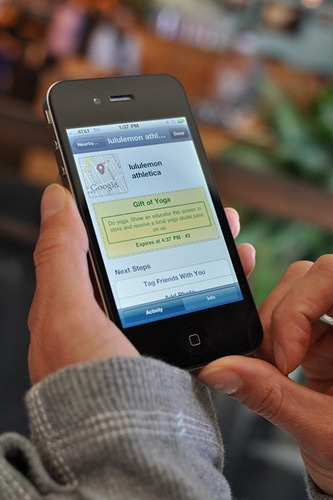
    If you have a great web presence but haven’t made your site mobile friendly, chances are you are missing out on business. Recent research shows that more than 90% of people with a smartphone are using local searches while on their phone. Those using mobile searchers are typically looking for general information. From locations to services, they want to find what they need while they are on the go.

    By having a mobile-friendly website, you widen your presence and open yourself up to a larger customer-base. In fact, users are more likely to make purchases on their phone than they are sitting at home on their computer. Transitioning your current site to a mobile platform doesn’t have to be overly complicated either. Just follow some of the same rules when optimizing your site, such as targeting popular keywords. Also make sure the most important information like directions and contact information is easy to access.

    Phone 2

    When you are designing your mobile site, be sure to keep it user-friendly and compatible with all devices. Sites should have a responsive design element that adjusts the content to fit on the various screen sizes and be easily readable so that it translates properly to all phones and tablets. Having this element of design will also prevent you from needing two completely different sites, eliminating the risk for inconsistencies and making it easier for each user to find content.

  • Stop Writing Press Releases For The Wrong Reasons

    As many in the SEO industry already know, Google is not impressed with link building strategies of old, especially when those links are coming from optimized anchor text in press releases. New guidelines are decreasing the SEO value of press releases and their use for link building at all is up in the air, so now seems to be the perfect time to refocus the purpose of your press releases.

    Gone are the days of pointless keyword-stuffed press releases being used to generate valuable backlinks–but that’s good news. Even with the new guideline regarding optimized anchor text, press releases can still be part of a comprehensive link building strategy. More importantly, they can be a great addition to your content marketing strategy, which you should never ignore. A good press release can still reach people and can still bring people to your site, and isn’t that the whole point after all?

    When it comes to quality, you’ve got to start at the beginning—your topic. The key word here is newsworthiness. Now, this doesn’t mean that you can’t publish a press release unless the media is hounding you for a comment, but something does need to have happened or be about to happen. Opening a new location? Launching a new website? Got a new certification? Great! You’ve got a press release. Unfortunately, it won’t look like this:

    New press release daily newspaper headline

    Alternatively, if you play it right, you can also offer some comment or insight into other news events that are related to your industry. This is a popular strategy when study findings or reports are released. This can sound misleadingly simple, but things can go laughably wrong when the connection between the event/report/etc., that you are piggybacking on is a stretch. Newsjacking can have negative consequences on your reputation when it’s done poorly, and you want to add something to the conversation, not just recount it. You should also make sure that you have fully investigated whatever it is that you are commenting on. You don’t want to end up coming off as uninformed.

    Though the topic is important, it’s not the only thing that you need to consider when preparing a press release. While you might have come to press release writing as part of an SEO campaign, don’t forget that this is an established form of communication with rules and standards. If you want to have your press release published on reputable sites, it’s going to need to pass review. These might not be stringent inspections, but you’ll still want your release to look professionally written by someone with journalism experience.

    Monkey
    This guy definitely knows what he’s doing.

    The most important thing to consider with the writing is probably whether the press release emphasizes the news you are writing to share. The best way to do this is by writing in the Inverted Pyramid style. This means that the vital facts are all included in the first paragraph, and everything else follows in order of importance. Though no writer wants to plan for people to stop reading what they have written, the point is that if the reader were to not finish your press release, they would already have read the most important bits. However, the goal is the same as all content — write for people, not machines. It probably won’t even do you much good to write a press release for machines at this point.

    In fact, it looks like it might hurt your campaign to write for the machine now. Though you can read a more in-depth guide to safely linking in press releases here, there are a few things to keep in mind:

    1. You need to be linking to content that is of high quality and is interesting. This content should also not be stuffed with keywords.

    2. The content should be relevant to the press release, meaning if a reader wanted to learn more about what you are writing about, the link would bring them to a page that gives them what they are looking for.

    3. The links should be inserted naturally. This means no more keyword-rich anchor text. Google has caught on to this and does not like it.

    Here’s the bottom line: even with the devalued links, you can and should still use press releases to your advantage, but they need to be done right.

  • Google Launches Manual Actions in Webmaster Tools

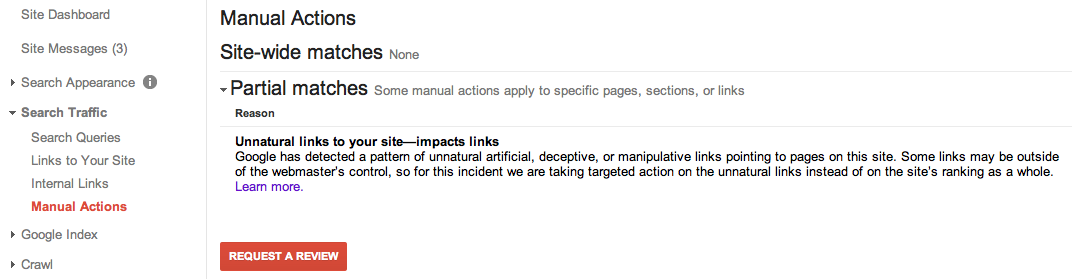
    On August 9th, Google rolled out the manual actions alert in Google Webmaster Tools. The full rollout wasn’t complete until August 12th.

    Back in the day, Google would only alert you via messages, but you would still not know whether or not you had a manual penalty. With the new feature, the notification is obvious under the Search Traffic section.  Even though Google does not send you an alert through messages, it should still notify the webmaster that you have an alert in your Manual Actions section. This is an important issue that needs immediate attention. Google should send a big alert if you had any manual actions since this is a huge penalty for your site.

    manual-actions-in-webmaster-tools

    If your rankings dramatically dropped, most people prior to the release of the manual actions alert would not be sure if they should submit a reconsideration request. The messages that Google previously sent would not indicate whether a manual penalty was taken against the site. The manual actions can be site wide or just a few links on your site. If you have received a message, you should consider the following actions.

    Steps to Take After a Manual Action Notification:

    1. Pull a list of “links to your site”

    In Google Webmaster Tools, you can find a list of links of sites that link to you. Go through the list and start with the domains that have the most links to you. Perform a link analysis and find sites that are not relevant and appear questionable. Take a screenshot of the current amount of links pointing to your site.

      Links-to-your-site

    2. Reach out to webmasters with unnatural linking

    Email the webmaster of the site politely requesting that they remove the link. If someone does not respond to your request, you will be compiling these links in your disavow request. Make sure you keep a record of your correspondence and who you have reached out to.


    3. Submit a Disavow Request

    You will need to compile a list of spammy domains that link to you. You can submit the file through Google Webmaster Tools. Just upload the file and wait. Google will not alert you and let you know whether or not they have made any actions. You can check your Links to Your Site section in a few days or weeks to see if any changes have been made.


    4. Submit a Reconsideration Request

    How long should you wait to submit a request? It depends on the severity of your situation. Repent for your sins when you are submitting a review. Explain in a nice way to Google what happened and what you have done to remedy the situation. This may include details about firing your previous SEO firm. You should also include screenshots of your correspondence with the webmasters you tried to reach out to and a list of your disavow file. Google says it can normally take days to process your request, but the process time can vary depending on the number of requests they receive.

    Good luck!


  • 4 Must-Have Chrome Extensions

    I have a confession to make–I’m an absent fiddler. At opportune moments, I’ll fiddle with all the settings on my smartphone or rearrange my books according to different categorical flights of fancy (this time, they’re arranged by most recently read). I clean out and purge unnecessary belongings every three months. I’m “that guy.” So naturally whenever I see a new browser plugin or smartphone app that I’ll find useful, I get pretty excited. Over the course of the past year, I’ve collected a few plugins that have really helped my workflow and sate my fiddling desires, and I would like to share them with you.

    Google Analytics Debugger
    GA Debugger is a pretty nifty plugin a coworker turned me on to. It provides a fairly simple but exceedingly useful service of showing the Google Analytics Debugging code in my browser’s Javascript console.

    Ghostery Ghostery Logo
    Ghostery is a fantastic plugin that tells you all of the trackers that are on any webpage you visit. It’s very useful to aid in finding out whether I’ve implemented things correctly as well as allowing me to see what’s going on other pages I visit.

    Moz Logo Mozbar
    Mozbar is probably my most used of this crop of plugins. The plugin reveals the SEO metrics of a page in a very organized fashion. No more fishing through source code!

    Check My Links
    If you’re not using Check My Links to find out whether a page has broken links on it, then you’re silly. This has been the simplest way for me to find out on a page-by-page basis where a nasty broken link can be found. It has proven incredibly useful for me. I’ve also found it useful in sniffing out any hidden links on a page.

  • 6 AdWords CTR Boons & Bombs

    You might not need a NASA mathematician, but a keen eye can help you identify your own CTR boons & bombs.[/caption]

    Many internet marketers tend to forget that they sit on a veritable gold mine of big data. Each visit to a website is one data point. For paid advertising such as AdWords and Facebook ads, marketers end up with literally thousands of data points to test even the most minute characteristics of ads. While pulling the data, aggregating it, and analyzing it can be time-consuming, the value to your marketing plan is immeasurable. Recently, we pulled a sample of over 16,000 ads from the past 7 years of our AdWords accounts to see what aspects of ad copy increased click-through-rates, the overwhelmingly largest factor in keeping your costs per click low.

    These ads predate the full rollout of enhanced campaigns, and are not segmented for anything such as ad position, device, or industry. Furthermore, of the 16,000 ads in the study, only ones with over 1000 impressions were sampled, an arbitrary but significant amount. When compared to large-scale CTR studies, the size of the sample falls short; however, we reached a statistical significance of at least 95% using single-tailed t-scores* in all 6 of these variables. Finally, it’s important to note that these six actionable insights were gleaned from 48 interaction, linear, and binomial variables that were tested. Of course, it’s hoped that these flaws do not invalidate the study; at worst, it’s an invitation for someone to check under the hood of their own accounts.

    CTR Boons

    Three main factors were the most certain to be the cause of increases in click-through rate: “Sentence Format,” which changes the display of the ad; Calls to Action, in either line of the body copy; and DKI in the headline, which inserts the triggered keyword. In general, factors that increased relevance to keywords and uniqueness among competing ads increased CTR, which isn’t terribly far from the general status quo of ad copy literature.

    Use Periods in Both Description Lines

    Two variables checked for sentence-ending punctuation, one for each line of the body copy. Both lines lead to higher click-through rates, which is a bit of a surprise. Because we at Search Influence tend to keep our ads in the top positions, using punctuation will bring up the first body line into the headline of the ad, making the ad stand out against competitors on the page. However, the second line seems equally as influential, lifting the average CTR by .6% at a near-perfect confidence interval.
    boost adwords ctr
    Ending the second line with an ending punctuation makes the user feel like the thought is done, a natural fit for an English-speaking user. A further aspect to look into is an ongoing debate in the office: Do exclamation marks entice or drive away users?

    Call Your Users to Action in the Description

    Putting calls to action in the description has a palpable effect on conversion rate, but highlighting the value to the user entices .52% more clicks at a 99.99% confidence interval. Placing the CTA in the first line teams up with using ending punctuation, raising CTR by .6% at 99.9% confidence, but the second line performs admirably as well, raising CTR by .38% at a 99.99% confidence.

    Calls to action are treated very broadly, matching a variety of words often used in our campaigns. These words like “call,” “download,” or “contact” make your audience know that you’re expecting a certain action and can highlight unique selling propositions along the way. Interestingly, having a call to action in the headline was loosely correlated (90% confidence) to a significant drop in CTR. Users seem to subconsciously like to be guided, not bashed over the head with the sales pitch.

    Use DKI in Your Headline

    Finally, DKI remains an effective way to match user queries to ad copy. By inserting the triggering keyword into the headline, you raise your CTR by .44% at a 99.99% confidence interval, though DKI anywhere else in the ad has very little measurable effect on click-throughs. Relevance is by far the easiest way to get a users’ click, but it seems users are used to a matching keyword only in the headline, leaving the rest of the ad for setting yourself apart from the other people on the page.

    In the same vein, I checked for the existence of the ad group name in the copy, expecting the same idea to hold true in static ads. Either due to inconsistent naming from the various alternative campaign structures that exist such as personas or highlighting the wrong keyword in the ad group, such as [breast augmentation] rather than [breast implants], there was either no correlation or a negative effect between including the ad group name in the ad copy and CTR.

    CTR Bombs

    On the other hand, these three aspects of ad copy were pretty certain to have caused drops in click-through rate. Unlike the CTR Boons, the Bombs generally fly in the face of conventional advice. In fact, blogs often suggestusing copy that drops these bombs.

    Use Obscure Parts of Speech

    Previously, we had suggested that a natural language answer to a search query is best. Yet “little” words like “the,” “an,” and “on” anywhere in the ad copy lowers click-through rates by over 1% at a 99.99% interval. This was the most consistent bomb across positions and the biggest drop to CTR, showing that it’s absolutely hated by users.

    Users seem to need clear and direct writing, something along the lines of a grammatically correct Tonto. Simple, clear sentences win over verbosity every time. Furthermore, bullet-point style copy can also quickly outline main unique selling points and make the value of clicking on the ad clear to users.

    Ask Your Reader Questions

    “Try asking a question in your ad copy,” say so many copywriting guides, but our dataset shows a 1.18% drop (99.99% confidence) in CTR from asking questions in the headline and a .55% drop (98% confidence) due to questions in the body. This may tie into the previous bomb because questions often require little “helping” words to make sense. However, it could also be a question of relevance — asking a question like “Are You a Candidate?” introduces doubt into the user whether or not the page is really relevant to them, discouraging the click.

    Buy Now!

    Finally, including “Now” or “Today” in the headline seems to turn off users from clicking, to the tune of a .97% drop at a 98% confidence. At lower confidences (90%), including the word “Now” in the body copy drops CTR by .33%. It seems that too much immediacy is a bad thing for users, making them feel pushed. Most verticals have a buying cycle, and trying to artificially shorten that may gain short-term clients but won’t net the same results.

    Interestingly, at a 90% confidence interval, the word “Today” doesn’t have the same effect in the first line of body copy, boosting CTR by .4%. It seems that, again, playing to the buying cycle of the industry will ensure that your ads, and not your less pushy competitors’, will get the click.

    Next Steps

    After all this, it should be made clear that CTR isn’t the only holy grail, as being able to vet users before the click is extremely important. As with any data, more research will always be needed. The next step for this dataset is to look into collinearities that may shed further light onto the data. Finding data-based “power combos” for ad copy can jump-start any campaign and gives your copywriters real formulas for effective, large-scale advertising solutions.

    Unfortunately, we can’t share all our data, but the next-best thing is to test your own data and test your assumptions — it’s the only way to make sure you’re doing the best job for your campaigns. Do you have any data you’d like to share?


    *Disclaimer: Please excuse any oversimplifications of terms, though feel free to correct anything outright wrong with how I’m describing processes or data. (Get back to reading)
  • Team Building 101: Kickball

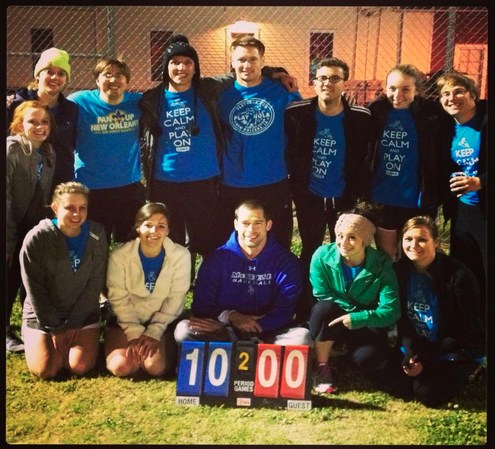
    As our team was beaming from a 10 to 0 victory over a clearly superior opponent, I began to think about how good this absurd adult kickball league was for the relationships in our office. If you are not familiar with adult kickball leagues, you might be doing your organization a disservice by not looking into it.

    I joined Search Influence only about a month or two before our kickball team got started, so I thought, “I can’t pass up this chance to get to know my new coworkers.” After all, no one wants to be known as “the new guy” any longer than they have to.

    kickball

    In it’s inaugural season, the Pay-Per-Kickers (that’s right–we are nerds) managed about a .500 season, but the friendships that were forged had immeasurable benefits. We would all get out to the field no earlier than we had to to have a beer before the game, and the conversations slowly shifted from office talk to congenial discussions about what we were doing that weekend.

    Our first couple games were shaky. I think everyone was trying to find their comfort level hanging out with their colleagues on a much more personal basis. In the meantime, we were all trying not to look like fools while playing a child’s game. When we did look like fools, it was just something to laugh about the next day at work.

    After the kickball games, all of the teams go to the same bar for trivia. I’ll say this, we were much better at trivia than kickball. With a slew of 1st and 2nd place trivia finishes throughout the season, we had built up an impressive bar tab by the time we lost our last playoff game.

    play nola

    PLAYNOLA’s kickball league became a topic of discussion and an event to look forward to each week. I think the word got around the office how much fun we were having, because for our second season, we had 23 people sign up!