Author: Search Influence Alumni

  • Tech It Out: Scripting Automated Emails of Extracts with Tableau

    Businesses now more than ever need effective, data-driven metrics to drive solid, evidence-based workflows. More and more small- and medium-sized companies are realizing an increased demand for data visualization to be able to quickly and clearly communicate exactly what is happening at every level in their business. A Stanford-born company arose to fill this need: Tableau. Tableau has more than 35,000 customer accounts, so chances are, if you need data analytics, you’re using Tableau.

    Our particular needs were a little different and required a little bit of innovation. Tableau has user accounts, but we weren’t satisfied with the level of user account access control to the app, and we couldn’t give everyone access to all of the data. So how could we report metrics to different departments while keeping the irrelevant inner workings of other departments cleanly separated?

    Tableau Server Metrics Image

    The solution lies in having meaningful tags on workbooks and automatically emailing out extracts. Here’s the reference for commands we’ll be using.

    What you’ll need:

    – A scripting language you’re comfortable with

    – An already running Tableau Server

    – The username and password to that server to log in and perform general admin tasks

    – The site ID that you’re interested in reporting on

    1. Create a command to log in to the Tableau Server.

    The first thing you’ll want to do is write a command in your script to log in to your already running Tableau server. It should have the basic form:

    tabcmd login -s SiteURL -u Username -p Password

    2. Focus on either emailing PDFs or workbooks and plan accordingly.

    You can either export PDFs of views or the actual workbooks themselves. The workbooks are more time-consuming to export, but they contain the interactive parts of the workbooks, and the dimensions don’t have to be known beforehand. Either way, you’ll need to perform a GET request.

    If you want to get info on the workbooks:

    your_site_uri + ‘api/2.0/sites’ + site_id + ‘/users/’ + user_id + ‘/workbooks

    If you want to get info on the views:

    your_site_uri + ‘api/2.0/sites’ + site_id + ‘/workbooks/’ + workbook_id + ‘/views’

    3. Parse the workbook info.

    Each workbook and view comes back with a smattering of XML info related to the workbook. The important bits are as follows:

    • ID
    • Title
    • Project
    • User-defined tags
      • Frequency
      • Recipients
      • Disabled

    The ID, title, and project are all related to the default Tableau structure. In our case, I have user-defined tags which represent the frequency that the workbooks are emailed out (daily/weekly/monthly), a tag with the email address of each intended recipient, and a tag indicating if the emailing function should be disabled for that particular workbook.

    With some simple string substitution, maybe a regex pattern here or there, you should be able to pull out all of the relevant information and create your own class to store the tag information for each workbook.

    4. Refresh your extracts.

    Unless you want stale data getting sent out, you should refresh each extract related to each workbook. Every call should include information about the workbook title, the project, and the data source. It should also have the synchronous flag to ensure stale data isn’t mailed out before the extract completes refreshing. It should have the form:

    tabcmd refreshextracts –workbook WorkBook –project Project –datasource DataSource –synchronous

    5. Export the workbooks.

    Exporting the workbooks command should look something like this:

    tabcmd get ‘/workbooks/’ + title + ‘.twb -f ‘ + title + ‘.twbx’

    6. Email

    Use the tags pulled from step three to create the list of recipients. Use your favorite email class (I used Ruby’s built-in Mail class to do this) to email out each email if the particular report is to be sent out that day.

    And that’s it—you’re done! You’ve defeated automated reporting!


  • You’ve Gotta Be Kitten Me: Uber Delivers Cute Cats to the Search Influence Office

    Our Company Culture, Image With Uber Kittens

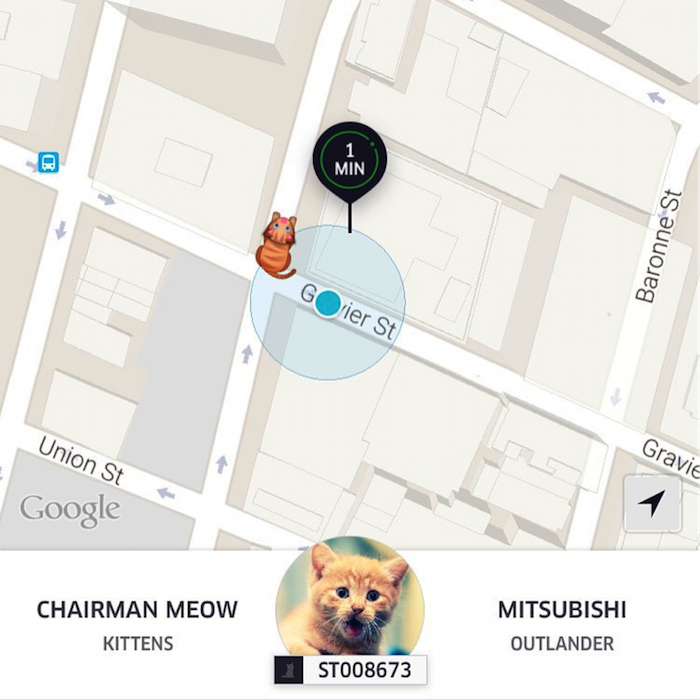
    Apparently, looking at photos of cute animals while at work not only makes you happier, but it also increases your productivity. Like most companies, Search Influence encourages employees to be productive. So on National Cat Day (October 29), when we learned Uber was delivering kittens for just $30, we HAD to do it—for productivity reasons, of course. The money was donated to The Louisiana Society for the Prevention of Cruelty to Animals.

    JCarter blog image 1


    #Uberkittens

    My Productivity Status: Went from high to medium as I became more excited about kittens and less about doing work.

    The kittens arrived at the office. Naturally, they were the cutest things to walk through the office doors (sorry, fellow employees). Four kittens took over the City Park conference room: Leonardo, Sadie, Rocket, and Luna jumped, climbed, cuddled, and scratched employees as we took turns hanging out with them.

    My Productivity Status: Went from medium to low as I began Googling the Louisiana SPCA to learn more, too excited at the thought of a new kitten.

    JCarter blog image 2

    Meet Ralph

    The following Saturday, Halloween, I went to the SPCA just to take a look. Five minutes later, I fell in love with every animal in the building. I decided I could only have one. Since it was Halloween, I decided to take home a two-month-old black kitten who I named Ralph. Ralph is playful, sleepy, soft, and cuddly.

    JCarter blog image 3


    From now on, I’m going to stick to looking at cute photos of Ralph at work to increase my productivity levels: clearly, having animals roam around the office can be a bit distracting for me.

    Thank you to Uber, the SPCA, and Search Influence for giving me the best kitten!


    JCarter blog image 4

  • Search Influence Is Grateful for Its Newest Influencer

    Join us in welcoming this month’s newest Influencer to the Search Influence team!

    1511-NewInfluencers-BlogImage

    Kari Llorens  – Account Coordinator

    Kari is originally from Kansas City, Missouri and played competitive volleyball for 10 years, including one year at Loyola. She loves to explore New Orleans and finds herself walking around Magazine St. or Uptown in her free time and trying out all the restaurants that the city has to offer. She also loves animals and just rescued a Terrier named Kandy in September.

    Welcome to Search Influence, Kari! We’re excited to have you here.

  • AI Is Here, and It’s Affecting Your SEO: A Look at Google’s RankBrain

    In late October, Google announced that they are actively using an artificial intelligence algorithm called RankBrain as part of the search results engine. This has rolled out slowly since early 2015 and has become a factor for website owners and search marketers to pay attention to, according to Bloomberg.

    “RankBrain has become the third-most important signal contributing to the result of a search query.”

    What are you saying? What madness is this?

    RankBrain is used as a way to interpret the searches that people submit to find pages that might not have the exact words that were searched for. It correlates words on your website page to those expected to be seen about the topic. A very simple example from Search Engine Land: RankBrain helps determine whether your page is about “apple,” the fruit, or “Apple,” the company.

    RankBrain is self-learning. It’s analyzing billions and billions of searches and click actions to determine what content is more helpful to consumers and what is less helpful. When there are content updates on your site or a competitor’s website, this algo is reanalyzing and reconfiguring search results. This is not done in real time.

    How often does RankBrain update?

    Because it is self-learning, it is constantly updating itself. But the real question is: how often is it updating search results?

    “Google periodically updates the system by feeding it a load of new data to help it better reason with new concepts.”

    So Google is feeding it batches of search data, and it’s crunching through the data in batches. The algo is constantly updating itself as it learns from the content it’s analyzing, but the search results are not constantly updating. Search results are updated in batches, which may explain some unexpected ups/downs in Google organic traffic that don’t match up to announced algo updates.

    1511-SI-Newsletter-KG-A-02

    Does Google’s RankBrain change any SEO that we do?

    As RankBrain learns more and more, and as Google feeds it more new data to crunch, we may see some organic traffic blips, up or down. These will not likely be announced data updates. Google has said they typically won’t announce data updates. Ups and downs are expected as the AI figures out how your content relates to specific search terms relative to the other content in your market.

    With the launch of Hummingbird and the continuous Pandas, Search Influence has long seen the need for really informative consumer-focused content. We have seen consistently positive results across many websites in many industries with this standard of content. If your content is written in accord with Panda and Hummingbird, meaning it is rich text, educational, and really on topic, RankBrain should not be a problem for you.

    For further reading, this blog post by Cyrus Shepard was one of the more influential in our constantly evolving content standards, and I think it is definitely related to this discussion.

    What’s Next?

    “Facebook Inc. uses AI techniques to filter the newsfeed that comprises the personalized homepage of the social network and Microsoft Corp. is using artificial intelligence to increase the capabilities of its Bing search engine.”

    Google is actively using self-learning artificial intelligence, its driverless cars have driven over 1 million miles, and it has the dead/undead Google Glass. Reach into your sci-fi knowledge, and consider what Google might do next.

    Image Sources:

    Google RankBrain

    Smartphone

  • Will Camp Out for Marketing Tips: Your Black Friday Survival Guide

    1

    November is here! A month full of falling leaves, dropping temperatures, giving thanks, and many people’s favorite shopping day: Black Friday. Last year, 133.7 million people shopped during the Black Friday weekend, according to a Fundivo.com study. As a local business, you may be trying to get a piece of the Black Friday pie this year, but you might not know where to start. Follow these tips to make the most of your online marketing efforts on one of the busiest the shopping days of the year.

    Plan Early

    The time to start thinking about marketing for Black Friday is now. If you traditionally experience a high volume of customers and sales during this time, like a retail store, you won’t necessarily be able to think about your marketing plan as you’re stocking extra inventory a few days before.

    One of the first things to decide is what your business is going to offer for Black Friday. Is it going to be a storewide sale? Will you sell a product you don’t typically offer? Consider your goals and determine what makes the most sense for your business.

    Get the Word Out

    Once you’ve chosen your Black Friday offer, you need to let people know about it. By promoting your offer online, you’ll be able to reach significantly more potential customers than by promoting it in-store alone.

    If you don’t have extra budget specifically for your Black Friday offer, use social media to connect with your fans. Stand out amongst competitors by posting images of products that will be available during your sale or offer an online-only incentive to entice shoppers to stop in on Black Friday.

    If you’re willing to put a bit of spend behind your efforts, Facebook advertising is an affordable alternative to a costly pay-per-click campaign. You can use their impressive targeting options to get your message in front of your specific demographic. Facebook targeting ranges from gender, age, and location to education, income level, interests, shopping habits, and more.

    Also, consider adding a page to your website with information specific to your Black Friday offer. That way, anyone scouting out sales in your area beforehand will know exactly what to expect from your business.

    Be Creative

    Black Friday isn’t just for retail. Although retail stores tend to see the majority of the action, it doesn’t mean other industries can’t jump on the bandwagon.

    Not everyone loves waiting in line overnight and battling crowds all day, but who doesn’t love a bargain? If you’re a service area business, reward your customers for being productive with home maintenance on Black Friday by offering discounted service or installation. Since many people take the day off work, it’s a great time to take advantage of gaining some extra business.

    Restaurant offers are also a great way to capitalize on Black Friday foot traffic. Let customers know ahead of time that appetizers are half off or you’re offering happy hour prices all day so they know where to go when they need a break from the shopping crowds.

    Make sure your business is taking full advantage of Black Friday this year by creating your marketing plan early, making your offer known, and utilizing creativity to gain more customers.

    Image Sources:
    Jingle All The Way
    Glee
    Gossip Girl
    Shopaholic

  • Google My Business Brings the Holiday Cheer with Special Office Hours Pre-Sets

    4

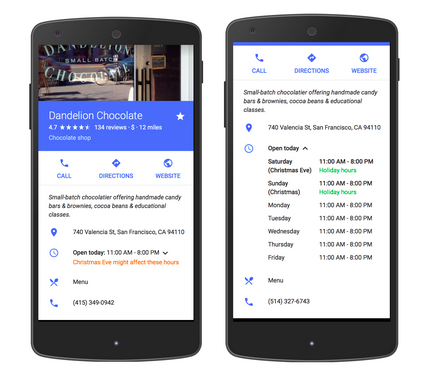
    Yesterday, a new My Business feature was published by Google in the product forums. This new feature allows business owners to pre-set special hours to their My Business listing for holiday closings or special times that are exceptions to your day-to-day office hours.

    google my business special hours exampleThere is more information in Google Support documentation. If you have many locations to update, there is a spreadsheet upload feature. If your business has hours that extend into a second day, there is information on how to manage that scenario.

    Editing Your My Business Special Hours

    This morning, I updated the office hours of a local credit union. This feature will be especially helpful in publicizing the dates their office is closed in the upcoming weeks. It will also be especially helpful to the community for finding the times each branch is closed, and we know Google is focused on user experience.

    Once you log into your Google account, navigate to your list of locations and choose one location to edit the location details. Scroll down to “Special Hours” below the standard “Hours.”

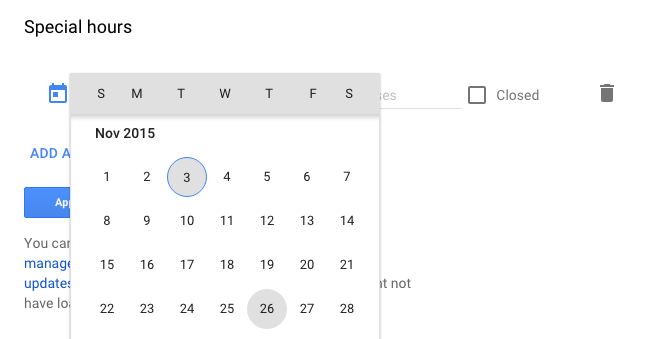
    choose the holiday date for special hours

    Click on “Special Hours,” and you can choose a day from a drop-down calendar and either apply early closing hours or mark if the office is closed the entire day.

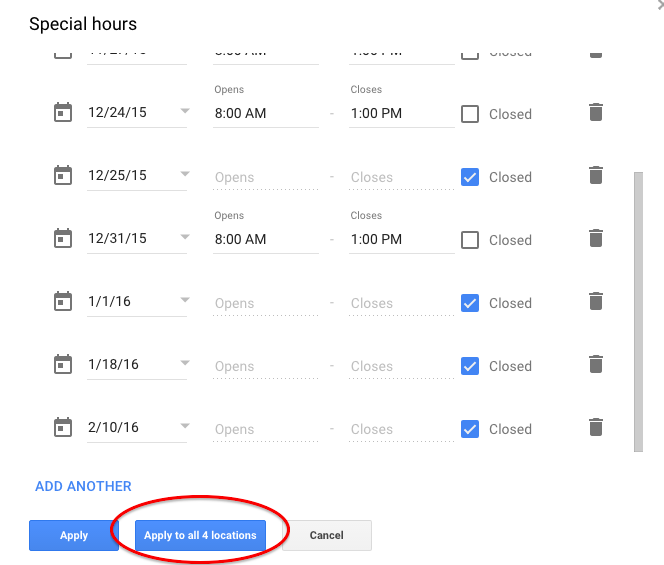
    If the hours will be the same at all of your locations, Google has thoughtfully provided a button to apply the hours to all locations within your account.

    Your final Special Hours or office closing times may look something like this for your summary review. Some days they are closed, and some days the branch is closing early:

    apply special hours office closed times to all locations

    Great New Feature

    You may want to set up some reminders to update your holiday hours every quarter or every six months.

    I know businesses have wanted this feature for quite some time, and now it’s available just in time for Thanksgiving and the December holidays. Very good timing, Google!

  • Boo! These 3 Talented New Influencers Are So Good, They’ll Scare You!

    This October, Search Influence welcomed three new Influencers to the team—and they’re so good, they’re scary! Say hello to our Halloween hires:

    Oct 2015 New Influencers

    Kristin Tidwell – Upscribed Associate Product Manager

    A Louisiana native, Kristin comes to Search Influence after a 15-year hiatus from the city. After spending time in Colorado and Oregon, her hobbies include hiking, snowboarding, and mountain biking. Suggestions for new hobbies are currently being accepted.

    Myndi Savoy – HR Manager

    Myndi is a Louisiana native who grew up in Baton Rouge. She lived in Dallas for 17 years (though she is NOT a Cowboys fan, she’s a die-hard Saints season ticket holder) and moved to New Orleans 3 years ago. She has 15 years in human resources, mostly in hotels, restaurants, and hospitality industries. She has two fur-kids, Deuce and Thibodeaux, who are pit-mutt mixes of nearly 75 lbs and 100 lbs respectively. In her free time, she likes biking and going to festivals and concerts. Her personal goal is to attend a NFL game in every stadium. So far, she has been to 16 different stadiums, including Wembley stadium in London when the Saints played there.

    Paul Morris – Web Developer

    Paul is a New Orleans native and self-taught programmer/web developer and die-hard Saints fan. He has had a lifelong love affair with computers but also enjoys camping, the outdoors, and rock-climbing. He has played guitar since a young age and enjoys just about every kind of music, especially anything by George Clinton. Ready to meet new people and learn from those around him, Paul is incredibly excited to start working at Search Influence!

    We’re always ready to welcome new energy and talent to our team! If you’re ready to help us share our SEO tricks and treats, visit our careers page to apply. We look forward to hearing from you!

  • ‘Tis the Season: Ten Ways to Enhance Your Online Presence All Year Round

    2

    Traffic to your website depends on how relevant your landing page is in relation to the terms being searched and how well optimized your site is in the eyes of Google. If demand for your products and services is low for a certain time of the year, chances are search volume will also be lower, resulting in less traffic to your site. Having a strong online presence is all about understanding user behavior and optimizing your site to achieve the best results. In order to accomplish this, utilizing a seasonal SEO strategy will help boost your overall online performance annually.

    Whether your business maintains consistent demand or changes with the time of year, there’s something for everyone when it comes to seasonal SEO!

    What Is Seasonal SEO?

    Seasonal SEO refers to optimizing your site for seasonal keywords in order to get more visibility in search engine results during a specific time of the year. For example, let’s say you own a jewelry business. Around the holidays, search volume will increase for Christmas presents. Instead of just optimizing your site for vintage jewelry, you may try optimizing for “Christmas vintage jewelry,” “vintage jewelry for Christmas,” or even “holiday vintage jewelry” in order to enhance your site’s ability to be found amidst the high search traffic for the season. Optimizing your site seasonally could prevent your business from missing out on additional holiday revenue.

    22310142726_1b807169fc_z

    Capitalizing on the Seasons

    So how does one go about optimizing for the seasons? Here are five tips to get your site ready, no matter the time of year.

      1. Do your research. Don’t just blindly select any season to optimize your site. Look at year-over-year data on Google analytics to make inferences on when traffic to your site is the highest in order to determine what season optimizing your business will most benefit from. You will want to concentrate your efforts on one to two seasonal holidays, three at most.
      2. Start planning now! Once you’ve selected which seasons you will be optimizing for, create a seasonal SEO calendar to outline which items you intend to seasonally optimize. (Local SEO consultant Andrew Shotland has provided an excellent resource here.) Keep in mind that searches for most seasons start much further in advance. For example, planning for Valentine’s Day starts mid-January. Once more, it can take a while to gain momentum when it comes to SEO, so starting months in advance is key.
      3. Create unique pages of seasonal content and optimize it for the appropriate seasonal keywords. During the season, place the seasonal landing page in the main navigation, HTML sitemap, and XML sitemap so that humans and search engine bots can access it more easily. Create one or two seasonal pages annually, three at most.
      4. Update your meta descriptions for seasonal pages and your site. Meta descriptions exist to facilitate a higher click-through rate between the search engine results page and your website. Not only is it a good idea to create seasonally focused meta descriptions for seasonal pages, but it is also a good idea to update the meta descriptions of your year-round pages (i.e., your home page) so that they’re seasonally focused for the time being. After the holiday season is over, be sure to change them back.
      5. Do not delete seasonal pages once the season is over. It can take a while for new pages to gain authority and recognition with Google. Once you get a seasonal page to rank, deleting that page would mean that you would be starting from scratch the following year. You can simply reuse the seasonal pages for next year by updating the content. Because you may not want to keep these pages in your navigation all year round, it is very important to keep these pages indexed in both your HTML and XML sitemaps so that these pages remain crawlable and hopefully indexed all year round. When the season rolls around again, be sure to implement it back into your navigation again. Rinse and repeat.

    Off-Season Businesses

    But what happens if you own a seasonal business? Perhaps your store is closed during certain times of the year (i.e., a ski company closed for the summer), or perhaps nobody is looking for your swim store’s bikini line in the middle of January! Do not fear: indeed, while search traffic to your site will be lower off season due to its correlation to current consumer demands, there are still steps you can take to maintain your online presence year round.

      1. Do your research. Look at year-over-year traffic and conversions in Google analytics to ensure you’ve identified the correct high season for your business.
      2. Display positive customer reviews off-season. While the season is still in its prime, be sure to gather customer reviews about your business, especially your Google+, Yelp, and Bing pages. For example, a family may decide in May that they would like to take a winter ski trip. They may begin reading reviews on ski resorts and ski gear months in advance in order to be well prepared for their upcoming trip.
      3. Engage in social media all year round. It is critically important to always be engaged with your clients and potential clients on social media. Here’s why.
      4. Play up off-season hype. When it’s snowing outside, it wouldn’t hurt your business to post a picture of a sunny beach with your company’s sandal line to generate top-of-mind awareness even off season.
      5. Create interesting blog topics year round. This will provide readers with plenty of content during peak season as opposed to taking a break from posting during off-season months. It will also generate fresh content for your site, which signals to Google that your site contains relevant content for viewers.

    How do you maintain your business’s online presence year round?

  • You’ll Never Believe How Clickbait Techniques Are Causing the Downfall of Ads

    1511-SI-BlogImage-C-01

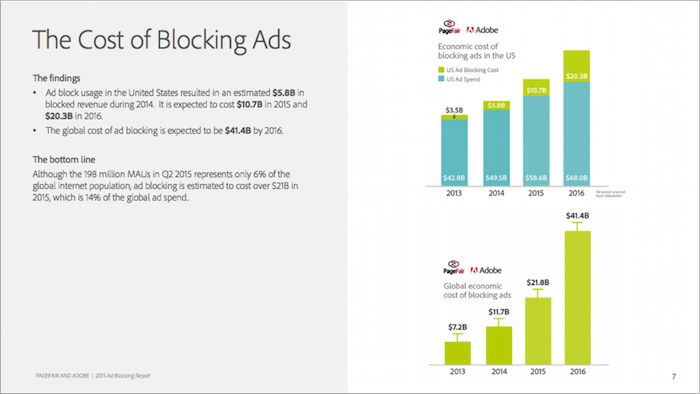
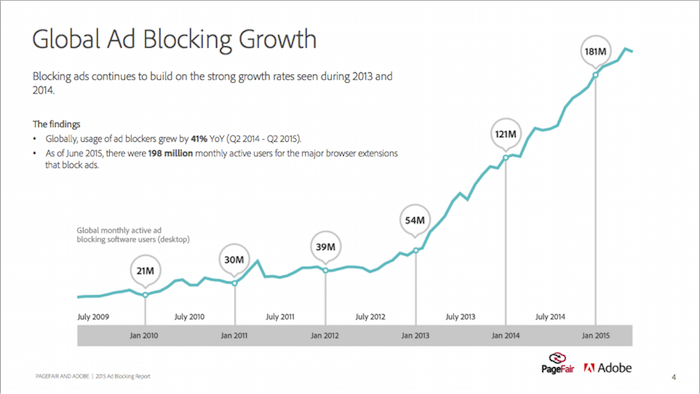
    The atmosphere for Internet advertisers has changed over the past couple of years following a trend that marketers of the past simply didn’t see coming. Thanks to an overuse of several marketing techniques, including clickbait titles, dynamic advertising, and uninspired cookie-cutter content, Internet users have learned ways to avoid ads and are experienced enough to know a clickbait title when they see one. All in all, this has a direct effect on potential income brought on by advertisements.

    Ad Block 1

    Why the Change?

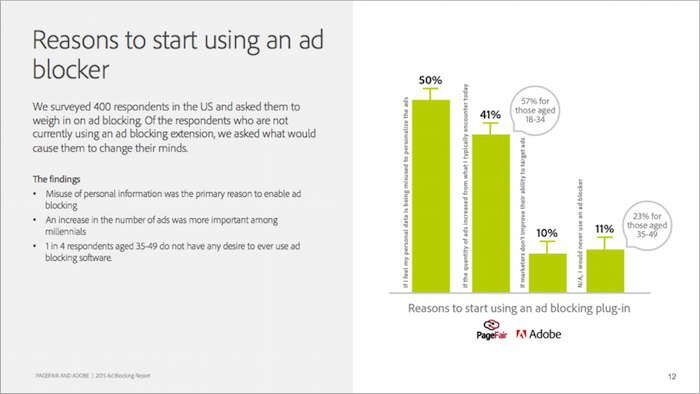
    It would be remiss of us to believe the fault in this lies with the consumer, or that advertisers of today are responsible for the actions of other advertisers in the past. In truth, this should have been an expected outcome when considering how simple it is to copy these techniques and how pervasive they have become on today’s Internet. People learn through experiences, and the sheer overabundance of these techniques simply expedited the desensitizing process. On top of that, other Internet users have found ways to use the current mood toward advertisements to their advantage.

    Ad Block 2

    AdBlock and AdBlock+ are the best examples of simple, easy-to-install ad blocker plugins that have seen increased usage and popularity. The effectiveness of dynamic advertisements, arguably the most adaptive and effective marketing technique there is, is completely nullified. What once showed ad content based on the Internet history of the user simply doesn’t load with the rest of a webpage. And it doesn’t stop here.

    AdBlock has now become popular enough that it has started to set and enforce its own criteria for quality, non-intrusive ads. The criteria focuses on ensuring:

    • Static advertisements
    • Text over image usage
    • Proper placement that does not block site content or require a mouse-click to hide or mute
    • All advertisements are labeled as advertisements

    The organization has even started to write a whitelist and ask other websites to voluntarily submit to these regulations. Though it might be difficult to imagine any major site agreeing to such demands, a glance at the growing number of AdBlock users makes clear the potential benefits.

    Ad Block 3

    Clickbait titles are also a commonly used technique that focuses on numbers over quality, and it has lead to a response from Internet users that to me is a far more fascinating result. People have started to avoid clicking on interesting titles on their own, because from the person’s experience, these titles usually offer little more than lackluster and boring content. Or at least, that is what people have learned to expect as a result of past Internet marketers. Simply put, clickbait titles have become less and less effective over time. This is an especially unfortunate result for those webmasters and organizations that actually offer quality content and are simply trying to draw traffic toward their site in an effective, eye-catching manner.

    Now what?

    So knowing all of this, what can be done? The simplest answer is to change the paradigm and make quality of content and advertisement more important than quantity. It may seem counter-productive, but this is more likely to have a long-term effect simply because it is what Internet users are looking for and prefer—at least for the moment. Another good option is to turn to professional advertisers and Internet marketers who are familiar with the ever-changing environment and are ready to follow through with new or changing regulations, whether they come from AdBlock or from Google altering its search engine algorithm once more. Without this assistance, an advertiser or organization has to start building its own community and establishing trust with those individuals using consistent, quality content. Internet users can then vouch for the content by sharing it, not necessarily with the rest of the world, but with the friends and family within their community that trust their opinion. That, in itself, makes a statement that reverberates across multiple online communities quickly.

    Image credits:

    2015 Ad Blocking Report

  • Stalking, Espionage, and More: The Guide to a Successful B2B Marketing Campaign

    Dealing with business to business, or B2B, clients in search engine optimization, search engine marketing, or social media can be challenging. There is an extra layer of difficulty associated with a technical business that you don’t typically have when working on B2C campaigns.

    The key to starting a B2B online marketing campaign is to focus on your business. Having a jumping-off point of information also allows you to craft thoughtful questions to ask in your initial meeting. Here are some easy things you can do to understand a technical client’s business and industry (besides scouring their site).

    Understanding the Client

    1. Watch the Tube – I love watching YouTube videos that my clients have created. Industrial clients tend to be good at showing off their technology via video. It can be super insightful, and it may help with your strategy down the road.

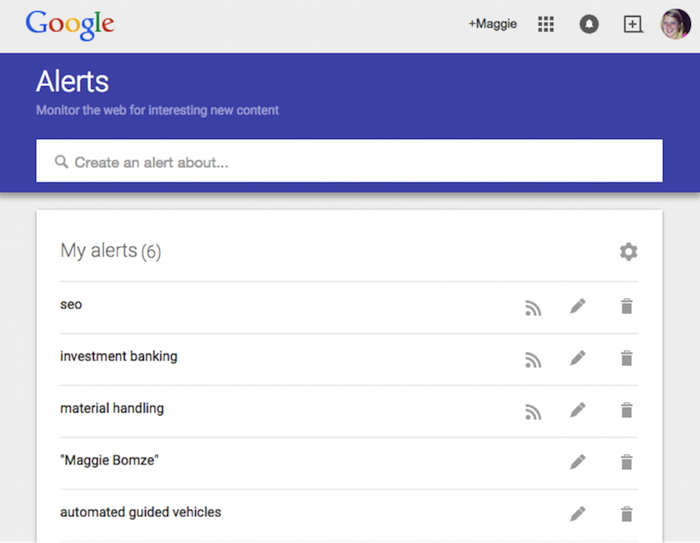
    2. Set up a Google Alert – Reading up on industry news can initially help with learning about the B2B client, and it can be informative later on when you need ideas for social media posts and press releases. (Side note: I think it’s 110% acceptable to have a Google Alert about yourself, so go on and set that up too.)

    MB Blog 1

    3. Do Some Stalking – Head over to LinkedIn to find out who you are going to be speaking with and what their background involves. I’ve also gone as far as joining engineering groups on LinkedIn to see what people in the industry are talking about (and more importantly for SEO and SMO, what types of posts get them engaged). I would also advise checking out any professional associations, charity organizations, and conferences where they regularly attend or present.

    Reaching the Client’s Customers

    1. Infiltrate the Buying Center – Find out (most likely by asking) which industries the client works with, and ask the right questions to find out who the decision makers are in the buying process. This can help you with ad targeting and creating relevant content for C-level buyers vs. operational team members.

    2. Find the Trigger – I always ask technical clients about their sales cycle, and most importantly, what triggers the need for our client’s goods/services. It is helpful to know what other businesses are going through and where search engine optimization fits into the B2B marketing plan.

    3

    Relaying that Knowledge to Your Team

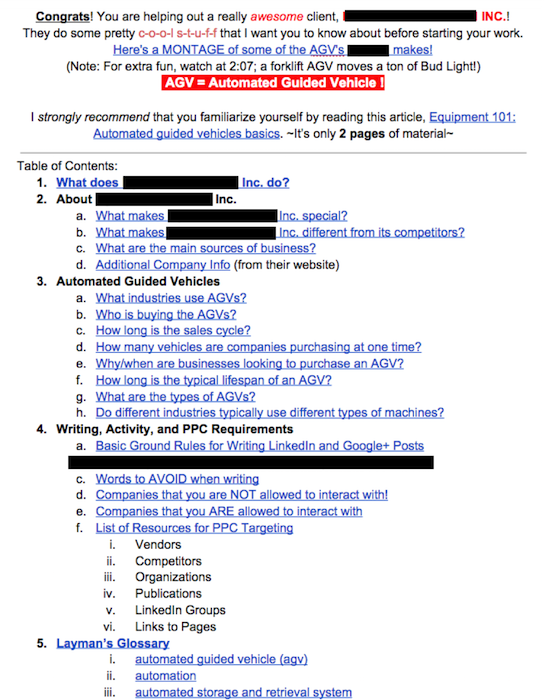
    1. Shout It from the Rooftops – Let the appropriate people on your team know the information they’ll need in order to produce the highest quality work for your client. This might be the hardest part of a B2B marketing campaign. Ask anyone on my team: I’m guilty of giving everyone all of the info I have on a super-technical topic! One short-term solution is to keep an ongoing “Everything you need to know” doc and organize it through bookmarks. This way, your team can quickly get to the info that impacts their task.

    MB Blog 2

    What are some of your tips for working with B2Bs in SEO? Let us know in the comments!