Tag: small business

  • 8 Must Visit Eateries For BIA Kelsey SMB Digital Attendees

    8 Must Visit Eateries For BIA Kelsey SMB Digital Attendees

    SoBouNolaCracklinImage
    Cracklin. Yes. Cracklin. Tasty.

    My colleague Neal Polachek, a noted analyst and advisor, wrote me an email asking my opinion on New Orleans restaurants. He is coming to town for the BIA Kelsey LEADING IN LOCAL: SMB Digital Marketing event. He mentioned Cochon, which is excellent, but I had a few other recommendations.

    If you’re coming to New Orleans for the BIA Kelsey show, then please look up Search Influence. We’re only a few blocks from the Hyatt and we would love to see you.

    The following is a transcript of my email to Neal:

    As you know, there are TONS of great places in New Orleans. I do love Cochon. Your only challenge may be the noise level.

    Donald Link’s group has another new restaurant called Peche which is also great.

    Others you should consider off the beaten path:

    Lillette – One of our current favorites, on Magazine St. just passed the Garden District towards Uptown.

    Gautreau’s – Hidden in an Uptown residential neighborhood – worth the trip!

    Pascal’s Manale – Also in Uptown, it’s classic, quintessential New Orleans.

    Oddly enough, one of our current favorite restaurants is actually inside the Hyatt pavilion, called Borgne.

    Another current favorite that is seldom as busy as it should be is SoBou, which is attached to the W in the French Quarter. You can make a meal of the appetizers alone.

    If you want a super-fancy wine and dine, a hot prospect or a hot date kind of thing, there’s R’evolution in the french quarter just past Bourbon Street. This restaurant is excellent. We just ate there for the first time a couple of weeks ago.

  • On Social Entrepreneurship and Social Media – Interview with Alexandra Ernst of Project Pangia

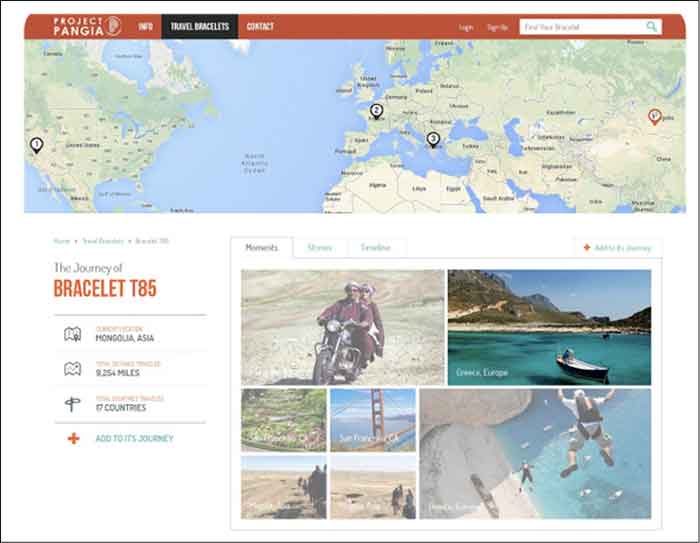
    ProjectPangiaOwnerImageA year and a half ago, Project Pangia was born from the mind of Alexandra Ernst. After graduating from Loyola University New Orleans and working with The Walt Disney Company, she set out to create a business of her own. Having a passion for travel, meeting people, and social change, she aimed to create a business that would connect people. Project Pangia is a global initiative based on social and interactive development through the exchange and tracking of travel bracelets. With the help of social media, Ernst has managed to successfully fund an $18,000 Kickstarter campaign, create jobs for various underprivileged women in Bali, Indonesia, and spread these bracelets to more than 17 countries.

    How did you come up with the idea for your business?

    Project Pangia started as an idea for a travel website. I’ve always had the entrepreneurial spark and I wanted to create something. More than creating a normal business, I wanted to create something that connected people around the world and had some social impact.

    I began thinking about how our generation uses social media; we all have Facebook, Instagram, and Twitter – people sometimes just sit and browse through these sites for hours looking at other people’s posts or thinking about what they are going to post. Then, I started thinking about how I could utilize these tools but be able to connect with people not only on a virtual level but also on a human level. This evolved into a travel networking site, but I needed something that would allow me to do it on a fixed budget. It all came full circle when I thought about the idea of creating these bracelets. I said, “What if I give these bracelets to one person; they can hand one off to another person and somehow be able to see where these bracelets are going?”

    How does the exchange of bracelets work?

    As it is explained on the Project Pangia website, every bracelet is handmade and stamped with a unique code, which is registered on the site. Every bracelet is handmade and stamped with a unique code, which is registered on the site. You can track your impact as your bracelet is passed along from one hand to another in the “spirit of kindness.” Each new recipient can add to the bracelet’s story online before passing it on to someone new. We keep you updated as your bracelet reaches certain milestones so you can witness just how far one simple act of kindness can go.

    What is the goal/vision for your business?

    A huge part of it is working in underprivileged communities that otherwise wouldn’t have these opportunities of having fair compensation for their work, quality working conditions, and mentorship. For now, I’ve handled the production aspect in Bali – we used recycled surfboards and other sustainable materials for our production, packaging, and shipping. Ultimately, I would like to offer other communities around the world these types of opportunities through collaboration and partnerships.

    Project Pangia also aims to spread kindness and spread the message of “travel in kindness.” By doing so, we are creating cultural awareness and connecting people through the use of personal interaction, as well as through embracing the use of technologies and social media platforms.

    Finally, as the business grows, I want for Project Pangia to have a strong online presence on a global level and I have been slowly creating this by displaying my products and the stories that arise through them on my website, Facebook Page, Instagram, and Twitter.

    ProjectPangiaScreenshotImage

    If you are active in social media, what platform do you find elicits the most activity?

    Facebook and Instagram have definitely been the two that have grown at the fastest rate. In January 2014, my Facebook page had about 200 followers. Once I began to post more consistently and I began to push a couple of Facebook Ads, it grew to almost 3,900 in just a few months.

    My Facebook page was definitely my most important and effective tool for my Kickstarter campaign. If it weren’t for Facebook it would have been impossible for me to successfully fund it. By creating Sponsored Posts through Facebook I was able to drive a lot of traffic to my campaign. Also, my campaign was shared via Facebook 1,523 times! It was definitely where I saw more interaction from my followers who eventually became my backers. My goal was $18,000 and I raised $18,295.

    My Instagram has also continued to grow. I constantly want to push more imagery, and I think nowadays there’s an overload of information and people don’t want to read that much. Therefore I want to show them as many pictures of my products and their impact, and my followers have responded very well to that. A month ago, I had about 300 followers and it has nearly doubled in less than a month.

    I try to be very meticulous and careful about what I post, which is why I do not post as often as other businesses. Something very important to keep in mind is that you can’t just post anything online; you have to be very intentional with what you are writing.

    What other tools aside from social media are you utilizing to push your business online?

    I currently use a WordPress site and as someone without much technical background, this platform has truly allowed me to manage my website effectively. WordPress even has a tool that measures traffic within the same platform. I also have Google Analytics installed with the site and I use Hootsuite to create social media posts ahead of time and make sure I stay organized.

    Do you have any advice for other young entrepreneurs who want to leverage the use of social media with their business?

    It’s way more time and money than you’ve ever imagined, so you better love it with all your heart and truly believe in it. However, once you start seeing how people respond and the feedback they give you it makes it all worth it.

  • 6 Second Marketing: Using Vine for Your Business

    Jul14

    In today’s fast-paced society, your business doesn’t have much time to grab the attention of potential customers. Can you do it in six seconds? Millions of users are racking up views and attention for their six-second masterpieces on Vine, Twitter’s ultra-short video sharing app that fits in well with the social network’s theme of keeping things brief—and businesses are using Vine to amplify their social media marketing campaigns and boost visibility.

    What is Vine? A Brief History

    Launched in January 2013 by Twitter, Vine was originally a mobile app that capitalizes on smartphone cameras, allowing users to capture and share up to six seconds of looped video. The platform gathered steam quickly, becoming the fastest growing app of 2013 with millions of users and several viral clips.

    Today, Vine has more than 67 million users. Vine videos can be posted to other social networks like Facebook and Twitter, and earlier in 2014 the platform introduced a desktop interface similar to YouTube, with searches, playlists, popular users, and trending tags.

    The Benefits of Using Vine for Business

    Some companies view the Vine platform as too short to be useful—but many said the same about Twitter. There are several benefits to using Vine as part of your marketing strategy, and they extend beyond the platform itself.

    Here are just a few of the advantages Vine can give your business:

    • Video works. Several studies have shown that video consistently performs better as a marketing tool, with higher engagement and more click-throughs. Regardless of your business type, video can help you promote it: 90 percent of online shoppers find video helpful in buying decisions, and 75 percent of executives watch work-related video.
    • Shorter is better. Online viewers are often pressed for time, or multitasking and switching between several windows. Long videos tend to see fewer views—so at six seconds a pop, viewers are far more likely to watch a Vine video.
    • Boost social sharing. Vine videos don’t have to stay on Vine. They can be posted on multiple social sites, or your business website or blog, and including hashtags in your description can help you improve discoverability and encourage sharing.

    What Can You Do with Vine?

    Just how much marketing can you pack into six seconds? With the right mindset, you can deliver a powerful message through a Vine video. For example, Lowe’s home improvement store created a series of Vine videos called “Lowe’s Fix in Six,” with each video delivering an interesting home do-it-yourself (DIY) tip. UK fashion retailer ASOS engaged their followers with an “unboxing” video of their products that invited customers to upload their own unboxing, incorporated the hashtag #ASOSUnbox, and entered participants in a drawing for a goodie box.

    To create effective short videos, consider:

    • The types of videos you want to offer—you might have helpful tips, product showcases, customer contests, or even content that’s pure entertainment
    • How you’ll communicate your message briefly and visually
    • The best way to tie your short videos to your company brand or theme

    Remember that like all social media marketing, Vine should be used to share more than just your products or services. Consider offering quick behind-the-scenes video that shows your workplace culture, your employees in action, or where your products are made. Or get your followers to participate and invite six-second testimonial videos, which you can display on your website in addition to posting on Vine and other social platforms.

    Regardless of your social marketing strategy, the Vine platform can make a powerful, visual addition to your current efforts and help increase your business visibility and reach. All you need is a smartphone or digital camera, and six seconds.

    Image courtesy of Frank Gruber

    Megan Totka is the Chief Editor for ChamberofCommerce.com. She specializes on the topic of small business tips and resources. ChamberofCommerce.com helps small businesses grow their business on the web and facilitates connectivity between local businesses and more than 7,000 Chambers of Commerce worldwide.

  • Google Instant Verification Passes The Sentence & Swings The Sword

    On July 31st, Google rolled out an instant verification option for local businesses that have already verified their websites with Google Webmaster Tools.

    WaitInstantVerificationImage

    There is, however, very specific cases. As the Google support page linked above states, it’s important to note “that some business categories may not be eligible for instant verification.”

    OneDoesNotSimplyVerifyAListingImage

    Webmaster tools verification option won’t work for your business if:

    • You’re creating a new listing
    • The pre-existing listing is already claimed by another user and your business has to request ownership
    • You have to change the website on the pre-existing listing you want to claim
    • Webmaster Tools isn’t verified BEFORE you claim the listing
    • Webmaster Tools isn’t verified in the same account that you are claiming your business listing in
    • Your company’s “My Business” category is not one of the Google approved categories eligible for this verification.

    “My Business” pages we tested:

    Car dealership: Claimed in account with pre-existing listing in need of claiming – worked

    Heating supplies provider: Had ALL ideal criteria. Listing had correct site and was available to claim, and WMT was already verified in the account. – didn’t work (So this business must have a category problem that makes it ineligible.)

    Real Estate: Created new listing- didn’t work

    Basically, if it’s possible, Google will automatically verify your business on its own when you claim your business in Google My Business. Google skips giving you any verification options altogether and just auto-verifies the listing.

    Assuming this new Google My Business feature is a work in progress on Google’s end, maybe once we see more categories accepted, it will become more doable and the qualifications may not be so restrictive. Even then, with the stipulations currently, it would be a rare occurrence.


  • HTTPS: Guardians Of The Google Galaxy

    Last week, Google published a blog post stating unequivocally that encryption will be a ranking factor for websites. They said, “We’re starting to use https as a ranking signal.” They did downplay that message slightly by adding the impact would be a small amount of rankings trust: Here is a pretty important takeaway from the Google published blog post (the emphasis is mine).

    “For now, it’s only a very lightweight signal … But over time, we may decide to strengthen it, because we’d like to encourage all website owners to switch from http to https to keep everyone safe on the web.”

    Which I interpret as “You don’t have to frantically get encryption on any of your websites today, but as you perform regular maintenance on any websites you own, you may want to consider adding SSL (Secure Sockets Layer).”

    EncryptionIsComingImageIn the Spring, Matt Cutts hinted strongly that the need for encryption was coming, and at the time we took a “wait and see” approach, knowing that it was not an urgent matter, and we could look at it again when it did become “a thing.”  Now, it is officially a thing.

    Over the years, Search Influence has had a small percentage of clients with encryption.  It has always been on websites where it makes sense: banks, credit unions, any online loan application sites, e commerce (of course) — basically, sites where you submit your personal and financial information. Historically speaking, plumbers, catering services, charter fishing, and dog walkers, would not normally need this level of security because those businesses don’t normally ask consumers for their personal info.

    As we watch the behaviors of secure vs non-secure websites, we will be better able to make informed decisions on the “ to-secure-or-not-to-secure” front.

    For now, MaAnna Stephenson says in this post, “Do it Because it’s Right For You … don’t make this change because of the ranking factor bump alone.“ I tend to agree with her at this point. Google could evolve this into a more significant factor as they suggest in the announcement, or like, other experiments, it could lose importance.

    What Does Encryption do?

    Encryption does very little to protect a website; it serves to protect any data exchange between a website visitor and the hosting server. This announcement by Google illustrates that they want a safe search experience for consumers. The ultimate goal is the consumer experience, and the consumer wants security.

    Without encryption, when you fill out a form or provide any information on a website that gets sent back to the business, this data is sent as plain text. Plain text is bad for personal information and financial information because plain text is easily taken by hackers.

    EncodingDataImage

    What encryption does — it encodes any data going through the website, and only the website owner can decode that data. The concept is the same as using codes to exchange secret messages. You can only decode the message if you have the decoding key.

    These 5 bullets are a great distillation of what happens.  I have quoted these straight from  from DigiCert:

    1.    Browser connects to a web server (website) secured with SSL (https). Browser requests that the server identify itself.

    2.    Server sends a copy of its SSL Certificate, including the server’s public key.

    3.    Browser checks the certificate root against a list of trusted CAs and that the certificate is unexpired, unrevoked, and that its common name is valid for the website that it is connecting to. If the browser trusts the certificate, it creates, encrypts, and sends back a symmetric session key using the server’s public key.

    4.    Server decrypts the symmetric session key using its private key and sends back an acknowledgement encrypted with the session key to start the encrypted session.

    5.    Server and Browser now encrypt all transmitted data with the session key.

    Considerations

    For existing websites, there are some considerations when deciding to implement encryption.  Most of these will cost the website owner money, time, and effort.

    1) Prepare to get an SSL certificate.

    Before you get an SSL certificate, there are several things you need beforehand:

    • Unique IP
    • Certified signing request
    • Accurate WHOIS record
    • Business valuation documentation

    Hopefully, you have a developer who will manage this checklist for you.

    2) Get the SSL certificate.

    The website owner has to decide what kind of SSL certificate he/she needs. Leigh Aucoin, Web Development Team Lead here at Search Influence, comments, “Most hosts or domain registrars offer SSL certificates, and there are some companies that specialize in this in particular.”

    Single Domain Cert

    Prices may vary (usually expect upwards of $70/year) for a single domain.

    If a single domain SSL cert is setup, it’s important to establish a “canonical” domain (as we tend to do) of www or non-www, and set the certificate to that one. Otherwise, you’ll need to purchase another certificate either for the www subdomain or just the raw hostname.

    Wildcard Cert

    Having a “wildcard” SSL certificate that will match all subdomains is approximately 3x the price. This may be good for certain sites, but most clients don’t have subdomains beyond www.

    Also, a website owner needs to understand that the SSL certificate, maintenance, and annual renewal will cost money and effort every year. Peter Rigney at Annunciation Interactive offers his input, “My practical experience is that, for clients who ‘just want the website to work’, keeping an SSL cert up to date can be somewhat logistically painful.  The annual renewals involve some work, charges, and client authorization processes that aren’t particularly fun for anyone. Particularly when it’s a ‘hands-off’ or over-taxed client…”

    This is work for a professional, unless you are a business owner with a lot of technical knowledge.

    MatrixImage

    3) Get it installed on your server.

    Leigh suggests that your hosting company should be able to provide you or your developer with guidance on how to do this, and it may vary per host. Per this FAQ, “Installing a certificate involves a process that’s specific to each individual web server. Certification Authorities publish instructions for generating the Certificate Signing Request (CSR) and installing the certificate.”

    4) Make sure your SEO is impacted as little as possible.

    Per Google Webmasters support, changing from http to https is considered a URL change, and as with all URL changes, it very likely could have a ranking decline after launch.

    Moving from http to https is considered a site move, all of your URLs are changing and all precaution and planning needs to be considered. Redirects, new sitemaps…  This costs a small business owner money in paying the developer to do this work. The web developer has to gather all of the site’s existing information, plan a thorough strategy, implement everything along with the SSL certificates, and monitor the results in the weeks after.

    5) Plan for accurate data.

    When you launch, you will want to make sure you see your website data accurately. In Webmaster Tools, make sure you verify all existing variations of your site (www., non-www., https, subdirectories, subdomains). Don’t forget about the settings for your preferred domains and canonical URLs.

    6) Know that site speed can be decreased.

    Your site speed could be impacted because encryption slows things down. All the data gets encrypted and then decrypted by the website visitor and then again on the hosting server. This takes a little more time than sending straight text data. The SSL also encrypts the page content, the style sheets, and all of the other features on the page such as images and videos. If your site is already old and clunky, you may want to consider an upgrade. While upgrading you should strongly consider a mobile or a responsive site to go along with your potential encryption.

    Not a Snap Decision
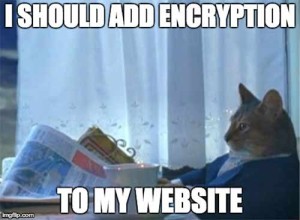
    CatShouldAddEncryptionImageDeciding to add encryption to a website is not a decision that can be made quickly. The certificate itself — not to mention hosting and domain renewals — costs money.  Relatively speaking, they don’t cost a lot of money, but the overhead is something that needs to be considered.

    The average small business owner would likely have to pay a developer to manage the process and installation. You also will likely have to pay the developer to maintain that security every year with renewal. Find a developer with some experience with SSL certificates. A trusted, knowledgeable developer is a valuable investment.

    There may be some opportunity costs if the site loses some ranking in the first few weeks after launch. This is a very real scenario and is especially a concern for ecommerce sites. If your developer isn’t experienced with setting up redirects and submitting sitemaps, talk to your SEO team to coordinate with the developer.

    If you are already planning a site redesign, or converting to a responsive site, or some other investment in your domain, it would make sense to go ahead and add in encryption. Just plan ahead and be thorough.

    This blog post is intended to give a small business owner some talking points when having a discussion with his developer. I’m sure there are many small considerations not included here, but if you have a valuable tip for an SMB, please comment!

    Image Sources:

    http://rebloggy.com/dancing+baby+groot/search/bestmatch/page/1

    https://imgflip.com/memegenerator

    http://giphy.com/search/hacker/3

    http://fierydragon.com/dragonsbreath/?p=1286
     

  • The Mullet Model: Why Your Business Should Be On Thumbtack

    Thumbtack is making life a whole lot easier for consumers and for businesses. Unlike Yelp and Angie’s List, Thumbtack has found a way to connect businesses and their potential customers in order for them to make a deal. With their most recent round of funding, the tech company will have $30 million to help them become a leader in localized markets. Jonathan Swanson, one of the cofounders, describes the easy to use platform as a mullet business, “it’s very simple on the front, but very complicated on the backend.”

    BusinessInTheFront

    How Thumbtack Works

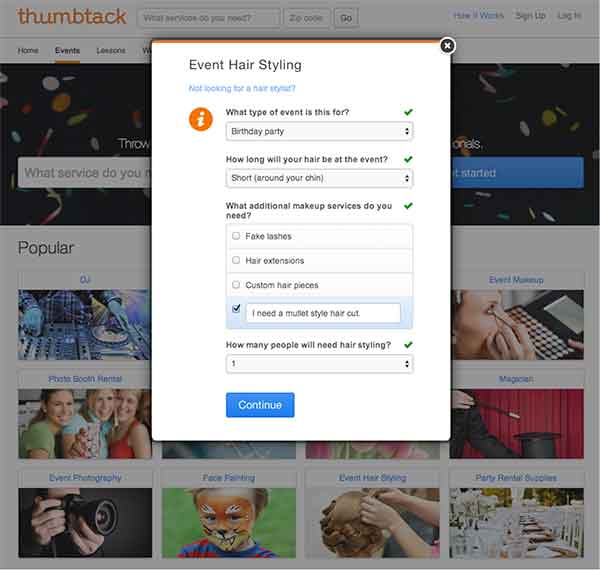
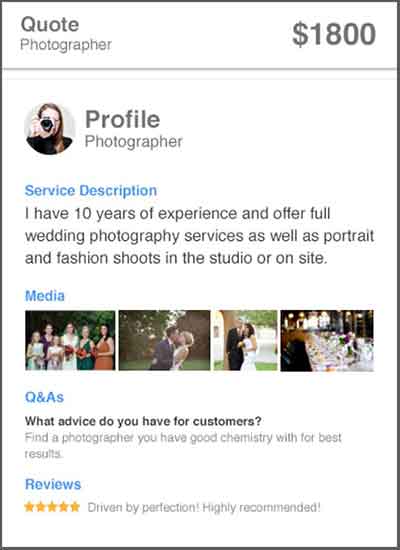
    Businesses can bid on, and acquire, new customers based on the specifics of a job, and consumers are able to hire professional service providers effectively by getting an “introduction” that includes a businesses’ custom quote, customer reviews, and profile. Consumers fill out a detailed form regarding what services they need done (see the mullet form below), and then, as a business, you can “bid” and contact the potential client based on the fit. One of these “introductions” can cost anywhere between $3 and $25, based on the size and cost of the job. From there, the customer can compare other local professionals and decide on the best pro to handle the job.

    Customer Form:

    CustomerForm

    How Thumbtack Can Help Your Business

    There are hundreds of services available for hire on Thumbtack, and you can find new customers that fit well with your business. The website’s reinvention of the Yellow Pages covers all types of services, from painters and tennis instructors to web development and Swahili translation. You can proactively find and acquire customers in your area, who already have a high intent to purchase. The local services market is worth over $6 billion, and Thumbtack provides a good platform for small business to earn their share. Thumbtack has lots of momentum behind it, and it’s free to sign up, so you can start discovering new customers now.

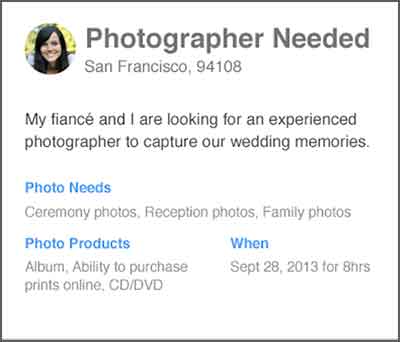
    Customer Request:

    PhotographerNeeded

    Business Custom Quote:

    CustomQuote

  • All The Best Ideas Are Stolen: Take Yours From Facebook’s Success Stories

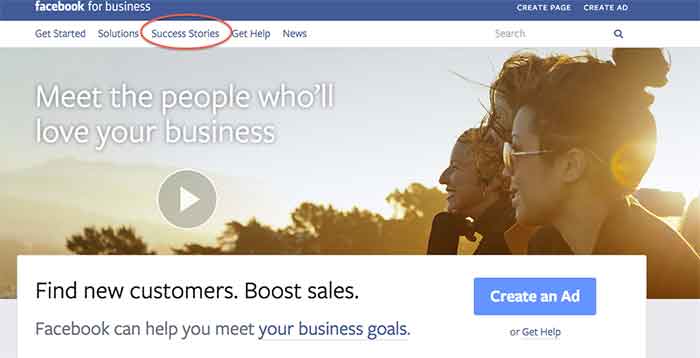
    I was recently introduced to the Facebook for business page and was shown some interesting and educational aspects of this informative page.

    Besides giving you an opportunity to create a Facebook Ad or create a page, it gives you the awesome option to see success stories of businesses that have used Facebook to their advantage.

    SuccessStories

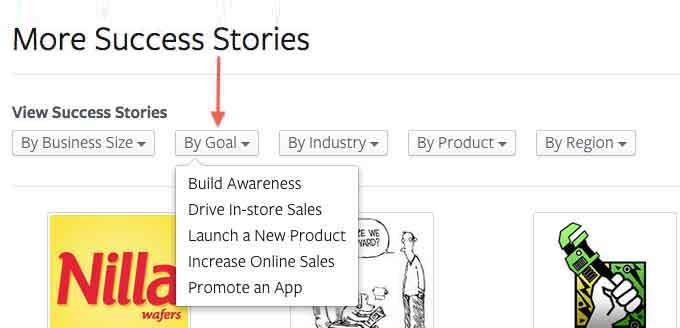
    The Success Stories page gives you 5 options to choose from, depending on what you would like your search to include/show. You can search by:

    • Business size
    • Goal
    • Industry
    • Product
    • Region

    The one that I think is the most helpful is the search by goal option. There are so many different goals that businesses want to achieve when promoting themselves on Facebook, and this option lists a variety of them to choose from.

    ViewMoreSuccessStories

    Since I LOVE to shop, I was interested in how small businesses that sell retail succeed on Facebook. When I conducted my search for a retail success story, Blake & Brady Boutique came up.

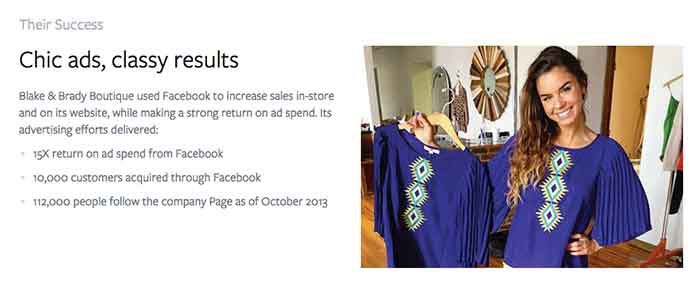
    This success story stated that the boutique, located in South Carolina, uses Facebook Ads to connect with shoppers. This in return has boosted their online and in-store sales. They have achieved a 15X return on ad spend and have gained 10,000 customers through Facebook.

    What Do They Have That You Don’t?

    After reading those amazing numbers, I had to wonder, how do they have such great success? Reading further into the story, I came across the thing that should start every success story, a GOAL!

    Their goal was to boost their in-store earnings and reach a wider audience online and offline. The first step the owner took was to use Facebook’s Start to Success Program to learn about what tools were available through Facebook.

    How’d They Do That?

    My next question was what did they use? Promoted posts were used to reach women who live close to Anderson, SC area in the News Feed. They also used ads in the right column of Facebook that target people based on their location, gender and interests to gain clicks to the business’s website to help boost online purchases. The owner measures ad results often and then re-invests in the campaigns that gain the most customers. The products they use are news feed placements, boosted posts, and custom audiences.

    TheirSuccess

    All in all, it is safe to say this small business is having an amazing experience using Facebook to promote their business. What are some of the ways you promote your business on Facebook? Let us know what works for you in the comments section below.


  • 8 Tips for Handling Bad (and Good!) Online Reviews

    Have you ever had a bad experience at a business? How did it affect your opinions of that company? More often than not, one bad experience will hinder how someone views a business, even if the experience was handled in the best way possible by the business owner/manager. This can affect the online reputation of a business greatly if people decide to write an online review about you.

    Reviews

    While the thought of negative reviews may scare you, do not let these reviews discourage you! Remember that a dissatisfied customer is more likely to write a review after a bad experience than a satisfied customer writing about a positive experience. Negative reviews can even help you learn how to improve your business. Here are some tips for actively handling these reviews:

    1. Actively check your reviews on various platforms across the web.

    A good way to keep up is to assign one day per month (or bi-weekly) to check your online reputation on the different platforms. The list can be endless, but these are some important ones to consider:

    **Note that you will most likely have to create an account and verify that you are the owner / manager to be able to respond to the reviews as the business owner.

    2. Always be transparent with your customers. This includes:

    • NEVER posting (or having your staff post) fake reviews.

    • NEVER deleting reviews that are negative. This will just anger the person that posted the review, in turn causing a downward spiral effect. Most likely, the angry reviewer will continue to post reviews until they are acknowledged by the business. Instead, take the time to listen to your customer and their concerns.

    3. Make an effort to respond to every review – positive and negative.

    • For positive reviews: A quick, “Thank you for your feedback, NAME! We appreciate your business. We hope you continue to be a BUSINESS NAME supporter!” is sufficient for a positive review. Responding to positive reviews can reinforce the already positive opinion that the reviewer has of your business, and reinforce brand loyalty with that person (because who doesn’t like being responded to by a business?).

    • For negative reviews: The dissatisfied customer will appreciate being heard, and outsiders will appreciate that the business takes the time to respond when something isn’t right.

    4. Be personal in your responses.

    Use the customer’s name if provided, and bring in information from their original review. This will keep the customer from thinking you just have a generic response to all reviews.

    • For example, if a person leaves a bad review on a spa page and you notice in their review they had a massage that day, you could say something along the lines of: “Hi NAME, I’m sorry your massage was not up to par….”

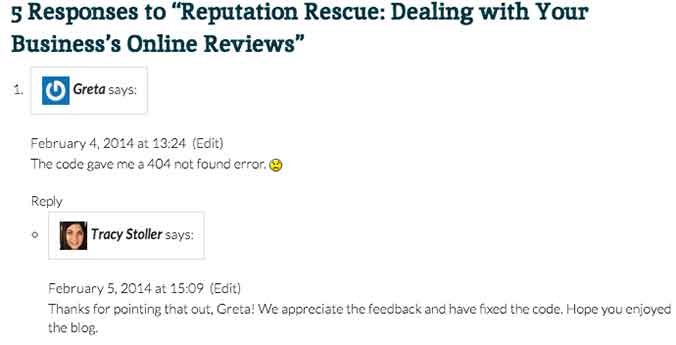
    • Another example comes from our blog! Check out how Tracy Stoller responded to a comment about an error in a code we provided in a previous blog.

    response

    5. Provide a business email that the reviewer can contact you on.

    Don’t try to make it all perfect on the review. You will be able to go more in depth with the customer through an email, depending on the severity of the review/situation. It’s up to you to decide when to try to go into more depth to resolve the issue.

    • You could say something along the lines of, “I truly apologize for XYZ. Please contact [email protected] to help us resolve this issue for you.”

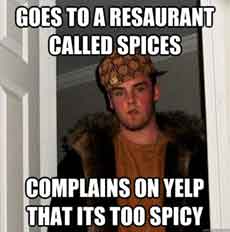
    6. Remember that sometimes people have unrealistic expectations of a business.

    yelp-meme

    If something happened that is completely out of your control, explain yourself in the reply. However, do not have a negative tone toward the customer – simply explain the situation to the best of your ability.

    • For example, a customer leaves a horribly negative review after coming to your restaurant and you are all out of their favorite beer. You can apologize for the inconvenience, but explain that things like this happen occasionally. Explain when the product would be restocked and invite them back. This would be an example of when to NOT provide a contact email, because the situation is not that extreme.

    7. Do not offer gift cards or other repayment for a negative experience on the review site.

    If something is serious enough that you feel the need to refund the customer, provide your contact email and do so through email. Offering repayment or gift cards publicly can be seen as bribery by an outsider reading reviews.

    8. Invite your customers to leave reviews!

    Post a link to your Yelp! page (or other review site) to your social media accounts and invite your followers to talk about their experiences. This could lead to people leaving positive reviews that would not have normally done that on their own.

    It’s important to remember that you can’t please everyone, but continuously having timely responses to your reviews can only benefit your business.

  • Social Media And Small Businesses

    Early last year, an article was featured on StreetFight.com  that made some overzealous claims about social media marketing for small businesses. The negative stance was made loud and clear: social media marketing + very small businesses = zero return.

    I take the most issue with the article’s claim, “The type of business most likely to realize a social media return on investment are B2C businesses whose customers are younger than 50 and that focus on entertainment, retail, personal services, or tourism. B2B or home services, or businesses catering to older people, do not fare nearly as well.”

    In my experience, that just isn’t true. Every business can benefit from social media marketing. Here’s why:

    Social Media is for Everyone

    First, let’s talk about the age comment. The whole “social media is only for young people” idea is dead. Besides the fact that every family member I have over the age of 50 is actively engaged on Facebook (and some are even on Twitter), there are numerous statistics that prove age assumptions wrong. The fastest growing age group using Facebook is surprising – 45-65 years old.

    So, in all actuality, Facebook has transcended the age divide.

    Second, the article singles out B2B companies, saying that these businesses do not do well on social media. Wrong again. According to Vocus, 90% of B2B companies are currently on Facebook. Outside of Facebook, Twitter has emerged as a popular platform for B2B, with 85% of B2B marketers citing Twitter as the top social platform, followed by LinkedIn at 82%. If those stats are not enough, there is a whole list here.

    B2B Benefits

    Social media generates leads and leads make B2B. That’s a fact.  Social media allows businesses to:

    • generate brand awareness

    • increase customer engagement

    • establish a personalized/genuine relationship with customers

    • respond to customer reviews and make improvements

    • share special offers and highlight products

    The list goes on, but what I’m driving at is that social media drives site traffic. When executed well, social media marketing acts as a hook, getting customers intrigued. All social media business profiles should direct the customer back to the site. Regardless of the products sold, even if the business isn’t based in “entertainment, retail, personal services, or tourism,” social media marketing can work for small business.

    Low Cost Alternative to Traditional Marketing

    As the article points out, sites like Twitter, Facebook, LinkedIn, Pinterest, and Google+ are all free, so the only cost is time. However, the easy-to-use formats of all these sites allow for quick updates. Plus, there are numerous scheduling tools out there, like Hootsuite, that allow you to make posts into the future. The benefits behind social media marketing are well worth the time SMBs are dedicating to it. Most businesses don’t have the time to run their own social media profiles, so these customers usually contract with Search Influence and our partners to manage their social profiles for them.

    Finally, the article says “Sure, social signals are important for SEO. But as far as knowing that inputting X equals Y placement in search results, we don’t know the equation and never will.” Even if we don’t know exactly what X and Y are, we do know that there is an obvious correlation between social media traffic and site traffic.

    For instance, an increase in followers leads to more shares, and shares are a great way to spread your website content and brand name. An active social presence will also generate inbound links and improve customer satisfaction as Facebook, Twitter, and other social networks provide the optimal forum for direct customer-business feedback. In other words, social networks increase online visibility, and they don’t just provide a small window of visibility – these business profiles open a genuine link between customers and businesses.

    Putting Social Media to Work

    So, small businesses shouldn’t count out social media marketing just yet. Create profiles that promote products and engage your customers in a genuine fashion. Of course, all of this support for social media marketing would fall on deaf ears without a direct example. One of our clients, a small business of the exact strain highlighted in the Streetfight article, reached out to Search Influence two years ago. At the time, they only had 97 Facebook fans and site traffic in the low hundreds.

    Now, after a strategically designed Facebook ad campaign and other SMO tactics, the client has over 27,000 likes on their Facebook page alone and generates monthly site traffic in the thousands. Although their site traffic was not driven by Facebook alone, their Facebook ads had a click-through rate five times the average for other Facebook ads.

    Annual ad spending is increasing most rapidly on Facebook. By the end of 2014, 88% of small businesses expect to put some of their marketing dollars on Facebook, up from 43% in 2009. Recent estimates show ad spending on Facebook and other U.S. social networks increasing by 31.6% in 2013 (eMarketer, 2013).

    Even though social media marketing may still be a bit undefined, many online marketing experts predict that it will only become more prevalent. The future of links-to-like upheaval hasn’t been determined, but the power of the “like” is only growing stronger. Don’t count out social media marketing because you are afraid that you won’t generate a fan base due to age restrictions or the size of your company. Explore the social media networks out there and find the site that best works for your business.

    Top 5 Keys to B2B Social Media Success

      • Be authentic – good content is still key

      • Promote your brand – send signals that direct viewers and fans back to your website

      • Be personal – social media works best when directed towards a specific audience, which is easier than you think with the Facebook Ad Campaign tool.

      • Be engaging – post things that will be shared or liked. Find what kind of content works best for that specific social network. Don’t be afraid to use humor or to have fun! Like we did with this post!

  • Kickstarter For Advertising and Funding


    159396590Crowdfunding has been around for a while now, from major sites like Kickstarter to more niche spots, like Indiegogo. Crowd funding is a process in which a project finds its funding from a vast pool of minor investors as opposed to the traditional approach of loans, private partners, and venture capitalists. Proper utilization of this funding option has lead to product launches across a variety of fields, from independent films to music to video games.

    Recently, major artists and established companies have turned to crowdfunding to act as both an additional revenue stream as well as viral marketing. By allowing fans and potential customers to feel included in the creative process, you can increase loyalty to the brand and to the project itself. Most projects have rewards associated with different levels of fund contribution, from early copies of products to names appearing in the credits of films and albums.

    Small businesses can even capitalize on this process by starting projects to fund future store or service expansions, and future product lines. A great example of a potential user would be a clothing boutique that sells a mixture a vintage clothing and modern, locally sourced products. The boutique could start a crowdfunding project to expand the production of an in-house jewelry line, setting a funding goal of slightly higher than the cost of an item. This essentially results in pre sales of these items, as well as viral advertising amongst current and potential customers.

    Avoid potential pitfalls, the major one being over promising. Make sure you understand the entire cost and potential extra expense associated with any new line or expansion and set your funding goal for above that amount. This way you will have all the capital you need to deliver the final product to your numerous investor/customers. And if you don’t meet your fundraising goal, sites like Kickstarter refund the money to the investors so you don’t have any unmet obligations among your existing customers.