If there was a formula for the best SEO strategy in today’s online market, it might look something like this:
Content + links + social = WIN
While there are no guarantees when it comes to search engine optimization, including these three ingredients in your strategy is sure to improve your ROI. Here are some tips and best practices to strengthen your SEO foundation and get results.
Content: More Important Than Ever
With recent changes to Google, like the new algorithm and the demise of the Google Keyword Tool in favor of SSL secured searches (that no longer allow marketers—or anyone else—to see specific keyword search data), great content is essential for optimizing your website.
There are no keyword “cheats” left. In order to boost your search engine ranking, you need to include keywords and search phrases organically inside well written, engaging content that encourages not only search engines, but also your visitors to spread the word about your business.
Aside from quality, freshness counts when it comes to content. Search engines index your website more frequently when you’re adding new content—so unless you want to continually rewrite the copy on your core pages, you need a way to keep updating your content. Starting or reviving a small business blog is a great way to do that.
Links: Quality Over Quantity
Link building has been an important part of SEO as long as there has been other websites to link to. Over the years, search engines have changed the way they weigh links. At first it was the more links, the better—but today, it’s all about quality.
There are two parts to link quality: inbound versus outbound and reputation. Inbound links—those that lead to your site from other sites—are weighted higher than outbound links, because they mean someone else is impressed enough with your content to link to it. With reputation, the higher the linked site ranks in search engines, the more it matters to your own SEO.
How can you get quality inbound links? Here are a few ways to do it:
Guest blogging. By writing quality content for blogs related to your business, you accomplish two things: help the hosting blog by giving them fresh, unique content, and gain inbound links. Most sites will offer guest bloggers a backlink to their own site in exchange for writing original posts.
Press releases. While some businesses view the press release as an antiquated tool that reached its peak while news still came mostly in print form, this type of content can still help your online marketing. There are plenty of syndicated online PR distribution sites, and sending out relevant, newsworthy press releases will spread more inbound links to your website around, even if it doesn’t get you in the newspapers.
Content repackaging. For maximum impact with minimal effort, spin your existing content into new pieces for redistribution. Turn newsletter articles into guest posts, blog entries into infographics, or even case studies into explainer videos. Don’t forget to include links to your website in all of your new content!
Social Media: Yes, You Need It
If you’re one of the few businesses that still doesn’t have a social media presence, it’s past time to get started. And if your social networks are getting dusty with neglect, it’s time to start showing them some love. Being active on social media helps you amplify your SEO strategy—building your brand and exposing your business to more potential customers.
The whole idea of social media may be overwhelming, whether you haven’t started yet or you’re trying to keep up with accounts on 10 different networks. For most small businesses, the best social strategy is to choose one or two channels to focus your efforts on (with Facebook and/or Twitter usually the most effective) and build those networks to perfection, instead of scattering your attempts across every platform out there.
Have you included these keys in your SEO strategy? What are you doing to keep your online marketing relevant? Let us know in the comments!
Megan Totka is the Chief Editor for ChamberofCommerce.com. She specializes on the topic of small business tips and resources. ChamberofCommerce.com helps small businesses grow their business on the web and facilitates connectivity between local businesses and more than 7,000 Chambers of Commerce worldwide.
Below you will find a webinar I did a few weeks ago that gives a very high level overview of things YOU can do to improve your presence online. Search Engine Optimization (SEO) can sound intimidating at first, but as you will see, there are many actionable items in this webinar that anyone could implement. Watch this presentation to learn more about what you can do on and off your website to improve your ranking in search results. If you have any questions after watching the webinar, please feel free to give us a call at 504-208-3900 (x.211)
Thanks to Panda and social signals becoming more prevalent than ever in Search Engine algorithms, content both on and off-site is moving to the forefront of most SEO and online marketing strategies. Truly exceptional content not only ranks well, but is shared virally and provides a real value to the reader.
Something I really began believing at PubCon NOLA this year is that social signals for search go beyond just whether someone likes or shares your content. The social signals Google is looking for have more to do with whether your customers are talking online about their experience with you after their purchase.
Source: mvellandi Flickr http://bit.ly/8vqROG
The problem here is the ratio between people who want to shout it from the rooftops when they have a bad experience to those who openly share when they are excited or had a positive experience. In today’s social age, everyone is a journalist, food critic, secret shopper and referral source. The average Facebook user has 229 friends on the social network, meaning that if they so choose, they can instantly alert at least 229 friends to stay far away from the new Italian restaurant in the neighborhood after finding a hair on the pizza.
That’s pretty powerful. There aren’t many other platforms that allow one individual to communicate with so many others so quickly, and to be so expressive while doing it.
As a business, you’ve probably been told that you need to be marketing on social media to protect your reputation online and grow your business by generating leads or driving more customers into your store. I would challenge you to think beyond that.
When is the last time you had a great experience at a local restaurant? Did you tell anyone about it? If so, how many people? Now think about the reverse. Chances are, you told a few more people about the negative experience than you did the positive one.
It is time to change our thinking when it comes to social messaging, beyond the traditional “lead gen” mindset. Rather than trying to push your product on someone who’s never used it or heard of it, why not look for opportunities to engage your existing happy but quiet customers and get them talking? Social media gives marketers and businesses the opportunity to turn a customer into a brand ambassador.
Yes, we have to make sure we watch out for Panda and keep an eye on that pesky Google and their algo updates when it comes to on-site content strategy. I don’t mean for my focus on social to suggest that you should move your entire content strategy off your own website and onto social platforms. But, if we think about using our online content strategies to lift up our happy customers, get them sharing and engaging with us, just imagine the viral potential to reach their friends and family–new business you haven’t yet tapped into.
You’re probably like, “Ok, I get your point, but how do I DO that?” Funny you should ask! Social media content strategies will vary by business and industry, but here are some tips for converting your social media following into brand ambassadors:
Tone down the sales messages and pushy language. No more than about 20% of your social messaging should be self-referential or portray a sales message. Within this 20%, remember that the goal of these posts should be to provide a real value proposition to the audience. This could include specials, deals or contests.
While this is basically a self-promotional post for Shutterfly, an online photo service, they are providing a value to their customers with a create-your-own cover photo featuring dad for Father’s Day.
Reward your loyal customers and followers with exclusive information. Whether is a sneak peak into an upcoming in-store special or just a “Did You Know” fact, people love to feel like they have the inside scoop, so give it to them!
Online retailer HauteLook hosts designer pop-up sales for a limited time until inventory is sold. They effectively use social media to make their audience feel like they’re getting the inside scoop while also promoting the upcoming sale.
Feature your fans. Everyone loves to be recognized, so give your fans a moment to shine by choosing to feature them every once in awhile. They’re more likely to share the content with their friends and family (increasing the potential reach of your future posts).
A little subtlety goes a long way. I’m a big proponent of including a call to action in your post, but it’s best not to take it to the extreme. Providing a share-worthy piece of content to your pre-qualified audience with a slight nudge can never hurt.
Disneyland provides a great piece of content with a direct call to action: share. And share they did! The piece resonates well with their audience and was timely for the Mother’s Day holiday.
Post well and post often. At PubCon New Orleans this year, Alison Zarella (another AZ girl!) said it best: “the newsfeed is crowded.” As a business or brand, your competition on Facebook is not limited only to the business across the street that sells the same product. You’re also competing for your audience’s attention with the likes of their moms, distant cousins, besties and frenemies. If you don’t post great content and do it consistently, you’ll never be seen.
Reply, reply, reply! Make sure to reply to your customers who comment or post with questions! Facebook and social networks are where people spend a lot of their time these days, so getting a quick reply and notification of that reply is what they expect.
Be flexible and test for yourself. Above all else, try new things and test multiple approaches with your fans. There’s lots of information and data out there about what works, when to post and how to do it, but the truth is that every industry is different. You’ll never know what is the most effective for your brand until you try new things, compare results and adjust your approach.
One of the reasons I love New Orleans is that living local is part of everyday life. People love shopping and eating at local businesses. Thankfully, you won’t find many chains in the New Orleans zip codes (you need to go out to Metairie for that)! My friend Christine Alex recently started a jewelry business that imports handmade pieces from several countries across the world. This Q&A profiles her company, touching on why it totally fits in with the local New Orleans vibe.
How did you come up with the idea for your business? I came up with the idea for Culture Shock when I was traveling abroad. I thought it was cool to bring back jewelry instead of postcards to my friends and family. The jewelry became a hit and eventually more and more people began giving me money and asking me to bring items back for them. That’s when I thought it would be really neat for people to be able to buy handmade items from all over the world without having to leave their couch. Culture Shock became an LLC in October 2012 and officially launched on January 18, 2013.
What is the goal/vision for your business? When I studied abroad, I gained a deep level of respect for other cultures and as a result, appreciated my own culture so much more. My goal is to educate my customers about other cultures while selling them a piece of someone else’s culture to wear.
What products do you offer? I sell jewelry that I hand picked from all over the world. The biggest countries that I receive my inventory from are Nicaragua, India, and Nigeria. Aside from offering a selection of imported items, I also began creating my own ethnic inspired items. In addition, as a way of honoring my own Creole culture, I created an apparel line under Culture Shock called Naturally Creole. This line offers a selection of Creole-themed apparel and accessories.
Do you have an online presence? Website, Facebook, Twitter, Pinterest? Yes, I have a website, Facebook, Twitter, Pinterest, and Instagram. Facebook and Instagram receive the most engagement from followers. I have noticed usually the same people follow us across social media platforms.
Why do you use Facebook? What is the benefit that it is bringing to your business? I use Facebook because it’s where my customers are, and I want to develop a relationship with them. Facebook allows my customers to understand the personality of my brand and learn more about my company and the products that I offer.
On the content she posts to her platforms: I try to post content related to the countries that I import my items from. I post photos, videos, and open-ended questions. Pictures usually receive the most activity from our followers. On Pinterest, I pin items from our website.
Do you run any contests on Facebook? If so, what kind? Yes, giveaways.
On her customers: Word of mouth and social media have been important in building brand awareness and getting people to buy our great pieces. I’d love to get more interaction from our social media followers to continue to build the brand!
As usual, Google is always testing new search results and the way the results display. Dr. Peter Meyers of Moz recently noticed a change in the Google search interface. The results displayed included restaurant reviews from Reason, New York Times, and the Wall Street Journal when he searched [mexican restaurants].
In a recent announcement, Facebook plans to consolidate its ad offerings down from 27 to close to half of that. Offers for online deals will disappear and they are changing way “Sponsored Stories” are laid out. Expect these changes to slowly roll out.
If you have heard of this NSA PRISM program, you should pay attention now. The Guardian uncovered a top secret document that showed that officials had direct access to systems of Google, Facebook, Apple and other internet bigwigs. The document was allegedly used to educate intelligence operatives on the program.
Jade W of Google announced that Google will now start displaying “Are you a business owner?” to direct branded search results. Although it is a minor change, it seems as though Google is attempting to engage small business owners more. Have you started seeing this change for other SMBs?
For those who still use Yahoo as their primary search engine will notice a change in the search results. Yahoo has attempted to de-clutter the SERPs and moving search results higher up on the page. Do you like the new changes? Will you start using Yahoo?
Pinning for SEO: Pinterest Can Boost Your Rankings
Pinterest is a hot topic right now, and not just for people wanting inspiration for their future wedding. While blogs, websites, and the big-name social sites get all the SEO airtime, Pinterest can get overlooked, even though it has huge potential to boost your company’s rankings. With the right tactics, you can start pinning your way to greater exposure, one infograph or product at a time.
Sneak In Keywords
Pinterest may appear to be all about the images, but that doesn’t mean there aren’t opportunities to scatter your keywords around the site—and doing so can provide a big payoff. Your profile’s “About” section is only 200 characters long, but making those words count will give search engines something to do.
For each board you create, incorporate one or more keywords into the title; that will make them more interesting to search engines, and more likely to be spotlighted. And when you pin, edit your image file names to include keywords, and utilize the 500-character description for each pin to scatter keywords. Remember to go back and edit previously pinned images, too, so you don’t lose those valuable SEO opportunities.
Check and Uncheck
There are two little features in Pinterest that can make all the difference for your SEO. Both are under “Settings.” Make sure the option to hide your boards from search engines is turned off; hiding your pins will defeat the entire point of using Pinterest.
While you’re on your “Settings” page, click the “Verify Website” button. This step certifies that the website on your profile is, in fact, yours, and puts a check next to the domain in search results. That check translates into increased traffic and higher SEO rankings, since both consumers and search engines are more likely to find you legitimate.
Go Outside the Platform
Pinterest, like any social media, is most useful as a connection tool. Link to your website, blog, Facebook profile, LinkedIn profile, and any other sites connected to the company, from your Pinterest “About” section and/or your pin descriptions. Encourage users to view more of what you have to offer by directing them beyond the images on your boards.
Additionally, pull your pictures from outside Pinterest to generate fresh content. While repinning creates connections, new pins draw attention, as they haven’t been seen before. Search engines scan pin quality as well as text, so pin high-resolution images whenever possible.
Board Smart
Think of your Pinterest boards as your welcome signs, drawing in users and search engines with strong titles and an enticing variety. Put your best boards up higher, since viewers often see just the top one or two rows, and edit each board to make sure it has a category. When you sort your images based on customers’ needs and desires, your Pinterest can become a well-organized storefront, even if you don’t sell products. And with the new Pinterest Web analytics, you’ll be able to see at a glance what’s working and what needs to disappear.
Pinterest may have started as a virtual corkboard for the crafty, but it’s exploded into nearly every realm. Take on the pinning challenge and make it work for you!
Megan Totka is the Chief Editor for ChamberofCommerce.com. She specializes on the topic of small business tips and resources. ChamberofCommerce.com helps small businesses grow their business on the web and facilitates connectivity between local businesses and more than 7,000 Chambers of Commerce worldwide.
At a recent event I found myself ranting – yes, really, ranting and I understand there’s video – about what I think is a very big deal for SMBs and those who market for them. The topic at hand was call tracking and local search.
Over the course of my interaction with a few of our attendees I discovered that at least a couple of them were using call tracking to demonstrate ROI for their customers in a potentially harmful way. Call tracking in local SEO, if done poorly, is one of the most irresponsible things an online marketing company can do.
What’s Coming – It’s Kinda Long:
The NAP (+W)
The History of Call Tracking
Why doing it wrong really hurts SMBs
When is it OK?
How you can do it with less risk
Your NAP +W and Why It’s So Important Not to Mess It Up
The first time I heard the NAP (Name, Address, Phone Number) referenced was in a presentation by my friend Gib Olander who at that time worked for Localeze, one of the 3 main data providers for online and offline directories. Gib and I were presenting on a panel at SMX Local & Mobile in July 2008. My presentation was on a concept I called “Barnacle SEO” and Gib’s was all about the NAP. Mike Blumenthal has sinced added the +W (web site).
NAP +W is:
Business Name – you should have one and only one name. It should be the same on your web site, yellow pages listings, Secretary of State web site and everywhere else.
Address – the location of your business in the real world. This should be identical, or very close, to the version of your address in the USPS database.
Phone Number – your main business phone number. In the best case this phone will be answered by someone who says “Thanks for calling [Business Name], may I help you”?
+ Web Address – your home on the web. All about your business, hopefully including your Name, Address and phone number.
In relational databases there’s a concept of a Primary Key, which is the piece of data which ties together data in different tables. So, in databases, the primary key helps you identify a unique record. In the world of Local Search, the NAP is like that. In other words, your NAP defines your business. It’s like your fingerprint on the web.
Hopefully it’s self-evident that when you mess with your NAP you run the risk of confusing Google and other local search engines, which is never a good idea. If you screw up your NAP you may find yourself invisible in maps and locally focused searches.
If you get many customers who came to you from search, this can be devastating for your business.
History of Call Tracking
A lot of folks in online marketing are relatively new to call tracking. To those of us who grew up in and around the Yellow Pages business, they’re nothing new. In the Yellow Pages universe, they refer to them a number of ways. “Metered lines,” “RCF (remote call forwarding) lines,” and other names all describe what we now know as call tracking.
The Yellow Pages providers and their industry analysts were trying to do the same thing we’re trying to do now. They were trying to show either directly, or by inference from category data, that the ads they were selling had value by demonstrating a direct ROI (Return on Investment). There is little doubt that if your primary goal is to prove the value of your marketing efforts, you can’t beat call-tracking for service and local businesses.
Over the years, some of those same companies who were providing call-tracking for Yellow Pages have morphed into our current crop of call-tracking providers for local SEO and online marketing.
Why Doing It Wrong Hurts SMBs
Small business advertisers typically have a limited budget for marketing and are therefore attracted to “performance based” solutions, in other words, those that feel like they come with a guarantee. Call-tracking is a great way to track leads and demonstrate the performance of these programs.
Small businesses are also often fickle and impatient. And they’re not professional marketers, so we can’t expect them to think like we do about their investment.
And they don’t usually understand exactly what it is we as marketers are doing for them. In the case of Call Tracking, they likely have NO idea of the risks of their local and maps rankings if their NAP gets screwed up.
According to an acquaintance of mine who works for Google in Local Support and Operations, Google’s systems don’t support replacing your local number with an 800 number if they’re still able to verify your local number. Yes, you can have multiple numbers, but Google is going to treat the one they are able to find and confirm through their own data as authoritative. Google is looking for the greatest number of signals — some of them human generated, like phone verification — to assure their data is correct, so if they find a call tracking number in all the places they look for authoritative data it can be incredibly problematic long term.
There are 3 major data providers in the US, Axciom, Localeze, and InfoGroup. One of those 3 is the origin for 90+ percent of the data you see online. But, like Google, they too get some of those data from crawling the web. So you can see how it becomes a vicious cycle – publish bad NAP, bad NAP get’s crawled and goes back into the ecosystem, bad NAP lives on long after the campaign has ended.
At Search Influence we have a pretty deep expertise in NAP clean up — that’s right, NAP clean up — and a staff trained in how to manage listings. Most locally focused SMBs, plumbers, roofers, even doctors and lawyers don’t have the expertise to do it themselves. And, this should be obvious, they’ve got businesses to run.
Putting a bad NAP into the ecosystem can hang around for YEARS. We all know that guy who keeps getting calls for the pizza place which used to have his number, right? Imagine your frustration if you were the pizza place. Think of all the sales you’d be missing.
Beyond the NAP issues, for local search call tracking can be a crutch for weak metrics. It’s a heck of a lot easier to tell a customer they got 20 calls than to pick up the phone and ask about their business.
When is It OK to Use Call Tracking for Local SEO
NEVER!
Ok, maybe not never.
I think it’s OK to use call tracking with PPC and other online ads as long as one takes precautions against those numbers being seen with other referral sources. And, for national accounts (preferably with ads) I don’t feel as strongly given the lower, perhaps negligible impact of maps. But I realize that’s not Local SEO.
For local / maps SEO, I want to state clearly that tracking numbers in local search should be avoided at all costs.
My friend Thomas Ballantyne says he’d be OK with lead gen services in local as long as the business name wasn’t a match for his. In other words, if you want him to buy leads that use local search you’d better not muck up his NAP. From a home-service provider we hear it clearly, think about using a slightly different business name in the same way some providers use a slightly different URL. That way you don’t have to worry about your lead-gen stuff winding up in the cluster.
If, however, a client is adamant that they need to see the calls generated or they need to record calls that come from search it can be done, but the proper precautions have to be in place.
How You Can Do It with Less Risk
The safest way to track phone leads is by dynamically switching the number using Javascript.
Search engine robots are increasingly capable of “seeing” dynamic content so this is an imperfect method by itself.
It does, however, reduce the likelihood your tracking numbers will be identified and muck up your NAP+W.
A little more technological implementation can reduce the likelihood of NAP confusion even further:
First, determine the User Agent of the visitors to your site – the identifier of the browser – and ensure that it’s not a robot, such as GoogleBot or BingBot. If you determine the visitor is a robot, you must show your proper NAP.
If at all possible, ONLY show a call-tracking number when there is a utm_source, or other tracking code on the URL string. Doing this will explicitly assure your tracking numbers are only present for visitors from a specific source, or ad campaign.
Finally, if you want to be absolutely certain your numbers won’t get spidered you can render them in images. By replacing the image which contains the phone number you assure it won’t be misread. This is not the preferred method given it’s not mobile friendly and clickable.
End of Rant…Phew!
I hope it’s clearer now why call-tracking is such a dangerous tool. Yes, it’s a tool we use, but much like using a chainsaw, we take every precaution available.
Our local business clients don’t know what they don’t know and often don’t know to ask “what are the risks.” So we, as their shepherds, need to be sure that we do no harm.
I’d love to hear some other opinions. Do we have an ethical responsibility to our clients to educate them in the risks, or does the end justify the means?
Earlier this month, Google started slowly rolling out the new Google Places For Business Dashboard which includes an updated interface, deeper integration with Plus, and a promise of faster updates. The dashboard is now available to all new users in the U.S. To help better understand the new features, we have compiled a great list of resources on this much-needed updated.
Around here we get new clients everyday. Among these, there is always one who comes to us with a website built and hosted by a proprietary CMS (content management system) developer instead of being an independently owned and maintained website.
Now, proprietary systems can be great and have some very real benefits. We absolutely see those benefits for the business owner. And we also see some of the challenges that may be things the business owner’s thinks about.
It’s a little like renting your place versus buying your place. Renting is awesome because someone else has to do the maintenance, someone else has to clean the gutters and mow the grass and fix leaking sinks. They own it, they maintain it. You’re just paying to borrow for a while. In some ways, I see signing on with a proprietary CMS a little like renting. You’re paying to borrow the system for a while, and you don’t own the website, the design or the content.
(Different systems operate differently so it’s a generalization to say you don’t own any of it. You might get to keep the content if you canceled your contract.)
Buying a house is a lot more intensive. You have to go through a learning curve and have money for the fees and down payments. You have to maintain your investment i.e. you have clean the gutters and mow the grass, or pay someone who will. But eventually you’ve invested heavily in something you own. Having an independent website is like buying a house in that you have to invest up front in a designer, and you have a learning curve of understanding hosting and getting that set up, and you have to maintain your property. You are responsible for it’s health and wellness; you own it.
Proprietary CMS vs Open Source CMS
Open source software means the source code is created by anyone and is available to anyone. The software is free, but of course custom design and hosting and maintenance is not free. An open source software platform site you build can be hosted anywhere you want, but you have to make sure the hosting service has the security you need to prevent hacking and to secure any sensitive data. Examples of open source platforms are WordPress, Joomla, and Drupal. You have to pay for design, hosting, and maintenance and version upgrades.
A proprietary CMS is developed by a firm, who will often specialize their product for a single industry. This helps them add in the security needs and hosting needs they usually see in the chosen industry. For schools which hold student information and grades, for credit unions holding account information, dentists and doctors holding patient data, having a website on an industry specific system that has nothing but schools or credit unions or doctors, is reassuring. You hope they have seen the typical website concerns specific for your industry and have addressed them for all of their similar clients. There is safety in numbers. Proprietary systems are usually a fee each month for which they provide design, hosting, maintenance and version upgrades.
Why Do Small Business Owners Like a Proprietary CMS?
There is a lot of good stuff to be said for having your website on a customized CMS.
It’s empowering. It’s the same reason why I love WordPress. It’s easy for us who don’t know how to build a website to log in and put some text in there just like we’re typing in Word or in an email, and hit a button, and it’s LIVE! Just like that. It’s always good to be able to spontaneously add in a special or a new video or whatever comes up, and I don’t have to go ask a developer to do what I know is a relatively simple edit.
It’s easy. Usually in a proprietary CMS, the hosting is part of your monthly fee. A business owner doesn’t have to understand hosting, nor does s/he have to worry with getting a hosting provider and worry that the hosting provider’s servers are secure. And design is easy. They have some templates, pick which one you want, done.
Security should already be addressed. Especially if you are going to store sensitive data which can be accessible online, a proprietary CMS is attractive. Hopefully, the system will address security concerns for all of the like businesses on their system, and the single business owner doesn’t have to worry about SSL and all of that stuff.
A proprietary system allows you to not have to manage hosting or security or system updates and maintenance. It can be a low-stress way to have a website; just be careful that you choose a development firm that will be around a while and has a solid reputation in your industry.
So Why NOT Get a Proprietary CMS Site?
It’s the standardization of these systems that often does not provide what an SEO agency needs to do the job you hired them for. It’s kinda like asking the landlord to fix a leaking sink but not allowing him a wrench nor any plumber’s tape. S/he would get the job done, but it would be twice as difficult and a little messier than if s/he had his usual tools in his toolbox.
Some of the challenges we have had with some proprietary platforms:
Content has a character limitation. … Informative, good content is a #1 priority in ranking on Google, and if the site owner is limited, s/he is a limited resource. We never want content that is sooooo long, but I don’t want to be cut short either.
Can’t create pretty, search engine friendly URLs. … This isn’t super imperative, but it sure is a benefit to have that ability.
We’re limited on changes to heading tags or heading tags simply don’t exist. … Again, not a make-it-or-break-it problem, but it would be nice to have heading tags.
Limited to adding new pages. … Ugh. This is a problem.
Can’t change the navigation. … Not great, but we can work around it.
Can’t change photos or images or we have to use stock images. … Bummer.
Any unique html is not going to happen – no forms, no side widgets, no extras can be added. … That’s disappointing.
But these are some of our biggest concerns that we often come across:
— We can’t set up redirects, can’t noindex pages, can’t set a robots file, all because we don’t have FTP access.
— Cookie cutter content on every page of a site. This is a killer. If a platform has 32 dentists, the thought is that the system will provide the same content for each dentist. It’s easy and cost efficient to write it once and use it for everyone, right? Everyone who went to high school knows plagiarism is bad. Google does too. Unique, relevant content is a high priority if you want your site to rank. If your site has the same content as 31 other dentists, Google knows this and doesn’t like it. Your site will see an negative effect in rankings.
— Sometimes these platforms do not use Google Analytics for website traffic tracking. Sometimes they use some other tracking system for which we may not get access. Sometimes there is no mechanisms in place for tracking traffic. I can’t prove or disprove that the website is working if I can’t show you the data.
— Sometimes the proprietary systems don’t have built in fields for standard optimization elements such as custom page titles and meta descriptions.
— On a rare occasion, we have optimized a proprietary system website as much as we can, and the system owner does a system version upgrade or some maintenance or whatever, and all of our edits are wiped out. We normally have a copy of a client’s site in a backup file internally, and we could just roll out our backup, but with one of these systems, we often can’t make those internal backups. If our work is overwritten, we have to start over, which is a significant set back for the website ranking.
A small business owner has to look at what s/he needs in a website, and how much time s/he has to devote to it. It’s a business decision, just make sure you ask a lot of questions, and hire people you sincerely trust.
(P. S. I read just yesterday that it’s because I’m Gen X that I am all-inclusive in my pronouns “s/he.” Maybe so, but I prefer “s/he” than how I was taught to switch from he to she to he with each pronoun use. That’s just confusing.)
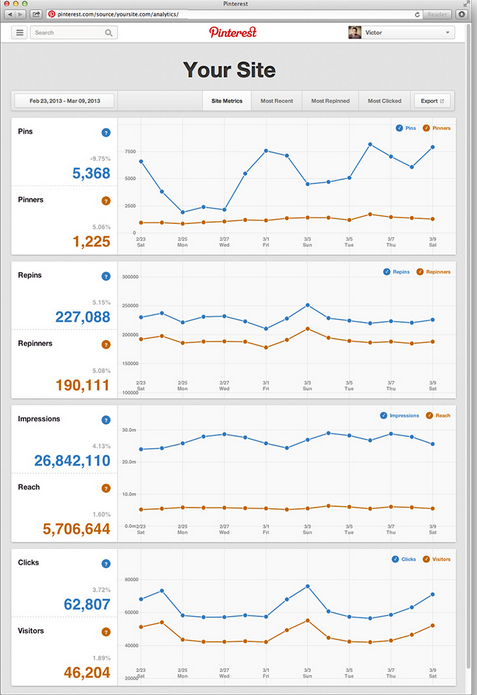
Recently, Pinterest launched its Web Analytics, allowing for businesses with verified accounts to track how many users are pinning from their site, the number of impressions from each pin, and incoming site traffic that is being generated directly from Pinterest.
Outside of SEO and social media campaigns, many may argue that there is no way to successfully tracking branding and traditional advertising efforts. Pinterest will argue this as this data now allows businesses to successfully track how users are interacting with their pins, products, and most importantly – how they are most likely to convert.
The launch of Pinterest for Business in late 2012 welcomed businesses to develop professional profiles and the implementation of “pin-it” widgets. Naturally this has been great for businesses across the board! Not only does having a professional Pinterest board increases brand awareness and a brand’s social presence, but also provides another avenue in generating site traffic.
By implementing social sharing widgets on a new product page, allows for users to quickly view a product they are interested in, and repin this great finding to the world of Pinterest.
So, yes we know how great Pinterest is, but what we really need to know is how it can make us money! As a business owner, our job is to create shareable content to promote products, and Pinterest’s job is to push it out. With this tool, we can track exactly how our marketing content is being socially pushed out! Businesses can now track how many pins are being pinned from the site, the impressions generated by each pin, and the number of repins generated by the original pin. Tracking of clicks and social reach is also available. Pretty cool we can now track the click through rate (CTR) for a specific product or pin!
Successfully tracking how customers pin their favorite blouse to a board where all their followings can see it (impression), allowing for new followers to visit your site (traffic), and potentially buy that same blouse (conversion), is a dream come true for e-commerce sites!
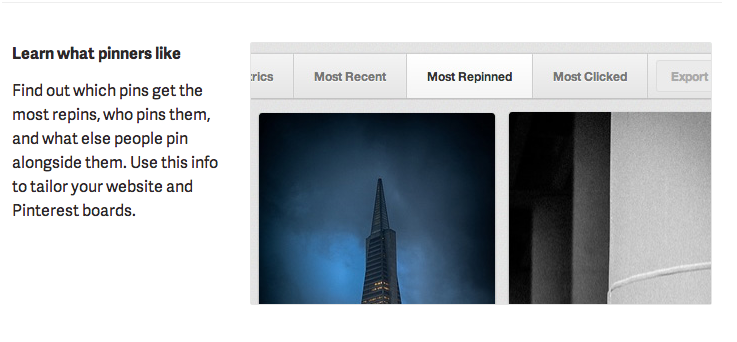
From a business perspective this allows us to really understand what our target market is interested in. Tracking which pin is the most successful allows us to analyze specific, engaging content that may lead to a higher conversion rate.
With social media constantly growing and changing, and the need to market businesses on social platforms only increasing, the launch of this new tracking device may even convince other business to get on board with Pinterest.
Now, how much longer until we see ads on Pinterest?
 If there was a formula for the best SEO strategy in today’s online market, it might look something like this:
 It is time to change our thinking when it comes to social messaging, beyond the traditional “lead gen” mindset. Rather than trying to push your product on someone who’s never used it or heard of it, why not look for opportunities to engage your existing happy but quiet customers and get them talking? Social media gives marketers and businesses the opportunity to turn a customer into a brand ambassador.


 Pinning for SEO: Pinterest Can Boost Your Rankings
 A lot of folks in online marketing are relatively new to call tracking. To those of us who grew up in and around the Yellow Pages business, they’re nothing new. In the Yellow Pages universe, they refer to them a number of ways. “Metered lines,” “
 The safest way to track phone leads is by dynamically switching the number using Javascript.