Tag: mobile sites

  • Call Me, Tweet Me (If You Wanna Rank Me) – Google Update Favors Mobile Sites

    UpdateAllTheCrustySitesImageRecently, Google released a blog about the importance of having a modern website that supports modern devices. Google has always put emphasis on the user’s experience. Now, they are trying to avoid sending users to sites that don’t promote a good user-friendly experience.

    Google explains that flash sites will display a warning in their search engine results. This warning can be detrimental to business owners with flash sites, or any site Google deems not compatible with modern devices. If users see this warning in the search engine results pages they will be less likely to click on the site. Essentially, it does not matter if a business’s site is ranked at the top of the page or the bottom; if this error warning is displayed the click through rate will be obliterated and the traffic to the site will plummet.

    How does this update affect you?

    Google is pretty vague in their blog, using Adobe Flash sites as an example and leaving it open ended insinuating that other types of sites may also be affected. Even though Google doesn’t provide a list of sites that may be affected, this should be a wake up call for all site owners. Any business with a website that is not compatible with mobile devices should be prepared to make upgrades. At this point, not doing so can bring site traffic to a standstill.

    Google is not saying it, but sites that are affected by this updated should expect to see their keyword ranking drop as well. With the stress put on user experience, it is unimaginable to think that Google would possibly allow sites that don’t promote a good user experience to rank higher than sites that do.

    Next Steps!

    Google recommends to all sites that don’t support various devices, to make the appropriate upgrades. Google references Web Fundamentals and Web Starter Kit, two resources that can be utilized by Webmaster to make the upgrade process smoother.

    It will be interesting to see how this update will evolve in later updates, and to see its effects on ranking algorithms. Will Google begin to rank sites according to their responsive design? Will they begin to rank those sites with responsive designs higher than sites that don’t? We will just have to wait and see. Business owners with a site that is not does not support all devices should call a web developer straight away!

    Image Source:
    Thanks to Hyperbole and a Half for All The Things image.

  • Five for Friday – LG Hires Bros to Build Brand, Your New Favorite Robot & Google Sees the Future of Eye Care

    Comic5

    1. LG Teams Up With Bro-tastic YouTube Network for Content Marketing Campaign
    – Advertising Age

    YouTube famous stars known as Dude Perfect are getting more than just views from their unbelievable, athletic trick shots. They have already acquired advertising leads with brands such as Pringles, Nerf, and as of this week, smartphone maker LG.

    LG hopes that by standing behind these bros, they can extend their reach to younger audiences and hopefully create some competition for other dominating brands in their industry.

    Incorporating this “jaw dropping” content may boost LG’s brand recognition, but stealing market share from Apple may be a bit of a reach.

    RobotWavingHandSmallImage2. Say Hello to the Robotic Personal Assistant of Your Dreams
    – Entrepreneur

    Meet Jibo, a robotic personal assistant created by Dr. Cynthia Breazeal, a Boston-based professor and entrepreneur. Jibo is a “family robot,” designed to interact with your household, take photos and remind you of important events.

    Having had a strange personal experience with Siri, I’m a bit skeptical of personalized interaction with a computer. Jibo seems to break the mold, but will this technology continue a pattern of diminishing personal interaction in today’s culture?

    3. Novartis, Google to Develop Contact Lenses to Monitor Blood Sugar
    – Mashable

    Google is currently joining with Novartis, a Swiss pharmaceutical research and sales company, to develop smart contact lenses. These lenses, expected to make their debut as early as next year, will be equipped with blood glucose monitors and autofocus for troubled vision.

    “The promise here is the holy grail of vision care, to be able to replicate the natural functioning of the eye,” Jimenez said in the Bloomberg report.

    As if being “the holy grail” of the internet was not impressive enough, Google is taking it a few steps further and improving health care and the quality of life as well.

    ContactsEyeImage

    4. Prototype Improves Mobile Typing by Ditching the Keyboard
    – DNews

    Are you fed up with ineffective, awkward mobile and tablet typing methods? Well, a startup based in Austin, Texas is in the early stages of creating a nonexistent keyboard to solve that #FirstWorldProblem.

    Just as the name implies, the AirType project’s goal is to create a system allowing the user to type freely with no restriction but the mobile sensors around your hands and knuckles. Not only does this keyboard (or lack there of) allow you to type freely, it will also adapt to your activity and begin recognizing your habits, like voice recognition for your hands.

    5. Retargeting Is Flawed; the Future Is Pretargeting
    – Digital Next

    What if ads were designed to service needs that we don’t even know we have? Retargeting will soon be a thing of the past, the future of advertising is our future behavior.

    Most are familiar with retargeting efforts, taking products and services we already recognize and driving marketing for those brands. Marketers are beginning to refocus their goals to be more predictive and create wants and needs we may have in the future. The more information consumers divulge, the more predictive marketers become.

    Image Sources:

    Niek Beck, Moms contact


  • 5 for Friday – Twitter and Facebook Duke it Out, Social Signals’ Effect on SEO, and the Power of Nofollow Links

    5hand

    1. Mobile Site Call Conversions Now Available in AdWords – PPC Hero

    It’s finally here! Adwords now tracks click-to-call conversions on mobile devices. This can easily be added to a specific landing page with a little bit of coding. This feature will allow you to track calls through the same venues as your other performance metrics and customize the value of the incoming call. This blog post has step-by-step instructions on how to implement this new feature on your site!

    2. Google Wallet’s 2-Click Instant Buy Checkout Comes To iOS – Tech Crunch

    This week Google Wallet released its Instant Buy API for iOS apps. This was first released for Android apps a year ago. This free service can be accessed with your Google+ login and stores your shipping and credit card information. Merchants can then use the information to complete the transaction. Google Wallet aims to eliminate the frustration of mobile device shopping and decrease shopping cart abandonment.

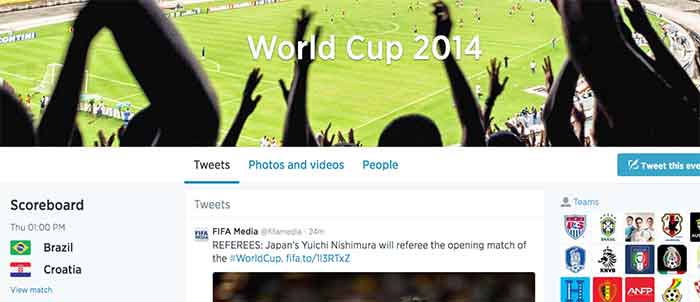
    3. Facebook and Twitter Want You to Talk About the #WorldCup on Their Field – Marketing Land

    Facebook and Twitter are engaged in a Battle Royal almost as intense as the World Cups itself. With yesterday’s commencement of the Fifa World Cup, these two social media powerhouses pull no stops to be become the No. 1 platform for Fifa fans to electronically engage.

    Facebook’s campaign provides fan with a Trending World Cup Page. Here fans can access the latest scores, view highlights and interact with a global map to pick their favorite teams

    Use #WorldCup and #WorldCup2014 to access Twitter’s World Cup landing page. Here you can create a Fifa-specific profile and choose a cover photo and profile picture to support your team. Don’t forget to include your HashFlag. Introduced during the last World Cup, these three-letter hashtags can be used by fans to unlock an image of a country’s flag.

    Which social media platform will reign supreme? Only trending numbers will tell. Let the games begin!

    WorldCup

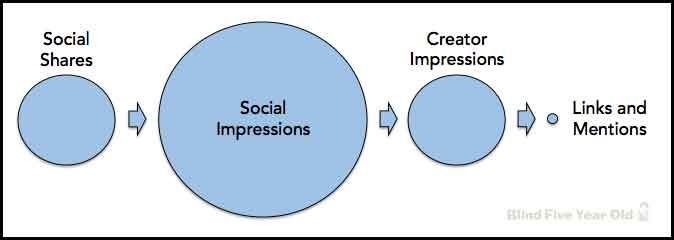
    4. Social Signals and SEO – Blind Five Year Old

    While the power of social media seems encompassing, Google is currently not using social signals, even from Google+, in its algorithm to calculate search results. You might be asking yourself why you’re putting so much effort into social now. Fear not! Maximizing the potential of a Google+ listing and other social outlets does have benefits. The Blind Five Year Old breaks down social media activity to explain that its not necessarily the activity itself, but the result of that activity that matters.

    social-seo-signals

    5. The Hidden Power of Nofollow Links – Moz Blog

    Link building is an integral part of all SEO campaigns. They can help build your company’s brand, build public awareness, increase profit and, of course, lead to more links. Links can also help build your site’s authority in the eyes of search engines. But what about nofollow links? While they seem unfathomably dreadful, this blog posts offers a silver lining and techniques to utilize those nofollow links.

  • 5 for Friday – Google Changes Its Logo, Apple Buys Beats, Internet Trends Report and More!

    spraypaint5

    1.Google Made the Slightest Change to Its Logo and Users Still Noticed – Mashable

    Google changed its logo and chances are, you probably didn’t even notice. The nerds did, though. Here’s a GIF of the logo, before and after.

    2.Apple Confirms It Will Buy Beats for $3 Billion – Mashable

    Apple confirmed the largest acquisition in company history – they will buy Beats Electronics and Beats Music for a cool $3 billion. No big deal, really.

    3. Lawyers Sue SEO Firm For Violating Google Guidelines – Search Engine Land

    A Michigan law firm is suing its former SEO company for allegedly using “spammy” techniques violating Google’s guidelines. I’ve been with Search Influence since October 2013 and have already seen changes in industry best practices, so it’ll be interesting to see what this means for SEO companies moving forward.

    4. The Most Important Insights From Mary Meeker’s 2014 Internet Trends Report – TechCrunch

    TechCrunch breaks down Meeker’s 164 slide report into 52 more digestible nuggets. Here are the 5 I found most interesting:

    • Mobile now accounts for 25% of all web usage
    • Internet advertising grew 16% this year
    • Music streaming is up, sales are down – sales fell in 2013, while streaming grew 32%
    • Photo sharing up 50% over 2013 in just the first half of 2014
    • 84% of mobile owners use their devices while watching TV

    2014InternetTrendsReport

    5. 7 Essential LinkedIn Marketing Stats: When to Post, What to Post and How to Improve – Search Engine Journal

    An interesting read about the third-fastest-growing social network. Don’t believe me? LinkedIn sends nearly four times more people to your homepage than Twitter and Facebook. Combined.

  • In The Game Of Maps, You Either Get There, Or You’re Using Apple Maps

    NotSureIfWhen you think of Apple Maps, you probably think of the disaster that was the iOS 6 Apple Maps update.

    Apple Maps is infamous for directional errors like having turn-by-turn directions that instruct users to drive across an airport runway to get to an airport. We’ve also experienced client business issues with Apple Maps.

    For example, Apple Maps users were being taken to a location 50 miles away from our client’s actual listed business location when using turn-by-turn navigation in the app. We had to then figure out how to edit business information in Apple Maps, as there is no desktop way to access Apple Maps, and you can only access it through the mobile app.

    The data in Apple Maps is mostly powered by data from Yelp, TomTom, Factual, Localeze, and Acxiom as you can see in Moz’s local search ecosystem. By making sure your business information is as accurate as possible on these sources, you could help avoid errors on the sites that they feed to. Often, however, when it comes to issues with Apple Maps, it’s best to figure out how to fix them at the source.

    YeahItUsesAppleMaps

    So here I’m going to walk you through how to edit information in Apple Maps via your mobile device.

    Step 1:

    Search for the business that you’re looking to update.

    Step 2:

    If you’re looking to add a business that is not appearing in search or to update directions that aren’t appearing properly, click on the ‘i’ (for information) icon in the bottom righthand corner. If you’re trying to edit particular business information like name or address, skip to Step 5.

    Step1

    Step 3:

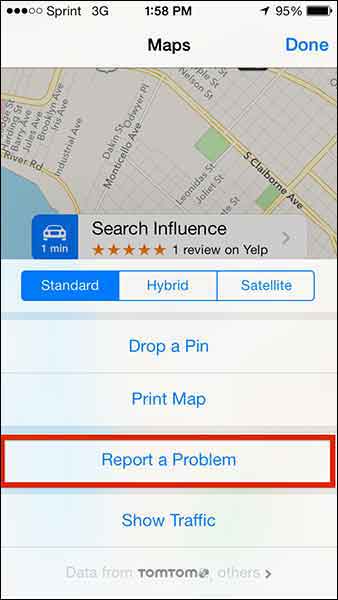
    From this popup dialog you will choose “Report a Problem”.

    Step2

    Step 4:

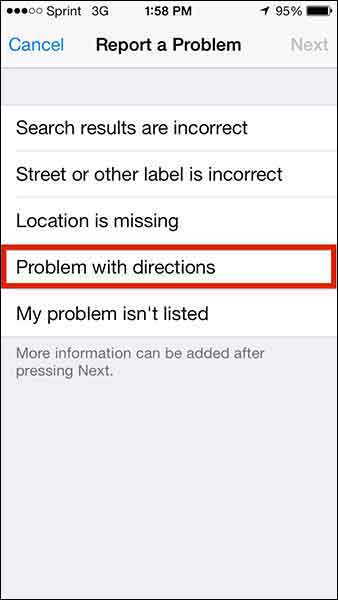
    This “Report a Problem” page will allow you to choose to report that

    • Search results are incorrect
    • Street or other label is incorrect
    • Location is missing
    • Problem with directions
    • My problem isn’t listed

    Select your issue (in our client’s case, we chose “Problem with directions” to indicate that the map was taking people somewhere it shouldn’t in turn-by-turn directions) and submit your problem!

    Step3

    Step 5:

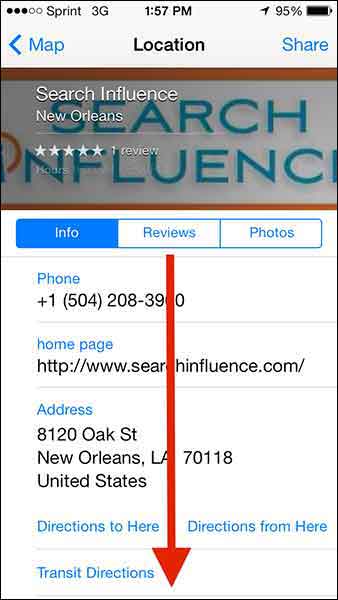
    To make more specific Apple Maps updates about a particular business, click on the business name in the search results.

    Step4

    Step 6:

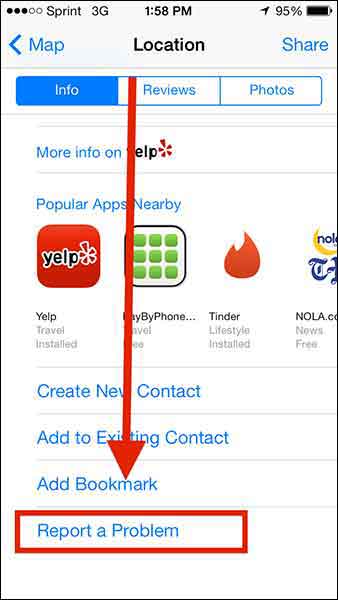
    Then scroll down “Report a Problem” on the “Location” dialog box, and CLICK IT!

    Step5

    Step6

    Step 7:

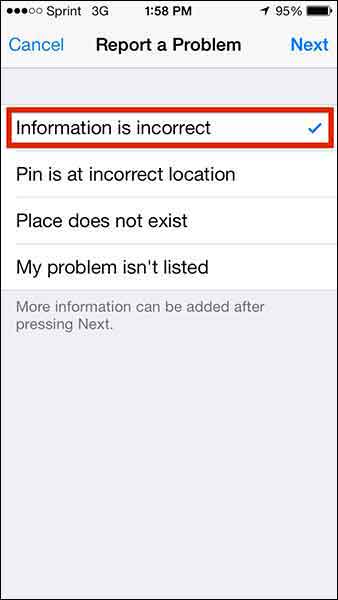
    Choose from the list of issues (most likely you’ll want to report that “Information is incorrect”) and click “Next” in the top right corner.

    Step7

    Step 8:

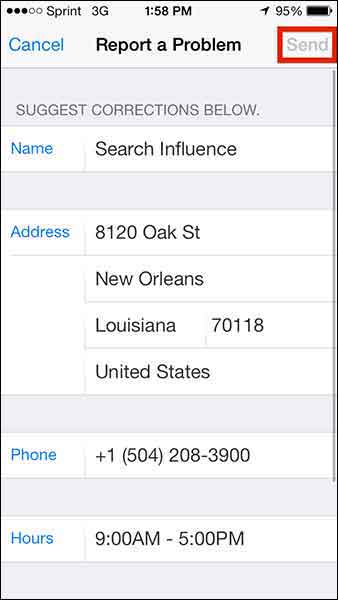
    Edit whatever details you need (obviously this page will differ depending on what problem you’re reporting) and click “Send” to send the report.

    Step8

    1O7UpdateApple maps has been gaining momentum in user numbers as it is the default app on all iPhones. Apple crushes all. It is known.

    With this in mind, one can only hope that Apple Maps’ future will have a formal business portal for claiming and managing your business information, but until then, we’ll have to live with this limited access process.

  • Mobile Optimization and WordPress Tips – Pubcon 3/20/2014

    Photo Of Influencers At PubconAlong with a number of other Influencers, I was fortunate enough to attend Pubcon New Orleans on Thursday, March 20th. Being a smarmy, cynical Developer, I was honestly a bit skeptical as to the amount of real, pertinent insights I would take away from the experience. I was even more skeptical of the quality of the seafood etouffee that would be provided at the lunch buffet. I am pleased to say that my skepticism was proven to be unfounded on both counts, and there was quite a bit of quality information shared at the Pubcon sessions I attended. And the seafood etouffee was legitimately really good, even to a New Orleans native. So great job all around!

    I thought I might in turn share some of the more significant information I took away from the speakers I heard. I’m going to start with what were actually the latter two sessions I attended (“Next Generation Catalysts: Trends Worth Watching” and “Mobile Conversion Optimization“), because these were similar thematically and a bit more “accessible” in terms of subject matter. Then I’ll cover the earlier session I attended on the nitty gritty of WordPress structure (“Optimizing the WordPress Content Machine“) for anyone whose eyes don’t glaze over upon encountering words like “server” or “database.”

    Mobile Strategy

    Photo Of Santa On A Smartphone

    In the two sessions I saw addressing mobile strategy, possibly the simplest but most surprising takeaway for me was how much actual commerce takes place on mobile devices now. As Ralph Schwoebel in the Next Generation Catalysts session enthusiastically emphasized, “mobile-friendly” optimization and responsive design are no longer just trends that are hip with the kids; they are now essential considerations for any business trying to expand its branding and customer reach on the internet. While more purchasers still use desktop devices to buy online, Schwoebel notes that mobile buyers actually spend about twice as much in their purchases. Also of significance is the fact that users of Apple devices thoroughly and decisively outnumber users of other mobile devices in terms of actual purchase rates. That’s not to say that designers and developers should just ignore Android users, but acknowledging the fact that iPhone and iPad purchases comprise a truly dominant majority of mobile purchases should help everyone prioritize a little bit.

    Key to leveraging this increased internet usage and spending among potential customers, however, is allowing our approach to design and user goals to evolve along with the technology. Poignantly, three different presenters across both sessions hammered on the same crucial point: mobile conversion goals should be approached differently than desktop conversion goals. Presenters William Leake and Chris Goward both emphasized that it is not necessarily productive to view form submissions or newsletter signups as a realistic user conversion goal, as it might be for desktop users. When optimizing a site for mobile users, they suggested making click-to-call buttons more of a focal point, since it is more realistic to expect a potential customer to call for more information versus filling out an entire form on a tiny phone keyboard. Ralf Schwoebel posited that rather than focusing on getting users to sign up for mailing lists, download apps or, again, awkwardly fill out a mobile form, efforts may be better directed toward encouraging users to bookmark a site or add it to a separate reader app or RSS feed.

    Along with adjusting goal expectations, mobile designers and developers were encouraged to adjust content-related expectations for mobile visitors. Where a site’s perceived topical authority and “SEO-friendliness” afforded by larger quantities of targeted content may benefit a business site viewed on a desktop browser, the same isn’t always true on mobile. It can be difficult to read content on smaller screens, and you don’t want to make users scroll forever to get to a conversion goal. “Trimming the fat” on mobile sites, be it content or excessive widgets, banners, etc. was a common theme throughout these presentations.

    So What’s The Point?

    In broader terms, just think like a real live mobile internet user (which most of us probably are). From a Development standpoint, I know it can be very easy to get bogged down in issues like “will this form display well in a mobile browser?” or “should all this content go above or below the form on Android devices?” and so forth. It’s essential, however, to take a step back and consider the actual user experience of someone browsing the internet on their phone while waiting in line or killing time at a coffee shop. The questions may well change to, “do we need the form or all that content in the first place?” or “what do people actually need to see in order to pique their interest enough to come back when they have more time to browse?” There are so many technical considerations when it comes to responsive site design and mobile-friendliness that it can be easy to forget its actual function for the majority of mobile users.

    Wonderful WordPress

    Moving on to the WordPress-centric session I saw earlier in the day, there were a great deal of really interesting points raised here about site security and maintenance. One over-arching point that presenters Carolyn Shelby and Brian Lafrance both emphasized is to avoid overuse of plugins in WordPress. There are numerous reasons for this, but one of the most pertinent is the ease with which a security breach in a plugin can facilitate hacks to a large quantity of disparate sites using that plugin. According to Shelby, this was exemplified during last year’s Pubcon, where it was revealed that there were major vulnerabilities in two of the most prominent WordPress caching plugins (W3 Total Cache and WP Super Cache).

    To help combat these sorts of problems, both speakers recommended compiling a master list of all plugins in use on any site you manage, with notes on when the plugins and the WordPress installation itself were last updated. This is one among many suggestions that would be more practical for developers afforded sole, proprietary management of a site and its content, of course. At Search Influence, we have many procedures in place to allow us to work on a site regularly while allowing clients and clients’ own developers to continue making updates of their own with minimal conflict. Still, tracking WordPress plugins and updates is an irrefutably sound approach.

    In essence, it should simply remain a policy to just not use plugins where plugins aren’t really necessary. There is no need to use plugins for site updates that would only require a couple lines of PHP or a quick line in the .htaccess file to accomplish on your own. Particular wrath was directed toward 301 redirect plugins, many of which have settings to automatically redirect broken URLs to places you might not want them to go, with very little customizable user control. And if a plugin is installed but not in use, it should definitely be deleted.

    Site Speed

    While the talk focused on the security aspects of WordPress, many of the principles in play also have direct impact on site speed. The fewer plugins with information being stored and sorted within the site’s database, the quicker the database can be accessed and loaded. More directly, a number of plugins function by adding extra JavaScript to a page, which can in turn make each page take longer to load in a browser. Another significant point raised by both speakers was to limit users within WordPress. More specifically, there is an option to force commenters to create an actual user account within your site in order to be able to comment. Some may see this as some form of deterring spam comments, but all it really accomplishes is to completely bloat a site’s database with user data. For anyone wishing for commenters to officially register in order to comment, Lafrance recommended using Facebook login as an alternative to avoid having to store all this information in the site’s database tables.

    All that said, it is still considered advisable to use certain plugins like anti-virus plugins, search and replace plugins and (now secure) caching plugins for site speed. Additionally, making effective use of the Custom Fields plugin for site functionality can save the need for many additional plugins, avoiding extra bloat within WordPress.
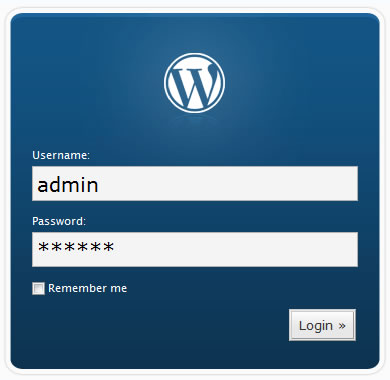
    Photo Of WordPress Login

    Logins

    I’m setting a special paragraph aside for one point that seemed almost embarrassingly obvious to the speakers and to me, but which comes up pretty much daily in our office. It’s shocking to have to say this in 2014, but PLEASE, do NOT make your WordPress user name “admin” or your password simply your business name, or worse, “temppass” or “password123.” Again, this seems like a statement that shouldn’t need to be made at this point in the evolution of internet usage, but it comes up all the time. Carolyn Shelby also pointed out that it is a really bad idea to name your WordPress database simply “wp,” which I’ve also seen on sites we’ve inherited in the past.

    Many of these points are in line with what we already practice – or at least preach, when access is limited – at Search Influence. It is always nice to be vindicated by other experts in the industry, however. Where we may not be overhauling any processes based on the points raised in the sessions I attended, I felt like I was definitely given better perspective on many issues we deal with regularly and better sense of priorities in terms of how we do our work.

  • 3 Ways To Make Your Website More Skim-able

    Bill Gates once said, “If your business is not on the Internet, then your business will be out of business.” I think we can expand on this and say that if your business doesn’t use the Internet to its advantage, it will not compete with those that do. This includes things like good SEO and a smart social media strategy, among other marketing tactics. Since all of these things are aimed at directing people to your website with the goal of converting a user into a customer, that site better be up to the task.

    There’s some bad news, though: most people don’t really want to read your website. They don’t have the time or the interest. But fret not! Your web copy can still be effective if you write it with this in mind. The key here is that you allow your readers to get the info they need quickly and without much effort. Let them skim!

    Mobile Search Content

    1. Visually Appealing Content

    Your copy should never look intimidating. Large chunks of text are out. Small paragraphs labeled with subheadings are the way to go. Bulleted or numbered lists are even better. Remember, a lot of your readers are likely using mobile devices. It doesn’t take much text to fill the screen of a phone, which might turn off someone  looking for a specific answer.

    2. Give Them What They Want

    Think about why someone would visit your site. What info are they looking for? That info should be the star of the site. If you own a tire shop, people are probably visiting your site for a few details: location, hours, services, products. If you own a dental practice, they’ll want to know what types of insurance you take, what services you offer, and your location. You can have more than the basics on your site, but make sure that you at least cover the most important details in a way that is easy to read.

    3. Put It Where It Belongs

    Make sure that your site is easy to navigate and all pages are clearly labeled with a logical title. “What We Do” is ok, but “Services” is better. Don’t put your hours on the “About Us” page. Put them on a page labeled “Hours of Operation.” You want your readers to scan the homepage and be able to quickly find the information they want or quickly figure out how to navigate to that information.

  • Responsive Design: An Introduction

    Responsive Design–What’s the fuss about? You hear the phrase “responsive design” but still don’t get it or why you should be paying for it? Allow me to explain it without all of the technical details.

    Making mobile versions of your website is common these days, but the implementation can make web developers’ heads spin. First thing to note is there are mainly two different approaches to making your site AWESOME on your veiwers’ devises and/or desktops.

    Concept smartphone tablet pc and laptop in handsThe first way is to have your main site for desktops and an additional (smaller) site for phones, tablets, and/or  ‘phablets’ (phone + tablet), which usually adds to your hosting, looking something like ‘mobil.yoursite.com.’ This works, but it doubles your content, number of domains, and space you are going to need to host such a site. Let’s not forget to mention the fact you will need to edit the mobile site every time a phone is made. Try to count how many sizes of tablets, phones, and monitors there are. Go ahead, I’ll wait. No? Me neither. Just getting up to date is enough to give a developer job security for the next decade. Or make his/her head explode.
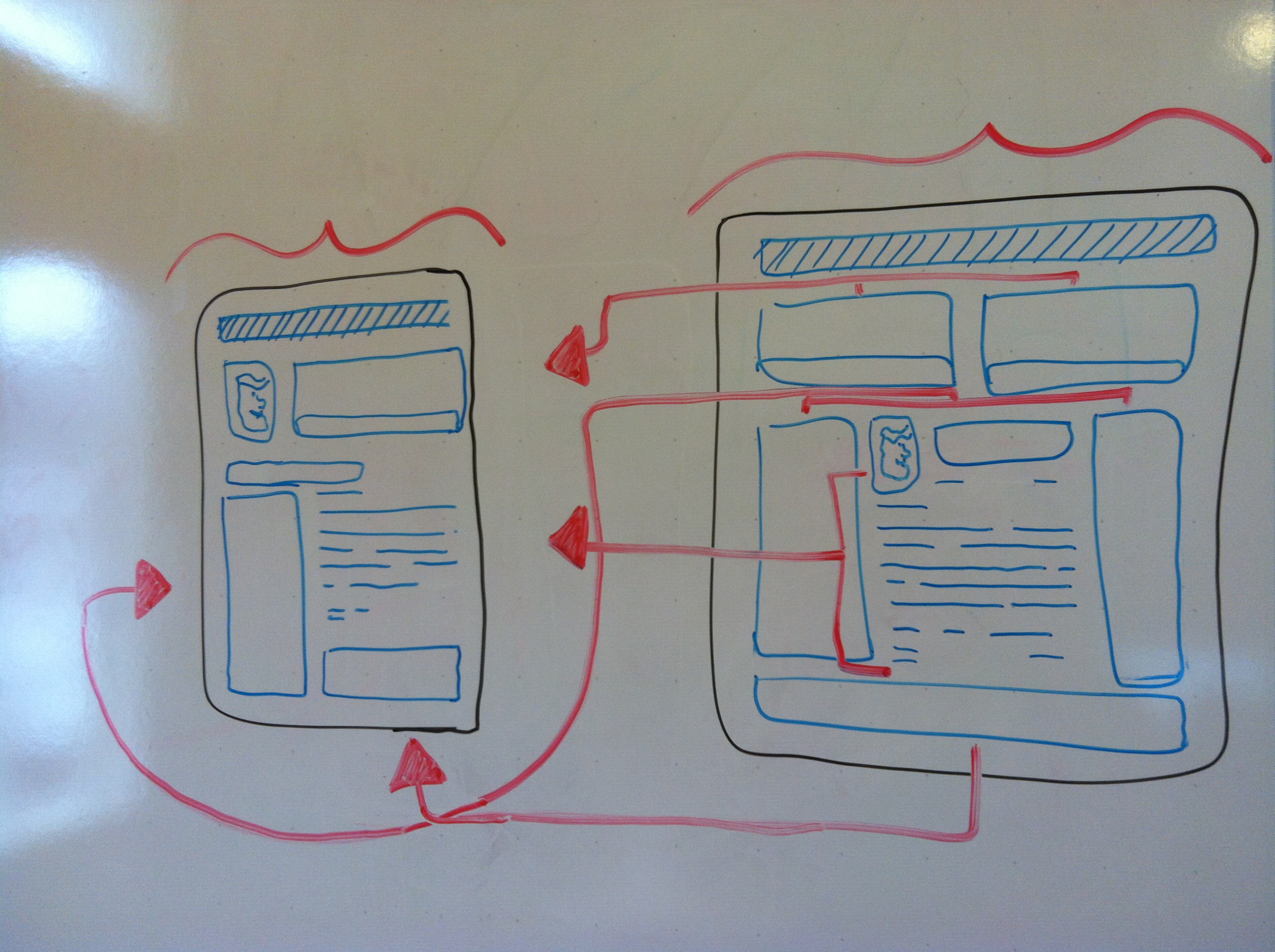

    Now wouldn’t it be great if your site just magically resized itself no matter what size the screen was and no matter what the pixel ratio was? I’ve beaten around the bush to get to the point, which is that responsive design using CSS (Cascading Style Sheets) can display your site according to the size of the user’s browser window. So whether your customer is on the latest iphone or tablet or wall projector, your site will handle it like a champ, displaying the site elements however you want them at that given size.

    Man, can it get any better? It actually does. Because you are using CSS instead of external files, which can bog down your site’s load time, it reacts in real time by styling itself. IT’S ALIVE!! If you’re on a desktop you can do a neat trick. You can actually resize your browser window and watch your site ‘take shape.’

    photo (1)
    With responsive design, you can change a website’s dimensions without worrying about the design elements.

    Use THIS SITE as an example if your site is not yet responsive. The elements on the page should ‘pop’ into new locations as it gets smaller/ larger. This ability to resize your site essentially free of cost it a great asset to your company and can save anyone, even smaller companies, big money.

    So responsive design has come a long way and still has a ways to go when it comes to the ever-expanding technologies and the shape of the web. Soon it will be as common term as “social media.” Now you should have a better idea of what people mean when they refer to sites being responsive, and the technical stuff won’t be as alien to you as before.

  • 5 for Friday — Links, Stories, & Posts for Your Weekend

    Round 1-101. Top 4 Strategic SEO Trends to Watch for in 2013 – Search Engine Journal

    Don’t get lost in the mix! Take a broad look at your organization to make sure you’re producing top quality content, including social media, making your site mobile friendly, and understanding the knowledge graph.


    rss2. Google Announces Retirement of RSS Reader – The Content Standard 

    Google has just announced that on July 1, 2013 Google Reader will retire. This is part of Google’s plan to remove irrelevant and no longer useful services. If most of your audience is using this to get your updates, now is the time to transition them to a new service.


    twilert-1

    3. How To: Use Twitter as a Listening Station – Small Business SEM

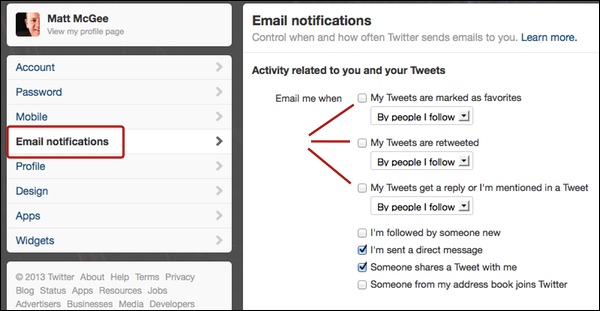
    If being active on Twitter doesn’t seem to be producing the results that you’re looking for, then try being passive by listening first and then responding. Twilert allows you to create timed alerts for when certain phrases, handles, or hashtags are used. If that is too much, you can always go the traditional route by creating email notifications through Twitter itself.

    twitter-alerts


    4. Mobile Searchers Do It at Night – Marketing Pilgrim

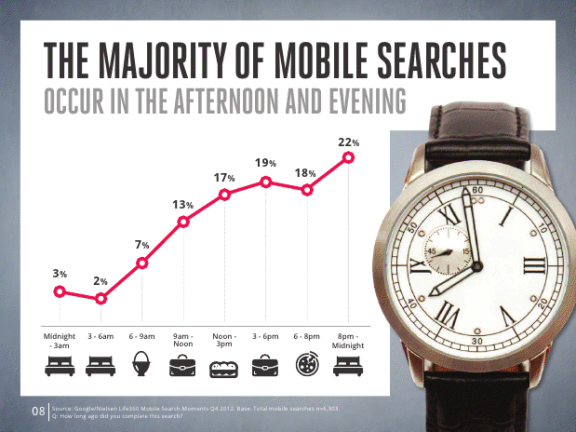
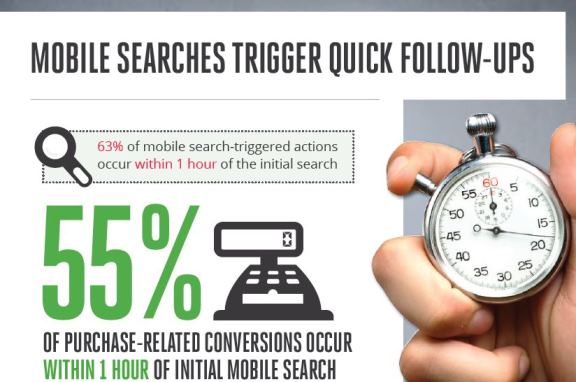
    Google and Nielsen recently put together a new report using data from 6000+ mobile searches to discover how it drives conversions. Did you know that 77% opt to use their mobile over a PC? So it’s important to make sure that you’re showing up in the first few results of a search otherwise you’ll never even make it onto their mobile screen.

    mobile-search

    mobile-followup

    5. Deadeye Keyword Research: Advanced Tips for Choosing the Right KWs from #SMX – aimClear Blog

    The better the research, the better the keywords…even if Google stopped providing all referring keywords in analytics for “privacy reasons.”

    privacywhat

    Key Relevance’s Christine Churchill provides some alternatives to gathering this information because as Avalaunch Media’s Matt Siltala stressed, “you can’t skip over keyword research. You can’t get annoyed with it. You HAVE to do it.” Read on for more about keyword intent and keyword research tools.

  • AdWords Enhanced Campaigns: Naughty or Nice for SMBs & Agencies?

    Yesterday, Google announced what might be the largest restructuring of the AdWords platform to date: Enhanced Campaigns. Building on (and some say attempting to boost) the influx of mobile advertisements on AdWords, Enhanced Campaigns are an attempt to simplify the mobile pay-per-click management process by removing barriers to ROI calculation for SMB advertisers. While many advertisers are less than enthused about the changes, Search Influence welcomes the new features, streamlined campaign creation process, and simpler campaign management and assessment that Enhanced Campaigns brings to the table.

    Nice!

    The official blog post on Inside AdWords is clear about the goals of Enhanced Campaigns: simplify mobile and multi-touch marketing for the part-time advertiser. Citing a study on the new world of multi-screen browsing, Google claims 90% of consumers “move sequentially” between several devices during the conversion funnel.

    Google highlights three refinements to existing AdWords features that will be live for everyone starting in June: (1) laser-targeted bid adjustment based on location, device, time of day, “and more” within a single campaign; (2) easy management of one campaign across multiple devices, which is in contrast to the previous recommended best practice of duplicating identical campaigns for different device targeting; and (3) more accurate click-to-call data and conversion measurement across devices. These changes allow advertisers to more easily set up mobile campaigns, a strategy Wordstream founder and CTO Larry Kim says only 4% of advertisers participated in despite lower costs-per-click and, in our experience, high conversion rates from calls.

    The new bidding system is based on a percentage of a basic bid which covers the equivalent of today’s national desktop campaigns. This bid can be multiplied by -100% to 300% depending on device targeted and -90% to 900% depending on geographic area or time targeted. This allows advertisers to avoid tedious duplication of campaigns simply for different targeting, while making it much easier on “part-timers” and campaigns with limited budgets to run on multiple devices and control who sees their ads.

    Combined with the recently-simplified Remarketing Lists in Analytics, the upcoming Universal Analytics, and the storyline offered in a post on SEER Interactive, it becomes clear that the other shoe dropping with Enhanced Campaigns is the continued march toward multi-touch lead attribution.

    AdWords is also dropping the direct fee for Google-offered click-to-call numbers in mobile search ads, tracking only calls over one minute as a conversion. This has been a point of contention for marketers who know that a click on a phone number and a call connected are very different things.

    Naughty!

    Not everyone is excited about the changes brought by Enhanced Campaigns. Many advertisers are concerned about the cost-per-click increase that will come with a variety of new advertisers not effectively managing their bids using combined campaigns. According to an Adobe study, the gap between mobile and desktop costs-per-click dropped by 15% between the 3rd and 4th quarters 2012, meaning that there’s already less of an advantage to advertising on mobile. Automatically setting advertisers to run on mobile means that despite the availability of new bidding tactics, less savvy advertisers will inflate the ad auction and lead the platform to be less profitable for everyone.

    Others are concerned that Google won’t be able to effectively manage the preferences expressed in the myriad targeting options provided by Enhanced Campaigns. Per Google’s Guide to Upgrading to Enhanced Campaigns, Quality Scores in upgraded campaigns are reported at a bird’s-eye view, making it difficult to see what targeting is driving increases or decreases of an already-opaque metric. Similarly, the inability to separate out tablets from desktop searchers makes some wary; there are some markets that would be highly affected by this, such as downloads of a desktop program. While this is concerning to some, it may also outline an overarching corporate goal of Google: to make the world fast and universally accessible — contrary to ideas like single-platform apps and solutions off the cloud.

    Misconceptions: Looks Naughty, but Is Nice!


    But some, seeing the change as a step backward for targeting, have unfairly found fault with the update. Enhanced Campaigns eliminates confusion by changing locations of settings.  Many have said that the “mobile-only campaign” has disappeared from AdWords. On the contrary, AdWords provides a checkbox to help Google figure out what device an ad should be shown. Furthermore, ads with extensions such as App Store downloads that only make sense on certain mobile carriers and operating systems will be automatically targeted to those devices.

    There’s also some worry about other platforms following suit. As BingAds has matured as a platform and international search engines have found monetization easier with cost-per-click ad auctions, it might follow that this grand experiment by Google will shape the industry. Yet BingAds has tried to forge its own path in the paid search realm; I can’t see them blindly following Google with its targeting any more than it already has — to wit, only slightly. But while the industry as a whole might not change, it is important to note the Google has over search ads, especially on mobile devices.

    How to Win with AdWords Enhanced Campaigns

    Best practices can already be parsed out from what has been released about AdWords Enhanced Campaigns, but they aren’t necessarily far divorced from current ones.

    1. Follow Google’s guide to transitioning your account to Enhanced Campaigns
    2. Be sure to take advantage of all appropriate ad extensions, which allow you to target you ads appropriately to device and location
    3. Ensure you’re using the most up-to-date version of AdWords Editor to effectively Enhance your Campaigns.
    4. Anticipate a variety of devices coming to your site by providing dynamic content and alternate conversion paths based on device
    5. Provide natural redirection to and from your mobile site if it’s required for your business to avoid issues when desktop ads show on mobile or vice versa
    6. Now more than ever, bid appropriately for your location, device, and time of day — the best strategy in a second-price auction like AdWords is to bid what that website visit is actually worth to you

    We’re looking forward to learning more as marketers start experimenting with these new tools. What do you think? Will this change the way you’re doing PPC?