Tag: mobile sites

  • How to Drive Conversions With the Right Contact Form—And What to Avoid

    Your business’ shiny new website just launched and everyone assumed a deluge of fresh new leads would follow. To everyone’s dismay, the predicted deluge turns out to be nothing more than just a trickle. What gives exactly? “Build it and they will come” may ring true with your traffic itself but that quote lacks an “and convert” at the end. In years past, traffic was the key metric for a lot of businesses since it was assumed that those users would appreciate the brand awareness. Fast forward to the present day in the “Silicon Age” where users not converting is sure to set your business behind further than the Bronze Age.

    One easy way to convert users into customers is through the usage of a handy-dandy online form, but just having a form doesn’t guarantee a conversion rate anywhere near your industry benchmark. I’m here to help bolster those forms from some boxes into lead machines!

    Positioning

    Back when there were only brick and mortar buildings, there was always a huge focus on location, location, location. That phrase may seem like it belongs in the Bronze Age, but it instead adapted to the changing times and is still just as important as it was before. The location of your form is integral to the success of any lead collection campaign. Forms should always be placed in a very obvious place and above the fold, which is the portion of a page that initially loads in the screen’s viewport, as often as possible. Having a form in a good location puts it on users’ minds as soon as they visit your website and makes it more convenient to convert. Overlaying the form over a banner image is a good start for more visibility.

    Another excellent location for your form is on the sidebar of your site. This allows casual site perusers to convert at their own leisure instead of forcing them to a contact page or trying to lead them back to whatever landing page they entered the site within. One last location for a form is on your contact page, of course. Any site user would expect a way to contact your business on the contact page. In addition to an address, phone number, or email, a contact form is a perfect way to capture visitors’ information and nurture leads to eventually becoming loyal customers of your business.

    Layout

    Now that you’ve figured out where to place your form, the next step is to create a form that users can easily understand, fill out, and convert on. One big helper that was pointed out in a Google AI test is how users’ eyes focus on form fields. Having your labels above the inside of form fields is preferable to labels next to the form fields. This allows users to better scan the information and breeze through forms quicker, which leads to lower rates of dropout and errors in fields. Speaking of fields, try not to overwhelm your users with a bunch of unnecessary fields for information that can be gathered further down the line. If you aren’t shipping something to someone, why would you require a home address? If you’re sending users a brochure via email, why would you require a phone number? Requiring an excess of information makes users go “hmm…” and abandon the website completely. This is not to say that long forms have no place on the internet, rather every bit of information should be relative to the call to action.

    Here at Search Influence, we use our own proprietary lead tracking system to create fully customizable and extremely flexible forms that can keep track of your website leads in an easy-to-read reporting system. With our forms, you’ll know where your leads come from the most and learn how to optimize your campaigns to maximize your lead generation.

    Call-to-Action

    A “Call-to-Action” (CTA) refers to the phrase that is meant to draw users into completing conversions. In the case of forms specifically, this would be the text that is on the submit button. Hubspot compiled a list of 31 Call-to-Action examples taken from many different corners of the internet and from varying industries. The main takeaway here is your CTA needs to be catchy and draw a user in. “Submit,” which may be seen fairly often around the internet, doesn’t quite cut it anymore. The end of a form should establish some sort of value to a user. Saying “Submit” simply tells the user that you’ll gladly collect their information and may or may not do anything with it.
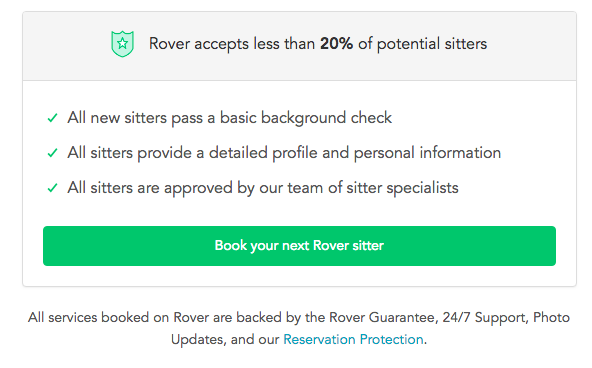
    Screen shot of a call to action from Rover - Search Influence

    Having detailed text on the CTA button encourages users that your form is something worthwhile whether they’re about to “Subscribe to our newsletter” or Rover.com‘s “Book your next Rover sitter.” Users want to know the value of giving up their precious personal data, so make sure your form is honest and straightforward with how the users’ data will be used.

    Mobile

    One factor that can’t be ignored is the impact of mobile users on your website. Considering mobile users surpassed the amount of desktop traffic almost two years ago—eons in internet time—ignoring mobile users is a recipe for failure. What’s even more surprising is that in the same year, even though there were more mobile visits to websites worldwide, mobile users converted almost 65% less than desktop users according to the 2016 Adobe Mobile Retail Report.
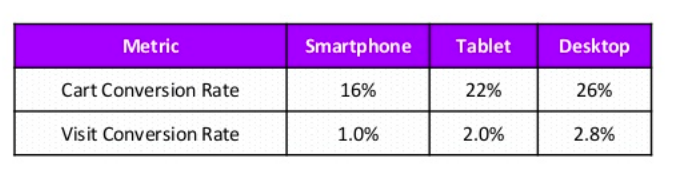
    Table of mobile conversion rates - Search Influence

    Our advantage here is that this data is like, eons old. We’ve progressed since then and have become more accustomed to serving mobile users and Google even recognizes the efforts that developers put in to make their websites mobile friendly and adjusted their search to index mobile sites first. This coupled with the rising magnitude of mobile traffic means that being able to capture leads efficiently on mobile platforms is imperative for any campaign.

    At Search Influence, we have everything you need to start a lead generating campaign, from SEO services, digital advertising, social media management, and the capability to track your campaign with pinpoint accuracy. We also practice what we preach; check out the form in the sidebar if you don’t believe us.


  • The Beginning of Google’s Mobile-first Index Rollout Is Underway—Are You Prepared?

    In 2016, Google announced they had begun testing a new ranking system based on indexing all mobile content first. Now, it’s official. The eagle has landed! The beginning of Google’s mobile-first indexing rollout is now well underway. As Google continues to move toward the big shift, it’s important that your company’s website is ready for the change.

    But how do you make the jump? Let’s start from the beginning.

    What Is the Mobile-first Index?

    Previously, GoogleBot would crawl your website and assign rankings based on the desktop version of your company’s website. Now that about 60 percent of search queries are made from mobile devices, Google is replacing desktop versions of sites in the index with their mobile counterparts via this mobile-first index. As a result, Google will determine rankings based on the quality of the mobile version ahead of the desktop version of the site.

    If the mobile performance, content, and user experience are up to scratch, your site receives a better ranking. If they are inferior, other sites will rank higher and you would take a hit.

    Ouch.

    How Do I Know When My Site Will Be Included in the Mobile-first Index?

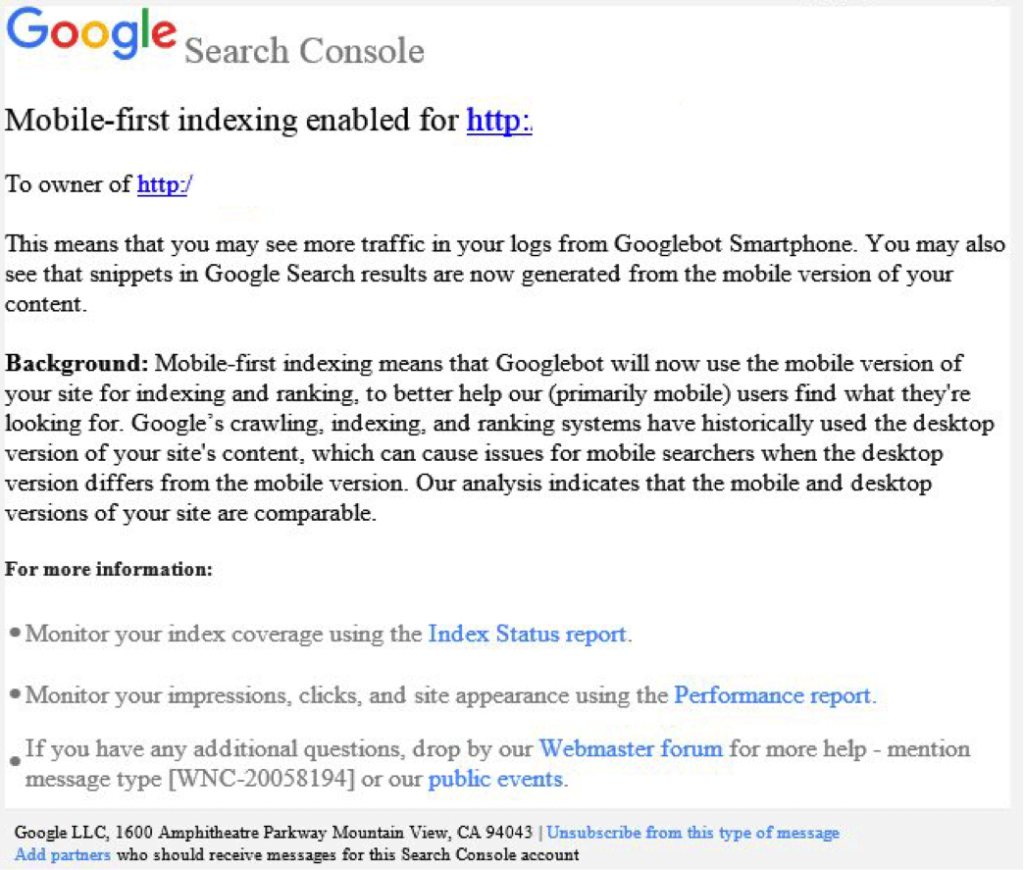
    Beginning this month, Google started notifying site owners and webmasters that their sites are migrating to mobile-first indexing through Search Console. The message looked like this:

    Screenshot of a mobile-first index notice from Google - Search Influence

    How Do I Prepare for the Mobile-first Index?

    Here are some tips to get you started.

    1. Mobile Page-speed

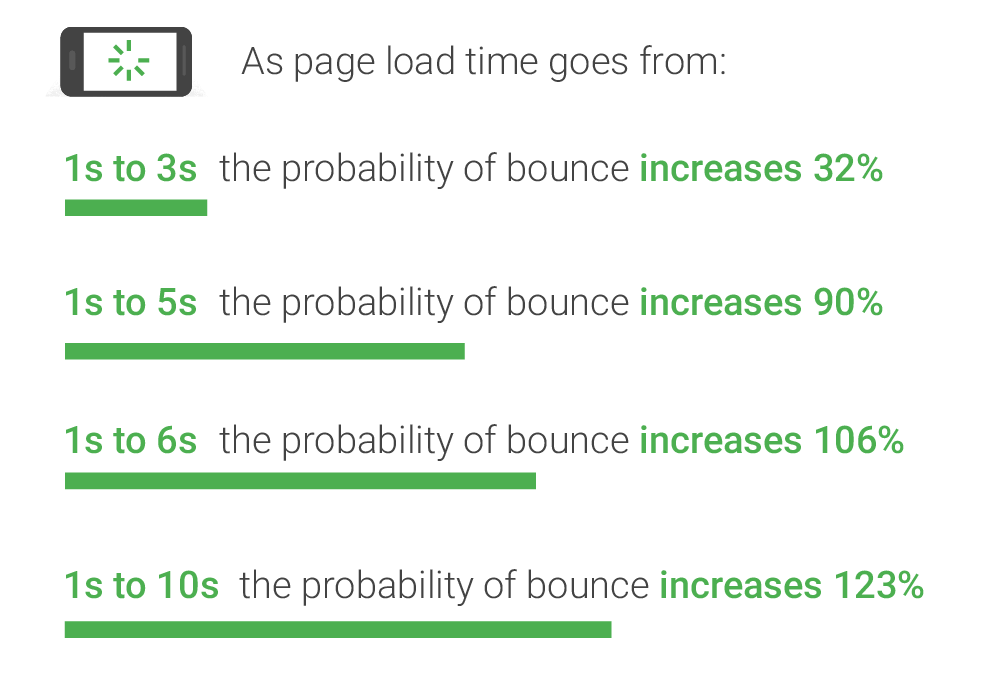
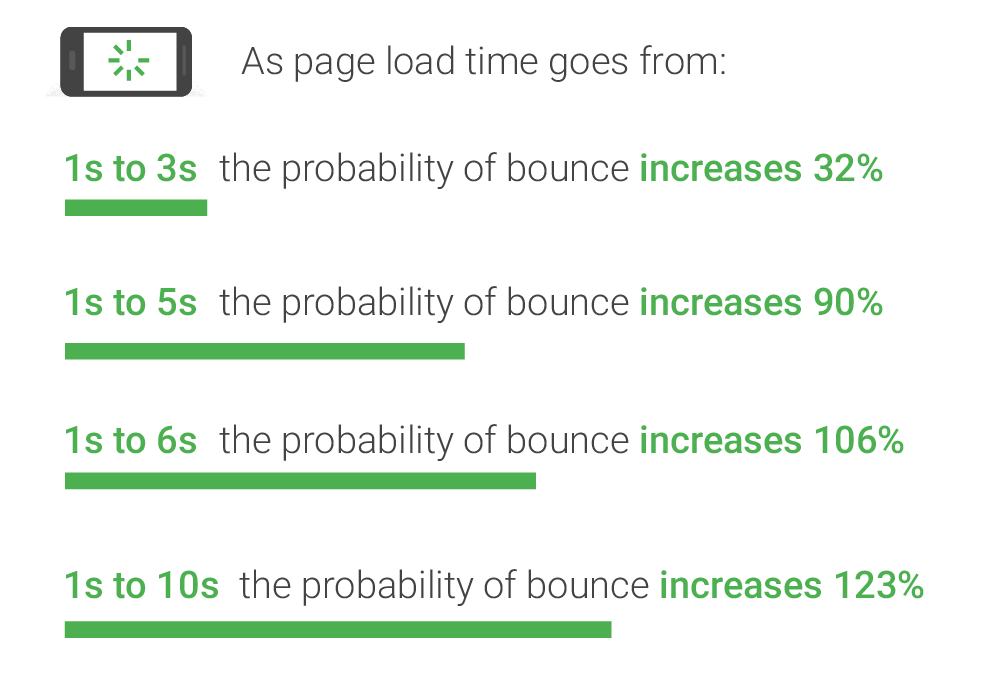
    According to Google’s mobile page speed study on Think with Google, as page load time slows down from one second to six, the bounce rate increases by 106%.

    A graphic of page load time relative to bounce rates - Search Influence

    So, make sure that your mobile website loads quickly and seamlessly. Google’s PageSpeed Insights is a handy tool for a basic test.

    2. Responsive Website

    A responsive website that is mobile-friendly works seamlessly across all devices. How do you make a website responsive?

    If your website is built on the WordPress platform, then creating a responsive design is very easy!
    Jared Jones’ post on the beauty of WordPress will make you a believer.

    3. Search Console Verification

    If you have separate mobile and desktop websites, verify the mobile version in Google’s Search Console. This proves that you own the site and directly affects how Google interprets and indexes it.

    Google’s Search Console help page provides you with all the ammo you need to get this done. More complex solutions for this preparation period includes content and image optimization, on-site directives and redirection, and schema structured data for your website.

    Talk to Us!

    At Search Influence, we are excited to start seeing the mobile-first index take form!

    To fully understand the impact of Google’s mobile-first index on your website, contact us for an audit and review of key aspects of your site’s mobile-friendliness. We’ll help you develop a roadmap to rectify potential risks to your search ranking and the content experience for your customers.

    Images:

    Parks and Rec

    Mobile-first notice Screenshot

    Page-speed Bounce Rates

  • 5 Tips for Engaging Email Marketing

    Sending frequent emails isn’t enough. In fact, if your content isn’t thoughtfully developed for your target audience, your hard work can find its way to the spam folder. From collecting email addresses to allowing people to unsubscribe, basic newsletter marketing is required to reach your audience’s inbox. Once you’ve got an interested audience, engagement is the first step to generating conversions.

    Craft a Strong Subject Line

    If your subject line isn’t engaging, the email may not be opened. Your subject line needs to communicate the content of the message clearly. Are you talking about a new product that’s not available anywhere else? Create urgency by emphasizing the timeline on the sale or promotion. From commercials and social media, we all have a basic understanding of how to make a compelling pitch. The challenge is creating an original subject line for each email marketing blast.

    Curious dog using the internet - Search Influence

    Your subject line should attract interest like a BuzzFeed headline, whether it’s describing an upcoming sale or exciting news updates for your stakeholders. Numbers are easy to digest, and they make better use of fewer characters. An email with “5 insider coupons” is more appealing than a vague promise of a special promotion. Similarly, “curiosity gap” is a term for headlines that give just enough information to make readers curious to read the rest of the story. Give the reader just enough information to pique their interest, and they will open the email in search of the answer.

    Create Valuable Content

    Before you put too much work into planning the perfect subject lines, make sure that your email marketing blasts are worth opening. Collect compelling, interesting, and useful information that rewards subscribers who continue to open and read emails. With both your website and email marketing, content is king. Whenever practical, offer special advantages and updates on future events. Are your subscribers offered insider discounts and advanced notice of sales?

    If your email marketing campaign suffers from a high rate of people clicking “unsubscribe,” then you aren’t meeting the expectations of subscribers. Think about the types of content that would most interest your target audience, whether they are interested in regular news about your industry or only occasional updates, presented in a timely manner. Offer special promotions and tips that reward people for continuing to follow along.

    Rotating mobile device - Search Influence

    Optimize for Mobile

    Many viewers will be sorting through their inbox on a smartphone. In fact, mobile devices are where 65 percent of emails are first opened. Those first seconds are critical in determining whether the recipient reads the message, archives it to read later, or deletes it immediately. A complex, information-rich chunk of text may get archived for later, but that’s no guarantee that it won’t be forgotten.

    If you have too many images or a poorly formatted page, you’ve already alienated a lot of potential readers. A modern email marketing campaign needs to leverage a mobile-friendly approach to newsletters, as well as websites. Short lines of text and a fast loading speed are essential. When targeting readers on their mobile devices, try to get them to engage while still on their smartphone. Keep your message short and clear, and quickly convert views into leads with an effective call to action.

    Use Compelling Calls to Action

    What’s your desired outcome for your email marketing campaign? Whether you’re looking to collect more followers, increase website traffic, or turn subscribers into repeat customers, the call to action should reflect your goals. The call to action should have a sense of timely urgency, and it should dovetail with the value offered by your email. Are the readers looking for a coupon or more information about new technology? Direct readers to your website for additional details. Have them call or visit your contact page to use the coupon today.

    Animation of a call to action icon on a mobile device - Search Influence

    Be careful about sounding too gimmicky or cheesy, both with your subject line and your call to action. We’re all familiar with the promotional hyperbole of excited advertisers, promising that this one-time offer is the best thing ever. Try to avoid language like “click here,” which is both overly specific and vague. “Here” doesn’t explain the content or purpose of the page that you want the reader to visit. “Click” places all the emphasis on the first action you want from the viewer. A stronger call to action would focus on the benefits of calling or visiting. Will they learn more about a new service? Will clicking or calling allow them to schedule a free consultation or request a proposal?

    Break Up the Text With Subheadings

    Attention spans are shorter, regardless of whether readers are pausing with their smartphones or relaxing with their laptops. Even a compelling subject line won’t compensate for a large, intimidating block of text. Break up your message into short paragraphs with frequent subheadings. Get conversions instead of TL;DR responses and deletions.

    Like subject lines, subheadings should summarize content in a concise and interesting way. Readers who aren’t interested in the first paragraph may find a later subtopic appealing. Similarly, readers on a tight schedule should be able to skim the page to locate the information most relevant to their needs.

    Email marketing is an effective way to generate leads, but it only works with an engaging message and appropriate formatting. Contact our team to learn more.

    Images:

    Internet Dog

    Mobile CTA

  • Rookie Website Mistakes, Part 3: Your Site Isn’t Mobile-Friendly

    Now that you have learned how to get your website found in Google searches, Part 3 of our Rookie Website Mistakes blog series will explore how to get mobile visitors to stay.

    It’s no secret that the current generation is keen on the combination of mobility and technology. We are a group who thrives off convenience and being able to get the information we need while on-the-go. It’s no wonder the level of frustration when a website we want to reach is not properly formatted for mobile use. Many of us quickly move on, searching until we find a site that is mobile-friendly and can also provide us with the information and services we need. According to Google, 58 percent of Americans use their smartphone (instead of a computer) to access a website. This means that over half of your potential audience—individuals who use the internet—are searching via cell phone. Visitors are also typically multitasking, leaving you with a limited amount of time to impress and engage them. You would be remiss to not format your website accordingly. Let’s dive a little deeper into what you lose and what you stand to gain with a website formatted for mobile visitors.

    Not Using Responsive Design

    One of the main differences between a site that’s built for mobile use and one that’s not is the responsiveness of the design. Consider the size of the interface or screen on a desktop computer or laptop versus a smartphone. Because mobile phones are smaller, websites cannot afford to have lofty navigation that hangs out in the margins—nor can they afford to have a surplus of text that hides below the fold. Often, the entire design of the website should be optimized for how visitors will need to navigate the page on a 5×3-inch device. Font size, typography, and single-column layout are also some items to consider.

    Optimizing for mobile does not mean that a business will have to create two different sites. Responsively designed websites are flexible and can detect screen size and orientation. The flow and readability of the design are crucial for a pleasant user experience that will keep visitors on your page, allowing them to receive the valuable information you are providing.

    Lack of a Touch-Friendly Interface

    Because visitors to your website are most likely accessing your page from their handheld device, it is imperative that the site can be easily navigated by touch. Visitors are frequently using touchscreens to find your business online, and once they arrive at your website, they need to be able to use their fingers to scroll, move between pages, click links and videos, and request more information.

    Man pointing his finger toward a smartphone's touchscreen - Search Influence

    Consider enlarging the font and adding more space between navigation buttons and links so that it’s easier to select items on the page. Unlike using a mouse on a desktop, fingers are less precise, so the use of buttons is vital to a friendly interface. Be sure to also have indicators on items that can be selected, such as adding a highlight or indentation marker to the button. This lets visitors know that their phone has recognized their selection. Another element is utilizing dropdown menus for navigation. They can be used on desktop screens and are ideal for mobile phones. Also, make sure the phone numbers are click-to-call and emails listed on your website are designed to open a compose window. This adds even more convenience for potential customers and visitors to your website.

    Images That Aren’t Optimized

    In previous blogs, we’ve made a case for the importance of having quality images on your page. But what happens if these images are slow to load? According to a study done by Equation Research, 60 percent of mobile users expect a site to load within 3 seconds, and 74 percent are willing to wait up to 5 seconds for it to load before abandoning the website entirely. Visuals that take too long to configure to the page also slow down the general responsiveness of your website. Scale images through code or optimize them by using new HTML markup that prevents the browser from downloading pictures that are larger than what is needed.

    Coworkers sitting at a table with different multimedia devices - Search Influence

    Content That Isn’t Mapped for Mobile

    Take inventory of each piece of content on your website and evaluate how effective it will read on a mobile phone. The size of the font and the typography style is something to consider, but the length and relevancy of the content are important, too. Trim down the fat. Use your analytics intel to determine which pieces of content your visitors are actually reading, and consider removing or optimizing content they are not. Review your website and be sure each piece of existing content is essential and can be easily digestible on all screen sizes.

    Having a mobile-friendly website is not something to be overlooked. With more and more of your potential customers using their phones to search for your business, mobile-friendly optimization is vital to the health of your business. If you have any questions or concerns about how to optimize your website and grow your business, our team is happy to help. Drop us a line!

    Stay tuned for the next blog in the series, Rookie Website Mistakes, Part 4: You have a Single Page Website.

  • Google Attribution Allows Clear, Seamless Campaign Analysis for Marketers

    How do you know which of your interactions with a customer mattered the most? How do you measure an organic search that someone performed for a product on one device compared to an ad clicked right before the point of purchase on another? Well, Google set out to solve some of these and other problems that marketers face daily with their newest rollout from their Marketing Next event—Google Attribution. Now, marketers can finally begin to answer the age-old question that is typically at the forefront of their minds—is my marketing working?

    How Google Attribution Streamlines Data

    Google Attribution uses machine learning and data to help marketers measure the impact of each of their marketing touch points, across multiple channels, and across multiple devices. It uses data that’s already there from Adwords and Google Analytics; it just takes that data and shows you how each customer moved through their buyer’s journey and attributes those conversions respectively. It provides a single view of the path to purchase to help marketers learn what is actually working compared to what seems to be working.

    “The aim of Google Attribution is to simplify the complex problem of multichannel, multi-device attribution by leveraging data advertisers already have in Google Analytics, AdWords, or DoubleClick Search,” said Kishore Kanakamedela, director of product management at Google.

    To give an example of how a richer lens of an entire campaign was able to better benefit a business, Virgin Holidays utilized store sales measurement to look at store sales after users clicked on a search ad:

    “Virgin Holidays discovered that when it factors in store sales, its search campaigns generate double the profit compared to looking at online KPIs alone. A customer purchasing in-store after clicking on a search ad is also three times more profitable than an online conversion.”

    Google already rolled out a store visits measurement in 2014. They’ll be rolling out store sales measurements as yet another touch point that marketers can analyze through Google Attribution.

    And possibly the best part? Attribution is free for anyone to use. It’s in its beta version right now and will be more readily available this fall.

    A Shift Away From Last Click

    Until now, many marketers were left to use last-click attribution to measure the value of their efforts. With last click, the reward for the conversion often went to the last touch point that the user made, often with a sale after a click on an ad. This could lead to false impressions about the effectiveness of an ad campaign versus display ads, organic search, social, email affiliates, and many other interactions that a customer made with a business along the buyer’s journey. Maybe organic search is actually more important display ads or vice versa.

    With Attribution, users can see how effective each step of a campaign is instead of just pointing to the last click of an ad before purchase. There are so many micro-moments that happen on the path to purchase. Now, marketers can have a more accurate view of business, and in turn, can then update bids or move budgets between channels based on such results.

    Image Of Woman Typing On A Computer With Media App Logos Flying Around - Search Influence

    This move to a more holistic view of a campaign makes sense. Video ads, banner ads, carousel ads, emails, social campaigns, and all other types of digital materials work together to drive solid leads to become conversions, so why would it make sense for only the final ad to get all of the credit and influence a business’ campaign and budgeting decisions?

    There is already a slew of companies that have seen the benefit of implementing the data-driven results of Attribution. Check out the success stories that Google has touted so far.

    Eliminating Waste and Annoyance With Unique Reach

    Most people use multiple devices to access their multimedia channels, whether that be a phone, a tablet, a smart TV, or a computer. For example, let’s say you’re shopping for a new laptop. You may first see a search ad when searching on your phone and then find a display ad while on your tablet. Then, you’ll come across a shopping ad by the time you decide to purchase the laptop on your current computer that needs replacing. According to Bill Kee, Google’s Group Product Manager for Attribution presenting at Marketing Next, “30% of people use 5 or more devices today. If you reach each of those devices three times, you’ll reach that person 15 times.” It’s safe to say that’s a bit of an overkill.

    With Unique Reach reporting in AdWords and DoubleClick, marketers will be able to measure how many people were shown display and video ads. It will show unique users and their average impressions. This helps marketers better understand how many people they reached in their target audience and how many times they reached them. This will allow businesses to find any wasted budget in over-saturated placements and, more importantly, better please their potential customers by not wasting their time with endless ads.

    People are expecting a simple, frictionless user experience on their path to purchase. Unique Reach is, well, unique in that it puts the customer right at the heart of the journey. Unique Reach is available in AdWords now and will be available in DoubleClick in the coming months.

    Image Of Person Sitting Out By The Water At Sunset - Search Influence

    The Customer Is the New Channel

    Instead of the mindset of measuring your reports within online or offline channels, Google has highlighted the importance of recognizing the customer or user as the new channel. The line between being online and offline has disappeared.

    Consumer expectations are higher than ever. So, the best way to meet those expectations is to try our best to understand consumers’ intent. Google also shared their Surveys 360 product connected to AdWords and Google Optimize. It helps marketers deliver more relevant ads with targeted surveys that seek to understand a customer’s intent along with their buyer’s journey.

    Marketers are already working hard to develop a strategy that brings conversions for their potential and current clients; Google Attribution helps them work smarter with data. By using their machine learning to put context into the consumer journeys, this new tool should help marketers create a simple, more streamlined campaign that their users will love and respond to. To quote Sridhar Ramaswamy, Senior Vice President of Ads and Commerce at Google and opening speaker at the Marketing Next event: “To really assist people, we need to become smart in how we use data to assist them.”

    Interested in learning how we can better market your business? Reach out to us at any time.


    Image Sources:

    Google Marketing Next

    Woman Checking Her Phone At Sunset

  • Growing Your Practice on Facebook, Part 1: Why Facebook Matters

    It’s no secret that Facebook isn’t going away anytime soon. Even with predictions a couple of years ago that the social media giant would lose a significant portion of its users to other contenders like Instagram, Twitter, WhatsApp, and Snapchat, they’ve managed to see steady growth. Since that prediction in 2015, they’ve gone from 1.2 billion monthly users to nearly 2 billion.

    So, let’s address the elephant in the digital room here. Is your practice on Facebook?

    In this series, we’ll break down the ins and outs of the best ways to reach your patients through Facebook, going over everything from advertising and shareable content to privacy rights and how to find the right images.

    Before we get into details of using Facebook to bring in more patients, let’s break down a broader question: Why is Facebook so important for your practice?

    Social Media Humanizes Medical Practices

    When’s the last time you talked with your patients outside of the office? In a report from the Health Research Institute, Ed Bennett, who oversees social media efforts at the University of Maryland Medical Center, notes, “If you want to connect with people and be part of their community, you need to go where the community is.”

    By using Facebook to interact with patients, physicians can create a dialogue that builds trust. Some patients may feel uncomfortable scheduling an appointment when all they wanted was to ask a personal medical question. Sometimes questions are just easier to ask through a direct message or comment rather than over the phone or in person.

    Medical Patient Sitting On Treatment Couch - Search Influence

    By commenting on, responding to, and answering questions directly through Facebook, unforeseen walls begin to break down. The best part? That starts to become what your practice is known for. Your medical office gets a reputation for being the place to go where people won’t feel afraid to ask about a diagnosis or procedure, how it affects them, or what their options are. It becomes the ideal venue for open communication. You’re no longer just a resource for patients when they come to your practice; you’re there for them at any time.

    Think about it this way. The average user checks their Facebook account daily. Will your practice be there to start a conversation when they log on?

    Expertise, Industry Experience, Specializations—Go Ahead and Tout It

    To go along the philosophical questioning of whether the falling tree in the forest makes any sound, are a physician’s best certifications and qualifications of value to patients if nobody knows about them?

    According to Search Engine Watch, nearly 90% of respondents aged 18–24 said they would trust medical information shared by others on their social media networks. This is also coming from a demographic that is more likely to share this information. Facebook gives physicians the tools to share their specific knowledge and expertise. Got a recent press release or blog post about a new technique offered exclusively at your practice? Put it on Facebook. It will demonstrate your expertise in your field while providing a great avenue for your patients to engage with and share this information.

    Also, in a time where anyone can share information and claim it as fact or scientifically true, physicians have the capability and responsibility to make sure accurate, helpful information is reaching their current and potential patients.

    Medical Patients Waiting In The Physician's Office On Facebook - Search Influence

    It’s All About Relevance

    Just as you shouldn’t make updating your Myspace page or LiveJournal your top priority anymore, you should be posting and staying up-to-date on Facebook to make your medical practice more relevant to what’s going on in your patients’ lives. It shows you’re a part of the online community, and ideally, it garners more traffic to your website and office.

    Ultimately, Facebook is more than just a place to share family pictures, an exciting recipe, or an awkward political conversation with an uncle. It’s a powerful resource for medical practices to reach their patients on a more personal level. Your patients are already there. We can show you how to utilize social media to find them and make them advocates for your practice. Reach out to us to learn how to implement a social media plan for your practice.

    For more information, stay tuned for our next blog post, which will teach you how to create and share content that moves your audience.

  • Gotta Go Fast! The Impact of Page Speed on Your Rankings

    “We have so much time and so little to do. Strike that, reverse it.”

    Roald Dahl, Charlie and the Chocolate Factory

    That may be a bit dramatic, but time is extremely important. In the digital age where a lot of people barely have the time to stop and say hello unless it was explicitly planned out in their schedule, a slow site can easily get lost in the abyss that is known as the internet. Though the forever relevant Bill Gates quote “content is king” should echo through anyone with a website, there are other factors that can make or break you as well. The best content in the world means nothing if no one sees it. If a tree falls in the woods and no one is around to hear, it does not make a sound; it makes vibrations that will never be converted into sound by ears. If a website has amazing content but a Page Speed as slow as molasses, does anyone ever read it? Probably not.

    How Optimized and Fast Page Speed can Bring in More Customers

    As you may (or may not) have guessed, page speed is the amount of time it takes for your website to load. On the surface, slow page speed will turn visitors and potential conversions away from your site simply based on the fact that they can’t “use” it, per se. But surely someone would wait 7 seconds to view your homepage or interesting product, right? No. Straight from the source, Daniel An from Google provides this handy chart on the correlation of page speed and bounce rates:

    Image of bounce ratio percentages relative to page load time - Search Influence

    As you can see, if your page takes longer than one second to load, you may see a bounce, which is when a user leaves your site after viewing only one page. The bounce risk increases dramatically the longer it takes for your site to load. This stat doesn’t just apply to your home page either—these statistics will affect every single page on your website. Imagine running an online shop and having someone abandon an order because it takes their cart too long to load. Having engaging content is only half the battle; it has to be seen and digested for it to maximize its potential.

    Page Speed from the SEO Point of View

    From an SEO standpoint, Page Speed has a two-pronged effect on the ranking of your website. Back in 2010 (which is literally forever in internet time), Google spilled the beans on speed having a direct effect on the rankings of websites and encouraged everyone to analyze their page speed to ensure their pages were loading in a timely fashion. Looking at complex Content Management Systems that automatically add mountains of bloat to every single page you publish, it doesn’t seem like many people heeded the warning of Google.

    Image of a snail using a rocket to go fast - Search Influence

    From an indirect standpoint, Page Speed can have an impact on your website’s speed in relation to the crawl speed. Google’s web crawler has an allotted amount of time that it likes to spend crawling a website. Faster loading pages mean that Google’s web crawler can crawl the page faster and move on to the next one, which can lead to more of your pages being indexed. Mix that up with some spicy content and you’ve got a great stew going that can lead to increased Search Engine Rankings!

    Tips for What Website Owners Can Do to Improve

    I personally like to think of Google as the tough love parents that will always steer you in the correct direction, give you the tools to succeed, but punish you if you stray from the light. With that said, Google gives the entire internet a handy tool to test the speed of their website. My favorite online game, League of Legends, will be the topic of example for this go round. After running their URL through Google’s PageSpeed Insights tool, a score is given for both the desktop (61/100, Poor) and mobile (40/100, Poor) versions (it defaults to mobile speed, perhaps because mobile users are using the internet more than desktop users now) along with some details on how to fix the issues and exactly which files are causing the issues. An alternative to Google’s own tool (because we want to show our parents we can succeed our own way) is the Pingdom Website Speed Test. From my experience using both of these tools to compose Site Audits for our clients, Pingdom does give some more in depth information. For instance, the main reason for the League of Legends website taking so long to load is a video (listed below) that has to load twice before the website is considered to be loaded.

    Screenshot of video load time - Search Influence

    This video took over 17 seconds to load. Now for a website such as League of Legends that has the clout of millions of gamers fiending to see the details of the next character being released or an overview of the latest patch notes, these 17 seconds are no big deal. However, if your website was discovered by someone using the Google search “boutique new orleans,” that may be a different story, especially if they’re on the other end of our historic Magazine Street. They may have thought about venturing to your end of Magazine Street had they seen the flashy new “romphims” that your store was offering. Unfortunately for your shop, Magazine Street is loaded with boutiques, and potential customers may just tire themselves out on the other end instead of planning their Magazine Street romp around your boutique.

    Don’t fret, a lot of these fixes aren’t all that difficult to fix, so here are a few common fixes.

    1. Leverage Browser Caching: This fix allows some files on your site to be saved on a user’s local computer so that the next time they visit your site, they won’t have to be downloaded again. In addition to increasing Page Speed, it also lessens the stress on your server.
    2. Optimize Images: This fix involves formatting and compressing your images, which will drastically reduce their size.
    3. Minify CSS: Minifying your CSS is removing spaces, removing line breaks, and combining elements that have the exact styling to reduce the size of your CSS files (yes, even spaces increase the size of your files). You could do it yourself or use a tool such as CSS Minifier to do it for you, but make sure you test it before you completely remove your old CSS.
    4. Minify JavaScript: If you read the previous fix, you can guess what this section is about, just replace styling with functions and that’s the gist of it. JSCompress can take care of this for you.
    5. Enable compression: Using gzip to compress your resources allows them to transfer over the server quicker, which leads to faster page load speeds.

    These fixes are a great way to start pushing your Page Speed close to preferred industry benchmarks and are also among the easiest to implement. There are many more metrics that can be improved as well, but don’t fear—head to Google PageSpeed Insights and plug in your own URL to see how you fare and what you can do to improve. League of Legends has a team of web experts to make sure that even though their videos take close to 17 seconds to load, the rest of their site renders much faster. Here at Search Influence, we also have a team of web experts that are able to analyze and implement fixes to your website to improve its performance and rankings.

    The Importance of Mobile Page Speed Benchmarks

    As revealed in an article earlier in this blog, in November of 2016, the number of mobile and tablet internet users surpassed desktop internet users. This adds increased importance on your website’s mobile speed. With a society that is ever on the go, having a high level of accessibility and a mobile friendly website is considered a necessity for every business. A slow mobile site has a large chance of sending business elsewhere.

    An important addition to keep in mind is the impending rollout of Google’s “mobile-first index,” which should be rolled out soon according to Google and industry experts. This index will reportedly factor mobile content at a higher priority than desktop content. Though all details have not been made public as of yet since Google likes to release this info intermittently after the fact, mobile website speed will probably be one of the factors that are taken into account.

    With cell phones and tablets becoming more powerful and useful in everyday life, it is imperative that your website is optimized to be viewed on mobile if you want any hope of making a splash in the sea that we call the internet. No matter how powerful the receiving device is, there will always be the limiting factor of how quickly files can be transferred across the server. The simplest solution is to ensure that your website is optimized to make it as easy as possible to ford the data transfer river.

    If that sounds like a scary thought, feel free to reach out to the experts at Search Influence. We will gladly take the stress out of it and add you to the list of our many satisfied customers that continue to use our services year after year.

    Images:

    Bounce Rate Percentages

    Snail

    Screenshot

  • Local SEO: How to Clean up Citations for Better SERP Visibility

    seo-google

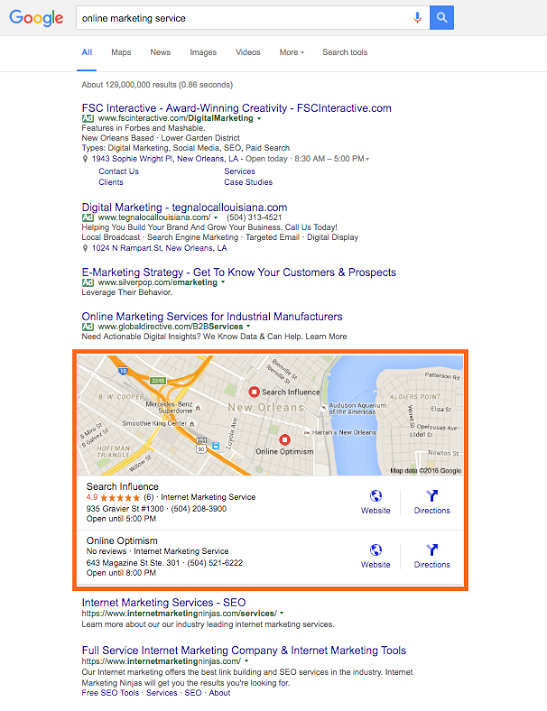
    Google, Bing, and other major search engines are constantly changing and developing their search engine results pages (SERPs). Major components of these pages include organic, paid, and local results. With the ever-increasing use of mobile, these local results are growing in importance in overall SEO strategy.

    SERP Screenshot

    So how does one account for local SEO, you may ask?

    This is where citation cleanup comes into play.

    Citations are the presence of a business’s name, address, and phone number (NAP) on any website. As search engines crawl websites and find instances of a business’s NAP, they look for consistency in that information, so the more accurate and consistent your citations are across the internet, the better your business will rank in a local search (i.e. in Google and Bing maps as well as in the maps packs on SERPs).

    Ensuring this consistency is called citation cleanup. From my experience, there are four major steps to effective citation cleanup:

    1. Ensure your address is USPS verified.
    2. Update your NAP on your website.
    3. Audit and build your citation on the major data feeds and directories.
    4. Find your remaining existing citations and make sure they are all consistent.

    Let’s break this down and go into a little more detail.

    Ensure Your Address Is USPS Verified

    This is an important place to start because, as you’ll find later on, many of the directories you end up submitting to or cleaning up have standard formatting that in most cases aligns with USPS’s own standards. So, if your format doesn’t match it will be harder and less likely to achieve consistency.

    Update the NAP on Your Website

    After the USPS verifies your address, make sure it’s reflected on your website. Include your whole NAP as a structured citation. Your website is the baseline for your NAP; this is what Google and other crawlers will compare other citations to, so it must be correct and formatted here.

    **For a little extra oomph, consider marking up your citation on your website with structured data like Schema. This will help crawlers understand it better as your NAP.

    Audit and Build Citations on Major Data Feeds and Directories

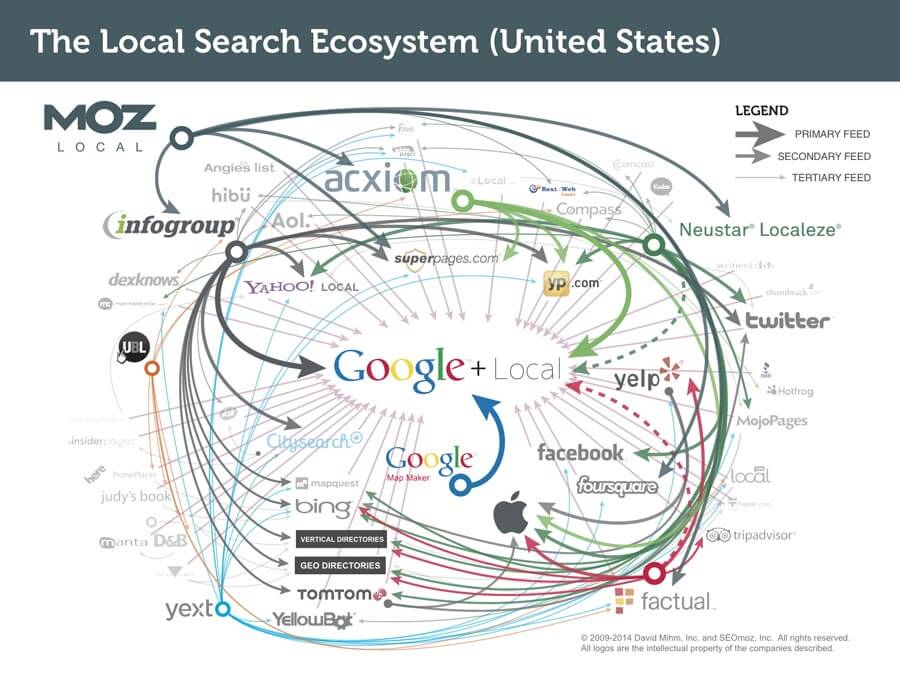
    Local_Search_Ecosystem_US

    The reason I put this before doing actual cleanup of existing citations is because citation dissemination is a hierarchical process within a large ecosystem of directories. There are a few feeds that push to other smaller directories where your citation may already exist, so updating these and the major directories first will make cleanup later on a little easier.

    There are four major feeds to check first: Infogroup, Acxiom, Localeze, and Factual. These feeds trickle down to other directories and local search engines, including Yahoo! Local, Apple Maps, SuperPages, etc. This is also where that USPS-verified address comes into play, especially. Part of the reason these four directories are so authoritative is because they have such strict guidelines on address verification.

    Along with those feeds, you also want to update the major local directories. Since many of these are directly on those search engines’ sites, this is absolutely essential to local rankings. These major directories include: Google Maps, Bing Maps, Yelp, YP, Foursquare, etc. You may also consider auditing your social media accounts to make sure your NAP is correct there as well.

    Find Remaining Existing Citations and Make Sure They Are All Consistent

    Once you’ve built your major citations, you’re ready to do some additional cleanup, if necessary. It’s useful for all businesses to be aware of their citations across the internet, but some businesses may need additional cleanup more than others.

    If you’re a business who’s recently changed their name, address, phone number, or website, you should definitely consider more extensive search and cleanup. The same goes for those who are still seeing problems with their local rankings. You may be missing a citation or set of citations that’s affecting your rankings.

    There are a number of ways to do this. You can use Google just to search for instances of your citation manually, or you can use a service to do a more in-depth search for your citation and its variations across the internet.

    Either way, you’ll find that your citation can be updated on some sites more easily than others. You may need to submit forms to have it updated, contact website administrators, or go through other channels to get it done.

    If you’re business is at this point, you may find it more cost-effective to hire an agency or service to do this kind of cleanup.

    However, once you’ve successfully cleaned up your citations, you’ll rest easier knowing that your business information is correct across the internet.

    Citation cleanup is an important factor in local and overall SEO. By ensuring NAP consistency, you’re gaining valuable traffic from local search engines! To learn more about why NAP consistency is important with your SEO, you can watch this short video.

    Image 1 Credit

  • 5 Rookie Mistakes That Will Ruin Your New Website’s SEO

    SEO Mistakes to Avoid

    Here at Search Influence, we take pride in providing valuable SEO information and tips for our clients, from the nitty gritty of Google’s algorithms to the basics of designing a great website. Our recently published white paper covers 5 SEO mistakes that could be lurking in your web design. Here’s a rundown of the rookie mistakes you may not know you’re making.

    Your Site Is Too Slow to Load

    Large, unoptimized images on the landing page can significantly decrease site speed. Not only does this lead to poor user experience, it affect how Google ranks your site in searches.

    You’re Not Allowing the Site to Be Crawled

    Web crawlers are how search engines know pages of your site exist and what the pages are about, so restricting their ability to crawl and index essentially renders your site invisible in search results.

    Your Site Isn’t Mobile Friendly

    Mobile Phone

    More and more people use phones and tablets to access the internet. You can miss a large percentage of your target audience if you do have have a mobile friendly site.

    It’s the Wrong Kind of Flashy

    Relying too much on Flash elements can slow down your site and causes complications for mobile users. And while single page sites can be visually appealing, you can miss many optimization and analytical opportunities.

    The Content Is Weak

    When it comes to Google’s algorithms, text is more important than visuals. Good content gives a better understanding of what the page is about, for crawlers as well as human readers. And old fashioned SEO techniques, such as keyword stuffing, can do more harm than good.

    If you’re concerned that your site may be suffering from any of these problems, fear not. Check out our white paper for more detailed information on each of these concerns. Once you have a better understanding of the issues at hand, you can reach out to your web developer or one of our SEO specialists to begin addressing your concerns.

    Image 1 Credit

  • These 5 Easy Ideas Can Help Your Site Reach 80% of Your Patients

    4-14-2016-BlogImage5

    Your patients might not be able to read your handwriting, but there should be no confusion with your website. According to a Pew Research Center survey, 80 percent of respondents look for health information online, and 44 percent actually search for physicians and healthcare professionals. As more and more people turn to the Internet to search for medical service providers, these tips will help you launch a website that connects new patients to your practice or clinic.

    1. Patient Forms

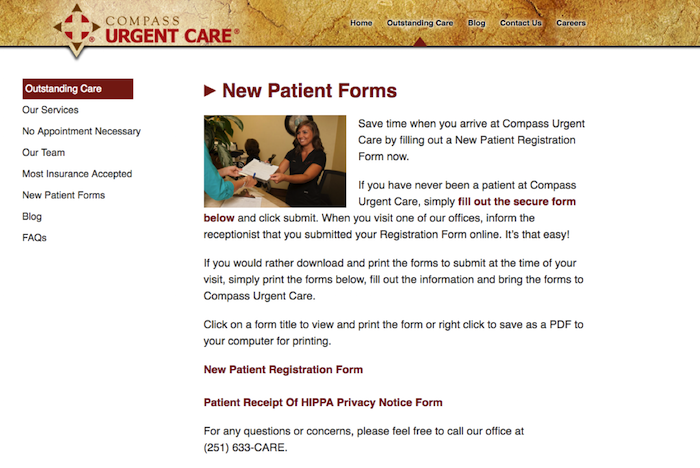
    Your website should make it easy for new or returning patients to access patient intake forms, schedule appointments, and update records. Registration forms can even be placed under their own tab, which will make it easier for website visitors to become registered patients. In general, always make things easy to find.

    New Patient Forms

    2. Mobile Responsiveness

    In the United States, there are more mobile searchers than desktop searchers, and this trend is expected to increase. There are two reasons your medical website needs mobile-responsive capabilities. Patients searching on a tablet or smartphone are likely to spend more time on your website if it is easy to navigate. A non-mobile-friendly website can be confusing, creating incentive for the searcher to move on to a different website, possibly that of your competitor.

    Furthermore, next month Google will start the roll out of a mobile-specific algorithm. Google is continually striving to improve the user experience, and if your website does not make the cut, it could be completely excluded from mobile search results.

    3. Patient-Centric and Informative Content

    Going to the doctor’s office can make some people feel anxious, but your website can provide comfort and instill confidence even before a patient walks through your door. All content should be patient-centric and make website visitors feel like they will be in safe hands. You can even give your website some personality by including bios for yourself and your staff. In an “About Us” or “Our Staff” section, you can not only show off impressive credentials but also demonstrate that you can engage with patients.

    A strong medical website also includes news, information, and updates. This platform should be a marketing tool and resource for patients. Refreshing your site with blog posts, medical news, and alerts will show patients that you follow current issues and are an attentive professional. A website with a regularly updated blog will also rank higher in the search engine results.

    4. Services and Insurance

    Again, all information should be easy to read and find, especially services and insurance information. Give detailed explanations of your services, and note if there are any special considerations. There should never be any confusion about payment, so clearly state whether you accept cash or if other arrangements are acceptable. Discussing insurance plans and payment methods creates an opportunity to include a call to action. Ask website visitors to contact your office with any further questions about services or insurance.

    5. SEO

    “If you build it, they will come”—this adage does not apply to websites. It can take a little time for your new website to get noticed by search engines. An SEO campaign can improve your website’s search engine rankings and drive more traffic to your website. On- and off-page optimization, social media management, title tags, meta data, image optimizations, NAP consistency, professional listings, and many other factors play a role in boosting your Google ranking. Search Influence can create a SEO campaign that will promote your website, connecting you with patients who are more digital than ever before.

    Image Credits:

    Doctor Meme Image