Tag: mobile sites

  • SEO for 2015: Meet the New Boss, Same as the Old Boss

    The world of SEO is constantly changing. Google, the big prize for search engine ranking, may change its search algorithms from 500 to 600 times a year, and major updates like Panda, Penguin, and Pigeon are rolled out on a fairly regular basis. And while your business can’t shift SEO strategies daily to incorporate every change Google unveils, it makes sense to take a fresh look at your SEO approach at least annually—or does it?

    The answer is yes, and no. While there are some aspects of SEO that can and should be refreshed or updated to keep up with changing algorithms and your audience’s needs and tastes, the good news for online marketers is that the basic SEO strategies you’re already familiar with will continue to be effective—in 2015 and beyond.

    Here’s a look at what will change in the SEO landscape for 2015 and what will remain the same.

    Sticking to the basics still works

    Best practices for SEO strategies have always revolved around delivering high-quality, targeted, and useful content with a few well-chosen, naturally incorporated keywords—and for 2015, that won’t change. Google-sanctioned “white hat” SEO tactics continue to be the most effective strategies for driving SEO and boosting search engine rankings.

    Another basic element of SEO that will remain the same is the need for both on-page (what you say about yourself) and off-page (what others say about you) factors. Successful SEO includes creative, useful, and engaging content creation for your website, social media, and other online channels, along with promotion that drives off-page SEO by attracting links to your content from other authoritative sites.

    Going mobile will be an imperative

    By now, most companies are aware that a responsive, mobile-friendly website is essential for attracting and retaining customers—but mobile SEO is more important than ever when it comes to Google. Responsive site design will be a crucial aspect of ranking high on Google, since the search engine now reports whether or not a site is mobile-friendly to both users and webmasters.

    If you’re not sure whether your business website is mobile-friendly enough, Google offers a free online testing tool, along with a link to information about their mobile-friendly criteria and how it may affect your search engine results.

    For small business, local SEO will be king

    In 2015, it will be important for businesses—especially small businesses—to make sure their websites are optimized for local area searches. Google and other search engines are giving more attention to local directories and citations, including hyperlocal content (relevant content authored by local experts within their geographic areas).

    One effective SEO strategy for optimizing local search is to make sure your phone numbers, addresses, and location pages are consistent with off-page directory listings. If you haven’t done so already, check out third-party business directory and review websites such as Yelp, Google+, and Yahoo Business to ensure that your local information is correct.

    Thinking like a publisher will benefit your SEO

    As search engine algorithms continue to shift weight away from obvious marketing and promotional content and toward contextual relevance, individuals are becoming more important than companies with regard to search engine rank. To take advantage for SEO improvement, more companies are transferring authorship credit to individuals—including text article writers, infographic designers, and video and podcast producers. Giving content creators their own voice will lend your content more weight with search engines.

    Links and keywords will lose center stage

    For a long time, keywords and links have been the cornerstones of SEO. But with a massive shift toward contextual search and high-value content, these primary factors no longer carry the same weight. Inbound and outbound links still matter for search, but their importance has been dwindling as more algorithms place relevance over popularity and authority.

    The same shift is apparently underway with keywords. While a few well-chosen and well-placed keywords still serve to help search engines determine the overall meaning of a page or piece of content, it’s more important that your content answers the right user questions and remains useful and engaging.

    If you’ve been sticking to SEO best practices, your strategy for 2015 is likely to only require minor changes in order to remain effective for the coming year and beyond.


  • Five For Friday: Do You Like Your Friends, Busting SEO Myths, and More

    1. You’re Doing It Wrong: This App Tells You If You Actually Have Friends – Tech Crunch

    Ever wonder if you actually like your friends? There’s now an app for that. The app, called “pplkpr,” monitors your heart rate through a wristband and sends you text message updates about your relationships. It even helps you schedule time to hang out with people it deems “better friends.” So next time you want to bail on plans to sit around and watch Netflix, just say “My app thinks I shouldn’t hang out with you.”

    2. Is Google Making You Dumber? – Mashable

    By keeping your browser homepage set to the default page, usually Google, you’re missing out on the opportunity to see something new every day. Changing your homepage to a more engaging site could allow you to learn a new word every day or to expand your horizons through photos. There are no limits on what page you set it to, and this article offers some great options if you’re looking for a daily knowledge boost.

    3. …But When Will I Get My Robot Butler? – Tech Crunch

    When Siri plays Hall & Oates instead of finding the nearest Walgreens, it makes me wonder if it’s even possible to build functioning, humanoid robots. Though constantly portrayed in popular culture, robots that mimic humans might never be a reality. Issues with artificial intelligence and voice recognition hold us back from being able to send a robot to take the trash out. Till large advances are made, it looks like I’m still going to have to do my chores myself.

    4. A Special Set of Skills: How to Not Let Your Phone Get “Taken” – CNet

    Though you might not need Liam Neeson to get your device free, hackers are taking phones hostage at alarming rates. By hiding ransomware links or apps, hackers can threaten to encrypt your device or lock your phone entirely unless you pay up. If you keep to reputable app sites and stay away from sketchy links, you can avoid having your phone “taken” right in your very hands.

    5. Myths Busted! 5 SEO Myths That Need to Be Debunked – Search Engine Watch

    SEO is always changing and updating (with the help of “P” named animals). With such a fast-paced industry, misconceptions easily find their way into common thinking. These myths can encourage unrealistic goals and set impossible standards. By demystifiying these myths, we set ourselves up for greater success and more satisfied customers. After all, the best place to hide a dead body is on the second page of Google results…

    Image Sources:

    Bye Felicia Image

  • Five for Friday: Is Your Social Media In Good Hands? Link-Dieting & More

    1. New Year, New Link Takedown – Search Engine Land

    As we all know, many sites were put on Google’s naughty list thanks to Penguin’s distaste for bad links. Their next move? Request, request, request. Looking back on 2014, Google certainly got a lot of action. Torrent Freak reports that Google received a 75% increase in link removal requests in 2014 as compared to the previous year. We’re talking highs of 12 million URLs requested for removal per week. 2014 was clearly the year of cleanup.

    2. Project Share Aware: Sugar Bowl Not So Sweet For Some – MarketingLand

    An unsuspecting real-life couple, dubbed “oversharers” by Allstate, was burglarized during their outing to the Sugar Bowl. You might be wondering why an insurance company would do such a thing. Allstate’s latest campaign, Project Share Aware, aimed to alert the public to encroaching social media-savvy burglars. Long story short, if you’re telling people where you are in a public sphere, those without your best interest in mind (aka burglars) can take advantage of your oversharing. The event went as far as holding a fake online sale of the couple’s property using #MayhemSale on Twitter. Many claim this was just another ploy of Allstate’s fear-mongering advertising tactics, but it certainly made a few rethink their privacy settings. Although rattled, the couple did walk away a little sweeter with free Sugar Bowl tickets.

    MayhemImage

    3. Modern Family: Device Edition – Search Engine Land

    This may not come as a surprise, but if it’s not on a modern advertiser’s to-do list, it certainly needs to be. What am I referring to? Cross-device advertising. We’re talking about your new modern family, each member gazing at their device of the moment, whether it’s a PC, mobile, or tablet. John Crosley, Bing Columnist, argues that households engaging with multiple devices within one day tend to be more receptive to advertising. The overall goal? Reaching your audience, wherever they are and on whatever device they may be using at the moment. Let’s just say cross-device advertising is the Lily of Modern Family.

    ModernFamilyLionKingImage

    4. New Year’s Resolutions: Cutting Carbs or Social Media? – Community2Business

    Which did you pick? If you picked social media, you’re probably in the right place. As you step into 2015, take some time to rethink how you’re reaching your audience. Some top tips include boosting visuals, knowing when the time is right, and monitoring your #HASHTAG.

    First things first, if your post lacks engaging visual content such as images, memes, or infographics, your audience will likely yawn and pass through. Also, consider donning those visual-friendly social media platforms like Pinterest or Instagram. Tick, tock – we’re talking about time. Although articles regarding the perfect posting times abound, don’t forget you’re unique! Pay mind to your particular market or industry and play around with tools to measure what time is actually best for you to post. Finally, it’s time to discuss the beloved hashtag. While this is an incredibly relevant and useful tool, it can be abused. Make sure you are picking appropriate wording and wisely follow the rule of no more than three hashtags per post!

    MeanGirlsButterImage

    5. Boost Your Newsworthy-ness! – Business2Community

    Based on an analysis of 2014 search trends, the most searched items were Robin Williams-related. This was followed up by the World Cup, ISIS, Frozen, and more. What can we take away from this? People want news! Alongside your SEO efforts, focus on making your business reflect the most recent, exciting news in the industry. As an added bonus, if you regularly update this information, it will be new news. And as we all know, Google loves to bask in fresh, updated content. Now, that’s killing two birds with one stone!

    Image Sources:

    Mayhem Last Item 4 Sale Tweet

    Modern Family Gif

    Mean Girls Gif

  • Five For Friday: Google Language 101 – Metas, SEO, & Link Building Without Content

    12507215604_e7408e02c4_z1. Link Building Without Content Creation  – Search Engine Journal

    A common misconception about link building is that content creation is a necessary part of it. While new content certainly helps, Jon Ball recently posted an article arguing that updating content is not always necessary, especially for small businesses that lack the resources to invest in new content. Small businesses, he claims, shouldn’t dismiss link building just because they think it is too costly or time-consuming. Fortunately, Ball offers five link building approaches that do not require content creation.

    2. Google+ Finally Lets Us Pin Posts! –  Marketing Land

    Finally, Google+ users can highlight certain posts to make them stand out. Early last week, Google+ announced that users can now pin posts to the top of their pages. Google+ is a little late on the trend, as Facebook and Twitter have already offered this feature to users. So far, Google+ pinned posts are only visible on a desktop or Android device. What does this mean for businesses? With this new feature, you can increase the visibility of posts you want your users to see.

    3. 2015: Over Half of Search Spending Goes to Mobile – Marketing Land

    5143183460_944dd8ac97_z

    A new study conducted by eMarketer shows that in 2015, spending on mobile paid search ads and SEO is predicted to be at 50.1%. This is due to a change in consumer behavior, which has veered away from searching on desktops to show a preference for searching on tablets and smartphones.

    4. Caution: Don’t Ignore Meta Descriptions – Search Engine Land

    Google has continually stated that meta descriptions do not impact search engine rankings, which has led many people to disregard them. However, Neil Patel argues that these descriptions are still important. While the content in a meta description is not considered in Google’s search ranking algorithm, the click-through rate (CTR) is part of Google’s search ranking algorithm. Instead of ignoring meta descriptions, businesses should write optimized meta descriptions to increase CTR and overall site rankings.

    5. Five “Googley” SEO Terms Explained – Search Engine Watch

    Misunderstanding search industry terms could cost you an entire SEO campaign. Kristine Schachinger discusses five commonly misunderstood Google terms that can lead to negative implications in the long run. In Schachinger’s opinion, the most commonly misunderstood Google terms are:

    1. Robots.txt
    2. Google DNS
    3. Penguin, Panda, Penalties
    4. Duplicate Content Filter
    5. PageRank

    To avoid accidental negative SEO implications, she offers the correct definition and usage for each commonly misunderstood Google term.

    Thanks to Christopher Sessums for the blue five and Trulia for the mobile app images!

  • Avoid Detours: Claim and Edit Your Apple Maps Listing with Maps Connect!

    In the past, the only way you could edit Apple Maps listing was through user feedback on the mobile app. Recently, with our company’s big move from Uptown to the CBD New Orleans, the best way to go about getting our address updated in Apple Maps at that time was to email the whole company and have them mass-submit user feedback about the address change. (P.S. it worked!) These kind of mass-effort cleanup requirements made editing your business information as difficult as crossing The Narrow Sea in Game of Thrones. Thankfully, with the release of Maps Connect from Apple, you can now claim, verify, and edit your Apple Maps listing via mapsconnect.apple.com without the hassle of the above process.

    While the data provided to Apple Maps still primarily comes from Yext and major data feeds, such as Localeze, Factual, and Acxiom, the new Maps Connect allows businesses to be in direct control of their Apple Maps information. Businesses no longer have to rely on data feeds to change their information.

    While it’s a pretty intuitive and user friendly process, I’m going to walk you through it!

    Step 1:

    Click “Add My Business” to get going.

    Step 2:

    Log in with your Apple ID or create a login if you don’t already have one.

    AppleMapsConnectImage

    Step 3:

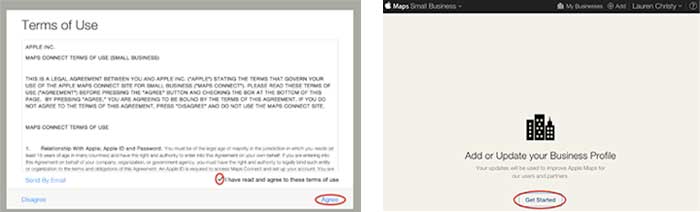
    Read the “Terms of Use,” check “I have read and agree to the terms of use,” then click “Agree.”

    Step 4:

    Click “Get Started” to finally start the actual claiming process.

    GetStartedAddorUpdateBusinessProfile

    Step 5:

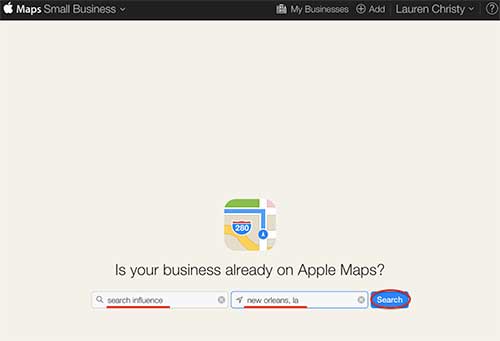
    Search to see if your business is already on Apple Maps by entering your business name, city, and state in the respective fields, then click “Search.”

    IsYourBusinessonAppleMapsImage

    Step 6:

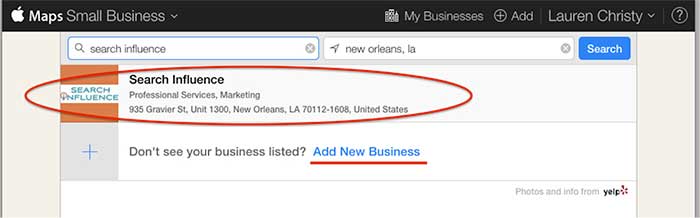
    Based on the results you get, either click on your pre-existing listing to claim it, or click “Add New Business” if yours is not already on Apple Maps.

    NOTE: You should always try searching for truncated versions and any possible variations of your business name before assuming it’s definitely not in a directory.

    AddNewBusiness

    Step 7a:

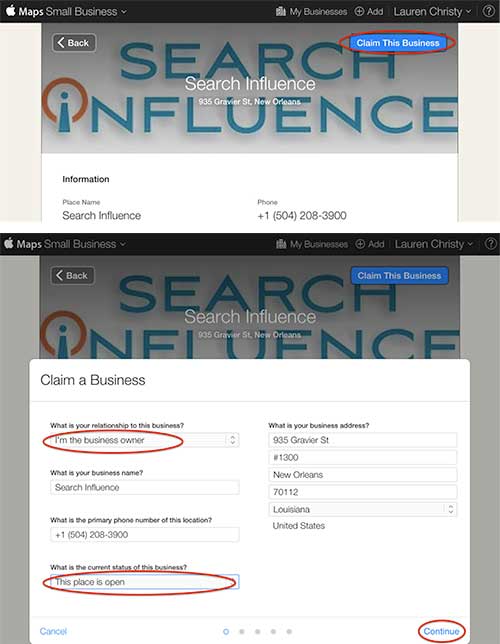
    If claiming a pre-existing listing, you’ll be taken to the live listing of your business where you can click “Claim This Business” in the top right-hand corner. Then you’ll choose your relationship to the business, change any of the business information that is inaccurate, choose the status of the listing, and click “Continue.”

    ClaimThisBusiness

    Step 7b:

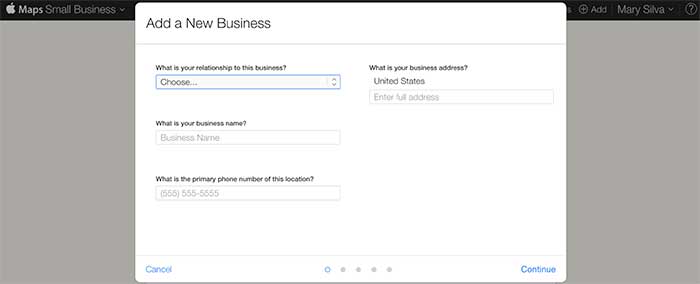
    If creating a new listing, you’ll be taken to a screen to fill out your businesses NAP (Name, Address, Phone Number) and your relationship to the business.

    FillOutBusinessNAP

    Step 8:

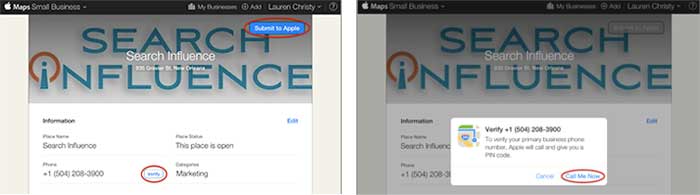
    In either case, the last step is a phone verification. By clicking “Submit to Apple” in the top right corner or “Verify” next to your number, you’ll be taken to a screen to verify your phone number by clicking “Call Me Now.”

    SubmitToApple

    Much like other higher-level directories (think Google, Yahoo, Bing,and Yelp) this phone verification is an immediate, real-time call to the business number to relay a pin. If the phone call with the code doesn’t work the first time, much like Apple’s process for bad pin-code entries on products like the iPhone and iPad that have passcode locks, you have to wait 1 minute to try again, then 5 minutes the next try, and 25 minutes after that. You can circumvent the wait time, however, by logging out of Maps Connect and logging back in.

    Since this is an automated process, businesses like ours with phone tree systems will suffer the inability to phone verify for now. I reached out to Apple Support to see if there’s an option to request a manual phone call to verify or some kind of domain-email verification. Within 24 hours the replied that they “manually reviewed and approved [our] profile” which I assume was because of our domain email being used in our account. Hopefully they’ll take a tip from from Google, Bing, and Yahoo and eventually allow a postcard verification option. Maps Connect is also currently only available to U.S. businesses.

    According to the folks at Search Engine Land, “Updates or new listings will show up within a week or could show up more quickly depending on the situation and whether the listing was flagged and/or there’s additional verification required. Beyond this, Apple has additional fraud prevention measures in place, but didn’t discuss them extensively.” So be patient when making any updates or edits.

  • Google Gives Answers To Life, Love, & The Universe

    As you may or may not have noticed, prevalence of Google’s answer boxes among search results has increased dramatically. Google’s algorithm updates have always pushed the search engine to more closely mirror the human searchers, aiming to provide the best answer to each question. With the collection of Google’s Knowledge Graph (their personal database of information and the interconnectivity of ideas), they have announced their goal of transforming from an “Information Engine” to a “Knowledge Engine.”

    From Google’s Knowledge Graph, a new item has emerged in search results: the answer box.

    If you haven’t seen them (and have no idea what I am talking about), let me back up. According to Moz, Google now displays a direct answer in 3.5% of search results, as opposed to the standard 10-pack of results, sprinkled with some PPC ads.

    These direct answer results have been around for well over a year (I found posts introducing them in August of 2013). However, answer boxes are being seen in 44% more search results after the rollout of Panda 4.1. So, more people are seeing them and more people are talking about them!

    Answer Box 1.0

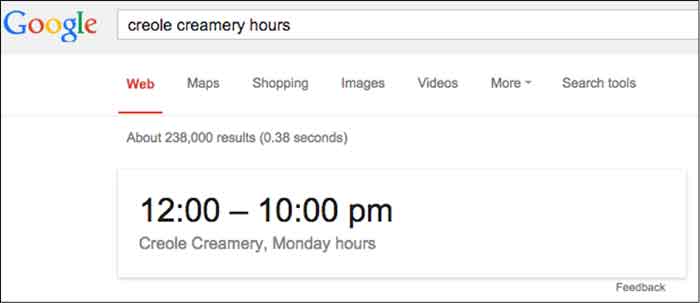
    The first generation answer box was a Google SERP feature. These early answer boxes provided short, direct snippets of information that were concise and, ultimately, limiting. Below is a perfect example that still holds this early answer box format:

    Google Answer Box Hours Of Operation Image - Search Influence

    Dr. Peter J. Meyers provides 101 other examples of early answer boxes in this blog. Quickly scrolling through them, you’ll notice they all look pretty similar and pretty boring.

    Answer Box Evolution

    Over time, the answer box has drastically evolved. Google quickly realized that it could not index every possible answer to every possible question. Spoiler alert, Google doesn’t like to be limited. So, instead, Google used its vast index of the Internet to pull results from sites, creating a completely different answer box that looks more like:

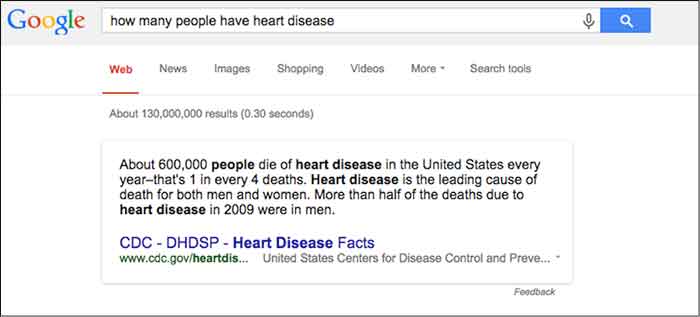
    CDC Information Pull Google Answer Box Image - Search Influence

    This, however, can pose problems. Sometimes, Google pulls answers from long-outdated websites, which can provide an incorrect or inappropriate answer.

    There are going to be instances where Google provides an insufficient or incorrect answer. When this happens, rejoice because even Google is imperfect. One example (and, yes, I’m being excruciatingly picky here) cropped up while I was doing research for one of our clients.

    HowManyHeartDiseaseGoogleAnswerImage

    Initially, my reaction was “Cool, that’s some information that I could use,” but then I realized it wasn’t the information I was looking for.

    StarWarsJediMindTricksImage

    Nice try Google. I was looking for how many people have heart disease, not how many people die from heart disease.

    But, you’ll notice that there is this handy “Feedback” button at the bottom. Here, you can write a personal message to Google telling them to get their act together. Yes, you can be a part of the Google movement.

    Other issues can occur when Google pulls from sites that are out-of-date. So be on the lookout, and when you find inaccuracies provide concise feedback, and be on your merry little way.

    Other Answer Box Speciation

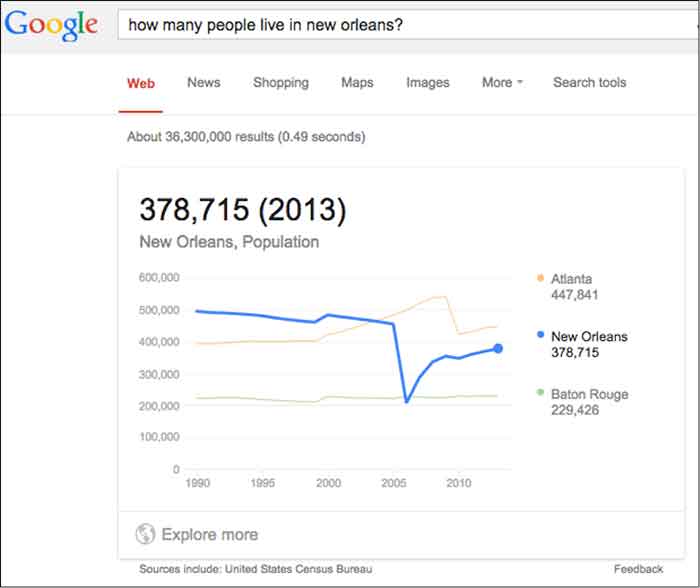
    Population – This one is actually interactive and will show the population anywhere along the measured domain.

    Interactive Population Google Answer Box Image - Search Influence

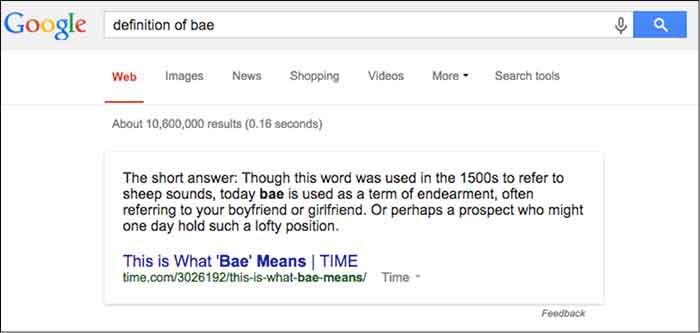
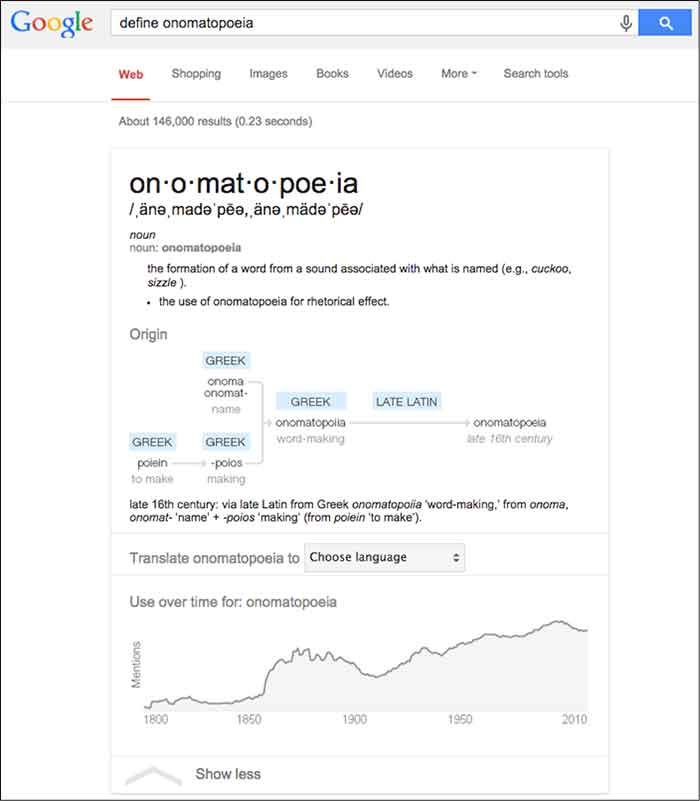
    Etymology & Definition – As a copywriter, this is a personal favorite of mine. I imagine this will do wonders for future linguists and English majors as they can find definition and historical context, all in one search.

    Definition Google Answer Box Image - Search Influence

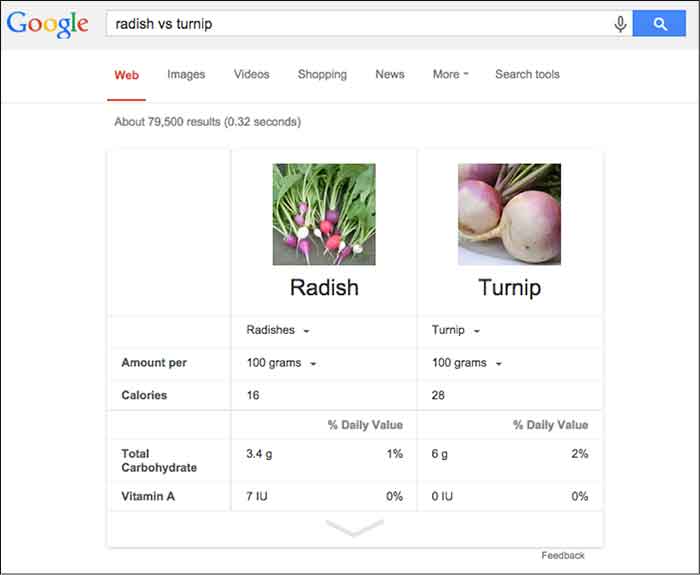
    General Knowledge – What is a thing? Compare and contrast objects or see a specific object defined across a wide array of variables.

    Comparison Google Answer Box Image - Search Influence

    These are just a few examples of an infinite amount of possibilities and I expect Google to only further diversify its answer boxes as its Knowledge Graph continues to expand. However, you’ll notice that, in general, the newer answer boxes seem much more comprehensive, colorful, and engaging. It seems fairly certain the we will continue to see these answer boxes more often as Panda stays on patrol.

    Why Now, Google?

    Plain and simple: mobile search is on the rise. Mobile users already account for more than half of all site traffic. The percentages are even more staggering for social sites such as Facebook and Twitter. Google is in tune with the mobile trend.

    The mobile searcher is a completely different animal than the traditional laptop user. Personally, when I am searching on my phone, I am looking for something very specific. That could mean any number of things — hours of operation, contact info, a trivial fact… The point is, I’m not in the mood to sift through a second layer to find that information. Google appeals to the mobile user in all of us with these answer boxes.

    Also, Google’s answer boxes are another push for clear, concise, valuable information. Google is, afterall, a search engine. Users are searching for information. Google continually updates its algorithms to effectively provide the best possible information.

    On its own site, Google says, “Get answers no matter where you search. Information from the Knowledge Graph is available on your desktop, tablet, and smartphone. So wherever you search on Google, you’ll find that answers and discovery are at your fingertips.”

    What Does This Mean For Your Site?

    In theory, if you’ve earned enough authority points from Google, your site could be a source included in the answer box. Unfortunately, unless you are the CDC or Times.com, this is highly unlikely for broad searches. To get pulled into more localized questions, there are things you can do to signal to Google, “Hey, this is an important piece of information.”

    One such way is schema, which classifies bits of information so that it is easier for search engines to digest. You can learn loads more about schema here and in an upcoming blog post.

    What kinds of answer boxes have you seen? Have you come across any issues with terrible (or terribly funny) Google answers? What do you think of them? Let us know!

    Image Source:

    Thanks to Tina Grimes for sharing the Star Wars mind trick gif.

  • 5 For Friday: Local Search, News, Advice, Measuring Success, and Penguin Refresh

    Five

    1. Local Businesses: Watch Out!
    – Search Engine Watch

    Apple’s newest gadget, the Apple Watch, is likely to have a major impact on local search. The expected increase in hyper-local searches means added pressure will be placed on businesses to ensure they can be found easily online. “Users will be able to search for locations via dictation or favorites, map out the routes and receive touch feedback at each turn – including different notifications to denote right or left turns” said Apple’s Vice President of Technology Kevin Lynch.

    2. SEO Success: Ranking #1 Isn’t What it Used to Be
    -Search Engine Land

    Following “Pigeon”, Google’s latest algorithm update, it has become increasingly apparent that rankings do not equal success. Instead you should focus on the following 5 metrics to more effectively measure SEO success: organic traffic, organic landing pages, organic conversion sources, Google My Business impressions and clicks for driving directions.

    PigeonUpdateImage

    3. Awaiting the Penguin Refresh
    – Search Engine Watch

    Google’s John Mueller recently announced that a Google is working on a Penguin update that is expected to launch in the “reasonable future.” In the meantime, Muller encourages webmasters to “focus on cleaning up site issues and making sure the sites are as good as they can be in and of themselves rather than focusing on individual factors of individual algorithms.”

    4. Social Customer Service: Now More Important than Ever
    – Search Engine Watch

    The social media revolution has had countless impacts on the success and failure of businesses. Consumers have more power than ever before; therefore, it is crucial businesses are aware of their concerns. Tips for success include: taking complaints and issues offline as quickly as possible, responding in less than an hour, and creating content that helps the customer, while maintaining a positive attitude.

    5. App-sessed
    – Marketing Land

    A new study shows that users spent 21 percent more time on apps in the last year. The data revealed that users are spending the longest amount of time on music-related apps and the shortest (but also most frequent) amount of time on social networking apps.

    MobileAppImage

    Image Sources:

    Pigeon Update Image

    Social Media Apps Image


  • Five For Friday: Vine Allows Video Imports, AdWords Launches New Bulk Editing, Snapchat Does News, And More!

    1. Vine Finally Lets You Import Videos From Your PhoneMashable

    Love making videos on Instagram? Well guess what! The popular app, Vine, is finally allowing users to upload videos from their phones.

    In addition to being able to import your own videos, Vine now also allows you to edit videos, and they have been encouraging users to upload older videos stored on their phones and share them with hashtag, #VintageVine. Check out the announcement video below!

    2. Google AdWords Launches New Bulk Editing ToolsSearch Engine Land

    Google announced early Wednesday morning that AdWords will now contain a bulk editing feature. This snazzy new tool will allow users to update their settings per campaign in a more user-friendly and efficient way. Some of the benefits include:

    • A filter for campaigns targeting specific location
    • Updating multiple campaigns with a new targeted location
    • Adjusting other settings such as language, campaign end dates, and ad rotation

    DrakeAndJohnGifImage

    3. Snapchat is Planning A Move into News, AdvertisingMarketing Land

    ghostsmilingimageThe Wall Street Journal reported Wednesday that Snapchat is expected to launch Snapchat Discovery in November. This new product will allow Snapchat users to read news articles and watch video clips the same way they do now: by holding their finger down on a phone screen. The Journal also reported that Snapchat CEO Evan Spiegel is looking to get into advertising for his popular app.


    4. Bing Maps Adds Hundreds of Streetside & 3D City Images; Plus New HD Aerial ImagesSearch Engine Land

    Bing announced a massive maps update this week. Bing Maps now has over 100 cities that support Streetside imagery across America, including Richmond, Boston, Denver and more. They also now have 3D city images and new, high resolution aerial images. 3D cities are viewable through the Bing Maps Preview app, available exclusively on Windows 8.1. Bing Maps also has new high-resolution imagery in over 150 countries on every continent in the world, covering five million square kilometers.

    5. Moz Announces Brand New Beginner’s Guide to Link BuildingMoz

    Moz released their third guide for marketers this week. As all marketers know, link building has changed over the years. One thing that has not is the importance of link building. In this updated guide, readers will learn:

    • What is link building, and why is it important in SEO?
    • What are good links and what are bad links?
    • How you can start a link building campaign
    • Link building tactics
    • Link building metrics
    • The good, the bad, and the ugly of link building
    • Advanced link building tips and tricks

    Click here to download the PDF!

    ApplauseGifImage

  • Five For Friday: Facebook Mobile Ad Tracking, Promoted Video Tweets, And More.

    FiveForFridayRedFiveImageFacebook rolls out new way for advertisers to track engagement with mobile ad campaigns. User suspicion on the rise as updated Messenger app gains greater access to personal information stored on mobile devices. Twitter begins testing promoted video posts for brands. Yelp and Bing join forces in the name of breaking down international language barriers. New addition to Google guidelines marks the end of guest blogging. Get the scoop with this week’s Five For Friday.


    1. Facebook introduces new ad data tool – Marketingland

    Facebook announced on Wednesday that they would begin allowing advertisers to track the click through rate of promoted posts and sponsored ads on mobile devices. According to a white paper written for Facebook by Altimeter Group titled, “Why Mobile is Essential for Brand Marketing,” users spend an average of 40 minutes per day on the Facebook mobile app. The white paper also revealed that users check their mobile phone nearly 150 times per day, and that 51% of mobile users say they prioritize checking their notifications over other messages.  Aside from confirming the fact that most people are more attached to their smartphones than their own shadows, the research reveals just how important it is for businesses to be able to reach their target audience with mobile ads.

    Conversion tracking helps businesses measure the return on investment for their Facebook Ads. The conversion reports on the actions people take after viewing and interacting with an advertisement. Marketing Land discusses the implications of the new cross-device feature, including that it enables advertisers to closely track mobile browsing behavior and allows them to better understand how customers are reacting to their campaigns. While Facebook already allowed for advertisers to target specific users, the new cross-device report amplifies an advertiser’s ability to view more detailed metrics on mobile conversions.

    What does this mean to you? Now, using this cross conversion report, businesses can track the success rate of their ad campaigns. Ads that were previously unsuccessful among PC users may be working well as a real-time mobile marketing tool. These ads can be tracked based on location as well, so get excited for better campaign analysis!

    2. Mark Zuckerberg’s Facebook Messenger spy game – Mashable

    TryingToReadMyThoughtsImage

    You’ve probably noticed a recent influx of paranoia popping up on your news feed, this time about the “permissions granted” required to download the new Facebook Messenger app. The concern is based on suspicions that the app can access your smartphone camera and microphone along with a plethora of other private information stored on your device.  Considering the PRISM program’s deal with Facebook, as revealed by Edward Snowden just one year ago, the public is beginning to feel more aware of apps having increased access to personal information. The origin of these suspicions seems to be based off a 2013 Huffington Post article. Some of the app’s new capabilities include:

    • Facebook can read your phone’s call log, including info about incoming and outgoing calls. Who have you been calling? How long did you talk to them?
    • Facebook can actively track your GPS location, approximate location, or precise location.
    • Facebook can actively record video and audio from your phone and take pictures as well as view all files stored on your phone.

    Mashable breaks it down for us in a different way, explaining that a lot of the permissions allow the app to have all of its convenient, user-friendly sharing capabilities:

    • Facebook Messenger requests permission to access your camera and microphone so the user can share images and record videos right from the app.
    • Facebook allows users to directly call people with the app. It needs permission to access your device’s call log so that it can identify who may be calling you via the Messenger app.
    • Facebook requests permission to access your GPS location so that you can check-in and share your location with friends and in posts.

    Now that we’ve walked through two perspectives on the issue, what do you think? Is this just a ploy to monitor the 250 million users on Facebook, or is it another step toward providing an optimal user-based experience?

    3. Twitter introduces promoted video sharing – Mediabistro

    TonyHawkTwitterVideoImageTwitter has introduced a new nifty feature where businesses can better communicate with their followers using promoted video sharing. According to the Twitter blog, “by using Promoted Video, it’s easy for brands to upload and distribute video on Twitter, and to measure the reach and effectiveness of this content.”

    What does this mean to you? As a business, you’ll have more options when it comes to competing for user attention and interaction. If your business is already actively using Twitter, statistics have shown that promoted videos gain more viewers than ever before. The cost-per-view ad model includes ample opportunity to see viewer analytics, including organic as well as paid posts. Overall, this means a much more engaging Twitter feed and increased opportunities for businesses to reach targeted audiences.

    4. Yelp introduces Bing translation– Marketing Land

    BeautyBeastFoodTastingImageHow nice would it be for everyone to communicate with each other as needed, especially about food? Well, that day seems to have arrived, as Yelp has now introduced a Bing translator capability, according to Marketing Land. Yelp can now translate up to 15 languages, which is sure to help travelers that can’t seem to navigate through restaurant menus, reviews, and directions that are posted in different languages. For international eateries looking to attract tourists with local customer reviews, this app update is perfect.

    5. Google updates guideline violations  – Search Engine Land

    With the ongoing battle for good content, Google+ has now updated their listed standards for determining what is considered spam. Guest blogging, a common practice used for SEO purposes, is now on the Google radar. Search Engine Land reports that guest blogging has been used as an attempt to cut-corners around Google’s algorithm, so if you are using low-quality guest blogs to increase the results of your Google page search results, then it is definitely time to stop. Certain guest blogger sites have already been removed from the Google-ranking loop, as reported by Search Engine Land back in April.

    This update is just another example of Google’s ongoing mission to deliver meaningful, authentic content to Internet users. If you haven’t already, take the time to review your business’s blog and website. The real moral of this update: Consider the ways your products and services cater to your audience’s needs by publishing content that is unique and informative!

    Image Sources:

    Red Five Image

    They’re Trying To Read My Thoughts Gif

    Tony Hawk Twitter Video Gif

    Belle Tasting Food Gif

  • Mobile, Mobile, Mobile: Why You Should Be Optimizing In The App Store

    marysilva1Who are we kidding? Mobile is already here and it is here to stay. With the shift from desktop to mobile for everything you can imagine, and the continued growth of app creation, it has become extremely important for creators to optimize their apps for in-app store rankings.
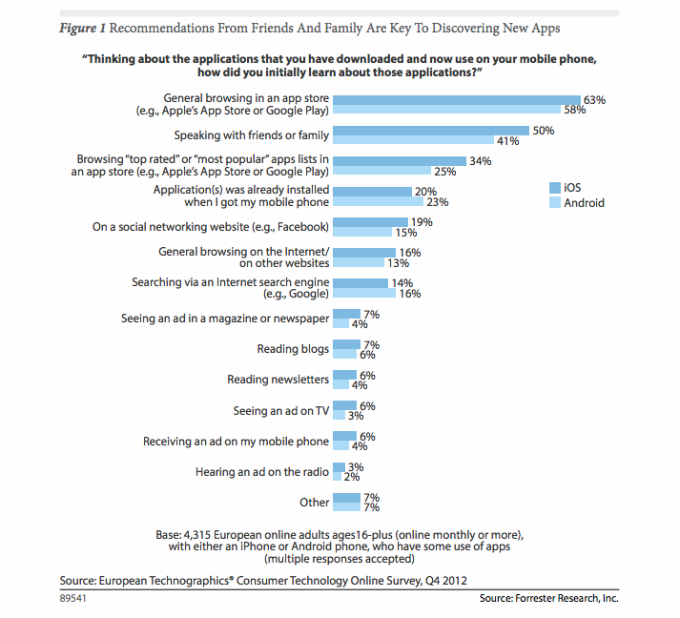
    App Store Optimization (or ASO, as it is known) is basically SEO for the app store search ecosystem. Much like major goals in SEO, the main goal of ASO is to drive more traffic to your app page in order to gain more downloads. In order to effectively optimize your app page, you must first understand your audience and what your target consumers would search for to find you.

    marysilva2

    Research firms, such as Forrester, have released studies in the past showing that most applications are discovered through general browsing and searching of the app store. From a user standpoint, when I am looking for a new app I first look for things that are relevant to my search terms and then weigh the options based on the number of downloads and ratings/reviews. This is much like the user experience when looking for local businesses online.

    This means that the best thing you can do for your app is provide relevant keywords in the title of your app. The other two determining factors (downloads and ratings) will come naturally once you improve your App Store Optimization. Keep in mind, however, that is not just the number of ratings, but the quality of ratings that really matters. Providing consumers with in-app support for encountered issues is a great way to help garner primarily positive reviews in the app store.

    Back in January 2013, Moz published the Top Three Inbound Marketing Strategies for Mobile Apps, a great resource for those looking to improve their ASO and app store rankings.