Tag: local search

  • Year-end Trends: What’s Been Driving Local Search in 2018?

    Annually, the brightest minds in the local search field come together to provide their input on the major changes and trends in the industry via the Local Search Ranking Factors Survey. Coordinated by Darren Shaw from Whitespark and the fine folks at Moz, the 2018 review of local ranking factors helps to coalesce the general sentiment around the most impactful inputs as they relate to local searches. This survey is a great resource for digital marketers because it not only helps us understand the changes in the last year, but also how to better focus our efforts and energy moving forward.

    Here at Search Influence, we are fortunate to be one of the contributors to this survey. With our experience in the local search realm across numerous industry verticals, we are well-equipped to help add more context to an, at times, confusing digital marketing landscape. As expected, much of what we saw in the day-to-day management of our clients’ local search campaigns was reflected in the results of this year’s survey.

    What’s the Biggest Local Search Trend for 2018?

    According to the results of the survey, the biggest local search trend is Google My Business management.

    For those of us who spend countless hours wrangling Google My Business (GMB) and/or Google Maps accounts, the attention Google has put into the product is obvious. With the addition of Google Posts, Google Q&A, website builder, services, expanded attributes, primary and secondary categories, etc., it became clear that GMB was being re-positioned as a social, activity, and information hub for potential customers, current customers, and the business, in some part to offset the loss of Google+ as a business platform.

    Understandably, digital marketers have found GMB signals increasingly important year-over-year. It is pretty straightforward, intuitively—use the new features introduced by Google to help with local search performance. However, many businesses and digital managers fail to follow up once these new features are rolled out.

    Of the eight signals measured in the results, GMB makes up 25.12 percent. As you can see in the image above, this is a large increase from the previous year’s data. Ensuring that your business has a properly optimized listing will go a long way in determining the vitality of your business in a local search context.
    31 questions to ask a marketing agency

    Reviews Are an Increasingly Relevant Local Search Ranking Factor

    Along with increased profile options, Google has started taking steps to help increase review participation on the Google My Business listings themselves. Through new mobile app features, new messaging features, and other small tweaks, Google has made it clear that they do not just want users leaving reviews for the business; they want to make sure businesses are interacting with their reviewers as well. One prevailing thought derived from the data points is that Google is making an effort to create a quasi-community around business listings, making it so users do not even feel the need to click through to a client’s website. There is ample room for discussion about the pros and cons surrounding that concept, but, as a practical matter, digital marketers and businesses should be keenly aware of this trend and know how to best leverage it to convert potential customers.

    This fact is reflected in the breakdown of the influence of review signals. As seen in the table above, the influence of reviews on listings has increased significantly year-over-year. As businesses begin to compete more and more for the “Local Pack,” reviews may be a large factor in whether or not your business becomes listed. Encouraging your customers to review you on Google, whether positive or negative, will help Google know your business is active. What’s more, if you, as a business, respond to the positive and negative reviews, you are adding a valuable signal to Google, as well as displaying good customer service.
    But, What Happened to Links and Citations?

    One important thing to consider in regards to this survey is that just because something has become less important relative to other factors does not mean that it has lost significance. A good local search strategy encompasses a holistic approach that implements strategies for all of the different factors, of which linking and citations are a significant portion.31 Questions Checklist square image

    Part of the reason these factors have seen a dip in relevance is because the other factors have become more influential—in other words, the overall results have become a bit diluted due to the increasing number of factors. To rephrase, linking and citations are still a large, integral part of a good local search campaign; however, you might want to get a wrangle on your Google My Business and review situation prior to embarking on a full-fledged link/citation-building campaign.

    So, What Are the Other Factors?

    A large portion of the review is the section-by-section breakdown, along with a helpful glossary, to help you fully understand how each factor is weighed and what digital marketers think. It is important to distinguish between organic search results and the “Local Pack,” as both have different considerations when it comes to ranking signals. In lieu of breaking that down here, I suggest reading the data supplied in the post on Moz’s blog, as well as Darren Shaw’s companion piece explaining the survey.

    Local search is a constantly evolving, dynamic field that requires actively monitoring changes to platforms and signals, and to Google’s new product rollouts. Undoubtedly, there will be some disruption in the local search field via a new product, new algorithm, or cosmetic changes, but these surveys give us the historical context to better understand why these changes might have occurred and how they might impact future usage. If you’d like help building a dynamic marketing strategy that encompasses these trends, reach out to Search Influence to request your free marketing analysis.

    Images:

    Laptop

  • Trust Your Marketing to a Team, Not a Machine

    You’ve probably heard something like this before: “Automated marketing is bad for business!” But, actually, I’m not sure I 100% agree with that—I know, you’re surprised, right? A marketer telling you that machines and automation are a good thing? Well, hear me out. Artificial intelligence is growing at a rapid pace, and in the field of digital marketing where there is data OVERLOAD, you’d be silly not to take advantage of this technology. I’ll admit, I’m one of the silly ones that have, at times, been afraid to trust machines with my campaign performance. But, as AI has become smarter, the real value lies in combining the best that humans have to offer with the speed and data processing capabilities of machines to achieve total marketing domination.

    What Can Technology Do for You?

    SO. MUCH. DATA! Does it make your head spin?! Luckily, machines don’t get dizzy easily, and they are able to process many more data points than we could ever hope to. The more data and history a machine is able to analyze, the more it can learn to make decisions for the future—this is the machine learning aspect. CUE THE FEAR: THE MACHINES WILL TAKE OVER! Just kidding (but more on this later).

    Machines were built to automate simple tasks. If it is a mundane task that is done over and over and over and… well, you get the point. These are the types of things that are perfect for machines to take on. Why pay someone for hours of work when a machine could do this in minimal time? This frees up your time to focus on the more important and creative work that you enjoy doing.

    This technology is now more readily accessible than ever. Google, Facebook, HubSpot, Salesforce, and many other platforms invest heavily in machine learning so that you as a business or marketer don’t have to. Google alone has continued to release new features (such as Smart Bidding options and responsive ad types) that make it easier to set up, run, and manage a successful campaign. They’ll also typically release these features in beta and test them first to assure they have the intended impact before releasing them to the public, so you know that these tools are reliable.
    31 questions to ask a marketing agency

    What About People?

    Wow, machines sound pretty amazing! What’s left for us mere humans to do? In marketing, the most important thing a human can do is to understand your business and marketing goals. With that understanding, marketers can devise strategies to reach your target audience and accomplish your goals. Marketers can deploy these strategies and understand the intentions behind them.

    Humans have two other amazing attributes that give us an advantage over AI: we are innovative and we are creative. We need humans to drive the innovation to test new theories and ideas. Automated systems and machines can only produce the same results if provided the same data, and it’s our innovation that continues to drive machine learning. With machines, however, we are able to test new ideas faster and with better accuracy.

    Because machines have gotten rid of all that boring work, we have more time to be creative and to apply that creativity to your marketing. Marketers can understand your business, what makes you unique, and why you love doing what you do, and they can assure that this message is prevalent throughout your marketing. They can come up with creative concepts and imagery that define your brand and make you stand out among your competitors. Could a machine do all that?

    Human + Machine = WINNING

    In other industries, we wouldn’t let the machines take over, so why would we do that in marketing? Think about it: autopilot technology has existed since 1912, yet we still have human pilots fly planes. Self-driving cars still have a human driver behind the wheel. Even machine assembly lines are often spot-checked for quality by human beings.

    “We need to stop thinking of machines as rivals. Instead, we should see them as an opportunity to take our creativity to the next level,” says Ben Jones, Google’s global creative director.

    So how can humans work together with machines? Let’s go through a few examples.

    1. Use human creativity to write ad copy and create compelling ad graphics, then use machines to make it more personalized. For example, Google’s responsive display ads allow us to put in a combination of assets that the algorithm integrates to be specific to the person it’s targeting, including the content the ad is shown next to and the size of the ad placement. Now that’s powerful! Otherwise, we’d have to create hundreds of combinations of ads to be able to show in all of the available inventory, and on top of that, we’d have to spend a lot of time organizing these ads.31 Questions Checklist square image
    2. Once a marketing strategy is created, marketers can set up campaigns and machines to manage it. However, it’s not a “set it and forget it” mentality. Machines can make decisions based on past performance and data, and they are capable of processing data, but they can only process the data provided. And while machines are getting better at reconciling offline and online data, humans should have the oversight to determine if campaigns are driving the bottom line.
    3. Marketers can work with businesses to define KPI targets, which are then fed into machines to optimize campaigns and work toward these goals. As mentioned above, it helps to have the human oversight to understand that marketing is doing what it is intended to do.

    How Can an Agency Help?

    Agencies have access to more technology, humans, and data. With larger marketing budgets, they are able to invest in some pretty powerful marketing automation tools, those that aren’t so readily (cough*inexpensive*cough) available. And as an important investment, they have likely researched and evaluated several platforms before choosing the one that would help them best achieve client goals most efficiently.

    Agencies also have the benefit of working with many clients across various industries with different objectives, so they’ve been able to put the machine through many different scenarios to figure out what works best in each situation.

    So rather than trusting your marketing to just a team or a just a machine, combine the power, speed, and intelligence of the machine with the creativity and empathy of a human team for a truly winning combination. The experts at Search Influence can help you integrate automated systems into your marketing strategy while providing creative feedback to ensure that your marketing campaign reaches its full potential. If you have any questions about implementing these tactics, start a conversation with one of our marketing strategists today.

    Images:

    Girl with AI

    So.Much.Data.

    Code

  • How to Align Your Marketing Team Around a Successful Strategy

    How to Align Your Marketing Team Around a Successful Strategy

    With the explosive growth of the marketing technology landscape in the last several years, it can be easy to get completely lost in tactics, technology, and metrics. “Digital marketing is so awesome,” they say, “because you can track everything,” they say.

    True, but what’s also true is that the 6,000+ vendors of MarTech platforms overwhelm us with SO. MUCH. DATA. How does a company know they are making the right decision when one can easily twist and turn data and draw correlations to tell a desired story? Confirmation bias is a real thing, and it can plague the effectiveness of any given marketer’s plan.

    So how does one manage to take advantage of the right data and make strategic marketing decisions without finding themselves adrift in a sea of marketing bologna? It’s easy to say, but less simple to execute: start with a solid strategic plan.

    In this post, I’ll review the essential steps to creating a highly organized and well-researched marketing strategy, which should then serve as the anchor for all future decision-making in your marketing journey. That is, until the next time you review and update your strategic plan (a bit of foreshadowing: it’s an ongoing process).

    How to Create a Successful Marketing Plan

    Start With Gaining Alignment

    The most successful marketing plans we’ve developed for clients have started with gaining alignment from all the stakeholders involved in marketing the business. From the top of the marketing department to the most front-line sales executives, making sure all parties are heard is important to gaining an understanding of the current state of sales and marketing and gathering input on the future ideal.

    Get an Outside Perspective

    Bringing in professionals for the research and development of a strategic marketing plan can help to make sure your plan is truly objective. Wrangling a lot of stakeholders, some of whom are more dominant than others, can leave you feeling like you’re chasing your tail and not making progress. When you hire a marketing agency for the development of your marketing plan, the third-party perspective can help to ensure the project not only stays on track, but also that all voices are heard.

    One way we’ve done this is to host workshop-style meetings with all stakeholders, facilitating discussions of their ideas on strengths and weaknesses, opportunities and threats, as well as their best customers, gaining insights on what marketing tactics were perceived as successful or not in the past.

    We bring to the table some initial research, like competitor profiles and trends in their marketing, as well as data analysis of existing customer profiles, if provided in advance. This information serves as the foundation for the discussion, and we prompt the stakeholders with specific questions to get them thinking more deeply about where and how marketing can help the business grow. In this process, we’ve seen clients experience some internal revelations and uncover operational opportunities for improvement, which are incredibly valuable to identify.

    We take away all the inputs and begin the fun part: planning a strategic marketing plan that accomplishes a measurable goal. And on that note…

    Define a Measurable Goal

    It’s critical for a marketing strategy to be informed by a S.M.A.R.T. goal. Digital marketing is indeed awesome because it’s measurable, but you have to know WHAT to measure up front. Otherwise, you’ll waste a lot of time on the wrong tactics and pulling reports on the wrong metrics.

    It’s critical for your sales and marketing stakeholders to be aligned on this measurable goal. If you have enough data to understand your sales pipeline, you might be able to identify a specific number of inbound leads that marketing should deliver per month or week. As a part of planning your marketing strategy, make sure you align everyone on how you will determine whether the marketing strategy was successful, at both a high level and an individual-tactic level.

    What to Include in a Marketing Plan

    There are tons of resources out there regarding what to include in a marketing plan, but the key elements are:

    • Competitive Analysis
    • SWOT Analysis
    • Buyer Personas
    • The Buyer’s Journey
    • Strategic Tactics
    • Key Performance Indicators

    Competitive Analysis

    In order to know where you stand in the marketplace, it’s important to take a close look at the competition your prospects are likely considering. Typically, we like to note basic business information for context, such as the number of employees, revenue (if available), years in business, and how they compare from a pricing perspective. Next, we review their marketing and brand presence, specifically noting key differentiators, how they’re appealing to the audience via messaging and measurable-goal visual communication, and, of course, the products or services for which they are a true competitor.

    SWOT Analysis

    SWOT stands for strengths, weaknesses, opportunities, and threats. Strengths and weaknesses are meant to look inward, whereas opportunities and threats look to the external marketplace, industry, and geographic landscape. An in-depth analysis here on the state of your business, not just marketing, can be incredibly insightful from the top down, and the key to a successful SWOT is stepping back and being as objective as possible. Questions you can ask yourself and your team include the following:

    Strengths

    • What advantages does your company have?
    • What do you do better than anybody else?
    • What unique resources can you draw on that your competitors cannot?
    • What are the reasons your clients choose you?

    Weaknesses

    • For what reasons might your prospective clients not choose your company?
    • What do other companies offer that your company does not or cannot?
    • What could be improved about the products or services that you offer?
    • What types of clients are you at risk of not serving well?

    Opportunities

    • What opportunities do you see in the marketplace?
    • What new ideas could you be taking advantage of?
    • What trends are popping up in your industry?
    • What positive changes in the market do you see?

    Threats

    • What obstacles does your company face in growing sales?
    • What are competitors doing? Is competition increasing?
    • What negative changes in the market do you see?

    Buyer Personas

    A buyer persona is intended to serve as a representation of a business’ “ideal” or target customer. It should be based on research and data about your existing and prospective customers, including their demographics and psychographics. The best process for buyer persona development involves surveying or interviewing actual customers, asking them deeper information than simply gender, age, and household income. An ideal buyer persona may include the following: background, demographics, identifiers, goals, challenges, how you help their challenges, and what marketing messaging will speak to the persona. You may find that you have several personas, or maybe you have just one. There’s no hard and fast rule about what a buyer persona should include or how many a business should have.

    The Buyer’s Journey

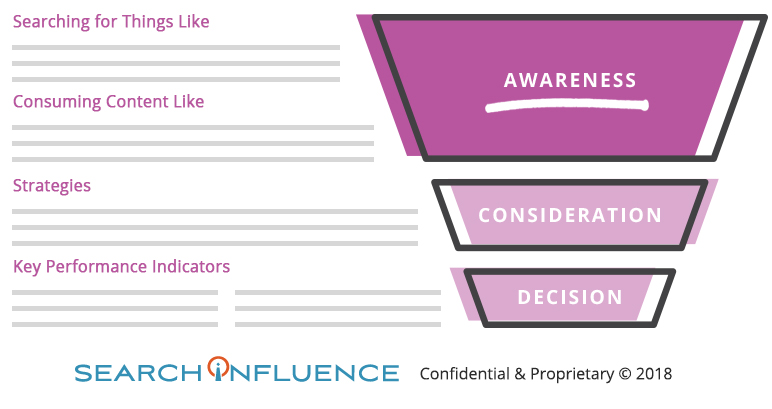
    When the Search Influence team develops a marketing plan for a client, the buyer’s journey is where we spend the majority of our time and is what informs the strategic tactics and key performance indicators (KPIs). Once your buyer personas are identified, the buyer’s journey maps out your prospective customer’s behavior at each stage of the marketing funnel, which allows you to think strategically about how you can reach the audience at each stage. When complete, our buyer’s journeys typically look something like this:

    Strategic Tactics

    Specific marketing tactics you hope to employ to achieve your goals are outlined here. This may include everything from traditional media and print collateral all the way through your digital campaign strategies and creative direction. It’s a good idea to spend time evaluating these tactics and considering a realistic budget required to deploy them all. Perhaps you will need to do a phased implementation due to your budget or internal resources. Now’s the time to make that plan.

    Key Performance Indicators

    In addition to outlining a marketing plan’s overall goal and objective, we recommend that your plan defines Key Performance Indicators (KPIs) for each phase of your marketing strategy and, if necessary, specific tactics. Defining this up front will help ensure that all stakeholders fairly evaluate the performance of a given tactic as time goes on and keep them anchored to the ultimate goal.

    Finish With Gaining Alignment…Again

    Remember the work you did with your team to collect their input early in the process? Call another meeting with them and present the finalized plan. Use this as an opportunity to set expectations for ongoing roles and responsibilities and get the team moving on the plan. They’ll enjoy seeing how their input shaped the finished product and be more willing to pitch in to make it happen. Trust us, you will need their support!

    We’ve led the charge through this arduous process several times with our clients. I say WITH our clients because, if you couldn’t tell by now, it requires a lot of collaboration and partnership. If you are looking for full support in leading this endeavor or even just some hours consulting with our team on the process, we’ve got your back! Speak with a strategist today at (504) 208-3900 or fill out this form to ask for a consultation within 24 hours.

  • Guide to Facebook’s Lead Generation Ads: What Can They Do for Your Business?

    You’ve probably heard this a million times by now, at least a couple thousand from us—if you aren’t on Facebook, then you’re doing your digital marketing all wrong. There are more than 2 billion people around the world who actively use Facebook monthly, and on average those people spend about 35 minutes a day swiping through their feeds and engaging with content from friends, family, and brands.

    Not only is Facebook’s audience large and engaged, Facebook offers an advertising tool that makes it easy for you to create advertising campaigns at a fraction of the price of traditional ad types. Our client Audubon Nature Institute generated $10,100 in total revenue while only investing $1,080 in ad spend on a Facebook Display campaign!

    What Are Facebook Lead Ads?

    Facebook Lead Ads are a type of Facebook ad that allows advertisers to collect information from prospective customers directly from the platform. Before Lead Ads, you would have to guide users to a landing page on your website to leave their contact information.

    Facebook has made it simple for you to create ad campaigns in a few taps and for potential customers to contact you with ease. Users simply tap your ad and their information is sent directly to you.

    Why Facebook Lead Generation Ads?

    • Facebook forms are made for mobile and allow users to submit their contact information in a flash
    • Because there is no need to click through to a landing page, there is potential for more conversions and less drop offs
    • You can reach your target customer where they are with Facebook’s countless targeting options
    • The Lead Generation forms are customizable, allowing you to build a form to ask the right questions
    • It’s easy to connect your CRM to Facebook to get your leads immediately and take action sooner
    • You can use Facebook Lead Generation Ads for quote and demo requests, sign-ups for your newsletter, event registration, access to gated content, and more
    • Many businesses and brands large and small have seen significant increases in lead generation and a reduction in cost per lead
    • Facebook advertising is cheaper than traditional ad types and can build more brand awareness
    • It saves you time

    Where Will My Leads Go?

    All of the leads you collect by way of your Facebook Lead Generation campaign will be stored on Facebook and can be downloaded to a CSV file. To download your leads, visit your Facebook page and click “Publishing Tools,” and you’ll see “Forms Library” under the “Leads Ads Forms” label.

    Pro Tip! Facebook also connects to popular CRMs like HubSpot and SugarCRM, enabling you to automate the process of pushing leads directly to your sales team. If you don’t take this step, you’ll have to download a CSV file regularly to see and take action on your new leads.

    Creating Your First Lead Generation Ad

    Before you begin building your campaign, you’ll need to make sure you have a Facebook Page for your business or brand. Building your campaign starts with visiting Facebook Ads Manager via business.facebook.com or accessing the drop-down menu on the top left of your screen. If you’ve never run ads before, you will need to create a Facebook Ads Manager account. You will be asked to link your business’s Facebook and Instagram page to your Facebook Ads Manager account.

    Building a campaign is simple and can be done in a few steps.

    1. Choosing Your Campaign Type

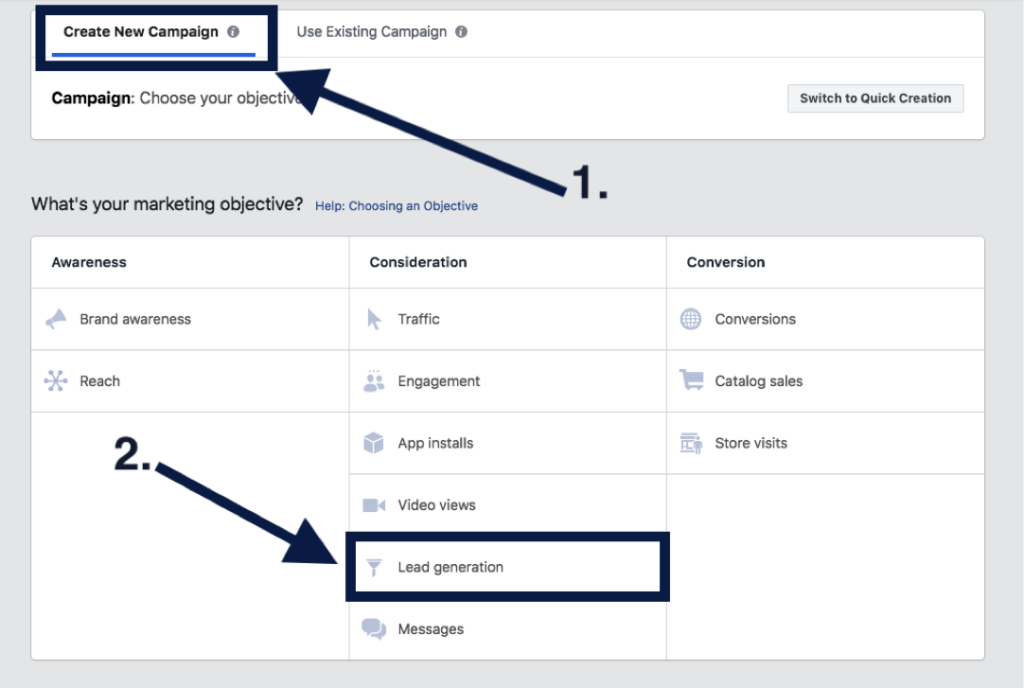
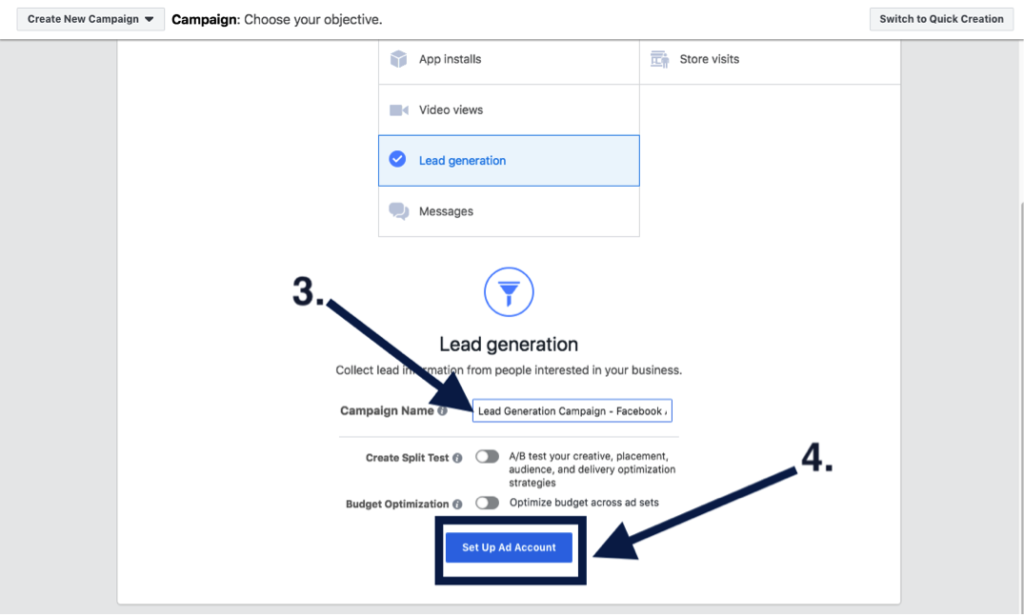
    Once you’re all set up and ready to go, you’ll want to create a new campaign and select “Lead generation” under the “Consideration” marketing objectives. You’ll want to give your campaign a relevant name and click “Continue.”

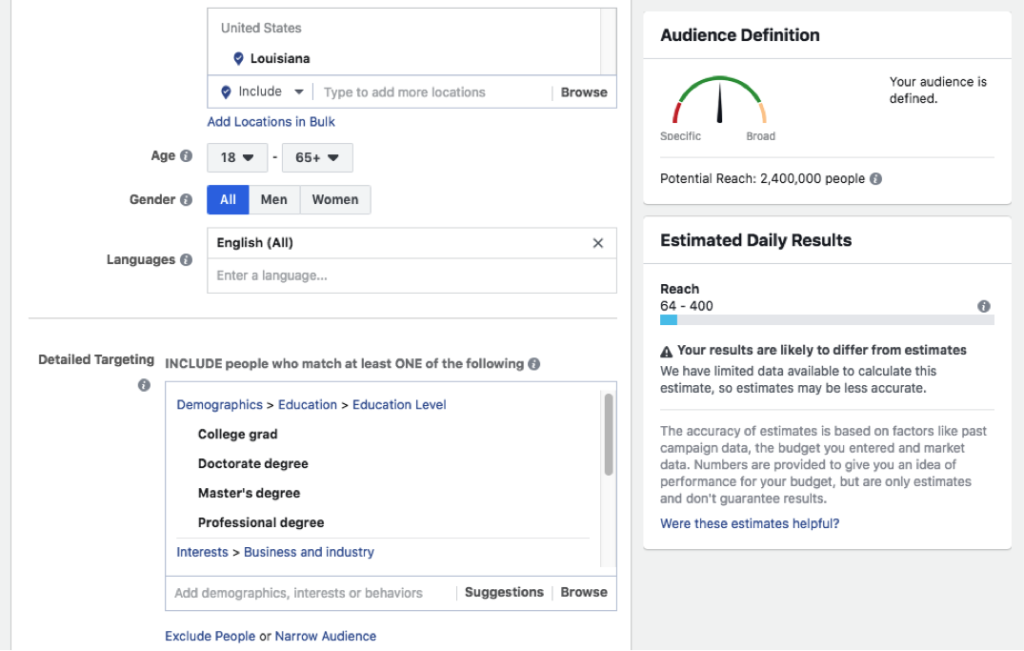
    2. Choosing Your Custom Audience & Budget

    Move forward with setting up your ad account, creating your custom audience, and setting your budgets. But don’t worry! Facebook offers optimization tools to help you adjust your budget and targeting after the campaign is launched, and they are always adjustable. Facebook offers several targeting options, including targeting by demographics like location, age, gender, and language. You can also target by other demographics, interests, and behaviors like education levels, if someone is interested in yoga, and behaviors like how they utilize Facebook. You also have the option to build an audience from a lookalike version of your current customers and website visitors.

    3. Creating Your Ad

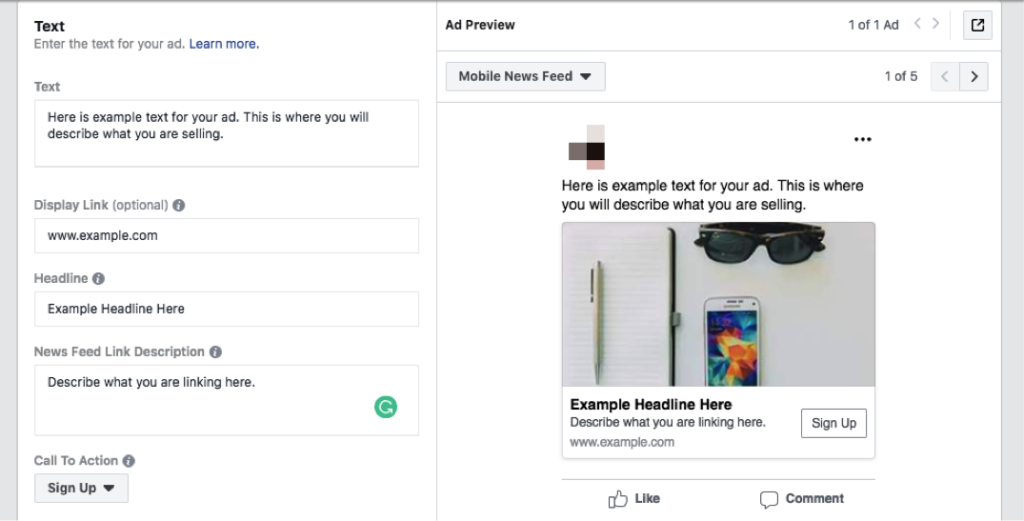
    After you have your custom audience and have set your budgets, you’re ready to create your ad. You’ll verify the pages you want your ads to be represented by and select your ad format. There are several ad formats to choose from. Carousel and video have been the most successful ad types in our experience. You’ll add in your ad text, display link, headline, news feed description, and a call to action.

    4. Creating Your Lead Generation Form

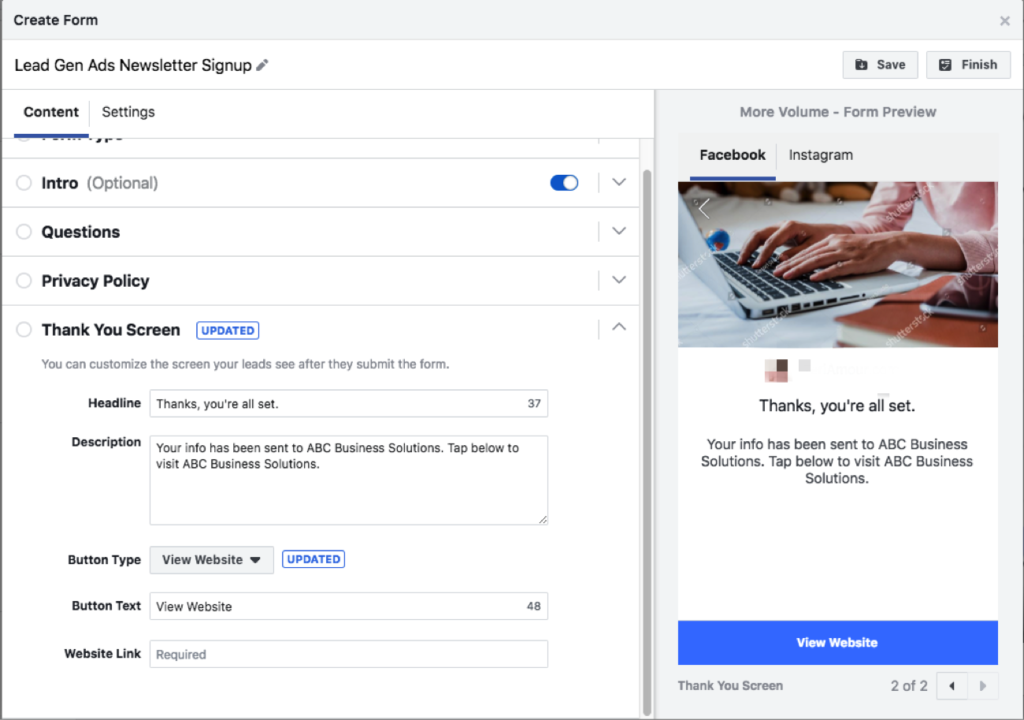
    Finally, the last step before you launch your campaign will be to create your lead generation form. Here you’ll introduce the product or service you’re promoting, add the questions you’d like to ask your audience, insert your privacy policy (it is mandatory to have one), and build your “Thank You” screen. Be sure to give your form a descriptive name so that you can identify it later when you need to download your leads.

    5. Publishing Your Campaign and Launching

    Congrats! You’ve launched your Lead Generation campaign. This is the part where you celebrate and wait for the leads to come pouring in.

    You’ll want to monitor your ad’s performance by testing and checking on it regularly! Try changing out your ad copy and graphics, or trying different targeting options—narrow your targeting if you find you’re reaching too broad of an audience and thus receiving unqualified leads. You could also update your form to ask more specific questions.

    Here at Search Influence, we’re invested in helping our clients grow their businesses through dynamic marketing strategies that drive qualified leads. If you’re interested in utilizing Facebook to bolster your lead acquisition efforts, request your marketing analysis today to get started.

  • Non-Secure Site? Prepare Your Website for the Google Chrome 70 Rollout

    Since last year, we have been explaining what HTTPS means and the important updates announced by Google. Let’s do a brief refresher course.

    What Is the Difference Between HTTP and HTTPS?

    HTTP and HTTPS protocols both fulfill the same core function to transfer data over the internet. HTTPS stands for Hyper Text Transfer Protocol Secure and is the most secure protocol that enables data transfers. It allows for security because it applies encryption on the data being sent. This makes you far less vulnerable to attacks on your information.

    HTTP isn’t encrypted, therefore snoopers with access to a network could look at and modify your precious data passing between you and the website.

    For a more in-depth look at the importance of security, check out our blog post on the topic of “Internet and Security” by our web developer Jared Jones.

    What Are Google’s Upcoming HTTPS Changes?

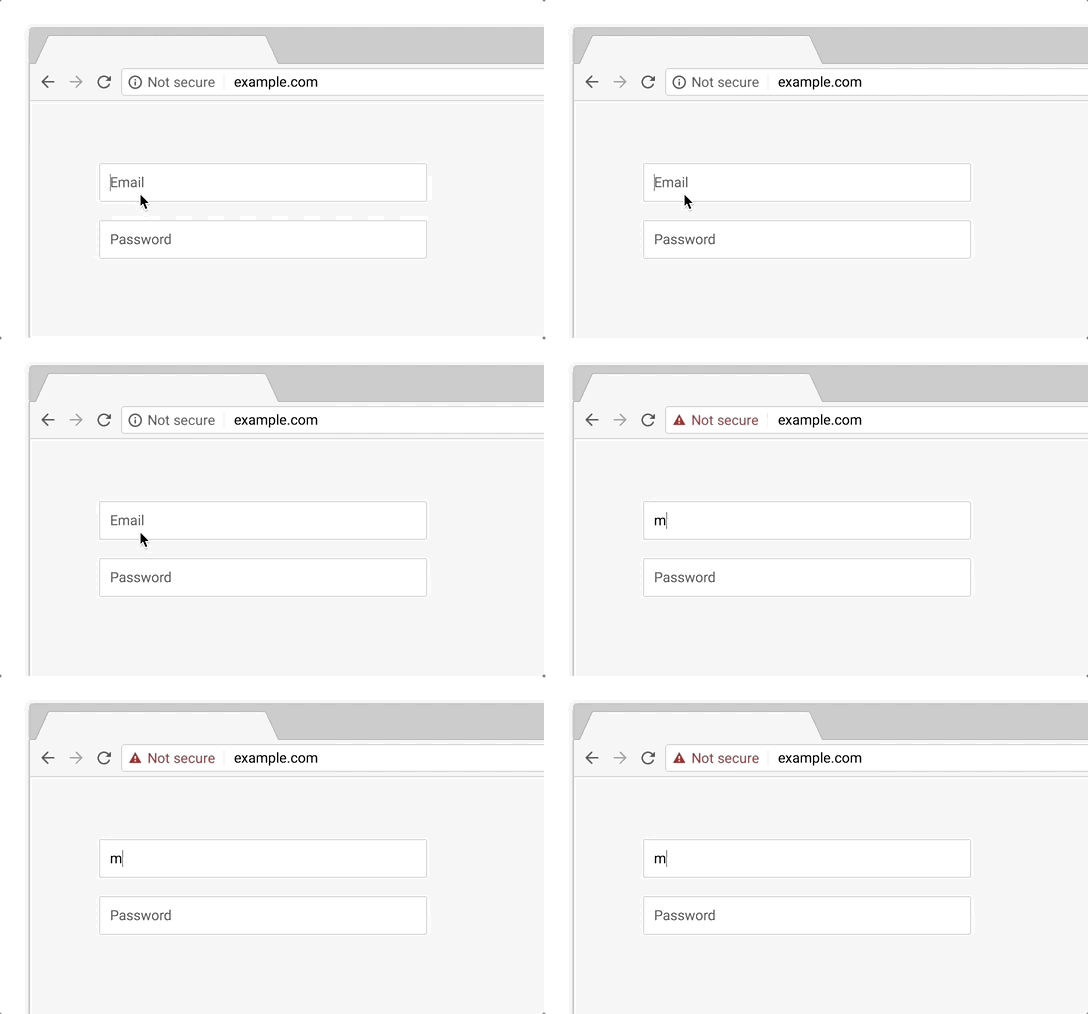
    The current version of Google Chrome shows a “not secure” sign alongside the web address bar for any websites that still use the HTTP standard.

    With the upcoming release of Chrome 70 in October 2018, Google announced that they will begin to shout out the “not secure” notification even louder. All websites still being served via HTTP will receive a negative visual indicator in red that reads, “not secure” beside the URL in Chrome’s address bar.

    “Eventually, our goal is to make it so that the only markings you see in Chrome are when a site is not secure, and the default unmarked state is secure. We will roll this out over time, starting by removing the “Secure” wording in September 2018. And in October 2018, we’ll start showing a red “not secure” warning when users enter data on HTTP pages,” according to Emily Schechter, the Chrome Security Product Manager.

    Example of a URL for a non-secure site - Search Influence

    In other words, now is the time to think of HTTPS as mandatory!

    How Do You Add HTTPS to Your Website?

    An SSL certificate is needed to convert your site to HTTPS. When you install this certificate and migrate your website to HTTPS, it facilitates the important encrypted connections.

    Google’s SSL requirements are crucial to your website because they provide authentication and establish trust when customers visit your pages.

    Brush up on our detailed explanation of SSL Certificates by reading Influencer, Alison Zeringue’s blog post.

    We Have Your Back!

    The majority of internet users tend to trust Google when it tells them something isn’t secure. Be prepared for all the new Google Chrome changes and keep your website secure. Call our team at Search Influence today at 504-595-1623 to help you protect your clients and provide encryption of all sensitive information on your website.

    Images:

    Not Secure

    We Got This

  • How to Drive Conversions With the Right Contact Form—And What to Avoid

    Your business’ shiny new website just launched and everyone assumed a deluge of fresh new leads would follow. To everyone’s dismay, the predicted deluge turns out to be nothing more than just a trickle. What gives exactly? “Build it and they will come” may ring true with your traffic itself but that quote lacks an “and convert” at the end. In years past, traffic was the key metric for a lot of businesses since it was assumed that those users would appreciate the brand awareness. Fast forward to the present day in the “Silicon Age” where users not converting is sure to set your business behind further than the Bronze Age.

    One easy way to convert users into customers is through the usage of a handy-dandy online form, but just having a form doesn’t guarantee a conversion rate anywhere near your industry benchmark. I’m here to help bolster those forms from some boxes into lead machines!

    Positioning

    Back when there were only brick and mortar buildings, there was always a huge focus on location, location, location. That phrase may seem like it belongs in the Bronze Age, but it instead adapted to the changing times and is still just as important as it was before. The location of your form is integral to the success of any lead collection campaign. Forms should always be placed in a very obvious place and above the fold, which is the portion of a page that initially loads in the screen’s viewport, as often as possible. Having a form in a good location puts it on users’ minds as soon as they visit your website and makes it more convenient to convert. Overlaying the form over a banner image is a good start for more visibility.

    Another excellent location for your form is on the sidebar of your site. This allows casual site perusers to convert at their own leisure instead of forcing them to a contact page or trying to lead them back to whatever landing page they entered the site within. One last location for a form is on your contact page, of course. Any site user would expect a way to contact your business on the contact page. In addition to an address, phone number, or email, a contact form is a perfect way to capture visitors’ information and nurture leads to eventually becoming loyal customers of your business.

    Layout

    Now that you’ve figured out where to place your form, the next step is to create a form that users can easily understand, fill out, and convert on. One big helper that was pointed out in a Google AI test is how users’ eyes focus on form fields. Having your labels above the inside of form fields is preferable to labels next to the form fields. This allows users to better scan the information and breeze through forms quicker, which leads to lower rates of dropout and errors in fields. Speaking of fields, try not to overwhelm your users with a bunch of unnecessary fields for information that can be gathered further down the line. If you aren’t shipping something to someone, why would you require a home address? If you’re sending users a brochure via email, why would you require a phone number? Requiring an excess of information makes users go “hmm…” and abandon the website completely. This is not to say that long forms have no place on the internet, rather every bit of information should be relative to the call to action.

    Here at Search Influence, we use our own proprietary lead tracking system to create fully customizable and extremely flexible forms that can keep track of your website leads in an easy-to-read reporting system. With our forms, you’ll know where your leads come from the most and learn how to optimize your campaigns to maximize your lead generation.

    Call-to-Action

    A “Call-to-Action” (CTA) refers to the phrase that is meant to draw users into completing conversions. In the case of forms specifically, this would be the text that is on the submit button. Hubspot compiled a list of 31 Call-to-Action examples taken from many different corners of the internet and from varying industries. The main takeaway here is your CTA needs to be catchy and draw a user in. “Submit,” which may be seen fairly often around the internet, doesn’t quite cut it anymore. The end of a form should establish some sort of value to a user. Saying “Submit” simply tells the user that you’ll gladly collect their information and may or may not do anything with it.

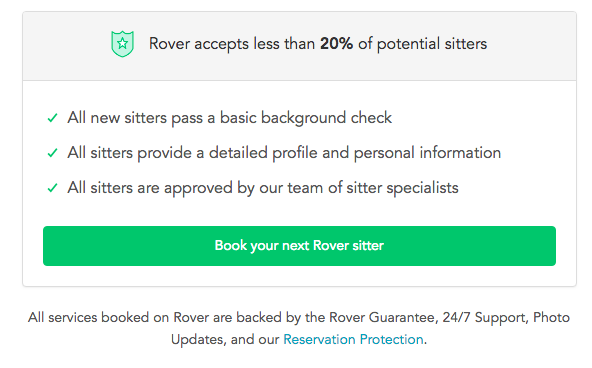
    Screen shot of a call to action from Rover - Search Influence

    Having detailed text on the CTA button encourages users that your form is something worthwhile whether they’re about to “Subscribe to our newsletter” or Rover.com‘s “Book your next Rover sitter.” Users want to know the value of giving up their precious personal data, so make sure your form is honest and straightforward with how the users’ data will be used.

    Mobile

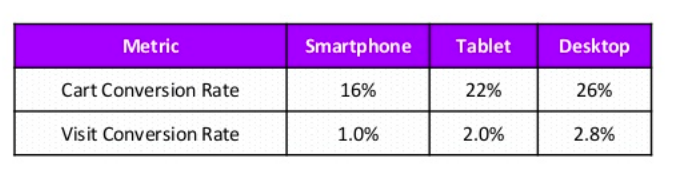
    One factor that can’t be ignored is the impact of mobile users on your website. Considering mobile users surpassed the amount of desktop traffic almost two years ago—eons in internet time—ignoring mobile users is a recipe for failure. What’s even more surprising is that in the same year, even though there were more mobile visits to websites worldwide, mobile users converted almost 65% less than desktop users according to the 2016 Adobe Mobile Retail Report.

    Table of mobile conversion rates - Search Influence

    Our advantage here is that this data is like, eons old. We’ve progressed since then and have become more accustomed to serving mobile users and Google even recognizes the efforts that developers put in to make their websites mobile friendly and adjusted their search to index mobile sites first. This coupled with the rising magnitude of mobile traffic means that being able to capture leads efficiently on mobile platforms is imperative for any campaign.

    At Search Influence, we have everything you need to start a lead generating campaign, from SEO services, digital advertising, social media management, and the capability to track your campaign with pinpoint accuracy. We also practice what we preach; check out the form in the sidebar if you don’t believe us.

  • Why You Should be Posting on Google My Business

    “Just Yahoo it,” said no one ever. It just doesn’t have the same ring as “Google it,” which was officially added to the Oxford English Dictionary and the Merriam-Webster Collegiate Dictionary in 2006. That’s because Google has practically monopolized internet searching. According to NetMarketShare, Google accounted for over 79 percent of all global desktop search traffic in 2017, followed by Bing at 7.27 percent, Baidu at 6.55 percent, and Yahoo at 5.06 percent. In addition, Google receives over 63,000 searches per second on any given day. In the U.S., more Google searches take place on mobile devices than on computers, and 30 percent of mobile searches are related to a location. It’s obvious that to succeed in the SEO world, you have to play by Google’s rules.

    So, Just How Do You Play By Google’s Rules?

    One way to do this is by creating a Google My Business (GMB) page for your company. This page allows your businesses to manage their online presence across Google, through a physical location. Within this company page, Google has a social posting platform that allows business to provide “up-to-date posts from verified people, places or things, directly in search results.” These public posts allow businesses to share company updates to feature what’s new, respond to customer reviews, and add photos to highlight what makes your business special, and build brand awareness.

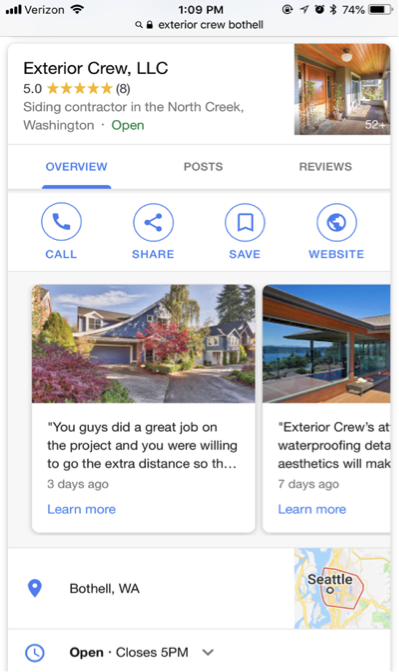
    Screenshot of a Google My Business post from Exterior Crew, LLC

    These posts are particularly captivating because, rather than appearing in the search results, they are displayed in the knowledge panel, which presents a more engaging visual aid. This is NOT to be confused with Google +, which was Google’s attempt to compete with Facebook as a social platform. And let’s be real; it was a major fail. Realizing this, Google reconstructed their platform and created GMB. Google + profiles and pages still exist, but they are now subpages of a GMB page.

    The Start of Google Posts With Candidate Cards

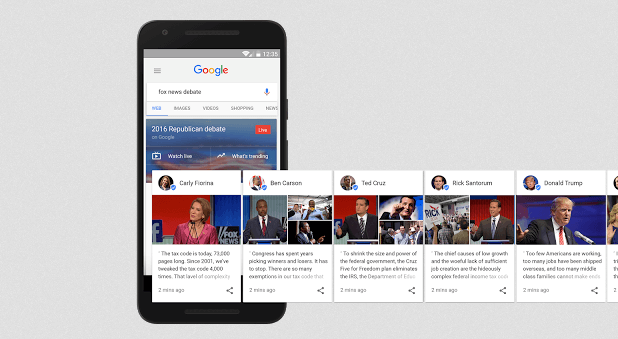
    Before July 2017, Google’s now-called “Google Posts” were only accessible to few. It all started with “Candidate Cards.” You may remember seeing these around the 2016 presidential election. Google described these as non-ad privileges, giving 2016 Republican and Democratic candidates a place in Google search.

    Image of Google's candidate cards - Search Influence

    Proving to be both appealing and informative by viewers, Google allowed the expansion of these cards for celebrities and sports teams. As of June 2017, GMB brought these now-called “Google Posts” to local businesses as an easy way to help attract new customers and build relationships with the customers you already have. These posts have proven particularly effective in promoting flash sales or promotions, emergency updates, such as school closings, and sharing job openings. In addition, these posts contain a call to action (CTA) feature, which provides an easy and direct way for customers to book appointments or reservations.

    Benefits of Google Posts Over Traditional Social Media Posts

    You may be thinking, why would I need to use Google as a social platform when I already use Facebook, Twitter, Instagram, etc.? And you have a point. These social platforms are still great ways to post updates about your business. Although similar, Google Posts offer a few advantages that the typical social media platforms do not, including the following:

    They’re more searchable

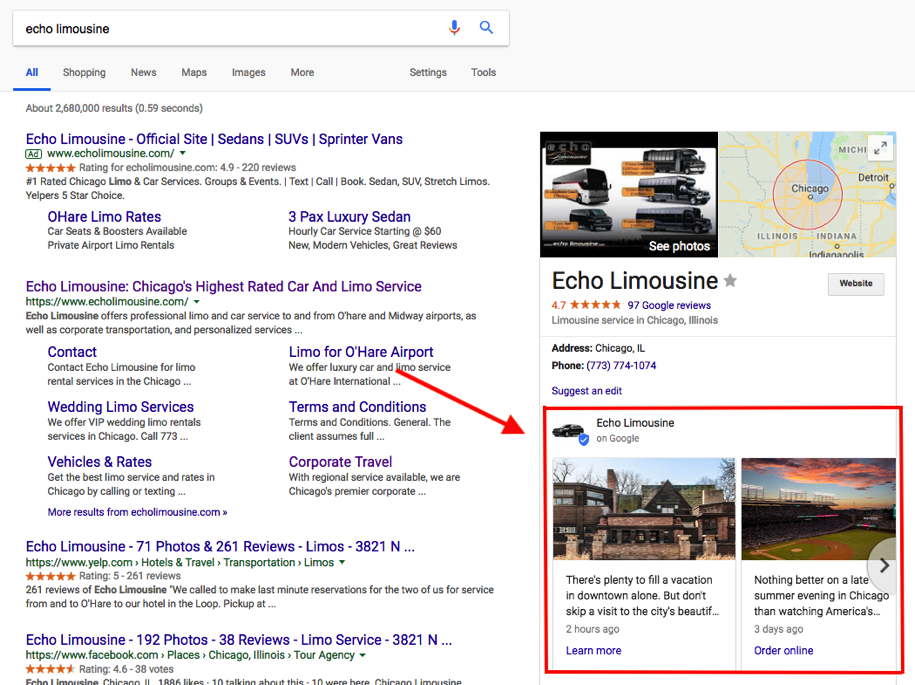
    You can literally “Google it.” When searching for a business, these posts will appear directly on Google Search and Google Maps pages. When someone searches for your business, your location address and phone number will appear in the knowledge panel on the right-hand side of your search results. Your company’s address/location is the primary piece of information searched for by local customers. In regard to mobile, local searches lead 50 percent of viewers to visit stores within one day.

    Screenshot of a GMB post by Echo Limousine - Search Influence

    You will expand your reach

    Not only does Google lead the way in search engine results, but it also surpasses Facebook search queries. According to Adweek, Google averages 3.5 billion searches per day, compared to Facebook’s 2 billion per day. In addition, 82 percent of people turn to search engines to find local information.

    Keyword Searches

    On Google, you can use keywords to target certain audiences—specifically, people that are already looking for your services. Since these people already have an idea of what they are looking for, they are likely to be further along in the decision stage, meaning they are more likely to convert into a client or customer. By contrast, Facebook is geared more toward targeting specific interests and in-depth personal information to lure in a potential customer.

    Impact on your ranking

    Google’s goal is to provide you with the most relevant information based on a search query. When you post new content directly through your GMB listing, you are sharing relevant content and information about your local business, which contributes to building your location authority. This tells Google that your business is legit. The more you legitimize your business to Google, the higher ranking you will get. The higher ranking you have, the higher you will appear on Google search and gain more traffic to your site.

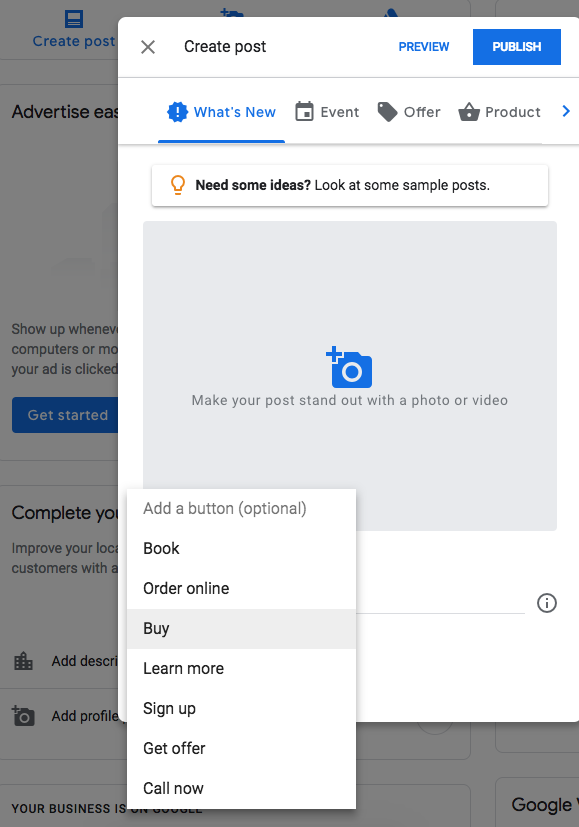
    Screenshot showing how to create a Google My Business post - Search Influence

    Connect with your customers directly

    You can include CTA buttons on all of your GMB posts. Call to action buttons have been proven priceless for converting customers. According to Everything You Need to Know About the Psychology of the Call to Action by Neil Patel, the human mind expects a call to action button. “Our minds are prepared for and are expecting an experience of being called to act and have already decided that there will be a CTA. We know that expectation affects behavior. That’s why people know to act on the CTA. They aren’t staring at the CTA button wondering what it is. They know its a button they are being asked to click.”

    Some examples of how a business can utilize these buttons include the following:

      1. Make a reservation
      2. Sign up for a newsletter
      3. Learn more about the latest offers
      4. Buy a specific product from your website
      5. Call now

    Get backlinks

    Everyone knows that backlinks have a huge effect on organic search results. By posting compelling content on your GMB posts, people are more likely to engage and reference information from your site. You can also link your site pages in a post, making it easier for researchers to find your pages.

    Start Posting!

    Although still green, GMB posting is projected to be incredibly valuable to local businesses. Facebook, Twitter, and Instagram are saturated with businesses looking to promote brand awareness. But since GMB posts are still in the early phases, it hasn’t been flooded by the masses just yet—which is why you should get in now! GMB is an excellent platform that allows your customers to stay in the know of what is going on with your businesses. Not to mention, it’s free! What do you have to lose?

    Here at Search Influence, we’re constantly staying on top of new ways in which we can help our clients be found online and thrive in their industry. If you’re interested in honing your local SEO strategy with rich, relevant Google My Business posts, then request your marketing analysis today to get started.

    Images:

    Candidate Cards

  • 8 Facebook & Instagram Features You Might Not Know About

    8 Facebook & Instagram Features You Might Not Know About

    Facebook is going cross-country with a free conference, bringing it to 30 cities, including New Orleans! This is part of Facebook’s mission to better educate businesses in using their platform. They state that… “By 2020, we’re committing to provide 1 million US workers and entrepreneurs the digital skills they need to compete in today’s workplace.”

    My evaluation is that their goal of this effort is to increase and improve business use of Facebook (and ultimately advertising dollars) and try to make up for their data privacy blunders earlier this year.

    Given that 2.07 billion people access FB monthly, and ¾  of those users come back daily, there’s an appropriate way for most businesses to engage with consumers.

    I really enjoyed seeing traditional advertising promoting this free event as I drove around New Orleans, from downtown digital billboards to suburban bus stop ads. While it may seem ironic that Facebook would use out-of-home media to promote their conference, it is not that surprising since part of their strategy is likely to reach NEW businesses in addition to improving the skills of those already on the platform.

    In case it’s not coming to a city near you, check out these tips from our team of Influencers who attended various sessions!

    Build Creative for Mobile

    Because 90% of time on Facebook is spent on mobile, businesses must get out their desktop-focused world and think about the screen size of their audience.

    One key media type for mobile optimization is video—your typical rectangle, landscape video (16:9 aspect ratio) videos are suboptimal for mobile. Square is better, but the best is to create vertical, full-screen videos—think Snapchat, Instagram Stories, and Facebook Live style.

    In addition to it being a more immersive and engaging experience, a key benefit is you aren’t sharing the screen with other content.

    If you use Instagram, you may not be surprised to hear that ⅓ of the content that people are engaging with on Instagram is BRAND content!

    Thanks to Alison Zeringue & Amanda Ball for this takeaway!

    Mobile Creative Doesn’t Have to Be Hard or Expensive

    All you need is a phone, lighting and a $20 Amazon tripod (for video) to make something look REALLY nice!

    These 10 apps can enable you to enhance your photos and videos on your mobile device, on the fly.

    Considering that by 2020, 75% of content on Facebook will be videos, it is time to put on your videographer hat!

    Photo Enhancing Apps

    1. Adobe Photoshop Express
    2. Adobe Spark Post
    3. PicLab
    4. Plotaverse
    5. RIPL

    Video Enhancing Apps

    1. Videoshop
    2. Quik
    3. Instagram Stories
    4. Boomerang
    5. Legend

    See here for direct links to these Top 10 Creative Apps.

    Remix

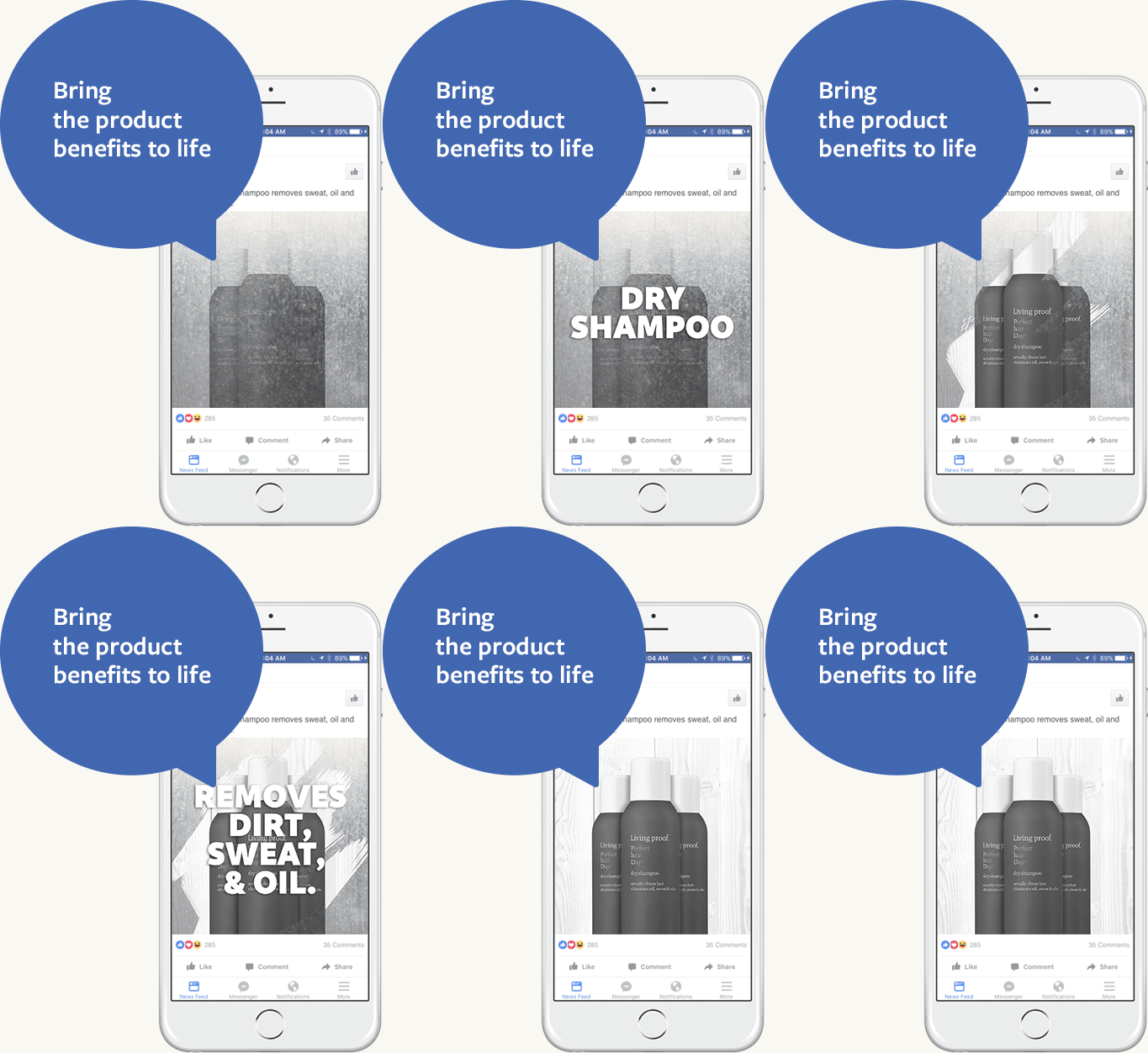
    The apps above and others allow you to “remix.” Easily take images you already have and create gifs and videos to better engage your audience, including overlaying text (love the Living Proof example… ask me how many bottles of Living Proof I have stocked—major “life hack” for professionals on the go!).

    Amanda Ball likes the Pop Up Plus example, which uses e-commerce product images and “remixes” them into fun videos with vibrant colors and movement. An app called Videoshop can help do this FOR FREE.

    Shooting from Scratch

    Facebook also provides tips on making great videos from scratch for ads and posts. Check out this savvy use of Boomerang to show a spiralizer in action. As Amanda Ball describes it, “Potential buyers are prompted to feel like they know how the product works, making them more on board to dig deeper into your brand and products.“

    Thanks to Amanda Ball, Account Management Team Lead, for this tip!

    Secret Boomerang Menu

    Did you know Boomerang has a secret menu!? Learn how a four finger tap can bring up options on options to edit your video. You can smooth it out, speed it up, slow it down, and so much more.

    Thanks to Alison Zeringue, Director of Account Management, for this tip!

    Custom Contact Methods on Instagram Profile

    On a standard Instagram profile, call, email, and directions are standard calls to action that you can add.

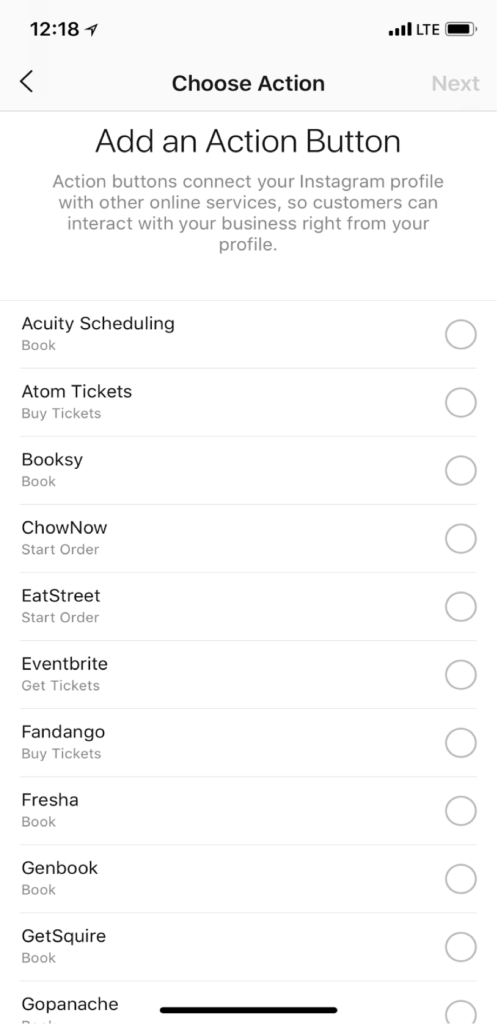
    Through settings, you can hook up third-party apps like Open Table and Eventbrite.

    1. Go to your profile
    2. Click “Edit Profile”
    3. Click “Contact Method”
    4. Choose from the ever-growing list of action buttons that correspond with other apps and services you may already be using

    Thanks to Alison Zeringue, Director of Account Management, for this tip!

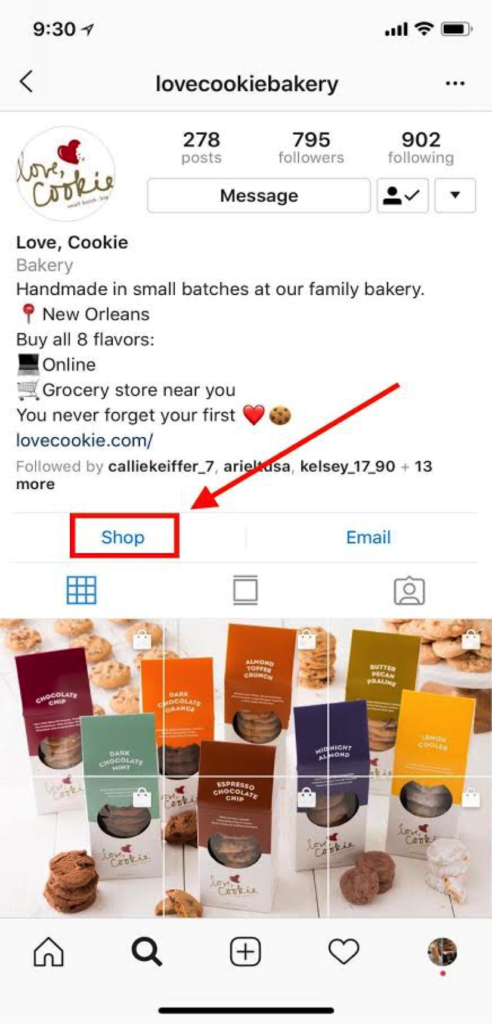
    Get a “Shop” Button on Your Instagram Profile

    Those who sell products may wonder how to activate the “Shop” button of their Instagram profile. After you’ve created nine “shoppable” Instagram posts, a “Shop” button will appear on your profile. It will direct users to all of your shoppable posts, making it that much easier for users to buy your product on their phone.

    Thanks to Ariel Tusa, Account Manager, for this takeaway!

    Vying for “Swipe Up for More”?—What to Do in the Meantime

    We're all vying for the "Swipe up for more" feature on Instastories, but, alas, you must have 10,000 followers for this feature to show up. In the meantime, use the "screen record" feature on your iPhone to create a video that guides users to important content. Then you can add that video to your Instastories.

    "https://townsend.bunksite.com/wp-content/uploads/2018/08/Screencast-of-Search-Influence-Blog-Post-for-Instagram-Story.mp4%22

    Thanks to Ariel Tusa, Account Manager, for this takeaway!

    Donate Button on Facebook Live

    Facebook has offered a selection of calls to action (CTAs) for your page and ads for some time. One way non-profits can use CTAs creatively is by using the “Donate” CTA button on a Facebook Live video. For example, you can “go live” at a fundraising event so those who aren’t in attendance can check out the action, and you can feature the “Donate” button on this post to capture their wallets while you are capturing their hearts. Bonus—giving a sneak peek into your event this year can create a buzz that translates to more attendees next year (as we talk about in our blog post with more tips to increase event attendance).

    Requirements for Fundraising on Facebook:

    In order to have access to features like the “Donate” button, you must be an approved non-profit.

    • 501c3
    • US-based
    • Verified page
    • Page meets community standards
    • Application approved

    Thanks to Ceallaigh Montgomery, Sales Executive & Digital Marketing Strategist, for this takeaway.

    Audience Network

    I find the Audience Network isn’t talked about nearly enough. By default, ads set up on Facebook will run on Instagram as well as the Audience Network, which is a collection of sites around the web. This idea is core to Google Display, which leverages the Google Content Network as the avenue for showing all ads. When people talk about Facebook ads, they take for granted this opportunity to be in front of people when they are “surfing the web”—not just browsing the “ ‘book.”

    Thanks to Shawn Kelly, Sales Manager, for this takeaway!

    Also, thanks to Shauntae Joseph, Account Manager, & Jenna Mire, Account Coordinator, for takeaways worked in throughout!

    If you need help implementing these tactics, let’s start a conversation about how we can help you.

  • What Are The Most Important Review Sites? Start With These Three

    In order to remain competitive in the local search space, it is essential to encourage your customers to provide feedback about your business. Reviews and interaction with your digital properties help search engines and users learn more about your business; in today’s environment, if you are neglecting these review sites, then there is a chance you are missing conversion opportunities as well as losing ground to your competitors. With the number of review sites out there, it is important to prioritize their management in order to expose your business to the largest amount of potential customers without spending all day managing different profiles.

    What Are The Most Important Review Sites?

    While there are endless options out there, these are the most important review sites:

    1. Google My Business

    2. Facebook 

    3. Yelp 

    This should not be a huge surprise, even to casual internet searchers. These sites dominate a lot of the search space when it comes to search queries about businesses or services. Here are the basic reasons why these are the most trusted review sites:

    1. Traffic

    2. Reputation

    3. Authenticity

    According to Alexa, a widely accepted measure of websites’ ranking metrics, Google My Business, Facebook, and Yelp are the first, second, and fourth most visited websites in the United States for Consumer and Business Review websites. Amazon currently holds the third spot, but Amazon is not an option if you are in a service-based industry. All of these sites have millions of unique visits a month, meaning, people are undoubtedly coming to these sites for more information. Since these are free to manage, it would be like passing up an opportunity to have a free billboard on one of the most traveled roads in the country. Furthermore, reviews can now populate on organic search for Facebook, Google, and Yelp, so users may or may not click through to your site based on your review situation.

    One of the reasons these sites generate so much traffic is because of their reputation as a reliable source of business information. The amalgamation of traffic, number of reviews, and day-to-day use have made all of these sites integrated into our digital diet. Much like people reflexively would use the Yellow Pages or White Pages in a pre-internet world, people will reflexively use these sites to get more information about a business.

    Lastly, people trust these sites because the reviews are user-generated and moderated by a third party rather than the business itself. While it’s good practice to have reviews and testimonials on your main site, the obvious issue there from a user perspective is that you will probably only promote the positive reviews. These sites allow the opportunity for customers to express a range of thoughts or emotions, allowing potential customers to better discern the pros and cons.

    So, Why Should I Manage Business Review Sites?

    According to Vendasta, 88 percent of online shoppers utilize reviews to inform their purchase decision. Furthermore, the amount of people who do not research a business online prior to a purchase has decreased from 22 percent to 9 percent. The trends are obvious; more people are looking for your business online and more people are using reviews to make a judgment. Let’s take this even a step further—44 percent of users say they need reviews to be younger than a month old in order for them to consider it relevant. This highlights an important point—it is not enough to just let your reviews aggregate on these sites, you need to engage your audience.

    Screenshot of a typical yelp listing - Search Influence

    Screenshot of a facebook review listing - Search Influence

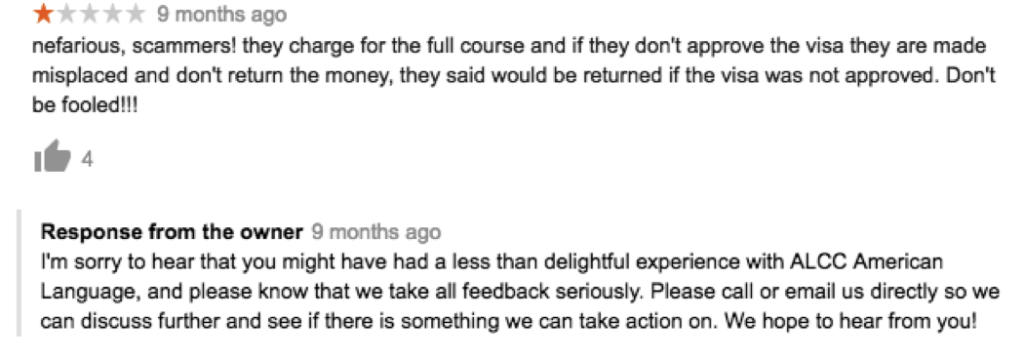
    One concern is that your business may aggregate a bunch of negative reviews. Without getting into the reasons for these negative reviews, it is important that you engage with customers who have had a negative experience. Other users looking at your business will see you engaging with customers who had a negative experience and see that you are making an effort to provide customer service.

    Screenshot of a typical negative business review with a response from an owner - Search Influence

    You should also respond to the positive reviews. It is a simple gesture to show that you appreciate their business and that they took time out to engage further with your business online.

    Screenshot of a positive business review with a response from the owner - Search Influence

    Beyond the simple client facing, customer service reasons, these reviews are increasingly important to search ranking. It follows that Google will appreciate you using their Google My Business platform to gather and respond to reviews. It improves their product while also helping your business get in front of more people. Being active on your listing can have a positive impact on your local search rankings. When users visit Yelp or Facebook, having a robust review profile with engagement from the business could help you stand out in the crowded marketplace. Managing reviews is now a major factor in the realm of local SEO management.

    How Do I Get More Reviews?

    The simplest way? Just ask! There are numerous ways to interact with your clients and customers, whether it is through an email marketing campaign, adding a request to their receipts or billing, or asking them face-to-face when they are visiting your business. If they are delighted with their service, they may be inclined to help you out by spreading the gospel via Facebook, Yelp, and Google.

    Since running a business is time-consuming on its own, it is important to dedicate some time each week to ensure your digital presence is working for you. By auditing your review situation on Google, Yelp, and Facebook, you will be ensuring that you are monitoring three of the four most visited platforms in the United States among consumer and business review sites. Just a little effort in this area could lead to a surprising amount of new business for your location with the only expense being a bit of your time.

    If you need help getting your online reputation management off the ground, our team at Search Influence can streamline your local SEO strategy to better fit your business goals. Because we are dedicated to the needs of small and mid-sized local businesses, we offer pricing transparency. Request your marketing analysis today to get started.

    Images:

    Thumbs Up

  • Top 5 Google Analytics Metrics for E-commerce Tourism Companies

    Top 5 Google Analytics Metrics for E-commerce Tourism Companies

    With a growing number of travelers using mobile search to book their vacations, it’s a great time to be in the tourism industry, assuming you have an e-commerce option for your customers. Whether you’re offering hotel rooms, dinner reservations, or curated experiences, your customers are more likely than ever before to make their travel purchases online and on the go. But, how can you tell if the e-commerce side of your business is operating at peak performance? With a strong track record of successful marketing for zoos, museums, and other tourist attractions, Search Influence is here to help! We’ve compiled the top five Google Analytics metrics that your business should be tracking to make sure you’re optimizing your potential.

    1. E-commerce Conversion Rate

    Google divides the number of completed sales by the number of visitors to your website to provide your e-commerce conversion rate. This metric is one way to measure your business’ success in terms of online sales. While it does not measure how much revenue each sale brings in (that’s the average order value, and we’ll talk about it next!), your e-commerce conversion rate tells you how many visitors to your site have become paying customers. It’s an especially important metric to keep track of because converting current visitors into customers is much more cost effective than acquiring a new customer base.

    Of course, e-commerce isn’t the only conversion rate you can measure. Break down conversion points on your site into micro and macro. In the world of e-commerce, your macro conversion would be a purchased products/tickets. Micro conversions are smaller actions that lead up to the end goal of purchases. For tourism, this would likely include visits to key pages (like ticket pricing page), to adding something to a shopping cart, to email signups. You should watch your success of micro conversions and tune your campaigns to those as well, as each of these actions should be designed to drive customers toward macro conversions—increasing that e-commerce conversion rate of visitors turned into paying customers.

    2. Average Order Value

    Average order value tells you how much revenue online purchases generate for your business, on average. It is calculated by finding the total revenue generated from online orders and dividing it by the number of orders. According to some experts, like Databox, it could be the one most important metric for your e-commerce business to focus on.

    So, how do you improve your average order value? MonsterInsights provides some key suggestions.

    First, price your products with upselling in mind. For example, if you’re a photographer shooting on-site family vacation photos, you might offer a base package of 20 photos, with the option to add more at an increased price-per-photo rate.

    Second, offer product bundles at discounted prices. For example, if you’re running a walking tour company, you could bundle together a daytime and a nighttime tour. Customers will be enticed by the promise of extra touring for their dollars, and you’ll still gain more income than if they had just purchased a single tour.

    Finally, offer savings with a minimum order—something like, spend $100 and get $20 free. Customers may spend more than they ordinarily would just to access the discount. All three of these strategies can drive up your average order value, bringing in more revenue for your e-commerce tourism business.

    A close-up of a woman touching a screen - Search Influence

    3. Revenue Per Visitor

    Revenue per visitor is a crucial metric – increasing it can mean revenue growth for you without having to drive new visitors. You can increase this metric by both converting more visitors into customers and increasing your customers’ average order value. Revenue per visitor is calculated by dividing your total online revenue by the number of unique visitors.

    You can increase revenue per visitor by using any of the previously discussed methods, like upselling, bundling products, and offering discounts with a minimum spend. Keep in mind that a low revenue per visitor is not necessarily an indication that your business is struggling. For example, if you’re selling lower priced items, like postcards or other tourism souvenirs, your revenue per visitor will be much lower than for a company selling high-dollar items like cruise tickets or hotel suites. You’ll just need a larger number of unique visitors to boost your sales and drive revenue overall, and this should play heavily into your marketing goals and strategy.

    4. Customer Lifetime Value

    Customer lifetime value tells you the total value that an individual customer, acquired during a particular time period, has spent with your online business.

    This metric is best used for estimating appropriate marketing costs for your business, and for analyzing your customer acquisition strategy. For example, if your average customer will only spend $100 at your business over the course of their life, it isn’t worth paying hundreds of dollars to attract this customer. Maximize your return on investment (ROI) by keeping your marketing and advertising expenses reasonably lower than the income your average customer is likely to generate for your business. Most businesses are willing to spend 5-10% of revenue to acquire a new customer. (See more in our blog “What’s The Perfect Marketing Budget For Your Company?”)

    5. Return on Advertising Spend

    Speaking of ROI, let’s discuss return on advertising spend—or ROAS as it’s sometimes called—which is a key metric for determining the effectiveness of your digital advertising. It tells you how much income you earn for every dollar spent on advertising campaigns. If you’re running online ads and want them to be as effective as possible (who doesn’t?), you need to raise your return on advertising spend. Ideally, your ads should drive about three times as much income as you paid to advertise.

    A man viewing graphs and charts on a tablet - Search Influence

    So, how can you raise your return on advertising spend to this ideal 3x level? Conversion Fanatics Blog offers some great tips. First, do some testing to figure out what channels work best for your business. For example, if your Facebook ads tend to perform better than your Google ads, channel your dollars to Facebook, where your ads drive the most revenue. Similarly, test the times at which your ads have the best results. If you notice that holiday ads bring in more clients for you than summer ads do, it could be worth concentrating your ad dollars on that crucial time of year. Finally, you can dive into even more metrics. Monitor the user journey by tracking how many customers click on your ad, how long they stay on the resulting landing page, and so on. If you can pinpoint which stages of the user journey are working well for you, and which stages are losing potential customers, you can fine-tune your ads and landing pages for an improved user experience.

    These five metrics, all available through Google Analytics, are key components of e-commerce tracking for any online tourism company. For more information about how to optimize your travel business’ potential, contact Search Influence at 504-208-3900, or request a proposal today to hear opportunities from our strategists.

    Images:
    Camera and Phone

    Touchscreen

    Tablet