Tag: local search

  • Google Places For Business Email Update

    We’re still not panicking about all of Google’s updates! As many of you already know, Google has been sending out a Google Places for Business email that reads as follows:

    The Message

    Hello,

    We’d like to inform you that Google Places no longer accommodates more than one authorized owner per business location. Your account contains one or more listings that have been identified as duplicates of other listings and as a result, some of the information you provide will not be shown to Google users anymore.

    To get more information or request access to the other listings, please log into your Google Places account.

    Sincerely,
    The Google Places Team

    As this message is kind of vague/ confusing, I called a Google rep to get clarification on exactly what’s going on here. Bear with me as I explain what this means exactly and how it’s affecting business listings.

    The Meaning

    PrintGoogle is finally pulling all listings into the new Places for Business dashboard. In the old dashboard there could be multiple owners of a listing, but in the new dashboard there can only be one.

    As Google performs these batch listing upgrades, the first owner whose account is upgraded gets grandfathered in, so to speak, and they will be the sole owner of the listing through the new dashboard. If someone has already claimed and verified a listing in the new dashboard, however, then no one will experience the “grandfather” situation in the batch upgrades as it is already verified in the new dashboard and has its one owner.

    The good news is that many of us have been force pulling businesses into the new dashboard by claiming them through the Places section of plus.google.com. So the latter situation will have already occurred for most, and we will be the current, sole owner of verified listings in the new dashboard. (If you lose ownership of your listing in the batch update by Google, you can still request it back, it will just take time through a two week request period and contact with Google.)

    We have seen cases, however, where after the batch update by Google there appears to be two listings in the dashboard of accounts who have already pulled their listing into the new dash on their own. Generally one appears as verified(the one we forced pulled into the new dash) and the other as unverified(the one Google pulled over), but they both lead to the same G+ page when you click through the “view this listing” link in each. This is just a weird hiccup, and if you wish to clean up the dashboard by deleting the unverified one, it will not affect your listing. As long as you have a verified listing in the new dashboard, you are the sole owner of said listing.

    Now What?

    Basically, anyone who has ever had a listing in the old dashboard is receiving this generic email, and it is not necessarily an indication as to whether or not the listing is owned/verified in the new dash in your account. So, as long as we’re keeping on top of our business listings’ dashboards, there is no cause for alarm! There’s also the note about duplicate listings in the email. Duplicate listing issues are not something that occur in every account which receives this email. More to come on addressing duplicates in the new dashboard next week! If you’d like to see what others are saying about the email, check out Search Engine Land’s post from earlier this morning or these forums where people have been discussing particular, individual issues encountered (Google Product Forums and Local Search Forum).

    Here’s a screenshot of the actual email for those of you who would like to see it:
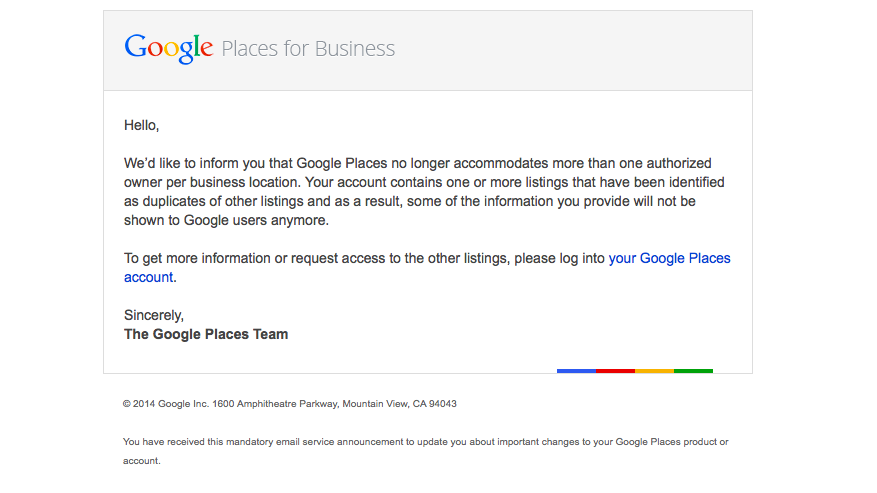
    Screen Shot 2014-03-05 at 10.42.19 AM

    If you have any questions or comments about this situation, feel free to comment below! Stay tuned for how to handle duplicate listings!


  • Reputation Rescue: Dealing with Your Business’s Online Reviews

    Reputation Rescue: Dealing with Your Business’s Online Reviews

    These days more customers are turning to their social networks and online review sites before making purchases. While local directories and review sites are important for your business’s online presence and SEO, it also opens up the door to both positive and negative reviews from customers.

    Reputation Rescue Infographic

    Copy and paste the code in the area below to place “Reputation Rescue: Dealing with Your Business’s Online Reviews” image on your site for free.

    Yes, People are Actually Looking at Them

    It’s been estimated that about half of American consumers have written at least one online review. Even those not writing reviews are reading them, with 70% of consumers saying they read reviews before making a purchase decision. The same number, seven out of ten, share the reviews they read with friends and family, meaning that these reviews are reaching even more people.

    And Making Decisions Based Off of Them

    For positive reviews, this is great! In fact, 87% of consumers say a positive review confirmed their decision to make a purchase. As one might expect, a similar yet opposite effect comes from negative reviews. Four out of five consumers report having reversed a purchase decision based on negative reviews. Yep. That’s 80%.

    But You Can Take Action

    Luckily, for businesses, there is a positive way to handle negative reviews. Respond quickly and publicly, keeping your response polite yet personal. Own the issue without being defensive and try to rectify the situation while still keeping your response simple. A whopping 97% of people found the reviews of a product they purchased to be accurate. This confirms that no one should be brushing off negative reviews. Responding correctly will give future customers confidence that they will not have the same experience.

    You know the saying about the best defense, right? Give your business a good offense by encouraging reviews from loyal customers. Reach out to customers via Facebook, Twitter, and email. Make reviewing your business as easy as possible and send those that do review a thank you.

    Real Reviews = Real Revenue

    Getting a considerable volume of real, accurate reviews will lead to real revenue. Positive online reviews have been shown to increase sales by 74%, and on a related note, consumers who conduct research online spend 18-36% more than those who do not.

    Don’t be scared to put your business out there! Transform your online review portals into revenue-making tools by garnering your existing customer relationships, addressing negative experiences, and improving your online presence. Reviews also create 21% higher purchase satisfaction and 18% higher customer loyalty. These are huge numbers for something that you aren’t even spending money on.

  • 3 Reasons Why Your Business Should be Active on G+

    Google Plus LogoSome may know Google Plus as a weak attempt by Google to compete with Facebook. However, it can be used for much more than just engaging with your target audience. Google’s social media platform can also help your SEO efforts while providing quality content and information to followers.

    Here are three reasons why your business needs to be active on G+:

    1. Google+ Posts are Crawlable

    Unlike other social media platforms, all Google+ posts are crawlable by the search engines. Your business’ Twitter or Facebook profile may show up for your brand name search, but specific posts and updates are not indexed. All Google+ posts are indexed in minutes, and some even say seconds.

    You can use your G+ posted content to target specific keywords. Each post has its own url, and the first 45-50 words in the post become the title tag. Links within Google+ posts are followed links. As you post content linking back to your website and that content is shared, the authority of your Google+ page and website are growing.

    2. Boost CTR with Google Authorship

    Screen Shot 2014-02-03 at 4.05.26 PM

    According to Google, authorship has no impact on the SERPs. However, Google Authorship can help you get more traffic to your website, which is why we are all trying to rank on page 1 to begin with, right?

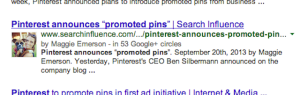
    By associating a G+ profile with pages on you wrote on your website, the profile photo of your G+ shows up with those pages in the search results. The image in the search results sets your site apart from the others and makes it more eye catching. Authorship increases the likelihood a searcher will click your site in the search result. And although authorship does not have a direct correlation with rankings now, we anticipate it will in the near future. And for now, using it for more traffic to your site is enough incentive to get on board.

    3. Potential Increase in Rankings

    The number of +1’s your G+ business page gets has been shown to correlate with top rankings in the SERPs. Moz did a correlation study to determine what aspects of a website show a strong connection to high Google rankings. The number of +1’s came in second only to page authority, with number of linking domains and Facebook shares, likes, and comments as the next most influential. Searchmetrics also did a similar study that found the number of +1’s to be the most highly correlated factor with top Google rankings.

    Yet, Matt Cutts is very adamant that the number of +1’s for a Google business page “has no direct impact on their web search ranking algorithm” and “correlation does not equal causation.” Although this may be true, a business can no longer ignore Google+ and its added SEO value.

    As a social platform, G+ is equally as important as Facebook. And Google+ goes far beyond social reach, it provides a great opportunity to boost your SEO efforts. So go ahead and get active on G+, the benefits are only continuing to grow!

  • Everything You Need to Know About Google Carousel

    Whether you’re looking to improve your position or simply figure out what the heck this carousel is doing in your Google search results, this blog post is for you. Let’s start out with a little background information.

    What is the Google Carousel?

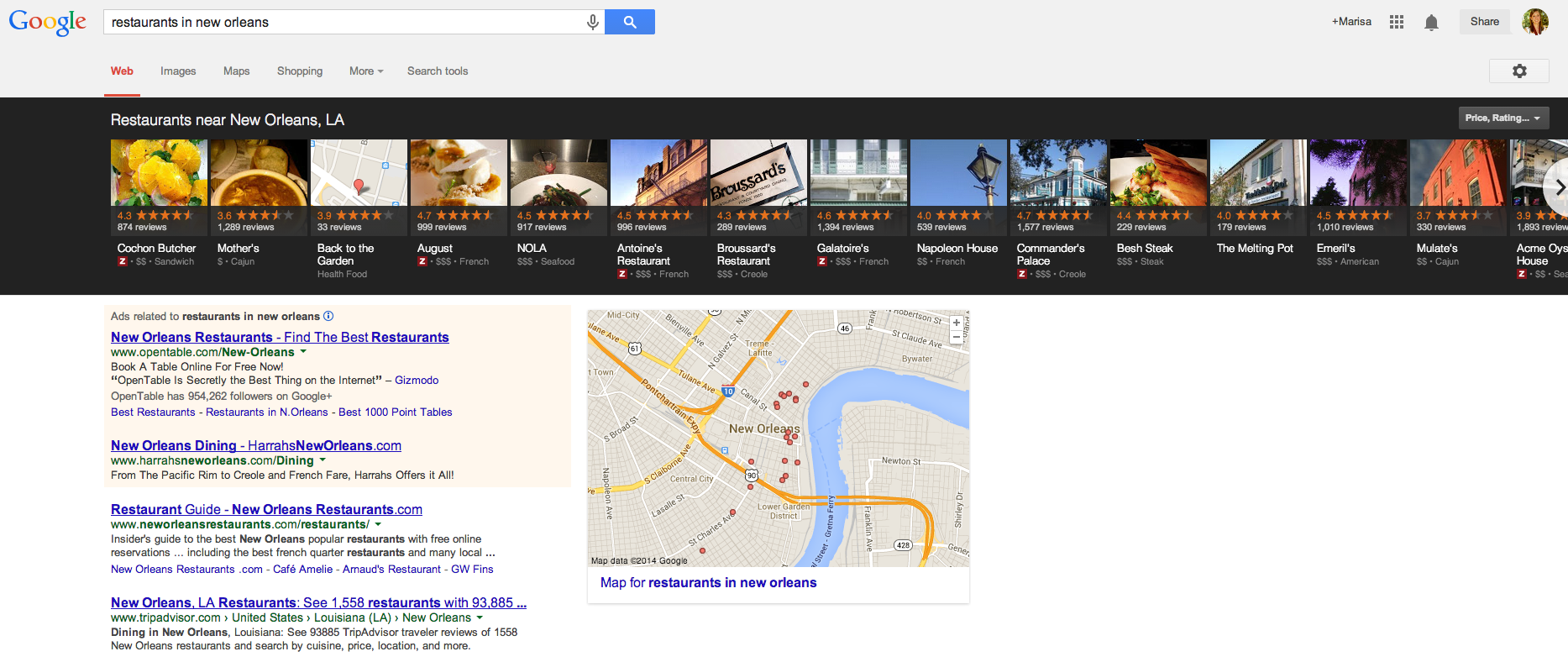
    As you have probably noticed by now, Google has incorporated a new carousel into several of its search results. If you haven’t seen it yet, the carousel is a row of about 20 listings displayed in a long black box at the top of search results. The image below shows an example of the carousel pulled for the search query “restaurants in new orleans.”

    Click the image below to enlarge

    Search Result Displaying Google Carousel

    How Does it Work?

    Google pulls the information for each carousel listing from the Google+ pages of relevant businesses. Upon clicking a result in the carousel, another search will be performed for that brand. There are pros and cons to having these carousel results display in searches related to your business. Here are just a few:

    Pros of the Google Carousel

    • Your website could potentially be displayed in 2 locations on Google search results: the carousel and regular Google organic results below the carousel. Psst – if you’re looking for some help with those organic rankings I know a guy

    • If you have great reviews and ratings on your Google+ page, your average star rating will appear as a fantastic means of comparison to your competitors (who may not have the same stellar rating as you)

    • Results are displayed ABOVE paid search results, putting you ahead of competitors who are paying to hold that prime real estate above the fold

    • If done carefully, some service area businesses can rank for local searches in the carousel where they may not have appeared in map pack results before the carousel

    Cons of the Google Carousel

    • When clicking a carousel result, another search is done for your brand rather than being taken to your website or Google+ page, which means more clicks are needed to get to your website and may result in a drop off of potential visitors

    • The carousel occupies a lot of space “above the fold” in search results, pushing down those precious organic results you worked so hard to obtain

    • Google chooses the image that is displayed in each carousel result from the images that are uploaded on your Google+ page

    There are a number of keywords and phrases that trigger the carousel. Mike Blumenthal has compiled a list of 300+ keywords and phrases that trigger these results. From a business standpoint, there are several reasons why you want to review these search terms and determine if search queries related to your industry are pulling this carousel, and whether or not your company shows up in the results.

    The Optimal Carousel Location

    A study of user engagement performed by Mike Ramsey suggests that the optimal locations in the carousel are positions 3 and 8, while Ethical SEO did a similar study and found that the 1st and 5th positions in the carousel were most popular. Although the exact prime locations differed, the main takeaways from these studies tell us the following:

    1. Searchers are clicking in the carousel

      • 30% of people in Ethical SEO’s study

      • 48% of people in Mike Ramsey’s study

    2. Reviews and ratings are important

      • Searchers cited Zagat scores and amount of reviews on a particular result as determining factors for clicking

    3. Images should be eye catching

      • In Mike Ramsey’s study, the carousel listing with the highest Zagat rating and number of reviews that contained a boring gray exterior photo of the restaurant was not clicked nearly as much as the result next to it that featured a beautifully plated entree

    Lookin’ Good in the Carousel

    Come See How Good I Look in Google Carousel ResultsIf you have little or no reviews on your Google+ page, what are you waiting for? You’ve worked hard to establish your business and provide positive customer experiences. Build up your following on Google+ and don’t be afraid to remind customers of your brand. Encourage potential and current customers to read your reviews. Highlight previous testimonials or reviews in Google+ status updates. Post pictures of your product, staff, events – anything to send your audience down memory lane and potentially inspire them to recount their experience in the form of a review.

    As mentioned previously, Google will select the image that appears in carousel results, so be mindful of the images you upload to your Google+ page. If you are a restaurant, upload images of plated dishes. If you are a jewelry store, upload images of your most popular designs. A good image will differ from industry to industry, however, across the board a good image will be:

    • Attractive

    • Eye catching

    • Clear (don’t upload stretched out or blurry images!)

    • And depict what you do

    Top Ranking Factors

    If you’ve been diligently working to improve your rankings for the map pack in blended results, many of those efforts also contribute to carousel ranking factors. Search Engine Journal’s recent study cites three top factors for ranking in the carousel: social signals, external factors, and content structure. The strongest of these appeared to be social signals, which include:

    • +1Amount of +1s on your Google+ page

    • Amount of +1s on a website’s URL that is attached to your Google+ page

    • Amount of reviews on your Google+ page

    • Rating of your Google+ page

    Next, external factors proved very important. In particular, the number of citations across the internet was cited as the most important external factor. An additional point to that is these citations should be clean and correct across the board. You may have several location citations, but it will only serve to confuse Google if the information is not consistent from one citation to the next. All this should sound familiar, as citations are nothing new to local search ranking factors and something Search Influence has preached for years.

    The last of these top ranking factors is content structure. Placing the keyword in the title, the location in the title, the keyword in the URL, and the location in the URL were all found to have a correlation to rankings. Although these factors are important, you don’t want to come off as sounding unnatural or spammy. Do exercise caution with these aspects of content structure, as you want this content to be natural.

    With any new update or change Google makes, there is always more to be found and mentioned. What are some things you’ve noticed about the Google carousel? What factors have you seen improve carousel rankings? What trends and/or benefits have you noticed since Google rolled out the carousel? Sound off in the comments!

  • What is this SEO Thing Anyway??

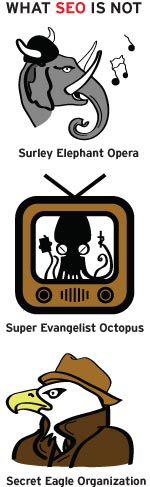
    SEO is not a shortened nickname for CeeLo Green. It’s not a secret government agency either. SEO, or Search Engine Optimization, is the process of improving a website’s visibility by making its function clear to Google and other search engines. Whether you realize it or not, SEO is a big part of every search you make online.

    To understand why you need SEO, you need to understand what SEO is. Search engines like Google and Bing use magical mathematical formulas—also known as algorithms—to scour the Internet and provide websites that are relevant to user searches. Each search engine considers a number of factors before deciding which website gets ranked where and who ultimately ends up on the first page of your search results:

    Not SEO

    Content

    Good content is the key to a high-performing website. Make sure your site’s content properly reflects your business and features the products and services you offer. Optimizing your content for relevant search terms will make sure you’re showing up for the right users. Think about it—you don’t want to rank on the results page  for “ponies” if you sell motorcycles (unless you are selling Iron Pony Motorcycles, that is). Plus, having good content keeps your bounce rate down and increases the amount of time users spend on your site, which are both good things in Google’s eyes. Search engines also look to see if your content is fresh and up-to-date. So if you want to stay at the top of the charts, keep fresh with the times, yo.

    Metadata

    Located somewhere in all that code that may or may not closely resemble the Matrix is metadata that tells search engines exactly what your website is there for. One important piece of metadata is the title tag. Each individual page has a title tag, and it’s one of the first tags the search engine looks at. There’s also  a meta description, which you might recognize as the sentence or two listed under a website’s name on the search engine results page. Properly optimizing this data will help search engines understand what your site is about.

    Authority

    Links are important. Having other sites link to your page proves your site is authoritative enough that other people are willing to reference it as a source. It’s kind of like in high school when you had a crush on Tim because all the girls talked about how amazing his cover of “Don’t Stop Believing” was and that song was totally your jam. But just like in high school, the trustworthy information has to come from the cool kids or else no one will believe it. In our case, “the cool kids” are the websites that Google already trusts. In other words, links aren’t worth much if they’re from sites that Google hasn’t heard of.

    And if you need a little help getting a hang of this SEO thing, you can always count on the experts to give you a hand. Give Search Influence a call today to get started.

  • 3 Keys to Your SEO Strategy for 2013 and Beyond

    Oct13If there was a formula for the best SEO strategy in today’s online market, it might look something like this:

    Content + links + social = WIN

    While there are no guarantees when it comes to search engine optimization, including these three ingredients in your strategy is sure to improve your ROI. Here are some tips and best practices to strengthen your SEO foundation and get results.

    Content: More Important Than Ever

    With recent changes to Google, like the new algorithm and the demise of the Google Keyword Tool in favor of SSL secured searches (that no longer allow marketers—or anyone else—to see specific keyword search data), great content is essential for optimizing your website.

    There are no keyword “cheats” left. In order to boost your search engine ranking, you need to include keywords and search phrases organically inside well written, engaging content that encourages not only search engines, but also your visitors to spread the word about your business.

    Aside from quality, freshness counts when it comes to content. Search engines index your website more frequently when you’re adding new content—so unless you want to continually rewrite the copy on your core pages, you need a way to keep updating your content. Starting or reviving a small business blog is a great way to do that.

    Links: Quality Over Quantity

    Link building has been an important part of SEO as long as there has been other websites to link to. Over the years, search engines have changed the way they weigh links. At first it was the more links, the better—but today, it’s all about quality.

    There are two parts to link quality: inbound versus outbound and reputation. Inbound links—those that lead to your site from other sites—are weighted higher than outbound links, because they mean someone else is impressed enough with your content to link to it. With reputation, the higher the linked site ranks in search engines, the more it matters to your own SEO.

    How can you get quality inbound links? Here are a few ways to do it:

    • Guest blogging. By writing quality content for blogs related to your business, you accomplish two things: help the hosting blog by giving them fresh, unique content, and gain inbound links. Most sites will offer guest bloggers a backlink to their own site in exchange for writing original posts.
    • Press releases. While some businesses view the press release as an antiquated tool that reached its peak while news still came mostly in print form, this type of content can still help your online marketing. There are plenty of syndicated online PR distribution sites, and sending out relevant, newsworthy press releases will spread more inbound links to your website around, even if it doesn’t get you in the newspapers.
    • Content repackaging. For maximum impact with minimal effort, spin your existing content into new pieces for redistribution. Turn newsletter articles into guest posts, blog entries into infographics, or even case studies into explainer videos. Don’t forget to include links to your website in all of your new content!

    Social Media: Yes, You Need It

    If you’re one of the few businesses that still doesn’t have a social media presence, it’s past time to get started. And if your social networks are getting dusty with neglect, it’s time to start showing them some love. Being active on social media helps you amplify your SEO strategy—building your brand and exposing your business to more potential customers.

    The whole idea of social media may be overwhelming, whether you haven’t started yet or you’re trying to keep up with accounts on 10 different networks. For most small businesses, the best social strategy is to choose one or two channels to focus your efforts on (with Facebook and/or Twitter usually the most effective) and build those networks to perfection, instead of scattering your attempts across every platform out there.

    Have you included these keys in your SEO strategy? What are you doing to keep your online marketing relevant? Let us know in the comments!

    Image courtesy of chichacha

    Megan Totka is the Chief Editor for ChamberofCommerce.com. She specializes on the topic of small business tips and resources. ChamberofCommerce.com helps small businesses grow their business on the web and facilitates connectivity between local businesses and more than 7,000 Chambers of Commerce worldwide.

  • SEO: Making it Work For You

    Below you will find a webinar I did a few weeks ago that gives a very high level overview of things YOU can do to improve your presence online. Search Engine Optimization (SEO) can sound intimidating at first, but as you will see, there are many actionable items in this webinar that anyone could implement. Watch this presentation to learn more about what you can do on and off your website to improve your ranking in search results. If you have any questions after watching the webinar, please feel free to give us a call at 504-208-3900 (x.211)

  • 3 Tips for Measuring Your Online Success with SEO and Beyond

    Lately I’m finding more and more clients focused on increasing site traffic. Some are setting goals to double, triple, or even quadruple their current site traffic in as little as 3 months with an SEO campaign. I’m all for a challenge, but there are other metrics to measure the success of an SEO campaign than just site traffic. Here are 3 helpful tips to running a successful and fulfilling online campaign!

    Focus on conversion traffic

    Having 2 million site visits a month is phenomenal! But when these 2 million visitors come to a site, how are they engaging or interacting? Do they click on one of your display ads or make a purchase? Are they filling out a form or calling for more information? A site can generate 2 million visits a month, but if your phone isn’t ringing or if products aren’t being sold, those visits aren’t very valuable. I’ll take less site traffic and a higher conversion rate any day.

    I worked in a retail boutique for 7 years, and as anyone who has ever worked in retail knows, there is nothing worse than a busy day with no sales. You are constantly catering to a customer’s every need with the hope that they might buy something, only to have them say, “I’ll think about it and come back later,” and walk out the door. It gets tiring after a while. Now, try doing that 2 million times a month.

    Traffic coming to your site and not converting is the same as having a full retail store with no sales. You not only want to drive traffic to your site; you want to drive the traffic that is most likely to convert into sales, leads, or better yet, repeat customers.

    Site-Conversion-Image

    Market your business through other online marketing avenues

    In addition to SEO, a great way to increase your site traffic is to make sure you have a presence on other social platforms and engage potential customers through other online marketing campaigns. Launching a paid search campaign is a great way to increase your site traffic immediately if you just can’t wait the 6 – 12 months it will take to organically grow your visibility with SEO.

    A strong social presence can potentially impact your organic search rankings as well. Having optimized and branded social networks throughout the web not only helps your SEO but also allows for another branding opportunity.  Different market segments interact and connect differently.  Having a presence on Facebook, LinkedIn, and Google+ and running a paid search campaign gives you the opportunity to expand your reach and potentially increase conversion traffic.

    Look at other metrics to track success

     When analyzing the success of any online marketing campaign, a great way to see how your audience is interacting when they come to your site is to look at bounce rate, pageviews, and the average time spent on site.  Having a low bounce rate indicates that visitors are coming to your site and finding the information or products they are looking for. A high bounce rate suggests that a visitor came to your site and wasn’t pleased with your content, couldn’t find a form or contact number, or had difficulty finding your products or services and left your site feeling frustrated.

    Another metric to look at is pageviews. A high number of average pageviews shows visitors are staying on your site and engaging with your content. The more pageviews, the more engaged your visitors are on your site. Paying attention to the average time spent on site is another indicator to show that visitors are spending time reading content, looking at products, learning about services, or viewing before and after photos. Keeping  visitors engaged on your site is key. The longer they are on your site, the lesser chances are that they will leave and go to another competitor.

    Lastly, consider calculating and tracking your total site conversion rate. Of all the visits to your site in a given time period, how many of them “converted,” or performed the desired action? If you’re interested in monitoring this metric, the ultimate tracking would include organic and paid call tracking, form inquiry tracking that captures the source and medium of the visitor and strategic event tracking in Google Analytics.

    There’s more to online success than a high number of website visitors. Even with a slight decrease in traffic, if metrics such as bounce rate, pageviews and conversion rate are up you will know that you are targeting (and capturing) the right audience!

  • The Search Influence Life: A Six-Month Update

    I’m coming up on the six-month mark here at Search Influence, and in these last six months, I’ve come to really enjoy this company.  I’ve always been rather picky about where I work, as I like an atmosphere that encourages learning and team work.  I believe in positive reinforcement for a job well done and recognize the need for constructive criticism to ensure your work is up to the high standards clients deserve.  I prefer to dress casual, as I believe working comfortably and being yourself produces higher quality work consistently.  I’m a single father, and on occasion I have to leave work in order to make appointments with my son’s school or doctor. Because of that, I need an employer that can understand this and allow me some flexibility to ensure both my work and home responsibilities are taken care of.

    shane blogDuring my job hunting several months ago, I turned down several employment offers from companies that still believe in stuffy uptight office environments with little to no personality.  I accepted the offer to work here at Search Influence, because it seemed to have all of the qualities I look for.  I’m so happy to report Search Influence has delivered on all of my personal requirements in a job — and even gone above and beyond my expectations!

    My fellow employees are amazing, and they aren’t afraid to show you how much they appreciate it when you provide quality work.  This place is FULL of highly competent experts in the field — all more than willing to help another co-worker at a moment’s notice.  The management here comes through on its promises, encourages personal growth and seems to understand that happy employees are productive employees!  The internal team building committee provides paid time for co-workers to enjoy each other’s company outside of the office as well. I’m looking forward to kicking butt in the upcoming laser tag game!

    So thanks to Search Influence and to my fellow co-workers for making this the perfect job for me!

    high-5-300x278

  • 5 Tips for Managing a Multi-Location Business Online

    Managing a business with multiple locations online can be challenging. It’s important to connect potential customers online with the business location nearest them. Follow these 5 tips for best practices for managing your multi-location business.

    1. All locations need their own individual page!

    It’s important for each location to have its own page on your website. You want each location page to rank for local search in the area. Having one page for each location maximizes the relevancy of the location web page to a searcher and has better chance of ranking locally, especially in blended results (organic mixed with maps results).

    2. Optimize content for each page 

    Add content to the page optimized for a top level keyword and location. Make sure to do this in a way that reads naturally.  
    Optimize all the thing meme
    Content can be relatively short and simple, explaining what the business is / offers, unique selling points, and where the business is located.  Make sure to also optimize the On Page heading (H1), title tag, and meta description as these are all important factors for SEO. It is crucial to have unique content for each page. Many businesses use the same content for all location pages, only switching out the geographical location. This duplicate content leaves the site vulnerable to penalties from Google. For a business with over 100 locations, creating unique content can be difficult. A tip for the writing unique, compelling content for these pages is to incorporate some “local flare” or any information specific to that location in the copy.


    3. Provide a good user experience

    On each location page, also be sure to list out the name, address, and phone number for that location. Its important for visitors that come to the page to be able to easily contact the business or find out where it is located. Adding a map with a pin on your location also proves to help visitors get a better visual of exactly where you are located. When listing the NAP for each, keep the format consistent across all pages. Make sure the name is the actual, official name of the business–instead of “Domino’s New Orleans”–as this will be consistent with other local listings across the web.


     photo 25650BaffinBayDrLakeForestCASelfStorageSmartStopSelfStorage_zpsb1f60ccf.png

    4. Tell Google where you are!

    Implement Hcard or schema around each name, address, and phone number of the location pages. Let Google know who and where you are. These are microformats that provide a standardized way to tell Google and other search engines your contact information. By implementing Hcard around your NAP, you can let Google know “this is my physical location.” Adding this code to the site will help the location page rank well in local search. By knowing where your business is located, Google now knows the page is more relevant to searchers.


    5. Consistent Citations

    When creating local citations across the web, be sure to list the name, address, and phone number of each location consistently. Having consistent listings across online directories helps enforce your physical address to Google and increases the chances of ranking locally. It is especially important to have your NAPs listed consistently on your Google+ local listings. If the directories allow, add the location landing page url in the website field, as this page is most relevant to the listing information.

    Google offers businesses with 10 or more locations a way to bulk upload local listing information. The upload process creates new listings as well as edits pre-existing listings. From my experience, this method has proved to be a very slow process. Bing offers very similar services for multi-location businesses, but 25 or more locations are required to use this upload. The most efficient bulk upload offered by a directory has to be Foursquare. I created a bulk upload for a business with 117 locations, and in less than 24 hours all the listings were created/updated and live.

    Following these 5 steps can dramatically help your local search presence. What other tips do you have for managing a multi-location business? Please share in the comments below!