Choosing the right keywords to target is one of the most important aspects of a successful SEO campaign. The goal of SEO campaigns is to get more online visibility, more traffic to your site, and more sales and leads. Keyword selection is central to bringing these goals to life.
Keyword Selection Must-Haves
When choosing keywords, make sure they:
1) Are RELEVANT to your business
Keywords should answer the questions: What do I do? What products and services do I offer?
2) Are SEARCHED often
If the goal is to bring more users to your site, you need to make sure users are actually searching for the keywords you select. Hint: use Google’s Keyword Planner to help you decide what keywords have the greatest search value.
3) Bring up the RIGHT SEARCH RESULTS that your business should appear in
You always want to do a Google search of the keywords you are considering. Make sure they represent a search that you have a realistic chance of ranking for and that your direct competitors are appearing in. For example, a bedding store in Mobile, AL might think “Mobile Bed” is a good keyword. In actuality, that keyword brings up national sites that carry movable beds.
Your Go-To Keyword Research Tips
With those 3 items in mind, below are a few tips to use during your keyword research process. Take it from me, comprehensive and strategic keyword research and selection can make or break your SEO efforts.
1) Be very thorough when brainstorming keyword variations. You’d be surprised how much search value differs for small variations such as “buy gold,” “gold buyer,” and “cash for gold.” The goal is to think of every possible way people are searching for your business and then narrow them down from there!
2) If you are a local business, be realistic when choosing what geo-modifiers to target. If you are a dentist in Metairie, LA (a suburb of New Orleans), it will be very difficult for you to rank on the first page for “dentist new orleans.” Check out the search results for that keyword, and you’ll see why! It’s best to be practical and start your focus on where you have a reasonable chance of ranking on the first page.
3) Try and try again! Sometimes you might target a keyword for 6 months to a year and don’t see the results you want. Don’t give up; Google is constantly changing its algorithm, so revisiting your keyword strategy and making changes is perfectly normal and to be expected.
Do you have more keyword research tips and tricks to share? Leave them in the comments below!
Whether you’ve noticed it or not, all website owners are in the parenthood business. Our websites are our babies; despite how frustrating they can seem, how stressed they make us, and how much of our money and time they require, we love them anyway. And, of course, we want them to live long, healthy lives. So, whether your business is currently raising a newborn, keeping track of an 8-year-old, or guiding a young adult, your baby deserves undivided attention, precious care, and the healthiest food available.
Why Choose Organic?
Just as any living and working body, your site deserves a high intake of organic food, and in this case, every visitor is a small portion of a meal. Organic traffic is traffic that comes to a website through unpaid links from search engines, directories, and more. Because organic traffic is considered natural, it’s not a quick process but rather builds over time. Its success is directly related to the content on the site and the number of backlinks it receives from trustworthy sites. Since you’re the parent of this functioning being of the virtual world, you’re responsible for its wellbeing.
The Recipe To Increasing Organic Traffic
The organic method is not only a high-quality and reliable tactic, but it’s also free and increasable. Plus, high numbers in organic traffic will naturally inflate your search engine rankings. How do you do this? Here are a few, efficient ways to increase your site’s organic traffic:
Build a site with relevant, unique content that’s up to date and free of grammatical errors.
Add keywords as naturally as possible into your compelling content. (Don’t overuse them.)
Do NOT post duplicate content on your pages.
Start an engaging blog.
Only have dependable, authoritative backlinks to your site. (Strive to have content that others want to link to. Don’t use link schemes.)
Optimize your photos.
Remember to add page descriptions.
The Final Health Check
The question at hand is simple: Is your website healthy? Or, is it stuffed with too many keywords? Is it living on manipulative, artificial backlinks? Is its body suffering from the lack of unique content nutrients? Deceptive preservatives will decrease your traffic and discredit your right to rank high on Google, Bing, and other search engines. Fill your site’s body with authentic, creative content with striking, optimized photos and strong backlinks. Then, you can sit back and watch its organic traffic grow.
Your website has a heart. Treat it like it does, and give it your best.
More often than not, our clients ask why their keywords aren’t as high up on Google as they should be. Is it a penalty issue? Is it an algorithm change? Or is it your content? Recently, I had a client that asked these exact questions. Here at SI, our job is to diagnose the answer.
If you’re an online marketer, you know one name to be the Holy Grail of answers: Matt Cutts (for you non-online marketers, the head of Google’s Web Spam team).
Recently, Cutts created a help video to answer the question we ask every day: What really determines why you’re not ranking as high as you think you should?
The answer: It depends!
Make Friends With Webmaster Tools
According to Cutts, you should first ALWAYS, ALWAYS, ALWAYS check Webmaster Tools. Here, you can see in detail what could be the issue, whether it be keyword stuffing within your content or some sort of crawl error.
“We have seen sites that will launch a new development website that was previously no-indexed, and forget to take off the noindex tag,” Cutts said. “Or there’s 404s, or we can’t reach your site…”
But what about the other algorithmic issues? How can you determine if it’s an algorithmic penalty or your content? According to Cutts, they don’t give much thought about algorithmic penalties because Google doesn’t really view them as penalties.
“It’s a tough call to make,” he says, “because the web spam team is working on more general quality changes, not necessarily things specifically related to web spam…we just think of it as the holistic ranking.”
Don’t Fear The Algorithm
According to Cutts, in 2012 Google rolled out about 665 changes to how they rank search results, so the odds that they are rolling out some algorithmic change at any given point are pretty high. In fact, they might be rolling out a few. However, if the algorithm changes they make will impact your site in a big way, Google will notify you of those changes.
For example, as Cutts says, Panda’s algorithm has become more integrated into indexing and has less of an impact on your rankings, whereas Penguin’s is still ever-changing and will more than likely have a bigger impact. In other words, Google will likely send you a notification if you were affected by some change within Penguin’s algorithm.
You’re probably wondering, what does this all mean? The reality is, it comes down to what you believe is best practice for your site. If your competitors are doing something that you think might be affecting their rankings in a great way, then use your judgement to determine if that’s something you should be doing for your site. As Cutts says, it’s difficult for Google to say that something is a penalty because it’s just a part of ranking. The good news is that it is algorithmic. As you change or modify your site based upon what you see within your competitors, you can see that these algorithms can reprocess the sites and you can and will rank again!
This article discusses a report that Google will stop passing keyword data to analytics software, even for AdWords advertisers. The three main points of the article state that Google will likely stop providing referrer data for paid clicks on AdWords ads, Advertisers may see [not provided] in their Google Analytics reports or other analytics provider reports for paid search clicks, and Google AdWords reports will remain unaffected. How will this change effect you?
Here the author speaks about different ways to create unique content for your clients. We have all had clients where we wondered if there was any way to promote their brand. As marketers it is our goal to raise brand awareness, improve search engine rankings, and increase sales for our clients.
If a business has incorrect information in an online listing will you lose trust in the business and look elsewhere? Have you ever looked up an address to a service or a business only to find yourself driving in circles because the info was incorrect? This happened to me personally a few weeks ago while looking for a restaurant. After I found myself lost for about 10 minutes I gave up and moved on to a new restaurant. This article has some interesting info about how potential customers will research your business information.
This has some excellent examples of a few major brands who have recently updated their Twitter profiles. I agree that these new profiles provide the client the opportunity to add more content, but immediately thought they looked like a Facebook profile. Twitter is rolling this function out slowly to the general public. Check out the examples and let us know what you think!
Here is a study on local search on mobile devices. The stat that stood out to me was that four out of five local searches on a mobile device end in a purchase. Check out the infographic at the bottom of the article for more interesting data they found.
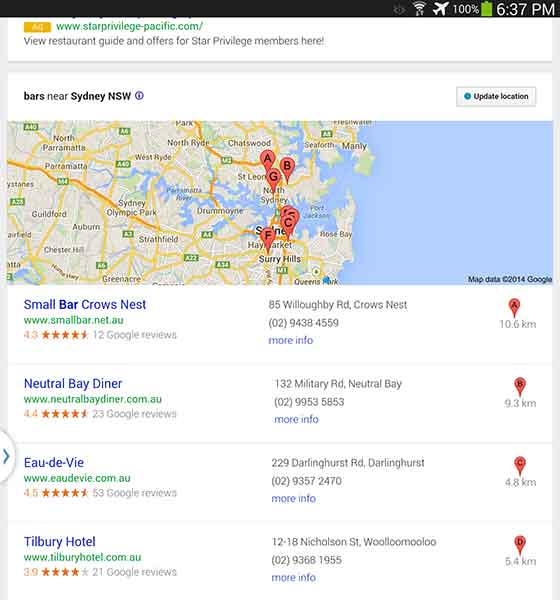
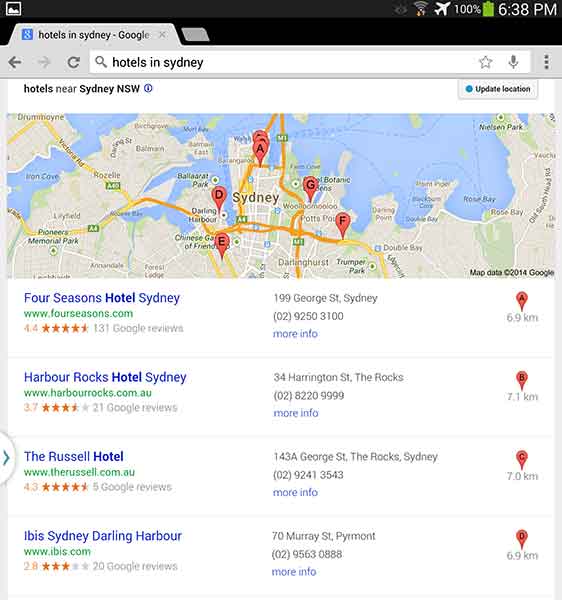
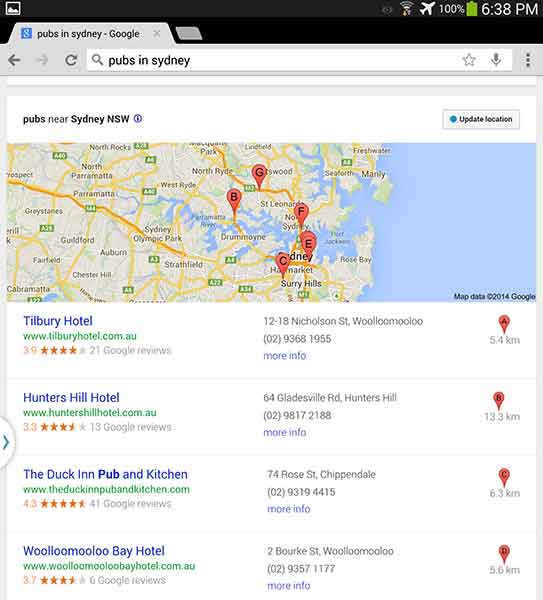
While I was in Australia earlier this year, I used google.com.au to search for a good happy hour spot after a long day at Bondi beach (they have free beach wi-fi!!). No matter how hard I searched, the best watering holes weren’t showing up in my search results. Little to my knowledge, it was because I was searching for “bars in sydney,” while all the other blokes and sheilas in Aussie call them by a different name, “hotels.” The following are the search results from various keyword searches in Australia. Check out how they vary just by changing one word!
“Bars in Sydney”
I found that the “bars” results were filled with restaurants that happened to serve classy drinks (not exactly what I was looking for). And I don’t mean to whine, but it’s mildly upsetting that results A, B, and G are located in North Sydney. SEO in Australia needs to step up its game.
“Hotels in Sydney”
Unfortunately, looking at “hotels” wasn’t helpful either. This keyword can get a little complicated because, while bars are called hotels, hotels are also called hotels. I think it would be really difficult for a bar to outrank an actual hotel, even on google.com.au.
“Pubs in Sydney”
The best results? Pubs. Each result was a bar with “hotel” in their business name and “pub” in the meta description. Pubs are a big part of Australian and English culture so it is fitting that this 7-Pack produced the best results.
If you want to run a local campaign, pay attention to changes in culture and language in your area. You may be able to target locals and tourists differently by focusing on some keywords more than others. As Ja’mie King would say, SEO in Australia is, like, so random.
Have you had any strange encounters with Google keywords in certain areas? Let us know in the comments!
Three months ago I started working at Search Influence. I thought I knew a lot about SEO, boy was I wrong. After what seemed like a crash course in everything we do here, I thought I would put together an overview of what I’ve learned:
SEO
After 45 (!) trainings I know a lot more about SEO, but I also found out you are never done learning. SEO continuously evolves, and that’s because of Matt Cutts, the head of Google’s Webspam team. To be honest, I only knew him from the 30 Day challenge he talked about at my favorite platform TED. He is the one that changes Google’s algorithm 600 times a year! Another honest confession, I thought this algorithm only changed 25 times a year. I was just a little off.
Keyword Research
One of my first trainings was on keyword research. This is a process in which we look at the historical online search behavior for a given product or service to determine what keywords we are going to focus on throughout a client’s campaign. This is an extremely important process and happens at the beginning of our partnership with a client.
Google Keyword Tool
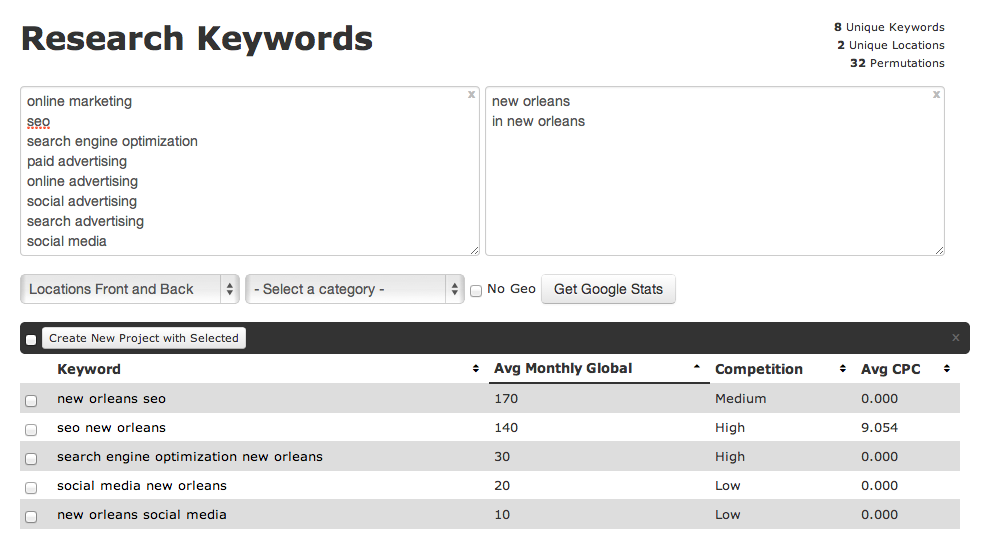
For the keyword research we use Google’s keyword tool. After adding a long list of root terms and a list of geographic modifiers (the physical location of the client and/or their service areas) the tool shows the approximate number of search queries matching the keywords that were found on Google.
A brilliant tool, but not perfect as it provides search statistics based on Google.com traffic only. But of course, Google captures 72% of all search traffic so we feel better about relying heavily on their research. When needed, we utilize other things like Google Webmaster tools and Google Adwords Keyword tool.
Google Analytics Organic Keywords
Before I started working at Search Influence, keyword research was much easier. My colleagues logged into Google Analytics and could see which words people used when searching Google to find the designated website. In October 2013, however, Google stopped offering this information to provide additional privacy and security for its users.
Google Suggest
Last month a light bulb went on in the head of a Search Influencer. ‘Why didn’t we think of this earlier?!’ She was talking about Google Suggest, a feature that has been around for five years. Just enter a letter or a word in Google’s search field and you will see associated terms in a dropdown menu. Google describes Google Suggest as:
“Autocomplete predictions are algorithmically determined based on a number of factors, like popularity of search terms, without any human intervention. Just like the web, the search terms shown may include silly or strange or surprising terms and phrases.”
Although we benefit from Google Suggest, I agree the search terms shown are sometimes (very) silly or strange, just see for yourself:
After seeing this, I was curious what Google would suggest when entering ‘Search Influence’:
Reasonable. Logical. But Google also suggested…
What???
So overall, Google Suggest can be helpful, but it can also make you laugh. (Or make you mad: over the past few years Google Suggest has been sued for racist search suggestions and defamatory language next to individual names or companies).
So what do I suggest? Use it, but
Do you have any questions about SEO? Let us know in the comments!
Google recently announced a new feature in the “Dimensions Tab” of Google AdWords. Once you link your AdWords account to your Webmaster Tools account, you will be able to view the “Paid and Organic” data. This report shows you a variety of valuable information, including the organic keywords that are delivering your website as a result and the clicks on those results. This is extremely valuable information given that Google is now masking all keyword data as “(not provided).” Below are the steps for linking your AdWords and Webmaster Tools Accounts.
First, make sure to verify your website in Google Webmaster Tools. Then follow the steps below.
1) Go to the gear icon at the top right. 2) Select “Account Settings” from the drop down. 3) Select “Linked Accounts” from the left sidebar. 4) Select “View Details” under Webmaster Tools.
Side Note: It’s a good idea to link your Google Analytics account, but for these purposes, you only need to link your Webmaster Tools account.
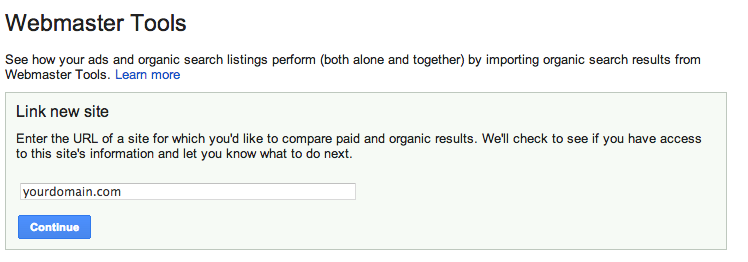
5) Type in your domain and select “Continue.”
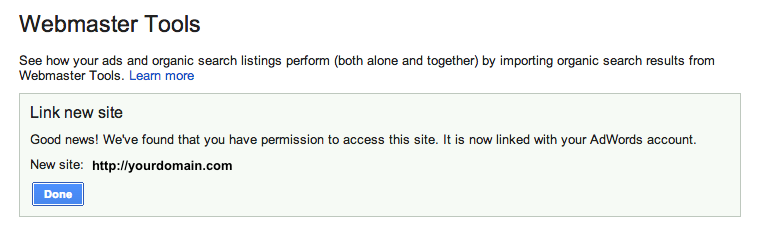
6) If you did it correctly, you will get the following message:
Now you can view all of the great data in the “Paid & Organic” report! You will find some interesting info here, especially how the combination of paid and organic play into each other. It will take some time for the data to accumulate, but once it does, you can gain valuable information.
So What am I looking at?
Query: The search query that delivered your website as a result. This will show the exact term that was searched, and whether you had an organic-only result, an ad-only result or both shown.
Ad Stats
Clicks: The number of times a person clicked on your ad for a given query Impressions: The number of times your ad was shown on the search engine results page for a given search term CTR: The number of clicks your ad received divided by the total number of impressions Avg CPC: The average amount you were charged for clicks on your ad Avg Pos: The average position your ad appears on the search result page
Organic Stats
Clicks: The number of times your organic listing was clicked on for a given query Queries: The total number of searches that returned your organic listings over the given period Clicks/query: The number of clicks your organic listing received divided by the total number of queries Listings/query: The average number of times a page from your site was listed in the organic results per query Avg. Pos: The average organic rank of your organic listing compared to other sites
Combined ad and organic stats
Clicks: The number of times a person clicked your ad or organic listing for a given query Queries: The total number of searches that returned your ad or organic listings over the given period Clicks/query: The number of clicks your ad or organic listing received divided by the total number of queries that returned one of your ads or organic listings
What do you think is the most valuable thing to learn from this new data that is provided by Google (if you have an AdWords account)?
Keywords are the key—no pun intended—to driving traffic to your site, and is part of the SEO basics a site owner needs to know. A smart business manager will put a great deal of thought into which terms to target. Even a fantastic list can always use improvement—however, four simple keyword expansions can be the trick to increasing your impressions using terms that are proven to get results.
Keyword expansion is quick, easy, and almost guaranteed to work. It might not drive tons of traffic, but it will certainly add to your existing pool.
1: Pluralize
Many of the main keywords can come to mind almost automatically: if you sell dog brushes, you’ve probably already factored “buy dog brush” into your list. But even if someone only wants to buy one, they’ll often search for “buy dog brushes”. Because some engines recognize plurals as separate keywords, you are potentially losing out on all the impressions from the “dog brushes” searchers. Adding an –s or –es to your common terms becomes a no-brainer when you realize how easily it can boost your traffic.
2: Rearrange
People typing search queries don’t always use syntax and grammar the way they do in everyday speech. To continue the example above, someone might search “dog brush buy,” which follows a pattern of what they want (dog brush), followed by what they want to do (buy). Yes, it’s likely to be a far fewer number of people than those searching “buy dog brush,” but that fewer number is not insignificant. Mixing up your word order often elicits more results.
3: Misspell
Another regularly overlooked area for keywords are typos and misspellings. Some errors are certainly more common than others; a check down the search query report should show you where you might have luck. If your canine brushes are of the affordable variety, running both “cheap dog brushes” and “cheep dog brushes” could benefit you. Fewer search engine gurus are competing for misspellings, as well, meaning you’ll have a good chance at capturing more of the market.
4: Match
The three different match types—exact, broad, and phrase—generally work together to generate the most impressions and clicks even though many choose to limit to exact match for a quality response. If your aim is to get more traffic to your site, though, casting a wide net will bring in more fish. Broad match additions to “dog brushes” might include “dog kennels” or “hair brushes,” but people running those searches might also be pleased to stumble across you. You’ll also pick up on new keywords, through broad and phrase matches that make sense, which you can incorporate into your list.
Keywords and keyword rankings are important to being found online. With a few additions and clicks, you’ve now expanded your keywords to draw impressions from those who pluralize, rearrange, or misspell words, as well as those running similar searches. You’ll benefit in impressions and ultimately traffic as well, without stressing over your keyword list.
Megan Totka is the Chief Editor for ChamberofCommerce.com. She specializes on the topic of small business tips and resources. ChamberofCommerce.com helps small businesses grow their business on the web and facilitates connectivity between local businesses and more than 7,000 Chambers of Commerce worldwide.
We’ve been watching Penguin 2.0 and its effects, and as a team we have noticed some fluctuating data that suggests the algorithm has not quite settled in yet. In another blog post, I put it out there that rankings are not everything, and they are not the primary measure of success. Ranking reports have known flaws, but they can be used as a weather vane. When we look at the ranking weather for a few clients, we see some ups and downs, clearly with some effect from the most recent Penguin, but it appears that the players on Google page 1 are still moving around more than a month after the rollout.
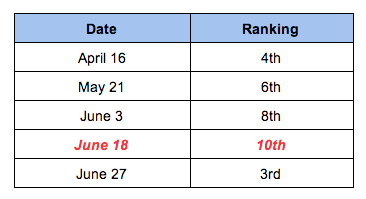
When we look at a few examples, we see the musical chairs being played on page 1 with nobody being safe and comfortable for very long. We’re watching rankings for a plastic surgeon in New Jersey for the term “rhinoplasty New Jersey.”
Here’s a summary of his rankings hopping all over. His biggest drop was on June 18th:
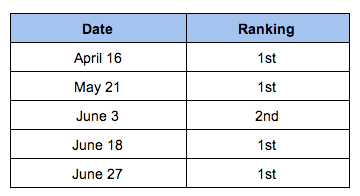
The same client for “breast augmentation New Jersey” had more subtle changes, but they are meaningful.
So it looks like he got a little hit from Penguin 2.0, but may be rebounding. We have done nothing out of the ordinary for this surgeon to move his site from 10th to 3rd in just nine days, so we make an assumption that Penguin is still adjusting.
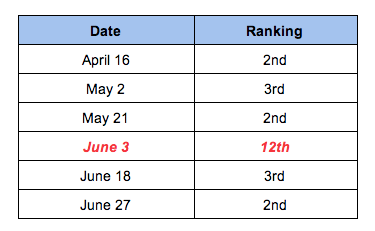
Another example in ranking fluctuations for “Columbus allergist” is in a doctor’s rankings seen below. His biggest decrease was on June 3rd vs the guy above who got the hit on June 18th:
Rankings Aren’t Everything!
Rankings are not the only measure by which we watch successes and failures. Organic traffic is another layer of data, and in some organic traffic trends, we see noticeable changes around June 3rd then again around June 18th.
The client represented in the chart below is a cocktail bar in the South. They saw a dip in organic traffic after May 22, but they enjoyed an unexpected bump in early June (the traffic dropped off again after that early June peak, but what I want to know is what’s behind that weird little bump up earlier on?):
The next example is a traffic bump around June 18th. This client is a completely different business on the west coast. We see a little effect from Penguin, then a weird spike:
And Then There Are Other Data Too
It gets a little fuzzier when you start looking at Bounce rates and Time on Page and these data in Analytics. Who’s to say that these increases or decreases are a direct effect from Penguin? You could argue your site is having better or worse quality traffic because of ranking and where your site now shows up vs where it showed before Penguin. You could argue lots. All I know is that 3 of the 4 clients mentioned above saw an improvement in Bounce rate after Penguin.
So … what?
I’m not convinced that Penguin 2.0 was a one time algorithm update, it did its thing on May 22nd, and we’re experiencing the good or the bad or the indifferent. I think it’s still shaking out, and we may still see a few odd spikes or odd drops in ranking or traffic or some other data. We may have a few more weeks before websites settle into a relatively comfortable placement on page 1, and it is only then that we can claim some clear understanding of the full effect of Penguin.
And because Penguin 2.0 is still reconfiguring, it may not be time for drastic action. If your site is experiencing some definite ups and downs, then yes, you should look at your backlinks quality, the anchor text quality, internal links, etc. All of this stuff is covered in many other blog posts. You should have been long ago working on authoritative backlinks and building up your social cred. But it’s not time to throw up your hands, and just Disavow everything. It’s not time to scrap your website and start with a brand new domain and design. Take some time to digest what’s going on before bulldozing ahead.
What I would really like to know is if anyone else noticed definite odd fluctuations around June 3rd and June 18th. Or if you noticed unusual changes at anytime after May 22nd. Leave a comment, and let us know.
I have always been hesitant to use keyword ranking reports as the focus for a successful SEO campaign. They are a useful measure, but they aren’t the most important, nor are they reliable and trustworthy. Don’t get me wrong. Ranking reports have value. Just not as the primary reporting standard.
The prescription for success is focusing on the website performance rather than obsessively watching over the rankings. This image shows this client hit the #1 spot in April then again in May, and within that time the #1 spot garnered them 8 visits.
A website needs to be a dynamic living entity. Google respects business owners who take care of their website properties and make those sites engaging, interesting places to visit. Website owners need to be mindful of which pages on the website are the strongest and most visited. What pages have the highest and lowest Bounce rates, and why? Which pages have the highest and lowest time spent on page – is there room for improvement?
A positive user experience is influential to the site strength. Quality backlinks. Author trust. Engagement in the industry discussions online. These are the things that will make a site strong, and from that strength, the site will show up in the SERPs, but maybe not for the phrases you want or expect.
Things ain’t what they used to be
A brief blog post in mid-May says it very succinctly:
“Keyword ranking as a metric is diminished in importance and relevance as performance metrics are starting to replace it.”
“Performance” encapsulates so many details. It’s a lot of what is already mentioned: the behavior of the visitor once they land on your site.
If they are digging around to other pages,
reading more information,
spending time on the site,
taking the quizzes sitting in the sidebar,
watching the videos embed on the page,
– if they are doing these things, Google is rewarding that site as being trusted as a resource.
An excellent Bounce rate, not seen very often in this client’s industry.
If visitors land on a page and immediately see the content is not rich enough, there is no multi-media experience, there are no big happy buttons encouraging that visitor to go read about the doctor or lawyer, baker or candle stick maker, it’s boring. And they will leave. When visitors Bounce,
you lose a potential customer,
and it sends signals to Google that your page has little value.
“If Not Keywords, What SHOULD you be looking at?” Well, it depends on your business and your goals, but traffic and conversions are going to be more useful than keyword rankings alone.”
I’m not drawing a line in the sand saying that ranking reports no longer have any value. What I am saying is for years we used rankings as the thumbnail data for reporting. Rankings were the first thing discussed in new client kick-off calls and the first thing addressed in monthly conference calls.
However, keyword ranking reports are flawed. They have been since the beginning of keyword ranking reports. But they were, and still ar,e one measurement to use; one that is becoming a little less relevant.
Rankings are always moving around. How many times have I said “The keyword rankings are simply a snapshot in time. The report is not reflective of reality for all searchers all of the time.” I have said that a LOT.
Ranking reports tell a very specific story. You’ve chosen keyword A, B, and C, and that’s what you will be chasing. But what if your site ranks for X, Y, and Z? You won’t necessarily know it because those phrases aren’t in your list. This is bad tunnel vision.
Google is showing us with every algo update, that what the business owner or the SEO thinks that a website should rank for is not necessarily what it will rank for.
A ranking report can’t predict the success or failure of a business online; it can absolutely help guide decision making and improving the website property, but it is not the definitive measure telling us that we have achieved the #1 spot and can now expect to dominate.
So What’s Important Now?
Rankings are still important. We still use rankings as a weather vane. But we have to remember that between the increasing personalization of search results and the localization of search results, rankings data is skewed. We have to recognize that.
Search results are personalized, based on website browsing history in some cases
Results are location based, so if you live in town A you will see something different if you move to town B
Previous search history is used to predict the most relevant links
People use different devices to search–although as people increasingly sync their smartphones, laptops, and tablets with each other, this may become less of a factor in the future
Or in Keyword Rankings are Dead: Long Live the ROI: “A keyword searched in New York by a logged-in Google account user showed different results than those done by a first-time user in Baltimore. A surfer searching on Google in Montana displayed different results than one in Texas. The more we searched, the more we realized Google has taken the rankings game one step further and personalized it based on a visitor’s search history, along with other important geographical and demographical information.”
This is simply more background as to why ranking reports are flawed data, and more evidence why we cannot rely on these as our primary gauge of achievement.
Our team here has had some fairly intense discussions on improving Bounce rates on select pages and strategies around increasing conversions. Looking at length of page visits and flow of site visits. Trying to pinpoint ways to improve the user experience and help them stick around longer on site. These are the things we are talking about and measuring and testing.
In Rankings are dead – long live conversion!: “With Google’s continued focus on location based rankings, we strongly believe that rankings are becoming much more dependent on their specific location. For example, one keyword could rank much higher in Scotland than it does in Brighton. Even today when our clients mention that their highest paid person in office spots that their website isn’t ranking high for a particular ‘money word’, it can be tempting to scream at nobody in particular “It’s not just about rankings!!”.”















 We’ve been watching Penguin 2.0 and its effects, and as a team we have noticed some fluctuating data that suggests the algorithm has not quite settled in yet. In another blog post, I put it out there that


 It gets a little fuzzier when you start looking at Bounce rates and Time on Page and these data in Analytics. Who’s to say that these increases or decreases are a direct effect from Penguin? You could argue your site is having better or worse quality traffic because of ranking and where your site now shows up vs where it showed before Penguin. You could argue lots. All I know is that 3 of the 4 clients mentioned above saw an improvement in Bounce rate after Penguin.