Tag: keywords

  • Googleplasty: How to Reshape Your Search Results (Part 1)

    As businesses grow more in touch with their online presence, it becomes more and more challenging to stand out in the search results of highly competitive markets and areas—and nowhere is this perhaps more true than in the cosmetic medicine industry.

    Search Influence - Plastic Surgeon Local Google Search Results

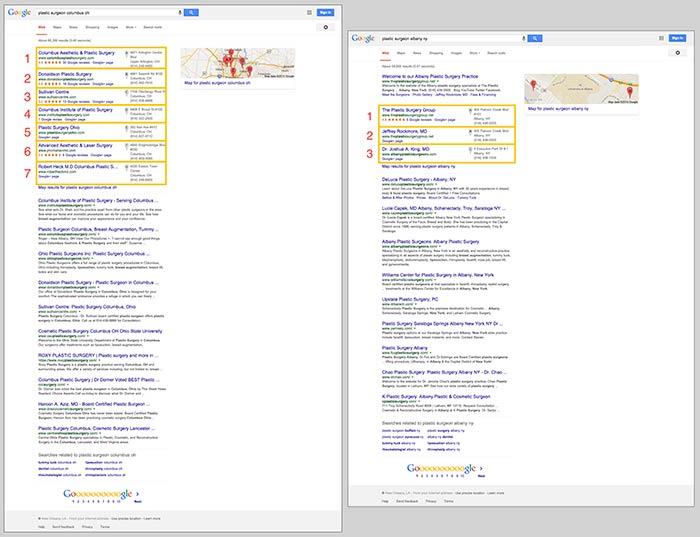
    First things first, let’s make sure we’re on the same page about the two major kinds of results that we see in desktop results for plastic surgeons. “Localized organic” search results and “maps pack” results typically appear together in what is referred to as “combined” search results. The factors that determine what appears in these two areas are not the same, as you can tell by the the difference in results and by the appearance of a site more than once between the two. Maps packs can come in a variety of forms and don’t show up for all search queries, which is also important to note.

    In the screenshot below on the left for the search “plastic surgeon columbus oh,” you’ll see 10 localized organic results below a 7-count maps pack. In the screenshot on the right for “plastic surgeon albany ny,” you’ll see 10 localized organic results, but the 3-count maps pack appears below the first organic result.

    Search Influence - Google Maps Pack Plastic Surgeon

    Stand Out in the Maps Pack

    In the maps pack itself, the most striking features are the review stars and rating display. The data in the maps pack area is pulled directly from Google Plus local listings in Google Maps. So, to make your practice stand out in the maps pack, you should claim and verify your Google Plus listing via Google My Business.

    Once you’ve claimed and verified your listing, you’ll want to get reviews from your patients. It’s important to understand that one or two reviews a month over a few months is better than 15 reviews in one week. As with most online marketing strategies, natural behavior is the best behavior.

    Stand Out in Localized Organic

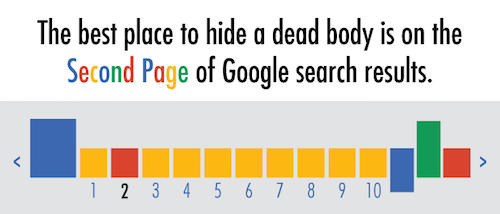
    The most obvious way to stand out in the localized organic results is to be ranking as high as possible and to AT LEAST be in the top 10 so that you’re on the first page. As the age-old SEO joke goes, “The best place to hide a dead body is on the second page of Google search results.” Hardly anyone looks past the first page, and—according to eye-tracking data—not many look past the top half of the search results page.

    Search Influence - dead body Google Search Results meme

    The Google PageRank algorithm that determines these rankings takes into account somewhere around 200 factors, so it’s not as simple as pinpointing one or two efforts to be made.

    Now that we’ve got a better understanding of what we’re looking at in search results, we can start to understand the major factors that affect ranking in each of these sections. Stay tuned for my next blog, where we’ll talk about the top five ranking factors in the maps pack, in the localized organic results, and in competitive markets!

  • Keywords: Now All-Natural and Gluten-Free

    Google has officially divulged that it rewards the mobile optimization of your website. Hooray! For most people, this doesn’t come as much of a surprise. There are studies dating back to last year claiming that up to 60% of consumers use mobile searches when making purchase decisions. The bottom line is that people are becoming increasingly hooked to their phones as each day passes.

    LookingAtPhonesImage

    How Has Search Intent Changed?

    Okay, so people love their phones—shocking. But what are the larger implications here? How might the mobile revolution affect the way you rank for specific keywords? Well, to answer that question, we need to delve into how search intent is evolving. With the mounting prevalence of semantic searches compared to conventional keyword-happy searches, users are now searching on the go and in an increasingly natural way. Gone are the days where using singular, valuable keywords are getting you exposure. In the ever-evolving search intent environment, content may be king, but nuance is noticed. One 2012 study estimated that “16 to 20% of queries that get asked every day have never been asked before.”

    What Does This Mean For Me?

    It’s officially time that we start thinking outside of the box when it comes to the keywords we are using in our content. Creating helpful, educational content for your users is about anticipating needs and answering questions. To keep up with the changing landscape of SEO, keyword brainstorming sessions need to become less about singular words and more about descriptive phrases.

    thinkoutsideimage

  • Art of War: Keyword Edition

    So you want to improve your online presence, crush your competitors, and rule the market with an iron fist from the coveted #1 spot on Google? Well, that’s all fine and good, but you may be getting a little ahead of yourself. Before you can dominate Google, you need to know which searches are worth dominating for your business.

    This is a simple question that often plagues those new to online marketing, keeps them awake at night, haunts their dreams, and, through perpetual second-guessing and overanalyzing, crushes the enthusiasm that began their quest for Internet marketing supremacy in the first place. What starts as a simple guessing game (“How would I look this up?”) often protracts itself over time into “What is every conceivable combination of words that could possibly describe my business?” Next thing you know, you’re soliciting family members, friends, and random strangers to participate in the game as you compile a list that more and more resembles a schizophrenic fit than viable keywords for site optimization. Let me save you the time, trouble, and expensive psychiatric treatment that is the inevitable result of the aforementioned method and let you in on how to sensibly go about this rudimentary phase of online marketing.

    Step One: Think Obvious

    ouijaboardforkeywordsimageThink of the most obvious way you would search for your business. This should be simple, to the point, and usually very general. Think, “If I sustained a life-altering injury that rendered me incapable of speech and left me with only a basic grasp of the English language, and I could only communicate through the use of my single working stump arm and a special stump-optimized typewriter, how would I search for my own business?” Great! You should probably have around ten simple and obvious ideas, and most often, these will be the most rife for traffic. In addition to these terms, you should also think, realistically, of where most of your clients reside. If you are a small business or storefront with services offered to those in your immediate area, keep focused on your local region or the nearest metropolitan area if you are in a suburb. If you overreach and try to optimize for every suburb and town within 1,000 miles, you’re not going to do well anywhere. Stay focused, and you will fare much better.

    Step Two: All Is Fair in Love and Marketing

    kingofgoogleimageTime for some good old-fashioned espionage! Use your simple search terms to pull up some results on Google. These will likely be your competitors showing up, the ones you will eventually need to dethrone in your quest for fame and fortune. Take a gander at their sites and see what key terms they’ve used to optimize their pages. What title shows in the Google results, and what do the headers on their pages say? These can give you some good ideas.

    Step Three: Teenage Mutant Ninja Keywords

    Gather the keywords you’ve thought up and the ones you have stolen from your enemies— ahem, I mean borrowed from your competitors—and consolidate them into a single list. Now, take your list of areas where your clients reside and combine each keyword with every location. Next, you will need to mutate these amalgamations into a number of different forms. Have one mutation listing keywords first and another reversing the order, add minor variations like using the word “in” before the location, use the plural version of your keywords, include the state in the location, take the state out, use the abbreviation of the state, and so on and so forth until your original list of obvious search terms is now an army of permutations of the originals. For instance, if you were a restaurant in New Orleans, you would take your keyword “restaurant” and geographic term “New Orleans” and end up with the following variations:

    • “restaurant New Orleans”
    • “New Orleans restaurant”
    • “restaurant in New Orleans”
    • “restaurant New Orleans LA”
    • “restaurants New Orleans”
    • “restaurants in New Orleans”
    • etc. etc.

    Step 4: The Meat

    Enough with the games—it’s time for some cold, hard facts to help guide us. For this, we turn to the invaluable resource provided by Google itself for this purpose: Google AdWords. To create a free account, just pop on over to adwords.google.com, and you will have the ability to sidestep random guesses and find out from the source whether your keyword ideas are actually being used. Within the AdWords dashboard is a Keyword Planner section. Within this section, you can select the option to “Get search volume for a list of keywords or group them into ad groups.” This allows you to take your precious list of keywords and all the variations created from the last step and see if anyone has searched for them in the last 12 months. The AdWords dashboard also has the ability to suggest keywords based on your industry. This is another good resource to consult for ideas, but try not to lose focus. It is important to get your initial keyword search completed, and you can always come back and do more research at a later date.

    Step 5: Survival of the Fittest

    So, you have your list of results, and now it’s just a matter of choosing the very best ones. Your choice will be based on the results from searches in the last year and which ones actually fit your business and service area the best. Finally! You now have the precious search terms to incorporate in your marketing strategy, and you’re ready for phase two of your plan to usurp the top seat of Google search results. You still have a long journey ahead before you can fully decimate the competition, but for the moment, at least you can stride forward knowing your key search terms are sound.

  • SEO for 2015: Meet the New Boss, Same as the Old Boss

    The world of SEO is constantly changing. Google, the big prize for search engine ranking, may change its search algorithms from 500 to 600 times a year, and major updates like Panda, Penguin, and Pigeon are rolled out on a fairly regular basis. And while your business can’t shift SEO strategies daily to incorporate every change Google unveils, it makes sense to take a fresh look at your SEO approach at least annually—or does it?

    The answer is yes, and no. While there are some aspects of SEO that can and should be refreshed or updated to keep up with changing algorithms and your audience’s needs and tastes, the good news for online marketers is that the basic SEO strategies you’re already familiar with will continue to be effective—in 2015 and beyond.

    Here’s a look at what will change in the SEO landscape for 2015 and what will remain the same.

    Sticking to the basics still works

    Best practices for SEO strategies have always revolved around delivering high-quality, targeted, and useful content with a few well-chosen, naturally incorporated keywords—and for 2015, that won’t change. Google-sanctioned “white hat” SEO tactics continue to be the most effective strategies for driving SEO and boosting search engine rankings.

    Another basic element of SEO that will remain the same is the need for both on-page (what you say about yourself) and off-page (what others say about you) factors. Successful SEO includes creative, useful, and engaging content creation for your website, social media, and other online channels, along with promotion that drives off-page SEO by attracting links to your content from other authoritative sites.

    Going mobile will be an imperative

    By now, most companies are aware that a responsive, mobile-friendly website is essential for attracting and retaining customers—but mobile SEO is more important than ever when it comes to Google. Responsive site design will be a crucial aspect of ranking high on Google, since the search engine now reports whether or not a site is mobile-friendly to both users and webmasters.

    If you’re not sure whether your business website is mobile-friendly enough, Google offers a free online testing tool, along with a link to information about their mobile-friendly criteria and how it may affect your search engine results.

    For small business, local SEO will be king

    In 2015, it will be important for businesses—especially small businesses—to make sure their websites are optimized for local area searches. Google and other search engines are giving more attention to local directories and citations, including hyperlocal content (relevant content authored by local experts within their geographic areas).

    One effective SEO strategy for optimizing local search is to make sure your phone numbers, addresses, and location pages are consistent with off-page directory listings. If you haven’t done so already, check out third-party business directory and review websites such as Yelp, Google+, and Yahoo Business to ensure that your local information is correct.

    Thinking like a publisher will benefit your SEO

    As search engine algorithms continue to shift weight away from obvious marketing and promotional content and toward contextual relevance, individuals are becoming more important than companies with regard to search engine rank. To take advantage for SEO improvement, more companies are transferring authorship credit to individuals—including text article writers, infographic designers, and video and podcast producers. Giving content creators their own voice will lend your content more weight with search engines.

    Links and keywords will lose center stage

    For a long time, keywords and links have been the cornerstones of SEO. But with a massive shift toward contextual search and high-value content, these primary factors no longer carry the same weight. Inbound and outbound links still matter for search, but their importance has been dwindling as more algorithms place relevance over popularity and authority.

    The same shift is apparently underway with keywords. While a few well-chosen and well-placed keywords still serve to help search engines determine the overall meaning of a page or piece of content, it’s more important that your content answers the right user questions and remains useful and engaging.

    If you’ve been sticking to SEO best practices, your strategy for 2015 is likely to only require minor changes in order to remain effective for the coming year and beyond.

  • I’m So Trendy. You Already Know… Using Google Trends on YouTube

    The last time I wrote about Google Trends, I explained how it could be useful in your keyword research process. I am now going to explore how this tool can be used to create a strategically optimized YouTube video.

    Note: As mentioned in my previous blog, keep in mind that the numbers on the graphs presented are not absolute numbers. They are relative to each other to reflect a trend.

    Search by Keyword

    If a client already has a YouTube video featuring a general overview of their business, then we typically try to match up another one of their keywords with a YouTube topic centered around that keyword. Google Trends has a section of the site dedicated to finding trends in search results on YouTube only, so you can see if that keyword is trending and if there are related phrases to consider adding to the title and description of the video.

    Here’s how to get there:

    1. Visit http://www.google.com/trends.

    2. Change your search setting in the top right drop down box in the top navigation from “Web Search” to “YouTube Search.”

    YouTubeSearchImage

    3. Type in the root of the keyword(s) you want to use in the search box under “Compare.” You can compare up to five keywords at a time. This can be used to help you decide between keywords to use as a video topic.

    CompareChartImage

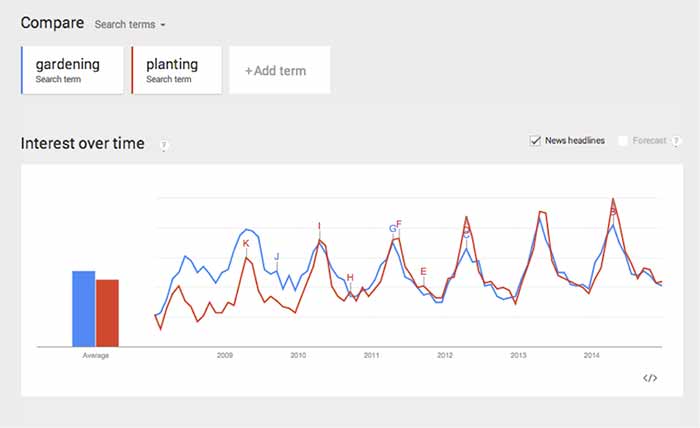
    In this case, both search terms fluctuate at the same time, so seasonality wouldn’t be a factor, but it could be in other instances. This chart tells me that “gardening” used to be a more popular search trend than “planting” on YouTube, but the gap has closed, and “planting” is actually trending more now. It’s interesting that both of the trends dropped so steeply in 2014.

    Because of this, we should look at similar phrases that could have a stronger trend. This is easy to do when you scroll down the page to “Related Searches.”

    Related Searches

    4. Scroll down the page to “Related Searches.”

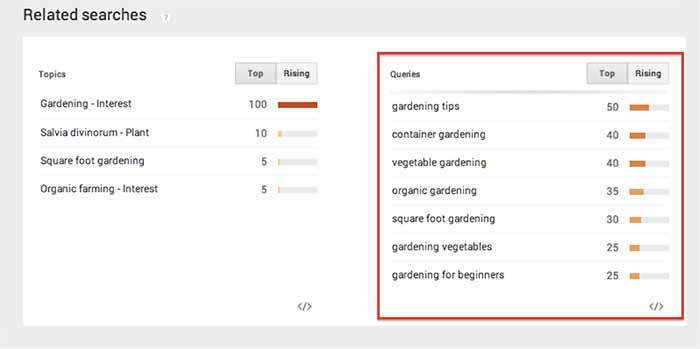
    5. Within “Related Searches” you will see a “Queries” box that shows the most consistently trending searches that are similar to your keyword(s). This is a good place to look for topics that are already popular on YouTube.

    RelatedSearchesImage

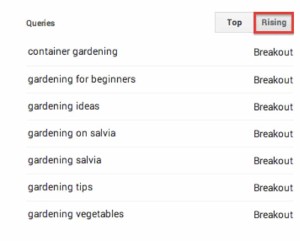
    6. Note the “Rising” column next to “Queries.” These are terms that have been searched for often recently and could become long-term trends.

    As you can see above, I searched for “gardening” and found “container gardening” and “gardening for beginners” as “Related Search” queries. If one of my keywords is “gardening livonia mi,” then I can use “container gardening livonia mi” in the title and description of the video, to optimize it for both terms.

    RisingImage

    Whether you are looking for a way to strategically choose a keyword to optimize a YouTube video or you just need an interesting video topic, Google Trends’ YouTube Search will be a handy tool to explore!

  • Big Results Can Come in Small (SEO) Packages

    tinygiftsimageMany small businesses fear that because they don’t have millions of marketing dollars at their disposal to build their SEO campaign, they simply won’t be able to compete with large corporations. However, there are many SEO tactics small businesses can employ to level the playing field and compete against large marketing budgets.

    If You’re Small, Focus Small

    If your small business offers many services but has a limited budget, it will be more effective to focus your SEO efforts on a small set of highly relevant keywords. For example, if you’re a hair salon and you offer haircuts, blow drying, hair coloring services, etc., it will be better for you to focus on the one service that you perform best. It’s more effective for you to try to be visible for a primary or specialty service than to try to be visible for all of your services—and not to be visible for anything in the end.

    pinonglobeimageYou’re Local, So Get Hyperlocal

    A big advantage you have as a small business is your attachment to the area. Focus your efforts on your local audience by hosting events, participating in your community, getting local reviews, and targeting your content to your locale. You can then leverage all of these hyperlocal efforts in your SEO campaign. That local event you hosted or local organization you helped can generate local content, local buzz, and website links back to your site, all of which tell search engines that you are locally relevant.

    Specific And Long Tail Is The Way To Go

    With limited funds, you need to be clever about the keywords you’re focusing your efforts on instead of going for the obvious ones. To go along with the hair salon example, instead of emphasizing keywords like “hair cut” or “hair coloring,” focus your efforts on more long tail phrases such as “tips to layer your hair” or “how to get an ombre effect.” It’s much easier to rank highly for these long tail, specific keywords than the obvious, broad keywords. While there may be less traffic, the traffic you do get will be highly relevant.

    The next time you think your SEO dollars and campaign efforts don’t stand a chance against giants in the industry, don’t forget that being small has its advantages. Leverage your nimble nature and cleverness for some easy wins!

    Thanks to Heiwa4126 for the globe image and to John Fingas for the tiny presents image.

  • 12 Days of SEO (as Told by Christmas Movies)

    December is finally here, and you know what that means – Christmas SEO! Here are my 12 (Days of Christmas) tips for your small business’ online presence, as told by my favorite Christmas movies:

    1. Accept That SEO Is a Gradual Process

    It may take some time, but if you strategize and take things step-by-step, you’ll be able to improve your results on Google.

    2. Keep It Consistent

    Just like the Rockettes’ kickline, it’s important to keep your business’ name, address, and phone number consistent across the web. This includes your website, social media outlets, and directories!

    3. Work on Positive Reviews

    Getting positive reviews from positive customers can go a long way. Once you have five reviews on your Google+ page, your average star rating will begin to show in search results. Tip: you can give customers this nifty review link to make it really easy.

    4. Don’t Let the Big Guys Push You Down

    Directories and national chains can be intimidating, but play up your strengths as a locally owned business. You can strategically find keywords to target that feature a maps pack; you can also optimize your business listing on the directories that are ranking high.

    5. Feature Fresh, Original Content on Your Site

    Duplicate content can be harmful to your site’s SEO, and it can be boring for potential customers. Make sure that your site’s verbiage isunique and engaging. It’s okay to be different!

    6. Avenge Your Manual Actions

    A manual action from Google may seem worse than being trapped on the Island of Misfit Toys, but there are ways to earn back trust and get in Google’s good graces. With time, money, and effort, you’ll get there one day. Just like Santa, Google checks its list twice. Once you’ve put in the work, wait and see what happens during the next algorithm refresh.

    7. Trust the Keyword Research

    Sometimes it may seem as though the keywords we recommend are not how people are searching, but the numbers don’t lie. Just don’t forget to check for outliers such as news articles, branded searches, and weird town names (Cadillac and Bath, Michigan).

    8. Get Backlinks That Are Natural and Relevant

    Just because you have lots of backlinks doesn’t mean they are good for your site. They may be spammy or unnatural. When getting links back to your site, you should have a combination of quality and quantity. Ideally, you want lots of good links coming from strong, relevant websites.

    9. Pay Attention to the Technical Side

    Keep all of your sitemaps updated and make sure you submit them to Google and Bing Webmaster Tools. It’s also important to add schema so that Google can easily find helpful information about your business. Don’t forget about optimizing your site’s images and meta data; it’s a quick and easy way to get your “ticket” on the Google Express.

    10. Verify High Authority Directory Pages

    Don’t get “lost” in map results or directory searches. Get your listings verified (usually via phone, mail, or email) and optimize them. I suggest claiming your Google+, Yelp, Bing, Foursquare, and Moz Local listings. If niche sites such as Houzz, Avvo, or Edmunds are available for your business, claim those listings as well. P.S.: this helps you with the recent Pigeon update!

    11. Engage with Customers Through Social Media

    It isn’t enough to have social media accounts; you need to be active and interact with your customers. Keep your content interesting and reward fans for commenting on your page. It could be as simple as liking their comments, favoriting their tweets, or saying “Thank you!”

    12. Analyze, React, and Keep Calm after Google’s Algo Updates

    The landscape of Google can seemingly change in the blink of an eye. While it’s important to brace for the worst, don’t forget to check for the best. A lot of recent updates have been good for my clients! Think of the glass of milk as half full and the cookie plate as half empty; be prepared to take action on the latter.

    Image Sources:

    Rockettes

    Christmas Story

    Christmas Vacation

    Miracle on 34th Street

    Mean Girls

    Polar Express

    Grinch

    Santa Clause

    Lost in New York

  • 5 For Friday: Winning at Local Search, Snippets in Search, & Investing in Content

    1. Google Structured Snippets Officially in Search Results
    – Search Engine Land

    Schema markup and other forms of structured data are being used by webmasters to display Google structured snippets, but this isn’t the only way more data is pulled into the search results. Google has been testing out new forms of this “structured data.” Data for a particular search result is now being pulled from “Knowledge Graph and other data sources.” Google is pulling more and more information from sites to show in search results in order to “provide the most relevant information to the user.”

    2. Be Careful of Switching to HTTPS to Improve Google Rankings: The Buffer Story [UPDATE]
    – Search Engine Land

    In early August, Google announced they would be putting more trust in secure sites as a ranking factor. One particular case in which a site adopted this practice early actually saw a major drop in traffic immediately following. This was an issue on Google’s part during the roll out of this new algorithmic adjustment. It has since been corrected, but the moral of the story is: Be cautious before making such a big website change.

    GoogleAlgoImage

    3. How to Win at Local SEO with Reviews, Citations, and Local Events
    – Search Engine Journal

    Recent Google algorithm updates have local businesses panicking trying to react to these new updates. While it is not time to panic, it is time to make sure you have all your local SEO basis covered. Make sure you are still completing all of the long lasting local search practices – consistent local listings, social media presence, and on-page optimizations. Make sure to take things to the next level by optimizing your local listing and reaching out to customers for reviews. This article takes local search even further by explaining how to leverage your local events online!

    pinslocalbusinessimage

    4. How to Use Keyword Research to Find New Landing Page Testing Ideas
    – Search Engine Watch

    Deciding on which elements of a landing page to test can be difficult and the options are endless. This article describes a shortcut for coming up with winning test ideas, which is competitive keyword research. Many available tools online allow you to view the landing page for given keywords your competitors are using. By viewing different competitors and their landing pages, you can get many different A/B testing ideas to improve your paid search campaign.

    5. Don’t Forget to Invest in Content (Not Just “Content Marketing”)
    – Search Engine Watch

    Businesses are jumping on board with the idea of content marketing, but many are solely investing in content creation. They know they need to be using content in their marketing strategy but they are getting their intern to work on it. Business owners need to be focused on the actual content creation process and what is being published because anyone can write but it may not be representing your brand in the best way. This article focuses on 4 main reasons business owners need to invest in content, not just “content marketing.”

    Image Sources:

    Google Algorithm Image

    Local Business Pin Image


  • 5 for Friday: New Apple Gadgets, Net Neutrality, And Twitter Says Buy, Buy, Buy!

    5ForFridayImage

    1. Apple’s Big Reveal
    -Mashable

    This week, it’s impossible to ignore Apple’s big unveilings. While the new iPhone 6 may come with some interesting upgrades, for me, “the big reveal” was all about the Apple Watch. The new gadget is very slick looking and appears to be packed with features. Apple aims to put our entire social networks on our wrists while combining a fitness tracker, texting and voice capabilities, as well as a ton of fun apps. Check out this article, which talks about the technology behind Apple Watch.

    2. Twitter’s Advances Its E-Commerce Plans
    -TechCrunch

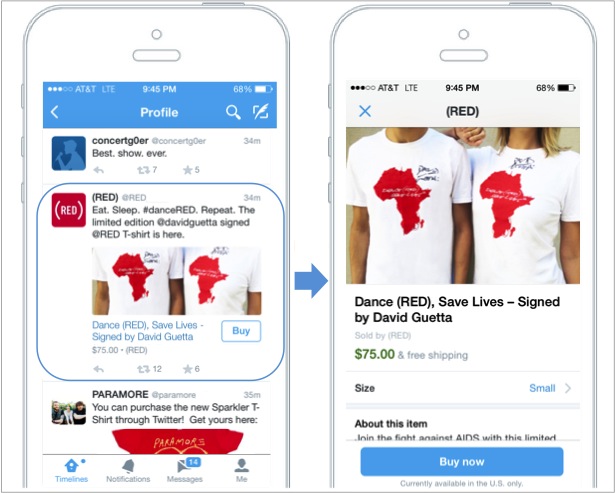
    As the ever growing competition between social media giants continues, Twitter explores alternative revenue options other than advertisements. The Nathan Hubbard, Twitter’s head of commerce, says of the microblogging platform, “[We] want to be a bridge between a consumer wanting something and getting it.” While still in the testing phase, the “Buy” button is a big step for Twitter in a series of initiatives built to generate more profit from its 271 million users. How do you feel about the option to buy goods from within Tweets?

    TwitterBuyNowButtonImage

    3. Facebook Converts Higher Value Into Better Marketing Services
    -Bloomberg

    While on the subject of social media advertising, check out this article on Bloomberg, which talks about Facebook’s incremental improvements to its array of advertising services. Marketers today are willing to spend more money for better conversion tracking, innovative new promotion options (such as video ads), and improved mobile ads.

    4. Social Networks for Net Neutrality
    -TechHive

    SaveTheInternetImageOver a dozen large websites, such as Netflix, Foursquare, and WordPress, joined “The Internet Slowdown Day” protest on Wednesday, looking to garner public support in the fight for net neutrality. Citing big Internet providers as the enemy, the websites simulated what the fast and slow lanes of the Internet would look like by displaying the loading page icons on their home pages. As September 15th approaches (the deadline for second-round comments on FCC proposed net neutrality rules), the conversation about Web traffic regulations is as pertinent as ever.

    5. Are You Using All Possible Keyword Sources?
    -Moz.com

    This highly informative post by Neil Patel uncovers some of the potential sources for your keyword research that you may not have thought of previously. While you may already have a preferred tool, the author suggests several unorthodox ways to supplement your research and, ultimately, lead to a better SEO campaign.

    Image Sources:

    Save the Internet Image

    Twitter Buy Now Button

    App Filled Five Image

  • TUTORIAL: A Google Gem That’s Trending Near You

    GoogleTrendsLogoMy clients frequently ask me how long it takes to rank higher on Google search page results. I explain that the process is gradual and not guaranteed due to a number of factors, such as the 200 plus “signals” that make up Google’s algorithm, the time it can take for Google to read our “signals,” creating a consistent online presence, etc. — the questions usually end there. I recently had a client challenge me beyond a basic explanation of SEO, digging into my keyword research, and inspiring me to explore the seasonal average search value.

    When the client asked me if I examined seasonal search value in my keyword research, I had to admit that I had not. It typically makes sense to look at average yearly search volume because, as stated above, the SEO process is gradual and we don’t want to target a term that will only help our clients in the short-term. This still left me wondering about seasonal search value, so I researched it. I was suspicious that seasonal search could help identify outside factors that affect the progress of SEO campaigns, and it may help lock-down industry standards that I wasn’t aware of.

    Google Ad Words’ Keyword Planner does allow you to select different date ranges to examine the monthly average value, but I wanted to find a tool that identified possible patterns in keywords. I should have known that Google already had a product for this: Google Trends.

    Google Trends’ Fun Facts:
    – Started in 2006
    – Remember “Google Insights for Search”? This tool put search data into graphs and merged with Google Trends in 2012
    Medical researchers have attempted to predict outbreaks with this tool over the past few years
    – You don’t need a Google account to use this tool

    Visit the site and follow along with my tutorial

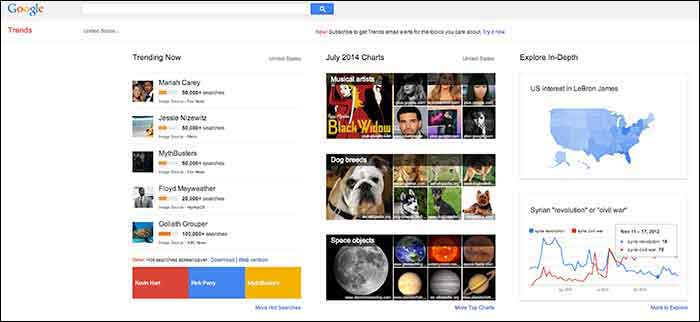
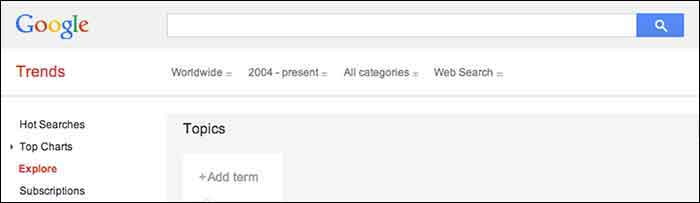
    When you visit Google Trends, you will see three columns of interesting data, so where should you start? The best place to start is with your goals in mind. Do you have specific keywords in mind that you would like to research and compare, or do you want keywords generated for you based around a topic? Either option is available here, along with many other unique features that make it a useful tool for SEO experts.
    GoogleTrends

    Here you will find 3 main categories: “Trending Now,” “July 2014 Charts” and “Explore in-Depth”. The first two categories could be used to brainstorm social media and blog ideas because you can see what’s being searched the most that day as well as a review of the past month’s top searches organized by topic.

    I am going to examine the third column on the page titled, “Explore in-Depth” because I find it most useful for SEO purposes. Still keep in mind the other two columns, however, because they relate to recent news and pop culture that’s also trending. The “Explore in-Depth” column shows two examples of ways you can examine topics and keywords. Click “More to Explore” at the bottom right-hand corner to see all of your search options.

    How to search by Keyword

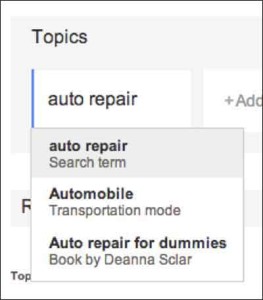
    When you start adding “Topics” that you are interested in gaining search value for, you will also see a drop-down box appear which gives you different types of searches to select. The example below shows “Search term,” which would be the keyword or query, “Transportation Mode,” which is a category. Google will find keywords that fall into that category, and “Book by Deanne Sclar” which indicates a branded search for that book. Once again, think about your goals. If you have specific terms in mind that you want to research, then select the “Search Term” option. If you want to explore a category and see what keywords were searched the most under that category, select the category.
    GoogleTrendsTopicsImage

    GoogleTrendsTopicsMenuImage

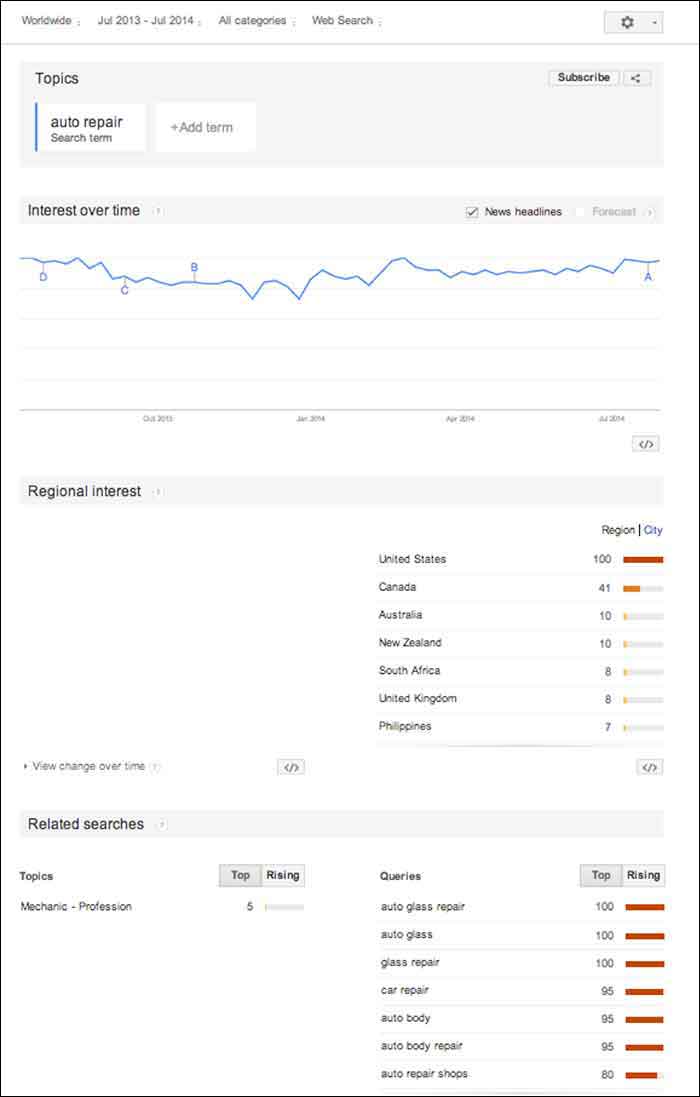
    I first selected “Search Term” and filtered the dates of our search to July 2013-July 2014. As you’ll see below, I receive an “Interest over time” graph, but I am also given a “Regional List” category of countries who have searched for “auto repair” the most. I have also been supplied with “Related Searches” at the bottom of the page. Let’s explore these resources.
    GoogleTrendsTopicsInterestsImage

    Note that the numbers on these graphs are not absolute numbers. They are relative to each other to reflect a trend.

    “Numbers represent search interest compared to the highest point on the chart. If at most 10% of searches for a given region and time were for ‘pizza’ we’d consider this 100. Each point on the graph is divided by the highest point and multiplied by 100. When we don’t have enough data, 0 is shown.” -Google Support

    1. Interest over Time
    GoogleTrendsTopicsInterestsForecastImage

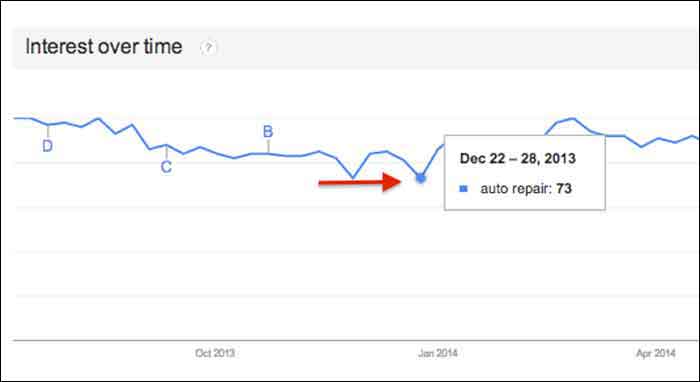
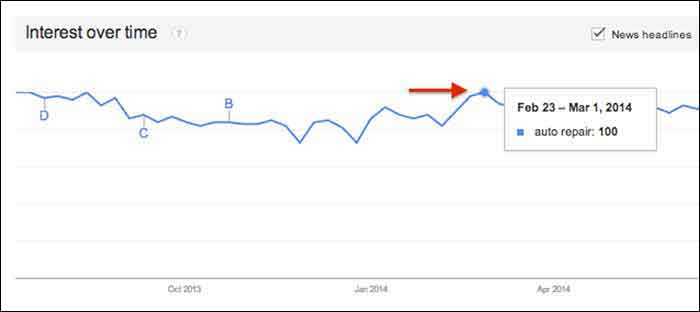
    This graph gives us a snapshot of the overall trend of searches for “auto repair” between July 2013 and July 2014. Hover over any point in the graph to see the exact score that Google Trends gave that time period of searches. After hovering over these points and comparing the highest score to the lowest, I realized that there was no dramatic change, but there was a slight decrease in late fall and early winter months.
    GoogleTrendsTopicsInterestsDecImage

    GoogleTrendsTopicsInterestsFebImage

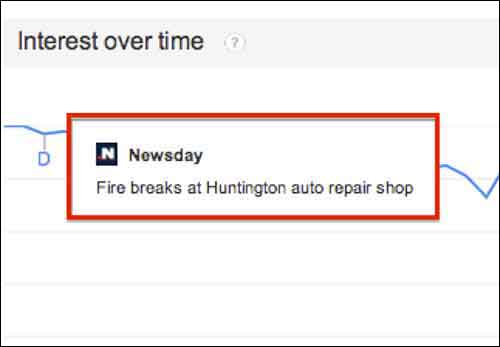
    You may notice the letters next to what seems like random points on the graph. These letters represent times when news headlines included that keyword. This is an interesting tidbit of knowledge to consider. Knowing if the trend increased dramatically is important because it could be due to an outlying factor.
    GoogleTrendsTopicsInterestsNewsdayImage

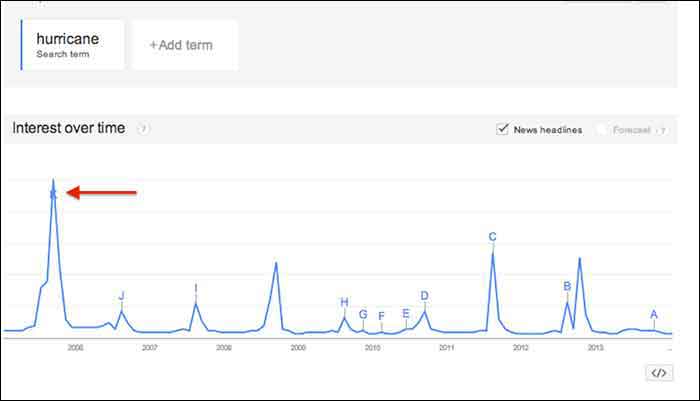
    Fun Fact: Look at how the trend for the keyword “hurricane” was affected by Hurricane Katrina in 2005.
    GoogleTrendsTopicsInterestsHurricaneImage

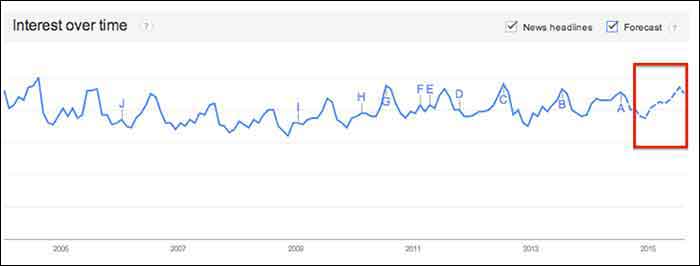
    You may notice the “Forecast” check box to the right of the “News Headlines” check box. This feature attempts to predict the upcoming trend of your search term. Note that you have to extend your start and end dates to make this option available. To yield the most accurate forecast, open the start and end dates to as wide as possible. This yielded the below results, showing the possibility of slight decreases in the fall and early winter months, with a continuous increase in the spring and summer months. Note that I had to hover over the graph points to figure out the dates because the graph does not let you zoom in.

    You could use this chart in conjunction with other keyword research tools such as Google Ad Words’ Keyword Planner to expect possible decreases or increases in certain keywords due to seasonal search value. For example, it’s not surprising that “ac repair” is not a particularly common search word during the winter months. Other keywords with seasonal value may not be as obvious, however, so resorting to Google Trends serve as one tool to help you crack the code when dealing with what seems to be seasonal increases or decreases in the search rankings.

    GoogleTrendsTopicsInterestsForecastImage

    2. Regional Interest

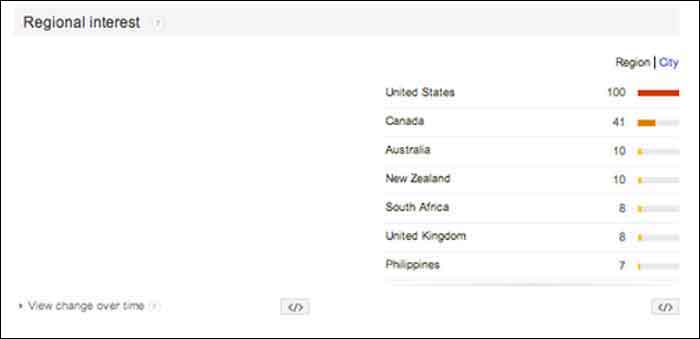
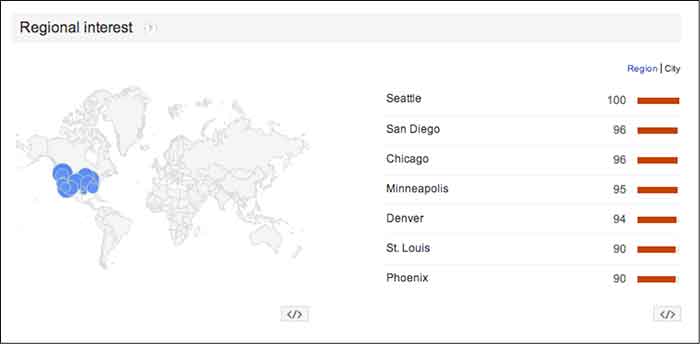
    “Regional Interest” displays larger areas that are searching for your keyword the most. While this is a useful tool for pinpointing countries and large cities, it does not typically show small cities or rural towns. In a global search (as shown below) the results help to narrow down the top countries searching for a keyword, and then the largest cities by clicking the “City” tab. The numbers represent the same calculated numbers as in the “Interest over time” section, so they are normalized and are the outcome of comparing the search volume to the area that searched for your keyword the most.

    For a business with a statewide, national or a global target audience, this map could help you pair the keyword with specific locations. It is possible that more people search “auto repair” in Detroit, while more people in Los Angeles search for “car repair”. This sounds like a slight difference, but the more precise you can be when choosing keywords, the higher your possible rate for success will be.

    In this case, the United States shows a dramatically higher interest in “auto repair” than any other country. You can click on each country to see a breakdown of interest within each one. You may also click the “City” link next to “Region” for the cities with the most interest in “auto repair” despite the country (demonstrated in the 2nd photo below).
    GoogleTrendsRegionalInterestsImage

    GoogleTrendsRegionalCityInterestsImage

    3. Related Searches

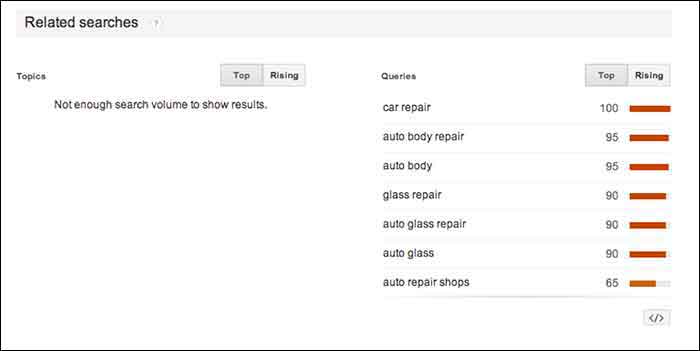
    If Google identifies your keyword with other similar terms that are being searched for, it will list them in the Related Searches section. This section is broken down by “Topics” and “Queries”.

    In this case, I received queries, but did not receive any topics. The message under “Topics” read, “not enough search volume to show results”. In keyword research, however, I would prefer to look at the queries because they are exact keywords. For example, “car repair” and “auto body repair” are the top two related queries listed for “auto repair” (shown below). You could use this list to find keywords that you may not have thought about researching, or to examine the similar keywords in relation to the keyword you are searching.
    GoogleTrendsRelatedSearches

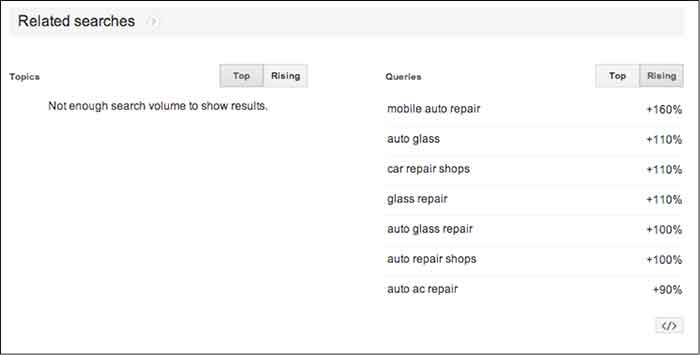
    The “Rising” tab under “Queries” shows terms that have had a significant increase in searches compared to the previous year. As shown below, “mobile auto repair” has risen 160%. This does not mean that “mobile auto repair” is one of the highest searched terms overall, but it may be worth monitoring throughout the campaign to see if it continues to rise and could be important to rank well for. With the rise of mobile Internet usage, it makes sense that this term could continue to increase in value.

    Resources:

    Google’s Algorithym: http://www.google.com/intl/en-US/insidesearch/howsearchworks/algorithms.html

    Google Trends data calculation: https://support.google.com/trends/answer/4355164?hl=en&rd=1

    Google Ad Words’ Keyword Planner Tool (must be logged into Google Ad Words):

    https://adwords.google.com/ko/KeywordPlanner
    GoogleTrendsRelatedSearchesRisingImage

    Finding a Pattern:

    I started researching more specific auto terms and found that there was a seasonal pattern for the service, “auto detailing”. I would not make this seasonal observation a factor in whether to choose the term as a targeted keyword or not because there is consistent search value. Although, it may help explain a decrease of site traffic in the winter months if that occurs.

    It is easy to get caught up in looking for a direct cause and effect between SEO practices and search engine rankings or site traffic, but expanding your research to recognize seasonal patterns can give you a larger idea of how your industry is searched for online.

    My next tutorial will examine search results by “Topic” instead of specific keywords. Stay tuned to learn more about how this can help your SEO practices!


    Image Source:

    Google Trends Logo