Tag: Google

  • SEO & Chill: Google’s Penguin Algorithm Will Sink Sites With Spammy Links

    Every business owner who uses the internet to advertise or display their product (which should be every business owner) needs to know about the importance of Google’s Penguin algorithm. Penguin was introduced way back in April of 2012 as a way to combat some “black hat” SEO practices, such as link buying and link trading with very low-quality and low-authority links. Just like Chill Penguin, Google’s Penguin algorithm is a bit dated, with its last full, confirmed update being back in October 2014, but it was still very active in stopping spammy backlinks. Even before its launch, Google sent out warnings to users of its Webmaster Tools to get rid of their spammy backlinks. Those who heeded the tech giant’s words were rewarded with high rankings in the search engine result pages; those who didn’t ended up on ice.

    Continuous Updates

    The newest Penguin update won’t be an Earth-shattering update like its previous versions, but this version will have continuous updates that will affect searches. What exactly does that mean? That’s anyone’s guess, but only Google knows the true answer. What we can do is try to prepare. Re-evaluating the information we already possess is a great start. We already know that Google hates super spammy, low-quality links and that they love high-authority links. Using this knowledge, you can pretty much assume that having highly authoritative backlinks would lead to Google liking your website a lot more. As far as this update being continuous, that more than likely means that the algorithm will auto-update based upon information that ends up getting collected.

    So What Are Good Links?

    Here’s an analogy: let’s say Google’s Penguin algorithm is a real penguin, your website is the penguin trainer, and your backlinks are fish. Low-quality backlinks would be akin to spoiled mullet, whereas high-quality backlinks are more like freshly caught wild Alaskan salmon. Doesn’t take a marine biologist or an ornithologist to figure out that your penguin will like you more if you continue to feed it salmon. High-quality backlinks will eventually lead you to increased SERP rankings. Not having backlinks is similar to starving your penguin; it makes your page look as if it isn’t an authority on its subject, which is bad news.

    Where Can I Start Getting Good Backlinks?

    Our very own Mary Silva outlined a pretty good strategy of procuring high-authority backlinks. The process itself isn’t easy and requires some inherent knowledge of the internet and the ability to rummage through links extensively and identify what would be the best moving forward into the outreach portion. What it entails is auditing all of your backlinks and clearing out all of the weak and low-authority backlinks. Then comes the hard part: reaching out to other high-authority sources to link to your site is one part of the next step. The more high-authority sources linking to your site, the more likely you are to gain Google’s praise. Another way to link build is to create unique and engaging content so that others can share it and create backlinks for you.

    If you don’t think you’re up for intense link building, Search Influence offers many different search engine optimization packages that can be custom tailored to fit both your budget and needs.

    Image Credits:

    Chill Penguin GIF
    Penguin Trainer GIF

  • Google My Business for Doctors: Visibility, Authority, & SEO

    One of the first steps in improving your searchability with Google is to claim or create a Google My Business listing. With Google My Business, you can manage your information in Google Maps and Google Plus. Since My Business is owned by Google itself, the links gained from these profiles are highly valuable and authoritative.

    However, if you’ve ever tried to claim your Google My Business listing, you may have seen how complex it can be, especially for businesses like medical practices. You may have had questions like: “How do I represent multiple locations for my practice” or “What if I want patients to be able to find their doctors in addition to my practice?” Well, today we’ll go through how to establish your Google My Business presence with exactly those questions in mind, and more!

    1603-SI-KierstensBlog-KG-A-01

    First, let’s dive a little deeper into the world of Google My Business. Google My Business is essentially the dashboard in which you can maintain your information with Google directly. This means that by creating a listing in Google My Business, you’re also creating a Google Plus page and, if establishing a local presence, a Google Maps listing as well. By doing so, you’re telling and verifying with Google, “Hey, I’m a real business, and here’s my real information!” By maintaining that information and posting to your Plus page, you’re proving to Google that you’re the authority on your business and that your business is a valuable resource for users to find.

    Sounds great, right? Who doesn’t want an in with Google? For many businesses, this can be as simple as claiming and verifying a single business listing. But for medical practices, it can get pretty complicated.

    Claiming Your Google My Business Local Listing(s)

    To begin, claim and verify your practice’s primary local business listing. If you are a multi-location business, go ahead and claim the local listings for each of your addresses. Each local listing will need to be verified by either phone or postcard, and no edits can be made until then. Once that’s done, check out these tips and guidelines for building your practice’s Google My Business presence:

    1603-SI-KierstensBlog-KG-B-01

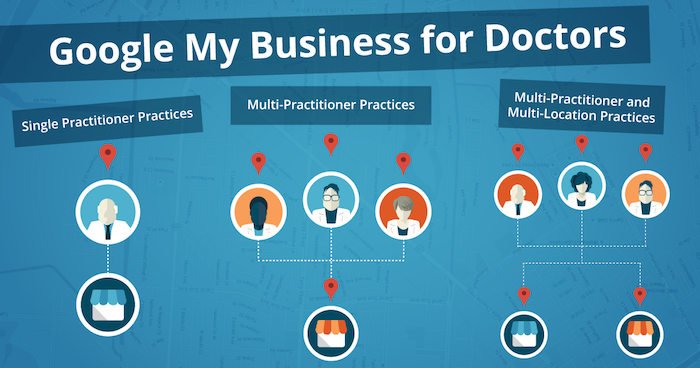
    1. Single Practitioner Practices
      For practices with just one public-facing doctor, you’ll need to decide whether or not to use that doctor’s name instead of the business name. This is wholly a personal decision, but do not create Google My Business pages for both.
    2. Multi-Practitioner Practices
      For practices with multiple public-facing doctors, it is acceptable to create local pages for each doctor, in addition to the practice’s local page. If this is the case, do not include your business name in the name of the practitioners’ pages. And try to differentiate between these pages with either a different phone number or suite number for each doctor, when possible.
    3. Multi-Practitioner and Multi-Location Practices
      For doctors who work at multiple locations, it is acceptable to create separate local pages for each doctor for each location, according to Google’s guidelines. However, it’s even more important that you’re able to differentiate between these pages with separate phone numbers and/or suite numbers. The practical likelihood that Google will flag these as duplicates is higher so proceed with caution! If your goal is to make sure clients can find their doctor’s contact information for each of their locations, then this is a solid practice. Otherwise, if you’re trying to get all of your doctor’s to rank for general searches you’ll need to do more than just add them to Google My Business.

    Brand Pages

    As mentioned before, Google My Business is two pronged; it lets you manage both your local presence via Google Maps and your social presence via Google Plus. If you’re a multi-location practice, consider creating a Google Plus Brand page in addition to your local pages to consolidate your social presence. Brand pages are not linked to Google Maps in any way. Instead, they are purely social platforms for you to manage…you guessed it, your brand! So rather than doing so on each of your local pages, you can post to your one Brand page and gather the same clout with Google.

    That wasn’t so bad, right? Remember to keep these pages updated and treat your primary Google Plus page as a social media profile, like Facebook or Twitter. By doing so, Google will be able to better recognize you as a trustworthy and authoritative source.

    Now that all your pages are claimed, verified, and updated, you’re one step closer to a solid SEO presence!

  • Four Steps for Ranking Above Wikipedia on Google

    2710464400_0fd7f7c94e_z

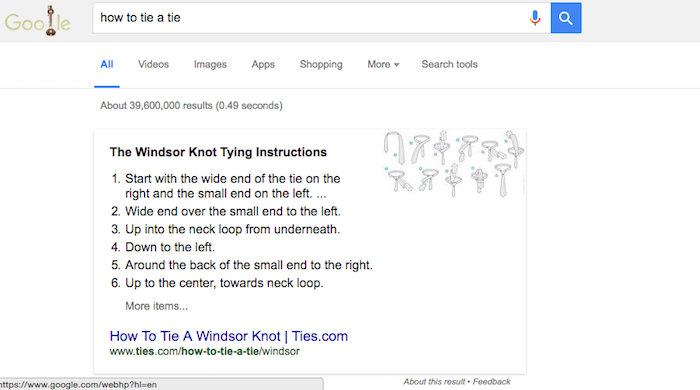
    When a user makes a query in Google, Google will sometimes display a Featured Snippet, which is a few lines of text that directly answer the question posed. These Featured Snippets provide valuable insight to the user who made the query, and according to a study by HubSpot, web pages ranking as a Featured Snippet for a high-traffic keyword see an average click-through-rate increase of 114%. But how do you get your web page to rank as a Featured Snippet?

    Identify Common Questions Related to Your Business and Market

    To rank as a Featured Snippet, your web page is going to have to offer a clear answer to a question that people are asking. Think about the most common questions you get from your customers. If you operate a dentist’s office, which procedures do your patients ask you about the most? Or as a lawyer, are there any specific laws or acts that your clients frequently ask you to clarify? Record these questions.

    Answer These Questions Clearly and Directly

    The point of the Featured Snippet is to answer the searcher’s query as efficiently as possible. After you have analyzed the questions you want your web pages to be featured for, answer them clearly. For example, a “how to” question would be best answered in a numbered series of steps. When “how to tie a tie” is searched, Google pulls a Featured Snippet from ties.com with detailed instructions on making a windsor knot. Each step is clearly numbered and gives exact directions.

    Windsor

    Provide More Valuable Content on Your Page Beyond the Answer

    Your web page for the Featured Snippet needs to have more content on it than just the answer to the query. After all, your answer should only be 54–58 words, and as we have discussed before, pages ranking on the first page of Google’s search results have significantly more words than that. Ways that you can add content to the web page are by adding a video about the topic with a clean transcript of the video’s content.

    Embrace the User Experience

    You want the answer to the query to be found easily by both searchers and Google’s crawlers. Include the search query in your header, with the answer found directly below it. Also include a <p> tag right below the header so that the crawlers will read the header as a header and not as part of the answer. The content you wish to be a Featured Snippet should begin in the same way you would logically begin an answer to the question. For instance, the Featured Snippet for the query “how to bake cookies” begins “COMBINE flour, baking soda, and salt in a small bowl.” There is a clear directive, which stresses the importance even further of eliminating filler content and language from your website.

    As with all matters related to SEO, experimentation will provide you with more insight in how these systems work and allow you to develop an effective content marketing strategy. If your first attempts at trying to rank as a Featured Snippet fail, keep trying. After all, the benefit of being able to rank ahead of such sites as Wikipedia is immense in gaining your website higher visibility.

    Image Credits:

    Question Mark Image

  • Does My Business Really Need a Google My Business Page?

    4-14-2016-BlogImage2

    In today’s interconnected world, businesses are putting a lot of effort toward getting their name out there on social media. The two biggest social media platforms, Facebook and Twitter, are used by businesses in all industries to connect with potential customers. The social exposure achieved through Facebook and Twitter is very important for businesses to market to and connect with customers and clients. Another social media platform, Google My Business, is very important to a business’s online success for a number of different reasons. Around here, one question we usually hear from our clients is “Why Google My Business?” Below are some ways that having a presence on Google My Business can help a business succeed online through more SEO-focused means!

    1. The Maps Pack: Establishing a Local Presence

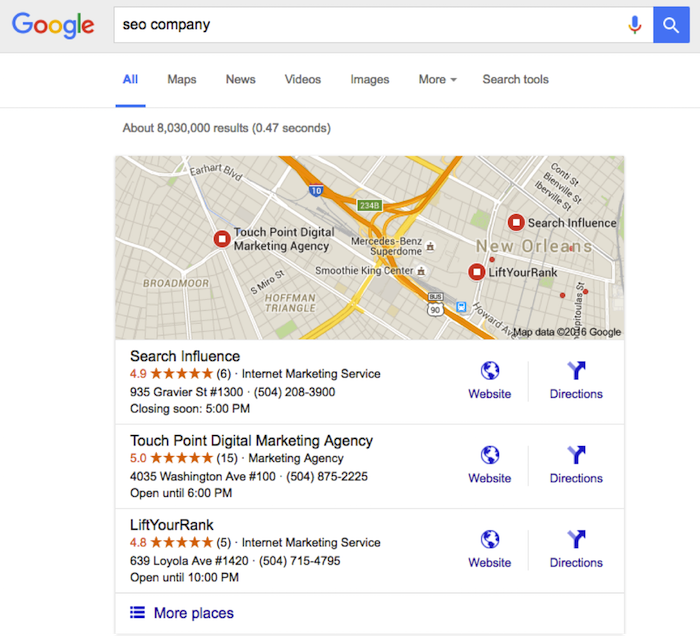
    One important reason for having an established presence on Google My Business is what we like to call the “maps pack.” Without having a Google My Business page, a business will not show up in the local results at the top of the search engine results page. These results are presented as a map with pins representing each business, with information (website, phone number, address) below that is pulled from Google My Business. These more visual results allow the user to gauge the geography of businesses they potentially want to visit.

    This maps pack feature creates fierce competition for local businesses. Ever since a recent update to the maps pack, which reduced the number of businesses listed in the local search results from seven to three, having a presence on Google My Business has become even more important. Optimizing the Google My Business page allows a business to make sure that their information in the maps pack will be correct when they are included.

    Not showing up in the maps pack means less traffic through the search engine results, and due to the prominence of the maps pack in the mobile search results, say goodbye to a large amount of mobile clicks. As we all know, the further down a business is in the Google search results, the less likely users are to click into its information. As you can see below, showing up in the maps pack is very attractive to potential customers. Now isn’t that an SEO company you would want to hire?

    Maps Pack Image

    2. Reviews!

    Another benefit of having an active Google My Business page is the importance of online reviews. Remember the “maps pack” we just discussed? A study by Digital Marketing Works shows a strong correlation between Google My Business reviews and showing up in the maps pack in the local search results. Search engines strive to give searchers a great user experience, so they lean toward sending users to a business that other people have rated highly online.

    Also, having these Google My Business reviews displayed prominently on the maps pack and Google search results will help convince customers to click through. In fact, ratings and reviews are some of the most influential SEO factors in getting users to convert into customers and to purchase your goods or services. Due to this high conversion rate, having these trusted Google My Business ratings and reviews in the search results and maps pack is very important for businesses trying to market themselves online!

    3. Google Publisher

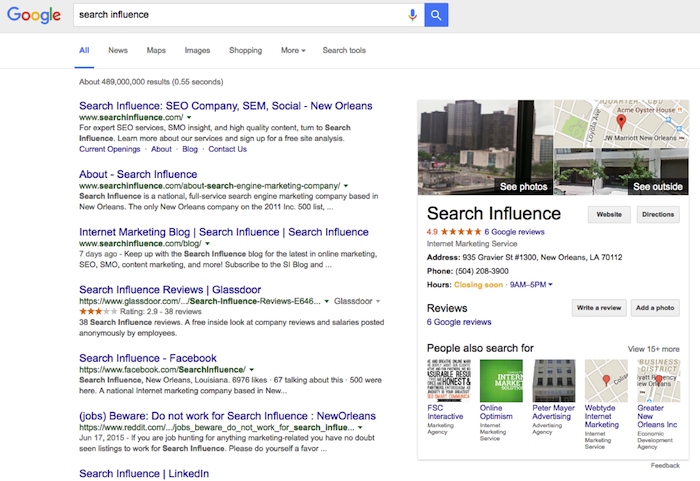
    Another reason Google My Business is important is the effect it can have on Google Publisher. Adding Google Publisher to your site allows your Google My Business information to show up in the “Knowledge Graph.” Triggered by a branded search, the Knowledge Graph is the window of information that shows up on the side of the search results page. This information (reviews, photos, hours, and address) comes straight from Google My Business and serves as a great first look at a website. Having an optimized and active Google My Business page allows the correct business information and more ratings/reviews to show in this knowledge graph. This can gain users’ trust and make them more likely to click into your business’s site! Below, you can see how a branded search for a company allows this Knowledge Graph to load and show more information about the business.

    Knowledge Graph Image

    Making sure you are active on Google My Business can definitely help with social interactions and getting your brand established in social media, but the benefits of this platform go far beyond that. Activity and having correct information on your Google My Business page go a long way toward improving your business’s SEO and your ability to convert clicks into customers.

  • Manage Tags Like a Sys Admin: 5 Ways Google Tag Manager Will Change Your Life

    1603-SI-Newsletter-0331-KG-D-02

    Where would we be without Google? It seems like for every issue that comes up in the field of online marketing, Google is ready with a solution. Google Tag Manager is one such solution. But before we examine the benefits of using this savvy tool, let’s first clarify what a tag is.

    What Is a Tag?

    Simply put, a tag is a snippet of website code that tracks visitors on a website. It allows companies to collect data for affiliate marketing, retargeting, conversion tracking, personalization, and a plethora of other cool marketing techniques.

    What Is Google Tag Manager?

    Back in 2012, Google saw online marketing tools growing more and more sophisticated. But as their sophistication evolved, the need for tags increased to make these tools effective. Though tags provide online marketers with beneficial information, tags can also overburden your website and become too confusing to manage.

    So Google developed Google Tag Manager, a tool that allows online marketers to consolidate all their tags into a single strand of code and gives them the ability to manage their tags through a user-friendly web interface.

    Now that we know what a tag and Google Tag Manager are, why should you use Google’s tool?

    14741920698_c97a07563f_o

    1. Faster Website Load Times

    Too many tags on your website can slow it to a halt. This has a negative impact on your Google ranking because load times are one of the parameters Google takes into account. With Google Tag Manager, you are allowed to specify when you want a tag to be triggered, which means not all your tags will load at the same time. This increases your website’s performance speed, which makes both your users and Google happy.

    2. Easy-to-Use Tag Template

    With Google Tag Manager, it’s no longer necessary to call up the IT guy every time you need to add a tag to your web interface. Tag Manager eliminates the need to add the code snippet to your website’s source code by introducing an easy-to-use template. This template allows users to quickly add tags for AdWords conversion tracking, Google analytics, GDN remarketing, and more. Tag Manager also supports custom tags.

    3. Error Prevention

    In the world of online marketing, there’s nothing worse than trying to add a feature to your website and causing the website to crash instead. Google Tag Manager prevents this by giving users a preview mode, a debug tool, and access to the version history. These tools show users how proposed changes will affect their sites before the changes go live.

    4. Customizable Permissions

    Another way Google Tag Manager adds to efficiency is by allowing the account admin to delegate access to the tool amongst a variety of users. This means that more than one person can add tags to your website. This feature is essential for projects that involve a lot of collaboration, since you no longer have to worry about giving a third party complete access to your website so they can update your source code. You can give or limit access to the main account as much as you want.

    5. Reduced Costs

    Of course, the best part about being able to manage your tags and increasing your efficiency is the amount of money you save by doing so. Google Tag Manager is a free tool, and by using the wealth of resources at your disposal to learn how it works, you’ll be able to add and customize your tags like a system administrator in no time. Instead of messing around with your source code and picking up the shambles when it all falls apart, you’ll be able to work on what draws people best to your website: creating fantastic and informative content.

    Do you currently use Google Tag Manager? Let us know how it’s working for your website.

  • Upgrade Your Website with Fresh Content and Some Help from Beyoncé

    In this ever-evolving age of Google, there seems to always be a way to upgrade your website and its search engine presence. Fresh content will not only ensure your website is up to date, but it can also inform your frequent customers of new information, let Google know that it should crawl your site, and add overall value to your site. Well, Beyoncé is here to help us give you our reasons for why a fresh content upgrade is so important.

    1. Give Them a Reason to Come Back

    Customers who periodically visit your site are likely to return when they know that you are updating your website frequently. I suggest something simple like adding a newsletter or on-site blog. Blogs don’t have to be publicity pushes or “salesy” advertisements. They can be fun ways to share content and let your consumers know that you are engaged in your business’s growth in a competing market. Also, you can use them as an excuse to show off your favorite Beyoncé GIFs.

    2. New Content = New Site Crawl

    Googlebots love to crawl new sites! Google pays special attention to existing sites that have previously been crawled but contain new content. This can be easy for any business to do, as most industries see gradual changes in techniques, best practices, and technology over time. There are new processes, seasonality changes, and all sorts of things that could warrant an extra boost in your content. Don’t feel like you need to rewrite from beginning to end; spicing your content with updates or including additional information to a page that may be lacking is a great way to upgrade your content. The new content should be relevant and engaging for your customer so that you stand out among your competition, or background dancers.

    3. Increase Your Authority

    Your fresh content will engage users and help increase your domain authority. If you aren’t convinced yet that fresh content will help your website, check out this blog about tracking your changes through Google Search Console. This tool can help show you how your site traffic changes when you update your content. The upgrade of content can gain page authority, along with domain authority, which can produce higher rankings for your site overall.

    Website content is by far one of the most important parts of your site and one of the easiest ways to change things up to increase visibility for your business. There are many sides of an SEO campaign, but upgrades to your content keep you relevant and let’s those in your industry know you are a force to be reckoned with.

    Image Sources:

    Upgrade U GIF
    Head Shake GIF
    Background Dancers GIF
    Hair Blowing GIF

  • Google Grants: What Every Nonprofit Should Know

    1608-SI-TheInfluencer-KL-A-01LargeIf you work for a nonprofit, you probably already take advantage of many of the free tools and services available to you. From software and applications to professional services, a huge number of corporations offer donations to show their commitment to the causes nonprofits represent—but few offer tools as powerful as Google AdWords. If your nonprofit isn’t reaping the benefits of a free AdWords campaign, it’s way past time for you to jump on board!

    What Are Google Grants?

    Essentially, Google Grants offer free in-kind AdWords advertising services—$10,000 USD worth per month, to be exact—to 501(c)(3) nonprofits. This is a huge deal because the AdWords platform offers a streamlined way to get your organization’s story and message in front of any target audience you want, meaning more visibility, supporters, and donations.

    1602-SI-TheInfluencer-KL-A-03-lg

    It’s important to note that unlike with the paid version of AdWords, Google does have some restrictions on the types of ads created with Google Grants:

    • Ads must be text-based (meaning no videos or images)
    • Ads appear only on Google’s search engine results pages
    • All campaigns are keyword-targeted
    • Your max cost-per-click (CPC) is $2.00 USD

    But the most exciting part? Your Google Grant is valid forever! All you have to do is maintain eligibility.

    What’s AdWords and Why Do I Need It?

    Let’s backtrack for a minute. If you haven’t heard of Google’s AdWords platform, it’s a powerful tool that allows you to distribute ads for your organization across the web. As a supplement to SEO, paid advertising can increase traffic to your site, often much more quickly than SEO alone, while building your brand in the eyes of your target audience.

    And when it comes to advertising, there’s no question that Google knows what it’s doing. The tech giant’s ad network is the largest in the world and reaches <80% of global Internet users, which means high visibility for any ad you create. With AdWords, you can share your message with more people—and with Google's customizable tools, you can be sure your story is shared with the people most likely to engage and donate, whether they're across the street or across the world. Not an AdWords expert? No problem. AdWords' customized functionality gives you as much control as you want. Beginners can launch an effective campaign with AdWords Express, the quick and easy version of AdWords that offers automated management services, until they’re ready to optimize their ad campaigns to the fullest. More experienced users can take advantage of AdWords’ spectrum of insights to monitor keyword strength, ad performance, and other areas.

    Charity:Water Image
    Image from Charity: Water, a member of Google for Nonprofits

    How Can I Tell if I’m Eligible?

    1. Do you meet Google’s location requirements? Your headquarters must be located in one of the 50+ eligible countries. If you’re in the US, you must have current 501(c)(3) status, and if you’re headquartered somewhere else, you must meet the defined charity status of that country.
    2. Have you checked the list of prohibited organization types? Governmental health entities, hospital or health care organizations, and academic institutions cannot receive assistance through Google Grants.
    3. Do you have a live website? You need somewhere for ads to link to! Google demands “substantial content”—meaning more than just a page or two.

    Where Do I Sign Up?

    If you’ve answered “yes” to all three questions in the last section, you’re ready to get started!

    1. Sign up with a Google for Nonprofits account. If you haven’t done so already, become a member here for access to free tools and services like Google Apps and Google Analytics.
    2. Enroll in Google Ad Grants and complete the application. Sign up for either AdWords or AdWords Express, depending on how you plan to maintain your ad campaign. Google’s account creation guide makes it easy to create an account that fits your needs, though it’s important to note that the process may take between 4–6 hours to complete. You’ll be expected to provide basic information about your organization, but you should also have a basic idea of how you intend to start your ad campaign. Google will ask for things like sample keywords and ad copy as well as your goals for your ad campaign (recruiting additional volunteers, getting more donations, promoting fundraisers, etc.).
    3. Submit your account for review. The Google for Nonprofits team will take it from there by verifying your eligibility and going over your application. Be prepared to wait: the process is run by volunteers and takes between 4–6 months.
    WaterAid Image
    Image from WaterAid, a member of Google for Nonprofits.

    Should I Manage My AdWords Campaign on My Own?

    While it’s definitely possible for nonprofits to run their own ad campaigns, some beginners have found it frustratingly difficult to gain traction—even with $10,000 worth of services waiting in the wings. Getting only a handful of visitors each month can make it seem as though all of your grant money is going to waste, and it can take time to build strategies that make the most of the AdWords platform. Search Influence has run successful Google Grant campaigns for a number of nonprofits, and we’ve even helped organizations take the next step up toward Google Grantspro, which offers $40,000 worth of in-kind AdWords services per month.

    Consider letting us do the work to create high-performing ads—all you have to do is wait for the performance reports!

    Image Credits:
    Charity: Water Image
    WaterAid Image

  • How Medical Professionals Use Google Display Ads to Win New Patients

    Google Display Network Ads Image

    By now, most professionals in the medical industry know that a robust Internet marketing campaign is necessary to achieve maximum exposure in the digital age. Doctors, practice managers, and other medical professionals may have an SEO plan that is designed to improve their search engine rankings with web crawlers such as Google. They may even have discovered AdWords, Google’s PPC (pay-per-click) advertising program. However, many aren’t aware of the visibility available to them via Google’s most powerful tool: Google Display Ads.

    GDN Banner Sizes: Get the Most for Your Money

    All ads come in various shapes and sizes and are measured in pixels. Depending on GDN banner size you opt for, the number of partner sites available to you may dwindle. Generally speaking, the options available are as follows:

    • 200×200 Small Square: Appears on the right-hand sidebar on a limited number of sites.
    • 250×250 Square: As above.
    • 300×250 Medium Rectangle: Appears within or toward the end of an article, with a good number of sites to choose from.
    • 336×280 Large Rectangle: As above.
    • 300×600 Half-Page Ad: Appears on the left or right hand of the site, with a growing number of participating websites.
    • 728×90 Leaderboard: Appears inside or at the top of an article, with a good number of sites to choose from.
    • 468×60 Banner: Appears in small spaces inside an article or to the left side, with few participating sites.
    • 234×60 Half Banner: As above.
    • 120×600 Skyscraper: Appears on the sidebars of sites, with few participating sites.
    • 160×600 Wide Skyscraper: As above, with a good number of sites available.
    • 970×90 Wide Skyscraper: This ad appears at the top of websites, with few participating sites.

    What Is the Google Display Network (GDN)?

    AdWords promotion will get your business and services noticed, as it bumps your site toward the top of SERPs (while simultaneously flagging it as an advertisement), but the GDN is slightly different. Google has said that the GDN reaches over 90% of Internet users worldwide, expanding across 2 million pages, including Google-owned sites like YouTube and Gmail, popular news outlets like The Huffington Post and, best of all, a large number of webpages devoted to the medical and healthcare industry. Not only do these ads display when a consumer is already searching for your services, but they also appear on related sites and target the lead while not in “shopping mode.” This unique ability to shape and direct the scope, reach, and target audience for your ad makes the GDN an invaluable tool in anyone’s digital marketing strategy.

    Donaldson Plastic Surgery Ad BannerWhere to Begin: Types, Formats, and Focus

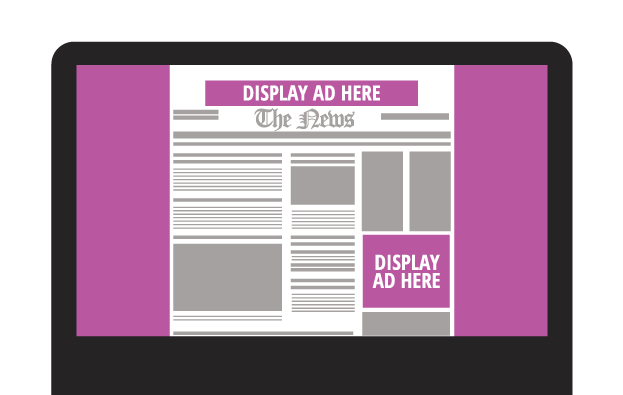
    Though you can opt for a text ad, researchers have found that maximum impact occurs with image ads, which Google places into four categories; static, animated, interactive, and video.

    Static ads: These are just what you might imagine: banners of different sizes that occupy space (usually at the top, bottom, or sides) of a website. The GDN allows these in the most common image file formats: JPG, JPEG, PNG, and non-animated GIF. The example to the left is a static ad created for Donaldson Plastic Surgery.

    Animated ads: This type of ad often generates more interest, as the eye is drawn to movement on an otherwise still display. This type of image also has the benefit of including more information, as you can phase from one still image to the next without having to take up a large amount of page space. These can be uploaded as an SWF or GIF.

    Interactive ads: These encourage input from the user, whether it be by including a link to sign up for a newsletter or showing a photo gallery of products that requires the user to click to view more. These ads can only be uploaded in SWF format. Studies suggest that people are 2.5 times more likely to take action after viewing an interactive ad; however, it’s worth noting that opting for static ads gives you a greater number of sites to advertise on.

    Video ads: These ads can be particularly eye-catching, and they allow you to market on sites that display video content, like YouTube.


    Here is an infographic that will help you easily remember the sizes.
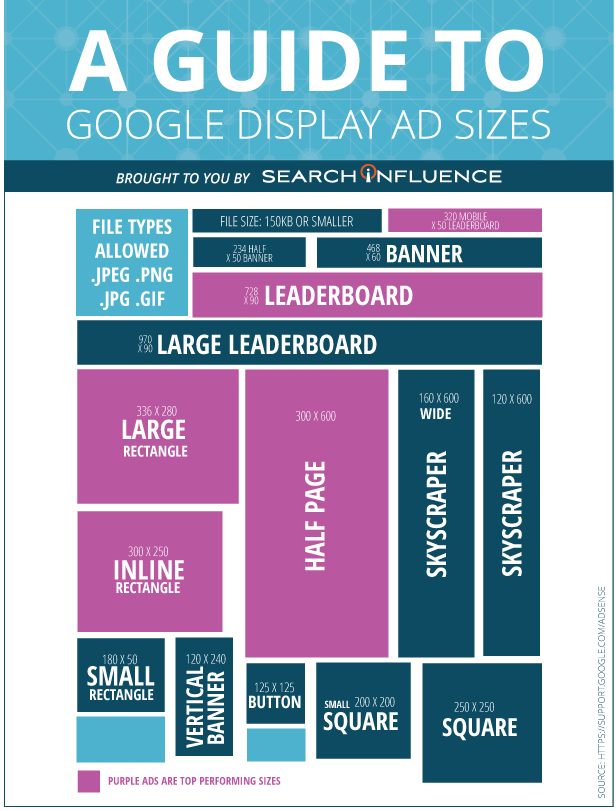
    Search Influence Ad Size Infographic

    When selecting a size for your Google Display Ads, it’s paramount to consider the both the click-through rates and the number of potential clients who will be exposed to your campaign.
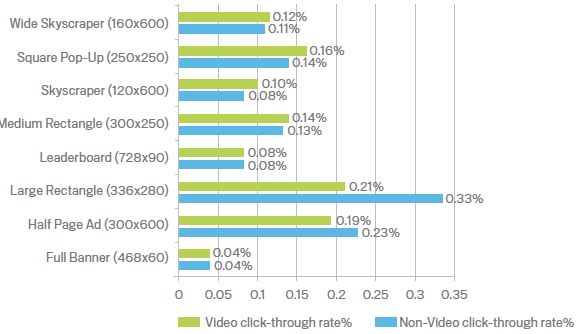
    A large interactive ad may seem like a good idea, but if it only appears on a handful of websites, it may not be worth the cost—or the effort.

    Technical & Content Requirements

    The GDN will not accept ads that are larger than 150KB. Reducing image size—particularly for animated or interactive files—without sacrificing quality can be difficult, which is why it’s always a good idea to consult with a professional design and marketing team. While animated ads can be looped (effectively playing forever), they cannot be more than 15 seconds long consecutively. Ads in GIF format must be 5 frames a second, whereas Flash ads (whether video or animated) can be considerably longer—up to 20 frames a second and sometimes slower.

    Google Display Ads also carries content guidelines that are particularly pertinent for those in the medical profession. Some of these rules are self-apparent, like not duplicating site content, not tricking users into clicking your ad by pretending to be a virus warning, and making it clear that the material is an advertisement. However, Google also has rules regarding adult-oriented content that can impact healthcare professionals, particularly in fields like OB/GYN and plastic surgery. For example, images containing exposed skin and nudity are not allowed, nor is content that is sexually suggestive. Again, consulting an Internet marketing specialist may be the best way to get your brand out there without inadvertently violating Google’s policies on restricted content.

    Tips for Successful Ads

    There’s no question about it: Google’s paid advertising options are powerful, but they’re complicated. Making the most of the GDM requires completely rethinking the way you market your services and products. You need to be intimately acquainted with your target audience, what sites they’re likely to visit, and what types of advertisements they’re most likely to respond to. Additionally, what works for a general practitioner isn’t going to work for an inpatient addictions clinic. Doctors who specialize in breast augmentation may encounter more problems than those who specialize in psychiatry and counseling—it all depends on your business and your prospective clientele.

    With years of experience in paid search and display advertising for medical practices, Search Influence is uniquely qualified to help you and your business harness the extraordinary power of Google Display Ads. Get in touch today, and we’ll be happy to come up with a plan to increase your visibility and enhance your bottom line.

    Image Credits:

    Ad Click-Through Rates

  • How the Google Penguin Update Will Affect Your Site in 2016

    Happy Penguin Awareness Day! (You remembered, right?) Today, we celebrate everyone’s favorite quirky, aquatic natives of the Southern Hemisphere. Maybe you’ll want to spend the day in a tuxedo, visit your local zoo, or adopt a penguin to celebrate?

    Of course, if you’re in the world of SEO, you might find that instead of adorable fluff balls, Google’s massive algorithm springs to mind. While it’s not quite as cute and cuddly as its animal cousin, this Google algorithm continues to be a crucial part of SEO in 2016—and this January, it’s more important than ever to be aware of how it affects your site.

    Google’s Big, Fluffy Penguin

    First launched in April 2012, Google’s Penguin update made massive waves in the SEO world. That era was a dark time in the online world—back when questionable content and black-hat SEO could earn you high rankings in the SERPs. The Penguin update’s primary aim was to make these manipulative strategies ineffectual, decreasing the SERP rankings of any website found to be in violation of Google’s Webmaster Guidelines, especially those sites that tried to increase their rankings through various link schemes.

    The penalty for sites with too many low-quality, “spammy” links is steep: you may lose your high rankings in the SERPs, or Penguin may even remove your URLs from the SERPs altogether, which is the last thing you want. Fortunately, penalties can be removed in a number of ways, from manually removing questionable links to using Google’s Disavow Tool. In a January 2015 video hangout, John Mueller also stated that these penalties can be removed by simply building high-quality links—which can help Penguin overlook some of your more questionable links.

    What’s New?

    Up until recently, Penguin was pretty old news: the last confirmed Penguin update was over a year ago in October 2014. But Google has been working on a revamped version of its favorite fluffy algorithm for some time, and Penguin 4.0 is expected to be released within the next few weeks. With anticipation hanging in the air, influencers throughout the industry have been on the edge of their seats awaiting the update—but in spite of a lot of unusual ranking changes, Google has confirmed that the latest Penguin update has not yet been released as of January 12.

    The Penguin update, according to Webmaster Trends Analyst Gary Illyes, promises to be the “real time version,” which means that the revamped Penguin algorithm will update continuously, discovering and analyzing your site’s links in real time. This, in turn, means that any changes to your site (whether good or bad) should have a much faster impact on your rankings.

    In the long run, this is great news: fast and frequent “real time” analysis should mean that Penguin penalties are less lasting, so removing unnatural links from your site should allow you to see a speedy recovery.

    How to Prepare for the Coming of Penguin

    While massive Google algorithm updates tend to shake up the SERPs for a while, the good news is that the same SEO best practices we preach so frequently on this blog should be a good defense against the worst of the changes.

    Now is the time to perform a comprehensive link audit, especially if it’s been a while, just to be sure your site is prepared. Take the time to eliminate any bad, exact match, low-quality, or irrelevant links in favor of clean linking strategies. If you’ve made every attempt to remove an unnatural link, use the Disavow Tool as a last resort: this tool tells Google that despite your attempts to remove the link, you were unable to do so.

    Aside from this careful audit of your site’s links, the best thing you can do is continue creating content that is high-quality, helpful, and informative—or tweaking your existing content to be this way. Organic backlinks are grown from this kind of information, as people naturally share content that they find interesting or informative.

    If the impending Penguin update has you worried, don’t forget that Search Influence offers a wealth of SEO services to ensure that this penguin doesn’t come back to bite you!


    Image Credits:

    Jumping Penguins
    You Didn’t See Anything
    Penguin Attack

  • How To Fix A Manual Action

    How To Fix A Manual Action

    In recent weeks, there’s been chatter about a large influx of manual actions. This got me thinking: how many people actually know how to fix manual actions? Stay tuned, ’cause you’re gonna learn today!

    But First, the Basics: What Is a Manual Action?

    A manual action is a manual penalty applied to a website by a member of Google’s Web Spam team. According to Google, there are a few common types of manual actions:

    • Hacked site
    • User-generated spam
    • Spammy freehosts
    • Spammy structured markup
    • Unnatural links to your site
    • Thin content with little or no added value
    • Cloaking and/or sneaky redirects
    • Unnatural links from your site
    • Pure spam
    • Hidden text and/or keyword stuffing

    In today’s post, we’ll be discussing a few of the most common types of manual actions.

    How Do I Know My Site Has a Manual Action?

    SEO practitioners know that performance fluctuations are expected, especially since Google’s algorithm is constantly changing. If you’re beginning to see your website rankings drop consistently, that’s usually an indicator of a possible manual action (or partial manual action). However, if you’re unsure, check out Google Search Console (aka Webmaster Tools for those late to the name-change party)! Once in the Search Console, you will see one of two actions displayed on the Manual Actions page:

    1. Site-wide matches
    2. Partial matches

    Each action will display a reason as to why your site received the action, as well as how the action will affect your site.

    So My Site Has a Manual Action…What Now?

    The good news: we can fix this! The bad news: fixing a manual action takes quite a few steps. The first thing you will want to do is determine what kind of manual action your site has. If you see this message, this means that Google has detected a pattern of unnatural deceptive or manipulative links pointing to your site. According to Google, here are the recommended actions to take:

    First, review Google’s Webmaster Guidelines on linking.

    Next, follow the steps below to identify and correct the violation(s):

    1. Download a list of links to your site from Search Console. You can download your links arranged either by hostname (Links to Your Site > Who links the most > Download more sample links) or in chronological order (Links to Your Site > Who links the most > Download latest links).
    2. Check this list for any links that violate our guidelines on linking. If the list is large, start by looking at the sites that link to you the most or links that were created recently (in the last few months).
    3. For any links that violate our guidelines, contact the webmaster of that site and ask that they either remove the links or prevent them from passing PageRank, such as by adding a rel=”nofollow” attribute.
    4. Use the Disavow links tool in Search Console to disavow any links you were unable to get removed.

    Once you’ve removed or disavowed the unnatural links, the last step is to submit a reconsideration request. A reconsideration request is a formal request to Google to reconsider giving your site a penalty. You will want to let Google know about everything you did to clean up your site, including documentation about the links you removed or tried to remove.

    Here comes the bad news: once you submit the request, you have to be patient.

    ryan reynolds ugh annoyed eye roll

    I know, people. I know. Ain’t nobody got time for that! BUT it will all pay off on that beautiful day when Google sends you that wonderful message in Search Console and approves your reconsideration request!

    FYI, this will be you:

    love actually hugh grant

    Hacked Site…Uh Oh!

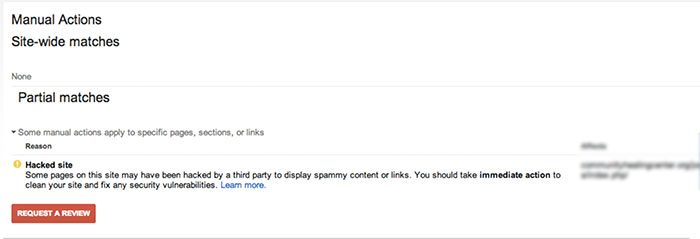
    Google may give your site a partial manual action if it notices that your site has been hacked. If you check the manual actions tab in Google Search Console, you will see a notice called “Hacked Site.”

    ManualActionsSiteWideMatchesImage

    According to Google’s Web Spam team, there are a few steps you will want to take if you’re the victim of a hacking:

    • Contact your host provider.
    • Quarantine your site by taking your site offline (change all passwords and check new user accounts).
    • Check the Google Search Console.
    • Assess the damage. If your site was hacked with spam, the display warning will be “This site may be hacked.” If you’ve been hacked with malware, the display warning will state “The site may harm your computer.”
    • Identify the site’s vulnerabilities and list them out.
    • Clean up the website to prevent future security problems.

    Once all hacked content is removed, “Request a Review” in the Google Search Console. Again, patience. Ugh.

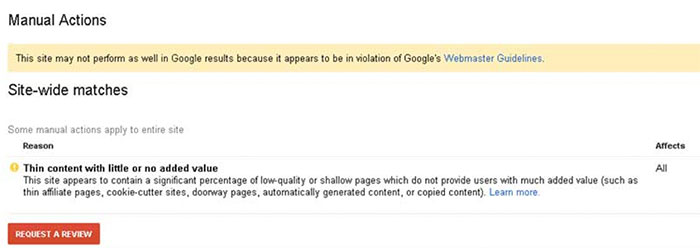
    Thin Content with Little or No Value

    For the non-SEO practitioners, you might be thinking, “What does that mean?” In a nutshell, Google launched a quality update in May 2015, specifically for onsite content. This means Google is placing more of an emphasis on sites producing quality content and penalizes those with content that is not useful to visitors.

    ManualActionSiteWideMatchesThinContent

    How to Fix Your Content, According to Google:

    • Remove any duplicate content from your site that is found anywhere else on the Internet.
    • Eliminate affiliate links on pages with little to no valued content, or add some value to the page’s content.
    • Get rid of auto-generated content pages.
    • Improve the website content to provide significant value for your site visitors!

    Once again…cue the reconsideration request.
    Remember, patience is a virtue!