Tag: Google

  • Five for Friday: Facebook’s Payment Feature, DuckDuck Go, & More!

    1. Facebook Messenger Payments Service Is Nationwide – Mashable

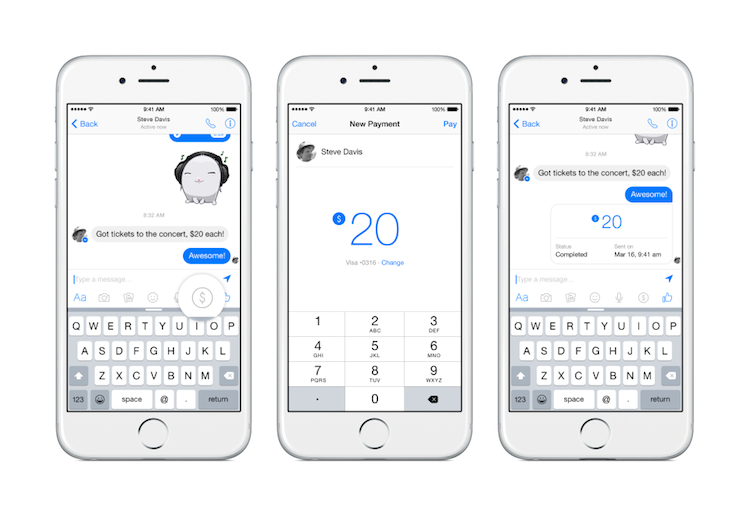
    Facebook’s vice president of messaging products, David Marcus, recently announced that Facebook Messenger has rolled out its payment feature. Users can add their debit card information in the Messenger’s settings. You can then send payments by starting a conversation with a friend and clicking the “$” icon followed by the “Pay” button. If you are on the receiving end of this transaction, you will be prompted to accept the payment at the appropriate time. Marcus has been quoted saying that the payment feature is “easy and safe.”

    Facebook Messenger Payments Image - Search Influence

    2. Google Earth Turns 10 – Google Blog

    Google Earth celebrated its 10th birthday on June 29, 2015. Google Earth allows users to see the world from a variety of viewpoints, from 3D versions of cities across the globe to striking photos of our planet shot from space. Happy belated birthday, Google Earth!

    3. Google: Panda Refresh Coming Soon – Search Engine Roundtable

    It looks like we’ve made it through the holiday weekend without seeing the newest Panda update, but the “refresh” is coming soon. During a recent Google Hangout session, John Mueller announced that he expected the Panda refresh to happen in a few weeks. (The Panda update was first introduced in 2011 with the goal of preventing sites with poor quality content from ranking in Google’s top search results.)

    4. DuckDuckGo Surpasses 10 Million Search Queries – Search Engine Land

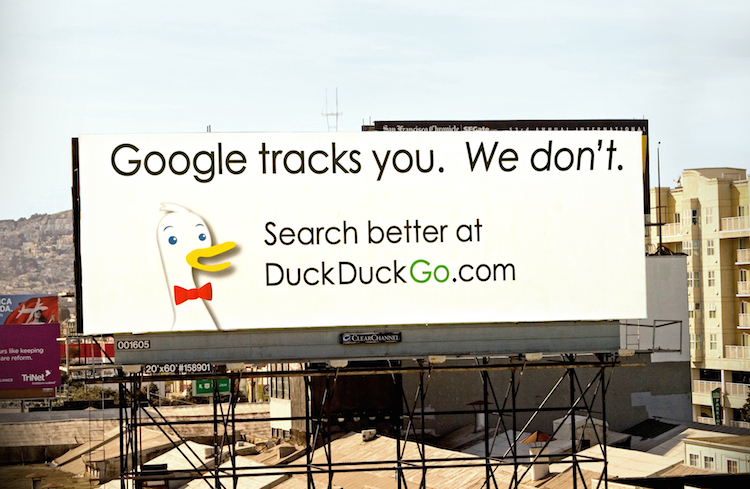
    DuckDuckGo, a search engine launched in 2008, hit the 10 million daily query mark on June 22. The company has promised not to collect or share your information while searching—a rare feature for any company in the search engine industry. DuckDuckGo has also announced that they will be giving out 10,000 t-shirts to users who promote their search engine to three additional users!

    Duck Duck Go Search Engine Image - Search Influence

    5. Instagram Makes Content More Accessible With Place Search – Search Engine Watch

    Instagram has granted users the ability to search by location, allowing them to access other users’ location-tagged photos from the Explore page. Now, anyone with an Instagram account can peer into the most interesting places in the world. This new search feature also allows users to search people, places, and tags simultaneously.

    Image sources:

    Facebook Messenger payments

    DuckDuckGo image


  • Five for Friday: Facebook Aims to Please, Amazon Goes the Way of Uber, & More!

    1. Facebook Update Takes Into Account Time Spent Reading Stories – Search Engine Journal  

    Facebook looks to be taking the next step forward in studying user behavior. The social networking giant is now directly measuring user activity and engagement, even when the user isn’t interacting with content. How important to us are news stories that we just want to skim? The next time you stop scrolling to look over a story, you are casting a silent vote for that type of content in comparison to other stories in your feed. Facebook has already rolled this update out, which means you no longer have to comment on or like a story for your feed to be modified. If you feel like you’ve been seeing more of what you want to see, well, you probably are. 

    2. Twitter Makes Your Conversations Easier to Follow – Mashable

    Having trouble following that long chain of tweets and retweets? Good news! Reading Twitter discussions will no longer test your mental sorting abilities. Dialogues are now conveniently grouped for maximum readability. If you have frequently wondered who is talking to whom, fret no more! Talks are joined by a single solid line.

    Following Tiwtter Conversations Image - Search Influence

    3. Google Uses Sitelinks Based on Significance – SEO by the Sea

    Google, acting as the undisputed market leader in search, is continually looking to improve the way their search performs. In a patent granted earlier last week, Google now seeks to identify the most “visually and/or functionally significant hyperlinks within the document.” This means that the location a link points to isn’t the only attribute considered when Google thinks about links, but where a link visually is on a page matters as well. 

    4. Amazon Debates Paying People for Deliveries – The Wall Street Journal

    Amazon Deliveries Image - Search Influence

    A big part of Amazon’s costs come from shipping, so it seems only natural they should be seeking to cut costs. Only, this time it isn’t drones: Amazon would like to turn every potential income-seeking individual into an Uber-like delivery driver.

    5. European Sites Are Declared Liable for User Comments – Techdirt

    On Tuesday, the European Court of Human Rights ruled that sites can be declared liable for what any random user posts on them. This has massive implications for sites that allow users to regularly post content. What lies in the future of censorship?

    Image sources:

    Cell phone image

    Delivery image


  • Unlike Your Dad, These Guys Know How To Use The Internet

    internet dads father's day image - search influence

    The other day, I was trying to remember why I had posted a curious image on my friend’s Facebook wall in 2010. In a stroke of brilliance, my friend suggested we do a “reverse Google search” to see where the picture originated from, all while we were using Google Chromecast to watch this search unveil on my TV screen.

    In the middle of this (pretty standard) activity, I thought to myself about how incredibly bizarre this whole process would sound to someone just 10 years ago. Facebook walls? Reverse Google search? CHROMECASTING? We’ve all grown so blasé about these daily—yet bewildering—Internet tactics that we’ve lost sight of the magic and brilliance behind them.

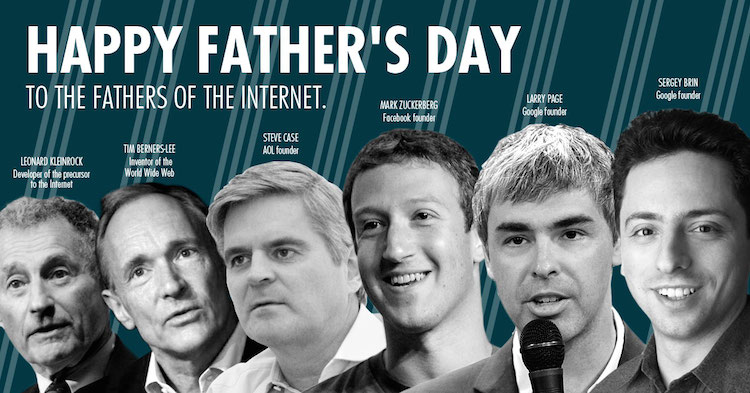
    So this Father’s Day, I’m here to remind you about the extraordinary minds behind all this wizardry. The men whose ideas have allowed me (and probably you, too) to stream Game of Thrones while Facetiming friends across oceans and also maybe simultaneously perusing Instagram (because what are we if not all impressive “multitaskers” these days). I present to you the fathers of the Internet:

    Leonard Kleinrock

    Kleinrock Image - Search Influence

    Before the Internet, people had to gain an understanding of how computers could communicate (or network) with each other. That’s where Leonard Kleinrock, an American engineer hailing from Harlem, came into play. Kleinrock pioneered the mathematical theory of packet networks, which, essentially, is the technological backbone of the Internet. By figuring out how to send “packets” of information across networks, Kleinrock was able to develop the ARPANET, which is the bare bones seedling that grew into the Internet we all know and love today. In fact, on a historical day in early September 1969, a team at Kleinrock’s Network Measurement Center connected one of their computers to an “Interface Message Processor,” thereby becoming the very first node on the ARPANET, and, perhaps more importantly, the first computer ever on the Internet.

    Tim Berners-Lee

    Berners-LeeImageSearchInfluence

    These days, it seems like there’s a browser for every kind of taste or personality. Are you over the age of 50? Internet Explorer. Do you enjoy plain bagels and go with the flow? Safari’s got your name all over it. Back in the day, though, there was only one browser, and it was created by Tim Berners-Lee in 1989. The World Wide Web (sound familiar?) was the first web server and also marked the advent of HTML. Through the World Wide Web, Berners-Lee was able to bring together the concept of the Internet and hypertext, which now establishes web pages as you know them. Today, Berners-Lee remains the Director of the World Wide Web Consortium, a Web standards organization he founded in 1994.

    Steve Case

    Case Image - Search Influence

    You may not have heard of Steve Case, but you (and just about anyone living in the 1990s) most likely became acquainted with the Internet thanks to his brainchild: America Online. In February 1991, after a few trial and error test runs, AOL was launched, and with it came online games, chat rooms, AIM, and a whole new way for people everywhere to interact online. Its goal was to focus on making the Internet a part of everyday life. To say he succeeded would probably be a huge understatement.

    Mark Zuckerberg

    Zuckerberg Image - Search Influence

    Perhaps the first name you immediately knew on this list, Mark Zuckerberg is one of the most recognizable Internet names, surpassing even the infamous Tom of Myspace. Just in case you somehow have yet to hear, Zuckerberg and his college friends founded what was then known as The Facebook in June 2004. By the end of the year, the site had 1 million users. Today, the site has more than 1 billion monthly active users. You can thank Zuckerberg for turning social media into the cultural phenomenon and world changer that it is today.

    Larry Page

    Larry Page Image - Search Influence

    You’ve likely learned more from Larry Page’s creation than your own father. This guy revolutionized the way we use the Internet, and even our brains! In 1996, Page and his friend Sergrey Brin began collaborations on a search engine called BackRub. Fortunately, that name didn’t stick, and instead they decided to name their website Google, which they officially launched in 1998. Since then, the company has become the world’s most popular search engine, an everyday verb, and an overall technology powerhouse. In fact, today, Page is the CEO of Google, which now processes more than 40,000 searches every second (!) on average, more than 3.5 billion searches per day, and 1.2 trillion searches per year worldwide. Thanks, Larry Page, for giving us access to more information than we can even fathom.

    So this Father’s Day, take time to thank these men for all the ways they’ve made your life easier. No more flipping through encyclopedias to understand what the plural form of “beef” is, significantly fewer phone conversations, the beauty of Netflix?! Thank you, all you great fatherly geniuses. Without you, I wouldn’t even have a job.

    Image sources:

    Leonard Kleinrock

    Steve Case

    Mark Zuckerberg

    Larry Page


  • How to Win Followers and Influence People: Build Your G+ Following in 3 Steps

    We’ve cracked the code to successfully increasing the Google+ following for a small business (or at least we know we’re on to something). Our little experiment shows that if you follow three simple steps, you can gain more followers on Google+.

    Now, before you equate the importance of Google+ (colloquially referred to as “The Plus”—it’s a thing, I promise) to that of utensils at a pizza shop or a certain search engine that rhymes with “wing,” it is important to note that although Google has consistently denied any causal relationship between what shows up in a Google search and activity on “The Plus,” evidence shows there may be reason to listen up. Besides, even if you don’t drink the Kool-Aid and immediately become a Google+ fanatic, I think we can all agree that vying to be in Google’s good graces is always a smart idea. I mean, come on, you wouldn’t skip your boss in line at the movie theatre or punch Ryan Seacrest in the face after winning a trip to Hollywood (OK, I can’t make any promises on that one), but you get the point. Don’t bite the hand that feeds.

    Follow and Compliment

    Now that we have established that Google+ matters, let me clue you in on a little G+ secret. People on social networks are like that hyper-masculine guy on your road trip: all they want is to be followed and complimented. Following, and subsequently +1’ing a person on Google+, is like referencing your buddy’s cheese blog in the bar you are currently patronizing with a group of friends. Not only have you discovered him on an incredibly remote platform, but you’ve even followed up with a compliment! Go you, Stanley, you’re relevant, and people appreciate your knowledge of cheese.

    In all seriousness, though, over the past few months our experimentation shows that you will receive at best a 40 percent return rate in followers. For every 100 people followed and +1’ed, we received approximately 40 follows in return. It is important to note that the client happened to be a particularly interesting and popular business. That’s not to say the inherent love of HVAC nuances isn’t bountiful across the land, but it’s just something to keep in mind.

    Given the fairly low rate of return, you can see how this may prove to be quite taxing if your goal of followers is in the hundreds, especially considering Google+’s limit of 50 follows per day. So what shall we do as small businesses owners armed with this knowledge? Luckily, as your in-house guinea pig, I am here to break it down into three simple, effective steps.

    3 Steps to Building Your G+ Following

    1) Start by following larger, established pages in your geographic area. Think The Wizarding World of Harry Potter if you are located in Orlando. If you need help getting to the Google+ page for The Wizarding World of Harry Potter, I can’t help you. If you have to ask, you’ll never know. If you know, you need only ask.

    2) Once you have lost yourself in a voracious “following” spree, now it is time for flattery. The people who occupy the comment threads of your newly acquired network are relevant to you in a few ways. Not only do they most likely engage with local businesses, but they are also active on “The Plus” ← there it is again! See, I told you it’s a thing. Start following and +1’ing posts in your stream you deem relevant to your business’s interests.

    3) Be sure to watch out for exceeding Google’s “follow” limitation on a larger scale. After you exceed 1,000 people/pages followed on Google+, we’ve noticed that the social network gets a little buggy. If you begin “maxing out” of follows well before your promised allotment of 50, simply take a break for a week, binge on some Netflix, and live to fight another day.

    That’s all for now, folks! If my team discovers any new, innovative ways to garner your Google+ following, we will be sure to let you know. If you hear nothing, that means Skynet, ahem, I mean Google has discontinued “The Plus.”

    Image sources:

    Kool-Aid GIF

    Guinea pig GIF


  • Social Giving Success: An Intro to Online Marketing for P2P Fundraisers

    P2P-Fundraising-Search-Influence

    Which do you trust more: an ad or a friend?

    The answer is pretty clear, right? At least that’s what many nonprofits think, and that’s why the face of fundraising has changed significantly over the past decade. Instead of just soliciting direct donations, we’re seeing more and more peer-to-peer, or P2P, fundraising campaigns.

    Peer-to-peer fundraising enlists a nonprofit’s supporters to fundraise on their behalf, rather than or in addition to soliciting direct donations.

    Having your supporters fundraise for you offers that extra level of trust and intimacy that ads can’t provide. P2P engages supporters so they feel more connected to a cause, resulting in greater long-term support. And with today’s technology, it’s easier than ever to connect with huge networks of people and resources.

    So let’s talk about ways to make an online P2P fundraising campaign successful. From search engine optimization and social media to website development, here are some important tips:

    Make Donating Easy

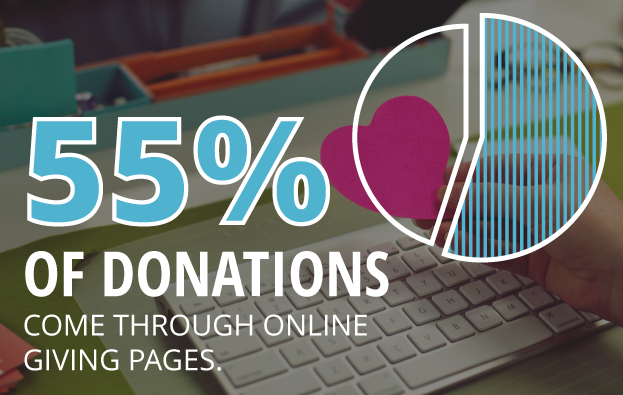
    First things first: You need a way to collect and differentiate donations. According to Network for Good’s annual Digital Giving Index, 55 percent of donations come through nonprofit, online giving pages, especially branded and personalized ones.

    A successful campaign has a user-friendly and effective system for making and processing donations that participants can share through social, mobile, email and every-which-way. This means also investing in either a mobile app or a responsive website. On DonorDrive’s platform, for example, donations have nearly doubled using responsive sites on mobile and tablets.

    The options out there are endless. Make sure your fundraisers have a link to share and trust your platform’s security and usability enough to want to share it.

    1511-SI-Newsletter-KG-D-02

    Engage your Followers

    More than half of those who engage on social media with a nonprofit take further action like donating or participating, according to Waggener-Edstrom’s Digital Persuasion Report.

    Fundraising as a whole is dependent on engaging and recruiting supporters. P2P requires not only engaging current followers to donate, but also inspiring them to fundraise and recruit for you. This means sharable content! Branded images, infographics and participant stories are just a few examples. Followers need to be able to see and share the effects of their donations, along with the whole experience along the way.

    Follow Basic SEO Guidelines

    SEO principles are universally applicable. Do some extra research on optimizing your website without stipulating that you’re a nonprofit or P2P campaign.

    That said, (1) make sure you’ve got relevant and easily accessible content on your website. Search engines are all about good content that naturally bridges the gap between what your organization does and what people are searching for. It’s no longer about stuffing exact-phrase keywords into every page of your site. (2) Submit and maintain consistent information for your organization to location- and industry-specific directories (and calendars if it’s an event). This way, you’re creating more links going to your website as well as solidifying your contact information with Google Maps and other mapping services. And (3) see if you qualify for a Google Ads Grant. Google gives out varying amounts of money each month to use for nonprofit AdWords campaigns, so take advantage of it! An AdWords campaign offers the opportunity to reach those who you might not be reaching with organic rankings alone.

    These are just a few tips to get you started. Even if you don’t have the budget to implement an intensive campaign, it’s important to cover your bases and make sure you’re tailoring your website and social media to work with P2P principles. The Internet is already THE social hub; use it to mobilize your followers for a successful campaign!

  • Return Of The YT Channel: Moving YouTube Channels Between G+ Pages In 2015

    Move YouTube Channels Between Google Plus Pages

    In the early ages of YouTube and Google Plus connections, disconnecting and reconnecting channels to the correct G+ page was not an easy feat. I once wrote a blog about this lengthy workaround for LocalU. Not long after that blog post, Google released a support form that allowed you to have a YouTube support specialist do the reconnection for you. While this support was amazing and usually reconnected channels within 24-48 hours, it required a middleman to get the work done and wasn’t immediate.

    Now, Google has released a way to reconnect your channel to another page within your account in the Advanced Settings section of YouTube! If everything is in one account, then this reconnection takes mere seconds. Often, however, we find ourselves in a situation where the channel is connected to a personal Google Plus page in one Google account, and we want it connected to a business page in another login.

    So I’m here to walk you through how to handle both of the aforementioned situations.

    Reconnecting A Channel Within One Account

    We’ll start with the simple one. You’ve got a YouTube channel connected to one page (probably a person page, maybe a random brand page), and you want it connected to your official business page on Google plus. Whatever shall you do!?

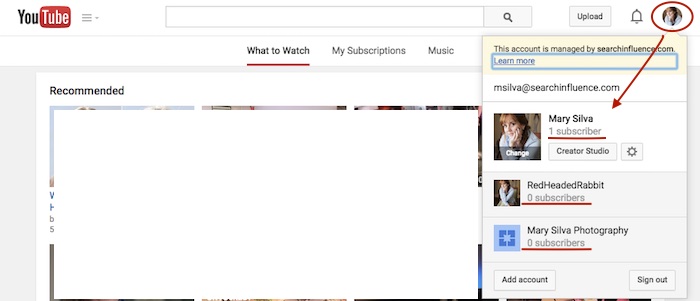
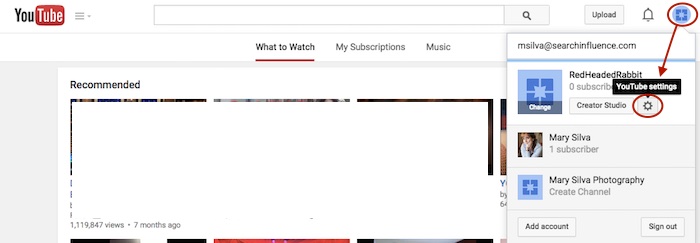
    Step 1: Go to YouTube.com and log in to your Google account. In the top-right corner of the page, click on the circle that shows your page icon to see a list of pages and their channels within this account.
    YouTube Users

    Usually, when you first log in to YouTube, you’re automatically managing or acting as your personal Google Plus page (the profile listed first in the dropdown is the one you’re currently acting as). To manage another page, which is what we’ll need to do to move channels, you’d just click the page you wish to manage from the dropdown.

    Deleting Unnecessary Channels Side Steps:

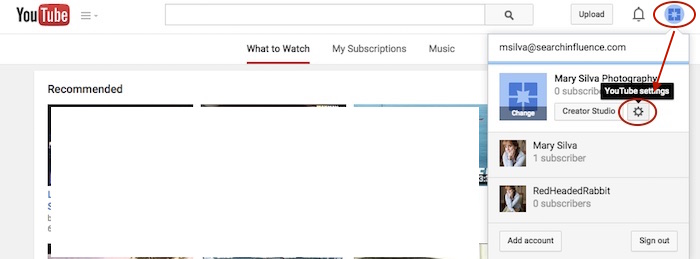
    Before we can proceed with moving channels, however, note that in the screenshot above, both of the extra pages have “subscribers” listed under their page names. This means that channels have been created for both of these pages already (otherwise we’d see “Create a Channel” below the page names). So if we want to move a channel to the page “Mary Silva Photography” in this account, then we’ll have to free it up for receiving a channel by deleting the unwanted channel that is currently connected to it.

    This can be done fairly easily by clicking the “YouTube Settings” gear from that top-right dropdown while managing the page from which you want to delete the channel.
    Screenshot 2015-05-18 10.36

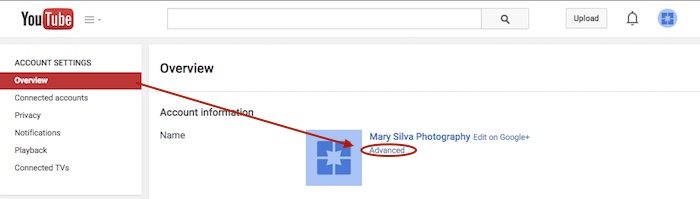
    Then click “Advanced” under the page name in the “Overview” tab.
    Screenshot 2015-05-18 10.37

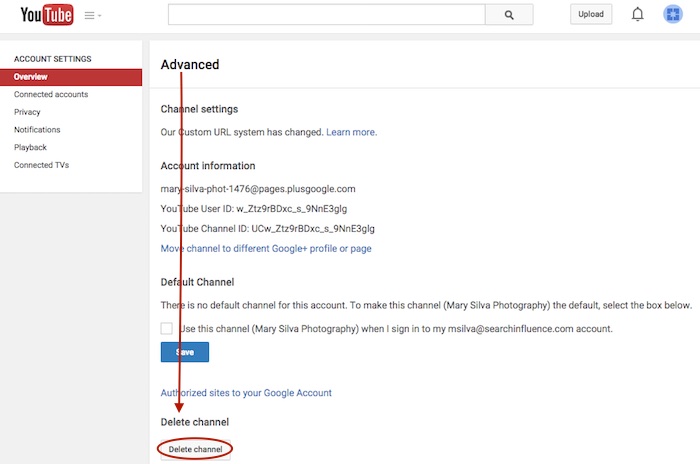
    At the very bottom of the page, you’ll see the “Delete channel” option. Once you click that, you’ll probably have to re-enter your password. Brace yourself.
    Screenshot 2015-05-18 10.38

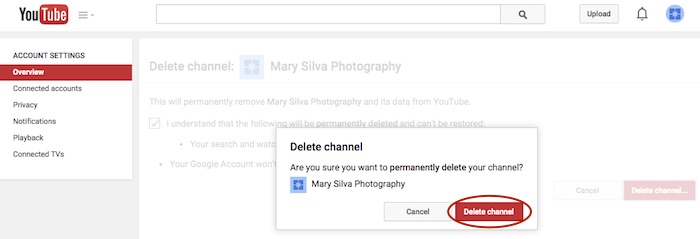
    You’ll see a verification page to confirm what you’re about to do. Check the box and click “Delete channel” to get one more verification dialogue, then click “Delete channel” one last time to complete the process.
    Screenshot 2015-05-18 10.41

    Now we can get back to moving the channel. In this example, we’ll pretend that the channel connected to “RedHeadedRabbit” needs to be moved over to “Mary Silva Photography.” As you can see in the next screenshot in Step 2, “Mary Silva Photography” now shows “Create a Channel” in the dropdown, so it’s free to take on the channel from the “RedHeadedRabbit” page.

    Step 2: Click on the page that has the channel you want to move in the top-right dropdown to manage the page (in this case, “RedHeadedRabbit”), and then the aforementioned “YouTube Settings” gear should appear for that page. Navigate back to the “Advanced” settings page from the “Overview” tab just as you would have to delete the channel.
    Screenshot 2015-05-18 10.47

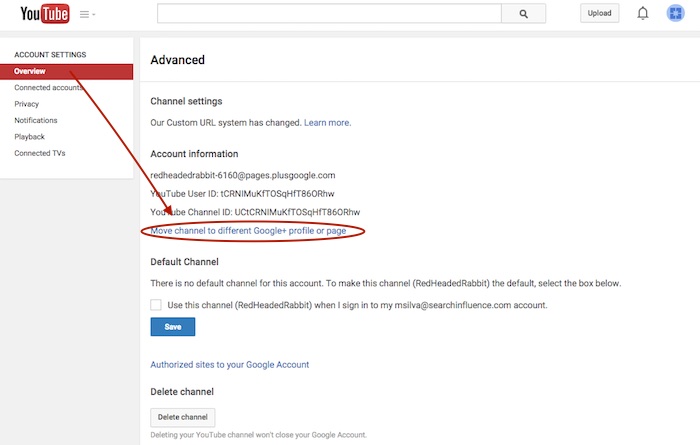
    Step 3: This time, however, you’ll want to click the “Move channel to different Google+ profile or page” option just above the “Default Channel” header. Google will probably make you enter your password again, so brace yourself.
    Screenshot 2015-05-18 10.48

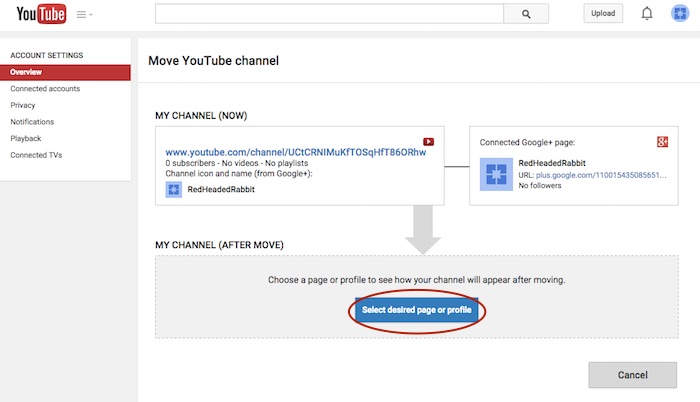
    Step 4: Now you’ll see the “Move YouTube channel” page. Under “MY CHANNEL (AFTER MOVE)” click the “Select desired page or profile” button.
    Screenshot 2015-05-18 10.49

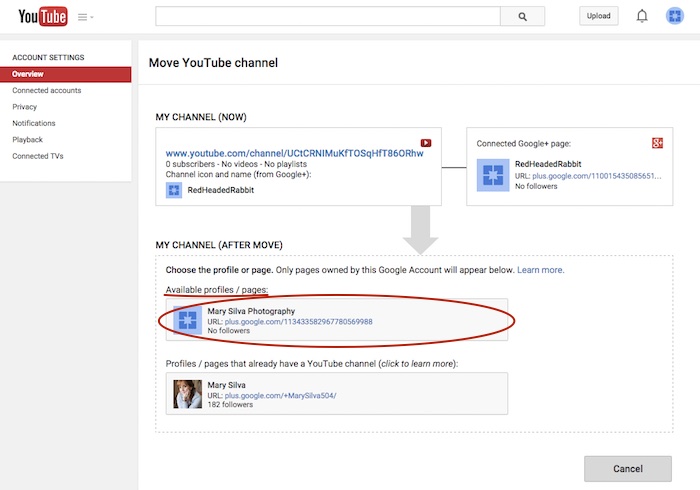
    Step 5: Choose the page you want to move the channel to from the “Available profiles / pages” section.
    Screenshot 2015-05-18 11.05

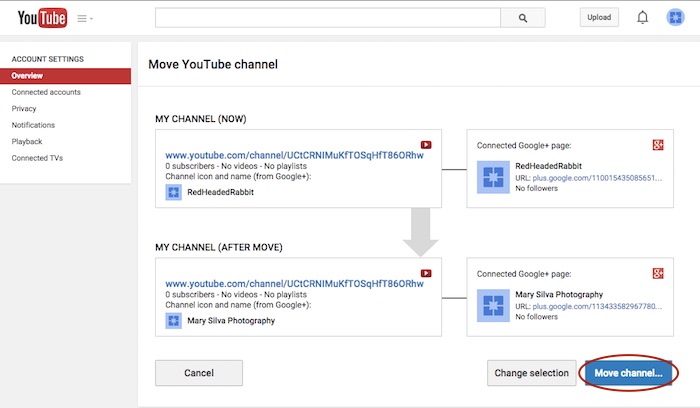
    Step 6: Confirm where you’re moving the channel (you can click links on this page to double-check that you’re moving the right channel to the right Plus pages) and click “Move channel…” to complete the transfer.
    Screenshot 2015-05-18 11.06

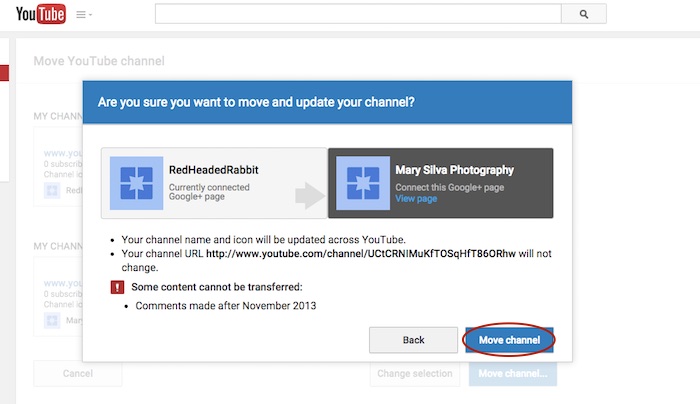
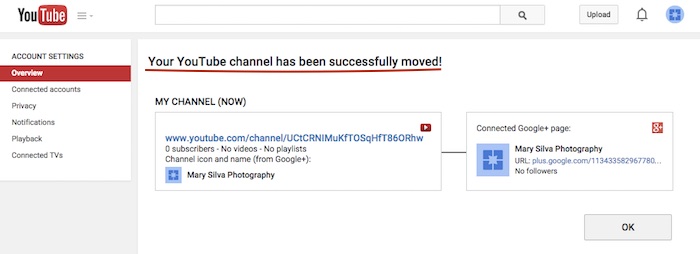
    Step 7: Click “Move channel” in one last confirmation dialogue box, and you’re done! You’ll see one last confirmation screen about the successful channel transfer.
    Screenshot 2015-05-18 11.13

    Screenshot 2015-05-18 11.09

    Reconnecting A Channel With Two Different Accounts

    As previously mentioned, we often find that we have a channel connected to a personal Google Plus page in one Google account, and we want it connected to a business page in another login. The steps for moving the channel will be the same as above, but first, we must get the pages all set up properly within one account.

    The account that has the channel has to be the OWNER of the page that we want to move the channel over to. So we need to go through adding the YouTube channel account as a manager of the business page within the other account first. Then we can go back and transfer ownership of the business page over to the channel account completely.

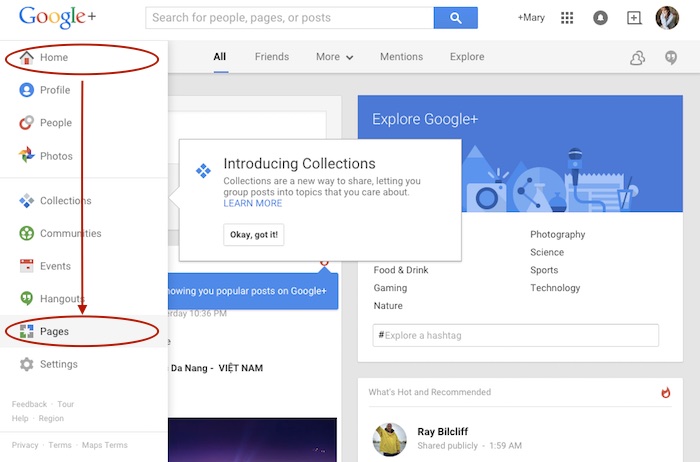
    Step 1: Log in to the account that the main business is claimed in and go into your Pages.
    Screenshot 2015-05-18 11.30

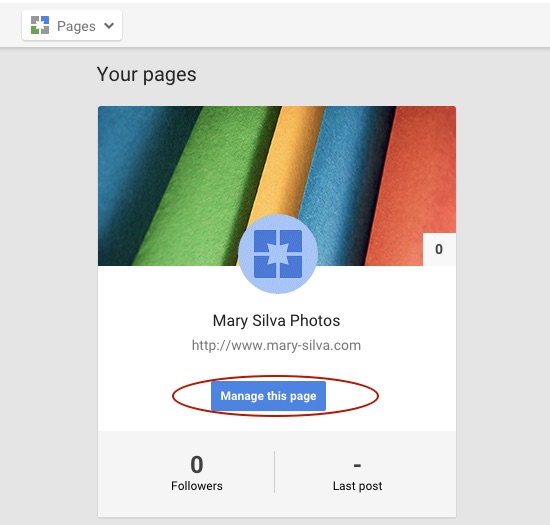
    Step 2: Choose “Manage this page” for the listing that you want to make the YouTube account a manager of.
    Screenshot 2015-05-18 11.31.30

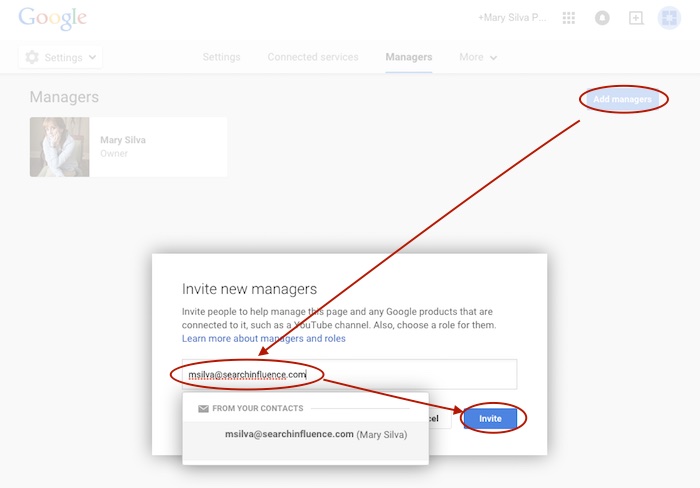
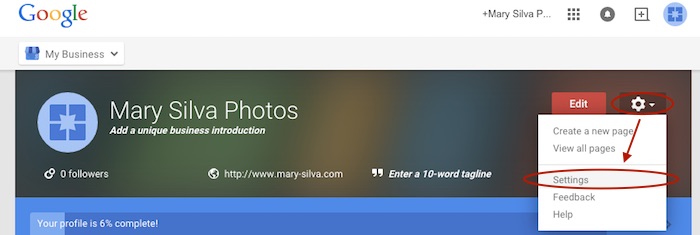
    Step 3: Go to “Settings” in the dropdown. Then, choose “Managers” under the “More” tab and add the email address for the YouTube account as a manager by clicking “Add managers.”

    Screenshot 2015-05-18 11.31.44

    Screenshot 2015-05-20 12.46.32

    Screenshot 2015-05-18 11.32

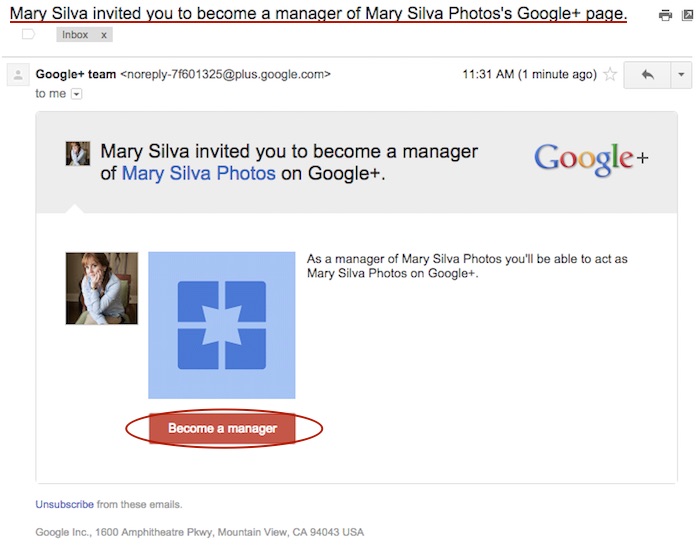
    Step 4: Log in to the email for the account with the YouTube in it. Look for the email that says “Person Name invited you to become a manager of the Business Name’s Google+ page” and click “Become a manager” within that email.
    Screenshot 2015-05-18 11.33.15

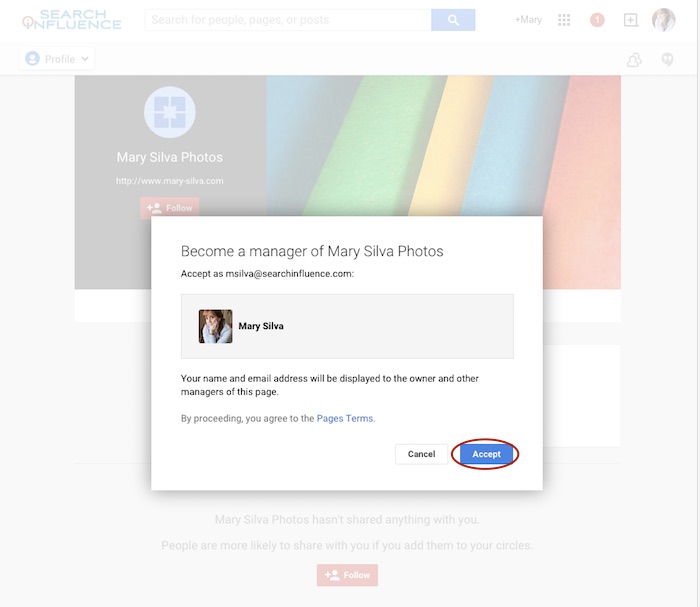
    Step 5: The link from the email will take you to the Google Plus page and automatically open a “Become a manager of Page Name” dialogue where you’ll click “Accept” to complete the managership setup.
    Screenshot 2015-05-18 11.33

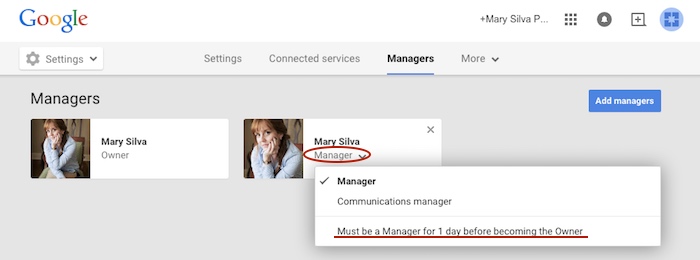
    Here’s where we wait…Unfortunately, for security reasons, Google requires an account to be a manager of a page for at least one day (as seen in screenshot below) before ownership of the page can be transferred over. So wait a day and come back to me when you’re ready to wrap this up. 😉
    Screenshot 2015-05-18 11.38.58

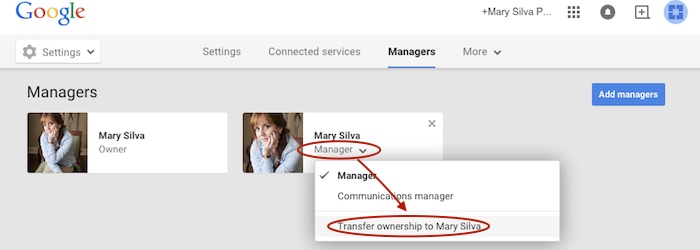
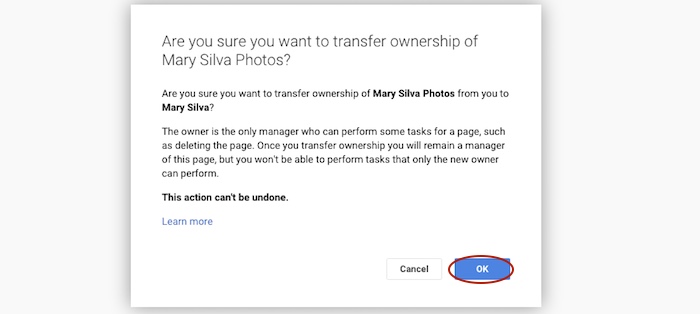
    Step 6 (One Day Later): Now log back in to the account that owns the page and follow steps 1-3 again to get back to your “Managers” settings page of your official business page. When you click “Manager” under the account name, you’ll see a dropdown with the option to “Transfer ownership to Person Name” where you previously saw “Must be a Manager for 1 day before becoming the Owner.” Once you click that, you’ll click “OK” to verify the transfer of ownership, and then the transfer is complete!
    Screenshot 2015-05-19 12.54.22

    Screenshot 2015-05-19 12.54.37

    You’ll get an email in that new owner account saying something like, “Person has made you the owner of the Page Name Google+ page.” Unlike the managership process, you don’t have to click anything in an email, so the ownership has been transferred completely, and you’re done!

    Now that you have everything set up properly, you can proceed with steps two to seven in the “Reconnecting A Channel Within One Account” section above.

    Hopefully this extensive tutorial helps you through all of your YouTube woes. To learn more about the ins and outs of Google Plus pages in Google My Business, you can read more on the blog here.
  • Five for Friday: Google’s Phantom Update Revealed, Remembering Sally Ride & More!

    1. Google’s “Phantom Update” Is a “Quality Update” – Search Engine Land

    In early May, many people noticed significant ranking changes, which led to the rumor that Google had run a Panda update or a spam-related update. However, Google denied this, leaving many stumped by what could have mysteriously caused these rankings changes. Now, Google has finally confirmed that the “Phantom Update” actually included changes to how content quality is ranked, leading some to call it the “Quality Update.” However, exactly what changes were made and how quality is now assessed by Google is still being kept top secret.

    2. New Cortana App Will Sync iPhones to Windows 10 “Very Soon” – Marketing Land

    Microsoft announced its plans to make Windows 10 cross-device friendly with a new Cortana “Phone Companion” application that will connect your Windows PC to mobile devices, including iPhones. This app will take Apple’s “Continuity” feature to the next level by not only syncing across devices, but by syncing across devices regardless of your operating system. Stay tuned for the Android version of Cortana at the end of June; iPhone users will be on hold for the app until “later this year.”

    3. Google Webmaster Tools Becomes Google Search Console – Google Webmaster Central Blog

    Say goodbye to the name Google Webmaster Tools and start becoming familiar with the term Google Search Console in its place. After 10 years of offering the beloved Webmaster Tools, Google announced the rebranding change last week. The company stated that there were many types of Google fans using the tool, from small business owners to marketers to true webmasters, and the goal is to make sure that the “product includes everyone who cares about Search.” No drastic changes to the tool’s functions were announced with the new name. Contrary to speculation, Bing says that renaming its Webmaster Tools is “not on the radar.”

    4. Twitter Helps Reinforce Your Mobile Local Branding In Search Results – Blumenthals

    Google mobile search results can now display Twitter content for branded searches, which provides a great place for local businesses to increase their visibility and positive brand message while also pushing competitors further down on the search engine results page. This also gives local businesses another platform for sharing content, which can easily be synced to a Facebook page, and more ways to control front-page content for reputation management.

    5. Google Doodle Celebrates Sally Ride’s 64th Birthday – Search Engine Roundtable

    Tuesday, May 26 would have marked the late Sally Ride’s 64th birthday. Google remembered the birthday of the first American female astronaut in space with a series of Google Doodles inspired by her life’s many accomplishments. On June 18, 1983, Sally became the first American female in space—and the youngest still to date! After another successful mission, Sally founded Sally Ride Science, where she focused on educating young people, especially girls, about careers in science, technology, math and engineering. As a woman in the technology field, I would like to say “thank you” to Sally Ride for all she has done to pave the way for those who have come after her.

    Image sources:

    It’s classified GIF

    Goodbye elephant GIF

    Sally Ride GIF

  • Give Content a Natural Glow: Medical Marketing Makes the Switch to Natural Content

    Content marketing natural glow image - Search Influence

    Back in the early days of search engine optimization, there were a lot of shady practices that were less than ideal for site visitors. Keyword-stuffing, spammy tweets, backlink schemes, and useless content were often the norm, as these tactics helped websites climb the ranks of the search engine results page. With content more focused on algorithms than the audience, many websites scared off potential users. While some of these tactics have been left firmly in the past, many SEO strategies still optimize for Google bots instead of users. This is especially true when it comes to geo-modified keywords in healthcare marketing (think “plastic surgeon new orleans”), which continue to make many pages feel stuffy and awkward.

    Of course, letting go of geo-modified keywords can seem like a hard pill to swallow—especially for those in highly competitive fields such as the plastic surgery industry, where medical practices are constantly battling for the top spots in a Google search. “Going natural” when it comes to content might seem like an overwhelming change at first, but the benefits to your patients and your practice make it a worthwhile strategy in the long run.

    Content is King

    So what do we have when we eliminate all the spam? Natural content. Google rewards sites that provide better user experiences, relevant information, and quality content—those with high click-through rates, low bounce rates, and long time-on-site—with better overall rankings.

    What’s more, all of the updates to Google’s algorithm have made the search giant incredibly advanced, and you might be surprised by some of the astonishing leaps it can make. A search engine results page might pull up one or more high-ranking pages that never actually include the words a user originally entered as a query. For example, a search for “breast implants new orleans” might return pages that never actually use this exact term. Highly relevant pages on “breast augmentation” might rank higher in a Google search than irrelevant, keyword-stuffed pages. What does all this mean? Google’s smarter than you thought.

    Interested in more content marketing strategies for your website? Find out how infographics can give your online strategy a facelift.

    It’s All About the Audience

    As its name suggests, SEO has always focused on search engine optimization—but the best way to earn trust from your patients is to focus on your patients. Forget trying to keep up with algorithm changes: Google’s updates are always centered around providing a better user experience, so why not focus on that as well?

    Spammy, keyword-stuffed content isn’t doing your patients any favors. Visitors to your site can see through the awkward “fluff” content, and they’ll abandon it to find content that actually answers their questions and meets their needs. Sites with overly optimized content tend to see higher bounce rates and less time spent on the site overall.

    Protection Against Algorithm Updates

    Beyond the fact that you’re losing your human visitors by focusing your content on the needs of Google bots, you also hurt yourself with this approach. Overly optimized content is vulnerable to every new update to Google’s algorithm. Well-written natural content, on the other hand, won’t need any of the major edits that spammy content will regularly require. Content that is relevant to the needs of your patients will always be useful—and Google’s algorithm can see that without your help. If you need help determining whether your website content will pass the Google test, fill out the short form on our homepage to sign up for a free website analysis.

    Search Intent Optimization

    At the end of the day, your potential patients are looking for something, and it’s your job to figure out what. Maybe they need help to become informed about a procedure they’re considering, maybe they’re weighing the pros and cons of several medical options, or maybe they know what they need and are searching for a trustworthy practice in the area.

    Whatever the case, you’ll need to do your research. Figure out what they consider useful and decide how you can use unique and creative content to solve their problems. Patients will be able to see the value in content that gives them the answers they need, and they’ll trust the information more if it doesn’t seem awkward or spammy. Go from there to build your relationship with them—rather than building a relationship with an algorithm.

    If you’re ready to take the dive into offering patients more natural content, but you’re not sure where to start, let us know how we can help! Interested in the ins-and-outs of search engine optimization for the medical industry? Check out our tips on the art of “Googleplasty.”

  • Five for Friday: Survived Mobilegeddon? Check Out What Google’s Doing Next

    1. Immediate Mobilegeddon Aftershocks – Moz

    Following the much-anticipated release of Google’s mobile update, a.k.a. “Mobilegeddon,” SEO authority Moz has taken its first look at the immediate aftershocks since the rollout. MozCast Mobile tracked the performance of mobile SERPs across a 10k keyword set over 10 days, but since Google says it could take days or weeks for the update, accurate measurements remain difficult to obtain. Stay tuned, because as more page-one URLs show the “mobile-friendly” tag, better Mobilegeddon data could be right around the corner.

    2. Google+ Launches Collections – Blumenthals

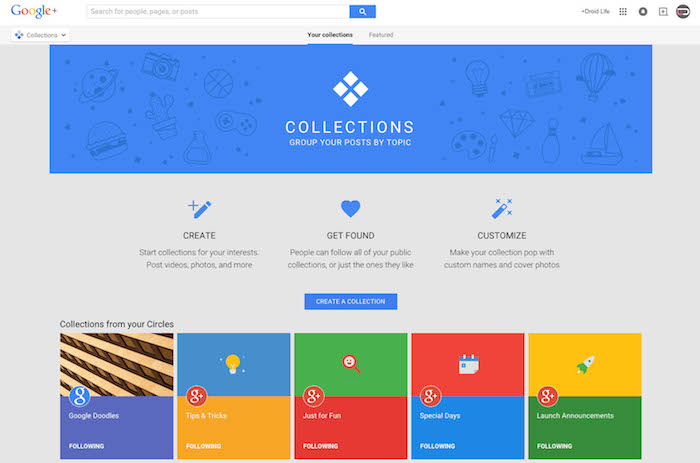
    Interested in using Google+ for your business but unsure how to organize groups of posts? Google+ has a new feature—Collections—that has the potential to help local businesses get more first-page exposure by allowing the organization of posts by topic. It remains to be seen how much of an impact Collections will have, and it very well may depend on Google’s direct marketing and exposure of this new feature.

    Google Collections Image - Search Influence


    3. Hope For Mobile Ads – Marketing Land

    As mobile traffic continues its upward climb, advertisers are finally jumping in and starting to focus on the user experience, particularly as more consumers are looking at content in-app and from social media rather than on the mobile web. Publishers are actively working to figure out how to profit from rapidly growing mobile traffic, while advertisers are grappling with creating ads that will work well on all screen sizes and moving away from trends like ads that are specifically placed to force the user to click on them.

    4. Google Gets Personal – Marketing Land

    Are you ready to optimize for personalized search results? Google is reportedly in talks with advertisers to gain access to their customers’ first-party data and incorporate it into more personalized search results based on enhanced user profiles. If you haven’t done so already, now may be the time to optimize your content by focusing on your product or service and specifically targeting searcher profiles rather than using broad keywords.

    5. Google+ Shows Signs Of Life With Its First Tweet – Marketing Land

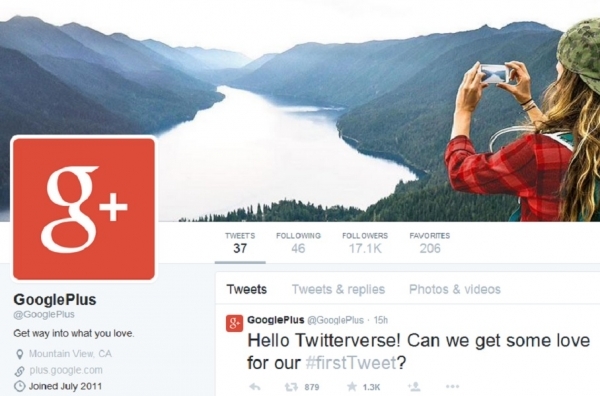
    Google+ has faced ongoing rumors as of late over its future, and for the most part, the social network has remained relatively silent, leaving onlookers to wonder if it would quietly split into its separate products: the social network experience, photos, and Hangouts. Instead, the social network recently showcased its sense of humor by surprising everyone with the network’s very first tweet, signaling that it is still alive and well. Google+ did make sure to point out its longstanding feelings on Facebook by commenting, “Still not on Facebook.”

    Google First Tweet Image - Search Influence

    Image sources:

    Google Collections


  • More Locations, More Problems? Optimize Your Franchise SEO—Part 2

    Franchise SEO tips image - Search Influence

    In part two of this two-part series about how to successfully optimize your franchise SEO, you will find three more winning strategies and steps for multi-location or franchise SEO.

    It’s All About Location

    The effort to have each location found in its own market is often perceived as the most challenging part of multi-location SEO. In part one of this series, we discussed the importance of building the central brand. Now we will tackle how to deal with individual location information, and the ways your franchisees can help to best optimize your franchise marketing and location SEO.

    1. On-Site Location Pages

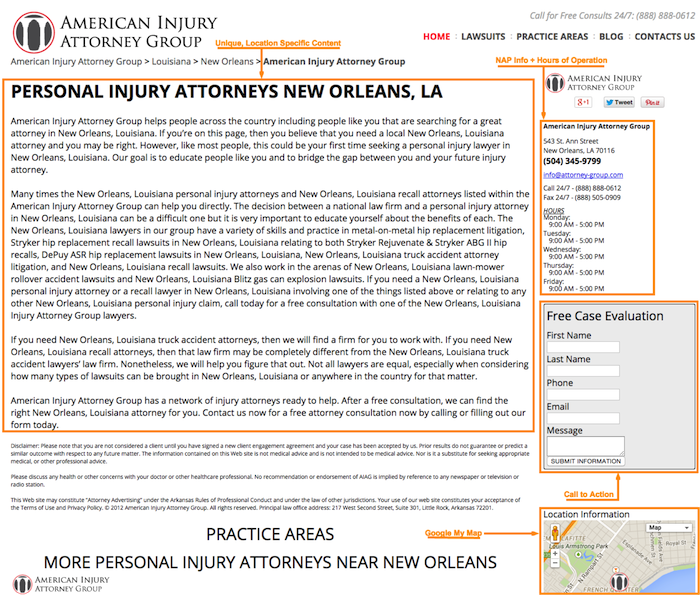
    Now that you have built up your central brand, it is time to focus on your individual franchises. Each franchise location should have its own location landing page on your company’s website. Taking extra care to create separate location pages allows search engines to better understand that you have individual locations in specific geographic areas. It also gives you an opportunity to tell users about the unique products and services offered at each different location.

    Here is a list of the necessary elements for an effective location page for Internet franchise opportunities:

    • My Map to Google+ page
    • Unique content for the specific location
    • Directions to the location from different landmarks, highways, surrounding cities, etc.
    • Photos of the location
    • Reviews of the location (probably best to have a separate page for these)
    • List of products and/or services (should link back to the main products/services pages)
    • Schema MarkUp to the name, address, and phone number
    • Link to the individual location’s social profiles
    • Link to staff member profile pages
    • Strong call to action

    Franchise SEO Tips 1 Image Search Influence

    As with all web pages, it is a best practice to implement unique, compelling content on your location landing pages. Users expect a rich experience when navigating your site, and bland content may turn them away. At the same time, content that is too dense with information or full of keywords may deter users from your web page. To keep site visitors interested, give them valuable information using bullet points in case they are in a hurry. Some multi-location businesses leave a portion of these elements to be completed by the individual franchise owners and managers. In an ideal world, this would be an effective solution, but knowing that these kinds of franchise marketing requests are often put on the backburner, it is best to have a solitary stakeholder in the corporate office responsible for these tasks.

    2. Citation Building

    Citation building is perhaps the most daunting exercise when approaching multi-location SEO. As it is with SEO for single-location businesses, consistency of name, address, and phone number in your online business listings is key. You will often see name formats including the location, such as “Company Name – Lakeview Location.” However, this is not a best practice for SEO purposes. Instead, remove the location information, and keep the business name exactly the same for all of the locations. The different addresses and phone numbers for each location will be enough to differentiate them for both Google and your potential customers.

    Each location should have a unique business description written for its online listings. This task may be best completed by individual franchisees, as it might be difficult for any one individual to write multiple, unique descriptions for essentially the same business.

    On the other hand, you should choose the same categories and logo for every location. Adding unique pictures of each location and its staff would be a nice touch, as well, but it may not be worth the trouble if you have upwards of 10 to 15 locations. Some directories will offer more fields than others. It is in your best interest to provide as much information as possible.

    Rather than taking on the incredibly time-consuming task of doing this for each individual business directory for every single location, consider using Moz Local. This tool makes pushing out each location’s name, address, phone number, categories, business descriptions, etc., to major directories as easy as a simple click of your mouse.

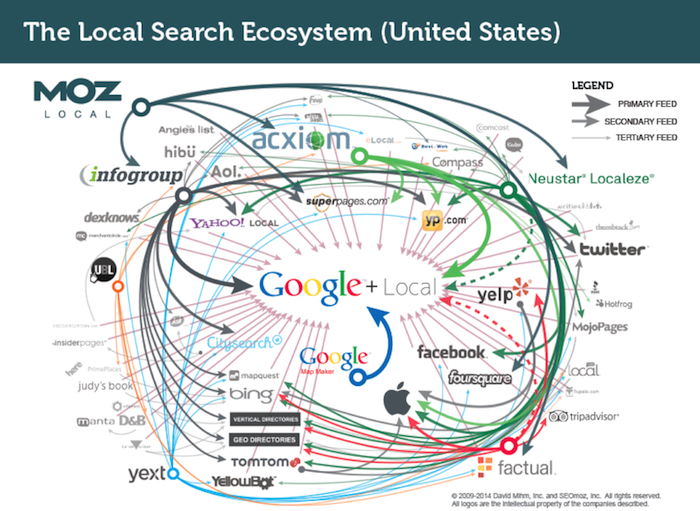
    As you can see below, the major online data feeds and directories share their information with each other, which should allow Moz to take care of most of your citation building and cleanup. Just 90 days after you submit the listings to Moz, go back and see where you stand. Some manual cleanup may be required.

    Local Search Ecosystem Image

    Expanding your search for niche directory opportunities for your company’s industry and each franchisee’s market is also highly recommended. By getting listed in these hyper-specific and hyper-local directories, you are giving search engines that much more information about what you offer and where your business should be found.

    3. Enlist the Help of Your Franchisees

    Enlisting the help of your franchisees may be a time-consuming task for some, which is why everything preceding this recommendation can be taken care of by one single source.

    Allowing each of your locations to manage its own social presence can be both empowering and helpful for your visibility in search engine results. To help manage the challenges that may arise, you should create a clear social media policy outlining what is and what is not acceptable. Make your branding and the content of the posts a top priority when creating this social media manifesto. You will also want to make this a working document just in case someone finds a loophole that needs closing.

    Each location should also be responsible for collecting positive reviews and testimonials from their customers. I would highly recommend incentivizing this effort and coaching your managers on the proper way to approach their customers. Written testimonials on the website serve as phenomenal selling tools. Reviews on Yelp, Google+, and other third-party review sites are even better.

    Getting everyone on the same page with webinars can also be advantageous to the cause. Some topics that you will definitely want to cover include social media branding, social media posting, social media interaction, and how to ask customers for reviews. Break each of these up into bite-sized chunks, and keep your focus on the industry’s top three social media platforms. Side note: record all of your webinars, and make them available to your franchisees at their leisure.

    Get Started!

    As you can see, there is plenty of work to be done in order to achieve success with multi-location SEO. As your franchise grows and brings on new franchisees, use the above recommendations as a checklist for each new location. You can get most of this done within a week’s time for each new franchise location. Doing so will save you a lot of trouble down the road. It may be in your best interest to contact Search Influence for your online marketing needs, especially including the complicated maze of managing multi-location SEO and franchise marketing.

    Image source:

    Local Search Ecosystem image