Tag: Google

  • Dude, Where’s My Location? Google Removes Location Search Ability

    Dude, Where’s My Location? Google Removes Location Search Ability

    News Impacting Your SEO Graphic Image

    While most people were recovering from Thanksgiving food comas on December 1st, Google was quietly removing the ability to change the location of your search. For those of you who don’t fondly remember, there used to be an option in the search tools that allowed you to pretend you were in a far off land searching, places like Saginaw and Cleveland.

    Google Missing Location Search Image

    What This Means for Online Marketing

    The impact of this change is now starting to really be felt for those of us in the online marketing world.

    Advanced Web Ranking, a popular keyword tracking software, had to make a quick fix for their product. Before this change, tracking keywords anywhere your clients was as simple selecting a location in the software. Just like that, you were seeing the results for “french fries” right along with everyone else located in Newark.

    Then, BOOM. Google changed that.

    According to Google support, the solution to this problem is now to add the city to see results for that city.

    Google Drops Location Search, Screenshot Image

    My example of “french fries” while searching in Newark has now become “french fries Newark” while in New Orleans.

    Changing Keyword Searches

    If you spend time looking at search volume, you might be aware that there is a difference between any two keywords, no matter how similar they may seem. Everyone is different, and I might search “french fries Newark,” you might search “Newark french fries,” and my neighbor might search “french fries in Newark.”

    Since AWR updated their software to fit the new location definition, they are unfortunately changing what is actually being tracked. If you read the comments on their release of the news, users are not happy with the change. AWR needs kudos for their quick response to a large change in online marketing, even though it did not adequately address the change.

    As AWR’s change magnifies, Google has drastically changed online marketers’ ability to peer into markets of their clients from afar. It really brings home the point that online marketing and SEO is are ever-changing industries, and you have to always on your toes, even over the holidays.

    Image Credit:

    Tom Hanks

  • An Update: How to Get Rich (Answers, That Is) with Google

    Editor’s Note: This post was originally published on December 3, 2015, and then updated on July 28, 2016, to provide you with the latest information.

    2016 Rich Answers: Update

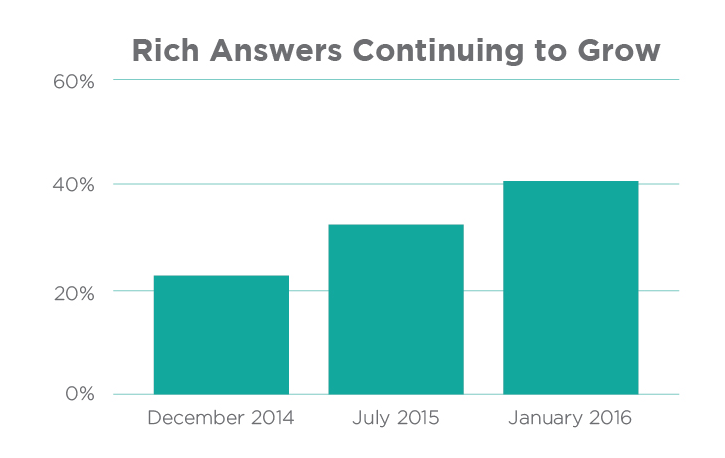
    Over the years, we’ve continued to follow and analyze Google’s perpetually evolving search engine results page (or SERP) to stay on top of Google’s algorithm and to provide deeper insight into how people use search engines. Rich Answers Continuing to GrowOver the past 12 months, we’ve witnessed a major paradigm shift in Google’s SERP, resulting in Rich Answers for 40% of queries on average as of 2016!

    Stone Temple Consulting Corporation’s 2016 study shows that Google provided Rich Answers (also known as Rich Snippets) for 22.6% of queries in 2014, 31.2% of queries in 2015, and 40% of queries in early 2016.

    Mostly surprisingly of all, the study shows that 55% of the available Google snippets are either brand new or have a new URL source since 2015. This is evidence of the volatility of rich snippets and how new sources (cough, your website, cough) have an enormous opportunity to obtain one!

    As Google’s SERP continues to evolve, it is now more important than ever to build a website in a way that better enables a domain to obtain these Rich Answers in the future. See the original blog post below for methods.

    What Are Rich Answers?

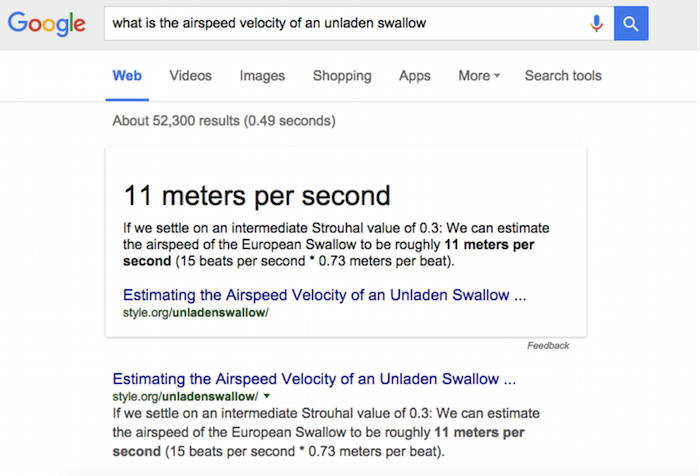
    “Rich Answers,” “Rich Snippets,” or “Google Knowledge Graphs” are results to search queries that have a definite or concrete answer. So definite, in fact, that Google will place them above all other searches with a linking source. Google will provide answers to questions such as “who won the Oscar for best actor in 2015,” “what is a rel=canonical,” “who is the president of Madagascar,” or even “what is the airspeed velocity of an unladen swallow.”

    Image Of Google Rich Answer Displaying Air Velocity Of An Unladen Swallow

    Rich Answers are featured snippets within the search results that allow the users to gain the information they are looking for faster and easier. These Rich Answers are provided in many ways, such as knowledge boxes, tables, images, maps, how-to graphics, and step-by-step instructions.

    The Results Are In

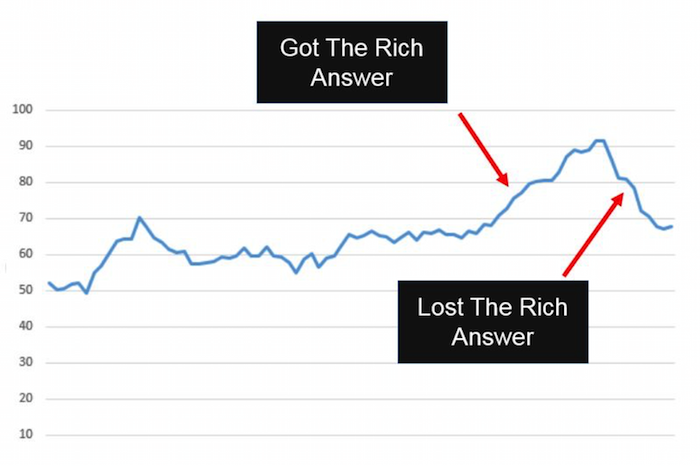
    Stone Temple Consulting released their findings earlier this year, stating that Google Rich Answer results have in fact grown quite significantly from approximately 22.6% in December of 2014 to 31.2% in July of 2015. This is truly a staggering amount considering the number of searches that are performed in the Google search engine every day. You might think that this would be detrimental to the health of most websites: if people are finding what they need in the SERP, they won’t continue onto a website. However, Stone Temple Consulting shows that in fact, the websites who were able to provide Rich Answers in the SERP actually get more website traffic than before. It creates a better user experience for all Google users by pushing up quality content, providing the searcher what they are looking for more quickly and creating a product that users want to come back to.

    Graph Image Of Effects Of Google Rich Answer Results

    Strategy to Getting a Rich Answer:

    Our simple strategy to getting a Rich Answer:

    1. Identify a simple question.
    2. Provide a direct answer.
    3. Offer value added info.
    4. Make it easy for users (and Google) to find.

    Use Google TrendsGoogle Correlate (which is currently in Beta), Shopping Insights, and data from your Search Console to determine if a topic is trending. This will give you a better understanding of how much effort to put forth on providing high-quality content so that other searches (and Google) will find your website as the authority on that subject.

    Utilizing Schema markup can help the search engines better understand the resources that you are providing on a given website. If Google can better understand your site, they can return more informative results for users and increase the likelihood of a Rich Answer over time.

    The format of content can also be a large contributing factor to obtaining a Rich Answer in the SERP. Step by step instructions, bulleted lists, simple tables, and charts are all simple ways businesses can format content that will allow Google and its users to more easily find the answer they are looking for.

    Summary

    We are expecting these trends to continue as Google’s users find value in these types of results. In fact, we predict that Google will not only increase these types of results in the future, but that it will also begin to provide more interactive Rich Answers by utilizing high performing website content. Once Google can directly attribute performance on the SERP within Google Analytics, it will become much more mainstream to include Rich Answers optimization in the marketing strategy of businesses.

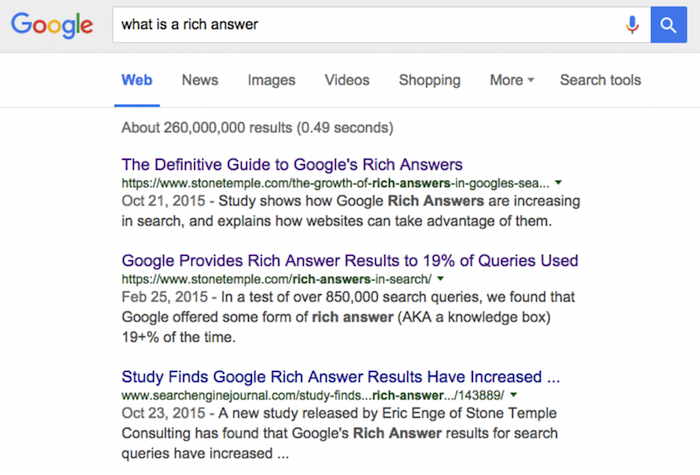
    And one last thing: if you search “what is a Rich Answer,” there is no Rich Answer for that result yet.

    Image Of Google Search Results For What Is A Rich Text Answer

    Image Credits:

    Image 1 Credit | Image 3 Credit

  • Google My Business Brings the Holiday Cheer with Special Office Hours Pre-Sets

    4

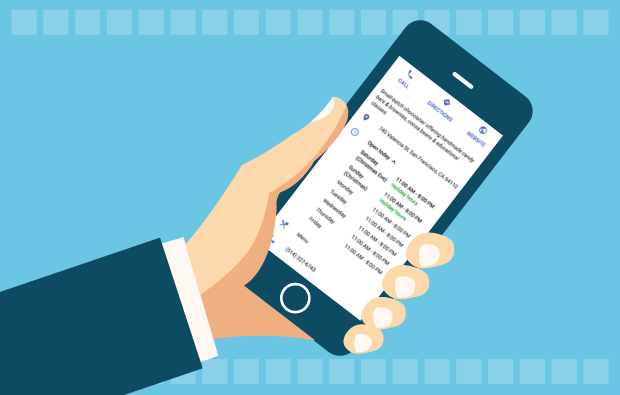
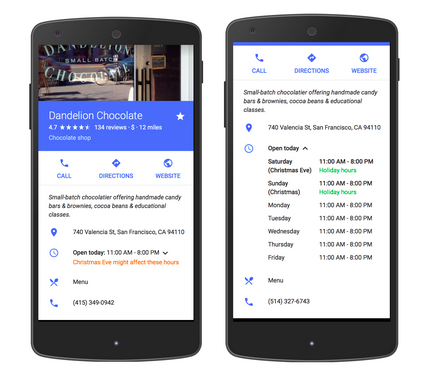
    Yesterday, a new My Business feature was published by Google in the product forums. This new feature allows business owners to pre-set special hours to their My Business listing for holiday closings or special times that are exceptions to your day-to-day office hours.

    google my business special hours exampleThere is more information in Google Support documentation. If you have many locations to update, there is a spreadsheet upload feature. If your business has hours that extend into a second day, there is information on how to manage that scenario.

    Editing Your My Business Special Hours

    This morning, I updated the office hours of a local credit union. This feature will be especially helpful in publicizing the dates their office is closed in the upcoming weeks. It will also be especially helpful to the community for finding the times each branch is closed, and we know Google is focused on user experience.

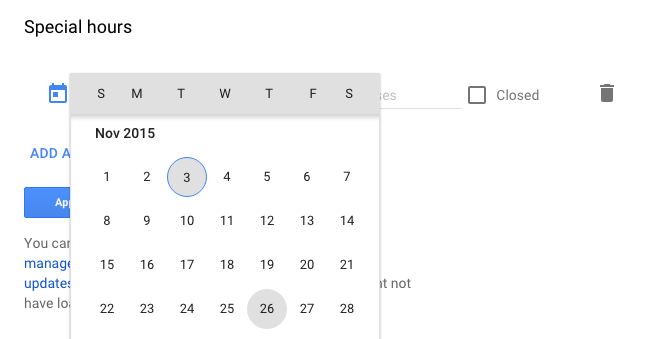
    Once you log into your Google account, navigate to your list of locations and choose one location to edit the location details. Scroll down to “Special Hours” below the standard “Hours.”

    choose the holiday date for special hours

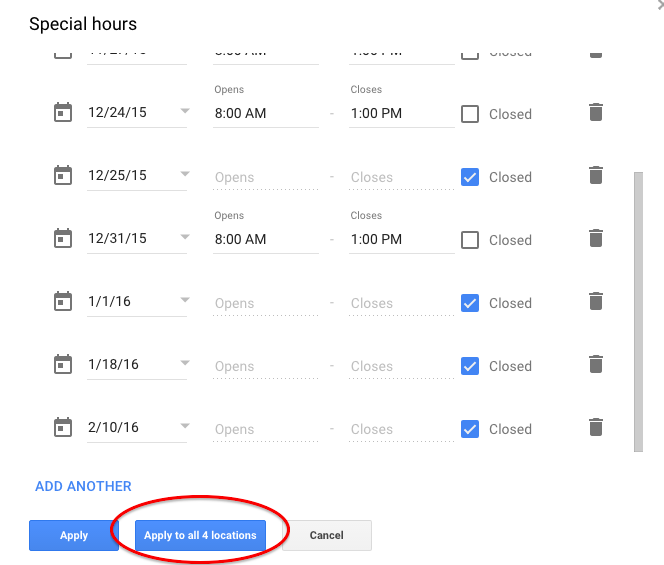
    Click on “Special Hours,” and you can choose a day from a drop-down calendar and either apply early closing hours or mark if the office is closed the entire day.

    If the hours will be the same at all of your locations, Google has thoughtfully provided a button to apply the hours to all locations within your account.

    Your final Special Hours or office closing times may look something like this for your summary review. Some days they are closed, and some days the branch is closing early:

    apply special hours office closed times to all locations

    Great New Feature

    You may want to set up some reminders to update your holiday hours every quarter or every six months.

    I know businesses have wanted this feature for quite some time, and now it’s available just in time for Thanksgiving and the December holidays. Very good timing, Google!

  • We Went to AdWords Bootcamp so You Don’t Have to: 5 Tips from the Experts

    We Went to AdWords Bootcamp so You Don’t Have to: 5 Tips from the Experts

    I had the pleasure of living and breathing AdWords for two full days on its home field—at Google Tech Corners in Sunnyvale, California.

    We had some very focused discussions that dove into some of the newer features and the best practices for long-standing features. I share some of my key takeaways below!

    1. Be present for your customers’ “micro-moments.”

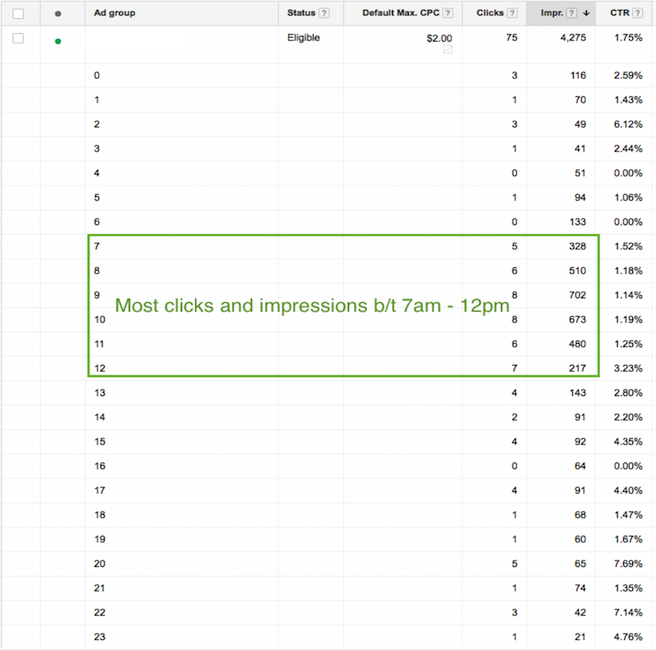
    These “micro-moments” are the key critical points in time in which your customers are searching for your products and services. You must be present when your customers’ micro-moments occur. You may want to increase your bids at certain times of day when more searches for your type of business are being done.

    Ex: restaurant upping bids leading up to and during mealtime.

    If your customer’s micro-moments aren’t as obvious as that of a restaurant, you can identify those high times by analyzing the following:

    • Google AdWords: impression & click reports by time of day
    • Google Analytics: visits by time of day

    Paula Blog 1

    2. We can trust cross-device conversions.

    If you work in AdWords, you’ve likely seen the column “Estimated Conversions.” Google has recently changed the name of this column from “Estimated” to “Cross-Device Conversions”

    Only conversions with a 95% certainty will be included in this number.

    Why do you care?

    Search sessions are segmented for the same purchase throughout the day and across devices. Gone are the days when a user sits at their desktop at nighttime and researches everything they want to know within 30 minutes.

    For example: instead, we’re talking two minutes at 7 a.m., five minutes at 9 a.m., ten minutes at noon, and maybe five minutes again at 6 p.m. to purchase.

    1511-SI-BlogImage-D-01

    3. You better not ignore cross-device conversions.

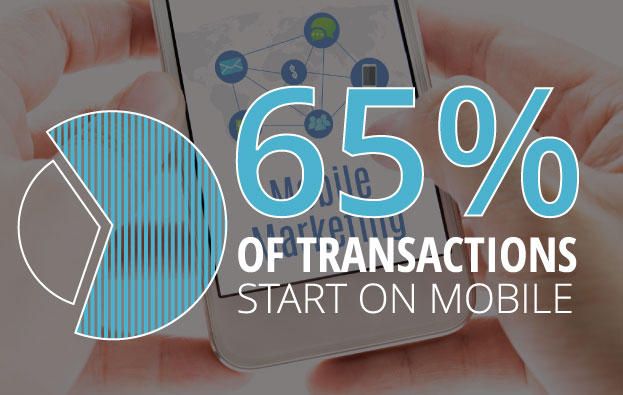
    Why? 65% of transactions start on mobile.

    I’ll be making it a priority to look at cross-device conversions in addition to the traditional conversion metrics (which only include users who search and convert on the same device). If you are looking at traditional conversions only, you are missing out.

    In order to see this metric, you must have one or more conversions set up in AdWords. Then, Google will do the rest.

    4. Leverage in-market segments and affinity segments.

    In both AdWords display targeting and Google Analytics, you can find “In-Market Segments” and “Affinity Segments.” Analytics allows you to see this info about your existing site visitors, and AdWords allows you to target potential customers using these two targeting options.

    This isn’t new knowledge, but I was given a fantastic example of what distinguishes the two, and I thought it was worth sharing:

    Affinity Segments:

    Users in this group have demonstrated (via the sites & pages they visit) what their lifestyle interests are.

    Example: A user in an affinity segment for “automobiles” would read car blogs and articles about future car releases, and they would also watch YouTube videos about cars.

    In-Market Segments:

    Users in this group are actually in the market for a given category of product or service.

    Example: A user in an in-market segment for “automobiles” would be looking at Kelly Blue Book, local dealership sites, Edmunds, TrueCar, etc.

    5. Allow new features to make your life easier.

    Last but not least, what I finally realized is that Google is constantly adding new features to AdWords to help us better spend our money. Given advertising is very much Google’s main source of revenue, this only makes sense.

    As new features roll out, learn their benefits and capabilities, and adjust your process accordingly.

    With consumer behavior changing faster than you can say “micro-moments & cross-device conversions,” there’s never an excuse to say “Well, we’ve always done it this way.”

  • Patience Is A Virtue, But If You Don’t Have It, Use Google’s Popular Times

    As a naturally impatient person, I struggle with the following: people who take forever to text me back, traffic, and long lines. Thankfully, Google Search’s newest feature called Popular Times lets impatient people like myself know when a restaurant, business, or venue is busiest so we can avoid rush hour. Intrigued? Read on!

    What Is “Popular Times?”

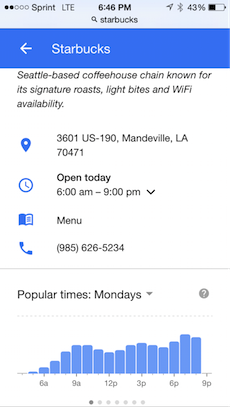
    According to Google, Popular Times “uses data from users who have chosen to share their location” in order to keep track of when businesses are at their busiest and slowest. Although this search feature is only available on mobile devices and for select businesses, it can prove helpful for people looking to maximize their time during certain days of the week.

    Popular Times in Action

    I’m not a heavy coffee drinker, but there are some days when I am in desperate need of a caffeine boost. I commute from the Northshore to New Orleans, so I have to be fairly strategic about when and where I get my cup of joe if I choose to get it in the morning.

    This weekend, I had a craving for a Starbucks Pumpkin Spice Latte (#dontjudgeme), so I thought I’d check out Popular Times to see if I could stop by the Starbucks drive-thru nearest to me before heading to work one day this week.

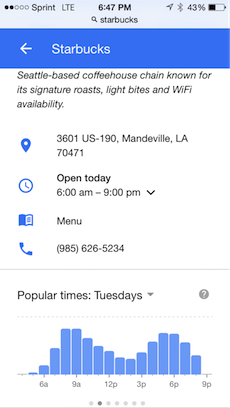
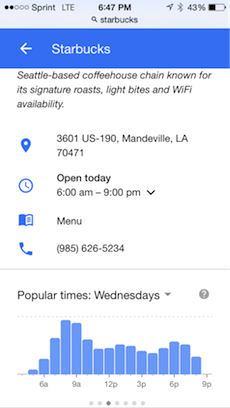
    These were the results for the first few days:

    PopularTimes1  PopularTimes2  PopularTimes3

    Monday at 7 a.m. seemed to be when Starbucks got the least amount of traffic, so I now know when to stop by if I need to get my PSL fix. Now to just stop pressing the snooze button…

    What do you think of Popular Times? Do you think it’s got potential, or is it just another a superfluous Google search feature? Let us know in the comments below!

    Image Credit:

    Pumpkin Spice Latte GIF

  • Word of Mouth in the Digital Age: The Importance of Online Reviews

    SmallBusinessWoman

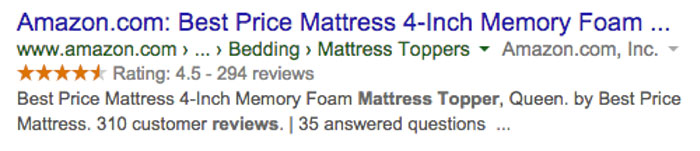
    Having just moved, I’ve spent a lot of my free time shopping on Amazon. From new bathmats to nice wine glasses, a majority of my paychecks have gone towards furnishing my new house. One thing I really needed, though, was a solution to the rock of a mattress that came with the apartment. I needed a mattress topper. Since it was something I would use every night, I wanted the ability to test out the feel of it first. The only negative of Amazon is that you can’t do that. So, whose opinions can I trust other than my own? Fellow customers.

    I spent all night (on the rock) searching through different mattress toppers. I didn’t look at the actual toppers as much as the reviews, though. “This one’s too lumpy,” or “This one smells funny” were the words that guided me to finding the perfect topper. And now, I’m sleeping like a queen, thanks to my fellow customers.

    In this scenario, I was the customer, and the product was the business. I passed up on a lot of toppers that were probably just as good as the one I ended up getting. Having a lot of bad reviews or no reviews at all were the deciding factors for me, and these things can be the deciding factors for whether or not your business succeeds online.

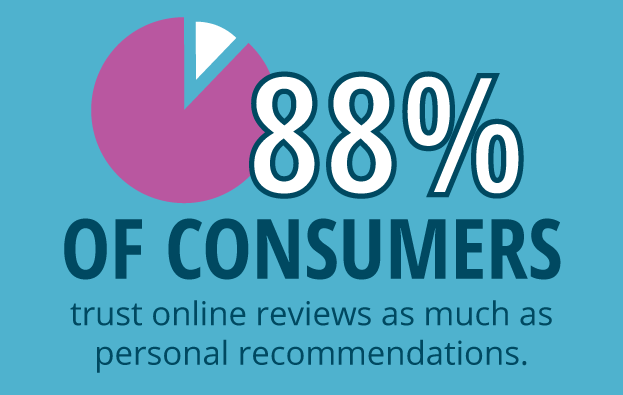
    Consumers Trust Online Reviews Statistic Image

    Why Reviews Matter

    According to a study done by BrightLocal, “88% of consumers trust online reviews as much as personal recommendations.” Reviews can greatly impact consumer decisions, showing how valuable positive reviews are to local businesses. In the same study, “72% of consumers say that positive reviews make them trust a local business more.” Thus, positive reviews increase conversions.

    Negative reviews can hurt business and prevent a potential customer from converting. However, negative reviews can also be a positive thing. Negative reviews give a business unique insight in the ways they can improve, and they can also help eliminate consumer suspicion if there are too many positive reviews. A study done by Econsultancy found that “68% of consumers trust reviews more when they see both good and bad scores, while 30% suspect censorship or faked reviews when they don’t see anything negative at all.” Overall, businesses should leverage the value of negative reviews by working to enhance their business and improve customer relationships.

    SEO Benefits of Reviews

    Not only do consumer reviews enhance customer experience, but they also provide some SEO benefits:

    • Improving local rankings by showing Google that people are engaging with your brand on third-party sites like Yelp.
    • Adding new content to your site. Search engines like to see unique content being added to a site regularly.
    • Increasing chances of ranking for long-tail keywords. Users reviewing your business tend to use the same terms that other potential customers may use when searching for your business.
      • Add reviews to many pages on the site in order to increase the amount of pages ranking for long-tail terms.
    • Adding schema markup for reviews, which enables rich snippets.

    AmazonReviewScreenshot

    Sources:

    http://searchengineland.com/88-consumers-trust-online-reviews-much-personal-recommendations-195803

    https://www.brightlocal.com/2014/07/01/local-consumer-review-survey-2014/#methods

    https://econsultancy.com/blog/8638-bad-reviews-improve-conversion-by-67

    https://econsultancy.com/blog/9366-ecommerce-consumer-reviews-why-you-need-them-and-how-to-use-them/

  • Go Go Google Grantspro

    Nonprofit Marketing PPC Image - SearchInfluence

    Being a Google Grants Pro:

    So you’ve heard of Google Ad Grants … in fact, you applied to be a part of the program ages ago. IN FACT, you have been a part of the Google Ad Grants program since like 2005 and you’ve been running campaigns in AdWords to promote your mission and grow your nonprofit organization like a pro (and all on Google’s dime—$10,000 worth of dimes, to be precise).

    Well, that’s cool. Congrats on being a pro with your Google Ad Grants account. But what if we told you—you’re not really a pro until you get accepted into Google Grantspro?

    That’s right. After Google Ad Grants comes Grantspro, and along with Grantspro comes $40,000 of Cold. Hard. AdWords spending limit. Get excited. Your nonprofit organization is about to expand its reach to where it has never reached before…gain visibility where it was never visible before…increase awareness where it was never aware before!

    Wait. What?

    Becoming Eligible for Google Grantspro

    Ah, the good part. Pay attention.

    To become eligible for Google Grantspro, you must:

    • Currently be a part of the Google Ad Grants program. (What’s that? Oh, boy.)
    • Have conversion tracking installed and have successfully tracked at least one conversion.
    • Hit the Google Ad Grants budget cap for at least two different months over the past six months.
    • Currently be a part of the Google Ad Grants program. (What’s Google Ad Grants? Seriously?)
    • Have maintained an average account level click-through rate of 1 percent or higher over the past 6 months.
    • Be on good terms with the Google Ad Grants program.
    • Submit an online application for Google Grantspro.
    • Currently be a part of the Google Ad Grants Program. (How do I become a part of that? Come ON!)
    • Complete biweekly maintenance of your AdWords account.
    • Complete an annual survey.
    • Agree to share your impact or conversion data.

    Sounds simple enough, right? You just have to meet all of the above requirements and you’ll be good to go! Just kidding. Space is limited, and meeting the minimum eligibility requirements does not guarantee acceptance.

    It’s OK. Don’t cry. This is why we’re here: to make sure your application stands out to the College Admissions Rep so you get into your first choice school. Erhm…

    Seriously though, think of Search Influence as your admissions coach. We’ve been through this process before, and we’re familiar with every step of the Grantspro application process. This is part of our job. Get in touch and let us help your nonprofit rise above the rest!


  • Running With The Pack: Competing in Local Search Just Got Harder

    Running With The Pack: Competing in Local Search Just Got Harder

    Overnight on Aug. 6, Google updated search results for mobile and desktop searches from local seven-pack to a three-pack. This is not just in the United States; it seems to be worldwide and rolled out at one time. It’s really early to start dissecting this change, but I’m not seeing much good about it.

    What Does This Mean for Organic Search?

    For organic search, it means it’s even harder for searchers to find you. It looks as if these changes from Google are driving consumers to a business’ My Business page and perhaps encouraging more ad spending.

    Organic—Looking a Little Closer

    On Mobile

    Before Google rolled out this change, when a search on mobile gave local pack results, the user could immediately click on what they needed directly on the search results page, including:

    • Click-to-call
    • Click to get some directions
    • Click on the website

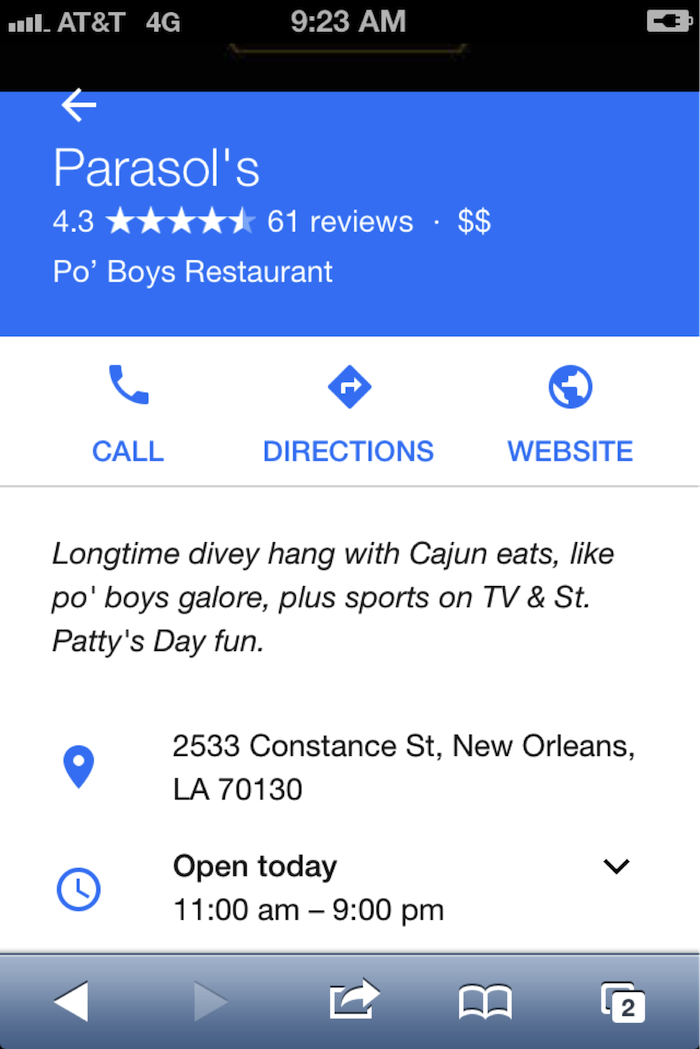
    Now, the mobile local pack only provides a click-to-call button:
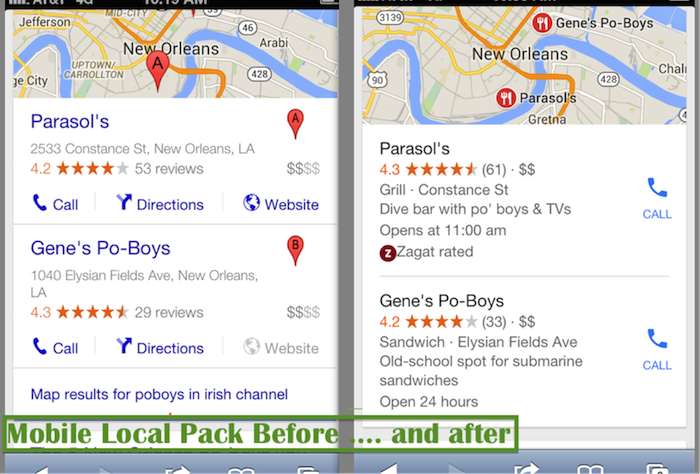
    Mobile Local Pack Click Call Image

    If the searcher wants to visit the website for more info, they have another click in order to navigate to the My Business page:
    Navigate Google My Business Page Image

    On Desktop

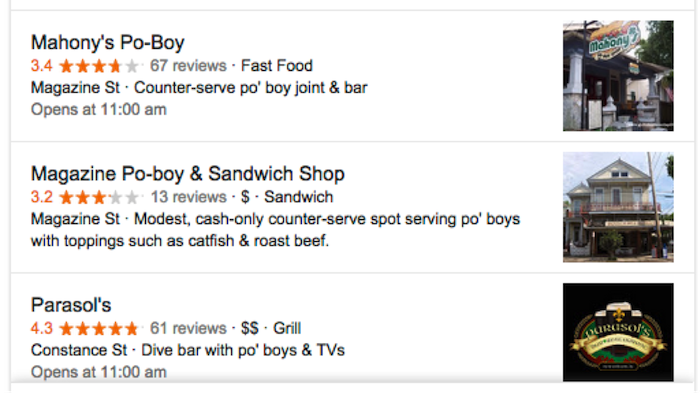
    With the new update, I get the three-pack with no immediate click opportunities:
    DesktopThree Pack Google Image - Search Influence

    Update:

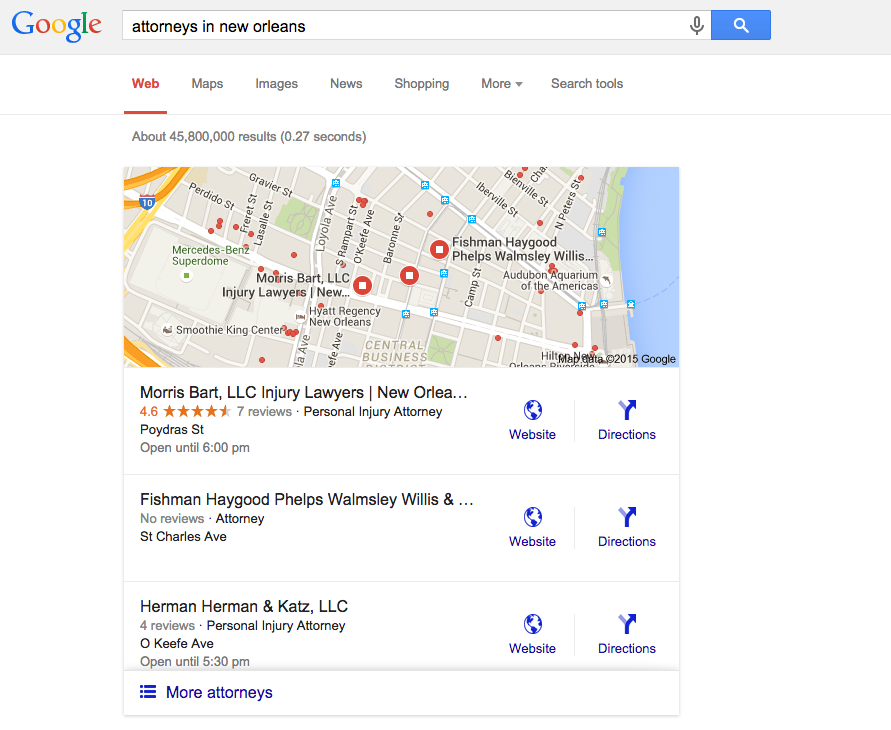
    Ryan Schulze, Senior Account Associate, commented, on this published post with an interesting correction. (It takes a village.)  He shows how some searches on desktop are giving the website link in the 3-Pack.  It suggests different search categories have different clicking opportunities.  I would guess this is based on percentage of search performed on mobile vs desktop.
    attorneys in new orleans 3 pack desktop

    Back to the story …

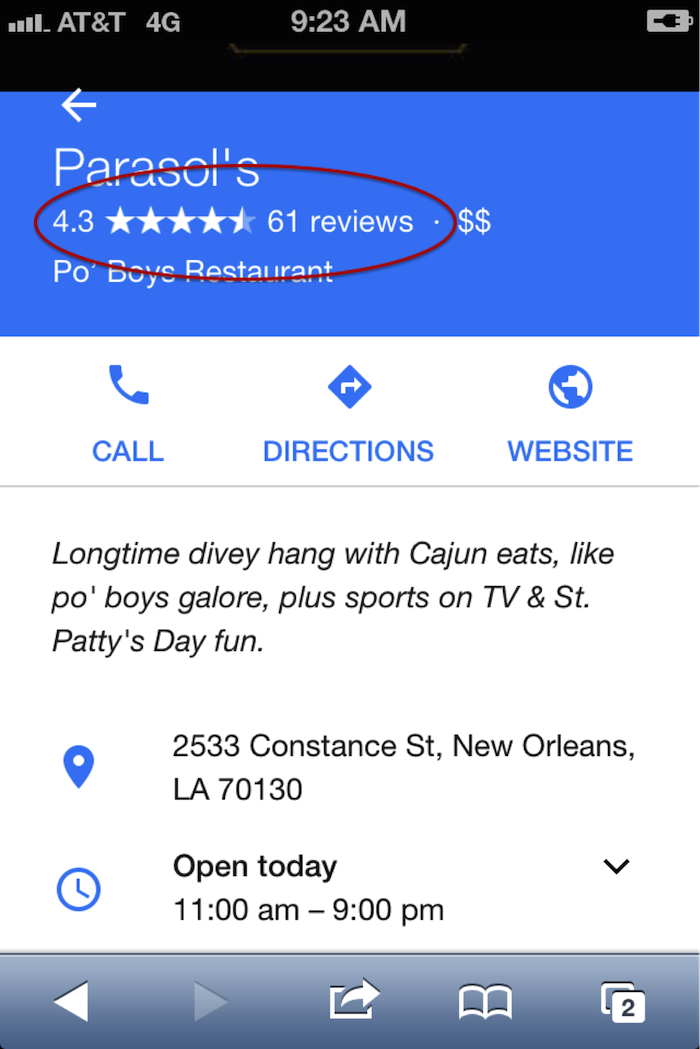
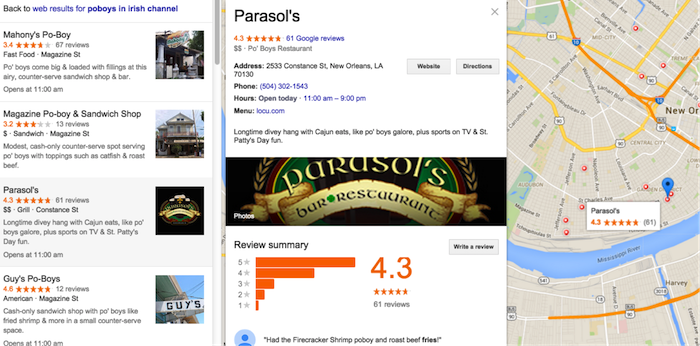
    I click on Parasol’s, thinking I will get its website or the Google My Business listing. Instead, it drives me to the local finder with ALL of the competitors right there!

    • This is not great if you’re in the three-pack because you must fight the competitors again for the searcher’s attention.
    • If you’re not in the three-pack, this levels the playing field. You have a chance to woo the searcher away from their initial choice.
    • If you are a searcher, it’s annoying because you have already indicated your preference with your first click, and Google forces you into an extra click to call the business. In addition, you are forced into viewing more choices after you made your decision.

    Desktop searches are losing ground to mobile, but desktop isn’t dead, and it still dominates search in some industries—usually those that skew to an older population.

    This does show us that it is still incredibly important to claim and optimize a Google My Business listing. Those Google My Business listings can get your business into the desktop local finder list, which is a long list of competition, so images and reviews are still important efforts to woo the searcher over to your business:
    Local Business Maps Pack Image - Search Influence

    Reviews on branded search results on desktop and mobile:
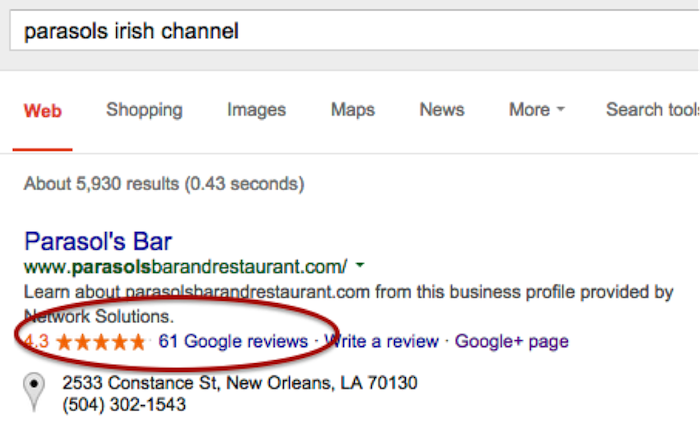
    Online Reviews Branded Search Image - Search Influence

    Online Business Reviews Mobile Image - Search Influence

    (FYI: if you’re ever in New Orleans in March, Parasol’s is a great place to be.)

    Early Data on Organic Visits

    I was chatting with Megan Lindsey, senior account manager at Search Influence, about the effect of this change for one client in particular. Lindsey sums it up nicely: “I imagine now since a searcher has to click on the business name and then once more on the ‘website’ button that people aren’t as inclined to keep clicking. I would think that most clients, even if they were in the top three maps results, are losing organic traffic because of it, but especially the ones who aren’t there anymore.”

    The early Google Analytics data supports Lindsey’s hypothesis. I found no great winners: Several clients’ Google organic was static, and several were worrisome. These clients are local businesses that are historically very strong in their markets. Over the weekend dates, there were 20 percent to 35 percent losses in organic website traffic, which seems to have rebounded Monday to Wednesday, so it appears things are still settling down.

    CLIENT A

    google / organic

    Aug. 7, 2015 – Aug. 10, 2015: 179 visits

    July 30, 2015 – Aug. 3, 2015: 285 visits

    % Change -37.19%

    Aug. 7, 2015 – Aug. 12, 2015: 319 visits

    July 31, 2015 – Aug. 5, 2015: 364 visits

    % Change -12.36%


    CLIENT B

    google / organic

    Aug. 7, 2015 – Aug. 10, 2015: 161 visits

    July 30, 2015 – Aug. 3, 2015: 210 visits

    % Change -23.33%

    Aug. 7, 2015 – Aug. 12, 2015: 161 visits

    July 31, 2015 – Aug. 5, 2015: 210 visits

    % Change -6.76%


    CLIENT C

    google / organic

    Aug. 7, 2015 – Aug. 10, 2015: 36 visits

    July 30, 2015 – Aug. 3, 2015: 54 visits

    % Change -33.33%

    Aug. 7, 2015 – Aug. 12, 2015: 58 visits

    July 31, 2015 – Aug. 5, 2015: 67 visits

    % Change -13.43%


    Have Calls Increased?

    The clients above usually do really well in the local pack and in organic website traffic, so let’s see what happened to their call volume. If you are a lucky business falling in the three-pack, consumers might be calling your business more now than visiting your website.

    When you log into the Google My Business page and go to Insights, this is the data you get:
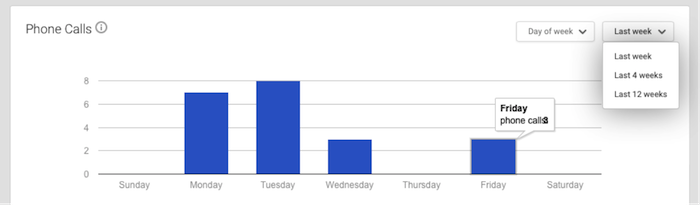
    Phone Call Data 1 Image - Search Influence

    It’s severely limited and not really insightful. The date ranges are not customizable. There is no data after Aug. 8. I have to wait until next week to get any data on effects of call volume from the three-pack rollout, and I can’t compare to the previous week. I will have to do some elementary math that surely Google could program to ensure a better user experience.

    The data is summarized to the point of being so generalized it is virtually useless. This is 12 weeks of call data. I know Google can do better.
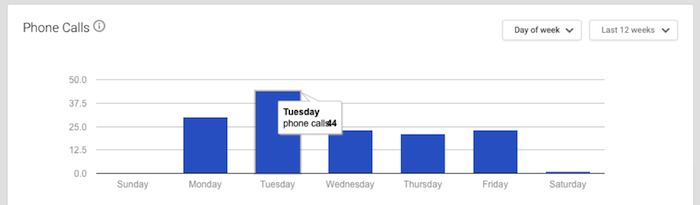
    Phone Call Data 2 Image - Search Influence

    It warns that call volume is “approximate and only significant values may be shown.”

    Also, the call numbers could be calls from three different sources: Google Maps, search and maps for mobile. This is so frustrating for business owners. I would want to know EVERY call I received! And I would want to know where I received the calls! Google has the data, and it just isn’t sharing with business owners.

    And Paid Search?

    On the first day of the this rollout, local search expert Mike Blumenthal made these early comments: “I am not sure what will happen on clicks for AdWords, but those businesses that were lower in the old display may feel compelled to double down on their AdWords activity.”

    I asked Jeanne Lobman, senior online advertising manager at Search Influence, to check it out and give us some input. “Those businesses that were previously only ranking in spots four to seven in the local pack (and nowhere organically) are now going to need to spend money on AdWords ads in order to be seen in the search engine results pages. Additionally, since Google has removed the website URL and the phone number from the local pack info, it could be beneficial to run AdWords in order to make sure searchers can easily find your phone number and call you (on desktop). This would be accomplished by using call extensions with your campaigns, which adds your phone number to your ad (as seen in the below example).
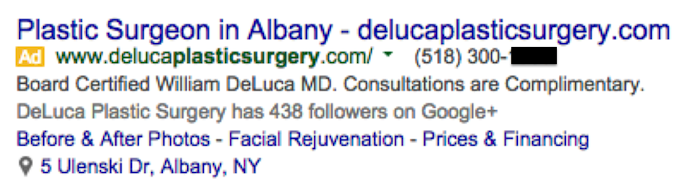
    Plastic Surgery Google Ad Phone Image - Search Influence

    On mobile, the local pack results do include the call button, but there’s no link to the website. When you click the local result on mobile, you are taken to the G+ page, which then has a link to the website. To avoid having that extra step, running an AdWords campaign on mobile ensures you can land people directly on your website with one click.”

    Lobman pulled some AdWords reports to see what impact this change may have had on click-through rate. She says it’s really too early to tell any effects, but the data so far suggests there seems to be an increase in clicks and impressions but little to no change in click-through rate, conversions and conversion rate.

    So Now What?

    We need to give it a little more time to settle in before we make any dramatic changes. When we looked at six days of organic visitor data versus four days of data, we see big improvements, so watching the data to make smart moves is the action item.

    Walk through the process that visitors might use to find your website online, and try to improve what you can control, such as adding phone numbers in your desktop AdWords ads or continuing to encourage reviews from your customers.

    Your engagement online is a reflection of how you engage with your customers in real life. Providing for the searcher with easy linking from ads, Google My Business images, reviews and informative website content is a long-term plan, and it’s a good one to win trust and authority.



  • A Tale of Two Google+ Updates: Shutting Down G+ Pages & Disconnecting YouTube From G+

    Shuttered Google Local Pages - Search Influence

    In the past week, two new Google Plus updates have come to light. First, we found out that as of July 28, Google has plans to shut down inactive and unverified Google My Business (aka Google Plus) listings. On Monday, July 27, Google’s Bradley Horowitz posted on Google’s official blog that in the coming months, it will be removing the requirement for users to have Google+ profiles to use various Google products such as YouTube and Google Photos.

    The Update: Google My Business is Shutting Down Unclaimed, Unverified Listings & Unverifying Inactive Accounts’ Listings

    On July 23, a Local Search Forum user posted an email they received from Google as follows:

    UPDATE – Announcement from Google July 22, 2015

    Dear photographers and agencies,

    In the past few months, you may have seen some changes in the look of Google+ pages that have been associated with Google My Business (GMB) accounts. These changes, including how we treat business pages without owners, are part of Google’s ongoing effort to simplify people’s experience with our tools. We are constantly working to provide only valuable and rich content to our users.

    On July 28, Google will begin shutting down those GMB–associated Google+ pages that have not been associated with user accounts and are also not verified. You may find that some of your Business View tours also sit on such pages, but note that after this removal of unverified Google+ pages, the Business View tours will still remain available on Google Maps and Google Search.

    Here are a few recommendations for informing any business customers that may be impacted by this:

    Encourage your business customers to verify their listings if they wish to retain their Google My Business page …

    If a business owner decides later that they would like to have a Google My Business page, please advise them to create a new page and verify their listing. The Business View virtual tour can be then transferred to the new verified listing. Please log a case to our support teams to request that images for your business customer be forwarded to the new GMB page.

    Please point your business customer to their images in Google Maps.

    Best,

    The Google Maps | Business View team

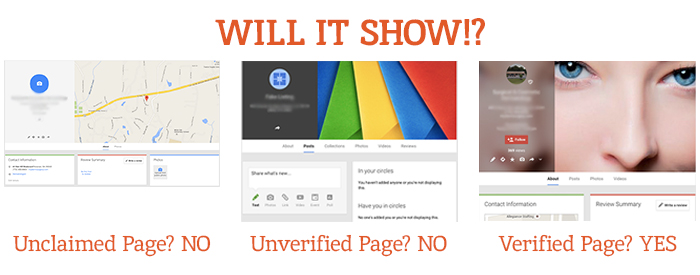
    This was specifically geared towards photographers so they would know how to handle the effect on Business View tours. What this means for all Google My Business users is that unclaimed local pages will most likely no longer be visible (as Google has always said is the case for unverified Google Plus Local pages).

    Different Google Local Pages - Search Influence

    As always, this update is accompanied by Google’s explanation that all actions are in the best interest of users and geared towards improving the user experience. Thanks, Google!

    On June 4, via the Google Business Help forums, Jade Wang (come visit us in NOLA again soon 😉 ) of the GMB Maps team also announced: “If a user is unresponsive to our attempts to contact him or her and has not logged into Google My Business for a significant length of time, then we may unverify pages in the account.” Here’s the full update from Jade:

    In some cases, we may contact Google My Business users via email to confirm that they are still actively managing a business page. If a user is unresponsive to our attempts to contact him or her and has not logged into Google My Business for a significant length of time, then we may unverify pages in the account. We’re doing this in order to continue to provide users with the best experience when they’re looking for local businesses like yours. If you find that a page in your account has been incorrectly unverified, please contact support to get assistance restoring verification.

    It’s a good idea to keep an eye on the inbox associated with your Google My Business (Locations) account. It’s also a good idea to regularly log into Google My Business (Locations) to confirm that your business information is current and accurate.

    My Take On It

    Both of these updates could mean great news for businesses that have struggled with requesting ownership of listings that were verified in the past by a person or an account they no longer have access to. To fix this issue in the past, you’d have to submit an ownership request form to Google to gain access to these listings. Then, you’d have to wait 10 business days (as per Google’s rules) and reach out to support (they could check to see if the account never responded to the request). After this 10-day period, the support representative could determine that the account that owned the listing was inactive and release the listing to you for claiming and verification.

    Basically this means inactive accounts are no longer roadblocks to getting access to business listings in Google My Business!

    While some issues may be alleviated with the update, what’s harder for search engine optimization work is that now it’ll be more difficult for us to see unverified duplicate G+ pages, old or closed G+ pages, and practitioner G+ pages that could be hurting businesses’ local rankings. Map Maker should allow us to still see the data but not the pages themselves.

    But there are signs this hasn’t rolled out completely yet. I have some unverified, fake listings in my Plus account (shhh, I know) that I use for training purposes that haven’t been touched yet. This is likely a slow rollout that started July 28. I did notice some changes to Maps navigation recently that were probably in preparation for this, though. For example, you used to be able to click “Write a review” from the Maps results to get to the G+ local page for a business, but now that just opens a review dialogue in the Google search results for that business in another window. This makes sense, since unclaimed businesses will no longer have pages.

    The Update: Google+ Is Disconnecting From Unnecessary Services

    On Monday, July 27, Bradley Horowitz posted on Google’s official blog that Google+ would be moving towards a “more focused Google+ experience,” which basically means no longer forcing users of various other Google products to have a G+ profile to use said products.

    Specifically, Google wants to foster the natural sharing environment of G+ by adding new features such as Google+ Collections. This update means that all you need to share content, communicate, and have a YouTube channel (among other things) is a Google account and not necessarily a G+ profile. Also, it will continue to keep Google accounts private and unsearchable. For those who were forced to create G+ profiles to use YouTube and other Google products in the past, Google promises that it will “offer better options for managing and removing those public profiles.”

    My Take On It

    Congrats to everyone who was pissed when they couldn’t use YouTube without a Google+ profile!

    Mad Men Cheers Joan

    At first, it seemed that G+ pages that are already connected to YouTube channels might be disconnected. But, that last comment about offering ways to get rid of unwanted G+ profiles, points to the fact that this update will not actively affect anyone in this way.

    Since this update has not yet rolled out, however, it is important for users to realize that they should not delete their G+ yet! Doing so prior to roll out will force you to delete your entire YouTube presence!

    Let me know your thoughts on all of these new Google updates! I’d love to hear what other users think of these changes.

    Image source:

    Mad Men gif

  • Time Savers: 9 Tech Hacks to Improve Your Efficiency

    Search Influence Tech Hacks Image

    Trying to make your time working on the Internet more efficient? Looking for tools that could potentially save your life in case of an emergency? We here at Search Influence have gotten a good grasp on the types of tools that are effective in the workplace. Here are a few tech hacks you’ll be glad to discover.

    Google Tech Hacks

    As easy as Google is to navigate, there are more intricate systems at play in its algorithm that can be utilized when searching for something more specific.

    Set a Time Range

    In Google Search Tools, you can set Google to only display results within a certain time frame, with the range going down to as little as one hour.

    What we use it for: Referencing content that is the most up-to-date or relevant.

    Reverse Image Searching

    In Google Images, you can upload an image or copy and paste an image’s link from the web and ask Google to find images that match that one. Google will also display similar images.

    What we use it for: Determining whether an image is a stock photo; looking for the same image with different image dimensions.

    Specific Website Search

    Google allows its users to search for keywords on specific websites through a “site:keyword” search. For example, if looking for Bridget Juelich’s blog post “A Family Affair: Teaching Mom a Thing or Two About SEO,” entering “site:searchinfluence.com Mother’s Day” into the search bar will bring it up seamlessly.

    What we use it for: Easily navigating websites to find specific content.

    Gmail Tech Hacks

    Gmail has become one of the most used email clients in the world. With Google and other companies implementing a host of functions and features, there’s a reason for all the excitement.

    Boomerang

    Installing Boomerang allows you to schedule specific messages to be sent at certain times. It will also allow you to archive important messages and bring them back when you need them.

    What we use it for: Resending emails if there was no reply; streamlining inboxes.

    Sidekick

    Sidekick by HubSpot is an email tracker that allows you to see when emails you sent were opened. It can also be used with Microsoft Outlook or Apple Mail.

    What we use it for: Determining whether or not to resend an email; receiving social media or company info from senders.

    Undo Send

    Google has officially rolled out the undo send function for Gmail. After hitting send on an email, you have up to 30 seconds to undo it before it is received by the recipient.

    What we use it for: Attaching forgotten files; retracting emails that were accidentally sent using “Reply all.”

    Chrome Extensions

    Chrome allows its users to install extensions to increase the functionality of the browser.

    Pearls

    Pearls allows Chrome users to highlight specific keywords on specific web pages, whole websites, or even the entire Internet. All the user has to do it type what words Pearl should find and highlight.

    What we use it for: Drawing our eyes to special instructions; looking at specific phrases on web pages.

    Grammarly

    Grammarly is an online grammar and spell checker that will show you your errors in an instant. It also has a document function that saves projects to your account through cloud storage.

    What we use it for: Quickly checking emails for spelling or grammar issues; helping ensure the quality of our written content.

    The Great Suspender


    Does your computer ever start to run slowly because you have so many tabs open in your web browser? The Great Suspender will suspend your tabs until you are ready to use them again. You can even tell the extension which websites to never suspend.

    What we use it for: Saving tabs for later research.

    With these tech hacks, your Internet exploration is sure to be both fun and efficient.

    Image sources:

    Google search tools image

    Google reverse image search

    Pearls Extension image

    The Great Suspender image