Tag: Google

  • 5 For Friday – War Of The Week’s 5 Kings: Apple, BTC, Google, Pinterest, & IG

    1. It’s Gold, It’s Gold Baby: The New iPad Air, That Is – Business Insider

    Apple is releasing a gold version of the iPad Air with the new launch. With the iPhone 6 being launched next week, the next Apple event in line will be in October. According to MacRumors, the new iPad Air 2 is suspected to include some features similar to the iPhone 5s: fingerprint recognition and an 8MP rear camera.

    Fingers crossed everyone can get gold iPads that match their gold iPhones just in time for the holidays!

    2. KnCMiner Throws A Lasso Around The Moon For Bitcoin – TechCrunch

    Since last December, KnCMiner has made some hard core ASIC systems to move BTC markets shortly after deployment. Now they’ve announced “a $14 million Series A to help build out new mining chips along with hosted mining services.” This ASIC chip upgrade is expected to come on-stream next year.

    As a company that doesn’t actively look for funding, their miners generally sell out immediately at the commence of pre-order periods. In the past, this has allowed them to fund the entire venture independently, but they plan to look for $70 million in funding for future upgrades to a Series B to grow in capacity along with the appreciation of Bitcoin’s price.

    BitcoinOnTheMoonImage

    3. Google Crushing and How to Survive Q4 With Intense Competition – Search Engine Watch

    No, this isn’t about our awesome Google+ Crush infographic (although it should be).  Mary Weinstein of Search Engine Watch posted 4 things that you can do to improve your e-commerce strategy.

    1. Improve Brand Perception using Google Special Offers, Seller Ratings, and Product Ratings.

    2. Make Feed Changes to optimize your AdWords campaigns.

    3. Optimize Big Data by using Google data for Google Shopping campaigns.

    4. Leverage Search Trends, such as the growth of the mobile e-commerce segment to do location targeting.

    4. Pinterest Becomes The Ultimate Creeper – Marketing Land

    This past week, social bookmarking network, Pinterest, sent emails to some of its users congratulating them on upcoming weddings, even some who aren’t actually planning a wedding at the moment. Talk about poor targeting.

    The nature of a site like this is that a lot of people create “dream” and “inspiration” boards without the intention of following through with their pinned desires. So naturally, there are a lot of “dream wedding” boards out there for people who aren’t even remotely close to a wedding day. Luckily, the improperly emailed users mostly found it amusing and took no offense.

    Amusingly enough, Pinterest came out with a funny statement to New York Magazine’s Daily Intelligencer saying that they email these category-specific boards to users every week. This one was meant for those simply interested in wedding content and not just those getting married. They ended the statement with, “We’re sorry we came off like an overbearing mother who is always asking when you’ll find a nice boy or girl.” In my opinion, that’s a great way to turn it around.

    5. Spring 2015 Fashion Week Is Upon Us, You NEED To Follow Some Designer Instagrams – Huffington Post

    You might not be cool enough to intern for a designer or be backstage for all of Fashion Week’s best shows, but you are totally cool enough to know where to look to find your fashion fix.

    Thanks to Huffington Post’s 60 designers to follow, there’s an easy way to keep up with the fashion world. Some of my faves from the list are @zac_posen (designer), @stellabugbee (editorial director of The Cut), and @chloenorgaard (model). One of my personal favorites who didn’t make the list is the fashion photographer Jamie Beck @annstreetstudio.

    InstagramFashionWeekImage

    Image Sources:

    Bitcoin On The Moon

    Instagram Fashion Week

  • TUTORIAL: A Google Gem That’s Trending Near You

    GoogleTrendsLogoMy clients frequently ask me how long it takes to rank higher on Google search page results. I explain that the process is gradual and not guaranteed due to a number of factors, such as the 200 plus “signals” that make up Google’s algorithm, the time it can take for Google to read our “signals,” creating a consistent online presence, etc. — the questions usually end there. I recently had a client challenge me beyond a basic explanation of SEO, digging into my keyword research, and inspiring me to explore the seasonal average search value.

    When the client asked me if I examined seasonal search value in my keyword research, I had to admit that I had not. It typically makes sense to look at average yearly search volume because, as stated above, the SEO process is gradual and we don’t want to target a term that will only help our clients in the short-term. This still left me wondering about seasonal search value, so I researched it. I was suspicious that seasonal search could help identify outside factors that affect the progress of SEO campaigns, and it may help lock-down industry standards that I wasn’t aware of.

    Google Ad Words’ Keyword Planner does allow you to select different date ranges to examine the monthly average value, but I wanted to find a tool that identified possible patterns in keywords. I should have known that Google already had a product for this: Google Trends.

    Google Trends’ Fun Facts:
    – Started in 2006
    – Remember “Google Insights for Search”? This tool put search data into graphs and merged with Google Trends in 2012
    Medical researchers have attempted to predict outbreaks with this tool over the past few years
    – You don’t need a Google account to use this tool

    Visit the site and follow along with my tutorial

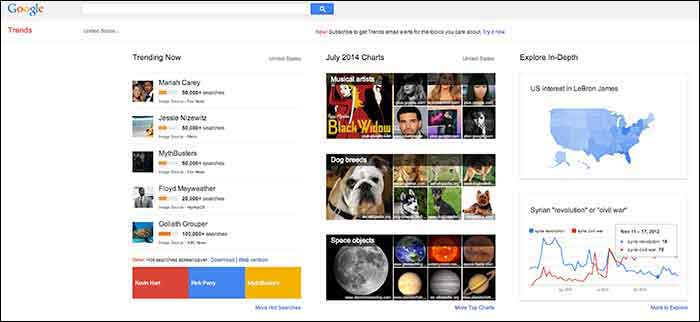
    When you visit Google Trends, you will see three columns of interesting data, so where should you start? The best place to start is with your goals in mind. Do you have specific keywords in mind that you would like to research and compare, or do you want keywords generated for you based around a topic? Either option is available here, along with many other unique features that make it a useful tool for SEO experts.

    GoogleTrends

    Here you will find 3 main categories: “Trending Now,” “July 2014 Charts” and “Explore in-Depth”. The first two categories could be used to brainstorm social media and blog ideas because you can see what’s being searched the most that day as well as a review of the past month’s top searches organized by topic.

    I am going to examine the third column on the page titled, “Explore in-Depth” because I find it most useful for SEO purposes. Still keep in mind the other two columns, however, because they relate to recent news and pop culture that’s also trending. The “Explore in-Depth” column shows two examples of ways you can examine topics and keywords. Click “More to Explore” at the bottom right-hand corner to see all of your search options.

    How to search by Keyword

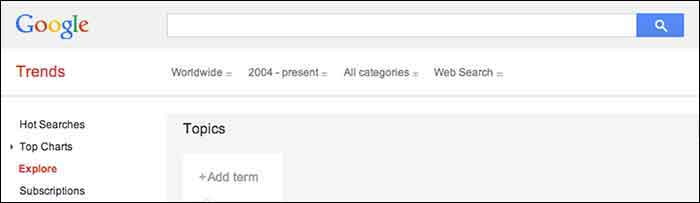
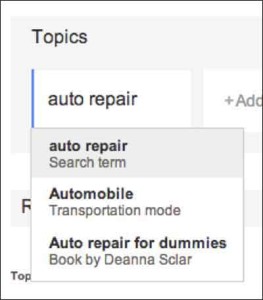
    When you start adding “Topics” that you are interested in gaining search value for, you will also see a drop-down box appear which gives you different types of searches to select. The example below shows “Search term,” which would be the keyword or query, “Transportation Mode,” which is a category. Google will find keywords that fall into that category, and “Book by Deanne Sclar” which indicates a branded search for that book. Once again, think about your goals. If you have specific terms in mind that you want to research, then select the “Search Term” option. If you want to explore a category and see what keywords were searched the most under that category, select the category.

    GoogleTrendsTopicsImage

    GoogleTrendsTopicsMenuImage

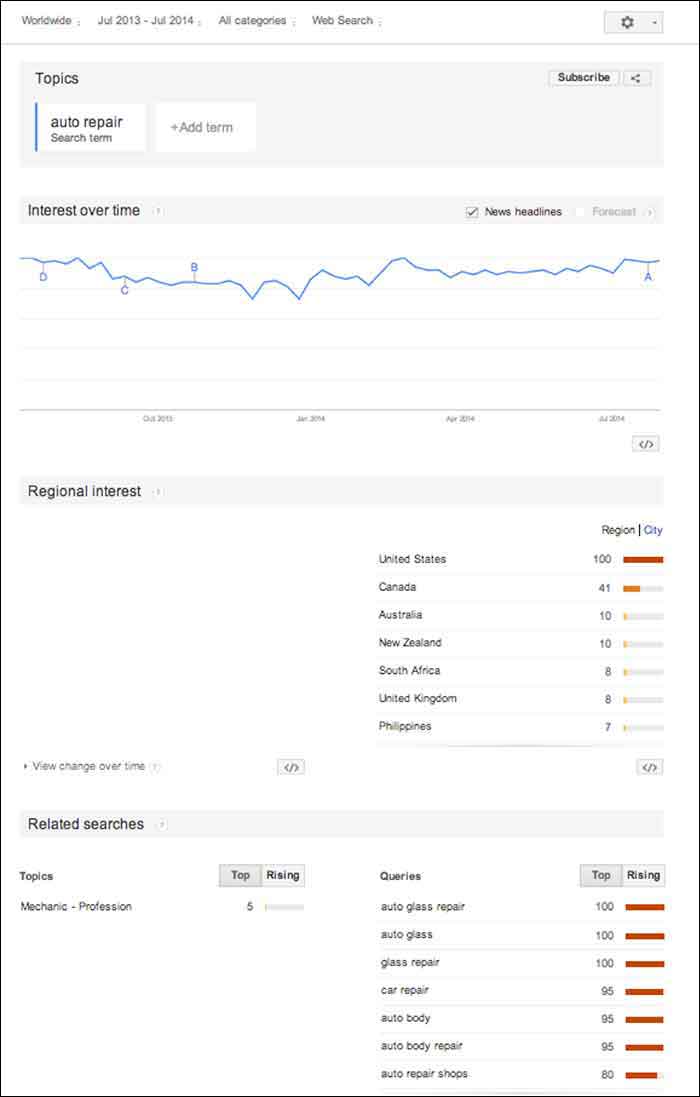
    I first selected “Search Term” and filtered the dates of our search to July 2013-July 2014. As you’ll see below, I receive an “Interest over time” graph, but I am also given a “Regional List” category of countries who have searched for “auto repair” the most. I have also been supplied with “Related Searches” at the bottom of the page. Let’s explore these resources.

    GoogleTrendsTopicsInterestsImage

    Note that the numbers on these graphs are not absolute numbers. They are relative to each other to reflect a trend.

    “Numbers represent search interest compared to the highest point on the chart. If at most 10% of searches for a given region and time were for ‘pizza’ we’d consider this 100. Each point on the graph is divided by the highest point and multiplied by 100. When we don’t have enough data, 0 is shown.” -Google Support

    1. Interest over Time

    GoogleTrendsTopicsInterestsForecastImage

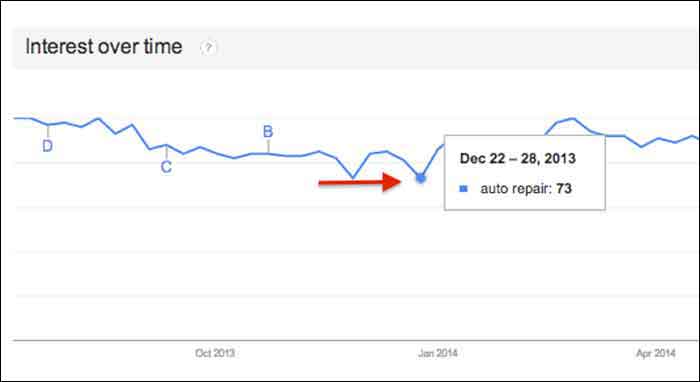
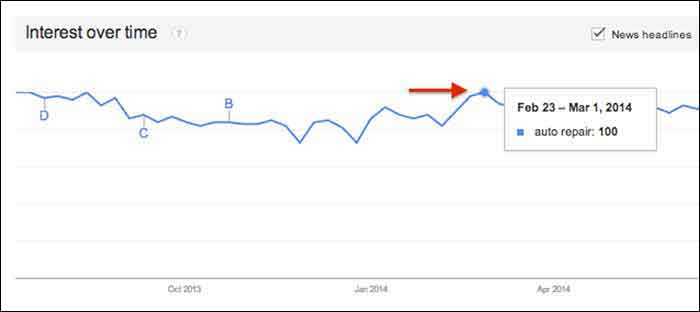
    This graph gives us a snapshot of the overall trend of searches for “auto repair” between July 2013 and July 2014. Hover over any point in the graph to see the exact score that Google Trends gave that time period of searches. After hovering over these points and comparing the highest score to the lowest, I realized that there was no dramatic change, but there was a slight decrease in late fall and early winter months.

    GoogleTrendsTopicsInterestsDecImage

    GoogleTrendsTopicsInterestsFebImage

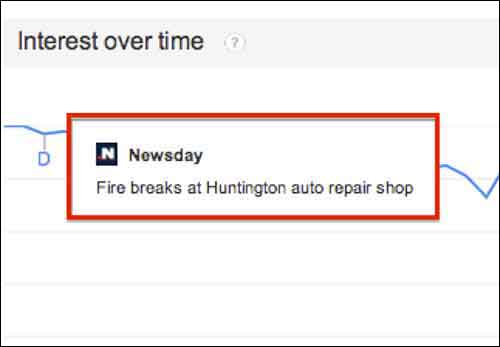
    You may notice the letters next to what seems like random points on the graph. These letters represent times when news headlines included that keyword. This is an interesting tidbit of knowledge to consider. Knowing if the trend increased dramatically is important because it could be due to an outlying factor.

    GoogleTrendsTopicsInterestsNewsdayImage

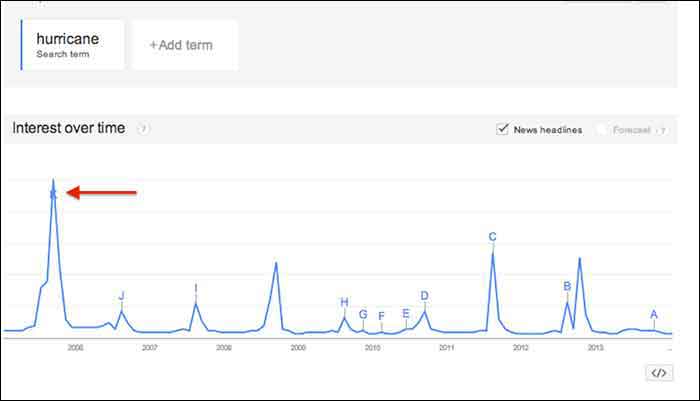
    Fun Fact: Look at how the trend for the keyword “hurricane” was affected by Hurricane Katrina in 2005.

    GoogleTrendsTopicsInterestsHurricaneImage

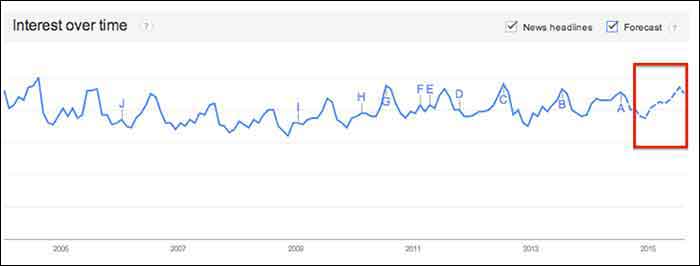
    You may notice the “Forecast” check box to the right of the “News Headlines” check box. This feature attempts to predict the upcoming trend of your search term. Note that you have to extend your start and end dates to make this option available. To yield the most accurate forecast, open the start and end dates to as wide as possible. This yielded the below results, showing the possibility of slight decreases in the fall and early winter months, with a continuous increase in the spring and summer months. Note that I had to hover over the graph points to figure out the dates because the graph does not let you zoom in.

    You could use this chart in conjunction with other keyword research tools such as Google Ad Words’ Keyword Planner to expect possible decreases or increases in certain keywords due to seasonal search value. For example, it’s not surprising that “ac repair” is not a particularly common search word during the winter months. Other keywords with seasonal value may not be as obvious, however, so resorting to Google Trends serve as one tool to help you crack the code when dealing with what seems to be seasonal increases or decreases in the search rankings.

    GoogleTrendsTopicsInterestsForecastImage

    2. Regional Interest

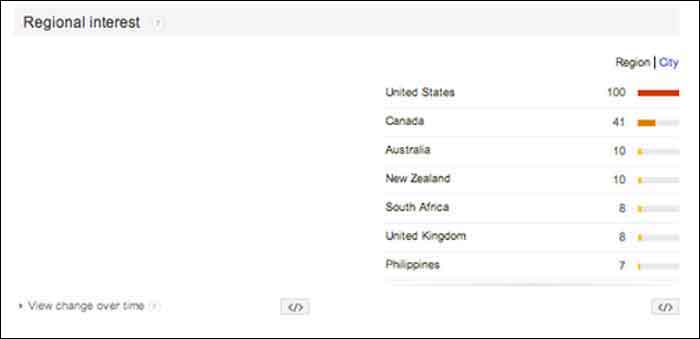
    “Regional Interest” displays larger areas that are searching for your keyword the most. While this is a useful tool for pinpointing countries and large cities, it does not typically show small cities or rural towns. In a global search (as shown below) the results help to narrow down the top countries searching for a keyword, and then the largest cities by clicking the “City” tab. The numbers represent the same calculated numbers as in the “Interest over time” section, so they are normalized and are the outcome of comparing the search volume to the area that searched for your keyword the most.

    For a business with a statewide, national or a global target audience, this map could help you pair the keyword with specific locations. It is possible that more people search “auto repair” in Detroit, while more people in Los Angeles search for “car repair”. This sounds like a slight difference, but the more precise you can be when choosing keywords, the higher your possible rate for success will be.

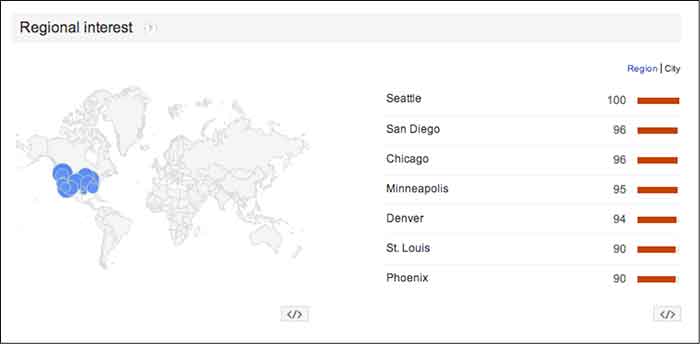
    In this case, the United States shows a dramatically higher interest in “auto repair” than any other country. You can click on each country to see a breakdown of interest within each one. You may also click the “City” link next to “Region” for the cities with the most interest in “auto repair” despite the country (demonstrated in the 2nd photo below).

    GoogleTrendsRegionalInterestsImage

    GoogleTrendsRegionalCityInterestsImage

    3. Related Searches

    If Google identifies your keyword with other similar terms that are being searched for, it will list them in the Related Searches section. This section is broken down by “Topics” and “Queries”.

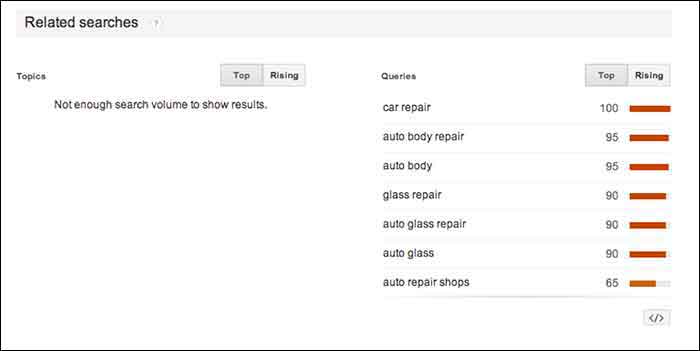
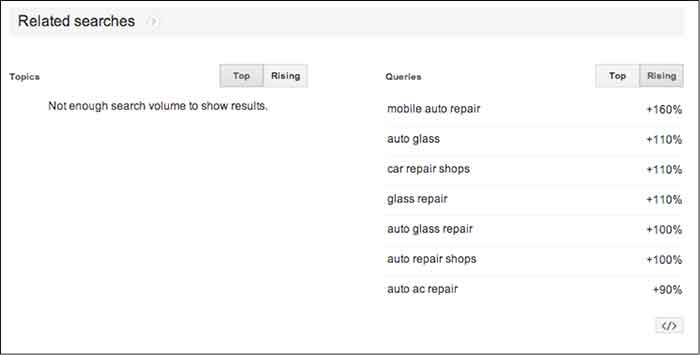
    In this case, I received queries, but did not receive any topics. The message under “Topics” read, “not enough search volume to show results”. In keyword research, however, I would prefer to look at the queries because they are exact keywords. For example, “car repair” and “auto body repair” are the top two related queries listed for “auto repair” (shown below). You could use this list to find keywords that you may not have thought about researching, or to examine the similar keywords in relation to the keyword you are searching.

    GoogleTrendsRelatedSearches

    The “Rising” tab under “Queries” shows terms that have had a significant increase in searches compared to the previous year. As shown below, “mobile auto repair” has risen 160%. This does not mean that “mobile auto repair” is one of the highest searched terms overall, but it may be worth monitoring throughout the campaign to see if it continues to rise and could be important to rank well for. With the rise of mobile Internet usage, it makes sense that this term could continue to increase in value.

    Resources:

    Google’s Algorithym: http://www.google.com/intl/en-US/insidesearch/howsearchworks/algorithms.html

    Google Trends data calculation: https://support.google.com/trends/answer/4355164?hl=en&rd=1

    Google Ad Words’ Keyword Planner Tool (must be logged into Google Ad Words):

    https://adwords.google.com/ko/KeywordPlanner

    GoogleTrendsRelatedSearchesRisingImage

    Finding a Pattern:

    I started researching more specific auto terms and found that there was a seasonal pattern for the service, “auto detailing”. I would not make this seasonal observation a factor in whether to choose the term as a targeted keyword or not because there is consistent search value. Although, it may help explain a decrease of site traffic in the winter months if that occurs.

    It is easy to get caught up in looking for a direct cause and effect between SEO practices and search engine rankings or site traffic, but expanding your research to recognize seasonal patterns can give you a larger idea of how your industry is searched for online.

    My next tutorial will examine search results by “Topic” instead of specific keywords. Stay tuned to learn more about how this can help your SEO practices!


    Image Source:

    Google Trends Logo

  • 5 For Friday – Amazon Ad Challenge, Facebook Changes, Twitter Spam, & Google’s Snafu

    1) Amazon Takes on Google Adwords – Wall Street Journal

    AmazonLogoImage

    The war for Internet supremacy rages on between Google and Amazon. The increasingly competitive relationship between the two giants has grown even more strained as of late, but their tenuous relationship has survived largely because Amazon is one of Google’s largest advertisers for text ads. But that may change.

    Amazon is working on a competing in-house platform, and testing could commence as early as later this year. Using the plethora of shopping data the online retailer has amassed, the program could almost instantly become a major force against the search engine’s online ad dominance.

    2) Despite More Ads, Facebook Promises, “We Will Not Show More Ads” – Digiday

    Speaking of Internet giants, Facebook is in the news again. In a rather quiet update earlier this month, Facebook amended its advertising policy to allow marketers to show ads more frequently in users’ News Feeds.

    The update allows advertisers to show the same ad twice a day, as opposed to the previous once a day restriction. The new update also allows advertisers to show users two News Feeds ads per day from a page that they did not explicitly “Like,” again up from just one.

    Facebook emphasizes that you will not see more ads from various companies, just possibly more ads from the same company. A Facebook spokesperson said of the change, “This does not change ad load. We will not show more ads; rather, we are updating the spacing between ads, and relaxing some of the parameters around the insertion of ads.”

    Hmmm… more ads is more ads, no matter who they are from.

    3) More from Zuckerberg & Co: Facebook is Finally Cracking down in Upworthy-Style Click Bait – Gizmodo

    We’ve all seen it – an annoying, attention-grabbing headline like “No One Would Help This Little Girl from Being Bullied. What She Did Next Will Shock and Amaze You.”

    Of course, these headlines are designed only to generate clicks, but dang, am I intrigued. I mostly refuse to click them simply on principle, but even when I do succumb to the temptation, I am always disappointed.

    DoNotPushButtonImage

    Thankfully, Facebook is finally taking steps to eradicate this spammy click bait by looking at how long people actually read the articles they click on as well as comparing the click ratio to comments, “Likes,” and shares.

    Facebook also announced that links should be posted in a “link format” instead of shared in the status update and captions of photos. Posts that have links in the captions will be given less priority in the News Feed.

    4) Meet Twitter’s Spam-Fighting Tool – Marketing Land

    And now, a word from that other social media juggernaut: Last week, Twitter gave an inside look at their super spam-killing system known as BotMaker. Since launching the system recently, spam metrics have dropped 40% overall.

    BotMaker is designed to prevent spam content from being created, reduce the amount of time spam appears on Twitter, and reduce the reaction of new spam attacks. To accomplish this, Twitter uses a combination of systems that detect spam at various stages: Scarecrow (real time), Sniper (near real time), and Periodic (over extended periods of time). What makes it even more effective is its ability to adapt quickly with new models and rules to combat the ever-changing production and proliferation of spam.

    To learn more about the creation of BotMaker and how it works, feel free to dig in deep over on the Twitter Engineering Blog.

    5) Moving to HTTPS: Good or Bad? – Wall Street Journal

    Google recently announced it would be giving a boost in search rankings to encrypted websites. But in an effort to push site owners to switch to HTTPS, Google overlooked the fact that many web components, including its own Trusted Stores and AdSense, are not completely compatible with those types of sites yet.

    To protect sensitive info, sites were already required to have their checkout pages encrypted, but the announced rankings boost spurred many sites to try and convert all of their “non-sensitive” pages as well.

    This caused a bit of a problem with user experience. Trusted Stores is not compatible with basic encryption, meaning that the required badge cannot be displayed. Without this badge, Google will not accept HTTPS sites into the Verified Stores program.

    As for AdSense, Google now acknowledges that “if you convert your HTTP site to HTTPS, ads on your HTTPS pages might earn less than those on your HTTP pages.” This is because the HTTPS ads don’t compete in auctions with HTTP ads, which lowers rates. Whoops!

    OopsMyBadImage

    Image Sources:

    Amazon in Browser

    Do Not Push Button
    “Oops my bad”

  • Google Instant Verification Passes The Sentence & Swings The Sword

    On July 31st, Google rolled out an instant verification option for local businesses that have already verified their websites with Google Webmaster Tools.

    WaitInstantVerificationImage

    There is, however, very specific cases. As the Google support page linked above states, it’s important to note “that some business categories may not be eligible for instant verification.”

    OneDoesNotSimplyVerifyAListingImage

    Webmaster tools verification option won’t work for your business if:

    • You’re creating a new listing
    • The pre-existing listing is already claimed by another user and your business has to request ownership
    • You have to change the website on the pre-existing listing you want to claim
    • Webmaster Tools isn’t verified BEFORE you claim the listing
    • Webmaster Tools isn’t verified in the same account that you are claiming your business listing in
    • Your company’s “My Business” category is not one of the Google approved categories eligible for this verification.

    “My Business” pages we tested:

    Car dealership: Claimed in account with pre-existing listing in need of claiming – worked

    Heating supplies provider: Had ALL ideal criteria. Listing had correct site and was available to claim, and WMT was already verified in the account. – didn’t work (So this business must have a category problem that makes it ineligible.)

    Real Estate: Created new listing- didn’t work

    Basically, if it’s possible, Google will automatically verify your business on its own when you claim your business in Google My Business. Google skips giving you any verification options altogether and just auto-verifies the listing.

    Assuming this new Google My Business feature is a work in progress on Google’s end, maybe once we see more categories accepted, it will become more doable and the qualifications may not be so restrictive. Even then, with the stipulations currently, it would be a rare occurrence.


  • Give Your Site Some Link-building Lovin’

    MclovinYourLinksWith this year’s Google algorithm updates, we’ve heard a lot of buzz about implementing disavows and getting rid of bad, non-relevant links to your site. However, what we’ve heard less about is what to do after you get rid of all of those links. Now that those disavowed or deleted links are no longer helping, (or hurting) your site, it’s important to build up a profile of links that are strong, relevant, and influential to help elevate your site back to its previous authority and status. Here are some tips to help give your site the link building lovin’ that it needs.

    1. Create A Link Building Strategy

    Just like with any marketing endeavor, it’s important to create a roadmap and set goals to get a clear sense of where you want your efforts to take you. Take a look at the current links pointing to your site. Then, decide which types of links are relevant and helpful to your site (the kind of links you’d like to pursue more of). Based on that, allocate a budget, time, and metrics to measure your upcoming link building efforts.

    2. Use Real-Life PR Opportunities

    A great way to get natural links back to your site is to do it the old-fashioned way with PR opportunities. Host an event, go to conferences, engage in your community, leverage relevant organizations — all of these activities not only build your brand, they also provide credible linking opportunities for your website.

    Remember: Almost anything that happens offline can be captured online as well.

    3. Leverage Great Shareable Content

    The adage “content is key” is especially applicable when it comes to link building. People are consuming massive amounts of content on the Internet everyday. Content is a great way to capture viewers’ attention. Additionally, when viewers share a piece of content or use it on their own site, your website is attributed as the source.

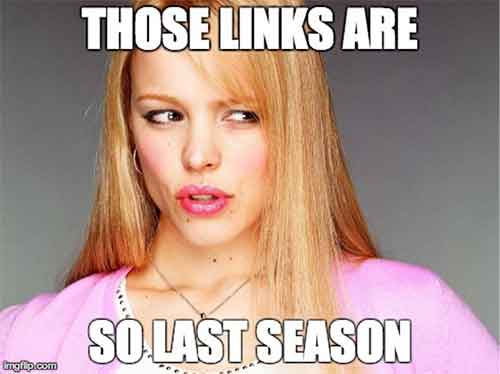
    Getting rid of old, irrelevant links to your site is just like cleaning out your closet. Every wardrobe needs updating, so send last season’s links to the thrift store and go find yourself the latest collection of new links to give your site a boost.

    LinksSoLastSeason

    Image Sources:

    Link Memes

  • Five For Friday: Vine Allows Video Imports, AdWords Launches New Bulk Editing, Snapchat Does News, And More!

    1. Vine Finally Lets You Import Videos From Your PhoneMashable

    Love making videos on Instagram? Well guess what! The popular app, Vine, is finally allowing users to upload videos from their phones.

    In addition to being able to import your own videos, Vine now also allows you to edit videos, and they have been encouraging users to upload older videos stored on their phones and share them with hashtag, #VintageVine. Check out the announcement video below!

    2. Google AdWords Launches New Bulk Editing ToolsSearch Engine Land

    Google announced early Wednesday morning that AdWords will now contain a bulk editing feature. This snazzy new tool will allow users to update their settings per campaign in a more user-friendly and efficient way. Some of the benefits include:

    • A filter for campaigns targeting specific location
    • Updating multiple campaigns with a new targeted location
    • Adjusting other settings such as language, campaign end dates, and ad rotation

    DrakeAndJohnGifImage

    3. Snapchat is Planning A Move into News, AdvertisingMarketing Land

    ghostsmilingimageThe Wall Street Journal reported Wednesday that Snapchat is expected to launch Snapchat Discovery in November. This new product will allow Snapchat users to read news articles and watch video clips the same way they do now: by holding their finger down on a phone screen. The Journal also reported that Snapchat CEO Evan Spiegel is looking to get into advertising for his popular app.

    4. Bing Maps Adds Hundreds of Streetside & 3D City Images; Plus New HD Aerial ImagesSearch Engine Land

    Bing announced a massive maps update this week. Bing Maps now has over 100 cities that support Streetside imagery across America, including Richmond, Boston, Denver and more. They also now have 3D city images and new, high resolution aerial images. 3D cities are viewable through the Bing Maps Preview app, available exclusively on Windows 8.1. Bing Maps also has new high-resolution imagery in over 150 countries on every continent in the world, covering five million square kilometers.

    5. Moz Announces Brand New Beginner’s Guide to Link BuildingMoz

    Moz released their third guide for marketers this week. As all marketers know, link building has changed over the years. One thing that has not is the importance of link building. In this updated guide, readers will learn:

    • What is link building, and why is it important in SEO?
    • What are good links and what are bad links?
    • How you can start a link building campaign
    • Link building tactics
    • Link building metrics
    • The good, the bad, and the ugly of link building
    • Advanced link building tips and tricks

    Click here to download the PDF!

    ApplauseGifImage

  • A Few Things You May Or May Not Have Ever Wanted To Know About Schema, But Were Too Bored To Ask

    As Google continues to affirm its support for more detailed types of schema markup when crawling sites, it seems that there is an increased level of general interest in the concept and implementation of schema. I know that across our office, there are constant enraptured whispers about the ethereal mystery and beauty of this particular variety of microdata. At least, that’s what I imagine. In any case, I am quite certain that people across departments in the Search Influence office, and presumably others, are talking about schema more than they used to.

    If you are already thoroughly comfortable understanding and implementing schema, this is not a blog post for you. Take a long pull on your cigar, another sip of fine brandy, ease the seat back and return to your Baudelaire. As for everyone else, I’m writing this because Google’s documentation on the subject – though extremely helpful and somewhat surprisingly transparent – is probably still a bit dense for those not familiar with microdata as a concept or without some experience coding a web page. I’m hoping to help bridge this gap for anyone seeking a schema primer without the time or inclination to sign up for a night school web design course.

    So What Is Schema Anyway?

    Schema is a type of microdata that is standardized and structured in a way that can help search engines parse pertinent information from web content. The official description can be found here, but let’s keep this simple.

    Many of us went to school at a time where we had to carry around these huge, heavy things called “books” that contained all sorts of crucial knowledge within words printed on bound “paper.” In the course of trying to learn the material contained in the books, many students found it helpful to highlight really pertinent passages in obnoxious neon colors. Highlighting made it a lot easier to go back and see what passages to focus on when studying later for an exam or putting together an essay.

    Well, schema is a lot like highlighting for a search engine. We mark up certain key pieces of information that may provide a clearer concept of what is most important for a search engine to pull from a larger body of content. It’s not saying that the entirety of that content isn’t important in any way; rather, it’s streamlining the presentation of content so that Google or Bing can get a clear picture of what the page is about even before parsing the full scope of what is contained on a page. Accordingly, there is a vast array of different schema types available for different content topics or functions. Whether the topic of your page involves a bus trip or a volcanic eruption, there is probably a schema type that can help further break down your content.

    OK Cool, But Why Bother If Google Is Going To Read Everything Anyway?

    Yes, Google will find a way to establish a general concept of what is on your page for presentation in search results with or without the use of schema. But, well, the Internet is kind of huge, and search engines tend to get kind of busy dealing with that a lot of the time. I think anyone interested in schema understands that Google and Bing use extremely intricate and elaborate algorithms to assess content for use within search results. Even with all of Google’s bears, birds, and mythical beasts on the job, however, it is still possible for information to be misconstrued within Google’s results. It is less a matter of keeping a search engine from getting things wrong than it is of helping a search engine get things more accurate.

    For a hypothetical example, let’s look at this – as I do most things – in David Bowie terms. As you may or may not be aware, David Bowie actually briefly changed into an apocalyptic half-dog monster in 1974. This is a fact. Had you been unaware of this rather unusual moment in human evolution and overheard it discussed in an elevator (which is certainly where most of us first hear about otherworldly metaphysical transformations), you might be tempted to Google it. Well, if you were to Google “david bowie changes into dog monster,” you’ll eventually find some things about dog monsterdom, to be sure, but you also get an awful lot of results related to the classic 1971 song “Changes,” the compilation album “Changesbowie,” and the 1980 album “Scary Monsters.”
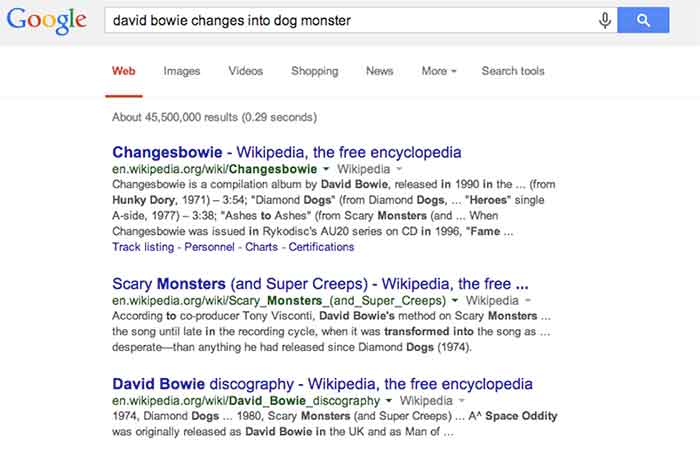
    ChangesBowieSchemaExampleImage

    Well, in this example, Google isn’t doing anything wrong really. It gave you perfectly logical results related to the primary subject of your search and based on the many of the keywords entered, but it still wouldn’t be quite what you were looking for. This is where schema would come into play. If an obviously extant news article on the completely 100% factual occurrence of David Bowie turning into an apocalyptic dog monster had been marked up with, say, Article schema breaking down the subject matter and providing a summary of the content, Google would likely have better understood to serve you the content that directly matched your search query. Likewise, were album and song writeups for “Changes,” “Changesbowie” and “Scary Monsters” marked up with MusicRecording schema or MusicAlbum schema, Google would be better able to differentiate these types of results from articles more pertinent to this search.

    I realize that it’s cheating to hold Google accountable for not being able to perfectly assess my intent in searching for viable news on an event that didn’t actually happen, but this example still hopefully illustrates how schema can be employed to help Google get from “logical and related” to “absolutely on point” in its serving up of search results.

    There is, of course, a less tangible, but equally (if not more) enticing motivation for using schema. Imagine you are trying to settle on your order at a restaurant, and you ask your server if there are any vegetarian options. You’re probably going to leave a bigger tip for a server who specifies and describes the vegetarian options available, versus a server who simply says, “yeah, read the menu” and walks away. In the same way, there is a mentality when using schema that making it easier for Google to see what it needs to take away from a page might result in a better ranking in search results. I will not say in any definitive terms that adding schema markup boosts a site’s search ranking, but – if used correctly and responsibly – it sure isn’t likely to hurt, is it?

    So that’s all it does? What’s all the fuss?

    Well, actually there are a number of other things we can do using schema beyond making Google’s life easier and hoping for some vague benefit in rankings. With many types of schema, we can make really cool things happen in search result snippets for specific types of pages with specific types of content.

    Review Schema

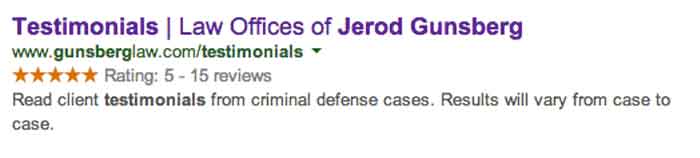
    One thing clients tend to like is having a really pretty star rating value appear in listings of their site in search snippets, which is something that can be accomplished using Review schema.
    StarRatingSchemaExampleImage

    By marking up a number of details within the content of this testimonials page, we are able to communicate enough information to Google about the ratings contained on this page that it presents the rating and review values right there in the search snippet. This is obviously pretty enticing for a user unsure of which result to click on in a long list of unfamiliar names and businesses.

    It is important to remember, though, that the reviews contained in review schema must contain actual ratings associated with said reviews in order to facilitate the addition of the pretty stars to the results. It is also good practice to include some portion of each reviewer’s name in order to establish legitimacy for the content being marked up. Also, in a case like the above example, where there are multiple reviews with multiple rating values, it is necessary for some cumulative review value totals to actually appear on the page. This is known as a review set’s aggregate rating, and it is required in order for the list of ratings to be compiled into a single rating value to be displayed as a star value.

    Video Schema

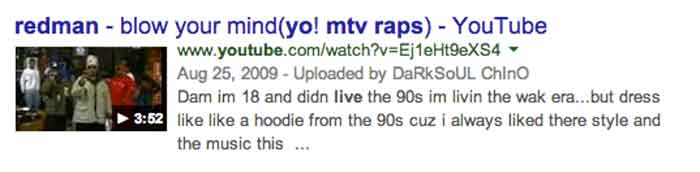
    Anyone who has used Google (so anyone reading this) has seen the potential results of video schema in action every time the inevitable Youtube video links comes up somewhere in your search results list. When YouTube links appear in search results, they are generally accompanied by a thumbnail of the video, which is also a direct link to play the video and the duration of the video being linked. See below:
    VideoSchemaExampleImage

    Effective use of video schema can lead to a similar thumbnail, play icon, and duration display within your site’s search snippets. This can be accomplished using self-hosted videos displayed with custom players or through embedded videos hosted on YouTube, Vimeo, or any other video engine. It is important to remain realistic about this though. Remember that Google owns YouTube, so it’s kind of unlikely that the page containing your embedded YouTube video is going to rank higher or be featured more prominently than the source video’s listing actually on YouTube.

    MusicRecording Schema

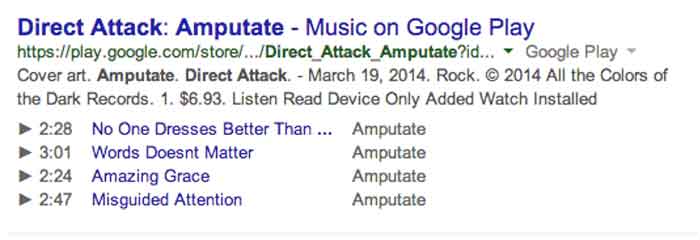
    Much like video schema, MusicRecording schema can display player icons with track, title, and duration details right there in the search snippet. This type of schema obviously only applies to a fairly niche segment of sites and/or clients, but it is another good example of how search snippets can be enhanced through schema. The example below displays a Google Play search result, which, as with fellow Google property YouTube, almost always displays the player info in the search snippet. Similar results can be accomplished in organic results with effective use of schema, however:
    MusicRecordingSchemaExampleImage

    OK, I Get It. So How Do You Do It?

    I’m not going to get into incredibly great detail here, because I promised a relatively simple primer and not a code-heavy breakdown that would scare away newcomers. Perhaps a more thorough explanation of the actual implementation of schema within HTML can be addressed in a future post. For now, I just want to explain schema implementation in terms of properly reading and understanding schema properties in the context of the schema.org item breakdowns.

    The most important thing to understand is that schema markup, like the HTML markup it is integrated into, is hierarchical in nature. This means that there are often numerous schema subproperties, within another schema subproperty, within a schema property, within the top level declared scope of a specific schema type, and so on. And once you go a next level deep in the hierarchy (or change the scope of your markup), the set of available properties is different and only applies to this new scope of the schema.

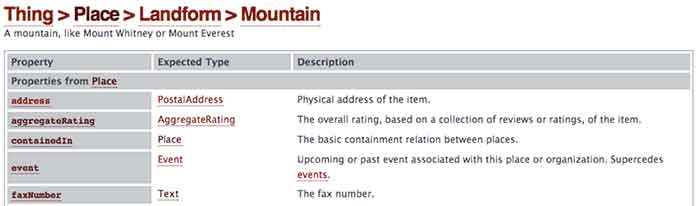
    As an example, let’s look at a section from the page for the always useful Mountain schema*:
    MoutainSchemaExampleImage

    So we’re going to start with Mountain schema as the scope of what we’re marking up in our content. As you can see, there is a list of available Properties for use within this schema on the left. With a nod back to the much earlier comparison in this post, these are all the different types of information we can “highlight” for a search engine. The Description on the right is a pretty self-explanatory explanation of what the property should reference. So far, so good.

    Now, where things get a little tricky is in the Expected Type column in the center. Take a look at the bottom most property “faxNumber,” which is obviously very important. We all know how difficult it can be to send a fax to a mountain, right? Well, you can see that the faxNumber property has an expected type “Text.” This means that whatever text content you list as the value for the faxNumber property is what will be directly communicated to a crawler or search engine as the fax number for your mountain. Simple enough.

    Well, you’ll notice that all the properties above it have more vague and mysterious extended types associated with them. In fact, these types are entirely new hierarchical scopes for the schema being added to the page. So for the “address” property, for instance, instead of just dumping your mountain’s entire street address in as the value, as you can with “faxNumber,” you’re going to have to change the scope of this schema and fill in any address information according to the next level of properties contained in the PostalAddress schema type. Once you change scopes in schema, the deeper level schema type does not know what is going on in the outer levels. So in this example, your PostalAddress does not know or see your mountain’s fax number.

    OK, This Is Getting Ugly. Just Stop.

    Good call. This is probably a good place to cut off an intro level crash course in schema, since anything much more detailed would involve some actual HTML knowledge or experience. Hopefully, this will have helped a non-web developer understand a little bit more about what schema is and how it can be employed to better communicate with search engines. There is such a vast expanse of available schema types for use marking up web content, a fundamental grasp of its structure and function can be extraordinarily useful in pointing your content more directly to the right readers.

    * This is where the Game Of Thrones meme would have gone if I weren’t such a snob.

  • Five For Friday: Facebook Mobile Ad Tracking, Promoted Video Tweets, And More.

    FiveForFridayRedFiveImageFacebook rolls out new way for advertisers to track engagement with mobile ad campaigns. User suspicion on the rise as updated Messenger app gains greater access to personal information stored on mobile devices. Twitter begins testing promoted video posts for brands. Yelp and Bing join forces in the name of breaking down international language barriers. New addition to Google guidelines marks the end of guest blogging. Get the scoop with this week’s Five For Friday.


    1. Facebook introduces new ad data tool – Marketingland

    Facebook announced on Wednesday that they would begin allowing advertisers to track the click through rate of promoted posts and sponsored ads on mobile devices. According to a white paper written for Facebook by Altimeter Group titled, “Why Mobile is Essential for Brand Marketing,” users spend an average of 40 minutes per day on the Facebook mobile app. The white paper also revealed that users check their mobile phone nearly 150 times per day, and that 51% of mobile users say they prioritize checking their notifications over other messages.  Aside from confirming the fact that most people are more attached to their smartphones than their own shadows, the research reveals just how important it is for businesses to be able to reach their target audience with mobile ads.

    Conversion tracking helps businesses measure the return on investment for their Facebook Ads. The conversion reports on the actions people take after viewing and interacting with an advertisement. Marketing Land discusses the implications of the new cross-device feature, including that it enables advertisers to closely track mobile browsing behavior and allows them to better understand how customers are reacting to their campaigns. While Facebook already allowed for advertisers to target specific users, the new cross-device report amplifies an advertiser’s ability to view more detailed metrics on mobile conversions.

    What does this mean to you? Now, using this cross conversion report, businesses can track the success rate of their ad campaigns. Ads that were previously unsuccessful among PC users may be working well as a real-time mobile marketing tool. These ads can be tracked based on location as well, so get excited for better campaign analysis!

    2. Mark Zuckerberg’s Facebook Messenger spy game – Mashable

    TryingToReadMyThoughtsImage

    You’ve probably noticed a recent influx of paranoia popping up on your news feed, this time about the “permissions granted” required to download the new Facebook Messenger app. The concern is based on suspicions that the app can access your smartphone camera and microphone along with a plethora of other private information stored on your device.  Considering the PRISM program’s deal with Facebook, as revealed by Edward Snowden just one year ago, the public is beginning to feel more aware of apps having increased access to personal information. The origin of these suspicions seems to be based off a 2013 Huffington Post article. Some of the app’s new capabilities include:

    • Facebook can read your phone’s call log, including info about incoming and outgoing calls. Who have you been calling? How long did you talk to them?
    • Facebook can actively track your GPS location, approximate location, or precise location.
    • Facebook can actively record video and audio from your phone and take pictures as well as view all files stored on your phone.

    Mashable breaks it down for us in a different way, explaining that a lot of the permissions allow the app to have all of its convenient, user-friendly sharing capabilities:

    • Facebook Messenger requests permission to access your camera and microphone so the user can share images and record videos right from the app.
    • Facebook allows users to directly call people with the app. It needs permission to access your device’s call log so that it can identify who may be calling you via the Messenger app.
    • Facebook requests permission to access your GPS location so that you can check-in and share your location with friends and in posts.

    Now that we’ve walked through two perspectives on the issue, what do you think? Is this just a ploy to monitor the 250 million users on Facebook, or is it another step toward providing an optimal user-based experience?

    3. Twitter introduces promoted video sharing – Mediabistro

    TonyHawkTwitterVideoImageTwitter has introduced a new nifty feature where businesses can better communicate with their followers using promoted video sharing. According to the Twitter blog, “by using Promoted Video, it’s easy for brands to upload and distribute video on Twitter, and to measure the reach and effectiveness of this content.”

    What does this mean to you? As a business, you’ll have more options when it comes to competing for user attention and interaction. If your business is already actively using Twitter, statistics have shown that promoted videos gain more viewers than ever before. The cost-per-view ad model includes ample opportunity to see viewer analytics, including organic as well as paid posts. Overall, this means a much more engaging Twitter feed and increased opportunities for businesses to reach targeted audiences.

    4. Yelp introduces Bing translation– Marketing Land

    BeautyBeastFoodTastingImageHow nice would it be for everyone to communicate with each other as needed, especially about food? Well, that day seems to have arrived, as Yelp has now introduced a Bing translator capability, according to Marketing Land. Yelp can now translate up to 15 languages, which is sure to help travelers that can’t seem to navigate through restaurant menus, reviews, and directions that are posted in different languages. For international eateries looking to attract tourists with local customer reviews, this app update is perfect.

    5. Google updates guideline violations  – Search Engine Land

    With the ongoing battle for good content, Google+ has now updated their listed standards for determining what is considered spam. Guest blogging, a common practice used for SEO purposes, is now on the Google radar. Search Engine Land reports that guest blogging has been used as an attempt to cut-corners around Google’s algorithm, so if you are using low-quality guest blogs to increase the results of your Google page search results, then it is definitely time to stop. Certain guest blogger sites have already been removed from the Google-ranking loop, as reported by Search Engine Land back in April.

    This update is just another example of Google’s ongoing mission to deliver meaningful, authentic content to Internet users. If you haven’t already, take the time to review your business’s blog and website. The real moral of this update: Consider the ways your products and services cater to your audience’s needs by publishing content that is unique and informative!

    Image Sources:

    Red Five Image

    They’re Trying To Read My Thoughts Gif

    Tony Hawk Twitter Video Gif

    Belle Tasting Food Gif

  • Five For Friday: Tweets Within Tweets, Foursquare Gets A Facelift, And More!

    FiveForFridayImage

    1. Personal Preferences Killed The Check-In
    -Mashable

    Once upon a time, Foursquare made “checking in” at a location cool. But as of its latest update on Wednesday (8/6), the app has completely removed that feature. Now, those who want to broadcast their location to their social media spheres can do so with Swarm, Foursquare’s spin-off app that debuted in May.

    So what does that mean for Foursquare 8.0? Well, the app has a completely remodeled user experience: new colors, new logo, new layout, and new functions. Once you login, the app asks about your preferences (Are you into Pho? What about Chai Lattes?), then uses those preferences to provide recommendations just for you about places nearby. The app also provides filters to help you narrow down your findings. By using these filters and profiling users’ tastes, Foursquare has successfully become a more personalized version of databases like Yelp, and could potentially change the way people explore their cities. Pretty epic.

    2. Get Your Google Reviews On Your WordPress Blog
    -Blumenthals

    For those with WordPress blogs and websites, there is now a plugin that allows you to share your Google reviews on your page! Google Places Review lets WordPress sites embed Google reviews in two ways: The free, basic version provides a widget in the sidebar showing up to 3 of your most recent Google reviews. The pro version, which is available for $20, provides up to 5 reviews on any page using short codes. The pro version also allows you to filter by star ratings, offers optimized widget caching, and includes a customizable feature for collapsing and expanding reviews. Presumably, posting your reviews on your site can help boost consumer confidence, while providing easy exposure to your good reviews. A recent study by Dimensional Research found that 90% of consumers are influenced by positive online reviews, so get out there and show the interwebs how great you are!

    3. #Tweetception
    -MediaBistro

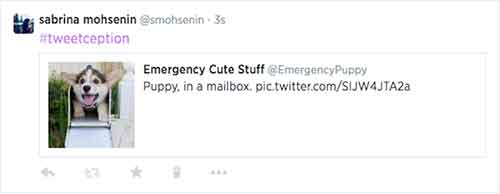
    For those who feel that retweeting simply isn’t enough, there was an interesting update from Twitter this past week: you can now embed a tweet within another tweet! All you have to do is copy and paste the URL of the tweet you want to embed, and then Twitter takes the wheel. The embedded tweet acts as a link that takes you through to the full version of that tweet (you can see my own #tweetception example below). The best part of this feature is that embedded tweets only use up the same amount of characters as any other shortened link, so you have roughly 115 free characters still left at your disposal.

    TwitterEmbedTweetImage

    If you want to get really fancy, the tweet-ception can go even further: you can embed a tweet that includes an embedded tweet into a brand new tweet (!)  – and they all link together in a chain. For now, this feature only functions on twitter.com and the official Twitter iOS and Android apps.

    4. Facebook Goes Down, So Does News Site Traffic
    -Marketing Land

    Last Friday (8/1), there was a brief Facebook outage that led to some interesting information. Chartbeat, a service that produces analytics for web publishers in real-time, announced that the overall traffic on news sites fell 3% during the downtime, which was ultimately less than an hour. What’s even more interesting is that the entrances to news sites via mobile devices dropped 8.5% during the outage, further proving just how important Facebook is to driving mobile traffic to online publishers. Another interesting factoid provided by Chartbeat shows there was also a “9% increase in homepage direct traffic,” meaning people look at homepages more when they don’t have Facebook to tell them what they should be reading. While all this information may seem fairly expected, it highlights just how powerful Facebook is as a news source.

    5.  You Can Now Delete Google Analytics Properties
    -SEO Round Table

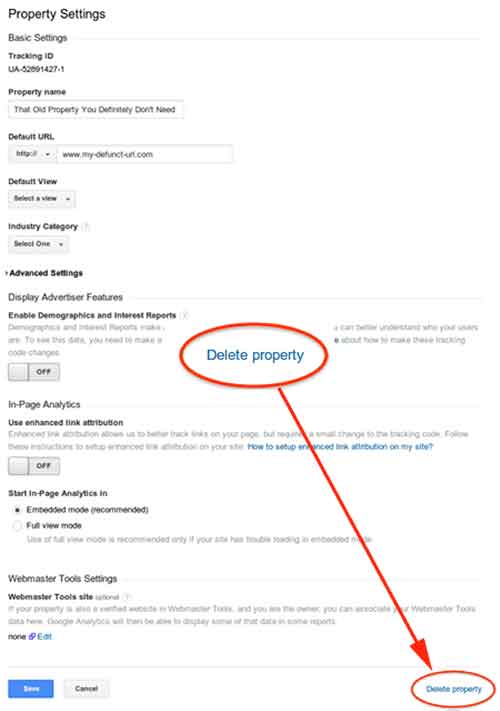
    This week (8/5), Google made a quiet announcement on its Google+ Page stating that you can now delete Google Analytics properties within your various accounts. In the announcement, Google explains that this was not previously allowed due to how the accounts, properties, and profiles were all associated with one another. According to Google, they are “excited to bring this additional flexibility and consistency to our users, which is the first in a series of improvements to managing deletions in Google Analytics.” If you want to delete a property, all you have to do is go to the property settings within admin view, then click “Delete Property” at the bottom right of the page.

    GoogleAnalyticsDeletePropertyImage

  • Google+ Crush Saga: Your Guide To Social Media Sweetness

    Google+ is SO complicated! That’s what a lot of our clients tell us. They get frustrated and, to be honest, so do we.
    There are so many questions! It can be overwhelming.

    What kind of Google+ page should you create?

    Which Google+ page should you use for posts and updates? Which page should you connect to your YouTube channel? How many types of Google+ pages are there?

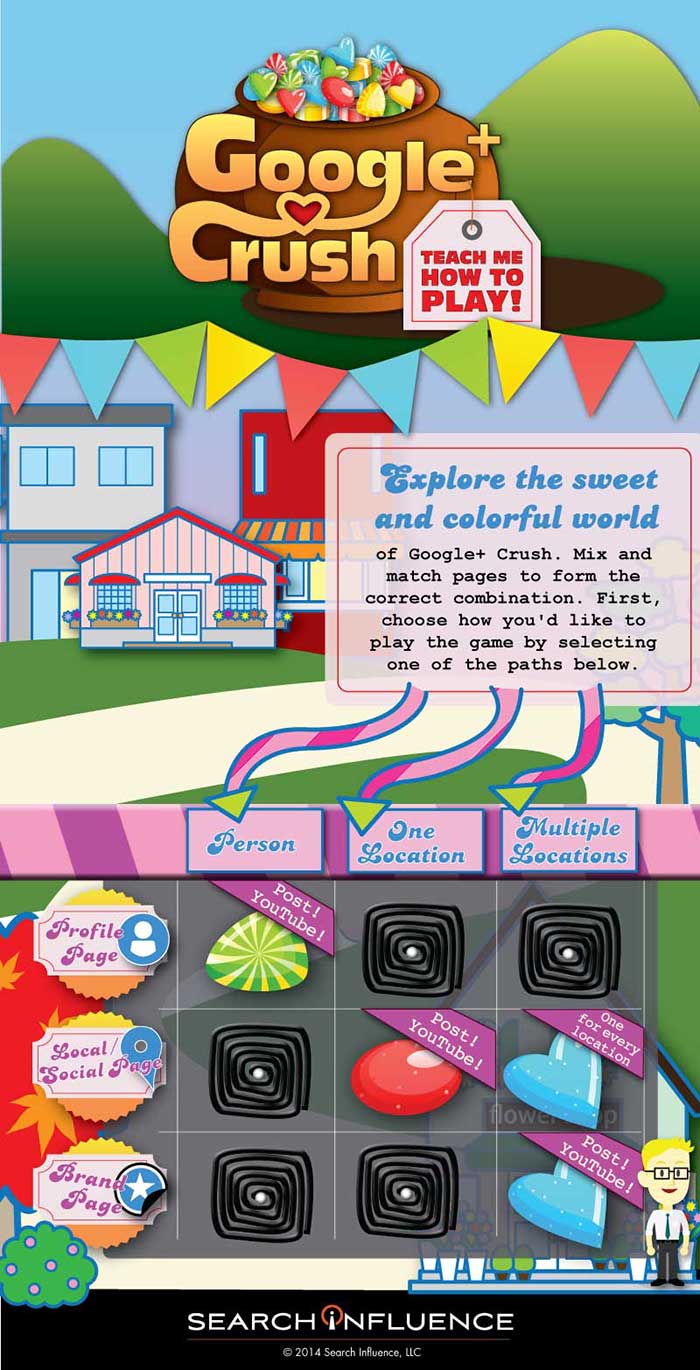
    To simplify this Google/YouTube situation, we’ve created this sweet little infographic to show:

    • Which pages you should create
    • Which page(s) you should use for regular posts and updates
    • Which page you should connect to YouTube

    As a reminder, there are three types of Google+ Pages:

    • Google+ Profile
    • Google+ Local/Social Page
    • Google+ Brand Page

    Explore the sweet and colorful world of Google+ Crush.

    Mix and match pages to form the correct combination, create the appropriate profile, and send the right social signals. First, choose how you’d like to play the game by selecting one of the paths.

    GooglePlusCrushInfographicImage

    If Google+ Crush Isn’t Your Type of Game, Just Read the Manual:

    • Are you looking to use your G+ profile for personal reasons (not associated with a business)? Start posting on your Profile Page and connect this page to your YouTube Channel.
    • Are you a business with just one location? Start posting on your Local/Social Page and connect this page to your YouTube Channel.
    • Are you a multiple location business? Create a Local/Social Page for each location. You should post to your Brand Page and connect your Brand Page to your YouTube Channel.

    Sugar crush! Remember, Google likes it when you play in their sandbox, so go ahead and start posting on Google+ and use YouTube channel to create your unique videos.

    And, above all, crush it!