Tag: Google

  • Avoid Customers Crying In Your Parking Lot: A Cautionary Tale

    If you’ve ever done a Google search for a business, you’ve likely seen this kind of result.
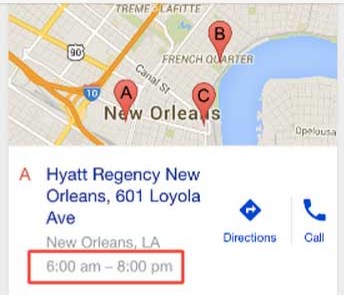
    MapsTimeViewImage

    And I’m sure at least once, you’ve seen this result, driven to the location, and found it to be closed.

    CatDrivingImage

    In that crushing moment, did you hear your heart beating in your ears? Did you see black spots? Did you curl up into a fetal position?

    Google lied to you. It clearly said the business was “open.” You had a full 8 hours before they closed! Rapidly stalking the business’ multiple social media platforms, you finally find one tiny post that says “Closed for the holidays.”

    If this has happened to you, you definitely are not alone. Rest assured that I have cried in a coffee shop parking lot due to this very scenario.
    QuoteImage

    With Great Power Comes Great Responsibility

    Know this, my comrades: it is not the fault of Google—nay! This falls on the responsibility of business owners as part of properly managing and maintaining a Google My Business profile.

    Currently, Google has not built out the functionality for saving holiday-specific hours ahead of time. As the profile setup currently stands, you’ll need to manually edit the hours of operation on a given day when your business is open (or closed) outside your standard hours of operation.

    See Google’s steps on how to update your business’ hours.
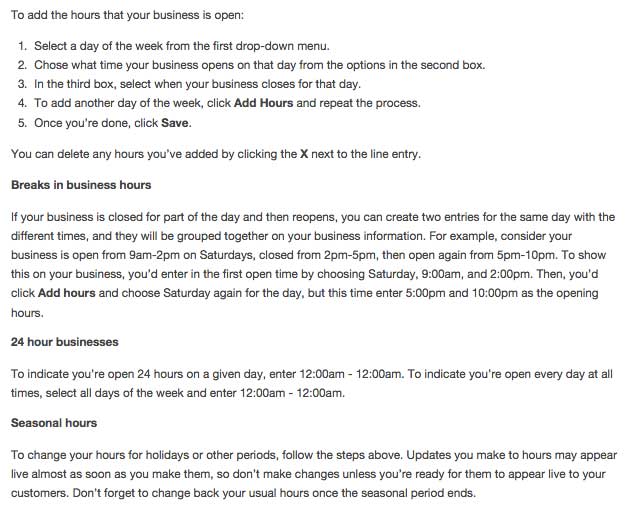
    InstructionsOnAddingHoursImage

    After scouring Google’s forum for topics related to holiday-specific hours, it doesn’t seem like they’ll be adding the ability to set such hours ahead of time. Many of you may grumble and say that this is the last thing you’d think about during the holidays and, man, I get it, but know this:

    If customers have just one instance where they very much look forward to coming to your establishment and are discouraged by misleading information, they have less of a chance of coming back. How can they know if you’ll be open?

    This issue, however, is not specific to the holidays. It’s also applicable to businesses that have season-specific hours, and … really, all businesses! Companies with out-of-date or incorrect hours will quickly lose favor with customers. Really, take this as a larger lesson for why displaying accurate information across the World Wide Web is essential to a business’ success.

    As Google’s search engine becomes increasingly more sophisticated, results will become increasingly more accurate. Online users already rely on the Internet to supply the most up-to-date information on any given topic, so why should your business be immune to this demand? The point is, it isn’t.

    Google Time Stops For No Man

    Set a calendar reminder the day before to update your hours. Set an alarm on your phone! Put post-it notes all over the place. Tie a ribbon to your finger. Pay your tech-savvy kid to do it. Or hire an Internet marketing company to manage your profile for you. Whatever method you choose, just know that you are doing a great service to your customers—and to the world!

    In addition to managing an accurate and up-to-date Google My Business profile, it’s a good idea to update your social profiles as well. Facebook has easy-to-manage settings on your business’ page. Additionally, if your website has a built-out blog, it might be a good idea to have a holiday-specific post. In addition to alerting your customers about abnormal hours, a holiday-specific blog post opens the door to great time-sensitive content marketing opportunities.

    Opportunistic Marketing

    For instance, let everyone know your restaurant is open on St. Patrick’s Day and post your holiday-specific menu for the day, highlighting any specials you may have on account of the holidays.

    Contracting company closed for Christmas? Make a blog post about being unavailable on certain days, but highlight necessary winter-related structural checks or services that you will be offering when you return to normal business hours. Share the blog post across your social media platforms.

    Medical practice open for limited hours over Easter? Post a piece highlighting choking hazards for Easter-related paraphernalia, common food dye allergy reactions, or the importance of a dental check-up after candy-centric holidays.

    CatBunnyHatImage

    Clothing boutique open on the Fourth of July? Embellish a blog post with photos of your cutest red, white, and blue outfits. Have a friendly contest amongst shoppers and get them to post the Fourth of July outfits they purchased at your store. Who wore it best?

    Sno-ball stand closed for the winter? Write up a cute post about how you’ve gone north to collect more “snow” for the next coming season and when your customers can expect you to return! Also, post new flavors that they can anticipate for next season (or new combinations of old flavors). Or have a contest over the winter to see who can come up with the best flavor!

    CatAbeLincolnImage

    Go Forth And Update

    So, let this be a warning to you. Every time a search result for your business shows inaccurate information, you may just be losing a customer. Don’t think of maintaining accurate information as a chore but as an opportunity to engage and educate your customers.

    Have questions about maintaining other aspects of your Google My Business profile or opportunistic content marketing? Have an incorrect-business-info experience you’d like to share? Let us know in the comments below!

    Image Sources:

    Grumpy cat

    Easter cat

    Bearded cat

  • Five for Friday: Ditch the Phone, Google Your Cells, and Reconnect to Real Life

    In the past few decades, we’ve seen a major shift in communication venues. We used to meet in the town square or pick up the phone, but now we belly up to a screen to share stories. In a world full of devices, it’s easy to feel disconnected, so this week’s Five for Friday highlights some of the ways companies have begun using digital assets to connect users with the world around them.

    1. Getting the Party to You Gets You to the Party! – Tech Crunch

    Event and ticketing site Splash just received $6 million in funding to further develop its invitation and ticketing platform. This engaging events management platform entices (no doubt hungover) party attendees back to the site the morning after. Splash allows party hosts to capture and share video footage and photos for days after the event. Both the opportunity for engagement as well as Splash’s advanced event page analytics make it intriguing for the host of any party, from a backyard kegger to a multi-million dollar event.

    the help animated GIF 2. Don’t We All Just Want to Feel Special? – Marketing Land

    British apparel brand Ted Baker may have cracked the code on how to engage loyal followers on Instagram. The company recently began posting coded images that require diehard fans to regram them using a new filter in order to crack the secret message. Is this a cool new way to leverage those Insta-followers, or will fans of the brand be reduced to advertisements on autocorrect?

    3. Google: It’s in Your Blood – SEO by the Sea

    Google’s latest patent is getting so up close and personal that it may even gain access to your cells. The company recently filed a patent for a device that can zap cancer cells as they’re forming in the bloodstream. Google has changed so much more than the way we search, but this patent provides further evidence for our theory that Google’s on a path to take over the world.

    4. Absence (of Your Phone) Makes the Heart Grow Fonder – Mashable

    What if keeping your phone private could enhance your real-life relationships? Recent studies show that limiting phone use with colleagues and friends can make you seem more trustworthy and empathetic. After a week without public phone use, one writer reported more in-depth conversations and connections with his colleagues. It just goes to show you that losing your phone can actually be beneficial for your social networks.

    5. Think Twice Before You Swipe – CNN Money

    Tinder claims that in an effort to get users to be more willing to connect with each other, they have set limits on the number of rejections a user can make within a twelve-hour period. This limit directly corresponds to the release of Tinder’s paid version, Tinder Plus, which allows users unlimited left swipes on subpar suggestions. To add insult to injury, the app’s Plus version is more costly if you’re over the age of 27. Tinder, can’t you see your users are lonely and desperate enough?

  • Don’t Celebrate Too Soon: What to Know About Disappearing Manual Actions

    The topic of manual actions disappearing from Google Webmaster Tools is not a new issue, but it has come up a few times in the last week, which automatically deems the topic worthy to write about.

    Do manual actions have expiration dates?

    Manual actions do expire, and when they expire, they disappear from Webmaster Tools. The expiration date is not published in Webmaster Tools, but Matt Cutts states in this older video that manual penalties do expire and that the length of the penalty is dependent on the maliciousness of the problem.

    In my experience, I have seen these disappear from GWT most commonly at one year, but that is not an absolute expiration date.

    If the penalty is gone, is the problem is still there?

    Eric Kaun sums it up nicely:

    It looks like the manual action that was applied by the webspam team on your site expired. Right now there are no manual actions affecting your site in Google’s search results. However, even when a manual action expires, if the reason for the original manual action is still relevant, it’s possible that the manual action will return later on.

    I’d strongly recommend that you continue removing any inorganic links to your site to prevent any future manual actions on your site.

    John Mueller adds more in this GWT forum:

    While manual actions will expire at some point, I would strongly not recommend sweeping them under the carpet and hoping that they go away on their own – at least if you’re interested in having your site be optimally represented in our search results. Even when a manual action expires (which might take quite some time), if the reason for the original manual action is still relevant, it’s always possible that the manual action is returned later on. In my opinion, if you’re aware of issues that are negatively affecting your site’s performance in search, and if its performance there is important to you, then resolving those issues is often a good use of time.

    Should I still submit a disavow file?

    If a website had a manual action, and that manual action notice is gone, a disavow file should absolutely still be submitted. The site likely still has the unnatural links, thin content, or other problems that originally warranted the manual action. It’s just basic cleanup and common sense. You want to rank in Google, but Google has directly told you that your site has signs of unnatural behavior. Go clean up your act, and you may win a little favor back from Google.

    Also, note that it is possible for a manual action to return. If it returns, Google is generally stricter this time around and requires much more cleanup. If you get two manual actions, Google tends to no longer trust your site, and you have to work a little harder to earn back that trust.

    What will happen to my rankings?

    It’s worth noting that after an MA is lifted, rankings don’t always increase, especially if you just had a partial match manual penalty. Sometimes rankings won’t increase because the site also had a hit from a Panda or Penguin filter or there aren’t enough quality references to get to the top of the SERPs.

    If the pages of your site were ranking from unnatural behavior before, what’s left now that those tactics are edited and the bad behavior is fixed? Among other factors, the site needs some new, engaging content and some strong, relevant backlinks as first steps on the path to bouncing back.

    Do I need to submit a reconsideration request?

    If a manual action disappears from Webmaster Tools, a reconsideration request cannot be submitted because the submission goes through the manual action message, which is now gone. All you can do is edit the unnatural behavior you have on the site, remove or edit the links that you can, then submit a disavow file.

  • Pick up the Phone: Google is Calling With A Mobile-Friendly Update

    With Google’s recent announcement that mobile-friendliness will be a ranking signal, we have been fielding impressive numbers of emails and phone calls from website owners asking how this affects them.

    Google has been moving toward rewarding websites that are addressing consumer demand with mobile-friendliness. In the official announcement published on February 26, Google says, “Starting April 21, we will be expanding our use of mobile-friendliness as a ranking signal.”

    Two factors to consider regarding this algorithm launch:

    1. This rollout will affect mobile search rankings only.
    2. This rollout will likely be a period of rollouts rather than a single-day launch.

    Mobile Search Rankings Only

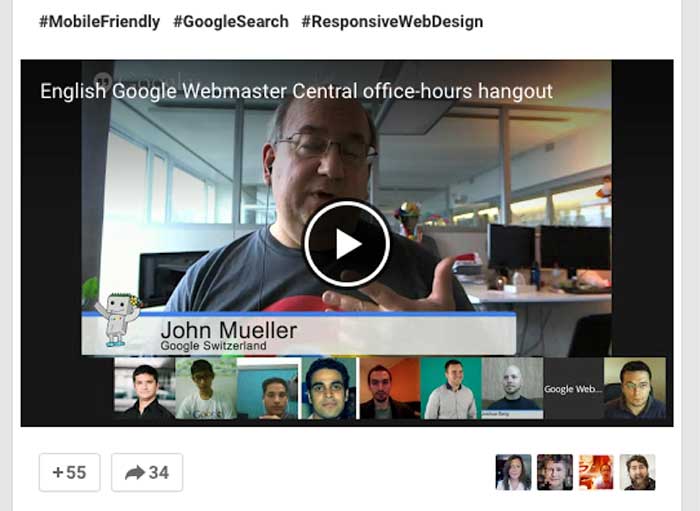
    In a hangout the day after the announcement, John Mueller, Web Trends Analyst for Google, mentions at about 9:42, “These ranking changes are effective on smartphones for smartphone users.”

    Again at 44:40, he reiterates that this algorithm is specific to mobile search. Mobile SERPs and desktop SERPs may become significantly different starting in late April.

    JohnMuellerGoogleMobileFriendlyYouTubeImage

    (Thanks, Joshua Berg, for the G+ post with topics time stamped).

    Why is Google launching a mobile-specific algorithm?

    Because mobile use is growing so quickly and is approaching 50% of Internet use, Google wants mobile users to experience relevant, high-quality websites that are designed for mobile use specifically. It’s a recurring theme that Google wants to provide for the user by offering a quality experience.

    Um, is my site mobile-friendly?

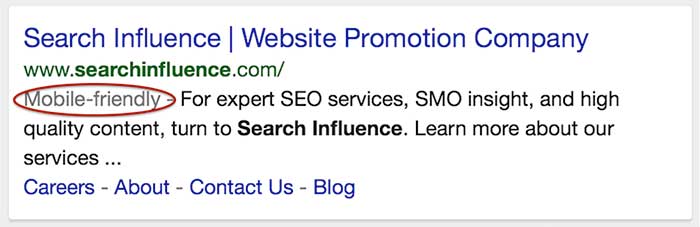
    In November, Google announced the addition of “mobile-friendly” tags in mobile search results.

    mobile-friendly tag in iphone search results

    At the same time, they also gave us a mobile-friendly testing tool. Take note that this testing tool shows you how the Google bots see your site, which is not necessarily how your site resolves on an actual smartphone.

    Passing the test means you qualify for getting the mobile-friendly tag in mobile search.

    However, even if you have a mobile-friendly (“mobfr” per Joshua Berg) site, if the Google bots can’t get to all of the page elements, the testing tool image result may not be how your site really looks on a phone.

    Not passing the test generally means you don’t have a mobfr site. However, I have seen a few sites that are responsive but don’t pass the test. They look great on my iPhone but don’t look great to the Google crawlers.

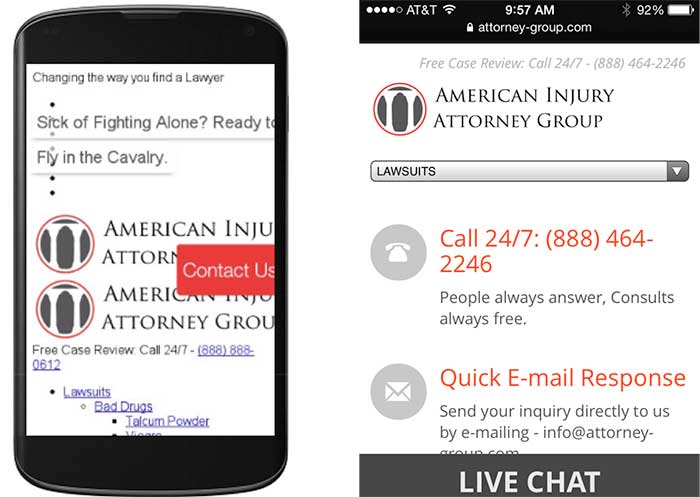
    This is an example of a responsive website that looks and functions well on my phone, but the mobfr tool just doesn’t see it that way. (The good news is that this website owner has been working on an improved responsive site that should launch soon, well ahead of the April 21 deadline.)

    errors in mobile friendly testing tool show the site different than on iphone

    Do I have to get a mobile site if I want to rank?

    In the hangout video, this question is discussed at about minute 12:00. The summary is that mobile-friendly websites will be getting the edge in mobile rankings. Paraphrasing the hangout conversation, non-mobile-friendly sites will not be dropped out of mobile search completely.

    Any time you boost the position for a specific set of sites, it will naturally result in the loss of position for another set of sites. Giving precedence to mobfr sites just means not-mobfr sites have to move out of the way.

    John Mueller also mentions that if a not-mobfr site renders decently on mobile and is highly relevant, it would be a disservice to the searcher to not serve those sites up in results. It’s all about the searcher.

    How much do I really need to worry about mobile traffic?

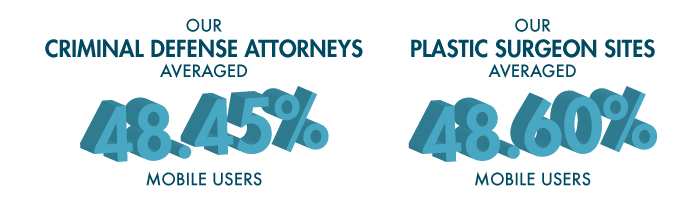
    The number of visitors using a mobile device to access websites has increased dramatically over the last few years. The current average hovers at around 50%, depending on the industry. This is half of a website’s traffic coming from smartphones. I looked at some of our clients to see if I could confirm this stat. I dug around in Analytics and pulled mobile (not tablet) stats for the last six months for two industry types.

    SI-stats-blog-1

    For some industries, this algorithm may not be as big of a concern as it is for the criminal defense and plastic surgery industries. I looked at an admittedly small set of clients to get these two percentages:

    •      Independent insurance agents average 17.48% of traffic as mobile.
    •      K-12 schools have mobile traffic at an average of 13.87%.

    If the mobile traffic to your site is in the double digits but may not be at 50%, you can look at other data points in Analytics. Look at bounce rates, pages visited, and repeat visits from smartphone users to see how satisfied or dissatisfied they were with their visit to your site.

    What are the options to make my site mobile-friendly?

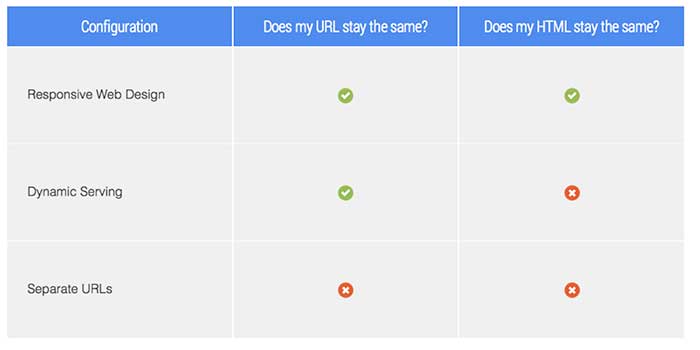
    There are three options for developing a mobile-friendly site version. The most common option is to have responsive and mobile serving separate URLs. Here are three options for mobile sites thatGoogle discusses in detail on their developer site:

    GoogleDeveloperURLConfigurationOptionsImage

    What’s better, mobile or responsive?

    Personally, I love a responsive site because the site has the same HTML, the same URLs, and the same design across all devices: desktop, mobile, tablet.

    It should be noted that a responsive design is an investment because it usually requires a complete rebuild of the site. However, if you rely heavily on website traffic for lead generation and if you haven’t redesigned your site in a few years, this may be the time to invest.

    A mobile version of your site is a good option as well. You can have either a full version or just a portion of your website in a mobile design. Creating a mobile site with a handful of important pages, or the pages most people visit, may be all you need to deliver to mobile users the information they need.

    For websites with an already high percentage of mobile users, I have to recommend responsiveness over mobile. For websites with double-digit mobile traffic, but not 50%, a mobile site may serve you well.

    Also, make sure your developer optimizes images and pages for fast page load. Google has been testing with page load speed tags in SERPs too, and if you’re investing in a site upgrade, you should address as many factors as you can at one time.

    What about duplicate content?

    If you have a mobile site and a desktop site with the same content on two different URLs, these can be seen as duplicate content, which can dilute your content’s authority. Example:

    Domain.com/about-us

    m.domain.com/about-us

    John Mueller commented on this topic: “You don’t have to worry about duplicate content—definitely not when it comes to mobile versions when they’re annotated appropriately.”

    You should make sure to get your developer’s assurance that content will be referenced properly between a mobile site and a desktop site.

    Your website is an asset for your business.

    One small business owner I talk to frequently is in an industry that does not get a lot of leads online. The owner is not interested in anything online, but he knows his customers use his website frequently as a resource, and his site is an asset to the business. He gritted his teeth and devoted a lot of his 2014 budget to technology. He converted his website to a responsive design, and while he was at it, he had the developers add encryption, and he was able to have an app created (which can be an expensive investment for a small business, but in his industry it’s almost required). It’s 2015, and he feels some satisfaction (and relief) that he took care of all of these things last year.

    The takeaway is that a business’ online properties are assets that need regular maintenance and upgrades to keep up with the ever-changing Google and consumer demand. If your site is not mobile-friendly, you should talk to your SEO manager as a first step in finding out what you need.

    For even more information, see:

    March 4, 2015 Google’s Gary Illyes Q&A on Upcoming Mobile Ranking Change

    March 5, 2015 Google: The Mobile-Friendly Ranking Factor Runs In Real-Time & Is On A Page-By-Page Basis

    “…if you have 10 web pages on your web site and 5 of them are mobile-friendly and 5 are not, then only the pages that are mobile-friendly will benefit.”

  • Defibrillate Your Clinic’s Social Media Plan in Five Steps

    Over the past decade, there have been steady increases in the acceptance, usage, and number of social networks. With membership in the hundreds of millions and even billions, social media networks like Facebook, YouTube, and Twitter have become excellent platforms for businesses that want to reach and engage their audiences. Because they form part of a more niche industry, it is crucial for hospitals, healthcare practitioners, pharmaceutical companies, and others in the healthcare industry to have a detailed online strategy in place across various social media platforms. Below are five steps to designing a comprehensive social media plan that take into consideration the challenges and specific needs of the healthcare industry.

    Challenges

    Healthcare providers face a number of unique obstacles when entering the world of social media. Businesses in this industry typically have multiple stakeholders, from existing patients to future patients to other physicians. Each stakeholder has unique expectations regarding communication standards and topics, and a fully fleshed out plan that follows these steps should take these expectations into consideration.

    The healthcare industry is strongly regulated by organizations like the FDA. However, in the recent surge of social media outlets and usage, the healthcare industry has faced a unique challenge: the reigning regulatory offices have not cited clear guidelines regarding the use and management of these social media platforms. Seeing as some information on the topic has been released, it is important that you review these sources before creating a social media plan for a business in the healthcare industry.

    Creating Your Plan

    1. Define Your Personality

    As a business and as a brand, you will need to define your online social personality: how do you want your stakeholders and audience to perceive you? Thinking of your brand as an individual will allow you to adopt a more coherent voice across your chosen social media platforms. To help define your voice, ask yourself questions like the following:

    • What color would you associate with your brand?
    • If your brand was a person, what kind of clothes would they wear?
    • What type of car would this person drive?
    • How would his or her friends describe him?
    • Does this person have likes or dislikes?

    Although it may be difficult in the beginning to uncover the personality of your practice, carefully designing this aspect of your social media strategy will allow you to create a more concrete tone and voice.

    Along with defining your voice, take the time to study and understand your stakeholders. Decide which groups you would like to reach: existing patients, future patients, other healthcare professionals, insurance companies, or any combination of these. This decision will impact the tone and purpose of your social media campaign, as each of your audiences will react best to content that is specifically designed for them. By keeping your target audience in mind, you will enhance your ability to focus your social media updates, allowing you to promote audience engagement and build a stronger, more trusting relationship.

    2. Listen

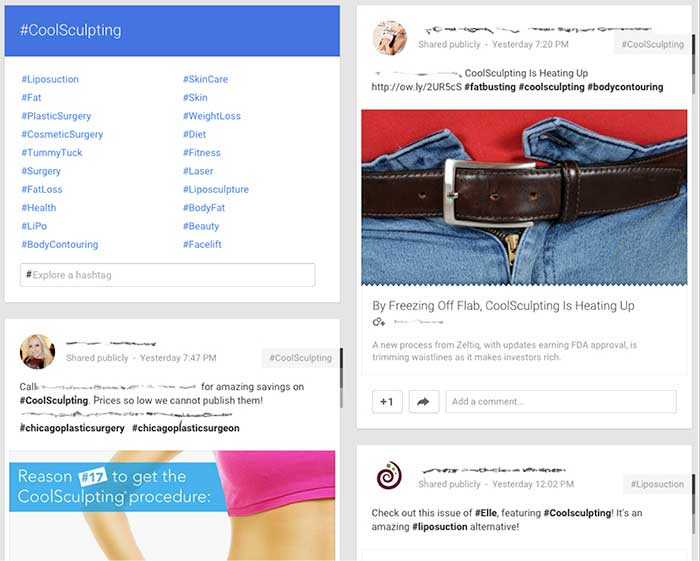
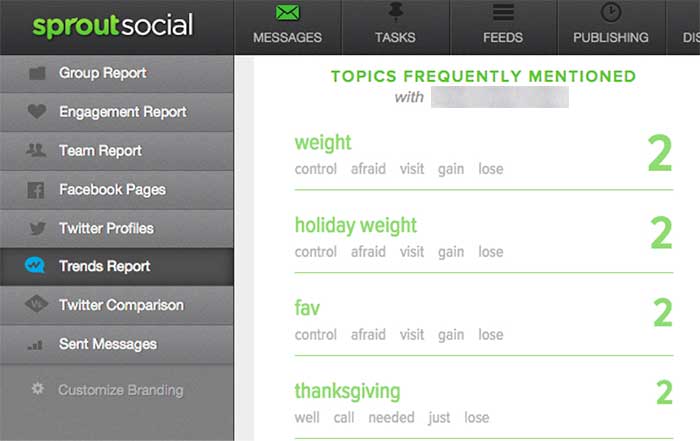
    After you have settled on the tone and audience of your social media strategy, pause to listen to the existing conversation. Determine how your audience and competitors interact within the social space, monitor conversations about your industry, and track the ways in which your brand is discussed online. Using tools like Google Alerts and hashtags, Sprout Social, monitoring forums and other online spaces to understand the existing conversations.

    Listening to the discussions that are in place across the spectrum of social media platforms will allow you to gain a sense of which healthcare topics are currently trending. It will also help you to identify the concerns, questions, and interests of your target audience, allowing you to build a strategy to address these topics during your social media campaign.

    GooglePlusIndustryHashtags

    Example using Google+ to review similar hashtags and industry competitors

    SproutSocialConsumerConversation

    Example of using Sprout Social to understand how consumers are talking about your brand.

    3. Find Your Voice

    Next, begin your own conversations! Look for areas in the industry that lack a strong voice. Use that space to make a name for your brand and to demonstrate your expertise. Also, provide topics and the secure space for conversations regarding the health industry and health issues. Help moderate conversations to keep the discussions moving and the connections building. Encourage your audience to converse with you and with each other to foster a sense of community.

    To make use of your influence on social media, you can use a number of strategies:

    • Add personal, authentic stories: Depending on your goal, these can consist of success stories, anecdotes of achievement, or triumphs over a disease or disability.
    • Facilitate conversations and actions: Give healthy-eating challenges or build a place to help raise awareness for widespread health issues.
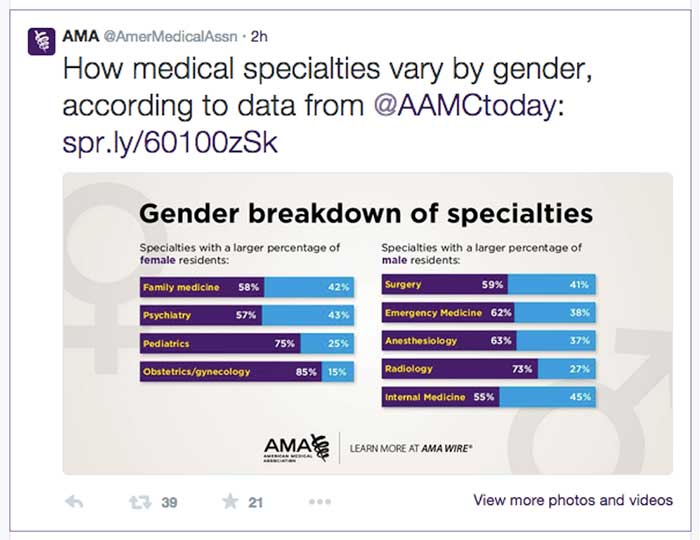
    • Wow the crowd with numbers: Build credibility by showing your audience the bigger picture. Share statistics, infographics, and other information about your industry or practice.

    AmericanMedicalAssociationExample

    Example from the American Medical Association using numbers to engage in a conversation. Only 2 hours after being tweeted this post received 39 retweets and 21 favorites.

    TwitterHealthcareDiscussion

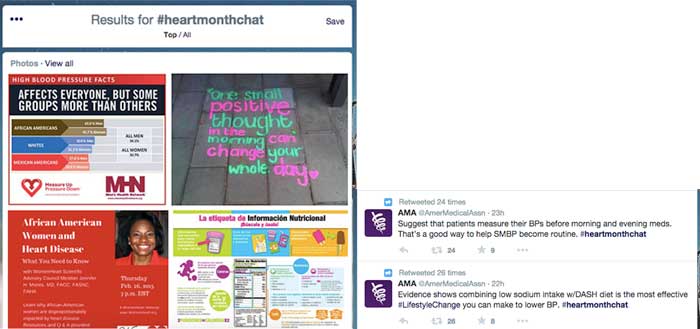
    Example of Twitter healthcare community discussing heart health online via #heartmonthchat and how the American Medical Association was able to find their voice in the conversation giving advice and statistics. Both tweets were retweeted and favorited several times.

    4. Collaborate

    Social media has become a frequent place of feedback for companies, and you can take advantage of this fact by using the social space to collaborate with your audience and with others in your industry. Do not be afraid to talk to your audience about their experiences and how to improve them in the future.

    Use social media as a place to work with other practitioners and organizations to raise awareness regarding healthcare topics. By working with others, you can increase your audience reach and further your message.

    GailZahtzHealthcareTwitterAdvice

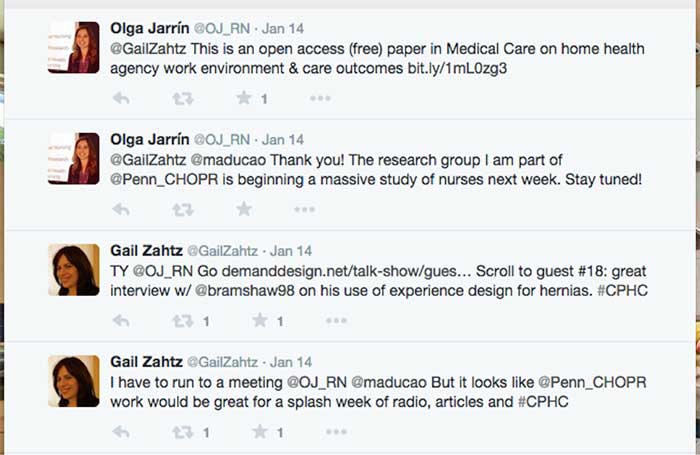
    Example of Gail Zahtz (expert in patient-doctor relationships, offers advice to healthcare industry) collaborating with others in the healthcare industry to make information more readily available.

    5. Measure Your Success

    Although the last step in this plan is to measure your success, it is important to review your achievements on a regular basis and throughout each step of the process. Measure growth and success in the online space by an increase in followers, consistent interaction, and rising mentions across social media platforms.

    ThePlasticSurgeryInstituteFacebookLikes

    Example of growth of likes on Facebook using these steps. Prior to this campaign beginning, The Plastic Surgery Institute of Southeast Texas ~500 page likes.

    Consider the steps above when designing your own social media strategy. For more inspiration, check out some of these healthcare companies that have successfully created an empowering online presence!

  • 4 Internet Marketing Mistakes You Might Be Making

    There is nothing more frustrating than putting all your money and effort into your site’s content only to see a conflicting ROI. Many companies and businesses rely on Internet marketing to increase their profits, but some make simple and even unpredictable mistakes as they go about it. Feeling frustrated or annoyed with your results? You’re not alone.

    WAIT! Don’t break your computer just yet—we’re here to point out some mistakes you might be making.

    1.) Every part of your content concentrates on sales.

    Everyone wants to make sales and increase profits. That’s the whole point of your Internet marketing campaign, right? But new users who visit your site may not purchase your product or service right away. Smart buyers want to research your product, learn more about your brand, see what you offer, and compare your prices to the prices of your competitors. Your potential customers likely won’t have the compulsion to commit to a purchase right away unless you are a well-known company like Amazon. Don’t try to sell your product outright; rather, tell a story with your content. Ease your customer in slowly to make them believe in what you are selling.

    To do this, avoid making your content too product-specific. Let’s say you sell garden hoses, and garden hoses are all you know. You don’t want to talk about just garden hoses all the time; you’ll lose customer interest. And let’s face it—you can’t talk specifically about garden hoses non-stop while keeping your content interesting. So make sure you expand your content beyond your specific product. On certain pages of your site, spill expert gardening secrets, discuss ways to keep your lawn fresh, or start an FAQ section on popular gardening techniques. Always expand on your product and related topics to keep the customer engaged!

    2.) You’re using social media sites…incorrectly.

    One of the biggest components of any company’s campaign is the strategic use of social media. Coordinating posts on Facebook, Twitter, LinkedIn, and other social media platforms can take up exorbitant amounts of time and effort. Concentrating too much or too little on certain posts or topics can lead to fewer followers on a specific page, and no one wants to see multiple, random posts appear on their newsfeed every single day. Creating posts and utilizing social media should be a strategic and intelligent endeavor, not a disorganized, chaotic mess.

    Plan ahead by understanding the goals of your social media strategy. Do you want to drive traffic to your site? Generate more sales? Enhance your email list? Work toward brand awareness? Know your brand and, most importantly, know your customers! You don’t need to use every social media outlet; just figure out which channels your customers use most. If you’re not sure which media sites your customers prefer, just ask! It’s important to learn as much as you can about your clients, their social activity, and how to appeal to them. Absorb yourself in the community’s conversation and interact with your clients. Marketing 101: customer service and knowledge is the number one driving component to any business.

    3.) Your content is SEO-heavy.

    SEO is essential to any marketing campaign. You want Google to find your specific keywords and phrases to generate more traffic. SEO helps human users know you exist within their area!

    While all that is true, you do not want to write all of your content specifically for search engines. No one wants to read website content that has keywords stuffed into every sentence; content needs to be well-written and unique! When creating pages for your visitors, you want the writing to be memorable and easy to read. Once you start to write your content, all of the information you have about your product will flow out naturally, and the content will optimize itself: users will be more likely to share your content through social media, blogs, or websites when the writing is more natural. And if you want to give your content greater authority, be sure to link to other credible websites within your industry.

    4.) You aren’t calling your clients to action.

    You caught the fish, and now you have to reel them in.

    It is a very common misunderstanding that if you drive traffic, you will automatically increase sales. Maybe your new customers aren’t making purchases, and even your old customers who have been following your site and posts since the beginning of time still aren’t biting. Personally, I have followed many company sites without ever buying their products. Why is that?

    Creating an easily accessible path to your product is crucial. You want clients to have a simple conversion from viewing/visiting to buying. By embedding relevant calls to action within your text, you can ensure that content on your site gets potential customers deeply involved with your product. Every page for your products should have a link to sign up for your site, email list, or newsletter in three places: on the sidebar, below the article, and underneath the header.

    Don’t leave your customers to ponder what to do after reading your page. Send them along the right path!

    Image Sources:

    Smashing Computer Gif

    According to Google Gif

    Thumbs Up Gif

  • Five for Friday: Pay for Twitter Verification, Snapchat Goes Local, and More!

    1. If You Want to Be Verified on Twitter, All You’ll Have to Do Is Pay! – Mashable

    If you’ve ever tried, you know that getting verified on Twitter is a lengthy process. Twitter does not accept requests for verification, so users just have to wait until the site feels that your page should be verified—and the process can take an extremely long time. But not anymore: Twitter is considering letting people pay to get that little blue check mark symbol. Hopefully, if this change is adopted, the days of waiting for verification will be gone!

    2. Google Answers the Question “Is Link Building Good?” – Search Engine Round Table

    In any discussion about link building, the conversation usually turns into a debate about whether the strategy is good or bad for a website. If you’ve been searching for the answer, you may finally have it: in a recent Google+ hangout, Google’s John Mueller was asked to answer this common question. Ultimately, Mueller stated that he would “try to avoid” link building in general, but he also gave helpful tips on how to allow others to link to your site.

    3. Snapchat Wants to Show You What’s Happening in Your City – Tech Crunch

    Have you ever ignored a Snap from Team Snapchat because it relates to an event taking place in a different state or even a different country? Well, Snapchat has caught on. The company is currently experimenting with regional Our Stories, which will add content that will be visible only to locals within a specific area. Keep an eye out for these relevant Our Stories!

    4. 4 SEO Landmines to Avoid if You’re Updating Your Website – Search Engine Watch

    From time to time, it becomes necessary for all of us to update our websites—but how do we manage the change without losing the authority our sites have built up? Whenever you update your website, you may leave yourself vulnerable to changes in domain authority and search engine indexing. If you’re thinking about changing your website, a few tips from this recent Search Engine Watch article can teach you what to avoid in order to keep your SEO intact.

    5. Facebook Will Be Revealing the Relevance Score of Your Ad – Marketing Land

    Ever wonder how Facebook chooses which ads to show? The company uses a combination of bid price and relevance scoring to decide which ads will make an appearance, but the process might seem confusing. Well, Facebook has begun to allow marketers to see the relevance score of their ads. In doing this, Facebook hopes to incentivize the creation of better ads that are more relevant to target audiences.

    Image Sources:

    All You Have To Do Is Pay

  • Art of War: Keyword Edition

    So you want to improve your online presence, crush your competitors, and rule the market with an iron fist from the coveted #1 spot on Google? Well, that’s all fine and good, but you may be getting a little ahead of yourself. Before you can dominate Google, you need to know which searches are worth dominating for your business.

    This is a simple question that often plagues those new to online marketing, keeps them awake at night, haunts their dreams, and, through perpetual second-guessing and overanalyzing, crushes the enthusiasm that began their quest for Internet marketing supremacy in the first place. What starts as a simple guessing game (“How would I look this up?”) often protracts itself over time into “What is every conceivable combination of words that could possibly describe my business?” Next thing you know, you’re soliciting family members, friends, and random strangers to participate in the game as you compile a list that more and more resembles a schizophrenic fit than viable keywords for site optimization. Let me save you the time, trouble, and expensive psychiatric treatment that is the inevitable result of the aforementioned method and let you in on how to sensibly go about this rudimentary phase of online marketing.

    Step One: Think Obvious

    ouijaboardforkeywordsimageThink of the most obvious way you would search for your business. This should be simple, to the point, and usually very general. Think, “If I sustained a life-altering injury that rendered me incapable of speech and left me with only a basic grasp of the English language, and I could only communicate through the use of my single working stump arm and a special stump-optimized typewriter, how would I search for my own business?” Great! You should probably have around ten simple and obvious ideas, and most often, these will be the most rife for traffic. In addition to these terms, you should also think, realistically, of where most of your clients reside. If you are a small business or storefront with services offered to those in your immediate area, keep focused on your local region or the nearest metropolitan area if you are in a suburb. If you overreach and try to optimize for every suburb and town within 1,000 miles, you’re not going to do well anywhere. Stay focused, and you will fare much better.

    Step Two: All Is Fair in Love and Marketing

    kingofgoogleimageTime for some good old-fashioned espionage! Use your simple search terms to pull up some results on Google. These will likely be your competitors showing up, the ones you will eventually need to dethrone in your quest for fame and fortune. Take a gander at their sites and see what key terms they’ve used to optimize their pages. What title shows in the Google results, and what do the headers on their pages say? These can give you some good ideas.



    Step Three: Teenage Mutant Ninja Keywords

    Gather the keywords you’ve thought up and the ones you have stolen from your enemies— ahem, I mean borrowed from your competitors—and consolidate them into a single list. Now, take your list of areas where your clients reside and combine each keyword with every location. Next, you will need to mutate these amalgamations into a number of different forms. Have one mutation listing keywords first and another reversing the order, add minor variations like using the word “in” before the location, use the plural version of your keywords, include the state in the location, take the state out, use the abbreviation of the state, and so on and so forth until your original list of obvious search terms is now an army of permutations of the originals. For instance, if you were a restaurant in New Orleans, you would take your keyword “restaurant” and geographic term “New Orleans” and end up with the following variations:

    • “restaurant New Orleans”
    • “New Orleans restaurant”
    • “restaurant in New Orleans”
    • “restaurant New Orleans LA”
    • “restaurants New Orleans”
    • “restaurants in New Orleans”
    • etc. etc.

    Step 4: The Meat

    Enough with the games—it’s time for some cold, hard facts to help guide us. For this, we turn to the invaluable resource provided by Google itself for this purpose: Google AdWords. To create a free account, just pop on over to adwords.google.com, and you will have the ability to sidestep random guesses and find out from the source whether your keyword ideas are actually being used. Within the AdWords dashboard is a Keyword Planner section. Within this section, you can select the option to “Get search volume for a list of keywords or group them into ad groups.” This allows you to take your precious list of keywords and all the variations created from the last step and see if anyone has searched for them in the last 12 months. The AdWords dashboard also has the ability to suggest keywords based on your industry. This is another good resource to consult for ideas, but try not to lose focus. It is important to get your initial keyword search completed, and you can always come back and do more research at a later date.

    Step 5: Survival of the Fittest

    So, you have your list of results, and now it’s just a matter of choosing the very best ones. Your choice will be based on the results from searches in the last year and which ones actually fit your business and service area the best. Finally! You now have the precious search terms to incorporate in your marketing strategy, and you’re ready for phase two of your plan to usurp the top seat of Google search results. You still have a long journey ahead before you can fully decimate the competition, but for the moment, at least you can stride forward knowing your key search terms are sound.

  • Five for Friday: The Analytics Glitch, Google’s Beginnings, Mardi Gras Madness, & More!

    1. Google Analytics Data Drops Off On Monday, February 9th – SEO Roundtable

    Did you notice that all of your customers suddenly decided to boycott your website this past Monday? You’re not the only one. Luckily, this is not an issue with your website or your business; it’s actually a brief glitch in the data of Google Analytics. This problem appears to have affected thousands of websites. Though Google has yet to give an official statement on the matter, they have assured us that they are looking into the problem.

    MLB.com animated GIF

    2. Your Guide to Everything Mardi Gras – New Orleans Online

    Mardi Gras celebrations are in full swing this week, and New Orleans Online has released an infographic to help us navigate and understand the chaos! Filled with tidbits on the history of Mardi Gras as well as helpful hints for making the most of this year’s events, this infographic can guide both newbies and veterans through the Carnival season in New Orleans.

    mardi gras animated GIF

    3. Lessons Learned from the Early Days of Google – Matt Cutts

    Today, we know Google as the wooly mammoth of the Internet—large and in charge. Whether we are aware of it or not, no company has had a greater impact on how we navigate the World Wide Web. But it wasn’t always that way. Google, like all huge companies today, had humble beginnings, with a lot of blunders and a lot of lessons learned. Matt Cutts revealed all in his presentation at UNC Chapel Hill last month.

    google animated GIF

    4. Is Yahoo Stealing Mobile Search Share from Bing? – Marketing Land

    Yahoo is beginning to make its first divergence from its search alliance deal with Microsoft. The search engine has its eyes set on the mobile market, a segment that was not part of the search alliance deal made five years ago. The search engine has gained traction on mobile devices not at the expense of Google, but at the expense of its ally Microsoft.

    5. 8 Sure-Fire Ways to Beat Out Your Top PPC Competitors – Hanapin Marketing

    Yesterday, Jamie Smith and Cassie Oumedian of Hanapin Marketing presented a webinar on the eight ways to beat out your top PPC competitors. Some of the expert tips included competitive intelligence and monitoring insights, why location targeting is a must, and bid strategies to outrank your competitors. If you weren’t able to catch the webinar live, you can go to the Hanapin Marketing website to get the full recap.

    Image Sources:

    Dog Typing Image

    Mardi Gras Parade Image

    Google Doodle Image

  • Search Tools, Edit Wars, and More: Get the Gist of Wikipedia for Businesses

    Wikipedia

    What is the Loch Ness Monster? Who is Monty Python? What is the history of Starbucks? Every time you do a Google search for practically any event, business, person, phrase, song, or obscure piece of trivia, Wikipedia seems to be right there at the top of the search results. Wikipedia, for those who are still using PalmPilots and pagers, is a free online encyclopedia. What makes Wikipedia unique is that it allows users to edit the content on all 35 million of its pages!

    A Brief History of Wikipedia

    With more than 500 million unique views each month, Wikipedia is currently the 7th most popular website on the Internet—but it didn’t start out that way. Wikipedia was launched in 2001, back in the dark ages of the Internet, and it was highly criticized for building a business plan in which no central organization would control editing and the general public would be responsible for the site’s upkeep. Because the site’s content was being created only by users, it took quite a while for the concept to gain traction in certain circles. In addition, some considered the website’s content to be untrustworthy because edits were so easy to make in the site’s early days. As you can see from the graph below, it took several years for the site to gain popularity, but within a few years, Wikipedia’s usage and traffic exploded.

    WikipediaGrowthGraph

    If you have ever visited Wikipedia, you’ve surely noticed that there are no advertisements, no fees to use the site, and no indications that the company is making a profit at all! This is partially due to the fact that they are a not-for-profit organization relying almost completely on donations from their users. A few times a year, the site hosts drives in order to cover basic costs like server space, bandwidth, software, office space, and salaries for its small staff. Of course, because all of their content is donated, there is no need to pay for updates and contributions!

    As time went on and Wikipedia increased in popularity, the company wanted to ensure that the site’s content was as trustworthy, current, and extensive as possible. Wikipedia began to create new processes that made editing content and creating pages more difficult, and it also added a review process. Only registered users can create new articles, some pages are protected from edits, and some pages are “semi-protected,” which means that only certain editors can make changes. All editors are allowed to submit modifications or updates. However, review is required for many of these edits, and all new articles must go through the review process. Depending on the page, edits can be reviewed by the public or by specific members of the Wikipedia staff, but if the edits are small enough, they might go live immediately without passing through the review process.

    What This Means for Your Business

    Because the site has such high authority and ranks so well in search results, Wikipedia offers incredible SEO opportunities for businesses. A business’s Wikipedia page can have very recent information, detailed descriptions about products and services, a history of the company, and even information about charities and community outreach programs the staff partakes in. However, because Wikipedia aims to always tell the full story from a neutral (and non-promotional) standpoint, dark spots in the company’s past are more prone to surfacing. Major lawsuits, media mentions, and other types of bad press could have a permanent place on a business’s Wikipedia page if that news is noteworthy enough. If your business is considering going down this path, always keep in mind that others will be able to write and edit all content about the business.

    Below, we have provided additional information (all from Wikipedia) on how to create a page, make edits, and more!

    Resources

    http://en.wikipedia.org/wiki/Wikipedia

    http://en.wikipedia.org/wiki/History_of_Wikipedia

    http://en.wikipedia.org/wiki/Wikipedia:Size_of_Wikipedia

    http://www.ehow.com/how-does_4809393_wikipedia-make-money.html

    http://en.wikipedia.org/wiki/Wikipedia:Your_first_article

    http://en.wikipedia.org/wiki/Wikipedia:Article_wizard