Tag: business

  • Why Do Digital Agencies Have Setup Fees for Online Ads?

    Why Do Digital Agencies Have Setup Fees for Online Ads?

    We often get the question from prospective clients of why we have setup costs for our online advertising programs. They ask this question because some of the companies that they speak with either don’t seem to have setup costs or don’t communicate a setup cost as such. Even those who say they don’t have setup fees have some costs associated with building campaigns, but the extent to which they are or are not thinking strategically on behalf of their customers is a big factor in whether or not they will indeed charge for it.

    How Can a Media Company Not Charge a Setup Fee?

    Often, media companies choose not to charge setup costs. Sometimes this is because they use a third party that automates the process for them, eliminating some of the complexity and control of digital media buying.

    In other cases, a media company (TV, Radio, Newspaper or Cable outlet) may choose not to charge a setup cost because the difference between what they’re spending on advertising and what you’re paying is sufficient—they know they will make up whatever their actual costs are in a very short period. In other words, they may be keeping excessively high margins for what is, in essence, a commodity.

    The challenges of these perspectives are not very different

    In short, the advertiser—the merchant, the customer, the office—who is buying advertising services or other digital offerings doesn’t realize that in order to have those setup costs, the actual money spent on advertising has to, by definition, be lower. And, if the amount spent on advertising is lower, unless there are significant efficiencies in automation—which there seldom are—one will have a less effective advertising program.

    So, there really is no such thing as a “free lunch”

    When deciding how to advertise online, the most important thing to consider is whether or not your ads are going to be seen by your targeted prospects. With less money to spend on advertising, you have a choice of either targeting less precisely or displaying fewer ad impressions over time. With those two options, it’s easy to see how your campaign is less effective when a greater amount of the dollars are going to fat margins rather than the management of the campaign.

    Automation can be good

    In fact, we use automation to assure we don’t overspend and to do some interesting things like changing ads in the case of weather changes and special circumstances. But, there’s a dark side as well. For all the good automation does, it can also lead to irrelevant traffic, i.e. people who will never become customers but are still targeted by the automated ad buys. And, if not managed well, automation can lead to overspending the budget.

    To allow automation to work efficiently, the companies that use automated platforms for management of online advertising must, in the main, set and forget the campaigns. They are hopeful they will be able to deliver results through automation, not through active management.

    How Is Search Influence Different?

    We typically don’t think of ourselves as competition to traditional media companies who’ve decided to launch a digital agency arm. When we think of competitors, it’s typically the traditional agencies— traditional marketing agencies and pure-play digital marketing agencies. The reason that we identify these as the potential competitors is that within their advertising programs, there’s typically a focus placed on strategy.

    Strategy requires people. Digital and traditional agencies have grown over time based on the expertise of their team members. They are therefore able to deliver strategic plans rather than just automated processes. We have the people in place to deliver. Every one of our online advertising team members goes through a rigorous training process and must be certified in multiple areas of expertise before they get to own campaigns.
    As traditional media companies have come to realize that people are buying much less television, radio, newspaper, and Yellow Pages advertising, they need a replacement product. They have seen the value of digital advertising as an item of sale. As an item of sale, it’s not something in which they have invested significant strategic knowledge and development. The agencies with whom Search Influence competes have invested in at least some strategic development in their teams, whether it be through continuing education, certification, or years of experience.

    We are always looking for ways to optimize the potential of our clients and our team members, and that’s why we review automation systems with some frequency. We have yet to find one that delivers the results we can achieve with our human intervention. Of those we’ve tested, they may hit target budgets and costs per click (CPC), but they don’t deliver the same results. Again, what we’re after is not just traffic, not just customers, but the right traffic and the right customers. That said, we’ll always keep looking and exploring.

    As such, while we often find ourselves selling against traditional media “agencies,” we do not think that, when it comes to digital, they represent real competition or the value we know we can deliver.
    How Search Influence Helps Digital Advertising Clients

    Our core purpose at Search Influence is to Optimize Potential.

    So before anything, we engage in a thorough review of your existing assets, both digital and traditional analog media. We also engage in an equally comprehensive business review to assure we understand your goals for your possible future campaigns. This way, we can strategically map all of the relevant information to an effective digital campaign to deliver the best results.

    When thinking about what goes into the business decisions around advertising, we know that it’s much more than clicks or even calls. It’s about the right click and the right call at the right time. The goal is to deliver that refined prospect to your business with the expectation that they will move from prospect to customer. Before we spend one dollar on Google or Facebook, we will have investigated all of the facets of your needs and how they might impact our execution of your campaign.
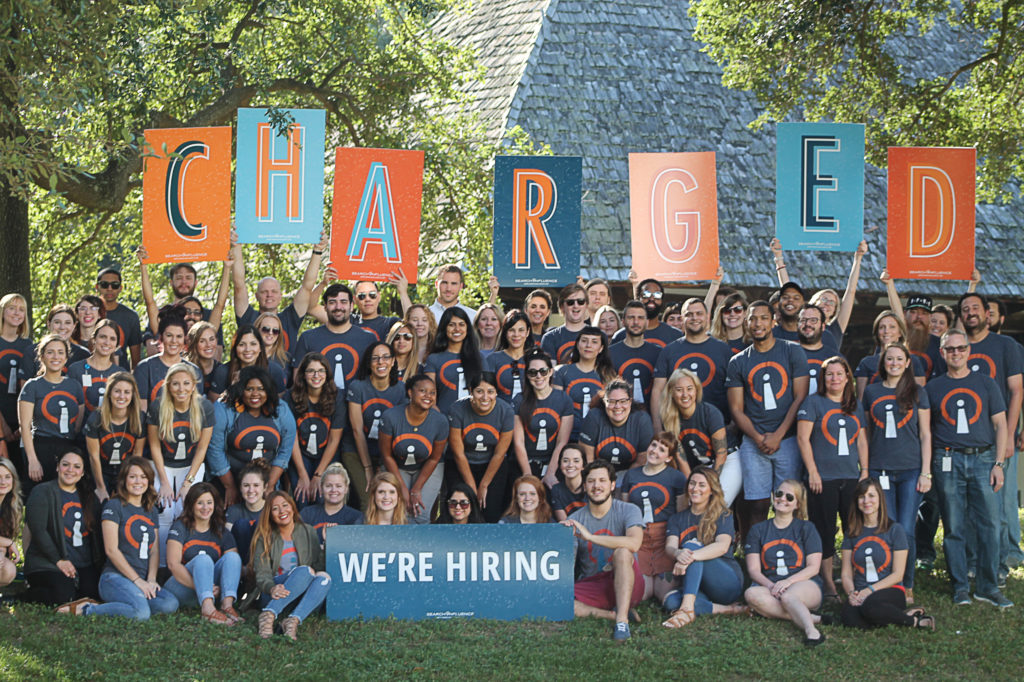
    Charged Employees of Search Influence

    Why You Should Care How About How We Get It Done

    You may think to yourself, “It doesn’t really matter how it gets done, as long as I get more traffic to my website, more calls, and more inquiries coming through.” The unfortunate truth is this: the wrong kind of contacts can cost you time and money.

    As the Pareto Principle implies, 20% of the prospects who might get in touch with you are going to be responsible for 80% of the business you will ultimately do.

    If you could tailor your marketing and advertising so that you only spoke to the 20% of customers who were going to drive the greatest value to your business, wouldn’t you have a much more successful business? Wouldn’t your team be more engaged if they knew that each client engagement, or patient interaction, was putting them with the right customers?

    We know it’s a lot of work to get this right, and only when you work with a strategic partner can you have an expectation that you will get what you need as early in the process as possible. When we work with clients, whether they’re spending $1,000 or $100,000, we work strategically to assure them we’re delivering the greatest value possible for their advertising dollars.

    Wouldn’t you rather spend your money on the most valuable customers? We think you should, and that’s why we believe that we are not competing with the mass-market automated systems that don’t deliver the kind of value you need. With a fundamental understanding of technology-enabled marketing and the expertise and know-how to back it up, we can be true partners to our clients regardless of their budget.

    If you’d like to learn more about the why and the how, we’d love to hear from you. Please fill out our contact form or give us a call. We’ll be glad to review your current situation and come up with some strategic recommendations.


  • 6 Best Practices on LinkedIn for Your Company Page

    Did you know that only 17% of businesses have a company page on LinkedIn? With over 520 million users, LinkedIn has the right to refer to itself as the world’s largest business network. Connecting users with current and potential colleagues and even to future relationships with consumers, distributors, and manufacturers, LinkedIn is chock-full of opportunities to find whomever you need to grow your business.

    Whether your company is new to LinkedIn or has existed on the platform for years, make sure you’re staying active on LinkedIn in the right ways. Here are 6 best practices when it comes to your business’s LinkedIn page.

    1. Keep It Professional

    Every social media platform has its own tone and personality. The language you use to represent your business on LinkedIn needs to be more professional and polished than what would typically be used on Facebook and Twitter. Don’t make the rookie mistake of writing your LinkedIn posts the same way you would write your Facebook posts.

    2. Have a Company Logo and Implement a Cover Photo

    A company logo adds credibility to your page. According to LinkedIn, company pages with logo images get six times more traffic to their pages. It will also appear whenever a user searches for your company on LinkedIn as well as on employee profiles.

    Search Influence company logo LinkedIn header - Search Influence

    3. Optimize Your Page for Google Search

    Did you know that company pages on LinkedIn are SEO friendly? Google can preview the first 156 characters of your description in search results, so maximize that space with strong keywords and concise information. This helps readers who stumble onto your page on their own know exactly what it is you do, too.

    4. Create Slamming Status Updates

    If you create your company page but then never post anything, you’re missing out on possibly infinite opportunities for micro connections that can grow into real business opportunities. But posting sporadically, or posting things nobody wants to read, won’t help either. Share articles from leaders in your industry, post your thoughts on industry or company news, and promote your blog posts (you are writing a blog, aren’t you?). Focusing on the needs of your demographic will help guide your updates. What do they want to learn, and when are they online? Our social media guide can help you out with that.

    In addition to focusing on what to write about, keep an eye on how you’re crafting it. Shorter updates perform better than longer ones, and ones with links, large and pretty images, and videos all catch people’s attention and get them to share and comment on your updates.

    5. Sponsor Your Content

    It’s true across the board—sponsored and organic content need to work together to create an effective marketing strategy. By sponsoring some of the posts you publish on your Company Page, you can make sure all the right people see it, not just people who are already following you. LinkedIn has very advanced targeting capabilities (company size, seniority level, and even job title targeting is available), and it is easy to track conversions for each sponsored post. This means you can run A/B testing to see what your target audience really wants to see.

    6. Establish Yourself as a Thought Leader

    This is a bit of an extension on point four. You want to consistently publish content that shows you know what you’re talking about and are at the cutting edge of industry innovation. Weigh in on industry news, share your own rich knowledge by promoting blog posts and whitepapers, and even get a bit controversial by taking a stand on an important industry issue. At the end of the day, people don’t buy from you because of your products, they buy from you because of who you are. Show everyone who your company is and how they can present solutions to problems through your LinkedIn updates, and your expertise might just spread.

    Social interaction vector image - Search Influence

    LinkedIn is such a powerful tool for engaging with B2B customers. While it might take some work at first to figure out your strategy, following these tips for creating a strong LinkedIn presence will end up really paying off in the end.

    Check out how Search Influence can help with your social media.

  • Growing Your Practice on Facebook, Part 6: A Facebook Success Story

    Part 6 of The Ultimate Guide for Growing Your Medical Practice Using Facebook

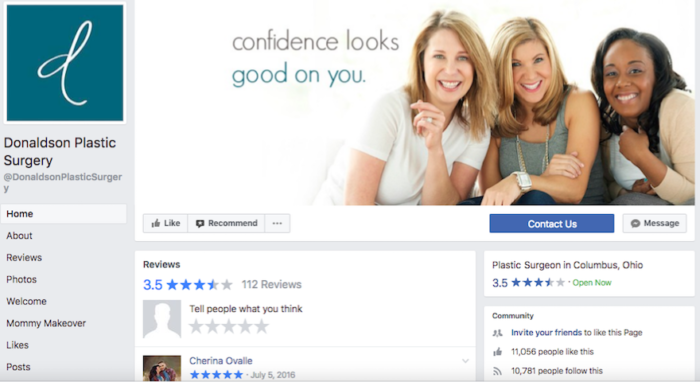
    Welcome to the final installment of our series on using Facebook to promote your medical practice. Now that we’ve covered best practices, we’ll show you how we put them in action using one of our own clients as a case study—Donaldson Plastic Surgery.

    Remember, if you want more information about using Facebook for your medical practice, make sure you download our e-book.

    But First, Let’s Recap

    Before we show you how to put everything together, here’s what we’ve learned so far:

    Part 1: Why Facebook Matters – The introduction to our blog series showed how Facebook can be used for medical practices in particular, and why it’s an important tool for engaging with patients and creating a personal connection with them.

    Part 2: Shareable Content – We gave easy-to-follow tips for creating shareable content as well as advice on the often forgotten second step of Facebook: engaging with your followers in response to their interest in you.

    Part 3: Advertising – Taking a slightly different approach, we went into detail about paid promotions, discussing the difference between promoted posts and ads, and laying out Facebook’s restrictions that govern medical advertising.

    Part 4: Reaching Your Audience – We explained how to leverage Audience Insights to target your ads to your ideal patient, making them more effective, and how to bridge the gap between your online audience and the real patients who walk through your door.

    Part 5: Patient Confidentiality Concerns – This blog brought it all home with clear examples of how to stay HIPAA-compliant while posting on social media.

    Now, it’s time to see how all of these elements work together with a real medical practice.

    Facebook Campaign in Action: Donaldson Plastic Surgery

    Dr. Donaldson has been our client since 2009, the year he opened his practice. Since he was just starting out, there was a lot of work that needed to be done in terms of digital marketing, including a new Facebook page that had a grand total of zero Likes. Since launching his Facebook campaign in 2011, Dr. Donaldson’s page Likes have increased to over 11,000. This was accomplished through a comprehensive Facebook marketing campaign.

    This campaign was comprised of Facebook management, fan building, and Facebook display ads. We created posts that established Dr. Donaldson’s professional brand and consistently published engaging, informational, and promotional posts that appealed to current and potential patients throughout the area. We also created ads that increased brand awareness, brought Dr. Donaldson’s practice to those who didn’t know him already, and promoted the full range of his services, all utilizing Facebook’s targeting abilities.

    Image Of Facebook Page Likes For Donaldson Plastic Surgery - Search Influence

    Combining paid ads with an increased frequency of organic posts expanded the practice’s fan base. A large chunk of Dr. Donaldson’s Facebook fans, totaling 11,000+ Likes, have come from annual fan building campaigns (over 6,400 of the Likes, in fact). Campaigns such as Likes for Lives encourage Facebook users to Like your page in exchange for a donation to a charity organization. These campaigns increase followers while also giving insight into your practice’s values and the importance of giving back to your community.

    Dr. Donaldson is proof that a well-managed Facebook page, full of engaging posts and targeted ads, can work to create a campaign strategy that gets patients through the door and establishes your practice as the medical resource in your area.

    Armed with the best practices we’ve covered in our blog series, you can accomplish results like this for your medical practice as well! If you have any strategic questions or need help growing your practice on Facebook, contact one of our experts here.

  • Growing Your Practice on Facebook, Part 2: Shareable Content

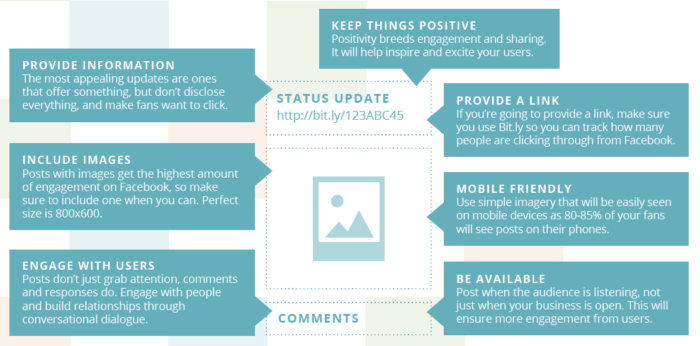
    Now that you’ve learned why Facebook is such a crucial tool for your practice, it’s time to master one of the most important aspects of Facebook: engagement. Facebook is all about conversation and interaction. If you aren’t creating compelling content and engaging with your followers on a regular basis, your social media campaign will fall flat—making the next steps in this series much harder for you. Here’s how to polish up your content and keep your followers invested on Facebook.

    1. Create Shareable Content

    At one point or another, we’ve all come across a Facebook post that just speaks to us; one we couldn’t help but share with a friend or add to our timeline. The act of sharing a Facebook post seems simple enough, but for your business, these shares are crucial to your social media campaign.

    According to Kissmetrics, more than 30 billion pieces of content are shared on Facebook each month. Facebook shares are powerful stuff for business because they help your message to grow exponentially. Friends share content with Facebook friends in a way you couldn’t have managed organically on your own. So, how do you help make this happen?

    Well, if your practice wants to be included in those 30 billion pieces of shared content, it’s essential that you start writing interesting and relevant posts your fans will really want to read. If you’ve followed our blog for a while, you’ve probably heard us quote the great Bill Gates saying “Content is king.” This saying holds true across websites and platforms, and Facebook is no exception. Compelling, authentic, and viral content is what earns you those valuable shares, which in turn means more fans and more social influence.

    Just one thing to clarify: we’re not saying Likes aren’t valuable in their own way. They can be a sign of popularity, a mark of agreement, or a note that “I agree,” or “I’m with you.” However, if your goal is to get your content in front of more potential patients, you should always be on the hunt for the ever-elusive Share. Got it? Let’s get started.

    How to Create Shareable Content

    The tricky thing for medical practices is that you’re busy, and your staff might not always have the time or expertise to sit down and brainstorm ideas for compelling content. But don’t worry—here’s a list of tips to get you on the road to those shareable posts.

    • Keep it short and sweet. The ideal length for Facebook is around 40 characters.
    • Don’t use too much industry jargon. The medical industry is notorious for its jargon. Just don’t forget to consider your audience when posting. Complex terms can be off-putting, and your busy readers will appreciate your effort to break things down.
    • Don’t make every post promotional. Patients will find it helpful to know your biggest and most relevant updates, including new staff members, upcoming events, and special deals. But keep in mind that no one wants to read a revolving door of the same products and services your practice offers. This type of repetitive content is unlikely to be shared.
    • Know when to post for best results.
    • Use images whenever possible. According to Hubspot, Facebook posts with images get 2.3x more engagement than those without images. Consider adding more personal images as well, such as photos of your office, your team, or your patients. This lets readers get a glimpse at the faces behind the computer, and it adds a personal, familiar touch to your posts that can’t be gained with stock images alone.
    • Consider creating a weekly themed post. This gives your fans something unique and interesting to look forward to on a regular basis. Maybe you want to highlight a recent article you read, inspirational images, or products your practice recommends.
    • Share or repost interesting updates from other businesses. Give your readers a range of information by sharing relevant information posted by other practices, industry leaders, or medical associations. This can also be a good way to help build a referral network.
    • Share something silly every now and then. It’s true that the medical industry has a reputation for being serious, but adding silly content to your page just for the sake of sharing the joy can make you more relatable. Funny yet relevant comics, relatable e-cards, cute videos, and even animated reaction GIFs might seem off-topic, but these types of posts are often widely liked and shared. These can be great for extending your reach if your practice’s name is attached to the content.
    • Come up with interesting topics. Don’t be afraid to change things up! If you need help with this, try one of our favorite tools, Answer The Public, which can help you get an idea of what your patients might be searching for or interested in.

    Image Of The Ins And Outs Of Shareable Content - Search Influence

    These tips can go a long way in shaping your existing Facebook posts into something your fans will naturally be interested in. It can take time to master all of this, but even small steps can help increase your content’s shareability—and don’t forget that we’re always here to help!

    2. Engage With Your Audience

    Now that you’ve created your shareable posts, it’s time to sit back, relax, and watch the Shares and Likes roll in. Just kidding! The hidden “Part 2” to your shareable content journey is the engagement factor. Your audience will react and respond to your content, and they’ll also voice their own questions, comments, and concerns. Everyone wants to feel like they’re being heard, and responding to these inquiries shows your patients and potential patients that you’re invested in the discussion.

    One thing to keep in mind with Facebook is that if you’re in the habit of responding quickly, users will see your estimated response time right on the page. This estimate shows your attentiveness, which can be a great signal for potential patients on Facebook. So, don’t forget that taking even a few minutes to respond to your followers can go a long way.

    With the skills you’ve learned in this post, you’re already on your way to growing your medical practice on Facebook. Next time in our blog series, we’ll teach you how to enhance your Facebook campaign with promoted posts!

  • Growing Your Practice on Facebook, Part 1: Why Facebook Matters

    It’s no secret that Facebook isn’t going away anytime soon. Even with predictions a couple of years ago that the social media giant would lose a significant portion of its users to other contenders like Instagram, Twitter, WhatsApp, and Snapchat, they’ve managed to see steady growth. Since that prediction in 2015, they’ve gone from 1.2 billion monthly users to nearly 2 billion.

    So, let’s address the elephant in the digital room here. Is your practice on Facebook?

    In this series, we’ll break down the ins and outs of the best ways to reach your patients through Facebook, going over everything from advertising and shareable content to privacy rights and how to find the right images.

    Before we get into details of using Facebook to bring in more patients, let’s break down a broader question: Why is Facebook so important for your practice?

    Social Media Humanizes Medical Practices

    When’s the last time you talked with your patients outside of the office? In a report from the Health Research Institute, Ed Bennett, who oversees social media efforts at the University of Maryland Medical Center, notes, “If you want to connect with people and be part of their community, you need to go where the community is.”

    By using Facebook to interact with patients, physicians can create a dialogue that builds trust. Some patients may feel uncomfortable scheduling an appointment when all they wanted was to ask a personal medical question. Sometimes questions are just easier to ask through a direct message or comment rather than over the phone or in person.

    Medical Patient Sitting On Treatment Couch - Search Influence

    By commenting on, responding to, and answering questions directly through Facebook, unforeseen walls begin to break down. The best part? That starts to become what your practice is known for. Your medical office gets a reputation for being the place to go where people won’t feel afraid to ask about a diagnosis or procedure, how it affects them, or what their options are. It becomes the ideal venue for open communication. You’re no longer just a resource for patients when they come to your practice; you’re there for them at any time.

    Think about it this way. The average user checks their Facebook account daily. Will your practice be there to start a conversation when they log on?

    Expertise, Industry Experience, Specializations—Go Ahead and Tout It

    To go along the philosophical questioning of whether the falling tree in the forest makes any sound, are a physician’s best certifications and qualifications of value to patients if nobody knows about them?

    According to Search Engine Watch, nearly 90% of respondents aged 18–24 said they would trust medical information shared by others on their social media networks. This is also coming from a demographic that is more likely to share this information. Facebook gives physicians the tools to share their specific knowledge and expertise. Got a recent press release or blog post about a new technique offered exclusively at your practice? Put it on Facebook. It will demonstrate your expertise in your field while providing a great avenue for your patients to engage with and share this information.

    Also, in a time where anyone can share information and claim it as fact or scientifically true, physicians have the capability and responsibility to make sure accurate, helpful information is reaching their current and potential patients.

    Medical Patients Waiting In The Physician's Office On Facebook - Search Influence

    It’s All About Relevance

    Just as you shouldn’t make updating your Myspace page or LiveJournal your top priority anymore, you should be posting and staying up-to-date on Facebook to make your medical practice more relevant to what’s going on in your patients’ lives. It shows you’re a part of the online community, and ideally, it garners more traffic to your website and office.

    Ultimately, Facebook is more than just a place to share family pictures, an exciting recipe, or an awkward political conversation with an uncle. It’s a powerful resource for medical practices to reach their patients on a more personal level. Your patients are already there. We can show you how to utilize social media to find them and make them advocates for your practice. Reach out to us to learn how to implement a social media plan for your practice.

    For more information, stay tuned for our next blog post, which will teach you how to create and share content that moves your audience.

  • Gotta Go Fast! The Impact of Page Speed on Your Rankings

    “We have so much time and so little to do. Strike that, reverse it.”

    Roald Dahl, Charlie and the Chocolate Factory

    That may be a bit dramatic, but time is extremely important. In the digital age where a lot of people barely have the time to stop and say hello unless it was explicitly planned out in their schedule, a slow site can easily get lost in the abyss that is known as the internet. Though the forever relevant Bill Gates quote “content is king” should echo through anyone with a website, there are other factors that can make or break you as well. The best content in the world means nothing if no one sees it. If a tree falls in the woods and no one is around to hear, it does not make a sound; it makes vibrations that will never be converted into sound by ears. If a website has amazing content but a Page Speed as slow as molasses, does anyone ever read it? Probably not.

    How Optimized and Fast Page Speed can Bring in More Customers

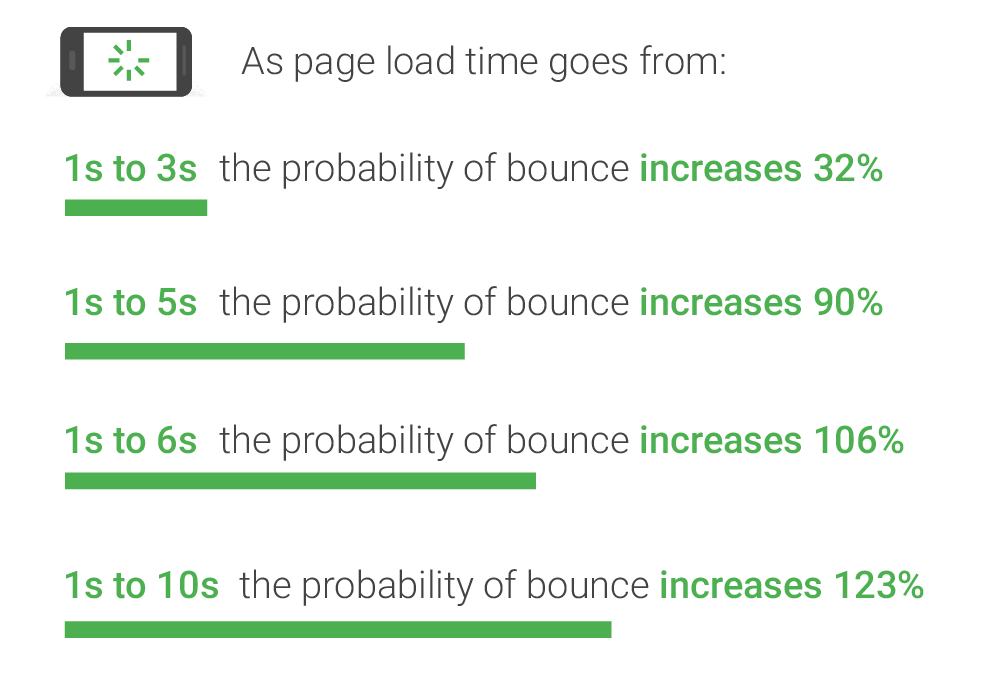
    As you may (or may not) have guessed, page speed is the amount of time it takes for your website to load. On the surface, slow page speed will turn visitors and potential conversions away from your site simply based on the fact that they can’t “use” it, per se. But surely someone would wait 7 seconds to view your homepage or interesting product, right? No. Straight from the source, Daniel An from Google provides this handy chart on the correlation of page speed and bounce rates:

    Image of bounce ratio percentages relative to page load time - Search Influence

    As you can see, if your page takes longer than one second to load, you may see a bounce, which is when a user leaves your site after viewing only one page. The bounce risk increases dramatically the longer it takes for your site to load. This stat doesn’t just apply to your home page either—these statistics will affect every single page on your website. Imagine running an online shop and having someone abandon an order because it takes their cart too long to load. Having engaging content is only half the battle; it has to be seen and digested for it to maximize its potential.

    Page Speed from the SEO Point of View

    From an SEO standpoint, Page Speed has a two-pronged effect on the ranking of your website. Back in 2010 (which is literally forever in internet time), Google spilled the beans on speed having a direct effect on the rankings of websites and encouraged everyone to analyze their page speed to ensure their pages were loading in a timely fashion. Looking at complex Content Management Systems that automatically add mountains of bloat to every single page you publish, it doesn’t seem like many people heeded the warning of Google.

    Image of a snail using a rocket to go fast - Search Influence

    From an indirect standpoint, Page Speed can have an impact on your website’s speed in relation to the crawl speed. Google’s web crawler has an allotted amount of time that it likes to spend crawling a website. Faster loading pages mean that Google’s web crawler can crawl the page faster and move on to the next one, which can lead to more of your pages being indexed. Mix that up with some spicy content and you’ve got a great stew going that can lead to increased Search Engine Rankings!

    Tips for What Website Owners Can Do to Improve

    I personally like to think of Google as the tough love parents that will always steer you in the correct direction, give you the tools to succeed, but punish you if you stray from the light. With that said, Google gives the entire internet a handy tool to test the speed of their website. My favorite online game, League of Legends, will be the topic of example for this go round. After running their URL through Google’s PageSpeed Insights tool, a score is given for both the desktop (61/100, Poor) and mobile (40/100, Poor) versions (it defaults to mobile speed, perhaps because mobile users are using the internet more than desktop users now) along with some details on how to fix the issues and exactly which files are causing the issues. An alternative to Google’s own tool (because we want to show our parents we can succeed our own way) is the Pingdom Website Speed Test. From my experience using both of these tools to compose Site Audits for our clients, Pingdom does give some more in depth information. For instance, the main reason for the League of Legends website taking so long to load is a video (listed below) that has to load twice before the website is considered to be loaded.

    Screenshot of video load time - Search Influence

    This video took over 17 seconds to load. Now for a website such as League of Legends that has the clout of millions of gamers fiending to see the details of the next character being released or an overview of the latest patch notes, these 17 seconds are no big deal. However, if your website was discovered by someone using the Google search “boutique new orleans,” that may be a different story, especially if they’re on the other end of our historic Magazine Street. They may have thought about venturing to your end of Magazine Street had they seen the flashy new “romphims” that your store was offering. Unfortunately for your shop, Magazine Street is loaded with boutiques, and potential customers may just tire themselves out on the other end instead of planning their Magazine Street romp around your boutique.

    Don’t fret, a lot of these fixes aren’t all that difficult to fix, so here are a few common fixes.

    1. Leverage Browser Caching: This fix allows some files on your site to be saved on a user’s local computer so that the next time they visit your site, they won’t have to be downloaded again. In addition to increasing Page Speed, it also lessens the stress on your server.
    2. Optimize Images: This fix involves formatting and compressing your images, which will drastically reduce their size.
    3. Minify CSS: Minifying your CSS is removing spaces, removing line breaks, and combining elements that have the exact styling to reduce the size of your CSS files (yes, even spaces increase the size of your files). You could do it yourself or use a tool such as CSS Minifier to do it for you, but make sure you test it before you completely remove your old CSS.
    4. Minify JavaScript: If you read the previous fix, you can guess what this section is about, just replace styling with functions and that’s the gist of it. JSCompress can take care of this for you.
    5. Enable compression: Using gzip to compress your resources allows them to transfer over the server quicker, which leads to faster page load speeds.

    These fixes are a great way to start pushing your Page Speed close to preferred industry benchmarks and are also among the easiest to implement. There are many more metrics that can be improved as well, but don’t fear—head to Google PageSpeed Insights and plug in your own URL to see how you fare and what you can do to improve. League of Legends has a team of web experts to make sure that even though their videos take close to 17 seconds to load, the rest of their site renders much faster. Here at Search Influence, we also have a team of web experts that are able to analyze and implement fixes to your website to improve its performance and rankings.

    The Importance of Mobile Page Speed Benchmarks

    As revealed in an article earlier in this blog, in November of 2016, the number of mobile and tablet internet users surpassed desktop internet users. This adds increased importance on your website’s mobile speed. With a society that is ever on the go, having a high level of accessibility and a mobile friendly website is considered a necessity for every business. A slow mobile site has a large chance of sending business elsewhere.

    An important addition to keep in mind is the impending rollout of Google’s “mobile-first index,” which should be rolled out soon according to Google and industry experts. This index will reportedly factor mobile content at a higher priority than desktop content. Though all details have not been made public as of yet since Google likes to release this info intermittently after the fact, mobile website speed will probably be one of the factors that are taken into account.

    With cell phones and tablets becoming more powerful and useful in everyday life, it is imperative that your website is optimized to be viewed on mobile if you want any hope of making a splash in the sea that we call the internet. No matter how powerful the receiving device is, there will always be the limiting factor of how quickly files can be transferred across the server. The simplest solution is to ensure that your website is optimized to make it as easy as possible to ford the data transfer river.

    If that sounds like a scary thought, feel free to reach out to the experts at Search Influence. We will gladly take the stress out of it and add you to the list of our many satisfied customers that continue to use our services year after year.

    Images:

    Bounce Rate Percentages

    Snail

    Screenshot

  • Top 5 Ways to Bounce Back from a High Bounce Rate

    Growing up in New Orleans, hearing the word “bounce” means something completely different to most people. I hear the word “bounce” and immediately think of the music! After starting at Search Influence at the end of 2014, I learned that “bounce” also had a meaning in the digital marketing world.

    Artist Big Freedia at a parade - Search Influence

    Bounce rate is a value given to hits on a website from users that don’t stay on the site after viewing a page. This value indicates to Google that you might have uninteresting content or spammy content that users aren’t interested in.

    Though I’d like to take this blog in my usual direction (Beyoncé-themed), I will be paying homage to bounce music, the only bounce reference in my life until I was 29 years old. With the help of some local talent, here are the top five ways to help decrease bounce rate on your site.

    1: Interesting Content Updates

    Image of Rapper Juvenile at a basketball court in New Orleans - Search Influence

    Updating your website content to get Google to crawl your site is a great way to decrease your bounce rate. If you find yourself with a high bounce rate, try updating your content with industry news or new services you are providing. The best way to show Google, and your potential customers, that you are an expert in your field is to use fresh, up-to-date, informative content on your site.

    The way your content is displayed is also a part of this. Bulleted lists and paragraphs that are broken up into smaller “chunks” to display your information in a reader-friendly way are helpful in getting clients engaged and staying on your site.

    2: Navigation Updates

    Your navigation should be incredibly user-friendly so that users will be able to learn about you and your business. There should be a clear path a client can follow with your top level navigation, but not too packed where the user is overwhelmed. If there are too many options, then your user experience might need some work.

    This is also true for sidebars. If you have a sidebar on your site that is embedded in the template (i.e. it shows up on every page) make sure the links here are relevant for all the pages on your site. This  is usually a call to action button (learn more, get a quote, etc.) Having an attractive sidebar can help lead people further into your site and decrease bounce rate.

    3: Become a Google Analytics Wizard

    Image of Birdman rubbing his hands together - Search Influence

    Bounce rate is something that is documented in Google Analytics. Understanding where these numbers come from, what pages they are occurring on, what referral sites they are from, and almost 100 other factors are keys to decreasing your bounce rate. This step could be the trickiest, but that’s OK!

    Hiring a company like Search Influence is the easiest way to accomplish this step. Google has special training and certifications for their products so that people like me (and my fellow co-workers) can be masters at reading all of this amazing data so that you don’t have to.

    4: Enhance the User Experience

    There are a few things that you can add or take away from your site to enhance the user experience. If you currently have multiple pop-ups or widgets on your site to help push for sales, this may be an indicator of why your bounce rate is high. Users are less likely to click on these if they aren’t engaged in your site. Make sure that these aren’t bombarding the client during their natural reading of your content.

    Inversely, if you have a high bounce rate but no particular ad experience on your site, add some! Just be thoughtful about it. Adding catchy call-to-actions to get people to click further through your site is helpful in decreasing bounce rate.

    5: Update Metadata

    Image of Rapper Lil Wayne adjusting his glasses - Search Influence

    Making your site reader friendly for SERPs will not only decrease your bounce rate but also increase your organic ranking for Google. It’s a two-fer! If your landing pages have descriptive, catchy titles along with meta descriptions to entice the reader, you will be guiding Google and its users to the page they are looking for. Bounce rate commonly occurs when someone has landed on a page that they aren’t looking for. They quickly click off of the page because it’s not the information they need. If you have strong metadata, Google will know exactly which user you should be targeting and bring them to you.

    Bounce rate can affect your site’s performance as well as your business goals. Knowing what could be the culprit for your high bounce rate or preemptively updating your site to keep a low bounce rate is a marketing must for your strategy. It’s something that is manageable with the help of an expert digital marketing guru who also knows a thing or two about “bounce.”

    Images:

    Big Freedia

    Juvenile

    Mannie Fresh

    Birdman

    Lil Wayne

  • Put a Ring on It: Turning Inquiries Into Lasting Patient Relationships

    Let’s envision an ideal scenario. Your private practice has a dynamic social media campaign, your website is optimized for all the right keywords, your blog showcases helpful and engaging posts, and maybe you’re even showing up on page one of Google’s search results. Basically, you’re an online marketing all-star. Well, to be honest, the real payoff relies on what you do next.

    Image Of Character Ron Burgundy - Search Influence

    How do you respond when all of this great marketing generates a lead? After all, you put a lot of hard work into building new patient relationships. But while all of this marketing could be seen as the courtship, handling the inquiry is the proposal. You better time it right and create an experience worth remembering.

    At this point, the prospective patient is taking the initiative to make contact, which means they are serious about taking action—they’re ready for a commitment. Even if you’re just posting your first Facebook status or still need some SEO guidance, every inquiry is the potential for a new patient to make the jump from interested to committed.

    Responding to inquiries is your first real engagement with a prospective client. They responded to your presence online, but how does it stack up to your presence IRL? In the healthcare industry, competition is high, and patients may be willing to travel great distances for the right provider—but that prospective patient may just move on to the next option if they don’t hear from you quickly or get the right answer.

    So, what’s the best way to ensure a “yes” to your proposal? Here are three tips to turn inquiries into actual patients.

    Image of Beyonce - Search Influence

    Respond Quickly

    Quickly can’t be overemphasized. In fact, according to The Lead Response Management Study conducted by Dr. James Oldroyd of MIT, the odds of qualifying a lead are 21 times less likely when comparing a response rate of 5 minutes vs. 30 minutes. Similarly, according to research from Harvard Business Review, companies that follow up on leads within an hour are 7 times more likely to have a meaningful conversation with the decision maker. This isn’t all that surprising when you consider our fast-paced culture of instant gratification. That same person who reaches out to your practice is likely contacting your competition, scouring through Google results and online directories to weigh the best healthcare options. They may already have their appointment scheduled at the office next door if you don’t respond quickly.

    You can increase your response speed by creating a short cheat sheet or script for answers to common questions, especially pertaining to pricing. This will empower an administrative team to handle inquiries confidently and quickly without consulting with the doctor or dentist before every response. Don’t forget that inquiries on social media, like questions through Facebook messaging, should be treated with the same level of professionalism and timeliness. Other features like online chat and online appointment scheduling make the conversion happen even more quickly. Many users are opting for digital communication, and it’s important to talk to your prospective patients in the format that they prefer.

    Track Your Leads…and Your Successes

    So how do you know what your patients prefer? You can start by collecting valuable information about the behaviors of your current and prospective patients to meet their needs better and make communication as seamless as possible. Online and call lead tracking will allow you not only to understand which communication methods work best, but also what led interested parties to your practice in the first place. Are they interested in a specific treatment page? Are they looking for plastic surgeons close to a particular location? Tracking this behavior can help tailor your response and deliver the right information.

    A tracking system also allows you to keep a detailed record of your correspondences and successful conversions. Use these metrics to determine what’s working and where to focus your energy. Maybe you see the biggest conversions through your online appointment scheduling feature, or maybe most of your new patients are searching on mobile and calling the office—use the data to build on your successes. For example, if you see a lot of phone call conversions, you can tailor your online marketing campaign to feature your phone number more prominently in your ads and website copy. Either way, you can’t make improvements if you don’t have the data. Learn more about the value of lead tracking and analytics.

    Listen to Their Needs and Make It Personal

    Now that you have systems in place for generating prompt replies and tracking your successes, you can focus on the actual response. This part might seem obvious, but it’s the most important aspect—especially in the healthcare industry where your customers are trusting you with, well, their health. Make sure your response includes questions, and spend more time listening to the inquiry than dishing out information. While phone scripts or automated email responses are great timesavers, be sure you consider multiple lead types and create responses that can fit different common inquiries like procedure costs or consultation requests.

    Remember that your response should show that your office is competent, knowledgeable, and compassionate. This extends beyond the healthcare professionals to the caring and attentive administrative staff answering the phones and making the appointments. Each employee is a representative of your brand and can create a memorable first interaction—whether it’s a phone call, email, or social media post. Your staff or a marketing agency should be equipped and ready to handle responses appropriately through multiple channels.

    Essentially, your response should be crafted to potential patients’ needs from the very start. While it may seem simple, ensuring that these steps are built into your systems and training will result in consistent and successful conversions. When it comes to healthcare, patients are looking for the gold standard in quality. So if you’re popping the question (you know, the “do you want to schedule an appointment?” question), be sure to time it right and execute a thoughtful, personalized message. Of course, if you’re still working on your online marketing all-star status, we’re always here to help.

    Images:

    Ron Burgundy

    Beyonce

  • Google Paid Search vs. Facebook Paid Social: Team Players or Adversaries?

    When it comes to choosing between Facebook and Google advertising, it’s important to note what your business’s goals are. Both platforms are beneficial to business in their own ways and often work in conjunction to help businesses achieve maximum online visibility, gain more customers, and increase leads and sales. In order to best understand the opportunities with these two advertising channels, it’s important to know what each has to offer.

    Google Paid Search and Facebook Paid Social

    No one can deny that as far as search engines go, Google takes the cake. With more than 3.5 billion searches being conducted every day, Google is by far the world’s most popular and widely used search engine. Because of this, advertisers are able to reach a broad potential audience who may be seeking their products or services. Google AdWords, the PPC advertising platform for Google, allows advertisers to utilize the Search Network and the Display Network. Through the Search Network, advertisers can bid on keywords and phrases to trigger certain Google searches. The Display Network offers visual ads and can reach those who are not just searching on Google, but on other sites as well (i.e. a banner displaying your business’s logo on YouTube).

    Image Of Don Draper Discussing The Future Of Advertising - Search Influence

    Considered the pioneer of paid social advertising, Facebook has refined its process and has become an important part of many businesses’ marketing strategies. Like Google, Facebook is an extremely prominent website, with more than one-fifth of the entire world’s population active on the site monthly. Because Facebook users tend to share a lot of personal information—interests, relationship status, political views to name a few—Facebook advertising can target very specific demographics, showing Facebook users what they want to see.

    What Types of Ads Does Each Channel Offer?

    Both Facebook and Google include a variety of ad formats to appeal to a variety of audiences.

    Google Ads:

    • Text – These ads are only words, and can immediately reach customers as they search on Google.
    • Responsive – Size, appearance, and format can be adjusted depending on the ad spaces.
    • Image – Graphics that are static or interactive, and can be animated in .gif and Flash format. These can show on websites that partner with Google through the Display Network.
    • App Promotion Ads – As the name states, these ads can drive app downloads and engagement for your business. These will only show on devices that can support the app.
    • Video – These can stand alone or show in streaming video content on websites that partner with Google.
    • Product Shopping Ads – These show a photo, title, price, store name, and other details about a product you are selling.
    • Showcase Shopping Ads – This type of ad shows a product but expands when it’s clicked on to show related products and store information.
    • Call-only Ads – Ads that include your business’s phone number to drive phone calls. These types of ads only show on devices that support phone calls.

    Facebook Ads:

    • Domain Ads – With a simple format, this ad displays on the right column. This type of ad does not display on mobile.
    • Page Post Link – The most common of all Facebook ad types, this type of ad links to your external website and includes a large image for grabbing the attention of Facebook users.
    • Carousel Ads – A relatively recent development in Facebook advertising, these ads allow e-commerce advertisers to showcase up to five of their products, each with its own picture, link, and title.
    • Dynamic Product Ads – These ads target based on past actions on your website, also known as remarketing.
    • Lead Ads – Allows Facebook users to fill out a form on either desktop or mobile directly from Facebook.
    • Canvas – Only available on mobile, customers can interact with the ad by swiping through the carousel, zooming in and out or even tilting the images.
    • Page Like – This allows users to immediately like a Facebook page.
    • Page Post Photo and Video – Showcases pictures and videos from your business. Video advertising is especially engaging as Facebook video receives up to 8 billion video views per day!
    • Mobile and Desktop Apps – Similar to Google’s app promotion ads, these drive installs of a business’s app to mobile and desktop.
    • Event – Allows a business to promote their event to visitors.
    • Offer – This type of ad can only be created on a page with at least 50 likes, and it allows a user who clicks on the ad to redeem a special promotion.

    Google and Facebook: Friends or Foes?

    As previously stated, it’s highly common for Facebook and Google to be utilized together in a marketing campaign for their different advantages. Many marketers are drawn to Google because of the search volume and opportunity for exposure there. Google allows for targeting based on location, keywords, demographics, devices, and languages, as well as re-marketing, which can target users based on searches that have previously been conducted. While PPC ads are text-based, advertising opportunities are versatile. Extensions, user reviews, map data, and shopping ads are just a few examples of how Google advertising can be further optimized.

    Facebook advertising is not only extremely targeted but also highly visual, which many see as an advantage over Google. Facebook ads are essentially unavoidable, appearing in your target audience’s News Feed or the right column of their page. Because advertising on Facebook is based on specific insights and interests, chances are that the ad will be more engaging to the user.

    Image Of the Internet Being Friends - Search Influence

    Perhaps the biggest difference between each platform is the behavior of the users. When searching on Google for products or services, users have an idea of what they are looking for. Facebook, on the other hand, is not typically used to seek a product or service. However, the likelihood of a Facebook user to be exposed to a product or service that appeals to them is very high.

    While Google and Facebook are often seen as adversaries in the marketing world, the possibilities with each vary greatly. Try this team together for utmost potential in maximizing any campaign’s performance.

    Image Sources:

    Don Draper & The Future Of Advertising

    The Internet Shaking Hands

  • Grow Your LinkedIn Network With These 3 Optimizing Tips

    With over 400 million users, LinkedIn has become a social networking must for companies large and small. While other platforms like Facebook and Twitter are commonly used in marketing and SEO campaigns, LinkedIn can have a significant impact on online visibility and SEO opportunities. Instead of neglecting your LinkedIn account, utilize it to grow your business’ traffic and network.

    1. Be Consistent

    The Devil Wears Prada Who Are You - Search Influence

    For your traffic to increase, customers have to know it’s you. One of the biggest mistakes a company can make is not maintaining brand consistency across all marketing platforms. LinkedIn provides you with the opportunity to upload banners, background images, videos, and photos. Utilize all of these to tie back into your brand, logo, tagline, and color scheme.

    This also applies to the written content on your LinkedIn profile. If your business’ website uses a formal tone, don’t be overly casual on your social media. This creates brand confusion and can lead to customers not connecting with you because they think you’re someone else. Don’t lose out on growing roots with a client because someone can’t figure out if your profile is the right one.

    2. Engage Your Network

    Parks And Recreation Aziz Ansari On Social Media - Search Influence

    While you may have a lush profile, if it’s not active, no one is looking at it. It’s important to create, share, and like fresh and relevant content to your industry. Shower your followers with content at least twice a day and watch your network grow. This keeps your profile engaging as well as current. When creating or sharing content, make sure to add variety. For example, it can be good to post an interesting article in the morning and then ask an engaging question in the evening. This allows for different types of client interaction and can make a profile look more personable.

    As I’m sure you’re aware, blog posts are great when it comes to a site’s SEO. By posting your company’s blog posts on LinkedIn, you not only help your profile, but you also improve your website’s ratings, which can lead to more business.

    3. Let Your Keywords Shine

    SEO Friendly - Search Influence

    While your company can be searched on LinkedIn by name, it can also be found by keywords. The keywords used in your SEO campaign are the same words you should be using on your social media platforms. Your keywords should shine through your content from your posts, to your description, and to your headline. While it’s still important to stay natural, try to fit in a keyword or two in the first 156 characters of content on your profile. Google previews these first characters, and with the help of keywords, your profile can be more easily found.

    LinkedIn Superman - Search Influence

    By not growing your LinkedIn network, you’re leaving opportunities like referrals and website traffic in the dust. Social media platforms are crucial to interacting with current and potential clients. As LinkedIn’s numbers grow, so can yours. Make sure your profile is the cream of the crop and optimize.


    Image Sources:

    Devil Wears Prada Image

    Aziz Ansari On Social Media

    LinkedIn Superman