Tag: advertising

  • Seeing Colors? Google Expands Paid Ads

    Google Ads

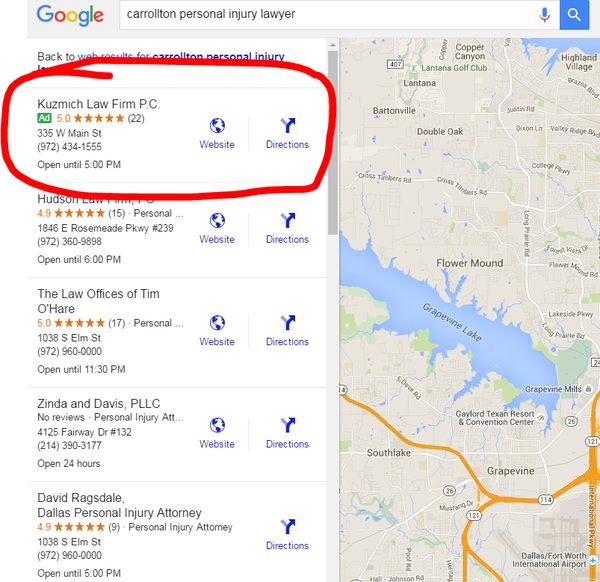
    Late last month Google changed the landscape of internet marketing once again. The latest update from Google expanded paid ads into two new areas, Maps and Local Finder. These two places were once a haven for those of us with beautiful, organic traffic, but we are set to be invaded by the strong-arm tactics of paid advertising.


    Local Finder Ads

    This change is likely to cause tears of both sadness and anger. In case you forgot, let our very own Amy Arnold explain how Google eviscerated the old Local Pack. In short, Google decided to reduce the number of local businesses displayed in the Local Pack from seven to three. Some of the default information displayed was also removed in an attempt to streamline the app. Many users found that the top three results were not enough, which compelled them to click that little “More Places” link in the search for more leads. After the most recent changes, ads are now displayed at the top of the More Places section, which is similar to how they are placed in the regular search results.

    Green Google Map Ad

    In addition to the new Penguin update, explained by yours truly, local businesses also have to deal with their information being relegated by potentially three spots. Even though it is possible to get your website higher by paying, it seems that organic content creators have been hit hard enough to cry.

    Cat Crying GIF

    Maps Ads

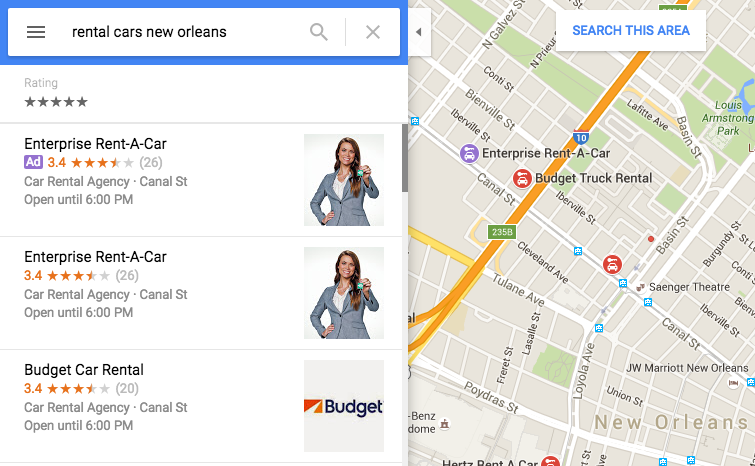
    Google Maps also received an ads revamp and a new color coding. Purple ads are now showing up, and Google decided to fill us in on exactly why that’s happening. These ads are controlled by AdWords, and users who have the location extensions enabled and are still charged the standard cost-per-click rate whenever a user attempts to get location details and directions or complete a mobile click to call requests. In addition to having your business show up at the top of Maps search results, a nice purple icon is also added to the map on your business location. By setting the targeted area, advertisers are able to give some extra range to their map pin in addition to appearing at the top of the list. Of course, if you plan on buying ads and placing your business at the top of search results to pay-per-click, you better make sure your business information is up to date.

    Google Purple Ad

    One thing you may have noticed from the above image is that the Enterprise Rent-A-Car is listed as both the top result and first advertisement. This would be an example of what not to do. A company may appear twice because it is already the top search result in this area. This redundancy happens a lot in regular search results, but the map ads allow you to select an area, allowing your ads to reach further than your search results normally would. This process is of course very confusing, but Search Influence’s expert Online Ads team is certified in Google AdWords and helps our clients gain maximum visibility. If this seems overwhelming, they’d be happy to take care of your advertising needs.

    Image 2 credit: Brian Barwig

  • Facebook Remarketing Explained – 4 Steps to Increase Your ROI

    How Does Remarketing Work?

    Have you ever window shopped for a new pair of running sneakers online and noticed they followed you around the Internet? Advertisements for those sneakers in the same color and size appear on almost every website you browse! You might even be scrolling through your Facebook News Feed and the sneakers pop up again. You may be thinking, “This is fate!” But no, this is not fate or the magic of the Internet.

    I’m going to let you in on a little secret called remarketing. One of the hottest trends in remarketing right now is using Facebook to target a select group of ideal customers with tailored ads. Your company’s marketing team can use this powerful marketing tool to nurture relationships with qualified customers and increase sales.

    What Is Remarketing?

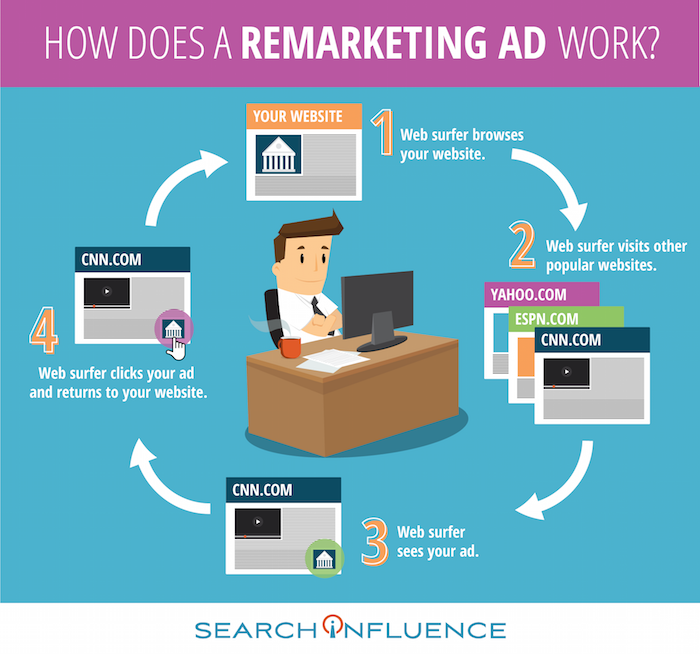
    Let’s say someone clicks on your brand’s Facebook ad. They’re instantly brought to your website, and they can browse your offerings. These people are generally qualified leads because they took the time to navigate away from their cluttered News Feed and click on your ad. However, they may not always complete an action like making a purchase, downloading an e-book, or providing their contact info. In fact, people rarely make a purchase the first time they visit a brand’s website or see an offer from the brand. These lost prospects are valuable, and you will want to continue your business experience with them.

    How Does a Remarketing Ad Work Infographic Image - Search Influence

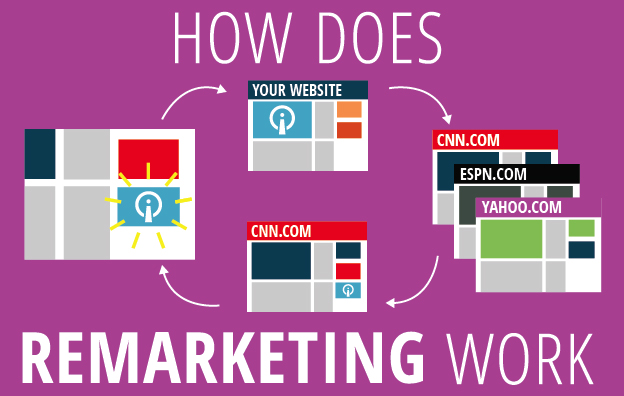
    The overarching goal of remarketing is to place your brand at the top of consumers’ minds. Remarketing allows you to reach people who have previously visited your website and may not have made a purchase.

    A great way to revive your relationship with them is by showing tailored ads to them again on Facebook. To do this, you can use your brand’s Facebook pixel to create a Custom Audiences for Website Traffic that builds an audience based on your brand’s website traffic. The opportunities to nurture and build relationships with current and prospective customers on Facebook are endless.

    Why Should I Remarket on Facebook?

    Facebook remarketing ads get three to four times the response rate of regular Facebook ads. With over 1 billion people using the social media platform daily, making sure that you’re reaching the right people is critical! The Custom Audiences for Website Traffic feature seamlessly reaches your ideal customers by creating a Facebook audience representing a group of prospective customers and current customers who have visited your website. This feature has a few benefits:

    • Reach people who are genuinely interested in your brand through targeted Facebook Ads
    • Bring people back to your website to complete an action
    • Find new people who have similar characteristics to your website

    By targeting your ideal customers, you will grow your brand’s fan base, drive website traffic, build a rock-solid email list, and increase ROI. You will also avoid burning a hole in your advertising budget by lowering cost-per-click, driving higher conversions, capitalizing on social proof, and expanding market reach.

    How Do I Use Facebook Custom Audiences for Remarketing?

    Now that you’re an expert in remarketing, let’s dive in and set up a Facebook remarketing campaign for your brand. I’ve created a 4-step guide that outlines the setup process.

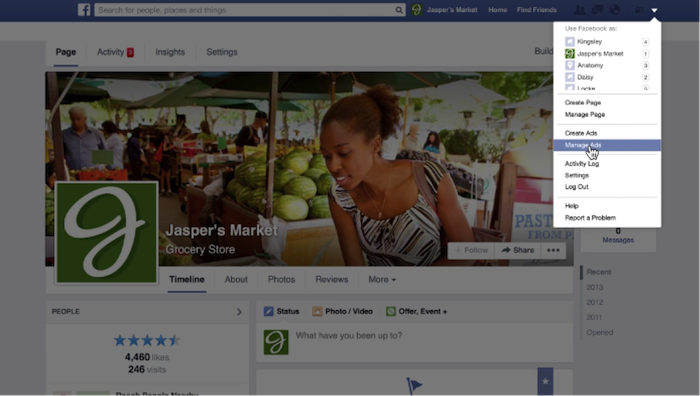
    1. Access Facebook Ads Manager. Log in to your Facebook account and navigate to the drop-down menu on the top left of your screen. Select “Manage Ads” from the drop-down menu.

    1 - Remarketing Drop Down

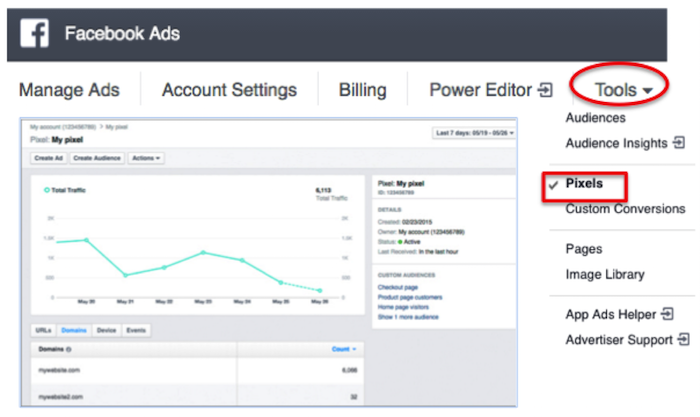
    2. Create a Facebook pixel. To pinpoint your website visitors so you can retarget them on Facebook, create a Facebook pixel and insert it on your site. Now that you are in Facebook Ads Manager, click on the “Tools” drop-down menu and select “Pixels.” Click “Create a Pixel” and give it a name. Then, copy and paste the pixel code into your website code.

    2 - Facebook Ads

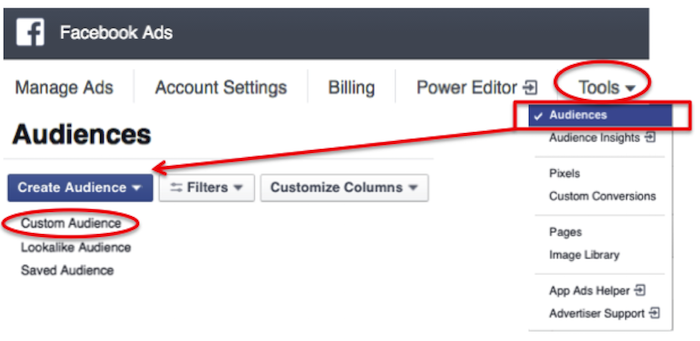
    3. Build a custom audience. Click on the “Tools” drop-down menu and select “Audiences.” You’ll see a blue button that says “Create Audience.” Click on that button and hit “Custom Audience” from the drop-down menu.

    3 - Audiences

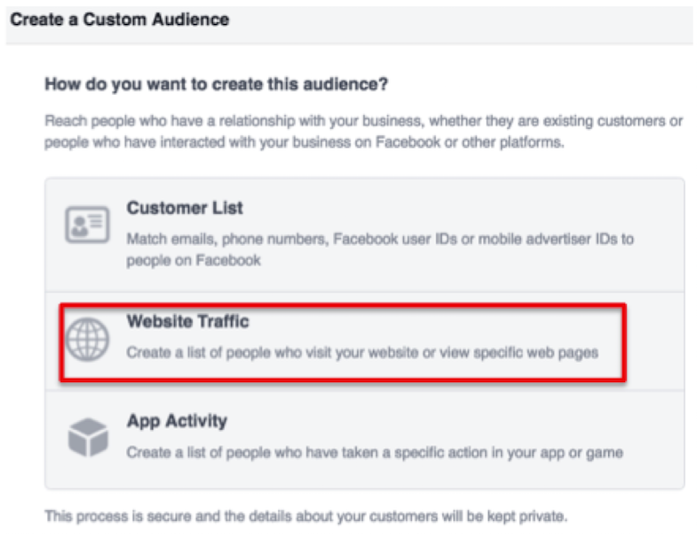
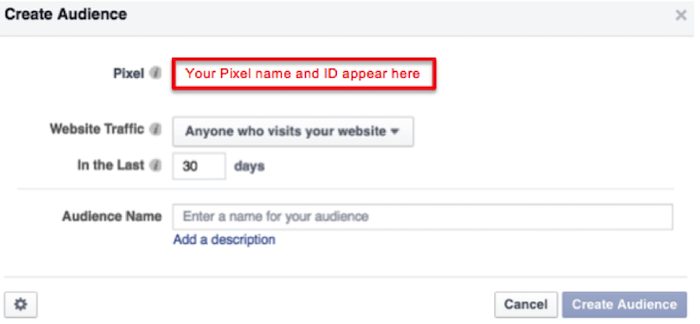
    Then, select “Website Traffic” and name your audience.

    4 - Website Traffic

    5 - Create Audience

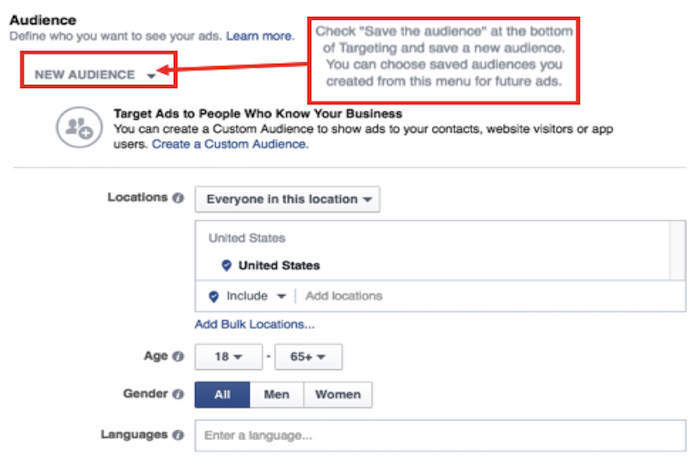
    4. Craft an Ad. In the ads create tool, you can access your custom audience when you choose who you want your ad to reach.

    6 - New Audience

    Voila! You’ve successfully created your remarketing campaign. If you have any more questions along your remarketing journey, you can reference Facebook’s simple remarketing guide.

    Image Credits:

    “Manage Ads” Menu Screenshot – from Video
    Pixel Graph Screenshot

  • How to Keep Your Law Firm’s Ads Legal

    With the recent death of Justice Antonin Scalia, the Supreme Court is on arguably on track for confusion, gridlock, and bipartisanship. This uncertainty could affect the future of affirmative action, abortion, union rights, and several other topics that are scheduled to go to court within the year. In the face of this uncertainty, we have been looking back at the famous Bates v. State Bar of Arizona ruling of 1977, which held major implications for digital marketing even before the World Wide Web was invented. In this case, the Court emphasized the benefits of advertising as a means of informing consumers of goods and services. A five to four opinion ruled that any restrictions on advertisements for legal services was in violation of the first amendment. The majority decision continued, however, to stipulate that advertisements that are “false, deceptive, or misleading, of course, [are] subject to restraint.” The opinion went on to address the grey area between perceptions of advertisements: “we recognize that many of the problems in defining the boundary between deceptive and nondeceptive advertising remain to be resolved…”

    In light of this acknowledged grey area, the question is: How do you keep your online legal ads legal?

    Legal Definition of Online Advertising

    Online advertising is not just limited to email blasts, pop-ups, or those dreaded YouTube clips that you must watch for at least five seconds. The legal definition varies by state, but in many states, online advertising is broadly defined to include your website and maybe even social media accounts. To be safe, assume that everything you or your firm publishes online is an advertisement.

    Avoid Misleading Claims

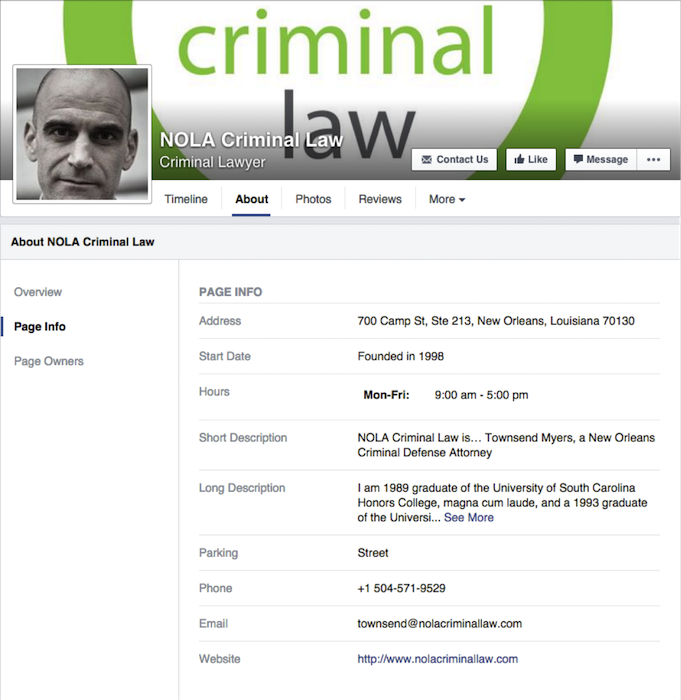
    To avoid false advertisement, everything you publish must be truthful and accurate. In terms of digital content, you will want to hook readers but not make over-exaggerated claims. This might take some creativity from your digital marketing team, but misrepresentation of services could lead to legal repercussions. It’s common sense. Don’t lie.

    NOLA Criminal Law Facebook Image

    Ad Targeting

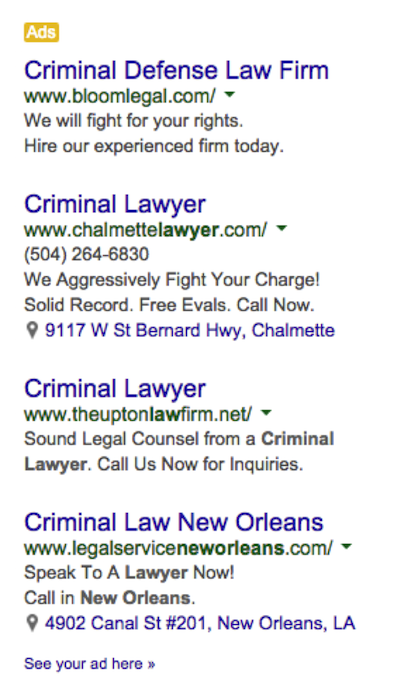
    Because state laws vary, targeted ads are a great resource a firm can use to ensure ads only appear within a certain geographical region, avoiding inadvertently breaking another state’s regulations. You should keep all of your online ads relevant and targeted to your state or area. On top of staying within the realms of your state’s advertising laws, ad targeting also helps save you money. You can avoid appealing to people outside of your legal jurisdiction and reduce waste on your advertising budget.

    Criminal Lawyer Google PPC Ads

    Creative Commons

    An image in an advertisement, whether a pay-per-click or on Facebook, needs to be creative and eye-catching. But all material published online or used in an advertisement still needs to comply with copyright laws. To ensure compliance, you can use creative commons material, join a stock photo website, pull images or graphics from a public domain repository, or ask the owner. A firm needs to get creative while staying safe.

    Even though the 1977 Bates v. State Bar of Arizona ruling solidified an attorney’s right to advertise, laws regulating the legality and specifics of Internet advertisements have yet to develop. We are operating in a grey area. To stay in the clear, make sure you everything you publish online is not a misrepresentation.

  • 5 Tips to Improve Your Franchise’s Online Display Ad Campaign

    Blog4

    If you are a franchise business owner, you may have already encountered the difficulties that come along with trying to create brand consistency and improved user experience across all of the online marketing for your franchise businesses. If your primary goal up to this point has been to employ a streamlined strategy to ensure your online ads are yielding the most successful results, then you’ve likely already created quality content throughout all of your websites and set up a structure for your branded sites with consistent business location information across the Internet. You may have also gone the extra step to manage reviews and testimonials. Now that you’ve optimized your sites, you’re ready to apply your focus to online display ads to generate new consumer leads. If you’re just getting started, these five tips will help you set up the most successful display ads for your franchises.

    1. Keep It Simple

    With spending on online display ads projected to increase 90 percent between 2014 and 2019, it’s crucial to get ahead of the competition and get your franchise campaign set up properly the first time around. In short, creating a successful franchise display campaign involves reaching the right people with the right message at the right place. So you’ll want to focus on one service or product per ad and keep your message tailored to the consumer you’re trying to reach by making the content of your message relevant and easy to understand. Be sure to also include a clear call to action so the consumer knows what they get by clicking on your ad.

    2. Use the Company’s Recognizable Look

    One aspect of online display ads that can easily set you apart from the competition is the distinctive look of your brand. If your company uses the same logo, colors, and fonts across all of the franchise businesses, a consumer should see your ad and be immediately drawn to its recognizable look. When designing your ads, consider placing your logo at the top center for optimal results.

    3. Use Contextual Targeting

    Employing contextual targeting allows you to design your campaign so that your ads will be placed on sites whose content relates to what you’re selling. For example, if you are a frozen yogurt franchise with multiple locations, your ad might appear on a food blog or restaurant review site.

    4. Use Remarketing Ads

    Taking placement of online display ads to an even more sophisticated level, you may want to consider implementing a remarketing campaign. Remarketing lets you show ads to people who have visited your website or used your mobile app before. When people leave your website without buying anything, for example, remarketing helps you reconnect with them by showing relevant ads as they browse the web, use mobile apps, or search on Google.

    How Does a Remarketing Ad Work Infographic Image - Search Influence

    5. Target All Desktop and Mobile Devices

    As trends rapidly change and consumers rely more heavily on their mobile devices, it’s important to also target your ads across all desktop and mobile devices for maximum reach. Eventually, as you start measuring the clicks and leads generated from your online display ads, you’ll have a better idea as to what devices to spend more on. Make sure that you’re targeting by user and not by device for the most accurate results.

    If you follow these five tips and continually make adjustments as the campaign progresses and you get measurable results, you should see how big an impact display ads can have on all of your franchises.

  • How Medical Professionals Use Google Display Ads to Win New Patients

    Google Display Network Ads Image

    By now, most professionals in the medical industry know that a robust Internet marketing campaign is necessary to achieve maximum exposure in the digital age. Doctors, practice managers, and other medical professionals may have an SEO plan that is designed to improve their search engine rankings with web crawlers such as Google. They may even have discovered AdWords, Google’s PPC (pay-per-click) advertising program. However, many aren’t aware of the visibility available to them via Google’s most powerful tool: Google Display Ads.

    GDN Banner Sizes: Get the Most for Your Money

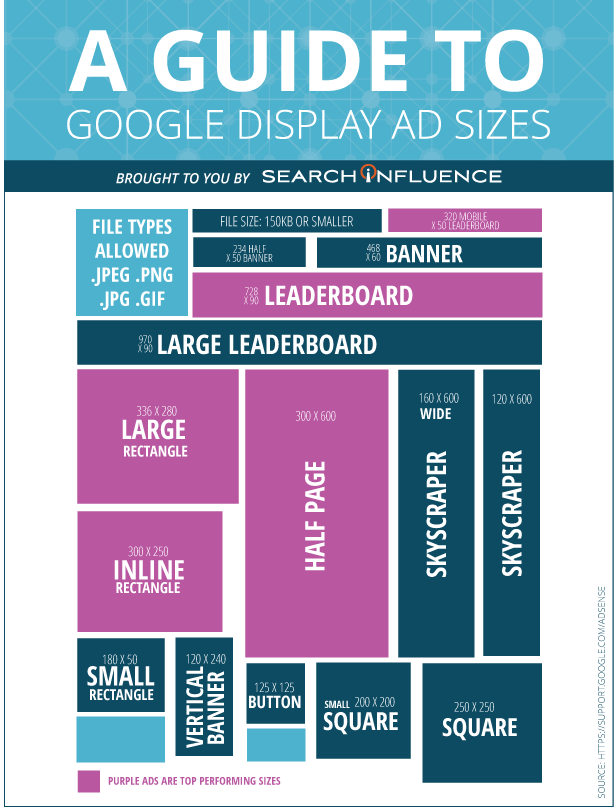
    All ads come in various shapes and sizes and are measured in pixels. Depending on GDN banner size you opt for, the number of partner sites available to you may dwindle. Generally speaking, the options available are as follows:

    • 200×200 Small Square: Appears on the right-hand sidebar on a limited number of sites.
    • 250×250 Square: As above.
    • 300×250 Medium Rectangle: Appears within or toward the end of an article, with a good number of sites to choose from.
    • 336×280 Large Rectangle: As above.
    • 300×600 Half-Page Ad: Appears on the left or right hand of the site, with a growing number of participating websites.
    • 728×90 Leaderboard: Appears inside or at the top of an article, with a good number of sites to choose from.
    • 468×60 Banner: Appears in small spaces inside an article or to the left side, with few participating sites.
    • 234×60 Half Banner: As above.
    • 120×600 Skyscraper: Appears on the sidebars of sites, with few participating sites.
    • 160×600 Wide Skyscraper: As above, with a good number of sites available.
    • 970×90 Wide Skyscraper: This ad appears at the top of websites, with few participating sites.

    What Is the Google Display Network (GDN)?

    AdWords promotion will get your business and services noticed, as it bumps your site toward the top of SERPs (while simultaneously flagging it as an advertisement), but the GDN is slightly different. Google has said that the GDN reaches over 90% of Internet users worldwide, expanding across 2 million pages, including Google-owned sites like YouTube and Gmail, popular news outlets like The Huffington Post and, best of all, a large number of webpages devoted to the medical and healthcare industry. Not only do these ads display when a consumer is already searching for your services, but they also appear on related sites and target the lead while not in “shopping mode.” This unique ability to shape and direct the scope, reach, and target audience for your ad makes the GDN an invaluable tool in anyone’s digital marketing strategy.

    Donaldson Plastic Surgery Ad BannerWhere to Begin: Types, Formats, and Focus

    Though you can opt for a text ad, researchers have found that maximum impact occurs with image ads, which Google places into four categories; static, animated, interactive, and video.

    Static ads: These are just what you might imagine: banners of different sizes that occupy space (usually at the top, bottom, or sides) of a website. The GDN allows these in the most common image file formats: JPG, JPEG, PNG, and non-animated GIF. The example to the left is a static ad created for Donaldson Plastic Surgery.

    Animated ads: This type of ad often generates more interest, as the eye is drawn to movement on an otherwise still display. This type of image also has the benefit of including more information, as you can phase from one still image to the next without having to take up a large amount of page space. These can be uploaded as an SWF or GIF.

    Interactive ads: These encourage input from the user, whether it be by including a link to sign up for a newsletter or showing a photo gallery of products that requires the user to click to view more. These ads can only be uploaded in SWF format. Studies suggest that people are 2.5 times more likely to take action after viewing an interactive ad; however, it’s worth noting that opting for static ads gives you a greater number of sites to advertise on.

    Video ads: These ads can be particularly eye-catching, and they allow you to market on sites that display video content, like YouTube.


    Here is an infographic that will help you easily remember the sizes.

    Search Influence Ad Size Infographic

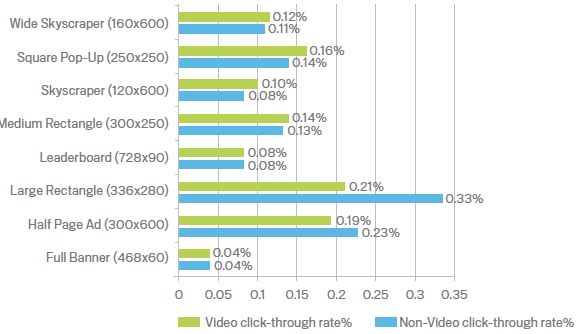
    When selecting a size for your Google Display Ads, it’s paramount to consider the both the click-through rates and the number of potential clients who will be exposed to your campaign.

    A large interactive ad may seem like a good idea, but if it only appears on a handful of websites, it may not be worth the cost—or the effort.

    Technical & Content Requirements

    The GDN will not accept ads that are larger than 150KB. Reducing image size—particularly for animated or interactive files—without sacrificing quality can be difficult, which is why it’s always a good idea to consult with a professional design and marketing team. While animated ads can be looped (effectively playing forever), they cannot be more than 15 seconds long consecutively. Ads in GIF format must be 5 frames a second, whereas Flash ads (whether video or animated) can be considerably longer—up to 20 frames a second and sometimes slower.

    Google Display Ads also carries content guidelines that are particularly pertinent for those in the medical profession. Some of these rules are self-apparent, like not duplicating site content, not tricking users into clicking your ad by pretending to be a virus warning, and making it clear that the material is an advertisement. However, Google also has rules regarding adult-oriented content that can impact healthcare professionals, particularly in fields like OB/GYN and plastic surgery. For example, images containing exposed skin and nudity are not allowed, nor is content that is sexually suggestive. Again, consulting an Internet marketing specialist may be the best way to get your brand out there without inadvertently violating Google’s policies on restricted content.

    Tips for Successful Ads

    There’s no question about it: Google’s paid advertising options are powerful, but they’re complicated. Making the most of the GDM requires completely rethinking the way you market your services and products. You need to be intimately acquainted with your target audience, what sites they’re likely to visit, and what types of advertisements they’re most likely to respond to. Additionally, what works for a general practitioner isn’t going to work for an inpatient addictions clinic. Doctors who specialize in breast augmentation may encounter more problems than those who specialize in psychiatry and counseling—it all depends on your business and your prospective clientele.

    With years of experience in paid search and display advertising for medical practices, Search Influence is uniquely qualified to help you and your business harness the extraordinary power of Google Display Ads. Get in touch today, and we’ll be happy to come up with a plan to increase your visibility and enhance your bottom line.

    Image Credits:

    Ad Click-Through Rates

  • We Went to AdWords Bootcamp so You Don’t Have to: 5 Tips from the Experts

    We Went to AdWords Bootcamp so You Don’t Have to: 5 Tips from the Experts

    I had the pleasure of living and breathing AdWords for two full days on its home field—at Google Tech Corners in Sunnyvale, California.

    We had some very focused discussions that dove into some of the newer features and the best practices for long-standing features. I share some of my key takeaways below!

    1. Be present for your customers’ “micro-moments.”

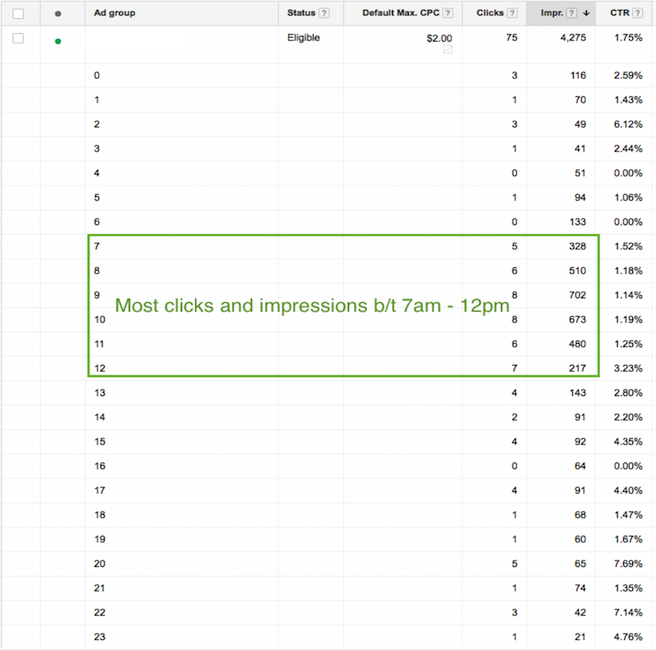
    These “micro-moments” are the key critical points in time in which your customers are searching for your products and services. You must be present when your customers’ micro-moments occur. You may want to increase your bids at certain times of day when more searches for your type of business are being done.

    Ex: restaurant upping bids leading up to and during mealtime.

    If your customer’s micro-moments aren’t as obvious as that of a restaurant, you can identify those high times by analyzing the following:

    • Google AdWords: impression & click reports by time of day
    • Google Analytics: visits by time of day

    Paula Blog 1

    2. We can trust cross-device conversions.

    If you work in AdWords, you’ve likely seen the column “Estimated Conversions.” Google has recently changed the name of this column from “Estimated” to “Cross-Device Conversions”

    Only conversions with a 95% certainty will be included in this number.

    Why do you care?

    Search sessions are segmented for the same purchase throughout the day and across devices. Gone are the days when a user sits at their desktop at nighttime and researches everything they want to know within 30 minutes.

    For example: instead, we’re talking two minutes at 7 a.m., five minutes at 9 a.m., ten minutes at noon, and maybe five minutes again at 6 p.m. to purchase.

    1511-SI-BlogImage-D-01

    3. You better not ignore cross-device conversions.

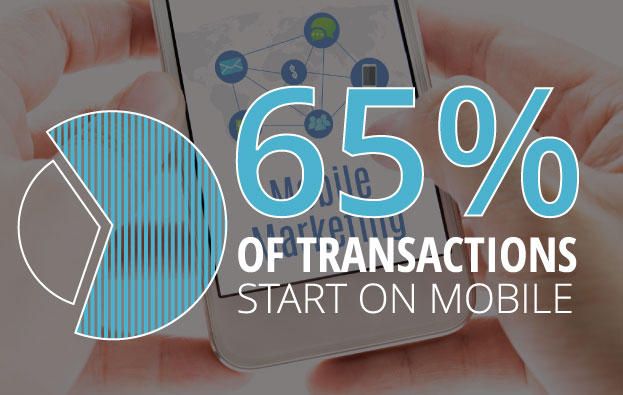
    Why? 65% of transactions start on mobile.

    I’ll be making it a priority to look at cross-device conversions in addition to the traditional conversion metrics (which only include users who search and convert on the same device). If you are looking at traditional conversions only, you are missing out.

    In order to see this metric, you must have one or more conversions set up in AdWords. Then, Google will do the rest.

    4. Leverage in-market segments and affinity segments.

    In both AdWords display targeting and Google Analytics, you can find “In-Market Segments” and “Affinity Segments.” Analytics allows you to see this info about your existing site visitors, and AdWords allows you to target potential customers using these two targeting options.

    This isn’t new knowledge, but I was given a fantastic example of what distinguishes the two, and I thought it was worth sharing:

    Affinity Segments:

    Users in this group have demonstrated (via the sites & pages they visit) what their lifestyle interests are.

    Example: A user in an affinity segment for “automobiles” would read car blogs and articles about future car releases, and they would also watch YouTube videos about cars.

    In-Market Segments:

    Users in this group are actually in the market for a given category of product or service.

    Example: A user in an in-market segment for “automobiles” would be looking at Kelly Blue Book, local dealership sites, Edmunds, TrueCar, etc.

    5. Allow new features to make your life easier.

    Last but not least, what I finally realized is that Google is constantly adding new features to AdWords to help us better spend our money. Given advertising is very much Google’s main source of revenue, this only makes sense.

    As new features roll out, learn their benefits and capabilities, and adjust your process accordingly.

    With consumer behavior changing faster than you can say “micro-moments & cross-device conversions,” there’s never an excuse to say “Well, we’ve always done it this way.”

  • You’ll Never Believe How Clickbait Techniques Are Causing the Downfall of Ads

    1511-SI-BlogImage-C-01

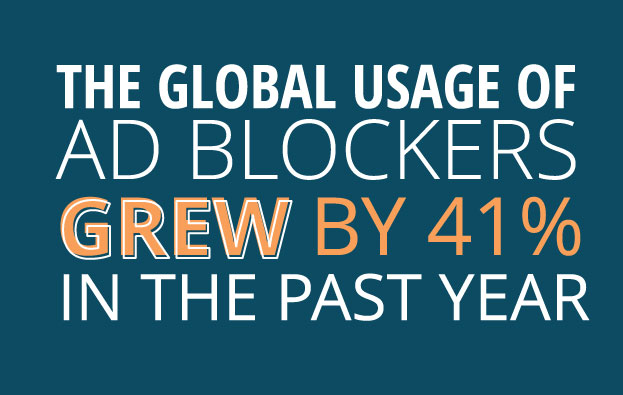
    The atmosphere for Internet advertisers has changed over the past couple of years following a trend that marketers of the past simply didn’t see coming. Thanks to an overuse of several marketing techniques, including clickbait titles, dynamic advertising, and uninspired cookie-cutter content, Internet users have learned ways to avoid ads and are experienced enough to know a clickbait title when they see one. All in all, this has a direct effect on potential income brought on by advertisements.

    Ad Block 1

    Why the Change?

    It would be remiss of us to believe the fault in this lies with the consumer, or that advertisers of today are responsible for the actions of other advertisers in the past. In truth, this should have been an expected outcome when considering how simple it is to copy these techniques and how pervasive they have become on today’s Internet. People learn through experiences, and the sheer overabundance of these techniques simply expedited the desensitizing process. On top of that, other Internet users have found ways to use the current mood toward advertisements to their advantage.

    Ad Block 2

    AdBlock and AdBlock+ are the best examples of simple, easy-to-install ad blocker plugins that have seen increased usage and popularity. The effectiveness of dynamic advertisements, arguably the most adaptive and effective marketing technique there is, is completely nullified. What once showed ad content based on the Internet history of the user simply doesn’t load with the rest of a webpage. And it doesn’t stop here.

    AdBlock has now become popular enough that it has started to set and enforce its own criteria for quality, non-intrusive ads. The criteria focuses on ensuring:

    • Static advertisements
    • Text over image usage
    • Proper placement that does not block site content or require a mouse-click to hide or mute
    • All advertisements are labeled as advertisements

    The organization has even started to write a whitelist and ask other websites to voluntarily submit to these regulations. Though it might be difficult to imagine any major site agreeing to such demands, a glance at the growing number of AdBlock users makes clear the potential benefits.

    Ad Block 3

    Clickbait titles are also a commonly used technique that focuses on numbers over quality, and it has lead to a response from Internet users that to me is a far more fascinating result. People have started to avoid clicking on interesting titles on their own, because from the person’s experience, these titles usually offer little more than lackluster and boring content. Or at least, that is what people have learned to expect as a result of past Internet marketers. Simply put, clickbait titles have become less and less effective over time. This is an especially unfortunate result for those webmasters and organizations that actually offer quality content and are simply trying to draw traffic toward their site in an effective, eye-catching manner.

    Now what?

    So knowing all of this, what can be done? The simplest answer is to change the paradigm and make quality of content and advertisement more important than quantity. It may seem counter-productive, but this is more likely to have a long-term effect simply because it is what Internet users are looking for and prefer—at least for the moment. Another good option is to turn to professional advertisers and Internet marketers who are familiar with the ever-changing environment and are ready to follow through with new or changing regulations, whether they come from AdBlock or from Google altering its search engine algorithm once more. Without this assistance, an advertiser or organization has to start building its own community and establishing trust with those individuals using consistent, quality content. Internet users can then vouch for the content by sharing it, not necessarily with the rest of the world, but with the friends and family within their community that trust their opinion. That, in itself, makes a statement that reverberates across multiple online communities quickly.

    Image credits:

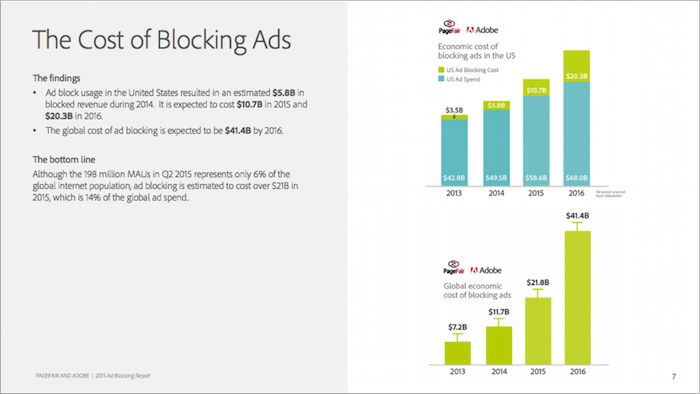
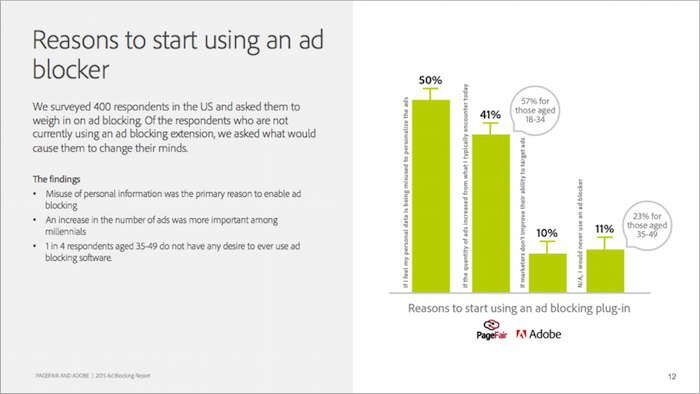
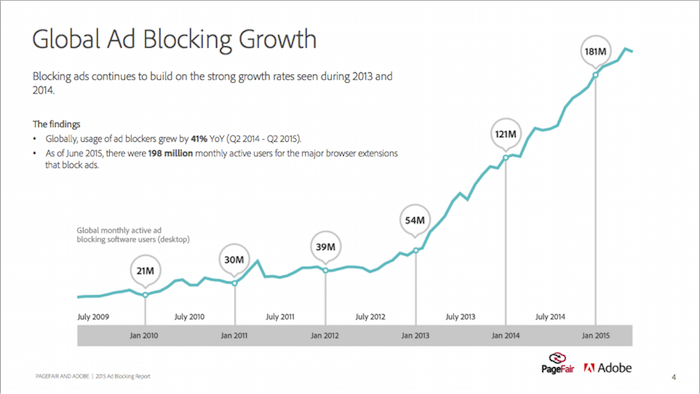
    2015 Ad Blocking Report

  • Insta-Ads: Facebook Brings Instagram Ads to Life

    Good news for advertisers! It appears that Instagram Ads are now open for advertisers through Facebook’s Power Editor.

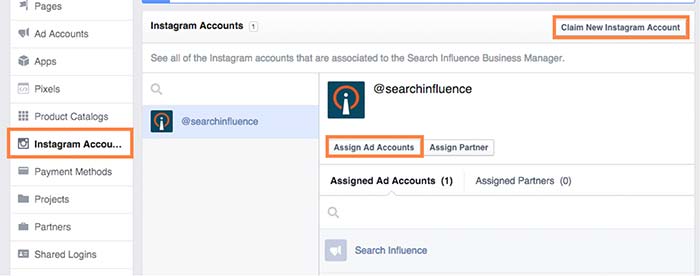
    While no official announcement has been made (and Instagram hasn’t even updated their site), I stumbled across these new features while poking around my Business Manager. What tipped me off was the ability to claim Instagram accounts under the Business Settings in Business Manager. From there, you can assign ad accounts to individual Instagram accounts. Interesting, right?

    instagramadscreenshot

    There is also a notification at the top of the page that states that “Instagram ads are gradually rolling out and might not be available to you right now. You can claim your Instagram account to have your setup ready. Read more here.”

    How Do They Work?

    After doing some digging and playing around with Power Editor, I was able to create an ad for Search Influence’s Instagram profile. However, the only ad objectives currently available on Instagram are “Clicks to Website” and “Mobile app installs.”

    Earlier this month, Instagram launched its Ads API Partners program. According to AdWeek, “Instagram Ads API Partners will be able to perform tasks including scheduling and publishing content to the Facebook-owned photo- and video-sharing network, monitoring audiences and sharing access to Instagram accounts across teams.”

    What Does This Mean For You?

    All of these updates come as very welcome news, as managing and advertising for businesses on Instagram was difficult in the past. Previously, Instagram advertising was only open to larger brands willing to spend $200,000 or more on brand awareness for a three-week campaign.

    Do you plan on using Instagram advertising? How do you think it can benefit your business?

  • Googleplasty: How to Reshape Your Search Results (Part 2)

    As more businesses begin to take efforts to improve their online presence, standing out in search results of highly competitive markets and areas becomes even more difficult—and nowhere is this perhaps more true than in the cosmetic medicine industry.

    In order to reshape your search results through the art of “Googleplasty,” you must know what factors make your business rank high in a Google search. Since we now know all about the different types of search results from part one of this two-part blog series, let’s talk about the most important factors that play a role in how high your practice ranks.

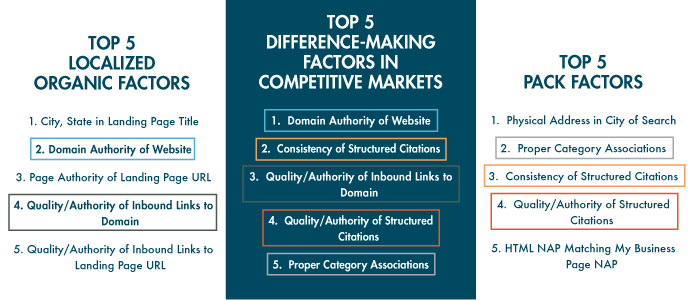
    The following three “Top 5” lists of factors are from from Moz’s 2014 Local Search Ranking Factors survey. The information came as a result of surveying 40 industry experts to determine what had the most influence on ranking in Google search results.
    top 5 search ranking factors

    As you can see, all of the factors that are integral in competitive markets also play a part in either localized organic or maps pack results. Due to their repeat importance, I think they’re the five factors most worthy of discussing in detail.

    1. Domain Authority of Website
    domain authority

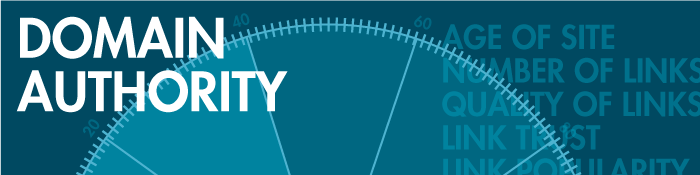
    First up on our list as the most important factor in competitive markets is Domain Authority, which isn’t much of a shocker. Domain Authority is a proprietary measurement (created by Moz geniuses) of a domain’s power within a 100-point scale. This score can be used to predict if a site is likely to rank in Google’s search results and can also be used to track a site’s growth and increase in strength.

    It is a metric that combines other metrics such as age, number of links, and quality of links, so it’s not easy to manipulate through singular or direct efforts. As it is directly put on Moz’s site, “The best way to influence this metric is to improve your overall SEO.”

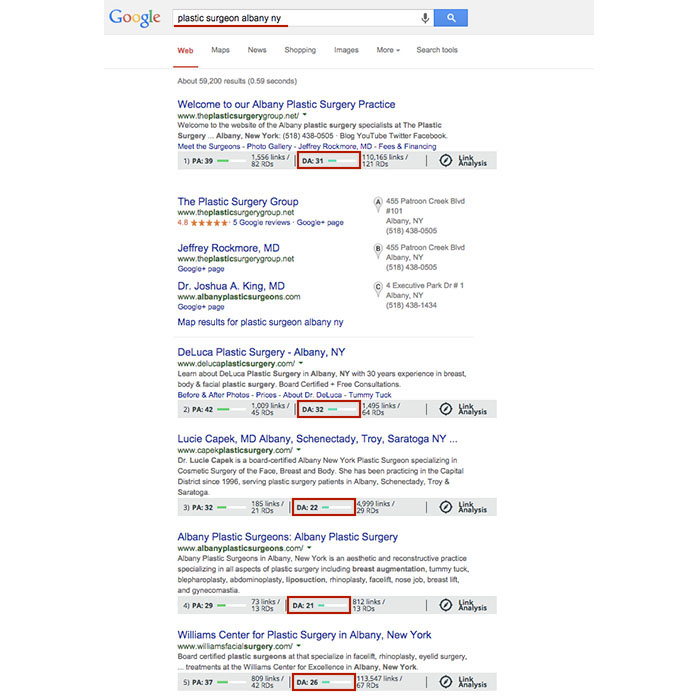
    Using Moz’s MozBar to see domain authority of pages in search results, you’ll see that the top five business sites in the localized organic results for “plastic surgeon albany ny” have Domain Authorities of 31, 32, 22, 21, and 26, respectively. As you can see here, having a score that is higher by a single point won’t guarantee that you rank above your competitor, but in this search example, business sites past the first page of results tended to have Domain Authorities lower than 20.
    Domain Authority Search Results

    2. Consistency of Structured Citations
    structured citation consistency

    While this factor isn’t as high ranking for localized organic results, it is third for the top maps pack factors and second here in the top factors for competitive markets. One reason for this is that in many competitive markets, such as plastic surgery or cosmetic dermatology, you’ll find maps packs in search results.

    To start, a citation is a place on the Web where a business’ name, address, phone number, and often website can be listed (sometimes referred to as the NAP of a business – name, address, phone). Any combination of the NAP, with or without all parts, listed on a site is considered a citation. A structured citation in particular is a listing of business information found on a directory website (e.g. YellowPages.com and Yelp.com). On the other hand, an unstructured citation can be business information on non-directory sites like newspaper sites, press release sites, and blogs, to name a few.

    By increasing the number of matching information sources (and therefore matching signals) to Google, you also increase your chances in having Google match this information to search queries, according to a recent webinar with Google’s Heather Wilburn. So if you want to be matched with potential patients searching for businesses like yours in your area, consistent business information across the Web is one of your best bets, especially in competitive industries like cosmetic surgery.

    3. Quality/Authority of Inbound Links to Domain
    inbound links to domain

    An inbound link to your domain (aka inlink or backlink) is exactly what it sounds like, a link leading to your website. The relevance to your industry or location and the authority of a website linking to yours in and of itself are the two best traits for quality links. Buying links or having links from random, spammy sites will hurt, not help you. Links from local sites and popular sites are a pretty safe bet. You can seek out local sponsorship opportunities as a good link-building effort or help other sites clean up their broken backlinks by using your working ones.

    To differentiate between natural link building versus spammy link building, remember that it’s all about user experience and what makes sense to the user. If your efforts don’t uphold the ideal of providing the best user experience possible, then they’re probably not good.

    4. Quality/Authority of Structured Citations

    structured citation quality

    As mentioned above, a structured citation can be any directory site that lists any variation of your business’ NAP or website. While consistency is most important, you also want to make efforts to build high-quality, authoritative citations in directories.

    Just like there are many factors to improve your own site’s authority, there are also many factors to determine the quality of a directory. You can delve into Whitespark’s blog on how to identify quality citation sources for a detailed breakdown, but basically a good rule of thumb is to look for high domain authority and human moderation in directory sites. Examples of human moderation include how DMOZ requires submission review by its team before a link goes live or how Google Plus, Yelp, and Bing listings all require verification via phone call or a postcard sent to the business.

    Google also considers niche directories highly authoritative. A niche directory is an industry-specific or location-specific directory. Since the Pigeon algorithm update, this kind of citation building has become especially important, and searching for your industry’s keywords will often help you identify these niche directories. If you search for “plastic surgeon columbus oh,” you’ll see that the directories healthgrades.com, vitals.com, and smartplasticsurgery.com appear on the second page of search results. Often, these types of directories require either verification or payment for those seeking to be listed on their site. If you understand the concept of barnacle SEO, you know that being listed on these types of big, authoritative sites is a great way to improve your own visibility to potential customers. Use your discretion to decide if the opportunity cost of getting on a directory isn’t too high to be worth the effort.

    Warning: If a site ever requests a “reciprocal link” to its site on your site in order to be listed, this is NOT A GOOD practice, and they are not worth your time.

    5. Proper Category Associations
    category associations

    Having proper category associations is another important factor for ranking in the maps pack that can set you apart from the rest in a competitive market. It’s a pretty simple concept, and it basically boils down to the part of the guidelines for representing your business on Google that tells businesses to “Choose categories that are as specific as possible, but representative of your main business.” A cosmetic surgeon with the primary category on the Google Plus local listing set to “surgeon” is less likely to rank above one with a primary category set as “plastic surgeon” in the maps pack, for example.

    Though this is a lot to grasp and take action on all at once, having the foundation and understanding of best practices to improve user experience and to better your business online will greatly improve your successes online in the long run.

  • Googleplasty: How to Reshape Your Search Results (Part 1)

    As businesses grow more in touch with their online presence, it becomes more and more challenging to stand out in the search results of highly competitive markets and areas—and nowhere is this perhaps more true than in the cosmetic medicine industry.

    Search Influence - Plastic Surgeon Local Google Search Results

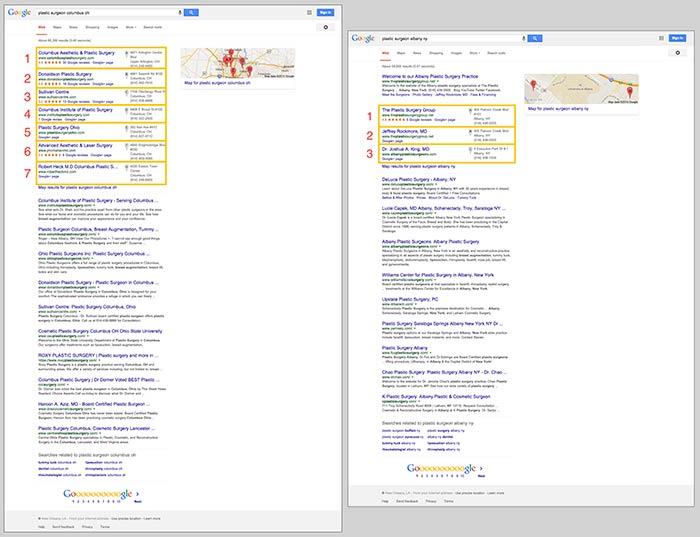
    First things first, let’s make sure we’re on the same page about the two major kinds of results that we see in desktop results for plastic surgeons. “Localized organic” search results and “maps pack” results typically appear together in what is referred to as “combined” search results. The factors that determine what appears in these two areas are not the same, as you can tell by the the difference in results and by the appearance of a site more than once between the two. Maps packs can come in a variety of forms and don’t show up for all search queries, which is also important to note.

    In the screenshot below on the left for the search “plastic surgeon columbus oh,” you’ll see 10 localized organic results below a 7-count maps pack. In the screenshot on the right for “plastic surgeon albany ny,” you’ll see 10 localized organic results, but the 3-count maps pack appears below the first organic result.

    Search Influence - Google Maps Pack Plastic Surgeon

    Stand Out in the Maps Pack

    In the maps pack itself, the most striking features are the review stars and rating display. The data in the maps pack area is pulled directly from Google Plus local listings in Google Maps. So, to make your practice stand out in the maps pack, you should claim and verify your Google Plus listing via Google My Business.

    Once you’ve claimed and verified your listing, you’ll want to get reviews from your patients. It’s important to understand that one or two reviews a month over a few months is better than 15 reviews in one week. As with most online marketing strategies, natural behavior is the best behavior.

    Stand Out in Localized Organic

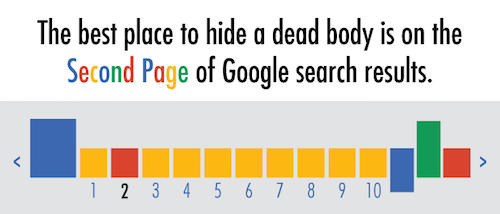
    The most obvious way to stand out in the localized organic results is to be ranking as high as possible and to AT LEAST be in the top 10 so that you’re on the first page. As the age-old SEO joke goes, “The best place to hide a dead body is on the second page of Google search results.” Hardly anyone looks past the first page, and—according to eye-tracking data—not many look past the top half of the search results page.

    Search Influence - dead body Google Search Results meme

    The Google PageRank algorithm that determines these rankings takes into account somewhere around 200 factors, so it’s not as simple as pinpointing one or two efforts to be made.

    Now that we’ve got a better understanding of what we’re looking at in search results, we can start to understand the major factors that affect ranking in each of these sections. Stay tuned for my next blog, where we’ll talk about the top five ranking factors in the maps pack, in the localized organic results, and in competitive markets!