Blog

  • Facebook Remarketing Explained – 4 Steps to Increase Your ROI

    How Does Remarketing Work?

    Have you ever window shopped for a new pair of running sneakers online and noticed they followed you around the Internet? Advertisements for those sneakers in the same color and size appear on almost every website you browse! You might even be scrolling through your Facebook News Feed and the sneakers pop up again. You may be thinking, “This is fate!” But no, this is not fate or the magic of the Internet.

    I’m going to let you in on a little secret called remarketing. One of the hottest trends in remarketing right now is using Facebook to target a select group of ideal customers with tailored ads. Your company’s marketing team can use this powerful marketing tool to nurture relationships with qualified customers and increase sales.

    What Is Remarketing?

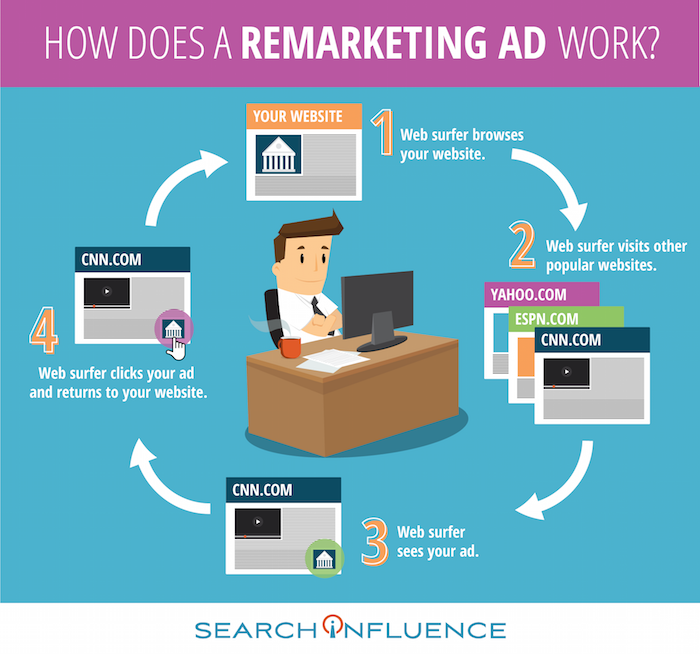
    Let’s say someone clicks on your brand’s Facebook ad. They’re instantly brought to your website, and they can browse your offerings. These people are generally qualified leads because they took the time to navigate away from their cluttered News Feed and click on your ad. However, they may not always complete an action like making a purchase, downloading an e-book, or providing their contact info. In fact, people rarely make a purchase the first time they visit a brand’s website or see an offer from the brand. These lost prospects are valuable, and you will want to continue your business experience with them.

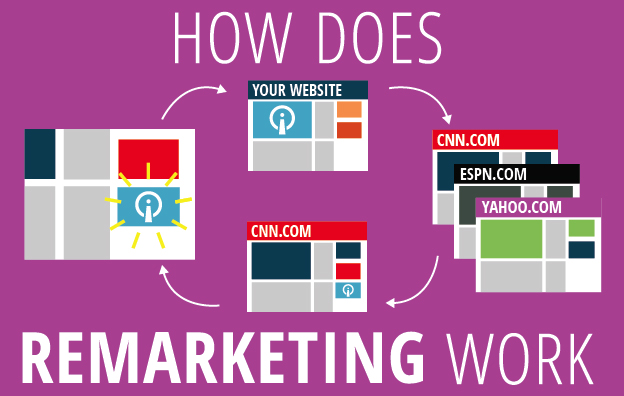
    How Does a Remarketing Ad Work Infographic Image - Search Influence

    The overarching goal of remarketing is to place your brand at the top of consumers’ minds. Remarketing allows you to reach people who have previously visited your website and may not have made a purchase.

    A great way to revive your relationship with them is by showing tailored ads to them again on Facebook. To do this, you can use your brand’s Facebook pixel to create a Custom Audiences for Website Traffic that builds an audience based on your brand’s website traffic. The opportunities to nurture and build relationships with current and prospective customers on Facebook are endless.

    Why Should I Remarket on Facebook?

    Facebook remarketing ads get three to four times the response rate of regular Facebook ads. With over 1 billion people using the social media platform daily, making sure that you’re reaching the right people is critical! The Custom Audiences for Website Traffic feature seamlessly reaches your ideal customers by creating a Facebook audience representing a group of prospective customers and current customers who have visited your website. This feature has a few benefits:

    • Reach people who are genuinely interested in your brand through targeted Facebook Ads
    • Bring people back to your website to complete an action
    • Find new people who have similar characteristics to your website

    By targeting your ideal customers, you will grow your brand’s fan base, drive website traffic, build a rock-solid email list, and increase ROI. You will also avoid burning a hole in your advertising budget by lowering cost-per-click, driving higher conversions, capitalizing on social proof, and expanding market reach.

    How Do I Use Facebook Custom Audiences for Remarketing?

    Now that you’re an expert in remarketing, let’s dive in and set up a Facebook remarketing campaign for your brand. I’ve created a 4-step guide that outlines the setup process.

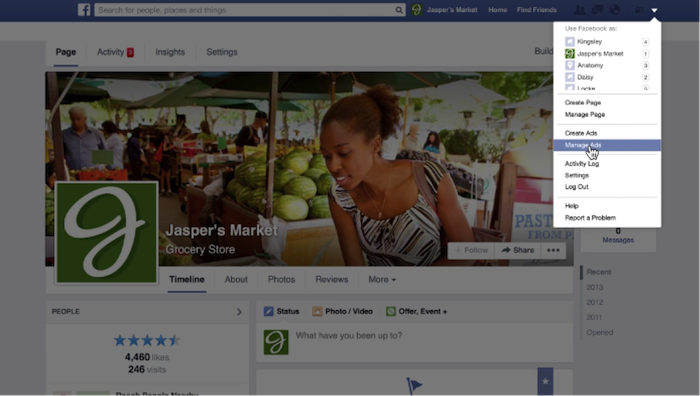
    1. Access Facebook Ads Manager. Log in to your Facebook account and navigate to the drop-down menu on the top left of your screen. Select “Manage Ads” from the drop-down menu.

    1 - Remarketing Drop Down

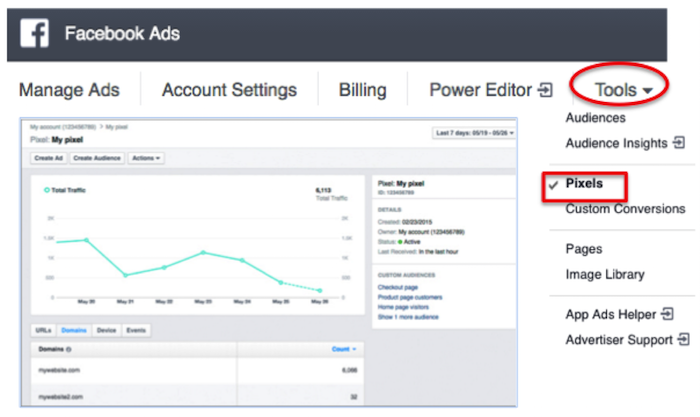
    2. Create a Facebook pixel. To pinpoint your website visitors so you can retarget them on Facebook, create a Facebook pixel and insert it on your site. Now that you are in Facebook Ads Manager, click on the “Tools” drop-down menu and select “Pixels.” Click “Create a Pixel” and give it a name. Then, copy and paste the pixel code into your website code.

    2 - Facebook Ads

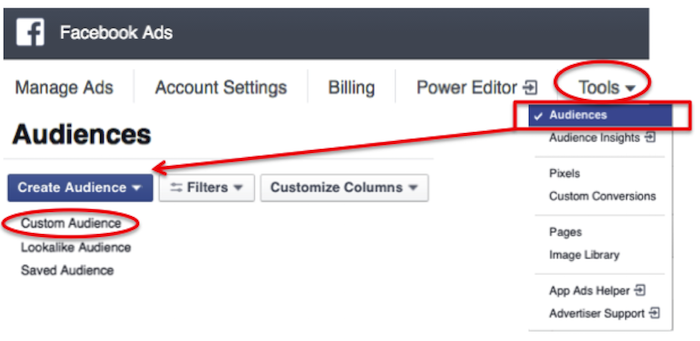
    3. Build a custom audience. Click on the “Tools” drop-down menu and select “Audiences.” You’ll see a blue button that says “Create Audience.” Click on that button and hit “Custom Audience” from the drop-down menu.

    3 - Audiences

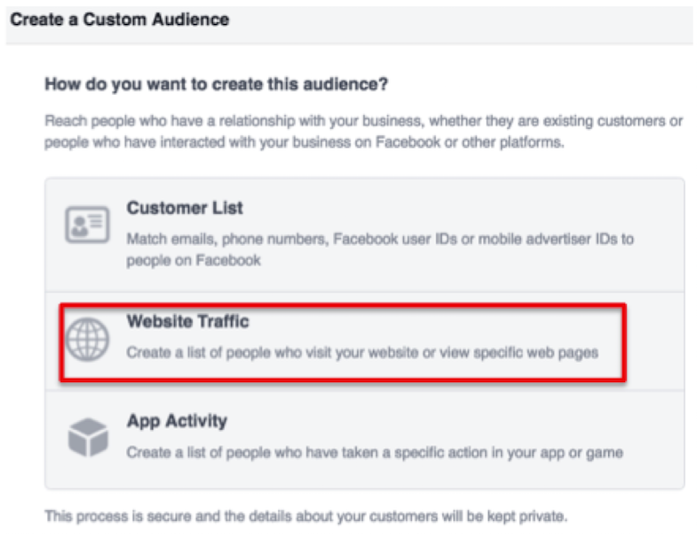
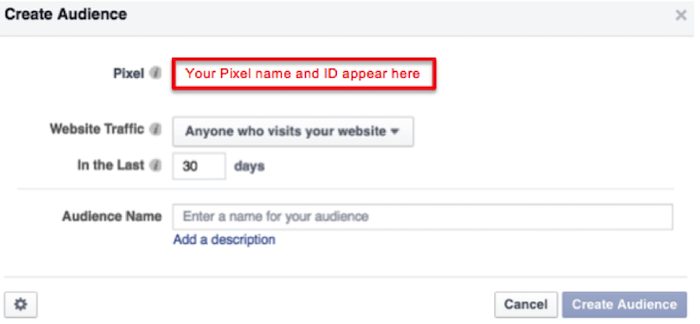
    Then, select “Website Traffic” and name your audience.

    4 - Website Traffic

    5 - Create Audience

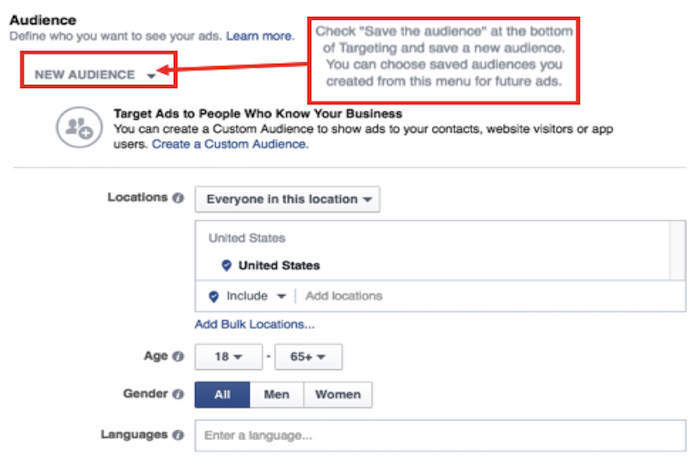
    4. Craft an Ad. In the ads create tool, you can access your custom audience when you choose who you want your ad to reach.

    6 - New Audience

    Voila! You’ve successfully created your remarketing campaign. If you have any more questions along your remarketing journey, you can reference Facebook’s simple remarketing guide.

    Image Credits:

    “Manage Ads” Menu Screenshot – from Video
    Pixel Graph Screenshot

  • Google My Business for Doctors: Visibility, Authority, & SEO

    One of the first steps in improving your searchability with Google is to claim or create a Google My Business listing. With Google My Business, you can manage your information in Google Maps and Google Plus. Since My Business is owned by Google itself, the links gained from these profiles are highly valuable and authoritative.

    However, if you’ve ever tried to claim your Google My Business listing, you may have seen how complex it can be, especially for businesses like medical practices. You may have had questions like: “How do I represent multiple locations for my practice” or “What if I want patients to be able to find their doctors in addition to my practice?” Well, today we’ll go through how to establish your Google My Business presence with exactly those questions in mind, and more!

    1603-SI-KierstensBlog-KG-A-01

    First, let’s dive a little deeper into the world of Google My Business. Google My Business is essentially the dashboard in which you can maintain your information with Google directly. This means that by creating a listing in Google My Business, you’re also creating a Google Plus page and, if establishing a local presence, a Google Maps listing as well. By doing so, you’re telling and verifying with Google, “Hey, I’m a real business, and here’s my real information!” By maintaining that information and posting to your Plus page, you’re proving to Google that you’re the authority on your business and that your business is a valuable resource for users to find.

    Sounds great, right? Who doesn’t want an in with Google? For many businesses, this can be as simple as claiming and verifying a single business listing. But for medical practices, it can get pretty complicated.

    Claiming Your Google My Business Local Listing(s)

    To begin, claim and verify your practice’s primary local business listing. If you are a multi-location business, go ahead and claim the local listings for each of your addresses. Each local listing will need to be verified by either phone or postcard, and no edits can be made until then. Once that’s done, check out these tips and guidelines for building your practice’s Google My Business presence:

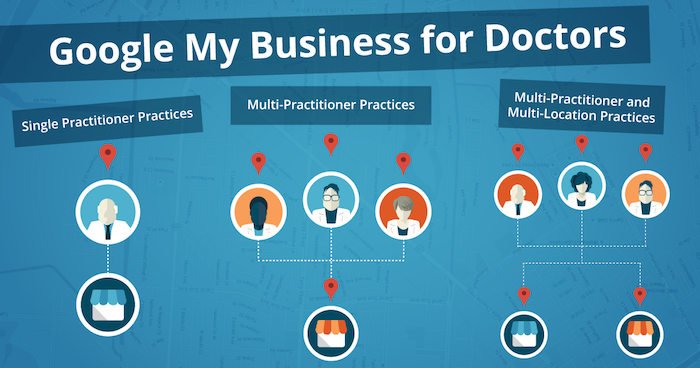
    1603-SI-KierstensBlog-KG-B-01

    1. Single Practitioner Practices
      For practices with just one public-facing doctor, you’ll need to decide whether or not to use that doctor’s name instead of the business name. This is wholly a personal decision, but do not create Google My Business pages for both.
    2. Multi-Practitioner Practices
      For practices with multiple public-facing doctors, it is acceptable to create local pages for each doctor, in addition to the practice’s local page. If this is the case, do not include your business name in the name of the practitioners’ pages. And try to differentiate between these pages with either a different phone number or suite number for each doctor, when possible.
    3. Multi-Practitioner and Multi-Location Practices
      For doctors who work at multiple locations, it is acceptable to create separate local pages for each doctor for each location, according to Google’s guidelines. However, it’s even more important that you’re able to differentiate between these pages with separate phone numbers and/or suite numbers. The practical likelihood that Google will flag these as duplicates is higher so proceed with caution! If your goal is to make sure clients can find their doctor’s contact information for each of their locations, then this is a solid practice. Otherwise, if you’re trying to get all of your doctor’s to rank for general searches you’ll need to do more than just add them to Google My Business.

    Brand Pages

    As mentioned before, Google My Business is two pronged; it lets you manage both your local presence via Google Maps and your social presence via Google Plus. If you’re a multi-location practice, consider creating a Google Plus Brand page in addition to your local pages to consolidate your social presence. Brand pages are not linked to Google Maps in any way. Instead, they are purely social platforms for you to manage…you guessed it, your brand! So rather than doing so on each of your local pages, you can post to your one Brand page and gather the same clout with Google.

    That wasn’t so bad, right? Remember to keep these pages updated and treat your primary Google Plus page as a social media profile, like Facebook or Twitter. By doing so, Google will be able to better recognize you as a trustworthy and authoritative source.

    Now that all your pages are claimed, verified, and updated, you’re one step closer to a solid SEO presence!

  • 10 SEO Best Practices To Resuscitate Your Medical Practice’s Website

    Your 2017 Website Checklist Image - Search Influence

    What exactly is SEO, and why should your medical practice be applying it to your website? SEO, or search engine optimization, is a means for building a successful website. It is an on-going strategy for increasing your site’s visibility in the search engine results and helping prospective patients find you and the services and treatments you provide. A well-rounded SEO campaign employs both on-site and off-site work to gain new patients, excel in search engine rankings, and bring in high-quality traffic to your site. The focus of this post is specifically on-site optimizations, which are part and parcel to a successful Healthcare SEO campaign.

    With Google, Yelp, and Bing taking nearly 90% of the market share, your ranking in those search results is essential to the online success of your medical practice. In this post, I give an overview of the 10 SEO tactics that are crucial for not only building a strong and healthy website, but also growing your client base.

    1. Title Tags and Meta Data

    Title tags and meta data are implemented on the backend of your website. They are short and informative, acting as the title of a page of content on your site. Title tags are read by search engine bots as well as users. These title tags are visible at the top of a browser window and appear in search results as a bold blue link title. An optimized title tag includes branding information, your location, and what that specific page of content is about. This allows both search engines and potential patients to know who you are, where you are, and what services you can provide for them.

    There are four types of meta data: meta keywords, meta language, meta robots, and meta description. Most effort is applied to meta descriptions (or meta tags), which act as a summary or description of that page of content. In search results, this information appears in two lines of gray text under the title tag. Every page of your site should have a unique meta description. It is best practice to remain in Google’s 160-character limit while including information on what that page is about as well as a call to action. You want your patients to know not only that you offer tummy tucks, but also that they can easily learn more about the procedure on your website!

    Here’s an example of an optimized title tag and meta description:

    Optimized Meta Data

    2. Call to Action

    Your website should have a clear and bold call to action as soon as a patient arrives on your site. What do you want existing and prospective patients to do once they have found your site online? Do you want them to call for an appointment, or do you have online scheduling? Do you offer a weekly newsletter with tips for healthy habits, or maybe an email list with monthly specials on cosmetic procedures? Make sure your site tells patients what the next step is in learning more about your business or coming in for appointment.

    Here’s an example of a call to action and two types of forms:
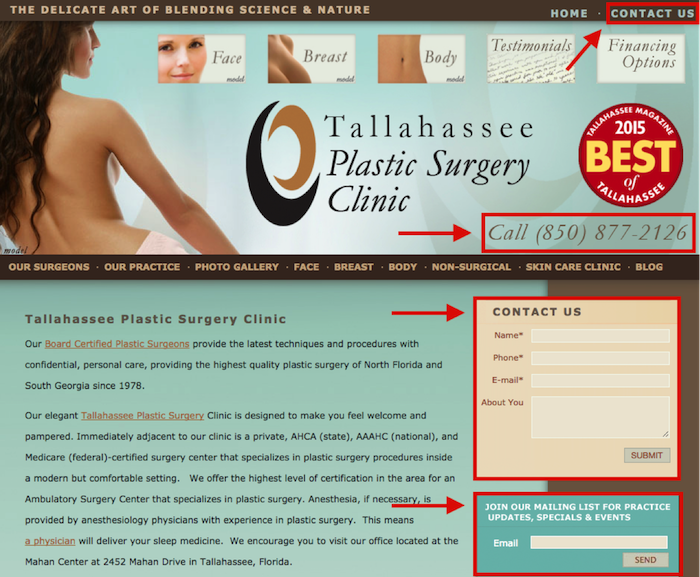
    Optimized Forms

    3. No Broken Links

    Just one broken link can gravely impact your ranking in the search engine results, create a poor user experience, and result in the loss of a customer. If a potential patient clicks on something in their search results and it 404s, they may never return to your site. 404s can be caused by the removal of content (PDF documents, videos, etc.), external links that are changed or moved, and the renaming or moving of pages within your own site. When possible, fix the problem at the source (update internal links on your site to reflect new URLs). You can also redirect any old URLs that have moved to a new URL. Careful: too many redirects can slow down the speed of your site. And remember, some pages are meant to 404, such as files that are not images or pages, or files that a normal site visitor should not have access to, such as an admin or login area.

    4. Topics and Keywords

    Topics are the more general themes assigned to pages on your site. Keywords are those phrases in your content that help people find your website through search engines. The pages of content on your site should include topics and keywords with the services that your practice offers. Keep in mind that these need to be terms that your patients would type into search engines. For example, there are on average over 40,000 monthly searches for “rhinoplasty,” but you don’t want to miss out on those 12,500 monthly users who are searching for “nose job.”

    The topics and keywords you choose for each individual page of your site should appear in the title tags, meta descriptions, on-page headings, alt tags of images, and on-site content. I will go more into content later, but keep in mind that you should be including one keyword for every 100 words appearing on the page. Google rewards those sites full of unique and fresh content.
    Google will reward you if all on-site content is unique and high quality.

    5. Mobile Friendly

    Your site must be mobile friendly! According to a study by Mobile Behavior Report, 27% of users will leave your site if it’s not optimized for mobile use. That’s a lot of business to miss out on! Many patients are calling for information or scheduling appointments on the go. You want to make sure they can easily access your site from their smartphone, and Google can help you with that! They offer a free tool to check how mobile-friendly your website is.

    6. Quick to Load

    If your site is slow, patients are likely to leave and visit another site in hopes of finding the information they are looking for. You want to create the best user experience by presenting an easily accessible and speedy site! Again, Google is here to save the day with their PageSpeed Insights tool. This tool measures both your desktop and mobile speed, gives it a score ranging from 0 to 100, and makes recommendations on how you can make your site speedier.

    7. Schema

    Schema is a piece of code that is placed on your site to help search engines provide richer and more informative results for your patients. It’s a way of “labeling” important information on pages of your site so that search engines can better read it and produce better search results for users. There are many types of schema that can be applied to your site. For a medical practice, one the most effective types of markup is ratings/reviews schema.

    8. Content

    Implementing optimized content on your site is one of the most important aspects of an SEO campaign. This is the actual text on your site where you describe your practice and the individual services that you offer. Google rewards sites with original, high-quality content. It needs to be unique to your site, natural, and fresh! A list of the services your practice provides may seem sufficient, but your site is an opportunity to show your new and existing patients that you are a knowledgeable expert in your field. Don’t just list that you provide rhinoplasty and breast augmentation; demonstrate that you are well versed in these procedures and their recovery process. Make your patients feel at ease and increase their confidence in choosing you as their physician.

    Unique and fresh content also reinforces your site authority with Google bots. New content implemented on your site brings those bots back to crawl the information on your site. Content should typically be about 500 words per page, but as the medical field is more technical, twice that length is usually appropriate. Use content as a means to stand out to patients and search engines as an authoritative and relevant source in your field!

    9. Blog

    Blogs are another way to place rich content on your site! Like on-site content, they boost your site’s authority, but they also allow you to relate to your patients. Regularly posting on your blog engages readers with valuable and useable information. Your website may have a page on melanoma, but a blog post on skin tips for summer is a friendlier way to attract patients to your site. Here are some helpful tips on choosing the length of your blog posts.

    10. Google Analytics

    Last but certainly not least on the list of must-haves for your website in 2016 is Google Analytics! With all of the items above, you’ll want to track the progress of your newly optimized site. With greater insight comes greater control. Google Analytics allows you to analyze your traffic data to better understand your audience. It also helps you understand which of your marketing strategies are working best for your practice. If you can hone in on your audience and which tools are most effective in reaching them, you can lower your marketing costs and bring in more business!

    These 10 best practices are an inexpensive way to boost awareness of your practice and bring in new, revenue-generating patients. With a little strategy and effort, you can have a comprehensive SEO campaign that brings your practice’s website up to speed!

    Image Credit:

    Nurse Phoebe Image
  • Four Steps for Ranking Above Wikipedia on Google

    2710464400_0fd7f7c94e_z

    When a user makes a query in Google, Google will sometimes display a Featured Snippet, which is a few lines of text that directly answer the question posed. These Featured Snippets provide valuable insight to the user who made the query, and according to a study by HubSpot, web pages ranking as a Featured Snippet for a high-traffic keyword see an average click-through-rate increase of 114%. But how do you get your web page to rank as a Featured Snippet?

    Identify Common Questions Related to Your Business and Market

    To rank as a Featured Snippet, your web page is going to have to offer a clear answer to a question that people are asking. Think about the most common questions you get from your customers. If you operate a dentist’s office, which procedures do your patients ask you about the most? Or as a lawyer, are there any specific laws or acts that your clients frequently ask you to clarify? Record these questions.

    Answer These Questions Clearly and Directly

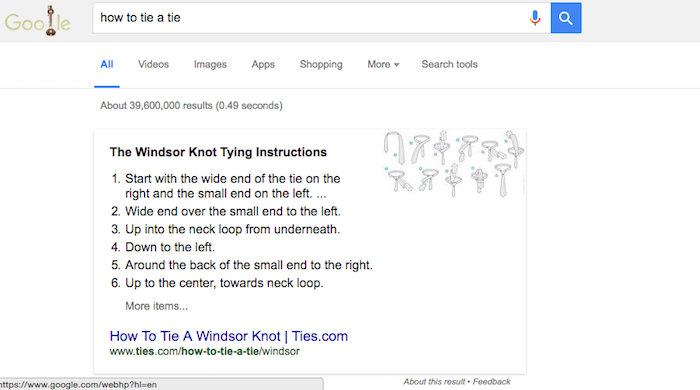
    The point of the Featured Snippet is to answer the searcher’s query as efficiently as possible. After you have analyzed the questions you want your web pages to be featured for, answer them clearly. For example, a “how to” question would be best answered in a numbered series of steps. When “how to tie a tie” is searched, Google pulls a Featured Snippet from ties.com with detailed instructions on making a windsor knot. Each step is clearly numbered and gives exact directions.

    Windsor

    Provide More Valuable Content on Your Page Beyond the Answer

    Your web page for the Featured Snippet needs to have more content on it than just the answer to the query. After all, your answer should only be 54–58 words, and as we have discussed before, pages ranking on the first page of Google’s search results have significantly more words than that. Ways that you can add content to the web page are by adding a video about the topic with a clean transcript of the video’s content.

    Embrace the User Experience

    You want the answer to the query to be found easily by both searchers and Google’s crawlers. Include the search query in your header, with the answer found directly below it. Also include a <p> tag right below the header so that the crawlers will read the header as a header and not as part of the answer. The content you wish to be a Featured Snippet should begin in the same way you would logically begin an answer to the question. For instance, the Featured Snippet for the query “how to bake cookies” begins “COMBINE flour, baking soda, and salt in a small bowl.” There is a clear directive, which stresses the importance even further of eliminating filler content and language from your website.

    As with all matters related to SEO, experimentation will provide you with more insight in how these systems work and allow you to develop an effective content marketing strategy. If your first attempts at trying to rank as a Featured Snippet fail, keep trying. After all, the benefit of being able to rank ahead of such sites as Wikipedia is immense in gaining your website higher visibility.

    Image Credits:

    Question Mark Image

  • Successful Physicians Do This to Quickly Increase Their Online Presence

    Doctor greeting patient

    Gone are the days when Americans simply used the Internet to merely research symptoms they or their loved ones were experiencing. Instead, they are now going online to determine which doctors to see, what treatment to get, and what services a hospital might provide — and using that information to drive their choices.

    According to Manhattan Research, which surveyed 5,210 adults who use the Internet as a health resource, 54% of respondents said they did online research to decide what services they might need and who should provide them. Other surveys like this one from Pew Research have said that roughly 75% of American adults search for health information online.

    No doubt, one thing is certain: people are becoming more comfortable with using the Internet for health-related decisions. And this upward trend isn’t likely to stop anytime soon. One out of every five patients uses online health information to choose a primary care physician, according to Manhattan Research.

    What’s that mean to health care professionals? It’s time to put more effort into beefing up your online presence. Communicate who you are and what you do. The quickest way to increase your visibility is to advertise on the Google Display Network. Watch this SlideShare or read this blog to learn more.

    Image Credit:

    Doctor Shaking Hands With Patient Image

  • Has Your Site Been Hacked? Here’s How to Handle It

    April is National Stress Awareness Month. And I can tell you, working at an online marketing firm, nothing can be more stressful than when a website gets hacked. Your day will start normally, and then comes the discovery. It can happen in a variety of ways. Some of the more common instances include no longer being able to access your site, finding that your site has been redirected to a, shall we say, “not so wholesome” website, or discovering that the content on your site has been compromised. Other ways you may be alerted of a site hack include a notification from your web browser or a message in Google Search Console/Bing Webmaster Tools.

    Step 1 – Take a deep breath

    Site hacks are more common than you think. You will get through this.

    Step 2- Change your passwords

    In order to prevent further harm to your site, you will want to change your passwords right away.

    Step 3 – Call in the troops

    This step involves a two-fold approach.

    First, you will want to call your hosting company. It is not likely that this company will be able to clean up the site for you. However, they deal with these things all the time and can provide valuable insight into the situation.

    Next, after speaking with your hosting team, contact your web developer. One of the first things you will want to let them know is whether or not you have a backup of your site. If you do, great news! This means they can restore your website from an earlier pre-hacked version. If you do not have a backup of your site, all hope is not lost. This just means that they will need to go the more labor-intensive route by manually removing the hack.

    Step 4 – Plugins, plugins, plugins

    If you are using WordPress as your CMS, make sure to update all of the WordPress plugins on your site to latest versions after your website is restored. You will also want to delete any inactive plugins. Hackers can sometimes hide their “back door” within these plugins. This allows them to circumvent the standard login procedure and gain access to the server remotely.

    In addition to updating your plugins, you will also want to install Sucuri WordPress Auditing, a free plugin that scans your site for malware issues.

    Having your site hacked is a stressful and frustrating process, but it is something you can recover from with some hard work and help from your support team.

    Image Credits:

    You Have Been Hacked Image
    Send in the Troops Image

  • Does My Business Really Need a Google My Business Page?

    4-14-2016-BlogImage2

    In today’s interconnected world, businesses are putting a lot of effort toward getting their name out there on social media. The two biggest social media platforms, Facebook and Twitter, are used by businesses in all industries to connect with potential customers. The social exposure achieved through Facebook and Twitter is very important for businesses to market to and connect with customers and clients. Another social media platform, Google My Business, is very important to a business’s online success for a number of different reasons. Around here, one question we usually hear from our clients is “Why Google My Business?” Below are some ways that having a presence on Google My Business can help a business succeed online through more SEO-focused means!

    1. The Maps Pack: Establishing a Local Presence

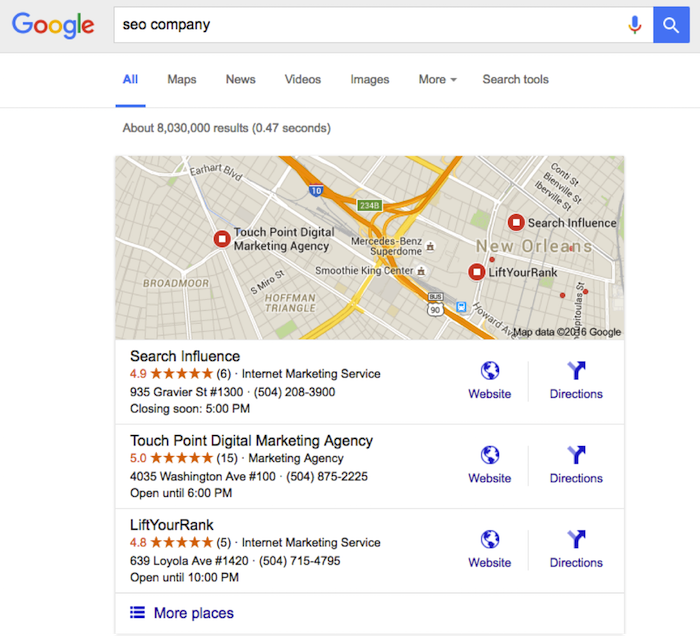
    One important reason for having an established presence on Google My Business is what we like to call the “maps pack.” Without having a Google My Business page, a business will not show up in the local results at the top of the search engine results page. These results are presented as a map with pins representing each business, with information (website, phone number, address) below that is pulled from Google My Business. These more visual results allow the user to gauge the geography of businesses they potentially want to visit.

    This maps pack feature creates fierce competition for local businesses. Ever since a recent update to the maps pack, which reduced the number of businesses listed in the local search results from seven to three, having a presence on Google My Business has become even more important. Optimizing the Google My Business page allows a business to make sure that their information in the maps pack will be correct when they are included.

    Not showing up in the maps pack means less traffic through the search engine results, and due to the prominence of the maps pack in the mobile search results, say goodbye to a large amount of mobile clicks. As we all know, the further down a business is in the Google search results, the less likely users are to click into its information. As you can see below, showing up in the maps pack is very attractive to potential customers. Now isn’t that an SEO company you would want to hire?

    Maps Pack Image

    2. Reviews!

    Another benefit of having an active Google My Business page is the importance of online reviews. Remember the “maps pack” we just discussed? A study by Digital Marketing Works shows a strong correlation between Google My Business reviews and showing up in the maps pack in the local search results. Search engines strive to give searchers a great user experience, so they lean toward sending users to a business that other people have rated highly online.

    Also, having these Google My Business reviews displayed prominently on the maps pack and Google search results will help convince customers to click through. In fact, ratings and reviews are some of the most influential SEO factors in getting users to convert into customers and to purchase your goods or services. Due to this high conversion rate, having these trusted Google My Business ratings and reviews in the search results and maps pack is very important for businesses trying to market themselves online!

    3. Google Publisher

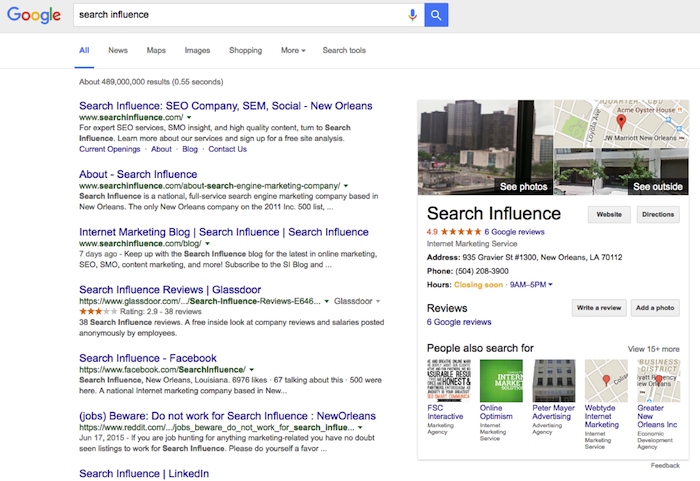
    Another reason Google My Business is important is the effect it can have on Google Publisher. Adding Google Publisher to your site allows your Google My Business information to show up in the “Knowledge Graph.” Triggered by a branded search, the Knowledge Graph is the window of information that shows up on the side of the search results page. This information (reviews, photos, hours, and address) comes straight from Google My Business and serves as a great first look at a website. Having an optimized and active Google My Business page allows the correct business information and more ratings/reviews to show in this knowledge graph. This can gain users’ trust and make them more likely to click into your business’s site! Below, you can see how a branded search for a company allows this Knowledge Graph to load and show more information about the business.

    Knowledge Graph Image

    Making sure you are active on Google My Business can definitely help with social interactions and getting your brand established in social media, but the benefits of this platform go far beyond that. Activity and having correct information on your Google My Business page go a long way toward improving your business’s SEO and your ability to convert clicks into customers.

  • Spring Is Here. Watch Our Team Blossom!

    1603-NewInfluencers-BlogImage

    As March comes to a close, Search Influence is glad to welcome two new faces to the SI team.

    Angie Hernandez – Junior Bilingual Internet Marketing Associate

    Angie Hernandez may not have been born in New Orleans, but she has lived here all her life. She graduated from Loyola University New Orleans in 2012 with a degree in mass communication. She has been published both in English and Spanish while covering New Orleans’ Latino community and fashion scene. In her spare time, Angie continues to learn and perfect her Latin ballroom skills.

    Monica Shariffskul – Operations Analyst

    As a New Orleans native and former University of Louisiana at Lafayette student, Monica received her degree in marketing and international business. She enjoys going on adventures and is constantly on the hunt for all the best happy hour specials. Monica helps conduct strategic assessments through value streams and business capability models, but her chief ambition is to one day control the entire Internet.

    Welcome to Search Influence, Angie and Monica! We’re all excited to have you on the team.

  • 4 Tips for Finding the Right Blog Length in 2016

    4-14-2016-BlogImage4

    When you have your own blog, there are a lot of things to consider if you want it to be successful. One common question people ask is, “How long should a blog post be?” Unfortunately, there is no cut-and-dry answer. Instead, the length of a blog post should depend on a few things, so I’ve put together a short list of important factors to consider when writing your blog posts.

    1. What is the topic of your blog?

    Is it fun and playful or technical and formal? If it’s more technical, it will probably require a lot of explaining and therefore have a longer word count. This would especially apply for very niche businesses like law or medical offices. If I am reading a blog about chemical peels, I will probably want to learn about the procedure itself, how it works, and what to expect after the procedure. This would require a pretty lengthy post. On the flip side, if I am reading a blog post about what I should do this weekend in Austin, a short list will do.

    2. What good is a blog if no one knows it exists?

    A study done by SerpIQ found that the average content length on the first ten search results is 2,000+ words. No worries: this doesn’t mean that every post on your blog should be research-paper length. Instead, try to include a few longer posts here and there. I would do some research and find some more specific topics that readers will want to learn about that require a lot of information.

    By writing some longer posts, you will also be able to include the topics you want to be ranking for more often than in short posts. It’s best practice to include the topic once every 100 words, so if you have a blog that’s 300 words, you should make sure the topic is mentioned three times total, which isn’t very much compared to a blog that’s 2,000 words long. Also, with a higher word count, there are more chances for you to include differently worded variations on that topic.

    3. Analyze past blog posts.

    What blogs do your readers like the most? Once your blog is established, take a quick analysis of the posts. Which ones get the most shares or comments, and how does that relate to the length of the post?

    4. Who is your target audience?

    What kinds of people do you want your blog to speak to? What is their day-to-day schedule like? Are they stay-at-home moms who might have a more flexible schedule and therefore would be more interested in long blogs? Or are they medical professionals who have a day full of appointments and would prefer blogs that are short and to the point?

    The most important thing to remember is that there is no rule on the length of a blog post, so if your topic can perfectly be explained in 300 words, leave it at 300 words. You shouldn’t feel like your blog isn’t long enough or you need to add words just to have a higher word count. If there are parts of your blog post that are “filler” or “fluff” and don’t really contribute, don’t hesitate to take them out.

    So how long should a blog be? Now you know the answer isn’t a simple one! The next time you’re writing a blog post, think about these four things, and hopefully you’ll reach a happy medium for a successful blog.

    Image Credits:

    Jim Carrey GIF
    Tom Hanks GIF

  • These 5 Easy Ideas Can Help Your Site Reach 80% of Your Patients

    4-14-2016-BlogImage5

    Your patients might not be able to read your handwriting, but there should be no confusion with your website. According to a Pew Research Center survey, 80 percent of respondents look for health information online, and 44 percent actually search for physicians and healthcare professionals. As more and more people turn to the Internet to search for medical service providers, these tips will help you launch a website that connects new patients to your practice or clinic.

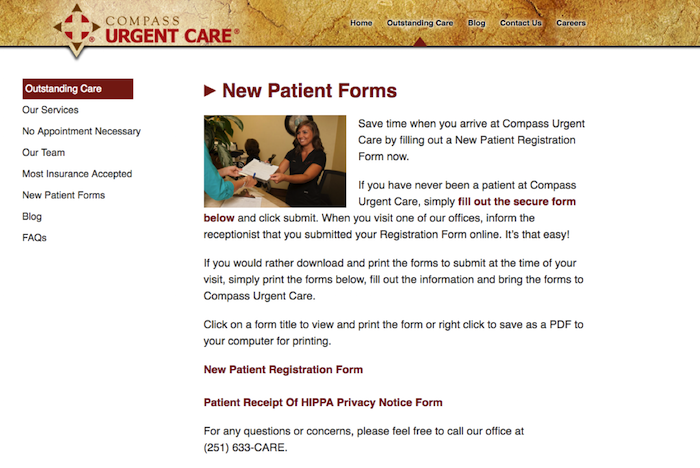
    1. Patient Forms

    Your website should make it easy for new or returning patients to access patient intake forms, schedule appointments, and update records. Registration forms can even be placed under their own tab, which will make it easier for website visitors to become registered patients. In general, always make things easy to find.

    New Patient Forms

    2. Mobile Responsiveness

    In the United States, there are more mobile searchers than desktop searchers, and this trend is expected to increase. There are two reasons your medical website needs mobile-responsive capabilities. Patients searching on a tablet or smartphone are likely to spend more time on your website if it is easy to navigate. A non-mobile-friendly website can be confusing, creating incentive for the searcher to move on to a different website, possibly that of your competitor.

    Furthermore, next month Google will start the roll out of a mobile-specific algorithm. Google is continually striving to improve the user experience, and if your website does not make the cut, it could be completely excluded from mobile search results.

    3. Patient-Centric and Informative Content

    Going to the doctor’s office can make some people feel anxious, but your website can provide comfort and instill confidence even before a patient walks through your door. All content should be patient-centric and make website visitors feel like they will be in safe hands. You can even give your website some personality by including bios for yourself and your staff. In an “About Us” or “Our Staff” section, you can not only show off impressive credentials but also demonstrate that you can engage with patients.

    A strong medical website also includes news, information, and updates. This platform should be a marketing tool and resource for patients. Refreshing your site with blog posts, medical news, and alerts will show patients that you follow current issues and are an attentive professional. A website with a regularly updated blog will also rank higher in the search engine results.

    4. Services and Insurance

    Again, all information should be easy to read and find, especially services and insurance information. Give detailed explanations of your services, and note if there are any special considerations. There should never be any confusion about payment, so clearly state whether you accept cash or if other arrangements are acceptable. Discussing insurance plans and payment methods creates an opportunity to include a call to action. Ask website visitors to contact your office with any further questions about services or insurance.

    5. SEO

    “If you build it, they will come”—this adage does not apply to websites. It can take a little time for your new website to get noticed by search engines. An SEO campaign can improve your website’s search engine rankings and drive more traffic to your website. On- and off-page optimization, social media management, title tags, meta data, image optimizations, NAP consistency, professional listings, and many other factors play a role in boosting your Google ranking. Search Influence can create a SEO campaign that will promote your website, connecting you with patients who are more digital than ever before.

    Image Credits:

    Doctor Meme Image