Blog

  • Website Promotion – 7 Common Lies & Misconceptions

    After many conversations with existing and potential clients, I have come to find there are many misconceptions and straight-up lies about our industry. Some of these lies are just bogus and everyone should be aware, so I’ve whipped up this handy guide with explanations!

    7. You cannot make money with social media

    This is simply a lie. Social media can be a great source of revenue. The biggest complaint about social media I often hear is, “I cannot measure the success of social media.” With the use of iFrames and reporting tools, success can now be more easily measured. An iFrame allows us the ability to create a welcome tab on your page that acts like a website, so we can install analytics, implement a form and utilize call tracking to get a detailed and effective overview of what’s going on.

    Social media is the only outlet that allows you to target your proper demographic. Through the use of highly targeted Facebook display ads, we have the ability to put your brand in front of your target audience.  Social media is also one of the easiest and most effective ways to create interaction with your existing and potential customers.  There is no reason you cannot see profits through social media.

    6. SEO is a set-it-and-forget business

    I wish obtaining the best rankings was as easy as that.  I often hear potential clients ask me “Why am I paying for a monthly service?” to which I respond, “Your competition isn’t asleep.”  Much of the work for optimizing a site is done off-site. This comes a shock to many people who believe you can just make a few edits on your site and magically you are now in position 1.

    Yes, having your site speak properly to the keywords that potential customers are searching is very important, but it is not everything. This will not get you to the top position in a competitive industry. Ongoing link building is a key element to the success of any SEO campaign. Google looks at links as a form of “popularity contest” that proves to Google you really do what your site says.

    5. I need a new site before I do any SEO

    We can help almost any site rank, including ones that are not as attractive as others. There are a few exceptions to this rule, such as Flash and templates that do not give you access to the backend management. Many time people believe that their site needs to be “pretty” to rank well, when in reality, it is more about the conversion optimization of your site. This includes prominent display of your phone number and a small form located on every page of your site. Your design has no effect on the organic rankings.

    4. Guaranteed rankings

    Since my email also attached to [email protected], I have the privilege of receiving all of the spammy SEO emails we get on a daily basis. My favorites are the ones that use scare tactics and money back guarantees. These guys are full of it! I recently read one that was trying to make you believe the paid results were part of SEO. Ultimately, the money back gaurantee is just a ploy to get you in the door, give them some money, and sure enough a few months down the road you’ll be calling me cursing everything SEO.  These scammy SEO companies can offer these guarantees by choosing keywords that are so irrelevant there is no search-around and by paying to be on page one.

    Why we not guarantee results? Hint: it isn’t lack of confidence! We would have never been able to earn placement in the INC. 500 (with no sales team!) if we did not produce results. Unfortunately we do not have control of Google; if we did, I would be on a beach enjoying a Mojito right about now. Earlier this month Google made a change to the display of search results.

    3. Article marketing does not work

    I have recently read a number of blog post questioning the effects of using articles as an effective form of obtaining backlinks. For those of you who question the effectiveness, ask any of our clients who are in the top positions for their most popular searches. We have been and continue to use articles as an effective way to obtain backlinks. What doesn’t work is spammy, zero-effort articles with poor-quality or even plagiarized content. We put a great deal of effort into this part of our services and it shows. Article marketing works!

    2. Paid search affects organic rankings

    Paid search results have zero effect on organic rankings. They can not help nor hurt your organic rankings. You can do things to optimize for both organic rankings and paid search rankings, but you cannot affect one without the other.  Its that simple!

    1. TopSEOs.com is a legitimate SEO rankings site

    I won’t mince words: TopSEOs.com is the biggest bunch of bullshit out there. According to their website:

    “The independent authority on search vendors, topseos.com, evaluates and ranks the best in the internet marketing industry. Through in-depth vendor analysis, review of work completed, and client evaluation, we put together a list of the top search engine optimization companies in the industry. Our in-depth analysis delves into a vendor’s business practices and compares them against industry standards to ensure that the work is quality. Often times we connect directly to the clients of a vendor and ask about their overall experience as well as details about the processes, reporting, and success of the campaign.”


    Sound legit, right? Wrong! Companies like Webimax.com pay for their placement in TopSEOs.com so they can tout the fact that they have been ranked “#1” SEO company. Garbage! It’s complete garbage.  For just a few thousand dollars a month Webimax gets to claim to be the “#1 SEO Company in the U.S.” There are many blogs and forums that expose the scam for what it is. Oh yeah, and if you attempt to leave a negative comment about Top SEOs or one of their “valued clients,” they will filter your post to ensure only positive messages can be seen.

    Below are just a handful of resources that expose Top SEOs and Webimax for the scams they are:
    How Top SEO Companies like WebiMax Scam Clients – P.T. Barnum Unique Method
    TopSEOs.com – A Review of the Top SEOs Paid Rating Service – Aaron Wall
    Sphinn.com – Multiple posts about TopSEOs Scam

  • Crossed Over Into… The Nofollow Zone: Livejournal SEO And What Nofollows Mean For You

    It’s been a bit over three years since I’ve used the once-titanic blogging site LiveJournal for anything. LiveJournal’s still got an active community, but it’s true that asking “What’s your LJ name?” of a new acquaintance is a little bit more embarrassing today than it was in 2003. My account’s dead (nah, it’s not on DeadJournal), but every few months, some brave archaeologists attempt to set up some horrible advertisements within the internals of this hibernating brute.

    Here’s one of the emails I got:

    Here we see a knucklehead posting a comment in a misguided attempt at link building. It’s not really the fault of the “spammer” that the link building attempt is for naught: this is an obvious mass-submission. Really, enough sites were probably hit by this submission machine that this message had some kind of benefit, and if so, congratulations to your diet supplements, dude.

    Still, the fact stands that this carpet bombing of links missed its target with any LiveJournal comment fields it was posted on. Not because of LiveJournal’s disabling of HTML-formatted links on anonymous comments, or because this little comment is formatted in BB-code, but because of a little attribute on links that Google doesn’t like:

    After joking with our very own Anthony Coleman about offering “LiveJournal SEO” services at our company, he admitted to researching the viability of this. Sadly or possibly as expected, he said that this was an empty pursuit, letting me know that every external link on LiveJournal is “nofollow,” as depicted and highlighted in the above picture. While my area of expertise in this company does not qualify me to comment on the exact benefit (or lack thereof) a “nofollow” link provides to a page’s rank, such links are certainly less desirable for SEO.

    LiveJournal’s not the only site practicing the nofollow tactic to dissuade would-be spammers: Twitter takes the same approach, and so do the other social media giants. Even so, this doesn’t stop Search Influence from getting our clients a nutritious glass of “link juice” when we put links into our proverbial Juiceman Juicers all around the web. While “LiveJournal SEO” may not be a service that Search Influence will offer anytime in the future, we’ll always hold the site dear to us, and I’d personally like to thank my new pal “Odzywki” for reminding us of the respectable approach that Search Influence takes to SEO.

  • Guest Post & Infographic: 6 Ways You Can Use Google+ to Build Authority

    Kaila Strong is an Account Manager at Vertical Measures.

    Infographic: The Authority Building Machine
    Internet Marketing Infographic by Vertical Measures

    Knowing how to build website authority is essential both in terms of increasing traffic and maximizing sales. With the emerging popularity of Google+, just about anyone with a Google profile can utilize the platform to help with building awareness for their website or brand. In addition, with the evolution of Google Pages you can also help build the authority of your website and connect with your customers too!

    Here are just a few ways you can use Google + to build your websites authority and connect on the platform.

    Google+ Button

    Haven’t added the Google+ button to your site yet? Do it! The social network is growing in popularity and should be around for a little while – at least we hope. Allow your site visitors to +1 your content such as blog posts, video, white papers, and even your products. Anywhere you think someone might want to give you props via +1 you should place a button.

    Additionally, use Google+ to start sharing your content with like-minded folks. Build up your circles and share your posts to get +1’s too. Share others content and ask others to share yours. Google has access to this information and can see if you naturally receive +1’s on good content. Worth mentioning, many are saying that a +1 on content can get it indexed and cached by the search engine giant much faster.

    Google Pages

    The announcement that Google now allows businesses to have Google+ pages certainly thrilled many around the web. Share breaking news, updates, promotions, links, photos, and even talk face-to-face with your customers via Google+ Hangouts just like you would do with your personal profile.

    First, build your Google+ page and fill out all the important areas. Add photos, video, and fill out the About section. Add a link to your website (do-follow!), and update your status messages regularly. Add profiles to your circle and encourage others to add you to their circle. Add a Google+ Page badge to your site with a link to your profile. Monitor how well your Page is doing through the use of Google Analytics and Google+ search.

    Engage

    Continue to engage on your Google+ business Page and from your personal profile as well. You might even go so far as making it a company policy to get all employees on Google+ by the end of the year. Encourage your staff to participate on your branded page and with others in your industry to connect with new people. Building up a community on social platforms isn’t an easy task, but with the help of your staff you can do so collectively. You’ll find that over time your community will naturally share your content, +1 your posts, and help increase the authority of your website all at the same time.

    As Google + matures and grows in popularity so will the ability you have as marketers to drive engagement and authority for your brand. See how Google + fits into the building authority process? The infographic below shows you just how important diversifying efforts are to building authority.

    Examining Ripples

    One interesting feature of Google+ are Ripples. “Google+ Ripples creates an interactive graphic of the public shares of any public post on Google+ to show you how a post has rippled through the network.” You’re able to see who publicly shared the post, the comments they’ve made, how the post was shared over time, and statistics on how the post was shared. Use Ripples to examine the who, what, where, when, and why of viral posts. Attempt to emulate the messages that receive the most engagement. Here’s a list of 10 amazing Google+ Ripples to get started.

    Extending Network

    Use Google+ to extend your network. Sure, not all your friends and connections will be on Google+ but quite a few of them will be – especially those “in the know”. Look to connect with others through the use of Huddles or examine Ripples to see who the influencers are within Google+. Add those folks to your circles and reach out to them, working to add them to your inner circle.  Build up your brands authority by being connected with these folks, or your own authority for being in their circles.

    Optimize Page

    Don’t forget to optimize your profile and business page. The meta description of your business page is your intro, headline, and name, so make sure to fill them in appropriately. Optimize your Google+ personal profile too with these easy-to-follow tips.

    These are just a few ways to utilize Google+ to your advantage and work to build authority. As you can see in the Infographic below, using Google+ is just one of the ways you can build authority.

  • 5 For Friday — Links, Stories & Posts For Your Weekend

    Black Friday: 5 Apps That Make Bargain Shopping Easier — Mashable

    The holidays are upon us, and many businesses local and nationwide are gearing up for the Black Friday sales frenzy. Be a savvy shopper and utilize these handy applications in order to find the best deals, compare prices, check to see where your desired item is on sale in your area and more!

    How Groundbreaking Thinkers Spread Their Ideas — Inc.com

    If you’re an entrepreneur or just a savvy businessperson, you know that knowing how to think critically in order to generate out-of-the-box ideas is a vital skill. However, once you’ve come up with your brilliant pitch, how to you get your audience to come to you? Inc.com’s Jeff Haden has some key concepts to share about the simple logistics of getting your concepts out there and your audience engaged with the message.

    Photos Draw Most Facebook Interactions, Links Draw the Least — Small Business SEM

    When you’re busily engaging with your fans on Facebook and promoting your online presence, it seems that putting up photos will elicit the most response and engagement on your fans’ parts. Sharing links, however, is the weakest option and comparatively offers very little reward for the effort. The theory makes sense: visual stimulation is always a plus for getting attention, and with the new Facebook UI users can simply click on a posted picture to expand a gallery-style mini-window, eliminating the need to leave Facebook itself. Will you be putting more effort into curating your business’s photo gallery now?

    Google+ Rolls Out Trending Topics — Mashable

    With Google+ making huge strides in recovering their previously-drooping user base and opening up to the business sphere, it seems evident that they’ve taken a good, hard look at what other social networks are doing well. The introduction of trending topics, a list of the most popular and oft-discussed items on the social network, offers users an effortless peek into the most relevant news of the moment. Several other UI tweaks have been made as well — head over to Mashable to check it out!

    8 Tips to Maximize Your Branded Presence in the Google Local Search Results — Bluemnthals

    With the recent hubbub over a plethora of Google service redesigns, some may be wondering where to go from here with regard to getting themselves noticed in the local search sphere. Never fear! This handy guide is an excellent overview to making sure your business is front-and-center when searchers are looking for you.

  • Tebowing, T-Bowing and Accidental Google Rankings

    As an LSU alumnus, I'm proud to say I saw Tim Tebowing while crying, after a loss in Tiger Stadium.

    According to Tebowing.com, tebowing is a verb, defined “to get down on a knee and start praying, even if everyone else around you is doing something completely different.” For a little background on the subject, Tim Tebow is a NFL quarterback who currently starts for the Denver Broncos. He’s known to be very religious, one of the greatest college football players of all time, and so far, not a very great NFL quarterback. For these reasons he has been a focal point of sports media since he joined the NFL. Since Tebow became an NFL starter the last few weeks, he has been seen praying frequently before and after games, which has given way to Tebowing — basically the same thing as planking, or taking pictures of yourself performing a specific, silly pose and posting it online.

    At Search Influence, we occasionally plank, tebow, and sometimes start our own trends, but no one wanted to talk about it until we accidentally ranked for the term… or actually a misspelled version of the term. This morning I discovered that in the past 30 days townsend.bunksite.com/ has received 83 visits for terms like tbowing, t bowing, t-bowing, etc. How can that be, when we haven’t written anything about it? It turns out that this blog post ranks # 2 in Google for the term tbowing–which by the way isn’t how it’s spelled, but if you had no idea what it meant, you might search it with this spelling.

    As you can see in the screen shot, due to the apostrophe in the word isn’t, Google is connecting the “t” and the “bowing” to form one word. Since there is no website called tbowing.com and no one calls it “tbowing,” Google has no choice but to try to match your crazy search phrase, which it has probably never seen to any significant degree before, with something seemingly relevant.

    What does this have to do with SEO? Not much other than trying to understand how Google works, and realizing that you might be able to rank for a new word, or an alternate spelling of a word that gets significant search volume, but provides irrelevant results. This brings up another issue — relevance. As you can see in the analytics screen shot, our site has received 83 extra visits that we didn’t plan on getting. The problem with this can be seen in the numbers: nearly 100% of visitors immediately left the page after it loaded because the page had nothing to do with the search term. Even if the page did have something to do with the search term, the term is likely not being Googled by an SEO firm’s target market, small to medium sized business owners, and therefore these “leads” aren’t really leads at all — the overall visits for this month are artificially inflated. Whether you’re a small business owner who has hired someone to manage your SEO, or a marketer looking to track your leads, make sure to exclude numbers like these.

    The moral of this story is that while sheer numbers of visits can be impressive on the outside, they’re not worth much if the viewers leave immediately. Seeding irrelevant keywords and concepts into your webpages can bring in the visitors, sure, but without some dirt to back it up, you’re not going to see results — just a veneer of success.

  • Read This! — November 2011

    One of the main purposes of our weekly 5 For Friday posts is to highlight weekly news stories that are funny, idea-provoking or just plain interesting. In this brand-new blog series, we’ll be publishing a monthly roundup of links that directly pertain to you and your business. With these tips and tricks, you can promote your online presence and make your social media profiles sing. DIY tactics can have big results! Without further ado, check out these handy posts and articles:

    Build a Better Blog: 11 Valuable Tips to Successful Blogging
    Do you run a blog for your business? If not, you should consider it: fresh content is good for your site on a purely technical level, encouraging higher search engine rank and favorable results from site crawlers, and thoughtful discussion about your sphere of business engages your fans and provokes stimulating discussion. Click here to find out the 11 steps to a more productive and fruitful blogging career.

    3 Reasons Why You Should Be a Formulaic Blogger
    Decided to start a blog for your business? Great –but there’s the pesky question of what to write about. Read this informative piece to discover why “formulaic” isn’t always such a dirty word.

    12 Tips For Using Press Releases In Local Online Marketing
    Press releases can be powerful promotional vehicles that can help you generate buzz around your brand, no matter how local your business is. Search Engine Land’s Chris Silver Smith gives an effective overview of the benefits of these social media-friendly publicity pieces, followed by an exhaustive list of ways to make sure you’re getting the most out of yours.

    How To Post Your Google+ Feed To Facebook And Twitter
    Are you one of the many business owners that have flocked to Google+’s newly-available brand pages? If you’re ready to start networking using the powerful tools available to G+ users, but aren’t quite ready to give up the more established Facebook and Twitter feeds (not to mention the fans you’ve accumulated on those networks), never fear: this handy guide will show you how to integrate your G+ updates to post to your other accounts without a hitch.

    Google Places Basics: Two Business Listings Or One?
    Diversity is the name of the game in contemporary business, and it’s not uncommon for establishments to offer a few different services — even under different names — under the same address. While it might seem tempting to set yourself up with a new Place Page or three to differentiate between these disparate services, Mike Blumenthal has the skinny on how you can do better.

  • Gmail Update: Hey, It Doesn’t Suck!

    I send and receive a lot of emails every day on my two constantly active Gmail accounts.

    And if you include the number of individual chats I have going at any given minute, that “a lot” expands exponentially.

    That’s why I was hesitant about switching to Google’s new Gmail layout when I first noticed the little blue box in the lower right hand corner of my inbox last week.

    Maybe I’ve been burned one time too many by Mark Zuckerberg’s ongoing ADD-tinged quest to change every last pixel of Facebook in a kaleidoscopic onslaught of updates, but I really, really didn’t want to change my Gmail.

    But I’m so glad I did.

    Gmail, or Gcrack?

    Before I came to Search Influence around six months ago, I was a light to occasional Gmail user. It was fun, free, relatively easy to use, and all my friends were already doing it, so why shouldn’t I? I was a recreational Gmailer.

    Now my usage has taken me to a whole new level. I communicate daily with the 40 freelance writers and 13 Production Team members I oversee, as well as the rest of the ever-expanding Search Influence team.

    I literally couldn’t do my job without my Search Influence Gmail account, the five or six Google Documents I have open at all times, and my endlessly active Gchat. I’m hooked, big time. The only thing I don’t do so far is Google+, and I know it’s just a matter of time before I decide to add another Gaddiction to this list.

    Google is the Force, and I am subject to its will. So I really didn’t want this new layout to suck.

    Keyboard Shortcuts Rock!

    Imagine my relief when I switched my personal Gmail to the new layout and slowly started to realize the amazing level of control the update was suddenly affording me. My work inbox followed this morning in what has proven to be one of the highlights of my day.

    First of all, being able to switch screen size is a major plus. I have my work MacBook hooked up to a 21-inch external display, so being able to adjust the layout as I switch between the laptop’s compact screen and the much larger external monitor is a big advantage. I can be “comfortable” and “cozy” at the same time, which is really great.

    The new conversation layout incorporates a more streamlined and minimalist approach to organizing email threads, which was a hugely welcome addition as far as I am concerned. Anything that helps me clearly navigate an email that may have been originally sent to 40 people and now includes direct replies from 17 of the original recipients is welcomed with open arms.

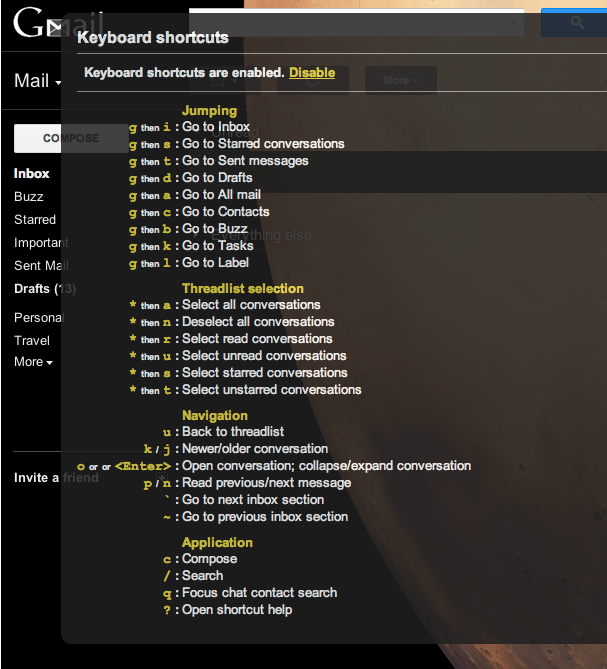
    But what’s really changing the way I interact with all things Google is the new set of keyboard shortcuts that came with the update.Gmail Keyboard Shortcuts

    Like!

    Want to compose an email? All you have to do is hit “c.” Want to go back to your inbox? Hit “g” then “i.” Drafts? Try “g” then “d.” You can hit “j” or “k” to move up and down between emails, “x” to select one, and then “shift” and “i” to mark your selection as read. “Enter” or “o” opens a selected email thread, “r” starts a reply, “a” replies to all, and hitting “tab” then “enter” sends your completed email.

    Want to like something on Google +? Hit “shift” then “1,” or “<Shift> + 1” as Google so craftily puts it in the helpful keyboard shortcuts menu that appears when you hit “shift” then “?”

    All of this adds to up a newfound level of control that will change the way you go about your daily Google life, especially if you’re a hardcore Gmail and Gchat user, like I am. And as a little bonus, the HD themes are pretty amazing.

    All in all, this is one update that actually does what the name implies and updates the user experience with a slew of new controls and options. Coming hot on the heels of a slew of updates to some of Google’s most iconic services, from a wildly unpopular redesign of the Reader to the newly minimalistic local search, this functional and stylish new Gmail is a breath of fresh air. And without the obligatory Someecard mocking the Internet’s latest update-fueled uproar.

  • 5 For Friday — Links, Stories & Posts For Your Weekend

    Forget Facebook: 4 Reasons Your Company Needs a Google+ Page — Inc.com

    While some discouraging stats about the use of Google+ have emerged in recent days, there’s no reason to give up the ghost just yet — particularly with the recent introduction of G+ business pages. If you’re hesitating to jump into the pool and establish your business on G+, linger no longer — Inc.com’s Abram Brown is here to give you the skinny on why getting in early is a smart move for small businesses and mega-corporations alike.

    Content Marketing Essentials: Tactical Advice From A To Z — Search Engine Land

    For those of you who just don’t know where to start making your web content sparkle, this 26-tidbit-long list provides a fantastic resource for your publication, website, blog or newsfeed. Content is king, they say — so go check out this list and don’t let yours languish for another minute!

    Places Reviews: Getting Offline Online — Search Engine Guide

    With the recent shakeups to Google Place Pages and the diminishment of third-party reviews, making sure the online word of mouth about your business is positive is more important than ever — particularly when it comes to Google reviews. Since these pieces function as both a ranking factor and a critical metric, spurring viewers to click through to your site, it’s important to make sure they’re in top-notch shape so you can present the best face to the public. This article offers handy tips on encouraging reviews with a handily-placed and easily generatable QR code.

    How percolation time can make you a better writer — SuccessWorks

    With the breakneck speed of contemporary society, it can be hard to find a few moments to meditate on the details of your day. The simple act of reflection can be enormously beneficial both personally and with regard to work. Here, SucessWorks’ Heather Lloyd-Martin shares some of the transformative powers of “percolation time,” particularly when applied to your writing projects and beyond.

    5 Ways to Give Your Content Marketing New Life — TopRank Blog

    Creative content can be a tricky beast, demanding immense amounts of time, energy and skill on the part of its creator to really jump off the page when read. This step-by-step guide from Heidi Cohen, President of Riverside Marketing Strategies, is invaluable for those of us whose websites’ content just don’t seem to be quite dazzling enough. Read on to learn about targeting your audience, respecting the reader and staying relevant in a fast-paced sphere of business.

  • Google+ Opens For Businesses — Potential And How To Get Your Face In The SERPs

    Google+ for Apps One Bar

    Google+ for Business
    Are we not men?

    The new kid on the block has opened itself to businesses in two principal ways. Unlike Facebook, which focuses on admin-managed pages, and Twitter, which couldn’t care less if a person, place, or animal is represented in a feed, Google initially maintained its focus on people in its business-level implementation of its social network, not announcing any kind of branded pages. Then Monday’s announcement of Facebook-style business pages opened a new avenue for marketers, if only those in selected niches. Both new tools allow for the implementation of the “authority” metrics hinted at in numerous Google quality documents.

    But should a business even have a Google+ presence? Facebook of course is ubiquitous, and Twitter has proven itself to be a direct customer relations tool. Google+, however, has languished as Robert Scoble’s main soapbox and Android users’ photo repository. Google+ isn’t a lead generator, lacking the customization of Facebook tabs, and it isn’t a customer service tool, lacking the plurality userbase (8% of the US) Twitter enjoys.

    Applications of Google+ for Business

    But it’s not just those on the social network who will benefit from business applications of Google+. Integration with search and the use of the network as an authority metric seem to be major advantages of Google+ for businesses. Once set up correctly, a robust Google+ profile can give authority to local ranking and regular integrated SERP rank depending on page type. Unsurprisingly, this leaves the active maintenance lacking; however, even that aspect can be worthwhile in the right niches.

    Internally, Hangouts combined with Google Docs allows decentralized businesses a face-to-face online collaboration tool. Users can avoid the loss of communication from short text comments in edits, enriching group writing and design. This use of Docs can help a variety of businesses, both for internal meetings and for work with clients. The possibilities previously hinted at are relatively endless, and make Google+ a must-have for remote businesses, some design firms, and any company needing to build something in front of a customer or each other without being in the same room.

    But most companies don’t need that kind of ability for real-time document editing. For them, Hangouts provide a simple way to start webinars, live shows, and other almost TV-styled content. Something like SEOmoz’s Whiteboard Friday could be live broadcast with question-and-answer, recorded locally, and quickly uploaded to YouTube or another video site, then added to a website for further life out of the content. If live videos would take too much effort, even a simple video exclusive to Google+ can help drive uses both to your Plus Page and create user interaction. This kind of direct, personal, and instant communication with users and the ease of creating something for all visitors is nearly unprecedented in social media.

    rel=author SERP Display
    How Your Employees

    Keeping with the focus on both users and non-users of the network, Google+ offers ways to interact with customers outside of the realm of the social network — being the only outlet for rel=”author” and introducing rel=”publisher”, the best way to get your personal face and name ad your company’s image in the SERPs. Reinforcing the authority metrics hinted at in Panda and the related effects, Google+ is the gatekeeper for bridging the gap between semantic and visible authorship in the SERPs, and the exposure and connection of a face and name to a business can humanize and connect with customers in a way that couldn’t be done for someone who isn’t just signed into Facebook. “The face in the SERPs” is perfect for any company with a regularly maintained blog or article section. Similarly, a company might see its logo next to its web site when rel=”publisher” is implemented.

    Using Google+ to Put Your Face in the SERPs

    Happily, WordPress sites have a relatively simple solution for implementing a multi-person rel=”author”. It does the first step for you, linking to the author page with rel=”author”. Then, add your canonical Plus account url to the Website field in Your Profile under Users:

    Wordpress Website Field for rel=author
    Place your canonical Google+ url in this field under User > Your profile

    Then, you need to edit the theme, adding this to the body of either your main template, or the author template, author.php, omitting the if-statement:

    <?php if (is_author()) {
    $curauth = (isset($_GET['author_name'])) ? get_user_by('slug', $author_name) :
    get_userdata(intval($author));
    ?>
    <a rel="me" href="<?php echo $curauth->user_url; ?>">
    Visit me on Google+
    </a>
    <?php } ?>

    This will get the author name if it’s set, then get all of the user data, then display the url from that author in a link with the all-important rel=”me”.

    rel=publisher fair
    Oops! Not what you'd like to see…

    Similarly, to set up rel=”publisher”, just a link tag on all pages without rel=”author” on it will connect your site with your company Google+ Page. Why only on those pages? Because as Search Engine Land’s rich snippet test shows, Google will prioritize author over publisher.

    <?php if (!is_single()) { ?>
    <link href="https://plus.google.com/113323125805722144061/" rel="publisher" />
    <?php } ?>

    Once it’s all set up, check your url in that same Rich Snippet Tester tool, making sure it shows your face and name. The wait time on recognition from Google is inconsistent, but such connections are key to establishing authority.

    Google+ Establishes Thought Leaders

    A secondary effect of individual commercial Google+ profiles is that giving a face to a URL can create a sense of thought leadership, pulling in longer-term researchers with high quality informative articles and blogs. Having one author connected to your name will heavily associate the one person with the site; having multiple writers will strengthen the authority of each writer as an individual source of quality knowledge. A logo, if well-chosen, transforms the SERPs into display ads. Through either, one positions their employees as experts and their company as prominent: certainly an admirable position.

    Google+ might not be for every business, even businesses that rely on their current Apps as the underpinning for their online productivity. However, for businesses with the specific needs for which Google+ provides killer apps, Google+ is a perfect addition to the social media profile of your business. Furthermore, it’s ease of setup provides deep support beyond social interaction, leaving much utility even for more straightforward businesses.

    …And hey, maybe one of your employees can criticize you while still garnering support for the company in a precarious time…

    Image Courtesy Cambodia4KidsOrg.

  • Influencer Profile: Matt Buys

    Search Influence IMA and Content Team member Matt Buys started out in journalism after graduating from Michigan State in 2003. Newspapers were kind enough to fund his restlessness for several years. He worked as a reporter/editor/page designer for the Orlando Sentinel and Rocky Mountain News before switching exclusively to freelance writing in 2008. Over the past few years he’s lived in Chicago and San Juan, Puerto Rico. He still loves to travel and discover new places, but thinks New Orleans might be a long-term home for him.

    Let’s get this out of the way: if you were a punctuation mark, what punctuation mark would you be?

    A parenthesis comes to mind. I am known to interrupt with conversation-halting, absurd parenthetical comments. What can I say, it’s a gift.

    You’re a member of SI’s Content Team, copy-editing, re-punctuating and polishing a huge array of different written pieces to go out for our clients. Be honest: do you go homicidal at the sight of a dangling modifier or poorly-placed comma, or have you become totally inured to bad grammar?

    I try to fight my snob tendencies when it comes to grammar. If you ask most chefs, they will tell you their favorite food is something greasy and messy, rather than a perfectly plated dish. Sometimes a butchered sentence is the funniest thing I read all day, so I should just learn to love it. But I still have to delete it.

    Like fellow Content Team member Colette, you have a journalism background. How did you get interested in the written word? Do you incorporate any of those skills into your work at SI?

    My family is always discussing books, so my interest was probably inherited. Studying journalism seemed like a good outlet for that passion. I think the skills I picked up at newspapers are helping me cope with the pace of work at SI.

    In addition to being new to SI you’re new to New Orleans in general — what brought you down here? How has it been so far?

    I thought about moving to New Orleans for years, but I always ended up somewhere else. Good food and music is really all I need, so I have been more than happy here so far.

    Besides writing and editing, what else do you find yourself doing here?

    Playing the guitar, listening to music and finding new places to eat are taking up most of my free time right now. Other than that, I’m just trying to meet new friends and have fun.