Blog

  • Google’s Augmented Reality Game ‘Ingress’ May Be the Path to New Business Opportunities

    Being a gamer myself, I think seeing video games developing new uses is pretty nifty. We’ve all been exposed to the concept gamification by now — most people don’t call it that, but sites like Foursquare and Yelp! have relied upon the tactic to make their services a lot like level-building in games. Social media ranking site Klout relies heavily (and shamelessly) on the same gimmick. It’s a simple way to draw out the kid part of us that wants to make it to the next level before bedtime, and it works like a charm. But gaming has more relevant applications than just engaging consumers, as Google is proving with its newest offering.

    If you’re unfamiliar with the Google mobile group Niantic Project, then you may be a bit confounded the first time you look at Ingress. The multiplayer game uses Google Maps and local data assets to connect online and offline universes based on real life places. In short, it’s augmented reality. In this imaginary world, there’s a new, mysterious power that could potentially be very dangerous. One group, “The Enlightened,” embrace it, while the other, “The Resistance,” struggle against it. After you choose a side, you can participate by capturing portals that are in public places. Once you capture them, they don’t stay captured for good, which means the struggle to hold territory must always be maintained.

    How does such a fantastical project relate to business? Well, for Google, it makes them look insanely ambitious — but we already knew that. On a more broad view, Ingress offers opportunity for businesses that fall into the game’s zones. Google’s John Hanke told Marketing Land that Google may make API’s available so that other developers could build augmented reality games on top of Google Maps, but those plans haven’t come to fruition yet. Sponsorships have, however, and Jamba Juice and Zipcar are already signed up to work with Ingress. How they will be promoted in-game has yet to be revealed, but it makes it clear that the option is there. The idea of entering a business to scan a certain item comes to mind, or messages hidden in selected locations — encouraging the player to interact and engage with the brand.

    Ingress displays something of the spirit behind geocaching, but with an intense story, which means it will attract an imaginative and passionately dedicated userbase. The game is only playable in a closed beta for Android for now, but since it’s worldwide, thousands of players all over the world are already participating. It’s essential to cooperate with others in order to secure an entire area, so you can’t work alone. It still remains to be seen how exactly it can work, but considering how innovative the product is is, I think the possibilities are substantial. Between Google’s strong userbase and a suite of already-developed systems like Maps, visual search, augmented reality and the Android OS, players have a huge array of ways to engage with the game’s world — not to mention the sponsors that are integrated into it.

    What do you think of Ingress? Would you use it to advertise your own business?

  • Website Mobilization Tools Go Head To Head: DudaMobile vs MobeeArt

    I don’t know about you, but I can barely leave my desk without grabbing my iPhone and bringing it with me. I know I’m not alone in this because as of May, more than half of U.S. mobile users have smartphones. Each day more people are interacting with websites, search results and advertisement via some type of mobile format. That is why it has become increasingly more important for businesses to make their websites mobile-friendly.

    There are several companies offering services to mobilize your website quickly and easily. Two services that have caught my eye are MobeeArt and Dudamobile. Dudamobile has partnered up with Google to try to create a more mobile-ready internet, while MobeeArt boasts an intuitive “what you see is what you get” approach. Both claim to be the easy DIY place to mobilize your website as quickly as possible.

    WYSIWYG Editor

    MobeeArt offers a mobilization suite that is both feature-rich and claims to have an ease of use and intuitive navigation. The company offers two versions of their suite: a very simple editor that instantly mobilizes your website and a much more robust suite that I preferred.

    MobeeArt Self The basic editor seems to be pretty par for the course as mobilization suites go. The view screen is cleverly phone shaped with basic options on the left hand side. The advanced editor, however, is a robust and visually comprehensive editor. The advanced editor allows you pull different items (photos, logos, text) from the desktop version to add to a custom-made page on the mobile site and tokenizes them to automatically sync with any changes that happen to the desktop site.

    Dudamobile’s suite has a much more subtle difference between their basic and advanced editors. The visual representation remains “phone on the right; features on the left” regardless of whether you look at the basic or advanced editor. This caused certain difficulties later on in the process of mobilization.

    Navigation

    MobeeArt
    During my testing, I found that while I enjoyed the robust feature set of the suite, I was very put off by the difficulty to find some of those features. Figuring out how to add the call tracking feature I wanted or where certain features lived inside the suite’s architecture proved to be quite the undertaking at times.

    MobeeArt Studio

    Navigating the website’s architecture, however, was incredibly easy in the Studio. The site’s skeleton was prominently displayed on the left hand side next to a visual representation of the website. The basic sitemap and relationships between parent and child pages are easily accessible.

    Dudamobile
    DudaMobile Full Dudamobile’s feature set is much more easily navigable than MobeeArt’s. Each feature has a small chiclet and menu label so finding that HTML box option isn’t a task unto itself.

    Navigating through the pages of website, however, was incredibly difficult. I had to rely on either the navigation menus built into the site I was mobilizing or a small drop down menu that listed every single page that existed on the desktop version, regardless of whether I chose to use it in the mobile version. This made switching from one page to another somewhat of a chore.

    Save Your Work!

    MobeeArt
    The advanced editor prominently displayed a save button so you would not lose your work. The basic editor seems to auto-save at a rate that is unknown to me, but didn’t make me worry about losing my work.

    The suite, however, did crash on me multiple times while attempting to edit the website and I lost a lot of changes. Remember, kids: ALWAYS SAVE YOUR WORK!

    Dudamobile
    I can only assume this suite auto-saved a certain amount of my changes, but the save button was buried as a final step to creating your mobile website. This made me incredibly uncomfortable to leave the mobilization process to do anything. Getting nit-picky about the way your mobile website looks AND not being able to take a bathroom break makes for a pretty ornery user.


    Optimization Features

    MobeeArt
    The editor had some integration with Google Analytics (very basic) and some of its own analytics, but I was pretty unimpressed by the offerings. Call tracking was nearly impossible and it was a task to put my own forms on the website. Additionally, as far as I could tell the suite did not provide canonical links.

    Dudamobile
    Dudamobile, on the other hand, automatically created canonical links to unique content. Since the company is partnered up with Google, all of the integration with Google Analytics, Webmaster Tools, and other SEO is fairly robust (albeit proprietary).

    Final Thoughts

    We are riding on the crest of the mobile wave and it is increasingly more important for us to recognize this. I don’t think the magic easy-to-use and SEO-conscious mobilization suite really exists yet. I had a lot of hair-pulling moments with both MobeeArt and DudaMobile that leave me wanting more from both suites.

    While DudaMobile probably wins this head-to-head by skin of its SEO-conscious teeth, the MobeeArt studio definitely has a slight aesthetic edge over the cumbersome one our winner provides. For best results, go with Google and DudaMobile, but watch this space for future developments in website mobilization.

  • Instagram Web Profiles Bring Nashville Filter to the Masses

    Screen Shot 2012-11-07 at 1.25.38 PMPhoto sharing service Instagram announced the release of brand new web profiles for all users last week, some two years after the launch of its iOS app. Although this is big news for your average Instagrammer, the addition is also a major breakthrough for businesses who use the app for photo editing and social sharing. The new web profiles have already begun launching, and the majority of Instagram users can expect a new profile featuring their photos within the coming week.

    Not only does the new functionality improve a business’s ability to monitor and respond to comments on photos, it also adds the ability to direct users on other networks to follow your account. Previously, it was difficult to encourage fans to follow your account within the app-only software because there was no easy way to find individual profiles without manually searching. The new web profiles add the “Follow” function directly on each individual profile, which allow businesses to link easily to their page and improve their reach. This new feature will also allow customers who do not have Instagram accounts to see your photo stream without downloading the app.Screen Shot 2012-11-07 at 1.26.12 PM

    The web profile layout is extremely similar to Facebook, with one major exception: no news feed. In order to view a user’s profile, you have to manually go to instagram.com/[username] or click a direct link. It seems likely that there may be some sort of “explore” or feed feature in the future, but as of right now it can only be used to directly visit pages. You can click on user profiles of people who comment or like your photos, which would allow businesses to follow back people who interact with their brand.

    Screen Shot 2012-11-07 at 1.59.51 PMThe new design also includes a follow button on individual photos, so Instagram users can easily add other users to their feed from photos sourced elsewhere, such as Pinterest, Facebook, Twitter, and Tumblr. I’ve already seen some businesses showing off their new web profile pages on Facebook, with links back to the page for maximum follow value. The integration of that button should help increase Instagram follower counts significantly for many business pages.

    All in all, the new design seems destined to help more users reach your business page, and will hopefully lead to increased interaction for your Instagram photos. With a little self-promotion on other social networks, Instagram profiles can now easily reach wider audiences, and showcase your brand’s identity to more potential customers. Has your business gotten a web profile yet? Check it out, and let us know what you think!

  • Pinterest For Business Has Arrived! 7 Reasons To Jump Onboard

    It’s finally here: the much anticipated Pinterest for Business.

    Chances are, for the past couple years you’ve been hearing all about Pinterest, its popularity explosion since 2009, and the fact that you, as a business owner, need to get on it… yesterday.

    Pinterest for BusinessUntil now, a business on Pinterest had to use the same profile format as yours and mine. There weren’t many tools available, and there was no way (until recently) to verify your website. The terms of service actually prohibited commercial use of the site, but that didn’t stop some of the world’s biggest brands from capitalizing on the phenomenon. From Whole Foods to the Smithsonian, big brands and smaller scale bloggers alike are making the most of Pinterest.

    The Pin It button was put to use on sites like Allrecipes.com and within 3 months, 50,000 recipes were pinned by users, resulting in a 900% increase in clicks on Allrecipes’ Pinterest-shared content.Pinterest E-Card

    With the announcement on Tuesday of the long awaited Pinterest for Business, Pinterest is not just acknowledging the thousands of business already on the site (and breaking the rules). The Silicon Valley start-up has also opened its arms to an entirely new realm of e-commerce possibilities. Pinterest is declaring itself as a champion for companies (large and small), working to make the site work for them.

    Features and opportunities now offered with Pinterest Business profiles include:

    • New business terms of use
    • The option to convert an existing profile into a business account
    • Name the account with a business or brand name rather than a first and last name
    • Website verification badges (which we heard about back in October)
    • New widgets for more seamless integration on business websites, including the Profile Widget and Board Widget. Easier to use guides for creation are also available for the Pin It Button and Follow Button.
    • The opportunity to receive updates on future products and services (which will hopefully include analytics)
    • A best practices guide containing examples and step-by-step instructions for making your account successful
    • Case Studies based on business already successfully using Pinterest to drive traffic and new business
    • Guidelines for using Pinterest logos and trademarks in your own marketing materials


    To date, Pinterest has raised $138 million, and it shows no signs of slowing down. Heck, my mom’s even on it. With more and more business likely to jump on the bandwagon, many are now posing inevitable questions such as “How long until the now free-to-use site begins to sell ad space?”

    So what is it about Pinterest that’s so appealing to businesses and users? Some of the following reasons might help you determine whether or not your business should sign up:


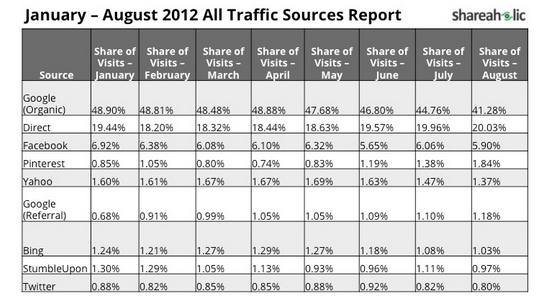
    1. Pinterest is the fourth largest traffic driver to websites in the world, surpassing Bing and Yahoo as reported by shareaholic.com.
    1. Pinterest is the third most popular social network on the web (behind only Facebook and Twitter), according to Experian’s 2012 Digital Marketer trend report.
    2. If you’ve got something to sell, chances are you want to be on Pinterest. Nearly ⅓ of Pinterest users have an annual household income of $100,000 or more. Most (68.2%) are female, and a majority of users are age 25 – 34 years.
    3. Trouble ranking organically? Pinterest pages have great authority with Google, providing an opportunity for a business to compete in rankings where they might not normally be able to outrank a competitor. Each click on a Pin from your site drives traffic right where you want it — your site!
    4. The number of active Pinterest users and unique visitors keeps on climbing. Pinterest became the fastest site ever to hit 10 million unique monthly U.S. visitors in history. The once exclusive, invite-only website is now open to anyone with an email address, Facebook, or Twitter account, opening the door to those who may have been intimidated by the exclusivity or simply lost interest during the wait period.
    5. The visual focus is addicting (to users). Pinterest users spend, on average 98 minutes per month on the site, behind only Facebook and Tumblr.
    6. Users always have access to Pinterest. The company provides a browser plug-in, mobile and iPad apps that make content on ANY site pinnable.


    Our mission at Search Influence is to help small businesses succeed online. Pinterest’s visual appeal and addictive nature make it the perfect opportunity for a small business to grow, instead of being lost in the noise of a more trafficked network like Facebook. On Pinterest, it’s not the number of followers or fans you have, but the quality of your content that makes you successful. I don’t know about you, but some of the best products I’ve seen came from small or local businesses just trying to get it out there.

    Pinterest for Business might be just the thing you need to get your product seen. Do you plan on signing up? Tell us about how it goes in the comments.

  • SI Social: Facebook Announces Couples Pages, World Retches Audibly

    In the modern world, there’s tremendous emphasis on finding a romantic partner. As if we didn’t get enough pressure from literature about star-crossed lovers, movies about pairing up, and images splayed across glossy magazine pages depicting blissful partners holding hands and gazing into the sunset, now Facebook has decided to join the bandwagon with a new addition. It’s called Profiles for Couples, and it gives you an excellent opportunity to show the world that you have indeed achieved putting off old maiddom for the time being.

    Scorn aside, the general reaction to this new addition has caused some negativity. CNN documented some of the more extreme reactions in a recent post. Profiles for Couples is actually not anything wildly innovative: Facebook Friendship Pages work in a similar fashion and have been around for years. If you go to any friend’s page, click the gear icon next to “message,” and choose “See Friendship,” you’ll see a page that shows the way you and said friend have interacted over time, including when you became friends on Facebook, posts, events you both attended, and more.

    An update like this tends to draw bitterness out of some and happiness from others, and funny enough, I think users’ reactions to it are much more significant than Facebook’s decision to make the change itself. Much like Facebook Friendship Pages, Profiles for Couples aren’t in your face — you have to navigate your way to them. Facebook is taking information you provide and assembling it to show a timeline, sure, and some people seem pissed about that. But it’s information you provide: if you don’t want it to exist, you have the option of not listing your relationship status on the site.

    “You cannot deactivate the pages, but you can control what you share on Facebook using the privacy settings for each post,” Facebook’s Jessie Baker told CNN. “The friendship page respects the privacy setting of each post. This means the person viewing the friendship page may see each post elsewhere on Facebook, like on either friend’s timeline or in news feed. You can curate your friendship page by hiding stories you do not want to appear.”

    For private types who don’t like their love lives chronicled across Facebook, these changes may draw some ire. Personally, the idea of setting up a page like this in place of a personal one does bother me, and because personal individuality is important whether you are married or not. Still, for those who opt to immerse their online identity in coupledom, it’s certainly their prerogative. On the other hand, the comedic value could be classic. Rather than sites like Lamebook having to keep an eye out for couples catfighting over the social network, they can now just surf over the the couples page and screencap the whole thing.

    Nothing gets the honeys' hearts thumping like Senor Cardgage.
    While these couples pages seem fundamentally gag-worthy, they can provide a nice repository of the exchanges between you and your sweetie — viewing those memories is a great way to reconnect with your past (and that one Strong Bad cartoon you posted on their wall in 2007). But why not just leave that to the domain of “view friendship” pages? What makes romantic coupledom so important that it has to get its own specialized feature that already existed in the Facebook UI? The answer, of course, is pleasing the crowd: ever since the disastrous IPO, the ‘book has been frantically trying to connect with users on every level possible. Time will tell if their efforts are successful in retaining the goodwill of its 800 million strong user base.

    Are you offended by the idea of couples pages, or indifferent?

  • Read This! — November 2012

    We’re back with another edition of Read This!, our monthly series exploring the DIY tips and tricks you can use to succeed online today.

    • So, Foursquare is a search engine now? How do I get my business to the top of the results? — AboutFourSquare.com

    Foursquare is on its way to becoming a hot name in local search, so what can you do to make sure your business is capitalizing on the action? By focusing on check-ins, likes, and community engagement, you’ll be on top of the game and the search results!

    • Do One Thing & Do It Better Than Anyone Else — Inc.

    While it may be tempting to try to “do it all,” aiming your energy in one direction will usually yield better, faster, and more impressive results than the sum of many unfocused efforts. Jeff Hoffan takes us through a variety of ways that specialization is preferable to generalization over at Inc.com.

    • Top PPC Tips For Local Businesses — PPC Hero

    We’ve learned that PPC is the way to go for advertising your business and product, but did you know that there’s a wealth of opportunity out there for businesses who cater to specifically local markets? Check out this thorough exploration of local PPC over at PPC Hero!

    • Ultimate list of Google Authorship resources — Raven Tools

    By connecting your G+ account to your blogging profile, you can get your name and face to appear in the search results page and lend weight and credibility to your posts. This post from the Raven Tools blog has an exhaustive list of resources on the subject, from guides to setting it up to tactics for utilizing it best to insights from Googlers themselves.

    • How To Create Epic Content — CopyBlogger

    Is your website’s content a little dry? Not quite attention-grabbing, perhaps? You need a generous dose of epic, and that’s just what this CopyBlogger piece aims to provide. Click over to read about how to build your brand, crush the competition, and sell your product — all while maintaining a strong and engaging voice that entertains and informs.

  • 5 For Friday — Links, Stories & Posts For Your Weekend

    No, Content is Not the Only Way – Whiteboard Friday – SEOMoz

    While well-written content earns links and establishes your authority on a subject, it is not the be all and end all of SEO. Whether you have a great reputation and reviews, your team creates inherently viral products or services, or you’ve built up a community of retweeters, +1’ers, sharers, and pinners, each company should play to its strengths — which doesn’t always mean paragraphs on paragraphs of content.

    How to Make Readers Do (and Buy) What You Want – SEO Copywriting

    If you do choose to go the content route, however, these tips can guide your reader from mild interest to conversion. A good copywriter is skilled in the art of persuasion. By combining knowledge of your audience, selling the dream, and a strong call to action, readers are more likely to engage with your brand and—fingers crossed—buy your products!

    How I Disrupted Poet Dylan Thomas’ First Page Dominance – Search Engine Journal

    Don’t lie. You’ve Googled yourself. Fortunately (or not so fortunately, depending on what you’re disclosing about yourself online), for most of us, we do not have to compete with celebrities with the same names. Read how Dylan Thomas conquered his disdain for writing in the third person and upset his WWII namesake in the search results.

    Image courtesy of http://www.ignitumtoday.com/
    Pope Twitter: Pontiff to Guide Followers with a New Personal Account – Huffington Post

    #WWJD? Follow the Pope on Twitter, and you just may find out!

    Challenge: Submit your best Pope-on-Twitter joke to the comments below!

    Mobile Ad Revenue Outlook: Local Search Leads the Way – Search Engine Watch

    Mobile access on the web is growing by leaps and bounds, and local search is at the forefront of the trend — according to El Goog, a whopping 50% of mobile search is local. As “brand advertisers increasingly evolve their campaigns to the realities of mobile usage,” users will have a wealth of opportunities to explore local offerings.

  • Top 5 Things I Learned About Politics on Facebook

    Obamaloney in the 2012 Presidential Race
    Obamaloney: 100 percent fact free! (Source: http://leevandenbrink.blogspot.com/)

    At some point during the endless presidential election of 2012, you probably shared a political opinion on Facebook that you were wholly unqualified to advance. Facebook is one of those great and terrible places where totally uninformed people can share their feelings with everyone they know. There’s just no room for actual rational argument on Facebook — at least, that’s the biggest thing that I’ve learned during this past election cycle.

    Here are five other things I learned about politics from reading my Facebook feed:

    Everybody has an opinion, and you better not disagree with it.

    Did you study political science in college? Do you have a degree in economics? Do you even know anything about the tenets of national socialism? No? Doesn’t matter.

    Facts and emotions rarely align, especially when social media is involved. Your aunt, uncle, grandmother, high school classmate, co worker, and friend from the coffee house all know that they are absolutely correct. If you want to remain Facebook friends with any of them, the best thing to do is do not engage when they proclaim that a vote for Romney is a vote for the Lizard People, or that President Obama is going to sell the entire country to Lithuania.

    Just smile and back away while not making any sudden movements.

    Sometimes it’s legitimately difficult to tell if someone is joking.

    I enjoy a well formed joke just as much as everyone else. I think it’s incredibly funny that Republicans took to referring to anything Obama said as “Obamaloney,” specifically because it reads as “Oba Maloney.” I came very close to writing a killer post about how everyone should leave my good old uncle Oba Maloney alone.

    But then I realized I was opening myself up to anyone who could possibly interpret the obvious hilarity in a way that I hadn’t intended. That unwritten post probably would have ended up with as many comments from people choosing to expound on the truthiness of the President’s latest statements as from people who enjoyed the scintillating wordplay on my part.

    Seriously, Oba Maloney. That just cracks me up.

    When people say they are moving to another country on Facebook, they probably should.

    Do you bloviate endlessly about the heinous misdeeds of those big bad meanies on the other side? Do you attack and browbeat anyone who opposes anything you hold to be true? Do you think women need to use birth control each and every time they have sex, and that having a prescription for birth control automatically makes a woman a prostitute? (Okay, that last one is optional.)

    If this is you, then you probably woke up this morning wanting to no longer be an American. And you probably said something to that effect on Facebook. To that I say: okay, cool. Send me a postcard.

    It really doesn’t matter what your opinion is.

    You are not a unique and special snowflake. You are not influencing anybody’s vote in any way. There is simply not a single scenario wherein one of those mythical “undecided voters” chose one side over the other because of a well-placed status update.

    You have every right to express your political opinion on Facebook. I just want to let you know that it doesn’t matter. The people who agree with you may like it, and the people who disagree with you may remove you from their newsfeed. You will not, however, have any impact on the Electoral College at all. Sorry to burst your bubble.

    Your friends hate it when you talk about politics on Facebook.

    Seriously. This is always, always, always true. The only people who are worse than the self-appointed Facebook pundits are the idiots who shake yard signs at drivers in the middle of busy intersections on election day.

    The bottom line is, while Facebook is a tool for personal networking, it’s no venue for political discourse. By keeping the commentating to yourself, you can avoid a whole lot of headaches and maintain your personal brand. Now that the election is over, let’s all find other things to talk about and fight about on Facebook. Like how Mickey Mouse bought George Lucas. Please?

    My name is Steve Maloney, and I approved this message. Now go share it on Facebook.

  • Why You Should Start a PPC Campaign Today

    PPC Questions & Answers for Small Businesses

    I get a lot of questions from clients about starting or maintaining a paid search or Pay Per Click (PPC) campaign. While we at SI are undoubtedly convinced of the positive impact a paid search campaign can have on a small business, others need more information before committing. Some of the most frequently asked questions about a paid search campaign include:

    • “What are the advantages and disadvantages of a PPC campaign?”
    • “Why should I do PPC if I rank in the first position organically?” in the same sense, “Should I start a PPC campaign until I start ranking organically?”
    • “Why should I pay for people to click on my website when they are already looking for my brand?”
    • “How will this help my business, and what should I expect for an ROI?”

    So, what are the answers to these important questions facing small businesses? Here’s my take:

    What are the advantages and disadvantages of a PPC campaign?

    1. Starting a PPC campaign allows you to show up in the Google search results for search terms that you may not rank for organically.
    2. A PPC campaign allows you to set daily and monthly budgets for the keywords and areas you want to target. If you are selling a product or service that is sold out or fully booked, you can allocate your budget to a different product or service with a simple click.
    3. You also have more control over the locations where your ads show. With SEO, you are building overall site authority, and while you may be targeting specific geo-modified keywords, you could potentially rank in other locations. With paid search, you can set your preferred locations as well as the exact geo-modified keywords you want to target.
    4. One of the main benefits of a paid search campaign is that results can be instantaneous. While it typically takes 30-60 days to fully optimize a campaign to see optimal results, you can begin receiving leads or making sales the first day your ads are live.

    Will paid search marketing ads still help me if I rank in the first position organically?

    The answer to this is, of course, “YES!” — but let me tell you why.

    1. For terms that you do rank for organically, having a paid ad allows you to claim more “real estate” on the search engine results page and increases the likelihood that people will come to your site. People tend to believe your site is more authoritative because Google allows you to show up more than once on the page. According to Search Engine Watch, 34 percent of paid search clicks occur when the same website ranks organically on the page. If the paid search ad is paused, only 11 percent of the traffic generated by the ads will be replaced by the organic clicks.
    2. Having a paid search campaign gives you the ability to control your message through your ad copy and change it easily and often if necessary. You can create unique ads for specials and seasonal offerings and have them rank in top positions quickly. This allows your ads to always be relevant.
    3. PPC also gives you the ability to control the message and content of the landing page to which you send your visitors. You can optimize this landing page for conversions and sales, with less focus on keyword-related content.
    4. Finally, you have the ability to test ad content, landing pages and keywords on a larger scale. You can determine which calls to action are driving traffic and which keywords convert the best in a shorter time frame. Then, you can apply this knowledge to your SEO campaign.

    Side Note: Running a paid search campaign will NOT improve your organic rankings.

    Should I start a PPC campaign until I start ranking organically?

    You should most certainly start a PPC campaign immediately. However, see the question above for why you should continue the campaign even if you rank in the first position organically.

    Why should I pay for people to click on my website when they are looking for my brand?

    Besides the points mentioned above, there are many reasons to bid on branded keywords.

    1. Competitors may be bidding on your branded terms and you will want to ensure you are showing in the top position for your brand.
    2. Branded clicks are very inexpensive, as you are going to be the most relevant result for your brand, and Google will “reward” you for that.
    3. People searching for your brand are more likely to convert, and you want to be where they are searching.

    How will this help my business, and what should I expect for an ROI?

    Search Influence tracks all aspects of a paid search campaign, similar to how we track success for SEO. We provide call tracking numbers for campaigns and set up form tracking to attribute leads directly to paid search campaigns. Our monthly reports include a list of leads, cost per lead, clicks, click through rates, and average cost per click (among other factors). This helps our clients determine if the leads we provide are valuable and what leads are becoming actual customers. ROI will vary depending on industry, but we strive to provide a positive ROI for every client.

    So if you are wondering if you should start a paid search campaign, the answer is almost certainly “Yes!” With effective research, targeting and analysis, you can have a successful campaign that will generate leads and sales for your business.

    I’d love to hear your opinions on PPC, so leave a comment below!

  • 5 For Friday — Links, Stories & Posts For Your Weekend

    1. Facebook Launches New Option on Charitable Gifts — Mashable

    Recently, Facebook created a new feature on Charitable Gifts that allow users to make a charitable donation in recognition of friends and family members. Users will be able to either choose the organization or let the friend or family member choose. With its 11 non-profit partners, Facebook is rolling out this test to help these organizations raise funds and increase awareness. Is this something you would considering doing on the social network?

    2. New “Quality Impact” feature on Bing Advertising to Help with Transparency — Search Engine Land

    The new “Quality Impact” feature will help advertisers learn how to increase impression share by improving the Quality Score for each keyword. The analysis can be accessed through the keyword report or its API. This will be a big game changer and provide advertisers more guidance than Google Adwords’ counterpart.

    3.  Foursquare Making a Splash in Local Search — Local Search Insider

    Foursquare is making a ripple with its marketing tactics this year by positioning itself as a competitor in the mobile local search game. Read SI’s Joseph Henson’s blog on how Foursquare is building a more “robust improvements to their local search feature, Explore.” Stay ahead of the curve with this insider scoop.

    4.  When to optimize or review your optimizations?  — Search Engine Watch

    Whether your site is new or the site has been around for awhile, on page optimization is important to SEO. What should you for? How is my content affecting my SEO? This blog will give you pointers of what to look for when you are optimizing or re-optimizing content on your site.

    5. Google’s Universal Analytics and What it Means to You — Google Analytics

    Want to see what Google has been developing? Users search in many different ways and with different mediums to get information. How do we track everything? Check out the Google Analytics blog to get a full overview of the “entire marketing funnel.” It will be interesting to see how Google manages this application.